 MANSOQ
 Patient registration · VERSION 3dfb7c9f
Keep or leave an unsaved registration draft
Use Back, read the genuine macOS browser confirmation, keep the draft with Cancel or leave it with OK without registering another patient.
Staff
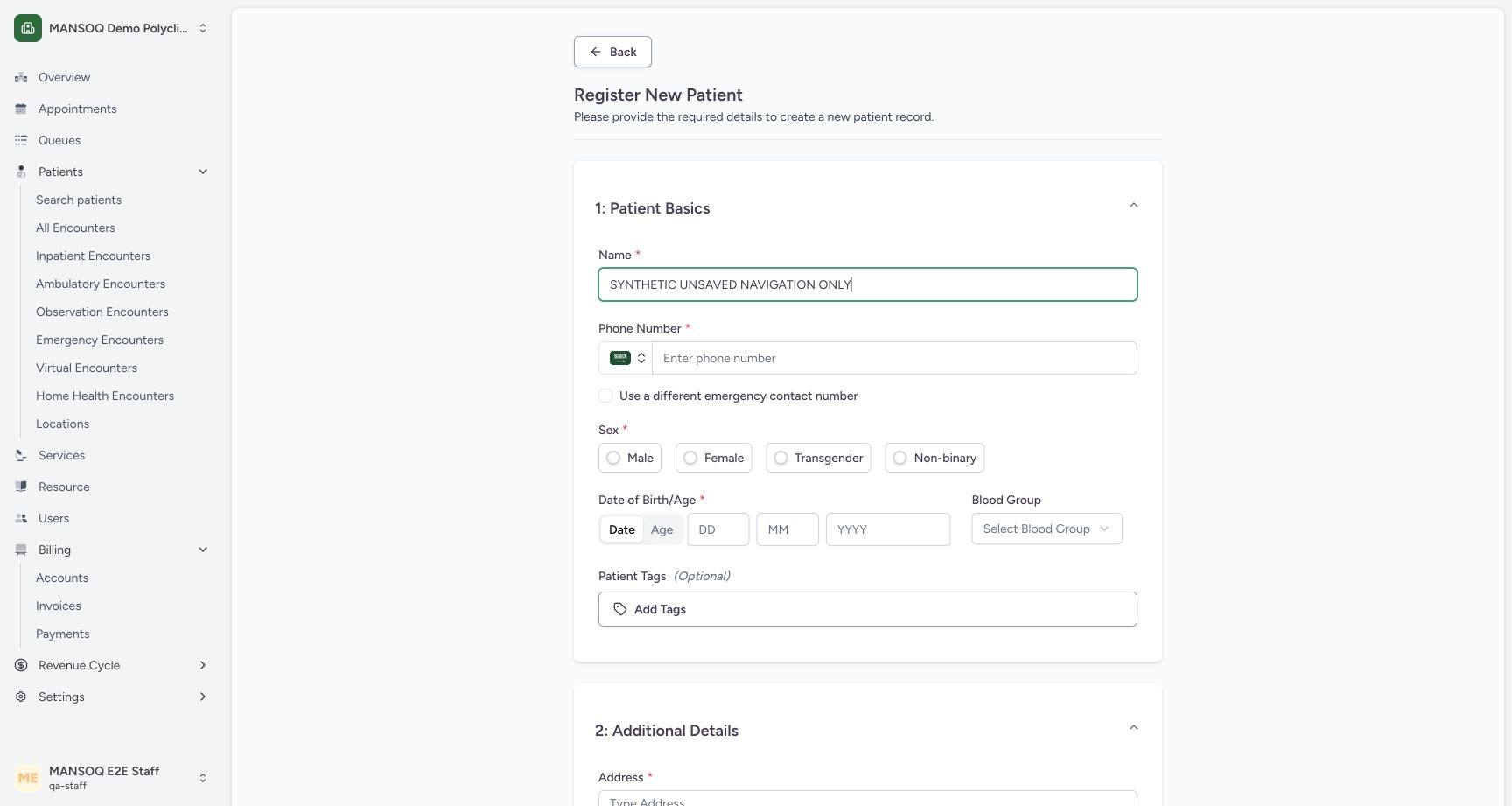 12
12Unsaved registration draft and Back control
Capture details
Exact committed 3dfb source, existing non-superuser qa-staff and fictional Polyclinic. Two distinct fictional patients only. Genuine unchanged desktop pixels; native confirmation retains its actual smaller window. No care, admission, booking, grant or configuration mutation.
Image SHA-256 12704cda1b9cd4cc93829521a6a92a2722527a0158fda4639881be1a4e6506e1
- Unsaved draft text: This name is an unsaved navigation example; no third patient will be registered.
- Back: Back opens the unsaved-change warning for this edited draft.
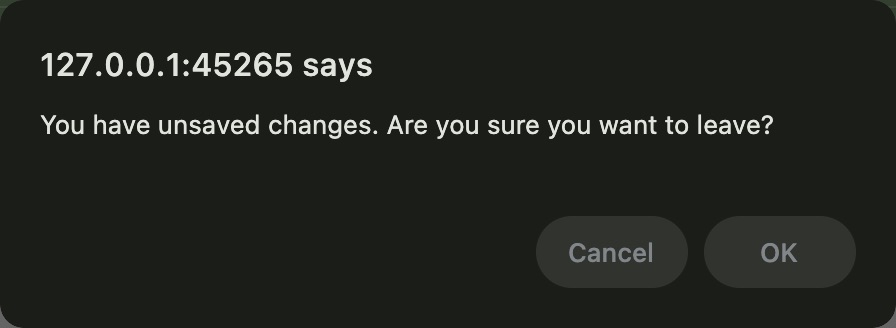 12
12macOS native unsaved-change confirmation
Native macOS confirmation dialog, shown in its original proportions.
Capture details
Exact committed 3dfb source, existing non-superuser qa-staff and fictional Polyclinic. Two distinct fictional patients only. Genuine unchanged desktop pixels; native confirmation retains its actual smaller window. No care, admission, booking, grant or configuration mutation.
Image SHA-256 12bd61952e2bf2af5196a691ab71ef1f38f853c29a7c3ec5381414b2d056bcc1
- Cancel keeps the draft: Cancel keeps the unsaved registration draft.
- OK leaves without saving: OK leaves the unsaved draft without registering it.
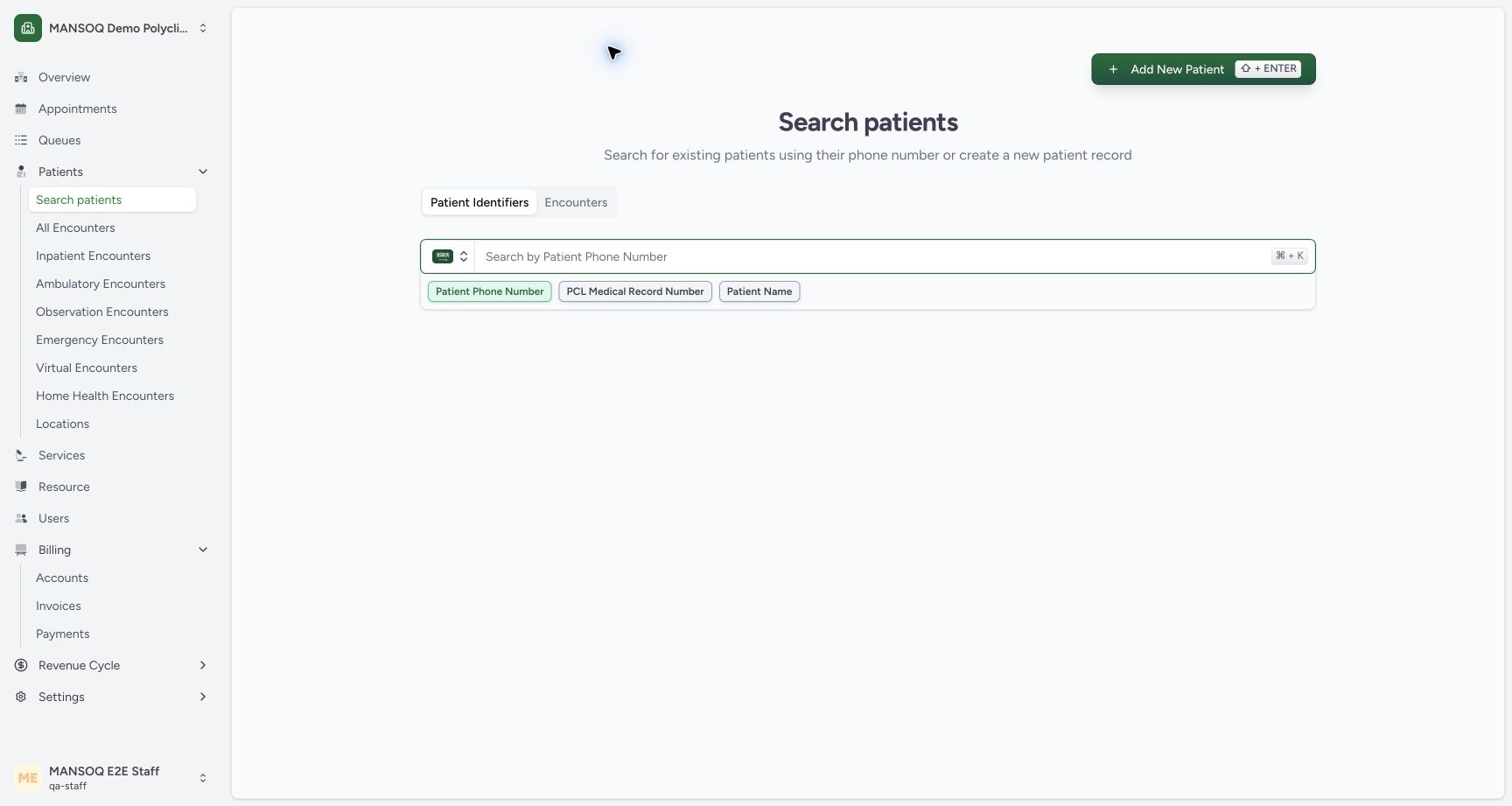 12
12Leaving the unsaved draft returns to Search patients
Capture details
Exact committed 3dfb source, existing non-superuser qa-staff and fictional Polyclinic. Two distinct fictional patients only. Genuine unchanged desktop pixels; native confirmation retains its actual smaller window. No care, admission, booking, grant or configuration mutation.
Image SHA-256 7340ddaf7bdca06a91678d1c4600425bc110cc0b3f1fd18ba99df88ab4d0c2cd
- Returned to Search patients: OK left the unsaved navigation example and returned to Search patients.
- New registration entry remains available: No third patient was saved by leaving the draft.
5 of 5 content blocks have reviewed image alignment. Missing overview or prerequisite images remain open.
Before you begin
- Use an already authenticated authorized Staff session and an unsaved registration draft. The pictured example contains only the text SYNTHETIC UNSAVED NAVIGATION ONLY and was never registered. Native confirmation buttons shown here are Chrome on macOS.12
Recorded release 3dfb7c9f · 2026-10-19T07:59:39.481Z · 1728 × 921 Unsaved registration draft and Back control
Capture details
Exact committed 3dfb source, existing non-superuser qa-staff and fictional Polyclinic. Two distinct fictional patients only. Genuine unchanged desktop pixels; native confirmation retains its actual smaller window. No care, admission, booking, grant or configuration mutation.
Image SHA-256
12704cda1b9cd4cc93829521a6a92a2722527a0158fda4639881be1a4e6506e1- Unsaved draft text: This name is an unsaved navigation example; no third patient will be registered.
- Back: Back opens the unsaved-change warning for this edited draft.
12Recorded release 3dfb7c9f · 2026-10-19T08:01:06.239Z · 896 × 328 macOS native unsaved-change confirmation
Native macOS confirmation dialog, shown in its original proportions.
Capture details
Exact committed 3dfb source, existing non-superuser qa-staff and fictional Polyclinic. Two distinct fictional patients only. Genuine unchanged desktop pixels; native confirmation retains its actual smaller window. No care, admission, booking, grant or configuration mutation.
Image SHA-256
12bd61952e2bf2af5196a691ab71ef1f38f853c29a7c3ec5381414b2d056bcc1- Cancel keeps the draft: Cancel keeps the unsaved registration draft.
- OK leaves without saving: OK leaves the unsaved draft without registering it.
1. Use Back from the unsaved draft
After entering unsaved registration text, choose Back. The native browser asks You have unsaved changes. Are you sure you want to leave?
12Unsaved registration draft and Back control
Capture details
Exact committed 3dfb source, existing non-superuser qa-staff and fictional Polyclinic. Two distinct fictional patients only. Genuine unchanged desktop pixels; native confirmation retains its actual smaller window. No care, admission, booking, grant or configuration mutation.
Image SHA-256 12704cda1b9cd4cc93829521a6a92a2722527a0158fda4639881be1a4e6506e1
- Unsaved draft text: This name is an unsaved navigation example; no third patient will be registered.
- Back: Back opens the unsaved-change warning for this edited draft.
12macOS native unsaved-change confirmation
Native macOS confirmation dialog, shown in its original proportions.
Capture details
Exact committed 3dfb source, existing non-superuser qa-staff and fictional Polyclinic. Two distinct fictional patients only. Genuine unchanged desktop pixels; native confirmation retains its actual smaller window. No care, admission, booking, grant or configuration mutation.
Image SHA-256 12bd61952e2bf2af5196a691ab71ef1f38f853c29a7c3ec5381414b2d056bcc1
- Cancel keeps the draft: Cancel keeps the unsaved registration draft.
- OK leaves without saving: OK leaves the unsaved draft without registering it.
2. Cancel when you want to keep editing
Choose Cancel in the native confirmation. The registration form remains open with the same unsaved name text. In this dialog, Cancel means stay on the draft.
12macOS native unsaved-change confirmation
Native macOS confirmation dialog, shown in its original proportions.
Capture details
Exact committed 3dfb source, existing non-superuser qa-staff and fictional Polyclinic. Two distinct fictional patients only. Genuine unchanged desktop pixels; native confirmation retains its actual smaller window. No care, admission, booking, grant or configuration mutation.
Image SHA-256 12bd61952e2bf2af5196a691ab71ef1f38f853c29a7c3ec5381414b2d056bcc1
- Cancel keeps the draft: Cancel keeps the unsaved registration draft.
- OK leaves without saving: OK leaves the unsaved draft without registering it.
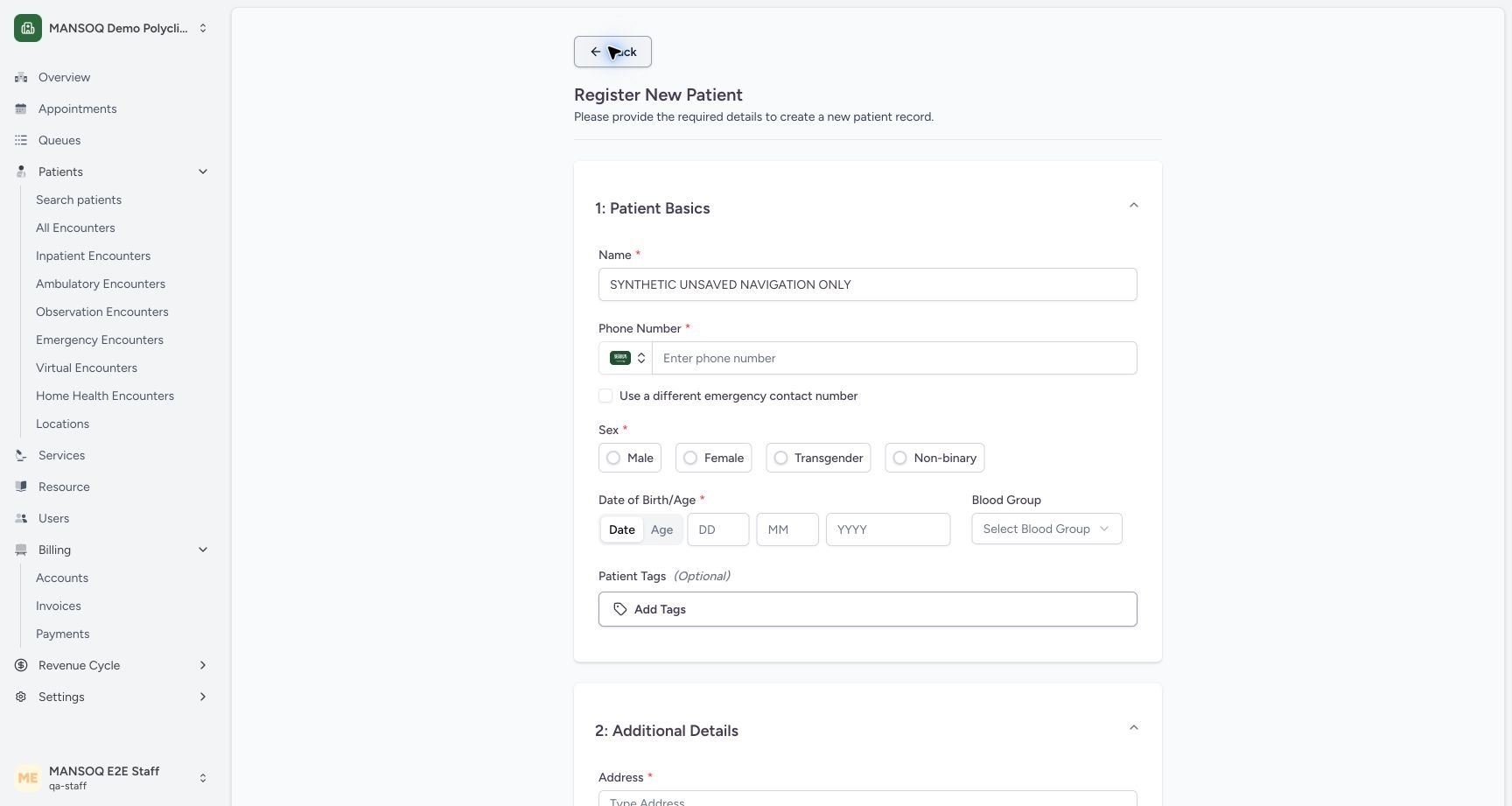 12
12Cancel keeps the unsaved registration draft
Capture details
Exact committed 3dfb source, existing non-superuser qa-staff and fictional Polyclinic. Two distinct fictional patients only. Genuine unchanged desktop pixels; native confirmation retains its actual smaller window. No care, admission, booking, grant or configuration mutation.
Image SHA-256 0d325e3f7f58d07ce963a7bb0ed932c069b4d9e94a89df2983faf5ec76ad2a71
- Draft retained after Cancel: Cancel kept this unsaved text in the registration form.
- Back again: Open the warning again when ready to leave this unsaved example.
3. Leave the unsaved example when ready
Choose Back again. In the same native confirmation choose OK. The actual result returns to Search patients. This left the unsaved example without registering a third patient.
12macOS native unsaved-change confirmation
Native macOS confirmation dialog, shown in its original proportions.
Capture details
Exact committed 3dfb source, existing non-superuser qa-staff and fictional Polyclinic. Two distinct fictional patients only. Genuine unchanged desktop pixels; native confirmation retains its actual smaller window. No care, admission, booking, grant or configuration mutation.
Image SHA-256 12bd61952e2bf2af5196a691ab71ef1f38f853c29a7c3ec5381414b2d056bcc1
- Cancel keeps the draft: Cancel keeps the unsaved registration draft.
- OK leaves without saving: OK leaves the unsaved draft without registering it.
12Cancel keeps the unsaved registration draft
Capture details
Exact committed 3dfb source, existing non-superuser qa-staff and fictional Polyclinic. Two distinct fictional patients only. Genuine unchanged desktop pixels; native confirmation retains its actual smaller window. No care, admission, booking, grant or configuration mutation.
Image SHA-256 0d325e3f7f58d07ce963a7bb0ed932c069b4d9e94a89df2983faf5ec76ad2a71
- Draft retained after Cancel: Cancel kept this unsaved text in the registration form.
- Back again: Open the warning again when ready to leave this unsaved example.
12Leaving the unsaved draft returns to Search patients
Capture details
Exact committed 3dfb source, existing non-superuser qa-staff and fictional Polyclinic. Two distinct fictional patients only. Genuine unchanged desktop pixels; native confirmation retains its actual smaller window. No care, admission, booking, grant or configuration mutation.
Image SHA-256 7340ddaf7bdca06a91678d1c4600425bc110cc0b3f1fd18ba99df88ab4d0c2cd
- Returned to Search patients: OK left the unsaved navigation example and returned to Search patients.
- New registration entry remains available: No third patient was saved by leaving the draft.
Source evidence
Every citation uses this exact committed version. The private source repository requires access.
- repositories/platform/mansoq-web/src/components/Patient/PatientRegistration.tsx:308 ·
3dfb7c9f519fb5b4cd4452439f3c12346bf58319Source file checksum
8a8dd34cad6ec2a2da6b43dbf55869a696cf7dc50f6d16af623bf7a4d9c2f92c - repositories/platform/mansoq-web/src/components/Patient/PatientRegistration.tsx:295 ·
3dfb7c9f519fb5b4cd4452439f3c12346bf58319Source file checksum
8a8dd34cad6ec2a2da6b43dbf55869a696cf7dc50f6d16af623bf7a4d9c2f92c