 MANSOQ
 Patient registration · VERSION 3dfb7c9f
Register a patient using date of birth and separate contact details
Search first, complete the pictured registration form, review separate emergency and permanent contact details, choose the configured geography and save one new patient.
Staff
 1234
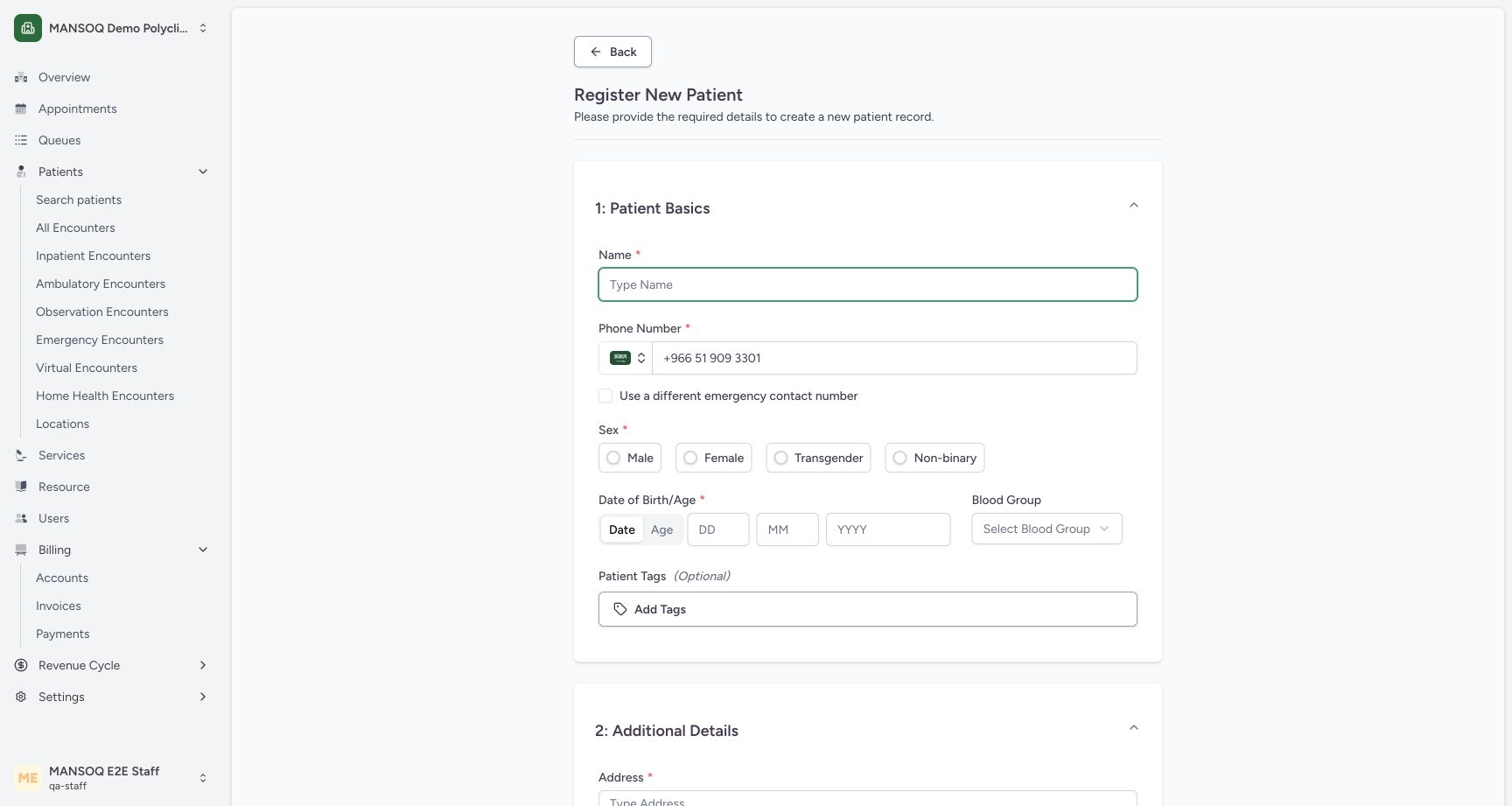
1234Required patient basics and Date or Age choice
Capture details
Exact committed 3dfb source, existing non-superuser qa-staff and fictional Polyclinic. Two distinct fictional patients only. Genuine unchanged desktop pixels; native confirmation retains its actual smaller window. No care, admission, booking, grant or configuration mutation.
Image SHA-256 c5d76af6ad18a1a77ca505ba95e7e9f7bcdeb3b4af48fd7ea3e9877f3e675794
- Patient name: Enter the synthetic patient name.
- Search phone carried forward: Review the phone number copied from the search.
- Date of birth: Date entry uses day, month and year fields.
- Age alternative: Age is an alternative to an exact date of birth.
 12345
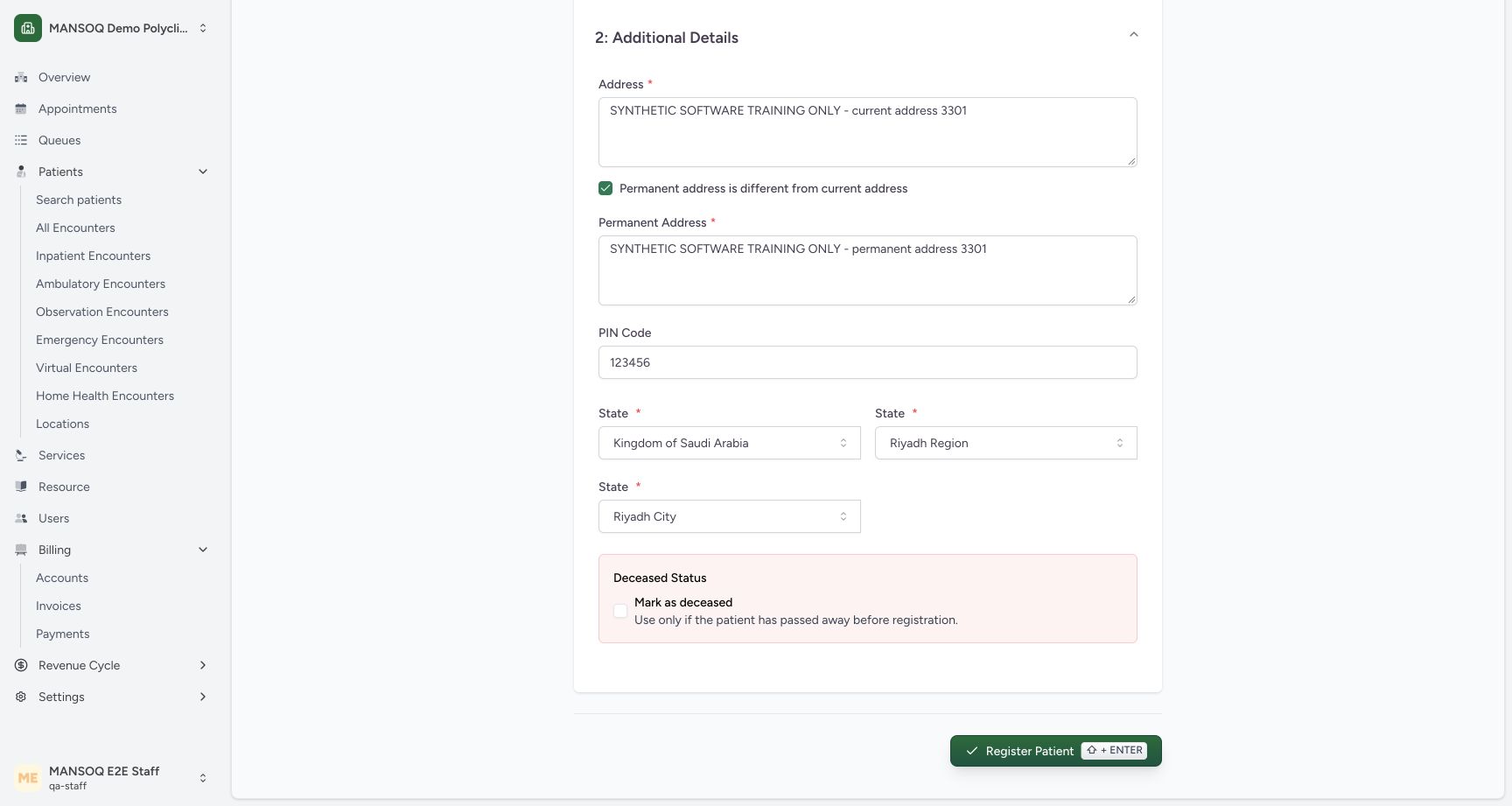
12345Review additional details and Register Patient control
Capture details
Exact committed 3dfb source, existing non-superuser qa-staff and fictional Polyclinic. Two distinct fictional patients only. Genuine unchanged desktop pixels; native confirmation retains its actual smaller window. No care, admission, booking, grant or configuration mutation.
Image SHA-256 95aaf7af549b23453e63cf4e04d62959fdca5d693651c4f7cff95118f8fc5306
- Separate permanent address: Review the distinct synthetic permanent address before saving.
- Six-digit software example: 123456 satisfies this installed field; it is not a Saudi postal-code recommendation.
- Riyadh City selected: The existing Riyadh City leaf is selected.
- Deceased remains unchecked: The saved example will have no deceased date or time.
- Register Patient: Save once after reviewing the required and optional fields.
 12
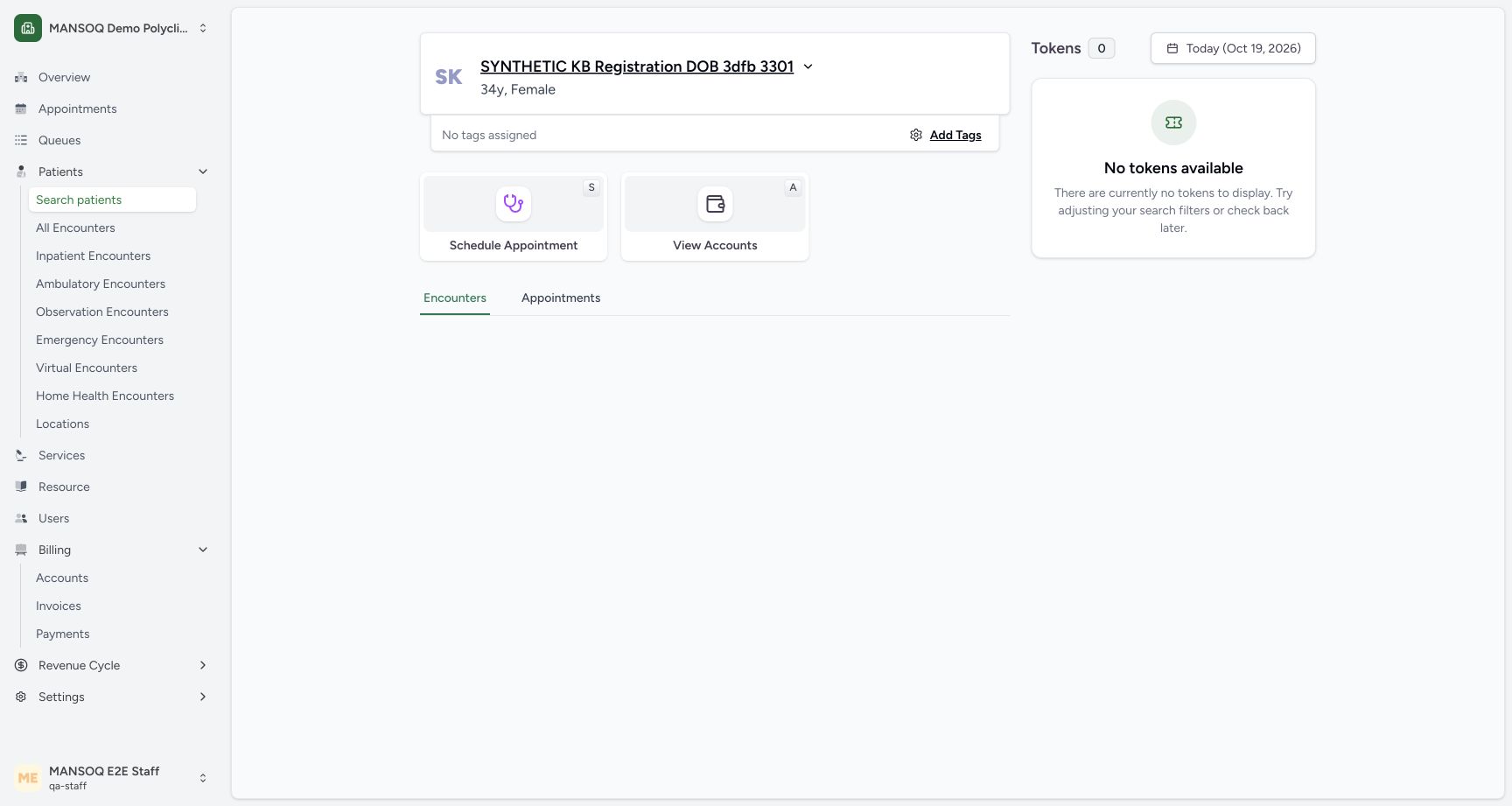
12Registered synthetic DOB patient home
Capture details
Exact committed 3dfb source, existing non-superuser qa-staff and fictional Polyclinic. Two distinct fictional patients only. Genuine unchanged desktop pixels; native confirmation retains its actual smaller window. No care, admission, booking, grant or configuration mutation.
Image SHA-256 b06cb1096639ff513ed12ee0870a4b68b5c9ca8cf145e93ff1d247303bf09180
- Registered patient: The saved patient home displays the newly registered synthetic identity.
- No tags assigned: This example was registered without selecting a patient tag.
16 of 16 content blocks have reviewed image alignment. Missing overview or prerequisite images remain open.
Before you begin
- Use an already authenticated authorized Staff session in the assigned facility. The pictured fictional MANSOQ Demo Polyclinic shows the complete registration form; all names, numbers and addresses in this example are synthetic training data.
 12
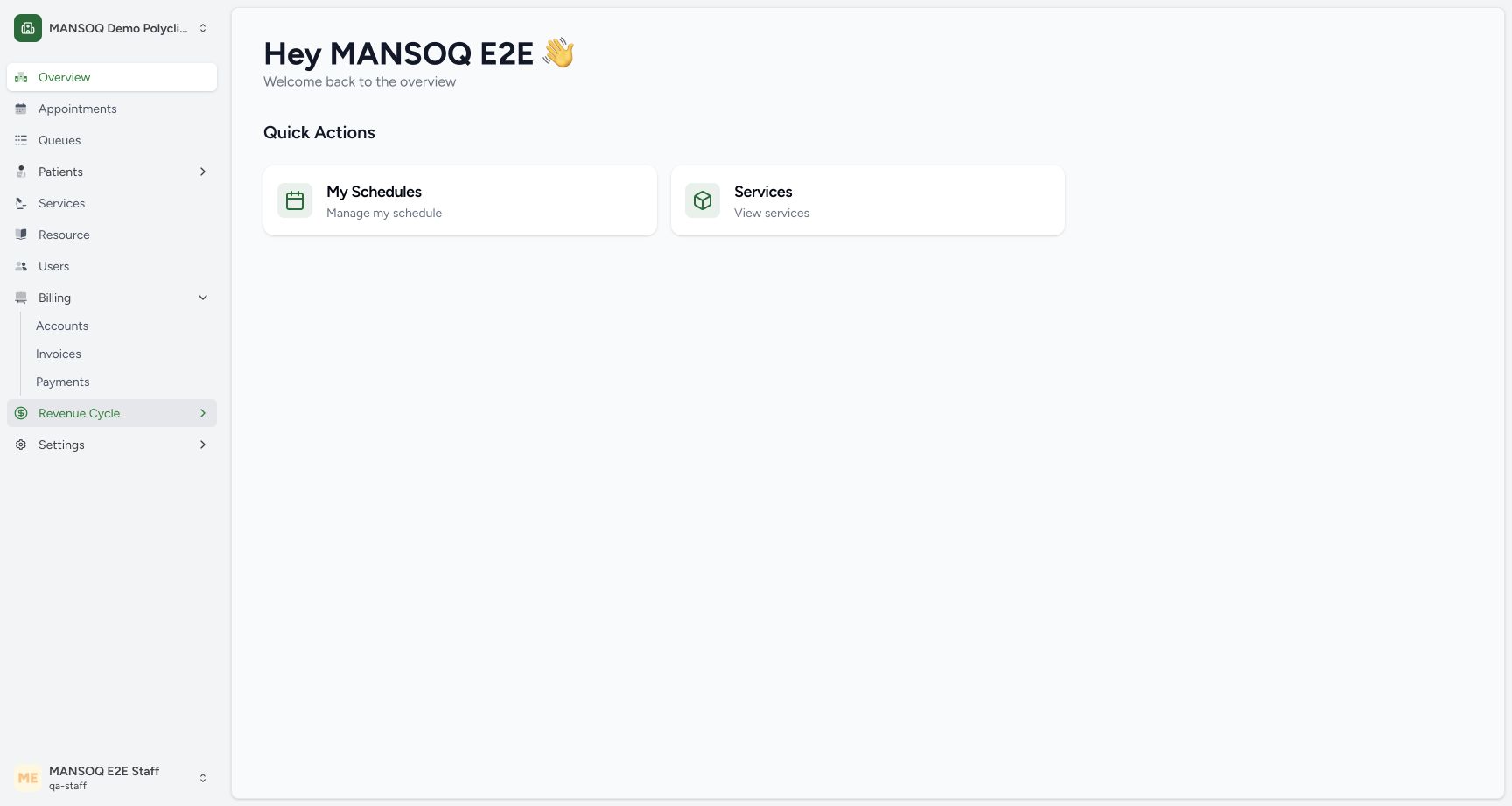
12Recorded release 3dfb7c9f · 2026-10-19T07:45:33.199Z · 1728 × 921 Existing Staff workspace and Patients navigation
Capture details
Exact committed 3dfb source, existing non-superuser qa-staff and fictional Polyclinic. Two distinct fictional patients only. Genuine unchanged desktop pixels; native confirmation retains its actual smaller window. No care, admission, booking, grant or configuration mutation.
Image SHA-256
6360e5d83a3fb86aa852d436c0738a6d458c4b3f4c10771cd2987a314789f7f6- Open Patients: Open the Patients menu in the authenticated Staff workspace.
- Existing Staff account: The visible account is the existing Staff training actor.
 1
1Recorded release 3dfb7c9f · 2026-10-19T07:45:47.075Z · 1728 × 921 Staff Search patients entry
Capture details
Exact committed 3dfb source, existing non-superuser qa-staff and fictional Polyclinic. Two distinct fictional patients only. Genuine unchanged desktop pixels; native confirmation retains its actual smaller window. No care, admission, booking, grant or configuration mutation.
Image SHA-256
2592ade7a10c5c83a0710c62b9950c00f4f52915d6c955be2af58e15583ffd62- Search patients: Open Search patients before creating or identifying a patient.
1234Recorded release 3dfb7c9f · 2026-10-19T07:47:56.899Z · 1728 × 921 Required patient basics and Date or Age choice
Capture details
Exact committed 3dfb source, existing non-superuser qa-staff and fictional Polyclinic. Two distinct fictional patients only. Genuine unchanged desktop pixels; native confirmation retains its actual smaller window. No care, admission, booking, grant or configuration mutation.
Image SHA-256
c5d76af6ad18a1a77ca505ba95e7e9f7bcdeb3b4af48fd7ea3e9877f3e675794- Patient name: Enter the synthetic patient name.
- Search phone carried forward: Review the phone number copied from the search.
- Date of birth: Date entry uses day, month and year fields.
- Age alternative: Age is an alternative to an exact date of birth.
1. Open Patients and Search patients
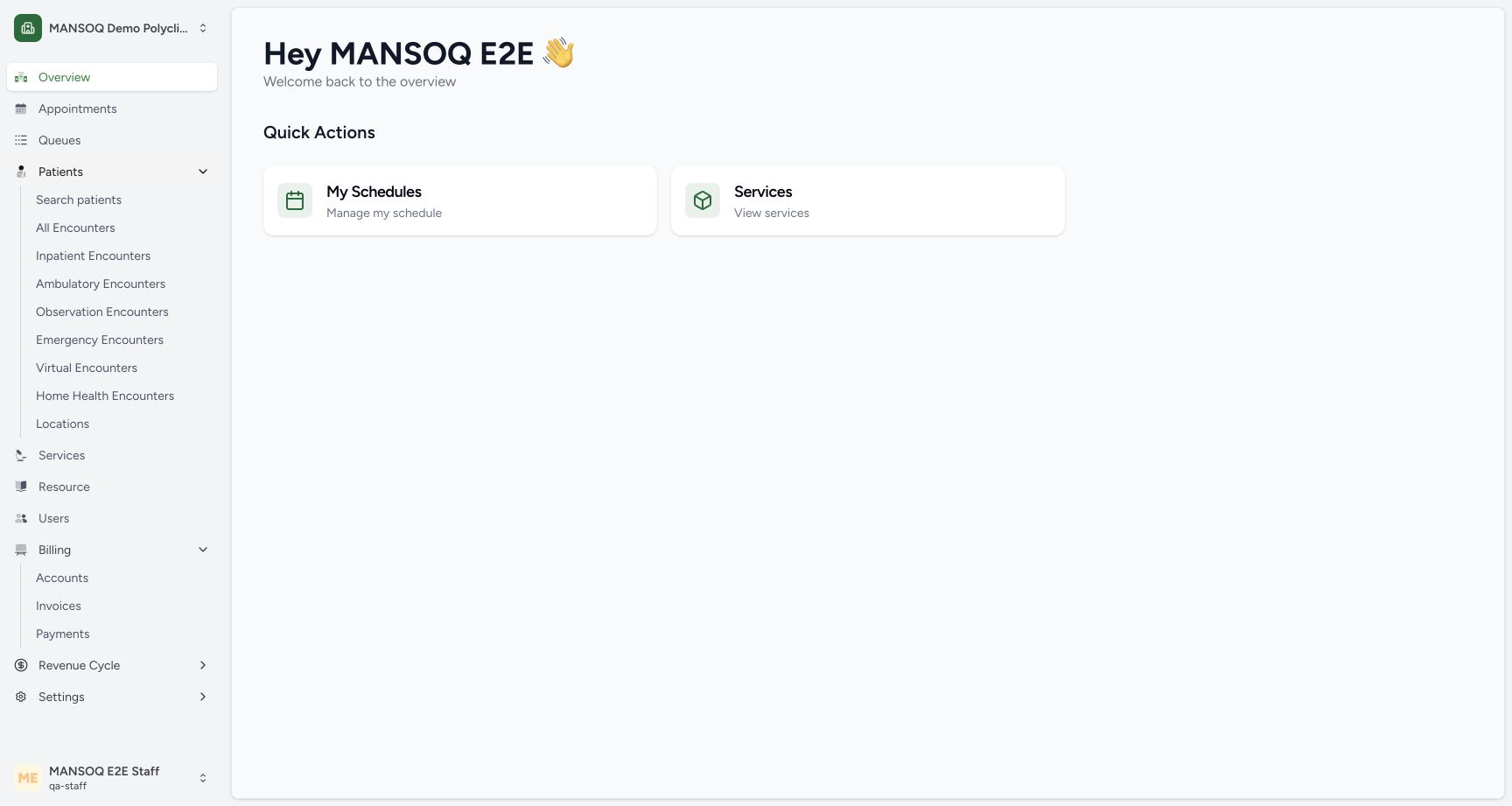
From the assigned facility workspace, expand Patients and choose Search patients. Confirm the facility and your account before continuing.
12Existing Staff workspace and Patients navigation
Capture details
Exact committed 3dfb source, existing non-superuser qa-staff and fictional Polyclinic. Two distinct fictional patients only. Genuine unchanged desktop pixels; native confirmation retains its actual smaller window. No care, admission, booking, grant or configuration mutation.
Image SHA-256 6360e5d83a3fb86aa852d436c0738a6d458c4b3f4c10771cd2987a314789f7f6
- Open Patients: Open the Patients menu in the authenticated Staff workspace.
- Existing Staff account: The visible account is the existing Staff training actor.
1Staff Search patients entry
Capture details
Exact committed 3dfb source, existing non-superuser qa-staff and fictional Polyclinic. Two distinct fictional patients only. Genuine unchanged desktop pixels; native confirmation retains its actual smaller window. No care, admission, booking, grant or configuration mutation.
Image SHA-256 2592ade7a10c5c83a0710c62b9950c00f4f52915d6c955be2af58e15583ffd62
- Search patients: Open Search patients before creating or identifying a patient.
2. Search for an existing patient first
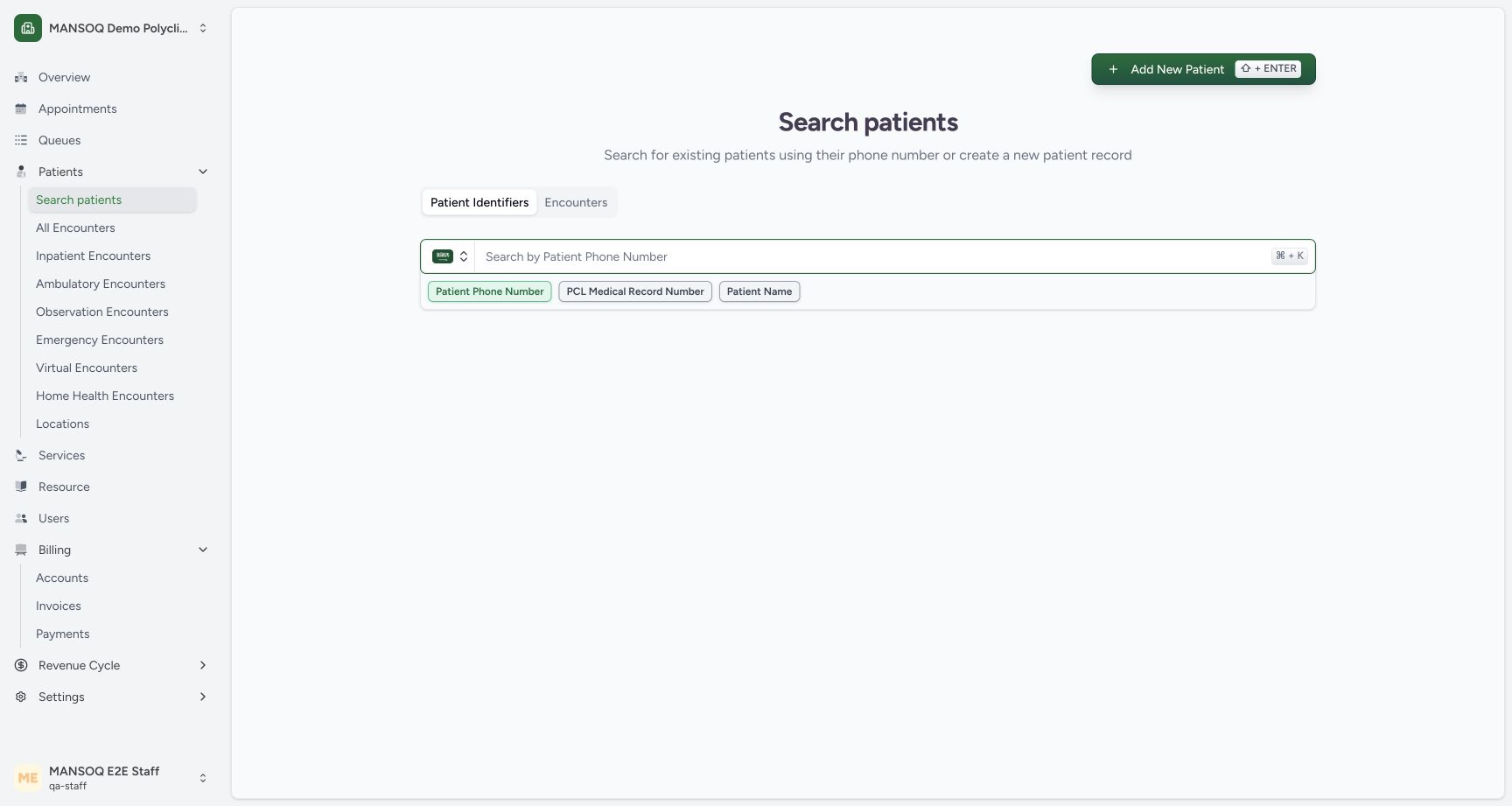
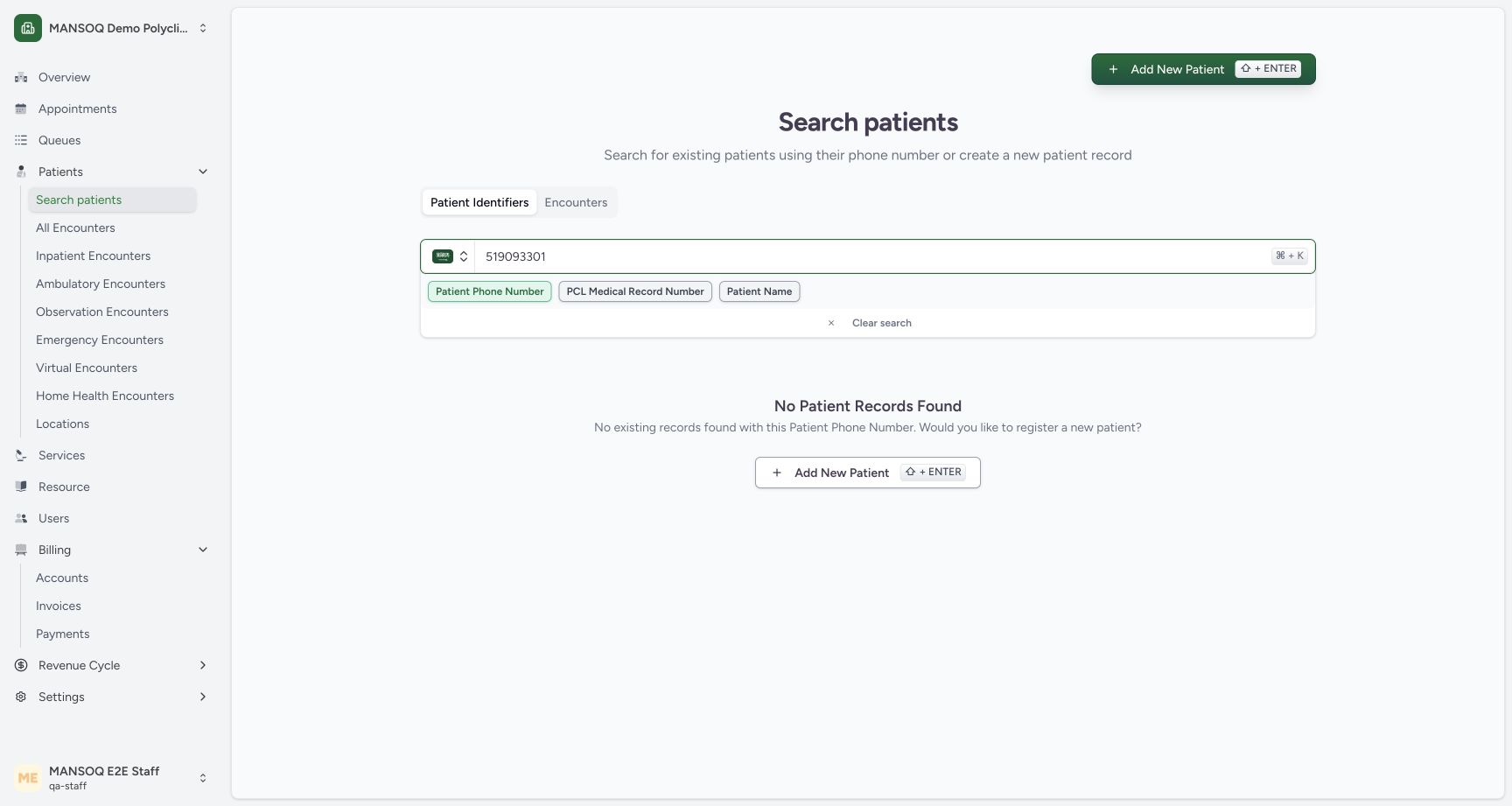
Keep Patient Identifiers → Patient Phone Number selected. Enter the patient phone with the country selector. This reserved training phone ending 3301 returns No Patient Records Found. Choose the Add New Patient button in that result.
 12
12Search existing patients before registration
Capture details
Exact committed 3dfb source, existing non-superuser qa-staff and fictional Polyclinic. Two distinct fictional patients only. Genuine unchanged desktop pixels; native confirmation retains its actual smaller window. No care, admission, booking, grant or configuration mutation.
Image SHA-256 18bba36ea784e8e48f4d26b59f3f6a3a675d6894a1871e78e33414d6a159693d
- Patient phone number: Enter the patient phone number with the selected country code.
- Identifier type: The selected lookup is Patient Phone Number.
 12
12No matching phone record before new registration
Capture details
Exact committed 3dfb source, existing non-superuser qa-staff and fictional Polyclinic. Two distinct fictional patients only. Genuine unchanged desktop pixels; native confirmation retains its actual smaller window. No care, admission, booking, grant or configuration mutation.
Image SHA-256 34aff1572c4fed7112ce339eeb9f4d7baf2d4ee478f7668b2d1df017ff5a8618
- No Patient Records Found: No existing record matches this reserved training phone.
- Add New Patient: Open the registration form from the empty search result.
3. Complete name, phone and sex
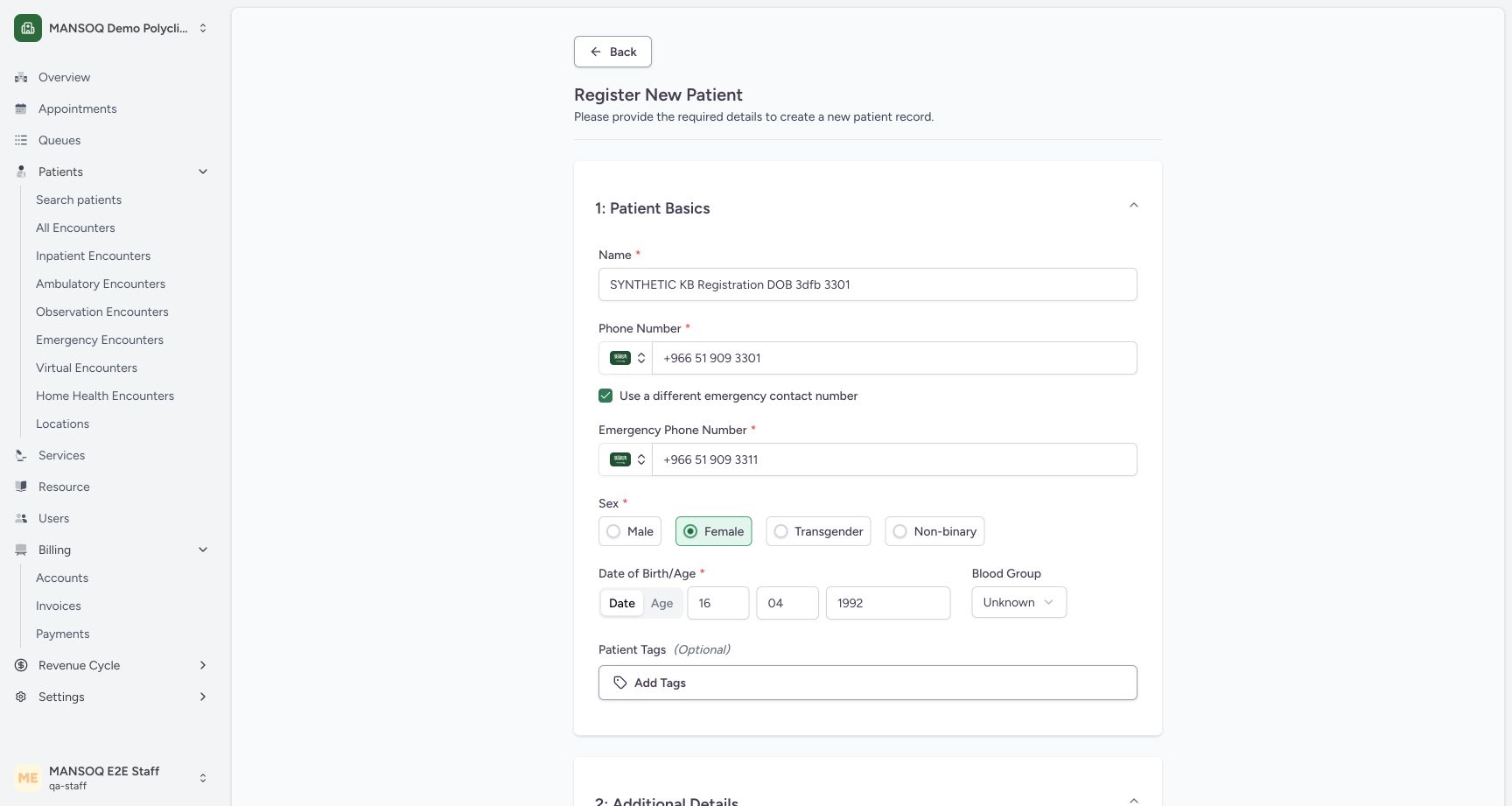
Enter SYNTHETIC KB Registration DOB 3dfb 3301 for this software example. Review the phone carried from search and select Female. The final basics screenshot shows the completed values.
1234Required patient basics and Date or Age choice
Capture details
Exact committed 3dfb source, existing non-superuser qa-staff and fictional Polyclinic. Two distinct fictional patients only. Genuine unchanged desktop pixels; native confirmation retains its actual smaller window. No care, admission, booking, grant or configuration mutation.
Image SHA-256 c5d76af6ad18a1a77ca505ba95e7e9f7bcdeb3b4af48fd7ea3e9877f3e675794
- Patient name: Enter the synthetic patient name.
- Search phone carried forward: Review the phone number copied from the search.
- Date of birth: Date entry uses day, month and year fields.
- Age alternative: Age is an alternative to an exact date of birth.
 1234
1234Review the completed DOB patient basics
Capture details
Exact committed 3dfb source, existing non-superuser qa-staff and fictional Polyclinic. Two distinct fictional patients only. Genuine unchanged desktop pixels; native confirmation retains its actual smaller window. No care, admission, booking, grant or configuration mutation.
Image SHA-256 e5851ac9fbf0f2bedd5921bb0425965288637e5fd613650eafe1ea60f9043aba
- Synthetic patient name: Review the conspicuously synthetic name before registration.
- Separate emergency contact: Review the different synthetic emergency phone number.
- Corrected birth year 1992: The completed date is 16 April 1992.
- Blood group Unknown: The software example does not assert a clinical blood group.
4. Use a different emergency contact when appropriate
Select Use a different emergency contact number. Enter the separate fictional emergency number ending 3311 and review its country code. This example saves a different emergency contact from the patient phone.
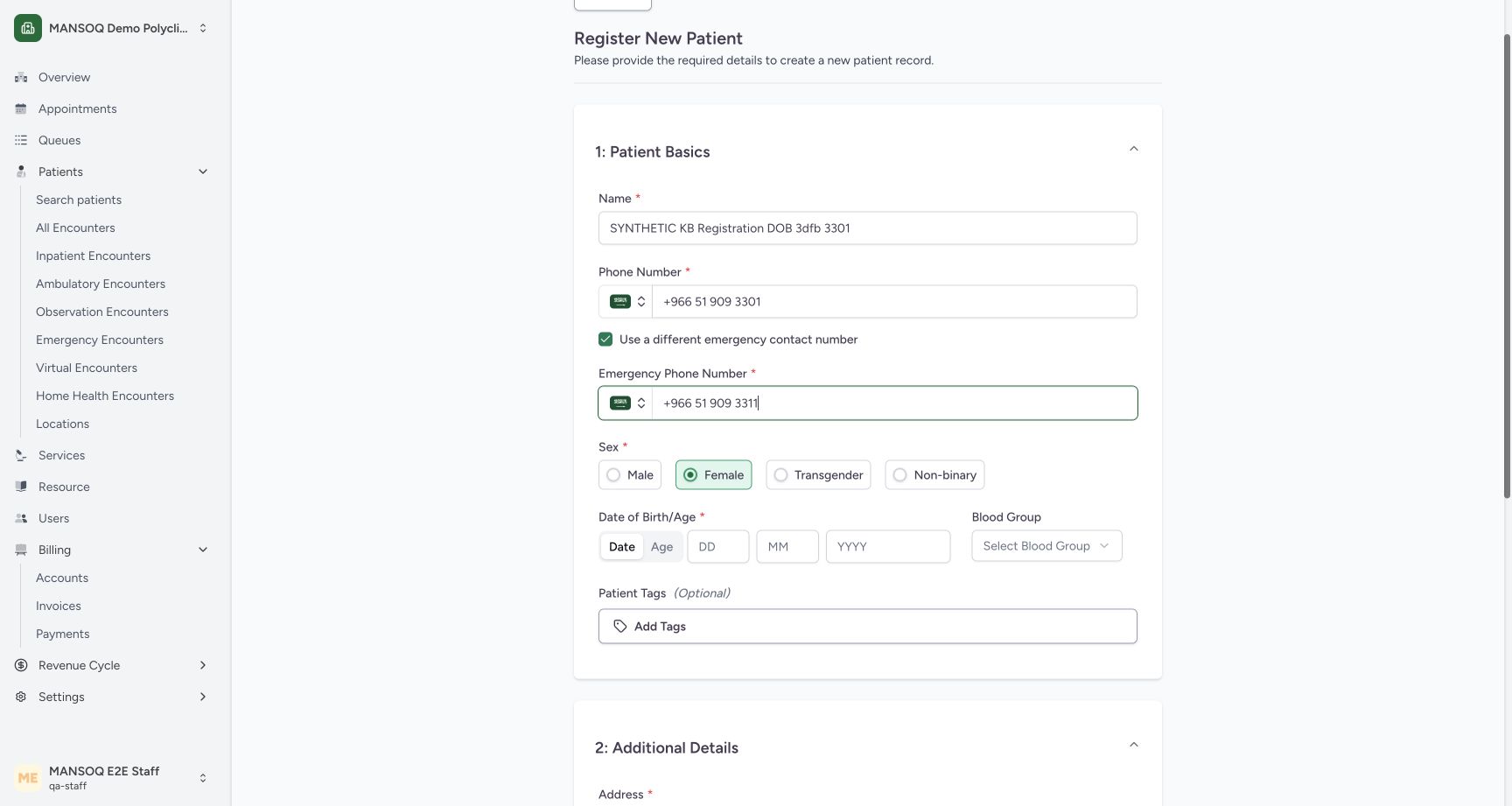 123
123Use a different emergency contact number
Capture details
Exact committed 3dfb source, existing non-superuser qa-staff and fictional Polyclinic. Two distinct fictional patients only. Genuine unchanged desktop pixels; native confirmation retains its actual smaller window. No care, admission, booking, grant or configuration mutation.
Image SHA-256 58eb5ac7ebd59ebadb7d4b9adbbab4f0551f25fc9a441b1ac95a5f115db60dd5
- Different emergency contact: Select this option to reveal the separate emergency phone input.
- Emergency phone number: Enter and review the synthetic emergency contact number.
- Sex selection: The selected sex for this synthetic example is Female.
1234Review the completed DOB patient basics
Capture details
Exact committed 3dfb source, existing non-superuser qa-staff and fictional Polyclinic. Two distinct fictional patients only. Genuine unchanged desktop pixels; native confirmation retains its actual smaller window. No care, admission, booking, grant or configuration mutation.
Image SHA-256 e5851ac9fbf0f2bedd5921bb0425965288637e5fd613650eafe1ea60f9043aba
- Synthetic patient name: Review the conspicuously synthetic name before registration.
- Separate emergency contact: Review the different synthetic emergency phone number.
- Corrected birth year 1992: The completed date is 16 April 1992.
- Blood group Unknown: The software example does not assert a clinical blood group.
5. Enter the exact date of birth
In Date of Birth/Age, keep Date selected and complete DD, MM and YYYY. The reviewed example is 16 / 04 / 1992.
1234Required patient basics and Date or Age choice
Capture details
Exact committed 3dfb source, existing non-superuser qa-staff and fictional Polyclinic. Two distinct fictional patients only. Genuine unchanged desktop pixels; native confirmation retains its actual smaller window. No care, admission, booking, grant or configuration mutation.
Image SHA-256 c5d76af6ad18a1a77ca505ba95e7e9f7bcdeb3b4af48fd7ea3e9877f3e675794
- Patient name: Enter the synthetic patient name.
- Search phone carried forward: Review the phone number copied from the search.
- Date of birth: Date entry uses day, month and year fields.
- Age alternative: Age is an alternative to an exact date of birth.
1234Review the completed DOB patient basics
Capture details
Exact committed 3dfb source, existing non-superuser qa-staff and fictional Polyclinic. Two distinct fictional patients only. Genuine unchanged desktop pixels; native confirmation retains its actual smaller window. No care, admission, booking, grant or configuration mutation.
Image SHA-256 e5851ac9fbf0f2bedd5921bb0425965288637e5fd613650eafe1ea60f9043aba
- Synthetic patient name: Review the conspicuously synthetic name before registration.
- Separate emergency contact: Review the different synthetic emergency phone number.
- Corrected birth year 1992: The completed date is 16 April 1992.
- Blood group Unknown: The software example does not assert a clinical blood group.
6. Review blood group and optional tags
Open Blood Group and select Unknown for this fictional example. Open Add Tags to inspect the available choices. The pictured picker says No tags or groups found; use its back arrow to close it. The patient is saved without tags.
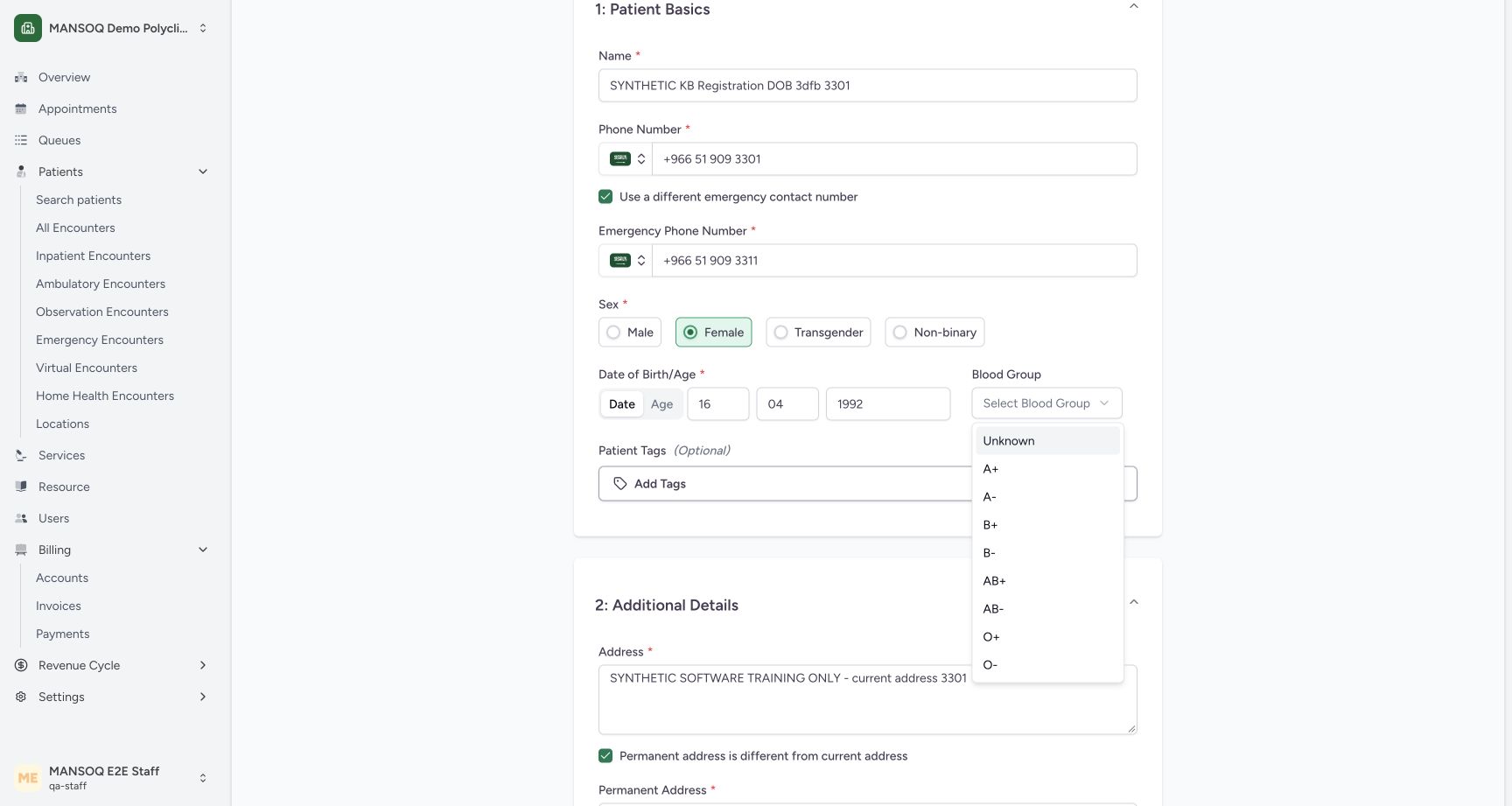 1
1Blood-group choices with Unknown for the software example
Capture details
Exact committed 3dfb source, existing non-superuser qa-staff and fictional Polyclinic. Two distinct fictional patients only. Genuine unchanged desktop pixels; native confirmation retains its actual smaller window. No care, admission, booking, grant or configuration mutation.
Image SHA-256 71e48385ba26b8b8aec642a8daef3726793bdacf8dd62582f0e7e91624fe8cbc
- Unknown: Use Unknown for this fictional training example; no clinical blood group is asserted.
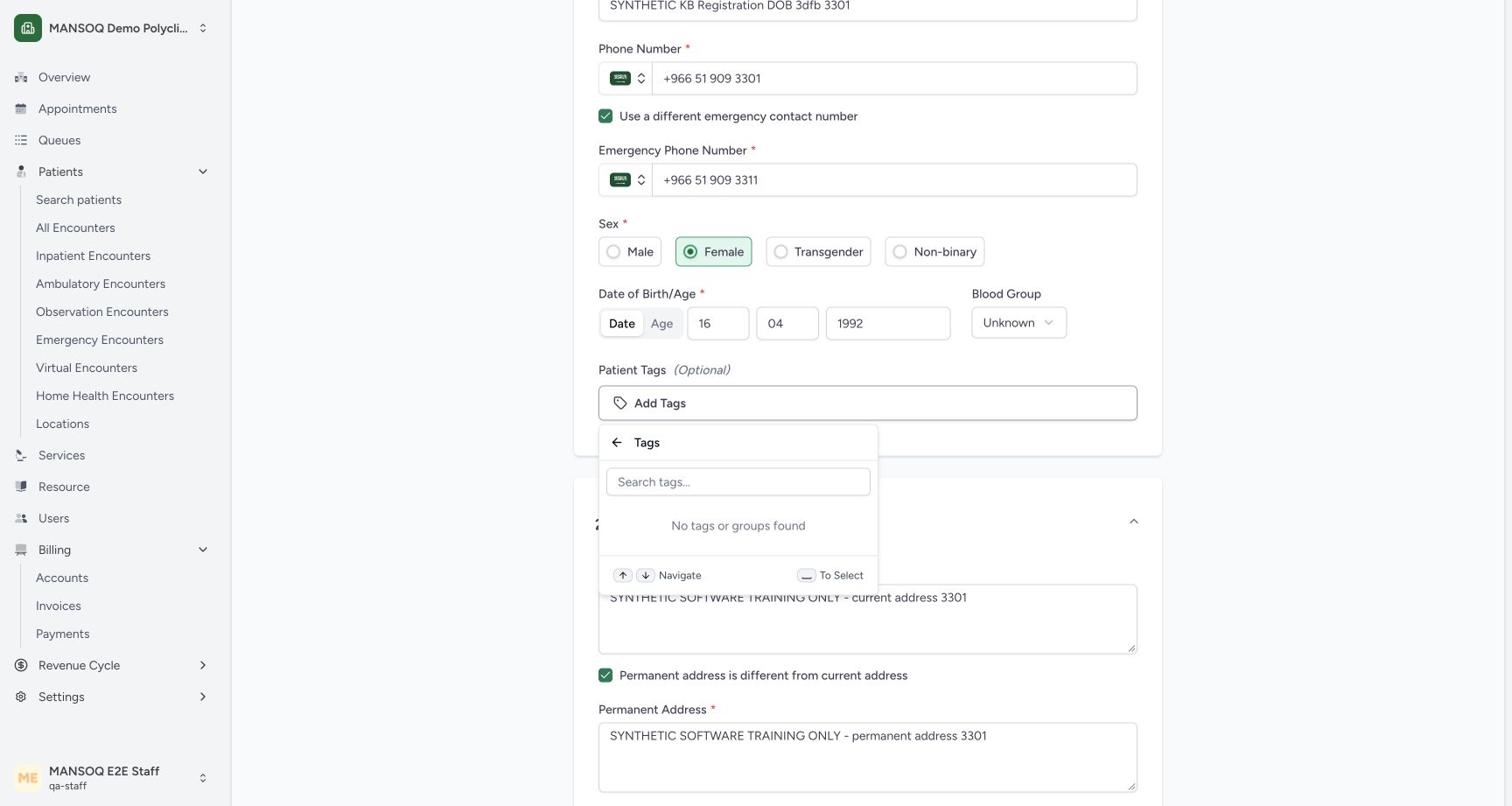 12
12Optional tags panel has no configured choices
Capture details
Exact committed 3dfb source, existing non-superuser qa-staff and fictional Polyclinic. Two distinct fictional patients only. Genuine unchanged desktop pixels; native confirmation retains its actual smaller window. No care, admission, booking, grant or configuration mutation.
Image SHA-256 b8ad3c665e7a6a324b6449f4e56ef0bcb56e298156322fcd46bffb05045de4d3
- No configured tags: This training facility currently has no available patient tags or groups.
- Tags back control: Use the visible back arrow to leave this optional picker.
1234Review the completed DOB patient basics
Capture details
Exact committed 3dfb source, existing non-superuser qa-staff and fictional Polyclinic. Two distinct fictional patients only. Genuine unchanged desktop pixels; native confirmation retains its actual smaller window. No care, admission, booking, grant or configuration mutation.
Image SHA-256 e5851ac9fbf0f2bedd5921bb0425965288637e5fd613650eafe1ea60f9043aba
- Synthetic patient name: Review the conspicuously synthetic name before registration.
- Separate emergency contact: Review the different synthetic emergency phone number.
- Corrected birth year 1992: The completed date is 16 April 1992.
- Blood group Unknown: The software example does not assert a clinical blood group.
7. Complete current and permanent addresses
Enter the synthetic current address. Select Permanent address is different from current address to reveal Permanent Address, then enter the distinct synthetic permanent address. Review both fields together.
 123
123Different current and permanent address controls
Capture details
Exact committed 3dfb source, existing non-superuser qa-staff and fictional Polyclinic. Two distinct fictional patients only. Genuine unchanged desktop pixels; native confirmation retains its actual smaller window. No care, admission, booking, grant or configuration mutation.
Image SHA-256 f53f408c5bc4431c063804d93d817767961a6de48bca4126ead1a59491e0ff65
- Different permanent address: Select the option to reveal a separate permanent address.
- Permanent address: Review the distinct synthetic permanent address.
- PIN code entry: This unsaved five-digit example will be corrected after validation.
12345Review additional details and Register Patient control
Capture details
Exact committed 3dfb source, existing non-superuser qa-staff and fictional Polyclinic. Two distinct fictional patients only. Genuine unchanged desktop pixels; native confirmation retains its actual smaller window. No care, admission, booking, grant or configuration mutation.
Image SHA-256 95aaf7af549b23453e63cf4e04d62959fdca5d693651c4f7cff95118f8fc5306
- Separate permanent address: Review the distinct synthetic permanent address before saving.
- Six-digit software example: 123456 satisfies this installed field; it is not a Saudi postal-code recommendation.
- Riyadh City selected: The existing Riyadh City leaf is selected.
- Deceased remains unchecked: The saved example will have no deceased date or time.
- Register Patient: Save once after reviewing the required and optional fields.
8. Choose the complete existing geographical path
Open the first State selector and choose Kingdom of Saudi Arabia. In the next selector choose Riyadh Region, then choose Riyadh City in the final selector. The installed form labels each level State; follow the actual option names and review the final path.
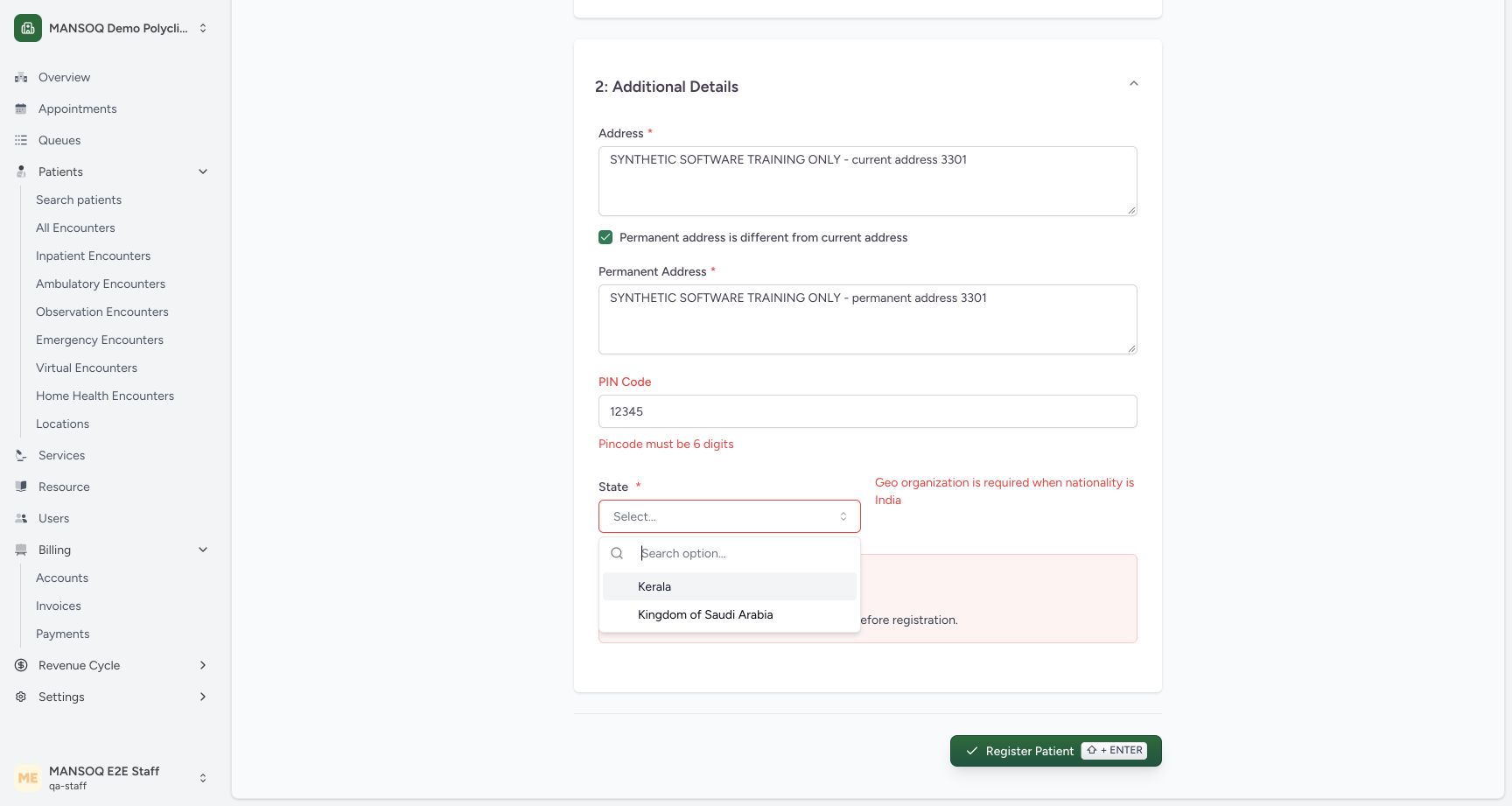 1
1Choose the existing geographical country path
Capture details
Exact committed 3dfb source, existing non-superuser qa-staff and fictional Polyclinic. Two distinct fictional patients only. Genuine unchanged desktop pixels; native confirmation retains its actual smaller window. No care, admission, booking, grant or configuration mutation.
Image SHA-256 e4cf2943b6003cd62001d7596e8d2395ffc40825e9c0f26e8baf9f067381954f
- Kingdom of Saudi Arabia: Choose the existing training geography root.
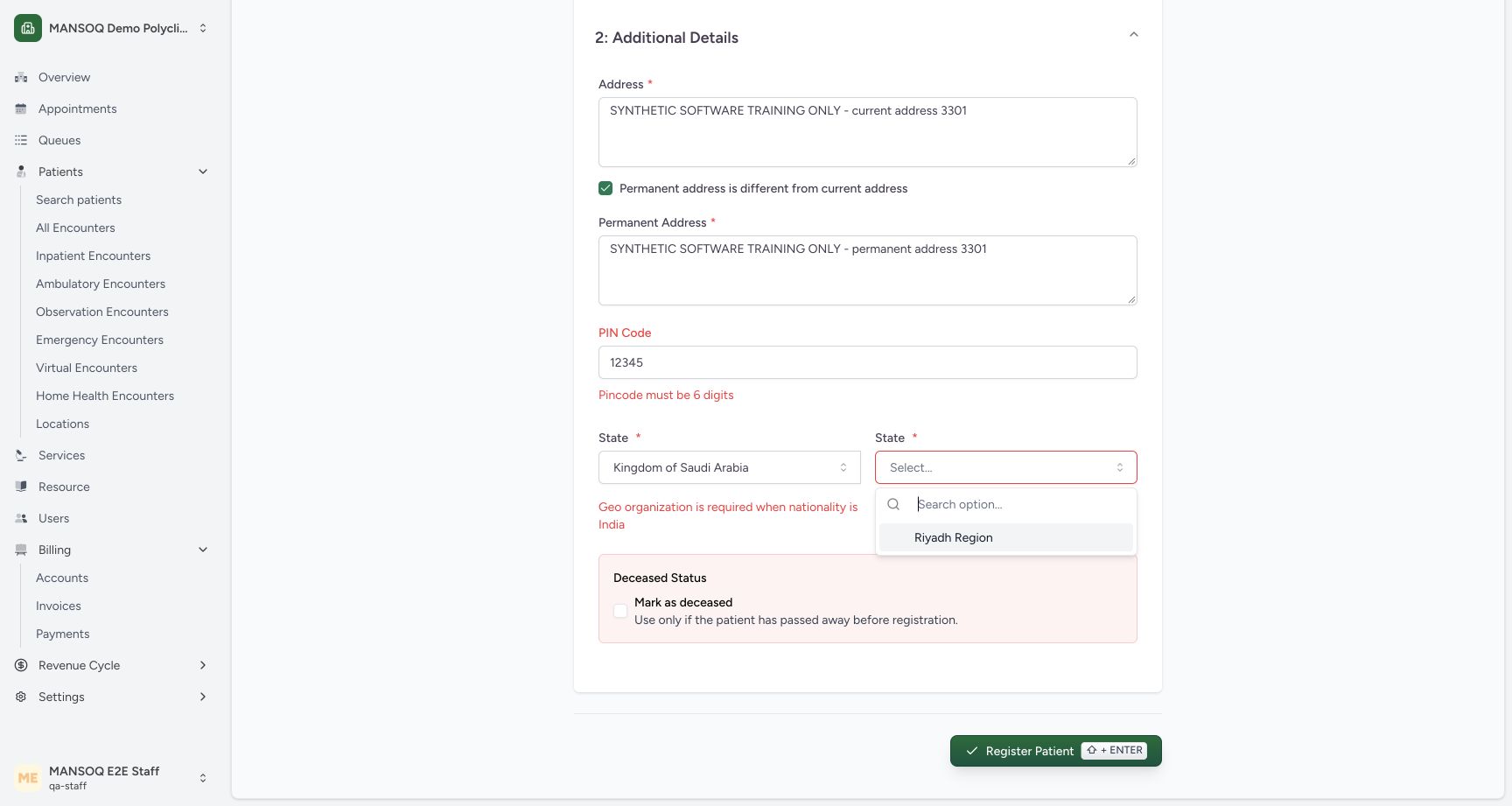 1
1Select the existing Riyadh Region
Capture details
Exact committed 3dfb source, existing non-superuser qa-staff and fictional Polyclinic. Two distinct fictional patients only. Genuine unchanged desktop pixels; native confirmation retains its actual smaller window. No care, admission, booking, grant or configuration mutation.
Image SHA-256 185b5054e2dd4a5ea9354a63931137d8d1cead4159c78609446f0a36cdad34bb
- Riyadh Region: Choose Riyadh Region under the selected geography root.
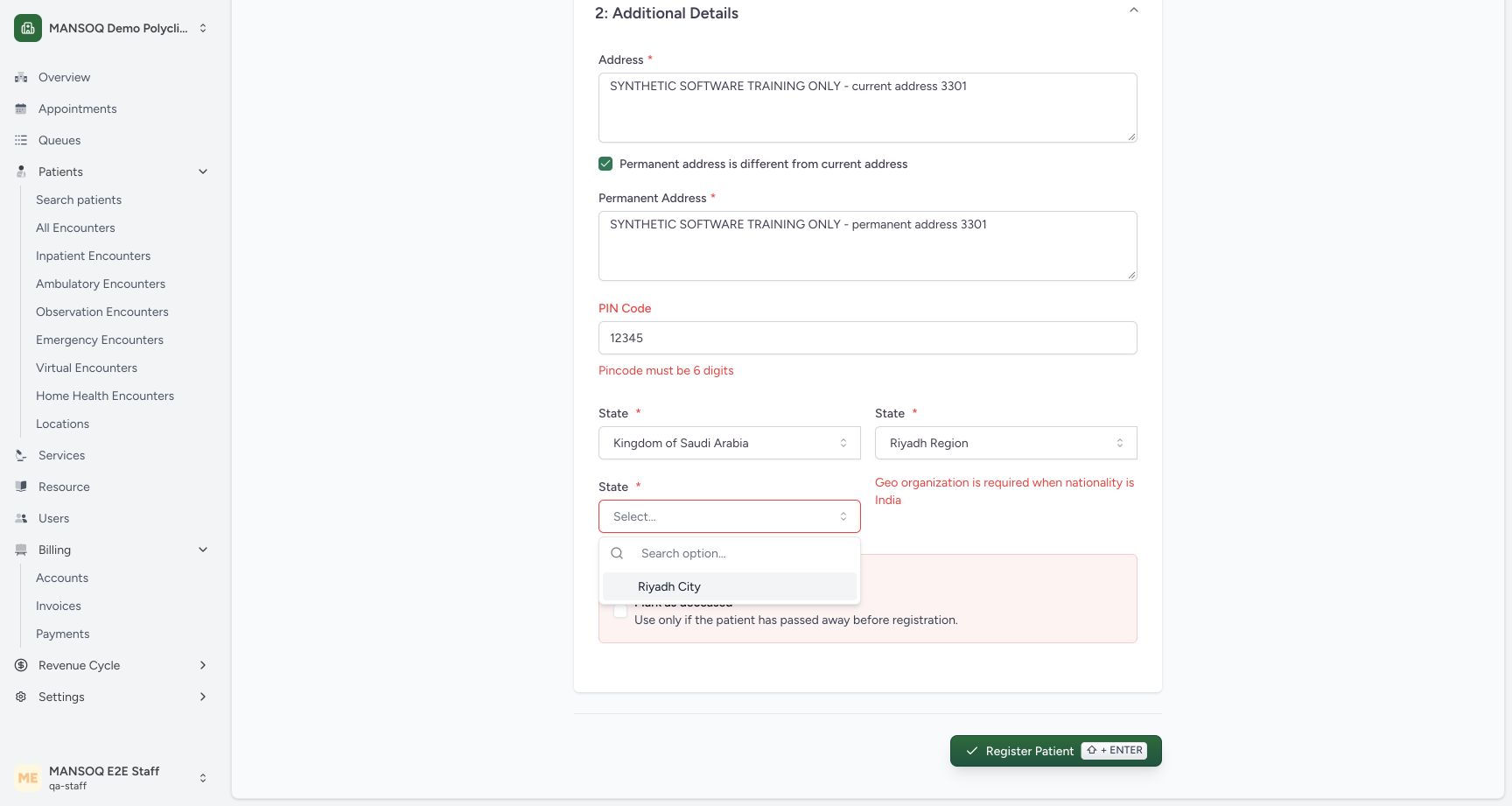 1
1Choose Riyadh City as the existing leaf
Capture details
Exact committed 3dfb source, existing non-superuser qa-staff and fictional Polyclinic. Two distinct fictional patients only. Genuine unchanged desktop pixels; native confirmation retains its actual smaller window. No care, admission, booking, grant or configuration mutation.
Image SHA-256 6f9b130d67f6449c50a51c612421a748adcd52a70c19922bb1b904d7e1a18737
- Riyadh City: Choose the existing final geography level for this synthetic example.
12345Review additional details and Register Patient control
Capture details
Exact committed 3dfb source, existing non-superuser qa-staff and fictional Polyclinic. Two distinct fictional patients only. Genuine unchanged desktop pixels; native confirmation retains its actual smaller window. No care, admission, booking, grant or configuration mutation.
Image SHA-256 95aaf7af549b23453e63cf4e04d62959fdca5d693651c4f7cff95118f8fc5306
- Separate permanent address: Review the distinct synthetic permanent address before saving.
- Six-digit software example: 123456 satisfies this installed field; it is not a Saudi postal-code recommendation.
- Riyadh City selected: The existing Riyadh City leaf is selected.
- Deceased remains unchecked: The saved example will have no deceased date or time.
- Register Patient: Save once after reviewing the required and optional fields.
9. Review optional PIN and deceased status
This installed form accepts a six-digit PIN Code when supplied. The value 123456 is only a software-control example, not a Saudi postal-code recommendation. Confirm Mark as deceased is unchecked for this saved example.
12345Review additional details and Register Patient control
Capture details
Exact committed 3dfb source, existing non-superuser qa-staff and fictional Polyclinic. Two distinct fictional patients only. Genuine unchanged desktop pixels; native confirmation retains its actual smaller window. No care, admission, booking, grant or configuration mutation.
Image SHA-256 95aaf7af549b23453e63cf4e04d62959fdca5d693651c4f7cff95118f8fc5306
- Separate permanent address: Review the distinct synthetic permanent address before saving.
- Six-digit software example: 123456 satisfies this installed field; it is not a Saudi postal-code recommendation.
- Riyadh City selected: The existing Riyadh City leaf is selected.
- Deceased remains unchecked: The saved example will have no deceased date or time.
- Register Patient: Save once after reviewing the required and optional fields.
10. Register once and check the new identity
Review the completed basics and additional details, then choose Register Patient once. The resulting patient home shows SYNTHETIC KB Registration DOB 3dfb 3301, 34y, Female and No tags assigned.
1234Review the completed DOB patient basics
Capture details
Exact committed 3dfb source, existing non-superuser qa-staff and fictional Polyclinic. Two distinct fictional patients only. Genuine unchanged desktop pixels; native confirmation retains its actual smaller window. No care, admission, booking, grant or configuration mutation.
Image SHA-256 e5851ac9fbf0f2bedd5921bb0425965288637e5fd613650eafe1ea60f9043aba
- Synthetic patient name: Review the conspicuously synthetic name before registration.
- Separate emergency contact: Review the different synthetic emergency phone number.
- Corrected birth year 1992: The completed date is 16 April 1992.
- Blood group Unknown: The software example does not assert a clinical blood group.
12345Review additional details and Register Patient control
Capture details
Exact committed 3dfb source, existing non-superuser qa-staff and fictional Polyclinic. Two distinct fictional patients only. Genuine unchanged desktop pixels; native confirmation retains its actual smaller window. No care, admission, booking, grant or configuration mutation.
Image SHA-256 95aaf7af549b23453e63cf4e04d62959fdca5d693651c4f7cff95118f8fc5306
- Separate permanent address: Review the distinct synthetic permanent address before saving.
- Six-digit software example: 123456 satisfies this installed field; it is not a Saudi postal-code recommendation.
- Riyadh City selected: The existing Riyadh City leaf is selected.
- Deceased remains unchecked: The saved example will have no deceased date or time.
- Register Patient: Save once after reviewing the required and optional fields.
12Registered synthetic DOB patient home
Capture details
Exact committed 3dfb source, existing non-superuser qa-staff and fictional Polyclinic. Two distinct fictional patients only. Genuine unchanged desktop pixels; native confirmation retains its actual smaller window. No care, admission, booking, grant or configuration mutation.
Image SHA-256 b06cb1096639ff513ed12ee0870a4b68b5c9ca8cf145e93ff1d247303bf09180
- Registered patient: The saved patient home displays the newly registered synthetic identity.
- No tags assigned: This example was registered without selecting a patient tag.
Inspect deceased fields only in an unsaved example
In the pictured unsaved inspection, selecting Mark as deceased reveals Date and Time of Death. It was then unchecked before registration. The saved example has no deceased date or time; this lesson does not demonstrate saving a deceased patient.
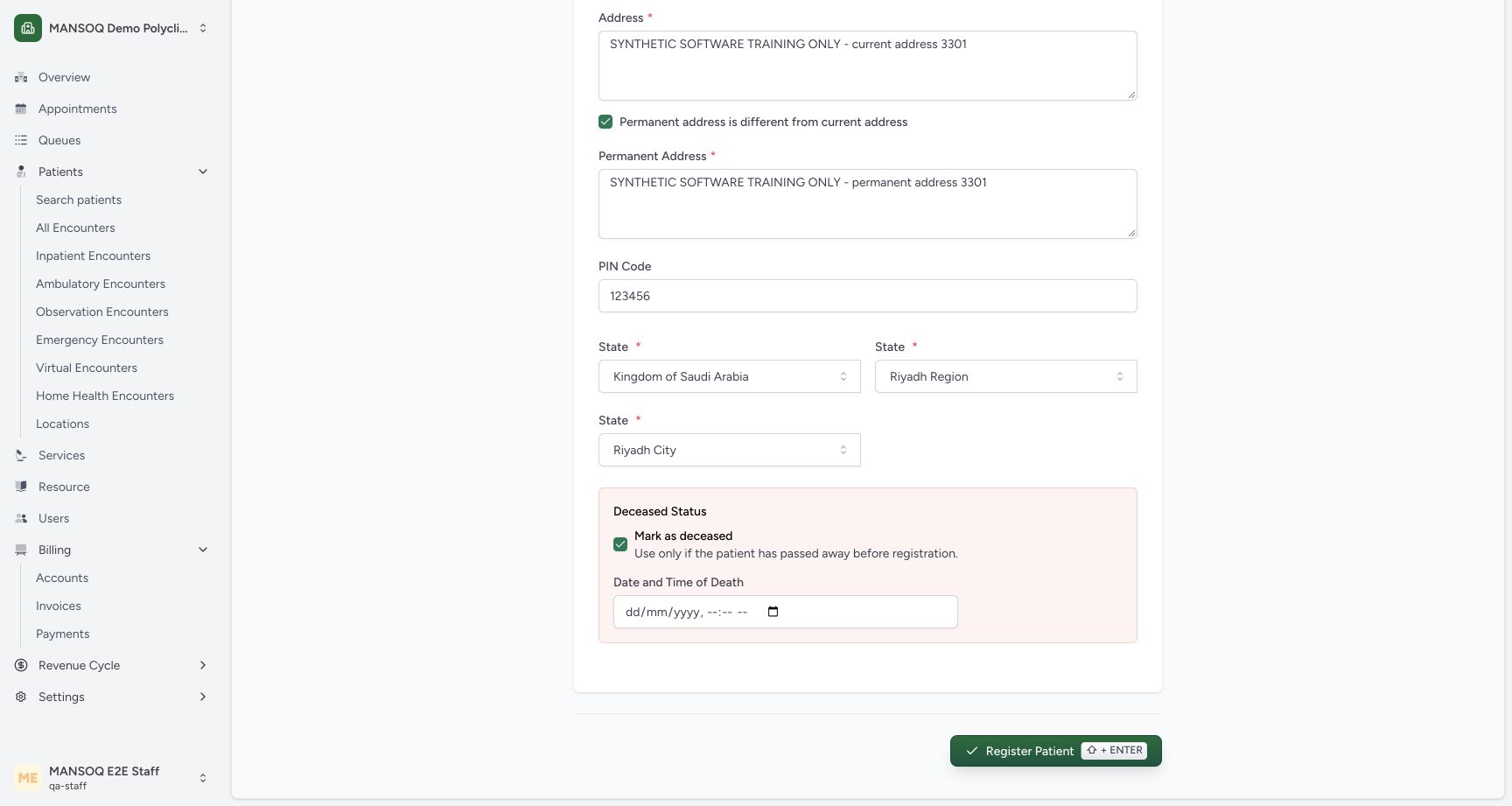 12
12Deceased status reveals date and time in an unsaved draft
Capture details
Exact committed 3dfb source, existing non-superuser qa-staff and fictional Polyclinic. Two distinct fictional patients only. Genuine unchanged desktop pixels; native confirmation retains its actual smaller window. No care, admission, booking, grant or configuration mutation.
Image SHA-256 ff6b689f62a860dd872c8bf0ddfffbf5e71105b991b597c7609ba32c6fce4627
- Mark as deceased: Selecting this option reveals the date and time field. This teaching draft will be unchecked before registration.
- Date and time of death: The extra date and time control is visible only in this unsaved inspection.
12345Review additional details and Register Patient control
Capture details
Exact committed 3dfb source, existing non-superuser qa-staff and fictional Polyclinic. Two distinct fictional patients only. Genuine unchanged desktop pixels; native confirmation retains its actual smaller window. No care, admission, booking, grant or configuration mutation.
Image SHA-256 95aaf7af549b23453e63cf4e04d62959fdca5d693651c4f7cff95118f8fc5306
- Separate permanent address: Review the distinct synthetic permanent address before saving.
- Six-digit software example: 123456 satisfies this installed field; it is not a Saudi postal-code recommendation.
- Riyadh City selected: The existing Riyadh City leaf is selected.
- Deceased remains unchecked: The saved example will have no deceased date or time.
- Register Patient: Save once after reviewing the required and optional fields.
Troubleshooting
The birth year is refused
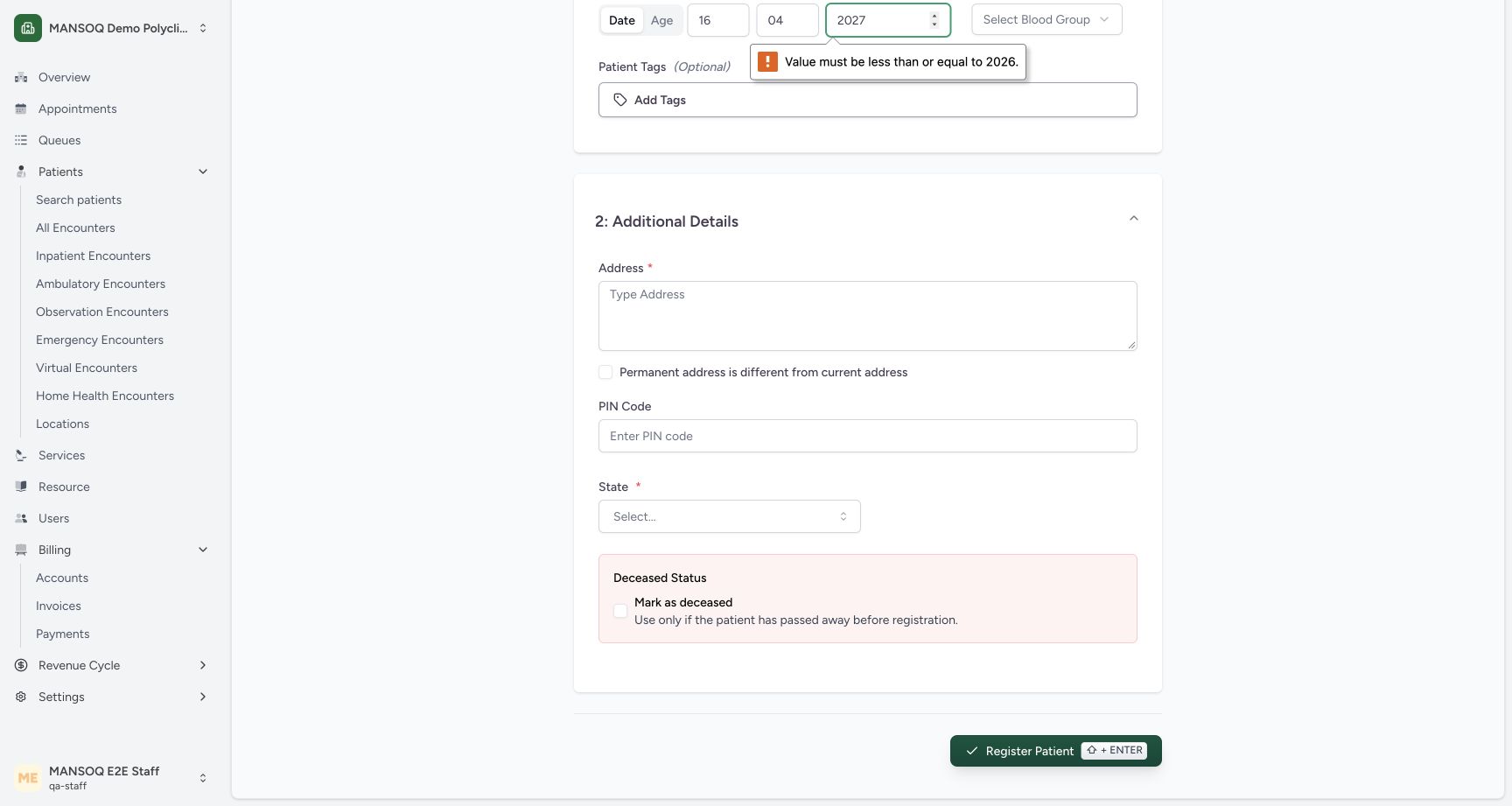
The pictured invalid year 2027 is refused with Value must be less than or equal to 2026. Correct the date; the completed example uses 16 April 1992. The native message reflects this dated capture.
 123
123Future birth year is refused before registration
Capture details
Exact committed 3dfb source, existing non-superuser qa-staff and fictional Polyclinic. Two distinct fictional patients only. Genuine unchanged desktop pixels; native confirmation retains its actual smaller window. No care, admission, booking, grant or configuration mutation.
Image SHA-256 ef67e06332f68a21b677af4fc679cd524997d8aa872d56f79d2d7dde5ca8e798
- Future year refused: The native year control refuses 2027 because the current displayed maximum is 2026.
- Register attempt: Submitting this invalid draft leaves the registration form open.
- Required address: Address is still empty in this unsaved validation example.
1234Review the completed DOB patient basics
Capture details
Exact committed 3dfb source, existing non-superuser qa-staff and fictional Polyclinic. Two distinct fictional patients only. Genuine unchanged desktop pixels; native confirmation retains its actual smaller window. No care, admission, booking, grant or configuration mutation.
Image SHA-256 e5851ac9fbf0f2bedd5921bb0425965288637e5fd613650eafe1ea60f9043aba
- Synthetic patient name: Review the conspicuously synthetic name before registration.
- Separate emergency contact: Review the different synthetic emergency phone number.
- Corrected birth year 1992: The completed date is 16 April 1992.
- Blood group Unknown: The software example does not assert a clinical blood group.
Address or geography validation remains visible
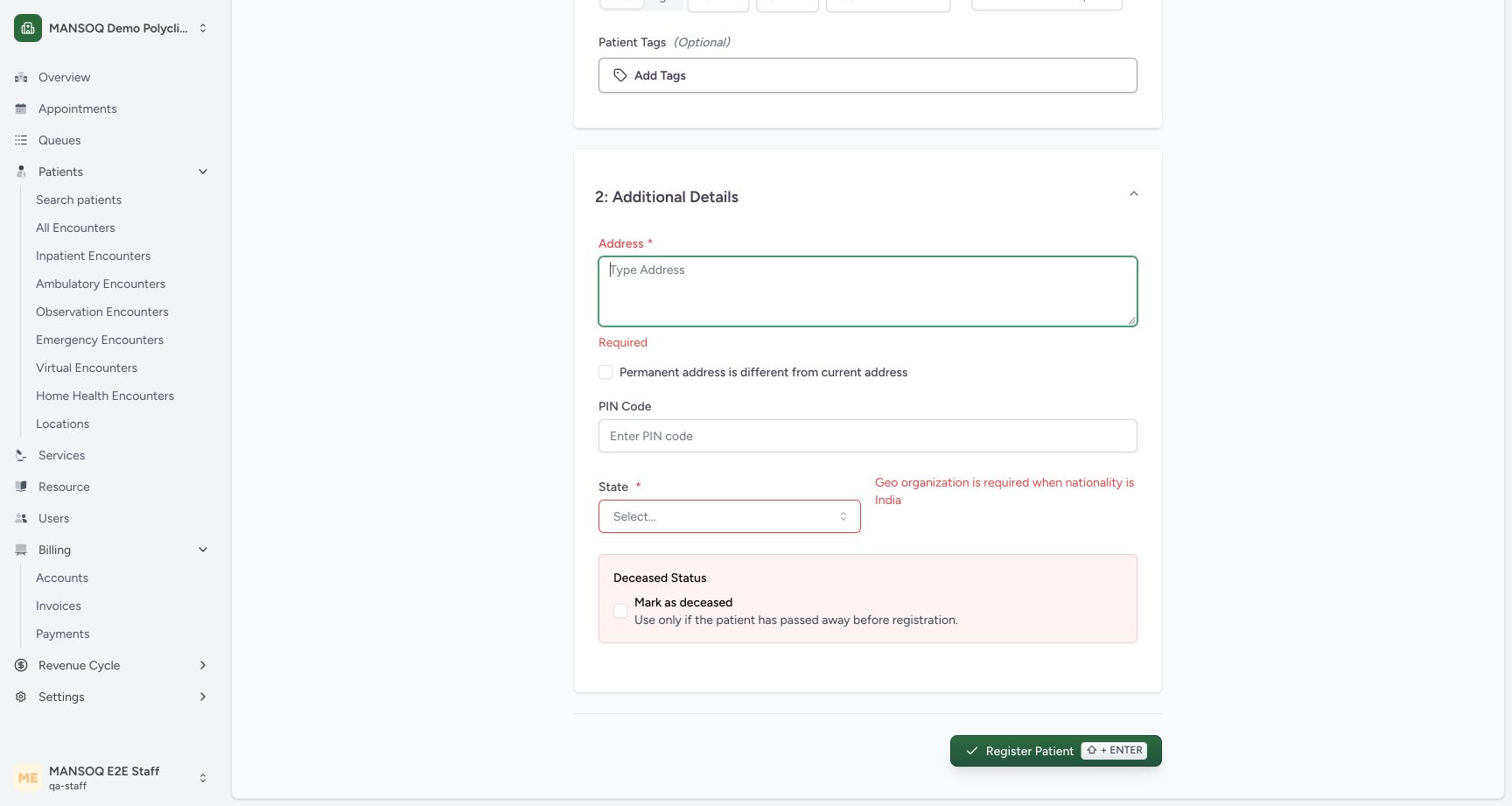
Complete Address and select the full configured geographical path. The pictured installed geography message says Geo organization is required when nationality is India before a path is selected. That wording does not establish a nationality; this example actually selects the Saudi geography shown. Review the final selectors after correction.
 123
123Address and geography validation messages
Capture details
Exact committed 3dfb source, existing non-superuser qa-staff and fictional Polyclinic. Two distinct fictional patients only. Genuine unchanged desktop pixels; native confirmation retains its actual smaller window. No care, admission, booking, grant or configuration mutation.
Image SHA-256 a4a1271c86537661f0d0668d98e59c1a800e02e2a7ff56cbc1e25bf14c9a1be7
- Required address: Complete the required current address before registration.
- Required geography: Select the configured geographical path. The pictured validation text is the installed software message.
- Installed geography message: This is the exact installed validation message; it does not set or establish a nationality.
1Choose the existing geographical country path
Capture details
Exact committed 3dfb source, existing non-superuser qa-staff and fictional Polyclinic. Two distinct fictional patients only. Genuine unchanged desktop pixels; native confirmation retains its actual smaller window. No care, admission, booking, grant or configuration mutation.
Image SHA-256 e4cf2943b6003cd62001d7596e8d2395ffc40825e9c0f26e8baf9f067381954f
- Kingdom of Saudi Arabia: Choose the existing training geography root.
1Select the existing Riyadh Region
Capture details
Exact committed 3dfb source, existing non-superuser qa-staff and fictional Polyclinic. Two distinct fictional patients only. Genuine unchanged desktop pixels; native confirmation retains its actual smaller window. No care, admission, booking, grant or configuration mutation.
Image SHA-256 185b5054e2dd4a5ea9354a63931137d8d1cead4159c78609446f0a36cdad34bb
- Riyadh Region: Choose Riyadh Region under the selected geography root.
1Choose Riyadh City as the existing leaf
Capture details
Exact committed 3dfb source, existing non-superuser qa-staff and fictional Polyclinic. Two distinct fictional patients only. Genuine unchanged desktop pixels; native confirmation retains its actual smaller window. No care, admission, booking, grant or configuration mutation.
Image SHA-256 6f9b130d67f6449c50a51c612421a748adcd52a70c19922bb1b904d7e1a18737
- Riyadh City: Choose the existing final geography level for this synthetic example.
12345Review additional details and Register Patient control
Capture details
Exact committed 3dfb source, existing non-superuser qa-staff and fictional Polyclinic. Two distinct fictional patients only. Genuine unchanged desktop pixels; native confirmation retains its actual smaller window. No care, admission, booking, grant or configuration mutation.
Image SHA-256 95aaf7af549b23453e63cf4e04d62959fdca5d693651c4f7cff95118f8fc5306
- Separate permanent address: Review the distinct synthetic permanent address before saving.
- Six-digit software example: 123456 satisfies this installed field; it is not a Saudi postal-code recommendation.
- Riyadh City selected: The existing Riyadh City leaf is selected.
- Deceased remains unchecked: The saved example will have no deceased date or time.
- Register Patient: Save once after reviewing the required and optional fields.
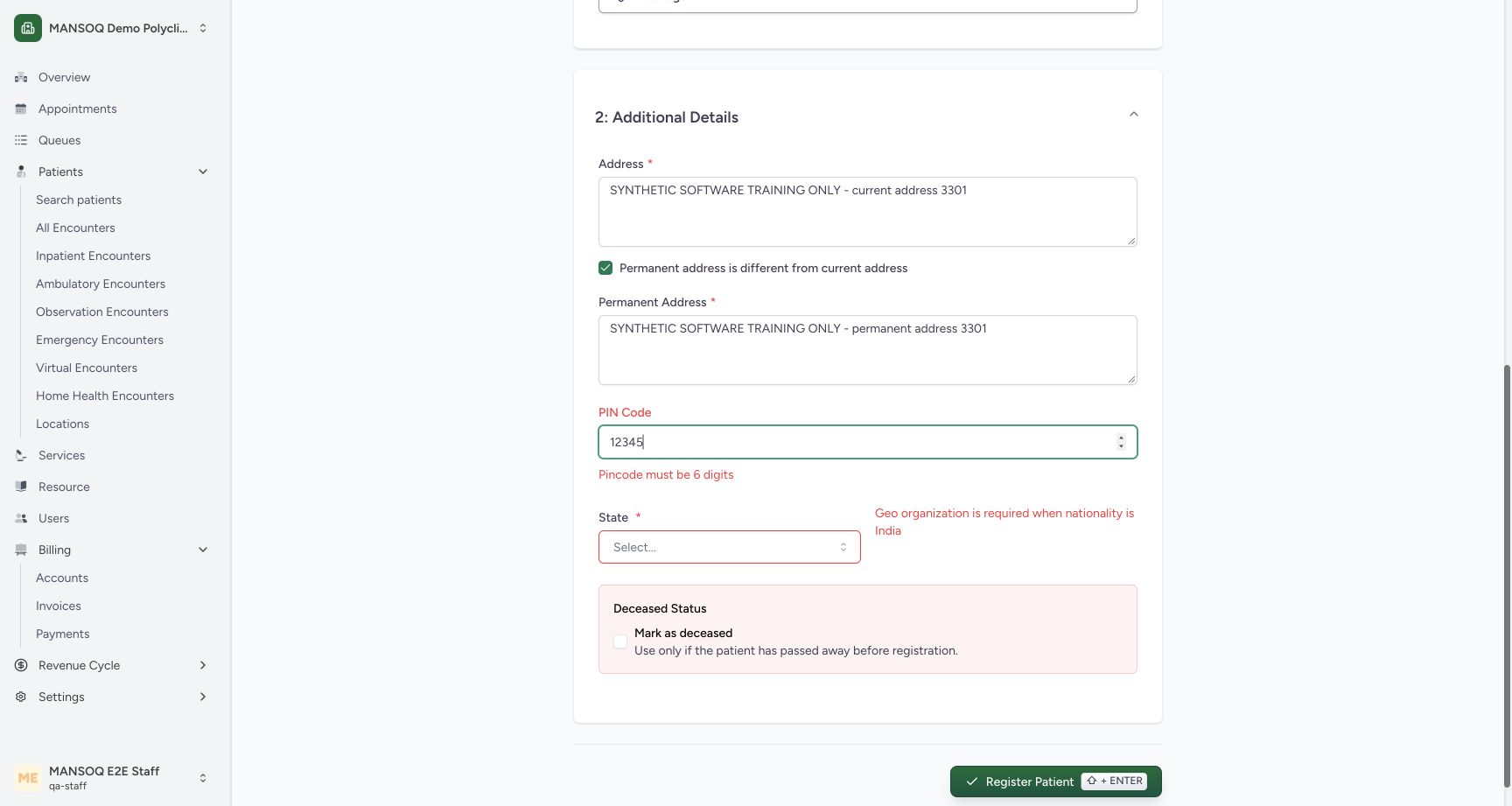
PIN Code says Pincode must be 6 digits
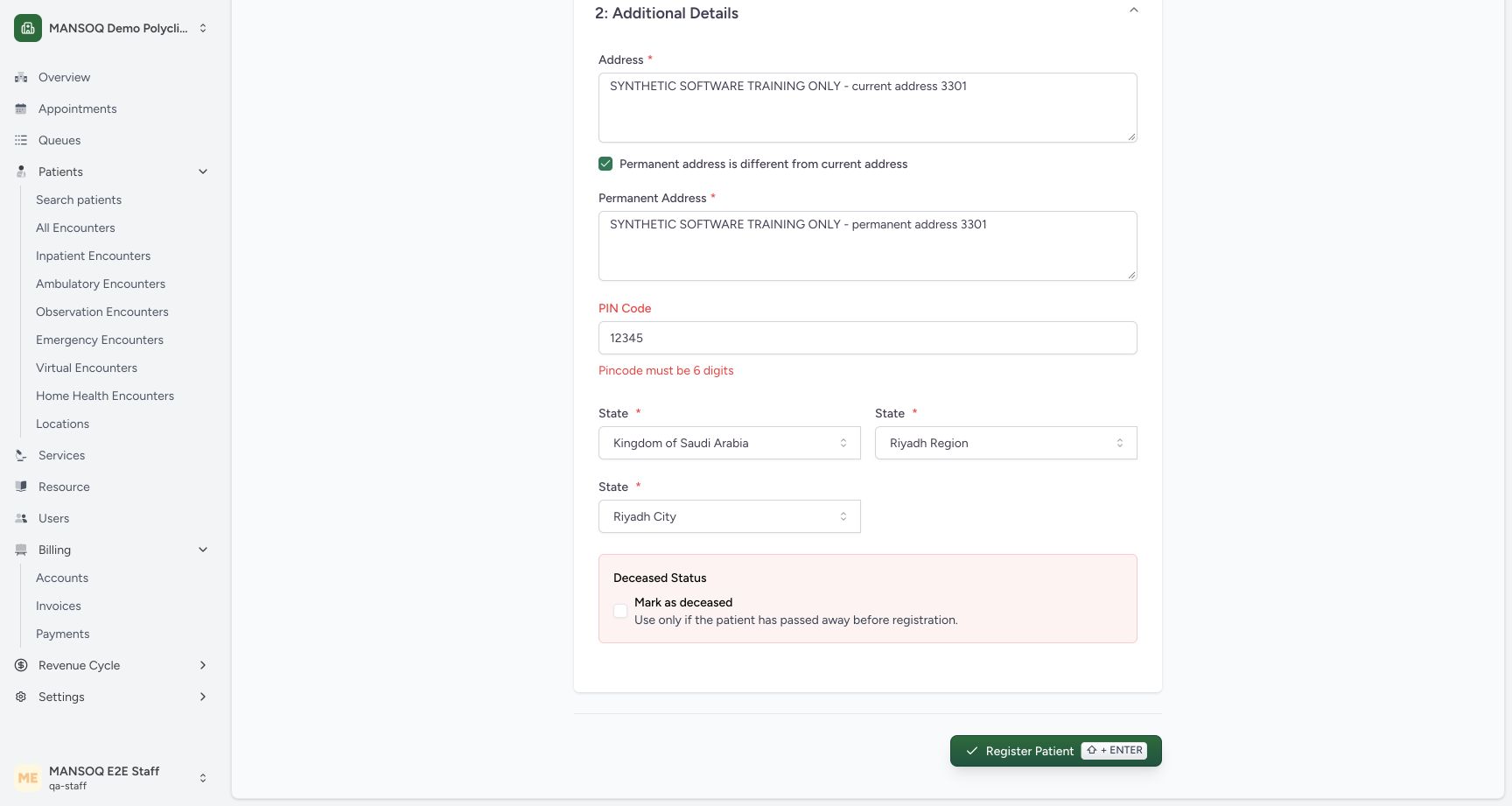
The optional five-digit example 12345 shows Pincode must be 6 digits. This demonstration corrects it to the six-digit software example 123456 before registration.
 123
123Six-digit PIN validation and completed geography
Capture details
Exact committed 3dfb source, existing non-superuser qa-staff and fictional Polyclinic. Two distinct fictional patients only. Genuine unchanged desktop pixels; native confirmation retains its actual smaller window. No care, admission, booking, grant or configuration mutation.
Image SHA-256 8a1887c2316b205a5e1bd131b50a60e8aade7498754828780e573f5de0f69fa6
- Five-digit value needs correction: The installed field requires six digits when a PIN code is entered.
- PIN validation message: The displayed message explains the six-digit requirement.
- Selected geography leaf: Riyadh City is the final selected geography level.
12345Review additional details and Register Patient control
Capture details
Exact committed 3dfb source, existing non-superuser qa-staff and fictional Polyclinic. Two distinct fictional patients only. Genuine unchanged desktop pixels; native confirmation retains its actual smaller window. No care, admission, booking, grant or configuration mutation.
Image SHA-256 95aaf7af549b23453e63cf4e04d62959fdca5d693651c4f7cff95118f8fc5306
- Separate permanent address: Review the distinct synthetic permanent address before saving.
- Six-digit software example: 123456 satisfies this installed field; it is not a Saudi postal-code recommendation.
- Riyadh City selected: The existing Riyadh City leaf is selected.
- Deceased remains unchecked: The saved example will have no deceased date or time.
- Register Patient: Save once after reviewing the required and optional fields.
Source evidence
Every citation uses this exact committed version. The private source repository requires access.
- repositories/platform/mansoq-web/src/components/Patient/PatientRegistration.tsx:120 ·
3dfb7c9f519fb5b4cd4452439f3c12346bf58319Source file checksum
8a8dd34cad6ec2a2da6b43dbf55869a696cf7dc50f6d16af623bf7a4d9c2f92c - repositories/platform/mansoq-web/src/components/Patient/PatientRegistration.tsx:317 ·
3dfb7c9f519fb5b4cd4452439f3c12346bf58319Source file checksum
8a8dd34cad6ec2a2da6b43dbf55869a696cf7dc50f6d16af623bf7a4d9c2f92c - repositories/platform/mansoq-web/src/components/Patient/PatientRegistration.tsx:558 ·
3dfb7c9f519fb5b4cd4452439f3c12346bf58319Source file checksum
8a8dd34cad6ec2a2da6b43dbf55869a696cf7dc50f6d16af623bf7a4d9c2f92c - repositories/platform/mansoq-web/src/components/Patient/PatientRegistration.tsx:617 ·
3dfb7c9f519fb5b4cd4452439f3c12346bf58319Source file checksum
8a8dd34cad6ec2a2da6b43dbf55869a696cf7dc50f6d16af623bf7a4d9c2f92c - repositories/platform/mansoq-web/src/components/Patient/PatientRegistration.tsx:822 ·
3dfb7c9f519fb5b4cd4452439f3c12346bf58319Source file checksum
8a8dd34cad6ec2a2da6b43dbf55869a696cf7dc50f6d16af623bf7a4d9c2f92c - repositories/platform/mansoq-web/src/components/Patient/PatientRegistration.tsx:972 ·
3dfb7c9f519fb5b4cd4452439f3c12346bf58319Source file checksum
8a8dd34cad6ec2a2da6b43dbf55869a696cf7dc50f6d16af623bf7a4d9c2f92c - repositories/platform/mansoq-web/src/components/Patient/PatientRegistration.tsx:1081 ·
3dfb7c9f519fb5b4cd4452439f3c12346bf58319Source file checksum
8a8dd34cad6ec2a2da6b43dbf55869a696cf7dc50f6d16af623bf7a4d9c2f92c - repositories/platform/mansoq-web/src/components/Organization/GovtOrganizationPicker.tsx:144 ·
3dfb7c9f519fb5b4cd4452439f3c12346bf58319Source file checksum
2c7797c2474d8ff716684a50b6fc33774738089106ee5825b64454395a5c263d - repositories/platform/mansoq-web/src/Utils/validators.ts:34 ·
3dfb7c9f519fb5b4cd4452439f3c12346bf58319Source file checksum
bd4ed05623cbe87f7e1c4ac235386f9527633051044c2618afc5a9123e7fad94 - repositories/platform/mansoq-core/mansoq/emr/api/viewsets/patient.py:120 ·
3dfb7c9f519fb5b4cd4452439f3c12346bf58319Source file checksum
4d3204a488bd87a6092ef1457cde56548e35e5c56901b8324d7a7272a519fb1f - repositories/platform/mansoq-core/mansoq/emr/signals/patient/phone_number_identifier.py:28 ·
3dfb7c9f519fb5b4cd4452439f3c12346bf58319Source file checksum
843f7eeef76c4ee36117303644590f357f0b7d6ad2415e869dd26abe49c81f15