 MANSOQ
 Appointments and registration handoff · VERSION 3dfb7c9f
Reschedule an appointment and verify both saved records
Review the old and replacement notes, select the intended existing date and schedule, then verify the retained original and new appointment.
Staff
 123
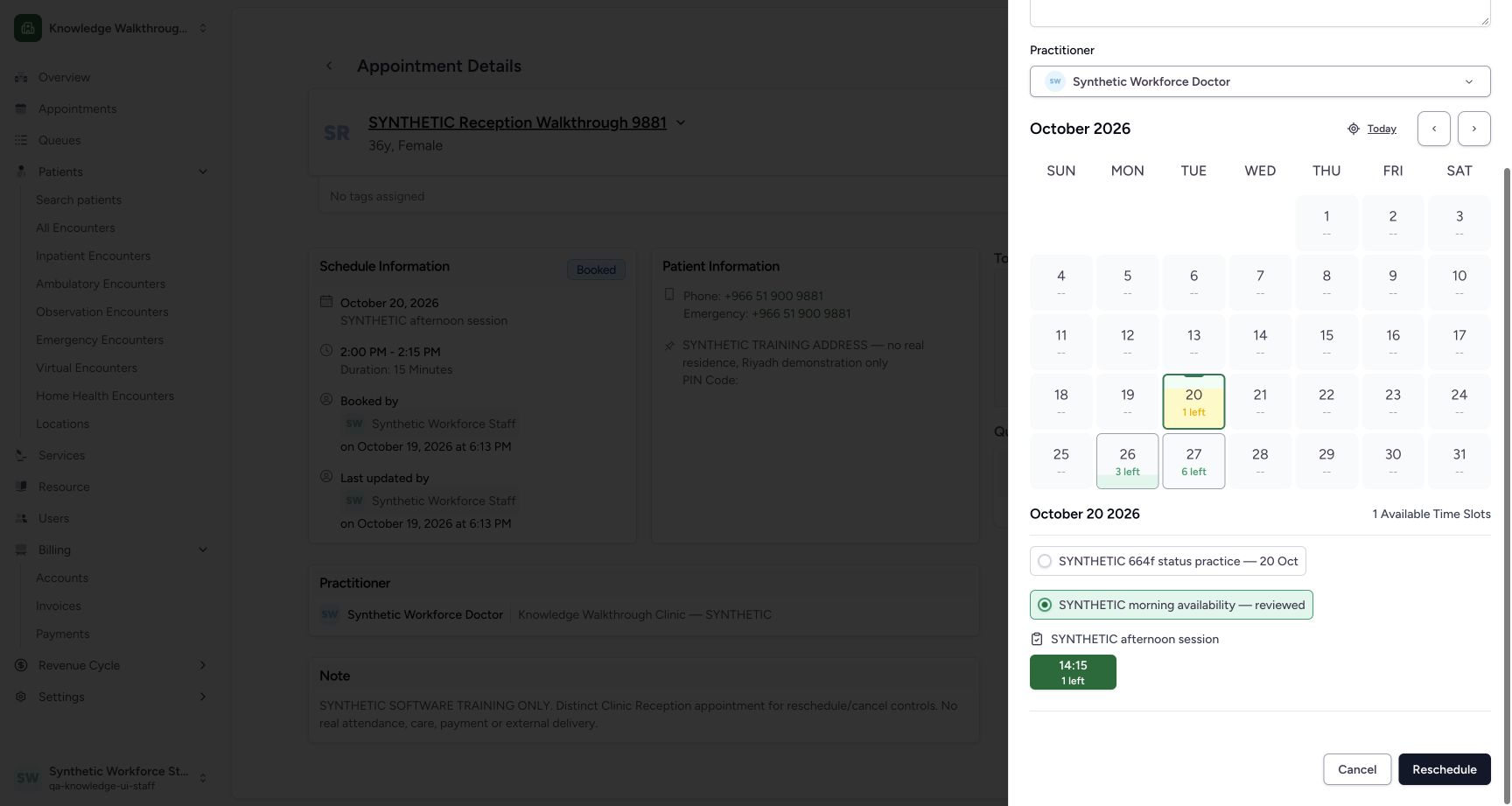
123Review the selected 14:15 replacement before saving
Capture details
Exact committed 3dfb source, existing non-superuser Clinic Staff and synthetic Reception patient. One approved reschedule saved a distinct replacement; the original remains in history. The cancellation warning was left with neutral Cancel. No cancellation, attendance, care, token, payment, grant or configuration change is demonstrated. Delivery providers are disabled in this isolated fixture.
Image SHA-256 11884b772819e656a650fffff2c3899cff0d7923b2a9a8c6e73501a495a014b4
- Selected 14:15: Verify the intended existing replacement time remains selected.
- Reschedule: After reviewing the intended patient, previous note, replacement note, date and time, save the reschedule once.
- Cancel: Leave the replacement draft without saving.
 1234
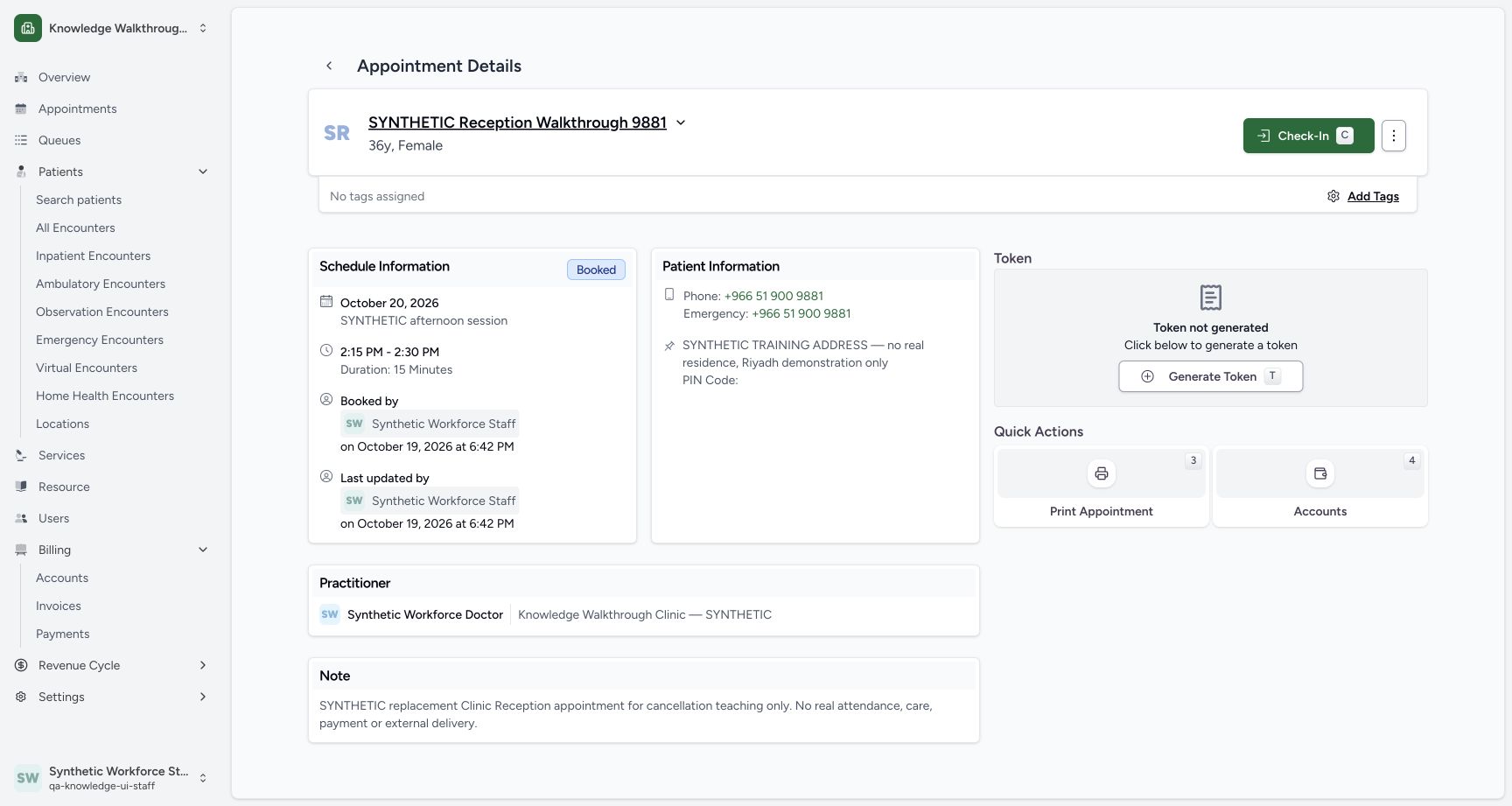
1234Verify the saved replacement appointment
Capture details
Exact committed 3dfb source, existing non-superuser Clinic Staff and synthetic Reception patient. One approved reschedule saved a distinct replacement; the original remains in history. The cancellation warning was left with neutral Cancel. No cancellation, attendance, care, token, payment, grant or configuration change is demonstrated. Delivery providers are disabled in this isolated fixture.
Image SHA-256 96f20c522a6555118dea44d857fefa3087361d5d9abb3ddea6b60489c2204a35
- Replacement Booked: The new replacement appointment is saved as Booked.
- Saved 20 October date: The replacement keeps the intended date; its nearby time is 2:15 PM–2:30 PM.
- Saved replacement reason: Verify the complete replacement note on this new record.
- Token not generated: No token is generated by this reschedule.
 123
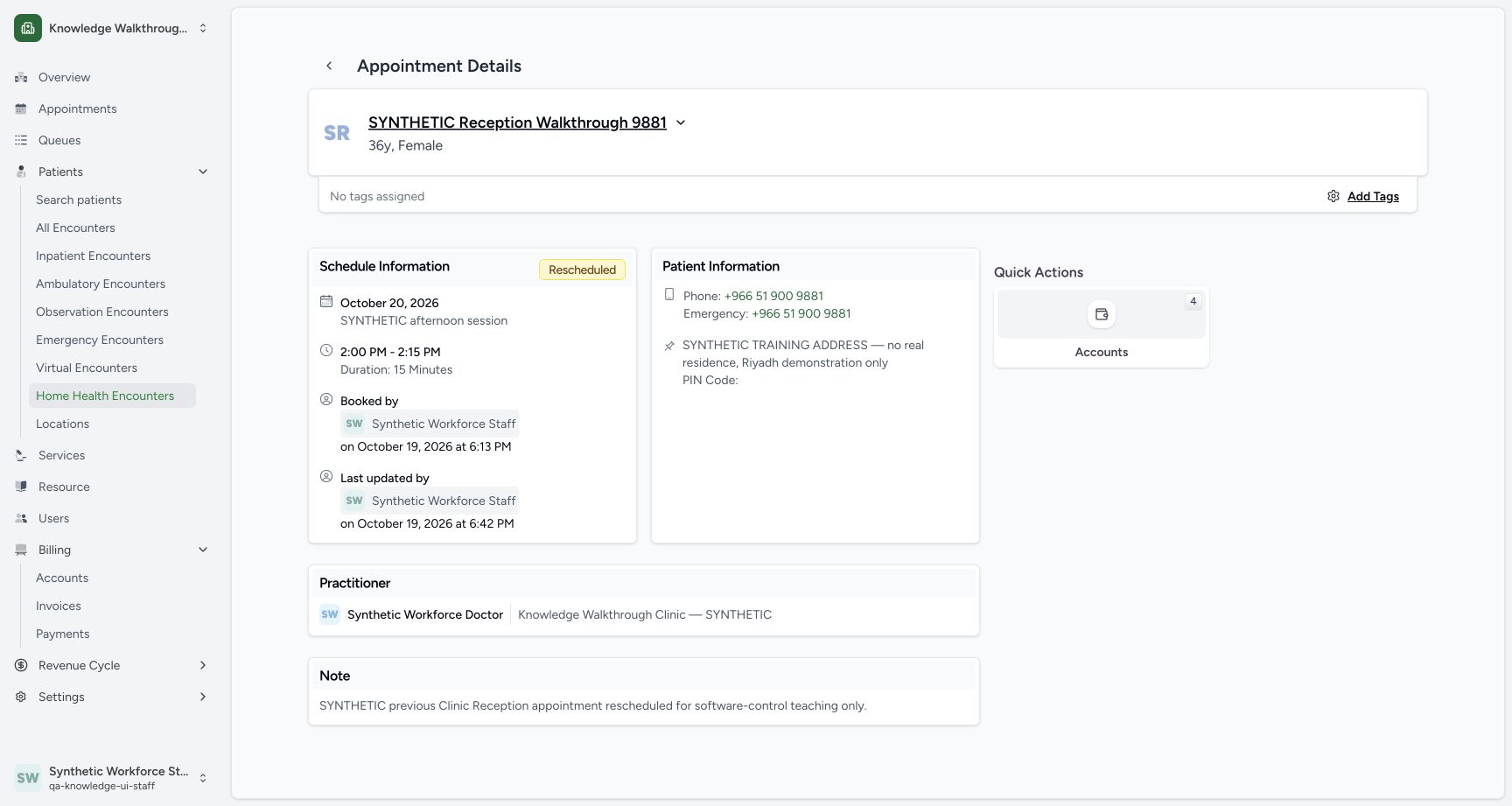
123Verify the retained original appointment
Capture details
Exact committed 3dfb source, existing non-superuser Clinic Staff and synthetic Reception patient. One approved reschedule saved a distinct replacement; the original remains in history. The cancellation warning was left with neutral Cancel. No cancellation, attendance, care, token, payment, grant or configuration change is demonstrated. Delivery providers are disabled in this isolated fixture.
Image SHA-256 e1cc15b57e9bd257afeeeb1f86ec0c1691d5d8684a51e216a201c346affa2630
- Original Rescheduled status: The original 2:00 PM appointment remains in history as Rescheduled.
- Saved previous appointment note: The previous record now carries the exact reviewed previous-booking note.
- Original update audit: Read the actual updater and updated time below this label.
11 of 11 content blocks have reviewed image alignment. Missing overview or prerequisite images remain open.
Before you begin
- Use an already authenticated authorized Staff session in the assigned fictional Clinic. Verify the existing synthetic Reception patient ending 9881 and Synthetic Workforce Doctor. These examples use 20 October 2026 in Asia/Riyadh UTC+03: 14:00–14:15 is 11:00–11:15 UTC and 14:15–14:30 is 11:15–11:30 UTC. The pictures do not print a timezone, so confirm the configured scheduling/browser date context. Other timezone combinations remain unverified.
 1
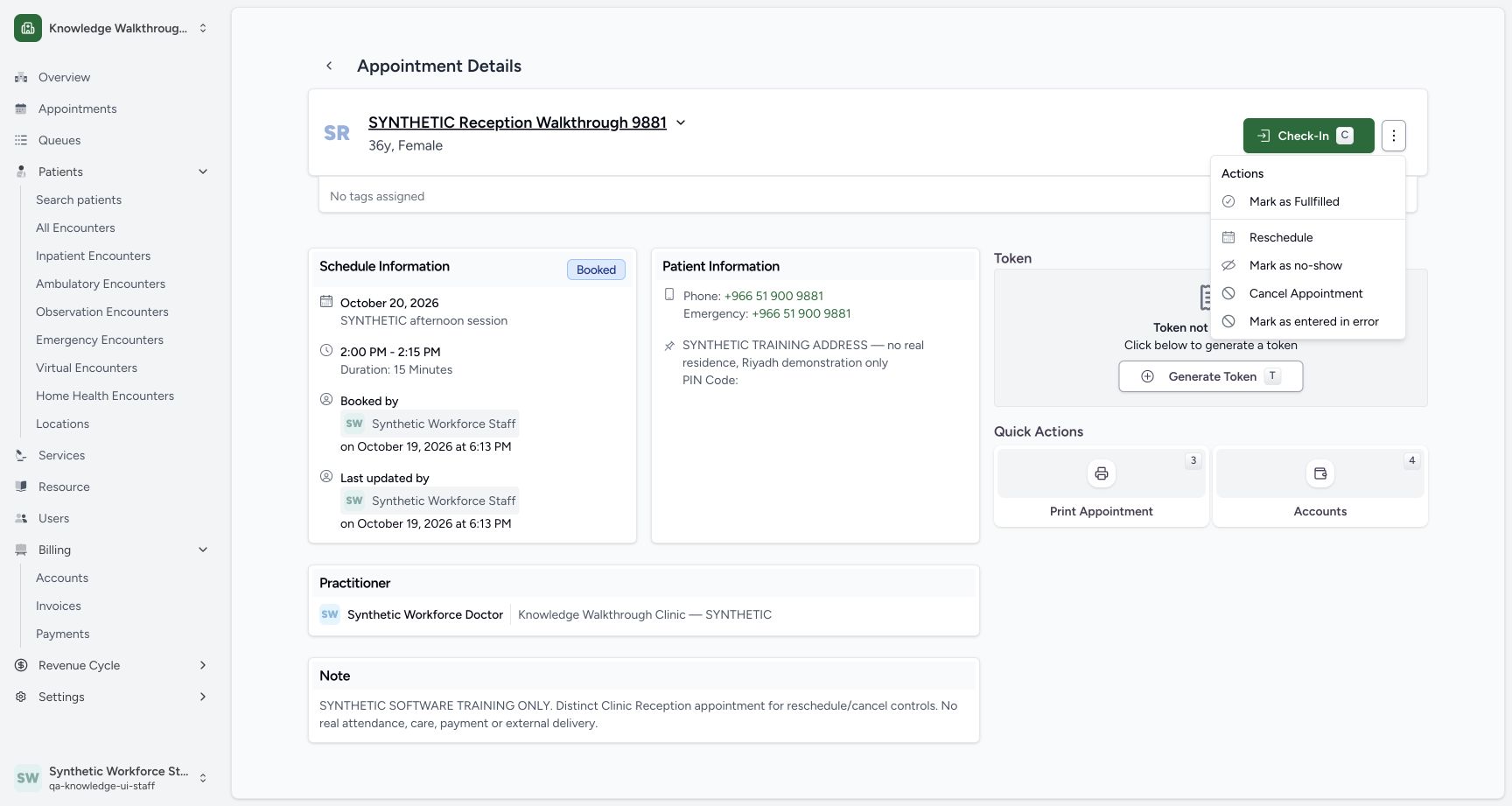
1Recorded release 3dfb7c9f · 2026-10-19T15:32:06.579Z · 1728 × 921 Open Reschedule on the saved appointment
Capture details
Exact committed 3dfb source, existing non-superuser Clinic Staff and synthetic Reception patient. One approved reschedule saved a distinct replacement; the original remains in history. The cancellation warning was left with neutral Cancel. No cancellation, attendance, care, token, payment, grant or configuration change is demonstrated. Delivery providers are disabled in this isolated fixture.
Image SHA-256
96cc307ffabaa3d0648b7e35bdaf2538fc8fc169f7a3587a2e7b32f88c805580- Reschedule: Open the reschedule review for this saved Booked appointment.
 12
12Recorded release 3dfb7c9f · 2026-10-19T15:34:20.214Z · 1728 × 921 Review the previous appointment note
Capture details
Exact committed 3dfb source, existing non-superuser Clinic Staff and synthetic Reception patient. One approved reschedule saved a distinct replacement; the original remains in history. The cancellation warning was left with neutral Cancel. No cancellation, attendance, care, token, payment, grant or configuration change is demonstrated. Delivery providers are disabled in this isolated fixture.
Image SHA-256
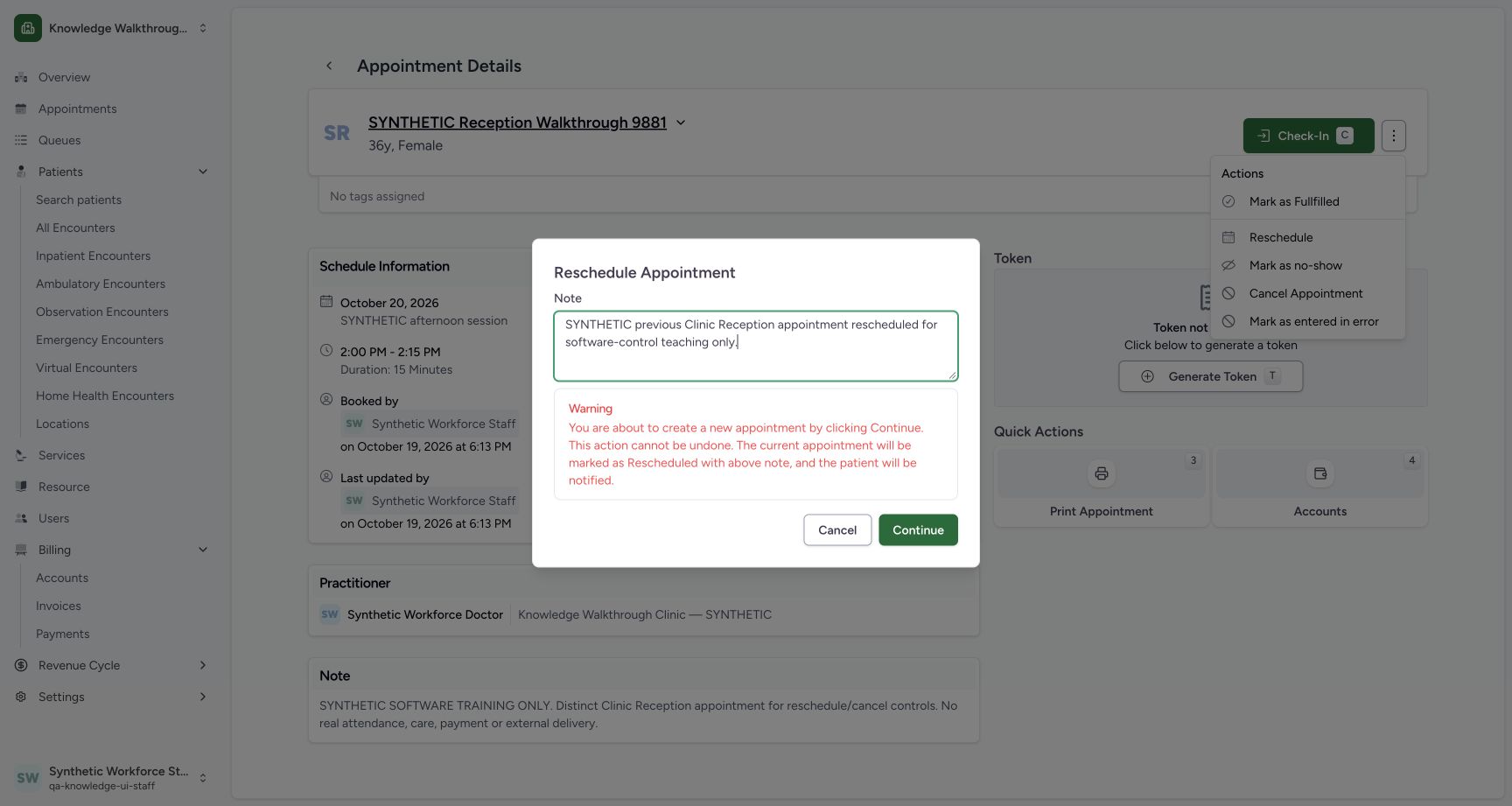
445563d0035af059b3a621f981d776c689d49b323051f211ab9dc1f909a7f025- Previous appointment note: This fictional note is intended for the previous appointment if rescheduling is later confirmed.
- Continue: Open the reschedule date and time sheet for review.
1. Review the note for the previous appointment
In the saved appointment’s Reschedule warning, enter the clearly fictional previous-booking note. Read it before Continue. This note belongs to the retained original appointment if rescheduling succeeds.
12Review the previous appointment note
Capture details
Exact committed 3dfb source, existing non-superuser Clinic Staff and synthetic Reception patient. One approved reschedule saved a distinct replacement; the original remains in history. The cancellation warning was left with neutral Cancel. No cancellation, attendance, care, token, payment, grant or configuration change is demonstrated. Delivery providers are disabled in this isolated fixture.
Image SHA-256 445563d0035af059b3a621f981d776c689d49b323051f211ab9dc1f909a7f025
- Previous appointment note: This fictional note is intended for the previous appointment if rescheduling is later confirmed.
- Continue: Open the reschedule date and time sheet for review.
2. Review the replacement note and practitioner
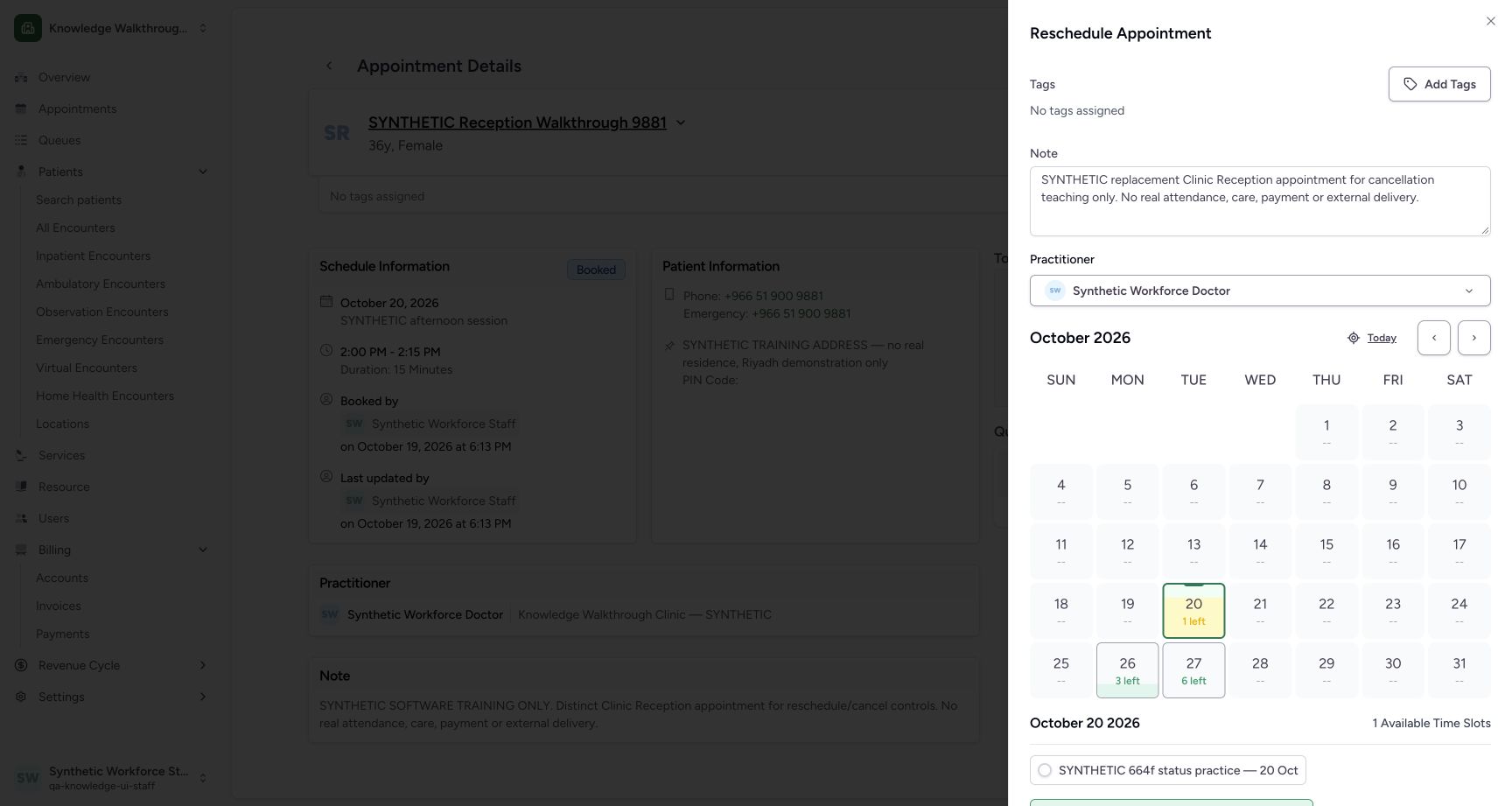
In the selection sheet, review the separate fictional replacement Note and the existing Synthetic Workforce Doctor. No tag is assigned. Preserve the intended practitioner while choosing a new time.
 123
123Review the complete replacement note and practitioner
Capture details
Exact committed 3dfb source, existing non-superuser Clinic Staff and synthetic Reception patient. One approved reschedule saved a distinct replacement; the original remains in history. The cancellation warning was left with neutral Cancel. No cancellation, attendance, care, token, payment, grant or configuration change is demonstrated. Delivery providers are disabled in this isolated fixture.
Image SHA-256 c8bb735e6b2cdd4dc19d9fd4a66b1a9e3d22ff80d6dc8bcf1b8275b26cf50bb2
- Complete replacement note: Review the explicit fictional replacement reason. This is distinct from the previous appointment note.
- Existing practitioner: The intended existing Synthetic Workforce Doctor remains selected.
- 20 October: The intended date remains 20 October 2026.
3. Choose the intended date and schedule
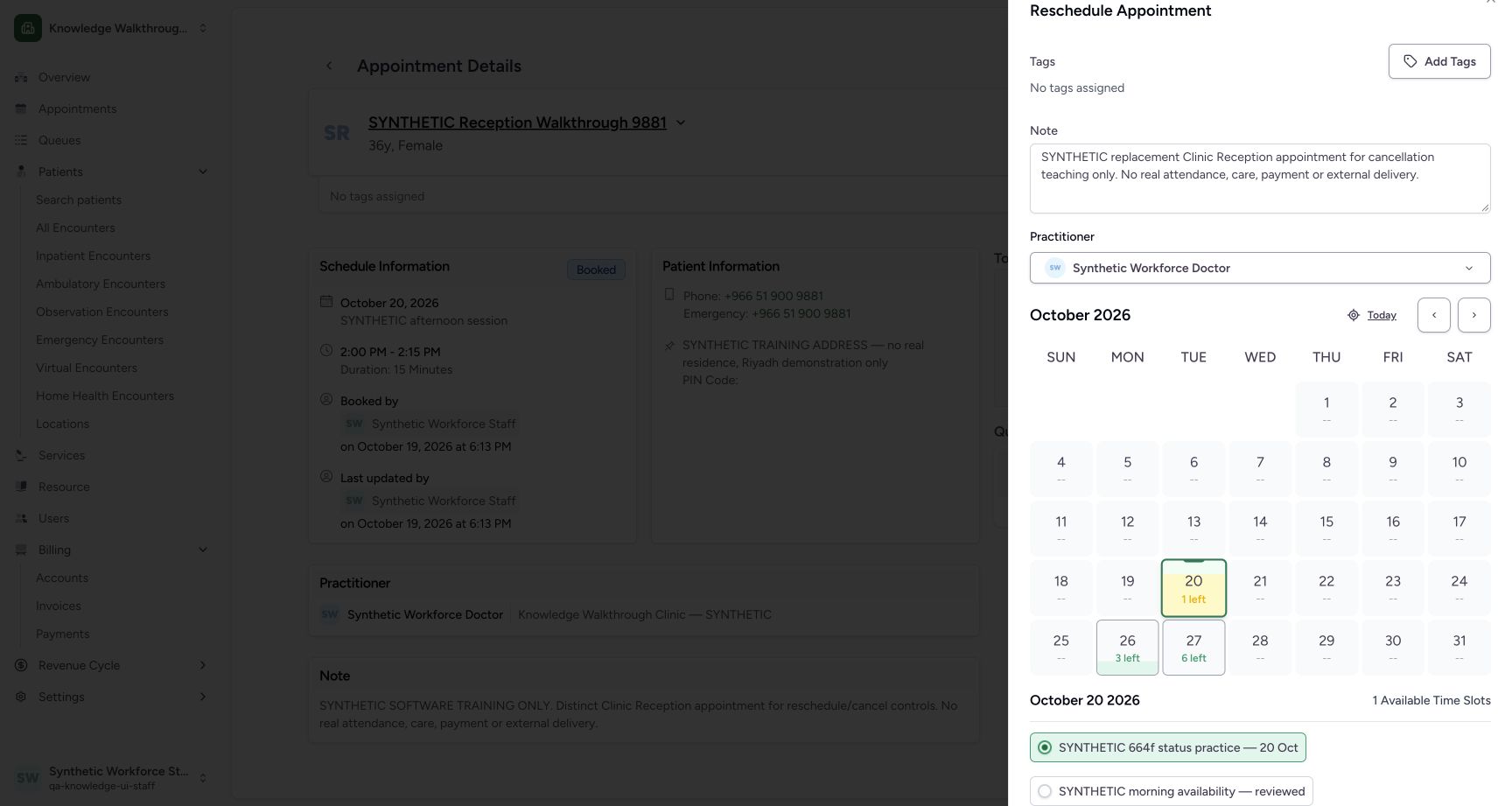
Select 20 October. The day has one available time, but a different schedule is initially checked. Choose SYNTHETIC morning availability — reviewed to display its existing 14:15 option.
 12
12Choose the intended existing schedule
Capture details
Exact committed 3dfb source, existing non-superuser Clinic Staff and synthetic Reception patient. One approved reschedule saved a distinct replacement; the original remains in history. The cancellation warning was left with neutral Cancel. No cancellation, attendance, care, token, payment, grant or configuration change is demonstrated. Delivery providers are disabled in this isolated fixture.
Image SHA-256 0949866205c0500eca57f5718d923c22ebb106ea4a4b1d55f7c6947c25507554
- Reviewed morning schedule: Select the existing schedule containing the intended 14:15 replacement time.
- Initially checked schedule: The initial checked schedule is different; review the intended schedule before selecting a time.
123Review the selected 14:15 replacement before saving
Capture details
Exact committed 3dfb source, existing non-superuser Clinic Staff and synthetic Reception patient. One approved reschedule saved a distinct replacement; the original remains in history. The cancellation warning was left with neutral Cancel. No cancellation, attendance, care, token, payment, grant or configuration change is demonstrated. Delivery providers are disabled in this isolated fixture.
Image SHA-256 11884b772819e656a650fffff2c3899cff0d7923b2a9a8c6e73501a495a014b4
- Selected 14:15: Verify the intended existing replacement time remains selected.
- Reschedule: After reviewing the intended patient, previous note, replacement note, date and time, save the reschedule once.
- Cancel: Leave the replacement draft without saving.
4. Verify the selected replacement time
The 14:15 option is filled green and shows 1 left. It became selected automatically when the intended schedule was chosen in this example. Check the actual green selection rather than clicking an already selected option again.
123Review the selected 14:15 replacement before saving
Capture details
Exact committed 3dfb source, existing non-superuser Clinic Staff and synthetic Reception patient. One approved reschedule saved a distinct replacement; the original remains in history. The cancellation warning was left with neutral Cancel. No cancellation, attendance, care, token, payment, grant or configuration change is demonstrated. Delivery providers are disabled in this isolated fixture.
Image SHA-256 11884b772819e656a650fffff2c3899cff0d7923b2a9a8c6e73501a495a014b4
- Selected 14:15: Verify the intended existing replacement time remains selected.
- Reschedule: After reviewing the intended patient, previous note, replacement note, date and time, save the reschedule once.
- Cancel: Leave the replacement draft without saving.
5. Save the reviewed reschedule once
Review the intended patient, previous-booking note, replacement note, date and selected time. Choose Reschedule once. If the outcome is unclear, read the saved records before attempting another save.
12Review the previous appointment note
Capture details
Exact committed 3dfb source, existing non-superuser Clinic Staff and synthetic Reception patient. One approved reschedule saved a distinct replacement; the original remains in history. The cancellation warning was left with neutral Cancel. No cancellation, attendance, care, token, payment, grant or configuration change is demonstrated. Delivery providers are disabled in this isolated fixture.
Image SHA-256 445563d0035af059b3a621f981d776c689d49b323051f211ab9dc1f909a7f025
- Previous appointment note: This fictional note is intended for the previous appointment if rescheduling is later confirmed.
- Continue: Open the reschedule date and time sheet for review.
123Review the complete replacement note and practitioner
Capture details
Exact committed 3dfb source, existing non-superuser Clinic Staff and synthetic Reception patient. One approved reschedule saved a distinct replacement; the original remains in history. The cancellation warning was left with neutral Cancel. No cancellation, attendance, care, token, payment, grant or configuration change is demonstrated. Delivery providers are disabled in this isolated fixture.
Image SHA-256 c8bb735e6b2cdd4dc19d9fd4a66b1a9e3d22ff80d6dc8bcf1b8275b26cf50bb2
- Complete replacement note: Review the explicit fictional replacement reason. This is distinct from the previous appointment note.
- Existing practitioner: The intended existing Synthetic Workforce Doctor remains selected.
- 20 October: The intended date remains 20 October 2026.
123Review the selected 14:15 replacement before saving
Capture details
Exact committed 3dfb source, existing non-superuser Clinic Staff and synthetic Reception patient. One approved reschedule saved a distinct replacement; the original remains in history. The cancellation warning was left with neutral Cancel. No cancellation, attendance, care, token, payment, grant or configuration change is demonstrated. Delivery providers are disabled in this isolated fixture.
Image SHA-256 11884b772819e656a650fffff2c3899cff0d7923b2a9a8c6e73501a495a014b4
- Selected 14:15: Verify the intended existing replacement time remains selected.
- Reschedule: After reviewing the intended patient, previous note, replacement note, date and time, save the reschedule once.
- Cancel: Leave the replacement draft without saving.
6. Verify the new replacement appointment
The resulting detail is a new saved appointment for the same patient and Doctor. Verify Booked, 20 October, 2:15 PM–2:30 PM, the complete replacement note and actual Staff audit. Token not generated remains visible.
1234Verify the saved replacement appointment
Capture details
Exact committed 3dfb source, existing non-superuser Clinic Staff and synthetic Reception patient. One approved reschedule saved a distinct replacement; the original remains in history. The cancellation warning was left with neutral Cancel. No cancellation, attendance, care, token, payment, grant or configuration change is demonstrated. Delivery providers are disabled in this isolated fixture.
Image SHA-256 96f20c522a6555118dea44d857fefa3087361d5d9abb3ddea6b60489c2204a35
- Replacement Booked: The new replacement appointment is saved as Booked.
- Saved 20 October date: The replacement keeps the intended date; its nearby time is 2:15 PM–2:30 PM.
- Saved replacement reason: Verify the complete replacement note on this new record.
- Token not generated: No token is generated by this reschedule.
7. Verify the retained original record
Open the original appointment and verify Rescheduled, the original 2:00 PM–2:15 PM time and the reviewed previous-booking note. The original Booked by time is retained; Last updated by shows the reschedule update.
123Verify the retained original appointment
Capture details
Exact committed 3dfb source, existing non-superuser Clinic Staff and synthetic Reception patient. One approved reschedule saved a distinct replacement; the original remains in history. The cancellation warning was left with neutral Cancel. No cancellation, attendance, care, token, payment, grant or configuration change is demonstrated. Delivery providers are disabled in this isolated fixture.
Image SHA-256 e1cc15b57e9bd257afeeeb1f86ec0c1691d5d8684a51e216a201c346affa2630
- Original Rescheduled status: The original 2:00 PM appointment remains in history as Rescheduled.
- Saved previous appointment note: The previous record now carries the exact reviewed previous-booking note.
- Original update audit: Read the actual updater and updated time below this label.
The two notes belong to different records
The previous-booking note appears on the retained Rescheduled original. The replacement note appears on the new Booked appointment. Compare both saved records to avoid mistaking one for the other.
12Review the previous appointment note
Capture details
Exact committed 3dfb source, existing non-superuser Clinic Staff and synthetic Reception patient. One approved reschedule saved a distinct replacement; the original remains in history. The cancellation warning was left with neutral Cancel. No cancellation, attendance, care, token, payment, grant or configuration change is demonstrated. Delivery providers are disabled in this isolated fixture.
Image SHA-256 445563d0035af059b3a621f981d776c689d49b323051f211ab9dc1f909a7f025
- Previous appointment note: This fictional note is intended for the previous appointment if rescheduling is later confirmed.
- Continue: Open the reschedule date and time sheet for review.
1234Verify the saved replacement appointment
Capture details
Exact committed 3dfb source, existing non-superuser Clinic Staff and synthetic Reception patient. One approved reschedule saved a distinct replacement; the original remains in history. The cancellation warning was left with neutral Cancel. No cancellation, attendance, care, token, payment, grant or configuration change is demonstrated. Delivery providers are disabled in this isolated fixture.
Image SHA-256 96f20c522a6555118dea44d857fefa3087361d5d9abb3ddea6b60489c2204a35
- Replacement Booked: The new replacement appointment is saved as Booked.
- Saved 20 October date: The replacement keeps the intended date; its nearby time is 2:15 PM–2:30 PM.
- Saved replacement reason: Verify the complete replacement note on this new record.
- Token not generated: No token is generated by this reschedule.
123Verify the retained original appointment
Capture details
Exact committed 3dfb source, existing non-superuser Clinic Staff and synthetic Reception patient. One approved reschedule saved a distinct replacement; the original remains in history. The cancellation warning was left with neutral Cancel. No cancellation, attendance, care, token, payment, grant or configuration change is demonstrated. Delivery providers are disabled in this isolated fixture.
Image SHA-256 e1cc15b57e9bd257afeeeb1f86ec0c1691d5d8684a51e216a201c346affa2630
- Original Rescheduled status: The original 2:00 PM appointment remains in history as Rescheduled.
- Saved previous appointment note: The previous record now carries the exact reviewed previous-booking note.
- Original update audit: Read the actual updater and updated time below this label.
A saved reschedule is separate from cancellation
The replacement is Booked. Rescheduling did not check in the patient, generate a token or provide care. Opening a later cancellation warning is a separate review; it does not establish that cancellation has been saved.
1234Verify the saved replacement appointment
Capture details
Exact committed 3dfb source, existing non-superuser Clinic Staff and synthetic Reception patient. One approved reschedule saved a distinct replacement; the original remains in history. The cancellation warning was left with neutral Cancel. No cancellation, attendance, care, token, payment, grant or configuration change is demonstrated. Delivery providers are disabled in this isolated fixture.
Image SHA-256 96f20c522a6555118dea44d857fefa3087361d5d9abb3ddea6b60489c2204a35
- Replacement Booked: The new replacement appointment is saved as Booked.
- Saved 20 October date: The replacement keeps the intended date; its nearby time is 2:15 PM–2:30 PM.
- Saved replacement reason: Verify the complete replacement note on this new record.
- Token not generated: No token is generated by this reschedule.
Source evidence
Every citation uses this exact committed version. The private source repository requires access.
- repositories/platform/mansoq-web/src/pages/Appointments/AppointmentDetail.tsx:913 ·
3dfb7c9f519fb5b4cd4452439f3c12346bf58319Source file checksum
8fc77ee6f1f7b145e2987ba272e80f35631e17907ea91cd305738250b137b839 - repositories/platform/mansoq-web/src/pages/Appointments/AppointmentDetail.tsx:1006 ·
3dfb7c9f519fb5b4cd4452439f3c12346bf58319Source file checksum
8fc77ee6f1f7b145e2987ba272e80f35631e17907ea91cd305738250b137b839 - repositories/platform/mansoq-web/src/pages/Appointments/AppointmentDetail.tsx:1023 ·
3dfb7c9f519fb5b4cd4452439f3c12346bf58319Source file checksum
8fc77ee6f1f7b145e2987ba272e80f35631e17907ea91cd305738250b137b839 - repositories/platform/mansoq-web/src/pages/Appointments/AppointmentDetail.tsx:1041 ·
3dfb7c9f519fb5b4cd4452439f3c12346bf58319Source file checksum
8fc77ee6f1f7b145e2987ba272e80f35631e17907ea91cd305738250b137b839 - repositories/platform/mansoq-web/src/pages/Appointments/AppointmentDetail.tsx:1047 ·
3dfb7c9f519fb5b4cd4452439f3c12346bf58319Source file checksum
8fc77ee6f1f7b145e2987ba272e80f35631e17907ea91cd305738250b137b839 - repositories/platform/mansoq-web/src/pages/Appointments/AppointmentDetail.tsx:1094 ·
3dfb7c9f519fb5b4cd4452439f3c12346bf58319Source file checksum
8fc77ee6f1f7b145e2987ba272e80f35631e17907ea91cd305738250b137b839 - repositories/platform/mansoq-web/src/pages/Appointments/AppointmentDetail.tsx:1147 ·
3dfb7c9f519fb5b4cd4452439f3c12346bf58319Source file checksum
8fc77ee6f1f7b145e2987ba272e80f35631e17907ea91cd305738250b137b839 - repositories/platform/mansoq-web/src/pages/Appointments/AppointmentDetail.tsx:1156 ·
3dfb7c9f519fb5b4cd4452439f3c12346bf58319Source file checksum
8fc77ee6f1f7b145e2987ba272e80f35631e17907ea91cd305738250b137b839 - repositories/platform/mansoq-web/src/pages/Appointments/AppointmentDetail.tsx:1227 ·
3dfb7c9f519fb5b4cd4452439f3c12346bf58319Source file checksum
8fc77ee6f1f7b145e2987ba272e80f35631e17907ea91cd305738250b137b839 - repositories/platform/mansoq-web/src/pages/Appointments/BookAppointment/AppointmentDateSelection.tsx:42 ·
3dfb7c9f519fb5b4cd4452439f3c12346bf58319Source file checksum
074e85911458d3e6756aa3510707e85a086dd5ce5f370e69adc4306355efb42f - repositories/platform/mansoq-web/src/pages/Appointments/BookAppointment/AppointmentSlotPicker.tsx:49 ·
3dfb7c9f519fb5b4cd4452439f3c12346bf58319Source file checksum
d2211acfcae4cf531e0b30aad5c9141c71caaaed7f04cc9dad2b32750f0ef1cc - repositories/platform/mansoq-web/src/pages/Appointments/BookAppointment/AppointmentSlotPicker.tsx:61 ·
3dfb7c9f519fb5b4cd4452439f3c12346bf58319Source file checksum
d2211acfcae4cf531e0b30aad5c9141c71caaaed7f04cc9dad2b32750f0ef1cc - repositories/platform/mansoq-web/src/types/scheduling/scheduleApi.ts:164 ·
3dfb7c9f519fb5b4cd4452439f3c12346bf58319Source file checksum
09bef9454cad793d68a19beeffa4db57fbb9b56f70577abbcaf3dc70fd30ed51 - repositories/platform/mansoq-core/mansoq/emr/api/viewsets/scheduling/booking.py:179 ·
3dfb7c9f519fb5b4cd4452439f3c12346bf58319Source file checksum
b648e5cd1211dcb659ba74969e4efbce3ff31ae65eef3a9a756ec3a34c782d5b - repositories/platform/mansoq-core/mansoq/emr/api/viewsets/scheduling/booking.py:212 ·
3dfb7c9f519fb5b4cd4452439f3c12346bf58319Source file checksum
b648e5cd1211dcb659ba74969e4efbce3ff31ae65eef3a9a756ec3a34c782d5b - repositories/platform/mansoq-core/mansoq/emr/signals/patient/facility_name_identifier.py:37 ·
3dfb7c9f519fb5b4cd4452439f3c12346bf58319Source file checksum
dd72b45263ce4c61a552f3d461eba4b4cd49ac295e2b31c9e2e5a84c11e26c34