 MANSOQ
 Appointments and registration handoff · VERSION 3dfb7c9f
Review rescheduling and leave the original appointment unchanged
Inspect the warning, distinguish the previous and replacement notes, then use Cancel to keep the saved appointment.
Staff
 1
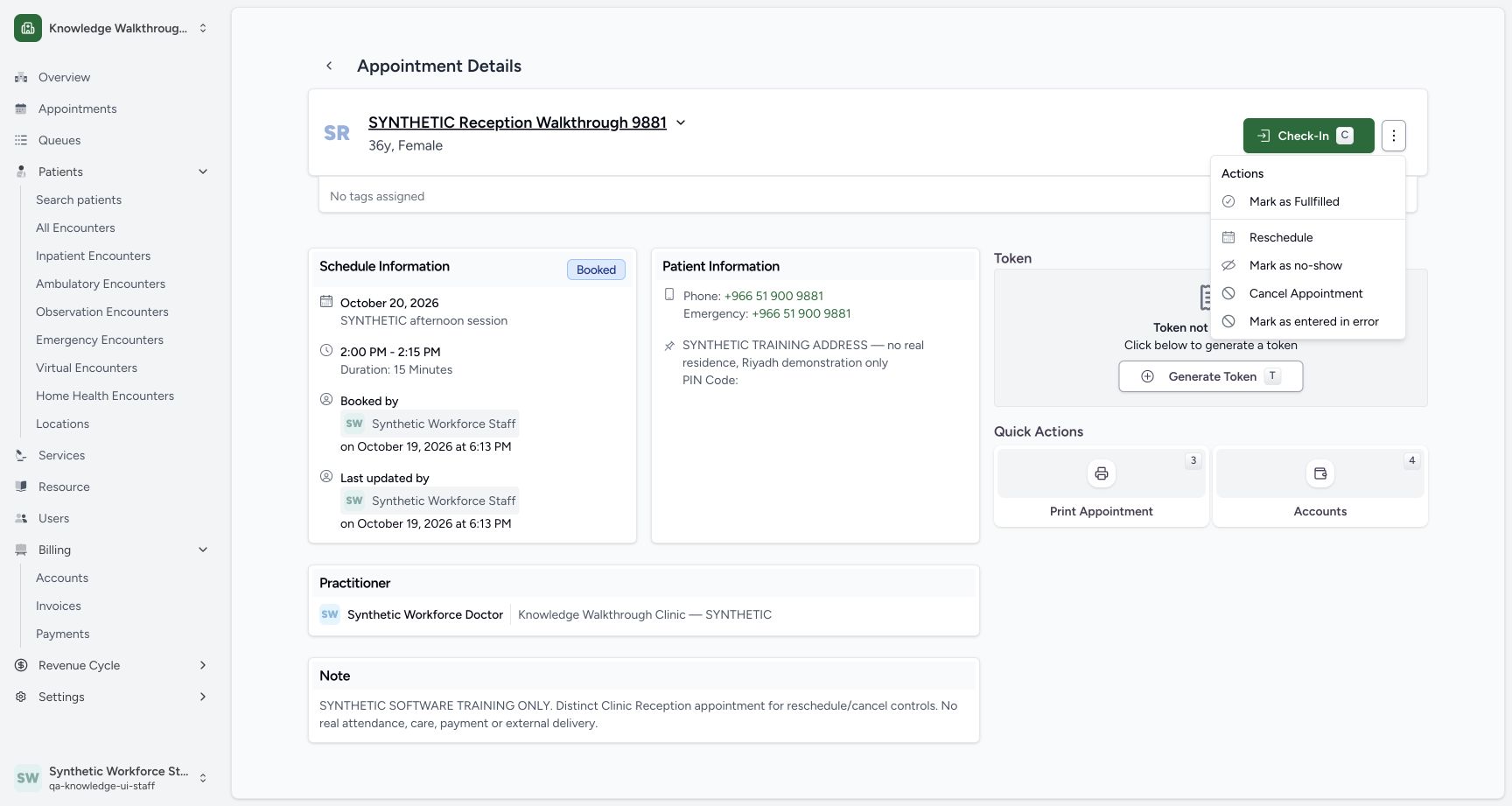
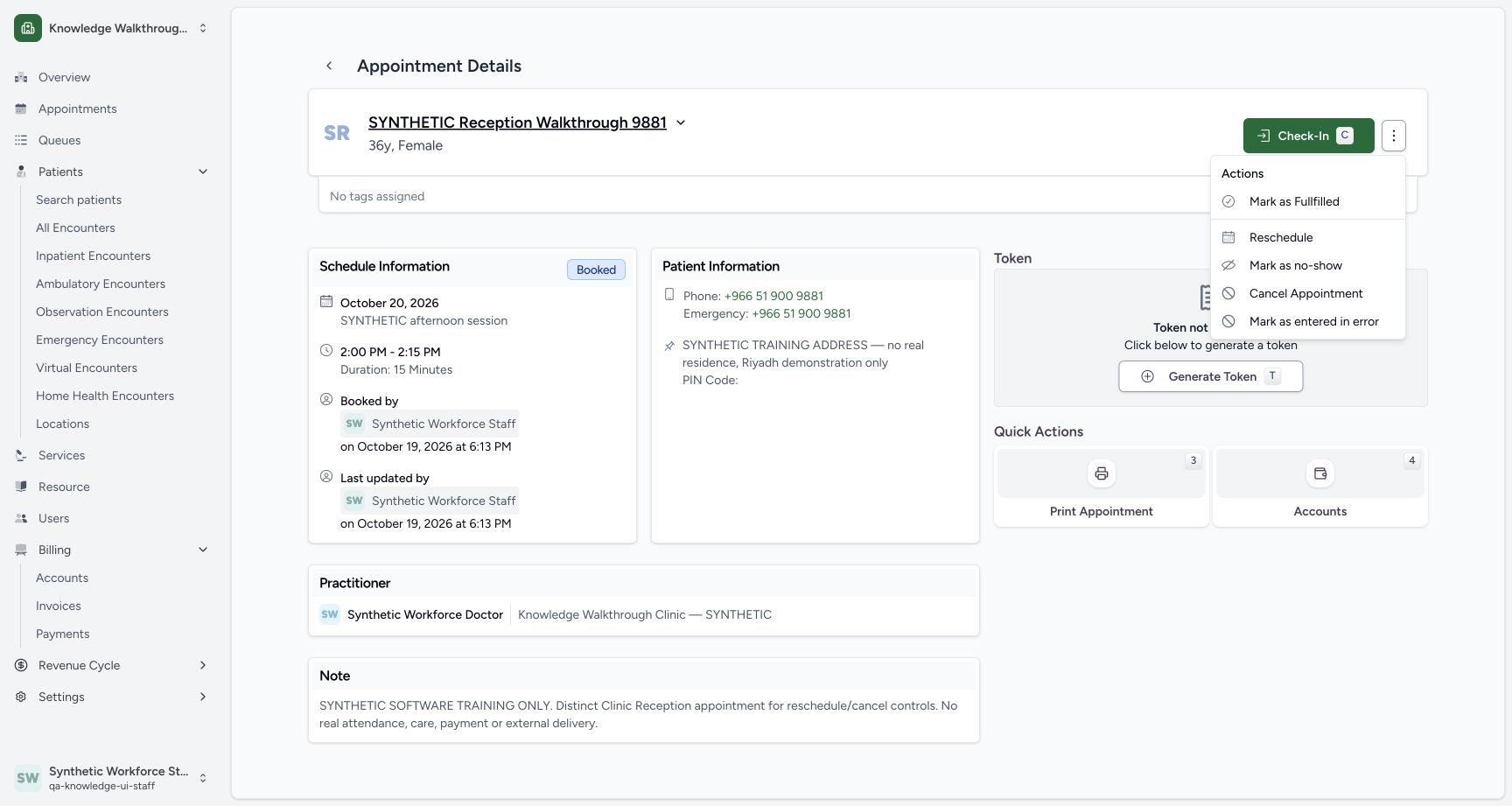
1Open Reschedule on the saved appointment
Capture details
Exact committed 3dfb source, existing non-superuser Clinic Staff and synthetic Reception patient. One approved reschedule saved a distinct replacement; the original remains in history. The cancellation warning was left with neutral Cancel. No cancellation, attendance, care, token, payment, grant or configuration change is demonstrated. Delivery providers are disabled in this isolated fixture.
Image SHA-256 96cc307ffabaa3d0648b7e35bdaf2538fc8fc169f7a3587a2e7b32f88c805580
- Reschedule: Open the reschedule review for this saved Booked appointment.
 1234
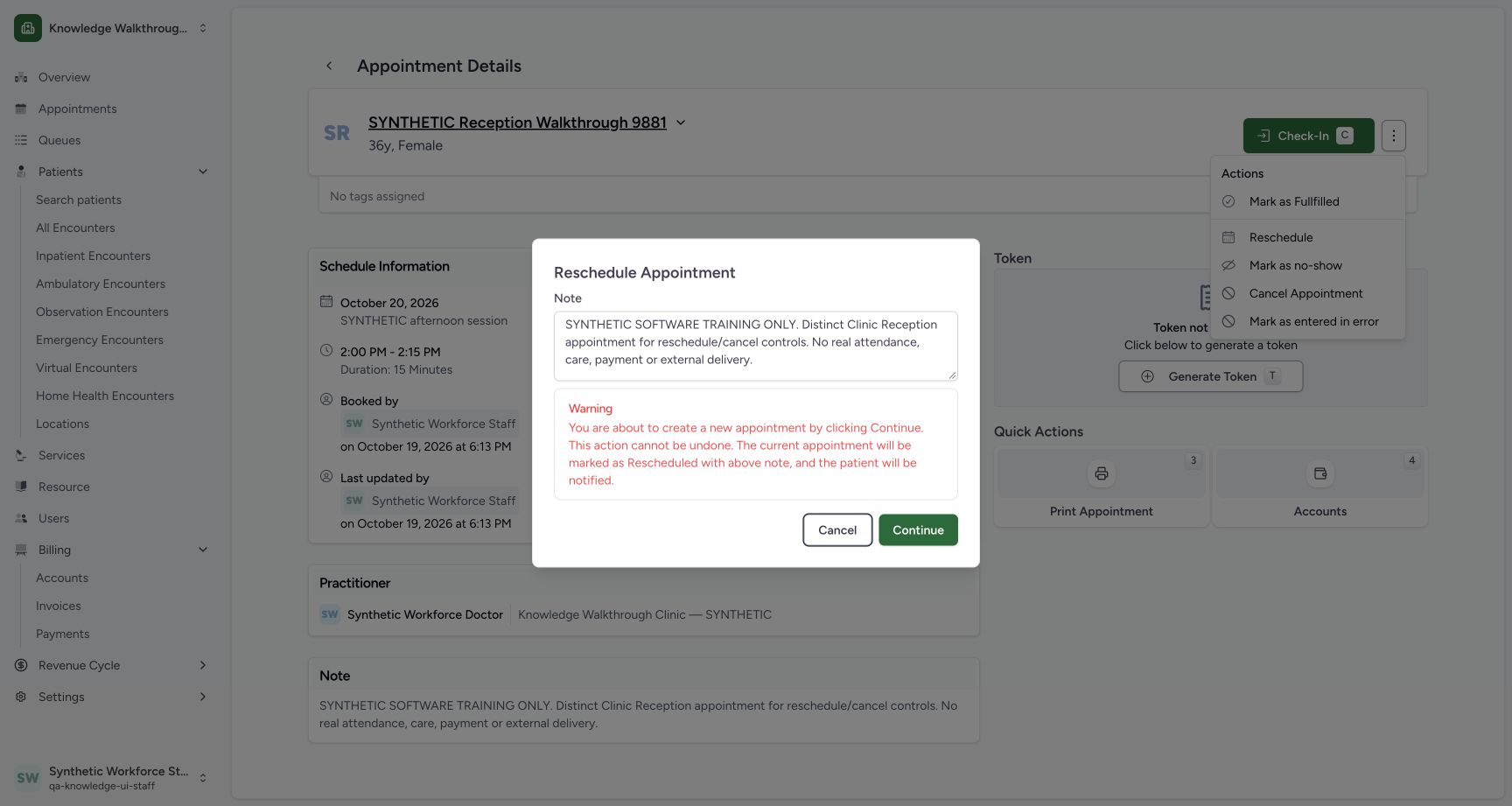
1234Review the reschedule warning before Cancel
Capture details
Exact committed 3dfb source, existing non-superuser Clinic Staff and synthetic Reception patient. One approved reschedule saved a distinct replacement; the original remains in history. The cancellation warning was left with neutral Cancel. No cancellation, attendance, care, token, payment, grant or configuration change is demonstrated. Delivery providers are disabled in this isolated fixture.
Image SHA-256 c98e3021ffcc6614d78ab1c96d665ec2fc32cd0a4d377e04631565e798130952
- Previous appointment note: Review the note that would be retained on the previous appointment.
- Reschedule warning: Read the visible warning before choosing whether to continue.
- Cancel: Close this warning without rescheduling the appointment.
- Continue: This opens the date and time selection sheet; no appointment is saved by this step alone.
 12
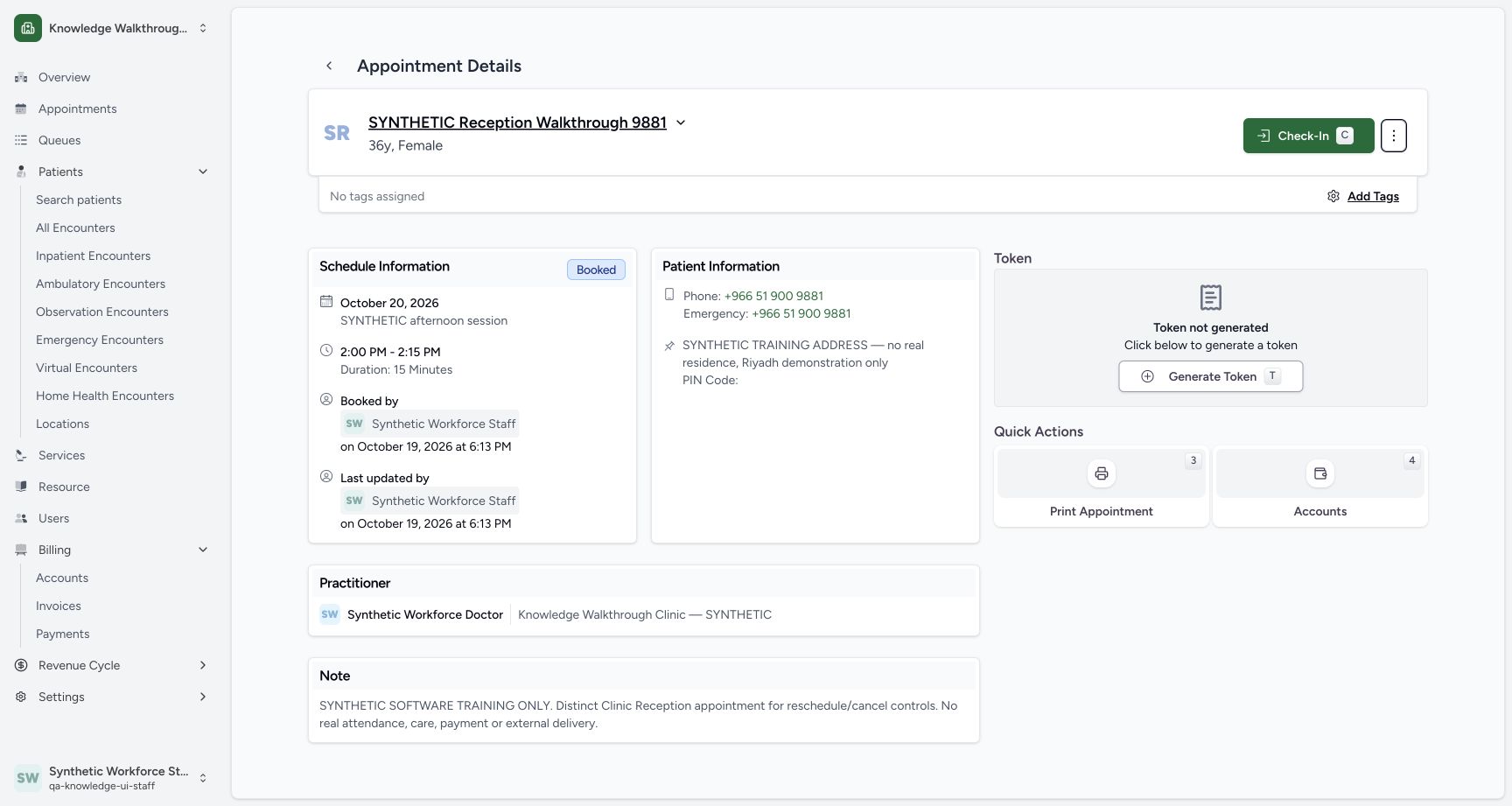
12Verify the original booking after Cancel
Capture details
Exact committed 3dfb source, existing non-superuser Clinic Staff and synthetic Reception patient. One approved reschedule saved a distinct replacement; the original remains in history. The cancellation warning was left with neutral Cancel. No cancellation, attendance, care, token, payment, grant or configuration change is demonstrated. Delivery providers are disabled in this isolated fixture.
Image SHA-256 23856c0786f562511119f733c06a239cc816c50df82aef62190d148c3eaafe41
- Booked: The same appointment remains Booked after cancelling the warning.
- Original saved note: The complete original appointment note remains visible.
7 of 7 content blocks have reviewed image alignment. Missing overview or prerequisite images remain open.
Before you begin
- Use an already authenticated authorized Staff session in the assigned fictional Clinic. Verify the existing synthetic Reception patient ending 9881 and Synthetic Workforce Doctor. These examples use 20 October 2026 in Asia/Riyadh UTC+03: 14:00–14:15 is 11:00–11:15 UTC and 14:15–14:30 is 11:15–11:30 UTC. The pictures do not print a timezone, so confirm the configured scheduling/browser date context. Other timezone combinations remain unverified.1
Recorded release 3dfb7c9f · 2026-10-19T15:32:06.579Z · 1728 × 921 Open Reschedule on the saved appointment
Capture details
Exact committed 3dfb source, existing non-superuser Clinic Staff and synthetic Reception patient. One approved reschedule saved a distinct replacement; the original remains in history. The cancellation warning was left with neutral Cancel. No cancellation, attendance, care, token, payment, grant or configuration change is demonstrated. Delivery providers are disabled in this isolated fixture.
Image SHA-256
96cc307ffabaa3d0648b7e35bdaf2538fc8fc169f7a3587a2e7b32f88c805580- Reschedule: Open the reschedule review for this saved Booked appointment.
12Recorded release 3dfb7c9f · 2026-10-19T15:32:40.995Z · 1728 × 921 Verify the original booking after Cancel
Capture details
Exact committed 3dfb source, existing non-superuser Clinic Staff and synthetic Reception patient. One approved reschedule saved a distinct replacement; the original remains in history. The cancellation warning was left with neutral Cancel. No cancellation, attendance, care, token, payment, grant or configuration change is demonstrated. Delivery providers are disabled in this isolated fixture.
Image SHA-256
23856c0786f562511119f733c06a239cc816c50df82aef62190d148c3eaafe41- Booked: The same appointment remains Booked after cancelling the warning.
- Original saved note: The complete original appointment note remains visible.
1. Open the saved appointment’s Reschedule action
Verify the patient, original 20 October date, 2:00 PM–2:15 PM time and Booked status. Open the action menu beside Check-In and choose Reschedule.
1Open Reschedule on the saved appointment
Capture details
Exact committed 3dfb source, existing non-superuser Clinic Staff and synthetic Reception patient. One approved reschedule saved a distinct replacement; the original remains in history. The cancellation warning was left with neutral Cancel. No cancellation, attendance, care, token, payment, grant or configuration change is demonstrated. Delivery providers are disabled in this isolated fixture.
Image SHA-256 96cc307ffabaa3d0648b7e35bdaf2538fc8fc169f7a3587a2e7b32f88c805580
- Reschedule: Open the reschedule review for this saved Booked appointment.
2. Read the warning and choose Cancel
The warning loads the existing saved note and describes the consequence of rescheduling. Choose the neutral Cancel button to leave the warning. Do not confuse this Cancel with Cancel Appointment in the action menu.
1234Review the reschedule warning before Cancel
Capture details
Exact committed 3dfb source, existing non-superuser Clinic Staff and synthetic Reception patient. One approved reschedule saved a distinct replacement; the original remains in history. The cancellation warning was left with neutral Cancel. No cancellation, attendance, care, token, payment, grant or configuration change is demonstrated. Delivery providers are disabled in this isolated fixture.
Image SHA-256 c98e3021ffcc6614d78ab1c96d665ec2fc32cd0a4d377e04631565e798130952
- Previous appointment note: Review the note that would be retained on the previous appointment.
- Reschedule warning: Read the visible warning before choosing whether to continue.
- Cancel: Close this warning without rescheduling the appointment.
- Continue: This opens the date and time selection sheet; no appointment is saved by this step alone.
3. Verify the original record is unchanged
The original appointment remains Booked with its complete original note. Its date, time and saved Staff audit remain unchanged after this Cancel.
12Verify the original booking after Cancel
Capture details
Exact committed 3dfb source, existing non-superuser Clinic Staff and synthetic Reception patient. One approved reschedule saved a distinct replacement; the original remains in history. The cancellation warning was left with neutral Cancel. No cancellation, attendance, care, token, payment, grant or configuration change is demonstrated. Delivery providers are disabled in this isolated fixture.
Image SHA-256 23856c0786f562511119f733c06a239cc816c50df82aef62190d148c3eaafe41
- Booked: The same appointment remains Booked after cancelling the warning.
- Original saved note: The complete original appointment note remains visible.
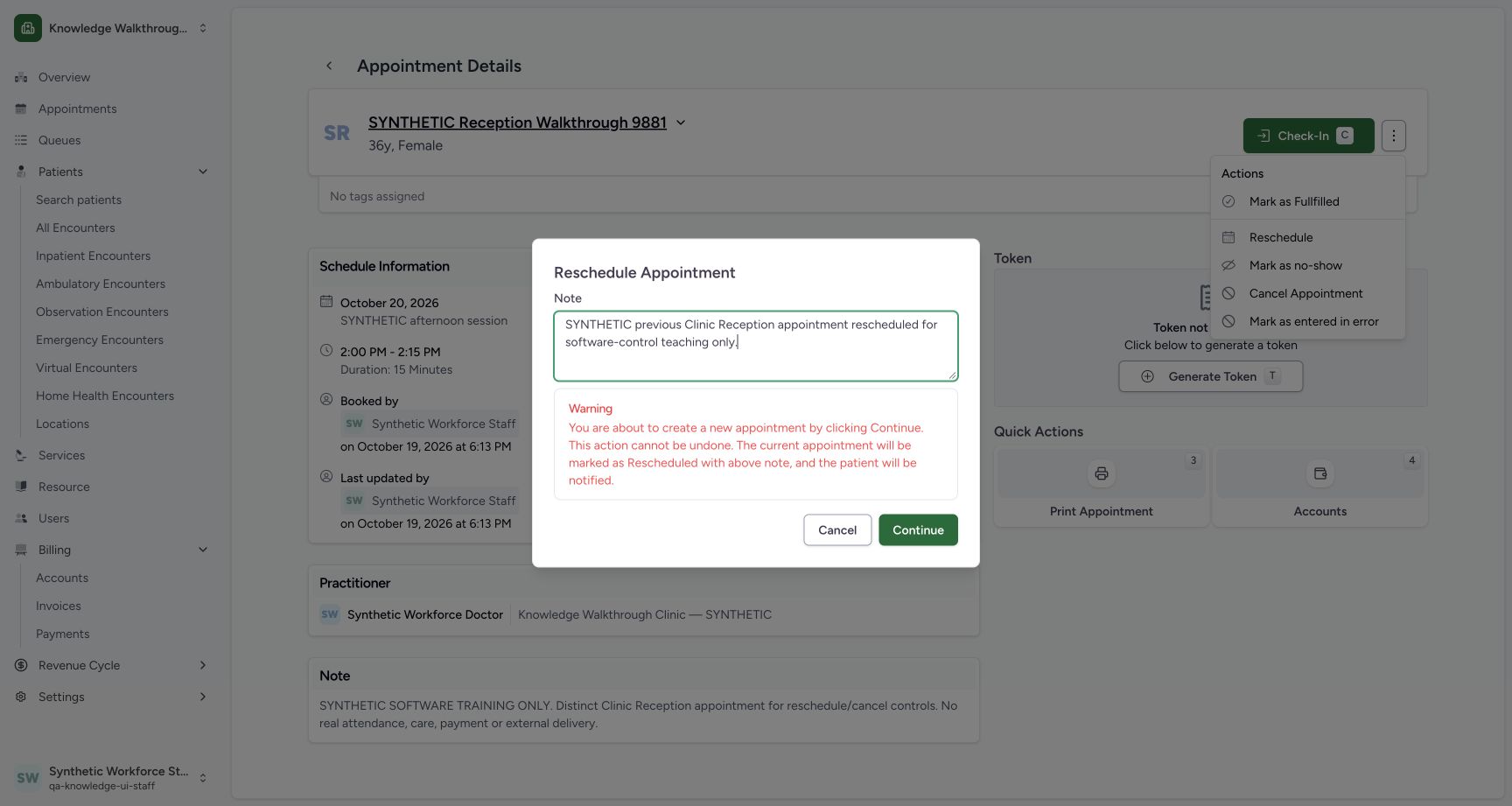
4. Review the selection sheet and leave without saving
Reopen Reschedule and review the proposed note for the previous appointment. Continue opens the replacement date and time sheet. The replacement Note is a separate field. With no replacement time selected, Reschedule is disabled. Choose Cancel in the sheet to leave without saving; the original record stays Booked.
 12
12Review the previous appointment note
Capture details
Exact committed 3dfb source, existing non-superuser Clinic Staff and synthetic Reception patient. One approved reschedule saved a distinct replacement; the original remains in history. The cancellation warning was left with neutral Cancel. No cancellation, attendance, care, token, payment, grant or configuration change is demonstrated. Delivery providers are disabled in this isolated fixture.
Image SHA-256 445563d0035af059b3a621f981d776c689d49b323051f211ab9dc1f909a7f025
- Previous appointment note: This fictional note is intended for the previous appointment if rescheduling is later confirmed.
- Continue: Open the reschedule date and time sheet for review.
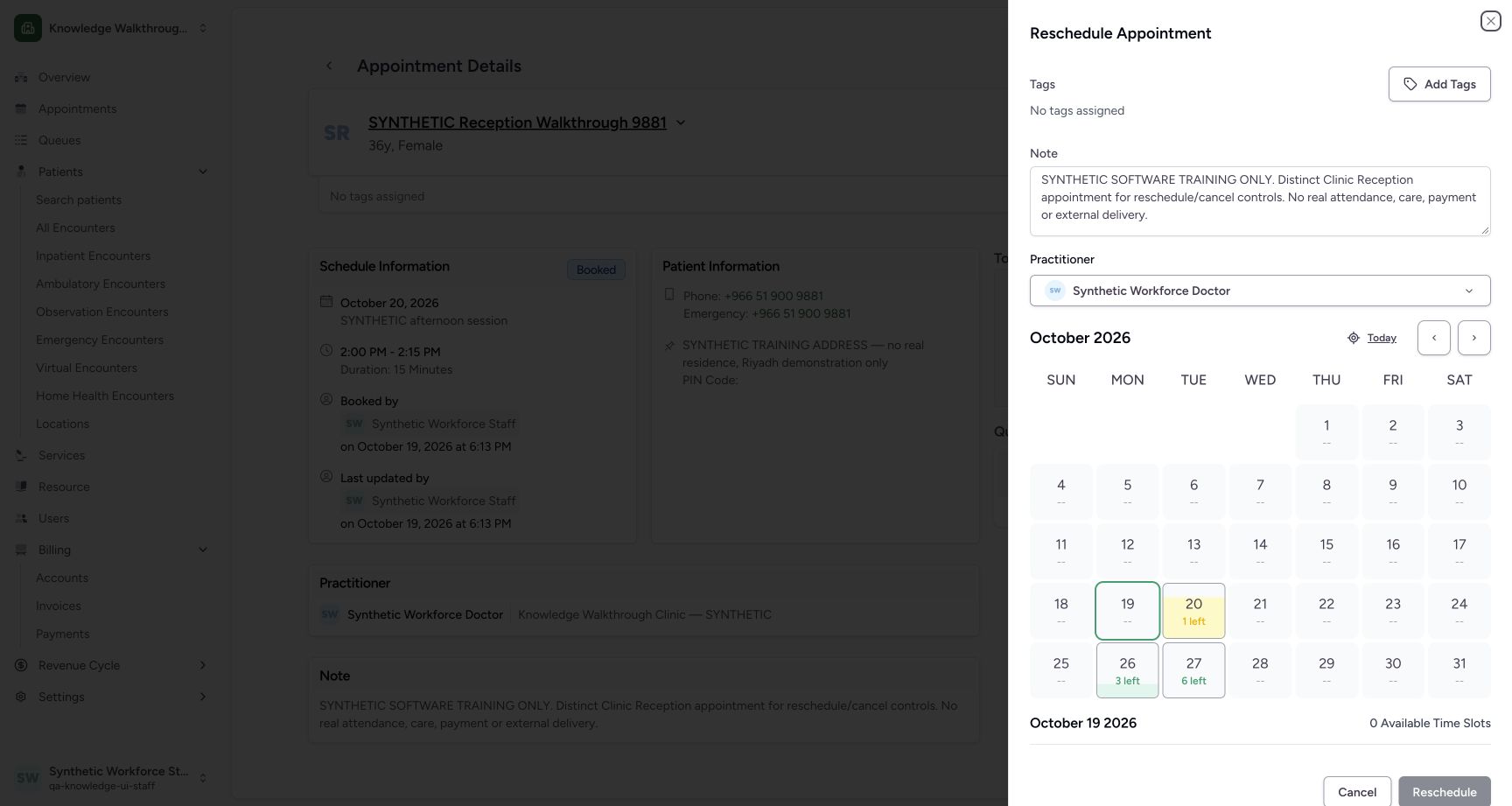 1234
1234Review the selection sheet before Cancel
Capture details
Exact committed 3dfb source, existing non-superuser Clinic Staff and synthetic Reception patient. One approved reschedule saved a distinct replacement; the original remains in history. The cancellation warning was left with neutral Cancel. No cancellation, attendance, care, token, payment, grant or configuration change is demonstrated. Delivery providers are disabled in this isolated fixture.
Image SHA-256 0de65fdb1b9298fc3a05fc4b32e74b155ae4ae2c0cbfeac83c54d7037cad5cce
- New appointment note: The replacement note is a separate field from the previous appointment note.
- 20 October, 1 left: An available future day is shown, but this review will close without choosing a time.
- Cancel: Close the selection sheet without saving a reschedule.
- Reschedule disabled: The save action is disabled while no replacement time is selected.
 12
12Verify the original after cancelling the selection sheet
Capture details
Exact committed 3dfb source, existing non-superuser Clinic Staff and synthetic Reception patient. One approved reschedule saved a distinct replacement; the original remains in history. The cancellation warning was left with neutral Cancel. No cancellation, attendance, care, token, payment, grant or configuration change is demonstrated. Delivery providers are disabled in this isolated fixture.
Image SHA-256 96cc307ffabaa3d0648b7e35bdaf2538fc8fc169f7a3587a2e7b32f88c805580
- Original Booked status: The saved appointment retains its original status after Cancel.
- Original saved reason: The saved note remains the complete original training reason.
Continue opens the next review
The warning text describes the reschedule consequence. In this observed flow, Continue opens the selection sheet; the later Reschedule button performs the save. Both warning Cancel and selection-sheet Cancel were independently checked without a business change.
1234Review the reschedule warning before Cancel
Capture details
Exact committed 3dfb source, existing non-superuser Clinic Staff and synthetic Reception patient. One approved reschedule saved a distinct replacement; the original remains in history. The cancellation warning was left with neutral Cancel. No cancellation, attendance, care, token, payment, grant or configuration change is demonstrated. Delivery providers are disabled in this isolated fixture.
Image SHA-256 c98e3021ffcc6614d78ab1c96d665ec2fc32cd0a4d377e04631565e798130952
- Previous appointment note: Review the note that would be retained on the previous appointment.
- Reschedule warning: Read the visible warning before choosing whether to continue.
- Cancel: Close this warning without rescheduling the appointment.
- Continue: This opens the date and time selection sheet; no appointment is saved by this step alone.
1234Review the selection sheet before Cancel
Capture details
Exact committed 3dfb source, existing non-superuser Clinic Staff and synthetic Reception patient. One approved reschedule saved a distinct replacement; the original remains in history. The cancellation warning was left with neutral Cancel. No cancellation, attendance, care, token, payment, grant or configuration change is demonstrated. Delivery providers are disabled in this isolated fixture.
Image SHA-256 0de65fdb1b9298fc3a05fc4b32e74b155ae4ae2c0cbfeac83c54d7037cad5cce
- New appointment note: The replacement note is a separate field from the previous appointment note.
- 20 October, 1 left: An available future day is shown, but this review will close without choosing a time.
- Cancel: Close the selection sheet without saving a reschedule.
- Reschedule disabled: The save action is disabled while no replacement time is selected.
Source evidence
Every citation uses this exact committed version. The private source repository requires access.
- repositories/platform/mansoq-web/src/pages/Appointments/AppointmentDetail.tsx:913 ·
3dfb7c9f519fb5b4cd4452439f3c12346bf58319Source file checksum
8fc77ee6f1f7b145e2987ba272e80f35631e17907ea91cd305738250b137b839 - repositories/platform/mansoq-web/src/pages/Appointments/AppointmentDetail.tsx:1006 ·
3dfb7c9f519fb5b4cd4452439f3c12346bf58319Source file checksum
8fc77ee6f1f7b145e2987ba272e80f35631e17907ea91cd305738250b137b839 - repositories/platform/mansoq-web/src/pages/Appointments/AppointmentDetail.tsx:1023 ·
3dfb7c9f519fb5b4cd4452439f3c12346bf58319Source file checksum
8fc77ee6f1f7b145e2987ba272e80f35631e17907ea91cd305738250b137b839 - repositories/platform/mansoq-web/src/pages/Appointments/AppointmentDetail.tsx:1041 ·
3dfb7c9f519fb5b4cd4452439f3c12346bf58319Source file checksum
8fc77ee6f1f7b145e2987ba272e80f35631e17907ea91cd305738250b137b839 - repositories/platform/mansoq-web/src/pages/Appointments/AppointmentDetail.tsx:1047 ·
3dfb7c9f519fb5b4cd4452439f3c12346bf58319Source file checksum
8fc77ee6f1f7b145e2987ba272e80f35631e17907ea91cd305738250b137b839 - repositories/platform/mansoq-web/src/pages/Appointments/AppointmentDetail.tsx:1094 ·
3dfb7c9f519fb5b4cd4452439f3c12346bf58319Source file checksum
8fc77ee6f1f7b145e2987ba272e80f35631e17907ea91cd305738250b137b839 - repositories/platform/mansoq-web/src/pages/Appointments/AppointmentDetail.tsx:1147 ·
3dfb7c9f519fb5b4cd4452439f3c12346bf58319Source file checksum
8fc77ee6f1f7b145e2987ba272e80f35631e17907ea91cd305738250b137b839 - repositories/platform/mansoq-web/src/pages/Appointments/AppointmentDetail.tsx:1156 ·
3dfb7c9f519fb5b4cd4452439f3c12346bf58319Source file checksum
8fc77ee6f1f7b145e2987ba272e80f35631e17907ea91cd305738250b137b839 - repositories/platform/mansoq-web/src/pages/Appointments/AppointmentDetail.tsx:1227 ·
3dfb7c9f519fb5b4cd4452439f3c12346bf58319Source file checksum
8fc77ee6f1f7b145e2987ba272e80f35631e17907ea91cd305738250b137b839 - repositories/platform/mansoq-web/src/pages/Appointments/BookAppointment/AppointmentDateSelection.tsx:42 ·
3dfb7c9f519fb5b4cd4452439f3c12346bf58319Source file checksum
074e85911458d3e6756aa3510707e85a086dd5ce5f370e69adc4306355efb42f - repositories/platform/mansoq-web/src/pages/Appointments/BookAppointment/AppointmentSlotPicker.tsx:49 ·
3dfb7c9f519fb5b4cd4452439f3c12346bf58319Source file checksum
d2211acfcae4cf531e0b30aad5c9141c71caaaed7f04cc9dad2b32750f0ef1cc - repositories/platform/mansoq-web/src/pages/Appointments/BookAppointment/AppointmentSlotPicker.tsx:61 ·
3dfb7c9f519fb5b4cd4452439f3c12346bf58319Source file checksum
d2211acfcae4cf531e0b30aad5c9141c71caaaed7f04cc9dad2b32750f0ef1cc - repositories/platform/mansoq-web/src/types/scheduling/scheduleApi.ts:164 ·
3dfb7c9f519fb5b4cd4452439f3c12346bf58319Source file checksum
09bef9454cad793d68a19beeffa4db57fbb9b56f70577abbcaf3dc70fd30ed51 - repositories/platform/mansoq-core/mansoq/emr/api/viewsets/scheduling/booking.py:179 ·
3dfb7c9f519fb5b4cd4452439f3c12346bf58319Source file checksum
b648e5cd1211dcb659ba74969e4efbce3ff31ae65eef3a9a756ec3a34c782d5b - repositories/platform/mansoq-core/mansoq/emr/api/viewsets/scheduling/booking.py:212 ·
3dfb7c9f519fb5b4cd4452439f3c12346bf58319Source file checksum
b648e5cd1211dcb659ba74969e4efbce3ff31ae65eef3a9a756ec3a34c782d5b - repositories/platform/mansoq-core/mansoq/emr/signals/patient/facility_name_identifier.py:37 ·
3dfb7c9f519fb5b4cd4452439f3c12346bf58319Source file checksum
dd72b45263ce4c61a552f3d461eba4b4cd49ac295e2b31c9e2e5a84c11e26c34