 MANSOQ
 Scheduling and appointments · VERSION 664f6a8f
Save a distinct appointment and mark it Fulfilled
Use the remaining place in the private synthetic slot, verify a separate Booked record and apply the actual direct Fulfilled action.
Staff
 12
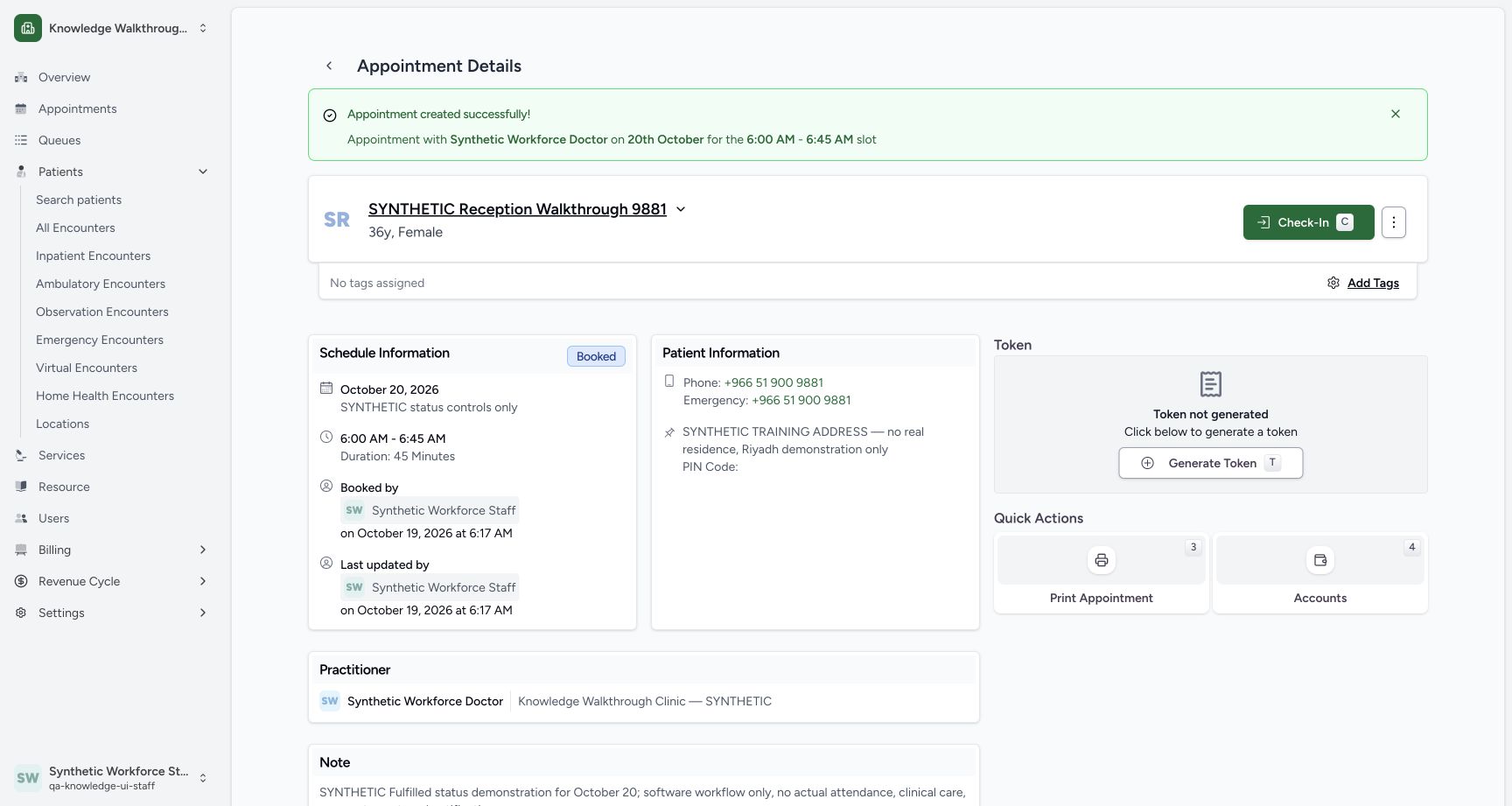
12Verify the second saved Booked appointment
Capture details
Exact committed 664f6a8f source, ordinary existing Staff in the fictional Clinic. Genuine 1728 × 921 per-tab screenshot. Verify the second saved Booked appointment.
Image SHA-256 6b97fd1207dca081077e332e5fe1be5abd3b3db8ce54c8b6e0beb7ec284cc3bf
- Second appointment Booked: This is a new record, separately saved as Booked.
- Actions menu: Open the second appointment’s three-dot menu.
 1234
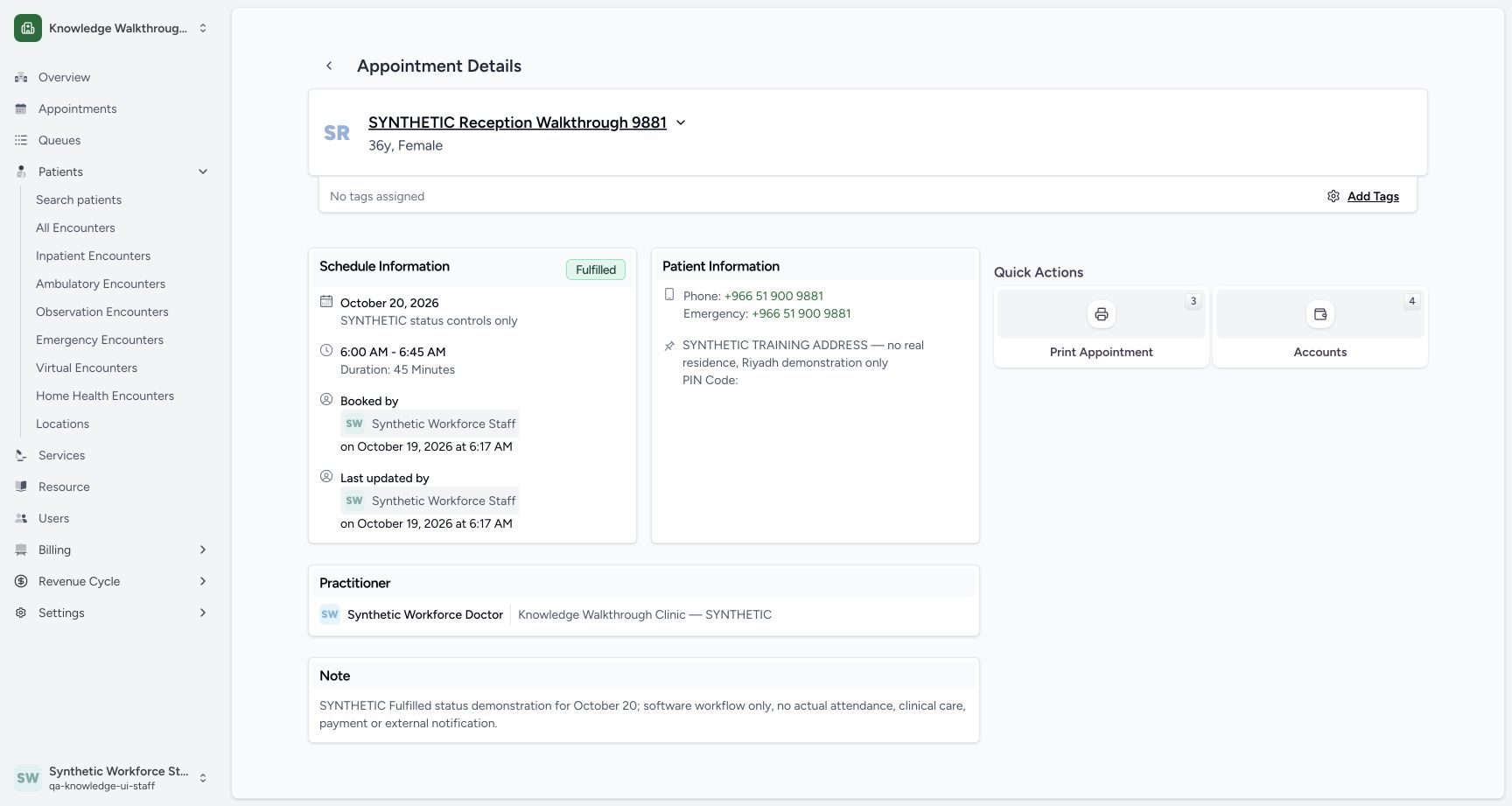
1234Verify the saved Fulfilled detail
Capture details
Exact committed 664f6a8f source, ordinary existing Staff in the fictional Clinic. Genuine 1728 × 921 per-tab screenshot. Verify the saved Fulfilled detail.
Image SHA-256 ecf3e1cec2f6eca2642b028e69b8d43be6c788af035dabf3a26e5b228b6771ec
- Fulfilled saved: Verify the saved Fulfilled state.
- October 20 and 06:00–06:45: The intended schedule remains visible.
- Staff updater: The original Staff actor is retained.
- Saved note: The distinct synthetic software-only note remains.
9 of 9 content blocks have reviewed image alignment. Missing overview or prerequisite images remain open.
Before you begin
- Use the same existing synthetic patient, Doctor and ordinary authorized Staff. The private 20 October capacity-2 slot has one place remaining after the separate No-show example. Preserve that first record. Pictured times use Riyadh (UTC+03:00): the saved 03:00–03:45 UTC slot is displayed as 06:00–06:45. Confirm your configured scheduling timezone and browser date context; other timezone combinations are not verified here.
 123
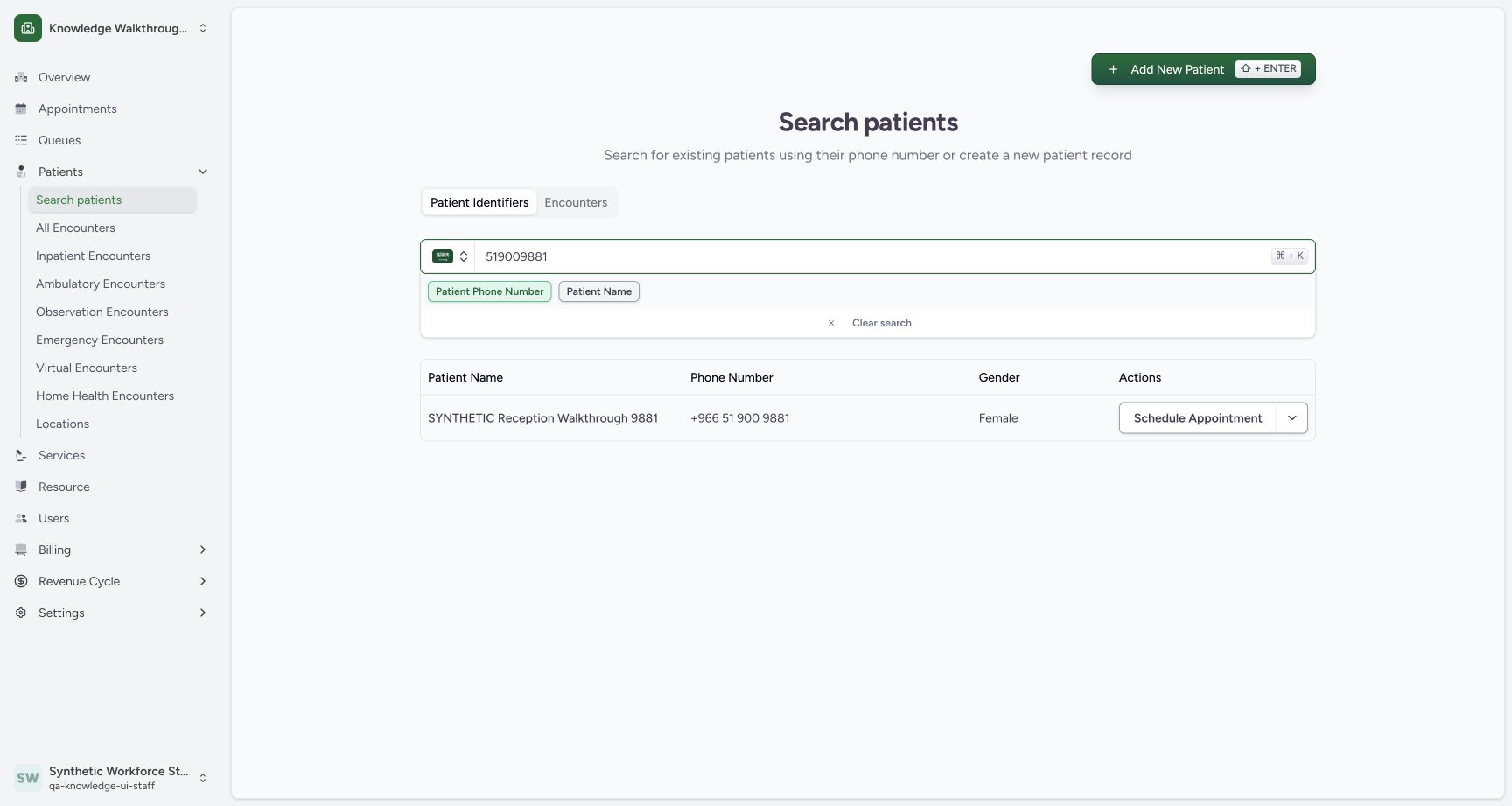
123Recorded release 664f6a8f · 2026-10-19T03:11:07.728Z · 1728 × 921 Match the fictional patient before scheduling
Capture details
Exact committed 664f6a8f source, ordinary existing Staff in the fictional Clinic. Genuine 1728 × 921 per-tab screenshot. Match the fictional patient before scheduling.
Image SHA-256
10bf30d1a6aa7d86dad2787277427c4a2b5ba6c03fc8fba878e08f1d17d1dcb3- Patient phone search: Use the known fictional patient phone.
- Matched patient: Check the matched synthetic name and phone.
- Schedule Appointment: Start booking for this matched patient.
 1234
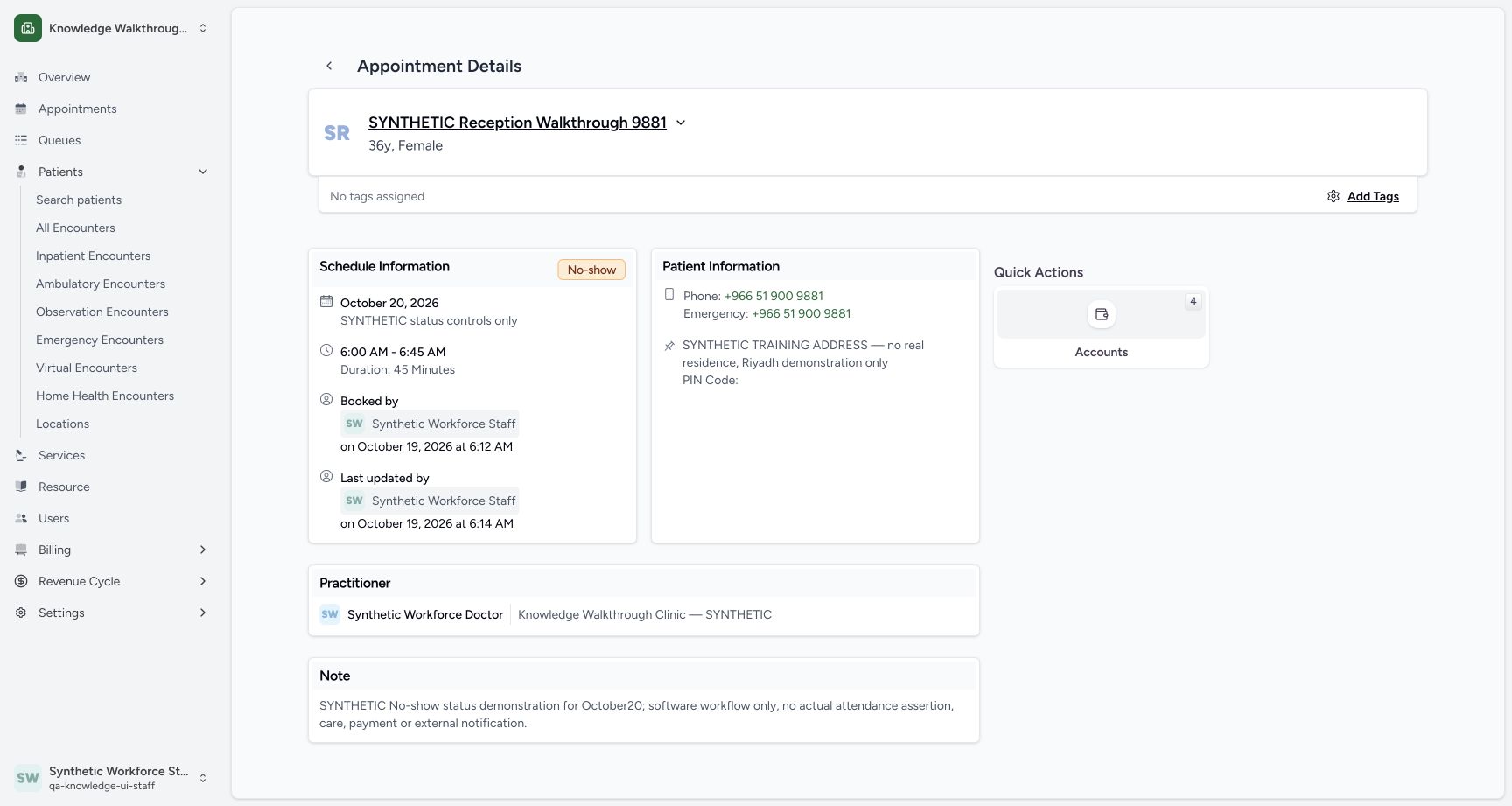
1234Recorded release 664f6a8f · 2026-10-19T03:14:06.545Z · 1728 × 921 Verify the saved No-show detail
Capture details
Exact committed 664f6a8f source, ordinary existing Staff in the fictional Clinic. Genuine 1728 × 921 per-tab screenshot. Verify the saved No-show detail.
Image SHA-256
aab39146d091fa9d3267a02b5c0a19207be1af94fd199f6d09e7aa799958c5af- No-show saved: The final saved state is No-show.
- Scheduled date and time: The October 20 appointment remains 06:00–06:45.
- Staff updater: Read the saved actor and update time.
- Saved note: The explicit software-only note is retained.
 12345
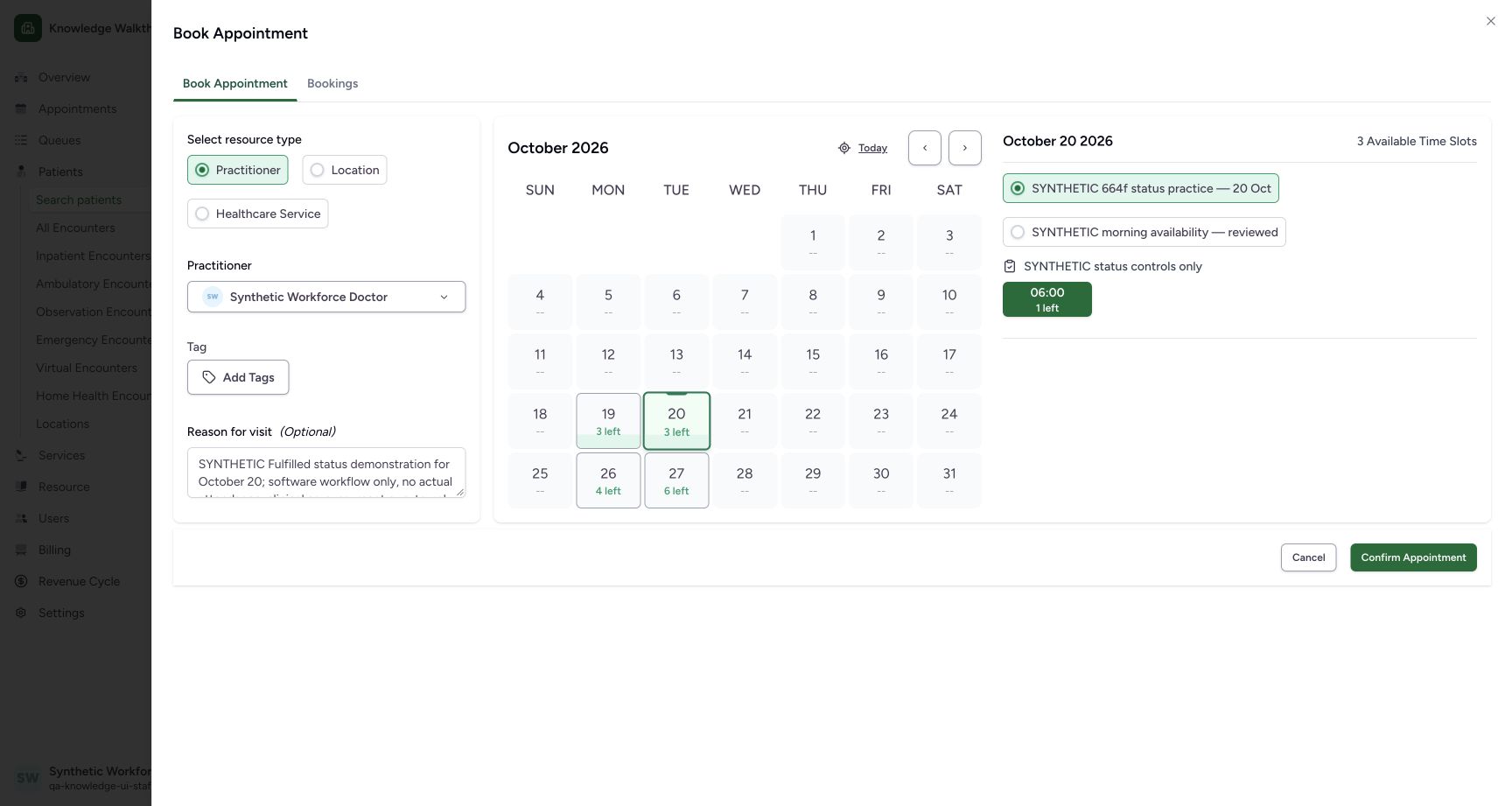
12345Recorded release 664f6a8f · 2026-10-19T03:17:02.714Z · 1728 × 921 Review a distinct second booking with one place left
Capture details
Exact committed 664f6a8f source, ordinary existing Staff in the fictional Clinic. Genuine 1728 × 921 per-tab screenshot. Review a distinct second booking with one place left.
Image SHA-256
695e3e815e1ff4bdd0f205b8b9b08210a5f7dc146fc5a215f3e477bedc58b8ee- 20 October: The second distinct example uses the same intended future date.
- Same new private template: Keep the original schedules separate.
- 06:00 selected; 1 left: One place remains after the first No-show example.
- Separate synthetic reason: Use a distinct Fulfilled software-practice note.
- Confirm Appointment: Save the second fictional appointment once.
1. Verify the same existing patient for a separate booking
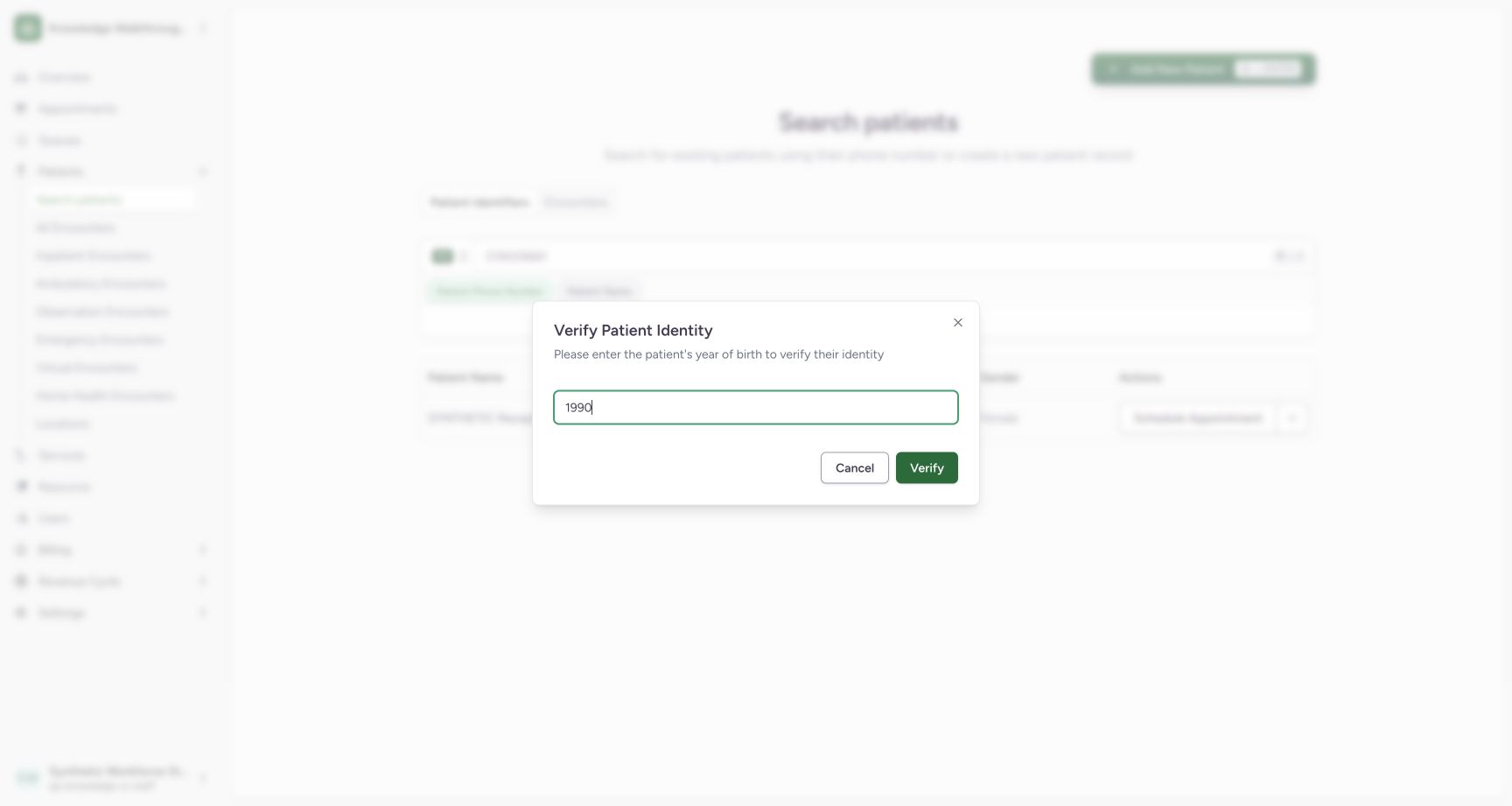
Repeat the known-patient search, check the matched name and phone, use Schedule Appointment, enter the known fictional year 1990 and use Verify. This creates a separate appointment rather than changing the earlier No-show record.
 1
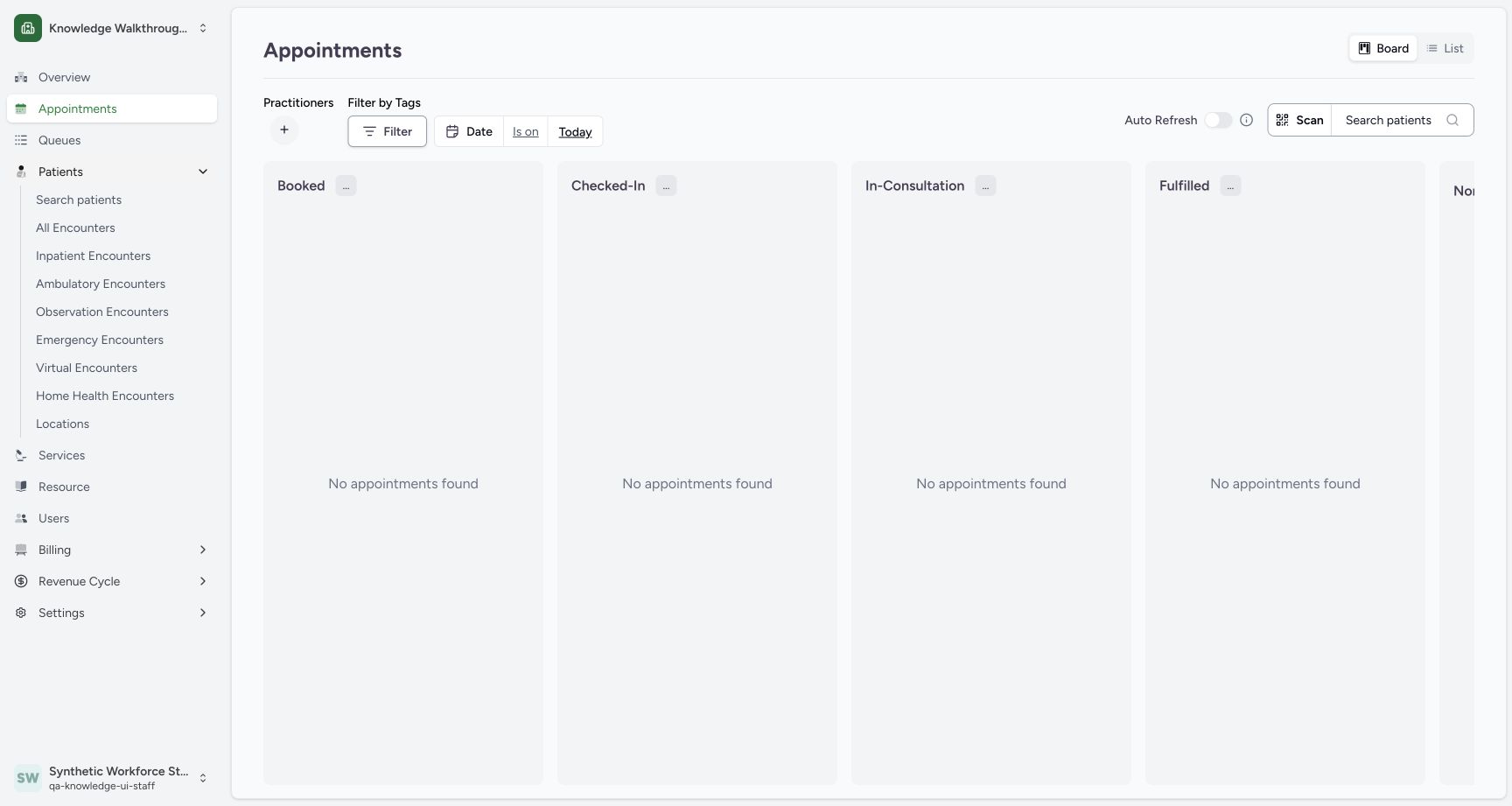
1Open existing-patient search
Capture details
Exact committed 664f6a8f source, ordinary existing Staff in the fictional Clinic. Genuine 1728 × 921 per-tab screenshot. Open existing-patient search.
Image SHA-256 37b45a1d53885d02bf71d809483d41d1f0d6dc6f28327479acaa282b92b15d04
- Search patients: Open the existing-patient search from Patients.
123Match the fictional patient before scheduling
Capture details
Exact committed 664f6a8f source, ordinary existing Staff in the fictional Clinic. Genuine 1728 × 921 per-tab screenshot. Match the fictional patient before scheduling.
Image SHA-256 10bf30d1a6aa7d86dad2787277427c4a2b5ba6c03fc8fba878e08f1d17d1dcb3
- Patient phone search: Use the known fictional patient phone.
- Matched patient: Check the matched synthetic name and phone.
- Schedule Appointment: Start booking for this matched patient.
 12
12Verify the fictional year of birth
Capture details
Exact committed 664f6a8f source, ordinary existing Staff in the fictional Clinic. Genuine 1728 × 921 per-tab screenshot. Verify the fictional year of birth.
Image SHA-256 96e49bbb4f97e6e8f7304a28360658223932bd7f91e944a7ad54996af6b902e2
- Year of Birth: Use this fictional patient’s known year 1990.
- Verify: Verify the selected identity.
2. Choose the intended Doctor again
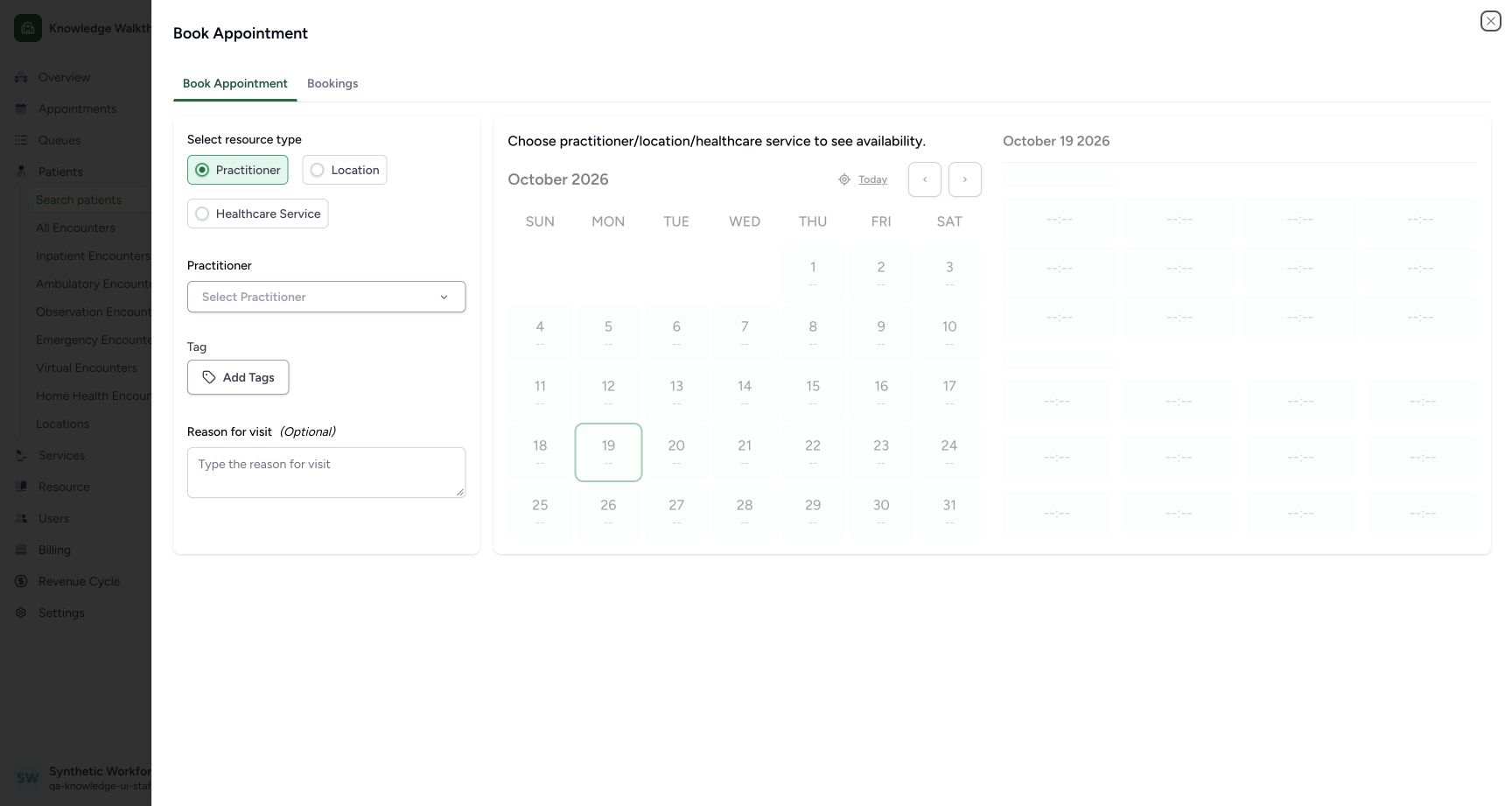
In the booking sheet select Practitioner, open Select Practitioner, choose the existing synthetic department and Synthetic Workforce Doctor.
 12
12Choose the Practitioner resource
Capture details
Exact committed 664f6a8f source, ordinary existing Staff in the fictional Clinic. Genuine 1728 × 921 per-tab screenshot. Choose the Practitioner resource.
Image SHA-256 3cc57b170bb239213126f4c27e55992871cfd969cb5b01f1ea46d2f833be181a
- Practitioner: Use the Practitioner resource type.
- Select Practitioner: Choose a resource before availability can be displayed.
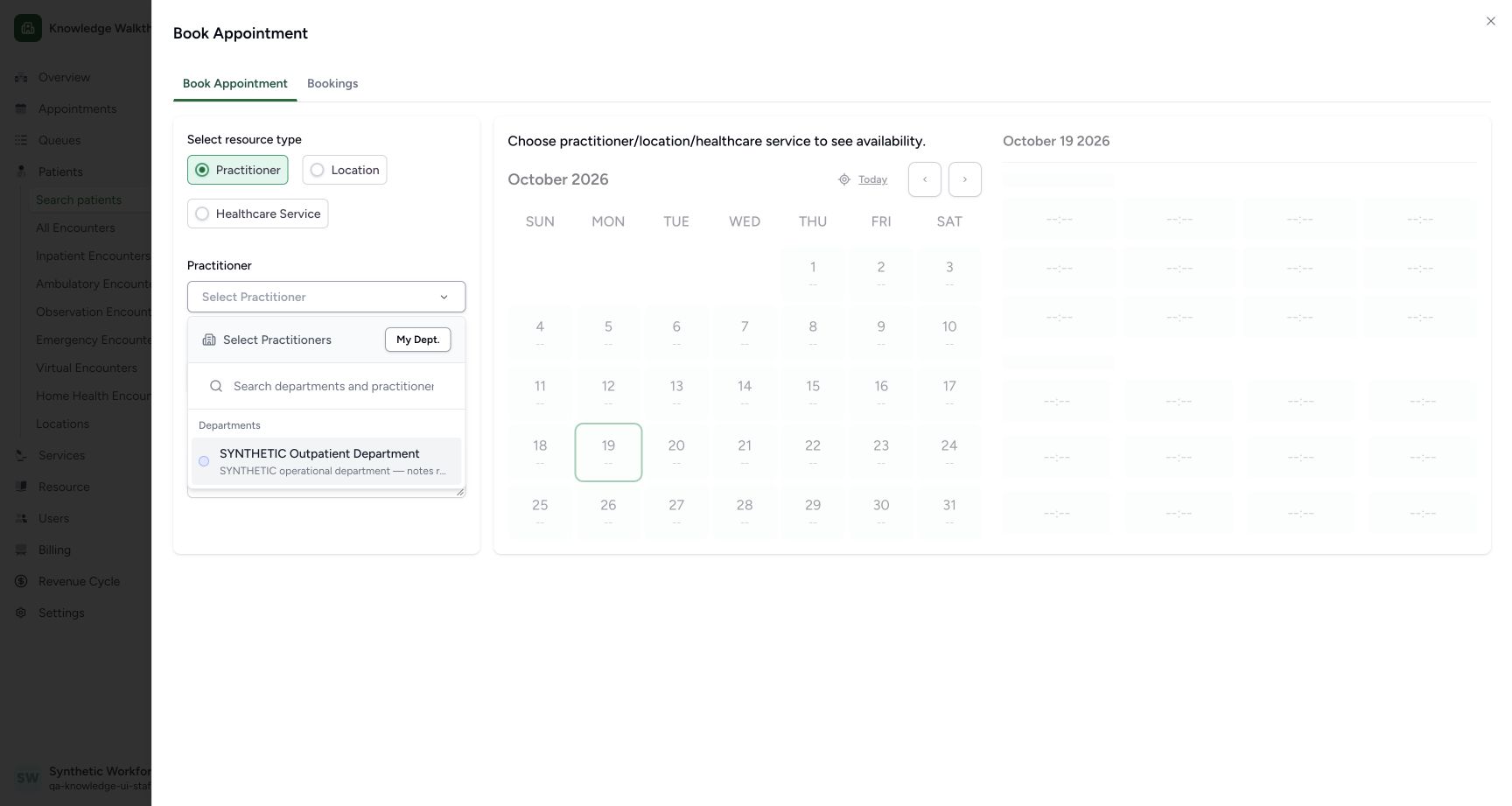 1
1Choose the existing department
Capture details
Exact committed 664f6a8f source, ordinary existing Staff in the fictional Clinic. Genuine 1728 × 921 per-tab screenshot. Choose the existing department.
Image SHA-256 0b1118bf478b6803996e0cca13970ccfc2f900f15bc96f9cdfa9efc9a61e5c71
- Existing department: Choose the fictional Outpatient Department.
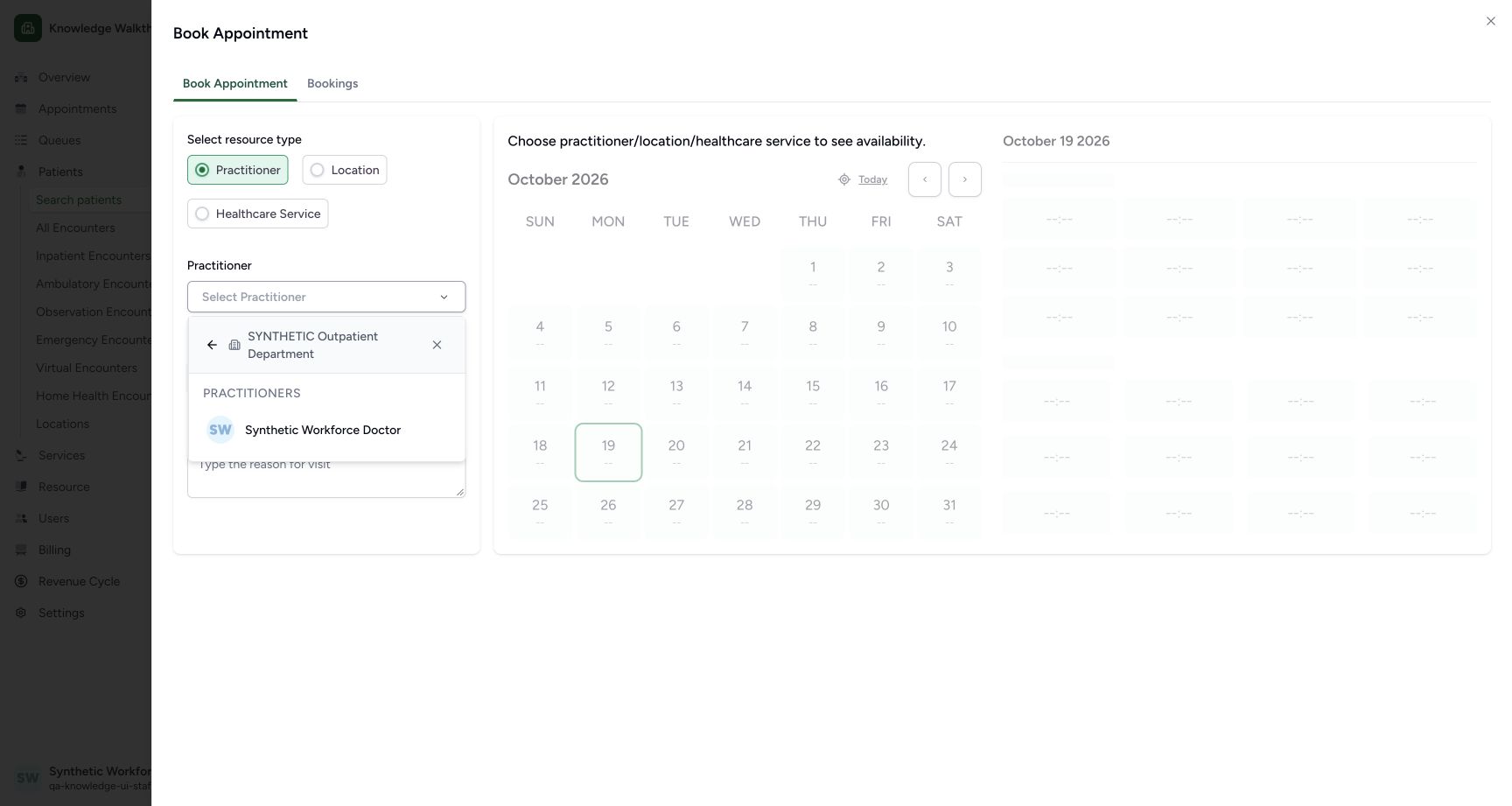 1
1Choose the existing Doctor
Capture details
Exact committed 664f6a8f source, ordinary existing Staff in the fictional Clinic. Genuine 1728 × 921 per-tab screenshot. Choose the existing Doctor.
Image SHA-256 ab9745bf707fa0ac3425bd75faed3078aff2f44b081325f70be02ce5b4d986d5
- Synthetic Workforce Doctor: Choose the existing Doctor in the selected department.
3. Review the remaining place and distinct reason
Select 20 October and the new private status-practice template. Review the green 06:00, 1 left slot and the distinct synthetic Fulfilled software-practice reason. This future appointment is an administrative control example, not an assertion of attendance.
12345Review a distinct second booking with one place left
Capture details
Exact committed 664f6a8f source, ordinary existing Staff in the fictional Clinic. Genuine 1728 × 921 per-tab screenshot. Review a distinct second booking with one place left.
Image SHA-256 695e3e815e1ff4bdd0f205b8b9b08210a5f7dc146fc5a215f3e477bedc58b8ee
- 20 October: The second distinct example uses the same intended future date.
- Same new private template: Keep the original schedules separate.
- 06:00 selected; 1 left: One place remains after the first No-show example.
- Separate synthetic reason: Use a distinct Fulfilled software-practice note.
- Confirm Appointment: Save the second fictional appointment once.
4. Save and verify the second Booked record
Use Confirm Appointment once. Check the separate saved Appointment Details page and Booked badge, intended patient, Doctor and 20 October, 6:00 AM–6:45 AM.
12345Review a distinct second booking with one place left
Capture details
Exact committed 664f6a8f source, ordinary existing Staff in the fictional Clinic. Genuine 1728 × 921 per-tab screenshot. Review a distinct second booking with one place left.
Image SHA-256 695e3e815e1ff4bdd0f205b8b9b08210a5f7dc146fc5a215f3e477bedc58b8ee
- 20 October: The second distinct example uses the same intended future date.
- Same new private template: Keep the original schedules separate.
- 06:00 selected; 1 left: One place remains after the first No-show example.
- Separate synthetic reason: Use a distinct Fulfilled software-practice note.
- Confirm Appointment: Save the second fictional appointment once.
12Verify the second saved Booked appointment
Capture details
Exact committed 664f6a8f source, ordinary existing Staff in the fictional Clinic. Genuine 1728 × 921 per-tab screenshot. Verify the second saved Booked appointment.
Image SHA-256 6b97fd1207dca081077e332e5fe1be5abd3b3db8ce54c8b6e0beb7ec284cc3bf
- Second appointment Booked: This is a new record, separately saved as Booked.
- Actions menu: Open the second appointment’s three-dot menu.
5. Use the actual Fulfilled command
Open the second appointment’s three-dot Actions menu. Use the exact displayed Mark as Fullfilled command. In this version it directly updates the appointment; no separate confirmation dialog is shown.
12Verify the second saved Booked appointment
Capture details
Exact committed 664f6a8f source, ordinary existing Staff in the fictional Clinic. Genuine 1728 × 921 per-tab screenshot. Verify the second saved Booked appointment.
Image SHA-256 6b97fd1207dca081077e332e5fe1be5abd3b3db8ce54c8b6e0beb7ec284cc3bf
- Second appointment Booked: This is a new record, separately saved as Booked.
- Actions menu: Open the second appointment’s three-dot menu.
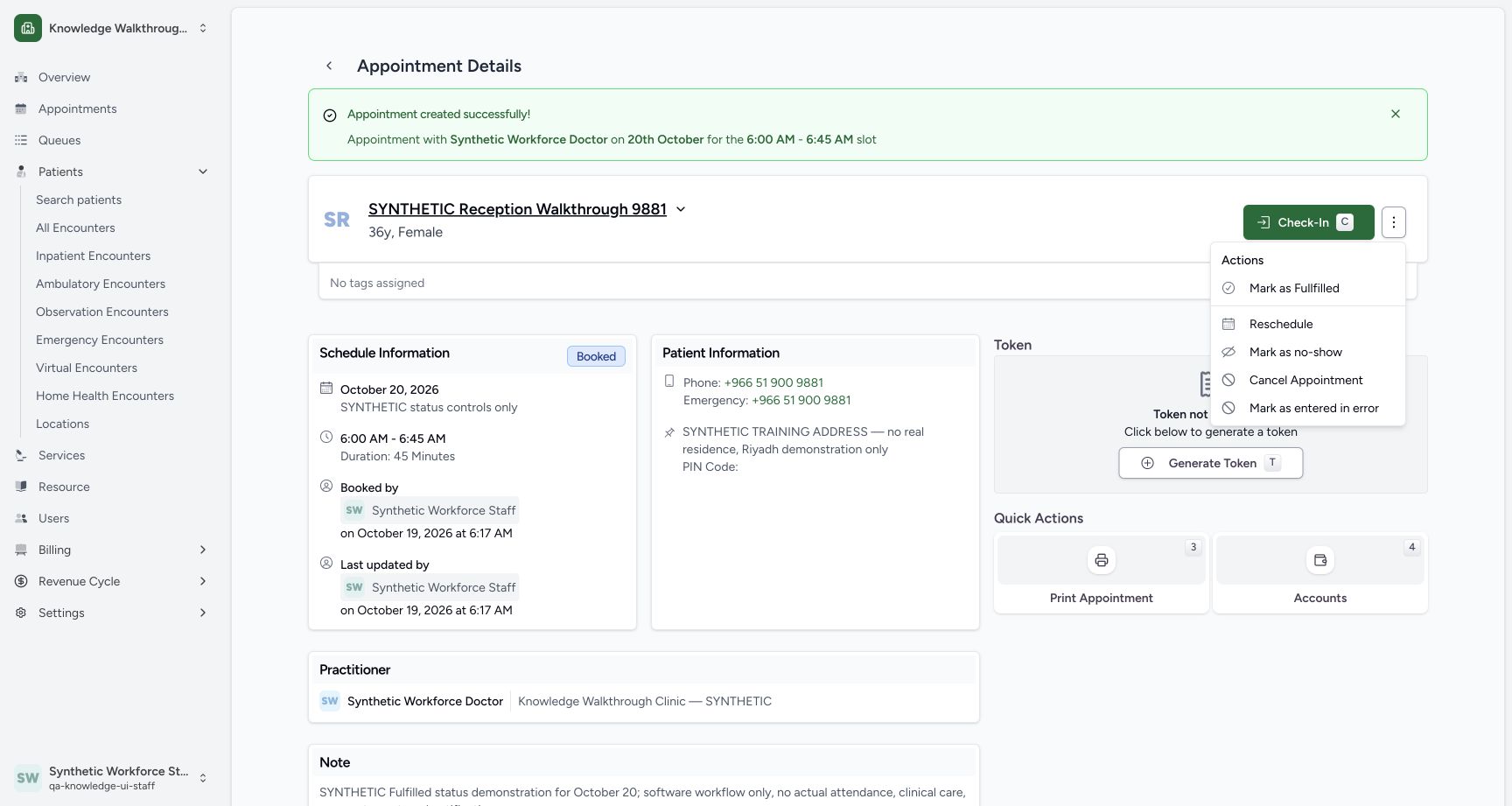 1
1Use the actual Mark as Fullfilled command
Capture details
Exact committed 664f6a8f source, ordinary existing Staff in the fictional Clinic. Genuine 1728 × 921 per-tab screenshot. Use the actual Mark as Fullfilled command.
Image SHA-256 ca09f905c78f8fb99e1c1c7ab6abdad1139ce6d2d51f8a12d6c6496a34b7ecf0
- Mark as Fullfilled: This exact UI command updates the appointment directly.
6. Verify Fulfilled and the retained context
Confirm the saved Fulfilled badge, intended date/time, Staff actor and unchanged synthetic note. The final page hides Check-In and the status Actions menu. The distinct earlier No-show record remains saved separately.
1234Verify the saved Fulfilled detail
Capture details
Exact committed 664f6a8f source, ordinary existing Staff in the fictional Clinic. Genuine 1728 × 921 per-tab screenshot. Verify the saved Fulfilled detail.
Image SHA-256 ecf3e1cec2f6eca2642b028e69b8d43be6c788af035dabf3a26e5b228b6771ec
- Fulfilled saved: Verify the saved Fulfilled state.
- October 20 and 06:00–06:45: The intended schedule remains visible.
- Staff updater: The original Staff actor is retained.
- Saved note: The distinct synthetic software-only note remains.
1234Verify the saved No-show detail
Capture details
Exact committed 664f6a8f source, ordinary existing Staff in the fictional Clinic. Genuine 1728 × 921 per-tab screenshot. Verify the saved No-show detail.
Image SHA-256 aab39146d091fa9d3267a02b5c0a19207be1af94fd199f6d09e7aa799958c5af
- No-show saved: The final saved state is No-show.
- Scheduled date and time: The October 20 appointment remains 06:00–06:45.
- Staff updater: Read the saved actor and update time.
- Saved note: The explicit software-only note is retained.
Retain each outcome as its own record
The final screenshots show separate No-show and Fulfilled appointments for this explicitly synthetic workflow. Independent readbacks show the shared slot allocation is 2 after the second booking and remains 2 after Fulfilled; the status action does not demonstrate released capacity.
1234Verify the saved No-show detail
Capture details
Exact committed 664f6a8f source, ordinary existing Staff in the fictional Clinic. Genuine 1728 × 921 per-tab screenshot. Verify the saved No-show detail.
Image SHA-256 aab39146d091fa9d3267a02b5c0a19207be1af94fd199f6d09e7aa799958c5af
- No-show saved: The final saved state is No-show.
- Scheduled date and time: The October 20 appointment remains 06:00–06:45.
- Staff updater: Read the saved actor and update time.
- Saved note: The explicit software-only note is retained.
12345Review a distinct second booking with one place left
Capture details
Exact committed 664f6a8f source, ordinary existing Staff in the fictional Clinic. Genuine 1728 × 921 per-tab screenshot. Review a distinct second booking with one place left.
Image SHA-256 695e3e815e1ff4bdd0f205b8b9b08210a5f7dc146fc5a215f3e477bedc58b8ee
- 20 October: The second distinct example uses the same intended future date.
- Same new private template: Keep the original schedules separate.
- 06:00 selected; 1 left: One place remains after the first No-show example.
- Separate synthetic reason: Use a distinct Fulfilled software-practice note.
- Confirm Appointment: Save the second fictional appointment once.
1234Verify the saved Fulfilled detail
Capture details
Exact committed 664f6a8f source, ordinary existing Staff in the fictional Clinic. Genuine 1728 × 921 per-tab screenshot. Verify the saved Fulfilled detail.
Image SHA-256 ecf3e1cec2f6eca2642b028e69b8d43be6c788af035dabf3a26e5b228b6771ec
- Fulfilled saved: Verify the saved Fulfilled state.
- October 20 and 06:00–06:45: The intended schedule remains visible.
- Staff updater: The original Staff actor is retained.
- Saved note: The distinct synthetic software-only note remains.
Source evidence
Every citation uses this exact committed version. The private source repository requires access.
- repositories/platform/mansoq-web/src/pages/Appointments/AppointmentDetail.tsx:951 ·
664f6a8fd787188f6481a6cb6f72a98c9d5fa22bSource file checksum
8fc77ee6f1f7b145e2987ba272e80f35631e17907ea91cd305738250b137b839 - repositories/platform/mansoq-core/mansoq/emr/api/viewsets/scheduling/booking.py:120 ·
664f6a8fd787188f6481a6cb6f72a98c9d5fa22bSource file checksum
b6eebb4afa619aa661824fd5790ac8c34452bb194833b51f3054ce04ca0dfee0 - repositories/platform/mansoq-core/mansoq/emr/api/viewsets/scheduling/booking.py:178 ·
664f6a8fd787188f6481a6cb6f72a98c9d5fa22bSource file checksum
b6eebb4afa619aa661824fd5790ac8c34452bb194833b51f3054ce04ca0dfee0 - repositories/platform/mansoq-core/mansoq/emr/resources/scheduling/slot/spec.py:45 ·
664f6a8fd787188f6481a6cb6f72a98c9d5fa22bSource file checksum
f53b0e2f74217b414b95f419e53f60a14517ef1d982d393dbd23bc376b9fd2a7 - repositories/platform/mansoq-core/mansoq/emr/api/viewsets/scheduling/availability.py:126 ·
664f6a8fd787188f6481a6cb6f72a98c9d5fa22bSource file checksum
1370c5b5f5cad98b4cceba59929dc88e82c70350615d5a3125d60cab54deec2c