 MANSOQ
 Scheduling and appointments · VERSION 664f6a8f
Book a fictional patient and record No-show with a required note
Verify an existing patient, choose the practitioner and selected slot, save Booked, test Cancel and record the actual No-show outcome.
Staff
 12
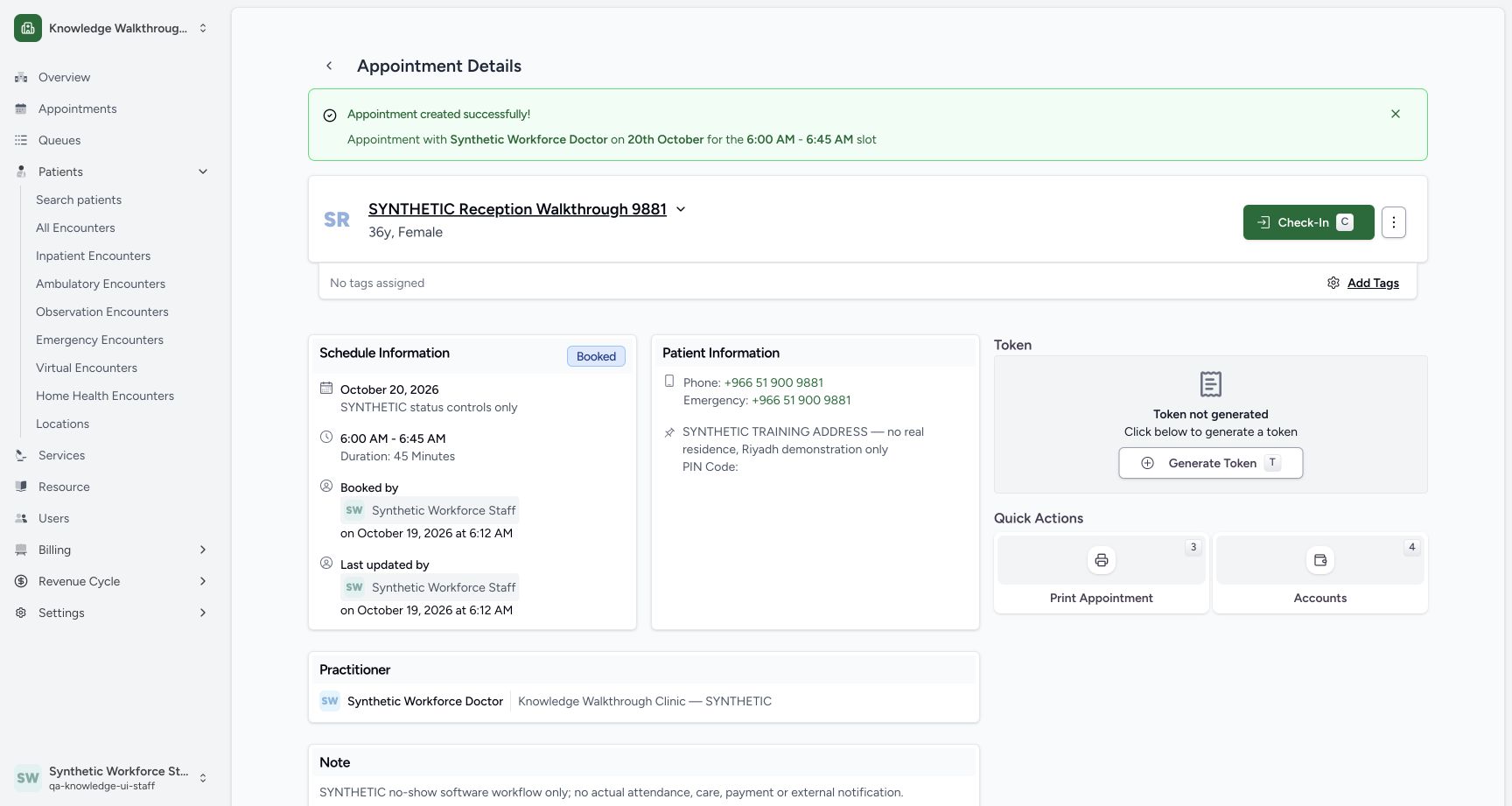
12Verify the first saved Booked appointment
Capture details
Exact committed 664f6a8f source, ordinary existing Staff in the fictional Clinic. Genuine 1728 × 921 per-tab screenshot. Verify the first saved Booked appointment.
Image SHA-256 edbaac337a8a1cdd081d8faa9b9f87bbbc1aebb84cbd9b4400298558d1417f21
- Booked: Verify the saved Booked state.
- Actions menu: Open the three-dot menu beside Check-In.
 1234
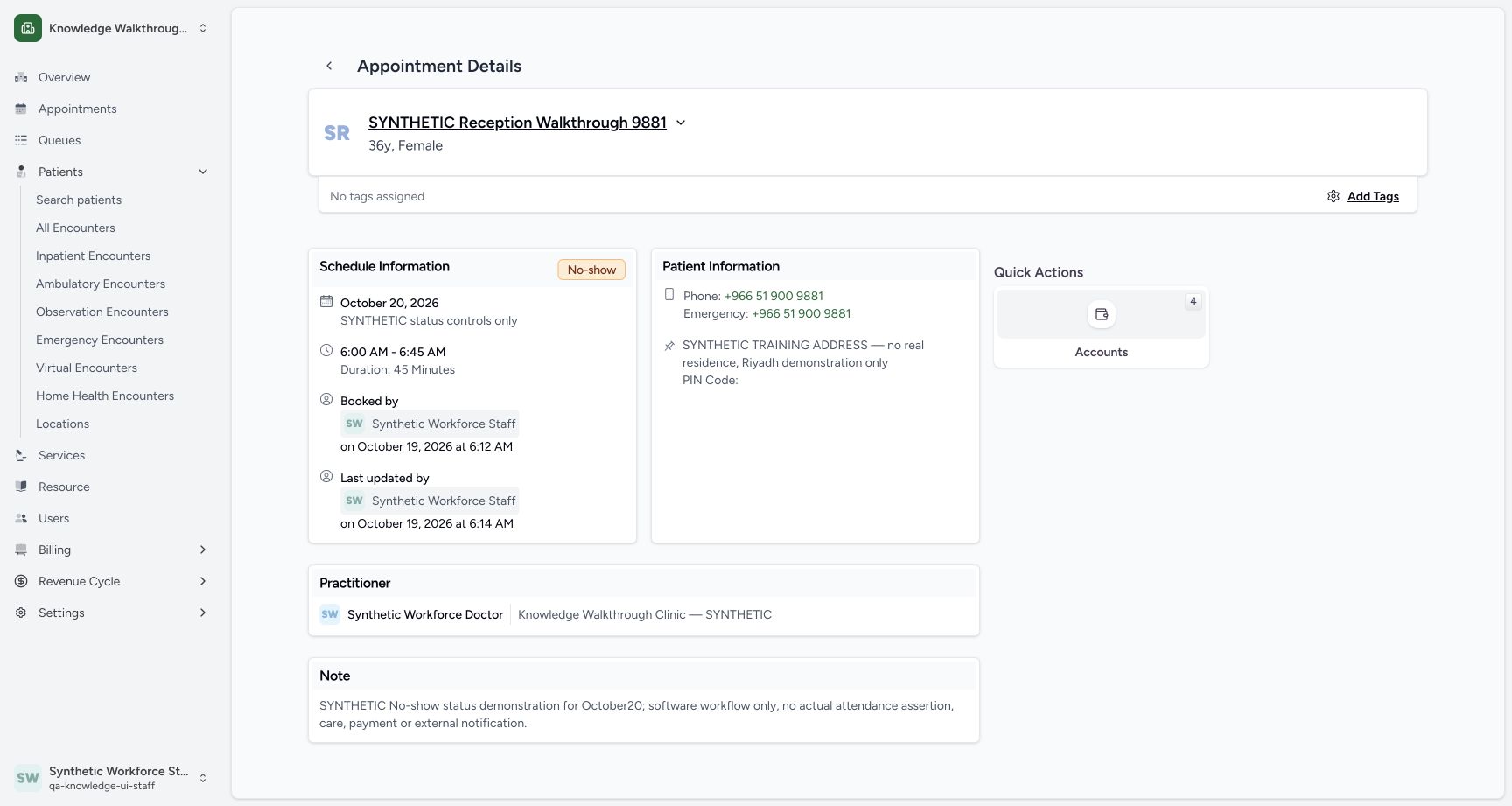
1234Verify the saved No-show detail
Capture details
Exact committed 664f6a8f source, ordinary existing Staff in the fictional Clinic. Genuine 1728 × 921 per-tab screenshot. Verify the saved No-show detail.
Image SHA-256 aab39146d091fa9d3267a02b5c0a19207be1af94fd199f6d09e7aa799958c5af
- No-show saved: The final saved state is No-show.
- Scheduled date and time: The October 20 appointment remains 06:00–06:45.
- Staff updater: Read the saved actor and update time.
- Saved note: The explicit software-only note is retained.
14 of 14 content blocks have reviewed image alignment. Missing overview or prerequisite images remain open.
Before you begin
- Use the same fictional Clinic, existing Staff, patient and Doctor. The separate private 20 October 06:00–06:45 template is already saved. These examples teach software controls and do not assert real absence or attendance. Pictured times use Riyadh (UTC+03:00): the saved 03:00–03:45 UTC slot is displayed as 06:00–06:45. Confirm your configured scheduling timezone and browser date context; other timezone combinations are not verified here.
 12
12Recorded release 664f6a8f · 2026-10-19T03:06:28.118Z · 1728 × 921 Recognize the Staff actor and fictional Clinic
Capture details
Exact committed 664f6a8f source, ordinary existing Staff in the fictional Clinic. Genuine 1728 × 921 per-tab screenshot. Recognize the Staff actor and fictional Clinic.
Image SHA-256
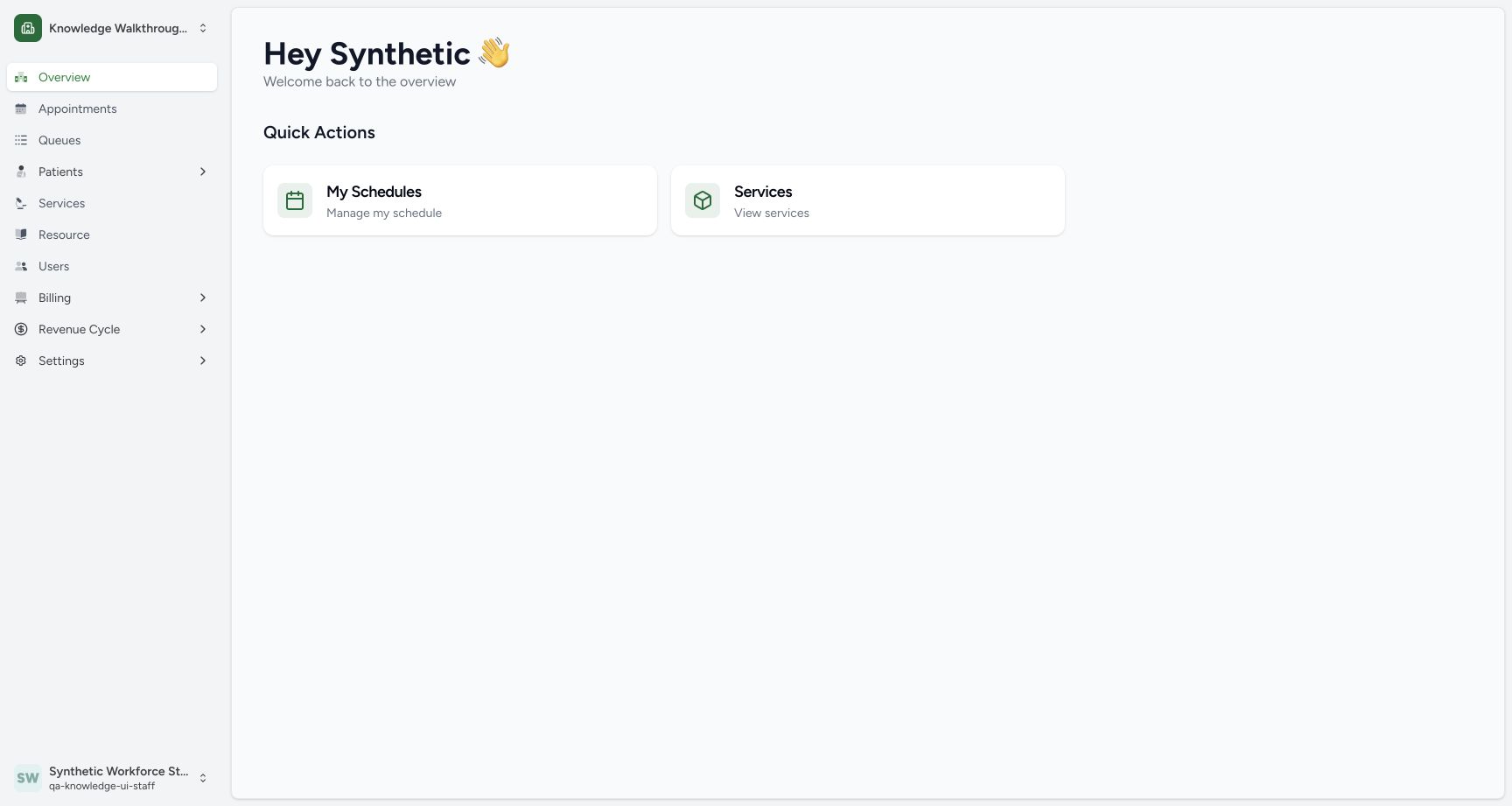
c23e97517fa732140164baf3c44e69c5bbd347bd48bb7375b59bab84751b14b2- Users: Open the users directory for the intended practitioner.
- Observed Staff actor: The existing synthetic Staff account is signed in.
 123
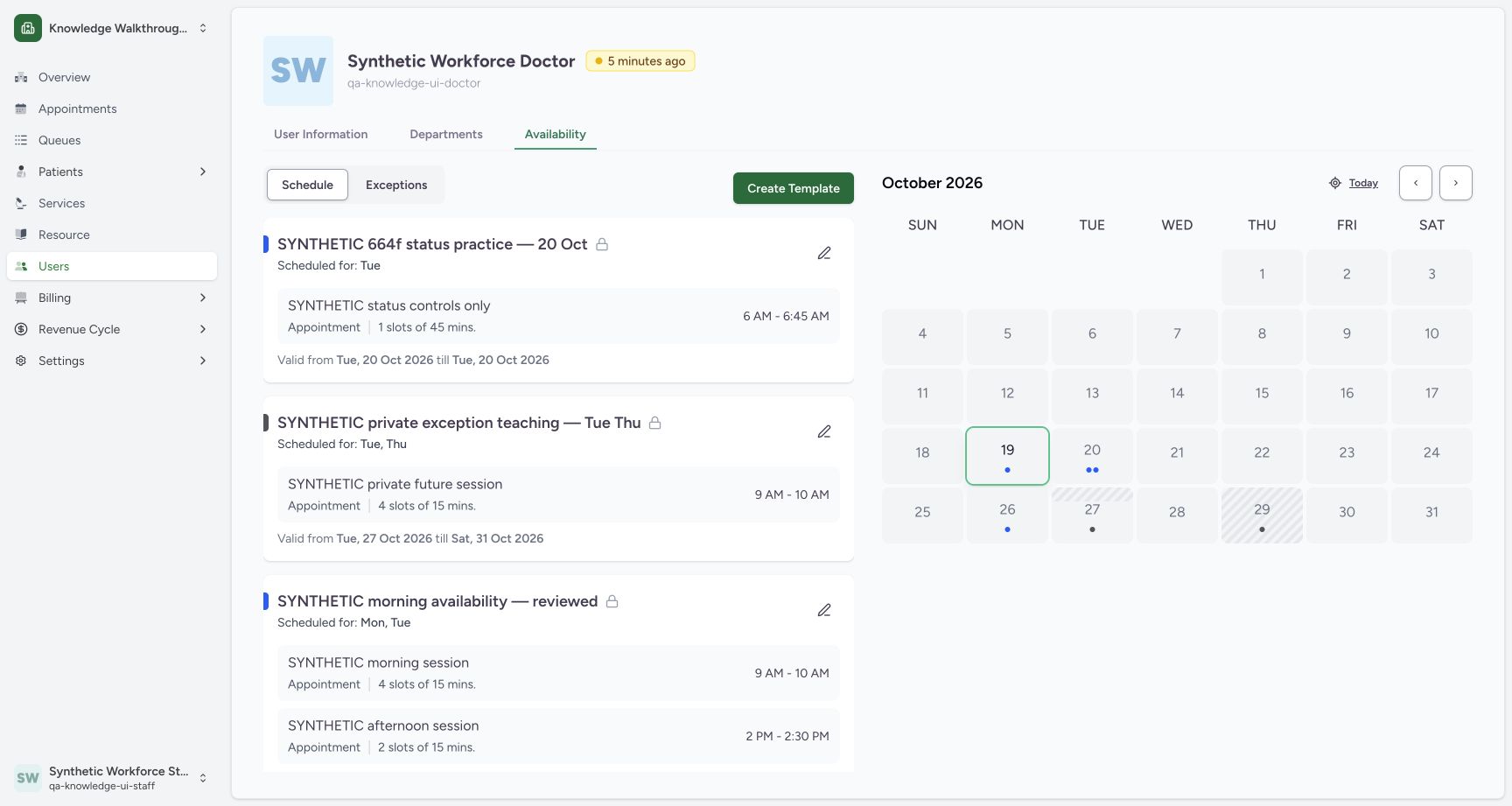
123Recorded release 664f6a8f · 2026-10-19T03:10:07.014Z · 1728 × 921 Verify the saved private future template
Capture details
Exact committed 664f6a8f source, ordinary existing Staff in the fictional Clinic. Genuine 1728 × 921 per-tab screenshot. Verify the saved private future template.
Image SHA-256
0f42d660e39c06df34129a83960cc2034ae54b1ac485209273dbe2cea8531583- Saved distinct template: The new private Tuesday template is present.
- One 45-minute slot: Review the saved session and 06:00–06:45 time.
- 20 October validity: Both dates are 20 October 2026.
 123
123Recorded release 664f6a8f · 2026-10-19T03:11:07.728Z · 1728 × 921 Match the fictional patient before scheduling
Capture details
Exact committed 664f6a8f source, ordinary existing Staff in the fictional Clinic. Genuine 1728 × 921 per-tab screenshot. Match the fictional patient before scheduling.
Image SHA-256
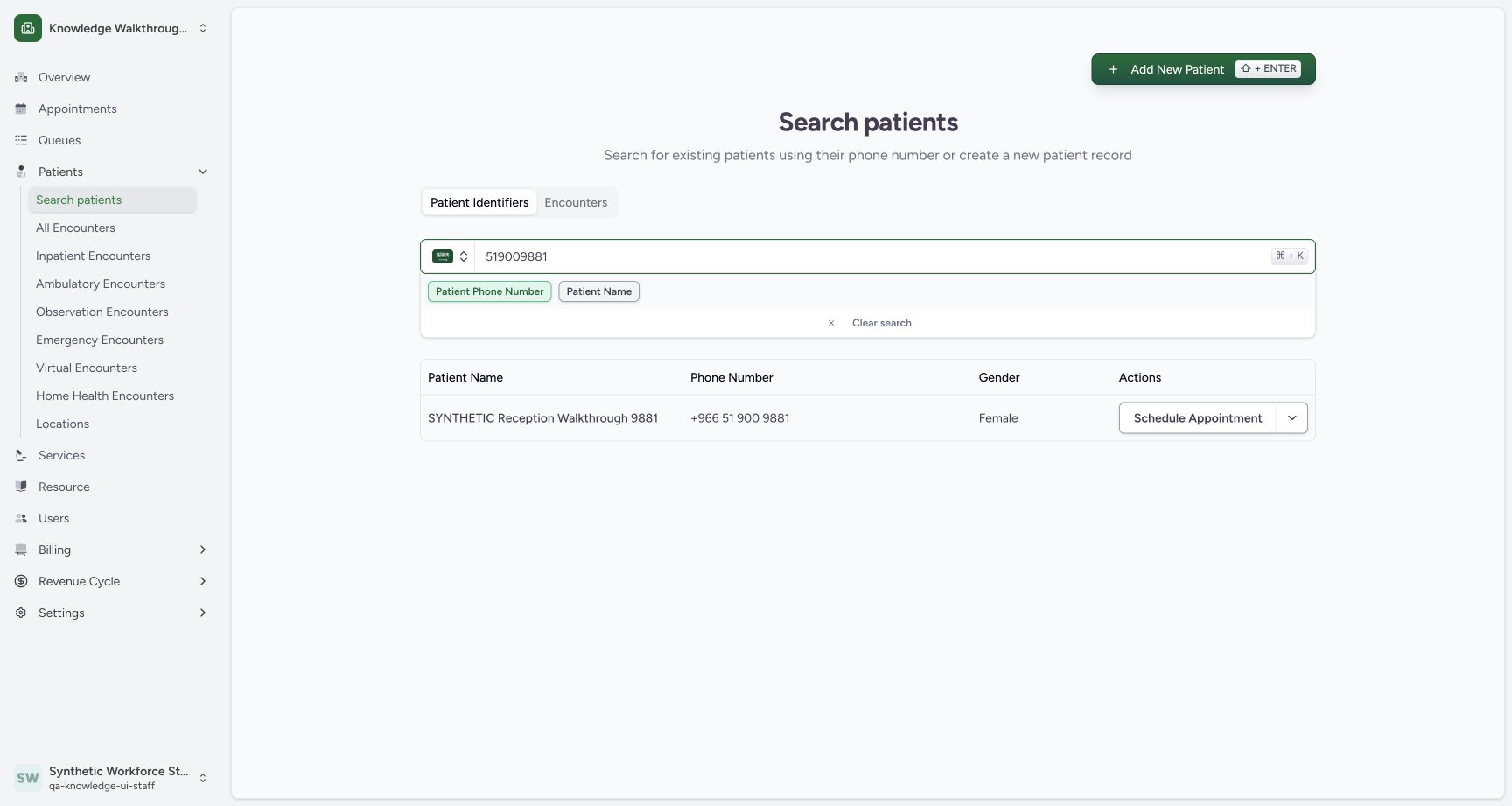
10bf30d1a6aa7d86dad2787277427c4a2b5ba6c03fc8fba878e08f1d17d1dcb3- Patient phone search: Use the known fictional patient phone.
- Matched patient: Check the matched synthetic name and phone.
- Schedule Appointment: Start booking for this matched patient.
1. Find and match the existing patient
From Patients → Search patients, search the known fictional phone. Check SYNTHETIC Reception Walkthrough 9881 and its phone before using Schedule Appointment.
 1
1Open existing-patient search
Capture details
Exact committed 664f6a8f source, ordinary existing Staff in the fictional Clinic. Genuine 1728 × 921 per-tab screenshot. Open existing-patient search.
Image SHA-256 37b45a1d53885d02bf71d809483d41d1f0d6dc6f28327479acaa282b92b15d04
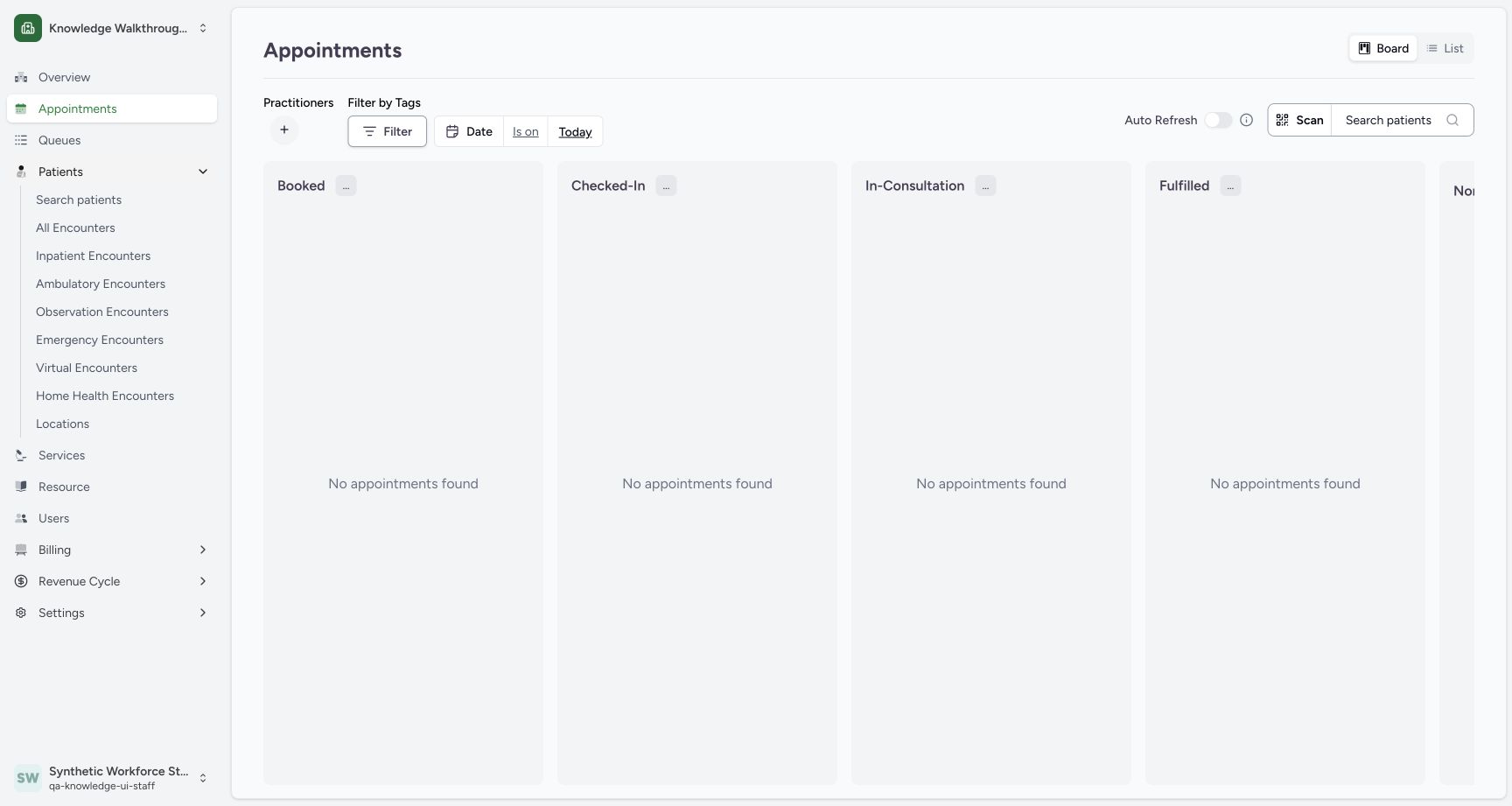
- Search patients: Open the existing-patient search from Patients.
123Match the fictional patient before scheduling
Capture details
Exact committed 664f6a8f source, ordinary existing Staff in the fictional Clinic. Genuine 1728 × 921 per-tab screenshot. Match the fictional patient before scheduling.
Image SHA-256 10bf30d1a6aa7d86dad2787277427c4a2b5ba6c03fc8fba878e08f1d17d1dcb3
- Patient phone search: Use the known fictional patient phone.
- Matched patient: Check the matched synthetic name and phone.
- Schedule Appointment: Start booking for this matched patient.
2. Verify the selected identity
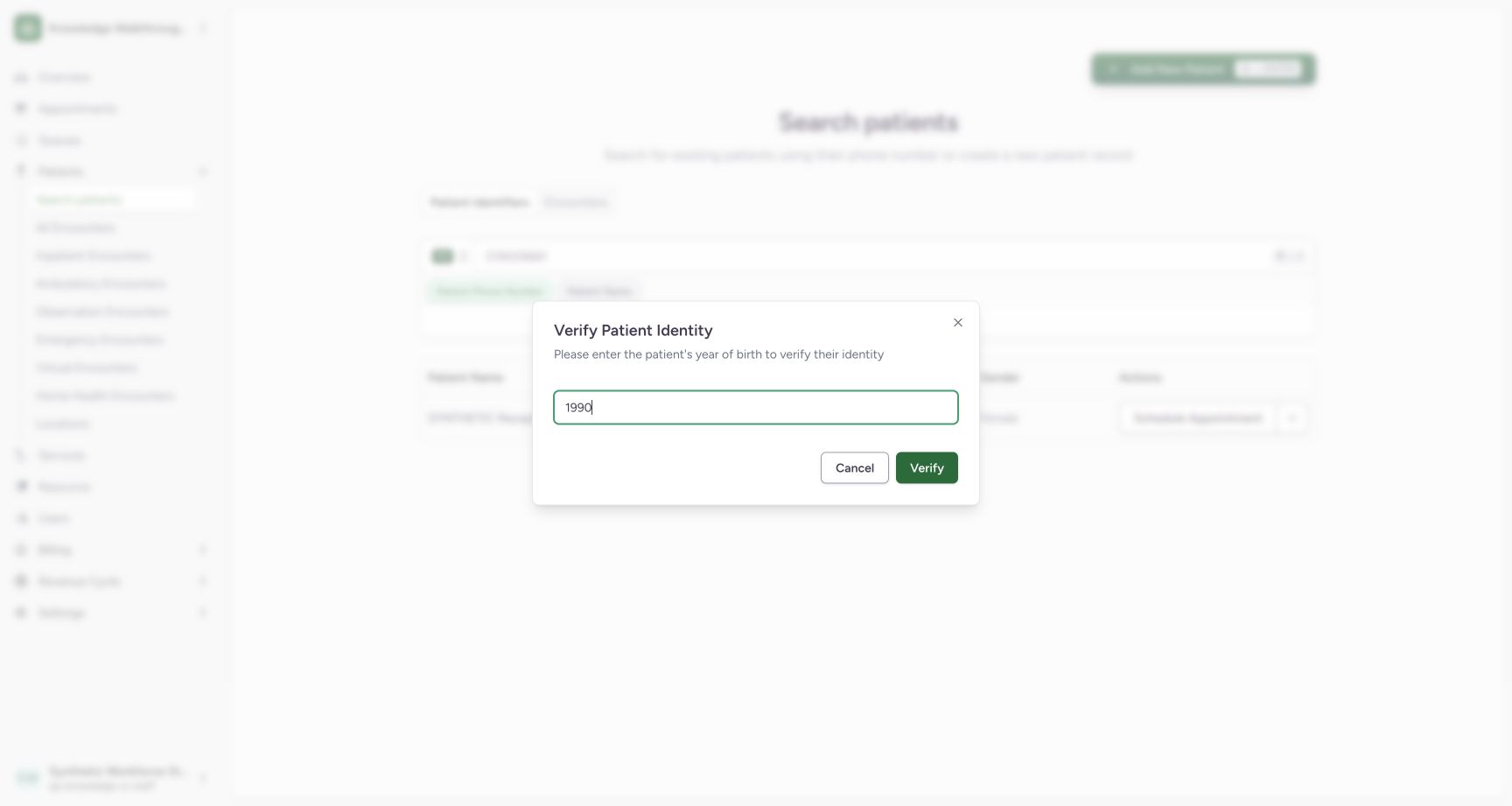
Enter the fictional patient’s known Year of Birth 1990, then use Verify.
 12
12Verify the fictional year of birth
Capture details
Exact committed 664f6a8f source, ordinary existing Staff in the fictional Clinic. Genuine 1728 × 921 per-tab screenshot. Verify the fictional year of birth.
Image SHA-256 96e49bbb4f97e6e8f7304a28360658223932bd7f91e944a7ad54996af6b902e2
- Year of Birth: Use this fictional patient’s known year 1990.
- Verify: Verify the selected identity.
3. Choose the existing practitioner
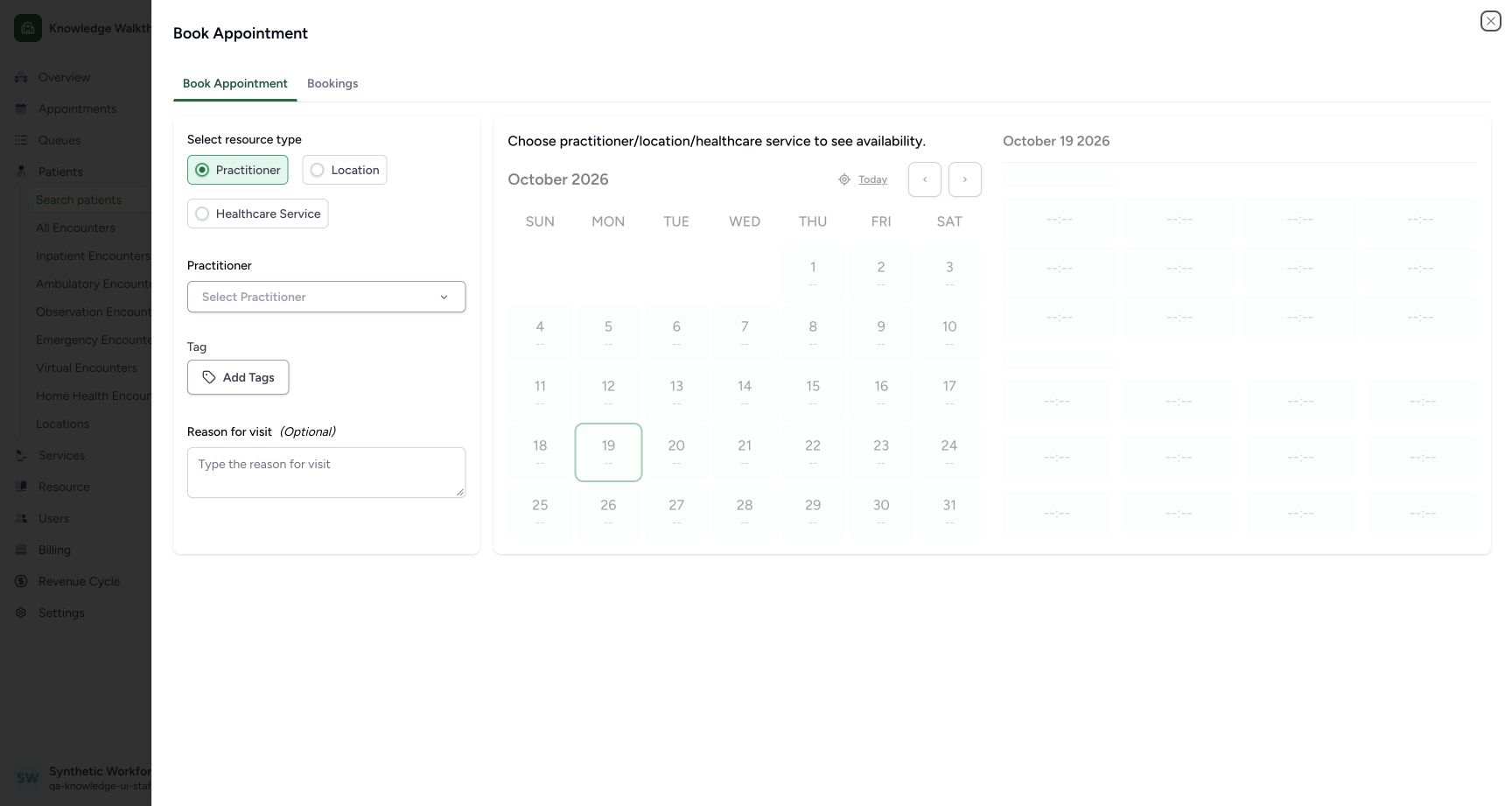
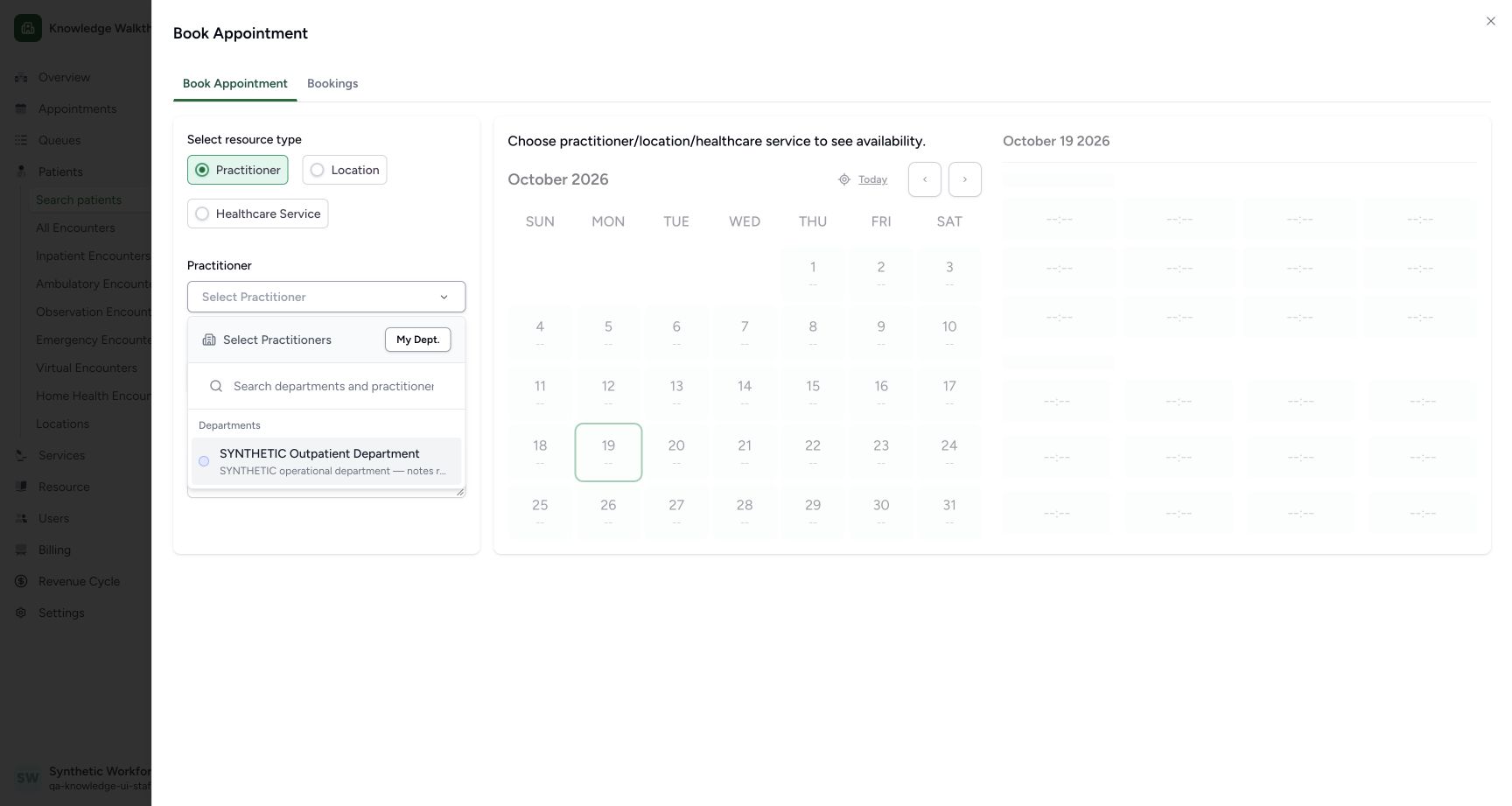
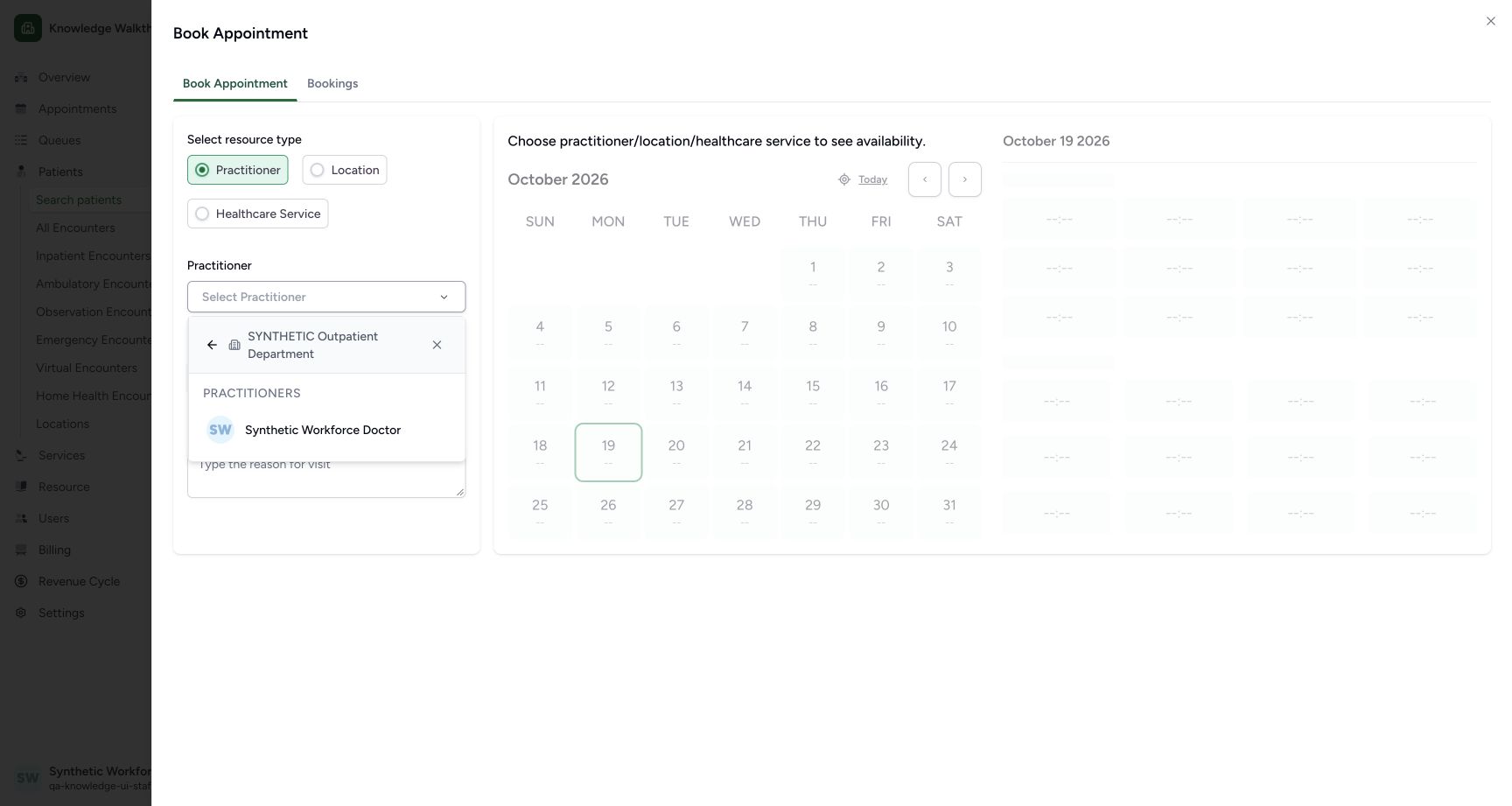
Keep Practitioner selected, open Select Practitioner, choose the existing SYNTHETIC Outpatient Department, then Synthetic Workforce Doctor. Availability is unavailable until a resource is selected.
 12
12Choose the Practitioner resource
Capture details
Exact committed 664f6a8f source, ordinary existing Staff in the fictional Clinic. Genuine 1728 × 921 per-tab screenshot. Choose the Practitioner resource.
Image SHA-256 3cc57b170bb239213126f4c27e55992871cfd969cb5b01f1ea46d2f833be181a
- Practitioner: Use the Practitioner resource type.
- Select Practitioner: Choose a resource before availability can be displayed.
 1
1Choose the existing department
Capture details
Exact committed 664f6a8f source, ordinary existing Staff in the fictional Clinic. Genuine 1728 × 921 per-tab screenshot. Choose the existing department.
Image SHA-256 0b1118bf478b6803996e0cca13970ccfc2f900f15bc96f9cdfa9efc9a61e5c71
- Existing department: Choose the fictional Outpatient Department.
 1
1Choose the existing Doctor
Capture details
Exact committed 664f6a8f source, ordinary existing Staff in the fictional Clinic. Genuine 1728 × 921 per-tab screenshot. Choose the existing Doctor.
Image SHA-256 ab9745bf707fa0ac3425bd75faed3078aff2f44b081325f70be02ce5b4d986d5
- Synthetic Workforce Doctor: Choose the existing Doctor in the selected department.
4. Review the intended date, template and slot
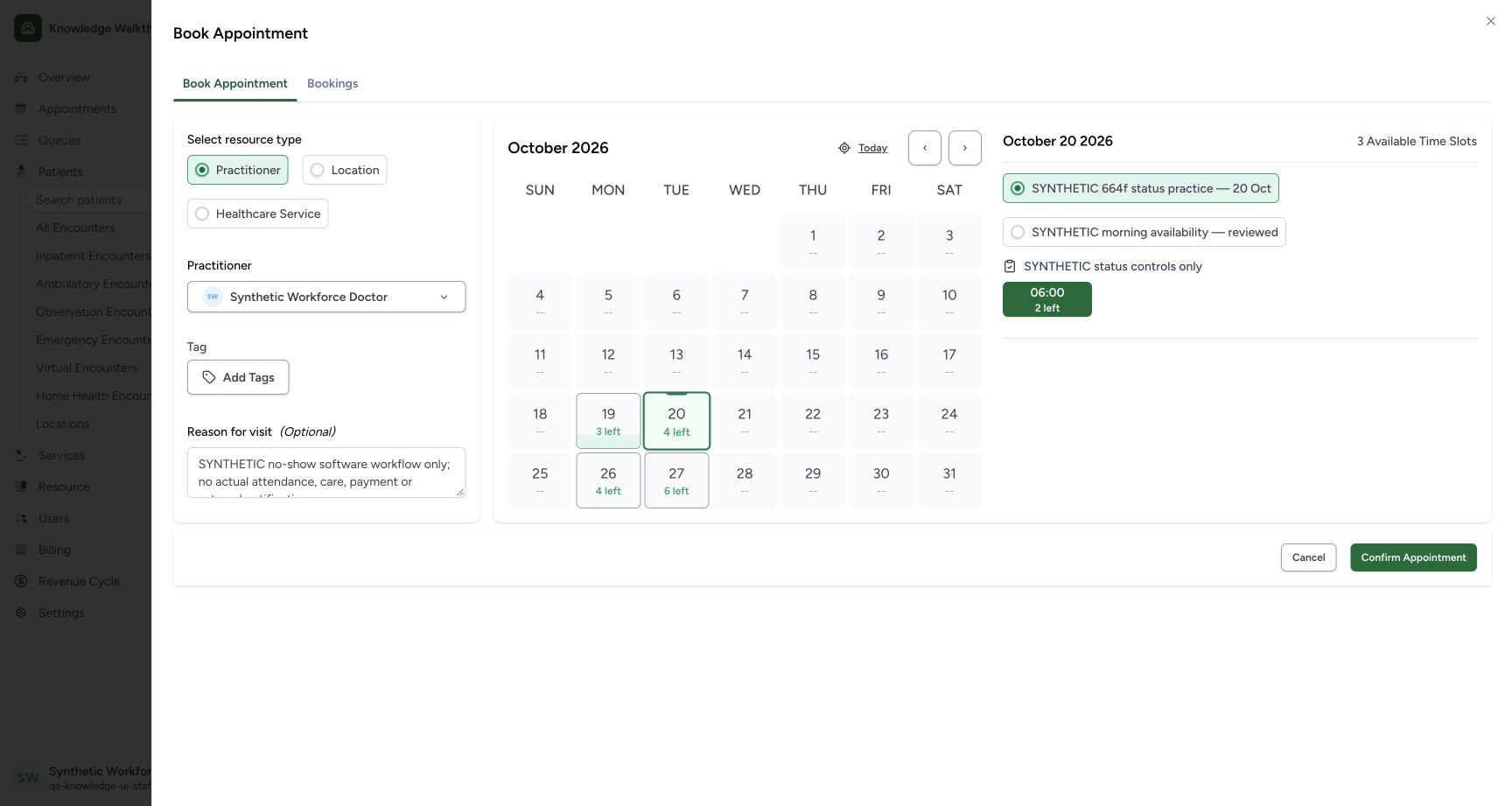
Choose 20 October and the separate SYNTHETIC 664f status practice — 20 Oct template. In this observed state 06:00, 2 left is already green and selected. Review it rather than assuming a selection is missing.
 1234
1234Review the selected future slot with two places
Capture details
Exact committed 664f6a8f source, ordinary existing Staff in the fictional Clinic. Genuine 1728 × 921 per-tab screenshot. Review the selected future slot with two places.
Image SHA-256 0430c3060fd42998372b706bbfad745a75d6ed4a2a9e305857cd4d1b17782766
- 20 October: Select the intended date.
- New private template: Choose the distinct status-practice template.
- 06:00 selected; 2 left: The first slot is already selected in this observed state.
- Confirm Appointment: The confirmation is available with a selected slot.
5. Confirm the first fictional appointment
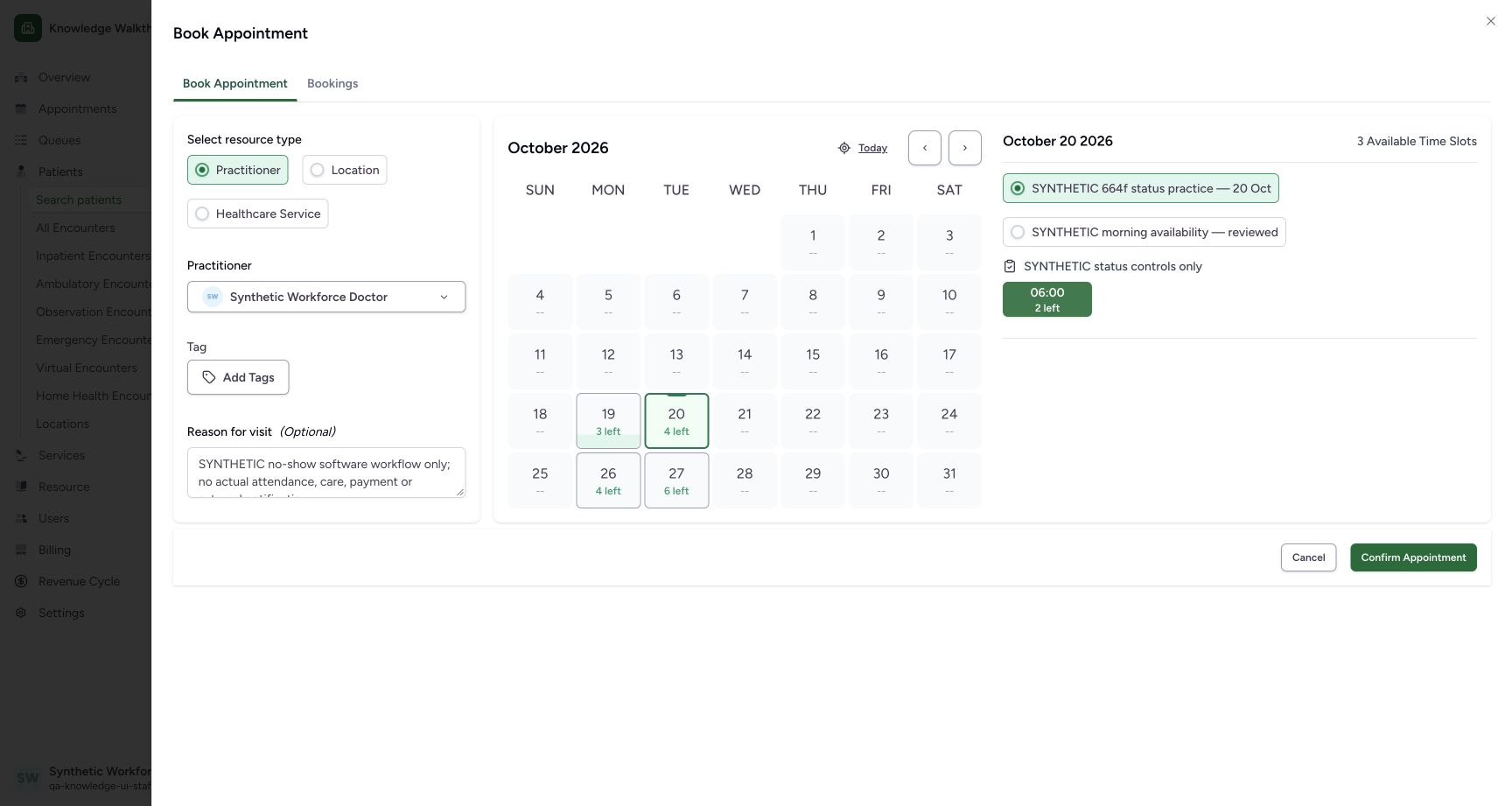
Keep the explicit synthetic software-only reason and intended green slot selected. Use Confirm Appointment once. Verify Booked, the patient, Doctor and 20 October, 6:00 AM–6:45 AM in Appointment Details.
 123
123Confirm the first fictional booking
Capture details
Exact committed 664f6a8f source, ordinary existing Staff in the fictional Clinic. Genuine 1728 × 921 per-tab screenshot. Confirm the first fictional booking.
Image SHA-256 32b7aa25ceceaf855a29676a2d4615270c32df95eeb6d446e04df73c783a7a9c
- Selected 06:00 slot: Check the green selected slot and remaining places.
- Synthetic reason: This example is explicitly software-only.
- Confirm Appointment: Save the first reviewed fictional appointment.
12Verify the first saved Booked appointment
Capture details
Exact committed 664f6a8f source, ordinary existing Staff in the fictional Clinic. Genuine 1728 × 921 per-tab screenshot. Verify the first saved Booked appointment.
Image SHA-256 edbaac337a8a1cdd081d8faa9b9f87bbbc1aebb84cbd9b4400298558d1417f21
- Booked: Verify the saved Booked state.
- Actions menu: Open the three-dot menu beside Check-In.
6. Open No-show and recognize the required note
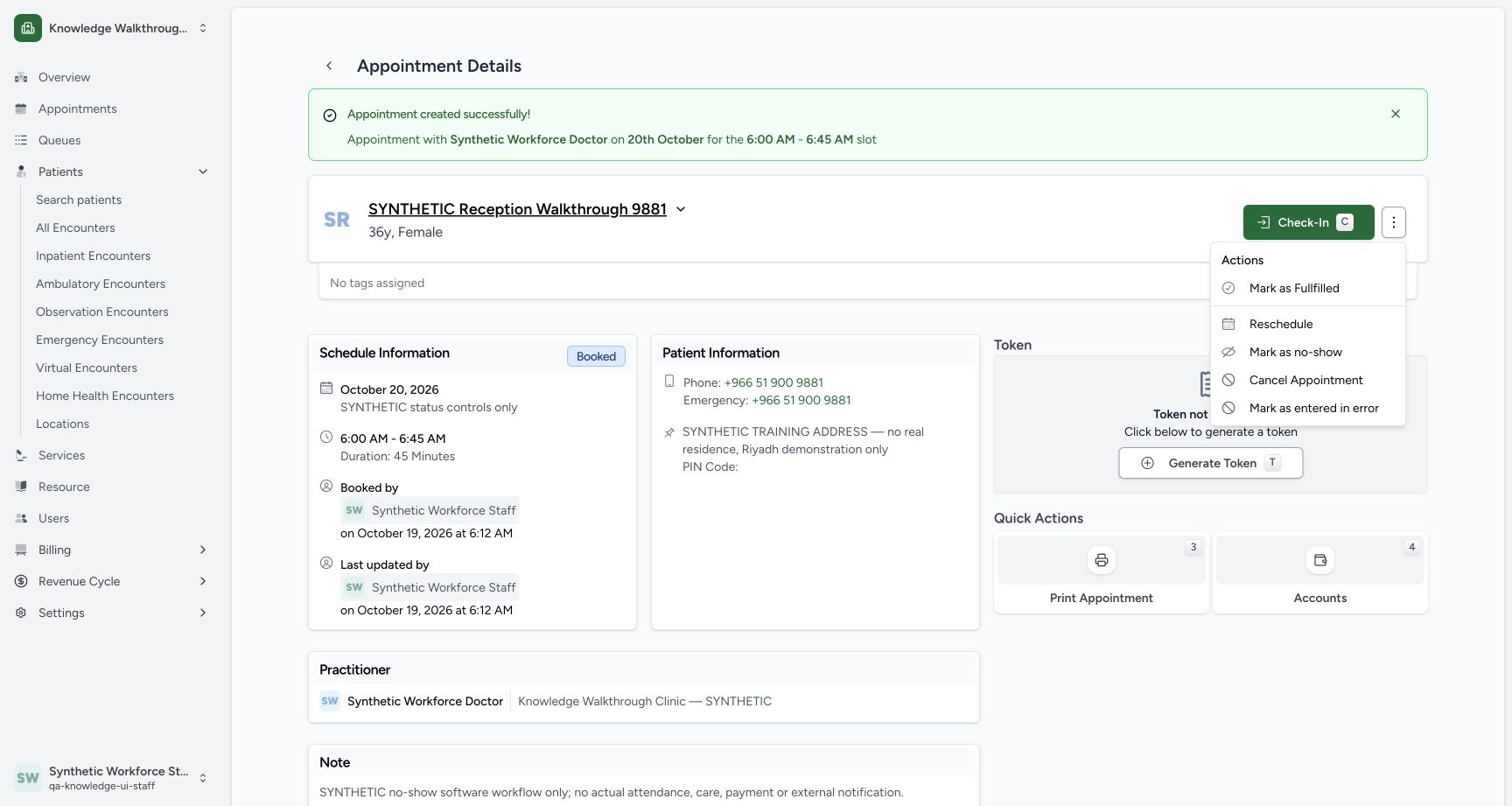
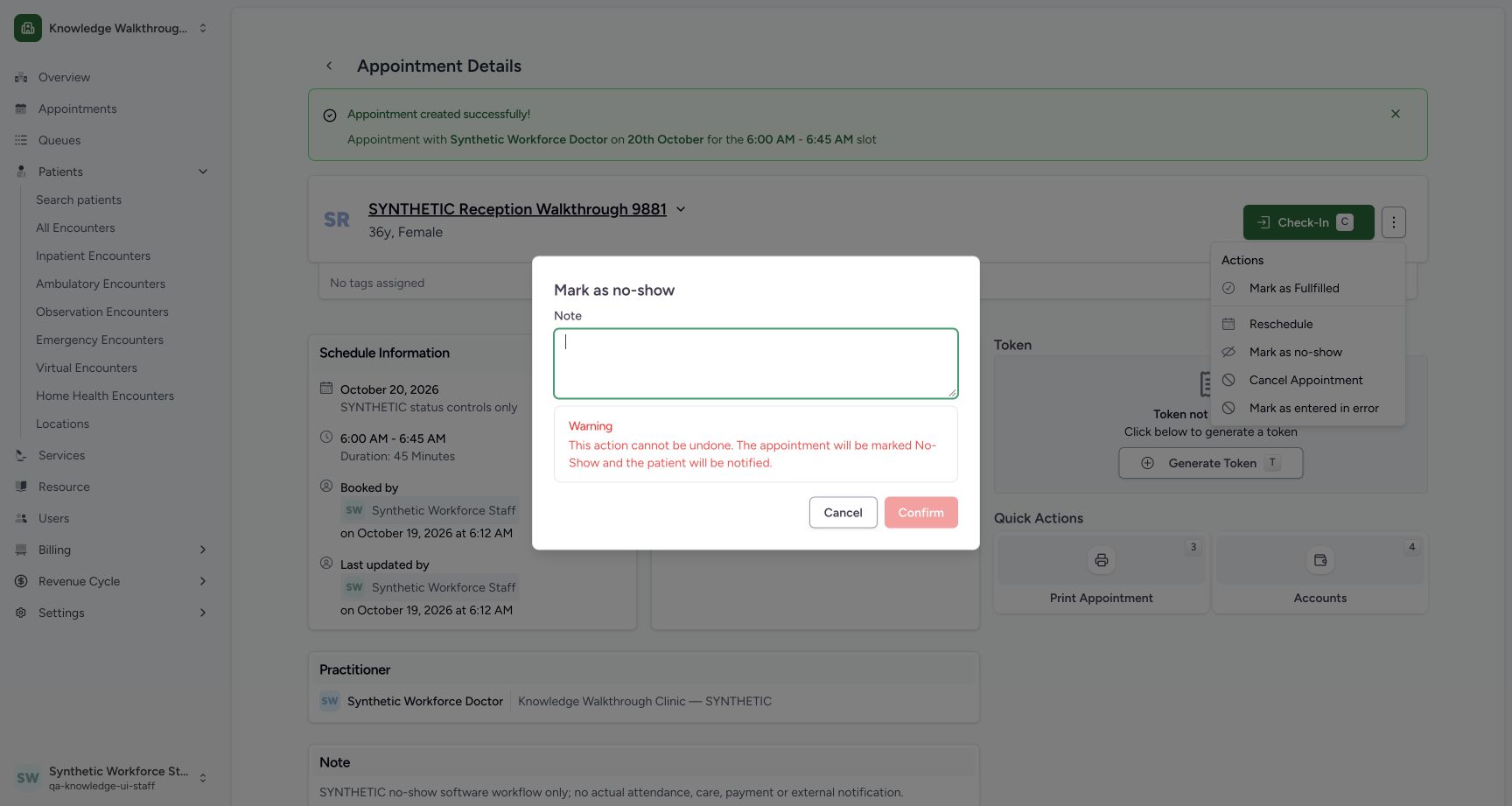
Open the three-dot Actions menu beside Check-In and choose Mark as no-show. Clearing the Note in this example leaves Confirm disabled. Read the warning displayed below the Note.
12Verify the first saved Booked appointment
Capture details
Exact committed 664f6a8f source, ordinary existing Staff in the fictional Clinic. Genuine 1728 × 921 per-tab screenshot. Verify the first saved Booked appointment.
Image SHA-256 edbaac337a8a1cdd081d8faa9b9f87bbbc1aebb84cbd9b4400298558d1417f21
- Booked: Verify the saved Booked state.
- Actions menu: Open the three-dot menu beside Check-In.
 1
1Open Mark as no-show
Capture details
Exact committed 664f6a8f source, ordinary existing Staff in the fictional Clinic. Genuine 1728 × 921 per-tab screenshot. Open Mark as no-show.
Image SHA-256 846c1053a5aa3fae4ac9fed8479ebd47c94c44e8aeae8f00bddc7238088640da
- Mark as no-show: Open the actual No-show confirmation dialog.
 1234
1234Recognize the required No-show note and Cancel
Capture details
Exact committed 664f6a8f source, ordinary existing Staff in the fictional Clinic. Genuine 1728 × 921 per-tab screenshot. Recognize the required No-show note and Cancel.
Image SHA-256 909d651eb3769c4d6aa1493c22387764ba7acfd1c682e3db705230e5d0794fec
- Note required: A blank Note leaves Confirm disabled.
- Cancel: Close this unsaved status change.
- Confirm disabled: A nonblank Note is required.
- Warning: Read the irreversible-status and notification warning.
7. Cancel without changing the saved status
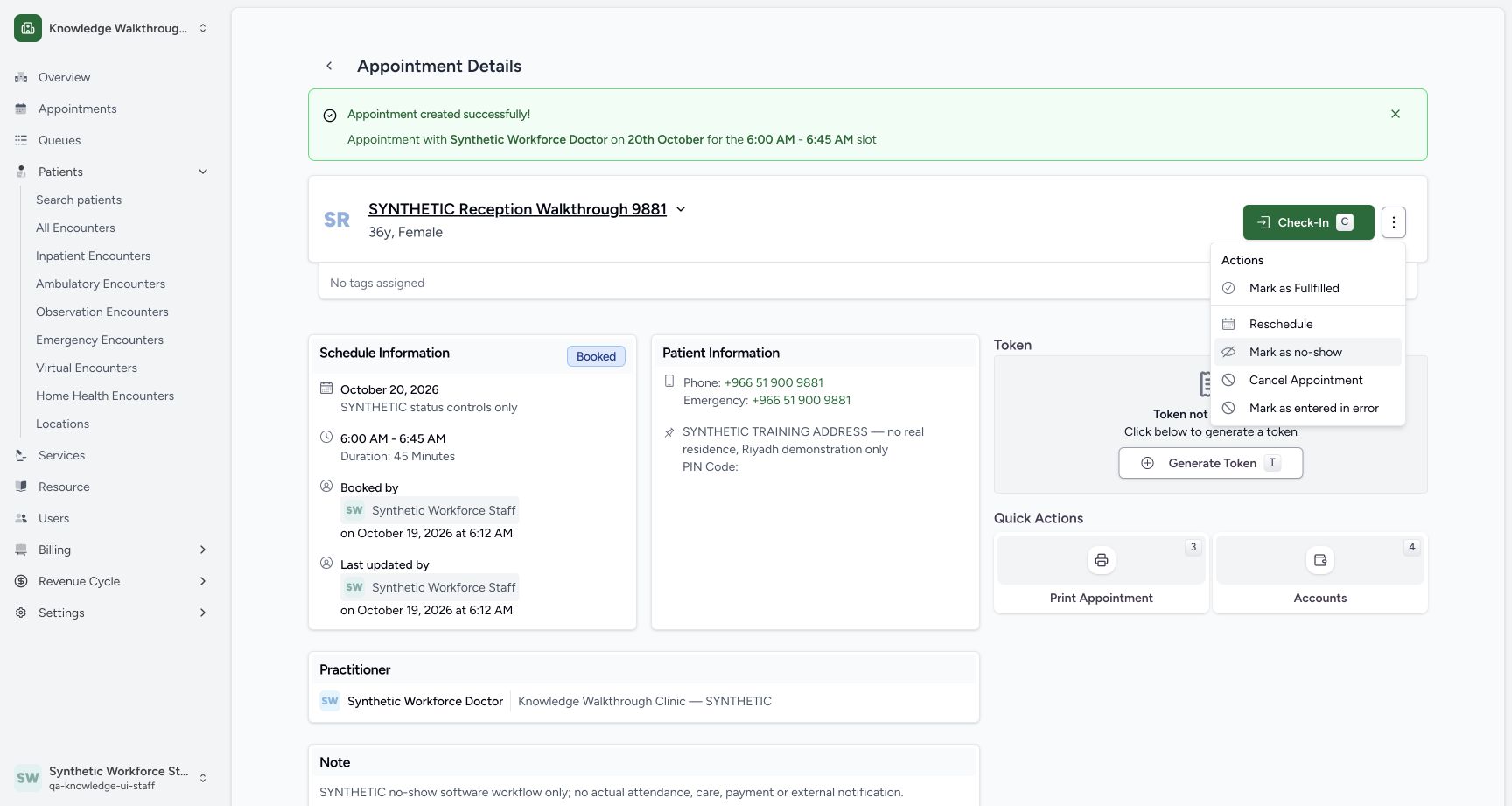
Use Cancel in the No-show dialog. The dialog closes and the appointment remains Booked. This lesson independently verified that Cancel did not change the saved appointment.
1234Recognize the required No-show note and Cancel
Capture details
Exact committed 664f6a8f source, ordinary existing Staff in the fictional Clinic. Genuine 1728 × 921 per-tab screenshot. Recognize the required No-show note and Cancel.
Image SHA-256 909d651eb3769c4d6aa1493c22387764ba7acfd1c682e3db705230e5d0794fec
- Note required: A blank Note leaves Confirm disabled.
- Cancel: Close this unsaved status change.
- Confirm disabled: A nonblank Note is required.
- Warning: Read the irreversible-status and notification warning.
 12
12Verify Cancel retained Booked
Capture details
Exact committed 664f6a8f source, ordinary existing Staff in the fictional Clinic. Genuine 1728 × 921 per-tab screenshot. Verify Cancel retained Booked.
Image SHA-256 849ed7eacb18b149df1797cd4a4fe225ea9ea420619b9c8ceecec750b6824502
- Still Booked: Cancelling the dialog retained the saved Booked state.
- Mark as no-show: Reopen the dialog only when the intended change is ready.
8. Review the actual intended status change
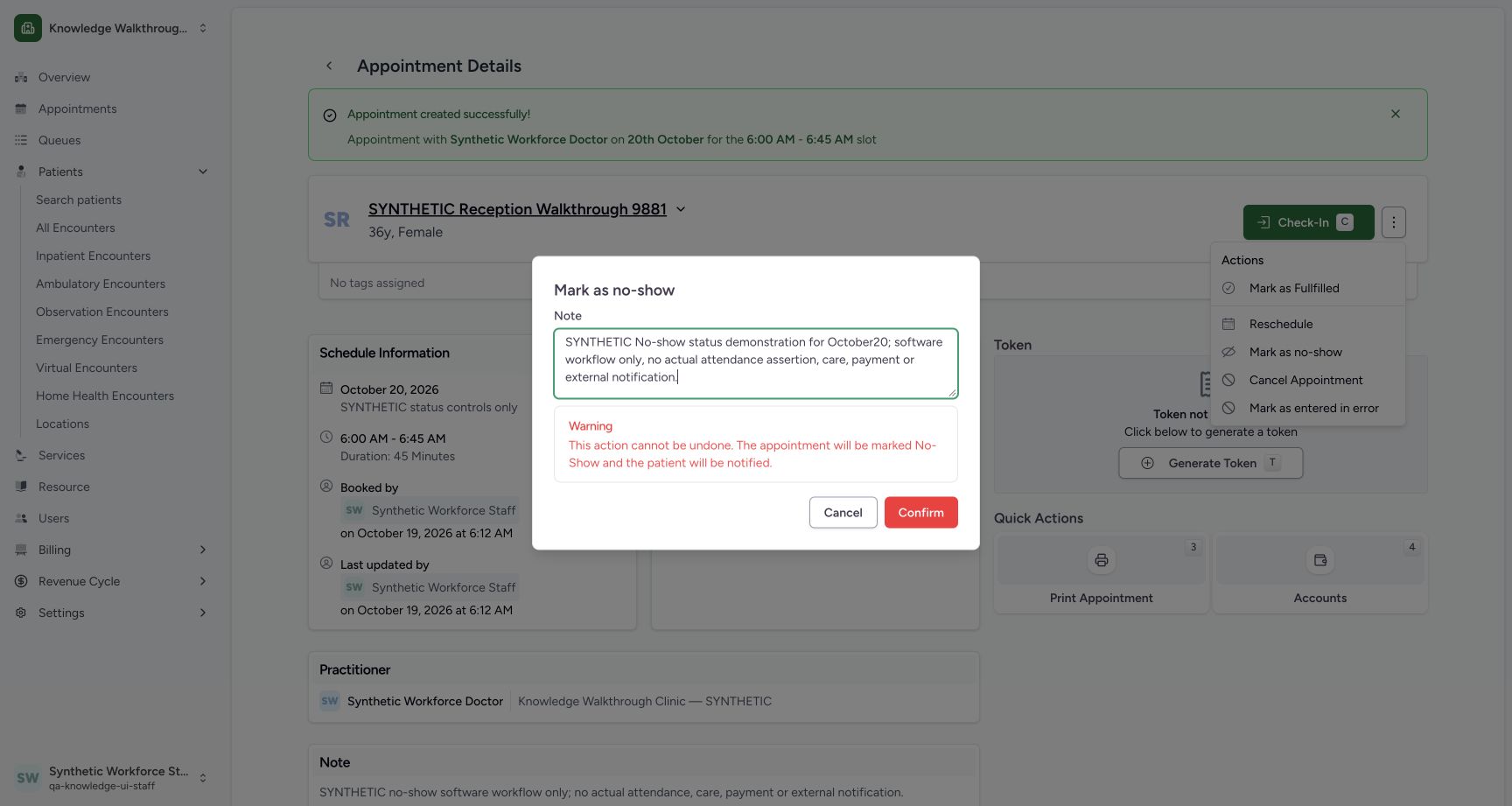
Reopen Mark as no-show, enter the explicit synthetic No-show software-practice note and read the warning. The dialog warns that the action cannot be undone and that the patient will be notified. External transports are disabled in this isolated demonstration; no delivery is claimed. Use Confirm once for the intended example.
12Verify Cancel retained Booked
Capture details
Exact committed 664f6a8f source, ordinary existing Staff in the fictional Clinic. Genuine 1728 × 921 per-tab screenshot. Verify Cancel retained Booked.
Image SHA-256 849ed7eacb18b149df1797cd4a4fe225ea9ea420619b9c8ceecec750b6824502
- Still Booked: Cancelling the dialog retained the saved Booked state.
- Mark as no-show: Reopen the dialog only when the intended change is ready.
 123
123Review the No-show warning, note and Confirm
Capture details
Exact committed 664f6a8f source, ordinary existing Staff in the fictional Clinic. Genuine 1728 × 921 per-tab screenshot. Review the No-show warning, note and Confirm.
Image SHA-256 a198ba88bbea8d1efdd4f2c8c16bc9165ca41c4620e5e2e7d457e326e6f85fdc
- Explicit synthetic note: Review the actual note to be saved.
- Warning: The displayed warning must be read before confirming.
- Confirm: Save this intended synthetic No-show status once.
9. Verify the saved No-show detail
Check the No-show badge, retained date/time, Staff update actor and saved synthetic note. The final page no longer shows the Booked Check-In or status Actions controls.
1234Verify the saved No-show detail
Capture details
Exact committed 664f6a8f source, ordinary existing Staff in the fictional Clinic. Genuine 1728 × 921 per-tab screenshot. Verify the saved No-show detail.
Image SHA-256 aab39146d091fa9d3267a02b5c0a19207be1af94fd199f6d09e7aa799958c5af
- No-show saved: The final saved state is No-show.
- Scheduled date and time: The October 20 appointment remains 06:00–06:45.
- Staff updater: Read the saved actor and update time.
- Saved note: The explicit software-only note is retained.
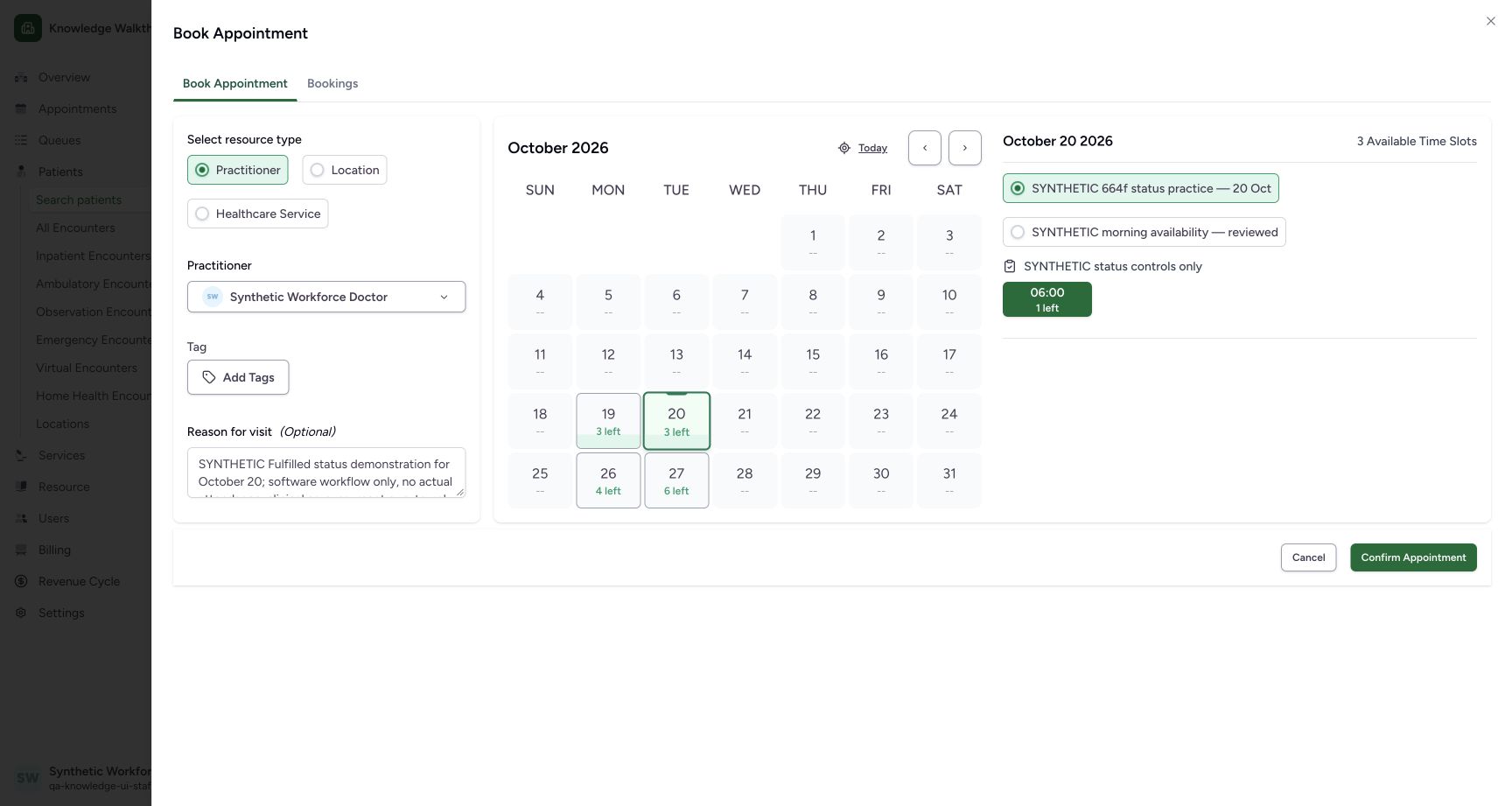
The two examples use a shared capacity-2 slot
After the first No-show was saved, the same 06:00 slot still showed 1 left when a distinct second example was prepared. Normal readbacks retained allocation 1 after No-show; no capacity release is inferred from the status label.
 12345
12345Review a distinct second booking with one place left
Capture details
Exact committed 664f6a8f source, ordinary existing Staff in the fictional Clinic. Genuine 1728 × 921 per-tab screenshot. Review a distinct second booking with one place left.
Image SHA-256 695e3e815e1ff4bdd0f205b8b9b08210a5f7dc146fc5a215f3e477bedc58b8ee
- 20 October: The second distinct example uses the same intended future date.
- Same new private template: Keep the original schedules separate.
- 06:00 selected; 1 left: One place remains after the first No-show example.
- Separate synthetic reason: Use a distinct Fulfilled software-practice note.
- Confirm Appointment: Save the second fictional appointment once.
Troubleshooting
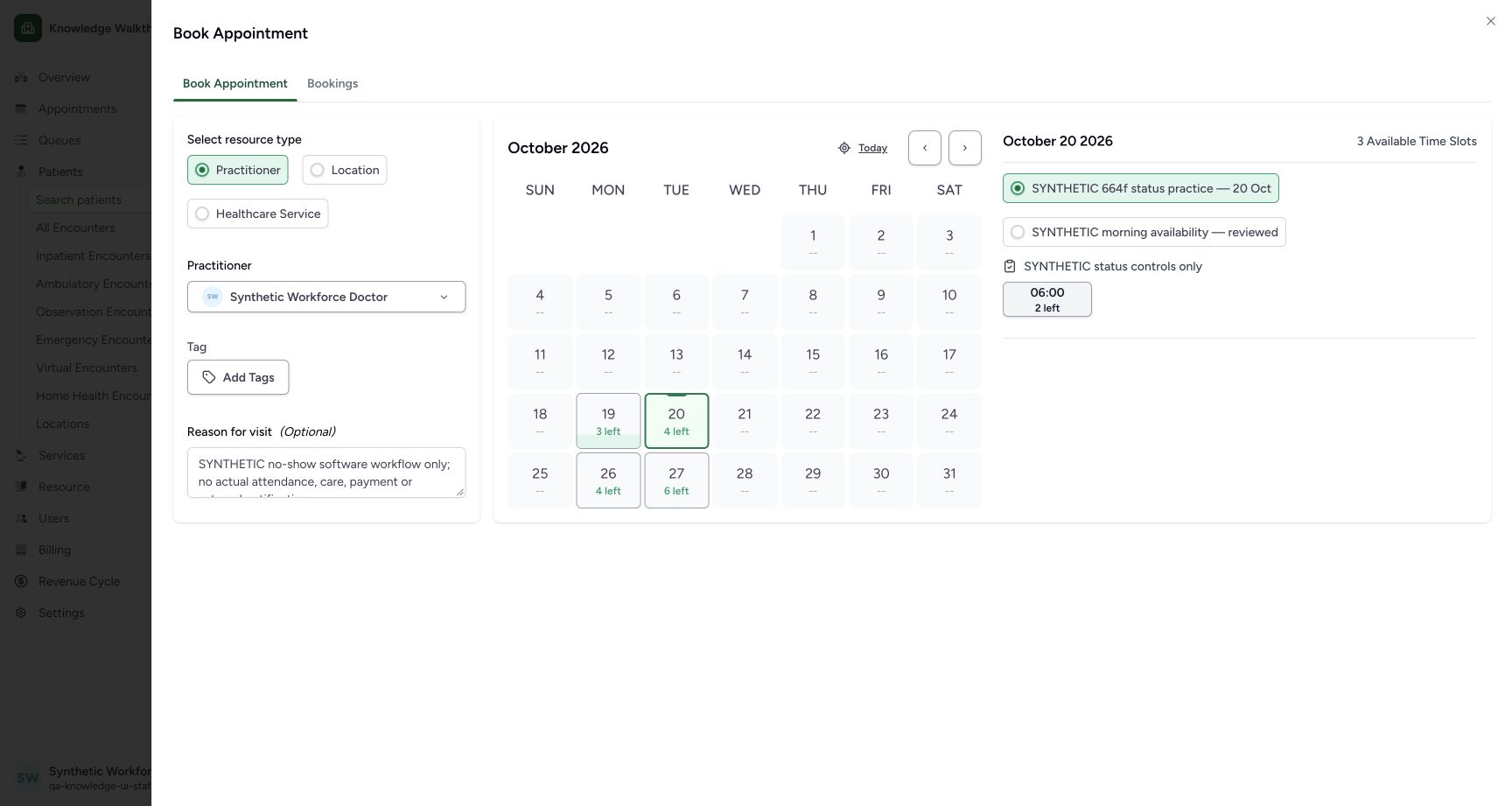
Confirm Appointment disappeared after clicking a selected slot
The actual selected green 06:00 slot toggles off when clicked. The screenshot with a white slot has no confirmation footer. Select 06:00 again and verify it is green before using Confirm Appointment.
1234Review the selected future slot with two places
Capture details
Exact committed 664f6a8f source, ordinary existing Staff in the fictional Clinic. Genuine 1728 × 921 per-tab screenshot. Review the selected future slot with two places.
Image SHA-256 0430c3060fd42998372b706bbfad745a75d6ed4a2a9e305857cd4d1b17782766
- 20 October: Select the intended date.
- New private template: Choose the distinct status-practice template.
- 06:00 selected; 2 left: The first slot is already selected in this observed state.
- Confirm Appointment: The confirmation is available with a selected slot.
 1
1Recognize a deselected slot and missing confirmation
Capture details
Exact committed 664f6a8f source, ordinary existing Staff in the fictional Clinic. Genuine 1728 × 921 per-tab screenshot. Recognize a deselected slot and missing confirmation.
Image SHA-256 617701ef4f1c6eb076f245f80ad7190f0882c4c127e3f8ce9a50cd983df6b598
- Select a slot again: The white slot is deselected; click it to restore selection before confirming.
123Confirm the first fictional booking
Capture details
Exact committed 664f6a8f source, ordinary existing Staff in the fictional Clinic. Genuine 1728 × 921 per-tab screenshot. Confirm the first fictional booking.
Image SHA-256 32b7aa25ceceaf855a29676a2d4615270c32df95eeb6d446e04df73c783a7a9c
- Selected 06:00 slot: Check the green selected slot and remaining places.
- Synthetic reason: This example is explicitly software-only.
- Confirm Appointment: Save the first reviewed fictional appointment.
No-show Confirm is disabled
Enter the intended nonblank Note and read the warning. The blank-note screenshot has disabled Confirm; the explicit-note screenshot shows it enabled. Cancel retains the saved Booked record.
1234Recognize the required No-show note and Cancel
Capture details
Exact committed 664f6a8f source, ordinary existing Staff in the fictional Clinic. Genuine 1728 × 921 per-tab screenshot. Recognize the required No-show note and Cancel.
Image SHA-256 909d651eb3769c4d6aa1493c22387764ba7acfd1c682e3db705230e5d0794fec
- Note required: A blank Note leaves Confirm disabled.
- Cancel: Close this unsaved status change.
- Confirm disabled: A nonblank Note is required.
- Warning: Read the irreversible-status and notification warning.
12Verify Cancel retained Booked
Capture details
Exact committed 664f6a8f source, ordinary existing Staff in the fictional Clinic. Genuine 1728 × 921 per-tab screenshot. Verify Cancel retained Booked.
Image SHA-256 849ed7eacb18b149df1797cd4a4fe225ea9ea420619b9c8ceecec750b6824502
- Still Booked: Cancelling the dialog retained the saved Booked state.
- Mark as no-show: Reopen the dialog only when the intended change is ready.
123Review the No-show warning, note and Confirm
Capture details
Exact committed 664f6a8f source, ordinary existing Staff in the fictional Clinic. Genuine 1728 × 921 per-tab screenshot. Review the No-show warning, note and Confirm.
Image SHA-256 a198ba88bbea8d1efdd4f2c8c16bc9165ca41c4620e5e2e7d457e326e6f85fdc
- Explicit synthetic note: Review the actual note to be saved.
- Warning: The displayed warning must be read before confirming.
- Confirm: Save this intended synthetic No-show status once.
Source evidence
Every citation uses this exact committed version. The private source repository requires access.
- repositories/platform/mansoq-web/src/components/Patient/PatientIdentifierFilter.tsx:567 ·
664f6a8fd787188f6481a6cb6f72a98c9d5fa22bSource file checksum
50d2cc2acbb414040148b30d6664ccdcae33df64bc7b19953fe34ee6afd3eed7 - repositories/platform/mansoq-web/src/pages/Appointments/components/PractitionerSelector.tsx:309 ·
664f6a8fd787188f6481a6cb6f72a98c9d5fa22bSource file checksum
fbff1cae7ee20060cda82aff258844a6a4040444176b5c0df23c6e90de1d0790 - repositories/platform/mansoq-web/src/pages/Appointments/BookAppointment/BookAppointmentDetails.tsx:164 ·
664f6a8fd787188f6481a6cb6f72a98c9d5fa22bSource file checksum
10a7aab902525f4669d7219477e1ca6b7e333f38fbecc8552f608fbc721023f2 - repositories/platform/mansoq-web/src/pages/Appointments/AppointmentDetail.tsx:180 ·
664f6a8fd787188f6481a6cb6f72a98c9d5fa22bSource file checksum
8fc77ee6f1f7b145e2987ba272e80f35631e17907ea91cd305738250b137b839 - repositories/platform/mansoq-web/src/pages/Appointments/AppointmentDetail.tsx:1168 ·
664f6a8fd787188f6481a6cb6f72a98c9d5fa22bSource file checksum
8fc77ee6f1f7b145e2987ba272e80f35631e17907ea91cd305738250b137b839 - repositories/platform/mansoq-core/mansoq/emr/api/viewsets/scheduling/booking.py:120 ·
664f6a8fd787188f6481a6cb6f72a98c9d5fa22bSource file checksum
b6eebb4afa619aa661824fd5790ac8c34452bb194833b51f3054ce04ca0dfee0 - repositories/platform/mansoq-core/mansoq/emr/api/viewsets/scheduling/availability.py:126 ·
664f6a8fd787188f6481a6cb6f72a98c9d5fa22bSource file checksum
1370c5b5f5cad98b4cceba59929dc88e82c70350615d5a3125d60cab54deec2c