 MANSOQ
 Manager dashboards and monitoring · VERSION 8d99bb8a
Read and filter bed availability
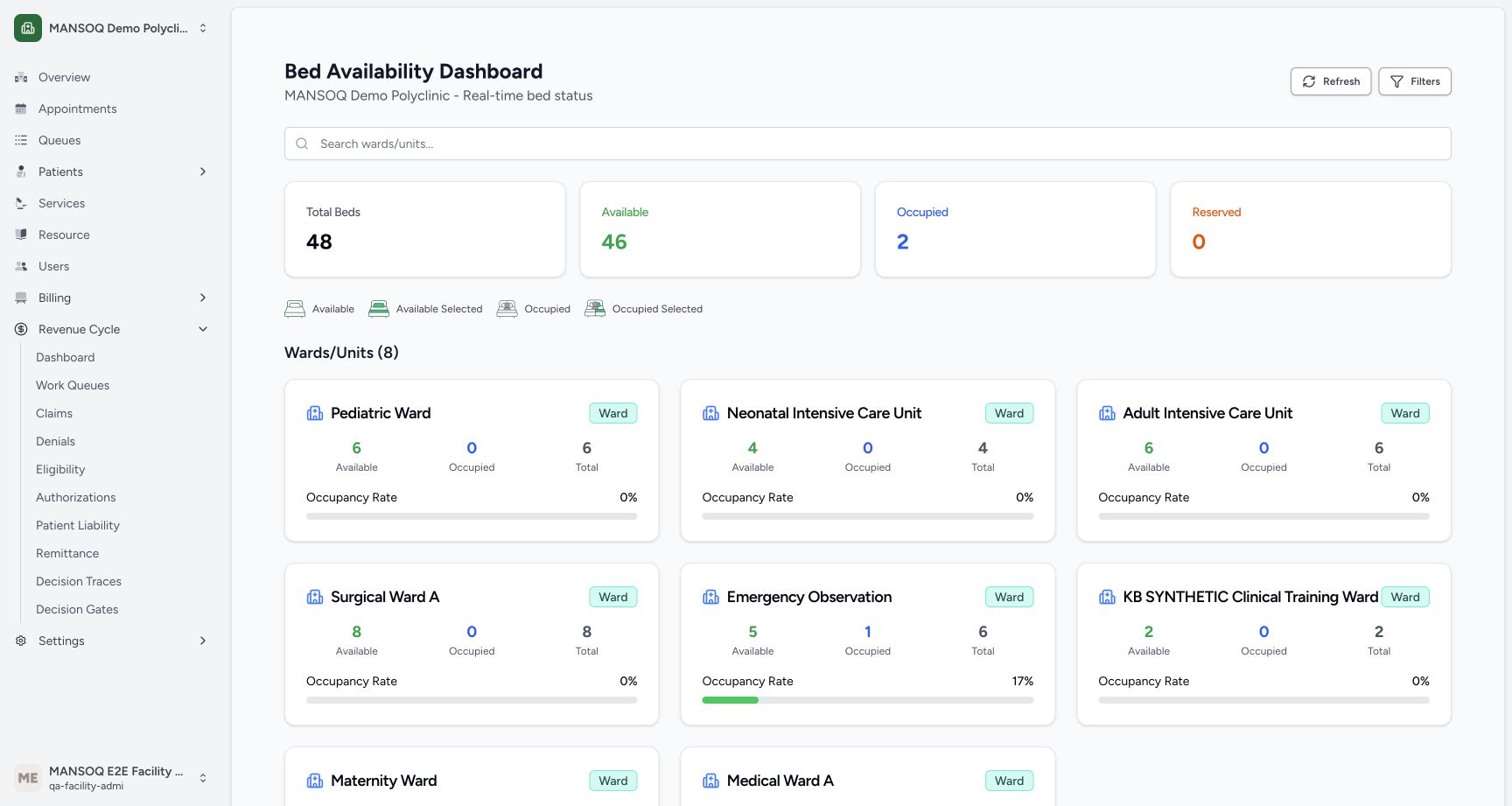
Use the installed bed dashboard to search wards, apply ward and availability filters, inspect a bed layout and refresh the read-only view.
Facility Admin
 123
123Read overall bed availability
Capture details
Exact committed release 8d99, isolated synthetic Polyclinic. Existing non-superuser Facility Admin; no new permissions. Source and139 frontend assets independently verified. Read-only manager teaching, not production deployment, bank reconciliation, payer acceptance or clinical/tax approval.
Image SHA-256 42d8b15fcc4275319b46c094f43f42aab9a18ea3eedabb17fc6423cac80380d3
- Refresh beds: Reload the current location data; the page also refreshes periodically.
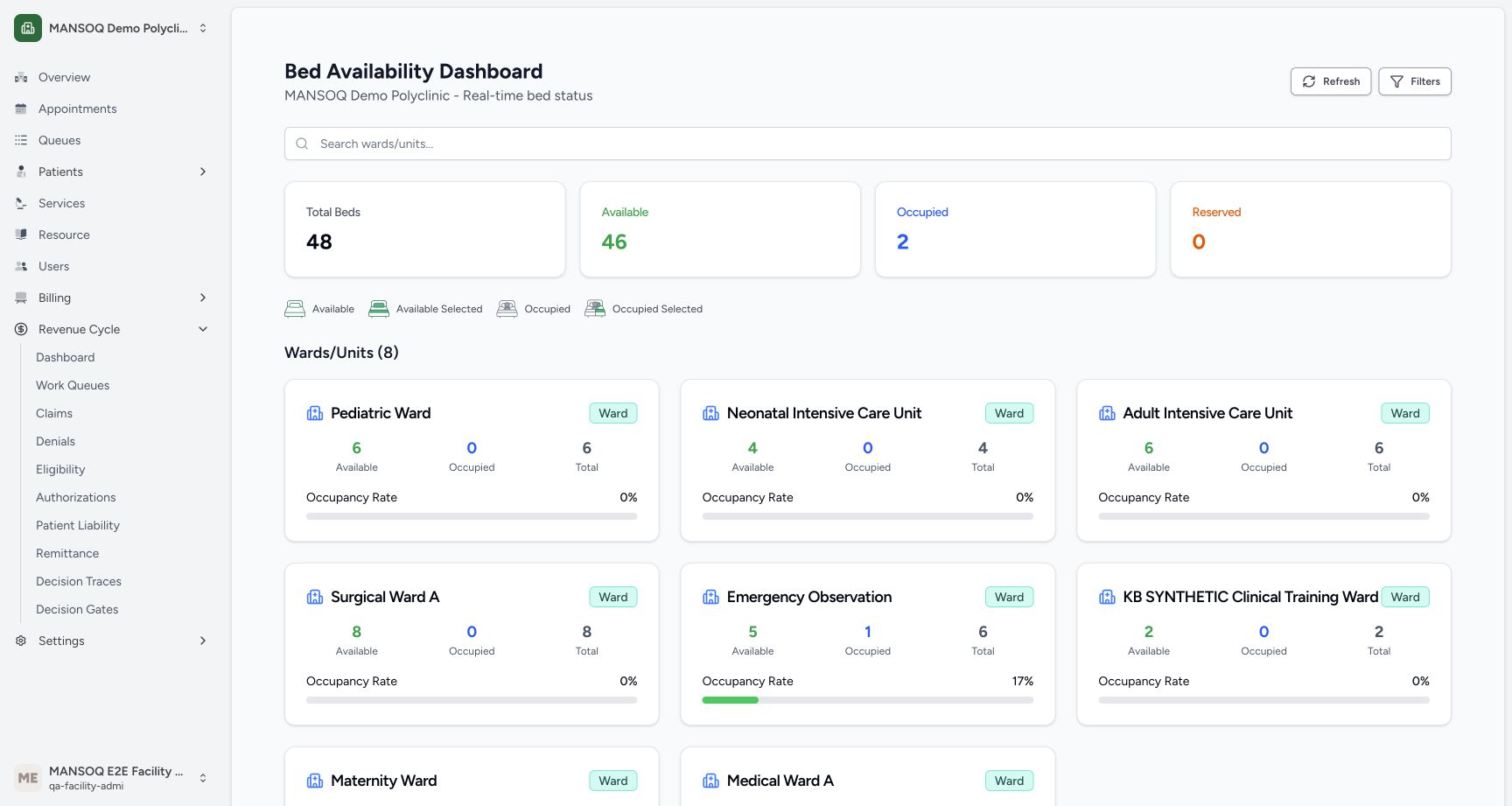
- Overall totals: The page shows 48 total, 46 available, 2 occupied and 0 reserved.
- Ward cards: Cards summarize loaded beds by their parent ward.
13 of 13 content blocks have reviewed image alignment. Missing overview or prerequisite images remain open.
Before you begin
- Use an existing authorized account in the intended facility. This example uses the synthetic Polyclinic and its normal Facility Admin account.123
Recorded release 8d99bb8a · 2026-10-19T03:53:37.703896+00:00 · 1728 × 921 Read overall bed availability
Capture details
Exact committed release 8d99, isolated synthetic Polyclinic. Existing non-superuser Facility Admin; no new permissions. Source and139 frontend assets independently verified. Read-only manager teaching, not production deployment, bank reconciliation, payer acceptance or clinical/tax approval.
Image SHA-256
42d8b15fcc4275319b46c094f43f42aab9a18ea3eedabb17fc6423cac80380d3- Refresh beds: Reload the current location data; the page also refreshes periodically.
- Overall totals: The page shows 48 total, 46 available, 2 occupied and 0 reserved.
- Ward cards: Cards summarize loaded beds by their parent ward.
- Have the Bed Availability Dashboard open in the intended facility. Confirm its screen name and facility heading. This version has no bed-dashboard sidebar link; arranging your approved bookmark or direct-route access is a separate setup branch, not demonstrated by the loaded view.123
Recorded release 8d99bb8a · 2026-10-19T03:53:37.703896+00:00 · 1728 × 921 Read overall bed availability
Capture details
Exact committed release 8d99, isolated synthetic Polyclinic. Existing non-superuser Facility Admin; no new permissions. Source and139 frontend assets independently verified. Read-only manager teaching, not production deployment, bank reconciliation, payer acceptance or clinical/tax approval.
Image SHA-256
42d8b15fcc4275319b46c094f43f42aab9a18ea3eedabb17fc6423cac80380d3- Refresh beds: Reload the current location data; the page also refreshes periodically.
- Overall totals: The page shows 48 total, 46 available, 2 occupied and 0 reserved.
- Ward cards: Cards summarize loaded beds by their parent ward.
1. Read overall bed totals
Confirm the facility heading. The example shows 48 total beds, 46 available, 2 occupied and 0 reserved, with eight ward cards. Available means no current encounter or a discharged current encounter; occupied means a current encounter whose status is not discharged. These are location-record classifications, not a staffing, cleaning or clinical readiness assessment.
123Read overall bed availability
Capture details
Exact committed release 8d99, isolated synthetic Polyclinic. Existing non-superuser Facility Admin; no new permissions. Source and139 frontend assets independently verified. Read-only manager teaching, not production deployment, bank reconciliation, payer acceptance or clinical/tax approval.
Image SHA-256 42d8b15fcc4275319b46c094f43f42aab9a18ea3eedabb17fc6423cac80380d3
- Refresh beds: Reload the current location data; the page also refreshes periodically.
- Overall totals: The page shows 48 total, 46 available, 2 occupied and 0 reserved.
- Ward cards: Cards summarize loaded beds by their parent ward.
2. Refresh the loaded location view
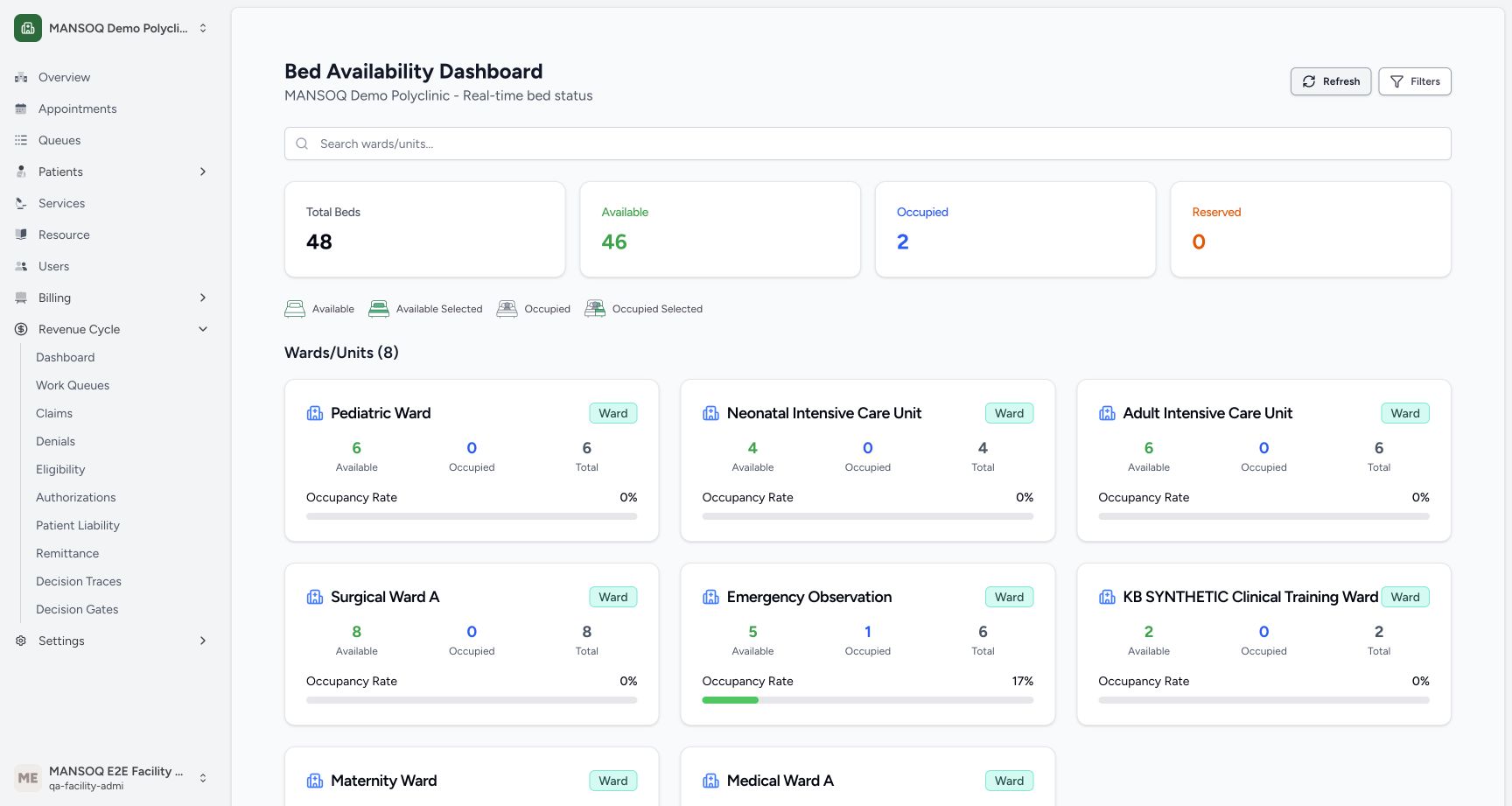
Choose Refresh and wait until the loaded cards return. The actual settled view retains the same totals. This page also requests current data periodically. Its Real-time label does not guarantee that source records were entered promptly.
123Read overall bed availability
Capture details
Exact committed release 8d99, isolated synthetic Polyclinic. Existing non-superuser Facility Admin; no new permissions. Source and139 frontend assets independently verified. Read-only manager teaching, not production deployment, bank reconciliation, payer acceptance or clinical/tax approval.
Image SHA-256 42d8b15fcc4275319b46c094f43f42aab9a18ea3eedabb17fc6423cac80380d3
- Refresh beds: Reload the current location data; the page also refreshes periodically.
- Overall totals: The page shows 48 total, 46 available, 2 occupied and 0 reserved.
- Ward cards: Cards summarize loaded beds by their parent ward.
 123
123Bed dashboard after Refresh
Capture details
Exact committed release 8d99, isolated synthetic Polyclinic. Existing non-superuser Facility Admin; no new permissions. Source and139 frontend assets independently verified. Read-only manager teaching, not production deployment, bank reconciliation, payer acceptance or clinical/tax approval.
Image SHA-256 55dbbcbad405c98a9e3e64409f8a8d798170866c1a8119c26237954ab6ebbe37
- Refresh beds: Reload the current location data; the page also refreshes periodically.
- Overall totals: The page shows 48 total, 46 available, 2 occupied and 0 reserved.
- Ward cards: Cards summarize loaded beds by their parent ward.
3. Search by ward or unit name
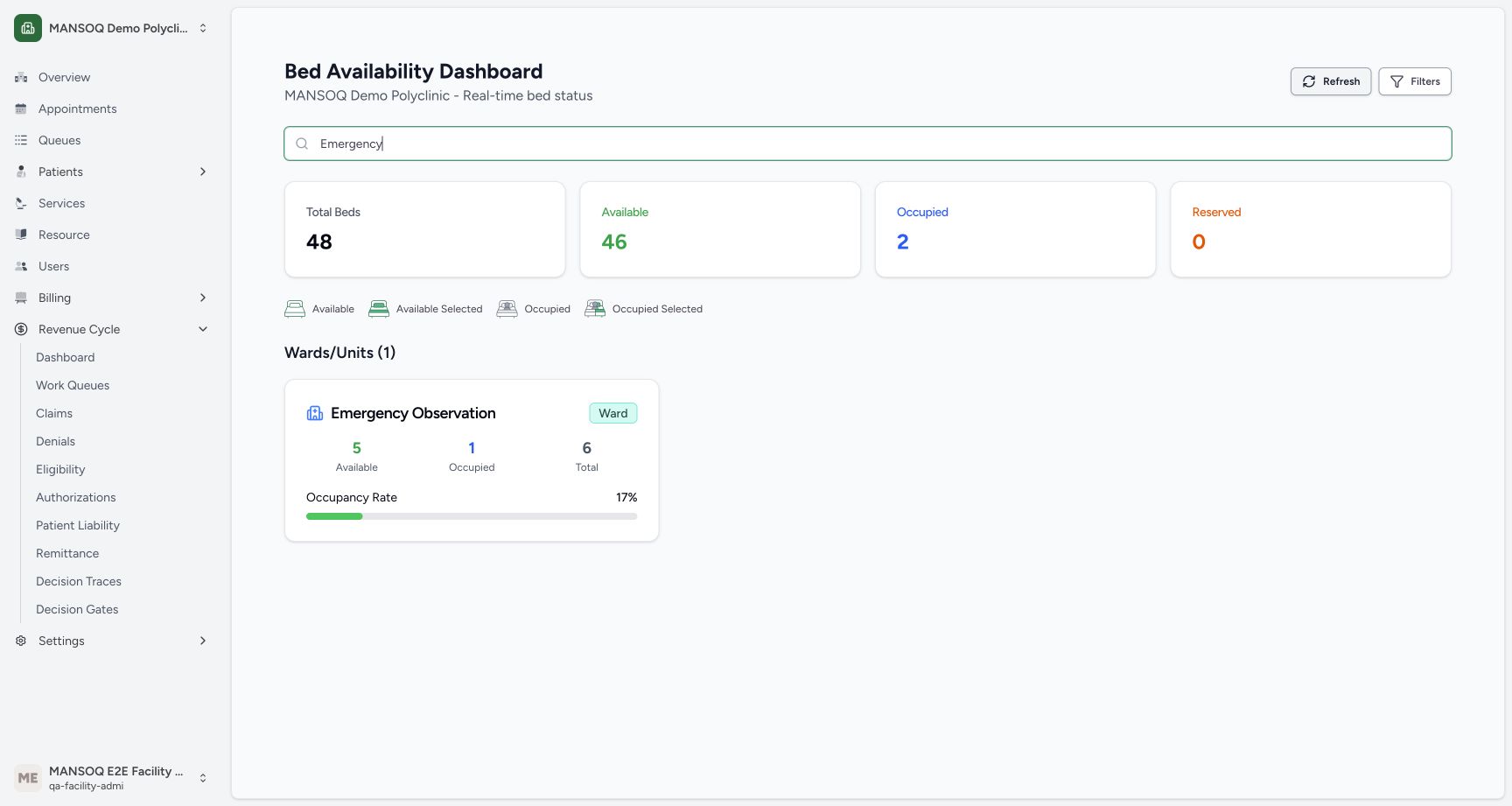
Type Emergency into Search wards/units. One matching Emergency Observation card remains, with 5 available and 1 occupied bed out of 6. The overall totals above remain unchanged because search filters the ward cards, not the summary cards.
 12
12Search for an existing ward
Capture details
Exact committed release 8d99, isolated synthetic Polyclinic. Existing non-superuser Facility Admin; no new permissions. Source and139 frontend assets independently verified. Read-only manager teaching, not production deployment, bank reconciliation, payer acceptance or clinical/tax approval.
Image SHA-256 98063c97b78359cbfb727cee9edd2f58c6baa59116b0ea527c6714a05b2c622d
- Ward search: Typing Emergency limits the displayed ward cards.
- Matching ward: Emergency Observation remains with 5 available and 1 occupied bed.
4. Recover from a search with no matches
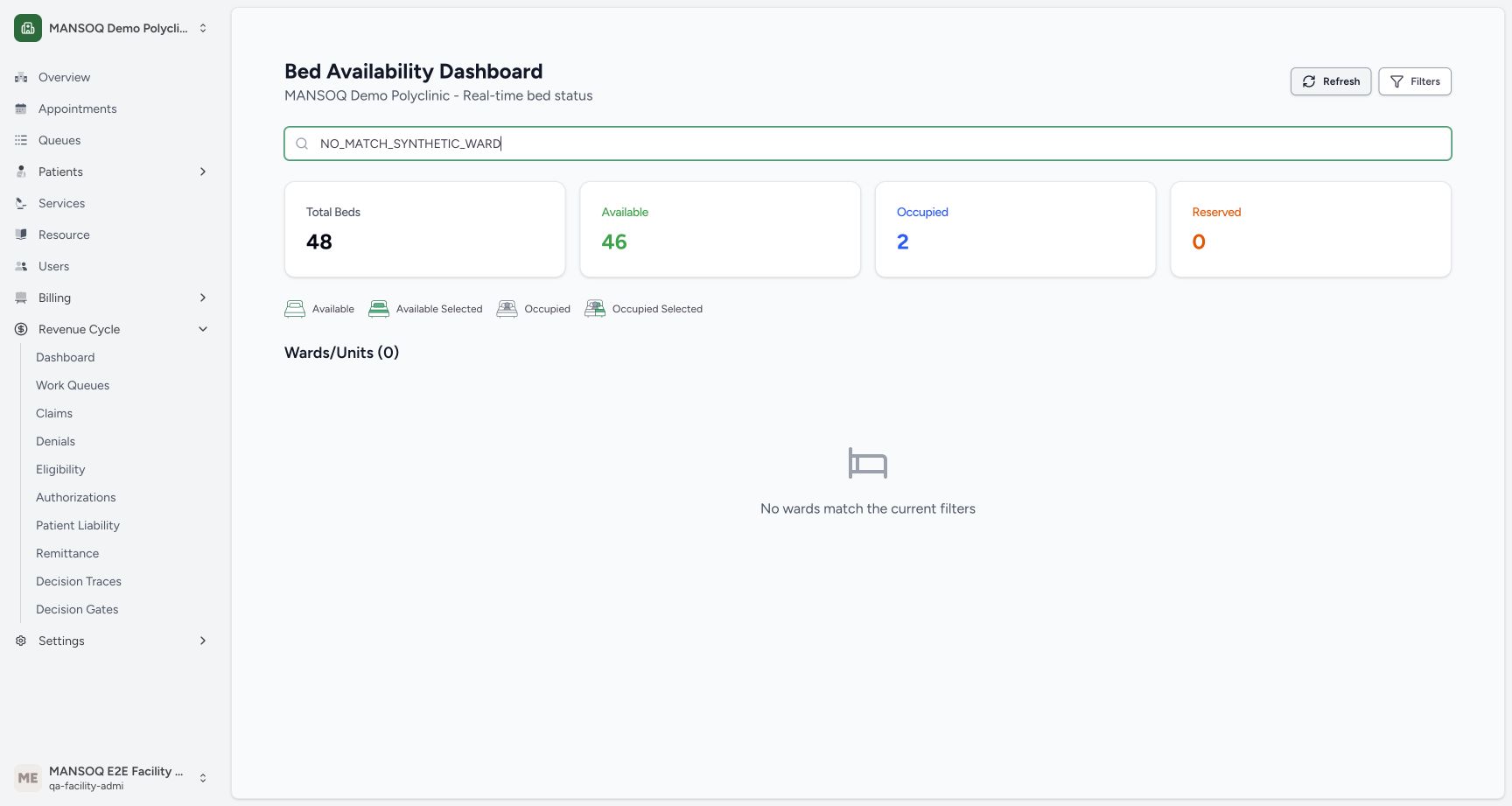
A nonmatching search displays No wards match the current filters and Wards/Units (0). Clear the search to return to the full list. This does not mean that the facility has no beds.
 12
12A ward search with no matches
Capture details
Exact committed release 8d99, isolated synthetic Polyclinic. Existing non-superuser Facility Admin; no new permissions. Source and139 frontend assets independently verified. Read-only manager teaching, not production deployment, bank reconciliation, payer acceptance or clinical/tax approval.
Image SHA-256 24c1b42e7b798f4610a1bbeae25c247e91d53c47db7c6d8955604d35c6a928db
- Nonmatching search: This temporary search string matches no ward.
- Empty search result: Clear the search instead of changing bed records.
 123
123Bed filters reset to the full ward list
Capture details
Exact committed release 8d99, isolated synthetic Polyclinic. Existing non-superuser Facility Admin; no new permissions. Source and139 frontend assets independently verified. Read-only manager teaching, not production deployment, bank reconciliation, payer acceptance or clinical/tax approval.
Image SHA-256 42d8b15fcc4275319b46c094f43f42aab9a18ea3eedabb17fc6423cac80380d3
- Refresh beds: Reload the current location data; the page also refreshes periodically.
- Overall totals: The page shows 48 total, 46 available, 2 occupied and 0 reserved.
- Ward cards: Cards summarize loaded beds by their parent ward.
5. Choose a ward filter
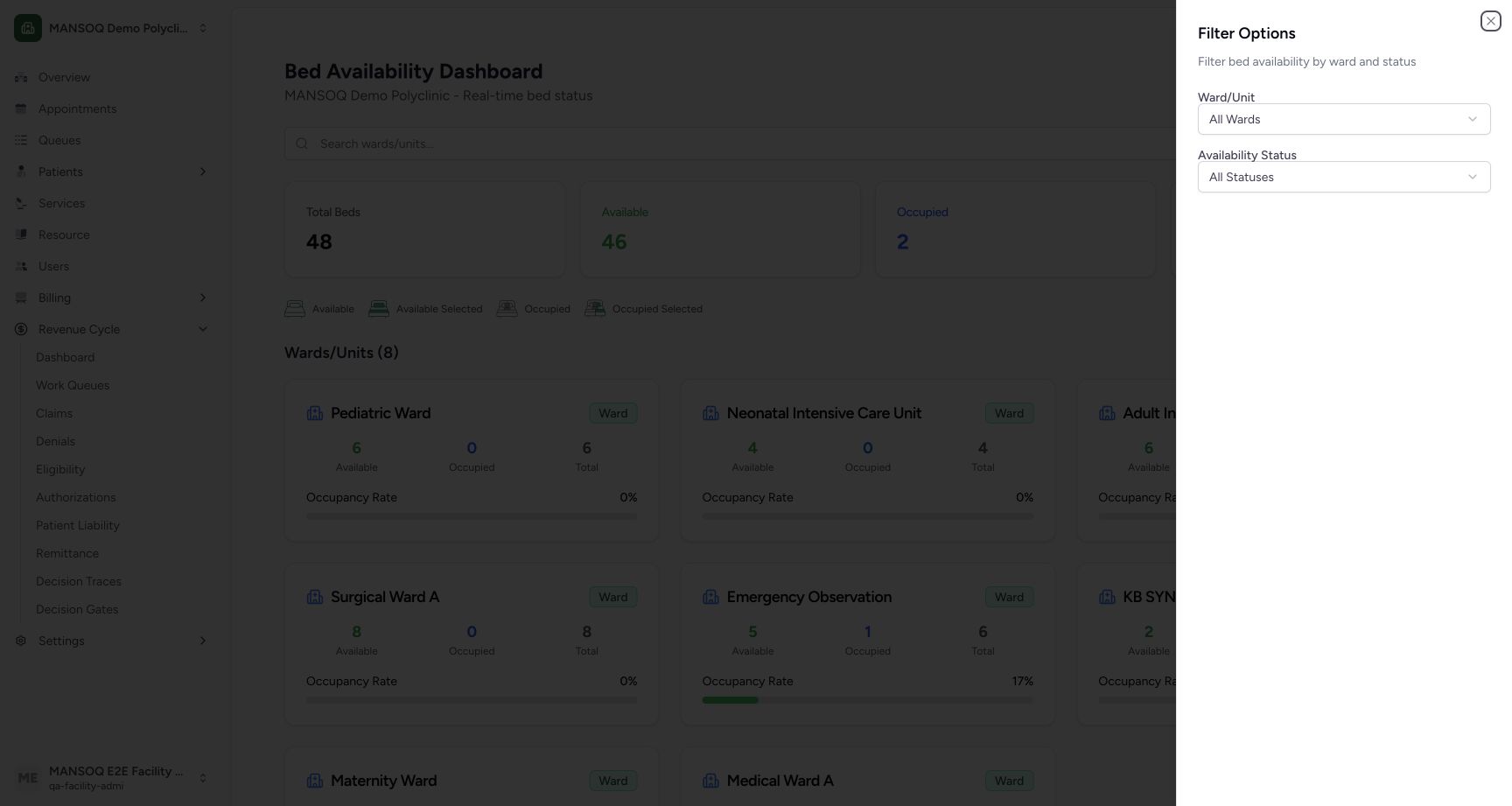
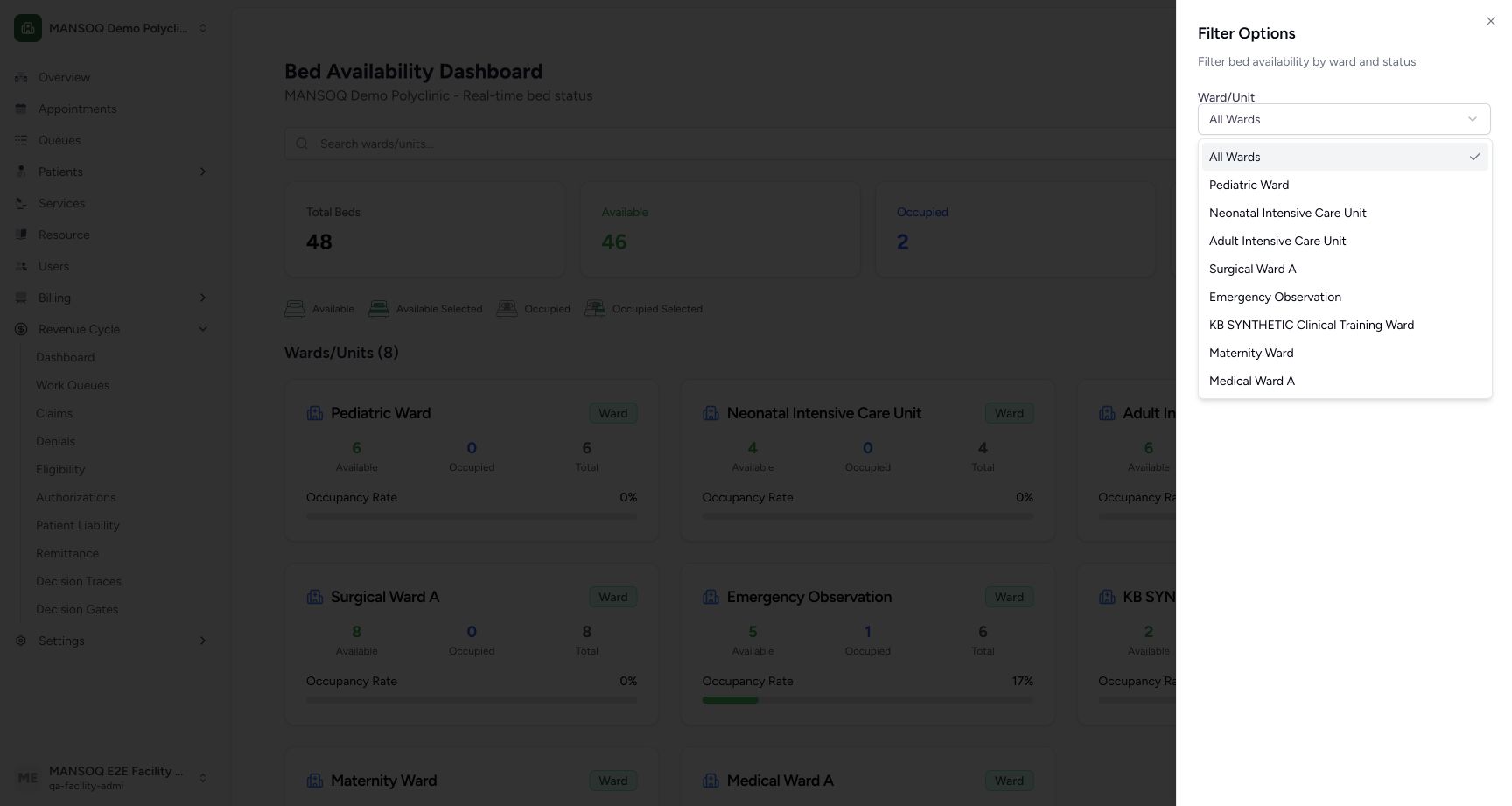
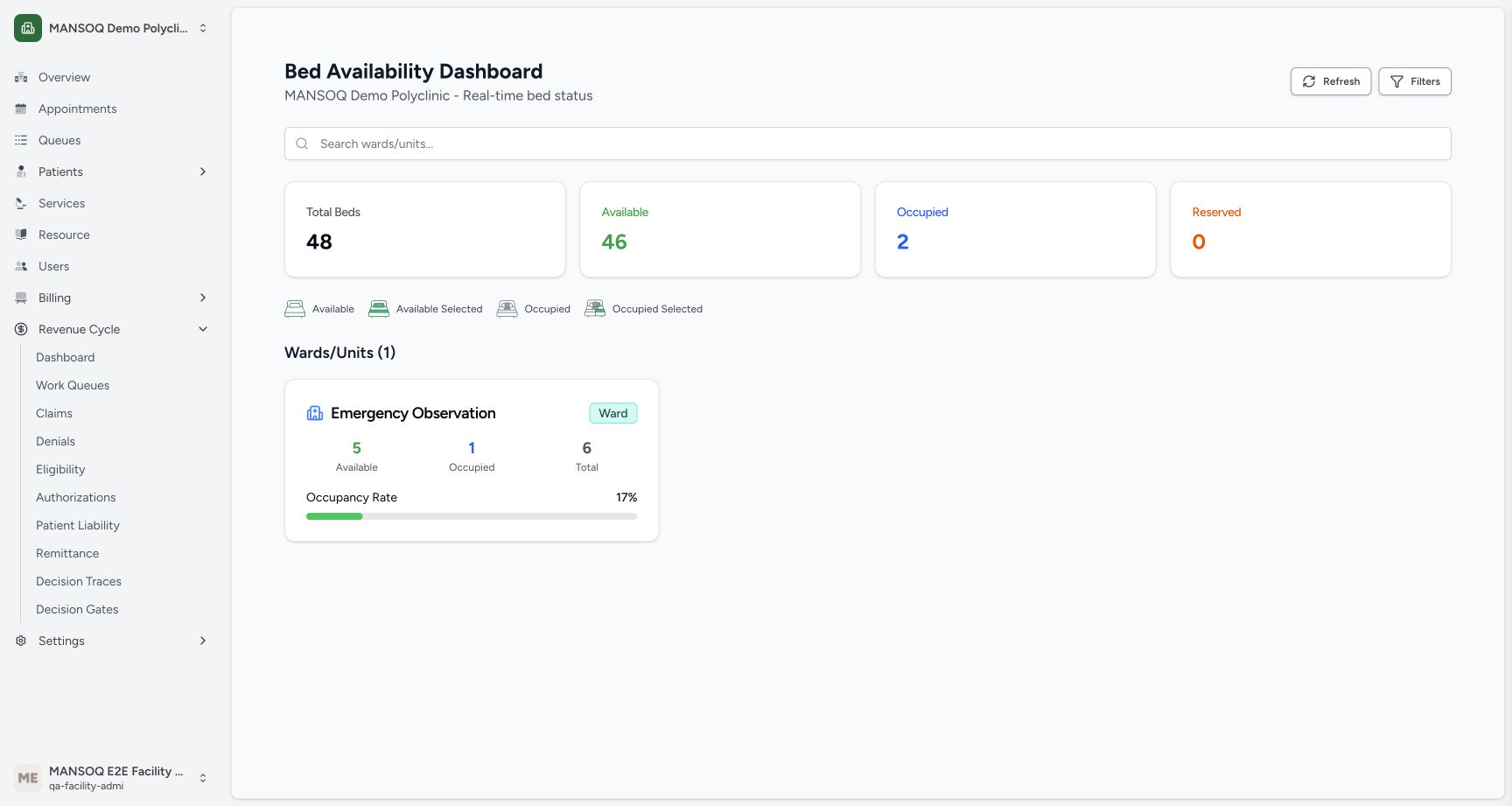
Clear the search and choose Filters. Use Ward/Unit to select Emergency Observation, then close the sheet. The settled result shows that one ward. All Wards removes this restriction. Filter choices affect only the local view and URL; they do not move patients or update locations.
 123
123Bed filter sheet
Capture details
Exact committed release 8d99, isolated synthetic Polyclinic. Existing non-superuser Facility Admin; no new permissions. Source and139 frontend assets independently verified. Read-only manager teaching, not production deployment, bank reconciliation, payer acceptance or clinical/tax approval.
Image SHA-256 74000518b1bb6c045b9c7289b267360cf5af74e2607ae7e065d84aef3f6ac6f9
- Ward selector: Choose a ward or All Wards.
- Availability selector: Choose one of the displayed status options.
- Close filters: Close the sheet after selecting filters.
 12
12Choose a ward from the actual list
Capture details
Exact committed release 8d99, isolated synthetic Polyclinic. Existing non-superuser Facility Admin; no new permissions. Source and139 frontend assets independently verified. Read-only manager teaching, not production deployment, bank reconciliation, payer acceptance or clinical/tax approval.
Image SHA-256 bf1c2b4d8f1321a94ab00738f4f94898f25e79011d99ecddaef082f7fc180a79
- Emergency Observation: Choose this existing ward to show its card.
- All Wards: Use All Wards to remove a ward restriction.
 12
12Settled ward-filter result
Capture details
Exact committed release 8d99, isolated synthetic Polyclinic. Existing non-superuser Facility Admin; no new permissions. Source and139 frontend assets independently verified. Read-only manager teaching, not production deployment, bank reconciliation, payer acceptance or clinical/tax approval.
Image SHA-256 13654170f6b2d8057310f43821a1a2a91cfa50f2c6e9ba8e4e3310d4c54c2da9
- Selected ward card: The chosen ward contains 6 beds: 5 available and 1 occupied.
- Open ward layout: Choose this ward card to inspect its read-only bed layout.
6. Apply Available and Occupied status filters
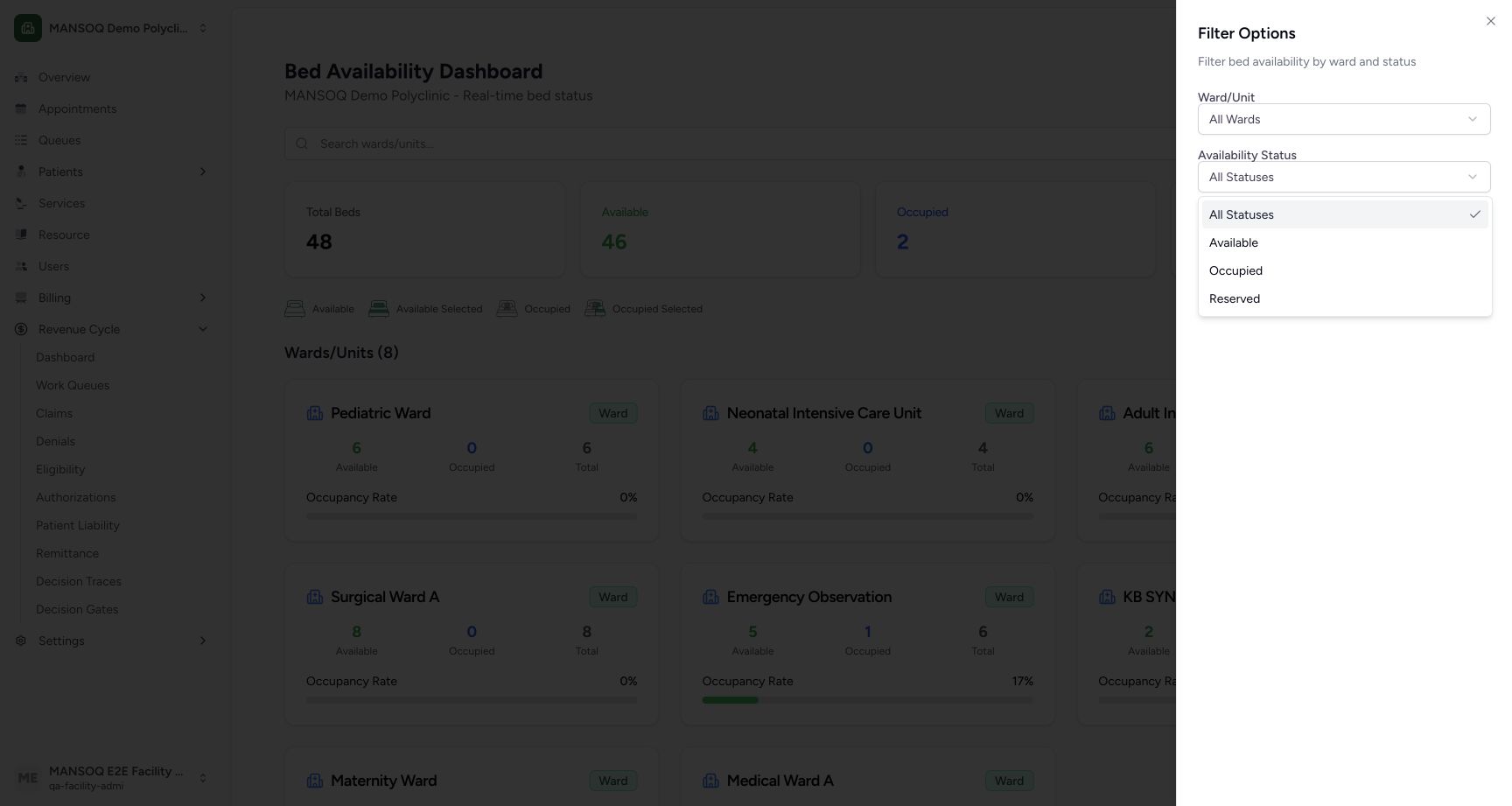
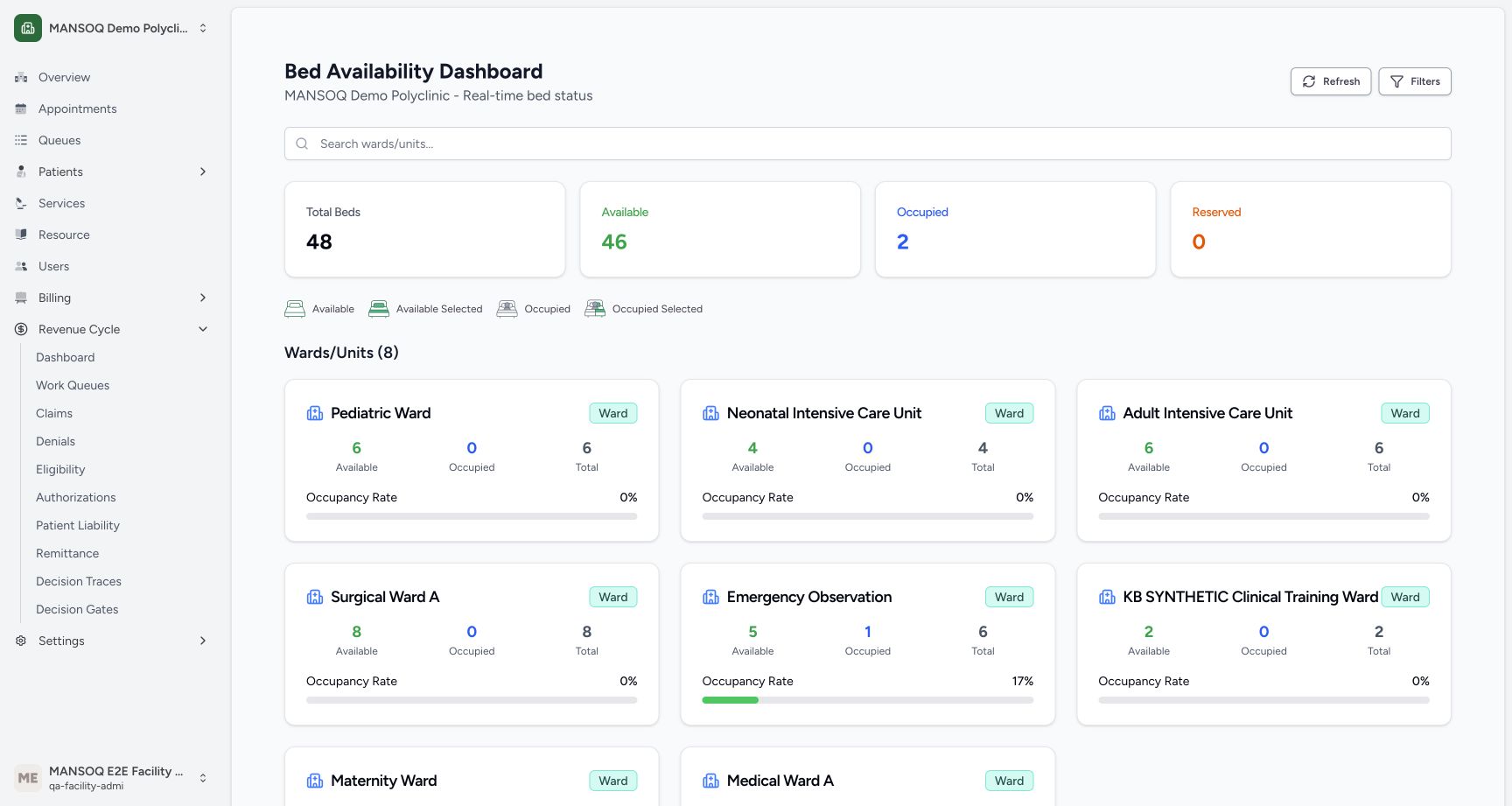
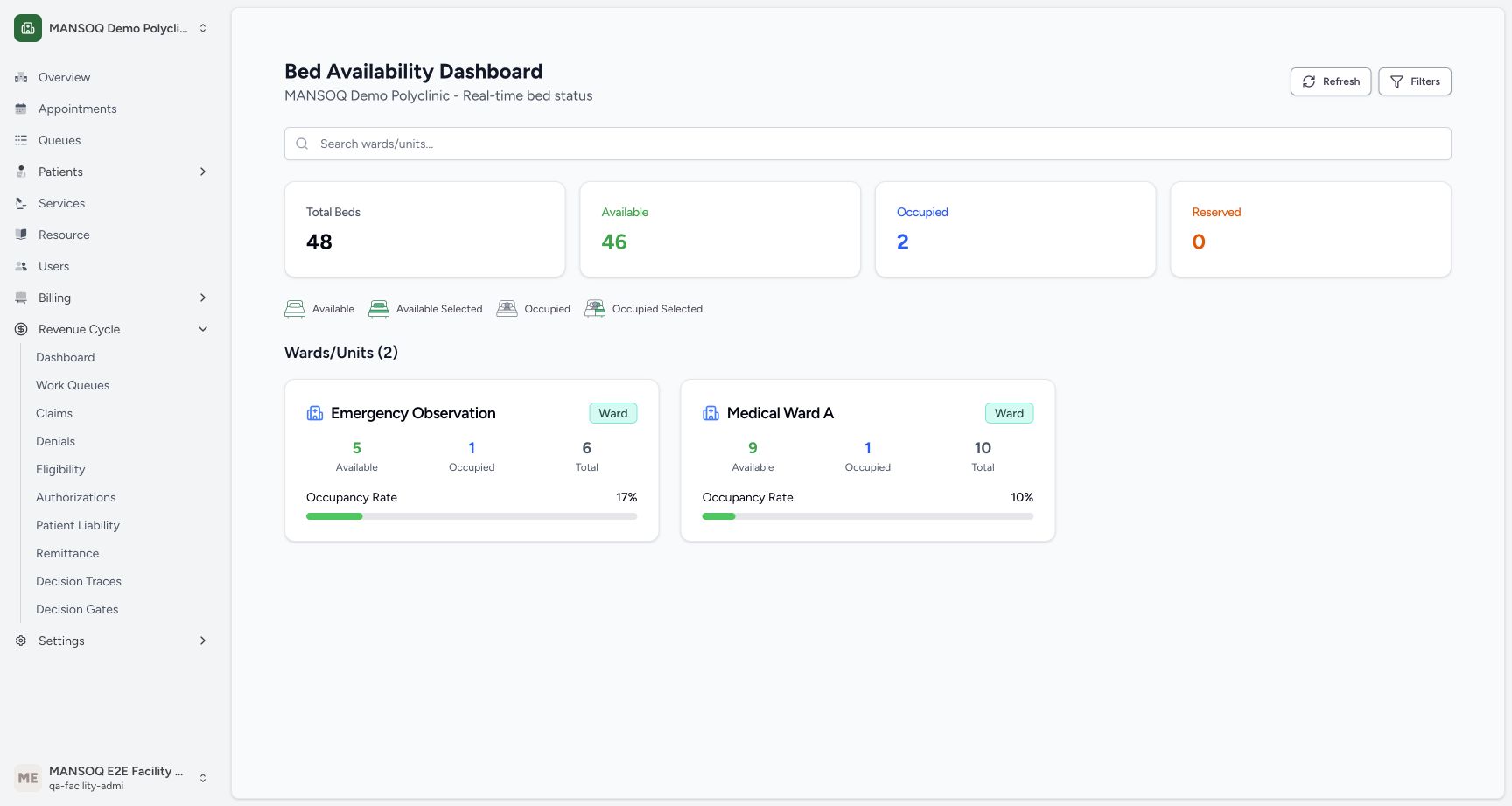
In Filters, set Ward/Unit to All Wards and choose Available. All eight wards remain because each has an available bed. Choose Occupied to show Emergency Observation and Medical Ward A. Each matching card still summarizes all of its beds, including available ones; the filter selects wards containing a matching bed.
 1234
1234Actual availability filter choices
Capture details
Exact committed release 8d99, isolated synthetic Polyclinic. Existing non-superuser Facility Admin; no new permissions. Source and139 frontend assets independently verified. Read-only manager teaching, not production deployment, bank reconciliation, payer acceptance or clinical/tax approval.
Image SHA-256 781826d094b647122aba75bd06c84426b79af570f513af79786b7251001e42b3
- All Statuses: Remove the status restriction.
- Available: Show wards containing at least one available bed.
- Occupied: Show wards containing an occupied bed.
- Reserved limitation: This release does not increment reserved status in its bed calculations.
 1
1Available filter keeps all eight wards
Capture details
Exact committed release 8d99, isolated synthetic Polyclinic. Existing non-superuser Facility Admin; no new permissions. Source and139 frontend assets independently verified. Read-only manager teaching, not production deployment, bank reconciliation, payer acceptance or clinical/tax approval.
Image SHA-256 42d8b15fcc4275319b46c094f43f42aab9a18ea3eedabb17fc6423cac80380d3
- Eight matching wards: Each displayed ward has an available bed; overall totals remain unchanged.
 12
12Occupied filter keeps two wards
Capture details
Exact committed release 8d99, isolated synthetic Polyclinic. Existing non-superuser Facility Admin; no new permissions. Source and139 frontend assets independently verified. Read-only manager teaching, not production deployment, bank reconciliation, payer acceptance or clinical/tax approval.
Image SHA-256 ca4463cea11a9f715f81a810c1892f00ae4c6b84cc80ebdd96e22d74dee2e95a
- Emergency Observation: This matching ward still shows all six of its beds in the summary.
- Medical Ward A: The second matching ward has 1 occupied and 9 available beds.
7. Understand the Reserved limitation
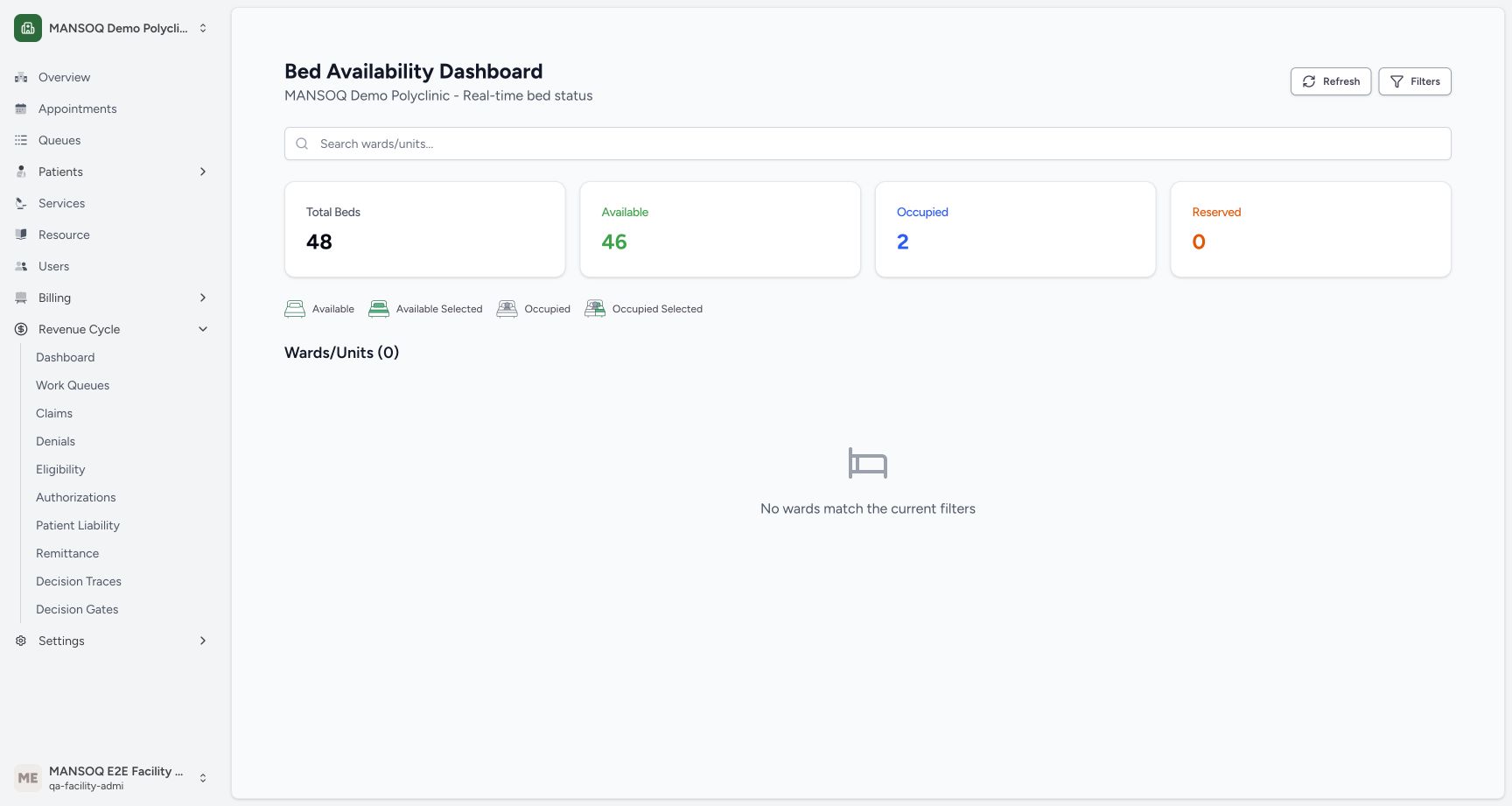
Choose Reserved. This version shows no matching wards and a reserved total of 0. Its component initializes reserved counts to zero without deriving or incrementing them, so this view cannot establish that no reservation exists elsewhere. Use the proper reservation workflow and evidence; do not infer an available bed from this zero.
1234Actual availability filter choices
Capture details
Exact committed release 8d99, isolated synthetic Polyclinic. Existing non-superuser Facility Admin; no new permissions. Source and139 frontend assets independently verified. Read-only manager teaching, not production deployment, bank reconciliation, payer acceptance or clinical/tax approval.
Image SHA-256 781826d094b647122aba75bd06c84426b79af570f513af79786b7251001e42b3
- All Statuses: Remove the status restriction.
- Available: Show wards containing at least one available bed.
- Occupied: Show wards containing an occupied bed.
- Reserved limitation: This release does not increment reserved status in its bed calculations.
 12
12Reserved filter has no matching ward
Capture details
Exact committed release 8d99, isolated synthetic Polyclinic. Existing non-superuser Facility Admin; no new permissions. Source and139 frontend assets independently verified. Read-only manager teaching, not production deployment, bank reconciliation, payer acceptance or clinical/tax approval.
Image SHA-256 219c5b6cbc35e066ec9e0a7e31c860936030e509c0942e52b0aa303e4a6d997e
- Displayed reserved 0: The current component does not populate reserved counts.
- No matching ward: This empty result is a display limitation, not proof that no reservation exists elsewhere.
8. Inspect a ward layout without changing placement
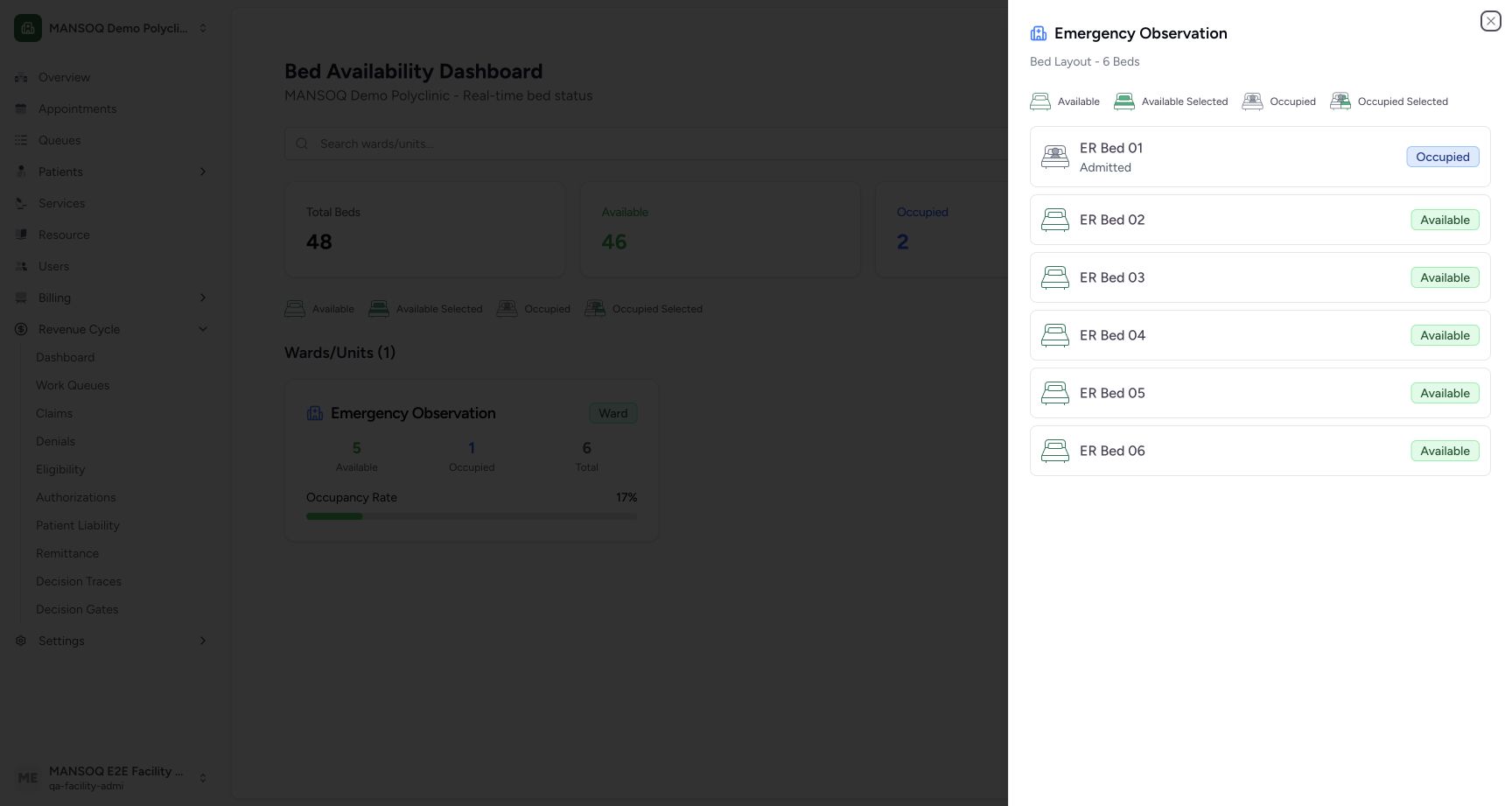
Restore All Statuses, choose Emergency Observation and close Filters. Select the ward card. The read-only sheet lists six beds; ER Bed 01 has the explicit Occupied badge, while ER Beds 02–06 have Available badges. This sheet inspection does not select a patient or perform an admission, transfer or reservation.
12Settled ward-filter result
Capture details
Exact committed release 8d99, isolated synthetic Polyclinic. Existing non-superuser Facility Admin; no new permissions. Source and139 frontend assets independently verified. Read-only manager teaching, not production deployment, bank reconciliation, payer acceptance or clinical/tax approval.
Image SHA-256 13654170f6b2d8057310f43821a1a2a91cfa50f2c6e9ba8e4e3310d4c54c2da9
- Selected ward card: The chosen ward contains 6 beds: 5 available and 1 occupied.
- Open ward layout: Choose this ward card to inspect its read-only bed layout.
 123
123Inspect the ward bed layout without changing placement
Capture details
Exact committed release 8d99, isolated synthetic Polyclinic. Existing non-superuser Facility Admin; no new permissions. Source and139 frontend assets independently verified. Read-only manager teaching, not production deployment, bank reconciliation, payer acceptance or clinical/tax approval.
Image SHA-256 ef845ca5c623772a2d47a0beaf9f40484b3100d39a73b8ee52fb2f6c243427a3
- ER Bed 01 occupied: Read the explicit occupied badge.
- ER Bed 02 available: Read the explicit available badge.
- Close ward layout: Close this read-only sheet.
9. Close the sheet and restore the full view
Choose Close, then use Filters to restore All Wards and All Statuses. Clear any search. The eight ward cards return with the same overall totals. No location, patient or encounter was changed in this walkthrough.
123Inspect the ward bed layout without changing placement
Capture details
Exact committed release 8d99, isolated synthetic Polyclinic. Existing non-superuser Facility Admin; no new permissions. Source and139 frontend assets independently verified. Read-only manager teaching, not production deployment, bank reconciliation, payer acceptance or clinical/tax approval.
Image SHA-256 ef845ca5c623772a2d47a0beaf9f40484b3100d39a73b8ee52fb2f6c243427a3
- ER Bed 01 occupied: Read the explicit occupied badge.
- ER Bed 02 available: Read the explicit available badge.
- Close ward layout: Close this read-only sheet.
123Bed filter sheet
Capture details
Exact committed release 8d99, isolated synthetic Polyclinic. Existing non-superuser Facility Admin; no new permissions. Source and139 frontend assets independently verified. Read-only manager teaching, not production deployment, bank reconciliation, payer acceptance or clinical/tax approval.
Image SHA-256 74000518b1bb6c045b9c7289b267360cf5af74e2607ae7e065d84aef3f6ac6f9
- Ward selector: Choose a ward or All Wards.
- Availability selector: Choose one of the displayed status options.
- Close filters: Close the sheet after selecting filters.
123Bed filters reset to the full ward list
Capture details
Exact committed release 8d99, isolated synthetic Polyclinic. Existing non-superuser Facility Admin; no new permissions. Source and139 frontend assets independently verified. Read-only manager teaching, not production deployment, bank reconciliation, payer acceptance or clinical/tax approval.
Image SHA-256 42d8b15fcc4275319b46c094f43f42aab9a18ea3eedabb17fc6423cac80380d3
- Refresh beds: Reload the current location data; the page also refreshes periodically.
- Overall totals: The page shows 48 total, 46 available, 2 occupied and 0 reserved.
- Ward cards: Cards summarize loaded beds by their parent ward.
Interpret ward occupancy carefully
A ward’s occupancy rate is occupied beds divided by that ward’s total beds, rounded for display. Emergency Observation shows 17% for 1 of 6. The color thresholds are display rules, not a clinical capacity policy. The initial location request loads at most 1,000 locations; this recorded dataset has 100, so all of its 48 beds are included. Larger installations need separate completeness verification.
12Settled ward-filter result
Capture details
Exact committed release 8d99, isolated synthetic Polyclinic. Existing non-superuser Facility Admin; no new permissions. Source and139 frontend assets independently verified. Read-only manager teaching, not production deployment, bank reconciliation, payer acceptance or clinical/tax approval.
Image SHA-256 13654170f6b2d8057310f43821a1a2a91cfa50f2c6e9ba8e4e3310d4c54c2da9
- Selected ward card: The chosen ward contains 6 beds: 5 available and 1 occupied.
- Open ward layout: Choose this ward card to inspect its read-only bed layout.
123Read overall bed availability
Capture details
Exact committed release 8d99, isolated synthetic Polyclinic. Existing non-superuser Facility Admin; no new permissions. Source and139 frontend assets independently verified. Read-only manager teaching, not production deployment, bank reconciliation, payer acceptance or clinical/tax approval.
Image SHA-256 42d8b15fcc4275319b46c094f43f42aab9a18ea3eedabb17fc6423cac80380d3
- Refresh beds: Reload the current location data; the page also refreshes periodically.
- Overall totals: The page shows 48 total, 46 available, 2 occupied and 0 reserved.
- Ward cards: Cards summarize loaded beds by their parent ward.
Source evidence
Every citation uses this exact committed version. The private source repository requires access.
- repositories/platform/mansoq-web/src/pages/Facility/BedAvailabilityDashboard.tsx:67 ·
8d99bb8a4712f6aa8446bcd3b40bf62dae280d39Source file checksum
aaf514864d4c20b82dcc7233edad5db11e20eb7d0d50a7691d3e11d33b4be436 - repositories/platform/mansoq-web/src/Routers/routes/FacilityRoutes.tsx:1 ·
8d99bb8a4712f6aa8446bcd3b40bf62dae280d39Source file checksum
e42381cbb2ce6c5ba8cdf2203ad05e90582e6bf59c27be491a071ea5417cc534