 MANSOQ
 Manager dashboards and monitoring · VERSION 8d99bb8a
Filter and page through the claim workbench
Inspect the separate claim worklist using its real status filter, three-page example and refresh control. Keep record status, processing, adjudication and ledger evidence distinct.
Facility Admin
 12345
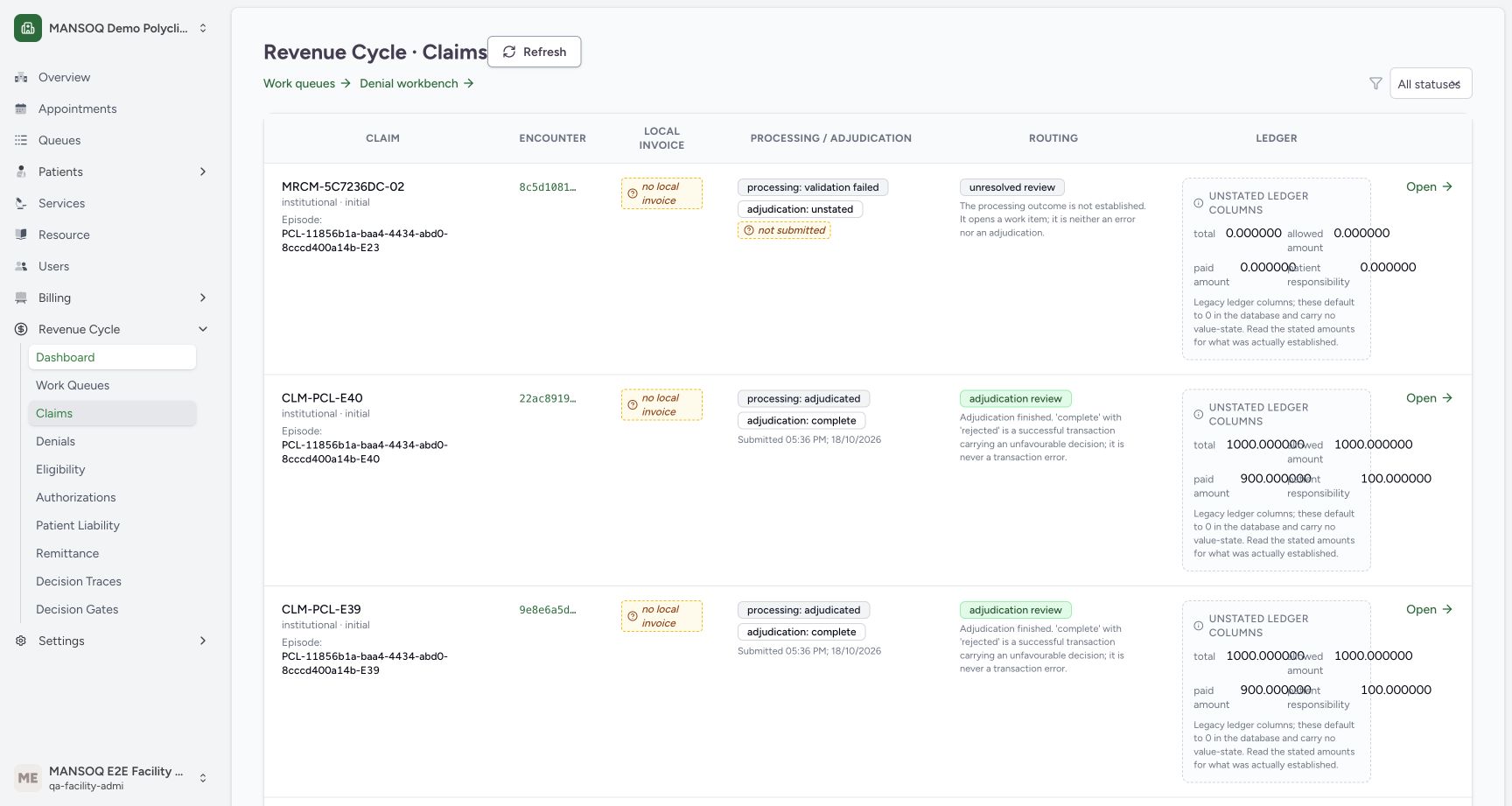
12345Claim workbench with All statuses
Capture details
Exact committed release 8d99, isolated synthetic Polyclinic. Existing non-superuser Facility Admin; no new permissions. Source and139 frontend assets independently verified. Read-only manager teaching, not production deployment, bank reconciliation, payer acceptance or clinical/tax approval.
Image SHA-256 fc1d03020df53c4db00500f227781e3a946d93af0cff90b4701f3fdc96d1d51f
- Status filter: Choose one of the actual status options; All statuses restores the complete list.
- Processing and adjudication: Keep processing outcome separate from adjudication decision.
- Routing: Read the independent routing explanation.
- Unstated ledger warning: Default ledger columns do not establish value-state.
- Refresh list: Refresh reloads the current claim list.
12 of 12 content blocks have reviewed image alignment. Missing overview or prerequisite images remain open.
Before you begin
- Use the intended facility and an existing authorized Facility Admin account. Open Claims from the Revenue Cycle menu; this list is separate from the dashboard episode worklist.
 123
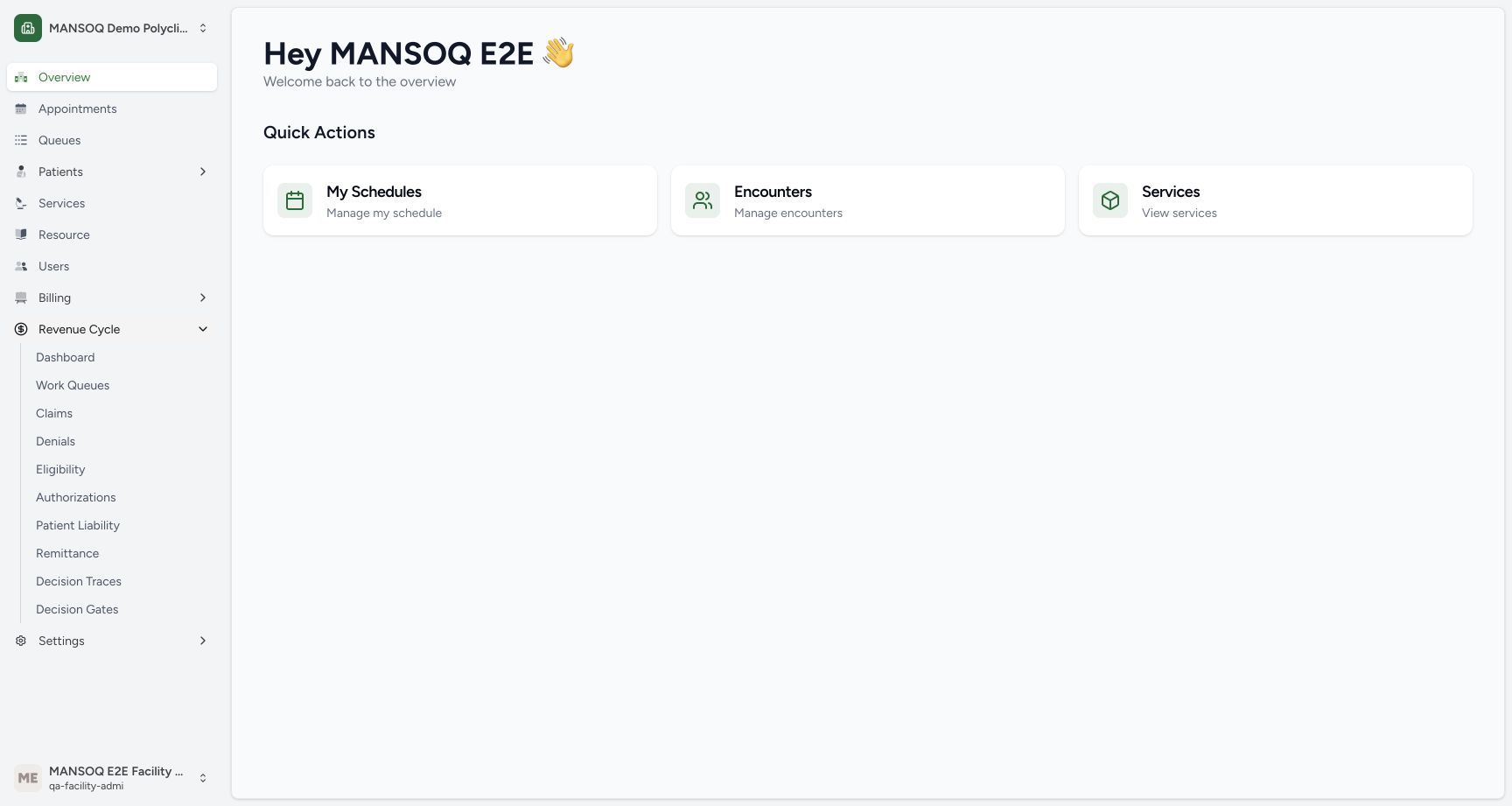
123Recorded release 8d99bb8a · 2026-10-19T03:52:06.908335+00:00 · 1728 × 921 Open Dashboard from the actual Revenue Cycle menu
Capture details
Exact committed release 8d99, isolated synthetic Polyclinic. Existing non-superuser Facility Admin; no new permissions. Source and139 frontend assets independently verified. Read-only manager teaching, not production deployment, bank reconciliation, payer acceptance or clinical/tax approval.
Image SHA-256
2d1d5cd0c0c4267cd28b6ec03b04d7c911a9d1f0614ef17ba15122e3ce1df315- Revenue Cycle menu: Expand this existing facility menu.
- Dashboard link: Open the aggregate revenue dashboard.
- Existing manager account: The demonstrated role is Facility Admin.
12345Recorded release 8d99bb8a · 2026-10-19T03:52:25.510772+00:00 · 1728 × 921 Claim workbench with All statuses
Capture details
Exact committed release 8d99, isolated synthetic Polyclinic. Existing non-superuser Facility Admin; no new permissions. Source and139 frontend assets independently verified. Read-only manager teaching, not production deployment, bank reconciliation, payer acceptance or clinical/tax approval.
Image SHA-256
fc1d03020df53c4db00500f227781e3a946d93af0cff90b4701f3fdc96d1d51f- Status filter: Choose one of the actual status options; All statuses restores the complete list.
- Processing and adjudication: Keep processing outcome separate from adjudication decision.
- Routing: Read the independent routing explanation.
- Unstated ledger warning: Default ledger columns do not establish value-state.
- Refresh list: Refresh reloads the current claim list.
1. Open the claim workbench
Choose Claims in the expanded Revenue Cycle menu. Confirm the page title Revenue Cycle · Claims and the selected All statuses option. Claim, encounter and local invoice are separate columns and separate records.
123Open Dashboard from the actual Revenue Cycle menu
Capture details
Exact committed release 8d99, isolated synthetic Polyclinic. Existing non-superuser Facility Admin; no new permissions. Source and139 frontend assets independently verified. Read-only manager teaching, not production deployment, bank reconciliation, payer acceptance or clinical/tax approval.
Image SHA-256 2d1d5cd0c0c4267cd28b6ec03b04d7c911a9d1f0614ef17ba15122e3ce1df315
- Revenue Cycle menu: Expand this existing facility menu.
- Dashboard link: Open the aggregate revenue dashboard.
- Existing manager account: The demonstrated role is Facility Admin.
12345Claim workbench with All statuses
Capture details
Exact committed release 8d99, isolated synthetic Polyclinic. Existing non-superuser Facility Admin; no new permissions. Source and139 frontend assets independently verified. Read-only manager teaching, not production deployment, bank reconciliation, payer acceptance or clinical/tax approval.
Image SHA-256 fc1d03020df53c4db00500f227781e3a946d93af0cff90b4701f3fdc96d1d51f
- Status filter: Choose one of the actual status options; All statuses restores the complete list.
- Processing and adjudication: Keep processing outcome separate from adjudication decision.
- Routing: Read the independent routing explanation.
- Unstated ledger warning: Default ledger columns do not establish value-state.
- Refresh list: Refresh reloads the current claim list.
2. Read processing and adjudication separately
Read the Processing / Adjudication column and the independent Routing explanation. A successfully processed transaction can carry an unfavorable adjudication decision. Do not interpret a claim status or a local test label as an actual payer transmission. The illustrated records are retained fictional scenarios.
12345Claim workbench with All statuses
Capture details
Exact committed release 8d99, isolated synthetic Polyclinic. Existing non-superuser Facility Admin; no new permissions. Source and139 frontend assets independently verified. Read-only manager teaching, not production deployment, bank reconciliation, payer acceptance or clinical/tax approval.
Image SHA-256 fc1d03020df53c4db00500f227781e3a946d93af0cff90b4701f3fdc96d1d51f
- Status filter: Choose one of the actual status options; All statuses restores the complete list.
- Processing and adjudication: Keep processing outcome separate from adjudication decision.
- Routing: Read the independent routing explanation.
- Unstated ledger warning: Default ledger columns do not establish value-state.
- Refresh list: Refresh reloads the current claim list.
3. Read the legacy ledger warning
The right-hand ledger panel explicitly labels its columns Unstated ledger columns. Database defaults, including zero, do not provide an established amount value-state. Consult the detailed stated evidence in its separate authorized workflow instead of assuming these figures are a finalized financial position.
12345Claim workbench with All statuses
Capture details
Exact committed release 8d99, isolated synthetic Polyclinic. Existing non-superuser Facility Admin; no new permissions. Source and139 frontend assets independently verified. Read-only manager teaching, not production deployment, bank reconciliation, payer acceptance or clinical/tax approval.
Image SHA-256 fc1d03020df53c4db00500f227781e3a946d93af0cff90b4701f3fdc96d1d51f
- Status filter: Choose one of the actual status options; All statuses restores the complete list.
- Processing and adjudication: Keep processing outcome separate from adjudication decision.
- Routing: Read the independent routing explanation.
- Unstated ledger warning: Default ledger columns do not establish value-state.
- Refresh list: Refresh reloads the current claim list.
4. Use the actual page controls
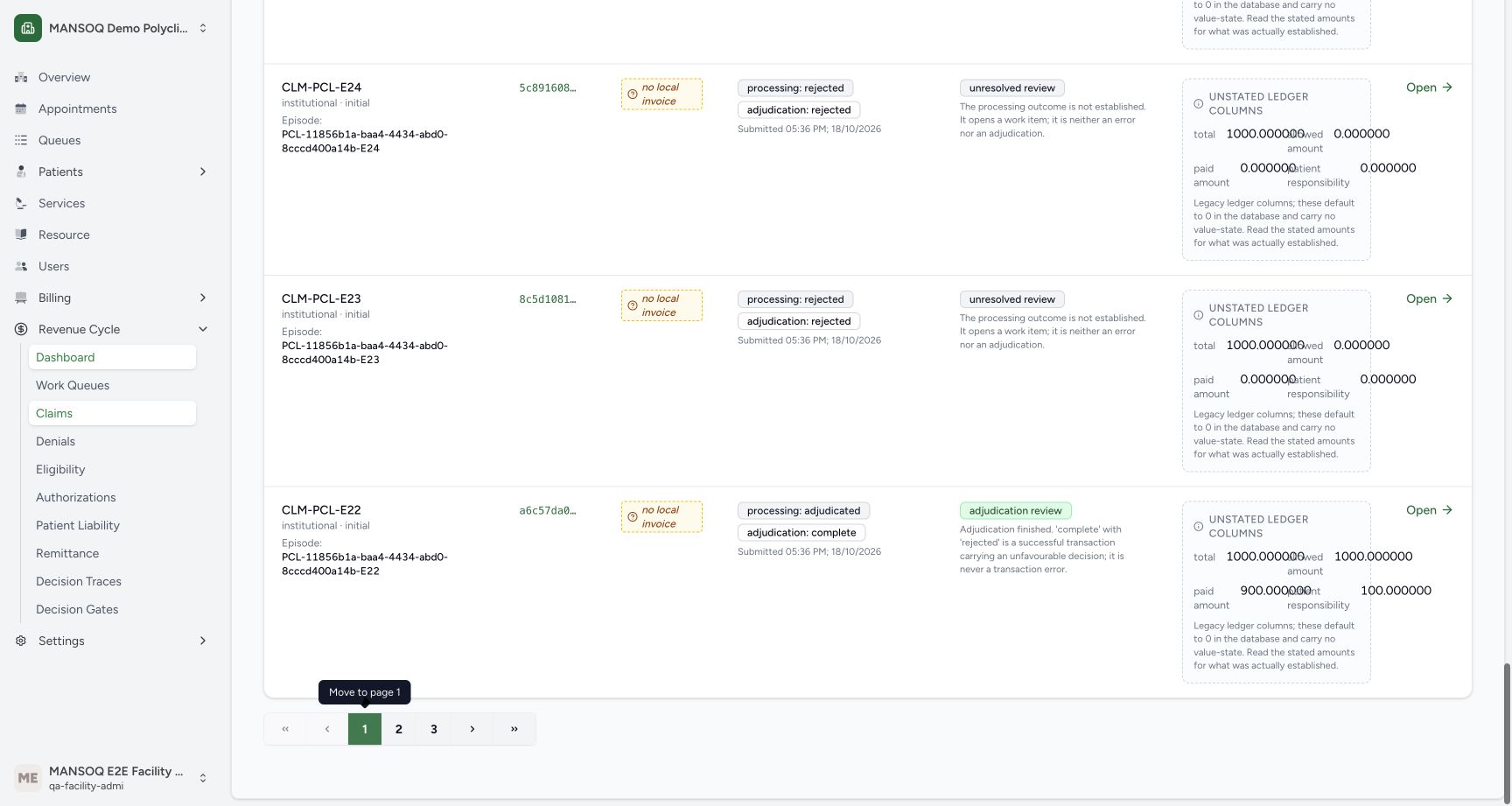
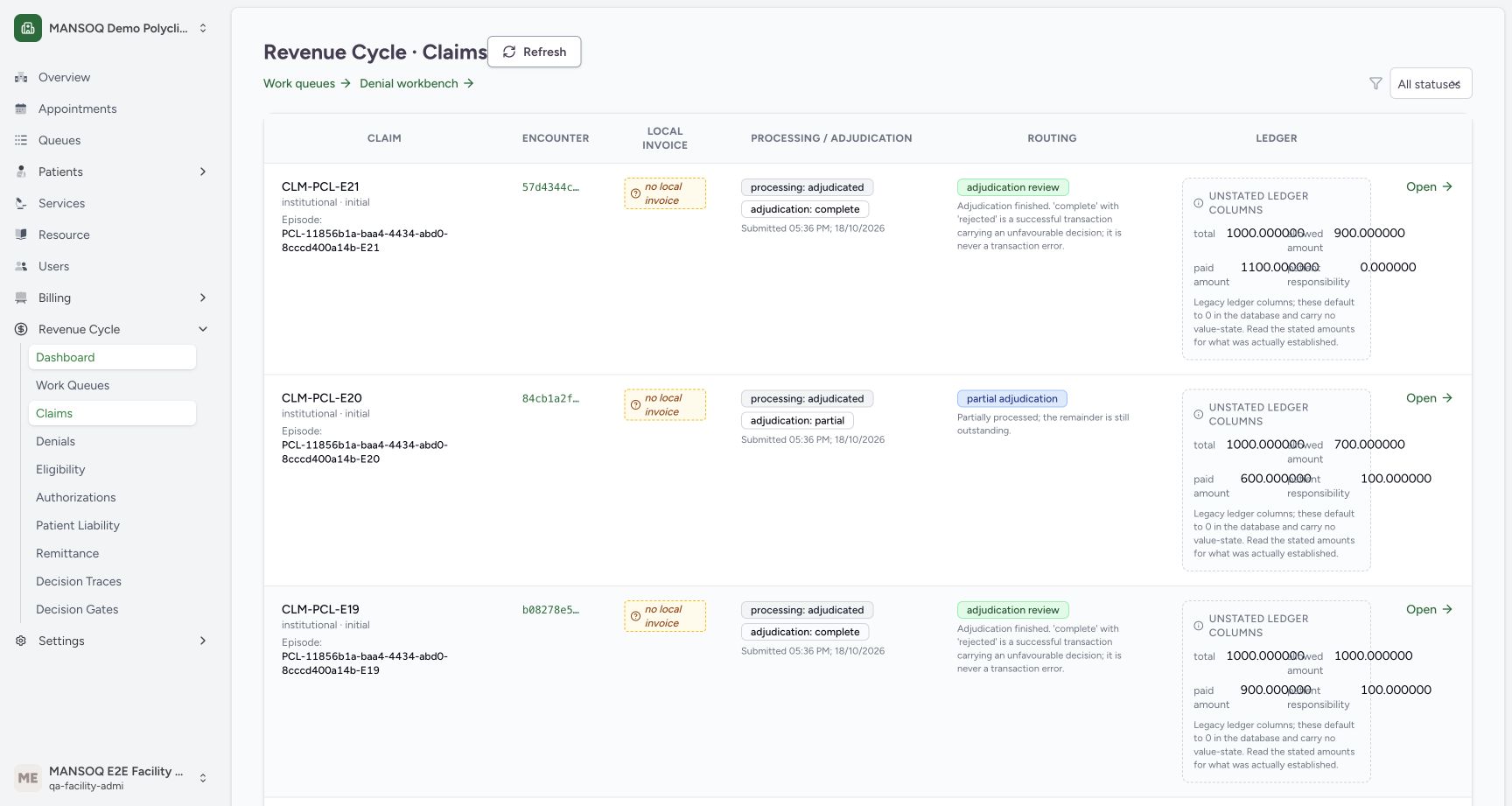
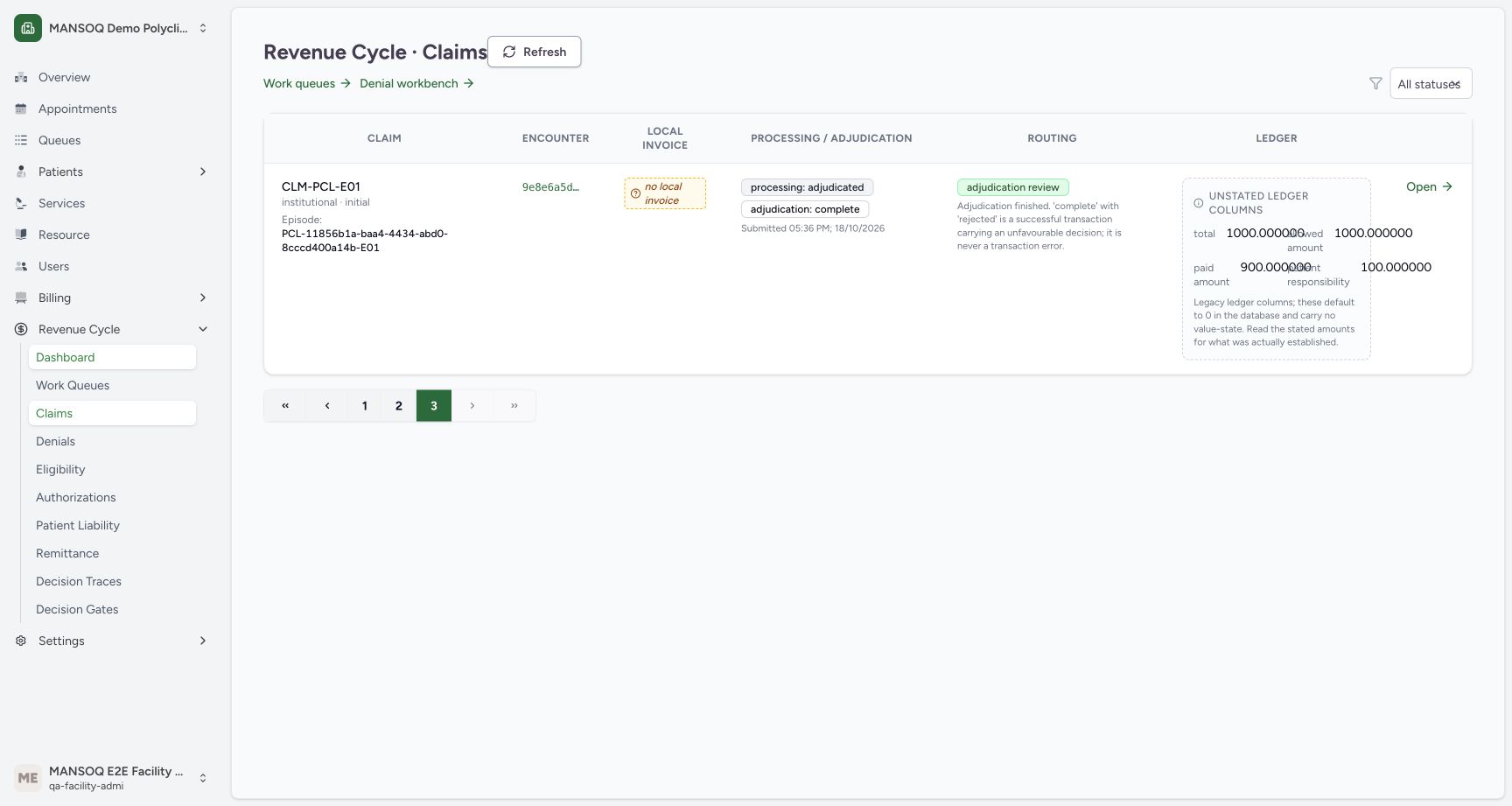
Scroll to the bottom of the loaded page. The list requests 20 claims per page. Choose page 2 to load the next 20 rows; the recorded second page begins with CLM-PCL-E21. Choose page 3 to see the final single row. The active page number and disabled end controls identify the final page. This example has 41 records in total.
 12
12Claim pagination at the end of page one
Capture details
Exact committed release 8d99, isolated synthetic Polyclinic. Existing non-superuser Facility Admin; no new permissions. Source and139 frontend assets independently verified. Read-only manager teaching, not production deployment, bank reconciliation, payer acceptance or clinical/tax approval.
Image SHA-256 6732e5176ee81150fc059da5501bdb6e575fefc78f6b3de4a4d295ba39872c00
- Page 2: Select page 2 to load the next 20claims.
- Page 3: Select page 3 for the final claim in this 41-claim example.
 1
1Loaded second claim page
Capture details
Exact committed release 8d99, isolated synthetic Polyclinic. Existing non-superuser Facility Admin; no new permissions. Source and139 frontend assets independently verified. Read-only manager teaching, not production deployment, bank reconciliation, payer acceptance or clinical/tax approval.
Image SHA-256 0c35bf72d0dd26c12146fbae4603a53534c8894a2f6e5a38e5c2f1d40de7edbd
- Second-page claim: This loaded page begins with the retained CLM-PCL-E21 row; its normal API page contains 20 records.
 123
123Loaded final claim page
Capture details
Exact committed release 8d99, isolated synthetic Polyclinic. Existing non-superuser Facility Admin; no new permissions. Source and139 frontend assets independently verified. Read-only manager teaching, not production deployment, bank reconciliation, payer acceptance or clinical/tax approval.
Image SHA-256 0604b704d4f6fc0765b9f557c6f4ed737ce72dda7d744d1eeba2b849377ed91f
- Final-page claim: The final page contains one claim.
- Selected page 3: The green page 3 control marks the final page.
- Return to page 1: Return using the page controls when needed.
5. Filter to Draft and Ready
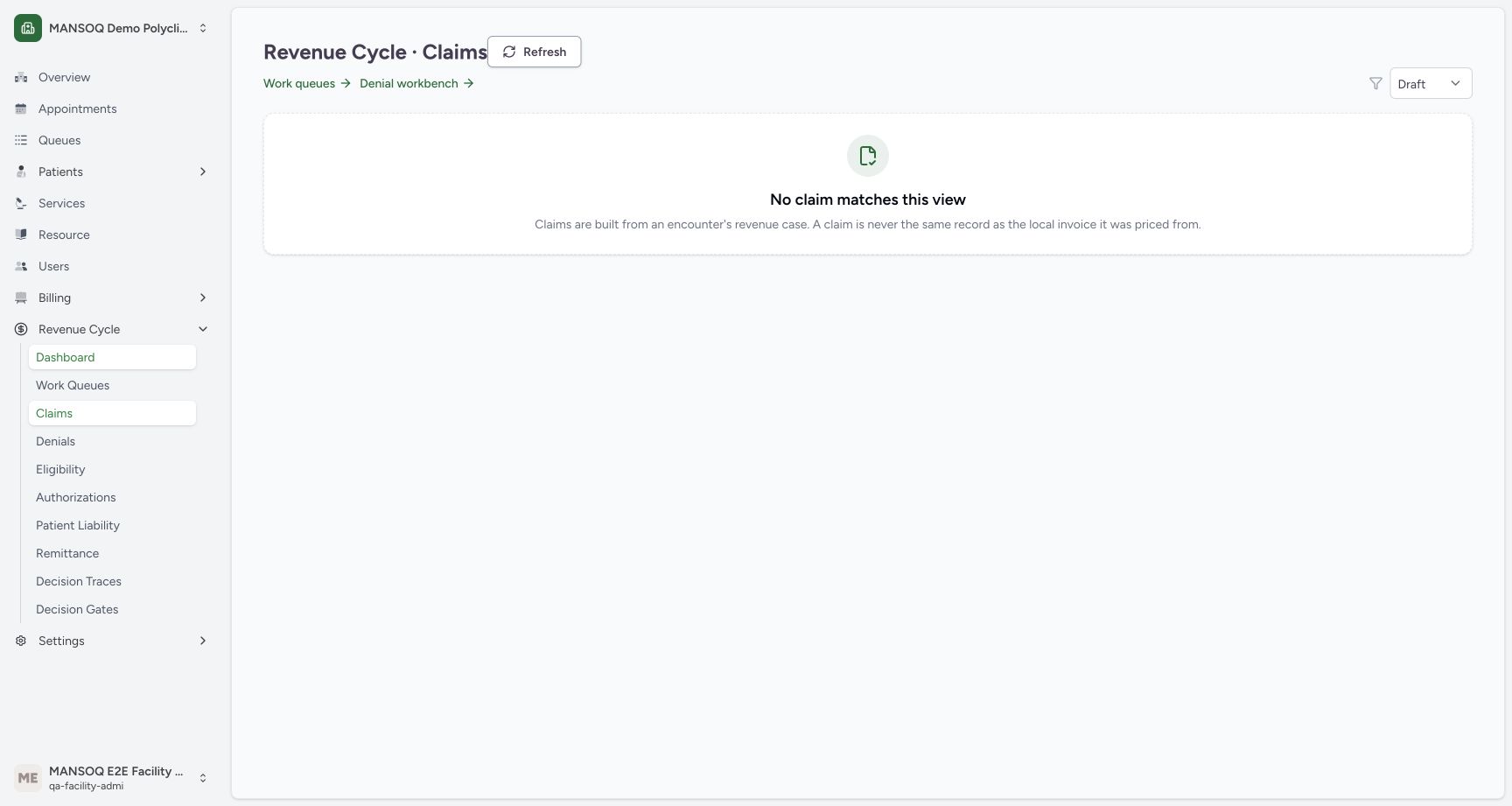
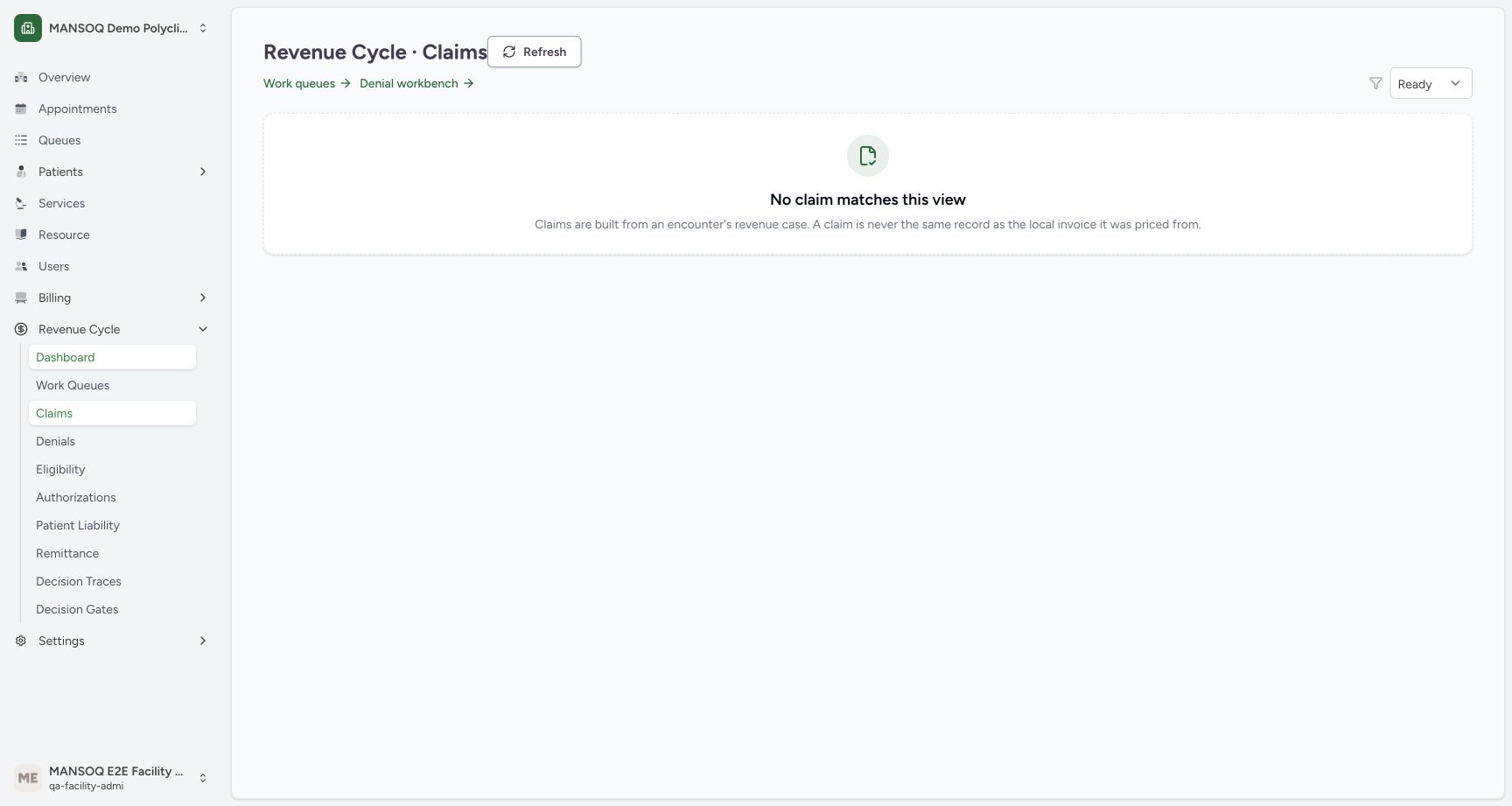
Use Filter claims by status and choose Draft. The actual example shows No claim matches this view. Ready produces the same empty state. A filter change resets the page to 1. These are loaded empty results, not evidence that the full facility has no claims or that unresolved held statuses are absent.
 12
12Draft filter has no matching claims
Capture details
Exact committed release 8d99, isolated synthetic Polyclinic. Existing non-superuser Facility Admin; no new permissions. Source and139 frontend assets independently verified. Read-only manager teaching, not production deployment, bank reconciliation, payer acceptance or clinical/tax approval.
Image SHA-256 c71fd3753dfe57ebf5afa3d500cfe5ff1c788a5a0e9a556d35d104fa79526e30
- Draft selected: Read the currently selected status before interpreting the results.
- Empty filtered view: No matching rows is not evidence that every claim has been resolved.
 12
12Ready filter has no matching claims
Capture details
Exact committed release 8d99, isolated synthetic Polyclinic. Existing non-superuser Facility Admin; no new permissions. Source and139 frontend assets independently verified. Read-only manager teaching, not production deployment, bank reconciliation, payer acceptance or clinical/tax approval.
Image SHA-256 a9dd076f88007b08fd03309848e72b6974eb07d7a41c4ab51c16c088cd744c8e
- Ready selected: Read the currently selected status before interpreting the results.
- Empty filtered view: No matching rows is not evidence that every claim has been resolved.
6. Filter to Submitted
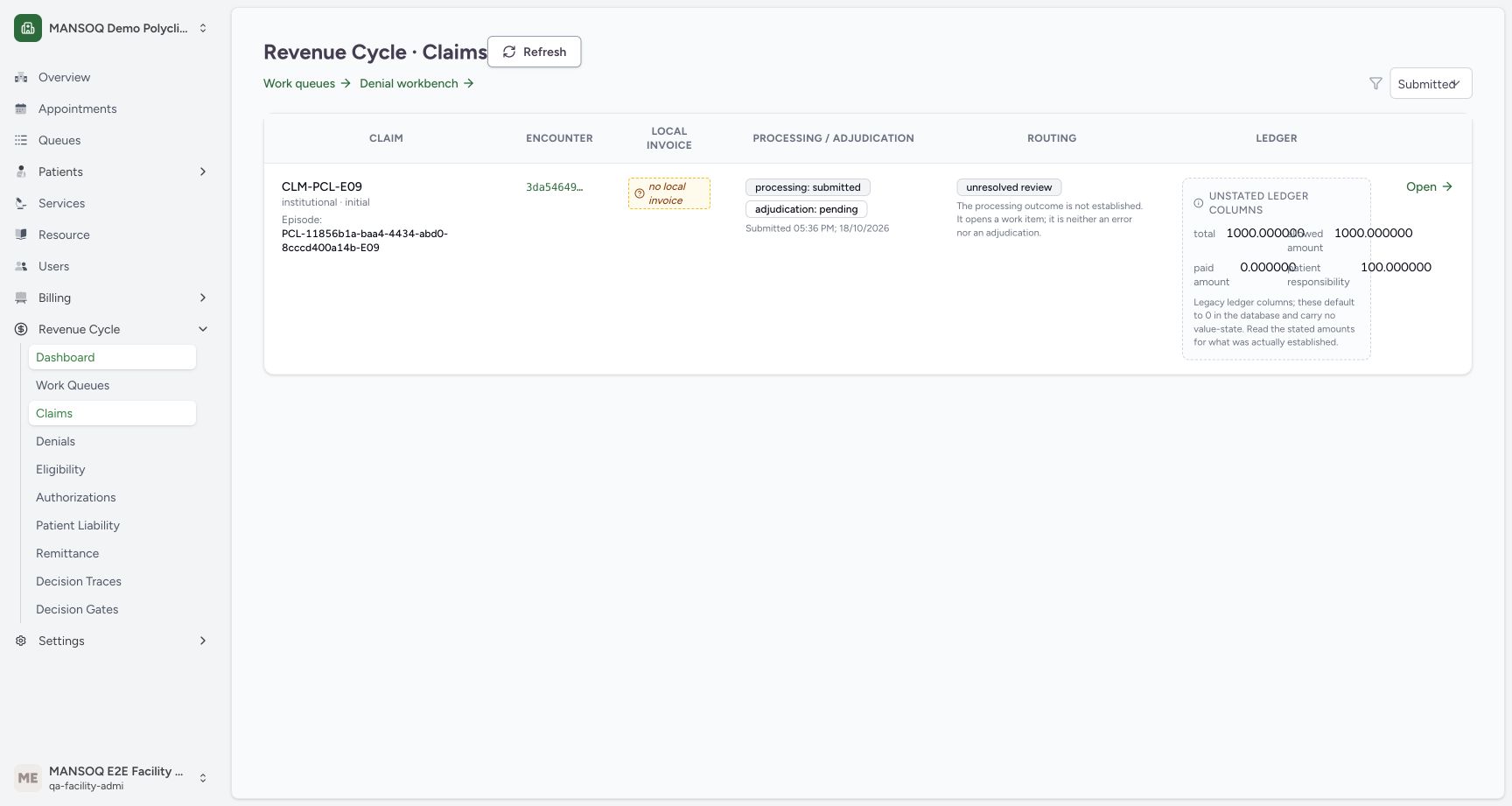
Choose Submitted. This example has one matching claim whose processing is submitted and adjudication is pending. A stored Submitted record is not independent proof of payer receipt or acceptance.
 123
123Claims filtered to Submitted
Capture details
Exact committed release 8d99, isolated synthetic Polyclinic. Existing non-superuser Facility Admin; no new permissions. Source and139 frontend assets independently verified. Read-only manager teaching, not production deployment, bank reconciliation, payer acceptance or clinical/tax approval.
Image SHA-256 35ae4ff852986dd28037d82b715fe50e23b847482e288d792e96e84339623905
- Submitted selected: This status filter applies to the claim record status.
- Processing and adjudication: These axes remain distinct from the selected record-status filter.
- Routing remains separate: Read the route and its rationale instead of inferring it from the status name.
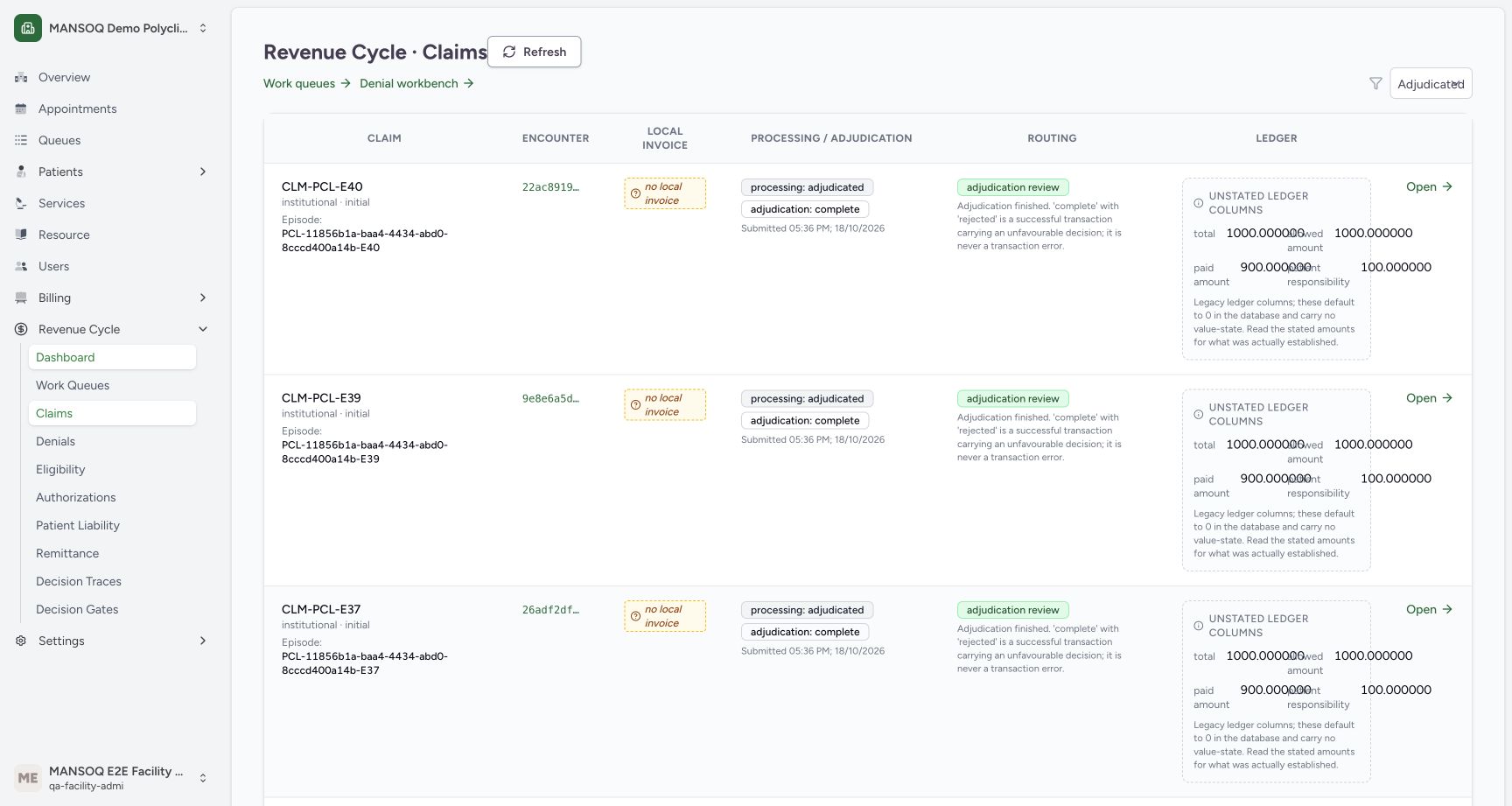
7. Filter to Adjudicated
Choose Adjudicated. The first page shows retained adjudicated records. The supporting normal API read found 35 matching claims; this frame shows the beginning of page 1. Read each row’s adjudication and routing separately. The filtered second page is a separate uncaptured branch.
 123
123Claims filtered to Adjudicated
Capture details
Exact committed release 8d99, isolated synthetic Polyclinic. Existing non-superuser Facility Admin; no new permissions. Source and139 frontend assets independently verified. Read-only manager teaching, not production deployment, bank reconciliation, payer acceptance or clinical/tax approval.
Image SHA-256 a7906d4e3d34ba328ce075489756469df4c93a6ea5d066233fbc23140026fa36
- Adjudicated selected: This status filter applies to the claim record status.
- Processing and adjudication: These axes remain distinct from the selected record-status filter.
- Routing remains separate: Read the route and its rationale instead of inferring it from the status name.
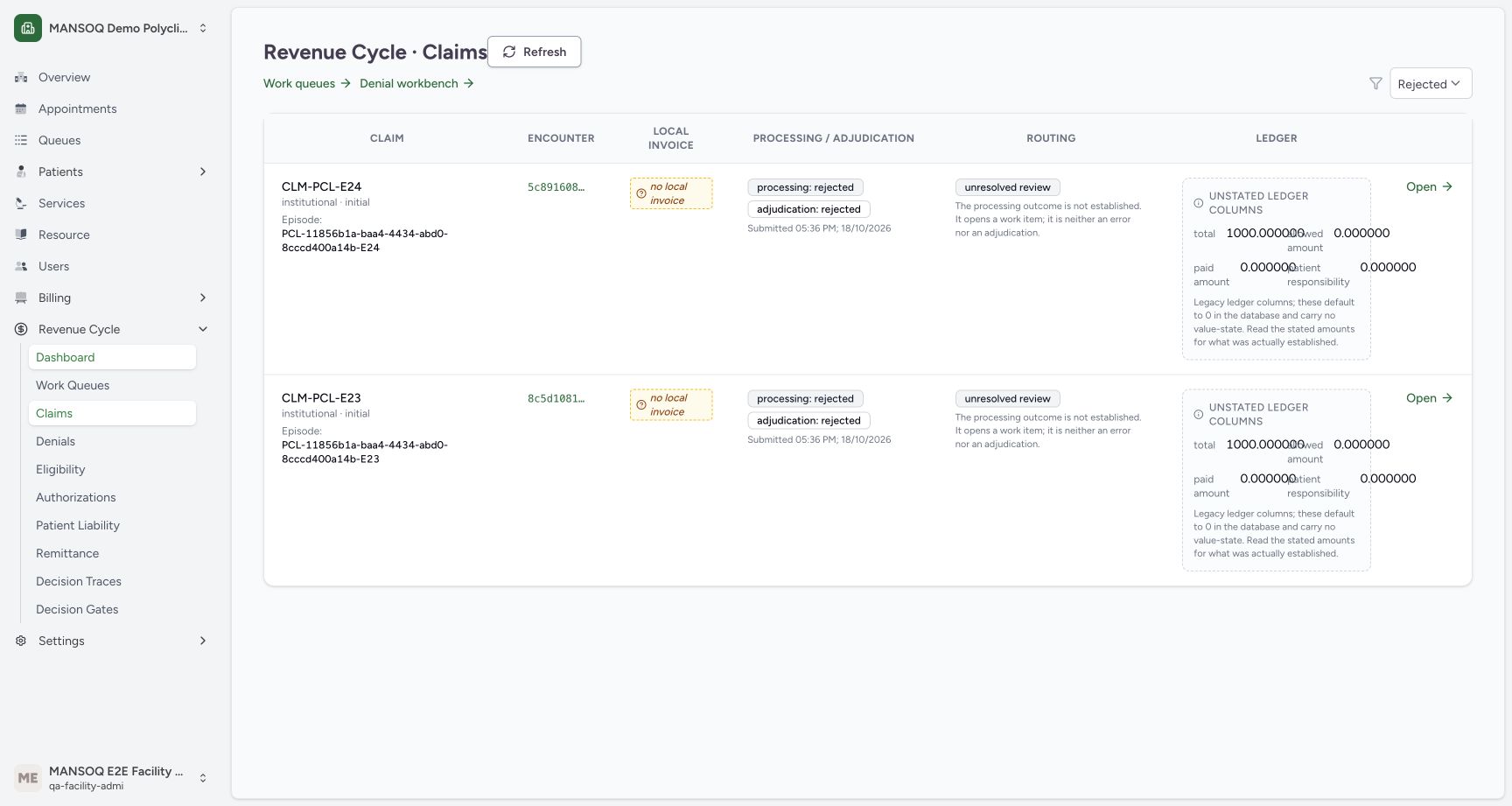
8. Filter to Rejected
Choose Rejected. Two retained records match in this example. Their routing remains unresolved because the processing outcome is not established; do not turn this record-status filter into a conclusion about a transaction error or an appeal route.
 123
123Claims filtered to Rejected
Capture details
Exact committed release 8d99, isolated synthetic Polyclinic. Existing non-superuser Facility Admin; no new permissions. Source and139 frontend assets independently verified. Read-only manager teaching, not production deployment, bank reconciliation, payer acceptance or clinical/tax approval.
Image SHA-256 cb0aa51675352fd555cd34fa24549aa08958725a4899f1776734b950f38d8d5d
- Rejected selected: This status filter applies to the claim record status.
- Processing and adjudication: These axes remain distinct from the selected record-status filter.
- Routing remains separate: Read the route and its rationale instead of inferring it from the status name.
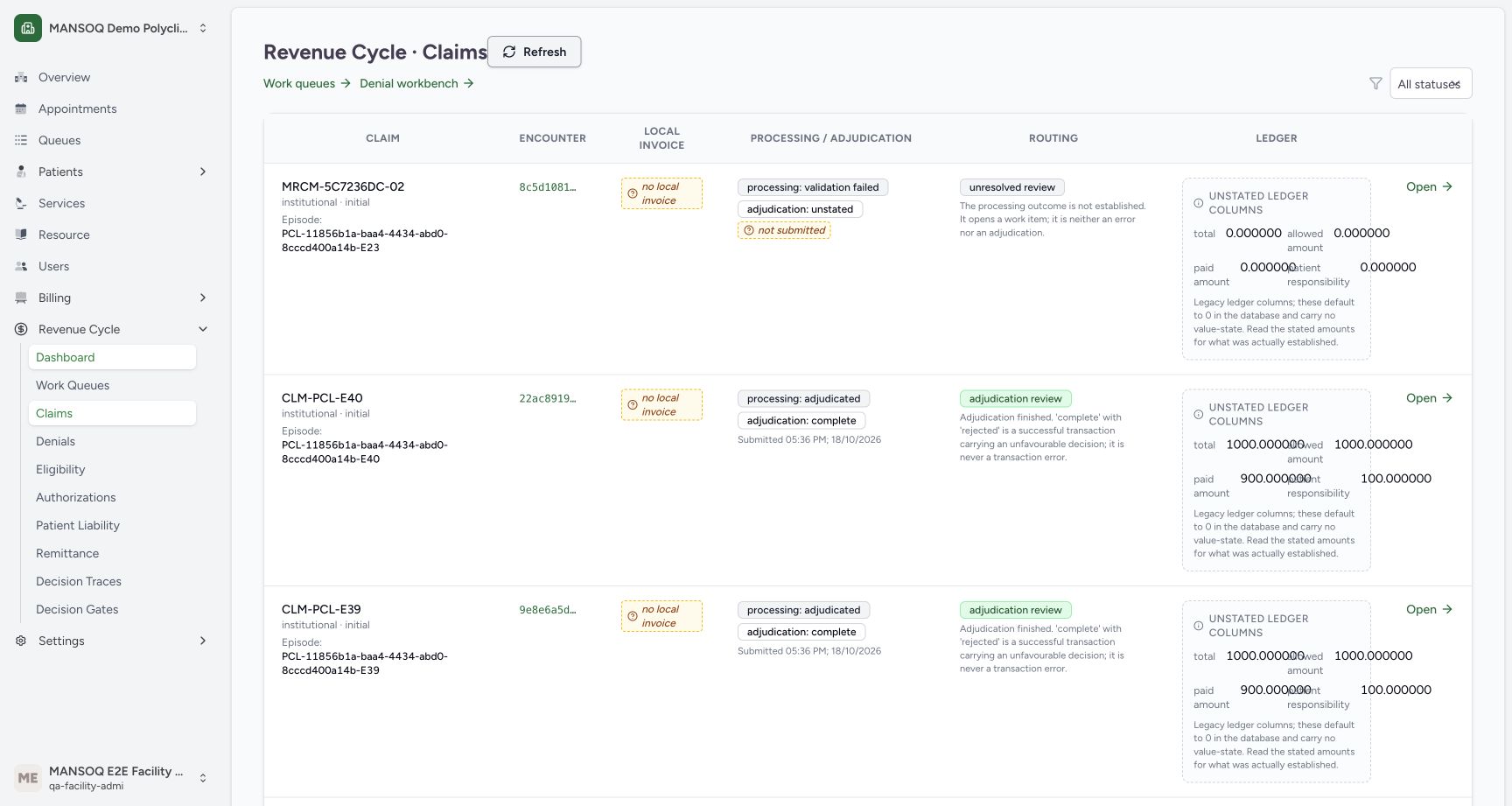
9. Restore the full list and refresh
Choose All statuses, then select Refresh. Wait for the loaded rows and confirm the reset filter. Returning to All statuses includes record states that are not offered as individual filter options, including the held draft-tax states present in this retained dataset. No claim is created, submitted or changed by this sequence.
 12345
12345All statuses restored and refreshed
Capture details
Exact committed release 8d99, isolated synthetic Polyclinic. Existing non-superuser Facility Admin; no new permissions. Source and139 frontend assets independently verified. Read-only manager teaching, not production deployment, bank reconciliation, payer acceptance or clinical/tax approval.
Image SHA-256 95c82aef6ec4dad6d85080661e423ebbb1c77dab0354d8a73c031cf0bc56b771
- Status filter: Choose one of the actual status options; All statuses restores the complete list.
- Processing and adjudication: Keep processing outcome separate from adjudication decision.
- Routing: Read the independent routing explanation.
- Unstated ledger warning: Default ledger columns do not establish value-state.
- Refresh list: Refresh reloads the current claim list.
No date or export controls are shown here
The installed workbench has a status selector, Refresh and pagination. It does not provide a date-range or export control in this version. Encounter and local invoice links have separate context; this read-only walkthrough does not follow them or perform response-classification actions.
12345Claim workbench with All statuses
Capture details
Exact committed release 8d99, isolated synthetic Polyclinic. Existing non-superuser Facility Admin; no new permissions. Source and139 frontend assets independently verified. Read-only manager teaching, not production deployment, bank reconciliation, payer acceptance or clinical/tax approval.
Image SHA-256 fc1d03020df53c4db00500f227781e3a946d93af0cff90b4701f3fdc96d1d51f
- Status filter: Choose one of the actual status options; All statuses restores the complete list.
- Processing and adjudication: Keep processing outcome separate from adjudication decision.
- Routing: Read the independent routing explanation.
- Unstated ledger warning: Default ledger columns do not establish value-state.
- Refresh list: Refresh reloads the current claim list.
12345All statuses restored and refreshed
Capture details
Exact committed release 8d99, isolated synthetic Polyclinic. Existing non-superuser Facility Admin; no new permissions. Source and139 frontend assets independently verified. Read-only manager teaching, not production deployment, bank reconciliation, payer acceptance or clinical/tax approval.
Image SHA-256 95c82aef6ec4dad6d85080661e423ebbb1c77dab0354d8a73c031cf0bc56b771
- Status filter: Choose one of the actual status options; All statuses restores the complete list.
- Processing and adjudication: Keep processing outcome separate from adjudication decision.
- Routing: Read the independent routing explanation.
- Unstated ledger warning: Default ledger columns do not establish value-state.
- Refresh list: Refresh reloads the current claim list.
Source evidence
Every citation uses this exact committed version. The private source repository requires access.
- repositories/platform/mansoq-web/src/pages/Facility/revenueCycle/ClaimWorkbenchPage.tsx:101 ·
8d99bb8a4712f6aa8446bcd3b40bf62dae280d39Source file checksum
78dc1987950cd261dc2fc9b003e80f2b9c9168ae7711cb5c264b19952cbc4a37 - repositories/platform/mansoq-web/src/pages/Facility/revenueCycle/operations/rcmOperationsApi.ts:1 ·
8d99bb8a4712f6aa8446bcd3b40bf62dae280d39Source file checksum
5db0f80e171dc7b30a6c62b9f67e0466e45d47a9fb8b4db6bef9f38780e97a1b - repositories/platform/mansoq-core/mansoq/emr/api/viewsets/rcm/claims.py:65 ·
8d99bb8a4712f6aa8446bcd3b40bf62dae280d39Source file checksum
aa6e238eaf25189fb9e86902712923b25997bbce371a6caee3c6f8d3e8ebfeaa - repositories/platform/mansoq-core/mansoq/emr/api/viewsets/rcm/claims_serializers.py:507 ·
8d99bb8a4712f6aa8446bcd3b40bf62dae280d39Source file checksum
32895eca8c650d82486762707896ef149898461f85252a5d0f77660435265af1