 MANSOQ
 Manager dashboards and monitoring · VERSION 8d99bb8a
Read and refresh the revenue dashboard
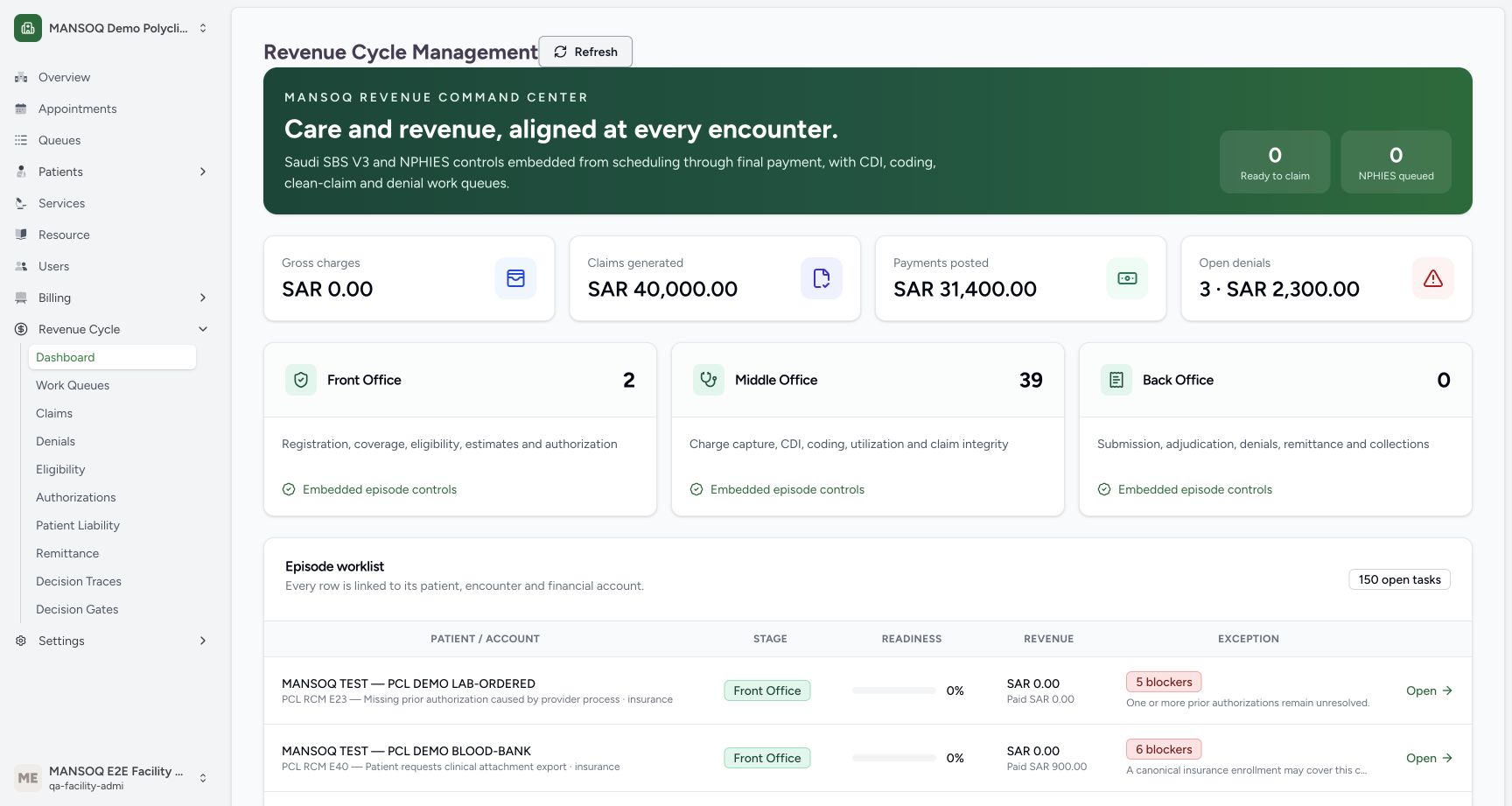
Use the existing Facility Admin dashboard to read stored financial snapshots, stage counts and unresolved work. The figures shown are fictional training data from release 8d99.
Facility Admin
 1234567
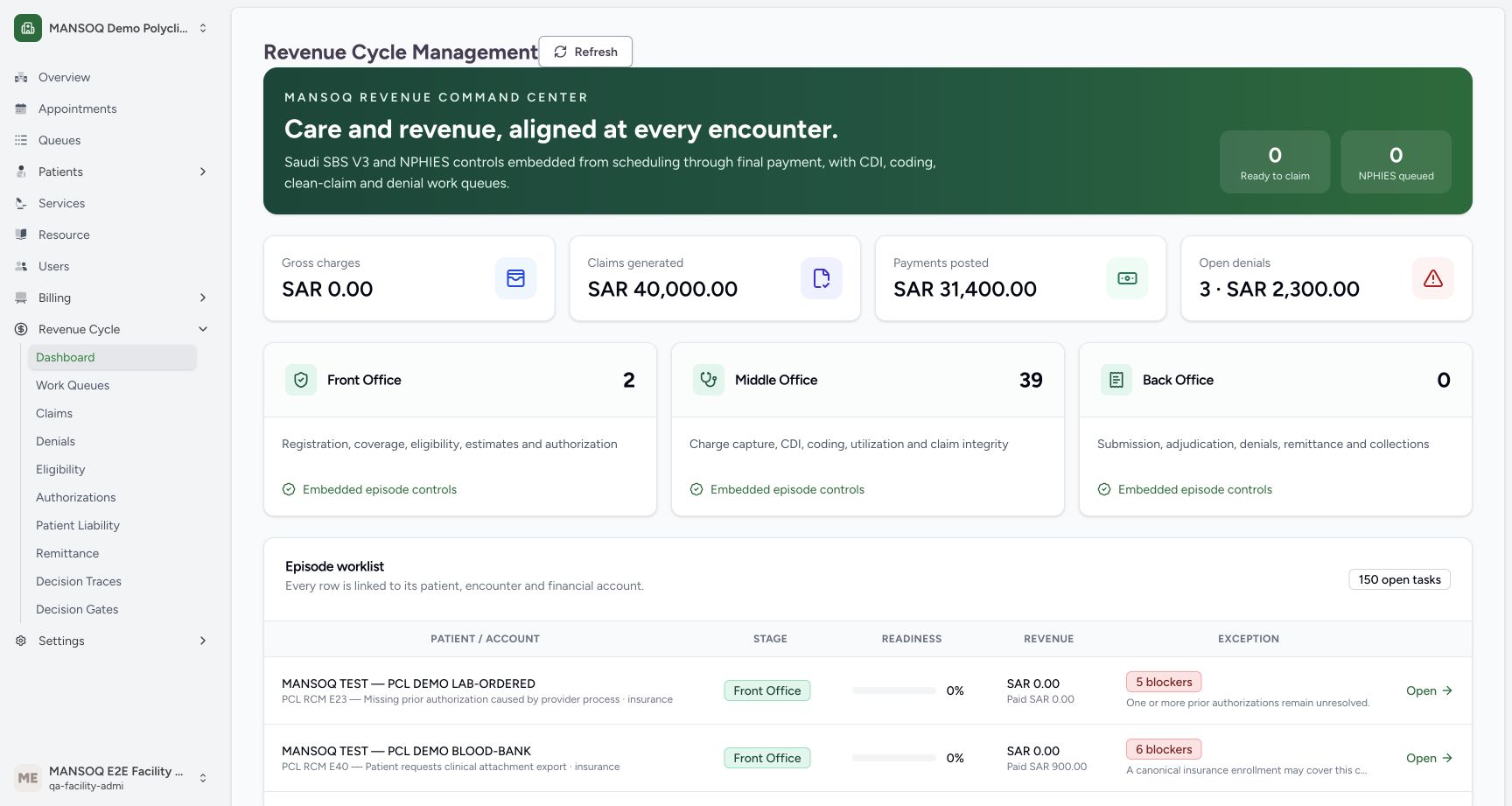
Read the loaded revenue dashboard
Capture details
Exact committed release 8d99, isolated synthetic Polyclinic. Existing non-superuser Facility Admin; no new permissions. Source and139 frontend assets independently verified. Read-only manager teaching, not production deployment, bank reconciliation, payer acceptance or clinical/tax approval.
Image SHA-256 f0d6b7fbd34e0998aef274225e5888f762ff962b4003ce3ba09749e970c8033c
- Refresh dashboard: Refresh reloads the dashboard totals and episode list.
- Claims generated: The displayed SAR 40,000 is a stored claimed-amount aggregate.
- Payments posted: The SAR 31,400 snapshot is separate from verified bank cash.
- Open denials: Three open or appealed denial records total SAR 2,300.
- Stage count: The stage cards show2 front-office and39 middle-office cases.
- Readiness boundary: Ready to claim is0; it is not a payer/tax/wire approval metric.
- Read the blocker: Readiness must be read with its unresolved error conditions.
10 of 10 content blocks have reviewed image alignment. Missing overview or prerequisite images remain open.
Before you begin
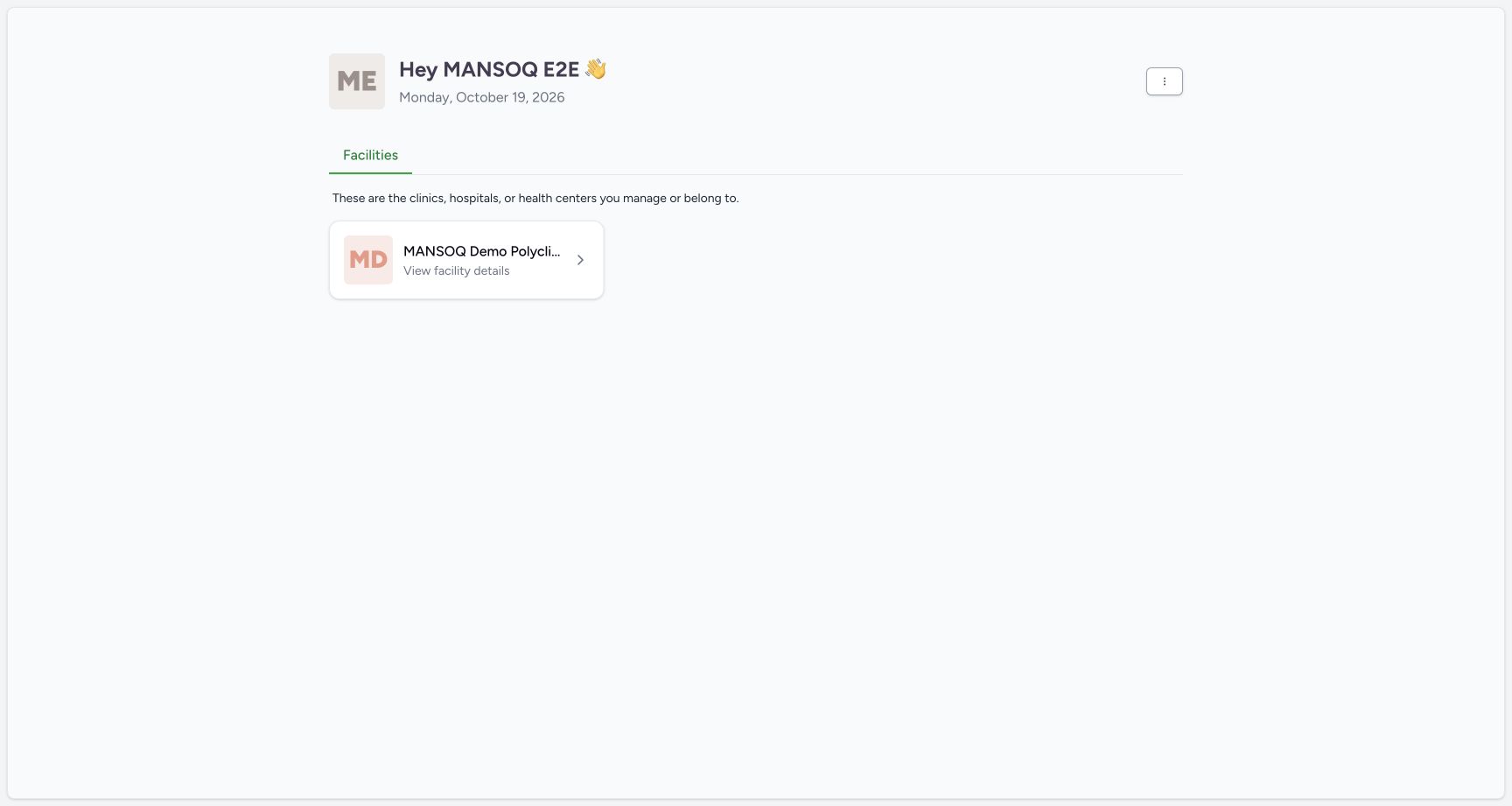
- Start from an already authenticated session for an existing account authorized to use the intended facility. The example uses the normal Facility Admin account in the synthetic Polyclinic. Sign-in procedures are separate and are not pictured here; a dedicated Executive account is not demonstrated.
 1
1Recorded release 8d99bb8a · 2026-10-19T03:51:58.604074+00:00 · 1728 × 921 Choose the existing authorized facility
Capture details
Exact committed release 8d99, isolated synthetic Polyclinic. Existing non-superuser Facility Admin; no new permissions. Source and139 frontend assets independently verified. Read-only manager teaching, not production deployment, bank reconciliation, payer acceptance or clinical/tax approval.
Image SHA-256
6c6c11d4c8d52d4018ee32d5cc124f7f9aaef526f253695e1d6e3662ab070499- Facility card: Choose the facility already associated with your account.
 123
123Recorded release 8d99bb8a · 2026-10-19T03:52:06.908335+00:00 · 1728 × 921 Open Dashboard from the actual Revenue Cycle menu
Capture details
Exact committed release 8d99, isolated synthetic Polyclinic. Existing non-superuser Facility Admin; no new permissions. Source and139 frontend assets independently verified. Read-only manager teaching, not production deployment, bank reconciliation, payer acceptance or clinical/tax approval.
Image SHA-256
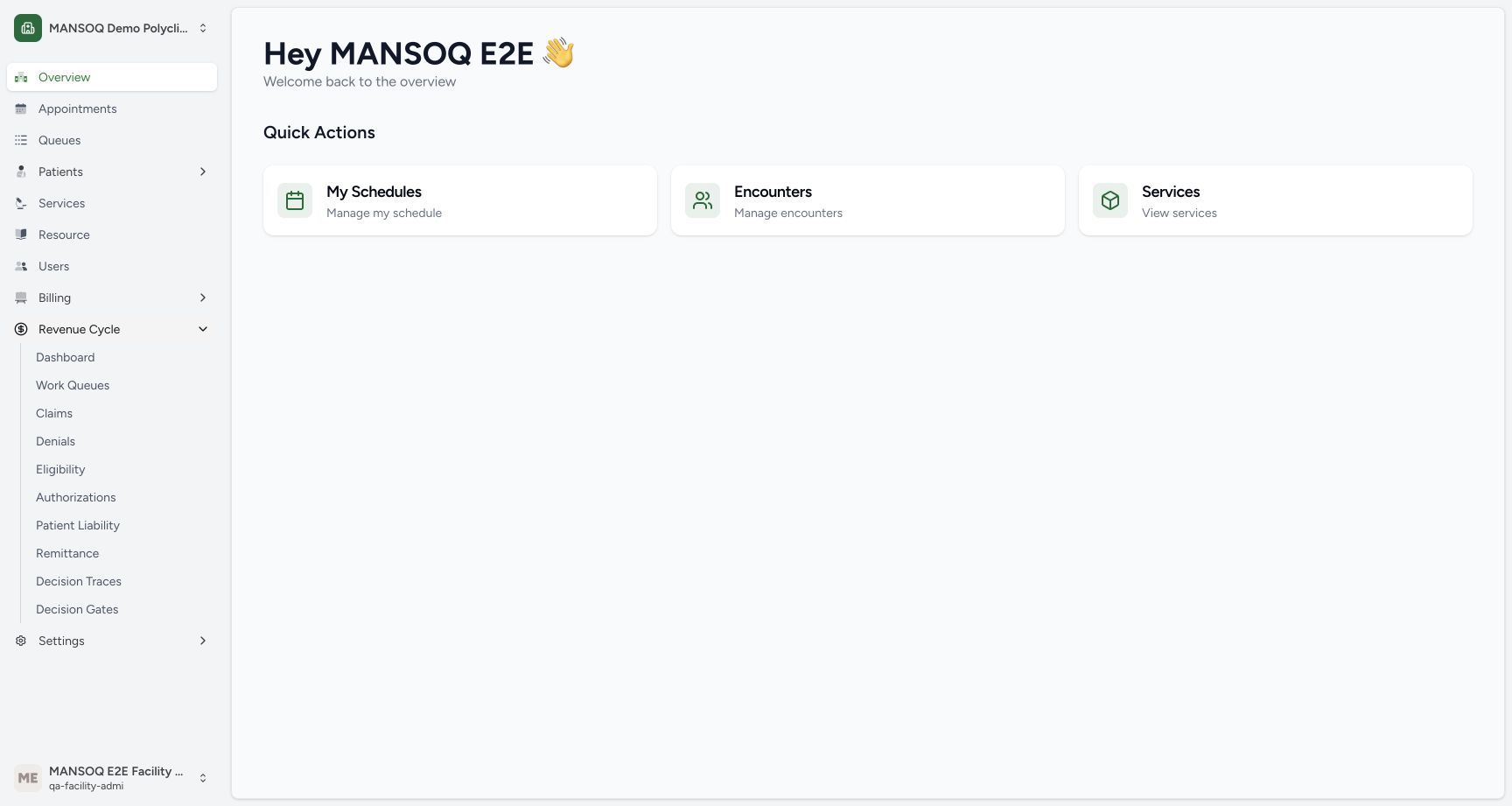
2d1d5cd0c0c4267cd28b6ec03b04d7c911a9d1f0614ef17ba15122e3ce1df315- Revenue Cycle menu: Expand this existing facility menu.
- Dashboard link: Open the aggregate revenue dashboard.
- Existing manager account: The demonstrated role is Facility Admin.
1. Choose the intended facility
From Facilities, select your authorized facility. Check its name and the current account in the facility sidebar. This recorded example is MANSOQ Demo Polyclinic with a Facility Admin account. Do not assume that another role has the same access.
1Choose the existing authorized facility
Capture details
Exact committed release 8d99, isolated synthetic Polyclinic. Existing non-superuser Facility Admin; no new permissions. Source and139 frontend assets independently verified. Read-only manager teaching, not production deployment, bank reconciliation, payer acceptance or clinical/tax approval.
Image SHA-256 6c6c11d4c8d52d4018ee32d5cc124f7f9aaef526f253695e1d6e3662ab070499
- Facility card: Choose the facility already associated with your account.
123Open Dashboard from the actual Revenue Cycle menu
Capture details
Exact committed release 8d99, isolated synthetic Polyclinic. Existing non-superuser Facility Admin; no new permissions. Source and139 frontend assets independently verified. Read-only manager teaching, not production deployment, bank reconciliation, payer acceptance or clinical/tax approval.
Image SHA-256 2d1d5cd0c0c4267cd28b6ec03b04d7c911a9d1f0614ef17ba15122e3ce1df315
- Revenue Cycle menu: Expand this existing facility menu.
- Dashboard link: Open the aggregate revenue dashboard.
- Existing manager account: The demonstrated role is Facility Admin.
2. Open the revenue dashboard
Expand Revenue Cycle and choose Dashboard. The facility Overview page contains shortcuts; the revenue dashboard is a separate page. This version offers Refresh here and does not show date-range, export or status-filter controls.
123Open Dashboard from the actual Revenue Cycle menu
Capture details
Exact committed release 8d99, isolated synthetic Polyclinic. Existing non-superuser Facility Admin; no new permissions. Source and139 frontend assets independently verified. Read-only manager teaching, not production deployment, bank reconciliation, payer acceptance or clinical/tax approval.
Image SHA-256 2d1d5cd0c0c4267cd28b6ec03b04d7c911a9d1f0614ef17ba15122e3ce1df315
- Revenue Cycle menu: Expand this existing facility menu.
- Dashboard link: Open the aggregate revenue dashboard.
- Existing manager account: The demonstrated role is Facility Admin.
1234567Read the loaded revenue dashboard
Capture details
Exact committed release 8d99, isolated synthetic Polyclinic. Existing non-superuser Facility Admin; no new permissions. Source and139 frontend assets independently verified. Read-only manager teaching, not production deployment, bank reconciliation, payer acceptance or clinical/tax approval.
Image SHA-256 f0d6b7fbd34e0998aef274225e5888f762ff962b4003ce3ba09749e970c8033c
- Refresh dashboard: Refresh reloads the dashboard totals and episode list.
- Claims generated: The displayed SAR 40,000 is a stored claimed-amount aggregate.
- Payments posted: The SAR 31,400 snapshot is separate from verified bank cash.
- Open denials: Three open or appealed denial records total SAR 2,300.
- Stage count: The stage cards show2 front-office and39 middle-office cases.
- Readiness boundary: Ready to claim is0; it is not a payer/tax/wire approval metric.
- Read the blocker: Readiness must be read with its unresolved error conditions.
3. Read the four summary cards
Read the currency and each label separately. The example shows Gross charges SAR 0.00, Claims generated SAR 40,000.00, Payments posted SAR 31,400.00, and three open denials totaling SAR 2,300.00. The money cards aggregate stored case snapshot fields. A zero charge snapshot does not prove that clinical services were free or that no charge rows exist elsewhere.
1234567Read the loaded revenue dashboard
Capture details
Exact committed release 8d99, isolated synthetic Polyclinic. Existing non-superuser Facility Admin; no new permissions. Source and139 frontend assets independently verified. Read-only manager teaching, not production deployment, bank reconciliation, payer acceptance or clinical/tax approval.
Image SHA-256 f0d6b7fbd34e0998aef274225e5888f762ff962b4003ce3ba09749e970c8033c
- Refresh dashboard: Refresh reloads the dashboard totals and episode list.
- Claims generated: The displayed SAR 40,000 is a stored claimed-amount aggregate.
- Payments posted: The SAR 31,400 snapshot is separate from verified bank cash.
- Open denials: Three open or appealed denial records total SAR 2,300.
- Stage count: The stage cards show2 front-office and39 middle-office cases.
- Readiness boundary: Ready to claim is0; it is not a payer/tax/wire approval metric.
- Read the blocker: Readiness must be read with its unresolved error conditions.
4. Read stages and readiness separately
The stage cards show 2 front-office, 39 middle-office and 0 back-office cases. Ready to claim and NPHIES queued both show 0. Ready to claim counts cases whose front-office and middle-office status are complete; it does not establish tax, coding, payer or external wire acceptance. A queued exchange is also separate from a sent or accepted exchange.
1234567Read the loaded revenue dashboard
Capture details
Exact committed release 8d99, isolated synthetic Polyclinic. Existing non-superuser Facility Admin; no new permissions. Source and139 frontend assets independently verified. Read-only manager teaching, not production deployment, bank reconciliation, payer acceptance or clinical/tax approval.
Image SHA-256 f0d6b7fbd34e0998aef274225e5888f762ff962b4003ce3ba09749e970c8033c
- Refresh dashboard: Refresh reloads the dashboard totals and episode list.
- Claims generated: The displayed SAR 40,000 is a stored claimed-amount aggregate.
- Payments posted: The SAR 31,400 snapshot is separate from verified bank cash.
- Open denials: Three open or appealed denial records total SAR 2,300.
- Stage count: The stage cards show2 front-office and39 middle-office cases.
- Readiness boundary: Ready to claim is0; it is not a payer/tax/wire approval metric.
- Read the blocker: Readiness must be read with its unresolved error conditions.
5. Inspect worklist context without opening a case
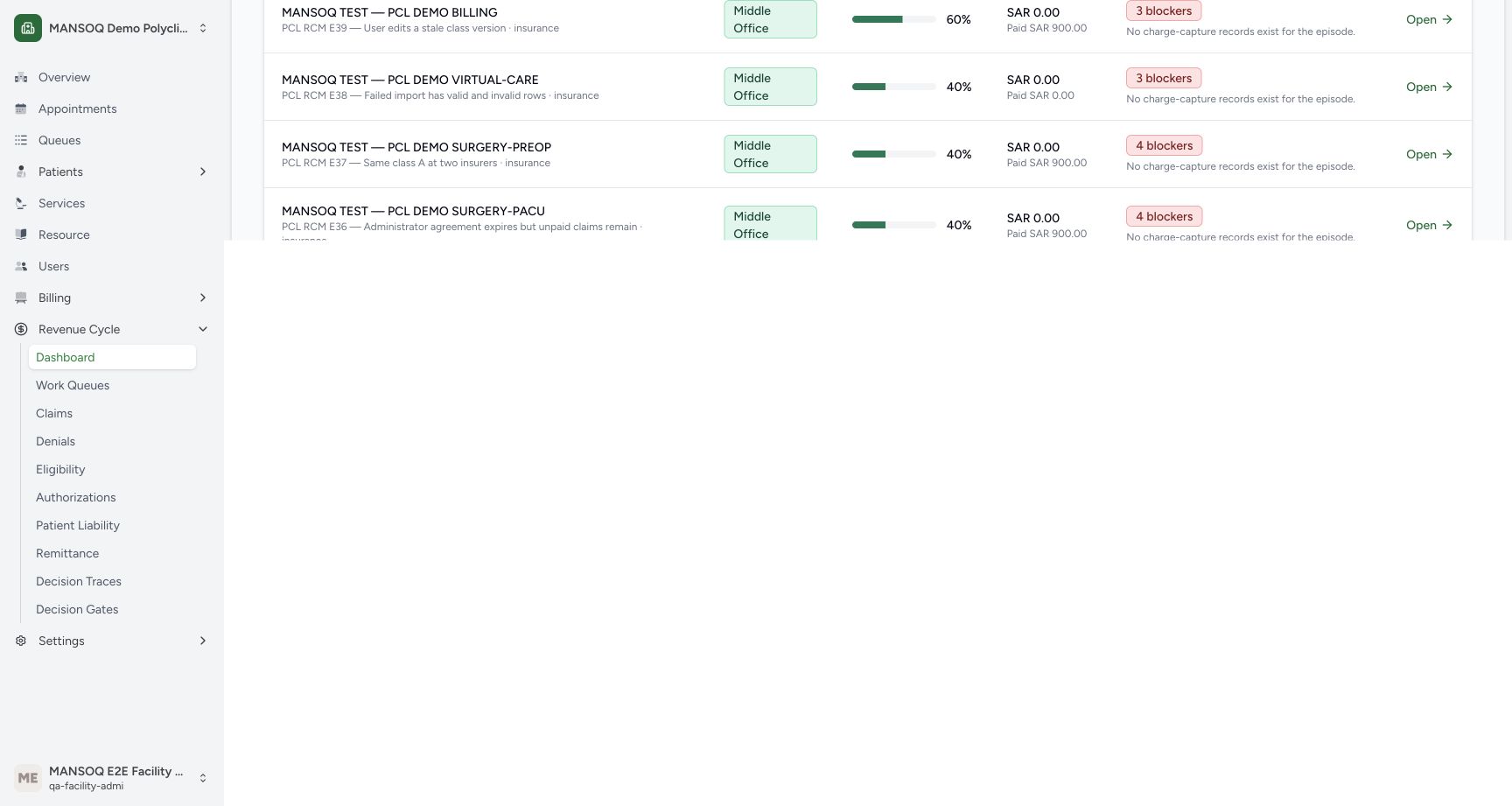
Read the patient/account, stage, readiness, revenue and exception columns together. The example has 150 open work items. A row can show historical paid amounts while still carrying blockers. The readiness score is a stored calculation that subtracts 20 points per error-severity blocker, bounded from 0 to 100; the visible total blocker count can include other severities. Open retrieves and recalculates a case in this version, so this monitoring walkthrough leaves it untouched.
1234567Read the loaded revenue dashboard
Capture details
Exact committed release 8d99, isolated synthetic Polyclinic. Existing non-superuser Facility Admin; no new permissions. Source and139 frontend assets independently verified. Read-only manager teaching, not production deployment, bank reconciliation, payer acceptance or clinical/tax approval.
Image SHA-256 f0d6b7fbd34e0998aef274225e5888f762ff962b4003ce3ba09749e970c8033c
- Refresh dashboard: Refresh reloads the dashboard totals and episode list.
- Claims generated: The displayed SAR 40,000 is a stored claimed-amount aggregate.
- Payments posted: The SAR 31,400 snapshot is separate from verified bank cash.
- Open denials: Three open or appealed denial records total SAR 2,300.
- Stage count: The stage cards show2 front-office and39 middle-office cases.
- Readiness boundary: Ready to claim is0; it is not a payer/tax/wire approval metric.
- Read the blocker: Readiness must be read with its unresolved error conditions.
 12
12Read stored readiness and blocker rows after scrolling
Capture details
Exact committed release 8d99, isolated synthetic Polyclinic. Existing non-superuser Facility Admin; no new permissions. Source and139 frontend assets independently verified. Read-only manager teaching, not production deployment, bank reconciliation, payer acceptance or clinical/tax approval.
Image SHA-256 4f59d53a953f2dc5039ae55dc588240577c684635a910a51dda3c81a604883ca
- Readiness score: This is a stored error-blocker score, not a clinical or collection probability.
- Specific blocker: Read the specific exception. Do not use Open in this read-only exercise.
6. Refresh and wait for the settled view
Choose Refresh once, then wait until the loaded cards and rows are available. The actual refreshed example retains the same totals and stage counts. Refresh reloads the dashboard and list; it does not reconcile a bank statement or certify external acceptance.
1234567Read the loaded revenue dashboard
Capture details
Exact committed release 8d99, isolated synthetic Polyclinic. Existing non-superuser Facility Admin; no new permissions. Source and139 frontend assets independently verified. Read-only manager teaching, not production deployment, bank reconciliation, payer acceptance or clinical/tax approval.
Image SHA-256 f0d6b7fbd34e0998aef274225e5888f762ff962b4003ce3ba09749e970c8033c
- Refresh dashboard: Refresh reloads the dashboard totals and episode list.
- Claims generated: The displayed SAR 40,000 is a stored claimed-amount aggregate.
- Payments posted: The SAR 31,400 snapshot is separate from verified bank cash.
- Open denials: Three open or appealed denial records total SAR 2,300.
- Stage count: The stage cards show2 front-office and39 middle-office cases.
- Readiness boundary: Ready to claim is0; it is not a payer/tax/wire approval metric.
- Read the blocker: Readiness must be read with its unresolved error conditions.
 1234567
Read the dashboard after genuine Refresh
Capture details
Exact committed release 8d99, isolated synthetic Polyclinic. Existing non-superuser Facility Admin; no new permissions. Source and139 frontend assets independently verified. Read-only manager teaching, not production deployment, bank reconciliation, payer acceptance or clinical/tax approval.
Image SHA-256 d43cbbe10f797688bf458cf19b4e2cbd2b87d5b48112f14899cc5ccfb2e1bc0d
- Refresh dashboard: Refresh reloads the dashboard totals and episode list.
- Claims generated: The displayed SAR 40,000 is a stored claimed-amount aggregate.
- Payments posted: The SAR 31,400 snapshot is separate from verified bank cash.
- Open denials: Three open or appealed denial records total SAR 2,300.
- Stage count: The stage cards show2 front-office and39 middle-office cases.
- Readiness boundary: Ready to claim is0; it is not a payer/tax/wire approval metric.
- Read the blocker: Readiness must be read with its unresolved error conditions.
Payments posted is not bank cash
The dashboard sums stored case paid amounts. The lifecycle computes that snapshot from claim payment fields, including historical payer payments independently from replacement-claim position. Use the separate remittance, allocation, suspense and treasury workflows to establish real receipt and reconciliation facts. Do not treat this card as an available bank balance.
1234567Read the loaded revenue dashboard
Capture details
Exact committed release 8d99, isolated synthetic Polyclinic. Existing non-superuser Facility Admin; no new permissions. Source and139 frontend assets independently verified. Read-only manager teaching, not production deployment, bank reconciliation, payer acceptance or clinical/tax approval.
Image SHA-256 f0d6b7fbd34e0998aef274225e5888f762ff962b4003ce3ba09749e970c8033c
- Refresh dashboard: Refresh reloads the dashboard totals and episode list.
- Claims generated: The displayed SAR 40,000 is a stored claimed-amount aggregate.
- Payments posted: The SAR 31,400 snapshot is separate from verified bank cash.
- Open denials: Three open or appealed denial records total SAR 2,300.
- Stage count: The stage cards show2 front-office and39 middle-office cases.
- Readiness boundary: Ready to claim is0; it is not a payer/tax/wire approval metric.
- Read the blocker: Readiness must be read with its unresolved error conditions.
List and date scope in this version
The dashboard requests at most 50 episode rows and has no list pagination or date filter. This example has 41 cases, so all fit in the returned list. The summary is facility-wide in the shown unfiltered view. Do not infer a monthly trend or a complete list when a different facility exceeds the requested row limit.
1234567Read the loaded revenue dashboard
Capture details
Exact committed release 8d99, isolated synthetic Polyclinic. Existing non-superuser Facility Admin; no new permissions. Source and139 frontend assets independently verified. Read-only manager teaching, not production deployment, bank reconciliation, payer acceptance or clinical/tax approval.
Image SHA-256 f0d6b7fbd34e0998aef274225e5888f762ff962b4003ce3ba09749e970c8033c
- Refresh dashboard: Refresh reloads the dashboard totals and episode list.
- Claims generated: The displayed SAR 40,000 is a stored claimed-amount aggregate.
- Payments posted: The SAR 31,400 snapshot is separate from verified bank cash.
- Open denials: Three open or appealed denial records total SAR 2,300.
- Stage count: The stage cards show2 front-office and39 middle-office cases.
- Readiness boundary: Ready to claim is0; it is not a payer/tax/wire approval metric.
- Read the blocker: Readiness must be read with its unresolved error conditions.
12Read stored readiness and blocker rows after scrolling
Capture details
Exact committed release 8d99, isolated synthetic Polyclinic. Existing non-superuser Facility Admin; no new permissions. Source and139 frontend assets independently verified. Read-only manager teaching, not production deployment, bank reconciliation, payer acceptance or clinical/tax approval.
Image SHA-256 4f59d53a953f2dc5039ae55dc588240577c684635a910a51dda3c81a604883ca
- Readiness score: This is a stored error-blocker score, not a clinical or collection probability.
- Specific blocker: Read the specific exception. Do not use Open in this read-only exercise.
Source evidence
Every citation uses this exact committed version. The private source repository requires access.
- repositories/platform/mansoq-web/src/pages/Facility/revenueCycle/RevenueCycleDashboard.tsx:57 ·
8d99bb8a4712f6aa8446bcd3b40bf62dae280d39Source file checksum
fbbaaace3371388c4b216edf2630a6a4bf521706365b068866f2ea58651f2445 - repositories/platform/mansoq-web/src/components/ui/sidebar/facility/facility-nav.tsx:1 ·
8d99bb8a4712f6aa8446bcd3b40bf62dae280d39Source file checksum
26a257157ad5c4272295c13ac63f349cc4f2ba61ede92af64e671a0eb9be5d95 - repositories/platform/mansoq-core/mansoq/emr/api/viewsets/revenue_cycle.py:637 ·
8d99bb8a4712f6aa8446bcd3b40bf62dae280d39Source file checksum
22bfb82c61b6138fd572189bb36ca031f0d2845f76b5c11b960b32e53202387e - repositories/platform/mansoq-core/mansoq/emr/resources/revenue_cycle/lifecycle.py:900 ·
8d99bb8a4712f6aa8446bcd3b40bf62dae280d39Source file checksum
4463a8c4affc001a10d6d58fdf3fa0468b0c1f111b5e32b01550cef6a2a6690a