 MANSOQ
 Nursing observations · VERSION 8d99bb8a
Correct a source response and verify its derived observation
Identify the exact new response, review the real confirmation, mark it Entered in Error and verify that only its linked observation becomes Error while current views refresh and original history is retained on 8d99bb8a.
Nurse · Doctor
 12
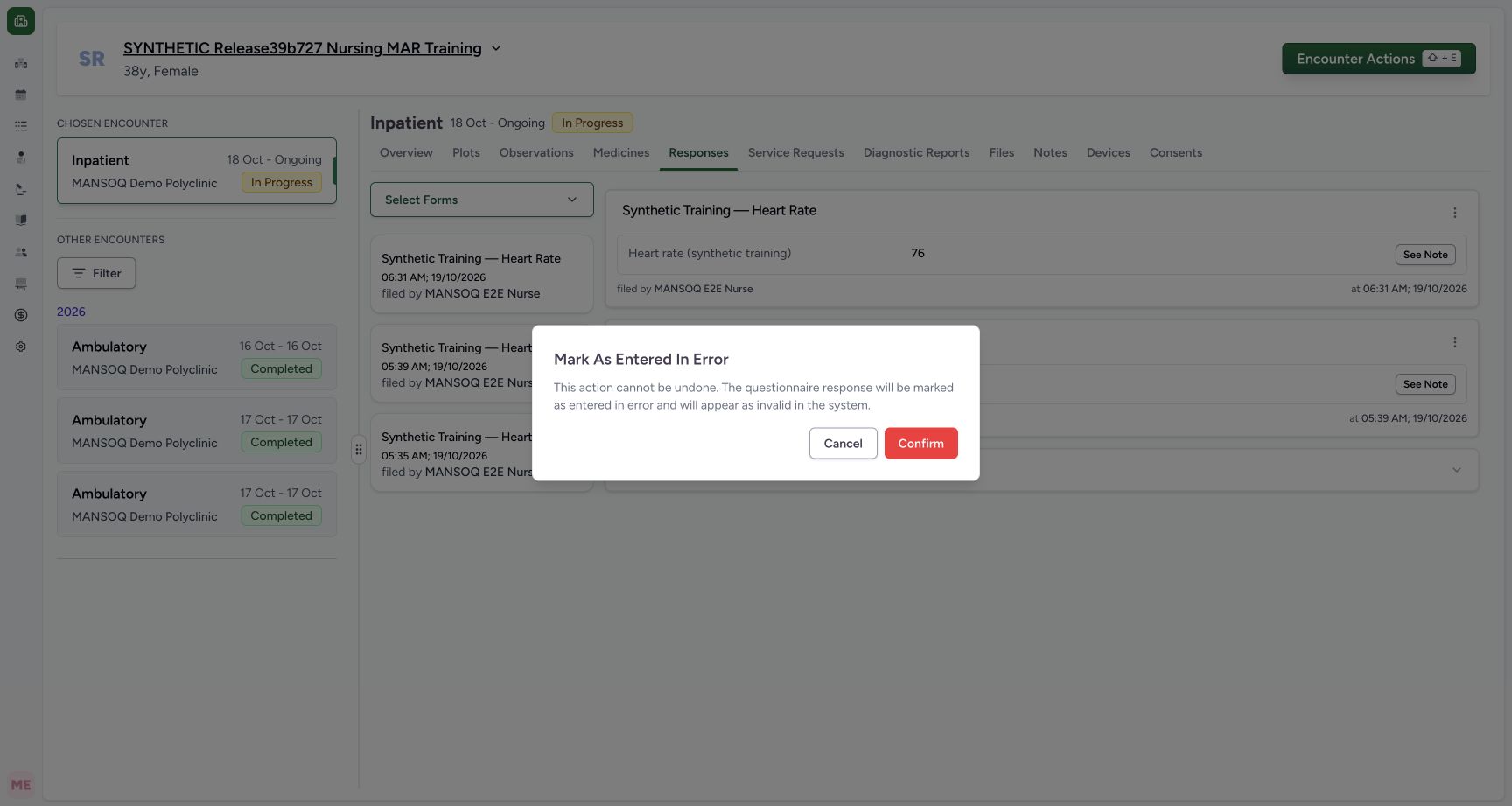
12Confirm the fictional response correction or cancel safely
Capture details
Exact committed release 8d99bb8a on an isolated nonproduction clone, using an existing Nurse and fictional Polyclinic inpatient case. The synthetic patient name retains an earlier release label. The product warns that this source response will be marked invalid and the action cannot be undone through this control. Confirm is used only for this explicitly synthetic 06:31 response; Cancel leaves it unchanged. This is an authorized demonstration, not a clinical care decision.
Image SHA-256 6b4a5f4e16ffcfbf63082465b5a2c0a841eb0fc66820e236ed7199a861ee8e78
- Confirm only the identified fictional source response: Confirm only the identified fictional source response. Confirm the fictional response correction or cancel safely.
- Cancel without changing the response: Cancel without changing the response. Confirm the fictional response correction or cancel safely.
 123
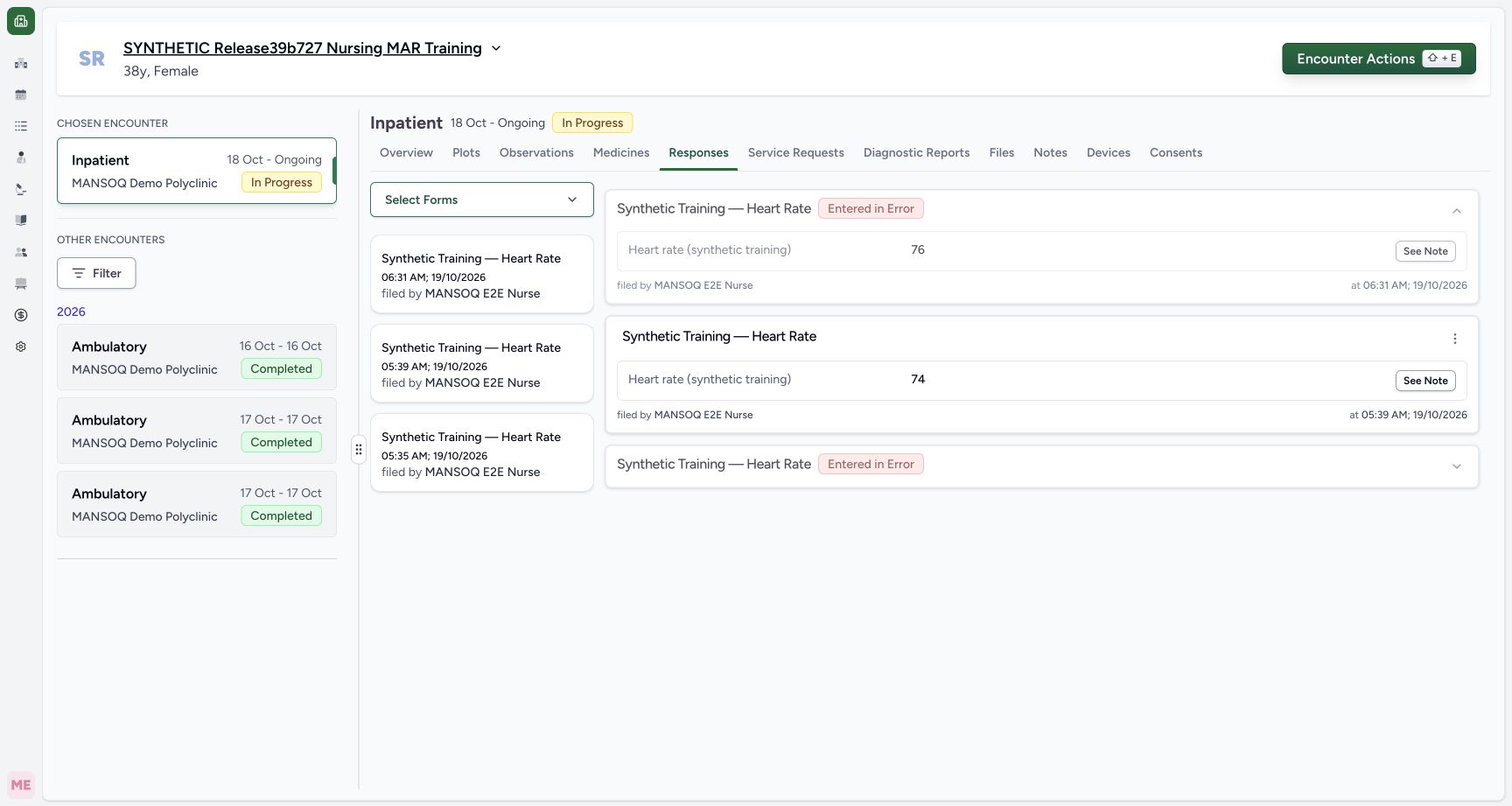
123Corrected source is retained with Entered in Error and original value
Capture details
Exact committed release 8d99bb8a on an isolated nonproduction clone, using an existing Nurse and fictional Polyclinic inpatient case. The synthetic patient name retains an earlier release label. The new 06:31 response remains visible with value 76, its original Nurse/time and an Entered in Error badge. The prior valid 74 response and older Error response remain. Independent Nurse/Doctor reads verify the new source and exact derived observation are both Error.
Image SHA-256 52c05db4016aad6d41878e6205d6aa0557e98098b2373a62e477c134f25bb392
- This retained source response is Entered in Error: Reference targets the actual Entered in Error badge on the new 06:31 response card.
- Check current observations after the successful correction: Check current observations after the successful correction. Corrected source is retained with Entered in Error and original value.
- The saved synthetic note remains inspectable: The saved synthetic note remains inspectable. Corrected source is retained with Entered in Error and original value.
 123
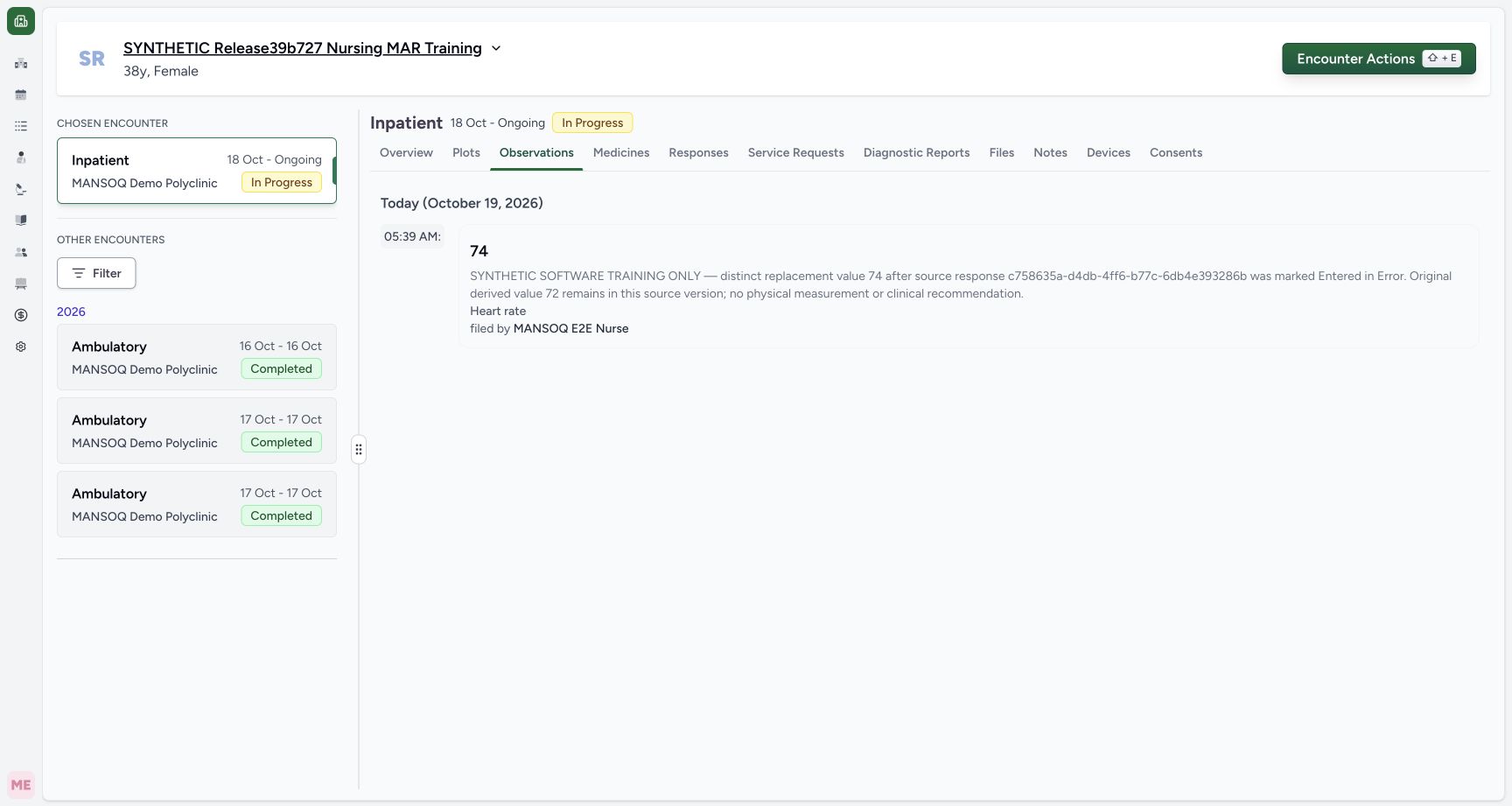
123Current observations refresh to the one remaining valid reading
Capture details
Exact committed release 8d99bb8a on an isolated nonproduction clone, using an existing Nurse and fictional Polyclinic inpatient case. The synthetic patient name retains an earlier release label. After the successful source correction, returning to the already-used Observations tab shows only retained valid 74. New Error 76 and legacy source-error 72 are excluded without a manual page reload. The exact history remains available separately.
Image SHA-256 6ff5866e5610b94208ffff204b32dfa0d40e040f13370156e941bf400850a549
- Refreshed current Observations mode: Refreshed current Observations mode. Current observations refresh to the one remaining valid reading.
- Retained valid 74 at 05:39: Reference targets the actual rendered simulated numeric value on this original observation card. The adjacent actual saved time and author remain visible.
- Check the previously loaded Pulse graph: Check the previously loaded Pulse graph. Current observations refresh to the one remaining valid reading.
 1234
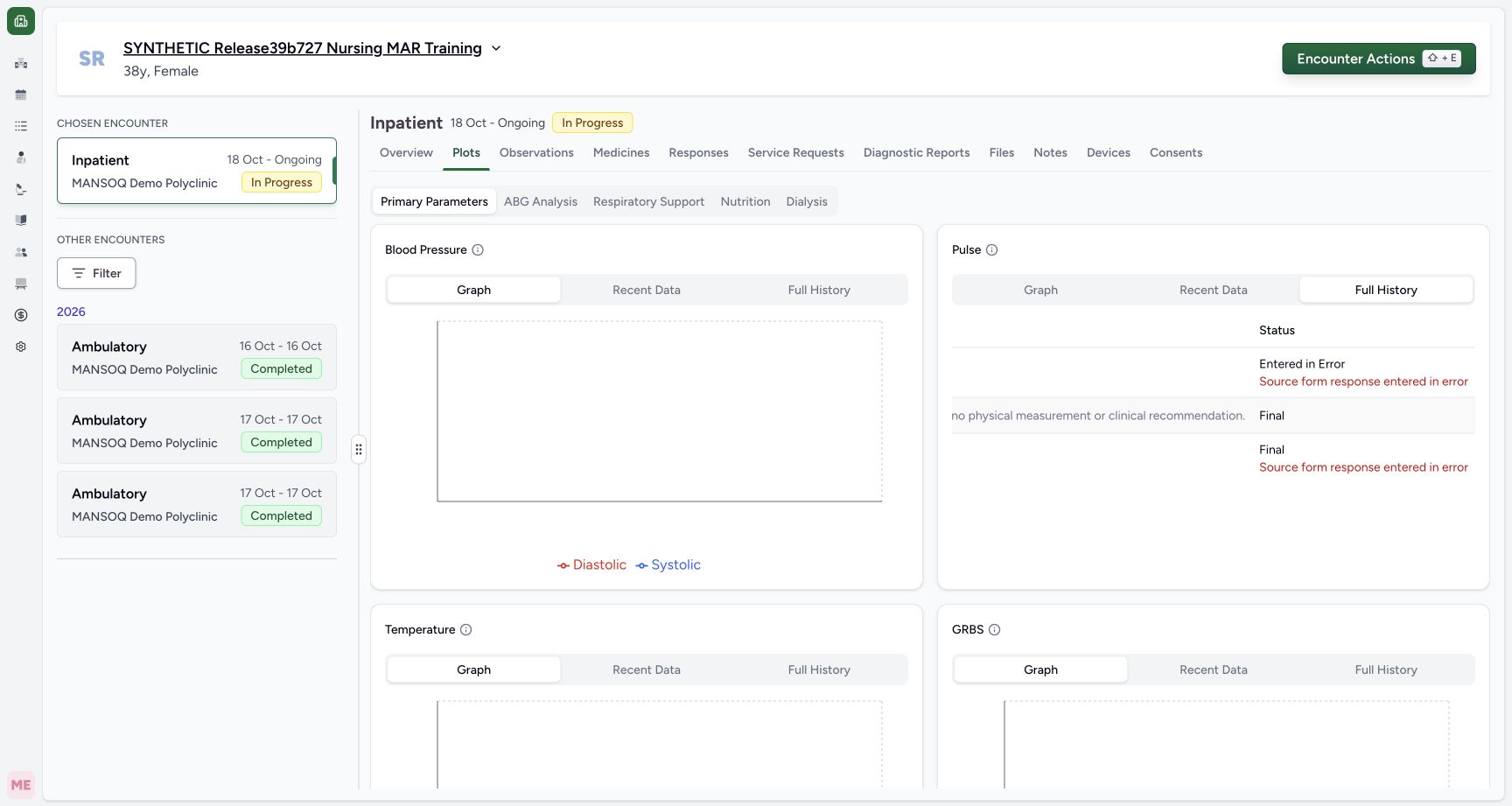
1234Retained history distinguishes new Error, valid Final and legacy source-error Final
Capture details
Exact committed release 8d99bb8a on an isolated nonproduction clone, using an existing Nurse and fictional Polyclinic inpatient case. The synthetic patient name retains an earlier release label. After ordinary horizontal scrolling, the same three rows show: new 76 is Entered in Error with source-error context; valid 74 remains Final; legacy 72 remains actually saved Final with a separate source-error warning. Paired with the preceding measurement/time view, this does not imply any old record was backfilled.
Image SHA-256 91de4ab7013d642352c814417428d3f32e6ca7e0e72012cb8671d0e14e436522
- New 76 observation: Entered in Error: Reference targets the actual observation Error text. Its exact source response has the separate red source-error warning directly below; these are two distinct facts.
- Valid 74 observation: Final: Reference targets actual Final on the middle valid row, which has no source-error warning.
- Legacy 72 observation: actual saved Final: Reference targets actual Final on the bottom legacy row. The separate red source-error warning below explains its exclusion from current views; the old status was not backfilled.
- Explicit Full History is separate from current Graph and Recent Data: Explicit Full History is separate from current Graph and Recent Data. Retained history distinguishes new Error, valid Final and legacy source-error Final.
11 of 11 content blocks have reviewed image alignment. Missing overview or prerequisite images remain open.
Before you begin
- Use the existing authorized Nurse on the intended ongoing encounter and identify the distinct fictional 76 response at 06:31 AM, filed by Nurse. This lesson changes only that new response and its exact linked observation; the older 72 source error and valid 74 are preserved.
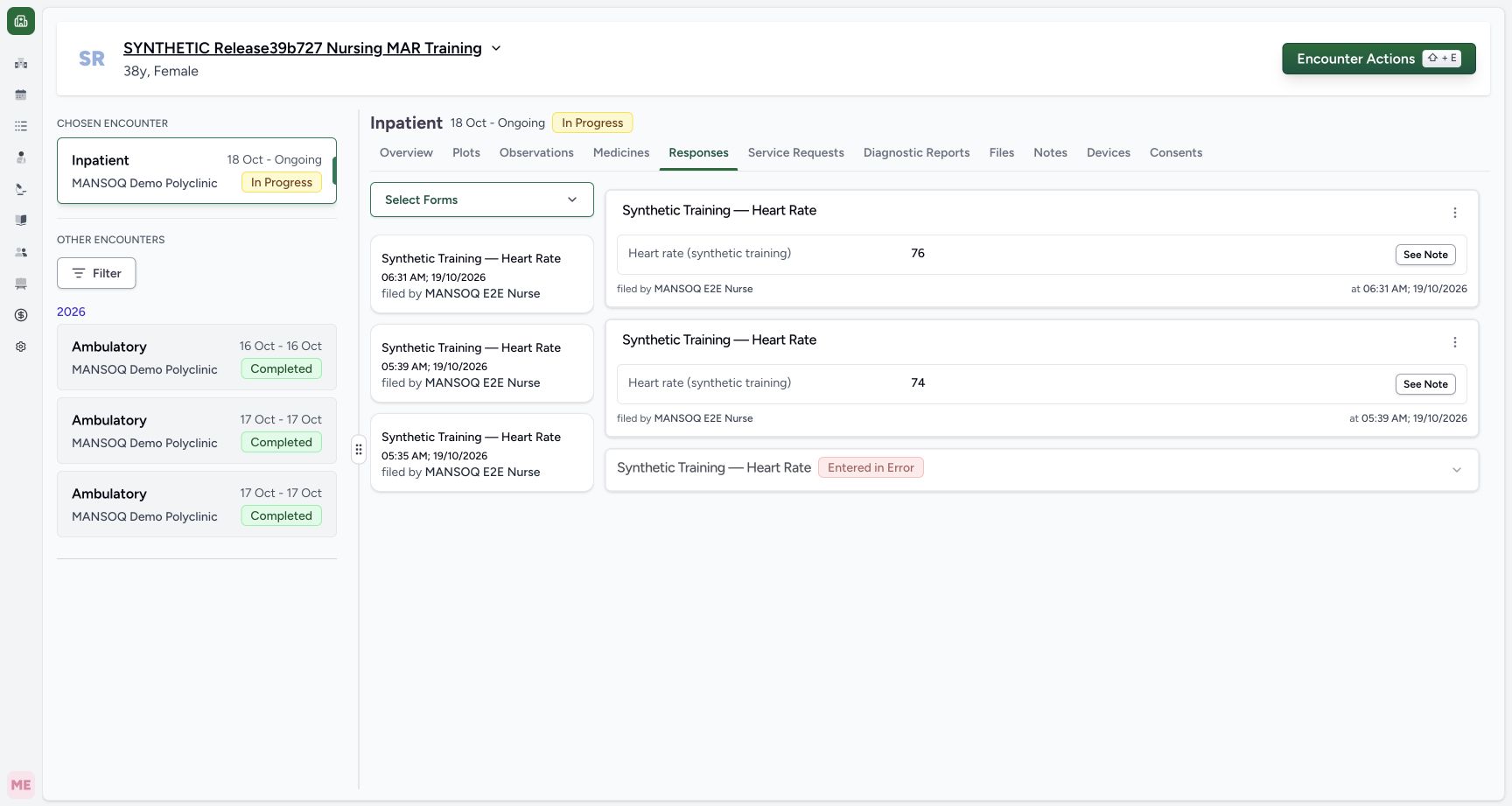 123
123Recorded release 8d99bb8a · 2026-10-19T03:32:06.252Z · 1728 × 921 Saved fictional response with Nurse and actual save time
Capture details
Exact committed release 8d99bb8a on an isolated nonproduction clone, using an existing Nurse and fictional Polyclinic inpatient case. The synthetic patient name retains an earlier release label. The new response displays 76, filed by the ordinary Nurse at 06:31 local on 19 October. Independent normal Nurse and Doctor API reads verify its new UUID, Completed source and Final derived observation; older 74 and source-error 72 remain unchanged.
Image SHA-256
2695d7c09ba46b8c8678e83d9f38313e644e020a76ec1786dac4e1751fd464da- Open actions for the new 06:31 response: Open actions for the new 06:31 response. Saved fictional response with Nurse and actual save time.
- Inspect the saved synthetic note: Inspect the saved synthetic note. Saved fictional response with Nurse and actual save time.
- Actual saved local time of the new 06:31 response: Reference targets the actual saved-time text at the right of the new response card; original Nurse attribution is visible at the left of the same card.
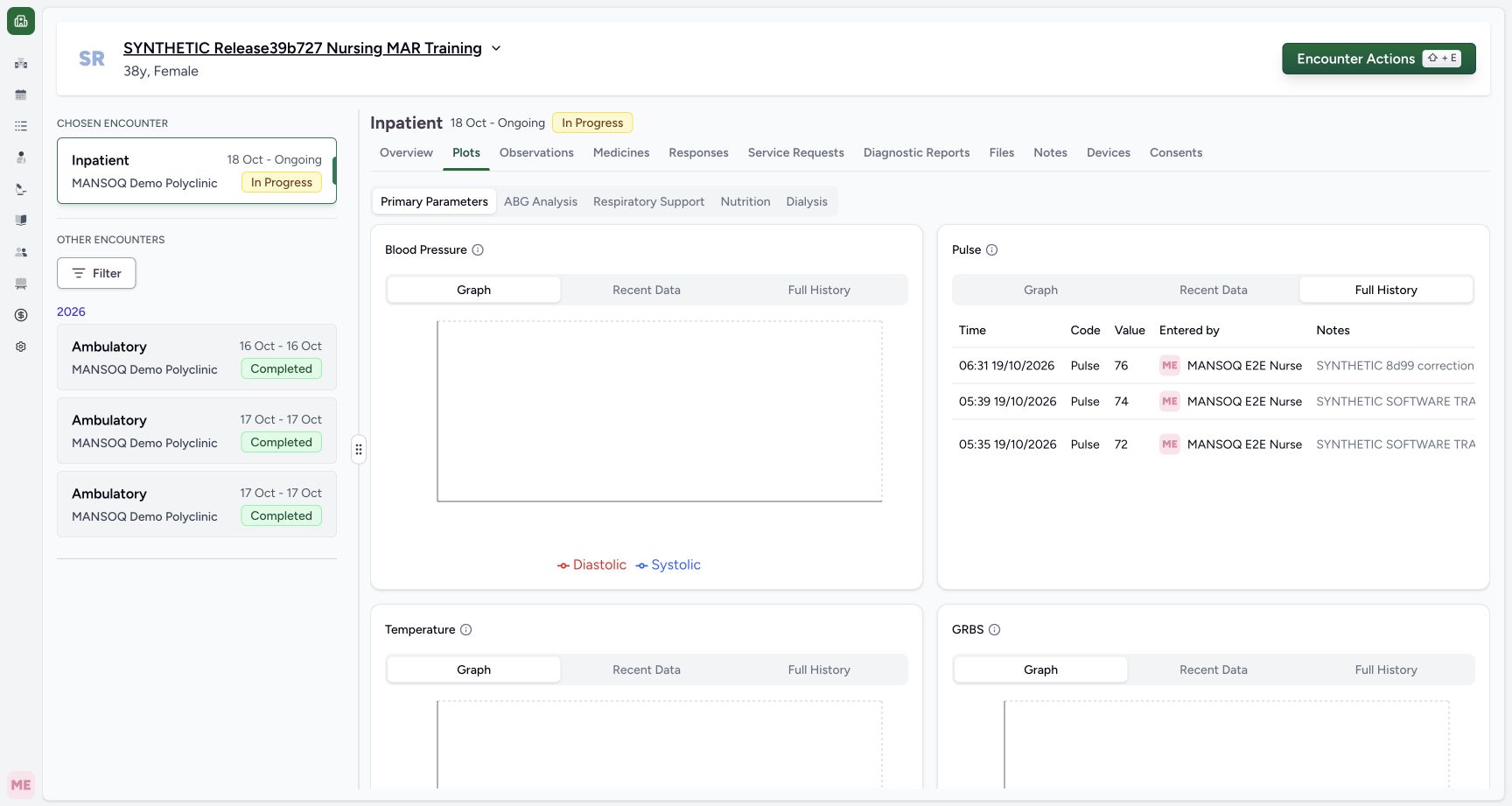 12
12Recorded release 8d99bb8a · 2026-10-19T03:32:42.624Z · 1728 × 921 Full History retains three measurements before the new correction
Capture details
Exact committed release 8d99bb8a on an isolated nonproduction clone, using an existing Nurse and fictional Polyclinic inpatient case. The synthetic patient name retains an earlier release label. The retained history now has distinct 76 at 06:31, 74 at 05:39 and legacy 72 at 05:35. This left-hand view shows measurement identity and attribution; the Status column is to the right of long notes.
Image SHA-256
1d40e8506dc951250c71a9f1d800ac896cdb075a46ecf98d101e504f31989ad8- Explicit Full History mode retains three original measurements: Explicit Full History mode retains three original measurements. Full History retains three measurements before the new correction.
- Return to the source response to correct the new entry: Return to the source response to correct the new entry. Full History retains three measurements before the new correction.
- The source checks response status, object authorization and the existing configured correction time window. This successful demonstration is inside that window and makes no policy or setting change. Follow facility policy before correcting a real record. Expired-window refusal, other-role writes and every facility’s permissions are not demonstrated by these screens.12
Recorded release 8d99bb8a · 2026-10-19T03:33:03.312Z · 1728 × 921 Confirm the fictional response correction or cancel safely
Capture details
Exact committed release 8d99bb8a on an isolated nonproduction clone, using an existing Nurse and fictional Polyclinic inpatient case. The synthetic patient name retains an earlier release label. The product warns that this source response will be marked invalid and the action cannot be undone through this control. Confirm is used only for this explicitly synthetic 06:31 response; Cancel leaves it unchanged. This is an authorized demonstration, not a clinical care decision.
Image SHA-256
6b4a5f4e16ffcfbf63082465b5a2c0a841eb0fc66820e236ed7199a861ee8e78- Confirm only the identified fictional source response: Confirm only the identified fictional source response. Confirm the fictional response correction or cancel safely.
- Cancel without changing the response: Cancel without changing the response. Confirm the fictional response correction or cancel safely.
123Recorded release 8d99bb8a · 2026-10-19T03:33:21.941Z · 1728 × 921 Corrected source is retained with Entered in Error and original value
Capture details
Exact committed release 8d99bb8a on an isolated nonproduction clone, using an existing Nurse and fictional Polyclinic inpatient case. The synthetic patient name retains an earlier release label. The new 06:31 response remains visible with value 76, its original Nurse/time and an Entered in Error badge. The prior valid 74 response and older Error response remain. Independent Nurse/Doctor reads verify the new source and exact derived observation are both Error.
Image SHA-256
52c05db4016aad6d41878e6205d6aa0557e98098b2373a62e477c134f25bb392- This retained source response is Entered in Error: Reference targets the actual Entered in Error badge on the new 06:31 response card.
- Check current observations after the successful correction: Check current observations after the successful correction. Corrected source is retained with Entered in Error and original value.
- The saved synthetic note remains inspectable: The saved synthetic note remains inspectable. Corrected source is retained with Entered in Error and original value.
1. Find the specific response to correct
In Responses, verify the new card’s 76, 06:31 time and filed-by Nurse context. Choose More Actions on that card, not on retained valid 74. The menu offers Print this response, Print all responses and Mark as entered in error; this flow does not offer direct measurement or effective-time editing.
123Saved fictional response with Nurse and actual save time
Capture details
Exact committed release 8d99bb8a on an isolated nonproduction clone, using an existing Nurse and fictional Polyclinic inpatient case. The synthetic patient name retains an earlier release label. The new response displays 76, filed by the ordinary Nurse at 06:31 local on 19 October. Independent normal Nurse and Doctor API reads verify its new UUID, Completed source and Final derived observation; older 74 and source-error 72 remain unchanged.
Image SHA-256 2695d7c09ba46b8c8678e83d9f38313e644e020a76ec1786dac4e1751fd464da
- Open actions for the new 06:31 response: Open actions for the new 06:31 response. Saved fictional response with Nurse and actual save time.
- Inspect the saved synthetic note: Inspect the saved synthetic note. Saved fictional response with Nurse and actual save time.
- Actual saved local time of the new 06:31 response: Reference targets the actual saved-time text at the right of the new response card; original Nurse attribution is visible at the left of the same card.
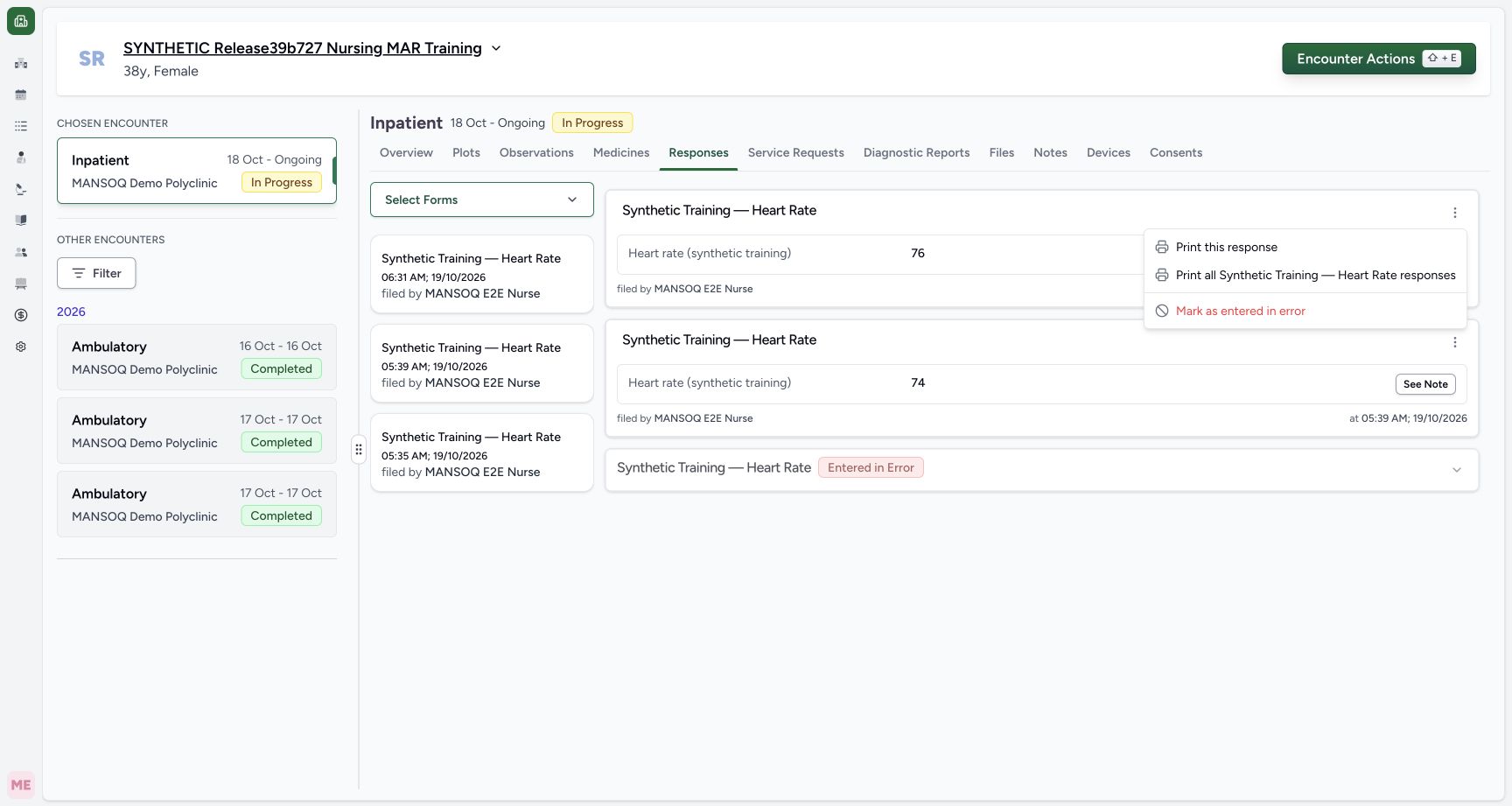 1
1Mark the specific new response as entered in error
Capture details
Exact committed release 8d99bb8a on an isolated nonproduction clone, using an existing Nurse and fictional Polyclinic inpatient case. The synthetic patient name retains an earlier release label. More Actions belongs to the new 06:31 response with value 76. Mark as entered in error is the supported source-response correction action; it is not deletion or direct editing of a historical observation.
Image SHA-256 0e6da463a0f1a4fb4a77359e82372402f18dba59a16ddf1eff225ccb3fe79f6f
- Open the source-response correction confirmation: Open the source-response correction confirmation. Mark the specific new response as entered in error.
2. Review the warning and confirm the intended source
Choose Mark as entered in error. Read the actual warning that the action cannot be undone and that the questionnaire response will appear invalid. Choose Cancel if it is the wrong record. In this explicitly fictional exercise, Confirm is chosen once for the identified new response. This is a source-response correction, not record deletion or an instruction to erase original values.
1Mark the specific new response as entered in error
Capture details
Exact committed release 8d99bb8a on an isolated nonproduction clone, using an existing Nurse and fictional Polyclinic inpatient case. The synthetic patient name retains an earlier release label. More Actions belongs to the new 06:31 response with value 76. Mark as entered in error is the supported source-response correction action; it is not deletion or direct editing of a historical observation.
Image SHA-256 0e6da463a0f1a4fb4a77359e82372402f18dba59a16ddf1eff225ccb3fe79f6f
- Open the source-response correction confirmation: Open the source-response correction confirmation. Mark the specific new response as entered in error.
12Confirm the fictional response correction or cancel safely
Capture details
Exact committed release 8d99bb8a on an isolated nonproduction clone, using an existing Nurse and fictional Polyclinic inpatient case. The synthetic patient name retains an earlier release label. The product warns that this source response will be marked invalid and the action cannot be undone through this control. Confirm is used only for this explicitly synthetic 06:31 response; Cancel leaves it unchanged. This is an authorized demonstration, not a clinical care decision.
Image SHA-256 6b4a5f4e16ffcfbf63082465b5a2c0a841eb0fc66820e236ed7199a861ee8e78
- Confirm only the identified fictional source response: Confirm only the identified fictional source response. Confirm the fictional response correction or cancel safely.
- Cancel without changing the response: Cancel without changing the response. Confirm the fictional response correction or cancel safely.
3. Verify the retained source response
After success, the same source card shows Entered in Error while retaining 76, its original Nurse, time and note. More Actions is no longer offered for that Error source. Older valid 74 stays unchanged and the earlier source-error response remains below it. Independent ordinary Nurse and Doctor reads verify the new source and exact linked observation both have status entered_in_error.
123Corrected source is retained with Entered in Error and original value
Capture details
Exact committed release 8d99bb8a on an isolated nonproduction clone, using an existing Nurse and fictional Polyclinic inpatient case. The synthetic patient name retains an earlier release label. The new 06:31 response remains visible with value 76, its original Nurse/time and an Entered in Error badge. The prior valid 74 response and older Error response remain. Independent Nurse/Doctor reads verify the new source and exact derived observation are both Error.
Image SHA-256 52c05db4016aad6d41878e6205d6aa0557e98098b2373a62e477c134f25bb392
- This retained source response is Entered in Error: Reference targets the actual Entered in Error badge on the new 06:31 response card.
- Check current observations after the successful correction: Check current observations after the successful correction. Corrected source is retained with Entered in Error and original value.
- The saved synthetic note remains inspectable: The saved synthetic note remains inspectable. Corrected source is retained with Entered in Error and original value.
4. Check the already-used current observation list
Choose Observations again. Without a manual page reload, the current list now contains only valid 74 at 05:39. New Error 76 and legacy source-error 72 are excluded from this current view. The original authored note on 74 describes its earlier source version; it is retained text, not a statement that invalid 72 is current in this new release.
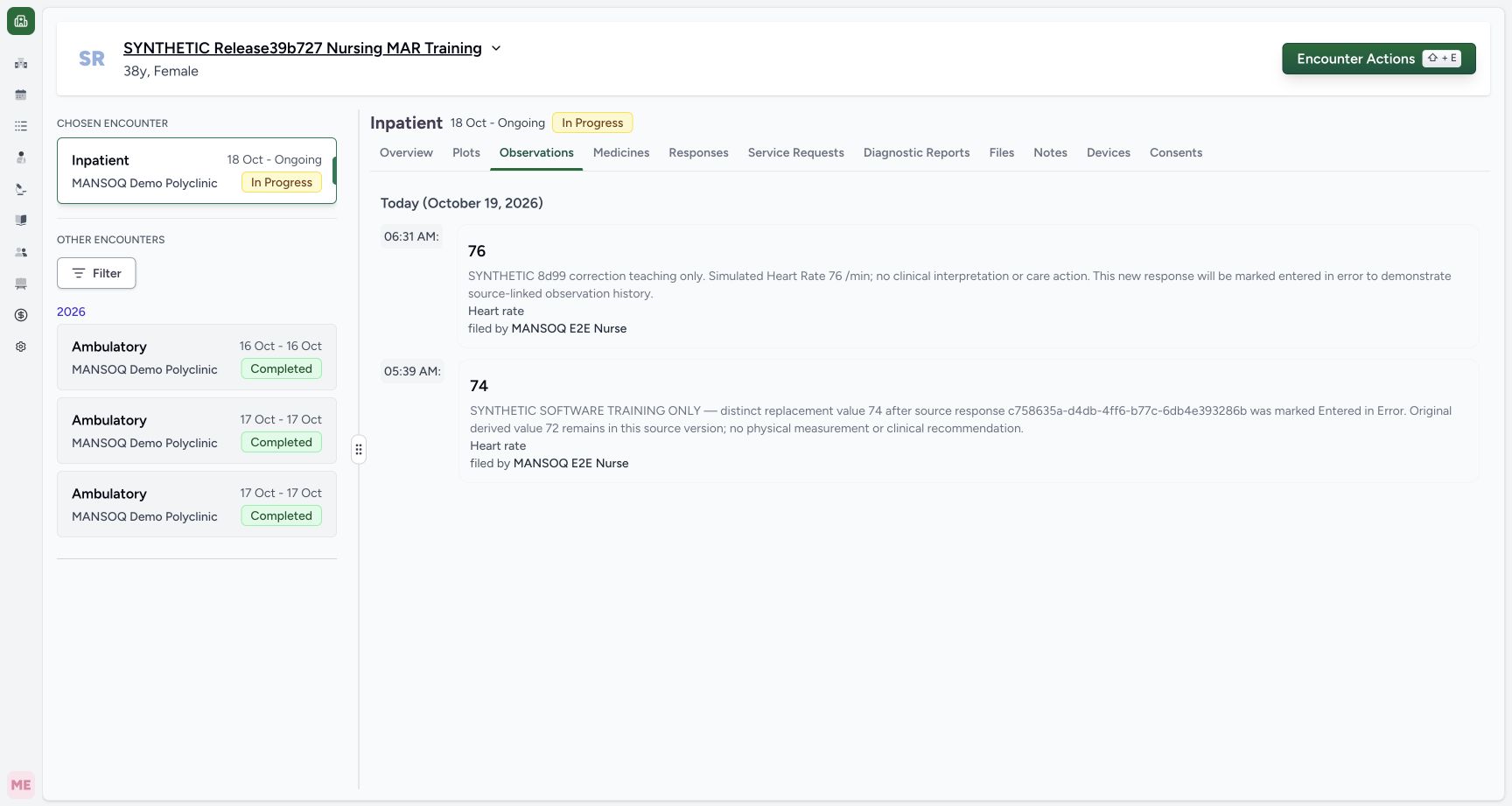 123
123Current observations show the new 76 and retained valid 74
Capture details
Exact committed release 8d99bb8a on an isolated nonproduction clone, using an existing Nurse and fictional Polyclinic inpatient case. The synthetic patient name retains an earlier release label. The Observations tab now shows the newly saved 76 at 06:31 and prior valid 74 at 05:39. Legacy 72 whose source is Entered in Error is excluded. These are synthetic software examples, not clinical interpretation.
Image SHA-256 4ba4d06e6e64e76f83bd9481f27d8062811b11acfef32e1ff451404028c19331
- Current observation list: Current observation list. Current observations show the new 76 and retained valid 74.
- New 06:31 simulated value 76: Reference targets the actual rendered simulated numeric value on this original observation card. The adjacent actual saved time and author remain visible.
- Open the current Pulse plot before correction: Open the current Pulse plot before correction. Current observations show the new 76 and retained valid 74.
123Current observations refresh to the one remaining valid reading
Capture details
Exact committed release 8d99bb8a on an isolated nonproduction clone, using an existing Nurse and fictional Polyclinic inpatient case. The synthetic patient name retains an earlier release label. After the successful source correction, returning to the already-used Observations tab shows only retained valid 74. New Error 76 and legacy source-error 72 are excluded without a manual page reload. The exact history remains available separately.
Image SHA-256 6ff5866e5610b94208ffff204b32dfa0d40e040f13370156e941bf400850a549
- Refreshed current Observations mode: Refreshed current Observations mode. Current observations refresh to the one remaining valid reading.
- Retained valid 74 at 05:39: Reference targets the actual rendered simulated numeric value on this original observation card. The adjacent actual saved time and author remain visible.
- Check the previously loaded Pulse graph: Check the previously loaded Pulse graph. Current observations refresh to the one remaining valid reading.
5. Verify graph and recent-data refresh
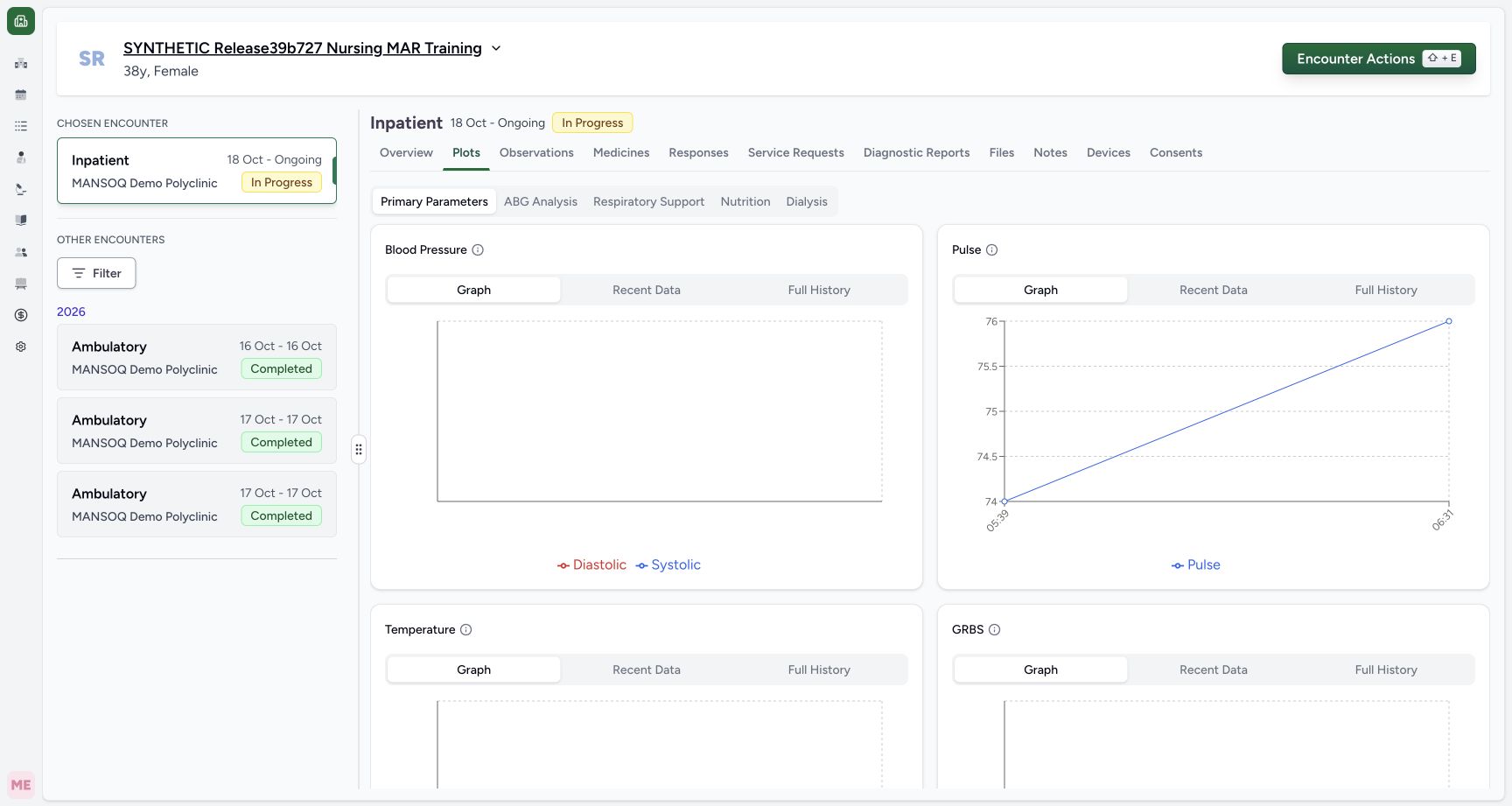
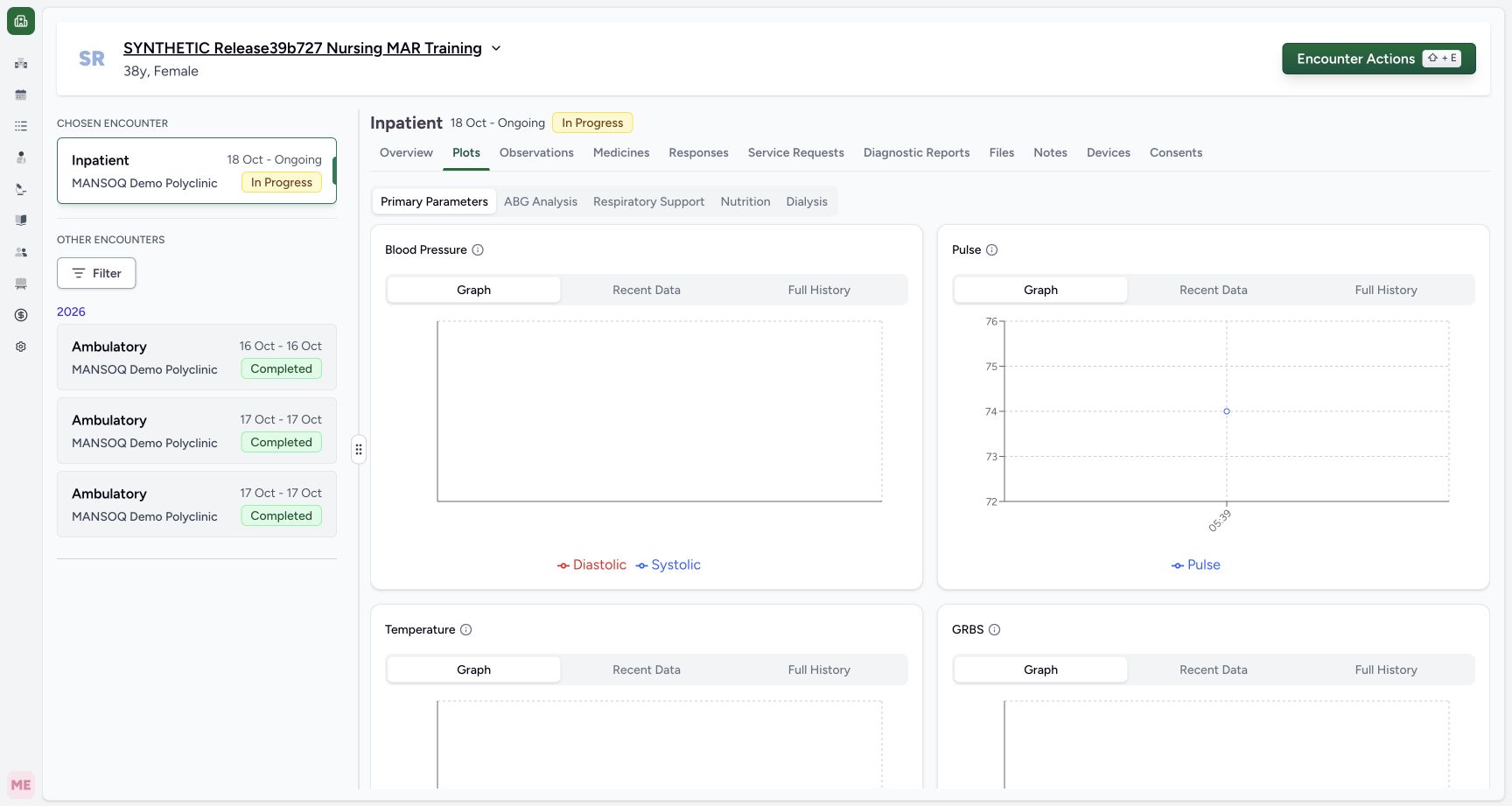
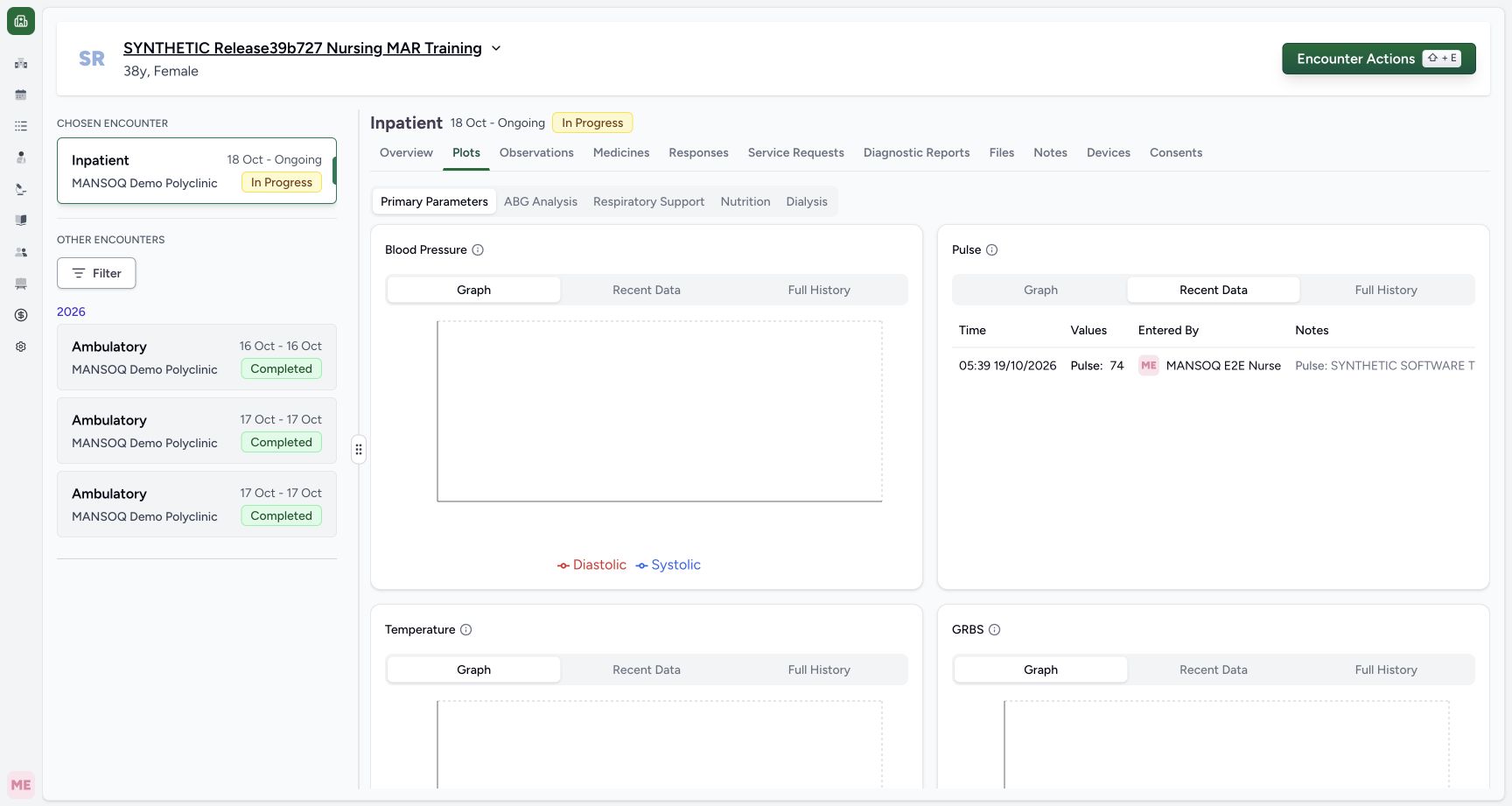
Return to Plots. The previously loaded Pulse Graph now has the one valid 74 point at 05:39. Axis ticks 72–76 are only the graph scale. Choose Pulse Recent Data and verify its one current 74 row and original Nurse/time. These current views refresh after successful correction; the data was not removed from retained history.
 123
123Current Pulse graph has the two valid synthetic values before correction
Capture details
Exact committed release 8d99bb8a on an isolated nonproduction clone, using an existing Nurse and fictional Polyclinic inpatient case. The synthetic patient name retains an earlier release label. The current Pulse graph plots the retained 74 at 05:39 and new 76 at 06:31. Intermediate axis ticks and the line are graph presentation, not extra observations. Legacy source-error 72 is not plotted.
Image SHA-256 78cb76aa5588d6d7d1c203922b10046bcdfb464a825d2586154c3e2a2876e697
- Pulse current Graph mode: Pulse current Graph mode. Current Pulse graph has the two valid synthetic values before correction.
- New simulated 76 point at 06:31: Reference targets the actual new 76 graph dot at 06:31; the connecting line and scale ticks are not extra measurements.
- Open Pulse Recent Data: Open Pulse Recent Data. Current Pulse graph has the two valid synthetic values before correction.
 123
123Current Pulse graph refreshes after source correction
Capture details
Exact committed release 8d99bb8a on an isolated nonproduction clone, using an existing Nurse and fictional Polyclinic inpatient case. The synthetic patient name retains an earlier release label. The previously loaded current Pulse graph now has only valid 74 at 05:39 after the successful response correction. Axis ticks72–76 are scale labels, not observations. New76 and legacy 72 are excluded from the current series without a manual reload.
Image SHA-256 32ee17c70e8073e0c5f21fc53256842f2fe8f1691f4b64dc55f2939ec73dffe9
- Current Pulse Graph mode after correction: Current Pulse Graph mode after correction. Current Pulse graph refreshes after source correction.
- The one retained plotted 74 measurement: Reference targets the actual one retained 74 graph dot at 05:39, distinct from axis tick labels.
- Inspect current Recent Data: Inspect current Recent Data. Current Pulse graph refreshes after source correction.
 12
12Current Pulse Recent Data excludes both invalid sources
Capture details
Exact committed release 8d99bb8a on an isolated nonproduction clone, using an existing Nurse and fictional Polyclinic inpatient case. The synthetic patient name retains an earlier release label. After correction, Pulse Recent Data refreshes to the one valid 74 measurement with its original 05:39 time and Nurse. New Error 76 and legacy source-error 72 are not current results; retained history is a distinct mode.
Image SHA-256 74ebca38ac631d98c3d14d076651d8a35b142b692aebfc12ca24aae418e1e901
- Current Recent Data contains only valid 74: Current Recent Data contains only valid 74. Current Pulse Recent Data excludes both invalid sources.
- Open Full History to inspect retained invalid entries: Open Full History to inspect retained invalid entries. Current Pulse Recent Data excludes both invalid sources.
6. Inspect the retained observation status and source context
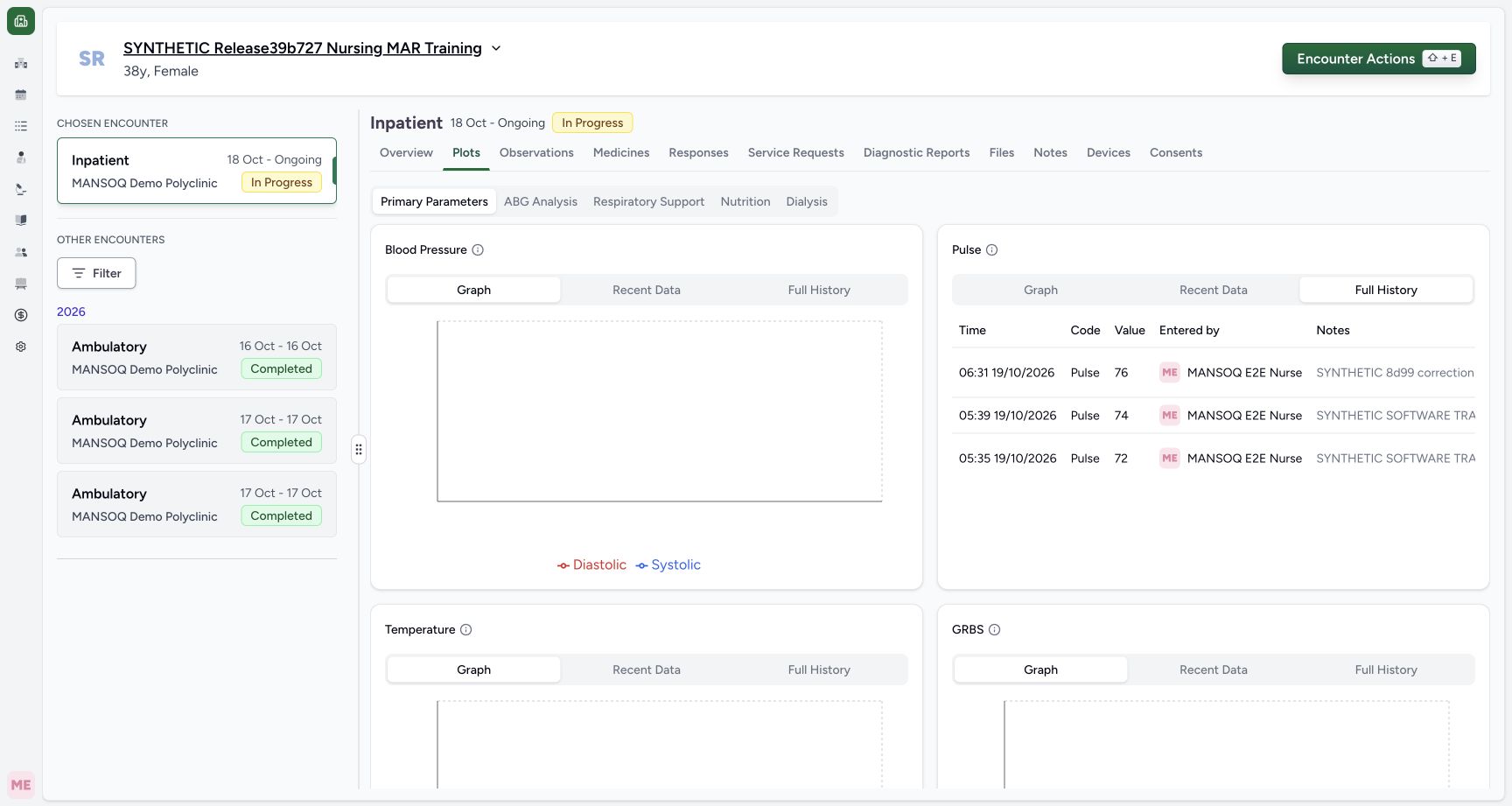
Choose Pulse Full History. Its left-hand view keeps 76 at 06:31, 74 at 05:39 and 72 at 05:35 with original Nurse attribution. Scroll the real table horizontally to its Status column. In the same row order, new 76 is Entered in Error with source-error context; 74 remains Final; legacy 72 remains actually saved Final with a separate source-error warning. The paired views establish measurement identity and status without pretending all columns fit together.
 12
12Full History keeps all three original measurement identities after correction
Capture details
Exact committed release 8d99bb8a on an isolated nonproduction clone, using an existing Nurse and fictional Polyclinic inpatient case. The synthetic patient name retains an earlier release label. The explicit Full History still shows 76 at 06:31, 74 at 05:39 and 72 at 05:35 with original Nurse attribution and notes. The Status column remains beyond long notes; scroll the real table horizontally for its separate status/source context.
Image SHA-256 7acf3b94b802e36758b35785ee6cbe997e6deca986da38f0249338c62df27fd1
- Full History retains all three measurements: Full History retains all three measurements. Full History keeps all three original measurement identities after correction.
- Scroll horizontally within the actual history table Notes area: This is a native scroll-area reference on visible Notes content, not a button or fabricated control. Ordinary horizontal scrolling reaches Status in this unchanged committed layout.
1234Retained history distinguishes new Error, valid Final and legacy source-error Final
Capture details
Exact committed release 8d99bb8a on an isolated nonproduction clone, using an existing Nurse and fictional Polyclinic inpatient case. The synthetic patient name retains an earlier release label. After ordinary horizontal scrolling, the same three rows show: new 76 is Entered in Error with source-error context; valid 74 remains Final; legacy 72 remains actually saved Final with a separate source-error warning. Paired with the preceding measurement/time view, this does not imply any old record was backfilled.
Image SHA-256 91de4ab7013d642352c814417428d3f32e6ca7e0e72012cb8671d0e14e436522
- New 76 observation: Entered in Error: Reference targets the actual observation Error text. Its exact source response has the separate red source-error warning directly below; these are two distinct facts.
- Valid 74 observation: Final: Reference targets actual Final on the middle valid row, which has no source-error warning.
- Legacy 72 observation: actual saved Final: Reference targets actual Final on the bottom legacy row. The separate red source-error warning below explains its exclusion from current views; the old status was not backfilled.
- Explicit Full History is separate from current Graph and Recent Data: Explicit Full History is separate from current Graph and Recent Data. Retained history distinguishes new Error, valid Final and legacy source-error Final.
What was changed and what was preserved
Read-only verification confirms one status-history entry on the exact new linked observation, recording the ordinary Nurse actor, source-response identity, correction time and Final-to-Error transition. The new observation keeps its UUID, original value, /min unit, effective time, creator, entered-by actor and note. This is independent private audit verification; the shown user interface exposes status/source context, not a separate audit-event viewer.
123Corrected source is retained with Entered in Error and original value
Capture details
Exact committed release 8d99bb8a on an isolated nonproduction clone, using an existing Nurse and fictional Polyclinic inpatient case. The synthetic patient name retains an earlier release label. The new 06:31 response remains visible with value 76, its original Nurse/time and an Entered in Error badge. The prior valid 74 response and older Error response remain. Independent Nurse/Doctor reads verify the new source and exact derived observation are both Error.
Image SHA-256 52c05db4016aad6d41878e6205d6aa0557e98098b2373a62e477c134f25bb392
- This retained source response is Entered in Error: Reference targets the actual Entered in Error badge on the new 06:31 response card.
- Check current observations after the successful correction: Check current observations after the successful correction. Corrected source is retained with Entered in Error and original value.
- The saved synthetic note remains inspectable: The saved synthetic note remains inspectable. Corrected source is retained with Entered in Error and original value.
12Full History keeps all three original measurement identities after correction
Capture details
Exact committed release 8d99bb8a on an isolated nonproduction clone, using an existing Nurse and fictional Polyclinic inpatient case. The synthetic patient name retains an earlier release label. The explicit Full History still shows 76 at 06:31, 74 at 05:39 and 72 at 05:35 with original Nurse attribution and notes. The Status column remains beyond long notes; scroll the real table horizontally for its separate status/source context.
Image SHA-256 7acf3b94b802e36758b35785ee6cbe997e6deca986da38f0249338c62df27fd1
- Full History retains all three measurements: Full History retains all three measurements. Full History keeps all three original measurement identities after correction.
- Scroll horizontally within the actual history table Notes area: This is a native scroll-area reference on visible Notes content, not a button or fabricated control. Ordinary horizontal scrolling reaches Status in this unchanged committed layout.
1234Retained history distinguishes new Error, valid Final and legacy source-error Final
Capture details
Exact committed release 8d99bb8a on an isolated nonproduction clone, using an existing Nurse and fictional Polyclinic inpatient case. The synthetic patient name retains an earlier release label. After ordinary horizontal scrolling, the same three rows show: new 76 is Entered in Error with source-error context; valid 74 remains Final; legacy 72 remains actually saved Final with a separate source-error warning. Paired with the preceding measurement/time view, this does not imply any old record was backfilled.
Image SHA-256 91de4ab7013d642352c814417428d3f32e6ca7e0e72012cb8671d0e14e436522
- New 76 observation: Entered in Error: Reference targets the actual observation Error text. Its exact source response has the separate red source-error warning directly below; these are two distinct facts.
- Valid 74 observation: Final: Reference targets actual Final on the middle valid row, which has no source-error warning.
- Legacy 72 observation: actual saved Final: Reference targets actual Final on the bottom legacy row. The separate red source-error warning below explains its exclusion from current views; the old status was not backfilled.
- Explicit Full History is separate from current Graph and Recent Data: Explicit Full History is separate from current Graph and Recent Data. Retained history distinguishes new Error, valid Final and legacy source-error Final.
Bounded correction scope
This lesson demonstrates one normal Nurse correction and ordinary Doctor/Nurse reads on a configured Polyclinic Inpatient encounter. It does not backfill old invalid-source records, reverse Entered in Error, amend a value, change units or effective time, bulk-correct records, grant permissions or qualify every role/facility workflow. All old clinical records are retained and the legacy difference is explicitly taught.
12Confirm the fictional response correction or cancel safely
Capture details
Exact committed release 8d99bb8a on an isolated nonproduction clone, using an existing Nurse and fictional Polyclinic inpatient case. The synthetic patient name retains an earlier release label. The product warns that this source response will be marked invalid and the action cannot be undone through this control. Confirm is used only for this explicitly synthetic 06:31 response; Cancel leaves it unchanged. This is an authorized demonstration, not a clinical care decision.
Image SHA-256 6b4a5f4e16ffcfbf63082465b5a2c0a841eb0fc66820e236ed7199a861ee8e78
- Confirm only the identified fictional source response: Confirm only the identified fictional source response. Confirm the fictional response correction or cancel safely.
- Cancel without changing the response: Cancel without changing the response. Confirm the fictional response correction or cancel safely.
123Current observations refresh to the one remaining valid reading
Capture details
Exact committed release 8d99bb8a on an isolated nonproduction clone, using an existing Nurse and fictional Polyclinic inpatient case. The synthetic patient name retains an earlier release label. After the successful source correction, returning to the already-used Observations tab shows only retained valid 74. New Error 76 and legacy source-error 72 are excluded without a manual page reload. The exact history remains available separately.
Image SHA-256 6ff5866e5610b94208ffff204b32dfa0d40e040f13370156e941bf400850a549
- Refreshed current Observations mode: Refreshed current Observations mode. Current observations refresh to the one remaining valid reading.
- Retained valid 74 at 05:39: Reference targets the actual rendered simulated numeric value on this original observation card. The adjacent actual saved time and author remain visible.
- Check the previously loaded Pulse graph: Check the previously loaded Pulse graph. Current observations refresh to the one remaining valid reading.
1234Retained history distinguishes new Error, valid Final and legacy source-error Final
Capture details
Exact committed release 8d99bb8a on an isolated nonproduction clone, using an existing Nurse and fictional Polyclinic inpatient case. The synthetic patient name retains an earlier release label. After ordinary horizontal scrolling, the same three rows show: new 76 is Entered in Error with source-error context; valid 74 remains Final; legacy 72 remains actually saved Final with a separate source-error warning. Paired with the preceding measurement/time view, this does not imply any old record was backfilled.
Image SHA-256 91de4ab7013d642352c814417428d3f32e6ca7e0e72012cb8671d0e14e436522
- New 76 observation: Entered in Error: Reference targets the actual observation Error text. Its exact source response has the separate red source-error warning directly below; these are two distinct facts.
- Valid 74 observation: Final: Reference targets actual Final on the middle valid row, which has no source-error warning.
- Legacy 72 observation: actual saved Final: Reference targets actual Final on the bottom legacy row. The separate red source-error warning below explains its exclusion from current views; the old status was not backfilled.
- Explicit Full History is separate from current Graph and Recent Data: Explicit Full History is separate from current Graph and Recent Data. Retained history distinguishes new Error, valid Final and legacy source-error Final.
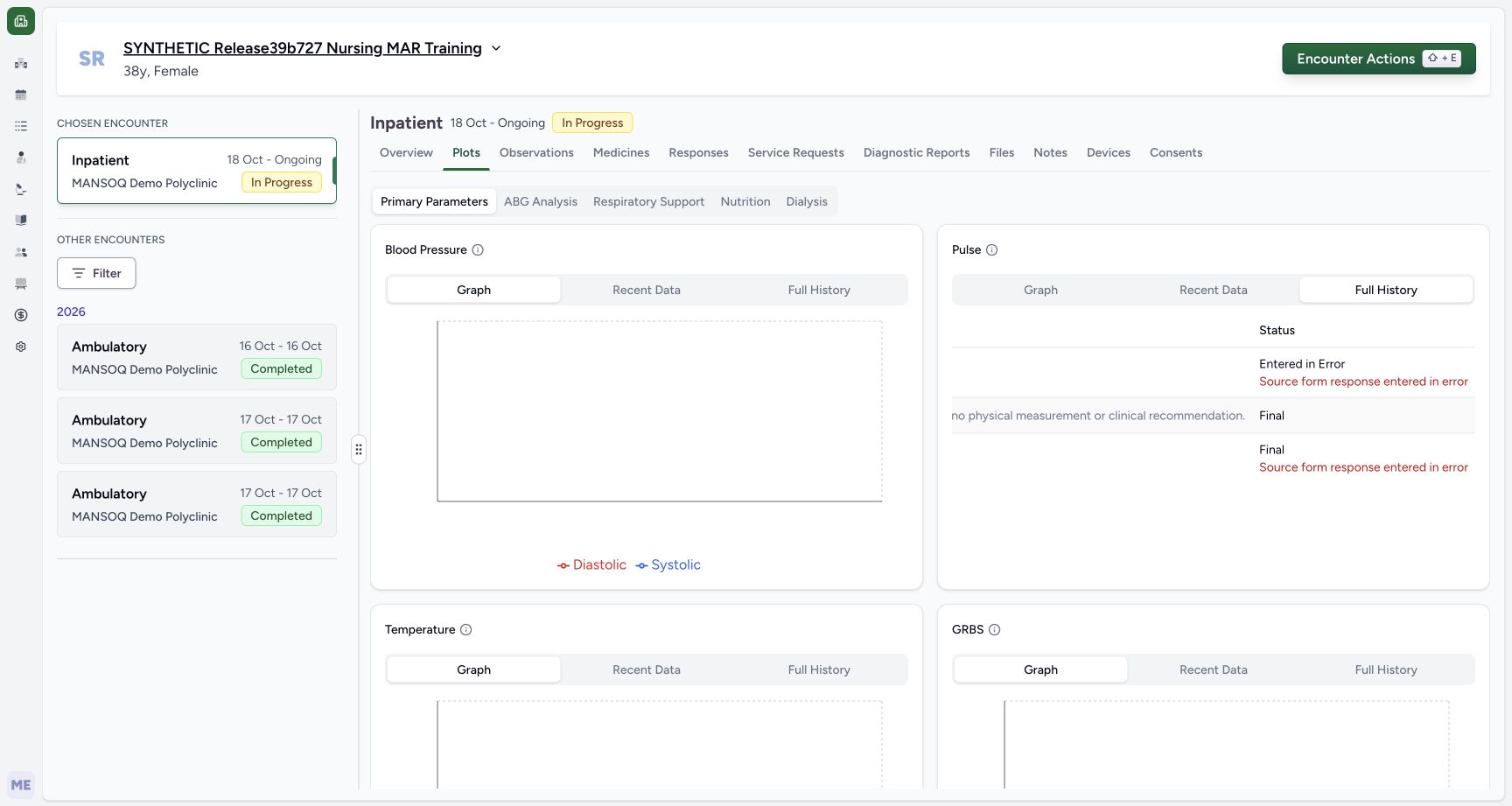 1234
1234Doctor distinguishes corrected and legacy source-error status facts
Capture details
Exact committed release 8d99bb8a on an isolated nonproduction clone, using an existing Doctor and fictional Polyclinic inpatient case. The synthetic patient name retains an earlier release label. The ordinary Doctor sees the same row statuses: new 76 observation Error with source Error, valid 74 Final, and legacy 72 actual Final with separate source-error warning. The paired left-hand history frame establishes each original measurement/time; no row is deleted or silently backfilled.
Image SHA-256 aaf9c742f108d150df359d0929a805b35ec7856c1a0d47f5ae134e7169f481e8
- New 76 observation: Entered in Error: Reference targets the actual observation Error text. Its exact source response has the separate red source-error warning directly below; these are two distinct facts.
- Valid 74 observation: Final: Reference targets actual Final on the middle valid row, which has no source-error warning.
- Legacy 72 observation: actual saved Final: Reference targets actual Final on the bottom legacy row. The separate red source-error warning below explains its exclusion from current views; the old status was not backfilled.
- Doctor read-only Full History mode: Doctor read-only Full History mode. Doctor distinguishes corrected and legacy source-error status facts.
Source evidence
Every citation uses this exact committed version. The private source repository requires access.
- repositories/platform/mansoq-web/src/components/Facility/ConsultationDetails/QuestionnaireResponsesList.tsx:271 ·
8d99bb8a4712f6aa8446bcd3b40bf62dae280d39Source file checksum
abcf7ab477238782e128a28bbd0b83562f900a41dcd1665a3df68e33fad1deac - repositories/platform/mansoq-web/src/components/Facility/ConsultationDetails/QuestionnaireResponsesList.tsx:292 ·
8d99bb8a4712f6aa8446bcd3b40bf62dae280d39Source file checksum
abcf7ab477238782e128a28bbd0b83562f900a41dcd1665a3df68e33fad1deac - repositories/platform/mansoq-core/mansoq/emr/api/viewsets/questionnaire_response.py:42 ·
8d99bb8a4712f6aa8446bcd3b40bf62dae280d39Source file checksum
3a1e4e355e2f2ec25e82f5adc12ca9250c201b521098af8d1211bee95489fa2b - repositories/platform/mansoq-core/mansoq/emr/api/viewsets/questionnaire_response.py:72 ·
8d99bb8a4712f6aa8446bcd3b40bf62dae280d39Source file checksum
3a1e4e355e2f2ec25e82f5adc12ca9250c201b521098af8d1211bee95489fa2b - repositories/platform/mansoq-core/mansoq/emr/api/viewsets/questionnaire_response.py:86 ·
8d99bb8a4712f6aa8446bcd3b40bf62dae280d39Source file checksum
3a1e4e355e2f2ec25e82f5adc12ca9250c201b521098af8d1211bee95489fa2b - repositories/platform/mansoq-web/src/pages/Encounters/tabs/observations.tsx:76 ·
8d99bb8a4712f6aa8446bcd3b40bf62dae280d39Source file checksum
652b6beefcdf45cd3b2813248c1d020583d7593fd0791819abd3fdc4f431f949 - repositories/platform/mansoq-web/src/components/Common/Charts/ObservationChart.tsx:118 ·
8d99bb8a4712f6aa8446bcd3b40bf62dae280d39Source file checksum
dcfb2e78c7a32f179608af2bfbfc447914ec0768636453b97be6e9d04fd272d8 - repositories/platform/mansoq-web/src/components/Common/Charts/ObservationHistoryTable.tsx:51 ·
8d99bb8a4712f6aa8446bcd3b40bf62dae280d39Source file checksum
e12f4349fa8bfbde0a55677679de17e0945bd04d775229e1294ca6012ead6d20 - repositories/platform/mansoq-web/src/components/Common/Charts/ObservationHistoryTable.tsx:105 ·
8d99bb8a4712f6aa8446bcd3b40bf62dae280d39Source file checksum
e12f4349fa8bfbde0a55677679de17e0945bd04d775229e1294ca6012ead6d20 - repositories/platform/mansoq-core/mansoq/emr/api/viewsets/observation.py:67 ·
8d99bb8a4712f6aa8446bcd3b40bf62dae280d39Source file checksum
4ba09107744a6081444385ab3b7917440595e41d94c9f7bca19d09e7e0694fcf - repositories/platform/mansoq-core/mansoq/emr/resources/observation/queries.py:6 ·
8d99bb8a4712f6aa8446bcd3b40bf62dae280d39Source file checksum
98332703807886682e9a76f9f78f160c5d18bb06c4fd5c79389570ca584907ca - repositories/platform/mansoq-core/mansoq/emr/resources/observation/spec.py:124 ·
8d99bb8a4712f6aa8446bcd3b40bf62dae280d39Source file checksum
a855e990e875658fa803c3c6be170fd953ed64a4504995a7260434164d576098