 MANSOQ
 Nursing paired vital-sign forms · VERSION 8d99bb8a
Record a configured paired blood-pressure training response
Use the actual configured three-question form to enter two fictional Decimal values with fixed units, resolve required validation, add an optional note and verify one saved Nurse response on release 8d99bb8a.
Nurse
 1234
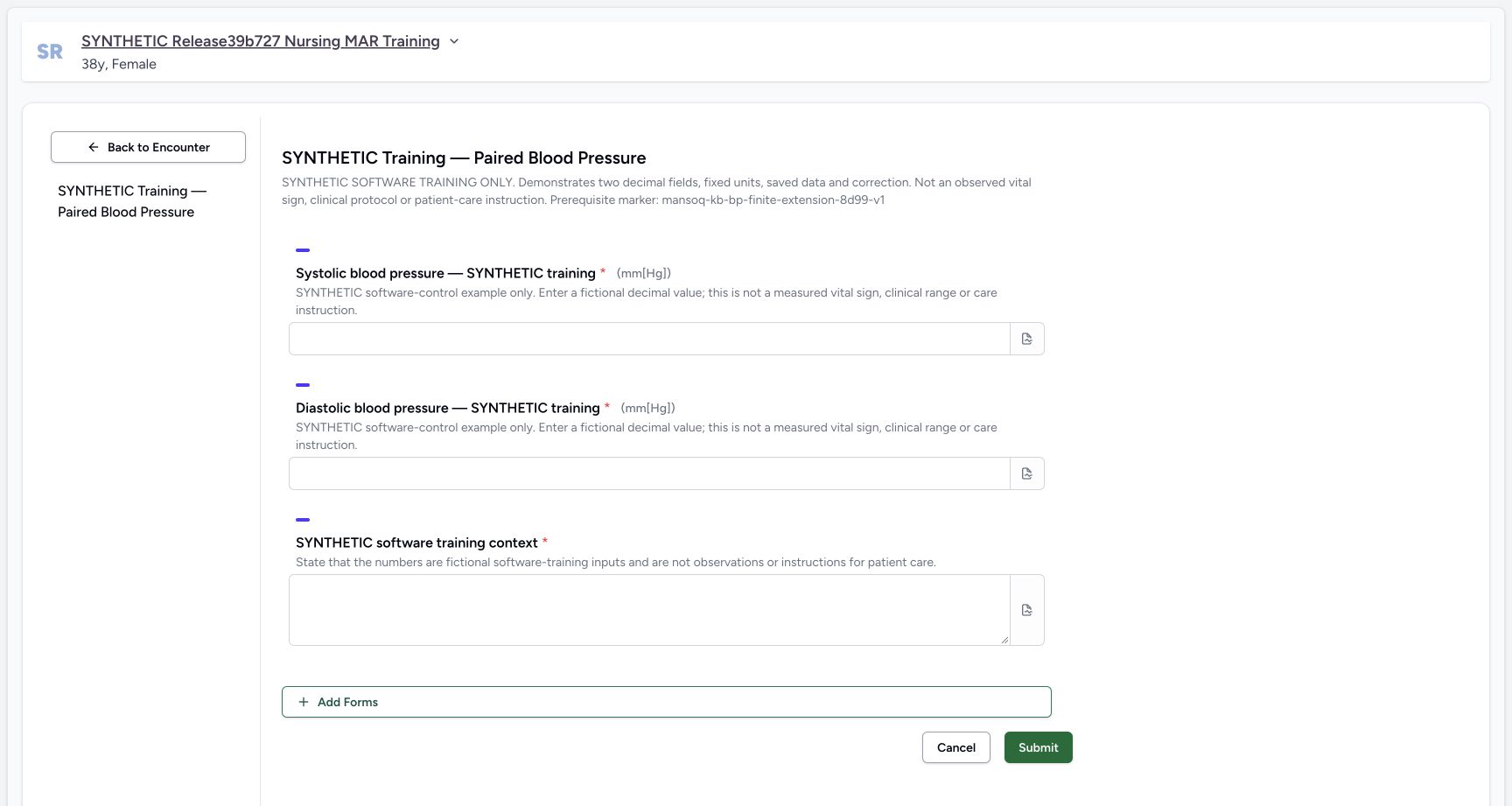
1234Read all three required fields and the fixed unit labels
Capture details
Exact committed 8d99bb8a, 3383 verified source blobs, ordinary Nurse. The old release text in the fictional patient name is retained. IT separately installed the finite official-code fragment extension and this explicitly synthetic form, with no grants/source/runtime change. Before the one native response save.
Image SHA-256 733bac7728c8e747e0c9ad1dc8f927a267a511d0f10573f6a30cf72b4561c101
- Required systolic Decimal: Enter the fictional systolic Decimal value here. This form fixes the unit to mm[Hg]; the asterisk marks this field as required.
- Required diastolic Decimal: Enter the fictional diastolic Decimal value here. This form fixes the unit to mm[Hg]; the asterisk marks this field as required.
- Required fictional context: Enter the required text explaining that these are fictional software-training values.
- Submit after review: After completing and checking all required fields, select Submit once. Blank required values show validation errors without saving a response.
 1234
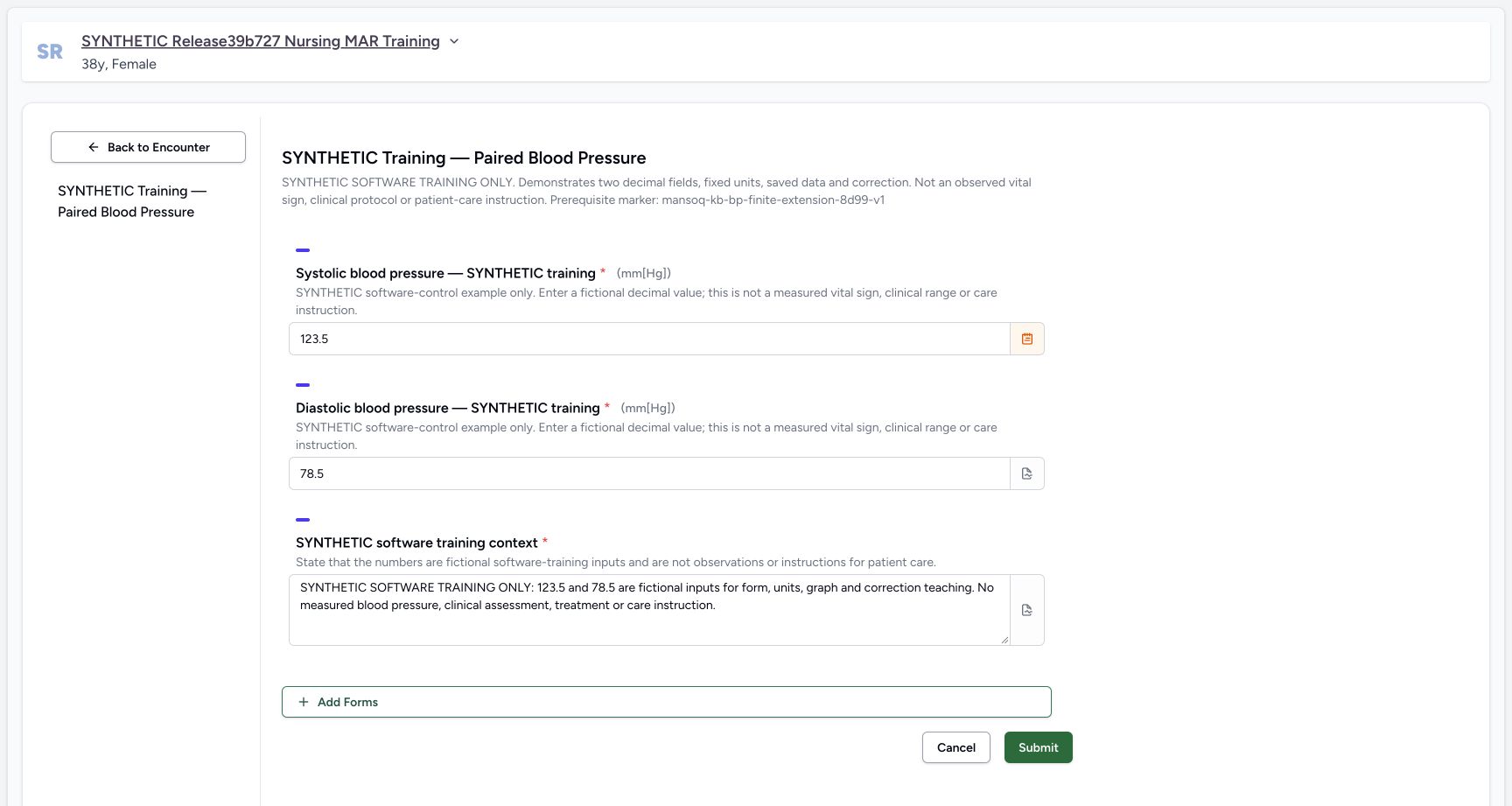
1234Review the completed form before one submission
Capture details
Exact committed 8d99bb8a, 3383 verified source blobs, ordinary Nurse. The old release text in the fictional patient name is retained. IT separately installed the finite official-code fragment extension and this explicitly synthetic form, with no grants/source/runtime change. Before the one native response save.
Image SHA-256 2e47c801c66ecda7b865a4cffde07375ee3cf7e7e8b90970b9eec4d13d6224e8
- Systolic Decimal: Review the entered systolic value and fixed mm[Hg] unit before saving.
- Diastolic Decimal: Review the entered diastolic value and fixed mm[Hg] unit before saving.
- Fictional context: Review the required fictional training context before saving.
- Submit once: Select Submit once to save the reviewed answers. After the form closes, verify the new response in the encounter.
 123
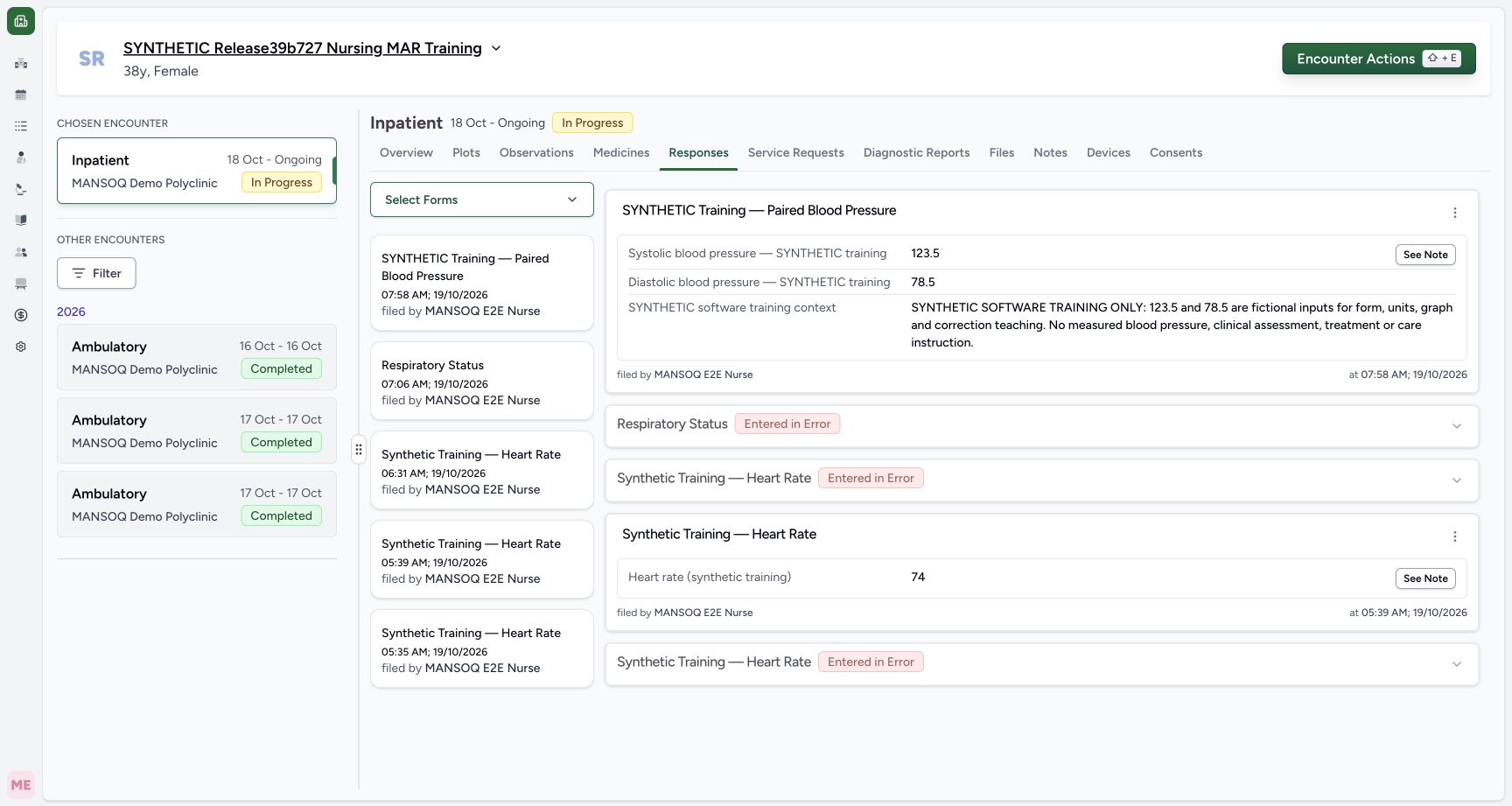
123Inspect the saved paired response and Nurse attribution
Capture details
Exact committed 8d99bb8a, 3383 verified source blobs, ordinary Nurse. The old release text in the fictional patient name is retained. IT separately installed the finite official-code fragment extension and this explicitly synthetic form, with no grants/source/runtime change. The one fictional response is Completed and its two derived observations are Final.
Image SHA-256 ef1c16961d06dc7ba9348cfcadfd1546953161d5700baeb105aac6f9e1604d60
- Saved systolic answer: Read the saved systolic answer on this response. Check the response’s author and time to identify the intended entry.
- Saved diastolic answer: Read the saved diastolic answer on the same response and compare it with the value you entered.
- Open this source’s More Actions: Open More Actions on this exact saved response to see its available actions.
12 of 12 content blocks have reviewed image alignment. Missing overview or prerequisite images remain open.
Before you begin
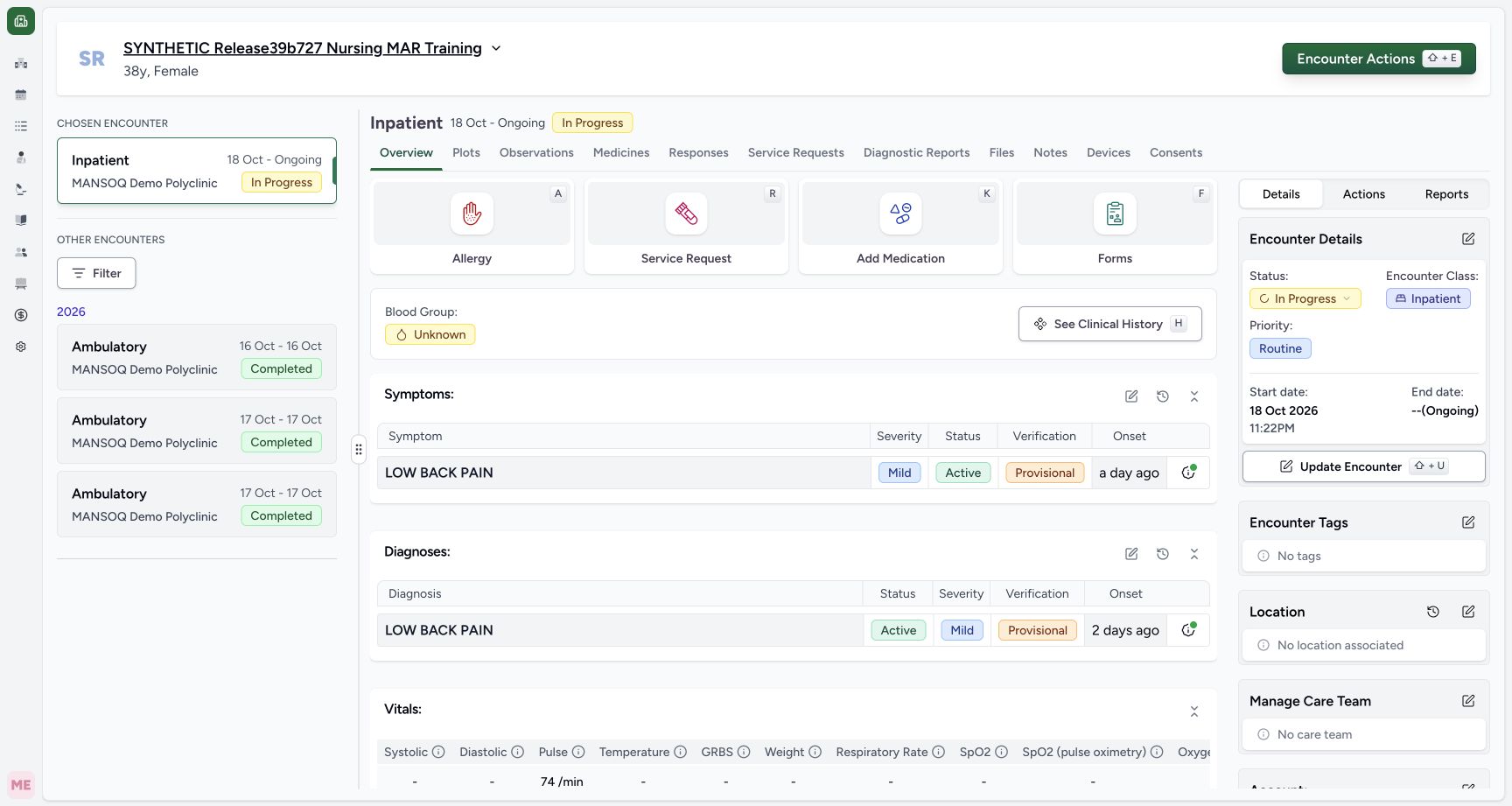
- Use the existing authorized Nurse session and the intended fictional ongoing Inpatient encounter in MANSOQ Demo Polyclinic. The patient’s older release label is a retained training name; these screens run exact committed 8d99bb8a. The matching patient and chosen encounter must be verified before entering data.
 123
123Recorded release 8d99bb8a · 2026-10-19T04:58:20.992Z · 1728 × 921 Choose the intended fictional ongoing encounter
Capture details
Exact committed 8d99bb8a, 3383 verified source blobs, ordinary Nurse. The old release text in the fictional patient name is retained. IT separately installed the finite official-code fragment extension and this explicitly synthetic form, with no grants/source/runtime change. Before the one native response save.
Image SHA-256
827917014e26b4159a15e8760937ed86ae4b2b3042265fba6b35d85c4180888e- Open encounter Forms: Select Forms in the chosen ongoing encounter to open the available questionnaires.
- Open Plots: Select Plots to review the encounter’s recorded observation series.
- Verify the fictional patient: Check the patient name and ongoing encounter before you open a form or enter any answers.
1234Recorded release 8d99bb8a · 2026-10-19T04:58:35.680Z · 1728 × 921 Read all three required fields and the fixed unit labels
Capture details
Exact committed 8d99bb8a, 3383 verified source blobs, ordinary Nurse. The old release text in the fictional patient name is retained. IT separately installed the finite official-code fragment extension and this explicitly synthetic form, with no grants/source/runtime change. Before the one native response save.
Image SHA-256
733bac7728c8e747e0c9ad1dc8f927a267a511d0f10573f6a30cf72b4561c101- Required systolic Decimal: Enter the fictional systolic Decimal value here. This form fixes the unit to mm[Hg]; the asterisk marks this field as required.
- Required diastolic Decimal: Enter the fictional diastolic Decimal value here. This form fixes the unit to mm[Hg]; the asterisk marks this field as required.
- Required fictional context: Enter the required text explaining that these are fictional software-training values.
- Submit after review: After completing and checking all required fields, select Submit once. Blank required values show validation errors without saving a response.
- This form was separately prepared as an isolated IT prerequisite: two legitimate LOINC bindings 8480-6 and 8462-4, fixed UCUM mm[Hg], and an uncoded required fictional-context question. Only three missing concepts and one explicitly synthetic form were added; original terminology provenance, old terms and permissions were retained. These screenshots do not teach native form creation or a complete terminology import. Use fictional software inputs only;123.5 and 78.5 are not measured findings, targets, ranges or care advice.
 1
1Recorded release 8d99bb8a · 2026-10-19T04:58:28.948Z · 1728 × 921 Select the configured synthetic paired form
Capture details
Exact committed 8d99bb8a, 3383 verified source blobs, ordinary Nurse. The old release text in the fictional patient name is retained. IT separately installed the finite official-code fragment extension and this explicitly synthetic form, with no grants/source/runtime change. Before the one native response save.
Image SHA-256
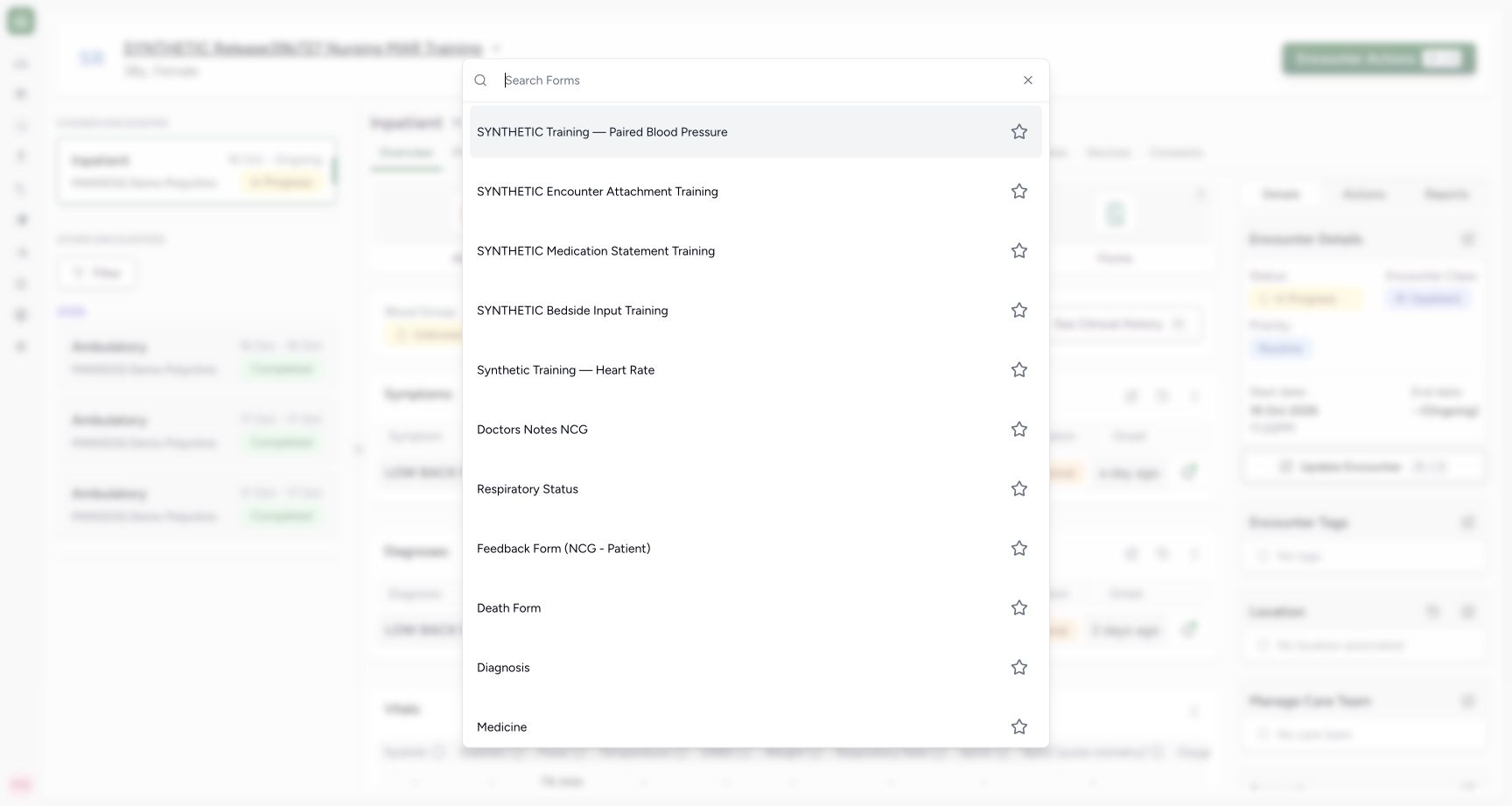
f63a61e90fcb42663ac3c1aad64ff6c5308a427380a2484577eb52e9b0d3a279- Choose the configured paired form: Select SYNTHETIC Training — Paired Blood Pressure from the available forms. Its description identifies this software-training example.
1234Recorded release 8d99bb8a · 2026-10-19T04:58:35.680Z · 1728 × 921 Read all three required fields and the fixed unit labels
Capture details
Exact committed 8d99bb8a, 3383 verified source blobs, ordinary Nurse. The old release text in the fictional patient name is retained. IT separately installed the finite official-code fragment extension and this explicitly synthetic form, with no grants/source/runtime change. Before the one native response save.
Image SHA-256
733bac7728c8e747e0c9ad1dc8f927a267a511d0f10573f6a30cf72b4561c101- Required systolic Decimal: Enter the fictional systolic Decimal value here. This form fixes the unit to mm[Hg]; the asterisk marks this field as required.
- Required diastolic Decimal: Enter the fictional diastolic Decimal value here. This form fixes the unit to mm[Hg]; the asterisk marks this field as required.
- Required fictional context: Enter the required text explaining that these are fictional software-training values.
- Submit after review: After completing and checking all required fields, select Submit once. Blank required values show validation errors without saving a response.
1234Recorded release 8d99bb8a · 2026-10-19T04:58:56.761Z · 1728 × 921 Review the completed form before one submission
Capture details
Exact committed 8d99bb8a, 3383 verified source blobs, ordinary Nurse. The old release text in the fictional patient name is retained. IT separately installed the finite official-code fragment extension and this explicitly synthetic form, with no grants/source/runtime change. Before the one native response save.
Image SHA-256
2e47c801c66ecda7b865a4cffde07375ee3cf7e7e8b90970b9eec4d13d6224e8- Systolic Decimal: Review the entered systolic value and fixed mm[Hg] unit before saving.
- Diastolic Decimal: Review the entered diastolic value and fixed mm[Hg] unit before saving.
- Fictional context: Review the required fictional training context before saving.
- Submit once: Select Submit once to save the reviewed answers. After the form closes, verify the new response in the encounter.
1. Open the intended form from the encounter
In Overview, choose Forms. Select SYNTHETIC Training — Paired Blood Pressure from the picker. Confirm the fictional patient at the top and the form’s explicit training description. This is the configured demonstration form, rather than a claim that every deployment already has a standard blood-pressure questionnaire.
123Choose the intended fictional ongoing encounter
Capture details
Exact committed 8d99bb8a, 3383 verified source blobs, ordinary Nurse. The old release text in the fictional patient name is retained. IT separately installed the finite official-code fragment extension and this explicitly synthetic form, with no grants/source/runtime change. Before the one native response save.
Image SHA-256 827917014e26b4159a15e8760937ed86ae4b2b3042265fba6b35d85c4180888e
- Open encounter Forms: Select Forms in the chosen ongoing encounter to open the available questionnaires.
- Open Plots: Select Plots to review the encounter’s recorded observation series.
- Verify the fictional patient: Check the patient name and ongoing encounter before you open a form or enter any answers.
1Select the configured synthetic paired form
Capture details
Exact committed 8d99bb8a, 3383 verified source blobs, ordinary Nurse. The old release text in the fictional patient name is retained. IT separately installed the finite official-code fragment extension and this explicitly synthetic form, with no grants/source/runtime change. Before the one native response save.
Image SHA-256 f63a61e90fcb42663ac3c1aad64ff6c5308a427380a2484577eb52e9b0d3a279
- Choose the configured paired form: Select SYNTHETIC Training — Paired Blood Pressure from the available forms. Its description identifies this software-training example.
1234Read all three required fields and the fixed unit labels
Capture details
Exact committed 8d99bb8a, 3383 verified source blobs, ordinary Nurse. The old release text in the fictional patient name is retained. IT separately installed the finite official-code fragment extension and this explicitly synthetic form, with no grants/source/runtime change. Before the one native response save.
Image SHA-256 733bac7728c8e747e0c9ad1dc8f927a267a511d0f10573f6a30cf72b4561c101
- Required systolic Decimal: Enter the fictional systolic Decimal value here. This form fixes the unit to mm[Hg]; the asterisk marks this field as required.
- Required diastolic Decimal: Enter the fictional diastolic Decimal value here. This form fixes the unit to mm[Hg]; the asterisk marks this field as required.
- Required fictional context: Enter the required text explaining that these are fictional software-training values.
- Submit after review: After completing and checking all required fields, select Submit once. Blank required values show validation errors without saving a response.
2. Identify both required Decimal inputs and fixed units
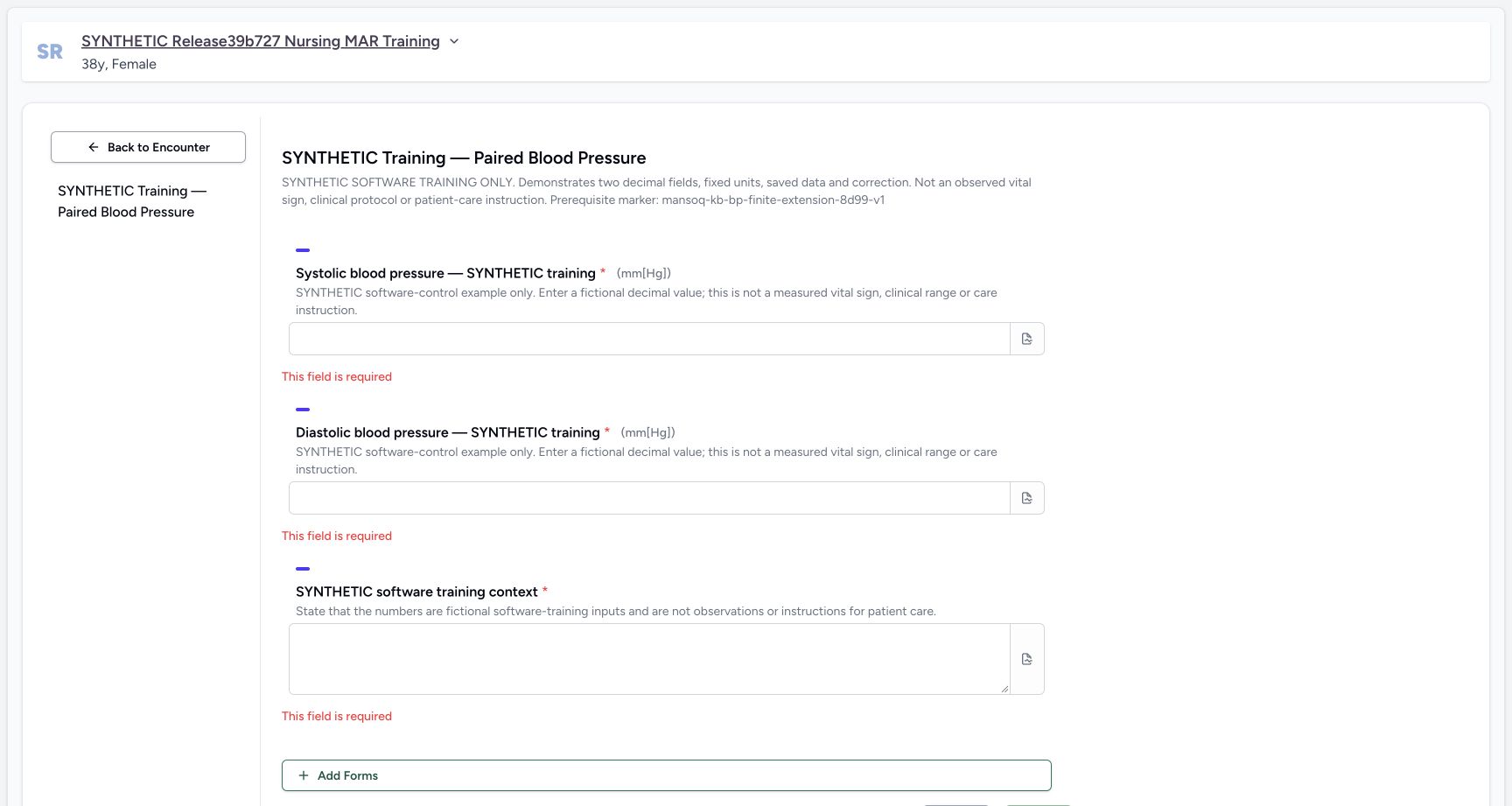
Systolic blood pressure — SYNTHETIC training and Diastolic blood pressure — SYNTHETIC training each display a required asterisk and (mm[Hg]). Both controls accept Decimal input. The unit is configured on each question and is displayed beside its label; this form has no user-selectable unit or conversion control. The third required field is SYNTHETIC software training context.
1234Read all three required fields and the fixed unit labels
Capture details
Exact committed 8d99bb8a, 3383 verified source blobs, ordinary Nurse. The old release text in the fictional patient name is retained. IT separately installed the finite official-code fragment extension and this explicitly synthetic form, with no grants/source/runtime change. Before the one native response save.
Image SHA-256 733bac7728c8e747e0c9ad1dc8f927a267a511d0f10573f6a30cf72b4561c101
- Required systolic Decimal: Enter the fictional systolic Decimal value here. This form fixes the unit to mm[Hg]; the asterisk marks this field as required.
- Required diastolic Decimal: Enter the fictional diastolic Decimal value here. This form fixes the unit to mm[Hg]; the asterisk marks this field as required.
- Required fictional context: Enter the required text explaining that these are fictional software-training values.
- Submit after review: After completing and checking all required fields, select Submit once. Blank required values show validation errors without saving a response.
3. Recognize blank-field validation
Submitting this blank form shows This field is required beside both numbers and the context field, with a lower Validation Errors summary. No response is saved by this attempt. Fill the intended fields rather than treating a blank submission as a recorded reading.
1234Read all three required fields and the fixed unit labels
Capture details
Exact committed 8d99bb8a, 3383 verified source blobs, ordinary Nurse. The old release text in the fictional patient name is retained. IT separately installed the finite official-code fragment extension and this explicitly synthetic form, with no grants/source/runtime change. Before the one native response save.
Image SHA-256 733bac7728c8e747e0c9ad1dc8f927a267a511d0f10573f6a30cf72b4561c101
- Required systolic Decimal: Enter the fictional systolic Decimal value here. This form fixes the unit to mm[Hg]; the asterisk marks this field as required.
- Required diastolic Decimal: Enter the fictional diastolic Decimal value here. This form fixes the unit to mm[Hg]; the asterisk marks this field as required.
- Required fictional context: Enter the required text explaining that these are fictional software-training values.
- Submit after review: After completing and checking all required fields, select Submit once. Blank required values show validation errors without saving a response.
 123
123Recognize required-field errors without saving
Capture details
Exact committed 8d99bb8a, 3383 verified source blobs, ordinary Nurse. The old release text in the fictional patient name is retained. IT separately installed the finite official-code fragment extension and this explicitly synthetic form, with no grants/source/runtime change. Before the one native response save.
Image SHA-256 2bdcf3843f59a6c602ae74ef3a3b41aadfc3a560e366e293471b2045e23df9f3
- Required systolic error: The systolic field is blank. Enter its fictional Decimal value to resolve this required-field error.
- Required diastolic error: The diastolic field is blank. Enter its fictional Decimal value to resolve this required-field error.
- Required context error: The training-context field is blank. Add the required explanation before submitting again.
4. Enter the fictional pair and its explicit context
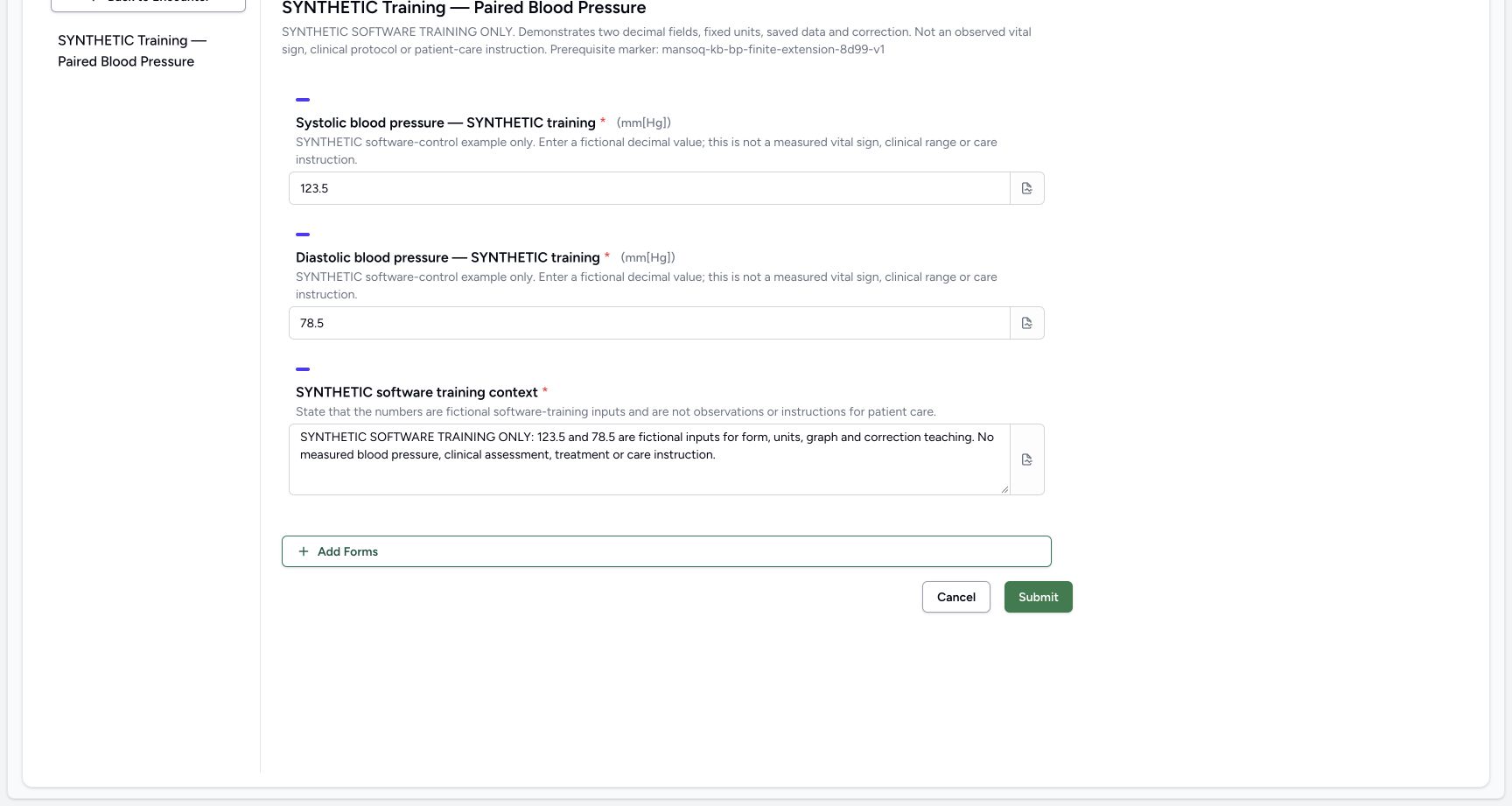
In this isolated control exercise, enter fictional 123.5 for Systolic and fictional 78.5 for Diastolic. In the required context textarea, state that these are fictional software-training inputs for form, units, graph and correction teaching, with no measured blood pressure, assessment, treatment or care instruction. The numbers demonstrate Decimal persistence; they do not establish a clinical protocol.
 1234
1234Review the fictional decimal pair and narrative
Capture details
Exact committed 8d99bb8a, 3383 verified source blobs, ordinary Nurse. The old release text in the fictional patient name is retained. IT separately installed the finite official-code fragment extension and this explicitly synthetic form, with no grants/source/runtime change. Before the one native response save.
Image SHA-256 a857b50c64bc792086cb6a9626e1cdfcb2503ee122fe8615a862c09acc79654c
- Fictional systolic 123.5: Review the fictional systolic example, 123.5. It demonstrates Decimal entry and is not a measured clinical reading or a target.
- Fictional diastolic 78.5: Review the fictional diastolic example, 78.5. It demonstrates Decimal entry and is not a measured clinical reading or a target.
- Fictional software context: Check that the text explicitly identifies this as software training before you save.
- Submit after review: After completing and checking all required fields, select Submit once. Blank required values show validation errors without saving a response.
1234Review the completed form before one submission
Capture details
Exact committed 8d99bb8a, 3383 verified source blobs, ordinary Nurse. The old release text in the fictional patient name is retained. IT separately installed the finite official-code fragment extension and this explicitly synthetic form, with no grants/source/runtime change. Before the one native response save.
Image SHA-256 2e47c801c66ecda7b865a4cffde07375ee3cf7e7e8b90970b9eec4d13d6224e8
- Systolic Decimal: Review the entered systolic value and fixed mm[Hg] unit before saving.
- Diastolic Decimal: Review the entered diastolic value and fixed mm[Hg] unit before saving.
- Fictional context: Review the required fictional training context before saving.
- Submit once: Select Submit once to save the reviewed answers. After the form closes, verify the new response in the encounter.
5. Add an optional note to one answer
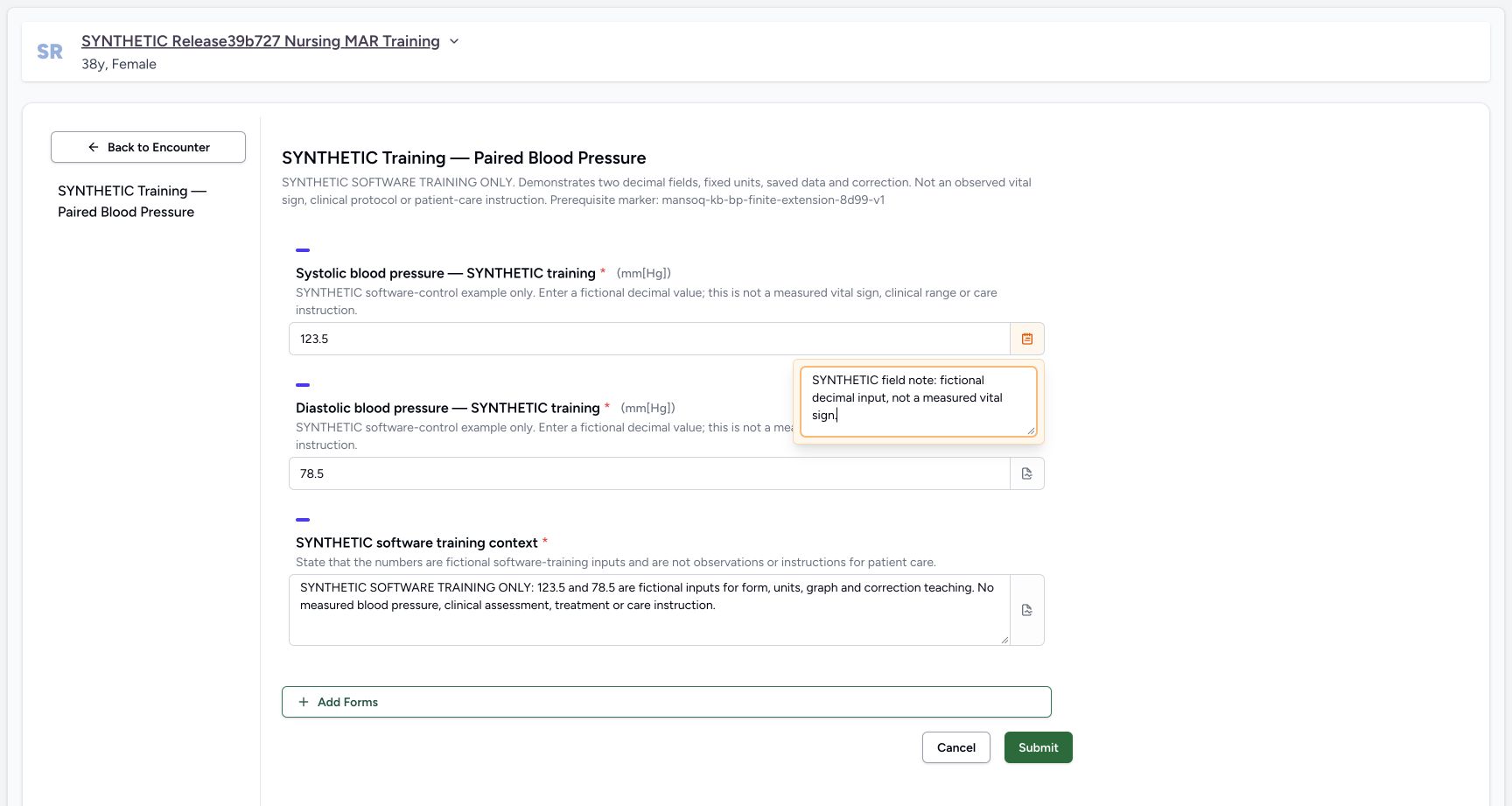
At the right end of the Systolic input, open its note icon and enter the explicit fictional field context in Add notes. This per-question note is optional in the software and separate from the required context textarea. Close the popover by clicking the form heading, as demonstrated, and verify that the note icon is orange. Facility documentation policy may impose its own requirements.
 1
1Add an optional per-question note
Capture details
Exact committed 8d99bb8a, 3383 verified source blobs, ordinary Nurse. The old release text in the fictional patient name is retained. IT separately installed the finite official-code fragment extension and this explicitly synthetic form, with no grants/source/runtime change. Before the one native response save.
Image SHA-256 15875b52da4da21b7d7738ae8bba6bbaa61ac0d5ee3f7896836ab9fd3999d455
- Optional question note: Type the optional note for this question here. The saved response retains it beside that answer.
1234Review the completed form before one submission
Capture details
Exact committed 8d99bb8a, 3383 verified source blobs, ordinary Nurse. The old release text in the fictional patient name is retained. IT separately installed the finite official-code fragment extension and this explicitly synthetic form, with no grants/source/runtime change. Before the one native response save.
Image SHA-256 2e47c801c66ecda7b865a4cffde07375ee3cf7e7e8b90970b9eec4d13d6224e8
- Systolic Decimal: Review the entered systolic value and fixed mm[Hg] unit before saving.
- Diastolic Decimal: Review the entered diastolic value and fixed mm[Hg] unit before saving.
- Fictional context: Review the required fictional training context before saving.
- Submit once: Select Submit once to save the reviewed answers. After the form closes, verify the new response in the encounter.
6. Review and submit once
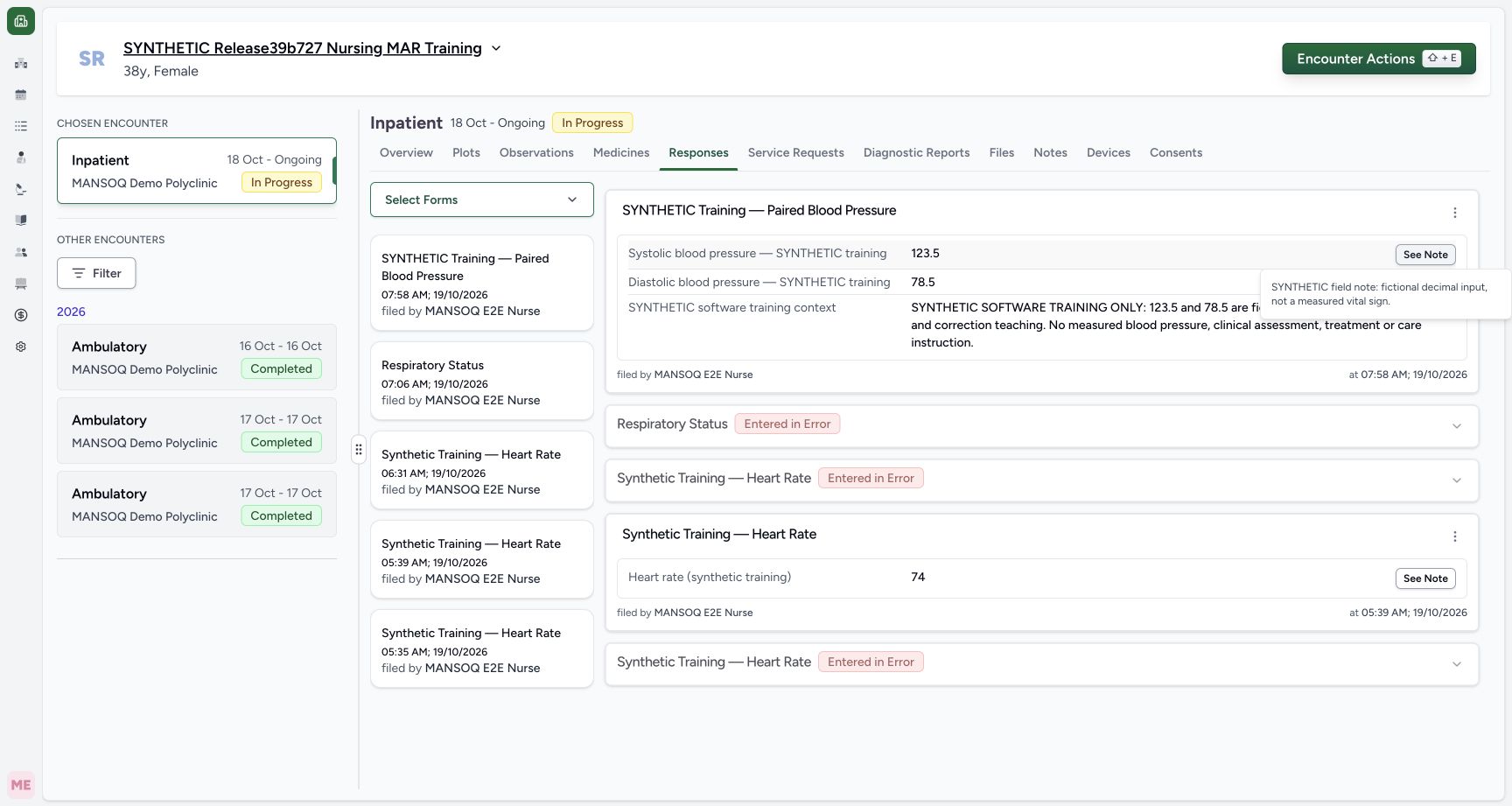
Review both numbers, the fixed unit labels, required fictional context and optional note. Choose Submit once. The successful form returns to the encounter. Open Responses and identify the new paired form card at 07:58 AM on 19 October 2026, filed by MANSOQ E2E Nurse. Required validation did not create an earlier duplicate.
1234Review the completed form before one submission
Capture details
Exact committed 8d99bb8a, 3383 verified source blobs, ordinary Nurse. The old release text in the fictional patient name is retained. IT separately installed the finite official-code fragment extension and this explicitly synthetic form, with no grants/source/runtime change. Before the one native response save.
Image SHA-256 2e47c801c66ecda7b865a4cffde07375ee3cf7e7e8b90970b9eec4d13d6224e8
- Systolic Decimal: Review the entered systolic value and fixed mm[Hg] unit before saving.
- Diastolic Decimal: Review the entered diastolic value and fixed mm[Hg] unit before saving.
- Fictional context: Review the required fictional training context before saving.
- Submit once: Select Submit once to save the reviewed answers. After the form closes, verify the new response in the encounter.
123Inspect the saved paired response and Nurse attribution
Capture details
Exact committed 8d99bb8a, 3383 verified source blobs, ordinary Nurse. The old release text in the fictional patient name is retained. IT separately installed the finite official-code fragment extension and this explicitly synthetic form, with no grants/source/runtime change. The one fictional response is Completed and its two derived observations are Final.
Image SHA-256 ef1c16961d06dc7ba9348cfcadfd1546953161d5700baeb105aac6f9e1604d60
- Saved systolic answer: Read the saved systolic answer on this response. Check the response’s author and time to identify the intended entry.
- Saved diastolic answer: Read the saved diastolic answer on the same response and compare it with the value you entered.
- Open this source’s More Actions: Open More Actions on this exact saved response to see its available actions.
7. Verify the retained response and note
The response shows Systolic 123.5, Diastolic 78.5 and the full fictional narrative. Choose See Note beside Systolic to read the saved optional note. Independent ordinary Nurse and Doctor reads verify one new Completed source response; separate read-only provenance checks establish exactly two linked Final observations with their configured units. The response card itself displays answers, author and save time rather than an editable unit or effective-time control.
123Inspect the saved paired response and Nurse attribution
Capture details
Exact committed 8d99bb8a, 3383 verified source blobs, ordinary Nurse. The old release text in the fictional patient name is retained. IT separately installed the finite official-code fragment extension and this explicitly synthetic form, with no grants/source/runtime change. The one fictional response is Completed and its two derived observations are Final.
Image SHA-256 ef1c16961d06dc7ba9348cfcadfd1546953161d5700baeb105aac6f9e1604d60
- Saved systolic answer: Read the saved systolic answer on this response. Check the response’s author and time to identify the intended entry.
- Saved diastolic answer: Read the saved diastolic answer on the same response and compare it with the value you entered.
- Open this source’s More Actions: Open More Actions on this exact saved response to see its available actions.
 12
12Open the retained optional field note
Capture details
Exact committed 8d99bb8a, 3383 verified source blobs, ordinary Nurse. The old release text in the fictional patient name is retained. IT separately installed the finite official-code fragment extension and this explicitly synthetic form, with no grants/source/runtime change. The one fictional response is Completed and its two derived observations are Final.
Image SHA-256 a0a76aa8d95cf497b7afa45eb432510188b861dcd4e4dc9cfae181a5e372a796
- Open saved See Note: Select See Note beside the saved systolic answer to open its optional note.
- Retained optional field note: Read the saved note here and compare it with the text entered for this question.
Server time and paired-field scope
This form offers no effective-time or backdating input. Each coded answer becomes its own derived observation with a server-generated effective timestamp. In this example the two timestamps differ slightly even though the visible cards show the same minute. Use the graph and history lesson to see the separate rows; do not assume a single shared pair timestamp or one combined observation record.
1234Read all three required fields and the fixed unit labels
Capture details
Exact committed 8d99bb8a, 3383 verified source blobs, ordinary Nurse. The old release text in the fictional patient name is retained. IT separately installed the finite official-code fragment extension and this explicitly synthetic form, with no grants/source/runtime change. Before the one native response save.
Image SHA-256 733bac7728c8e747e0c9ad1dc8f927a267a511d0f10573f6a30cf72b4561c101
- Required systolic Decimal: Enter the fictional systolic Decimal value here. This form fixes the unit to mm[Hg]; the asterisk marks this field as required.
- Required diastolic Decimal: Enter the fictional diastolic Decimal value here. This form fixes the unit to mm[Hg]; the asterisk marks this field as required.
- Required fictional context: Enter the required text explaining that these are fictional software-training values.
- Submit after review: After completing and checking all required fields, select Submit once. Blank required values show validation errors without saving a response.
123Inspect the saved paired response and Nurse attribution
Capture details
Exact committed 8d99bb8a, 3383 verified source blobs, ordinary Nurse. The old release text in the fictional patient name is retained. IT separately installed the finite official-code fragment extension and this explicitly synthetic form, with no grants/source/runtime change. The one fictional response is Completed and its two derived observations are Final.
Image SHA-256 ef1c16961d06dc7ba9348cfcadfd1546953161d5700baeb105aac6f9e1604d60
- Saved systolic answer: Read the saved systolic answer on this response. Check the response’s author and time to identify the intended entry.
- Saved diastolic answer: Read the saved diastolic answer on the same response and compare it with the value you entered.
- Open this source’s More Actions: Open More Actions on this exact saved response to see its available actions.
 1234
1234Read separate current rows and their author
Capture details
Exact committed 8d99bb8a, 3383 verified source blobs, ordinary Nurse. The old release text in the fictional patient name is retained. IT separately installed the finite official-code fragment extension and this explicitly synthetic form, with no grants/source/runtime change. The one fictional response is Completed and its two derived observations are Final.
Image SHA-256 d65211769fc5932c8819414fc01a5c7528813b4ab67b1aff706fe7b86ff90009
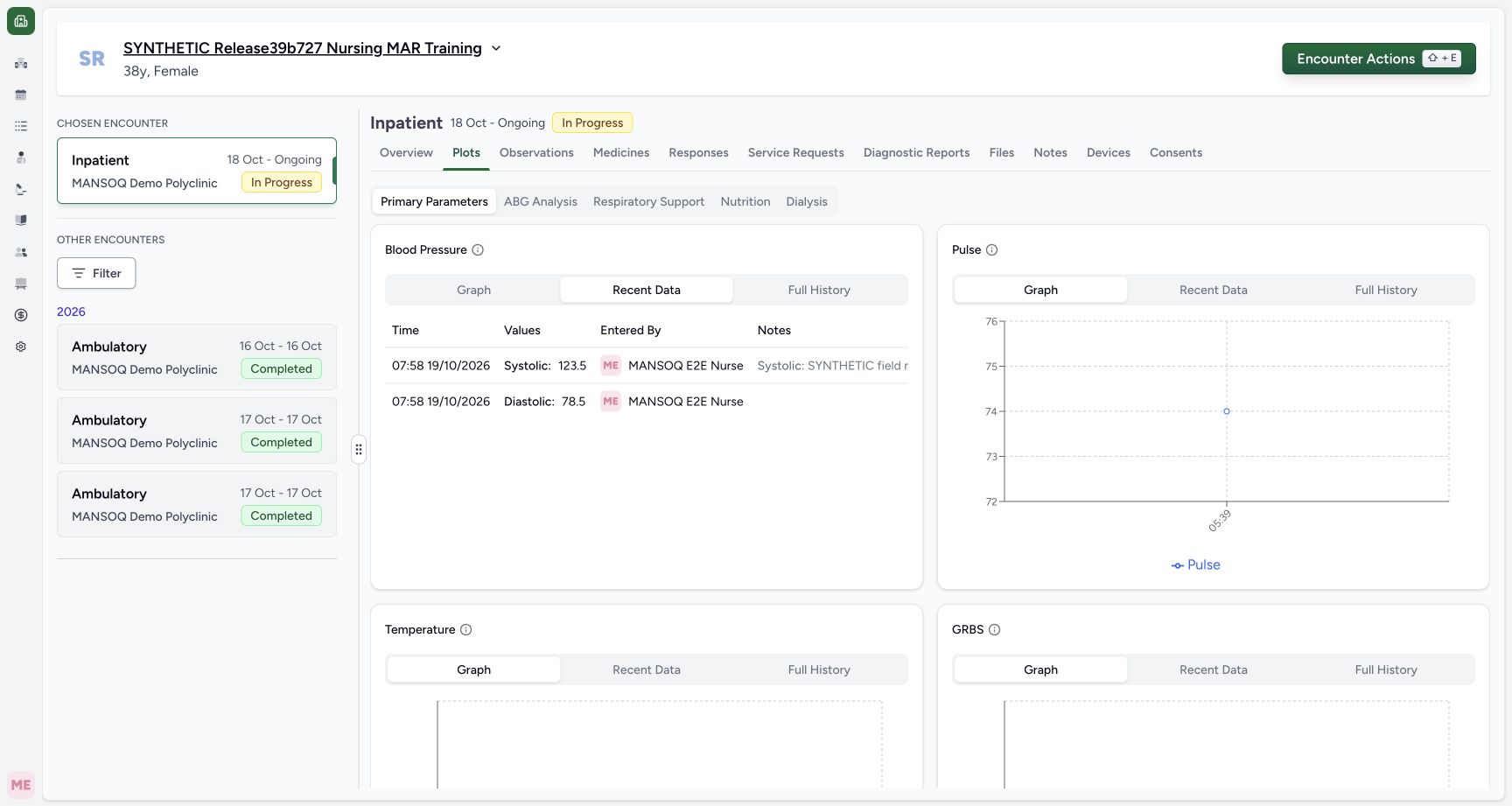
- Recent Data: This tab shows the current observation rows. Compare the values, time and entered-by information before moving to Full History.
- Systolic current row: Read the current systolic observation row. It is separate from the diastolic row even though both came from one form submission.
- Diastolic current row: Read the current diastolic observation row and its time. Each coded answer has its own recorded observation.
- Open Full History: Select Full History to inspect retained readings, their status and any source-correction warnings.
What was and was not changed
Only this new fictional response and its two coded observations were created during the Nurse flow. All seven original condition records (four diagnoses and three symptoms), fourteen administrations, four medication requests, three original observations and thirty-nine older responses remained unchanged. The public frames show Nurse controls; Doctor verification is an independent ordinary API read, not a demonstrated Doctor write, all-facility workflow or clinical measurement qualification.
123Inspect the saved paired response and Nurse attribution
Capture details
Exact committed 8d99bb8a, 3383 verified source blobs, ordinary Nurse. The old release text in the fictional patient name is retained. IT separately installed the finite official-code fragment extension and this explicitly synthetic form, with no grants/source/runtime change. The one fictional response is Completed and its two derived observations are Final.
Image SHA-256 ef1c16961d06dc7ba9348cfcadfd1546953161d5700baeb105aac6f9e1604d60
- Saved systolic answer: Read the saved systolic answer on this response. Check the response’s author and time to identify the intended entry.
- Saved diastolic answer: Read the saved diastolic answer on the same response and compare it with the value you entered.
- Open this source’s More Actions: Open More Actions on this exact saved response to see its available actions.
 1234
1234Inspect both series on the Blood Pressure graph
Capture details
Exact committed 8d99bb8a, 3383 verified source blobs, ordinary Nurse. The old release text in the fictional patient name is retained. IT separately installed the finite official-code fragment extension and this explicitly synthetic form, with no grants/source/runtime change. The one fictional response is Completed and its two derived observations are Final.
Image SHA-256 5fe4506d1ef8c5bbde54e6cfaea5a3c47019d6cc4910855661ebc1721e3edd5c
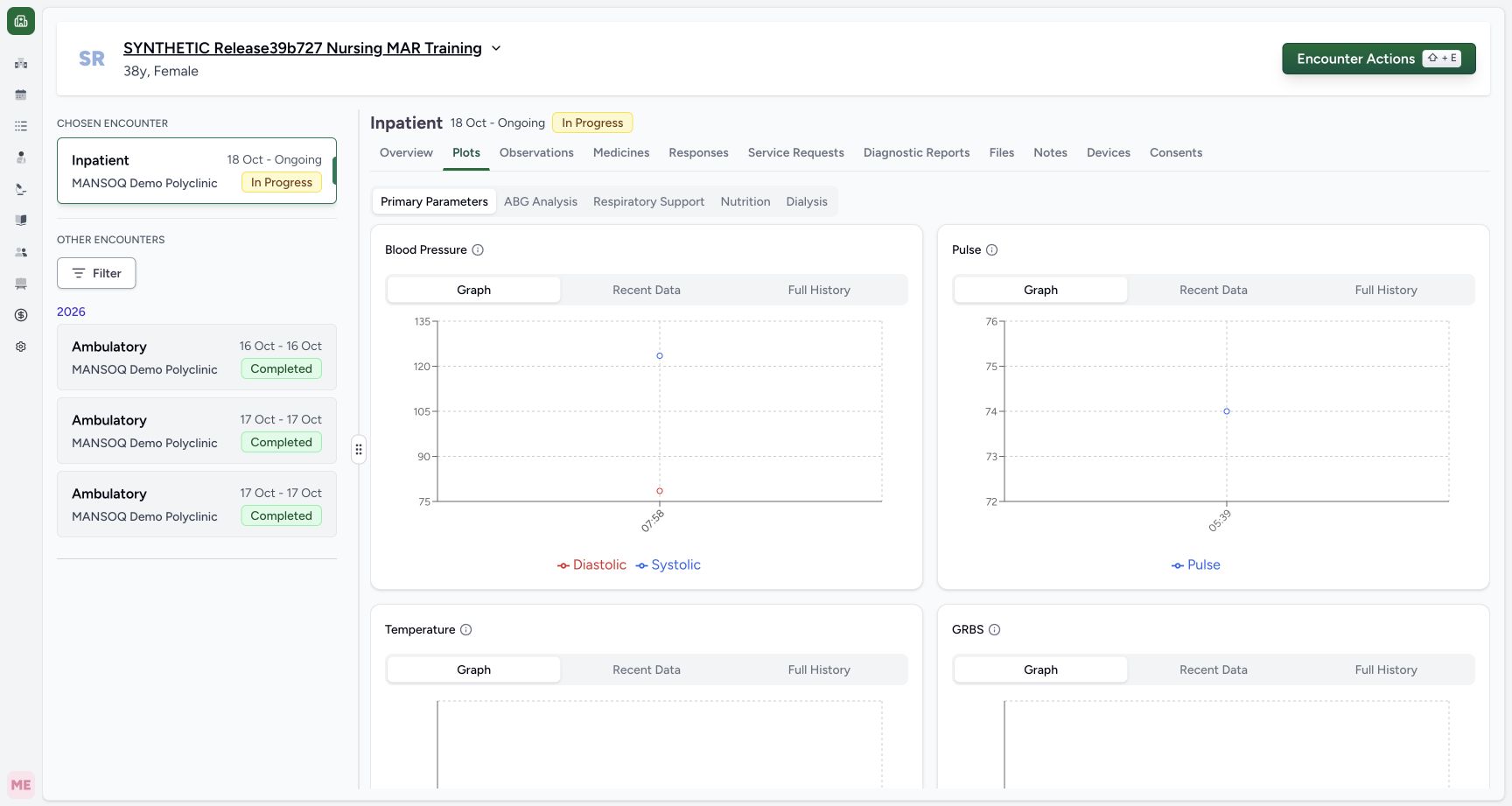
- Open Recent Data: Select Recent Data to inspect the observation rows currently included in this Blood Pressure view.
- Open Full History: Select Full History to inspect retained readings, their status and any source-correction warnings.
- Systolic plotted value: Read the plotted fictional systolic value, 123.5, here. This marker is a value reference; this graph does not display a unit label.
- Diastolic plotted value: Read the plotted fictional diastolic value, 78.5, here. This marker is a value reference; this graph does not display a unit label.
 123
123Open the encounter-scoped retained observation history
Capture details
Exact committed 8d99bb8a, 3383 verified source blobs, ordinary Nurse. The old release text in the fictional patient name is retained. IT separately installed the finite official-code fragment extension and this explicitly synthetic form, with no grants/source/runtime change. The one fictional response is Completed and its two derived observations are Final.
Image SHA-256 04184bb9109ff4756ef4d4ac0ea78e7fc838e1fbcf001ac38dee835753447400
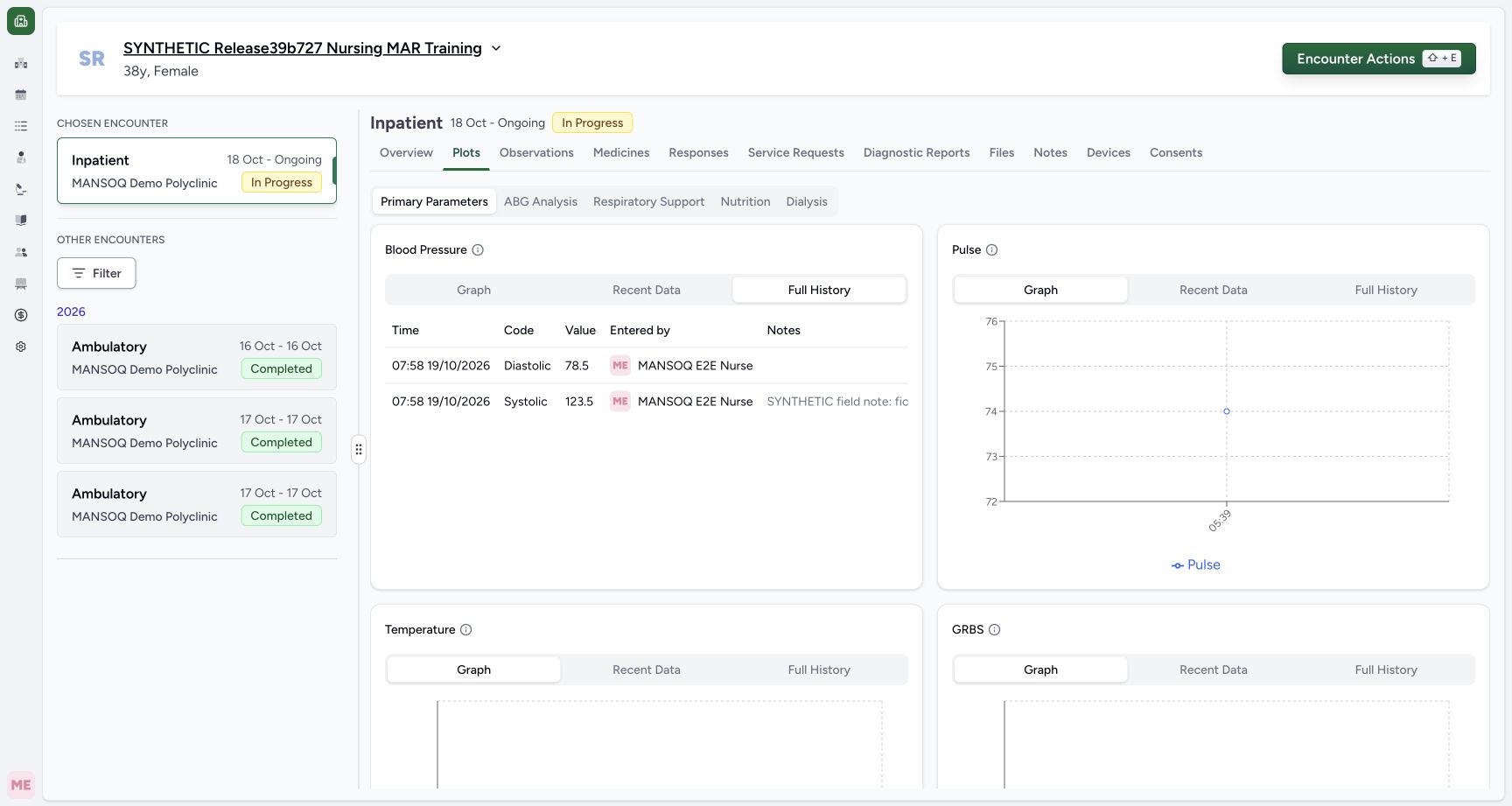
- Full History: Review the encounter’s retained observation history in this tab. Use horizontal scrolling to reach status and notes when needed.
- Retained Diastolic row: Read the retained diastolic row and its original time. Check its status in the columns to the right.
- Retained Systolic value: Read the retained systolic value in its own history row. Check its status and source context before interpreting its presence in history.
Source evidence
Every citation uses this exact committed version. The private source repository requires access.
- repositories/platform/mansoq-web/src/pages/Encounters/tabs/overview/FormsDialog.tsx:163 ·
8d99bb8a4712f6aa8446bcd3b40bf62dae280d39Source file checksum
94e423519145edb5e7895c4b2fa8eba6625db5a1d320fb35c37777f0876321a6 - repositories/platform/mansoq-web/src/components/Questionnaire/QuestionnaireForm.tsx:740 ·
8d99bb8a4712f6aa8446bcd3b40bf62dae280d39Source file checksum
5deed809524fa11fe9c31b3ff978929656b01c23cdd4c9b9cc45d2dd5e97a46c - repositories/platform/mansoq-web/src/components/Questionnaire/QuestionTypes/NumberQuestion.tsx:52 ·
8d99bb8a4712f6aa8446bcd3b40bf62dae280d39Source file checksum
fd8183d93ed6c65e651dfc6b790c5ebc740fceef5cf6d0d5dc3d107f465b8dab - repositories/platform/mansoq-web/src/components/Questionnaire/QuestionTypes/TextQuestion.tsx:131 ·
8d99bb8a4712f6aa8446bcd3b40bf62dae280d39Source file checksum
1ce4eb85780e351a42f155fc8a092fa921e6f4853f1efc91902365498b834aab - repositories/platform/mansoq-web/src/components/Questionnaire/QuestionLabel.tsx:50 ·
8d99bb8a4712f6aa8446bcd3b40bf62dae280d39Source file checksum
42c3c5bcf0af82362ef563c9e8a69ba1cc6490d677d8e1af6015720e1f1339b4 - repositories/platform/mansoq-web/src/components/Questionnaire/QuestionTypes/QuestionInput.tsx:47 ·
8d99bb8a4712f6aa8446bcd3b40bf62dae280d39Source file checksum
16bebfb11603d50cb219f5db55d93cd0bc2935630af0fc60a6d5732f04a33163 - repositories/platform/mansoq-core/mansoq/emr/resources/questionnaire/spec.py:122 ·
8d99bb8a4712f6aa8446bcd3b40bf62dae280d39Source file checksum
360690dc0be252ca3508ca507a6b2fb3acc1f9a67377b24bac36c023dfb43458 - repositories/platform/mansoq-core/mansoq/emr/resources/questionnaire/utils.py:354 ·
8d99bb8a4712f6aa8446bcd3b40bf62dae280d39Source file checksum
8425858d2179a66f482f38a3fd7f0fc0dcb70a4bcd85450fe7ce748b3081826c - repositories/platform/mansoq-core/mansoq/security/authorization/encounter.py:69 ·
8d99bb8a4712f6aa8446bcd3b40bf62dae280d39Source file checksum
0e7ff8afcfb57b2371201e16ee6fac26125d6e686af66ed7edd95e49bc07de78 - repositories/platform/mansoq-web/public/config/plots.json:7 ·
8d99bb8a4712f6aa8446bcd3b40bf62dae280d39Source file checksum
8a38f72c6b3c55df726baf7d0091748838bdf77cbd9af78cd4324354dc3e7345 - repositories/platform/mansoq-web/src/pages/Encounters/tabs/plots.tsx:70 ·
8d99bb8a4712f6aa8446bcd3b40bf62dae280d39Source file checksum
343dc44ffc4e98a0a1f78abf1940fea9216bc8f52374cf3da1c6fefce2da18f9 - repositories/platform/mansoq-web/src/components/Common/Charts/ObservationChart.tsx:178 ·
8d99bb8a4712f6aa8446bcd3b40bf62dae280d39Source file checksum
dcfb2e78c7a32f179608af2bfbfc447914ec0768636453b97be6e9d04fd272d8 - repositories/platform/mansoq-web/src/components/Common/Charts/ObservationHistoryTable.tsx:66 ·
8d99bb8a4712f6aa8446bcd3b40bf62dae280d39Source file checksum
e12f4349fa8bfbde0a55677679de17e0945bd04d775229e1294ca6012ead6d20 - repositories/platform/mansoq-core/mansoq/emr/api/viewsets/observation.py:89 ·
8d99bb8a4712f6aa8446bcd3b40bf62dae280d39Source file checksum
4ba09107744a6081444385ab3b7917440595e41d94c9f7bca19d09e7e0694fcf - repositories/platform/mansoq-core/mansoq/emr/resources/observation/queries.py:6 ·
8d99bb8a4712f6aa8446bcd3b40bf62dae280d39Source file checksum
98332703807886682e9a76f9f78f160c5d18bb06c4fd5c79389570ca584907ca - repositories/platform/mansoq-core/mansoq/emr/resources/observation/spec.py:123 ·
8d99bb8a4712f6aa8446bcd3b40bf62dae280d39Source file checksum
a855e990e875658fa803c3c6be170fd953ed64a4504995a7260434164d576098