 MANSOQ
 Nursing respiratory forms · VERSION 8d99bb8a
Complete the installed Respiratory Status form
Learn every input in the existing three-group Respiratory Status questionnaire: required choices, optional narrative and question notes, radio changes, decimals, whole-number zero, actual error recovery and verification of one saved fictional response on release 8d99bb8a.
Nurse
 1234
1234Inspect required choices and optional note fields
Capture details
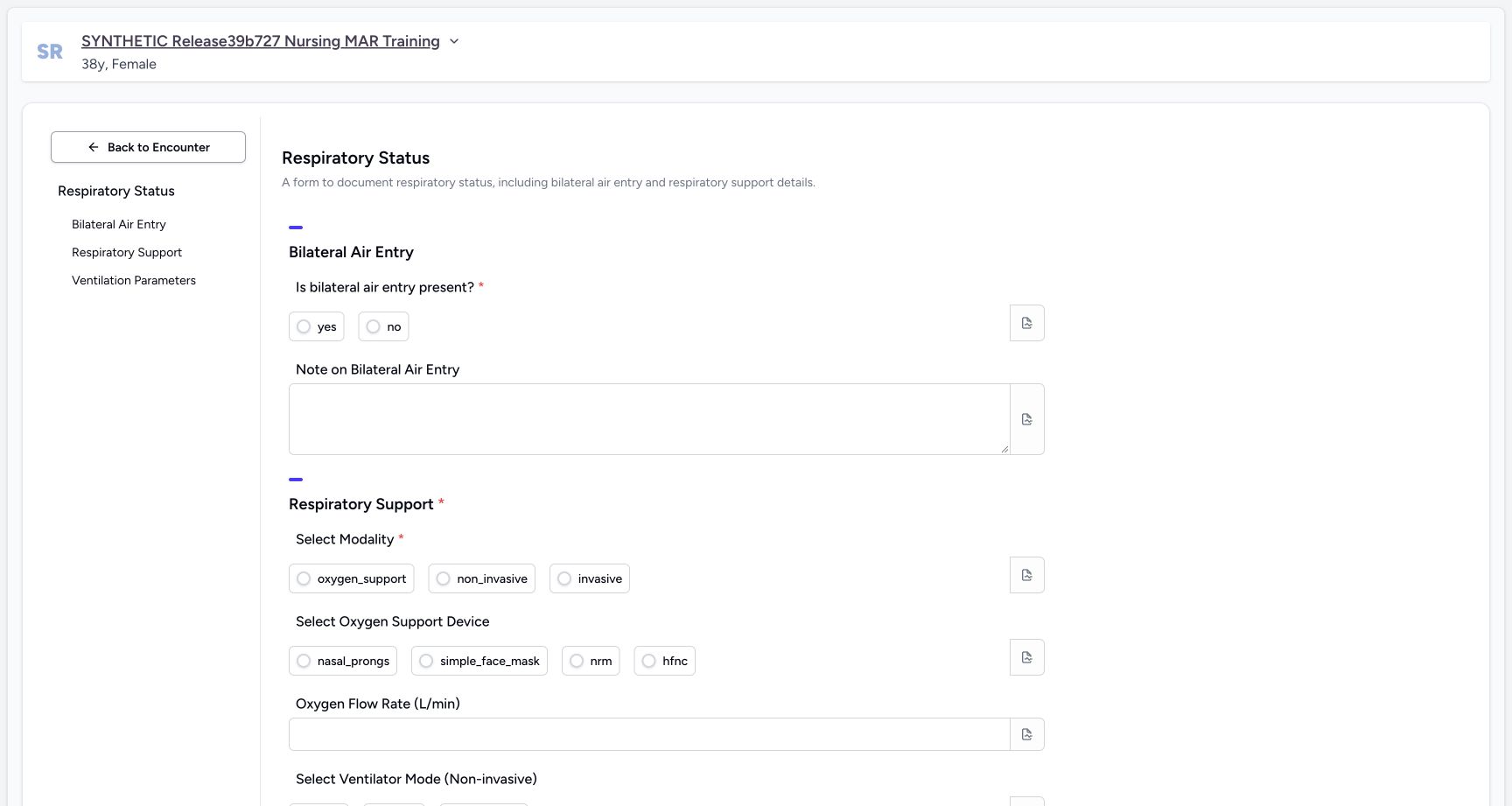
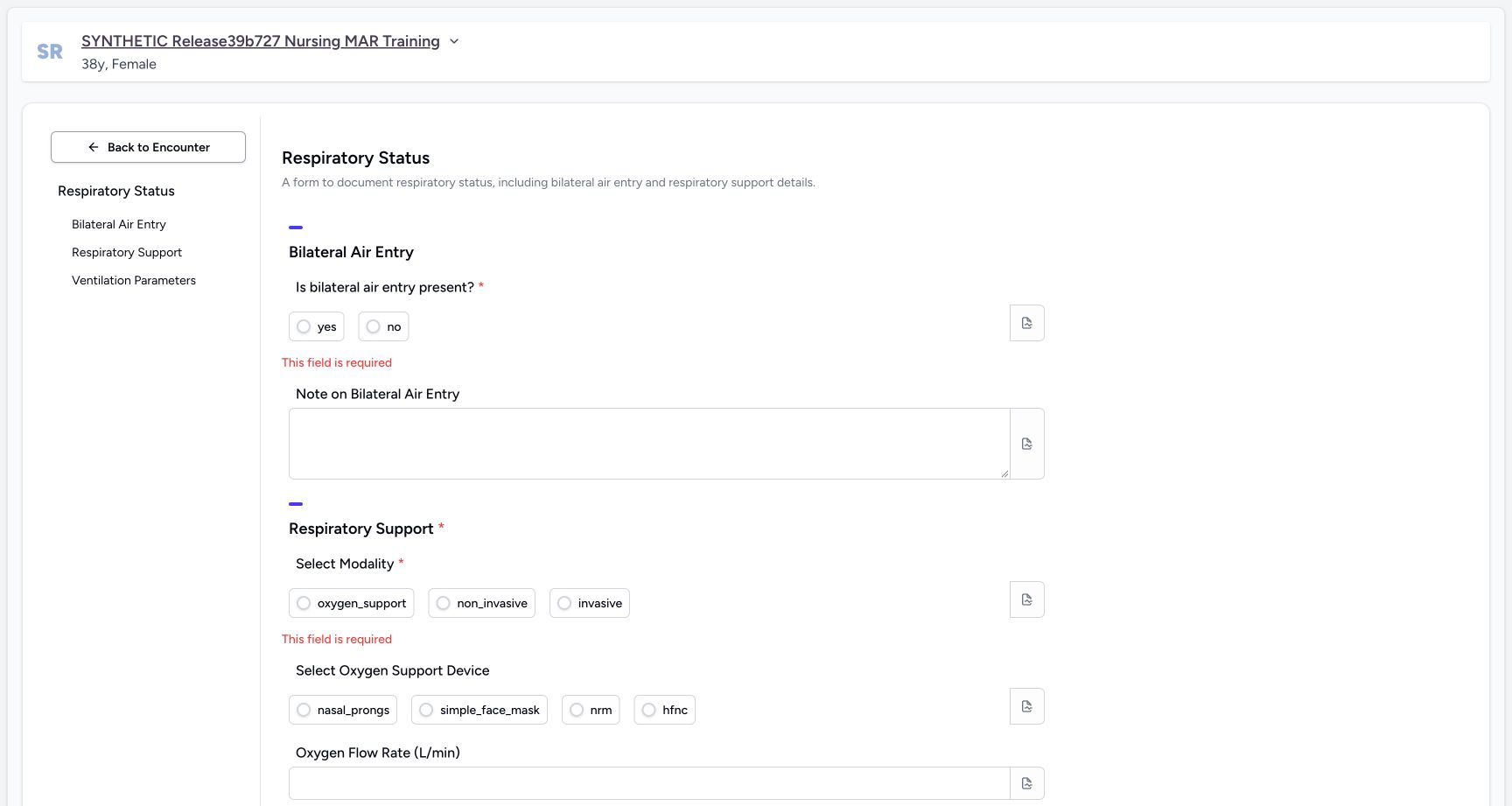
Exact committed release 8d99bb8a on an isolated nonproduction clone, using an existing Nurse and fictional Polyclinic inpatient case. The synthetic patient name retains an earlier release label. Existing form, still blank. Red asterisks mark the bilateral-air-entry question and Select Modality as required. Literal option labels are rendered exactly as installed; choices here are not care recommendations.
Image SHA-256 056564f24116a558537157ef90092720949438c3a124e9d00f0f85689403a9dd
- Required air-entry choice: The installed yes/no radio question is required.
- Optional text note: This separate text area is optional in the software.
- Required modality: The installed modality choices are oxygen_support, non_invasive and invasive.
- Optional device: Device is a separate optional choice; the form does not automatically hide other groups.
 1234
1234Inspect all seven optional ventilation-number controls
Capture details
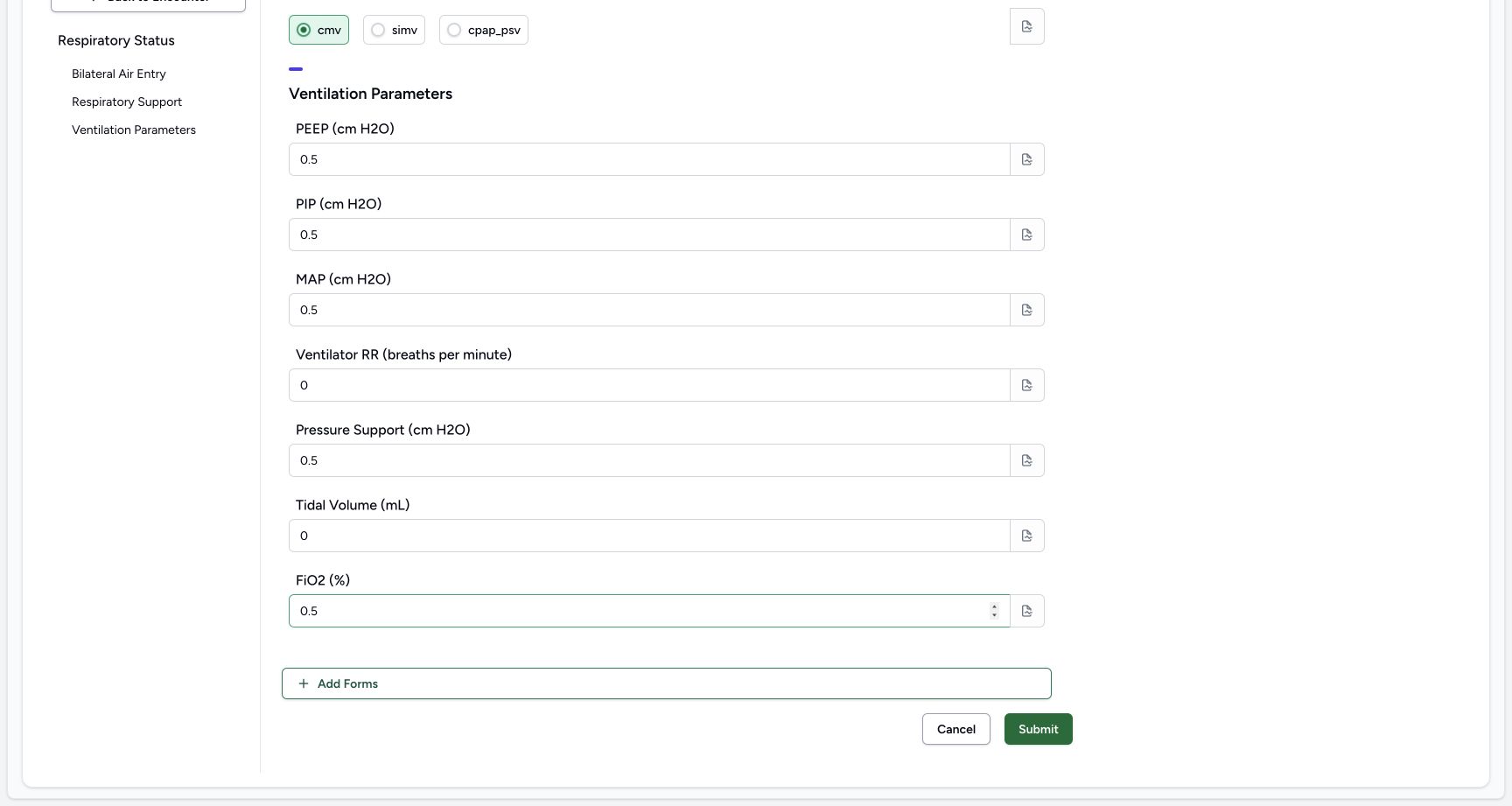
Exact committed release 8d99bb8a on an isolated nonproduction clone, using an existing Nurse and fictional Polyclinic inpatient case. The synthetic patient name retains an earlier release label. All seven optional ventilation fields remain visible. Artificial0.5 values exercise decimal controls; artificial 0 values exercise Integer controls. Parenthetical units are installed label text, with no selectable coded unit binding in this questionnaire.
Image SHA-256 e2d013dab1b3b5e0af75dc47301fee500ea1a317aa36b815bac47581bd4b9ceb
- Decimal fields: PEEP, PIP and MAP each currently contain the fictional 0.5 control example.
- Whole-number zero: Ventilator RR is an Integer control and currently contains artificial 0.
- Second Integer control: Tidal Volume is also an Integer control, with the same artificial 0 example.
- Final decimal field: FiO2 is a Decimal control with artificial 0.5; this is not a target or treatment value.
 12
12Inspect every saved answer group, zero values and author time
Capture details
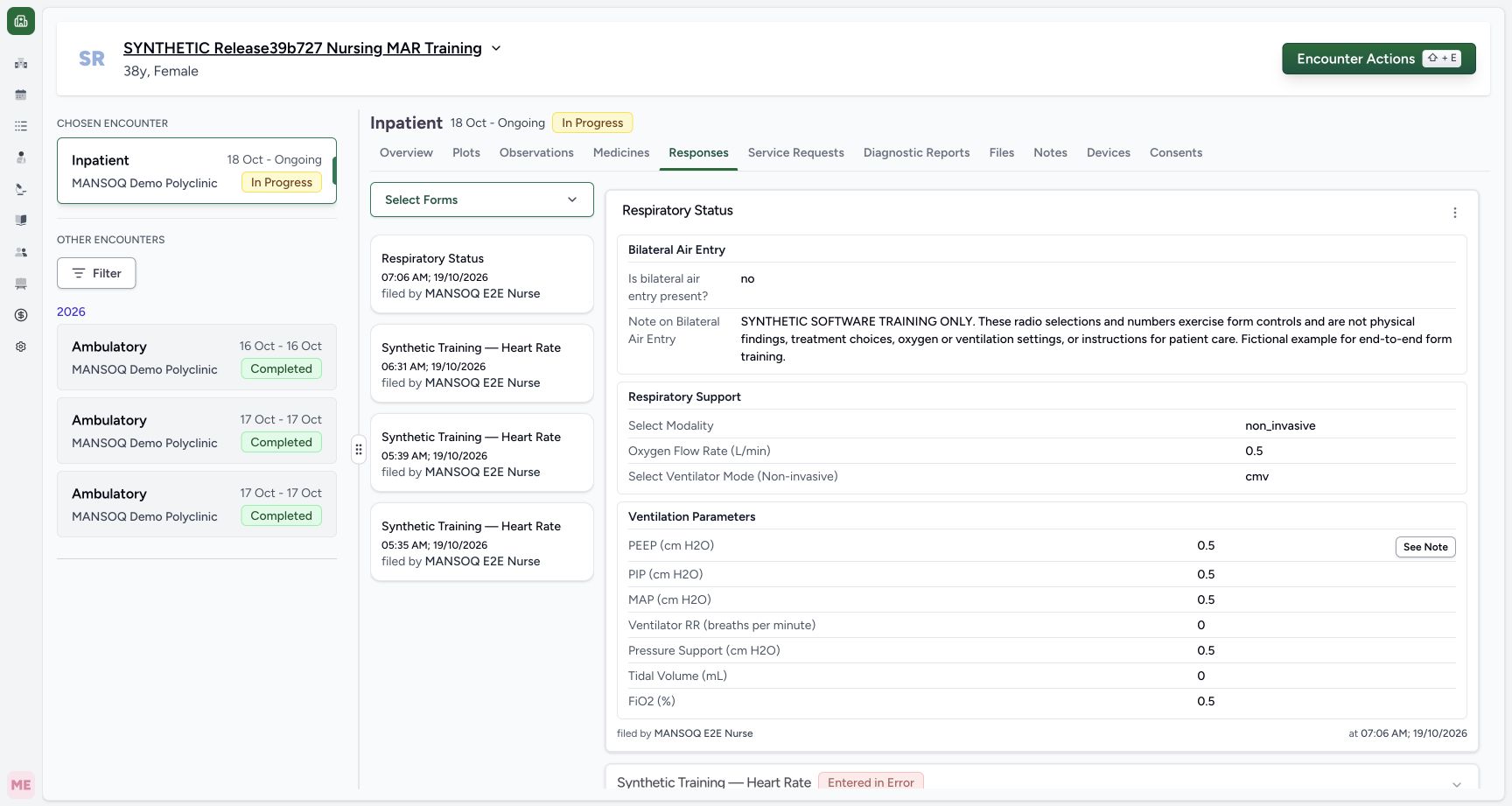
Exact committed release 8d99bb8a on an isolated nonproduction clone, using an existing Nurse and fictional Polyclinic inpatient case. The synthetic patient name retains an earlier release label. The saved Respiratory Status card shows all three groups, literal no/non_invasive/cmv choices, artificial decimal 0.5 and Integer 0 answers, full fictional note, Nurse author and server save time07:06 AM. Optional device was cleared and has no saved answer. Independent GETs identify source 7ef417e5-40a0-4945-b60b-d4a6212243d6 Completed and exactly 12 answer leaves.
Image SHA-256 ad5e2e153138631fd79149c6c6e6ccd62dfa3014470a399d81e5472fba1dcdf7
- Saved per-question note: Open the retained note belonging to the PEEP answer.
- Actions for this exact response: This menu belongs to the new Respiratory Status card, not the older Heart Rate records.
15 of 15 content blocks have reviewed image alignment. Missing overview or prerequisite images remain open.
Before you begin
- Use the existing authorized Nurse session on the intended fictional patient and ongoing Inpatient encounter in MANSOQ Demo Polyclinic. The active Respiratory Status form is already installed; this exercise changes no role, permission, form definition, code or unit configuration. The older release label in the patient name is a retained training name; these actual screens use committed 8d99bb8a.
 1
1Recorded release 8d99bb8a · 2026-10-19T04:03:40.788Z · 1728 × 921 Open the existing encounter Forms picker
Capture details
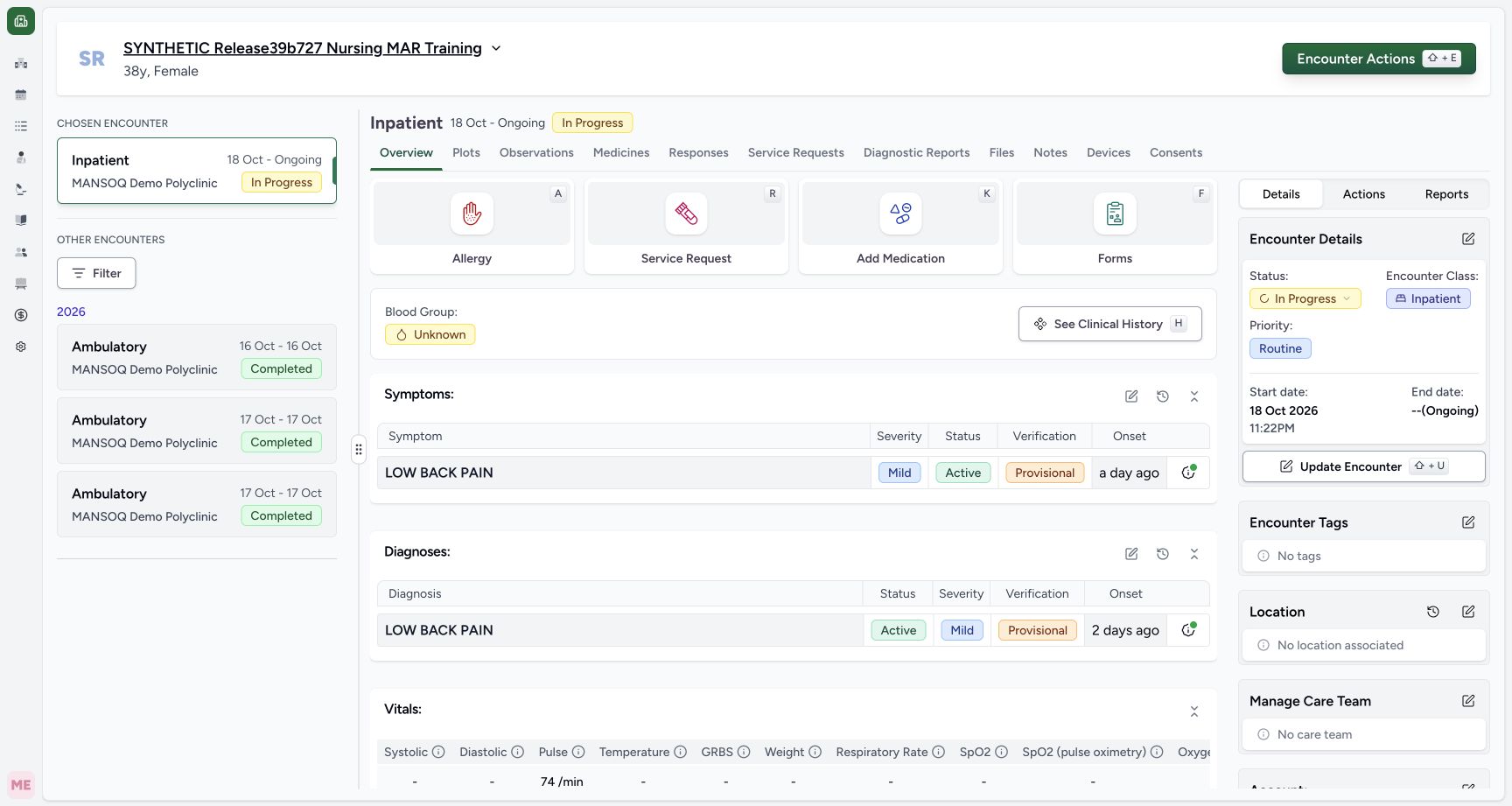
Exact committed release 8d99bb8a on an isolated nonproduction clone, using an existing Nurse and fictional Polyclinic inpatient case. The synthetic patient name retains an earlier release label. Ordinary Nurse, chosen synthetic Inpatient encounter In Progress. The patient name carries an older training label; actual capture release is 8d99. No respiratory response has been saved.
Image SHA-256
827917014e26b4159a15e8760937ed86ae4b2b3042265fba6b35d85c4180888e- Open Forms: Use the Forms button in this selected encounter.
 1
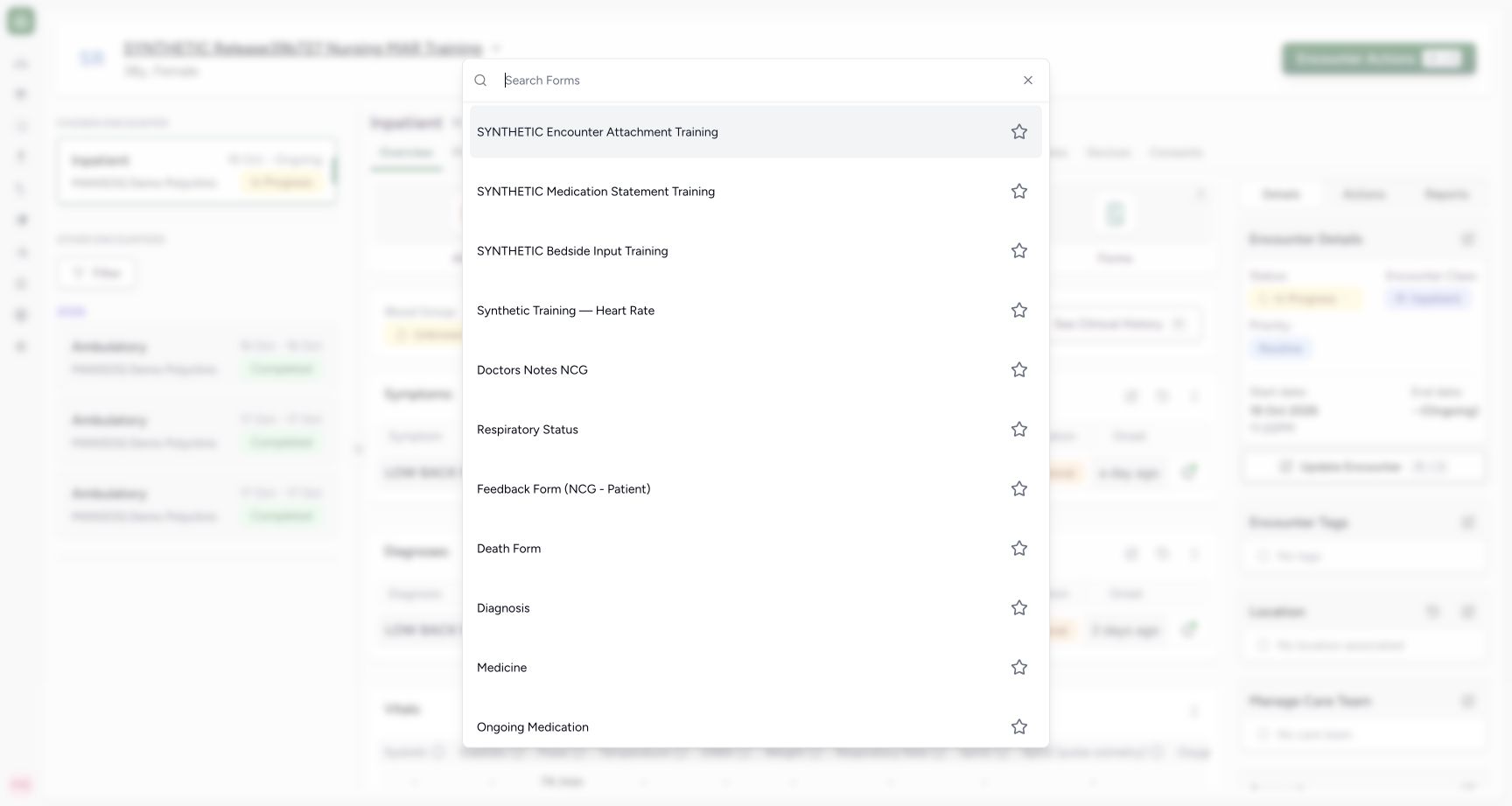
1Recorded release 8d99bb8a · 2026-10-19T04:03:49.078Z · 1728 × 921 Choose the installed Respiratory Status form
Capture details
Exact committed release 8d99bb8a on an isolated nonproduction clone, using an existing Nurse and fictional Polyclinic inpatient case. The synthetic patient name retains an earlier release label. The actual Forms picker contains Respiratory Status and a separate Respiratory Support record IPD form. This sequence uses Respiratory Status only.
Image SHA-256
96f4594c74e736b58db446cce619ded5777448a36e022c068faec603777eb206- Respiratory Status: Choose this existing form; do not confuse it with the separate Respiratory Support record IPD entry.
1234Recorded release 8d99bb8a · 2026-10-19T04:04:01.679Z · 1728 × 921 Inspect required choices and optional note fields
Capture details
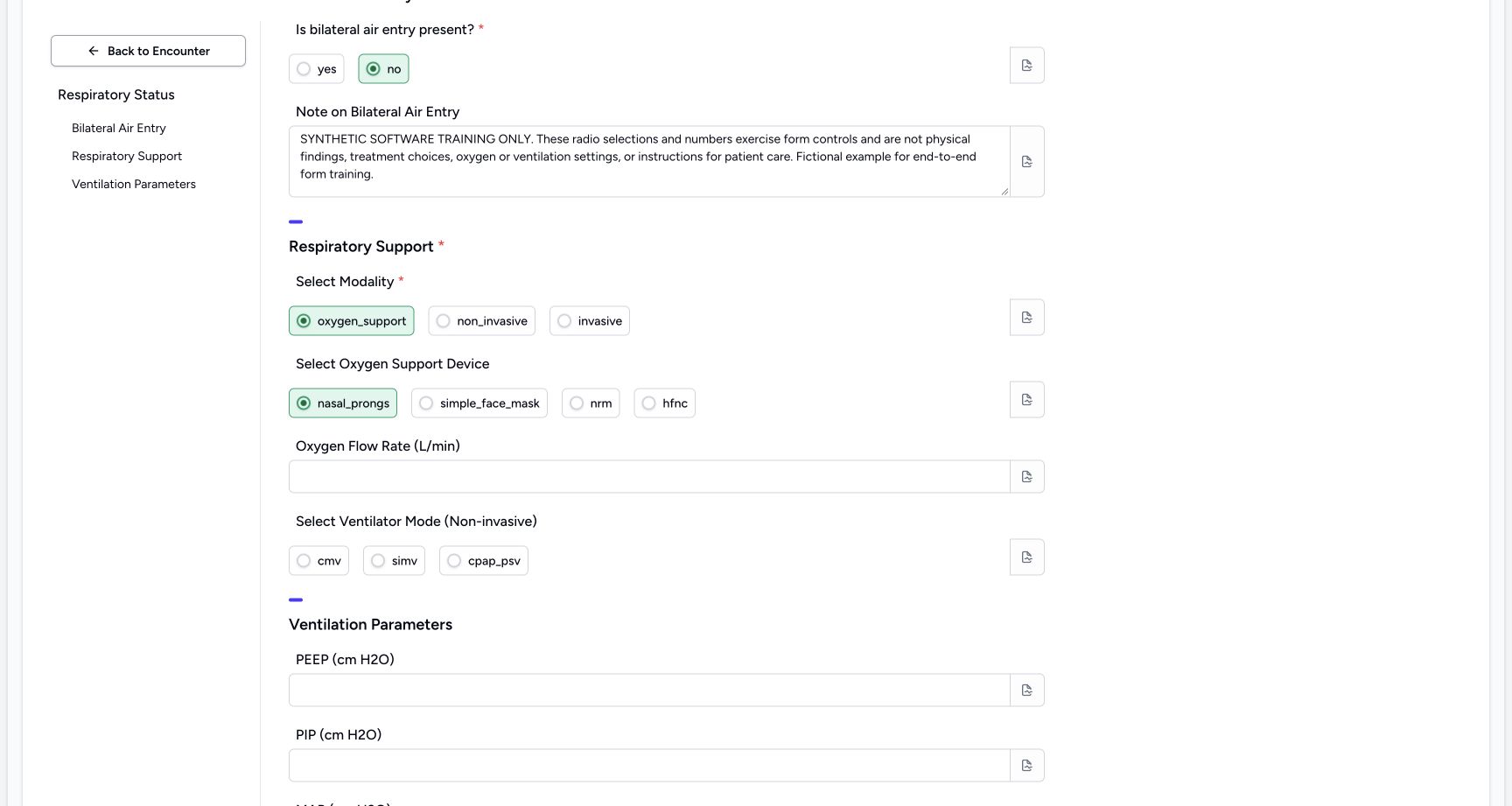
Exact committed release 8d99bb8a on an isolated nonproduction clone, using an existing Nurse and fictional Polyclinic inpatient case. The synthetic patient name retains an earlier release label. Existing form, still blank. Red asterisks mark the bilateral-air-entry question and Select Modality as required. Literal option labels are rendered exactly as installed; choices here are not care recommendations.
Image SHA-256
056564f24116a558537157ef90092720949438c3a124e9d00f0f85689403a9dd- Required air-entry choice: The installed yes/no radio question is required.
- Optional text note: This separate text area is optional in the software.
- Required modality: The installed modality choices are oxygen_support, non_invasive and invasive.
- Optional device: Device is a separate optional choice; the form does not automatically hide other groups.
- Use synthetic software data only. Every selection and number in this example exercises a control and is not a physical finding, treatment choice, oxygen or ventilation setting, target value or patient-care instruction. The full text note on the form states that distinction. The shown combinations are not a clinical protocol.
 1234
1234Recorded release 8d99bb8a · 2026-10-19T04:04:42.487Z · 1728 × 921 Required answers clear errors; optional controls remain independent
Capture details
Exact committed release 8d99bb8a on an isolated nonproduction clone, using an existing Nurse and fictional Polyclinic inpatient case. The synthetic patient name retains an earlier release label. The fictional note explicitly denies clinical meaning. Required no and oxygen_support are selected and their errors cleared; optional device is currently nasal_prongs. Lower ventilator controls remain visible rather than conditionally hiding.
Image SHA-256
b9d19b0d34acb85292a3a90b9784ae177d0912124fd0700a7d13a7d897fab063- Fictional context: The note identifies every choice and number as software training rather than patient findings or care instructions.
- Selected required modality: This selected circle cleared its own required error.
- Selected optional device: This optional choice can be inspected separately from the modality selection.
- Separate optional ventilator mode: These controls remain displayed in this installed form even when oxygen_support is selected.
 123
123Recorded release 8d99bb8a · 2026-10-19T04:05:14.385Z · 1728 × 921 Attach an optional note to one numeric answer
Capture details
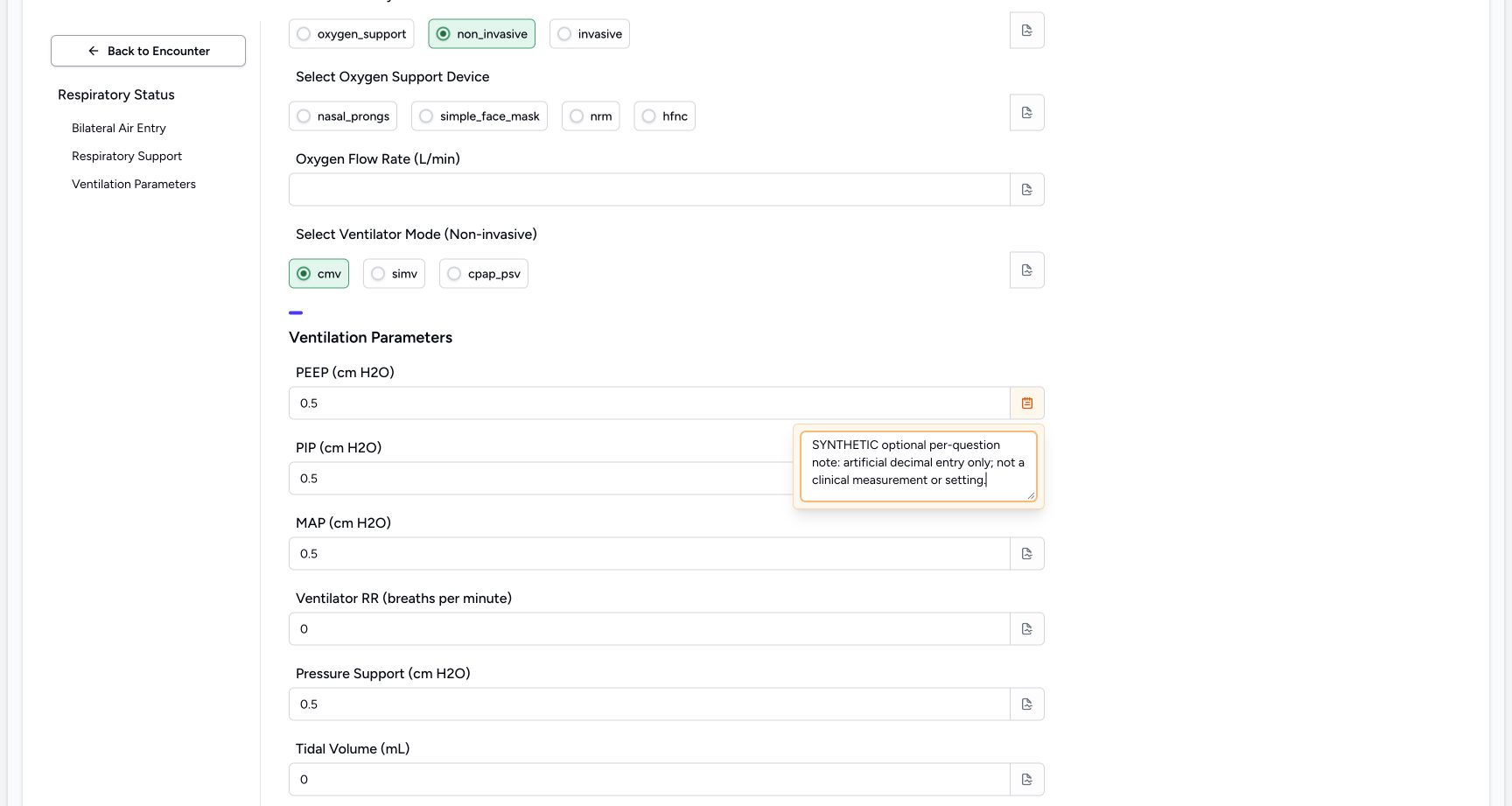
Exact committed release 8d99bb8a on an isolated nonproduction clone, using an existing Nurse and fictional Polyclinic inpatient case. The synthetic patient name retains an earlier release label. The PEEP question note popover contains explicitly fictional software-training context. This is separate from the dedicated Note on Bilateral Air Entry text question; note entry is optional.
Image SHA-256
4d6a4acbb52d84d1ff02719b646513c0fe464be168978b24a73c5bedd89fd78b- Optional question note: Enter the appropriate context here; this example is explicitly fictional and not a clinical setting.
- Question being annotated: This note belongs to the PEEP answer rather than to the entire response.
- Open the optional PEEP note icon: The original-pixel-reviewed note icon is at the right end of the PEEP numeric input. This additional point is not a new capture-time DOM geometry attestation.
12Recorded release 8d99bb8a · 2026-10-19T04:07:17.824Z · 1728 × 921 Inspect every saved answer group, zero values and author time
Capture details
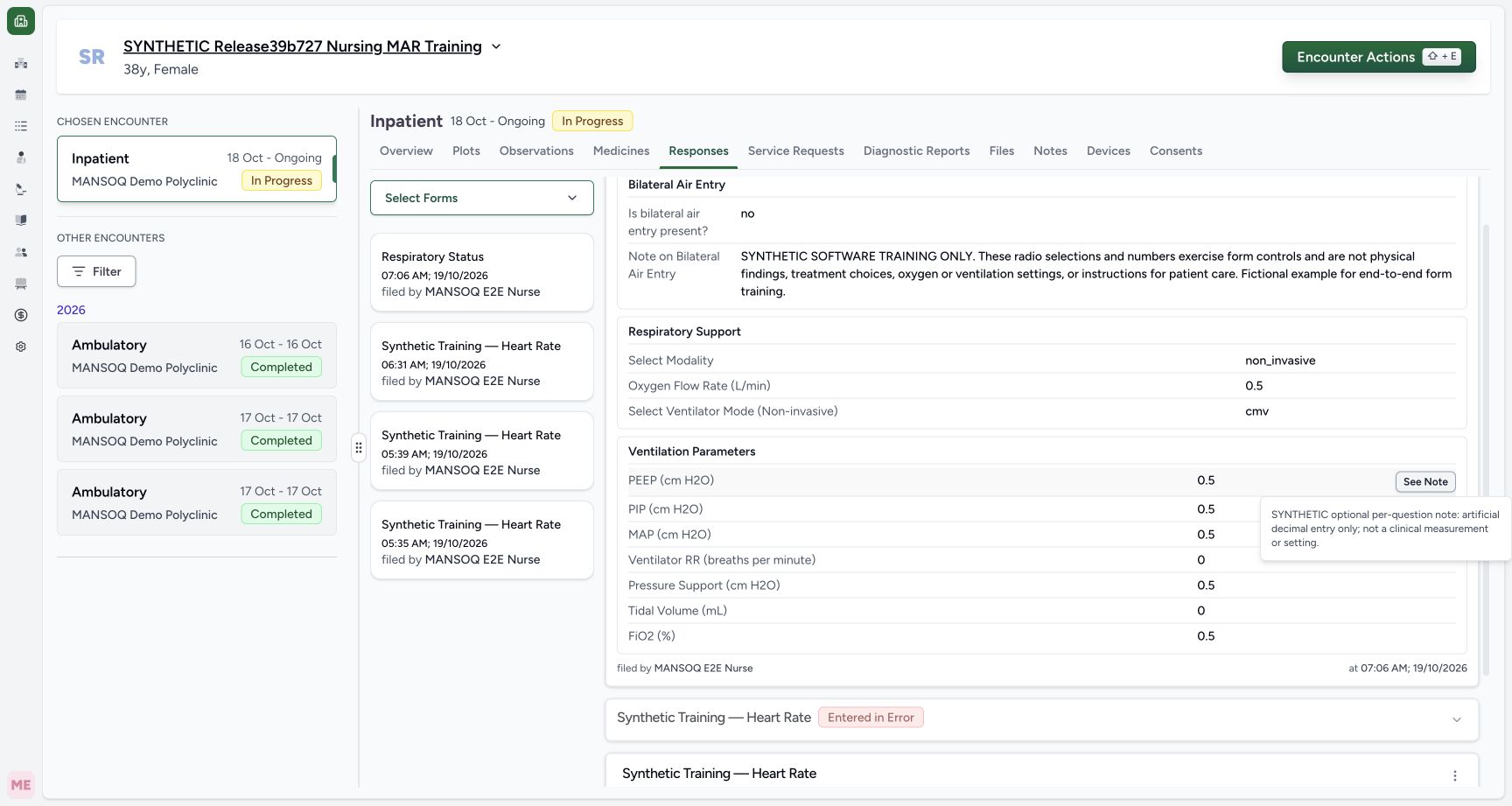
Exact committed release 8d99bb8a on an isolated nonproduction clone, using an existing Nurse and fictional Polyclinic inpatient case. The synthetic patient name retains an earlier release label. The saved Respiratory Status card shows all three groups, literal no/non_invasive/cmv choices, artificial decimal 0.5 and Integer 0 answers, full fictional note, Nurse author and server save time07:06 AM. Optional device was cleared and has no saved answer. Independent GETs identify source 7ef417e5-40a0-4945-b60b-d4a6212243d6 Completed and exactly 12 answer leaves.
Image SHA-256
ad5e2e153138631fd79149c6c6e6ccd62dfa3014470a399d81e5472fba1dcdf7- Saved per-question note: Open the retained note belonging to the PEEP answer.
- Actions for this exact response: This menu belongs to the new Respiratory Status card, not the older Heart Rate records.
1. Open the correct installed form
In the selected encounter Overview, choose Forms, then Respiratory Status. The picker also contains a separate Respiratory Support record IPD form; it is not the form used here. Confirm the fictional patient name on the opened form. The left navigation lists Bilateral Air Entry, Respiratory Support and Ventilation Parameters.
1Open the existing encounter Forms picker
Capture details
Exact committed release 8d99bb8a on an isolated nonproduction clone, using an existing Nurse and fictional Polyclinic inpatient case. The synthetic patient name retains an earlier release label. Ordinary Nurse, chosen synthetic Inpatient encounter In Progress. The patient name carries an older training label; actual capture release is 8d99. No respiratory response has been saved.
Image SHA-256 827917014e26b4159a15e8760937ed86ae4b2b3042265fba6b35d85c4180888e
- Open Forms: Use the Forms button in this selected encounter.
1Choose the installed Respiratory Status form
Capture details
Exact committed release 8d99bb8a on an isolated nonproduction clone, using an existing Nurse and fictional Polyclinic inpatient case. The synthetic patient name retains an earlier release label. The actual Forms picker contains Respiratory Status and a separate Respiratory Support record IPD form. This sequence uses Respiratory Status only.
Image SHA-256 96f4594c74e736b58db446cce619ded5777448a36e022c068faec603777eb206
- Respiratory Status: Choose this existing form; do not confuse it with the separate Respiratory Support record IPD entry.
1234Inspect required choices and optional note fields
Capture details
Exact committed release 8d99bb8a on an isolated nonproduction clone, using an existing Nurse and fictional Polyclinic inpatient case. The synthetic patient name retains an earlier release label. Existing form, still blank. Red asterisks mark the bilateral-air-entry question and Select Modality as required. Literal option labels are rendered exactly as installed; choices here are not care recommendations.
Image SHA-256 056564f24116a558537157ef90092720949438c3a124e9d00f0f85689403a9dd
- Required air-entry choice: The installed yes/no radio question is required.
- Optional text note: This separate text area is optional in the software.
- Required modality: The installed modality choices are oxygen_support, non_invasive and invasive.
- Optional device: Device is a separate optional choice; the form does not automatically hide other groups.
2. Read the two required questions and recover from blank submission
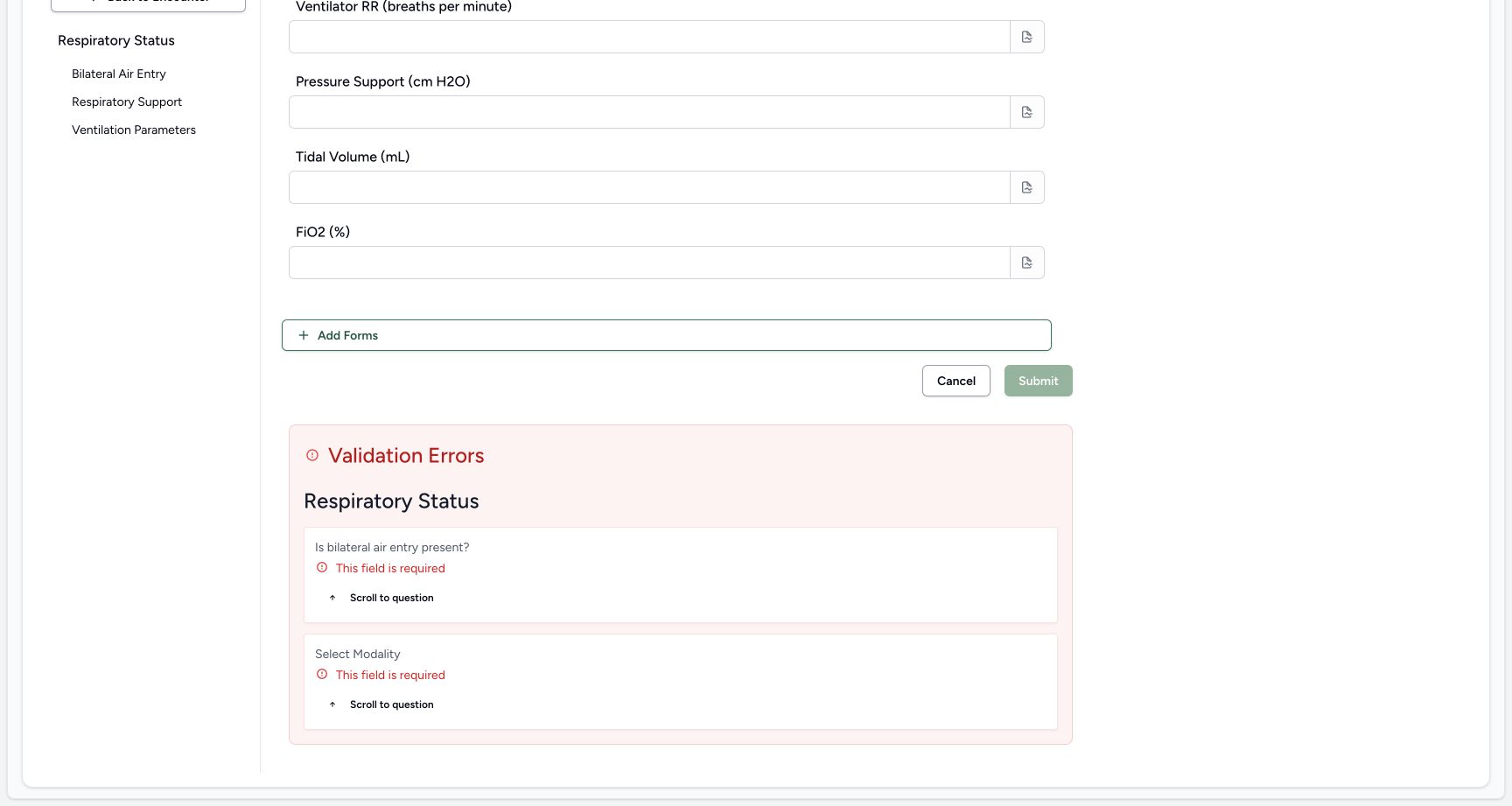
Is bilateral air entry present? and Select Modality have required asterisks. Submitting this blank form produces This field is required beside both questions and a Validation Errors summary below the form. Scroll normally to the summary. Its first Scroll to question button returns to the unanswered air-entry choice. No response is saved by that validation attempt.
1234Inspect required choices and optional note fields
Capture details
Exact committed release 8d99bb8a on an isolated nonproduction clone, using an existing Nurse and fictional Polyclinic inpatient case. The synthetic patient name retains an earlier release label. Existing form, still blank. Red asterisks mark the bilateral-air-entry question and Select Modality as required. Literal option labels are rendered exactly as installed; choices here are not care recommendations.
Image SHA-256 056564f24116a558537157ef90092720949438c3a124e9d00f0f85689403a9dd
- Required air-entry choice: The installed yes/no radio question is required.
- Optional text note: This separate text area is optional in the software.
- Required modality: The installed modality choices are oxygen_support, non_invasive and invasive.
- Optional device: Device is a separate optional choice; the form does not automatically hide other groups.
 12
12Recover from the two required-question errors
Capture details
Exact committed release 8d99bb8a on an isolated nonproduction clone, using an existing Nurse and fictional Polyclinic inpatient case. The synthetic patient name retains an earlier release label. A blank Submit produced two client validation errors and no saved response. Inline errors remain next to the required choices.
Image SHA-256 d0dbc66bb58e491b4d1cbcab3754c6d7ec2153fc98eb287152d85e6885668f12
- Air-entry answer missing: The inline error requires a choice before submission.
- Modality answer missing: Select Modality has its own required error.
 12
12Use validation summary links to return to missing questions
Capture details
Exact committed release 8d99bb8a on an isolated nonproduction clone, using an existing Nurse and fictional Polyclinic inpatient case. The synthetic patient name retains an earlier release label. The lower form shows two required-question errors. Submit is disabled while these are unresolved; the Scroll to question buttons return to the actual unanswered controls.
Image SHA-256 aa16055aed505f53ad082b630fbe466e6e1e415fd5e9eebf760b4a664a5bf035
- Return to air-entry question: Use this first Scroll to question link to correct the air-entry answer.
- Submit disabled: Submission is blocked by the displayed client validation errors.
3. Answer the required choice and identify the fictional example
The air-entry choices are the literal strings yes and no. In this fictional control exercise, no is selected and Note on Bilateral Air Entry receives the explicit SYNTHETIC SOFTWARE TRAINING ONLY text. This separate textarea is optional in the software. Selecting the required answer clears its inline error; it does not validate or establish a physical respiratory finding.
1234Inspect required choices and optional note fields
Capture details
Exact committed release 8d99bb8a on an isolated nonproduction clone, using an existing Nurse and fictional Polyclinic inpatient case. The synthetic patient name retains an earlier release label. Existing form, still blank. Red asterisks mark the bilateral-air-entry question and Select Modality as required. Literal option labels are rendered exactly as installed; choices here are not care recommendations.
Image SHA-256 056564f24116a558537157ef90092720949438c3a124e9d00f0f85689403a9dd
- Required air-entry choice: The installed yes/no radio question is required.
- Optional text note: This separate text area is optional in the software.
- Required modality: The installed modality choices are oxygen_support, non_invasive and invasive.
- Optional device: Device is a separate optional choice; the form does not automatically hide other groups.
12Recover from the two required-question errors
Capture details
Exact committed release 8d99bb8a on an isolated nonproduction clone, using an existing Nurse and fictional Polyclinic inpatient case. The synthetic patient name retains an earlier release label. A blank Submit produced two client validation errors and no saved response. Inline errors remain next to the required choices.
Image SHA-256 d0dbc66bb58e491b4d1cbcab3754c6d7ec2153fc98eb287152d85e6885668f12
- Air-entry answer missing: The inline error requires a choice before submission.
- Modality answer missing: Select Modality has its own required error.
1234Required answers clear errors; optional controls remain independent
Capture details
Exact committed release 8d99bb8a on an isolated nonproduction clone, using an existing Nurse and fictional Polyclinic inpatient case. The synthetic patient name retains an earlier release label. The fictional note explicitly denies clinical meaning. Required no and oxygen_support are selected and their errors cleared; optional device is currently nasal_prongs. Lower ventilator controls remain visible rather than conditionally hiding.
Image SHA-256 b9d19b0d34acb85292a3a90b9784ae177d0912124fd0700a7d13a7d897fab063
- Fictional context: The note identifies every choice and number as software training rather than patient findings or care instructions.
- Selected required modality: This selected circle cleared its own required error.
- Selected optional device: This optional choice can be inspected separately from the modality selection.
- Separate optional ventilator mode: These controls remain displayed in this installed form even when oxygen_support is selected.
4. Inspect and change the modality and device choices
Select Modality offers oxygen_support, non_invasive and invasive exactly as displayed. Select Oxygen Support Device separately offers nasal_prongs, simple_face_mask, nrm and hfnc. The example first selects oxygen_support and optional nasal_prongs, then clicks the selected nasal_prongs circle again to clear it and changes modality to non_invasive. The final response has no device answer. The other controls remain displayed; selecting a modality does not automatically hide these installed groups.
1234Inspect required choices and optional note fields
Capture details
Exact committed release 8d99bb8a on an isolated nonproduction clone, using an existing Nurse and fictional Polyclinic inpatient case. The synthetic patient name retains an earlier release label. Existing form, still blank. Red asterisks mark the bilateral-air-entry question and Select Modality as required. Literal option labels are rendered exactly as installed; choices here are not care recommendations.
Image SHA-256 056564f24116a558537157ef90092720949438c3a124e9d00f0f85689403a9dd
- Required air-entry choice: The installed yes/no radio question is required.
- Optional text note: This separate text area is optional in the software.
- Required modality: The installed modality choices are oxygen_support, non_invasive and invasive.
- Optional device: Device is a separate optional choice; the form does not automatically hide other groups.
1234Required answers clear errors; optional controls remain independent
Capture details
Exact committed release 8d99bb8a on an isolated nonproduction clone, using an existing Nurse and fictional Polyclinic inpatient case. The synthetic patient name retains an earlier release label. The fictional note explicitly denies clinical meaning. Required no and oxygen_support are selected and their errors cleared; optional device is currently nasal_prongs. Lower ventilator controls remain visible rather than conditionally hiding.
Image SHA-256 b9d19b0d34acb85292a3a90b9784ae177d0912124fd0700a7d13a7d897fab063
- Fictional context: The note identifies every choice and number as software training rather than patient findings or care instructions.
- Selected required modality: This selected circle cleared its own required error.
- Selected optional device: This optional choice can be inspected separately from the modality selection.
- Separate optional ventilator mode: These controls remain displayed in this installed form even when oxygen_support is selected.
 1234
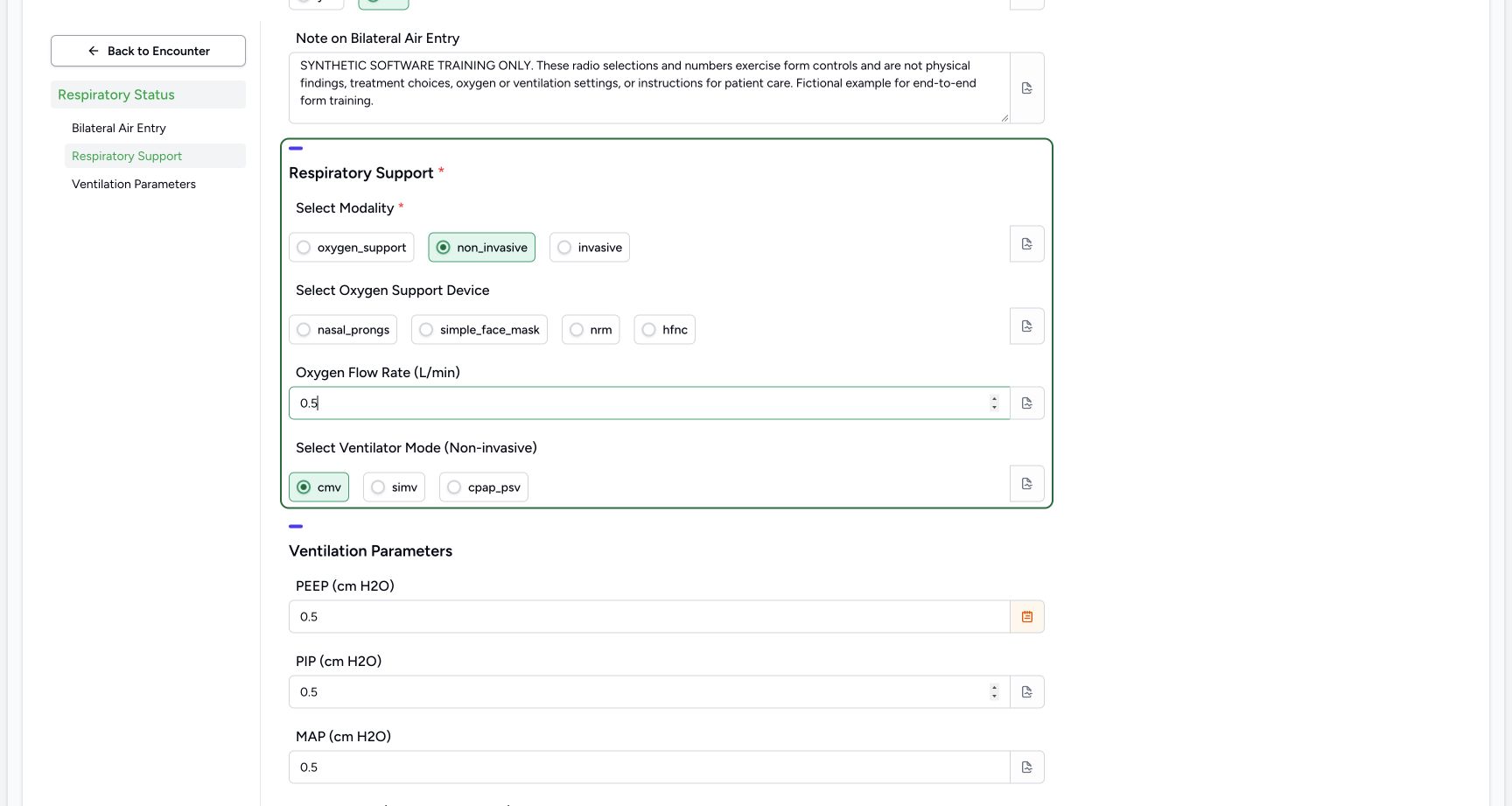
1234Change a radio choice and clear an optional selection
Capture details
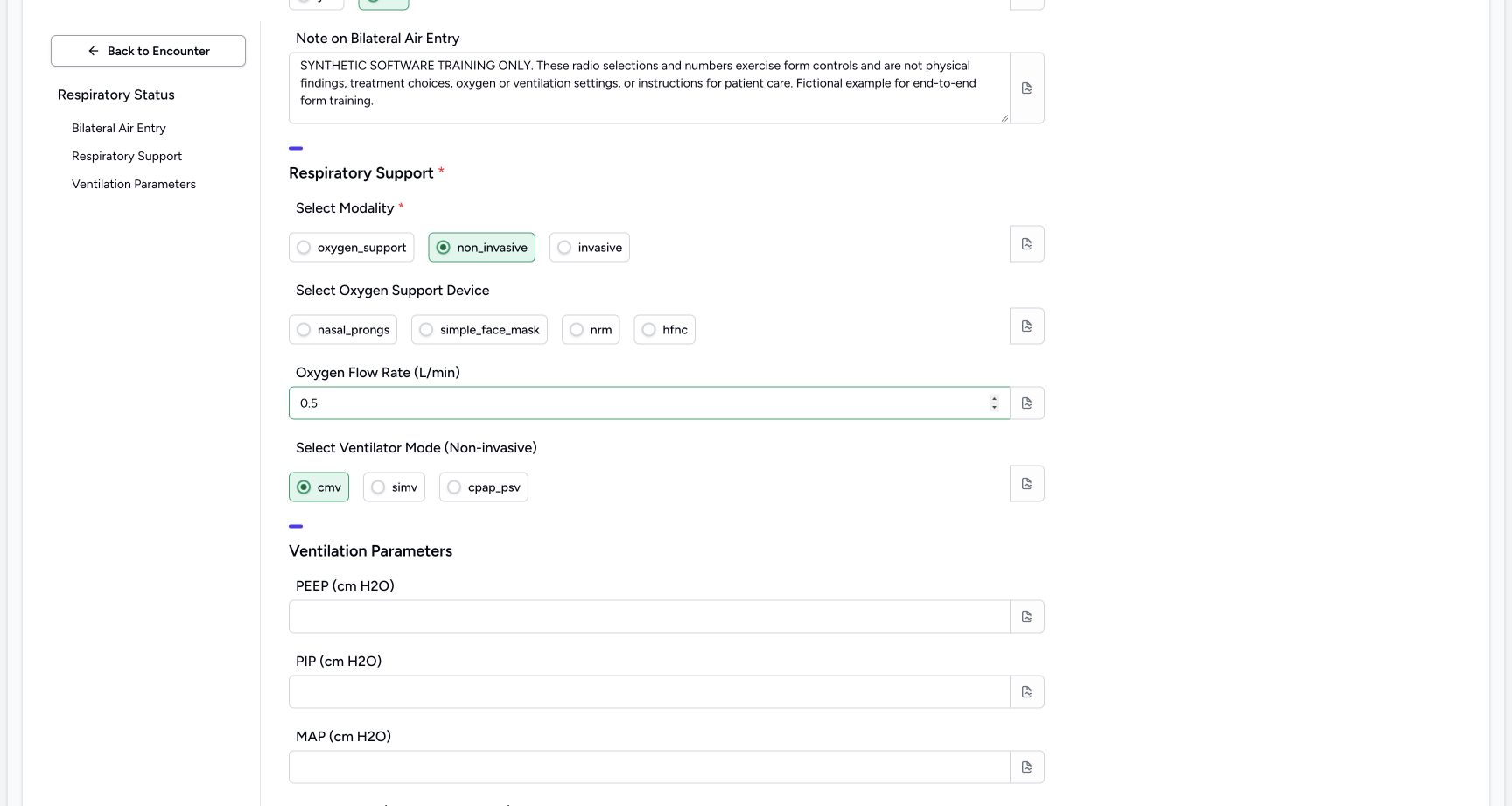
Exact committed release 8d99bb8a on an isolated nonproduction clone, using an existing Nurse and fictional Polyclinic inpatient case. The synthetic patient name retains an earlier release label. The selected nasal_prongs circle was clicked again and is now clear; non_invasive and cmv are selected. Oxygen Flow Rate contains artificial 0.5 solely to exercise the decimal input. All installed groups remain displayed.
Image SHA-256 90366b5773d6d53610e210bebed82ebb2dc99e78ad0f3240ea2a9e2c76e16d69
- Changed modality: Selecting another radio changes the modality selection.
- Optional device cleared: The previously selected nasal_prongs circle is now unselected after clicking it again.
- Decimal example: The input currently contains artificial 0.5; it is not an oxygen setting or recommendation.
- Mode example: The separate optional mode is selected only as a software-control example.
5. Inspect optional flow and ventilator-mode controls
Oxygen Flow Rate (L/min) is an optional decimal input. Select Ventilator Mode (Non-invasive) is a separate optional choice with cmv, simv and cpap_psv. The fictional example selects cmv. The parenthetical units and Non-invasive text are installed labels, not selectable coded units or a mode-dependent visibility rule. Artificial 0.5 is used only to exercise the flow input. The separate recovery lesson documents the real defect encountered when that entered value is cleared.
1234Change a radio choice and clear an optional selection
Capture details
Exact committed release 8d99bb8a on an isolated nonproduction clone, using an existing Nurse and fictional Polyclinic inpatient case. The synthetic patient name retains an earlier release label. The selected nasal_prongs circle was clicked again and is now clear; non_invasive and cmv are selected. Oxygen Flow Rate contains artificial 0.5 solely to exercise the decimal input. All installed groups remain displayed.
Image SHA-256 90366b5773d6d53610e210bebed82ebb2dc99e78ad0f3240ea2a9e2c76e16d69
- Changed modality: Selecting another radio changes the modality selection.
- Optional device cleared: The previously selected nasal_prongs circle is now unselected after clicking it again.
- Decimal example: The input currently contains artificial 0.5; it is not an oxygen setting or recommendation.
- Mode example: The separate optional mode is selected only as a software-control example.
 123
123Review the cleared optional flow field
Capture details
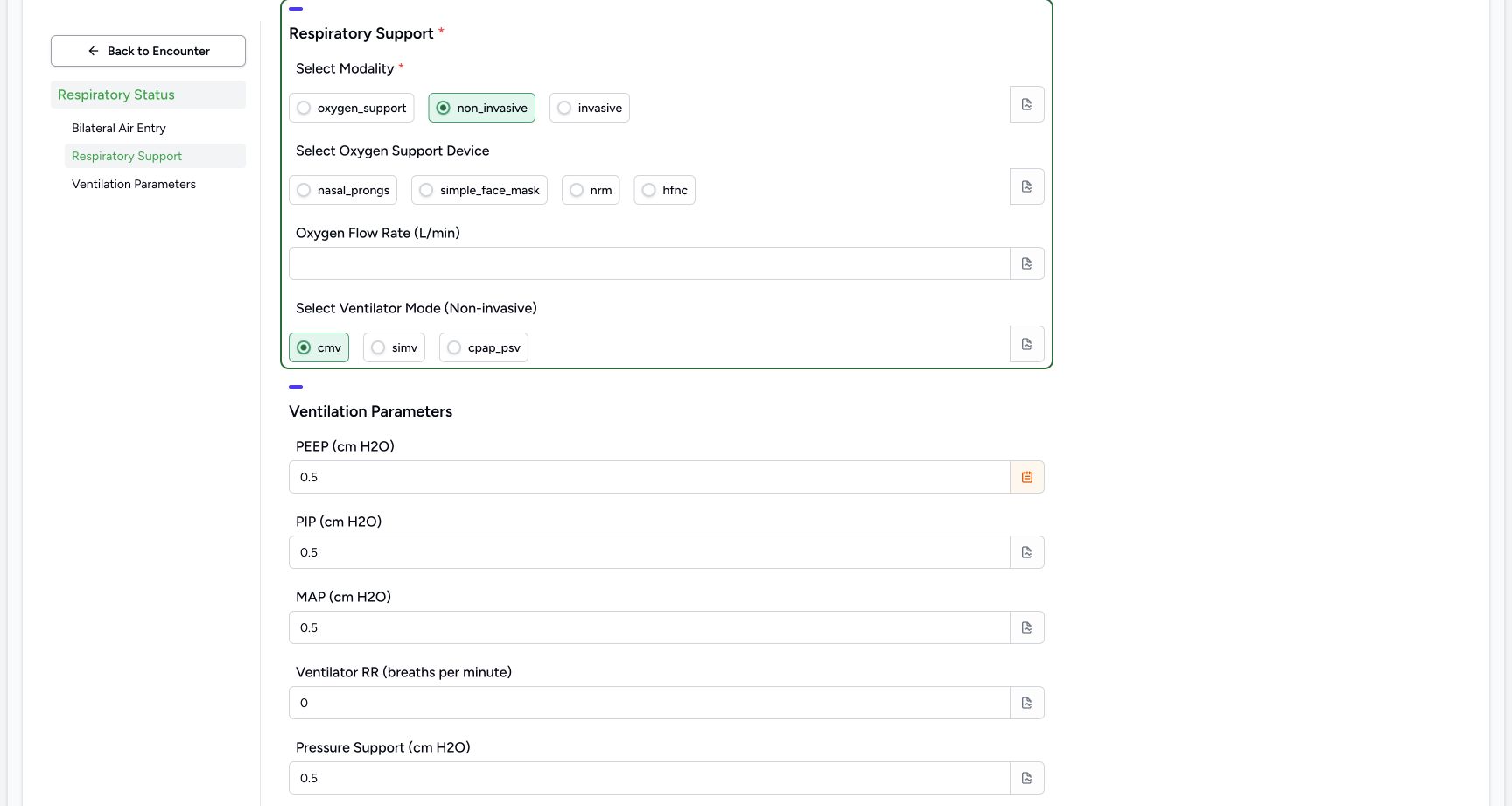
Exact committed release 8d99bb8a on an isolated nonproduction clone, using an existing Nurse and fictional Polyclinic inpatient case. The synthetic patient name retains an earlier release label. Oxygen Flow Rate previously held fictional 0.5 and was cleared through the normal number input. The device choice is also clear, while non_invasive and cmv remain selected. No response has been saved yet.
Image SHA-256 b36c6539f56beb4e1a84d33ee7f3024834cdfa27f454858290cc1362d98a25f9
- Optional decimal now blank: This field was entered and then cleared; the pending form is being checked rather than assuming how the server will treat it.
- Optional choice remains clear: No device radio is selected.
- Mode remains selected: The separate mode retains cmv after the other optional controls were cleared.
 1
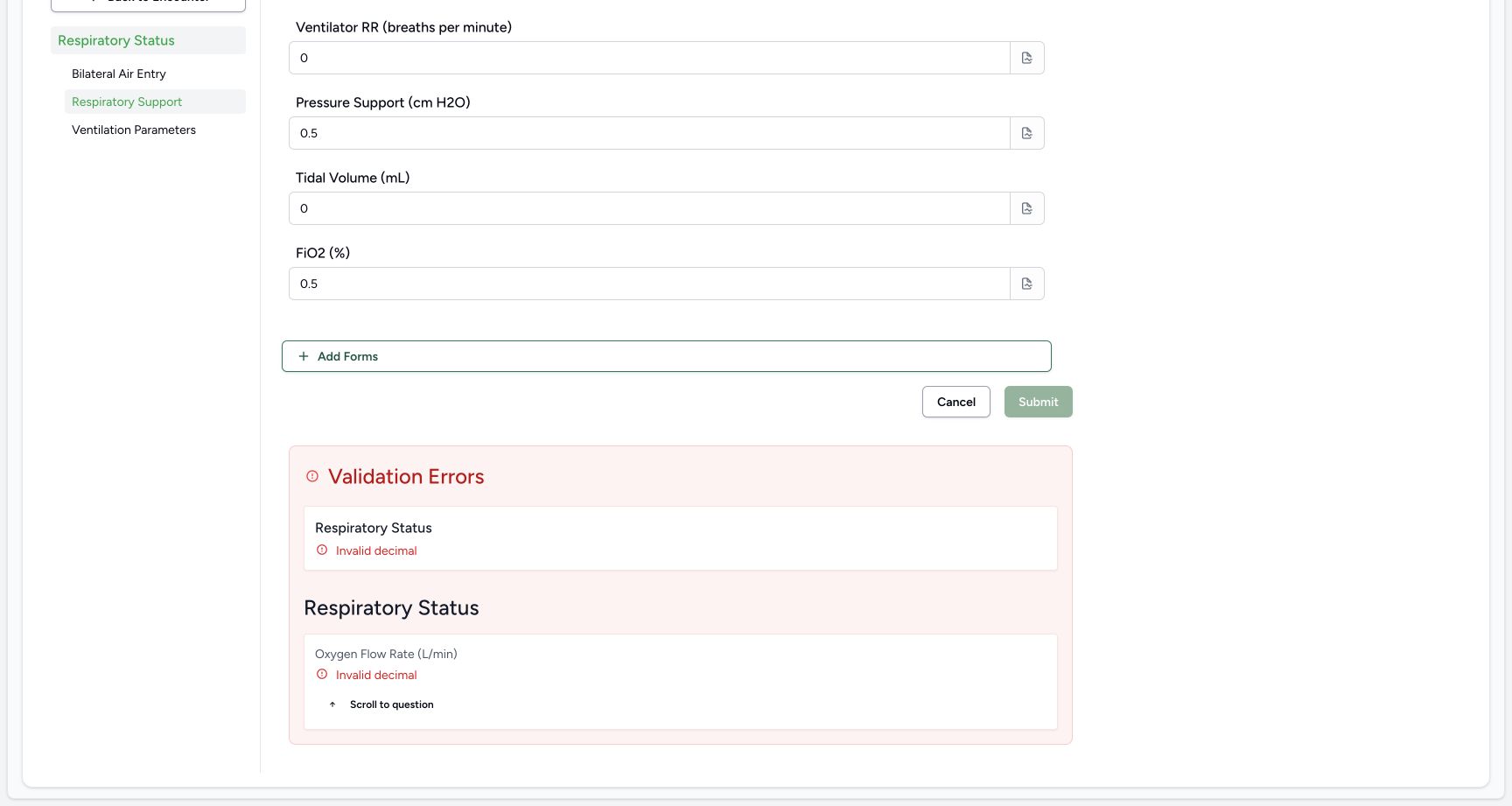
1A cleared optional decimal produces an actual submission error
Capture details
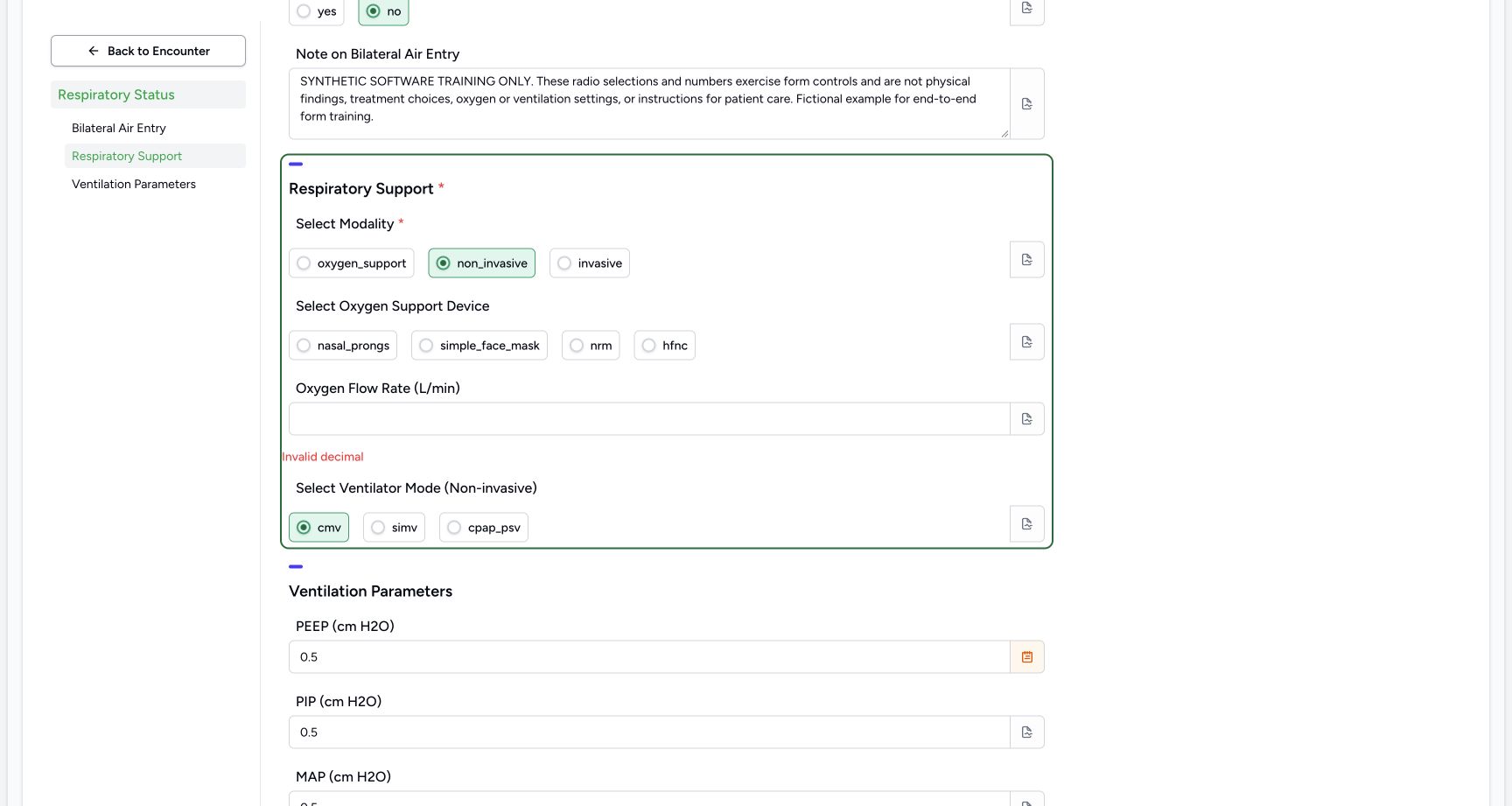
Exact committed release 8d99bb8a on an isolated nonproduction clone, using an existing Nurse and fictional Polyclinic inpatient case. The synthetic patient name retains an earlier release label. The ordinary UI submission stayed on the form and returned Invalid decimal for Oxygen Flow Rate after that optional field was entered and cleared. The pending fictional answers remain. This is demonstrated 8d99 behavior rather than a normal requirement to enter an oxygen value.
Image SHA-256 6d27008788b94e8ae811cf0974786c7dfc475c412d286a9fca14751279a9a917
- Actual decimal refusal: The cleared optional Oxygen Flow Rate field now has an Invalid decimal error.
6. Work through all seven ventilation-number fields
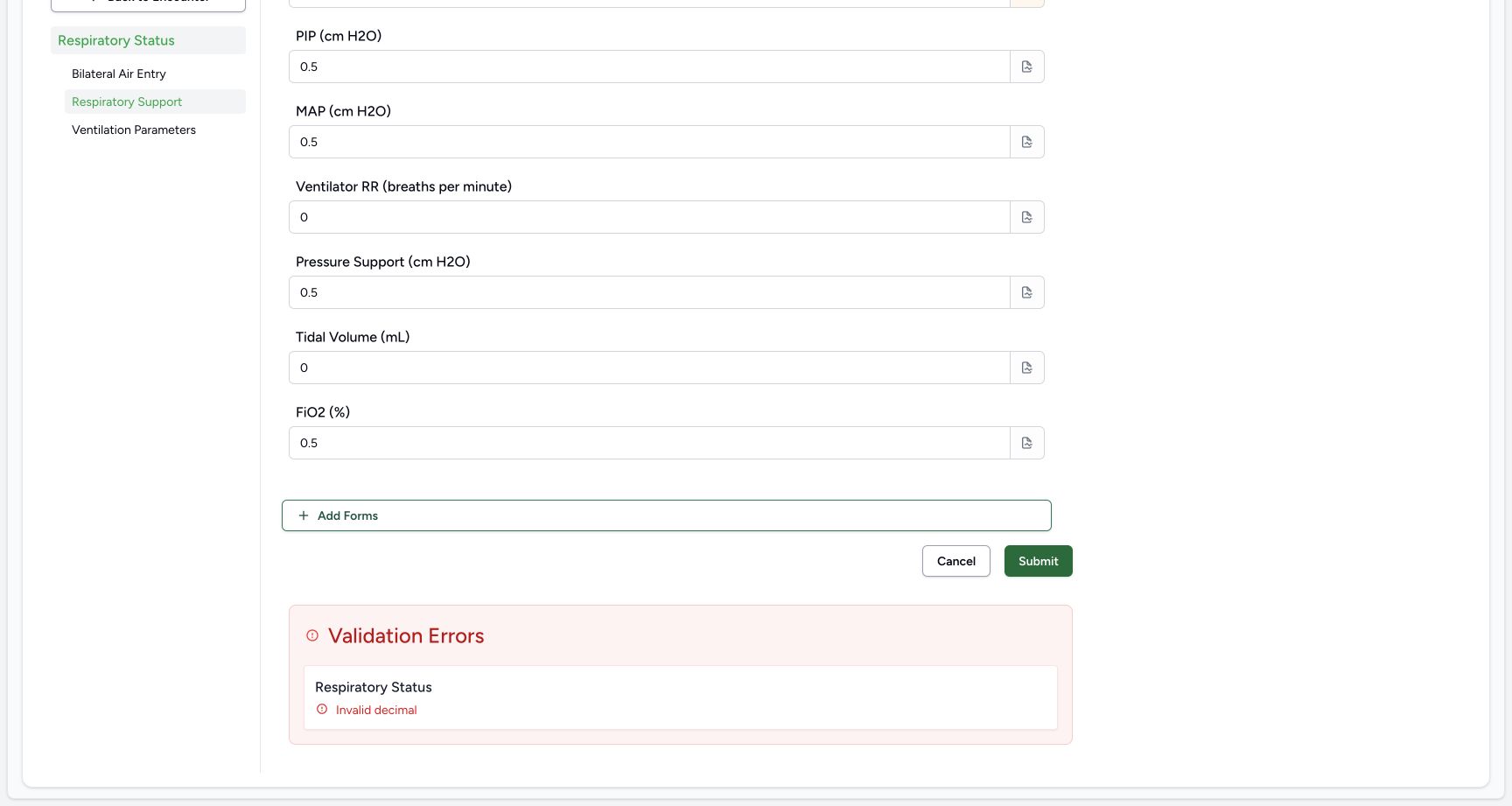
Scroll normally to Ventilation Parameters. PEEP (cm H2O), PIP (cm H2O), MAP (cm H2O), Pressure Support (cm H2O) and FiO2 (%) are Decimal controls. Ventilator RR (breaths per minute) and Tidal Volume (mL) are Integer controls. The demonstration enters artificial 0.5 in each decimal and artificial 0 in each integer; these are format examples rather than clinically meaningful settings. The numeric controls use the installed decimal or whole-number steps, with no selectable unit field shown.
1234Inspect all seven optional ventilation-number controls
Capture details
Exact committed release 8d99bb8a on an isolated nonproduction clone, using an existing Nurse and fictional Polyclinic inpatient case. The synthetic patient name retains an earlier release label. All seven optional ventilation fields remain visible. Artificial0.5 values exercise decimal controls; artificial 0 values exercise Integer controls. Parenthetical units are installed label text, with no selectable coded unit binding in this questionnaire.
Image SHA-256 e2d013dab1b3b5e0af75dc47301fee500ea1a317aa36b815bac47581bd4b9ceb
- Decimal fields: PEEP, PIP and MAP each currently contain the fictional 0.5 control example.
- Whole-number zero: Ventilator RR is an Integer control and currently contains artificial 0.
- Second Integer control: Tidal Volume is also an Integer control, with the same artificial 0 example.
- Final decimal field: FiO2 is a Decimal control with artificial 0.5; this is not a target or treatment value.
123Attach an optional note to one numeric answer
Capture details
Exact committed release 8d99bb8a on an isolated nonproduction clone, using an existing Nurse and fictional Polyclinic inpatient case. The synthetic patient name retains an earlier release label. The PEEP question note popover contains explicitly fictional software-training context. This is separate from the dedicated Note on Bilateral Air Entry text question; note entry is optional.
Image SHA-256 4d6a4acbb52d84d1ff02719b646513c0fe464be168978b24a73c5bedd89fd78b
- Optional question note: Enter the appropriate context here; this example is explicitly fictional and not a clinical setting.
- Question being annotated: This note belongs to the PEEP answer rather than to the entire response.
- Open the optional PEEP note icon: The original-pixel-reviewed note icon is at the right end of the PEEP numeric input. This additional point is not a new capture-time DOM geometry attestation.
 12
12Retry once after correcting the decimal input
Capture details
Exact committed release 8d99bb8a on an isolated nonproduction clone, using an existing Nurse and fictional Polyclinic inpatient case. The synthetic patient name retains an earlier release label. The pending fictional numbers and note remain. Submit is enabled after restoring the failed decimal; the form may still display the prior general error until a new submission succeeds. The retry must be verified from its actual result.
Image SHA-256 f95d9b003341fa486628a96793b7de75acaba97d0adf3934260326df04e3f542
- Retry Submit: Submit the corrected fictional response once, then verify that it was actually saved.
- Retained Integer zero: The artificial whole-number0 remains in Tidal Volume during the retry.
7. Add an optional note to one numeric answer
At the right end of PEEP, open its note icon. Enter the explicit fictional per-question context in Add notes, then close the popover with Escape. This optional note belongs to PEEP and is separate from the Note on Bilateral Air Entry textarea. The orange note icon indicates that this answer has context. A documentation requirement under facility policy is separate from this optional software input.
1234Inspect all seven optional ventilation-number controls
Capture details
Exact committed release 8d99bb8a on an isolated nonproduction clone, using an existing Nurse and fictional Polyclinic inpatient case. The synthetic patient name retains an earlier release label. All seven optional ventilation fields remain visible. Artificial0.5 values exercise decimal controls; artificial 0 values exercise Integer controls. Parenthetical units are installed label text, with no selectable coded unit binding in this questionnaire.
Image SHA-256 e2d013dab1b3b5e0af75dc47301fee500ea1a317aa36b815bac47581bd4b9ceb
- Decimal fields: PEEP, PIP and MAP each currently contain the fictional 0.5 control example.
- Whole-number zero: Ventilator RR is an Integer control and currently contains artificial 0.
- Second Integer control: Tidal Volume is also an Integer control, with the same artificial 0 example.
- Final decimal field: FiO2 is a Decimal control with artificial 0.5; this is not a target or treatment value.
123Attach an optional note to one numeric answer
Capture details
Exact committed release 8d99bb8a on an isolated nonproduction clone, using an existing Nurse and fictional Polyclinic inpatient case. The synthetic patient name retains an earlier release label. The PEEP question note popover contains explicitly fictional software-training context. This is separate from the dedicated Note on Bilateral Air Entry text question; note entry is optional.
Image SHA-256 4d6a4acbb52d84d1ff02719b646513c0fe464be168978b24a73c5bedd89fd78b
- Optional question note: Enter the appropriate context here; this example is explicitly fictional and not a clinical setting.
- Question being annotated: This note belongs to the PEEP answer rather than to the entire response.
- Open the optional PEEP note icon: The original-pixel-reviewed note icon is at the right end of the PEEP numeric input. This additional point is not a new capture-time DOM geometry attestation.
123Review the cleared optional flow field
Capture details
Exact committed release 8d99bb8a on an isolated nonproduction clone, using an existing Nurse and fictional Polyclinic inpatient case. The synthetic patient name retains an earlier release label. Oxygen Flow Rate previously held fictional 0.5 and was cleared through the normal number input. The device choice is also clear, while non_invasive and cmv remain selected. No response has been saved yet.
Image SHA-256 b36c6539f56beb4e1a84d33ee7f3024834cdfa27f454858290cc1362d98a25f9
- Optional decimal now blank: This field was entered and then cleared; the pending form is being checked rather than assuming how the server will treat it.
- Optional choice remains clear: No device radio is selected.
- Mode remains selected: The separate mode retains cmv after the other optional controls were cleared.
8. Resolve the demonstrated decimal refusal and retry once
In this exact version, entering and then clearing the optional flow number caused Invalid decimal on Submit. The form remained pending and no response was saved. For this controlled fictional example only, restoring explicit artificial 0.5 cleared the field error and enabled Submit. The old general error remained below the form until retry. This is a demonstrated defect, not a rule requiring an oxygen value for an inapplicable field. Review the pending fictional answers and choose Submit once, then verify the result.
123Review the cleared optional flow field
Capture details
Exact committed release 8d99bb8a on an isolated nonproduction clone, using an existing Nurse and fictional Polyclinic inpatient case. The synthetic patient name retains an earlier release label. Oxygen Flow Rate previously held fictional 0.5 and was cleared through the normal number input. The device choice is also clear, while non_invasive and cmv remain selected. No response has been saved yet.
Image SHA-256 b36c6539f56beb4e1a84d33ee7f3024834cdfa27f454858290cc1362d98a25f9
- Optional decimal now blank: This field was entered and then cleared; the pending form is being checked rather than assuming how the server will treat it.
- Optional choice remains clear: No device radio is selected.
- Mode remains selected: The separate mode retains cmv after the other optional controls were cleared.
1A cleared optional decimal produces an actual submission error
Capture details
Exact committed release 8d99bb8a on an isolated nonproduction clone, using an existing Nurse and fictional Polyclinic inpatient case. The synthetic patient name retains an earlier release label. The ordinary UI submission stayed on the form and returned Invalid decimal for Oxygen Flow Rate after that optional field was entered and cleared. The pending fictional answers remain. This is demonstrated 8d99 behavior rather than a normal requirement to enter an oxygen value.
Image SHA-256 6d27008788b94e8ae811cf0974786c7dfc475c412d286a9fca14751279a9a917
- Actual decimal refusal: The cleared optional Oxygen Flow Rate field now has an Invalid decimal error.
 12
12Use the actual Invalid decimal error link
Capture details
Exact committed release 8d99bb8a on an isolated nonproduction clone, using an existing Nurse and fictional Polyclinic inpatient case. The synthetic patient name retains an earlier release label. The summary identifies Oxygen Flow Rate with Invalid decimal and disables Submit. Independent ordinary Nurse and Doctor reads verified that no response or clinical record was saved by the failed attempt.
Image SHA-256 89d75ae221f93ecbaa623c9de8c351c156bda4085a1bca7b337ea64546025cf3
- Return to failed field: This actual error-summary link identifies the optional flow field that was entered and cleared.
- Submit blocked after refusal: No success should be inferred from pressing Submit; the form remains pending.
 12
12Recover with an explicit fictional number
Capture details
Exact committed release 8d99bb8a on an isolated nonproduction clone, using an existing Nurse and fictional Polyclinic inpatient case. The synthetic patient name retains an earlier release label. The fictional example deliberately restores0.5 to Oxygen Flow Rate to exercise the current decimal-save path. The field-level error clears and Submit becomes enabled. This is not a recommendation to fill an otherwise inapplicable clinical field.
Image SHA-256 af4a69ac502c208eb56d219595a967c1ff6e4f33d6a40a59a3a7e485604a2195
- Explicit fictional decimal: Restoring artificial 0.5 clears this field-level error in the demonstrated 8d99 path.
- Retained mode choice: The pending cmv choice remains unchanged through error recovery.
12Retry once after correcting the decimal input
Capture details
Exact committed release 8d99bb8a on an isolated nonproduction clone, using an existing Nurse and fictional Polyclinic inpatient case. The synthetic patient name retains an earlier release label. The pending fictional numbers and note remain. Submit is enabled after restoring the failed decimal; the form may still display the prior general error until a new submission succeeds. The retry must be verified from its actual result.
Image SHA-256 f95d9b003341fa486628a96793b7de75acaba97d0adf3934260326df04e3f542
- Retry Submit: Submit the corrected fictional response once, then verify that it was actually saved.
- Retained Integer zero: The artificial whole-number0 remains in Tidal Volume during the retry.
9. Inspect the actual saved response and retained note
After the successful retry returns to Overview, open Responses. The Respiratory Status card at 07:06 AM on October 19 is filed by MANSOQ E2E Nurse and contains all three groups. It retains no, non_invasive, cmv, the explicit fictional narrative, the decimal examples and both whole-number zero values. The cleared optional device has no saved answer. Choose See Note on PEEP to inspect its retained context. Independent ordinary Nurse and Doctor reads verify exactly one new Completed response, twelve answer leaves and server-created timestamp 2026-10-19T04:06:47.796296Z.
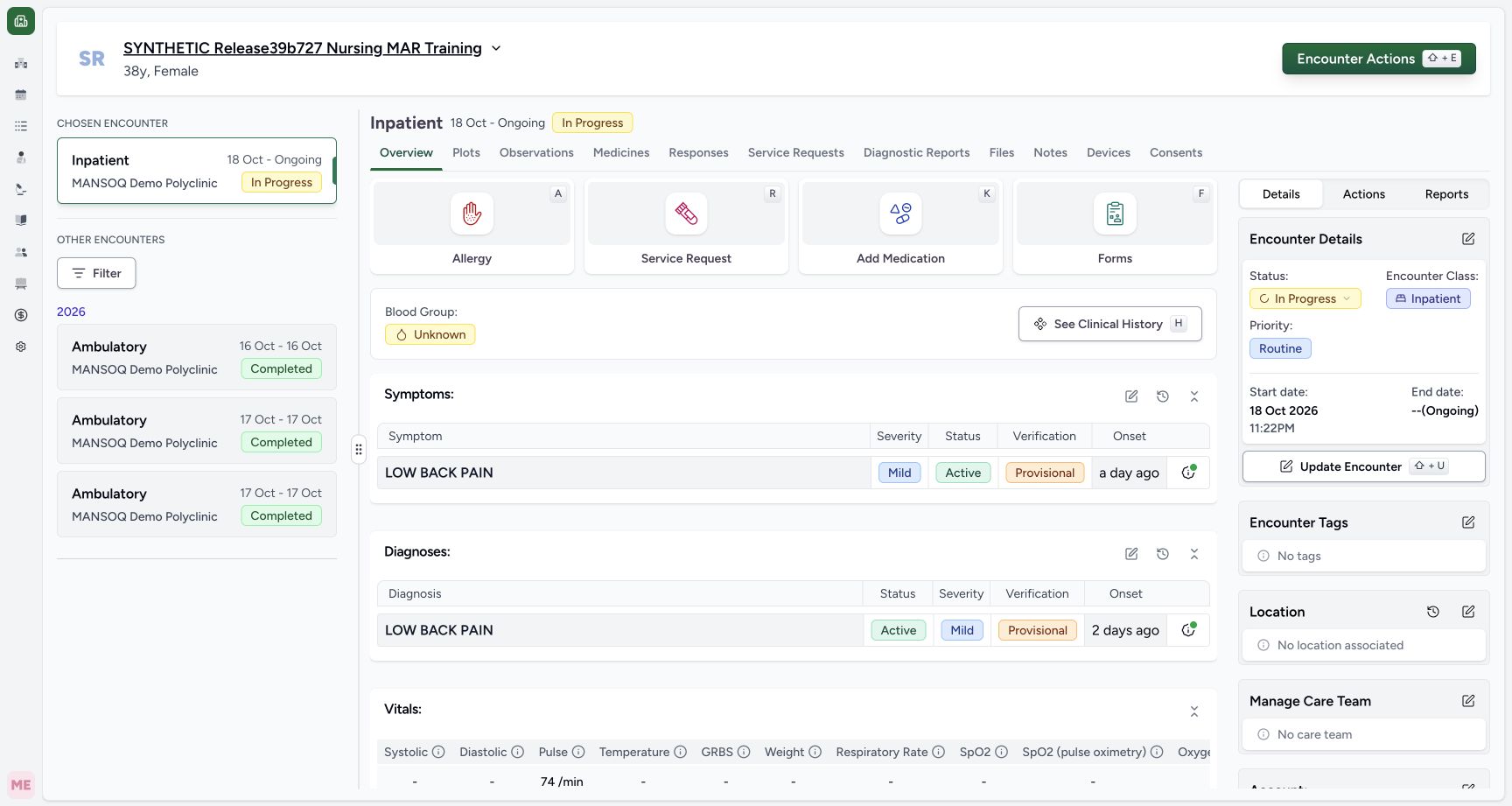 1
1Verify the saved response through Responses
Capture details
Exact committed release 8d99bb8a on an isolated nonproduction clone, using an existing Nurse and fictional Polyclinic inpatient case. The synthetic patient name retains an earlier release label. The successful retry returned to the selected encounter Overview. Independent ordinary Nurse/Doctor GETs establish exactly one new Completed Respiratory Status response and no additional observations; use Responses to inspect the actual saved answers.
Image SHA-256 827917014e26b4159a15e8760937ed86ae4b2b3042265fba6b35d85c4180888e
- Open Responses: Inspect the saved respiratory response here rather than assuming that form values become coded observations.
12Inspect every saved answer group, zero values and author time
Capture details
Exact committed release 8d99bb8a on an isolated nonproduction clone, using an existing Nurse and fictional Polyclinic inpatient case. The synthetic patient name retains an earlier release label. The saved Respiratory Status card shows all three groups, literal no/non_invasive/cmv choices, artificial decimal 0.5 and Integer 0 answers, full fictional note, Nurse author and server save time07:06 AM. Optional device was cleared and has no saved answer. Independent GETs identify source 7ef417e5-40a0-4945-b60b-d4a6212243d6 Completed and exactly 12 answer leaves.
Image SHA-256 ad5e2e153138631fd79149c6c6e6ccd62dfa3014470a399d81e5472fba1dcdf7
- Saved per-question note: Open the retained note belonging to the PEEP answer.
- Actions for this exact response: This menu belongs to the new Respiratory Status card, not the older Heart Rate records.
 1
1Read the retained optional PEEP note
Capture details
Exact committed release 8d99bb8a on an isolated nonproduction clone, using an existing Nurse and fictional Polyclinic inpatient case. The synthetic patient name retains an earlier release label. See Note opens the exact fictional note attached to the saved PEEP answer. The general text-question note and this per-question note are distinct retained answers/context.
Image SHA-256 c4764d9ca3f7a9dbea525e4ca67efcf721d4d90b2a227f737915f067f1c31a3f
- Retained note popover: The saved optional per-question note is visible beside its PEEP row.
Saved answers do not automatically create respiratory plots
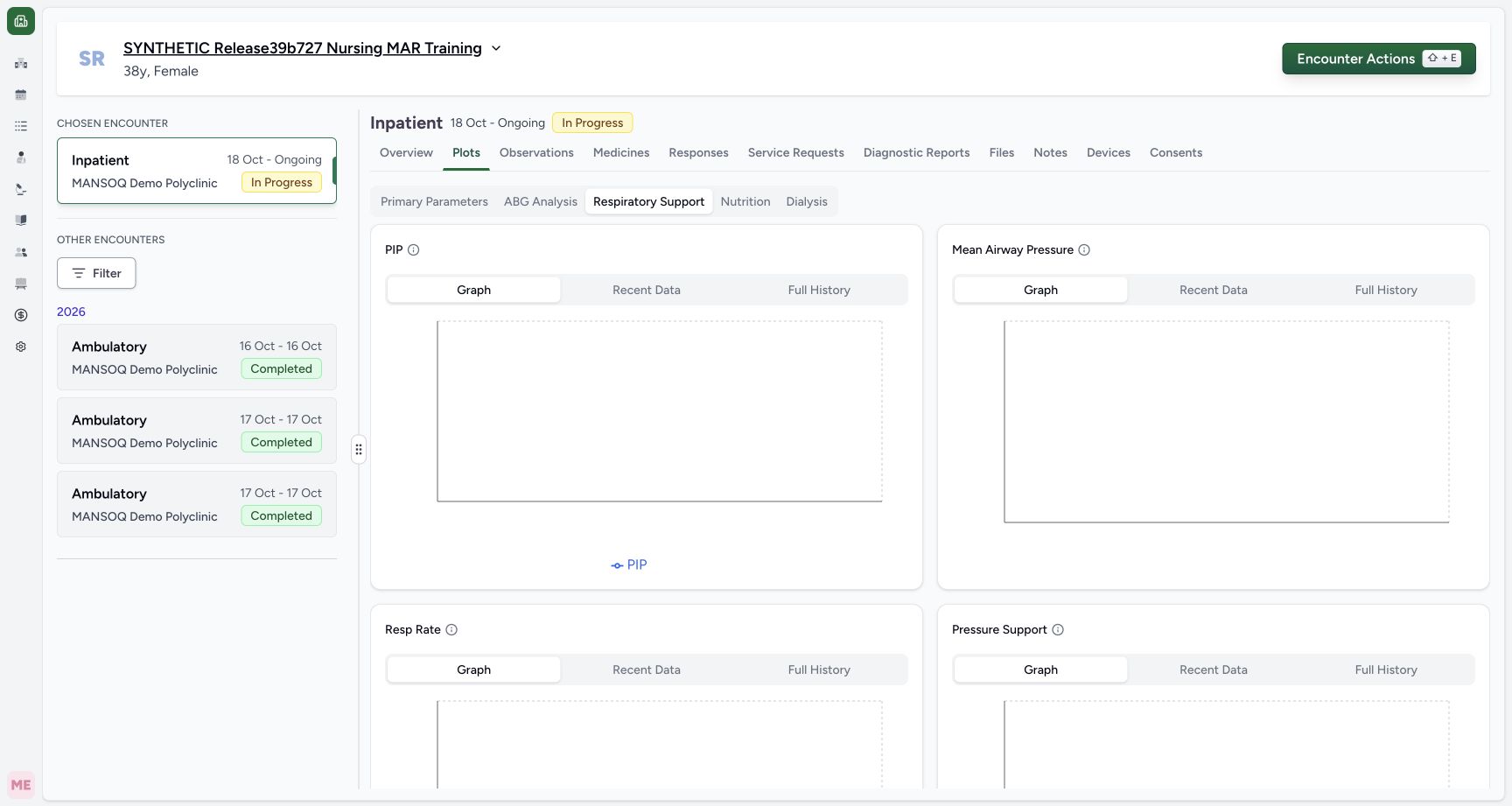
These thirteen installed input fields have no observation code or coded unit object. The questionnaire conversion creates derived observations only for coded leaves. Independent reads after the successful save, before its later correction, verified that the same three original observations remained and no respiratory observation was added. Plots → Respiratory Support is a separate configured observation view; the shown empty graph cards are not a trend of these form answers.
12Inspect every saved answer group, zero values and author time
Capture details
Exact committed release 8d99bb8a on an isolated nonproduction clone, using an existing Nurse and fictional Polyclinic inpatient case. The synthetic patient name retains an earlier release label. The saved Respiratory Status card shows all three groups, literal no/non_invasive/cmv choices, artificial decimal 0.5 and Integer 0 answers, full fictional note, Nurse author and server save time07:06 AM. Optional device was cleared and has no saved answer. Independent GETs identify source 7ef417e5-40a0-4945-b60b-d4a6212243d6 Completed and exactly 12 answer leaves.
Image SHA-256 ad5e2e153138631fd79149c6c6e6ccd62dfa3014470a399d81e5472fba1dcdf7
- Saved per-question note: Open the retained note belonging to the PEEP answer.
- Actions for this exact response: This menu belongs to the new Respiratory Status card, not the older Heart Rate records.
 12
12Distinguish saved form answers from coded respiratory observations
Capture details
Exact committed release 8d99bb8a on an isolated nonproduction clone, using an existing Nurse and fictional Polyclinic inpatient case. The synthetic patient name retains an earlier release label. The Respiratory Support plot area is separate from the zero-coded Respiratory Status questionnaire. Independent reads after the successful save, before correction and after correction all retained exactly the same three original observations and only current Pulse 74. No respiratory observation was created by this form. Visible empty plot groups are not fabricated clinical trends.
Image SHA-256 ee11d4a2e44e6d684f4239c5d9861918b57d7f5961ad12bbc89172e7854abbec
- Separate plot area: This tab displays configured respiratory observation groups, not arbitrary questionnaire answers.
- Graph control for PIP: This group has no respiratory observation from the saved zero-coded form.
Time, role and facility scope
The saved card shows the Nurse author and server save time. This form exposes no effective-time, backdating, device-control or clinical interpretation input. Existing ordinary Doctor and Nurse API readbacks verify the retained response and preservation of the original clinical records; the public screenshots in this lesson show the Nurse interface. No Doctor write workflow, approved clinical range, external device integration or every facility’s authority is implied.
1234Inspect required choices and optional note fields
Capture details
Exact committed release 8d99bb8a on an isolated nonproduction clone, using an existing Nurse and fictional Polyclinic inpatient case. The synthetic patient name retains an earlier release label. Existing form, still blank. Red asterisks mark the bilateral-air-entry question and Select Modality as required. Literal option labels are rendered exactly as installed; choices here are not care recommendations.
Image SHA-256 056564f24116a558537157ef90092720949438c3a124e9d00f0f85689403a9dd
- Required air-entry choice: The installed yes/no radio question is required.
- Optional text note: This separate text area is optional in the software.
- Required modality: The installed modality choices are oxygen_support, non_invasive and invasive.
- Optional device: Device is a separate optional choice; the form does not automatically hide other groups.
1234Inspect all seven optional ventilation-number controls
Capture details
Exact committed release 8d99bb8a on an isolated nonproduction clone, using an existing Nurse and fictional Polyclinic inpatient case. The synthetic patient name retains an earlier release label. All seven optional ventilation fields remain visible. Artificial0.5 values exercise decimal controls; artificial 0 values exercise Integer controls. Parenthetical units are installed label text, with no selectable coded unit binding in this questionnaire.
Image SHA-256 e2d013dab1b3b5e0af75dc47301fee500ea1a317aa36b815bac47581bd4b9ceb
- Decimal fields: PEEP, PIP and MAP each currently contain the fictional 0.5 control example.
- Whole-number zero: Ventilator RR is an Integer control and currently contains artificial 0.
- Second Integer control: Tidal Volume is also an Integer control, with the same artificial 0 example.
- Final decimal field: FiO2 is a Decimal control with artificial 0.5; this is not a target or treatment value.
12Inspect every saved answer group, zero values and author time
Capture details
Exact committed release 8d99bb8a on an isolated nonproduction clone, using an existing Nurse and fictional Polyclinic inpatient case. The synthetic patient name retains an earlier release label. The saved Respiratory Status card shows all three groups, literal no/non_invasive/cmv choices, artificial decimal 0.5 and Integer 0 answers, full fictional note, Nurse author and server save time07:06 AM. Optional device was cleared and has no saved answer. Independent GETs identify source 7ef417e5-40a0-4945-b60b-d4a6212243d6 Completed and exactly 12 answer leaves.
Image SHA-256 ad5e2e153138631fd79149c6c6e6ccd62dfa3014470a399d81e5472fba1dcdf7
- Saved per-question note: Open the retained note belonging to the PEEP answer.
- Actions for this exact response: This menu belongs to the new Respiratory Status card, not the older Heart Rate records.
1Read the retained optional PEEP note
Capture details
Exact committed release 8d99bb8a on an isolated nonproduction clone, using an existing Nurse and fictional Polyclinic inpatient case. The synthetic patient name retains an earlier release label. See Note opens the exact fictional note attached to the saved PEEP answer. The general text-question note and this per-question note are distinct retained answers/context.
Image SHA-256 c4764d9ca3f7a9dbea525e4ca67efcf721d4d90b2a227f737915f067f1c31a3f
- Retained note popover: The saved optional per-question note is visible beside its PEEP row.
Continue to source correction and other separate branches
The correction lesson applies only to this new fictional Respiratory Status response and retains its answers as invalid source history. Response printing, the form filter, the smaller Respiratory Support record IPD form, remaining plot groups and other patient/facility journeys require their own demonstrated teaching. The controls visible here do not establish those separate workflows as completed.
 1
1Choose correction for this exact saved response
Capture details
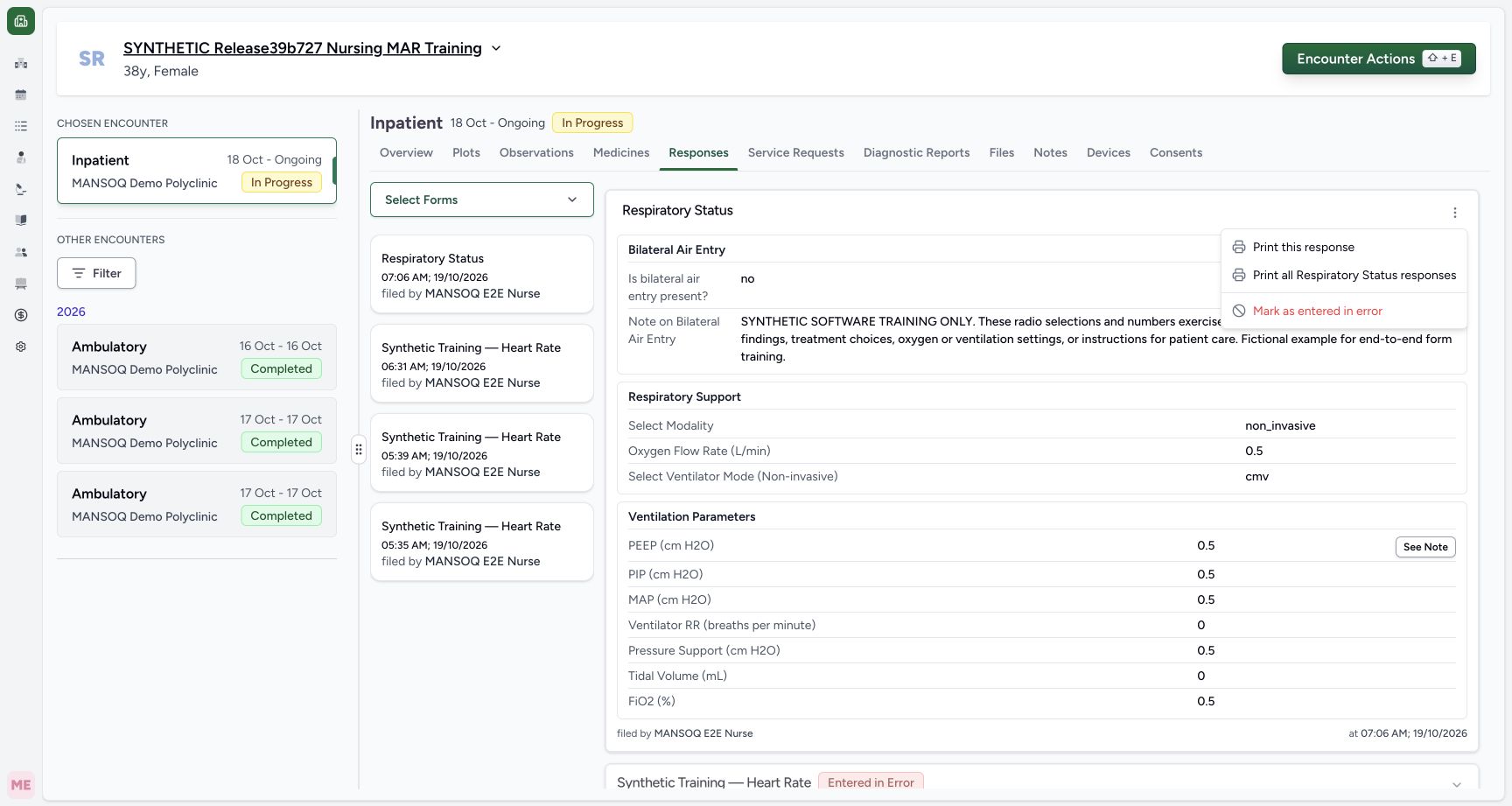
Exact committed release 8d99bb8a on an isolated nonproduction clone, using an existing Nurse and fictional Polyclinic inpatient case. The synthetic patient name retains an earlier release label. The actual More Actions menu for newly saved Respiratory Status response 7ef417e5 contains Print this response, Print all Respiratory Status responses and Mark as entered in error. Only this new fictional response will be corrected; no older record is selected.
Image SHA-256 dad7815c05e71ea87b60eec5c58b3c6551153e573c0b43e9d2dc64fca8978519
- Mark this response entered in error: Choose the correction action for the exact new Respiratory Status source.
 12
12Read the actual irreversible source-status warning
Capture details
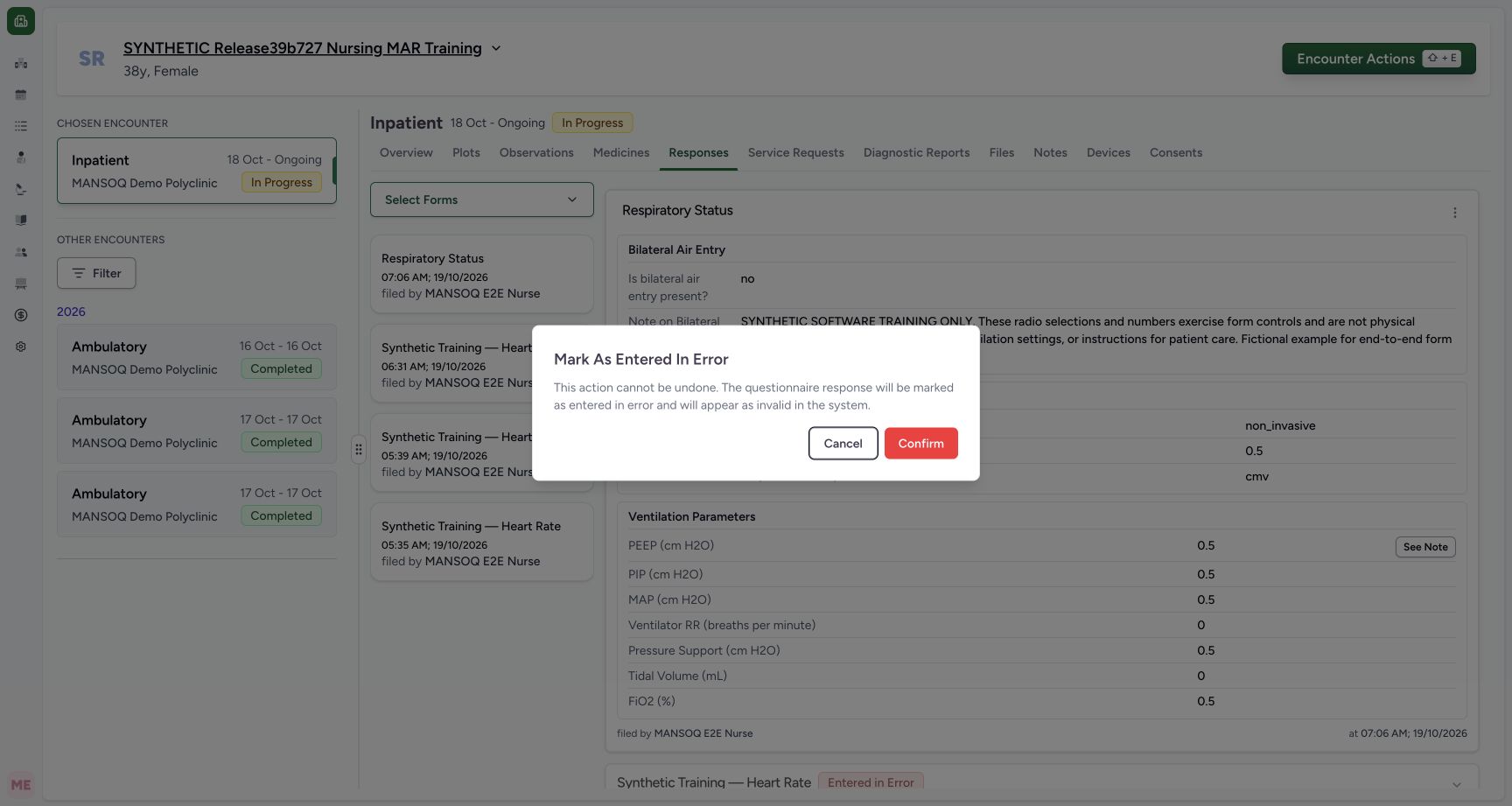
Exact committed release 8d99bb8a on an isolated nonproduction clone, using an existing Nurse and fictional Polyclinic inpatient case. The synthetic patient name retains an earlier release label. The correction dialog warns that the questionnaire response will be marked entered in error, appear invalid and that this action cannot be undone. It concerns only the newly created fictional respiratory response. Cancel leaves it unchanged; Confirm applies this source-status correction.
Image SHA-256 e5acc69c740f0dc2d973d1c11086ab0c5ad101cf9a2fc9fe1a03c4617eecefb4
- Confirm the exact source correction: Apply entered-in-error to the identified fictional respiratory response once.
- Cancel alternative: Use Cancel when the intended response has not been verified.
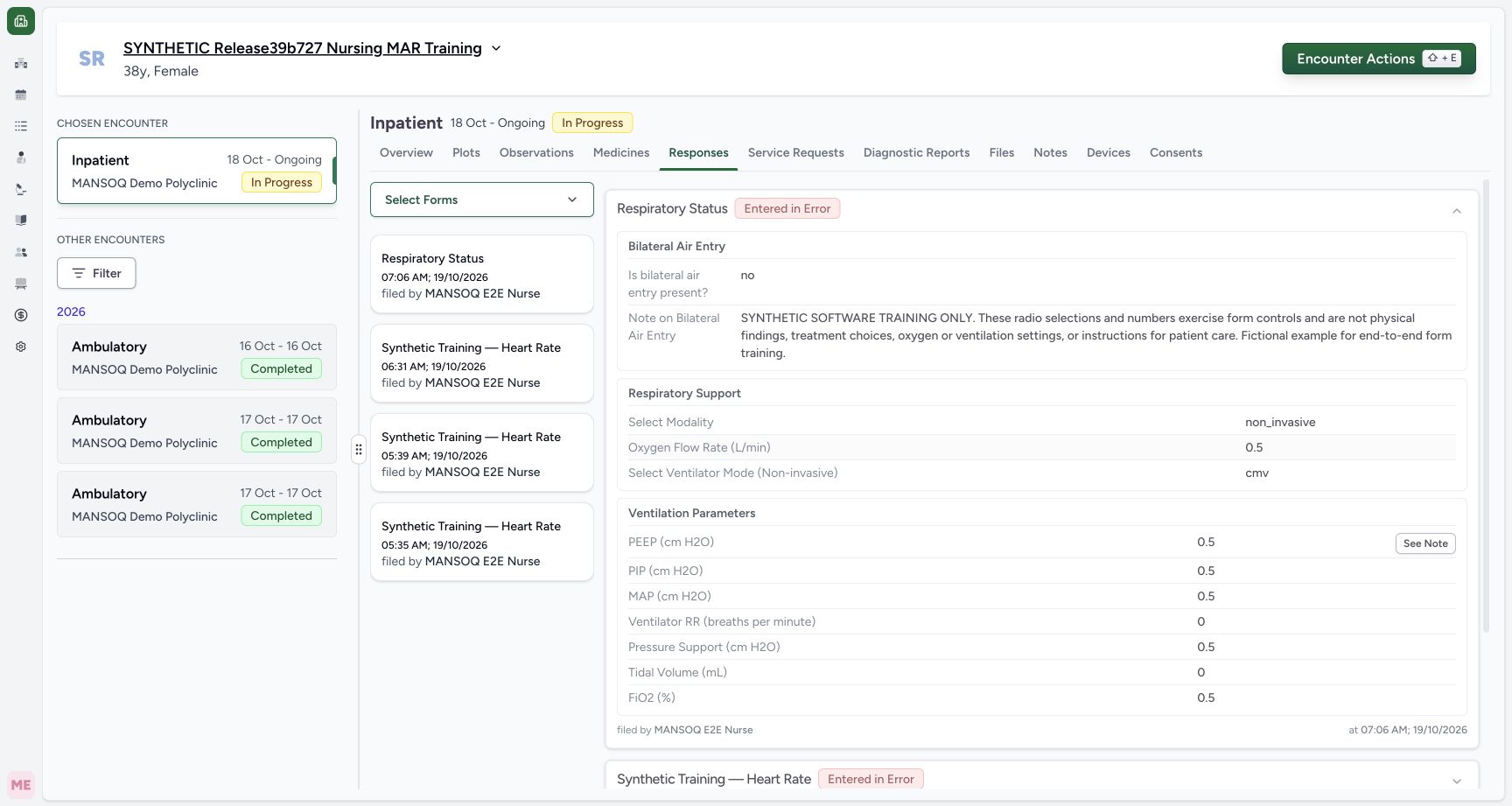 12
12Verify Entered in Error while the original answers remain
Capture details
Exact committed release 8d99bb8a on an isolated nonproduction clone, using an existing Nurse and fictional Polyclinic inpatient case. The synthetic patient name retains an earlier release label. The new source response is now visibly Entered in Error and its twelve saved answer leaves, full fictional note, Nurse author and original07:06 save time remain retained. Independent ordinary Nurse and Doctor reads confirm the same response UUID and unchanged answer/created-date bytes; every prior clinical record remains unchanged.
Image SHA-256 b954c6e1420c7ca1bd7a89e2380bd8902b46f721a6d4b173dde454b5f5a37973
- Entered in Error: This is the actual source-response status badge; the response is retained rather than deleted.
- Retained per-question note: The note remains attached to the retained saved answer after correction.
Source evidence
Every citation uses this exact committed version. The private source repository requires access.
- repositories/platform/mansoq-web/src/components/Questionnaire/QuestionnaireForm.tsx:740 ·
8d99bb8a4712f6aa8446bcd3b40bf62dae280d39Source file checksum
5deed809524fa11fe9c31b3ff978929656b01c23cdd4c9b9cc45d2dd5e97a46c - repositories/platform/mansoq-web/src/components/Questionnaire/QuestionnaireForm.tsx:858 ·
8d99bb8a4712f6aa8446bcd3b40bf62dae280d39Source file checksum
5deed809524fa11fe9c31b3ff978929656b01c23cdd4c9b9cc45d2dd5e97a46c - repositories/platform/mansoq-web/src/components/Questionnaire/QuestionTypes/NumberQuestion.tsx:27 ·
8d99bb8a4712f6aa8446bcd3b40bf62dae280d39Source file checksum
fd8183d93ed6c65e651dfc6b790c5ebc740fceef5cf6d0d5dc3d107f465b8dab - repositories/platform/mansoq-web/src/components/Questionnaire/QuestionTypes/ChoiceQuestion.tsx:43 ·
8d99bb8a4712f6aa8446bcd3b40bf62dae280d39Source file checksum
0f6a5813b88385121e4d44682fb82fa0c3d65a57faf21b59ddda8e19995e446e - repositories/platform/mansoq-web/src/components/Questionnaire/QuestionTypes/QuestionGroup.tsx:39 ·
8d99bb8a4712f6aa8446bcd3b40bf62dae280d39Source file checksum
ea2f931a1329973d4b23ffee6f4581df62fc7d7092449142d03b73f61553bccc - repositories/platform/mansoq-web/src/components/Questionnaire/QuestionTypes/TextQuestion.tsx:131 ·
8d99bb8a4712f6aa8446bcd3b40bf62dae280d39Source file checksum
1ce4eb85780e351a42f155fc8a092fa921e6f4853f1efc91902365498b834aab - repositories/platform/mansoq-web/src/components/ui/RadioInput.tsx:44 ·
8d99bb8a4712f6aa8446bcd3b40bf62dae280d39Source file checksum
17b849d60a4f860fdb9f2384625fe43b2bc99fc1179019728c57511fce74813d - repositories/platform/mansoq-core/mansoq/emr/resources/questionnaire/utils.py:420 ·
8d99bb8a4712f6aa8446bcd3b40bf62dae280d39Source file checksum
8425858d2179a66f482f38a3fd7f0fc0dcb70a4bcd85450fe7ce748b3081826c - repositories/platform/mansoq-web/src/components/Facility/ConsultationDetails/QuestionnaireResponsesList.tsx:271 ·
8d99bb8a4712f6aa8446bcd3b40bf62dae280d39Source file checksum
abcf7ab477238782e128a28bbd0b83562f900a41dcd1665a3df68e33fad1deac - repositories/platform/mansoq-web/src/components/Facility/ConsultationDetails/QuestionnaireResponsesList.tsx:292 ·
8d99bb8a4712f6aa8446bcd3b40bf62dae280d39Source file checksum
abcf7ab477238782e128a28bbd0b83562f900a41dcd1665a3df68e33fad1deac - repositories/platform/mansoq-core/mansoq/emr/api/viewsets/questionnaire_response.py:42 ·
8d99bb8a4712f6aa8446bcd3b40bf62dae280d39Source file checksum
3a1e4e355e2f2ec25e82f5adc12ca9250c201b521098af8d1211bee95489fa2b - repositories/platform/mansoq-core/mansoq/emr/api/viewsets/questionnaire_response.py:72 ·
8d99bb8a4712f6aa8446bcd3b40bf62dae280d39Source file checksum
3a1e4e355e2f2ec25e82f5adc12ca9250c201b521098af8d1211bee95489fa2b - repositories/platform/mansoq-core/mansoq/emr/resources/questionnaire_response/spec.py:24 ·
8d99bb8a4712f6aa8446bcd3b40bf62dae280d39Source file checksum
e1aff7243f7557d61fa33271652df53ce0fe0220505abdf3f5d20cdb5fa1a555