 MANSOQ
 Nursing observations · VERSION 8d99bb8a
Record and verify a synthetic heart-rate observation
Open the configured Heart Rate form, recover from required-field validation, save one fictional value with optional context, and verify its response, server time, current observation and Pulse views on exact release 8d99bb8a.
Nurse · Doctor
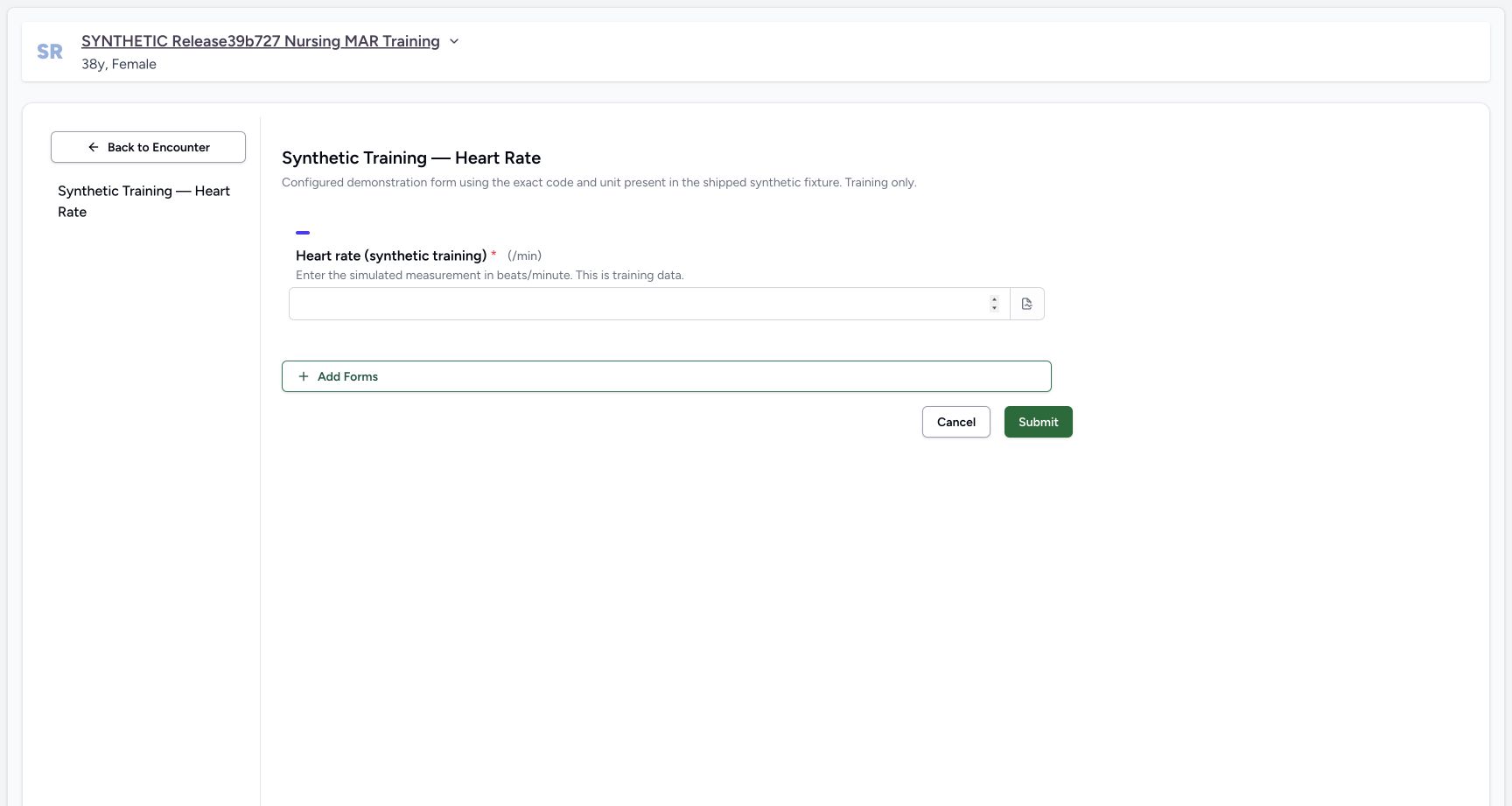 123
123Required synthetic reading with its configured unit
Capture details
Exact committed release 8d99bb8a on an isolated nonproduction clone, using an existing Nurse and fictional Polyclinic inpatient case. The synthetic patient name retains an earlier release label. The required integer input is blank and the form displays fixed unit/min. No operator effective-time/backdate control is present; this source records server effective time. The form has not been submitted and no clinical record has been created.
Image SHA-256 cfd58610a001469b205f5dae3f6077b303aa2f930ac21d815fdd5f30ce635df7
- Enter the explicit fictional reading in the required numeric input: Enter the explicit fictional reading in the required numeric input. Required synthetic reading with its configured unit.
- Submit validates the required input before saving: Submit validates the required input before saving. Required synthetic reading with its configured unit.
- Open the optional question note icon: The note icon is at the right end of the numeric input. This additional pointer is reviewed against original pixels, not a capture-time DOM geometry attestation.
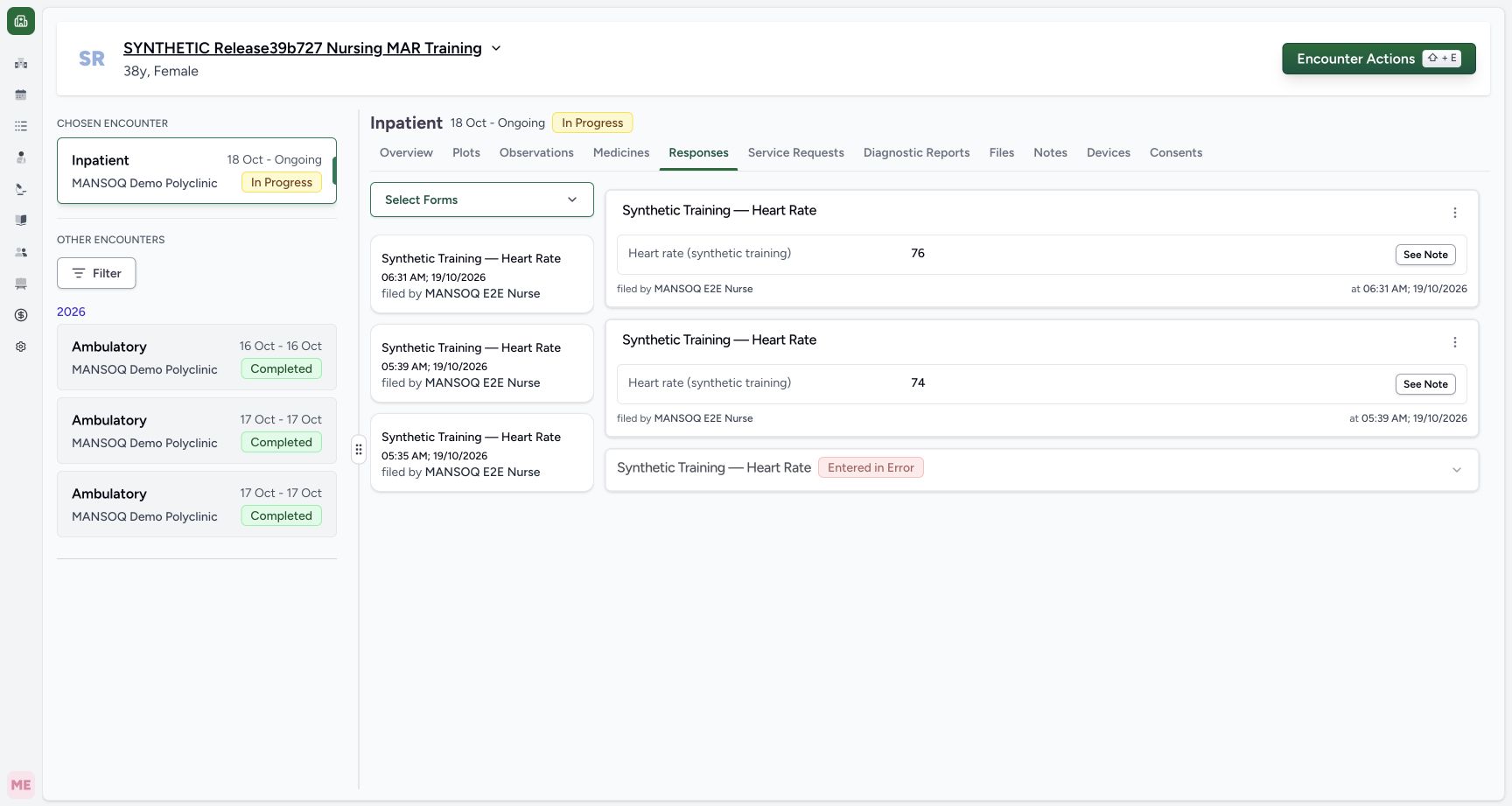 123
123Saved fictional response with Nurse and actual save time
Capture details
Exact committed release 8d99bb8a on an isolated nonproduction clone, using an existing Nurse and fictional Polyclinic inpatient case. The synthetic patient name retains an earlier release label. The new response displays 76, filed by the ordinary Nurse at 06:31 local on 19 October. Independent normal Nurse and Doctor API reads verify its new UUID, Completed source and Final derived observation; older 74 and source-error 72 remain unchanged.
Image SHA-256 2695d7c09ba46b8c8678e83d9f38313e644e020a76ec1786dac4e1751fd464da
- Open actions for the new 06:31 response: Open actions for the new 06:31 response. Saved fictional response with Nurse and actual save time.
- Inspect the saved synthetic note: Inspect the saved synthetic note. Saved fictional response with Nurse and actual save time.
- Actual saved local time of the new 06:31 response: Reference targets the actual saved-time text at the right of the new response card; original Nurse attribution is visible at the left of the same card.
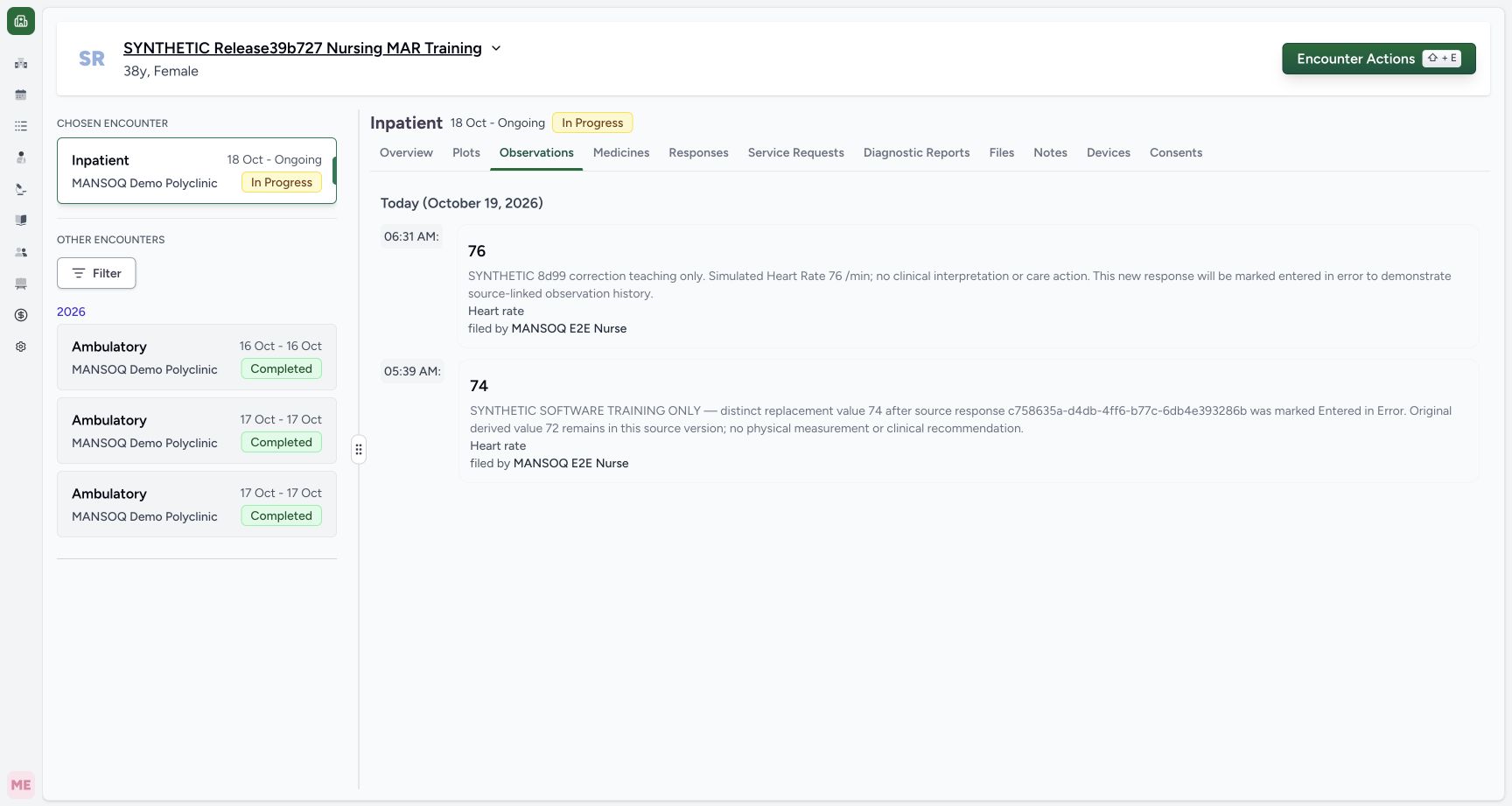 123
123Current observations show the new 76 and retained valid 74
Capture details
Exact committed release 8d99bb8a on an isolated nonproduction clone, using an existing Nurse and fictional Polyclinic inpatient case. The synthetic patient name retains an earlier release label. The Observations tab now shows the newly saved 76 at 06:31 and prior valid 74 at 05:39. Legacy 72 whose source is Entered in Error is excluded. These are synthetic software examples, not clinical interpretation.
Image SHA-256 4ba4d06e6e64e76f83bd9481f27d8062811b11acfef32e1ff451404028c19331
- Current observation list: Current observation list. Current observations show the new 76 and retained valid 74.
- New 06:31 simulated value 76: Reference targets the actual rendered simulated numeric value on this original observation card. The adjacent actual saved time and author remain visible.
- Open the current Pulse plot before correction: Open the current Pulse plot before correction. Current observations show the new 76 and retained valid 74.
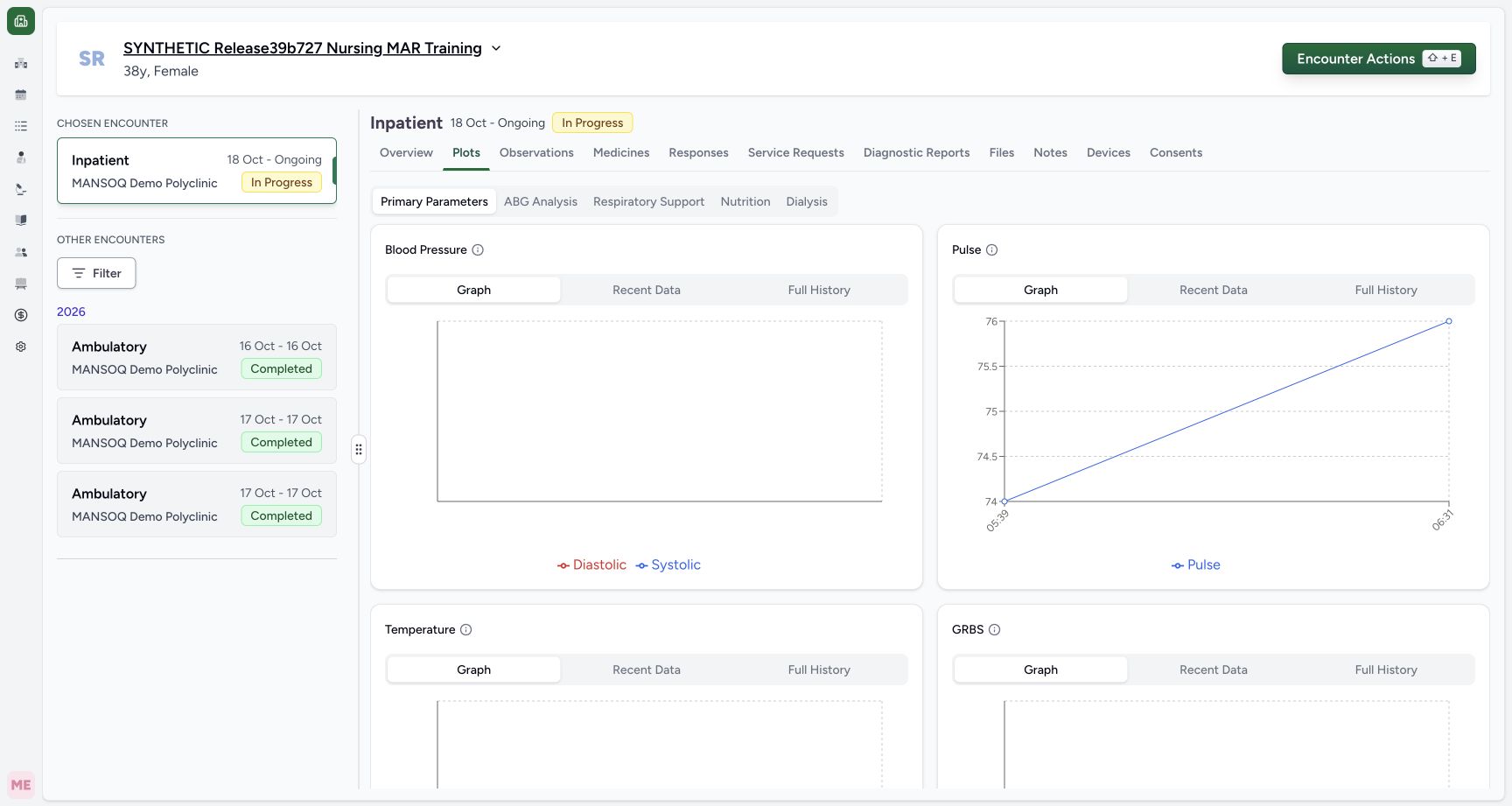 123
123Current Pulse graph has the two valid synthetic values before correction
Capture details
Exact committed release 8d99bb8a on an isolated nonproduction clone, using an existing Nurse and fictional Polyclinic inpatient case. The synthetic patient name retains an earlier release label. The current Pulse graph plots the retained 74 at 05:39 and new 76 at 06:31. Intermediate axis ticks and the line are graph presentation, not extra observations. Legacy source-error 72 is not plotted.
Image SHA-256 78cb76aa5588d6d7d1c203922b10046bcdfb464a825d2586154c3e2a2876e697
- Pulse current Graph mode: Pulse current Graph mode. Current Pulse graph has the two valid synthetic values before correction.
- New simulated 76 point at 06:31: Reference targets the actual new 76 graph dot at 06:31; the connecting line and scale ticks are not extra measurements.
- Open Pulse Recent Data: Open Pulse Recent Data. Current Pulse graph has the two valid synthetic values before correction.
12 of 12 content blocks have reviewed image alignment. Missing overview or prerequisite images remain open.
Before you begin
- Use the intended authorized Nurse account and confirm the fictional patient and ongoing Inpatient encounter in MANSOQ Demo Polyclinic. This example uses the already active Synthetic Training — Heart Rate form: required Integer input, installed LOINC Heart rate 8867-4 and fixed UCUM /min unit. No permission, terminology or configuration is changed for this exercise.
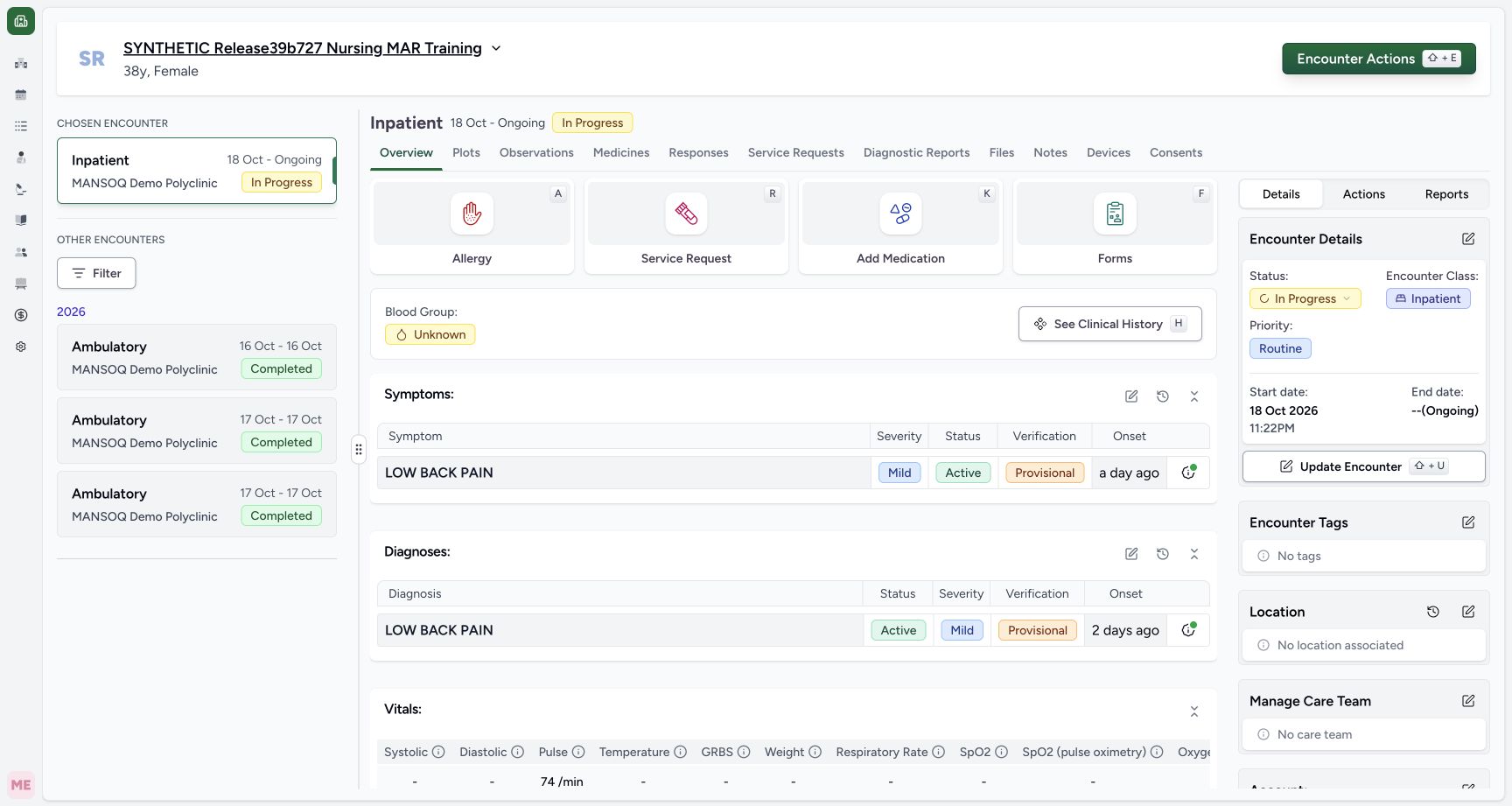 12
12Recorded release 8d99bb8a · 2026-10-19T03:27:54.187Z · 1728 × 921 Open an authorized form in the active fictional encounter
Capture details
Exact committed release 8d99bb8a on an isolated nonproduction clone, using an existing Nurse and fictional Polyclinic inpatient case. The synthetic patient name retains an earlier release label. Ordinary Nurse opens Forms in the existing In Progress inpatient encounter. This flow will create one explicitly fictional software-test reading through the normal UI. No existing clinical record, permission, correction window or facility configuration changes.
Image SHA-256
98003d9b1b17a9a5c7332cc6dca96b0692874682af815546edea83e275f91e41- Open Forms for the selected active encounter: Open Forms for the selected active encounter. Open an authorized form in the active fictional encounter.
- Reference: selected encounter is In Progress: Reference: selected encounter is In Progress. Open an authorized form in the active fictional encounter.
 1
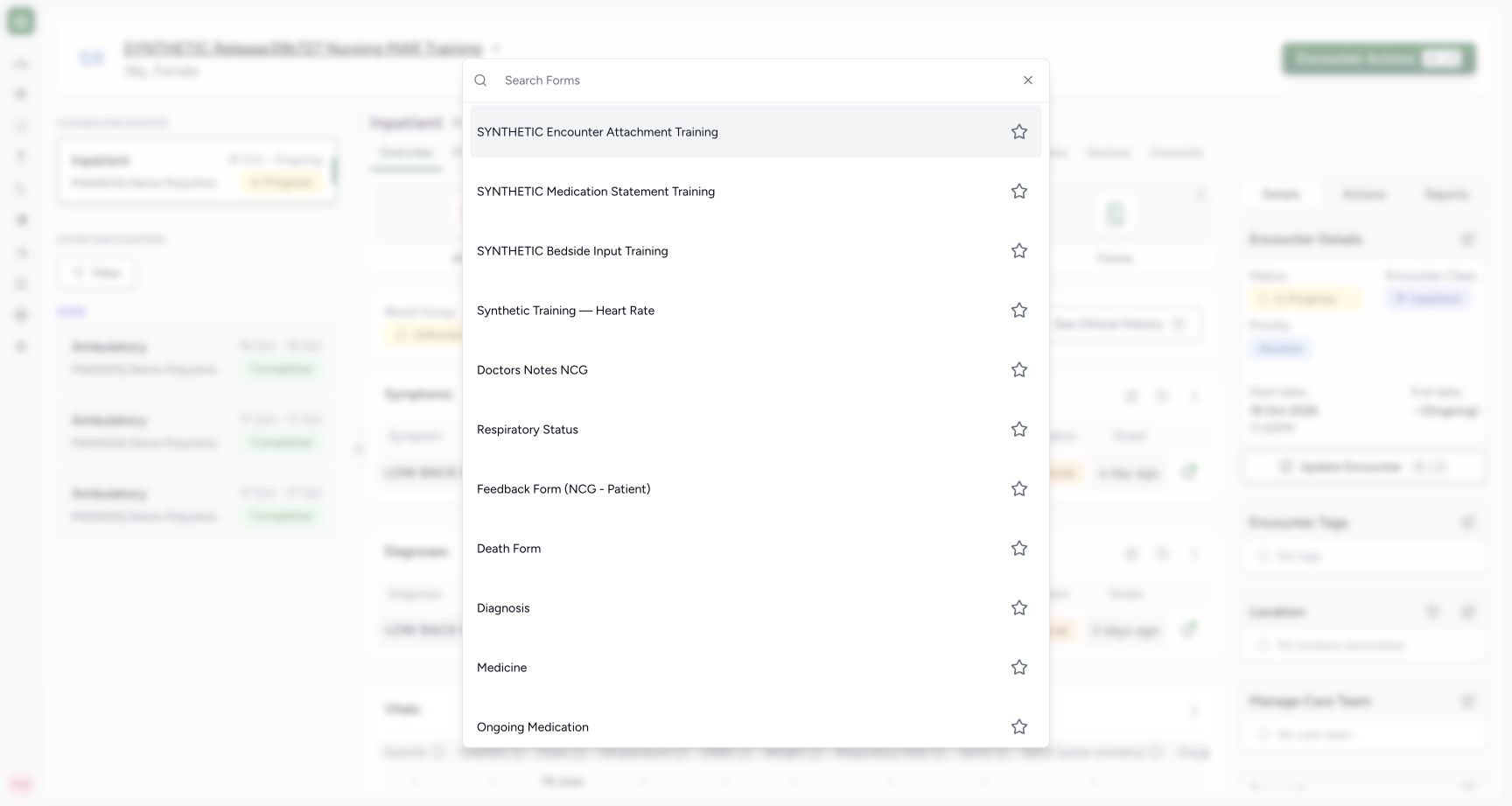
1Recorded release 8d99bb8a · 2026-10-19T03:28:13.140Z · 1728 × 921 Choose the configured synthetic Heart Rate form
Capture details
Exact committed release 8d99bb8a on an isolated nonproduction clone, using an existing Nurse and fictional Polyclinic inpatient case. The synthetic patient name retains an earlier release label. Choose the existing authorized Synthetic Training — Heart Rate form. Its artificial title and fictional case separate this software demonstration from a real patient measurement; installed pulse terminology/unit are retained.
Image SHA-256
833b91a4c348b7f3314e0c291914779f968d7774b5d89e8c4fa707d4e9a15c8c- Choose the existing synthetic Heart Rate form: Choose the existing synthetic Heart Rate form. Choose the configured synthetic Heart Rate form.
123Recorded release 8d99bb8a · 2026-10-19T03:28:42.321Z · 1728 × 921 Required synthetic reading with its configured unit
Capture details
Exact committed release 8d99bb8a on an isolated nonproduction clone, using an existing Nurse and fictional Polyclinic inpatient case. The synthetic patient name retains an earlier release label. The required integer input is blank and the form displays fixed unit/min. No operator effective-time/backdate control is present; this source records server effective time. The form has not been submitted and no clinical record has been created.
Image SHA-256
cfd58610a001469b205f5dae3f6077b303aa2f930ac21d815fdd5f30ce635df7- Enter the explicit fictional reading in the required numeric input: Enter the explicit fictional reading in the required numeric input. Required synthetic reading with its configured unit.
- Submit validates the required input before saving: Submit validates the required input before saving. Required synthetic reading with its configured unit.
- Open the optional question note icon: The note icon is at the right end of the numeric input. This additional pointer is reviewed against original pixels, not a capture-time DOM geometry attestation.
- This is synthetic software training, not a physical measurement, clinical recommendation or measurement protocol. The patient name retains an older release label, while all captures in this lesson use exact committed 8d99bb8a. Initially the current list contains valid 74; the separate older 72 has an invalid source and is retained only in explicit history.
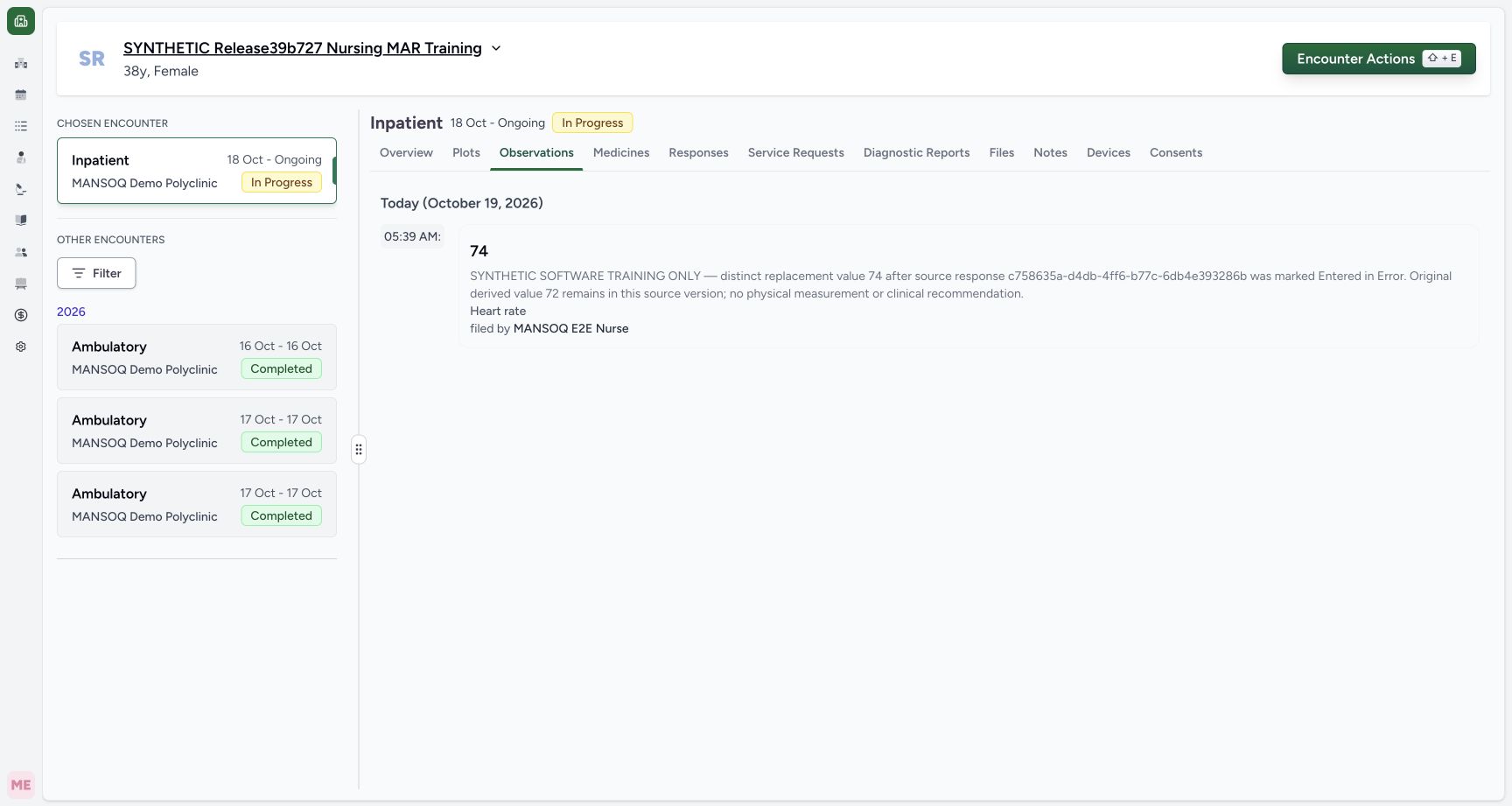 123
123Recorded release 8d99bb8a · 2026-10-19T03:24:41.187Z · 1728 × 921 Current observations show the retained valid reading
Capture details
Exact committed release 8d99bb8a on an isolated nonproduction clone, using an existing Nurse and fictional Polyclinic inpatient case. The synthetic patient name retains an earlier release label. Ordinary Nurse current encounter list shows retained valid 74 only. Legacy72 still has actual Final status but its exact source is Entered in Error, so current clinical views exclude it. The pre-existing replacement note was authored on the earlier96ca source and is preserved verbatim; it does not describe the new filtering rule.
Image SHA-256
6ff5866e5610b94208ffff204b32dfa0d40e040f13370156e941bf400850a549- Open current Observations for the selected encounter: Open current Observations for the selected encounter. Current observations show the retained valid reading.
- Reference: valid 74 remains in current observations: Reference targets the actual rendered simulated numeric value on this original observation card. The adjacent actual saved time and author remain visible.
- Open Plots to compare current readings with retained history: Open Plots to compare current readings with retained history. Current observations show the retained valid reading.
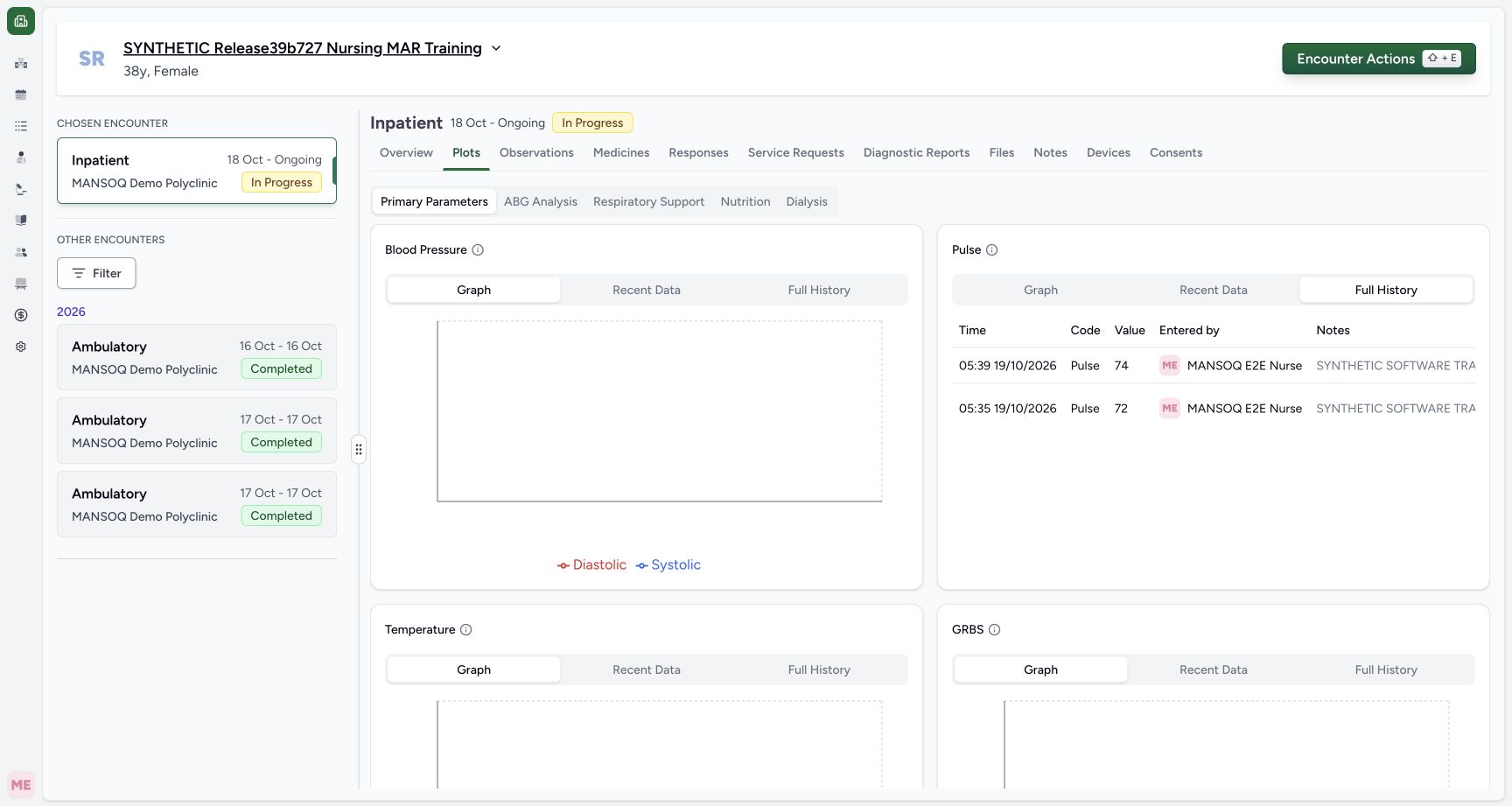 12
12Recorded release 8d99bb8a · 2026-10-19T03:26:39.028Z · 1728 × 921 Retained history before scrolling to its status column
Capture details
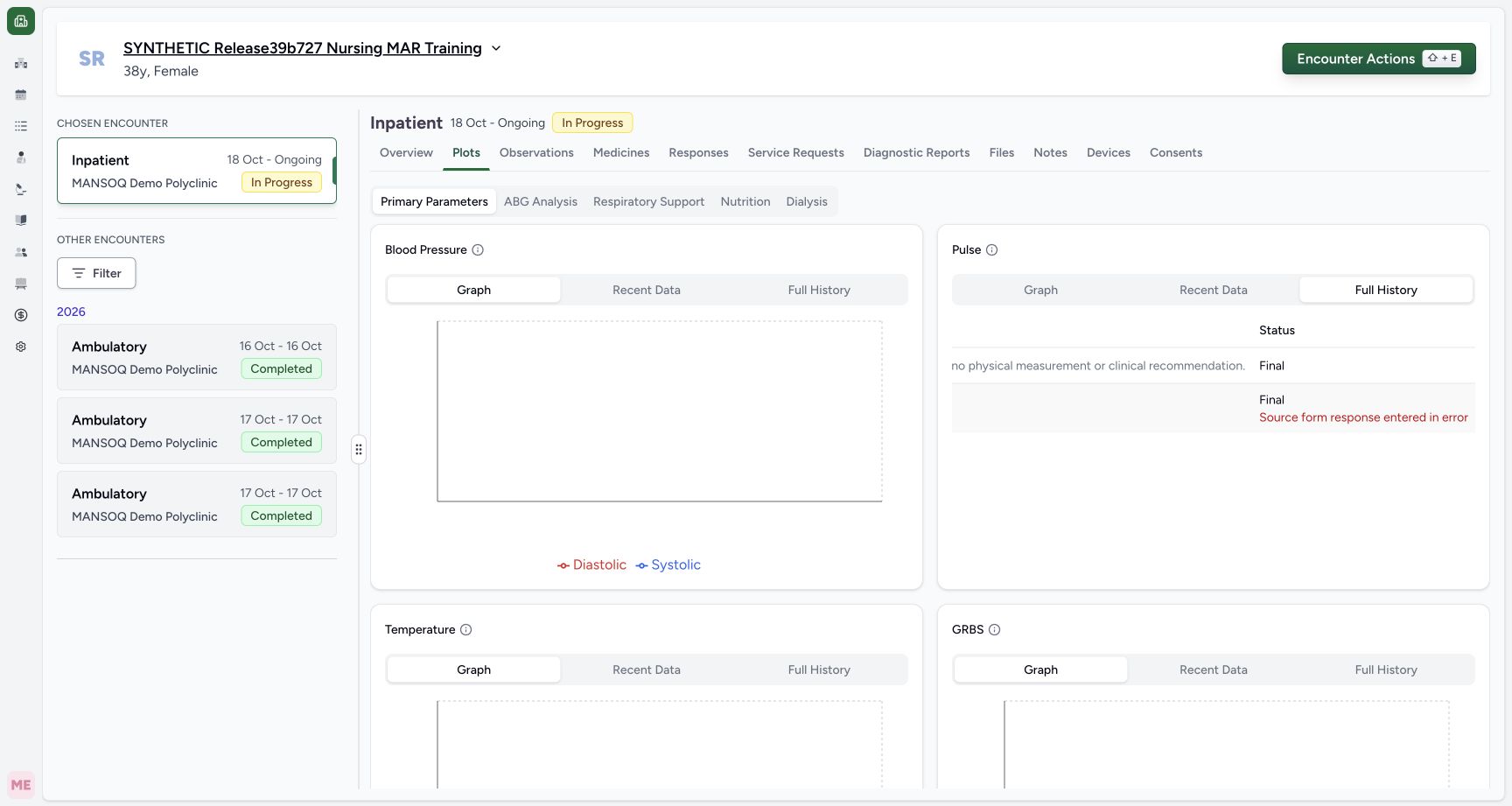
Exact committed release 8d99bb8a on an isolated nonproduction clone, using an existing Nurse and fictional Polyclinic inpatient case. The synthetic patient name retains an earlier release label. Full History retains valid 74 and legacy 72. Actual native layout places Status after long nonwrapping Notes: the source-error label is outside the visible card at x3278.6 on the1728px viewport, so this frame does not claim the status is visible. Scroll the real table horizontally to inspect it; no record or DOM has been altered.
Image SHA-256
7008c3a86063498a85bf148c11d4b9f7f7b7f576fdbd71207bc1a0449e6b93d3- Full History retains both original entries: Full History retains both original entries. Retained history before scrolling to its status column.
- Reference: retained legacy 72 is visible before horizontal scrolling: Reference: retained legacy 72 is visible before horizontal scrolling. Retained history before scrolling to its status column.
 12
12Recorded release 8d99bb8a · 2026-10-19T03:27:16.473Z · 1728 × 921 Legacy saved status and source error remain separate facts
Capture details
Exact committed release 8d99bb8a on an isolated nonproduction clone, using an existing Nurse and fictional Polyclinic inpatient case. The synthetic patient name retains an earlier release label. After normal horizontal table scrolling, the lower legacy 72 row displays actual saved Final plus separate Source form response entered in error. The upper valid 74 row displays Final without source-error label. This read-time rule preserves legacy records; it does not backfill their status. Identity/time/value remain in the paired before-scroll frame04.
Image SHA-256
d1123d150151b033d890402c3a0424c5ea01b794ad844fffb681fa8eb33200bd- Full History remains selected: Full History remains selected. Legacy saved status and source error remain separate facts.
- Legacy 72 observation: actual saved Final: Reference targets the lower legacy row’s actual Final text. The separate red Source form response entered in error warning immediately below is an independent source-validity fact. Pair with the preceding time/value view.
1. Open the existing Heart Rate form
From Overview in the intended ongoing encounter, choose Forms, then Synthetic Training — Heart Rate in the picker. Confirm the patient name on the form. The picker contains other configured clinical forms; select this explicit training form rather than an unrelated template.
12Open an authorized form in the active fictional encounter
Capture details
Exact committed release 8d99bb8a on an isolated nonproduction clone, using an existing Nurse and fictional Polyclinic inpatient case. The synthetic patient name retains an earlier release label. Ordinary Nurse opens Forms in the existing In Progress inpatient encounter. This flow will create one explicitly fictional software-test reading through the normal UI. No existing clinical record, permission, correction window or facility configuration changes.
Image SHA-256 98003d9b1b17a9a5c7332cc6dca96b0692874682af815546edea83e275f91e41
- Open Forms for the selected active encounter: Open Forms for the selected active encounter. Open an authorized form in the active fictional encounter.
- Reference: selected encounter is In Progress: Reference: selected encounter is In Progress. Open an authorized form in the active fictional encounter.
1Choose the configured synthetic Heart Rate form
Capture details
Exact committed release 8d99bb8a on an isolated nonproduction clone, using an existing Nurse and fictional Polyclinic inpatient case. The synthetic patient name retains an earlier release label. Choose the existing authorized Synthetic Training — Heart Rate form. Its artificial title and fictional case separate this software demonstration from a real patient measurement; installed pulse terminology/unit are retained.
Image SHA-256 833b91a4c348b7f3314e0c291914779f968d7774b5d89e8c4fa707d4e9a15c8c
- Choose the existing synthetic Heart Rate form: Choose the existing synthetic Heart Rate form. Choose the configured synthetic Heart Rate form.
123Required synthetic reading with its configured unit
Capture details
Exact committed release 8d99bb8a on an isolated nonproduction clone, using an existing Nurse and fictional Polyclinic inpatient case. The synthetic patient name retains an earlier release label. The required integer input is blank and the form displays fixed unit/min. No operator effective-time/backdate control is present; this source records server effective time. The form has not been submitted and no clinical record has been created.
Image SHA-256 cfd58610a001469b205f5dae3f6077b303aa2f930ac21d815fdd5f30ce635df7
- Enter the explicit fictional reading in the required numeric input: Enter the explicit fictional reading in the required numeric input. Required synthetic reading with its configured unit.
- Submit validates the required input before saving: Submit validates the required input before saving. Required synthetic reading with its configured unit.
- Open the optional question note icon: The note icon is at the right end of the numeric input. This additional pointer is reviewed against original pixels, not a capture-time DOM geometry attestation.
2. Read the required measurement and fixed unit
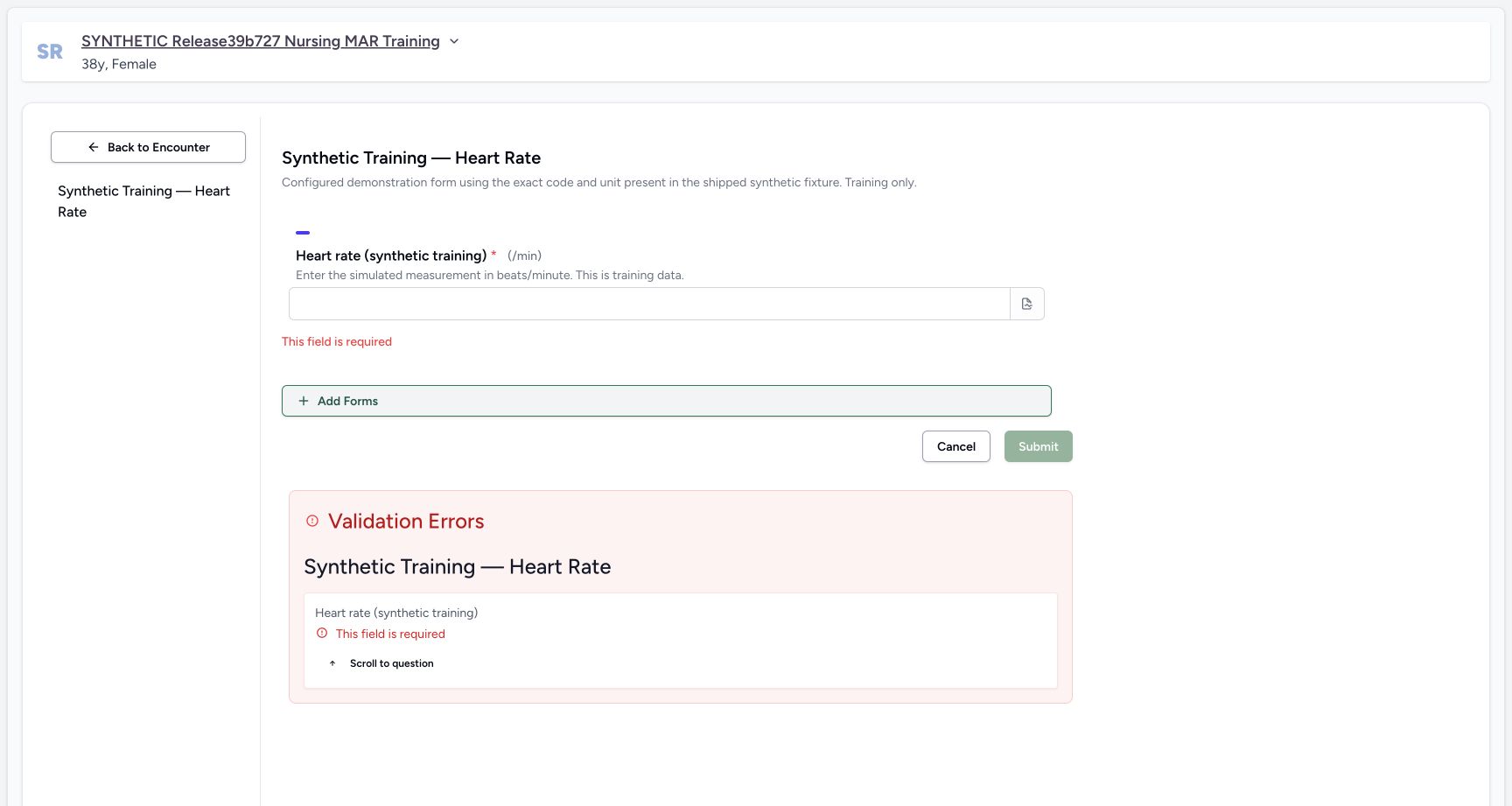
Read Heart rate (synthetic training), its required asterisk and /min label. The description specifies beats/minute. In this demonstration, choosing Submit with the input blank produces inline This field is required and a Validation Errors summary. Scroll to question returns to the missing input. This required-field validation prevents the blank form from saving.
123Required synthetic reading with its configured unit
Capture details
Exact committed release 8d99bb8a on an isolated nonproduction clone, using an existing Nurse and fictional Polyclinic inpatient case. The synthetic patient name retains an earlier release label. The required integer input is blank and the form displays fixed unit/min. No operator effective-time/backdate control is present; this source records server effective time. The form has not been submitted and no clinical record has been created.
Image SHA-256 cfd58610a001469b205f5dae3f6077b303aa2f930ac21d815fdd5f30ce635df7
- Enter the explicit fictional reading in the required numeric input: Enter the explicit fictional reading in the required numeric input. Required synthetic reading with its configured unit.
- Submit validates the required input before saving: Submit validates the required input before saving. Required synthetic reading with its configured unit.
- Open the optional question note icon: The note icon is at the right end of the numeric input. This additional pointer is reviewed against original pixels, not a capture-time DOM geometry attestation.
 12
12Required Heart Rate validation in the synthetic Nurse form
Capture details
Exact committed release 8d99bb8a on an isolated nonproduction clone, using an existing Nurse and fictional Polyclinic inpatient case. The synthetic patient name retains an earlier release label. Blank Submit triggers visible required-field validation. No response or observation has been saved. The configured form has one required numeric measurement and fixed /min unit.
Image SHA-256 d82f3660dd042a2c515b87bb1ff010dff27bcffc37aa86cb78b9c2868b336714
- Enter the required simulated measurement: Enter the required simulated measurement. Required Heart Rate validation in the synthetic Nurse form.
- Return to the required question: Return to the required question. Required Heart Rate validation in the synthetic Nurse form.
3. Enter a fictional value and optional note
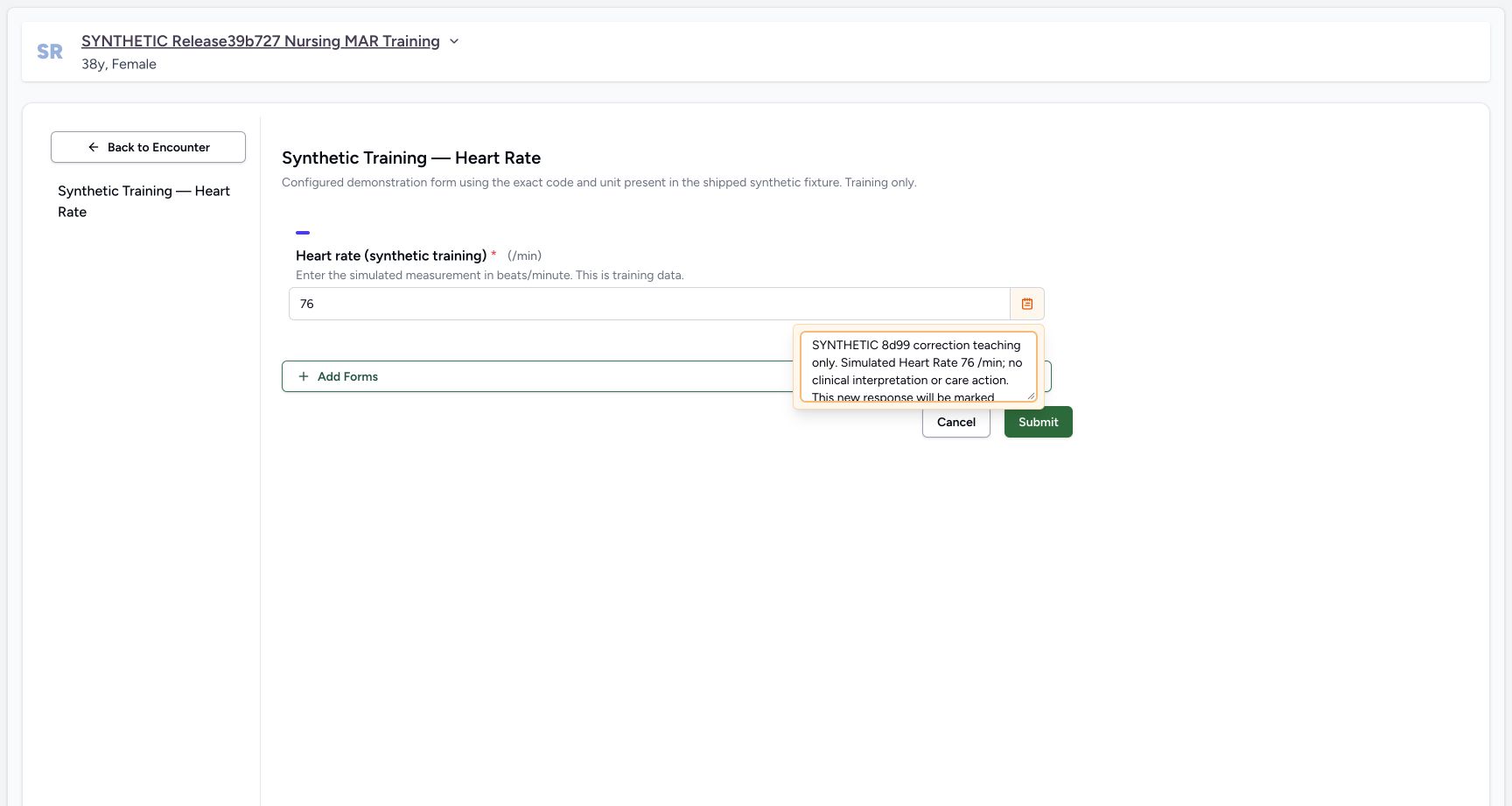
Enter 76 as the distinct simulated value for this software exercise. The required-field errors clear. Open the note icon at the right of the input and add explicit fictional context in Add notes. Notes is optional in the software; local documentation policy is separate from the required numeric field. The note popover displays a limited area of long text and can be scrolled within the editor.
123Required synthetic reading with its configured unit
Capture details
Exact committed release 8d99bb8a on an isolated nonproduction clone, using an existing Nurse and fictional Polyclinic inpatient case. The synthetic patient name retains an earlier release label. The required integer input is blank and the form displays fixed unit/min. No operator effective-time/backdate control is present; this source records server effective time. The form has not been submitted and no clinical record has been created.
Image SHA-256 cfd58610a001469b205f5dae3f6077b303aa2f930ac21d815fdd5f30ce635df7
- Enter the explicit fictional reading in the required numeric input: Enter the explicit fictional reading in the required numeric input. Required synthetic reading with its configured unit.
- Submit validates the required input before saving: Submit validates the required input before saving. Required synthetic reading with its configured unit.
- Open the optional question note icon: The note icon is at the right end of the numeric input. This additional pointer is reviewed against original pixels, not a capture-time DOM geometry attestation.
12Required Heart Rate validation in the synthetic Nurse form
Capture details
Exact committed release 8d99bb8a on an isolated nonproduction clone, using an existing Nurse and fictional Polyclinic inpatient case. The synthetic patient name retains an earlier release label. Blank Submit triggers visible required-field validation. No response or observation has been saved. The configured form has one required numeric measurement and fixed /min unit.
Image SHA-256 d82f3660dd042a2c515b87bb1ff010dff27bcffc37aa86cb78b9c2868b336714
- Enter the required simulated measurement: Enter the required simulated measurement. Required Heart Rate validation in the synthetic Nurse form.
- Return to the required question: Return to the required question. Required Heart Rate validation in the synthetic Nurse form.
 12
12Unsaved simulated reading with optional training note
Capture details
Exact committed release 8d99bb8a on an isolated nonproduction clone, using an existing Nurse and fictional Polyclinic inpatient case. The synthetic patient name retains an earlier release label. The required value is 76 /min. The optional Add notes editor is open and contains explicitly fictional training context. This pending form has not been submitted.
Image SHA-256 a5d80bf87a2d268430626836161c353982c0c10d500c1f31c813d325a3cd76ee
- Pending simulated measurement; fixed /min unit: Pending simulated measurement; fixed /min unit. Unsaved simulated reading with optional training note.
- Optional note editor for the response: Optional note editor for the response. Unsaved simulated reading with optional training note.
4. Submit this response once
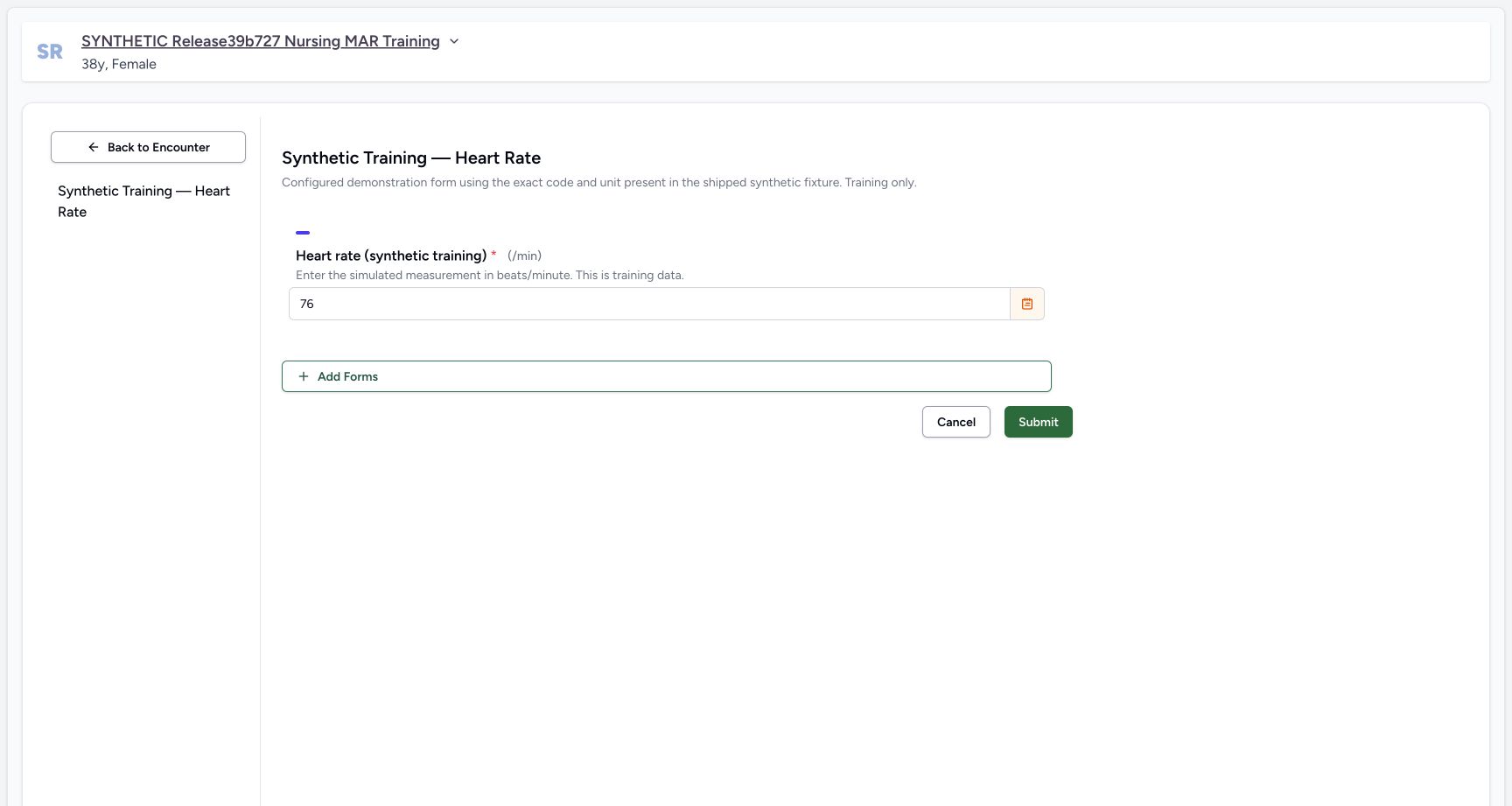
Close the note popover by choosing its icon again. Review the fictional patient, 76 and fixed /min unit, then choose Submit once. After success, open Responses and identify the new 06:31 AM card, filed by MANSOQ E2E Nurse on October 19. It has a distinct source-response identity and retains the fictional note through See Note. The response card does not repeat the stored unit.
12Unsaved simulated reading with optional training note
Capture details
Exact committed release 8d99bb8a on an isolated nonproduction clone, using an existing Nurse and fictional Polyclinic inpatient case. The synthetic patient name retains an earlier release label. The required value is 76 /min. The optional Add notes editor is open and contains explicitly fictional training context. This pending form has not been submitted.
Image SHA-256 a5d80bf87a2d268430626836161c353982c0c10d500c1f31c813d325a3cd76ee
- Pending simulated measurement; fixed /min unit: Pending simulated measurement; fixed /min unit. Unsaved simulated reading with optional training note.
- Optional note editor for the response: Optional note editor for the response. Unsaved simulated reading with optional training note.
 12
12Submit one distinct fictional Heart Rate response
Capture details
Exact committed release 8d99bb8a on an isolated nonproduction clone, using an existing Nurse and fictional Polyclinic inpatient case. The synthetic patient name retains an earlier release label. The pending required value is 76 /min and the optional note is stored in this unsaved form. There is no date or time input in this configured form; saving uses the actual server occurrence time.
Image SHA-256 e9ce06ad3a482c7029fdddd960d769f48cc9f20a11d1e3448f9b6d24fd056acf
- Submit this one fictional response once: Submit this one fictional response once. Submit one distinct fictional Heart Rate response.
- Confirm the required simulated value before saving: Confirm the required simulated value before saving. Submit one distinct fictional Heart Rate response.
123Saved fictional response with Nurse and actual save time
Capture details
Exact committed release 8d99bb8a on an isolated nonproduction clone, using an existing Nurse and fictional Polyclinic inpatient case. The synthetic patient name retains an earlier release label. The new response displays 76, filed by the ordinary Nurse at 06:31 local on 19 October. Independent normal Nurse and Doctor API reads verify its new UUID, Completed source and Final derived observation; older 74 and source-error 72 remain unchanged.
Image SHA-256 2695d7c09ba46b8c8678e83d9f38313e644e020a76ec1786dac4e1751fd464da
- Open actions for the new 06:31 response: Open actions for the new 06:31 response. Saved fictional response with Nurse and actual save time.
- Inspect the saved synthetic note: Inspect the saved synthetic note. Saved fictional response with Nurse and actual save time.
- Actual saved local time of the new 06:31 response: Reference targets the actual saved-time text at the right of the new response card; original Nurse attribution is visible at the left of the same card.
5. Verify the saved observation and actual time
Choose Observations. The new 76 appears at 06:31 above retained valid 74 at 05:39, with Heart rate, the original Nurse and fictional note. Independent ordinary Nurse and Doctor reads verify the new Final observation stores 76 with /min and effective_datetime 2026-10-19T03:31:04.454776Z. This configured form has no effective-time or backdating input; the effective time is assigned by the server when saving.
123Saved fictional response with Nurse and actual save time
Capture details
Exact committed release 8d99bb8a on an isolated nonproduction clone, using an existing Nurse and fictional Polyclinic inpatient case. The synthetic patient name retains an earlier release label. The new response displays 76, filed by the ordinary Nurse at 06:31 local on 19 October. Independent normal Nurse and Doctor API reads verify its new UUID, Completed source and Final derived observation; older 74 and source-error 72 remain unchanged.
Image SHA-256 2695d7c09ba46b8c8678e83d9f38313e644e020a76ec1786dac4e1751fd464da
- Open actions for the new 06:31 response: Open actions for the new 06:31 response. Saved fictional response with Nurse and actual save time.
- Inspect the saved synthetic note: Inspect the saved synthetic note. Saved fictional response with Nurse and actual save time.
- Actual saved local time of the new 06:31 response: Reference targets the actual saved-time text at the right of the new response card; original Nurse attribution is visible at the left of the same card.
123Current observations show the new 76 and retained valid 74
Capture details
Exact committed release 8d99bb8a on an isolated nonproduction clone, using an existing Nurse and fictional Polyclinic inpatient case. The synthetic patient name retains an earlier release label. The Observations tab now shows the newly saved 76 at 06:31 and prior valid 74 at 05:39. Legacy 72 whose source is Entered in Error is excluded. These are synthetic software examples, not clinical interpretation.
Image SHA-256 4ba4d06e6e64e76f83bd9481f27d8062811b11acfef32e1ff451404028c19331
- Current observation list: Current observation list. Current observations show the new 76 and retained valid 74.
- New 06:31 simulated value 76: Reference targets the actual rendered simulated numeric value on this original observation card. The adjacent actual saved time and author remain visible.
- Open the current Pulse plot before correction: Open the current Pulse plot before correction. Current observations show the new 76 and retained valid 74.
6. Compare the current Pulse graph with recent data
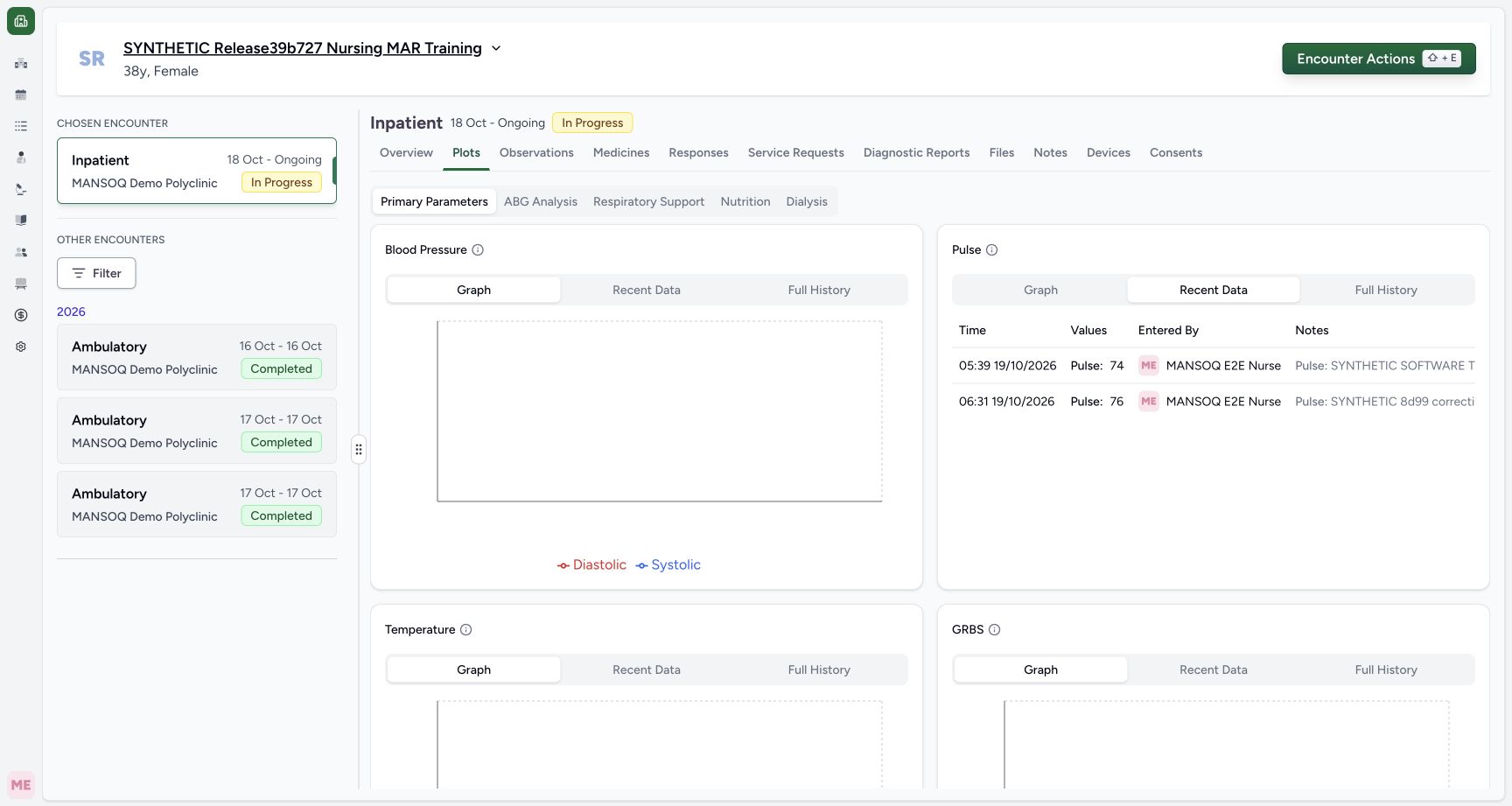
Choose Plots and find Pulse under Primary Parameters. Its Graph has the two valid points, 74 at 05:39 and new 76 at 06:31. The connecting line and intermediate axis ticks do not represent extra measurements. Choose Recent Data on this same Pulse card to inspect the two actual times, values and original Nurse attribution. Legacy source-error 72 is not part of the current series.
123Current observations show the new 76 and retained valid 74
Capture details
Exact committed release 8d99bb8a on an isolated nonproduction clone, using an existing Nurse and fictional Polyclinic inpatient case. The synthetic patient name retains an earlier release label. The Observations tab now shows the newly saved 76 at 06:31 and prior valid 74 at 05:39. Legacy 72 whose source is Entered in Error is excluded. These are synthetic software examples, not clinical interpretation.
Image SHA-256 4ba4d06e6e64e76f83bd9481f27d8062811b11acfef32e1ff451404028c19331
- Current observation list: Current observation list. Current observations show the new 76 and retained valid 74.
- New 06:31 simulated value 76: Reference targets the actual rendered simulated numeric value on this original observation card. The adjacent actual saved time and author remain visible.
- Open the current Pulse plot before correction: Open the current Pulse plot before correction. Current observations show the new 76 and retained valid 74.
123Current Pulse graph has the two valid synthetic values before correction
Capture details
Exact committed release 8d99bb8a on an isolated nonproduction clone, using an existing Nurse and fictional Polyclinic inpatient case. The synthetic patient name retains an earlier release label. The current Pulse graph plots the retained 74 at 05:39 and new 76 at 06:31. Intermediate axis ticks and the line are graph presentation, not extra observations. Legacy source-error 72 is not plotted.
Image SHA-256 78cb76aa5588d6d7d1c203922b10046bcdfb464a825d2586154c3e2a2876e697
- Pulse current Graph mode: Pulse current Graph mode. Current Pulse graph has the two valid synthetic values before correction.
- New simulated 76 point at 06:31: Reference targets the actual new 76 graph dot at 06:31; the connecting line and scale ticks are not extra measurements.
- Open Pulse Recent Data: Open Pulse Recent Data. Current Pulse graph has the two valid synthetic values before correction.
 12
12Pulse Recent Data before correcting the new response
Capture details
Exact committed release 8d99bb8a on an isolated nonproduction clone, using an existing Nurse and fictional Polyclinic inpatient case. The synthetic patient name retains an earlier release label. Pulse Recent Data contains 74 and 76 with their individual actual times and Nurse attribution. It excludes legacy source-error 72. Long notes extend horizontally and must be scrolled honestly.
Image SHA-256 7bcc11d978c0d42c975fb2dbdd1af01d46bbd15aa9a9fbdf7c86ff945cd5f841
- Pulse Recent Data with the two current values: Pulse Recent Data with the two current values. Pulse Recent Data before correcting the new response.
- Open retained Full History: Open retained Full History. Pulse Recent Data before correcting the new response.
7. Keep current data distinct from retained history
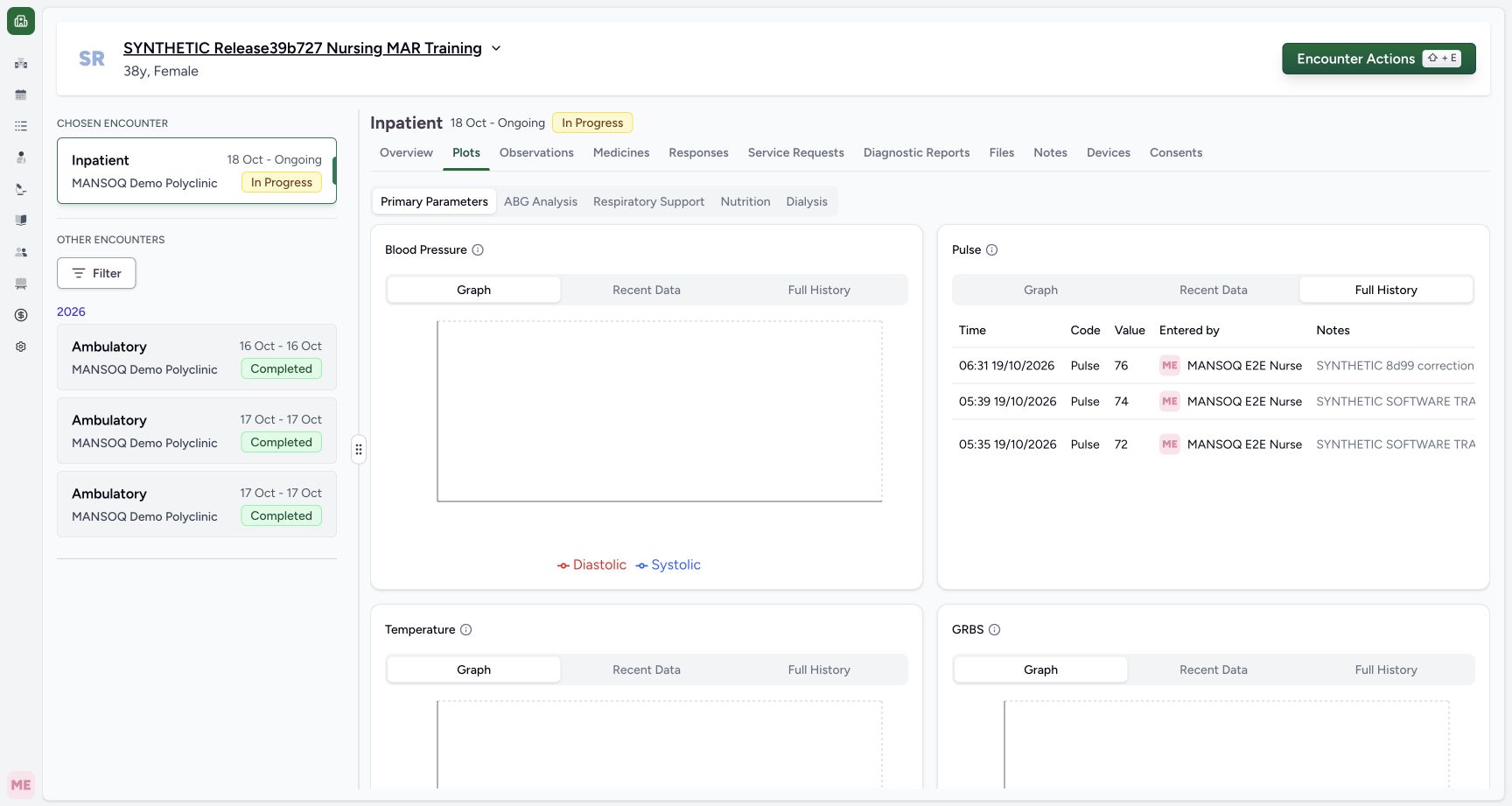
Choose Full History on the Pulse card. It retains three distinct measurements: new 76, prior valid 74 and older source-error 72, with their original times and Nurse. This is the selected encounter’s history. Long Notes extend to the right and place Status outside the initial viewport; use ordinary horizontal scrolling and the separate history lesson to read the exact status/source facts.
12Pulse Recent Data before correcting the new response
Capture details
Exact committed release 8d99bb8a on an isolated nonproduction clone, using an existing Nurse and fictional Polyclinic inpatient case. The synthetic patient name retains an earlier release label. Pulse Recent Data contains 74 and 76 with their individual actual times and Nurse attribution. It excludes legacy source-error 72. Long notes extend horizontally and must be scrolled honestly.
Image SHA-256 7bcc11d978c0d42c975fb2dbdd1af01d46bbd15aa9a9fbdf7c86ff945cd5f841
- Pulse Recent Data with the two current values: Pulse Recent Data with the two current values. Pulse Recent Data before correcting the new response.
- Open retained Full History: Open retained Full History. Pulse Recent Data before correcting the new response.
 12
12Full History retains three measurements before the new correction
Capture details
Exact committed release 8d99bb8a on an isolated nonproduction clone, using an existing Nurse and fictional Polyclinic inpatient case. The synthetic patient name retains an earlier release label. The retained history now has distinct 76 at 06:31, 74 at 05:39 and legacy 72 at 05:35. This left-hand view shows measurement identity and attribution; the Status column is to the right of long notes.
Image SHA-256 1d40e8506dc951250c71a9f1d800ac896cdb075a46ecf98d101e504f31989ad8
- Explicit Full History mode retains three original measurements: Explicit Full History mode retains three original measurements. Full History retains three measurements before the new correction.
- Return to the source response to correct the new entry: Return to the source response to correct the new entry. Full History retains three measurements before the new correction.
Time, unit and form scope
The form’s stored configuration includes collect_time, but this renderer does not turn it into an operator time control. The generic conversion assigns the actual server effective time. This lesson qualifies one configured Integer vital sign and fixed unit, with ordinary Nurse entry and Doctor readback; it does not establish selectable units, backdating, device capture or a facility measurement protocol.
123Required synthetic reading with its configured unit
Capture details
Exact committed release 8d99bb8a on an isolated nonproduction clone, using an existing Nurse and fictional Polyclinic inpatient case. The synthetic patient name retains an earlier release label. The required integer input is blank and the form displays fixed unit/min. No operator effective-time/backdate control is present; this source records server effective time. The form has not been submitted and no clinical record has been created.
Image SHA-256 cfd58610a001469b205f5dae3f6077b303aa2f930ac21d815fdd5f30ce635df7
- Enter the explicit fictional reading in the required numeric input: Enter the explicit fictional reading in the required numeric input. Required synthetic reading with its configured unit.
- Submit validates the required input before saving: Submit validates the required input before saving. Required synthetic reading with its configured unit.
- Open the optional question note icon: The note icon is at the right end of the numeric input. This additional pointer is reviewed against original pixels, not a capture-time DOM geometry attestation.
12Submit one distinct fictional Heart Rate response
Capture details
Exact committed release 8d99bb8a on an isolated nonproduction clone, using an existing Nurse and fictional Polyclinic inpatient case. The synthetic patient name retains an earlier release label. The pending required value is 76 /min and the optional note is stored in this unsaved form. There is no date or time input in this configured form; saving uses the actual server occurrence time.
Image SHA-256 e9ce06ad3a482c7029fdddd960d769f48cc9f20a11d1e3448f9b6d24fd056acf
- Submit this one fictional response once: Submit this one fictional response once. Submit one distinct fictional Heart Rate response.
- Confirm the required simulated value before saving: Confirm the required simulated value before saving. Submit one distinct fictional Heart Rate response.
123Current observations show the new 76 and retained valid 74
Capture details
Exact committed release 8d99bb8a on an isolated nonproduction clone, using an existing Nurse and fictional Polyclinic inpatient case. The synthetic patient name retains an earlier release label. The Observations tab now shows the newly saved 76 at 06:31 and prior valid 74 at 05:39. Legacy 72 whose source is Entered in Error is excluded. These are synthetic software examples, not clinical interpretation.
Image SHA-256 4ba4d06e6e64e76f83bd9481f27d8062811b11acfef32e1ff451404028c19331
- Current observation list: Current observation list. Current observations show the new 76 and retained valid 74.
- New 06:31 simulated value 76: Reference targets the actual rendered simulated numeric value on this original observation card. The adjacent actual saved time and author remain visible.
- Open the current Pulse plot before correction: Open the current Pulse plot before correction. Current observations show the new 76 and retained valid 74.
Continue to the source correction lesson
The separate correction lesson changes only this distinct new 76 source response. Its before-state is the two-point current graph and three-row explicit history shown here. Existing seven condition records (four diagnoses and three symptoms), fourteen administrations, four requests, prior responses and original observations remain unchanged. Adding a new response does not overwrite an earlier measurement.
123Saved fictional response with Nurse and actual save time
Capture details
Exact committed release 8d99bb8a on an isolated nonproduction clone, using an existing Nurse and fictional Polyclinic inpatient case. The synthetic patient name retains an earlier release label. The new response displays 76, filed by the ordinary Nurse at 06:31 local on 19 October. Independent normal Nurse and Doctor API reads verify its new UUID, Completed source and Final derived observation; older 74 and source-error 72 remain unchanged.
Image SHA-256 2695d7c09ba46b8c8678e83d9f38313e644e020a76ec1786dac4e1751fd464da
- Open actions for the new 06:31 response: Open actions for the new 06:31 response. Saved fictional response with Nurse and actual save time.
- Inspect the saved synthetic note: Inspect the saved synthetic note. Saved fictional response with Nurse and actual save time.
- Actual saved local time of the new 06:31 response: Reference targets the actual saved-time text at the right of the new response card; original Nurse attribution is visible at the left of the same card.
123Current Pulse graph has the two valid synthetic values before correction
Capture details
Exact committed release 8d99bb8a on an isolated nonproduction clone, using an existing Nurse and fictional Polyclinic inpatient case. The synthetic patient name retains an earlier release label. The current Pulse graph plots the retained 74 at 05:39 and new 76 at 06:31. Intermediate axis ticks and the line are graph presentation, not extra observations. Legacy source-error 72 is not plotted.
Image SHA-256 78cb76aa5588d6d7d1c203922b10046bcdfb464a825d2586154c3e2a2876e697
- Pulse current Graph mode: Pulse current Graph mode. Current Pulse graph has the two valid synthetic values before correction.
- New simulated 76 point at 06:31: Reference targets the actual new 76 graph dot at 06:31; the connecting line and scale ticks are not extra measurements.
- Open Pulse Recent Data: Open Pulse Recent Data. Current Pulse graph has the two valid synthetic values before correction.
12Full History retains three measurements before the new correction
Capture details
Exact committed release 8d99bb8a on an isolated nonproduction clone, using an existing Nurse and fictional Polyclinic inpatient case. The synthetic patient name retains an earlier release label. The retained history now has distinct 76 at 06:31, 74 at 05:39 and legacy 72 at 05:35. This left-hand view shows measurement identity and attribution; the Status column is to the right of long notes.
Image SHA-256 1d40e8506dc951250c71a9f1d800ac896cdb075a46ecf98d101e504f31989ad8
- Explicit Full History mode retains three original measurements: Explicit Full History mode retains three original measurements. Full History retains three measurements before the new correction.
- Return to the source response to correct the new entry: Return to the source response to correct the new entry. Full History retains three measurements before the new correction.
Source evidence
Every citation uses this exact committed version. The private source repository requires access.
- repositories/platform/mansoq-web/src/components/Questionnaire/QuestionnaireForm.tsx:740 ·
8d99bb8a4712f6aa8446bcd3b40bf62dae280d39Source file checksum
5deed809524fa11fe9c31b3ff978929656b01c23cdd4c9b9cc45d2dd5e97a46c - repositories/platform/mansoq-web/src/components/Questionnaire/QuestionTypes/NumberQuestion.tsx:21 ·
8d99bb8a4712f6aa8446bcd3b40bf62dae280d39Source file checksum
fd8183d93ed6c65e651dfc6b790c5ebc740fceef5cf6d0d5dc3d107f465b8dab - repositories/platform/mansoq-web/src/components/Questionnaire/QuestionRenderer.tsx:55 ·
8d99bb8a4712f6aa8446bcd3b40bf62dae280d39Source file checksum
9d82262b8344fca498cf3303b31faed7e0174773e3d5405da21000df84ba206a - repositories/platform/mansoq-core/mansoq/emr/resources/questionnaire/utils.py:354 ·
8d99bb8a4712f6aa8446bcd3b40bf62dae280d39Source file checksum
8425858d2179a66f482f38a3fd7f0fc0dcb70a4bcd85450fe7ce748b3081826c - repositories/platform/mansoq-core/mansoq/emr/resources/questionnaire_response/spec.py:24 ·
8d99bb8a4712f6aa8446bcd3b40bf62dae280d39Source file checksum
e1aff7243f7557d61fa33271652df53ce0fe0220505abdf3f5d20cdb5fa1a555 - repositories/platform/mansoq-web/src/pages/Encounters/tabs/observations.tsx:76 ·
8d99bb8a4712f6aa8446bcd3b40bf62dae280d39Source file checksum
652b6beefcdf45cd3b2813248c1d020583d7593fd0791819abd3fdc4f431f949 - repositories/platform/mansoq-web/src/components/Common/Charts/ObservationChart.tsx:118 ·
8d99bb8a4712f6aa8446bcd3b40bf62dae280d39Source file checksum
dcfb2e78c7a32f179608af2bfbfc447914ec0768636453b97be6e9d04fd272d8 - repositories/platform/mansoq-web/src/components/Common/Charts/ObservationHistoryTable.tsx:51 ·
8d99bb8a4712f6aa8446bcd3b40bf62dae280d39Source file checksum
e12f4349fa8bfbde0a55677679de17e0945bd04d775229e1294ca6012ead6d20 - repositories/platform/mansoq-web/src/components/Common/Charts/ObservationHistoryTable.tsx:105 ·
8d99bb8a4712f6aa8446bcd3b40bf62dae280d39Source file checksum
e12f4349fa8bfbde0a55677679de17e0945bd04d775229e1294ca6012ead6d20 - repositories/platform/mansoq-core/mansoq/emr/api/viewsets/observation.py:67 ·
8d99bb8a4712f6aa8446bcd3b40bf62dae280d39Source file checksum
4ba09107744a6081444385ab3b7917440595e41d94c9f7bca19d09e7e0694fcf - repositories/platform/mansoq-core/mansoq/emr/resources/observation/queries.py:6 ·
8d99bb8a4712f6aa8446bcd3b40bf62dae280d39Source file checksum
98332703807886682e9a76f9f78f160c5d18bb06c4fd5c79389570ca584907ca - repositories/platform/mansoq-core/mansoq/emr/resources/observation/spec.py:124 ·
8d99bb8a4712f6aa8446bcd3b40bf62dae280d39Source file checksum
a855e990e875658fa803c3c6be170fd953ed64a4504995a7260434164d576098