 MANSOQ
 Scheduling and appointments · VERSION 8d99bb8a
Book a fictional appointment before generating its token
Verify the existing patient, select the Doctor and future date, review the automatically selected slot, and confirm the saved Booked record.
Staff · Receptionist
 123
123Match the existing fictional patient
Capture details
Exact committed 8d99bb8a. Existing normal non-superuser Staff in its assigned fictional Clinic. Match the existing fictional patient. Genuine original image, no cropping, resizing or edits.
Image SHA-256 742c31efc6af01ed0ea6177a7ec6f04bad527b46e0d189c3f46e92d5d126b7ca
- Known fictional phone: Find the existing synthetic patient.
- Verify the match: Check the synthetic name and phone.
- Schedule Appointment: Continue with the matched patient.
 123
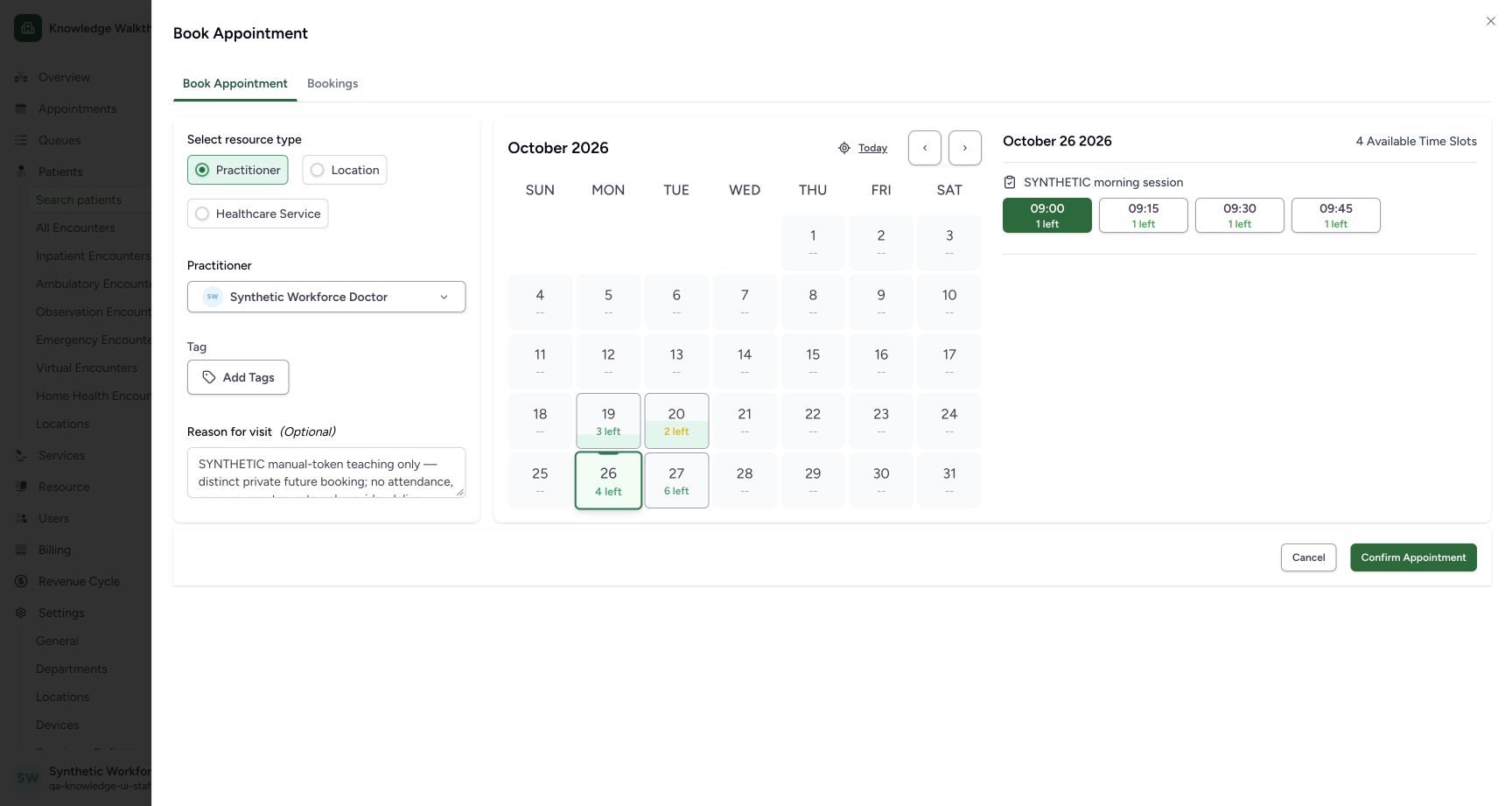
123Review the automatically selected 09:00 slot
Capture details
Exact committed 8d99bb8a. Existing normal non-superuser Staff in its assigned fictional Clinic. Review the automatically selected 09:00 slot. Genuine original image, no cropping, resizing or edits.
Image SHA-256 85c0df26e36116ed0912c0f8737af56c740d8cf78b65c67aa0c5d65d93b4da06
- 09:00 automatically selected: The first available 09:00 slot is highlighted green with 1 left.
- 26 October selected: Review the selected date.
- Confirm Appointment: Save only after checking the automatically selected slot.
 123
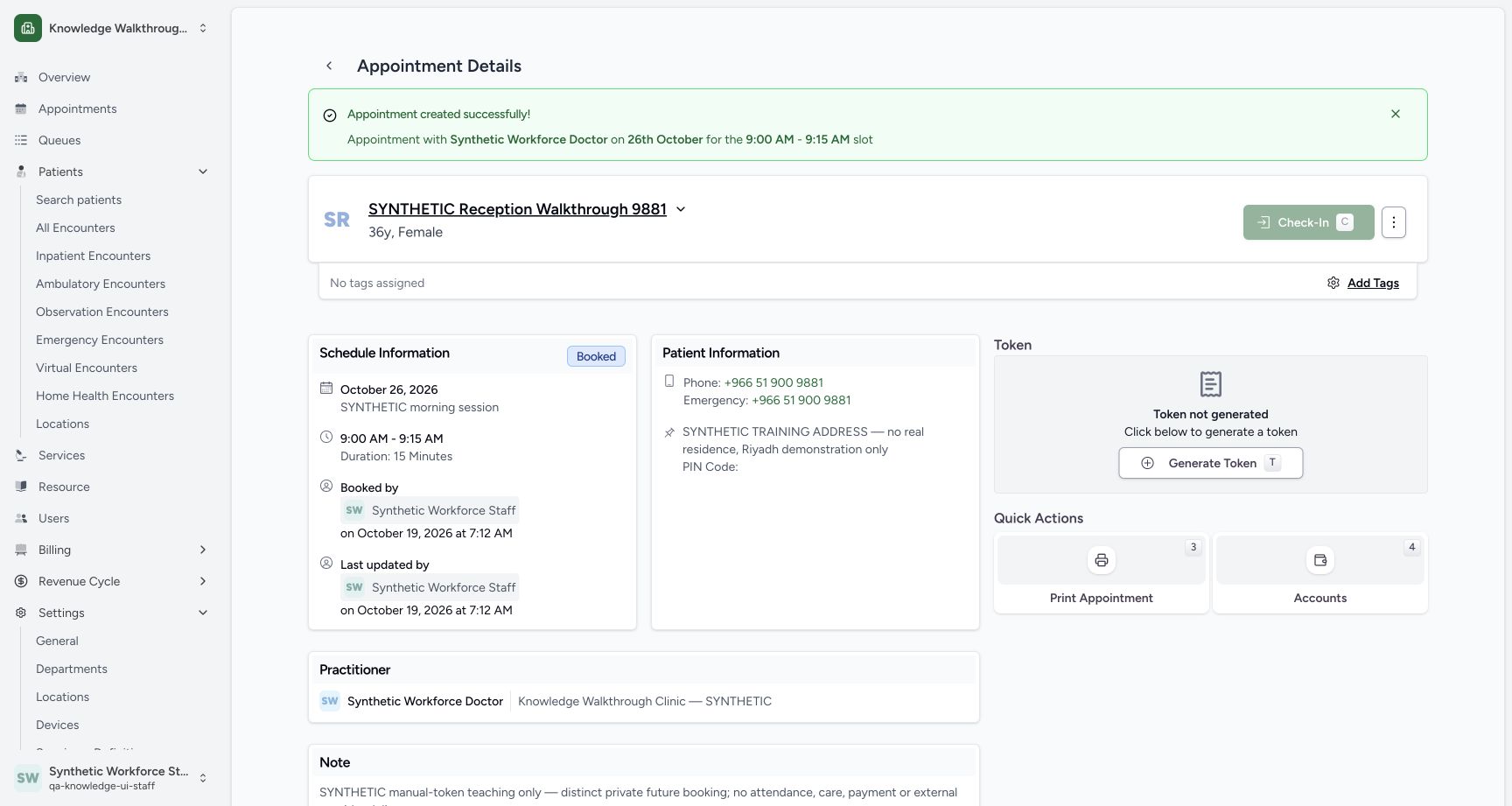
123Verify the saved Booked appointment without a token
Capture details
Exact committed 8d99bb8a. Existing normal non-superuser Staff in its assigned fictional Clinic. Verify the saved Booked appointment without a token. Genuine original image, no cropping, resizing or edits.
Image SHA-256 f7391b9923a60fc1d5b94d37565caafd52322db5cb96376ddf6fce65f7857d99
- Booked: Verify the saved status.
- 09:00–09:15: The saved schedule matches the selected 26 October slot.
- Generate Token: The saved appointment currently has no token.
12 of 12 content blocks have reviewed image alignment. Missing overview or prerequisite images remain open.
Before you begin
- Sign in as the existing ordinary Staff in the assigned fictional Clinic. The fictional patient, Doctor and private session already exist. This example displays 26 October 2026, 09:00–09:15 Riyadh (UTC+03:00), saved as 06:00–06:15 UTC. Confirm your configured scheduling and browser date context; other timezone combinations remain unverified.
 12
12Recorded release 8d99bb8a · 2026-10-19T04:11:08.139Z · 1728 × 921 Open patient search as ordinary Staff
Capture details
Exact committed 8d99bb8a. Existing normal non-superuser Staff in its assigned fictional Clinic. Open patient search as ordinary Staff. Genuine original image, no cropping, resizing or edits.
Image SHA-256
22bcf55ff625ccf0df748b1862019a07845d401a9865cb44a311e6e69868f4a9- Search patients: Open the existing-patient search.
- Ordinary Staff: Check the existing operating account.
123Recorded release 8d99bb8a · 2026-10-19T04:12:52.085Z · 1728 × 921 Review the automatically selected 09:00 slot
Capture details
Exact committed 8d99bb8a. Existing normal non-superuser Staff in its assigned fictional Clinic. Review the automatically selected 09:00 slot. Genuine original image, no cropping, resizing or edits.
Image SHA-256
85c0df26e36116ed0912c0f8737af56c740d8cf78b65c67aa0c5d65d93b4da06- 09:00 automatically selected: The first available 09:00 slot is highlighted green with 1 left.
- 26 October selected: Review the selected date.
- Confirm Appointment: Save only after checking the automatically selected slot.
123Recorded release 8d99bb8a · 2026-10-19T04:14:15.690Z · 1728 × 921 Verify the saved Booked appointment without a token
Capture details
Exact committed 8d99bb8a. Existing normal non-superuser Staff in its assigned fictional Clinic. Verify the saved Booked appointment without a token. Genuine original image, no cropping, resizing or edits.
Image SHA-256
f7391b9923a60fc1d5b94d37565caafd52322db5cb96376ddf6fce65f7857d99- Booked: Verify the saved status.
- 09:00–09:15: The saved schedule matches the selected 26 October slot.
- Generate Token: The saved appointment currently has no token.
1. Verify the operating account and Clinic
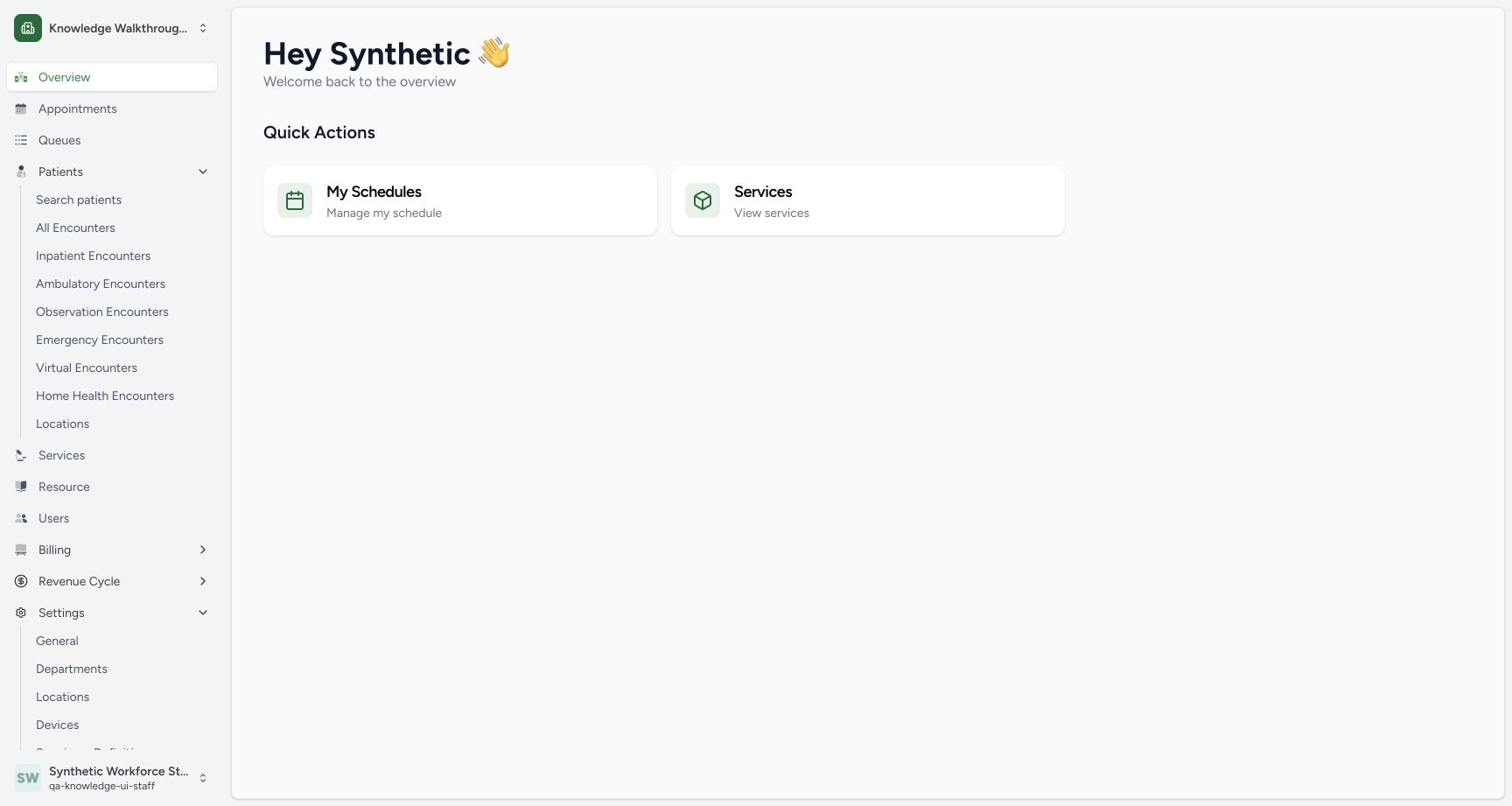
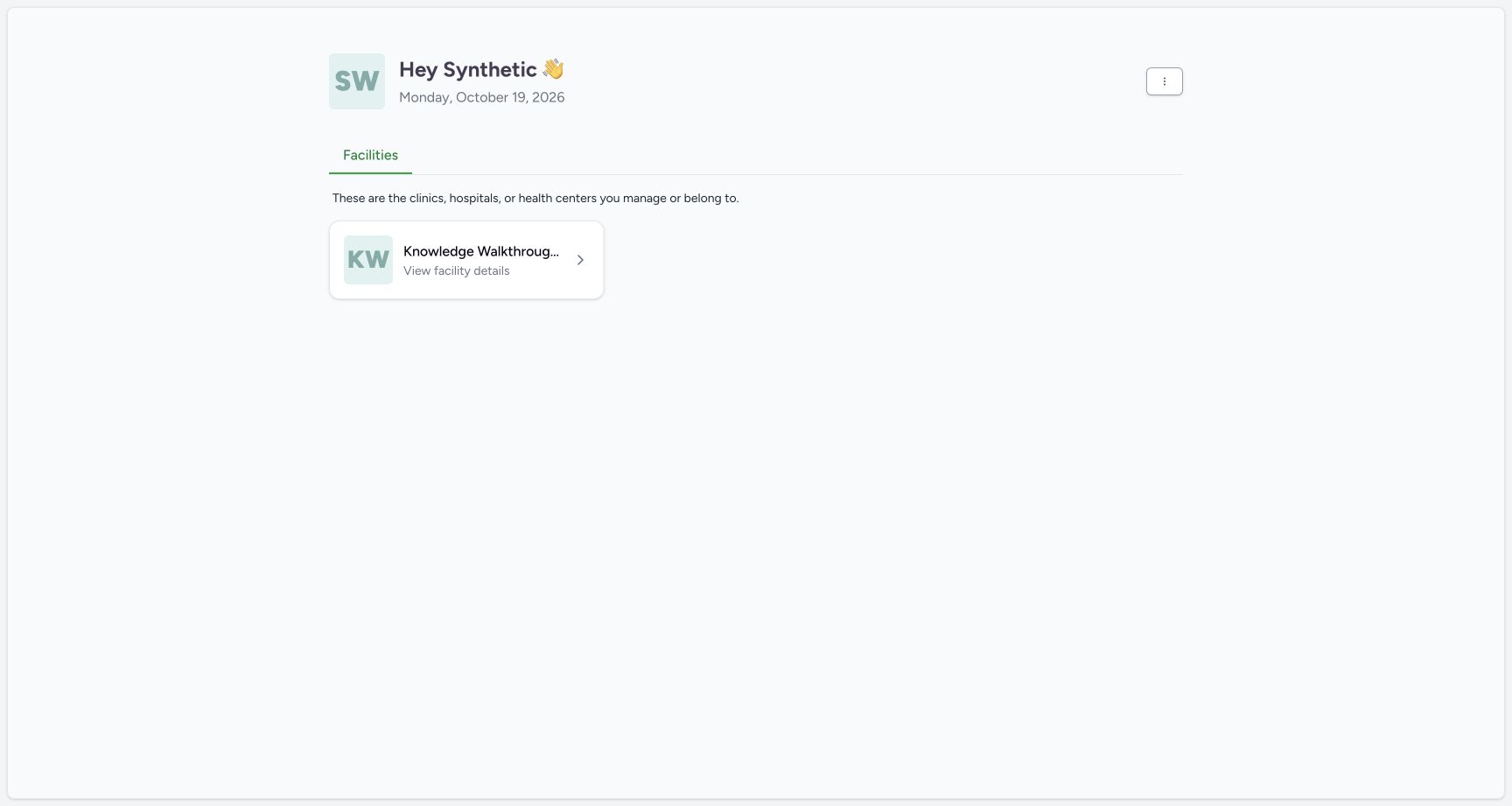
After the separate setup account has signed out, use the existing normal Staff sign-in workflow. The Staff home shows its assigned Clinic. Open that Clinic, verify qa-knowledge-ui-staff, then use Patients → Search patients.
 1
1Return to the ordinary Staff facility context
Capture details
Exact committed 8d99bb8a. Existing normal non-superuser Staff in its assigned fictional Clinic. Return to the ordinary Staff facility context. Genuine original image, no cropping, resizing or edits.
Image SHA-256 ed481922a237bcb8739d05a6ed1e896728b66a6ec240d33b3ab9f8e6dea286a0
- Assigned Clinic: The normal Staff home has its assigned fictional Clinic.
12Open patient search as ordinary Staff
Capture details
Exact committed 8d99bb8a. Existing normal non-superuser Staff in its assigned fictional Clinic. Open patient search as ordinary Staff. Genuine original image, no cropping, resizing or edits.
Image SHA-256 22bcf55ff625ccf0df748b1862019a07845d401a9865cb44a311e6e69868f4a9
- Search patients: Open the existing-patient search.
- Ordinary Staff: Check the existing operating account.
2. Find the existing fictional patient
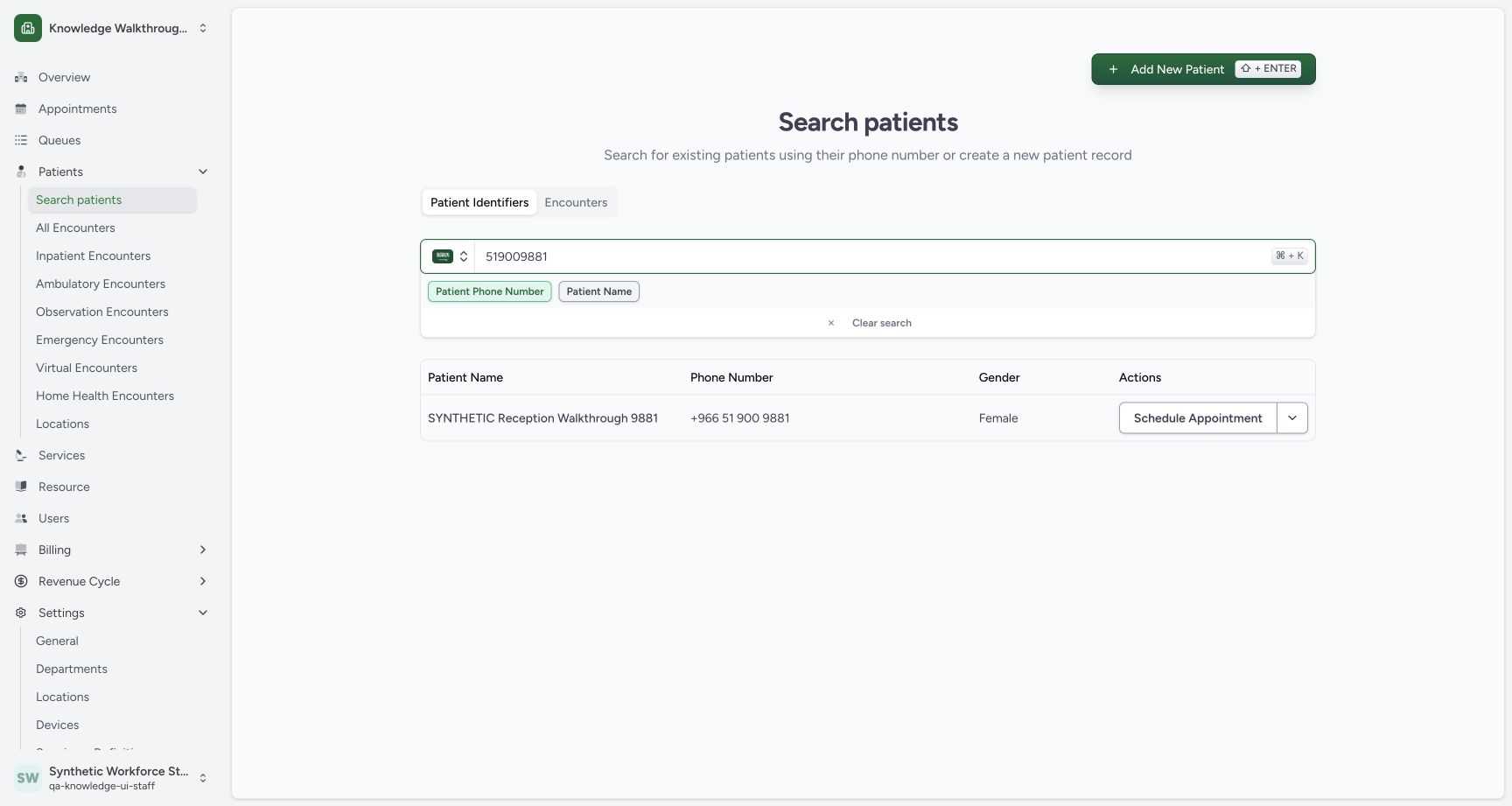
Search the known fictional phone 519009881 with the Saudi country selection. Check SYNTHETIC Reception Walkthrough 9881 and the returned phone before using Schedule Appointment.
123Match the existing fictional patient
Capture details
Exact committed 8d99bb8a. Existing normal non-superuser Staff in its assigned fictional Clinic. Match the existing fictional patient. Genuine original image, no cropping, resizing or edits.
Image SHA-256 742c31efc6af01ed0ea6177a7ec6f04bad527b46e0d189c3f46e92d5d126b7ca
- Known fictional phone: Find the existing synthetic patient.
- Verify the match: Check the synthetic name and phone.
- Schedule Appointment: Continue with the matched patient.
3. Verify the chosen identity
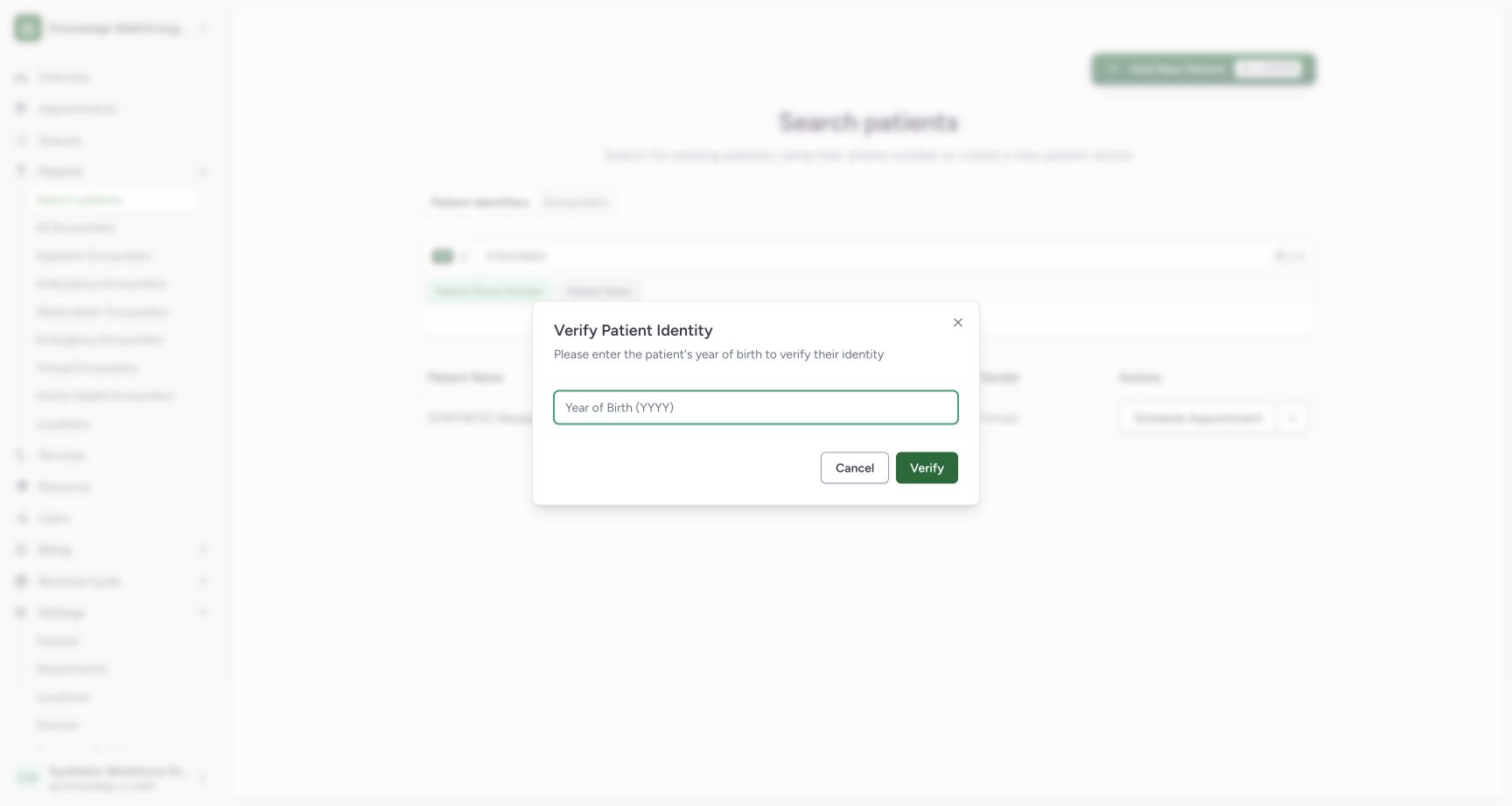
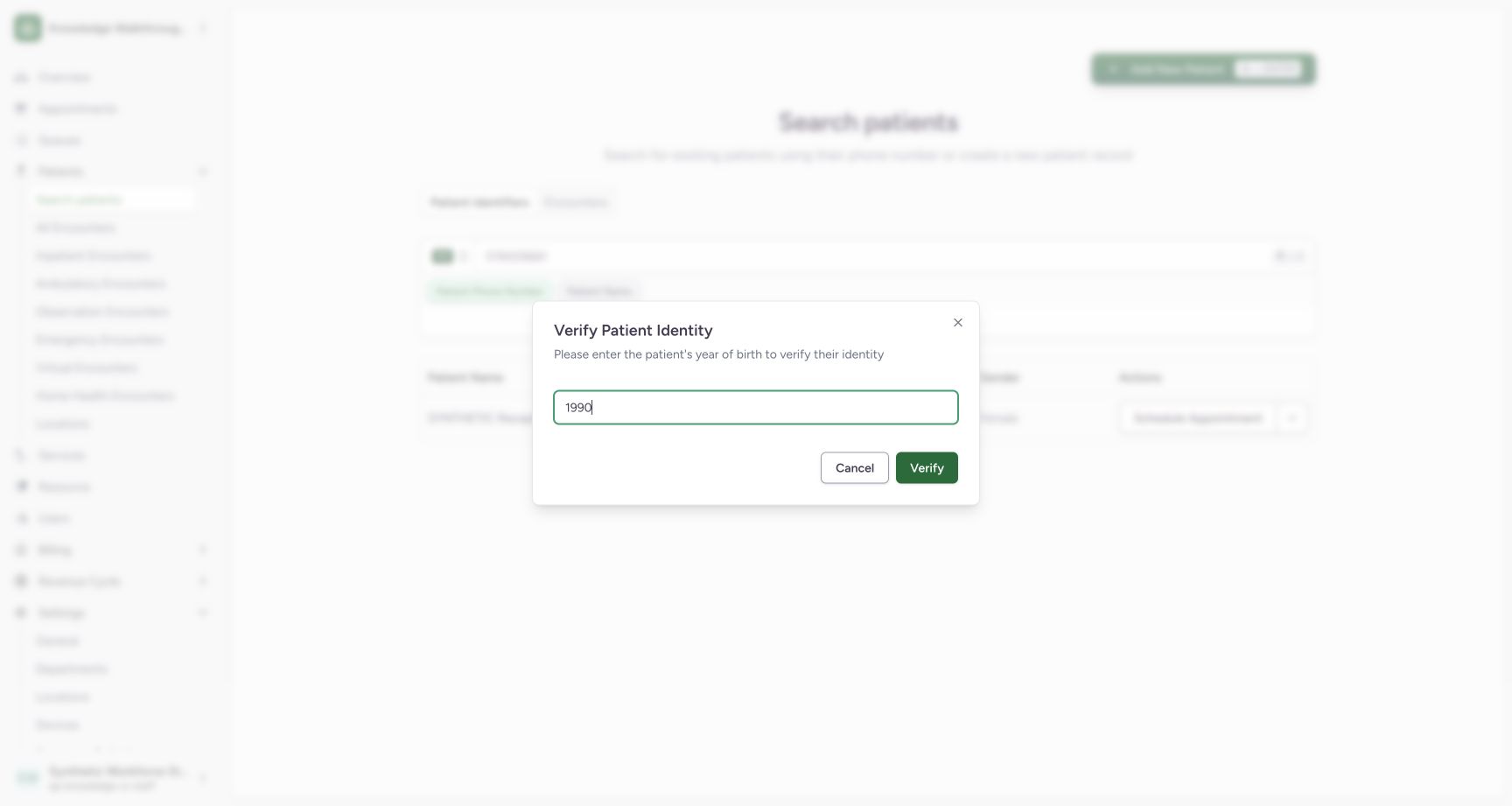
The dialog asks for the known year of birth. Enter 1990 for this fictional patient and use Verify. Use Cancel if this is not the intended person.
 12
12Inspect the year-of-birth identity prerequisite
Capture details
Exact committed 8d99bb8a. Existing normal non-superuser Staff in its assigned fictional Clinic. Inspect the year-of-birth identity prerequisite. Genuine original image, no cropping, resizing or edits.
Image SHA-256 dabf9a4b126917af8a5ef960831a6a591e50db52a4c46b4788bc5f3f16eb62fb
- Year of Birth: The identity dialog requests the known year.
- Cancel: Close the identity check if the patient is not intended.
 12
12Verify the fictional year of birth
Capture details
Exact committed 8d99bb8a. Existing normal non-superuser Staff in its assigned fictional Clinic. Verify the fictional year of birth. Genuine original image, no cropping, resizing or edits.
Image SHA-256 286837040b96956f80930f83a48ee3797fa092b175badaf9e4a54e7560a058fc
- 1990: Use this fictional patient’s known year.
- Verify: Continue after verifying the chosen identity.
4. Choose the Practitioner resource
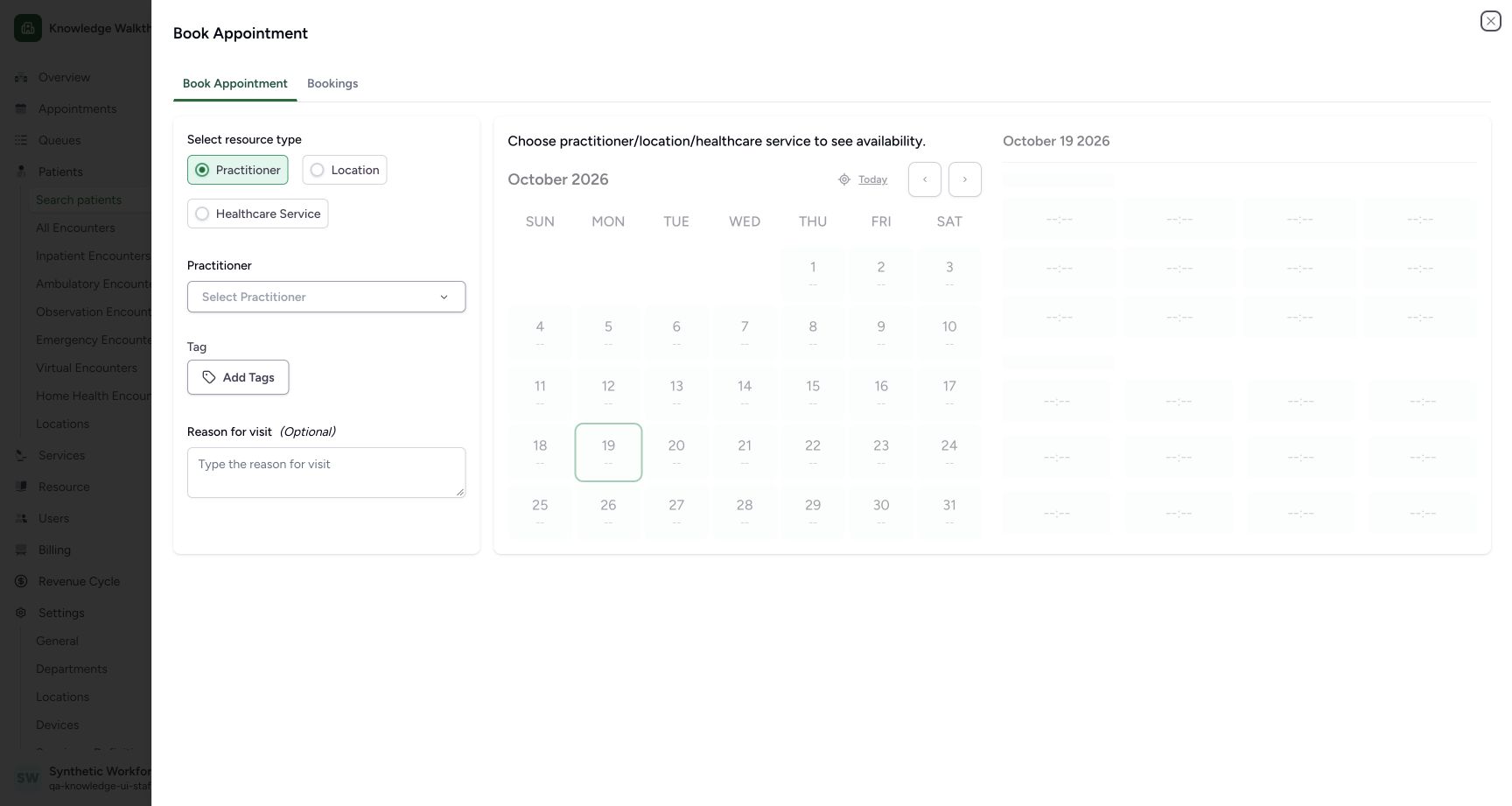
Keep Practitioner selected. The empty resource view asks you to choose a practitioner, location or healthcare service before showing availability. Open Select Practitioner.
 12
12Select the Practitioner resource before availability
Capture details
Exact committed 8d99bb8a. Existing normal non-superuser Staff in its assigned fictional Clinic. Select the Practitioner resource before availability. Genuine original image, no cropping, resizing or edits.
Image SHA-256 1343b5d07e330dd70abca54419e18ed665c87640cc34d921d51dccfc1603f79f
- Practitioner: Use Practitioner for this example.
- Select Practitioner: Choose the intended resource before availability.
5. Choose the authorized department and Doctor
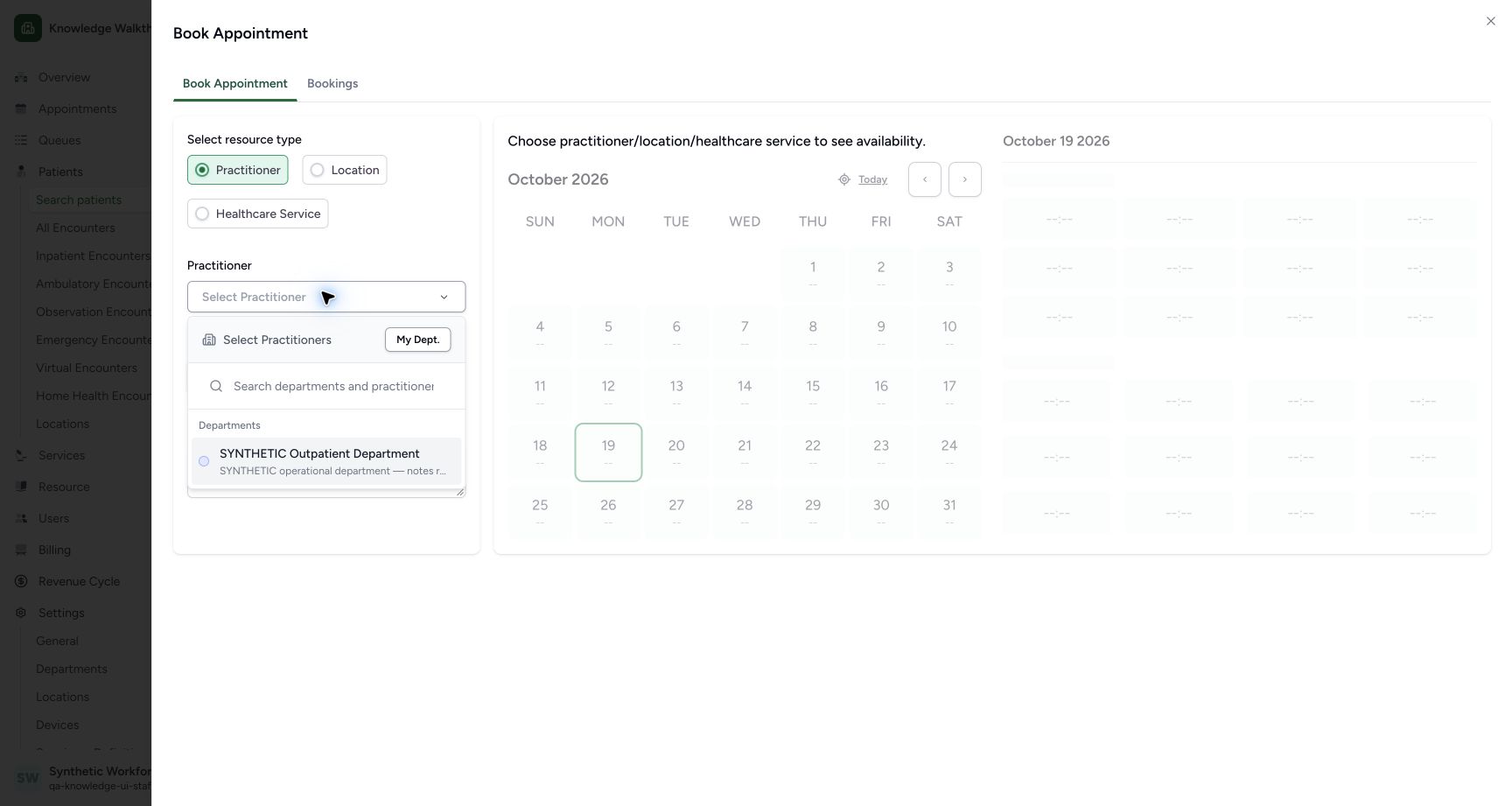
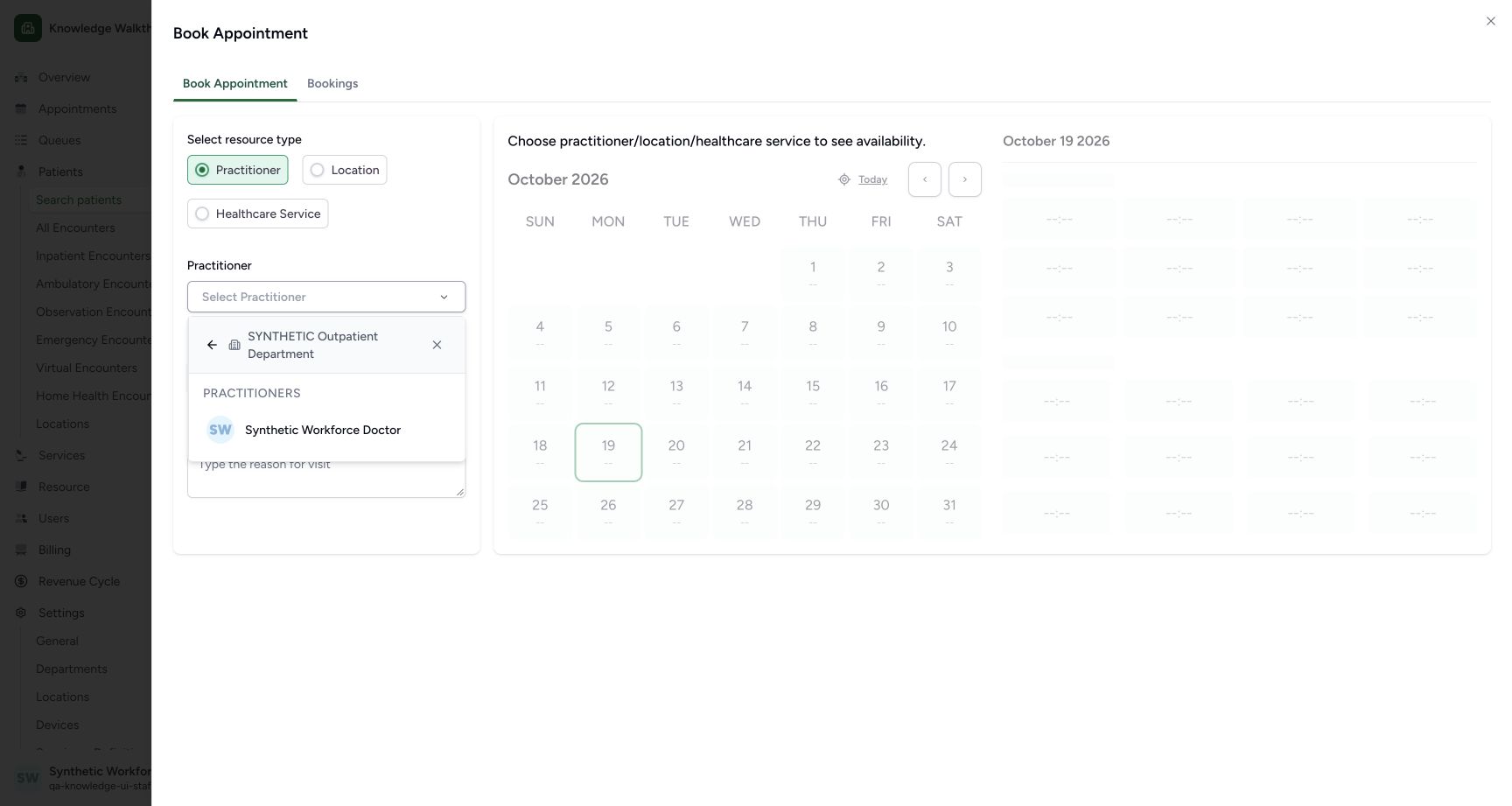
In the practitioner popup, use the existing SYNTHETIC Outpatient Department and select Synthetic Workforce Doctor. No practitioner or department is created here.
 1
1Choose the existing department with the actual visible target
Capture details
Exact committed 8d99bb8a. Existing normal non-superuser Staff in its assigned fictional Clinic. Inspect the authorized department picker. Genuine original image, no cropping, resizing or edits. Read-only geometry replacement after the saved token checkpoint: no appointment confirmation or business save.
Image SHA-256 612ba6565529851626f4dd6263c94bc479741a903d3dc8c930aa0bb963e2ab5f
- Existing department: Choose SYNTHETIC Outpatient Department in the actual Practitioner popup.
 1
1Choose the existing Doctor in the department
Capture details
Exact committed 8d99bb8a. Existing normal non-superuser Staff in its assigned fictional Clinic. Choose the existing Doctor in the department. Genuine original image, no cropping, resizing or edits.
Image SHA-256 ce78081d0438d1c7733ce6574c4d89af129db937bd36818c06f9dd194bf29aad
- Existing Doctor: Choose Synthetic Workforce Doctor in this department popup.
6. Set the future day and fictional purpose
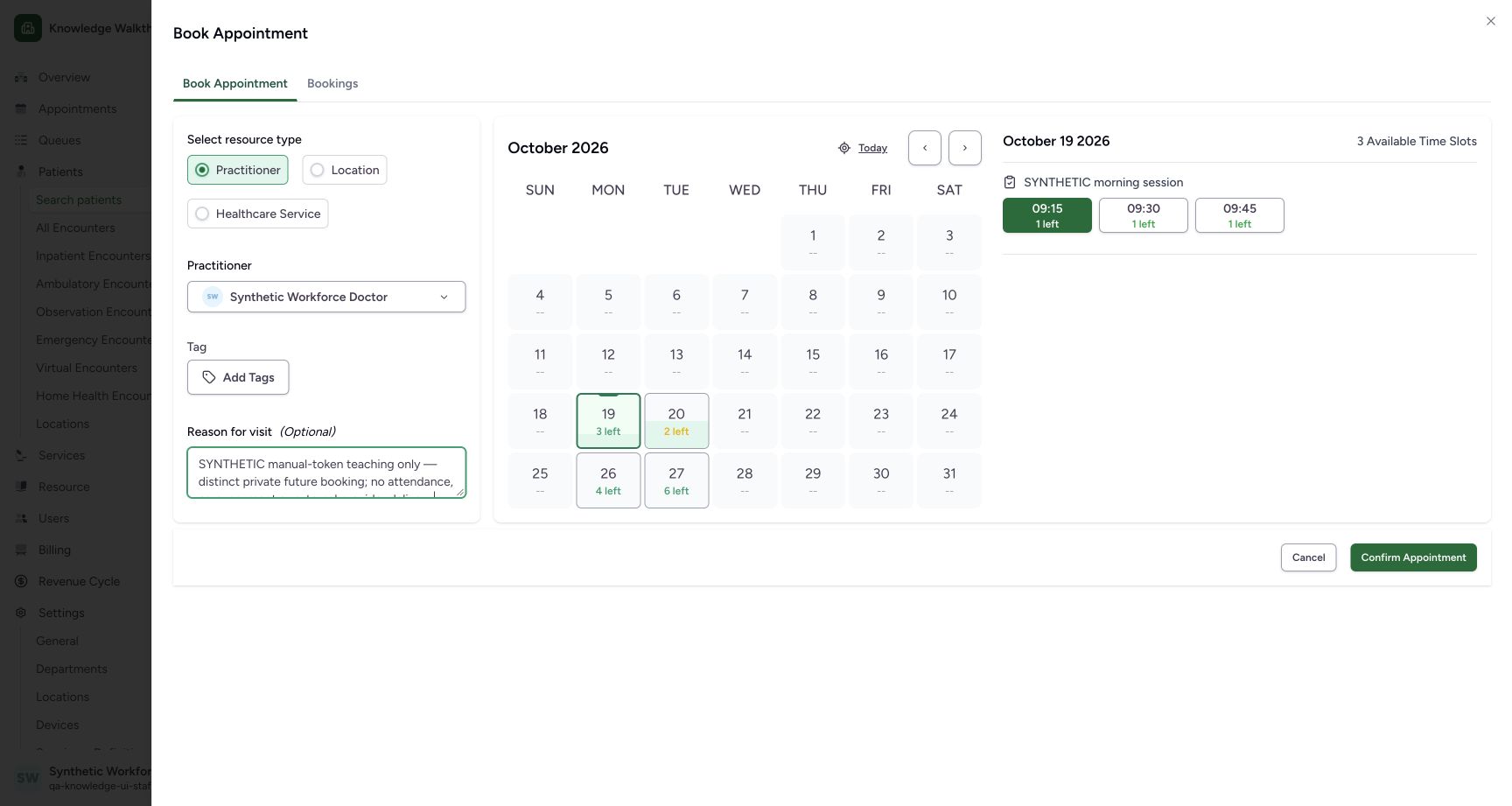
Record an explicit synthetic practice reason in Reason for visit. Select 26 October in the calendar. The earlier screen still shows 19 October until that date is selected; verify the updated date heading before saving.
 12
12Choose the future day and record the synthetic purpose
Capture details
Exact committed 8d99bb8a. Existing normal non-superuser Staff in its assigned fictional Clinic. Choose the future day and record the synthetic purpose. Genuine original image, no cropping, resizing or edits.
Image SHA-256 85aae980d4086bcae905e697485f2b55176a2305d98ca47cde082d4c23d0b29c
- 26 October: Change the currently displayed 19 October to 26 October.
- Synthetic reason: Record the explicit fictional purpose in Reason for visit.
123Review the automatically selected 09:00 slot
Capture details
Exact committed 8d99bb8a. Existing normal non-superuser Staff in its assigned fictional Clinic. Review the automatically selected 09:00 slot. Genuine original image, no cropping, resizing or edits.
Image SHA-256 85c0df26e36116ed0912c0f8737af56c740d8cf78b65c67aa0c5d65d93b4da06
- 09:00 automatically selected: The first available 09:00 slot is highlighted green with 1 left.
- 26 October selected: Review the selected date.
- Confirm Appointment: Save only after checking the automatically selected slot.
7. Review the automatically selected slot
After the date changes, the picker automatically highlights the first available slot. Here 09:00, shown green with 1 left, is selected. Review the Doctor, October 26 2026, session and highlighted 09:00 before selecting Confirm Appointment once.
123Review the automatically selected 09:00 slot
Capture details
Exact committed 8d99bb8a. Existing normal non-superuser Staff in its assigned fictional Clinic. Review the automatically selected 09:00 slot. Genuine original image, no cropping, resizing or edits.
Image SHA-256 85c0df26e36116ed0912c0f8737af56c740d8cf78b65c67aa0c5d65d93b4da06
- 09:00 automatically selected: The first available 09:00 slot is highlighted green with 1 left.
- 26 October selected: Review the selected date.
- Confirm Appointment: Save only after checking the automatically selected slot.
8. Verify the actual saved appointment
The saved detail shows Booked, October 26, 2026, 9:00 AM–9:15 AM, the intended patient and Doctor, and Token not generated. Use this exact saved record for the separate token exercise.
123Verify the saved Booked appointment without a token
Capture details
Exact committed 8d99bb8a. Existing normal non-superuser Staff in its assigned fictional Clinic. Verify the saved Booked appointment without a token. Genuine original image, no cropping, resizing or edits.
Image SHA-256 f7391b9923a60fc1d5b94d37565caafd52322db5cb96376ddf6fce65f7857d99
- Booked: Verify the saved status.
- 09:00–09:15: The saved schedule matches the selected 26 October slot.
- Generate Token: The saved appointment currently has no token.
Read selection and saved outcome together
The green 09:00 highlight is already a selected slot. In this observed flow, confirming that selection saves 09:00–09:15. A separate click on a different time is needed only when that different time is intended; do not assume that no slot is selected.
123Review the automatically selected 09:00 slot
Capture details
Exact committed 8d99bb8a. Existing normal non-superuser Staff in its assigned fictional Clinic. Review the automatically selected 09:00 slot. Genuine original image, no cropping, resizing or edits.
Image SHA-256 85c0df26e36116ed0912c0f8737af56c740d8cf78b65c67aa0c5d65d93b4da06
- 09:00 automatically selected: The first available 09:00 slot is highlighted green with 1 left.
- 26 October selected: Review the selected date.
- Confirm Appointment: Save only after checking the automatically selected slot.
123Verify the saved Booked appointment without a token
Capture details
Exact committed 8d99bb8a. Existing normal non-superuser Staff in its assigned fictional Clinic. Verify the saved Booked appointment without a token. Genuine original image, no cropping, resizing or edits.
Image SHA-256 f7391b9923a60fc1d5b94d37565caafd52322db5cb96376ddf6fce65f7857d99
- Booked: Verify the saved status.
- 09:00–09:15: The saved schedule matches the selected 26 October slot.
- Generate Token: The saved appointment currently has no token.
Troubleshooting
No availability is shown in the empty resource view
Choose the intended resource first. The pictured Practitioner view has Select Practitioner empty and explicitly asks for a practitioner/location/healthcare service; the later selected Doctor view shows actual slots.
12Select the Practitioner resource before availability
Capture details
Exact committed 8d99bb8a. Existing normal non-superuser Staff in its assigned fictional Clinic. Select the Practitioner resource before availability. Genuine original image, no cropping, resizing or edits.
Image SHA-256 1343b5d07e330dd70abca54419e18ed665c87640cc34d921d51dccfc1603f79f
- Practitioner: Use Practitioner for this example.
- Select Practitioner: Choose the intended resource before availability.
123Review the automatically selected 09:00 slot
Capture details
Exact committed 8d99bb8a. Existing normal non-superuser Staff in its assigned fictional Clinic. Review the automatically selected 09:00 slot. Genuine original image, no cropping, resizing or edits.
Image SHA-256 85c0df26e36116ed0912c0f8737af56c740d8cf78b65c67aa0c5d65d93b4da06
- 09:00 automatically selected: The first available 09:00 slot is highlighted green with 1 left.
- 26 October selected: Review the selected date.
- Confirm Appointment: Save only after checking the automatically selected slot.
Source evidence
Every citation uses this exact committed version. The private source repository requires access.
- repositories/platform/mansoq-web/src/components/Patient/PatientIdentifierFilter.tsx:567 ·
8d99bb8a4712f6aa8446bcd3b40bf62dae280d39Source file checksum
50d2cc2acbb414040148b30d6664ccdcae33df64bc7b19953fe34ee6afd3eed7 - repositories/platform/mansoq-web/src/pages/Appointments/components/PractitionerSelector.tsx:309 ·
8d99bb8a4712f6aa8446bcd3b40bf62dae280d39Source file checksum
fbff1cae7ee20060cda82aff258844a6a4040444176b5c0df23c6e90de1d0790 - repositories/platform/mansoq-web/src/pages/Appointments/BookAppointment/BookAppointmentDetails.tsx:164 ·
8d99bb8a4712f6aa8446bcd3b40bf62dae280d39Source file checksum
10a7aab902525f4669d7219477e1ca6b7e333f38fbecc8552f608fbc721023f2 - repositories/platform/mansoq-web/src/pages/Appointments/BookAppointment/AppointmentSlotPicker.tsx:129 ·
8d99bb8a4712f6aa8446bcd3b40bf62dae280d39Source file checksum
d2211acfcae4cf531e0b30aad5c9141c71caaaed7f04cc9dad2b32750f0ef1cc - repositories/platform/mansoq-web/src/pages/Appointments/AppointmentDetail.tsx:204 ·
8d99bb8a4712f6aa8446bcd3b40bf62dae280d39Source file checksum
8fc77ee6f1f7b145e2987ba272e80f35631e17907ea91cd305738250b137b839 - repositories/platform/mansoq-core/mansoq/emr/api/viewsets/scheduling/availability.py:151 ·
8d99bb8a4712f6aa8446bcd3b40bf62dae280d39Source file checksum
1370c5b5f5cad98b4cceba59929dc88e82c70350615d5a3125d60cab54deec2c - repositories/platform/mansoq-core/mansoq/security/permissions/token.py:34 ·
8d99bb8a4712f6aa8446bcd3b40bf62dae280d39Source file checksum
5140921e9f382b256d55e47f9aa7f21c49429a7d34fb436af3964b0de31c8985