 MANSOQ
 Scheduling and appointments · VERSION 8d99bb8a
Call, serve, recall and return an existing token
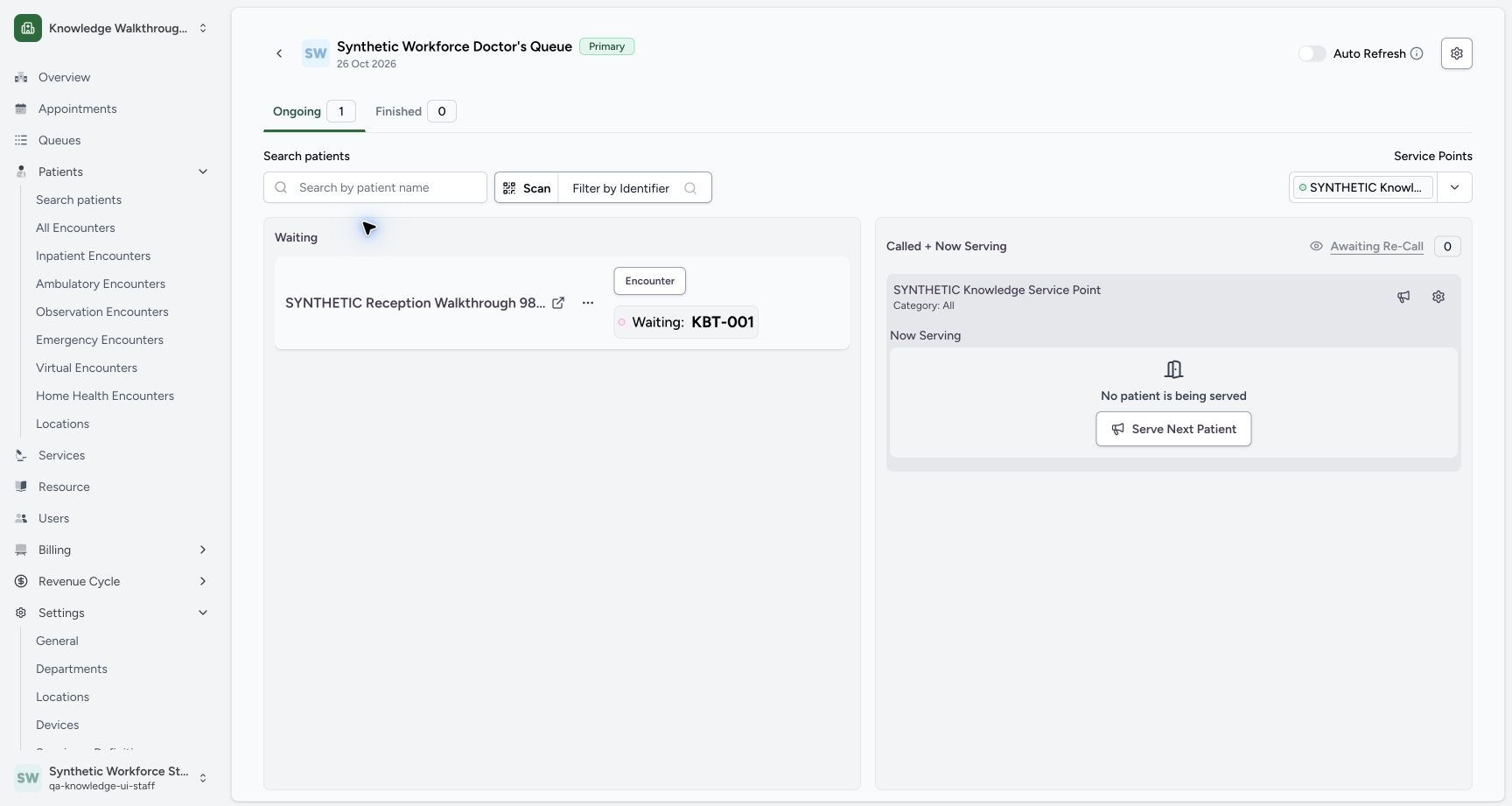
Use the same fictional KBT-001 through Call Next, Serving, Recall and back to Waiting, with its selected service point and token identity checked at each stage.
Staff · Receptionist
 123
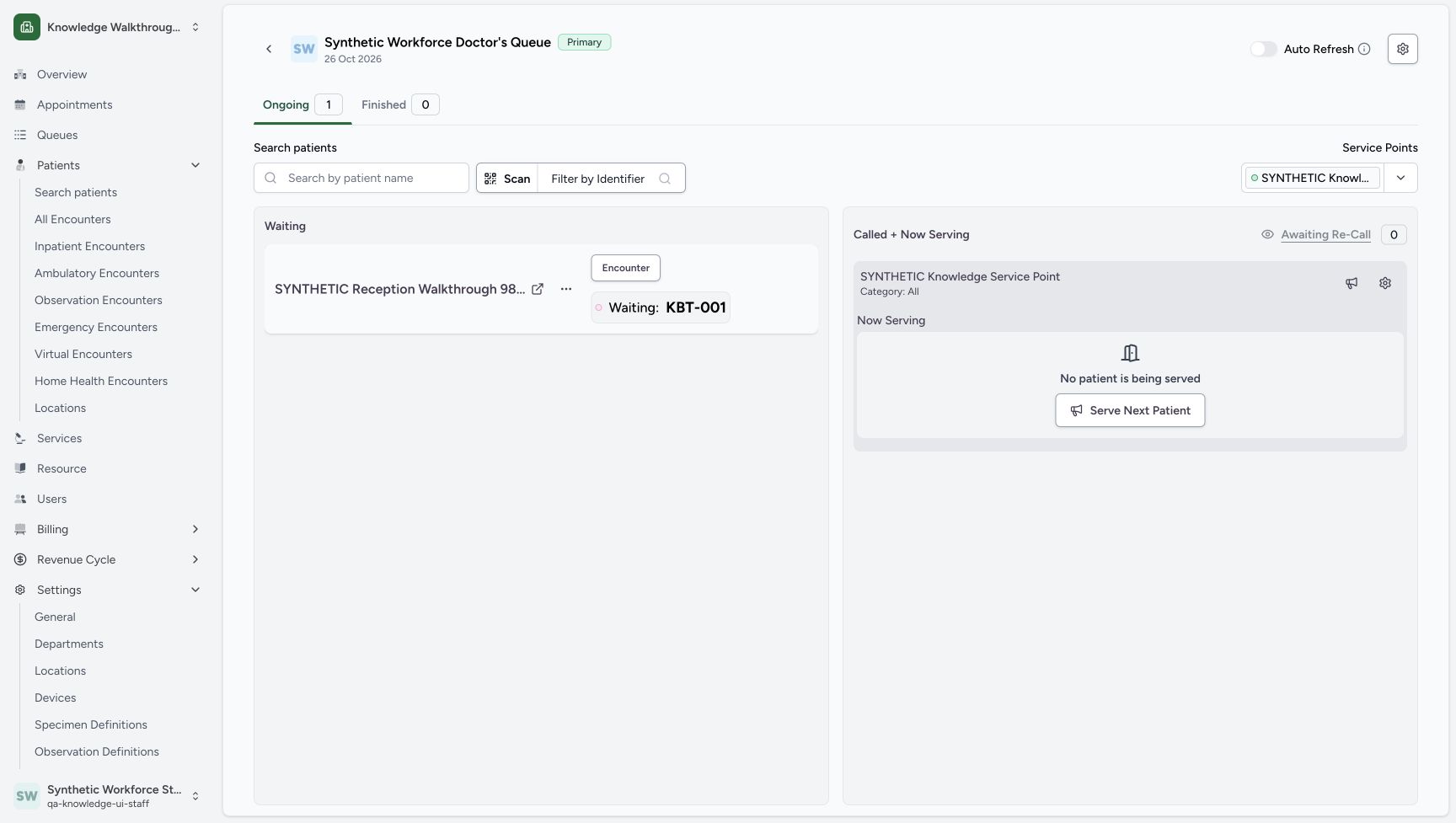
123The existing token is Waiting and the new Active point is already displayed.
Capture details
Exact committed 8d99 source and existing non-superuser Staff in the isolated fictional Clinic. The existing token is Waiting and the new Active point is already displayed. Genuine unchanged desktop screenshot; browser recovery changes the native viewport height from 921 to 977 without image resizing.
Image SHA-256 ce7f819007cfecab6e9f0cd986f0855cbfdaf0ed06b3fb4d57b7194d3138608d
- Token Actions: Open Actions for the existing Waiting KBT-001.
- Waiting: KBT-001: Check the current token label and number.
- Selected point: Check the existing synthetic service-point panel.
 123
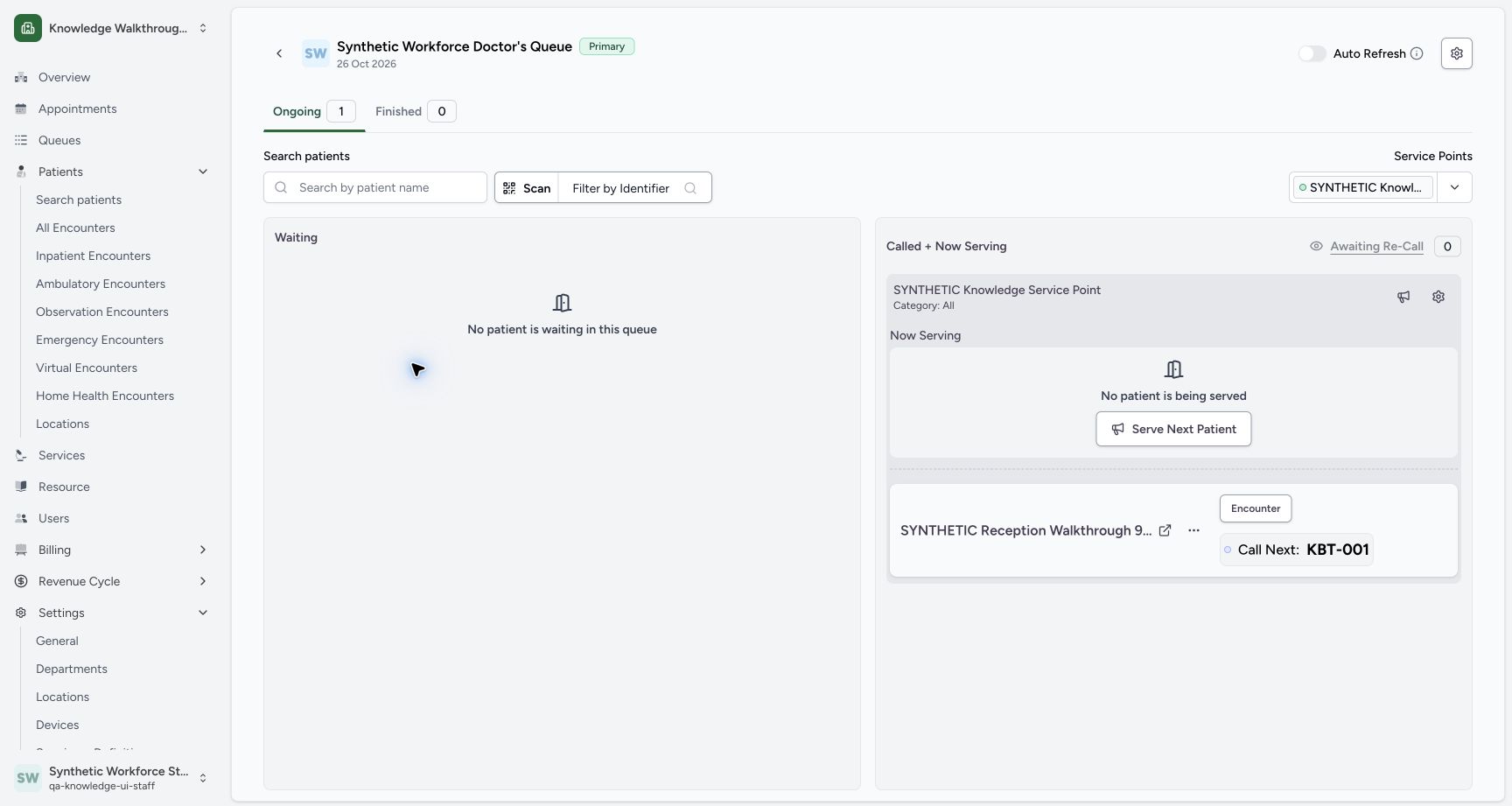
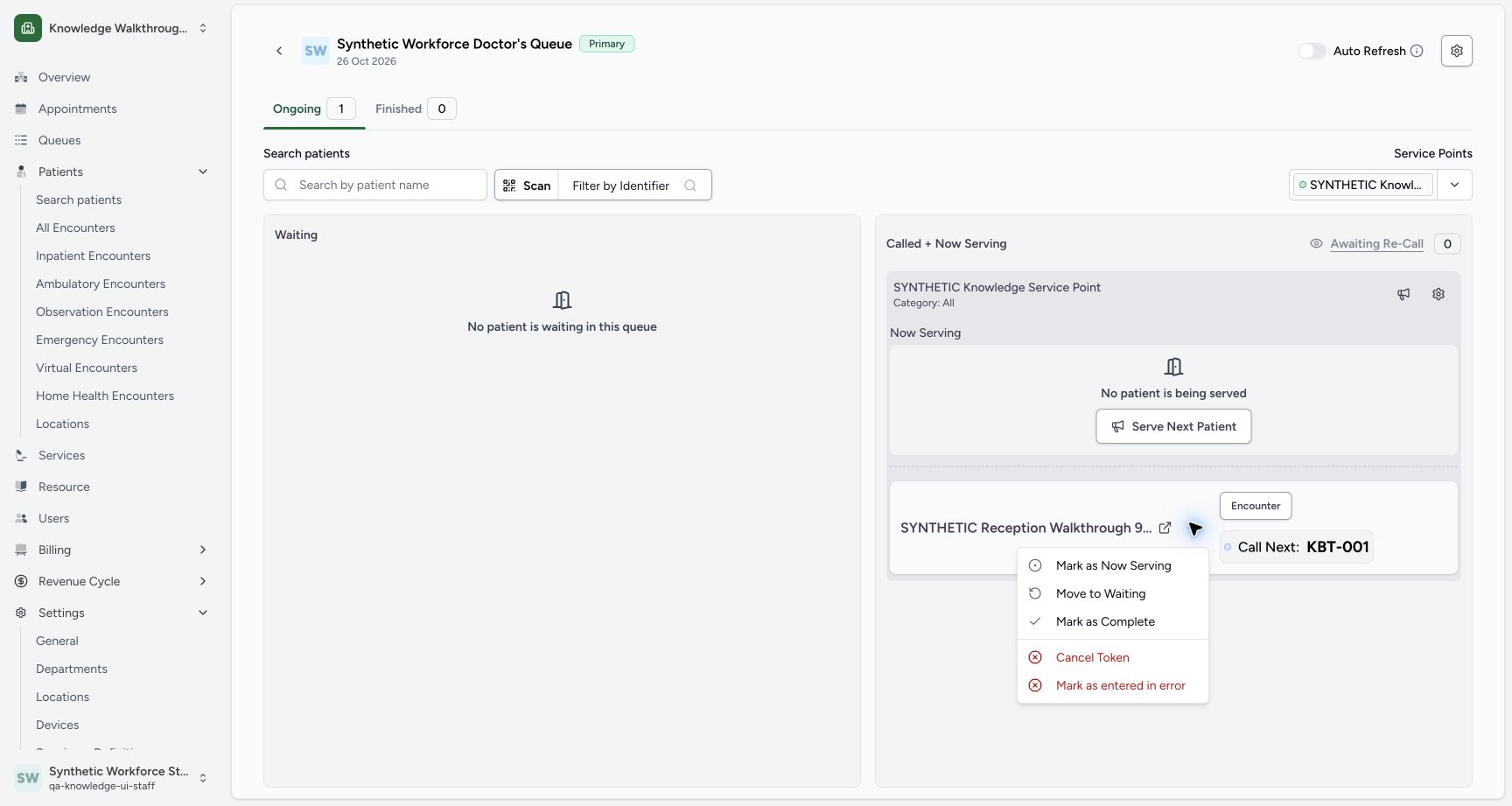
123After Call to, KBT-001 moves from Waiting under the selected service point and is labelled Call Next in this version.
Capture details
Exact committed 8d99 source and existing non-superuser Staff in the isolated fictional Clinic. After Call to, KBT-001 moves from Waiting under the selected service point and is labelled Call Next in this version. Genuine unchanged desktop screenshot; browser recovery changes the native viewport height from 921 to 977 without image resizing.
Image SHA-256 6268434dcbadfd347db8683553d14ffa70026fdd711969a99d16fcc56f854fe4
- Actions: Open the assigned token menu.
- Call Next: KBT-001: This version labels the called token Call Next.
- Waiting is empty: The token is no longer in the Waiting group.
 12
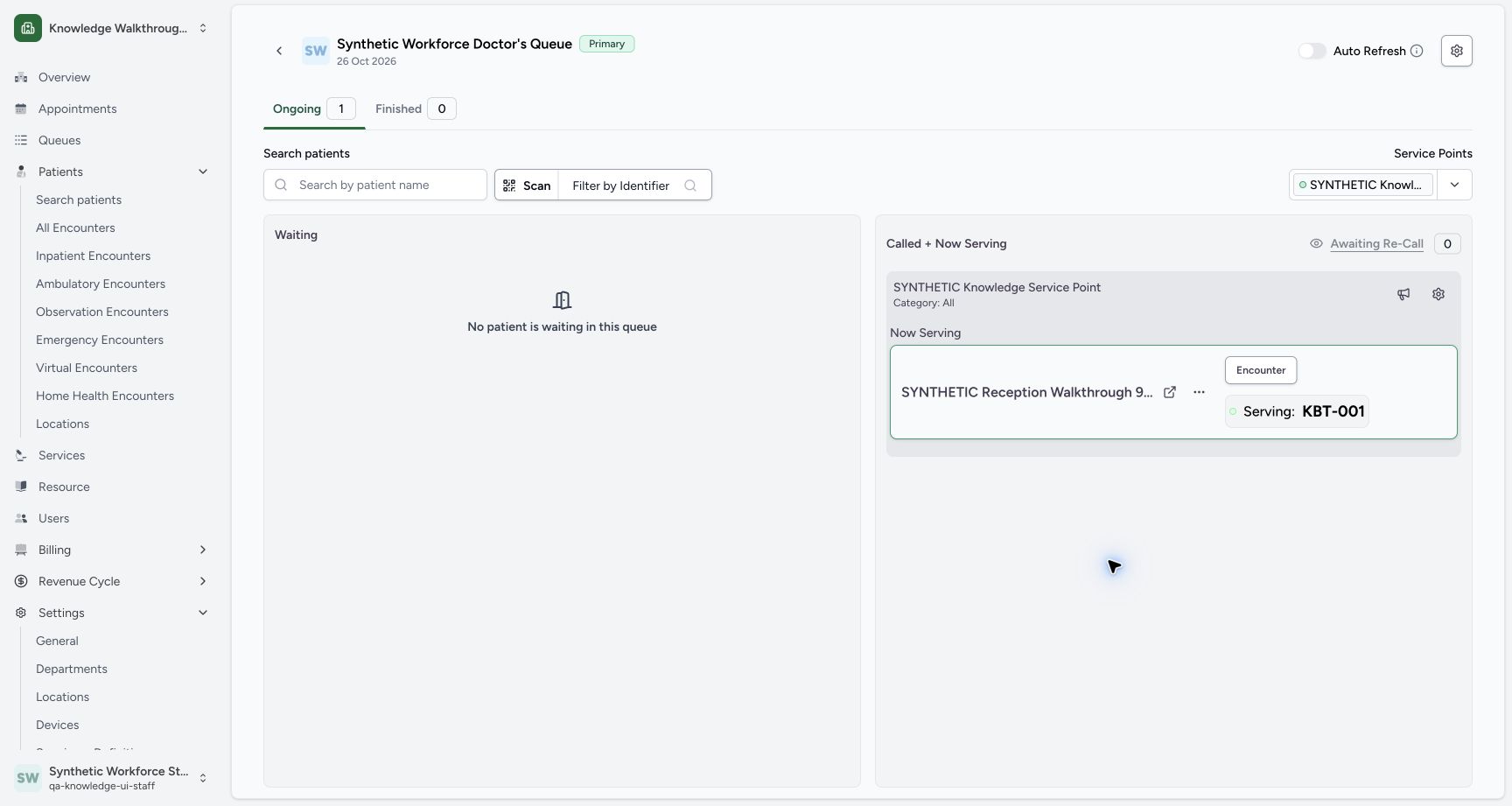
12KBT-001 is shown as Now Serving at the selected point after the normal action.
Capture details
Exact committed 8d99 source and existing non-superuser Staff in the isolated fictional Clinic. KBT-001 is shown as Now Serving at the selected point after the normal action. Genuine unchanged desktop screenshot; browser recovery changes the native viewport height from 921 to 977 without image resizing.
Image SHA-256 44f01f7f9a6227823b2b5cf588be8acd56af327d163feae98cd43ca0090c4a7d
- Serving Actions: Open the menu for the same Serving token.
- Serving: KBT-001: The token is now in the Now Serving panel.
 123
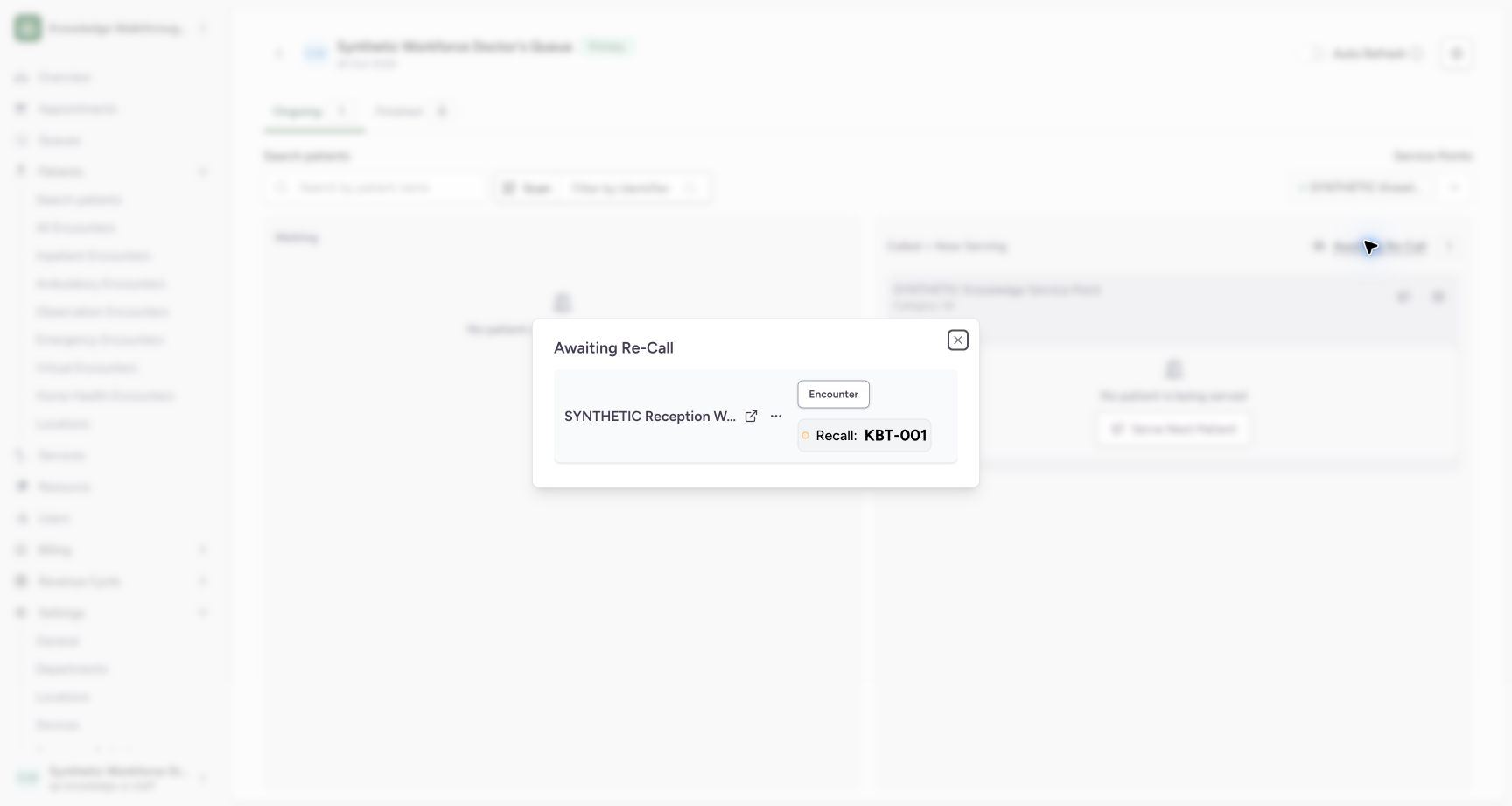
123After the dialog loads, it shows Recall: KBT-001 and the same fictional patient.
Capture details
Exact committed 8d99 source and existing non-superuser Staff in the isolated fictional Clinic. After the dialog loads, it shows Recall: KBT-001 and the same fictional patient. Genuine unchanged desktop screenshot; browser recovery changes the native viewport height from 921 to 977 without image resizing.
Image SHA-256 3a115aa84f24fe5f19c362f3972b45e4a4aa469ed6ef3be9157de2df01b7d57b
- Recall token Actions: Open Actions for the same Recall: KBT-001.
- Close control reference: This visible top-right control is shown as a reference; its post-call execution was not captured.
- Recall: KBT-001: Verify the intended token before recalling it.
 123
123KBT-001 is back in Waiting, with the service point still displayed and no patient being served.
Capture details
Exact committed 8d99 source and existing non-superuser Staff in the isolated fictional Clinic. KBT-001 is back in Waiting, with the service point still displayed and no patient being served. Genuine unchanged desktop screenshot; browser recovery changes the native viewport height from 921 to 977 without image resizing.
Image SHA-256 e5494b72b8decb8b083ba72b61aee0b63d5e7ff0e63300ed03f272cac7a5c16d
- Waiting token Actions: Open the existing token menu for the separate completion exercise.
- Disabled zero-count control: Awaiting Re-Call is disabled while its count is zero.
- Waiting: KBT-001: The same token is back in Waiting.
12 of 12 content blocks have reviewed image alignment. Missing overview or prerequisite images remain open.
Before you begin
- Use the existing ordinary Staff account in Knowledge Walkthrough Clinic — SYNTHETIC. The pictured Primary Queue is Synthetic Workforce Doctor’s queue for 26 October 2026, with SYNTHETIC Knowledge Service Point selected and Waiting: KBT-001 already saved. This dated exercise demonstrates queue software states.123
Recorded release 8d99bb8a · 2026-10-19T05:06:33.686Z · 1728 × 921 The existing token is Waiting and the new Active point is already displayed.
Capture details
Exact committed 8d99 source and existing non-superuser Staff in the isolated fictional Clinic. The existing token is Waiting and the new Active point is already displayed. Genuine unchanged desktop screenshot; browser recovery changes the native viewport height from 921 to 977 without image resizing.
Image SHA-256
ce7f819007cfecab6e9f0cd986f0855cbfdaf0ed06b3fb4d57b7194d3138608d- Token Actions: Open Actions for the existing Waiting KBT-001.
- Waiting: KBT-001: Check the current token label and number.
- Selected point: Check the existing synthetic service-point panel.
1. Check the existing Waiting token and point
On Ongoing 1, check Synthetic Workforce Doctor’s Queue, 26 Oct 2026, the selected SYNTHETIC Knowledge Service Point, and Waiting: KBT-001. Open that token card’s three-dot Actions menu.
123The existing token is Waiting and the new Active point is already displayed.
Capture details
Exact committed 8d99 source and existing non-superuser Staff in the isolated fictional Clinic. The existing token is Waiting and the new Active point is already displayed. Genuine unchanged desktop screenshot; browser recovery changes the native viewport height from 921 to 977 without image resizing.
Image SHA-256 ce7f819007cfecab6e9f0cd986f0855cbfdaf0ed06b3fb4d57b7194d3138608d
- Token Actions: Open Actions for the existing Waiting KBT-001.
- Waiting: KBT-001: Check the current token label and number.
- Selected point: Check the existing synthetic service-point panel.
2. Call the same token to the selected point
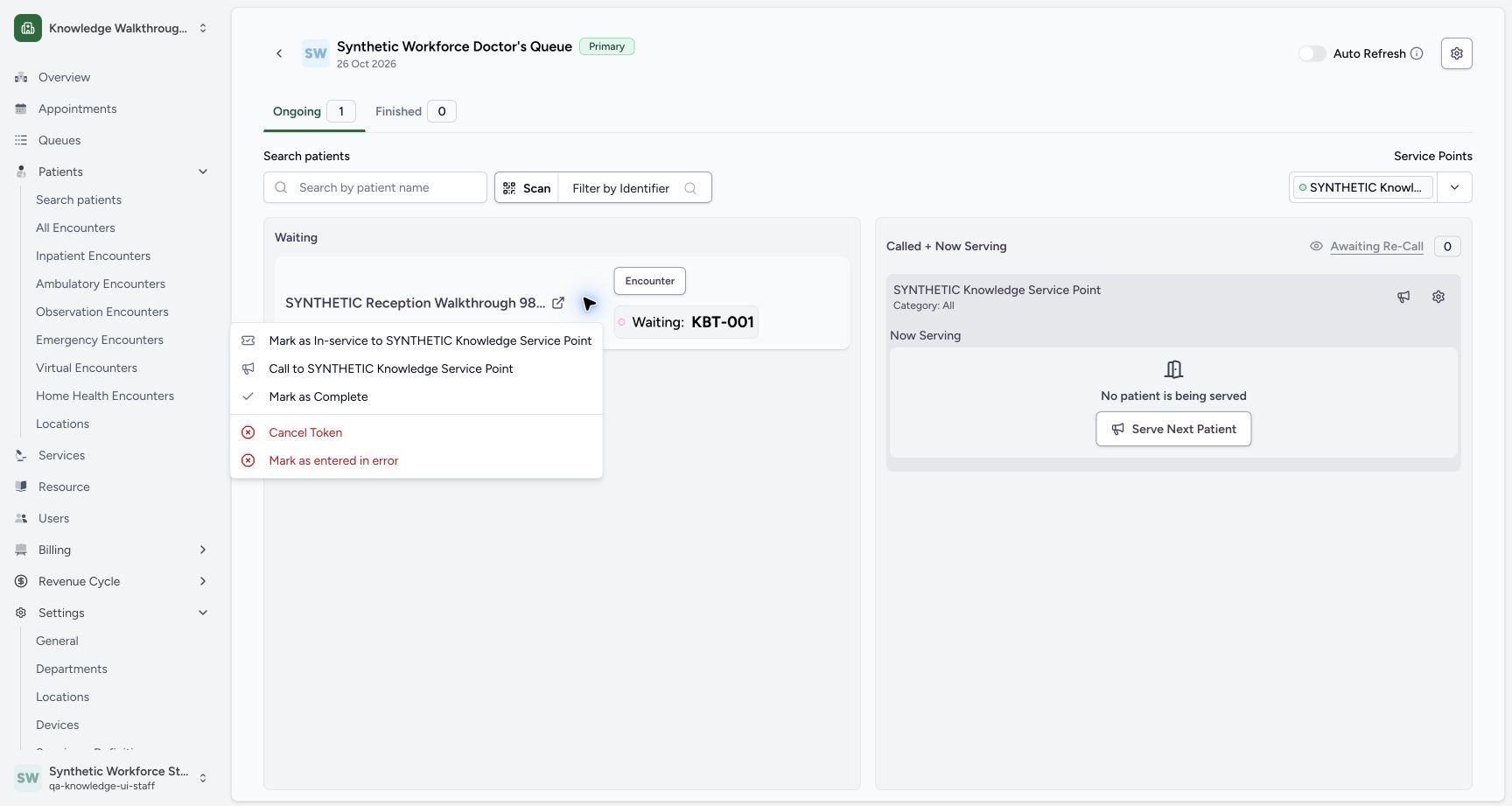
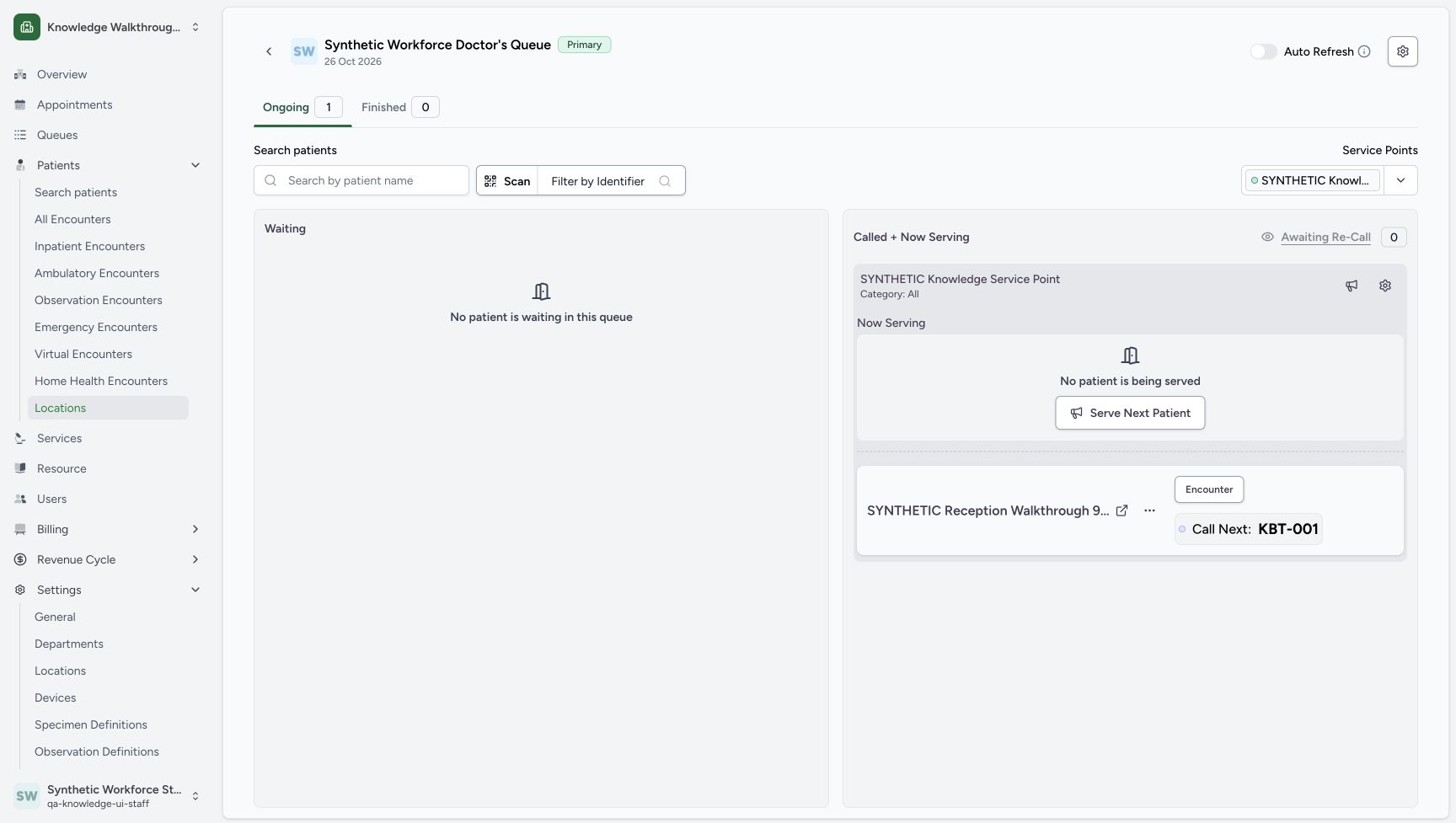
Choose Call to SYNTHETIC Knowledge Service Point. The saved token leaves Waiting and appears under that point with Call Next: KBT-001. In this version, Call Next is the pictured label for this assigned calling state.
 1
1Open the existing Waiting token Actions and review Call to the selected synthetic service point.
Capture details
Exact committed 8d99 source and existing non-superuser Staff in the isolated fictional Clinic. Open the existing Waiting token Actions and review Call to the selected synthetic service point. Genuine unchanged desktop screenshot; browser recovery changes the native viewport height from 921 to 977 without image resizing.
Image SHA-256 2463daa31e4cd495fcfb13939a42ea7c4cf8ad3ec6d87abd28e144fd27d98b71
- Call to point: Assign the existing token to this point in the calling state.
123After Call to, KBT-001 moves from Waiting under the selected service point and is labelled Call Next in this version.
Capture details
Exact committed 8d99 source and existing non-superuser Staff in the isolated fictional Clinic. After Call to, KBT-001 moves from Waiting under the selected service point and is labelled Call Next in this version. Genuine unchanged desktop screenshot; browser recovery changes the native viewport height from 921 to 977 without image resizing.
Image SHA-256 6268434dcbadfd347db8683553d14ffa70026fdd711969a99d16fcc56f854fe4
- Actions: Open the assigned token menu.
- Call Next: KBT-001: This version labels the called token Call Next.
- Waiting is empty: The token is no longer in the Waiting group.
3. Mark the assigned token as serving
Open this assigned token’s Actions and choose Mark as Now Serving. The same token appears in the Now Serving area with Serving: KBT-001.
123After Call to, KBT-001 moves from Waiting under the selected service point and is labelled Call Next in this version.
Capture details
Exact committed 8d99 source and existing non-superuser Staff in the isolated fictional Clinic. After Call to, KBT-001 moves from Waiting under the selected service point and is labelled Call Next in this version. Genuine unchanged desktop screenshot; browser recovery changes the native viewport height from 921 to 977 without image resizing.
Image SHA-256 6268434dcbadfd347db8683553d14ffa70026fdd711969a99d16fcc56f854fe4
- Actions: Open the assigned token menu.
- Call Next: KBT-001: This version labels the called token Call Next.
- Waiting is empty: The token is no longer in the Waiting group.
 12
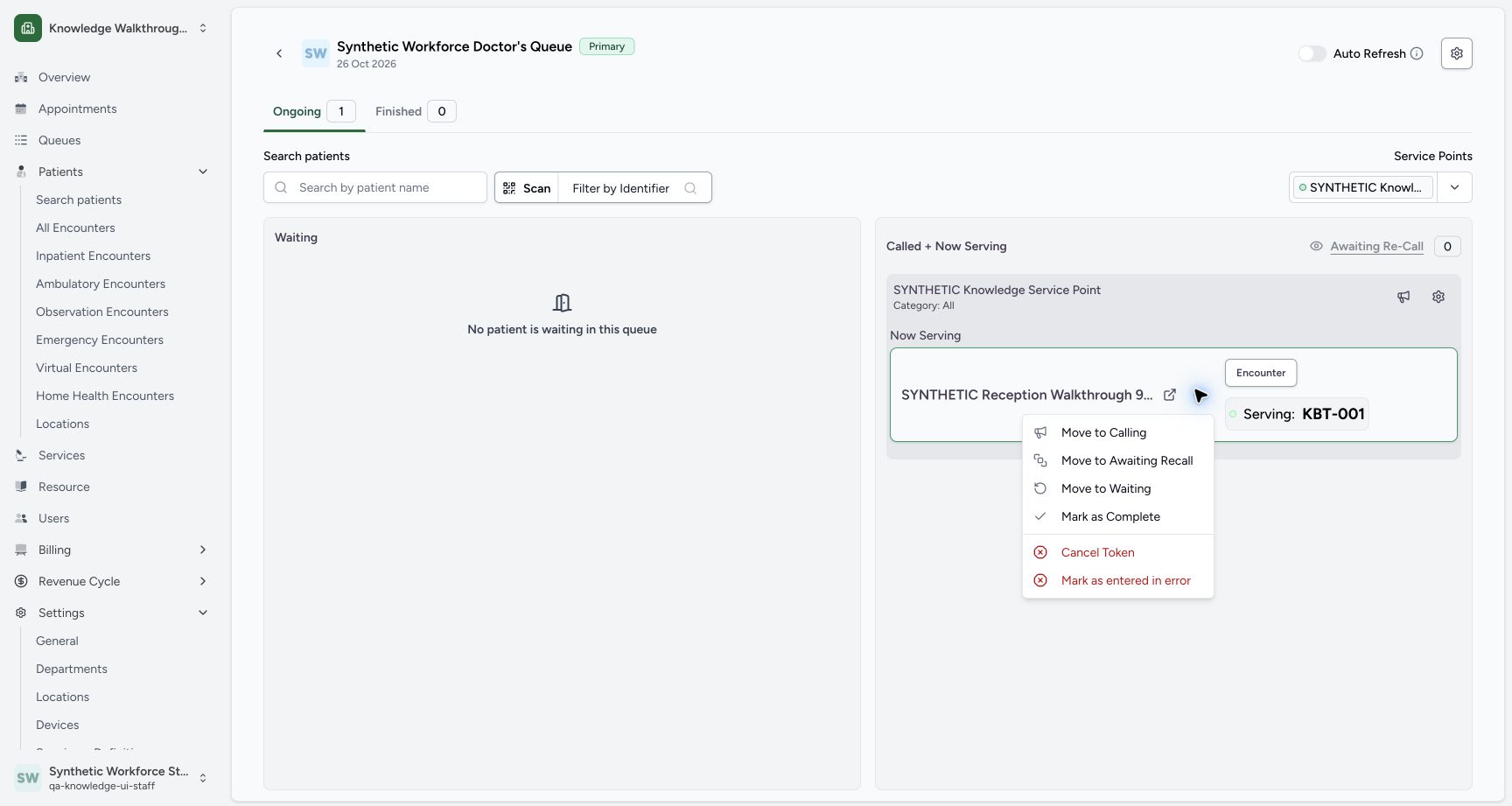
12The assigned CREATED token Actions offers Mark as Now Serving.
Capture details
Exact committed 8d99 source and existing non-superuser Staff in the isolated fictional Clinic. The assigned CREATED token Actions offers Mark as Now Serving. Genuine unchanged desktop screenshot; browser recovery changes the native viewport height from 921 to 977 without image resizing.
Image SHA-256 dc619ebe4fa77e7e422e7f0f49274cc0f4c3e7f84f3ea0eb702061ff9f7f8818
- Mark as Now Serving: Move the assigned token into the serving software state.
- Move to Waiting: This same assigned-token menu also offers return to Waiting.
12KBT-001 is shown as Now Serving at the selected point after the normal action.
Capture details
Exact committed 8d99 source and existing non-superuser Staff in the isolated fictional Clinic. KBT-001 is shown as Now Serving at the selected point after the normal action. Genuine unchanged desktop screenshot; browser recovery changes the native viewport height from 921 to 977 without image resizing.
Image SHA-256 44f01f7f9a6227823b2b5cf588be8acd56af327d163feae98cd43ca0090c4a7d
- Serving Actions: Open the menu for the same Serving token.
- Serving: KBT-001: The token is now in the Now Serving panel.
4. Move the serving token into recall
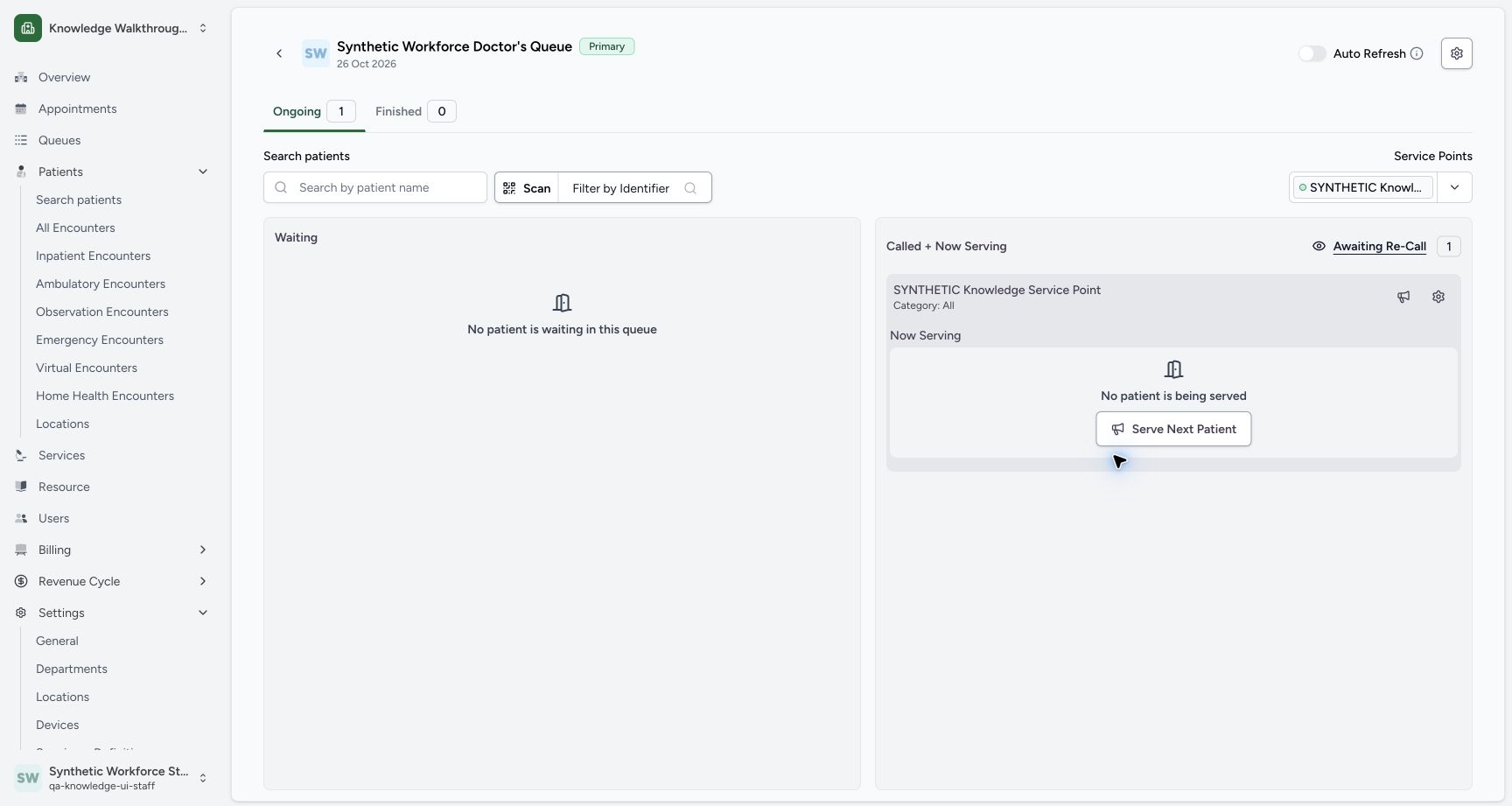
Open the serving token’s Actions, then choose Move to Awaiting Recall. The service point no longer shows a patient being served, and Awaiting Re-Call becomes enabled with count 1.
12KBT-001 is shown as Now Serving at the selected point after the normal action.
Capture details
Exact committed 8d99 source and existing non-superuser Staff in the isolated fictional Clinic. KBT-001 is shown as Now Serving at the selected point after the normal action. Genuine unchanged desktop screenshot; browser recovery changes the native viewport height from 921 to 977 without image resizing.
Image SHA-256 44f01f7f9a6227823b2b5cf588be8acd56af327d163feae98cd43ca0090c4a7d
- Serving Actions: Open the menu for the same Serving token.
- Serving: KBT-001: The token is now in the Now Serving panel.
 1
1The serving token menu offers Move to Awaiting Re-Call as a separate action.
Capture details
Exact committed 8d99 source and existing non-superuser Staff in the isolated fictional Clinic. The serving token menu offers Move to Awaiting Re-Call as a separate action. Genuine unchanged desktop screenshot; browser recovery changes the native viewport height from 921 to 977 without image resizing.
Image SHA-256 3b666c778bcbad5a7a6a702fe29780ce85e38d48f3c72e080e7408392dca8211
- Move to Awaiting Recall: Move the serving token into the recall group.
 12
12Awaiting Re-Call now has one token and its control is enabled; no patient remains in the service point.
Capture details
Exact committed 8d99 source and existing non-superuser Staff in the isolated fictional Clinic. Awaiting Re-Call now has one token and its control is enabled; no patient remains in the service point. Genuine unchanged desktop screenshot; browser recovery changes the native viewport height from 921 to 977 without image resizing.
Image SHA-256 d246ca289656767b465abd89365dc072892e13915576faeb752852f411cdbd5c
- Awaiting Re-Call: The control is enabled when the saved recall count is one.
- Recall count 1: Read the positive count before opening its dialog.
5. Open the saved recall token
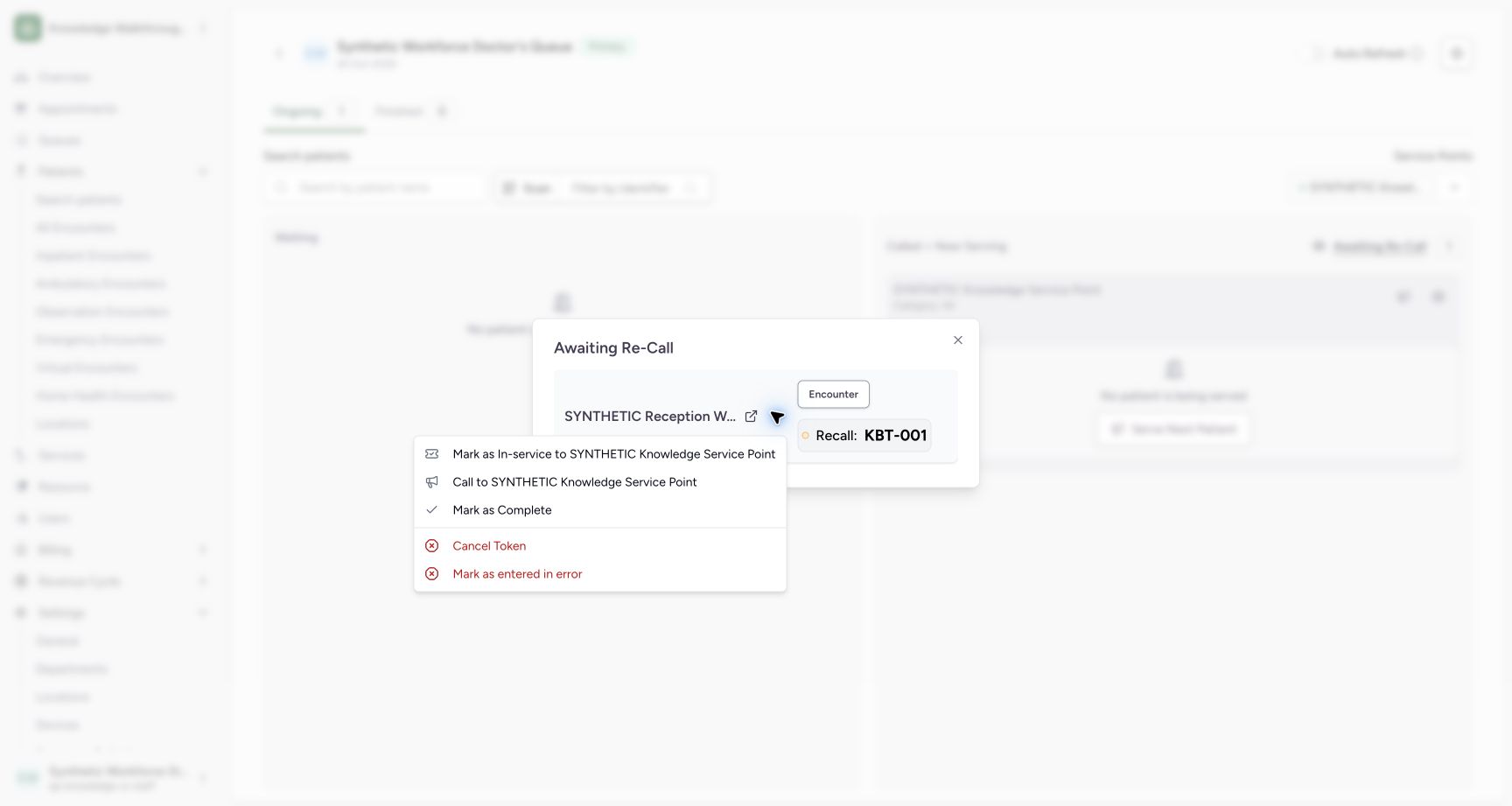
Choose Awaiting Re-Call and wait for its token list to load. Check Recall: KBT-001 and the intended fictional patient in the dialog before opening its Actions.
12Awaiting Re-Call now has one token and its control is enabled; no patient remains in the service point.
Capture details
Exact committed 8d99 source and existing non-superuser Staff in the isolated fictional Clinic. Awaiting Re-Call now has one token and its control is enabled; no patient remains in the service point. Genuine unchanged desktop screenshot; browser recovery changes the native viewport height from 921 to 977 without image resizing.
Image SHA-256 d246ca289656767b465abd89365dc072892e13915576faeb752852f411cdbd5c
- Awaiting Re-Call: The control is enabled when the saved recall count is one.
- Recall count 1: Read the positive count before opening its dialog.
123After the dialog loads, it shows Recall: KBT-001 and the same fictional patient.
Capture details
Exact committed 8d99 source and existing non-superuser Staff in the isolated fictional Clinic. After the dialog loads, it shows Recall: KBT-001 and the same fictional patient. Genuine unchanged desktop screenshot; browser recovery changes the native viewport height from 921 to 977 without image resizing.
Image SHA-256 3a115aa84f24fe5f19c362f3972b45e4a4aa469ed6ef3be9157de2df01b7d57b
- Recall token Actions: Open Actions for the same Recall: KBT-001.
- Close control reference: This visible top-right control is shown as a reference; its post-call execution was not captured.
- Recall: KBT-001: Verify the intended token before recalling it.
6. Recall it to the same point
Choose Call to SYNTHETIC Knowledge Service Point from the recall token menu. The independently saved board result shows the same KBT-001 back under the same point as Call Next. The retained next board view was taken after the browser was reopened; this step does not claim a pictured post-call Close click.
123After the dialog loads, it shows Recall: KBT-001 and the same fictional patient.
Capture details
Exact committed 8d99 source and existing non-superuser Staff in the isolated fictional Clinic. After the dialog loads, it shows Recall: KBT-001 and the same fictional patient. Genuine unchanged desktop screenshot; browser recovery changes the native viewport height from 921 to 977 without image resizing.
Image SHA-256 3a115aa84f24fe5f19c362f3972b45e4a4aa469ed6ef3be9157de2df01b7d57b
- Recall token Actions: Open Actions for the same Recall: KBT-001.
- Close control reference: This visible top-right control is shown as a reference; its post-call execution was not captured.
- Recall: KBT-001: Verify the intended token before recalling it.
 1
1The Recall token menu offers Call to the existing synthetic service point.
Capture details
Exact committed 8d99 source and existing non-superuser Staff in the isolated fictional Clinic. The Recall token menu offers Call to the existing synthetic service point. Genuine unchanged desktop screenshot; browser recovery changes the native viewport height from 921 to 977 without image resizing.
Image SHA-256 ba8fe27f538d6f0a812afddebc63c341aea977d510eface2bcea519eb901435f
- Call to the same point: Call this existing recall token back to the original synthetic point.
 12
12After browser recovery, the saved KBT-001 remains Call Next at the same point and the normal Staff account is visible.
Capture details
Exact committed 8d99 source and existing non-superuser Staff in the isolated fictional Clinic. After browser recovery, the saved KBT-001 remains Call Next at the same point and the normal Staff account is visible. Genuine unchanged desktop screenshot; browser recovery changes the native viewport height from 921 to 977 without image resizing.
Image SHA-256 70515baec36199cff8a4ba3d346dac67f23fd0b47ec2377827badfe552737ab0
- Assigned token Actions: The saved recalled token has the same assigned-token menu.
- Call Next: KBT-001: The independently saved recall result is shown after browser recovery.
7. Return the assigned token to Waiting
For the Call Next token, open Actions and choose Move to Waiting. The clear assigned-token menu pictured earlier shows this same available action. The saved result is Waiting: KBT-001, with the point panel still displayed and no patient being served.
12After browser recovery, the saved KBT-001 remains Call Next at the same point and the normal Staff account is visible.
Capture details
Exact committed 8d99 source and existing non-superuser Staff in the isolated fictional Clinic. After browser recovery, the saved KBT-001 remains Call Next at the same point and the normal Staff account is visible. Genuine unchanged desktop screenshot; browser recovery changes the native viewport height from 921 to 977 without image resizing.
Image SHA-256 70515baec36199cff8a4ba3d346dac67f23fd0b47ec2377827badfe552737ab0
- Assigned token Actions: The saved recalled token has the same assigned-token menu.
- Call Next: KBT-001: The independently saved recall result is shown after browser recovery.
12The assigned CREATED token Actions offers Mark as Now Serving.
Capture details
Exact committed 8d99 source and existing non-superuser Staff in the isolated fictional Clinic. The assigned CREATED token Actions offers Mark as Now Serving. Genuine unchanged desktop screenshot; browser recovery changes the native viewport height from 921 to 977 without image resizing.
Image SHA-256 dc619ebe4fa77e7e422e7f0f49274cc0f4c3e7f84f3ea0eb702061ff9f7f8818
- Mark as Now Serving: Move the assigned token into the serving software state.
- Move to Waiting: This same assigned-token menu also offers return to Waiting.
123KBT-001 is back in Waiting, with the service point still displayed and no patient being served.
Capture details
Exact committed 8d99 source and existing non-superuser Staff in the isolated fictional Clinic. KBT-001 is back in Waiting, with the service point still displayed and no patient being served. Genuine unchanged desktop screenshot; browser recovery changes the native viewport height from 921 to 977 without image resizing.
Image SHA-256 e5494b72b8decb8b083ba72b61aee0b63d5e7ff0e63300ed03f272cac7a5c16d
- Waiting token Actions: Open the existing token menu for the separate completion exercise.
- Disabled zero-count control: Awaiting Re-Call is disabled while its count is zero.
- Waiting: KBT-001: The same token is back in Waiting.
Read the recall controls accurately
The positive-count Awaiting Re-Call dialog visibly includes a top-right Close control. That control is a reference in this walkthrough; its execution after recalling the token was not captured. At the later 0 count, Awaiting Re-Call is disabled and is not forced open.
123After the dialog loads, it shows Recall: KBT-001 and the same fictional patient.
Capture details
Exact committed 8d99 source and existing non-superuser Staff in the isolated fictional Clinic. After the dialog loads, it shows Recall: KBT-001 and the same fictional patient. Genuine unchanged desktop screenshot; browser recovery changes the native viewport height from 921 to 977 without image resizing.
Image SHA-256 3a115aa84f24fe5f19c362f3972b45e4a4aa469ed6ef3be9157de2df01b7d57b
- Recall token Actions: Open Actions for the same Recall: KBT-001.
- Close control reference: This visible top-right control is shown as a reference; its post-call execution was not captured.
- Recall: KBT-001: Verify the intended token before recalling it.
123KBT-001 is back in Waiting, with the service point still displayed and no patient being served.
Capture details
Exact committed 8d99 source and existing non-superuser Staff in the isolated fictional Clinic. KBT-001 is back in Waiting, with the service point still displayed and no patient being served. Genuine unchanged desktop screenshot; browser recovery changes the native viewport height from 921 to 977 without image resizing.
Image SHA-256 e5494b72b8decb8b083ba72b61aee0b63d5e7ff0e63300ed03f272cac7a5c16d
- Waiting token Actions: Open the existing token menu for the separate completion exercise.
- Disabled zero-count control: Awaiting Re-Call is disabled while its count is zero.
- Waiting: KBT-001: The same token is back in Waiting.
Keep queue states separate from clinical service
The same KBT-001 is shown as Waiting, Call Next, Serving and Recall in separate retained views. These labels describe this token workflow. They do not establish attendance, an encounter or care delivery.
123The existing token is Waiting and the new Active point is already displayed.
Capture details
Exact committed 8d99 source and existing non-superuser Staff in the isolated fictional Clinic. The existing token is Waiting and the new Active point is already displayed. Genuine unchanged desktop screenshot; browser recovery changes the native viewport height from 921 to 977 without image resizing.
Image SHA-256 ce7f819007cfecab6e9f0cd986f0855cbfdaf0ed06b3fb4d57b7194d3138608d
- Token Actions: Open Actions for the existing Waiting KBT-001.
- Waiting: KBT-001: Check the current token label and number.
- Selected point: Check the existing synthetic service-point panel.
123After Call to, KBT-001 moves from Waiting under the selected service point and is labelled Call Next in this version.
Capture details
Exact committed 8d99 source and existing non-superuser Staff in the isolated fictional Clinic. After Call to, KBT-001 moves from Waiting under the selected service point and is labelled Call Next in this version. Genuine unchanged desktop screenshot; browser recovery changes the native viewport height from 921 to 977 without image resizing.
Image SHA-256 6268434dcbadfd347db8683553d14ffa70026fdd711969a99d16fcc56f854fe4
- Actions: Open the assigned token menu.
- Call Next: KBT-001: This version labels the called token Call Next.
- Waiting is empty: The token is no longer in the Waiting group.
12KBT-001 is shown as Now Serving at the selected point after the normal action.
Capture details
Exact committed 8d99 source and existing non-superuser Staff in the isolated fictional Clinic. KBT-001 is shown as Now Serving at the selected point after the normal action. Genuine unchanged desktop screenshot; browser recovery changes the native viewport height from 921 to 977 without image resizing.
Image SHA-256 44f01f7f9a6227823b2b5cf588be8acd56af327d163feae98cd43ca0090c4a7d
- Serving Actions: Open the menu for the same Serving token.
- Serving: KBT-001: The token is now in the Now Serving panel.
123After the dialog loads, it shows Recall: KBT-001 and the same fictional patient.
Capture details
Exact committed 8d99 source and existing non-superuser Staff in the isolated fictional Clinic. After the dialog loads, it shows Recall: KBT-001 and the same fictional patient. Genuine unchanged desktop screenshot; browser recovery changes the native viewport height from 921 to 977 without image resizing.
Image SHA-256 3a115aa84f24fe5f19c362f3972b45e4a4aa469ed6ef3be9157de2df01b7d57b
- Recall token Actions: Open Actions for the same Recall: KBT-001.
- Close control reference: This visible top-right control is shown as a reference; its post-call execution was not captured.
- Recall: KBT-001: Verify the intended token before recalling it.
123KBT-001 is back in Waiting, with the service point still displayed and no patient being served.
Capture details
Exact committed 8d99 source and existing non-superuser Staff in the isolated fictional Clinic. KBT-001 is back in Waiting, with the service point still displayed and no patient being served. Genuine unchanged desktop screenshot; browser recovery changes the native viewport height from 921 to 977 without image resizing.
Image SHA-256 e5494b72b8decb8b083ba72b61aee0b63d5e7ff0e63300ed03f272cac7a5c16d
- Waiting token Actions: Open the existing token menu for the separate completion exercise.
- Disabled zero-count control: Awaiting Re-Call is disabled while its count is zero.
- Waiting: KBT-001: The same token is back in Waiting.
Troubleshooting
Awaiting Re-Call cannot be opened
Read its count and enabled state. In this example, count 1 enables the control and opens the loaded recall token. When the token is back in Waiting, count 0 leaves it disabled. Do not force the disabled control.
12Awaiting Re-Call now has one token and its control is enabled; no patient remains in the service point.
Capture details
Exact committed 8d99 source and existing non-superuser Staff in the isolated fictional Clinic. Awaiting Re-Call now has one token and its control is enabled; no patient remains in the service point. Genuine unchanged desktop screenshot; browser recovery changes the native viewport height from 921 to 977 without image resizing.
Image SHA-256 d246ca289656767b465abd89365dc072892e13915576faeb752852f411cdbd5c
- Awaiting Re-Call: The control is enabled when the saved recall count is one.
- Recall count 1: Read the positive count before opening its dialog.
123After the dialog loads, it shows Recall: KBT-001 and the same fictional patient.
Capture details
Exact committed 8d99 source and existing non-superuser Staff in the isolated fictional Clinic. After the dialog loads, it shows Recall: KBT-001 and the same fictional patient. Genuine unchanged desktop screenshot; browser recovery changes the native viewport height from 921 to 977 without image resizing.
Image SHA-256 3a115aa84f24fe5f19c362f3972b45e4a4aa469ed6ef3be9157de2df01b7d57b
- Recall token Actions: Open Actions for the same Recall: KBT-001.
- Close control reference: This visible top-right control is shown as a reference; its post-call execution was not captured.
- Recall: KBT-001: Verify the intended token before recalling it.
123KBT-001 is back in Waiting, with the service point still displayed and no patient being served.
Capture details
Exact committed 8d99 source and existing non-superuser Staff in the isolated fictional Clinic. KBT-001 is back in Waiting, with the service point still displayed and no patient being served. Genuine unchanged desktop screenshot; browser recovery changes the native viewport height from 921 to 977 without image resizing.
Image SHA-256 e5494b72b8decb8b083ba72b61aee0b63d5e7ff0e63300ed03f272cac7a5c16d
- Waiting token Actions: Open the existing token menu for the separate completion exercise.
- Disabled zero-count control: Awaiting Re-Call is disabled while its count is zero.
- Waiting: KBT-001: The same token is back in Waiting.
Source evidence
Every citation uses this exact committed version. The private source repository requires access.
- repositories/platform/mansoq-web/src/pages/Facility/queues/OngoingQueueTokenCard.tsx:100 ·
8d99bb8a4712f6aa8446bcd3b40bf62dae280d39Source file checksum
3a2b10251d298c80a650d797148ace8b3b9418296175c6880901cc7ae4703aae - repositories/platform/mansoq-web/src/pages/Facility/queues/OngoingQueueTokenCard.tsx:126 ·
8d99bb8a4712f6aa8446bcd3b40bf62dae280d39Source file checksum
3a2b10251d298c80a650d797148ace8b3b9418296175c6880901cc7ae4703aae - repositories/platform/mansoq-web/src/pages/Facility/queues/OngoingQueueTokenCard.tsx:141 ·
8d99bb8a4712f6aa8446bcd3b40bf62dae280d39Source file checksum
3a2b10251d298c80a650d797148ace8b3b9418296175c6880901cc7ae4703aae - repositories/platform/mansoq-web/src/pages/Facility/queues/OngoingQueueTokenCard.tsx:179 ·
8d99bb8a4712f6aa8446bcd3b40bf62dae280d39Source file checksum
3a2b10251d298c80a650d797148ace8b3b9418296175c6880901cc7ae4703aae - repositories/platform/mansoq-web/src/pages/Facility/queues/ManageQueueOngoingTab.tsx:567 ·
8d99bb8a4712f6aa8446bcd3b40bf62dae280d39Source file checksum
d56e4b1a6e829fd735976b267a3e0e95fd168d8c5a8759ab75f79f52990be6eb - repositories/platform/mansoq-web/src/types/tokens/token/token.ts:64 ·
8d99bb8a4712f6aa8446bcd3b40bf62dae280d39Source file checksum
ed1eb1556d132c66e67ab71fa9329d13cc703d5417d8b8ef4a247bba8adcf579 - repositories/platform/mansoq-core/mansoq/emr/api/viewsets/scheduling/token.py:98 ·
8d99bb8a4712f6aa8446bcd3b40bf62dae280d39Source file checksum
410193e49a78ef1caa6e5c51c9c7e54f184a37ea6a95b5c90bf5963fec2f69c8 - repositories/platform/mansoq-core/mansoq/security/authorization/token.py:98 ·
8d99bb8a4712f6aa8446bcd3b40bf62dae280d39Source file checksum
d6ae61964447710ba49fd85fc0116be0ccacb1cca6457d5ffcd57b742f5d72bb