 MANSOQ
 Scheduling and appointments · VERSION 8d99bb8a
Complete a token and restore it to Waiting
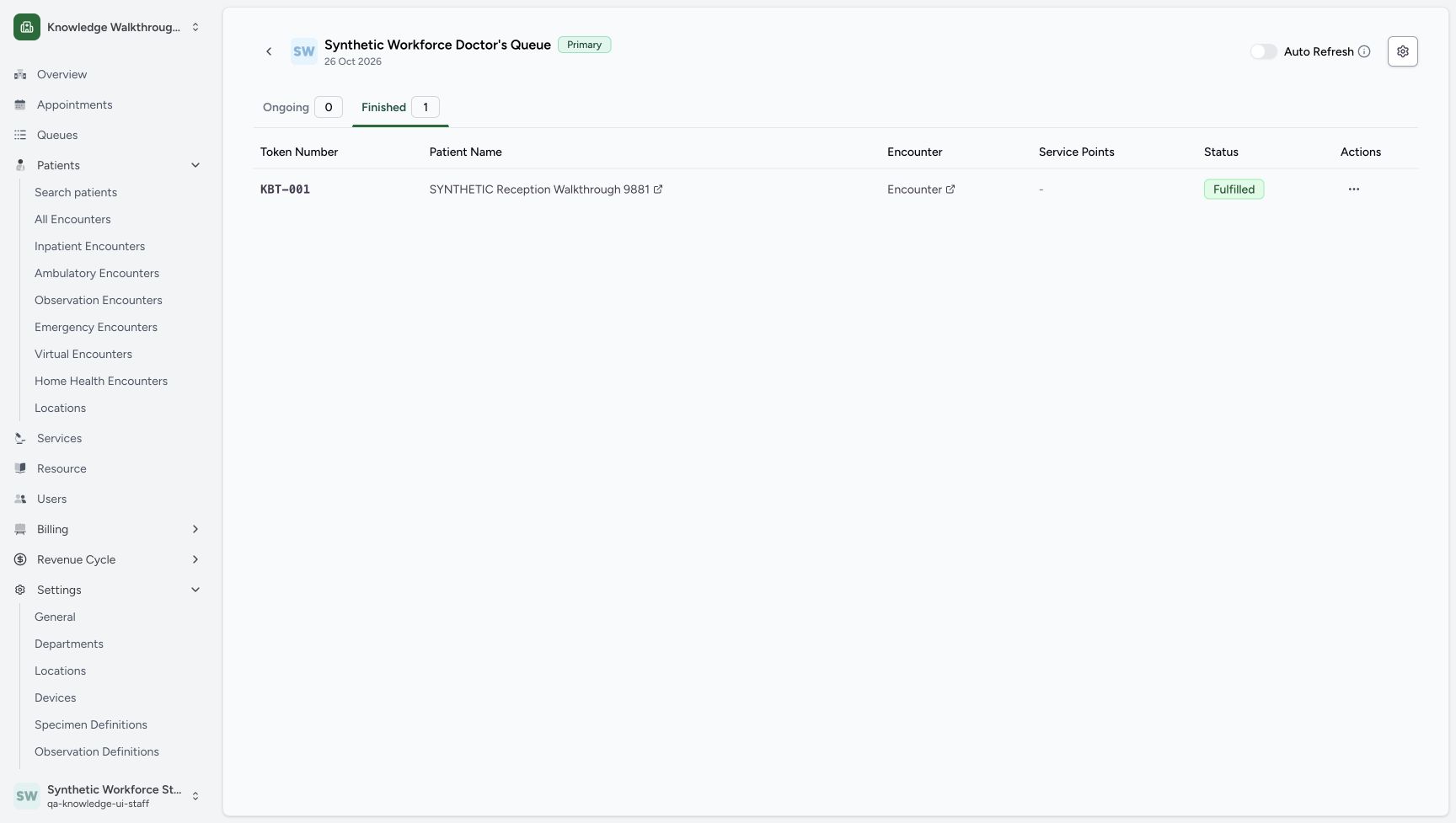
Complete the existing fictional token, inspect its Fulfilled row, cancel the restore confirmation first and then confirm the supported return to Waiting.
Staff · Receptionist
 1234
1234Finished contains the same KBT-001, fictional patient, no service point and Fulfilled status.
Capture details
Exact committed 8d99 source and existing non-superuser Staff in the isolated fictional Clinic. Finished contains the same KBT-001, fictional patient, no service point and Fulfilled status. Genuine unchanged desktop screenshot; browser recovery changes the native viewport height from 921 to 977 without image resizing.
Image SHA-256 73a4ca6bada2eb8dc423d0e16bce812944e94aaa2e7118c539e61dbc91d9a200
- Actions cell menu: Open the actual unnamed three-dot button in this exact token row.
- Fulfilled: The token row shows Fulfilled.
- No service point: The dash represents no token service-point association in this row.
- KBT-001: Verify the token number in the retained Finished row.
 123
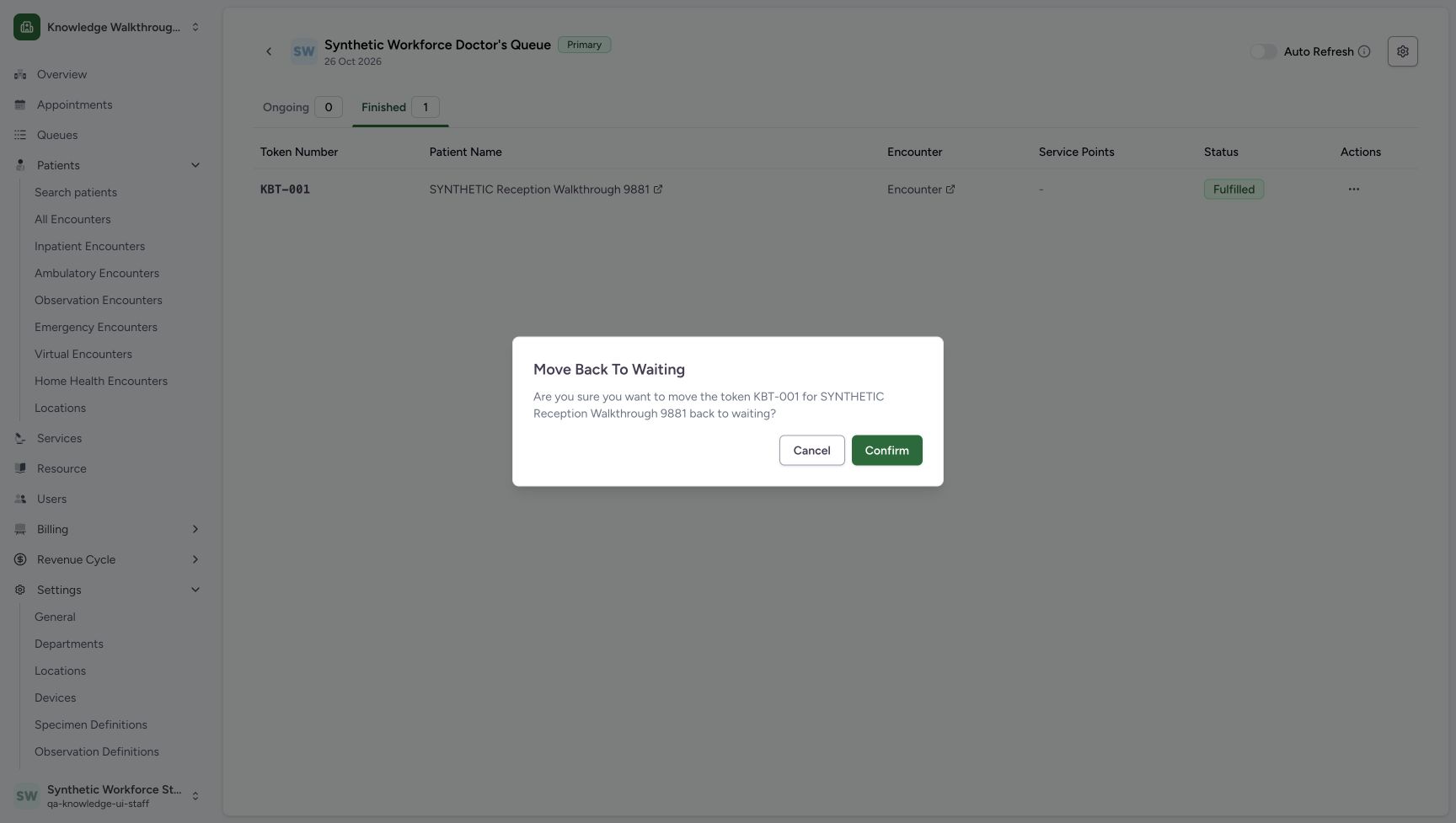
123Read the Move back to waiting confirmation for KBT-001, then choose Cancel for this first review.
Capture details
Exact committed 8d99 source and existing non-superuser Staff in the isolated fictional Clinic. Read the Move back to waiting confirmation for KBT-001, then choose Cancel for this first review. Genuine unchanged desktop screenshot; browser recovery changes the native viewport height from 921 to 977 without image resizing.
Image SHA-256 87c7f6bb91eb2f289ee4c861c893904163f00a1a6896b104b230359e0c248a04
- Cancel first: Back out without changing this Fulfilled token.
- Confirm after review: The later confirmed exercise uses this distinct button.
- Patient-specific warning: Read KBT-001 and the full fictional patient name.
 1234
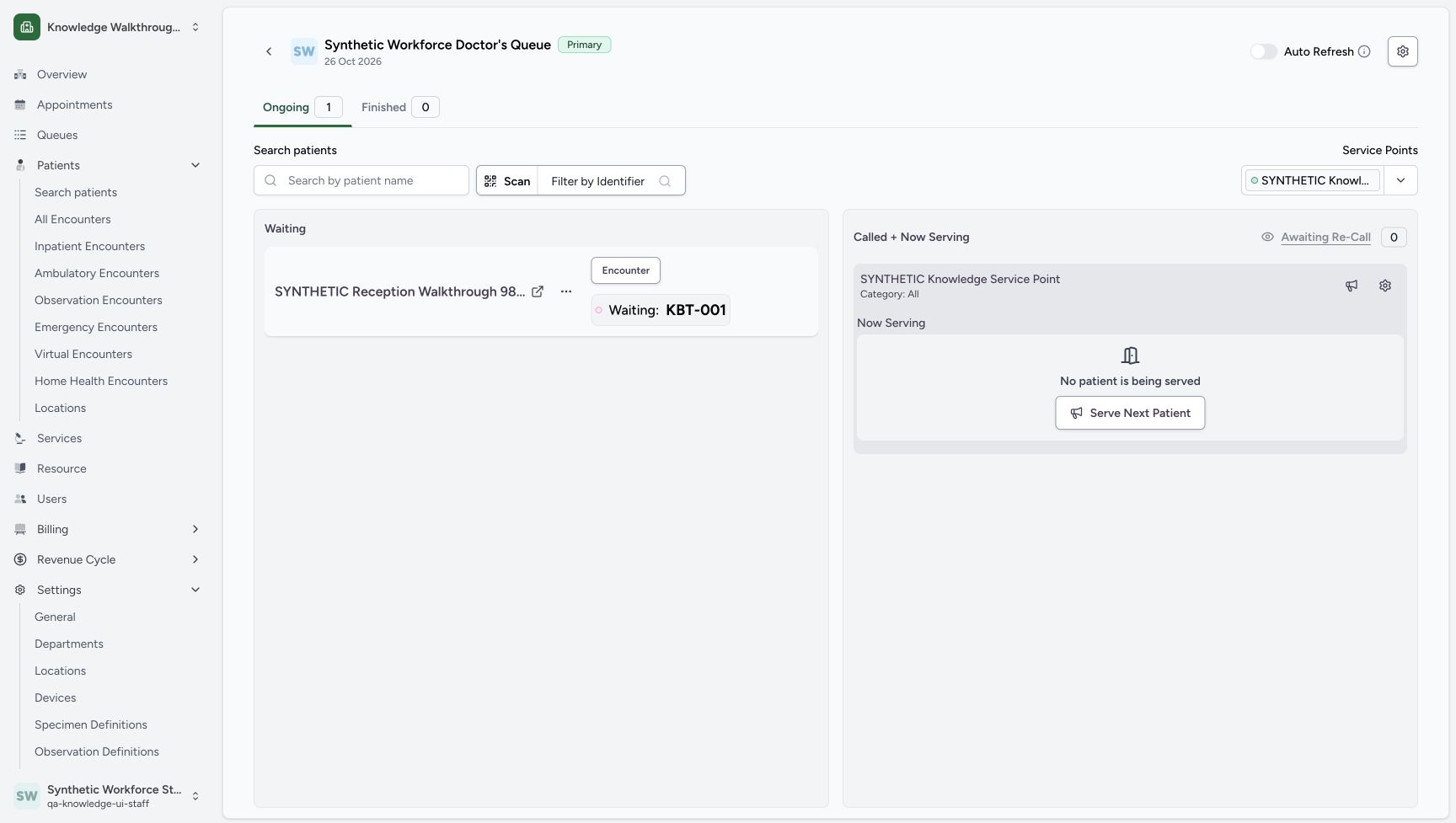
1234The same KBT-001 is back in Waiting; Ongoing is one, Finished is zero and the synthetic point remains displayed.
Capture details
Exact committed 8d99 source and existing non-superuser Staff in the isolated fictional Clinic. The same KBT-001 is back in Waiting; Ongoing is one, Finished is zero and the synthetic point remains displayed. Genuine unchanged desktop screenshot; browser recovery changes the native viewport height from 921 to 977 without image resizing.
Image SHA-256 89e84a3a9d88a334a942c01892acf1d17af030f8aa79dbc7c2db6aa7252259b9
- Waiting: KBT-001: The same token has returned to Waiting.
- Ongoing 1: Read the final ongoing count.
- Finished 0: Read the final finished count.
- Disabled Awaiting Re-Call: This zero-count control is disabled; it was not forced open.
11 of 11 content blocks have reviewed image alignment. Missing overview or prerequisite images remain open.
Before you begin
- Use the existing ordinary Staff account and the same dated Primary Queue for Synthetic Workforce Doctor in Knowledge Walkthrough Clinic — SYNTHETIC. The pictured software token is Waiting: KBT-001 with the fictional service point still displayed. This is separate from completing an appointment or clinical encounter.
 123
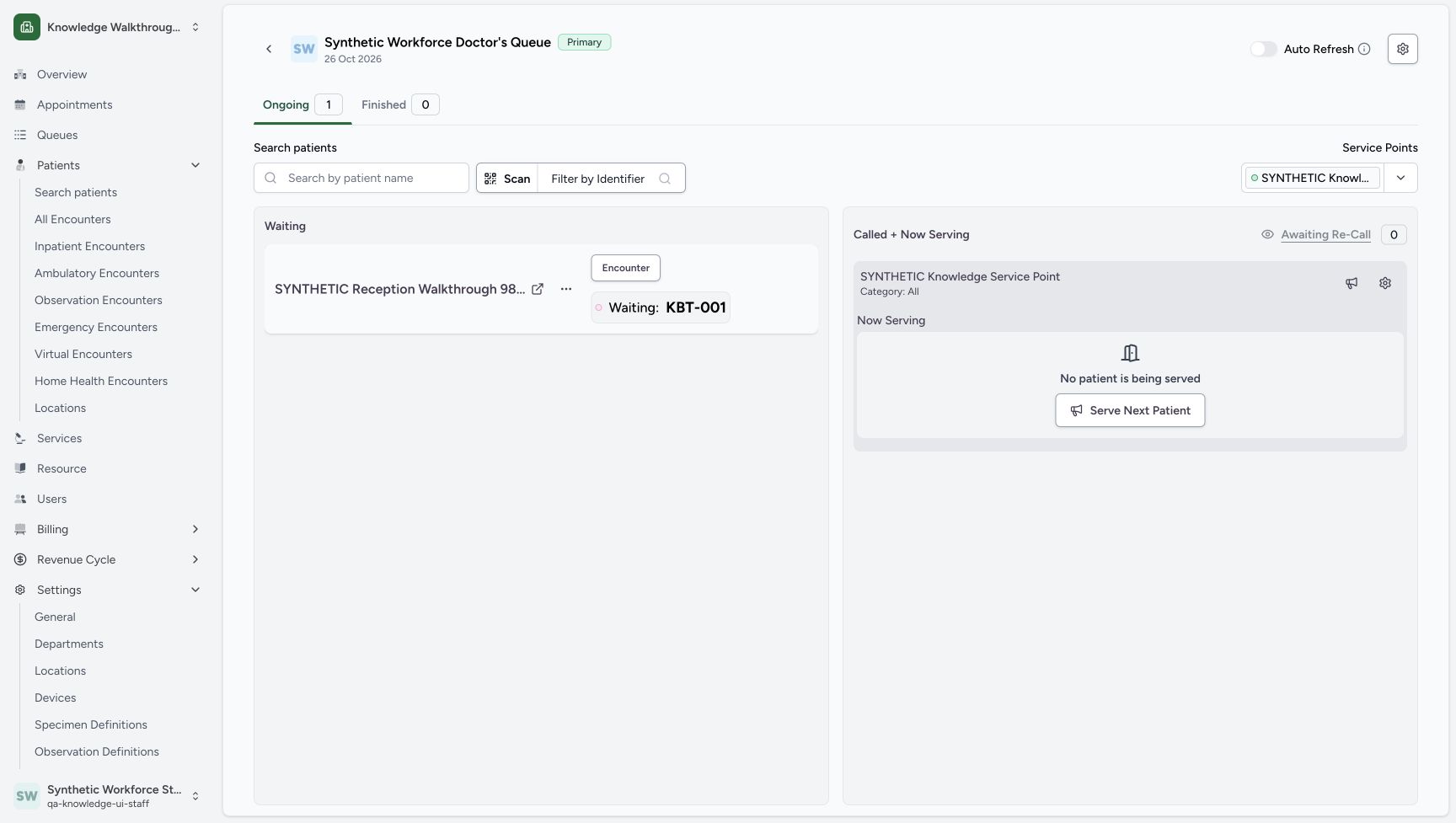
123Recorded release 8d99bb8a · 2026-10-19T05:15:17.768Z · 1728 × 977 KBT-001 is back in Waiting, with the service point still displayed and no patient being served.
Capture details
Exact committed 8d99 source and existing non-superuser Staff in the isolated fictional Clinic. KBT-001 is back in Waiting, with the service point still displayed and no patient being served. Genuine unchanged desktop screenshot; browser recovery changes the native viewport height from 921 to 977 without image resizing.
Image SHA-256
e5494b72b8decb8b083ba72b61aee0b63d5e7ff0e63300ed03f272cac7a5c16d- Waiting token Actions: Open the existing token menu for the separate completion exercise.
- Disabled zero-count control: Awaiting Re-Call is disabled while its count is zero.
- Waiting: KBT-001: The same token is back in Waiting.
1. Review the existing Waiting token
Check Waiting: KBT-001, Ongoing 1, Finished 0 and the intended fictional patient. Open the token card’s Actions.
123KBT-001 is back in Waiting, with the service point still displayed and no patient being served.
Capture details
Exact committed 8d99 source and existing non-superuser Staff in the isolated fictional Clinic. KBT-001 is back in Waiting, with the service point still displayed and no patient being served. Genuine unchanged desktop screenshot; browser recovery changes the native viewport height from 921 to 977 without image resizing.
Image SHA-256 e5494b72b8decb8b083ba72b61aee0b63d5e7ff0e63300ed03f272cac7a5c16d
- Waiting token Actions: Open the existing token menu for the separate completion exercise.
- Disabled zero-count control: Awaiting Re-Call is disabled while its count is zero.
- Waiting: KBT-001: The same token is back in Waiting.
2. Complete only the token
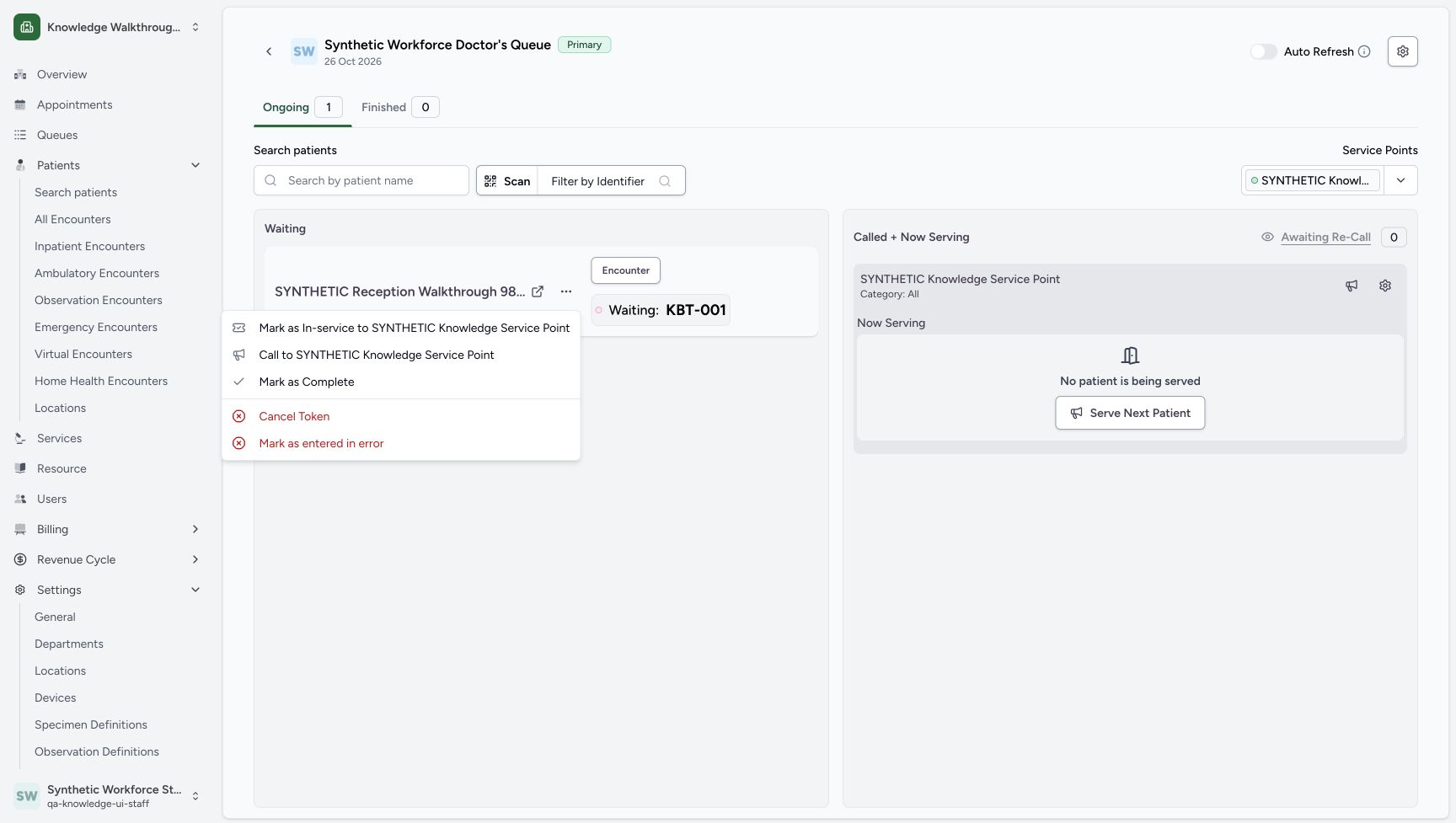
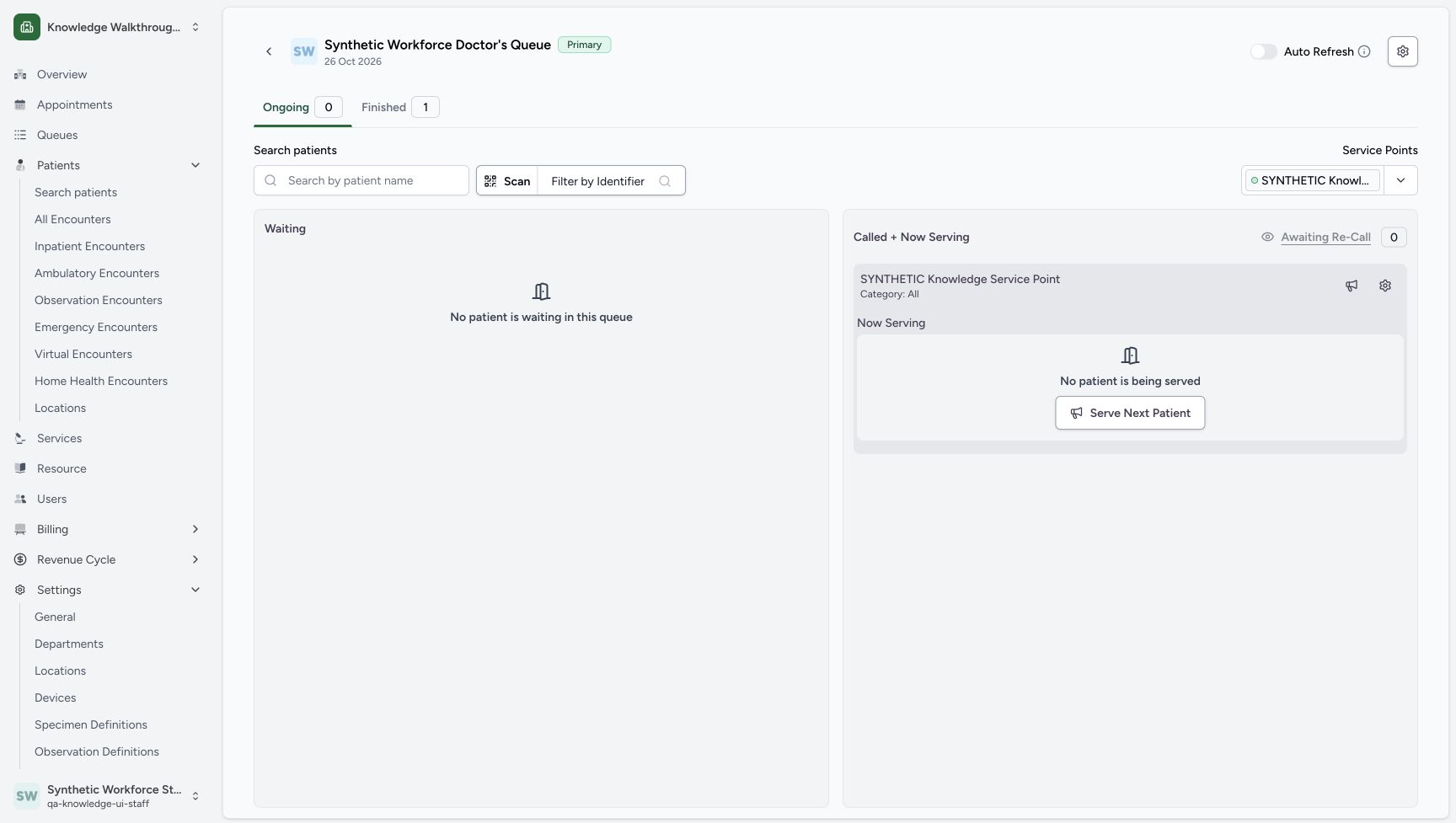
Choose Mark as Complete. After the save, Ongoing becomes 0 and Finished becomes 1. This action completes the software token.
 1
1The same Waiting token Actions menu offers Mark as Complete.
Capture details
Exact committed 8d99 source and existing non-superuser Staff in the isolated fictional Clinic. The same Waiting token Actions menu offers Mark as Complete. Genuine unchanged desktop screenshot; browser recovery changes the native viewport height from 921 to 977 without image resizing.
Image SHA-256 28d7373f06b6de44ef02d0e4359e027e04c894d48d586f8f8c45338cb18b239a
- Mark as Complete: Complete this existing software token, keeping appointment status separate.
 12
12After completing KBT-001, Ongoing is zero and Finished is one.
Capture details
Exact committed 8d99 source and existing non-superuser Staff in the isolated fictional Clinic. After completing KBT-001, Ongoing is zero and Finished is one. Genuine unchanged desktop screenshot; browser recovery changes the native viewport height from 921 to 977 without image resizing.
Image SHA-256 f1b81eea4255b9a77f4a29bd6171c403e155eb03195e2f37ad26742ffaa1ad18
- Finished 1: Open Finished after the saved token moves there.
- Ongoing 0: Read the resulting ongoing count.
3. Inspect the saved Finished row
Choose Finished 1. Verify KBT-001, SYNTHETIC Reception Walkthrough 9881, the - service-point entry and Fulfilled status in the saved row. Use its three-dot button in the Actions column.
12After completing KBT-001, Ongoing is zero and Finished is one.
Capture details
Exact committed 8d99 source and existing non-superuser Staff in the isolated fictional Clinic. After completing KBT-001, Ongoing is zero and Finished is one. Genuine unchanged desktop screenshot; browser recovery changes the native viewport height from 921 to 977 without image resizing.
Image SHA-256 f1b81eea4255b9a77f4a29bd6171c403e155eb03195e2f37ad26742ffaa1ad18
- Finished 1: Open Finished after the saved token moves there.
- Ongoing 0: Read the resulting ongoing count.
1234Finished contains the same KBT-001, fictional patient, no service point and Fulfilled status.
Capture details
Exact committed 8d99 source and existing non-superuser Staff in the isolated fictional Clinic. Finished contains the same KBT-001, fictional patient, no service point and Fulfilled status. Genuine unchanged desktop screenshot; browser recovery changes the native viewport height from 921 to 977 without image resizing.
Image SHA-256 73a4ca6bada2eb8dc423d0e16bce812944e94aaa2e7118c539e61dbc91d9a200
- Actions cell menu: Open the actual unnamed three-dot button in this exact token row.
- Fulfilled: The token row shows Fulfilled.
- No service point: The dash represents no token service-point association in this row.
- KBT-001: Verify the token number in the retained Finished row.
4. Open the restore confirmation
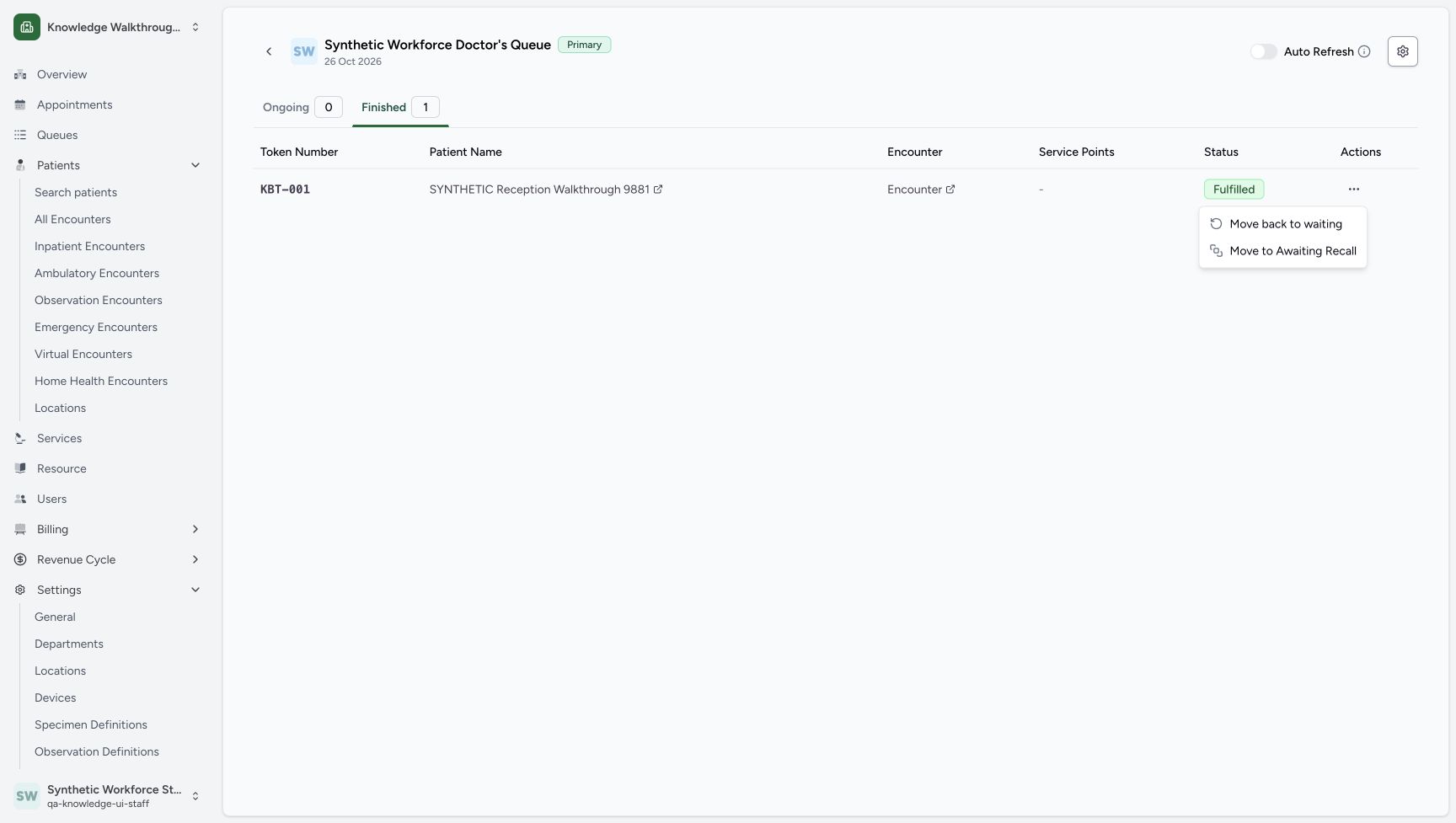
Choose Move back to waiting. Read Move Back To Waiting, KBT-001, the full fictional patient name and the question asking whether to move that token back to waiting.
 1
1The Finished token menu offers Move Back to Waiting.
Capture details
Exact committed 8d99 source and existing non-superuser Staff in the isolated fictional Clinic. The Finished token menu offers Move Back to Waiting. Genuine unchanged desktop screenshot; browser recovery changes the native viewport height from 921 to 977 without image resizing.
Image SHA-256 de313d9e3153b6d857a41aba47be6e2d245a8ecacf44b4439df7ea9c38e9c2e2
- Move back to waiting: Open the patient-specific restore confirmation.
123Read the Move back to waiting confirmation for KBT-001, then choose Cancel for this first review.
Capture details
Exact committed 8d99 source and existing non-superuser Staff in the isolated fictional Clinic. Read the Move back to waiting confirmation for KBT-001, then choose Cancel for this first review. Genuine unchanged desktop screenshot; browser recovery changes the native viewport height from 921 to 977 without image resizing.
Image SHA-256 87c7f6bb91eb2f289ee4c861c893904163f00a1a6896b104b230359e0c248a04
- Cancel first: Back out without changing this Fulfilled token.
- Confirm after review: The later confirmed exercise uses this distinct button.
- Patient-specific warning: Read KBT-001 and the full fictional patient name.
5. Cancel the first restore attempt
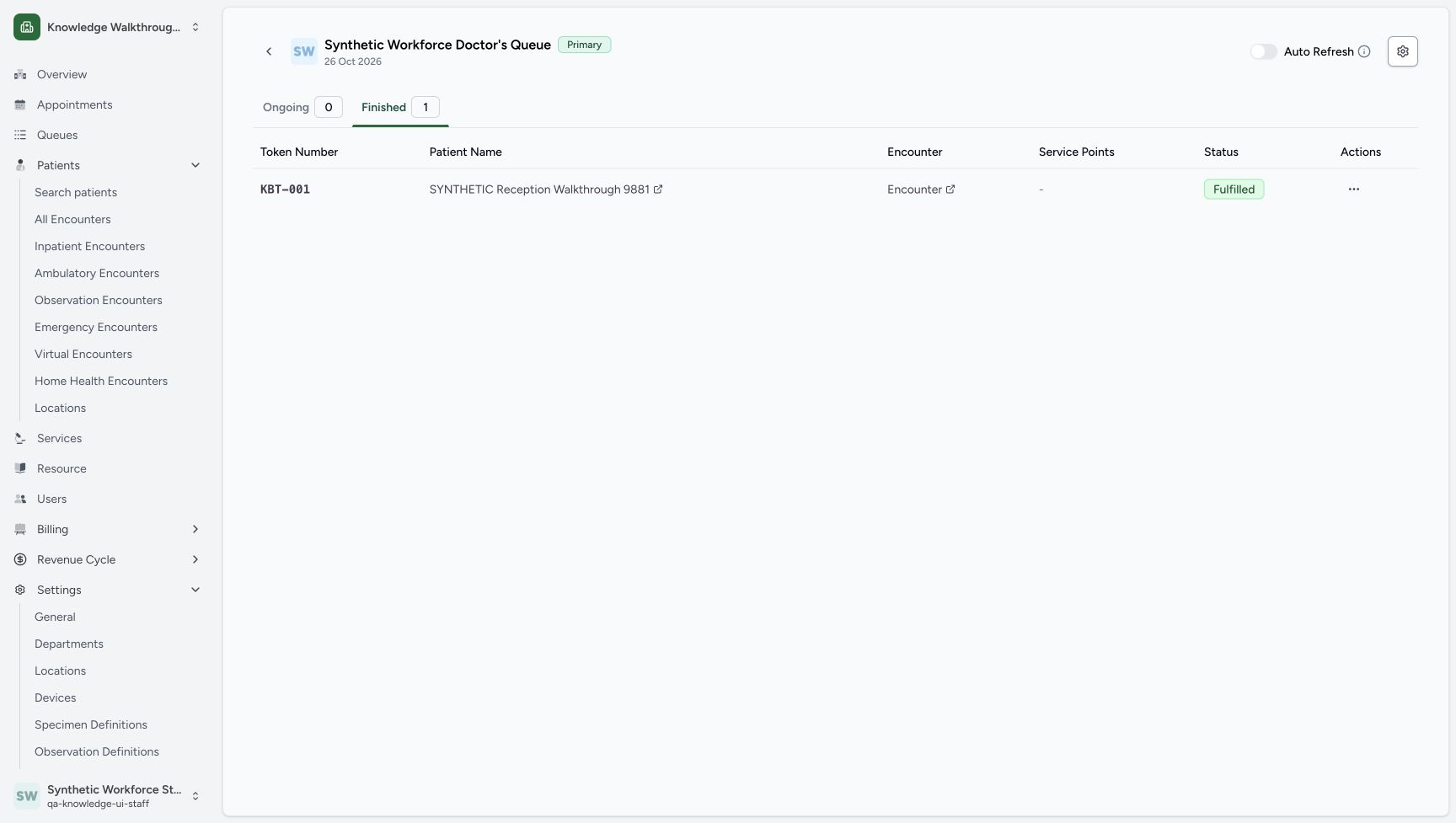
Choose the neutral Cancel button. The warning closes and the saved row remains Fulfilled under Finished 1. Cancelling this warning does not restore the token.
123Read the Move back to waiting confirmation for KBT-001, then choose Cancel for this first review.
Capture details
Exact committed 8d99 source and existing non-superuser Staff in the isolated fictional Clinic. Read the Move back to waiting confirmation for KBT-001, then choose Cancel for this first review. Genuine unchanged desktop screenshot; browser recovery changes the native viewport height from 921 to 977 without image resizing.
Image SHA-256 87c7f6bb91eb2f289ee4c861c893904163f00a1a6896b104b230359e0c248a04
- Cancel first: Back out without changing this Fulfilled token.
- Confirm after review: The later confirmed exercise uses this distinct button.
- Patient-specific warning: Read KBT-001 and the full fictional patient name.
 12
12After Cancel, the same token remains Fulfilled in Finished.
Capture details
Exact committed 8d99 source and existing non-superuser Staff in the isolated fictional Clinic. After Cancel, the same token remains Fulfilled in Finished. Genuine unchanged desktop screenshot; browser recovery changes the native viewport height from 921 to 977 without image resizing.
Image SHA-256 ad98845af487b496070777ccd13e47a3bae9abdf4f5f79c1f74d34ba407e9f47
- Still Fulfilled: After Cancel, the same saved token remains Fulfilled.
- Finished 1: The Finished count stays one after cancelling the warning.
6. Confirm the reviewed restore once
Reopen the same row’s Actions, choose Move back to waiting again and review the same warning. Choose Confirm once. The next saved view shows Finished 0 and Ongoing 1.
1234Finished contains the same KBT-001, fictional patient, no service point and Fulfilled status.
Capture details
Exact committed 8d99 source and existing non-superuser Staff in the isolated fictional Clinic. Finished contains the same KBT-001, fictional patient, no service point and Fulfilled status. Genuine unchanged desktop screenshot; browser recovery changes the native viewport height from 921 to 977 without image resizing.
Image SHA-256 73a4ca6bada2eb8dc423d0e16bce812944e94aaa2e7118c539e61dbc91d9a200
- Actions cell menu: Open the actual unnamed three-dot button in this exact token row.
- Fulfilled: The token row shows Fulfilled.
- No service point: The dash represents no token service-point association in this row.
- KBT-001: Verify the token number in the retained Finished row.
1The Finished token menu offers Move Back to Waiting.
Capture details
Exact committed 8d99 source and existing non-superuser Staff in the isolated fictional Clinic. The Finished token menu offers Move Back to Waiting. Genuine unchanged desktop screenshot; browser recovery changes the native viewport height from 921 to 977 without image resizing.
Image SHA-256 de313d9e3153b6d857a41aba47be6e2d245a8ecacf44b4439df7ea9c38e9c2e2
- Move back to waiting: Open the patient-specific restore confirmation.
123Read the Move back to waiting confirmation for KBT-001, then choose Cancel for this first review.
Capture details
Exact committed 8d99 source and existing non-superuser Staff in the isolated fictional Clinic. Read the Move back to waiting confirmation for KBT-001, then choose Cancel for this first review. Genuine unchanged desktop screenshot; browser recovery changes the native viewport height from 921 to 977 without image resizing.
Image SHA-256 87c7f6bb91eb2f289ee4c861c893904163f00a1a6896b104b230359e0c248a04
- Cancel first: Back out without changing this Fulfilled token.
- Confirm after review: The later confirmed exercise uses this distinct button.
- Patient-specific warning: Read KBT-001 and the full fictional patient name.
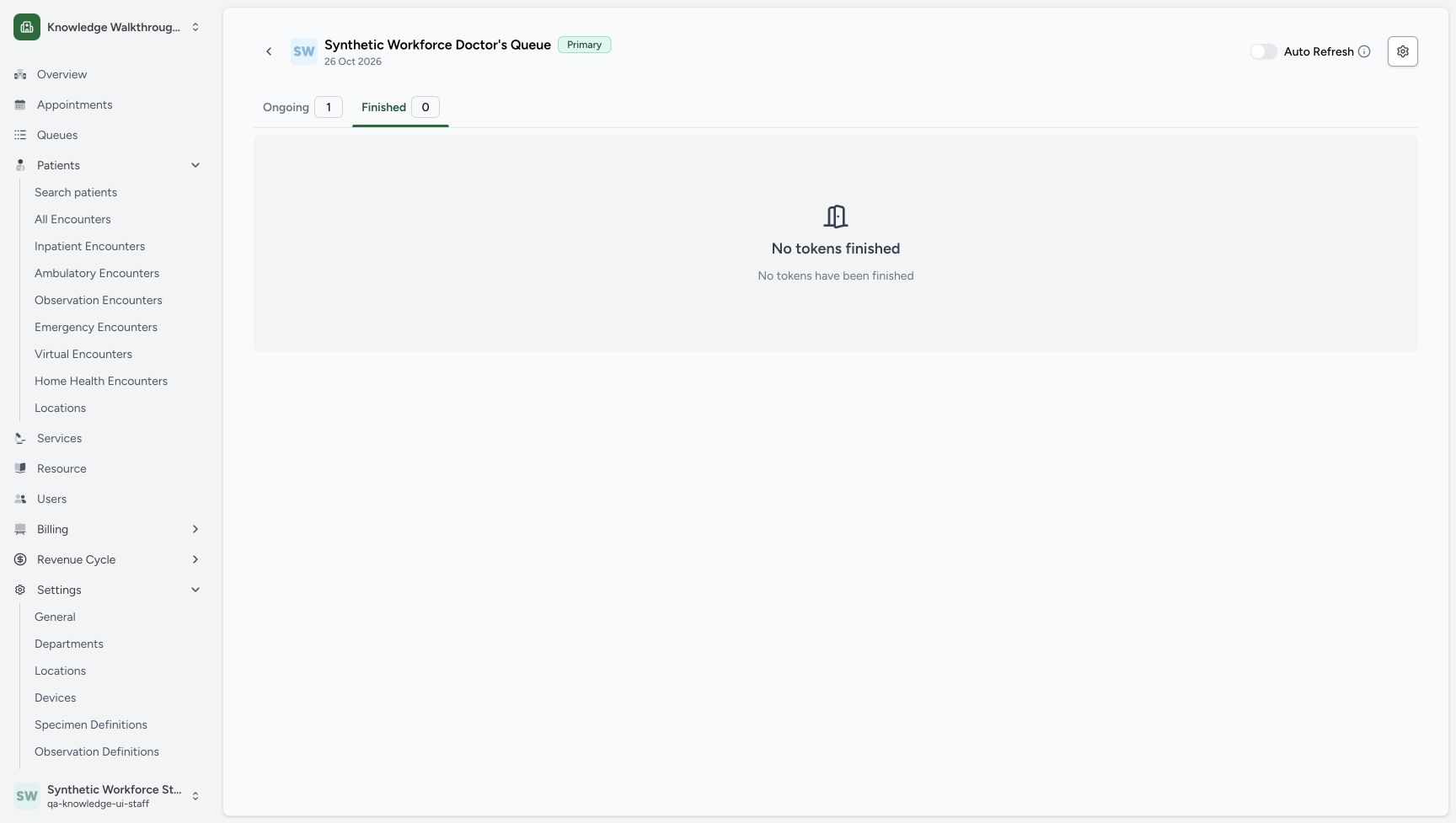 123
123After Confirm, Finished is zero and Ongoing is one.
Capture details
Exact committed 8d99 source and existing non-superuser Staff in the isolated fictional Clinic. After Confirm, Finished is zero and Ongoing is one. Genuine unchanged desktop screenshot; browser recovery changes the native viewport height from 921 to 977 without image resizing.
Image SHA-256 f3b4da494dace687b0c87bd5981281011dc350140bbd248f5838025e609796a4
- Ongoing 1: Return to Ongoing after Confirm saves.
- Finished 0: Finished is now empty.
- No tokens finished: The previous Finished row is no longer here.
7. Verify the same token in Waiting
Choose Ongoing 1 and verify Waiting: KBT-001 for the same fictional patient. Finished stays 0, and the synthetic service-point panel remains displayed with no patient being served.
123After Confirm, Finished is zero and Ongoing is one.
Capture details
Exact committed 8d99 source and existing non-superuser Staff in the isolated fictional Clinic. After Confirm, Finished is zero and Ongoing is one. Genuine unchanged desktop screenshot; browser recovery changes the native viewport height from 921 to 977 without image resizing.
Image SHA-256 f3b4da494dace687b0c87bd5981281011dc350140bbd248f5838025e609796a4
- Ongoing 1: Return to Ongoing after Confirm saves.
- Finished 0: Finished is now empty.
- No tokens finished: The previous Finished row is no longer here.
1234The same KBT-001 is back in Waiting; Ongoing is one, Finished is zero and the synthetic point remains displayed.
Capture details
Exact committed 8d99 source and existing non-superuser Staff in the isolated fictional Clinic. The same KBT-001 is back in Waiting; Ongoing is one, Finished is zero and the synthetic point remains displayed. Genuine unchanged desktop screenshot; browser recovery changes the native viewport height from 921 to 977 without image resizing.
Image SHA-256 89e84a3a9d88a334a942c01892acf1d17af030f8aa79dbc7c2db6aa7252259b9
- Waiting: KBT-001: The same token has returned to Waiting.
- Ongoing 1: Read the final ongoing count.
- Finished 0: Read the final finished count.
- Disabled Awaiting Re-Call: This zero-count control is disabled; it was not forced open.
Read the token result in its own context
The retained Fulfilled row and later Waiting: KBT-001 belong to the queue token. The walkthrough keeps the same token number and patient; it does not demonstrate appointment attendance, clinical completion, care delivery or payment.
1234Finished contains the same KBT-001, fictional patient, no service point and Fulfilled status.
Capture details
Exact committed 8d99 source and existing non-superuser Staff in the isolated fictional Clinic. Finished contains the same KBT-001, fictional patient, no service point and Fulfilled status. Genuine unchanged desktop screenshot; browser recovery changes the native viewport height from 921 to 977 without image resizing.
Image SHA-256 73a4ca6bada2eb8dc423d0e16bce812944e94aaa2e7118c539e61dbc91d9a200
- Actions cell menu: Open the actual unnamed three-dot button in this exact token row.
- Fulfilled: The token row shows Fulfilled.
- No service point: The dash represents no token service-point association in this row.
- KBT-001: Verify the token number in the retained Finished row.
1234The same KBT-001 is back in Waiting; Ongoing is one, Finished is zero and the synthetic point remains displayed.
Capture details
Exact committed 8d99 source and existing non-superuser Staff in the isolated fictional Clinic. The same KBT-001 is back in Waiting; Ongoing is one, Finished is zero and the synthetic point remains displayed. Genuine unchanged desktop screenshot; browser recovery changes the native viewport height from 921 to 977 without image resizing.
Image SHA-256 89e84a3a9d88a334a942c01892acf1d17af030f8aa79dbc7c2db6aa7252259b9
- Waiting: KBT-001: The same token has returned to Waiting.
- Ongoing 1: Read the final ongoing count.
- Finished 0: Read the final finished count.
- Disabled Awaiting Re-Call: This zero-count control is disabled; it was not forced open.
Troubleshooting
You intended only to inspect the restore warning
Use Cancel in Move Back To Waiting. The pictured Cancel result keeps KBT-001 Fulfilled in Finished 1. Confirm is the separate button used only for the later reviewed restore.
123Read the Move back to waiting confirmation for KBT-001, then choose Cancel for this first review.
Capture details
Exact committed 8d99 source and existing non-superuser Staff in the isolated fictional Clinic. Read the Move back to waiting confirmation for KBT-001, then choose Cancel for this first review. Genuine unchanged desktop screenshot; browser recovery changes the native viewport height from 921 to 977 without image resizing.
Image SHA-256 87c7f6bb91eb2f289ee4c861c893904163f00a1a6896b104b230359e0c248a04
- Cancel first: Back out without changing this Fulfilled token.
- Confirm after review: The later confirmed exercise uses this distinct button.
- Patient-specific warning: Read KBT-001 and the full fictional patient name.
12After Cancel, the same token remains Fulfilled in Finished.
Capture details
Exact committed 8d99 source and existing non-superuser Staff in the isolated fictional Clinic. After Cancel, the same token remains Fulfilled in Finished. Genuine unchanged desktop screenshot; browser recovery changes the native viewport height from 921 to 977 without image resizing.
Image SHA-256 ad98845af487b496070777ccd13e47a3bae9abdf4f5f79c1f74d34ba407e9f47
- Still Fulfilled: After Cancel, the same saved token remains Fulfilled.
- Finished 1: The Finished count stays one after cancelling the warning.
Source evidence
Every citation uses this exact committed version. The private source repository requires access.
- repositories/platform/mansoq-web/src/pages/Facility/queues/OngoingQueueTokenCard.tsx:192 ·
8d99bb8a4712f6aa8446bcd3b40bf62dae280d39Source file checksum
3a2b10251d298c80a650d797148ace8b3b9418296175c6880901cc7ae4703aae - repositories/platform/mansoq-web/src/pages/Facility/queues/ManageQueueFinishedTab.tsx:358 ·
8d99bb8a4712f6aa8446bcd3b40bf62dae280d39Source file checksum
caa7687e0aa772ebe23632dee0af66e7700b8d46539f1c7349358de0f9787b60 - repositories/platform/mansoq-core/mansoq/emr/api/viewsets/scheduling/token.py:98 ·
8d99bb8a4712f6aa8446bcd3b40bf62dae280d39Source file checksum
410193e49a78ef1caa6e5c51c9c7e54f184a37ea6a95b5c90bf5963fec2f69c8 - repositories/platform/mansoq-web/src/types/tokens/token/token.ts:64 ·
8d99bb8a4712f6aa8446bcd3b40bf62dae280d39Source file checksum
ed1eb1556d132c66e67ab71fa9329d13cc703d5417d8b8ef4a247bba8adcf579