 MANSOQ
 Scheduling and appointments · VERSION 8d99bb8a
Generate an appointment token and find its queue
Inspect the required category, cancel an unsaved draft, generate one token and follow the exact queue link.
Staff · Receptionist
 123
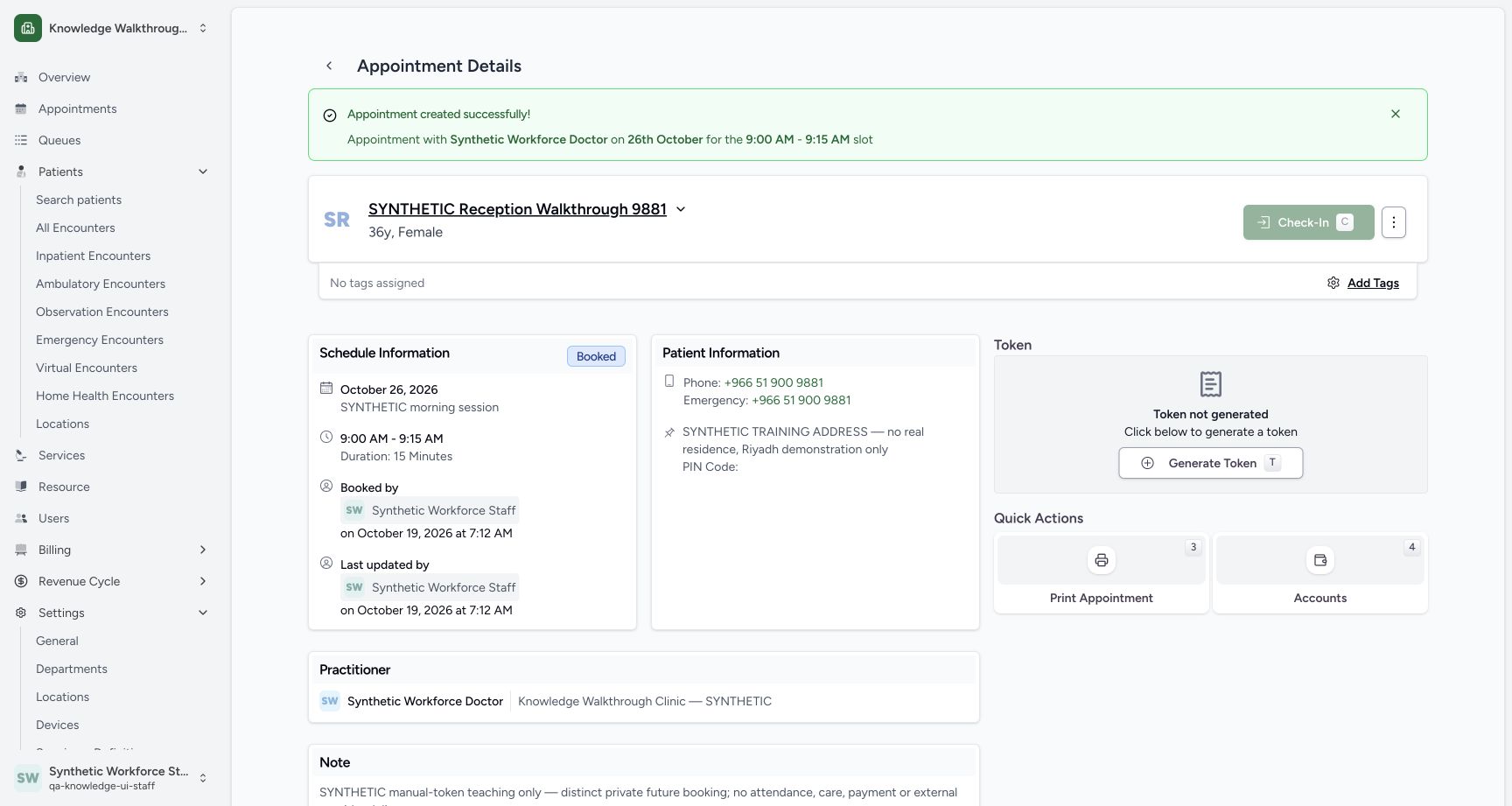
123Verify the saved Booked appointment without a token
Capture details
Exact committed 8d99bb8a. Existing normal non-superuser Staff in its assigned fictional Clinic. Verify the saved Booked appointment without a token. Genuine original image, no cropping, resizing or edits.
Image SHA-256 f7391b9923a60fc1d5b94d37565caafd52322db5cb96376ddf6fce65f7857d99
- Booked: Verify the saved status.
- 09:00–09:15: The saved schedule matches the selected 26 October slot.
- Generate Token: The saved appointment currently has no token.
 12
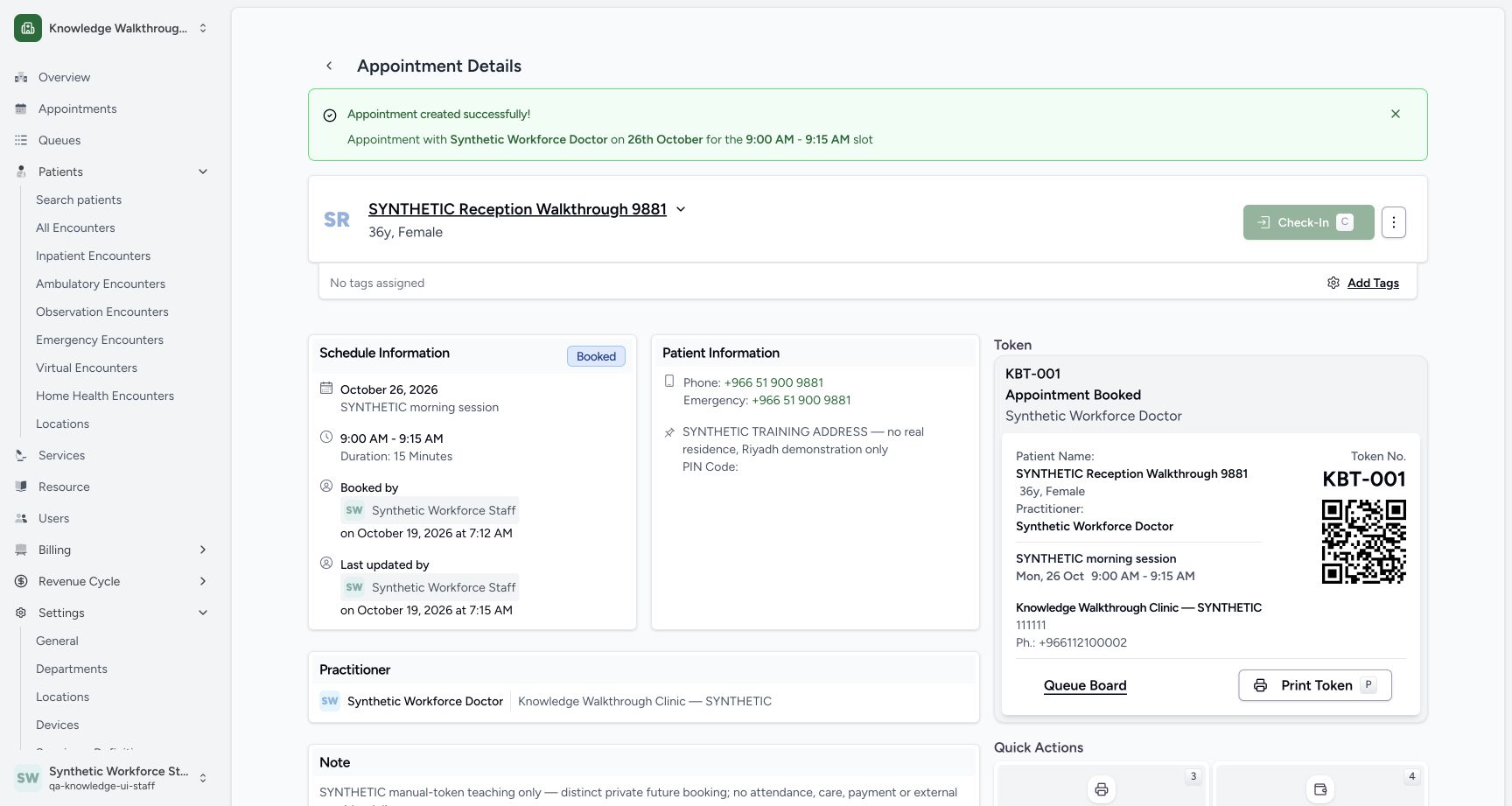
12Reload the saved KBT-001 token card
Capture details
Exact committed 8d99bb8a. Existing normal non-superuser Staff in its assigned fictional Clinic. Reload the saved KBT-001 token card. Genuine original image, no cropping, resizing or edits.
Image SHA-256 fedf246cb84aa47cbd8a8f57a2252b62b2fb1b8672a6d4b51588e76c148b5e93
- KBT-001 retained: Reload retains the same token number and patient.
- Queue Board: Open this token’s exact resource/date queue.
 123
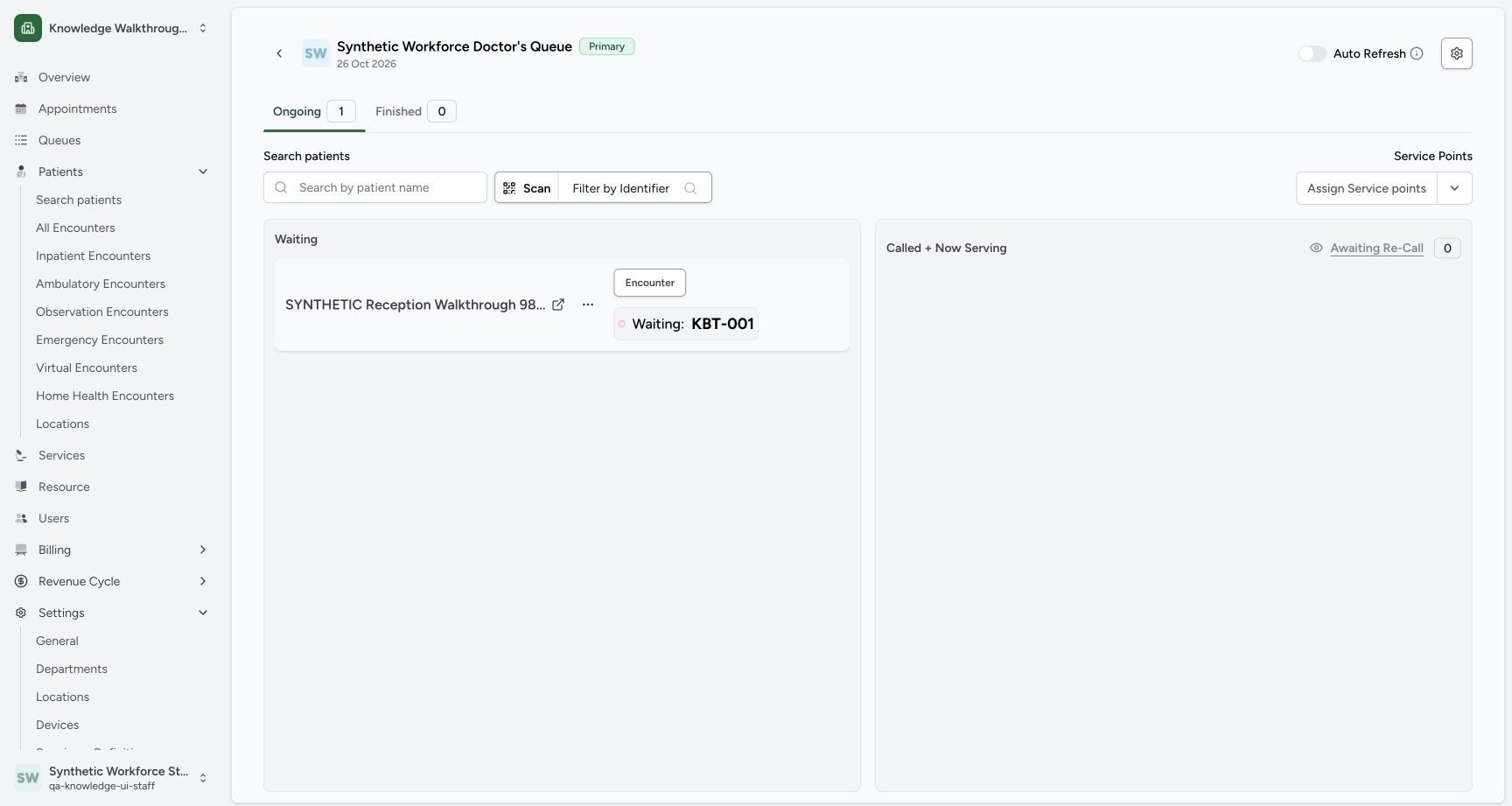
123Inspect the exact resource queue and Waiting token
Capture details
Exact committed 8d99bb8a. Existing normal non-superuser Staff in its assigned fictional Clinic. Inspect the exact resource queue and Waiting token. Genuine original image, no cropping, resizing or edits.
Image SHA-256 e134d599df2bedc36212e251f68b45145a8f3a914fc13d01c85866d697f22bc1
- 26 October queue: The header identifies the Doctor, Primary queue and date.
- Ongoing 1: One token is in the ongoing queue.
- Waiting: KBT-001: The new token is visibly in Waiting.
12 of 12 content blocks have reviewed image alignment. Missing overview or prerequisite images remain open.
Before you begin
- Use the saved fictional Booked appointment for 26 October, 09:00–09:15, under the existing ordinary Staff account. The separate setup exercise has already created the Practitioner category SYNTHETIC Knowledge Queue with shorthand KBT.123
Recorded release 8d99bb8a · 2026-10-19T04:14:15.690Z · 1728 × 921 Verify the saved Booked appointment without a token
Capture details
Exact committed 8d99bb8a. Existing normal non-superuser Staff in its assigned fictional Clinic. Verify the saved Booked appointment without a token. Genuine original image, no cropping, resizing or edits.
Image SHA-256
f7391b9923a60fc1d5b94d37565caafd52322db5cb96376ddf6fce65f7857d99- Booked: Verify the saved status.
- 09:00–09:15: The saved schedule matches the selected 26 October slot.
- Generate Token: The saved appointment currently has no token.
 1
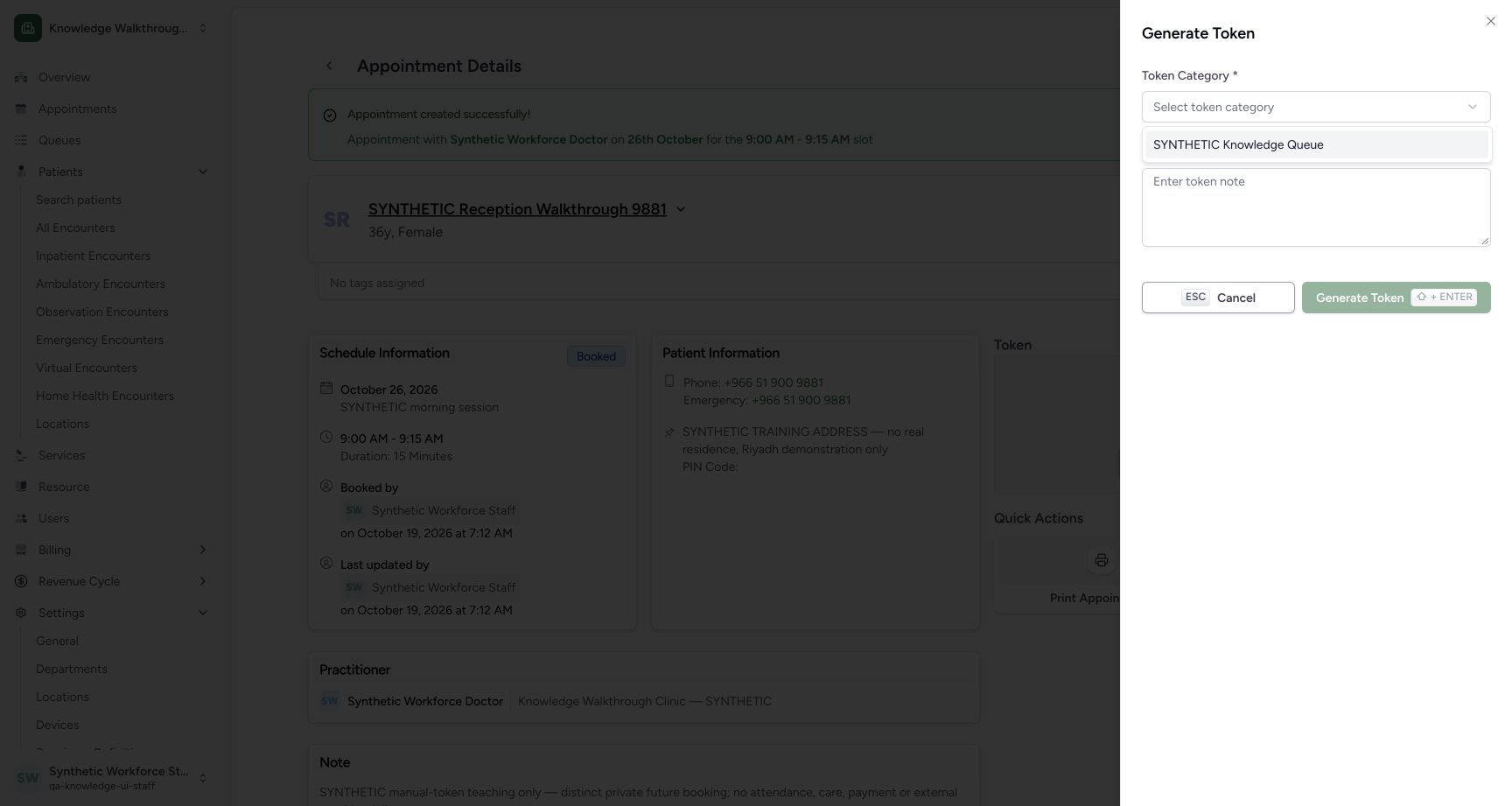
1Recorded release 8d99bb8a · 2026-10-19T04:14:23.982Z · 1728 × 921 Select the saved fictional token category
Capture details
Exact committed 8d99bb8a. Existing normal non-superuser Staff in its assigned fictional Clinic. Select the saved fictional token category. Genuine original image, no cropping, resizing or edits.
Image SHA-256
f58ae8eb65a3d7e08ddcaae7a9469fdf1082babb004d7af248b4d259328ab5a1- Choose fictional category: Use the saved Practitioner category.
1. Open Generate Token on the saved appointment
Check the intended patient, Doctor and saved future appointment. Its Token area shows Token not generated. Use Generate Token.
123Verify the saved Booked appointment without a token
Capture details
Exact committed 8d99bb8a. Existing normal non-superuser Staff in its assigned fictional Clinic. Verify the saved Booked appointment without a token. Genuine original image, no cropping, resizing or edits.
Image SHA-256 f7391b9923a60fc1d5b94d37565caafd52322db5cb96376ddf6fce65f7857d99
- Booked: Verify the saved status.
- 09:00–09:15: The saved schedule matches the selected 26 October slot.
- Generate Token: The saved appointment currently has no token.
2. Inspect the required category state
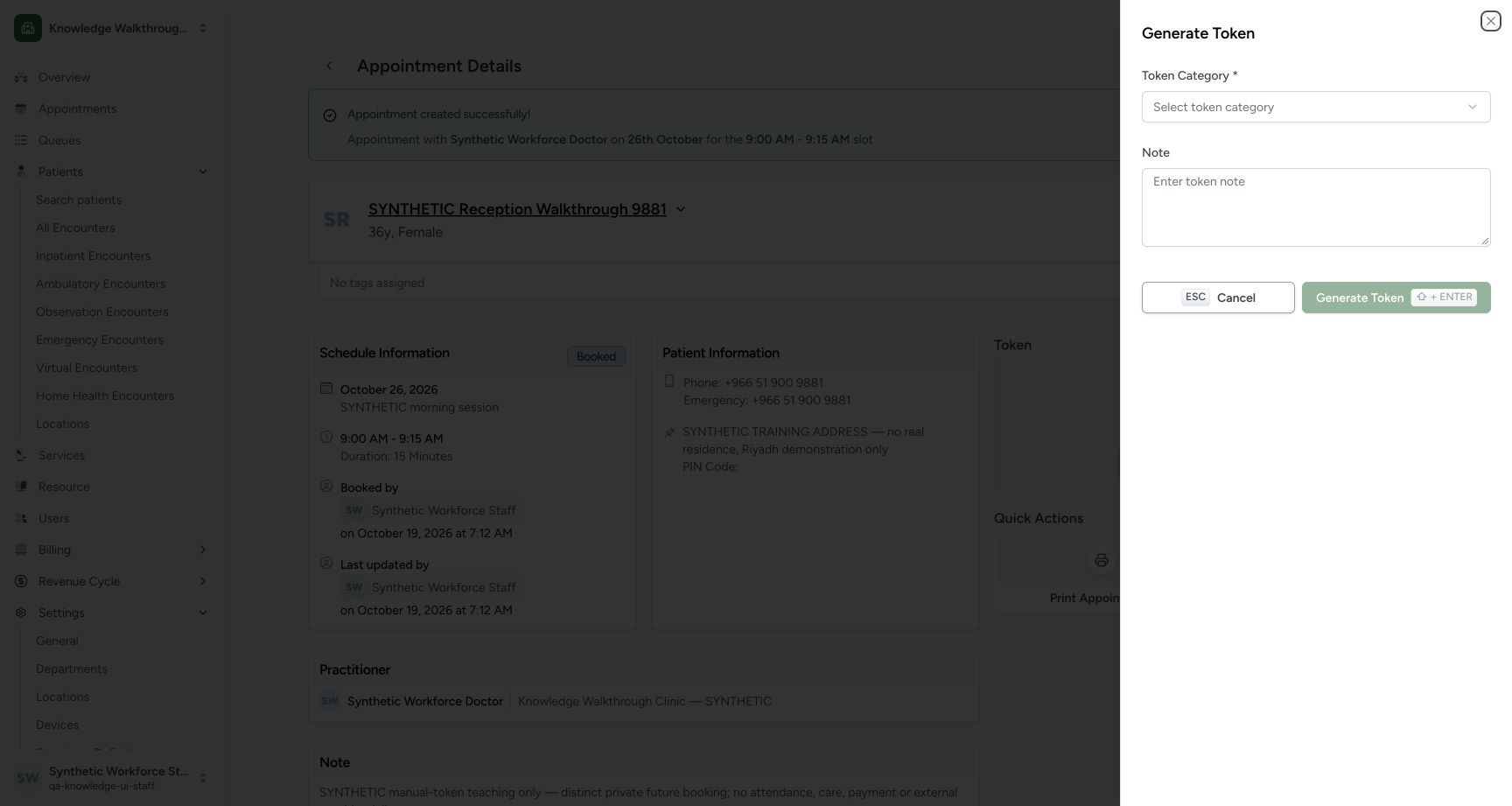
The sheet requires Token Category. Without a category, Generate Token is disabled. Note is available for context.
 12
12Inspect the required token-category state
Capture details
Exact committed 8d99bb8a. Existing normal non-superuser Staff in its assigned fictional Clinic. Inspect the required token-category state. Genuine original image, no cropping, resizing or edits.
Image SHA-256 149cbaa4debf5a7b039a45b20fd253bbffc8c068fa4ee2f8cc66fa405ab4abb8
- Category required: A category must be selected.
- Generate disabled: The action is disabled while no category is selected.
3. Choose the fictional category
Open Select token category and choose SYNTHETIC Knowledge Queue. This is the existing Practitioner category from the separate setup exercise.
12Inspect the required token-category state
Capture details
Exact committed 8d99bb8a. Existing normal non-superuser Staff in its assigned fictional Clinic. Inspect the required token-category state. Genuine original image, no cropping, resizing or edits.
Image SHA-256 149cbaa4debf5a7b039a45b20fd253bbffc8c068fa4ee2f8cc66fa405ab4abb8
- Category required: A category must be selected.
- Generate disabled: The action is disabled while no category is selected.
1Select the saved fictional token category
Capture details
Exact committed 8d99bb8a. Existing normal non-superuser Staff in its assigned fictional Clinic. Select the saved fictional token category. Genuine original image, no cropping, resizing or edits.
Image SHA-256 f58ae8eb65a3d7e08ddcaae7a9469fdf1082babb004d7af248b4d259328ab5a1
- Choose fictional category: Use the saved Practitioner category.
4. Enter the synthetic note and Cancel first
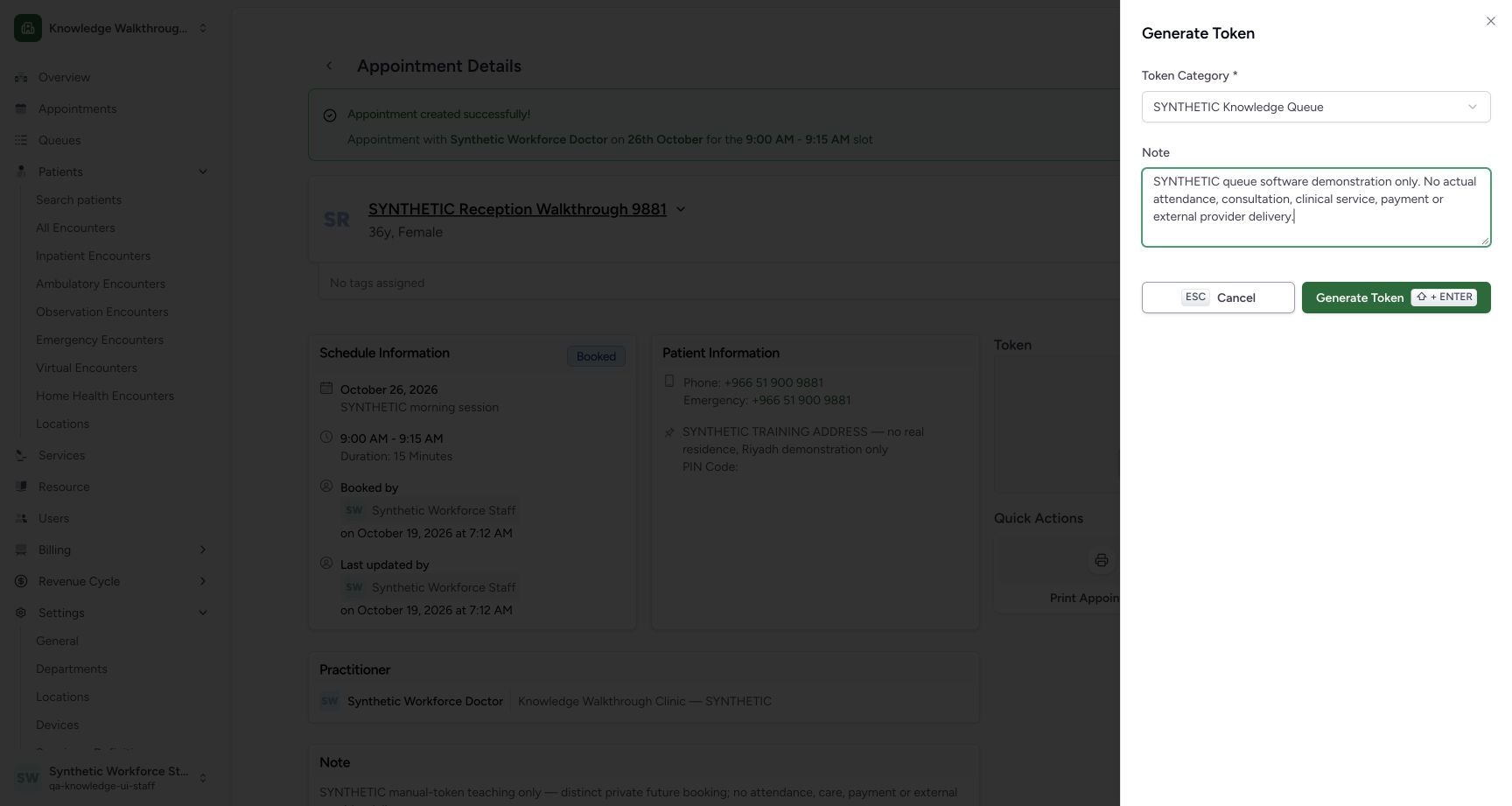
Enter the pictured synthetic software-demonstration note, review the category, then use Cancel. The appointment returns to Token not generated; the whole saved booking was independently verified unchanged and no queue/token existed at that checkpoint.
 123
123Review the token draft and Cancel first
Capture details
Exact committed 8d99bb8a. Existing normal non-superuser Staff in its assigned fictional Clinic. Review the token draft and Cancel first. Genuine original image, no cropping, resizing or edits.
Image SHA-256 917197151a13dc2292886a09e3cdb209d58905909c9834f850a042d7203bd9f8
- Selected category: Review the intended category.
- Synthetic note: Record that this is software training only.
- Cancel first: Close this draft without generating a token.
 12
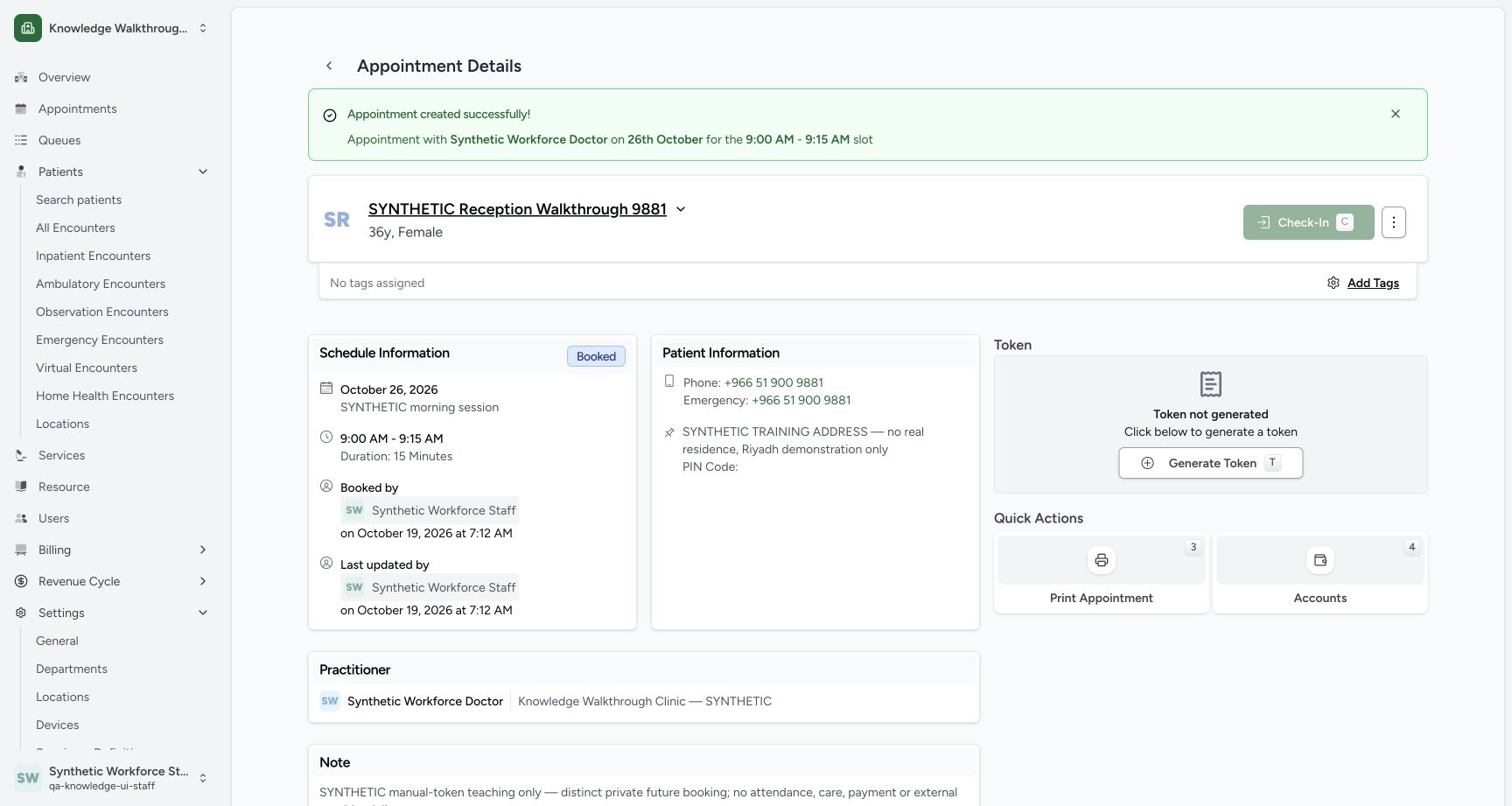
12Verify Cancel left the token ungenerated
Capture details
Exact committed 8d99bb8a. Existing normal non-superuser Staff in its assigned fictional Clinic. Verify Cancel left the token ungenerated. Genuine original image, no cropping, resizing or edits.
Image SHA-256 f7391b9923a60fc1d5b94d37565caafd52322db5cb96376ddf6fce65f7857d99
- Token not generated: Cancel leaves the appointment without a token.
- Reopen Generate Token: Open a new token draft.
5. Recognize the fresh draft after reopening
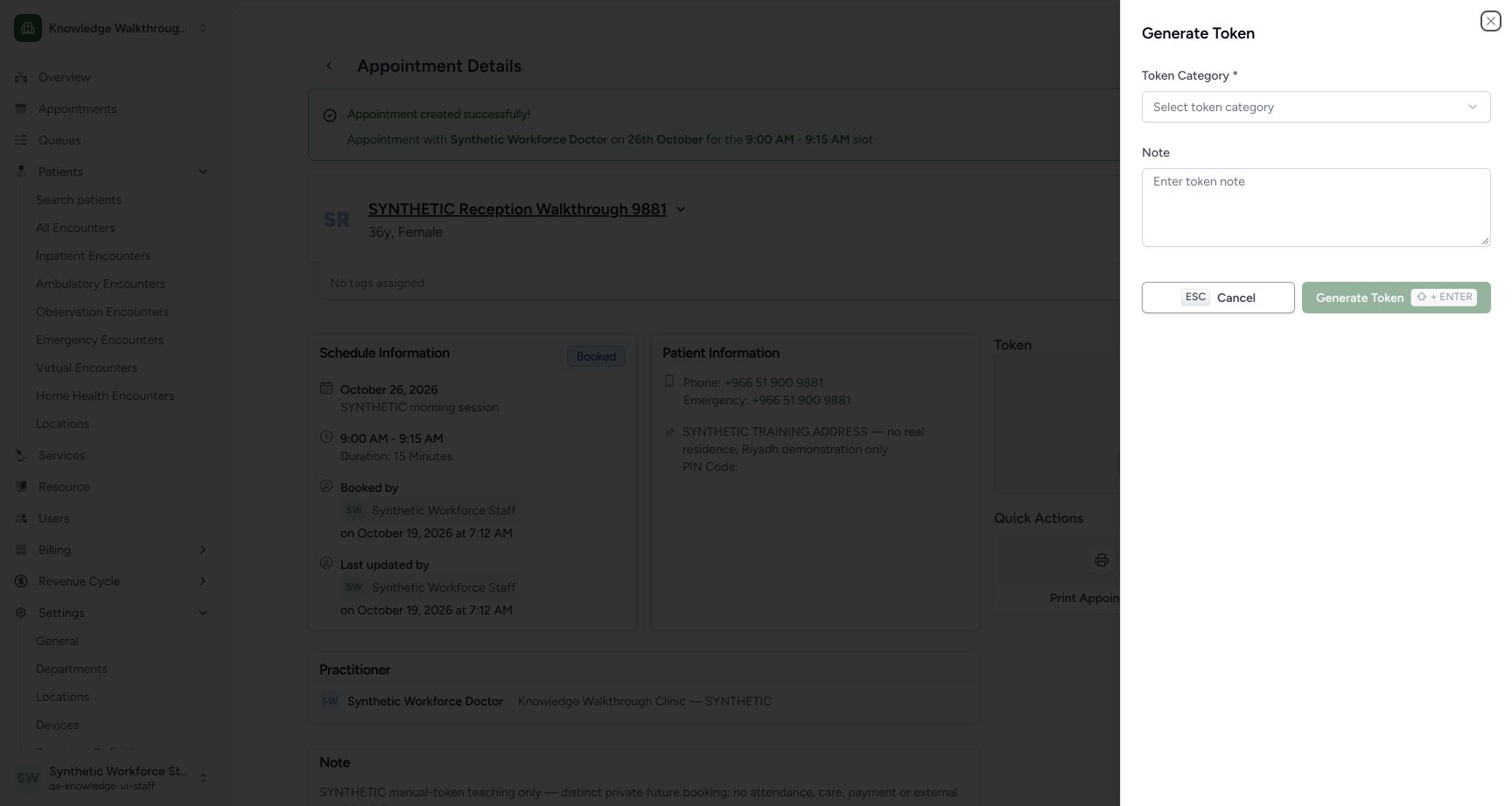
Use Generate Token again. The category returns to Select token category, the Note is empty and Generate is disabled. Re-select the intended category and re-enter the note rather than assuming the cancelled draft was retained.
12Verify Cancel left the token ungenerated
Capture details
Exact committed 8d99bb8a. Existing normal non-superuser Staff in its assigned fictional Clinic. Verify Cancel left the token ungenerated. Genuine original image, no cropping, resizing or edits.
Image SHA-256 f7391b9923a60fc1d5b94d37565caafd52322db5cb96376ddf6fce65f7857d99
- Token not generated: Cancel leaves the appointment without a token.
- Reopen Generate Token: Open a new token draft.
 123
123Inspect the fresh token draft after reopening
Capture details
Exact committed 8d99bb8a. Existing normal non-superuser Staff in its assigned fictional Clinic. Inspect the fresh token draft after reopening. Genuine original image, no cropping, resizing or edits.
Image SHA-256 149cbaa4debf5a7b039a45b20fd253bbffc8c068fa4ee2f8cc66fa405ab4abb8
- Fresh category selection: Reopening resets the category choice.
- Fresh note: The previous unsaved note is cleared.
- Still disabled: Choose a category before generating.
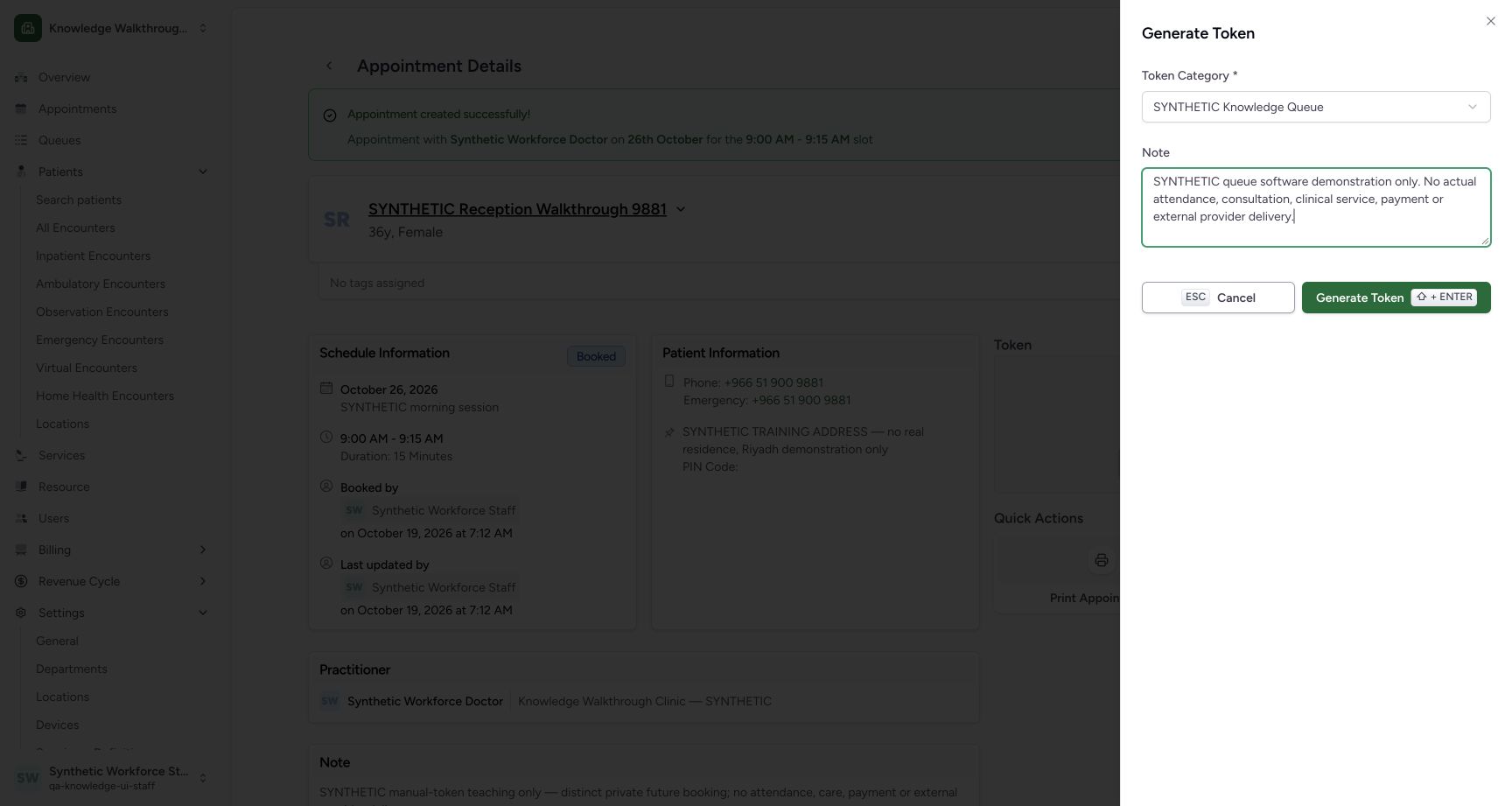 123
123Review the category and note before Generate Token
Capture details
Exact committed 8d99bb8a. Existing normal non-superuser Staff in its assigned fictional Clinic. Review the category and note before Generate Token. Genuine original image, no cropping, resizing or edits.
Image SHA-256 917197151a13dc2292886a09e3cdb209d58905909c9834f850a042d7203bd9f8
- Review category: Use the fictional KBT category.
- Review note: The note explicitly disclaims attendance, care and payment.
- Generate once: Create one token for this saved appointment.
6. Generate the intended token once
Review SYNTHETIC Knowledge Queue and the explicit fictional note, then use Generate Token once. The sheet closes and the appointment displays its saved token. The reloaded card retains KBT-001, the intended patient, Doctor and date/time.
123Review the category and note before Generate Token
Capture details
Exact committed 8d99bb8a. Existing normal non-superuser Staff in its assigned fictional Clinic. Review the category and note before Generate Token. Genuine original image, no cropping, resizing or edits.
Image SHA-256 917197151a13dc2292886a09e3cdb209d58905909c9834f850a042d7203bd9f8
- Review category: Use the fictional KBT category.
- Review note: The note explicitly disclaims attendance, care and payment.
- Generate once: Create one token for this saved appointment.
12Reload the saved KBT-001 token card
Capture details
Exact committed 8d99bb8a. Existing normal non-superuser Staff in its assigned fictional Clinic. Reload the saved KBT-001 token card. Genuine original image, no cropping, resizing or edits.
Image SHA-256 fedf246cb84aa47cbd8a8f57a2252b62b2fb1b8672a6d4b51588e76c148b5e93
- KBT-001 retained: Reload retains the same token number and patient.
- Queue Board: Open this token’s exact resource/date queue.
7. Follow the token’s exact queue link
Use Queue Board from the saved token card. Check the Doctor and 26 Oct 2026 queue header, Primary, Ongoing 1, and Waiting: KBT-001 for the intended synthetic patient.
12Reload the saved KBT-001 token card
Capture details
Exact committed 8d99bb8a. Existing normal non-superuser Staff in its assigned fictional Clinic. Reload the saved KBT-001 token card. Genuine original image, no cropping, resizing or edits.
Image SHA-256 fedf246cb84aa47cbd8a8f57a2252b62b2fb1b8672a6d4b51588e76c148b5e93
- KBT-001 retained: Reload retains the same token number and patient.
- Queue Board: Open this token’s exact resource/date queue.
123Inspect the exact resource queue and Waiting token
Capture details
Exact committed 8d99bb8a. Existing normal non-superuser Staff in its assigned fictional Clinic. Inspect the exact resource queue and Waiting token. Genuine original image, no cropping, resizing or edits.
Image SHA-256 e134d599df2bedc36212e251f68b45145a8f3a914fc13d01c85866d697f22bc1
- 26 October queue: The header identifies the Doctor, Primary queue and date.
- Ongoing 1: One token is in the ongoing queue.
- Waiting: KBT-001: The new token is visibly in Waiting.
Separate booking, token and queue state
The appointment remains Booked while its token is visible as KBT-001. The queue places that token in Waiting under Ongoing. This sequence does not check in the patient, start an encounter, assign a service point or demonstrate attendance.
12Reload the saved KBT-001 token card
Capture details
Exact committed 8d99bb8a. Existing normal non-superuser Staff in its assigned fictional Clinic. Reload the saved KBT-001 token card. Genuine original image, no cropping, resizing or edits.
Image SHA-256 fedf246cb84aa47cbd8a8f57a2252b62b2fb1b8672a6d4b51588e76c148b5e93
- KBT-001 retained: Reload retains the same token number and patient.
- Queue Board: Open this token’s exact resource/date queue.
123Inspect the exact resource queue and Waiting token
Capture details
Exact committed 8d99bb8a. Existing normal non-superuser Staff in its assigned fictional Clinic. Inspect the exact resource queue and Waiting token. Genuine original image, no cropping, resizing or edits.
Image SHA-256 e134d599df2bedc36212e251f68b45145a8f3a914fc13d01c85866d697f22bc1
- 26 October queue: The header identifies the Doctor, Primary queue and date.
- Ongoing 1: One token is in the ongoing queue.
- Waiting: KBT-001: The new token is visibly in Waiting.
Troubleshooting
Generate Token is disabled
Check Token Category. The pictured empty category state disables Generate; selecting the fictional category enables the reviewed draft. Cancelling and reopening clears the unsaved selection and note.
12Inspect the required token-category state
Capture details
Exact committed 8d99bb8a. Existing normal non-superuser Staff in its assigned fictional Clinic. Inspect the required token-category state. Genuine original image, no cropping, resizing or edits.
Image SHA-256 149cbaa4debf5a7b039a45b20fd253bbffc8c068fa4ee2f8cc66fa405ab4abb8
- Category required: A category must be selected.
- Generate disabled: The action is disabled while no category is selected.
123Inspect the fresh token draft after reopening
Capture details
Exact committed 8d99bb8a. Existing normal non-superuser Staff in its assigned fictional Clinic. Inspect the fresh token draft after reopening. Genuine original image, no cropping, resizing or edits.
Image SHA-256 149cbaa4debf5a7b039a45b20fd253bbffc8c068fa4ee2f8cc66fa405ab4abb8
- Fresh category selection: Reopening resets the category choice.
- Fresh note: The previous unsaved note is cleared.
- Still disabled: Choose a category before generating.
123Review the category and note before Generate Token
Capture details
Exact committed 8d99bb8a. Existing normal non-superuser Staff in its assigned fictional Clinic. Review the category and note before Generate Token. Genuine original image, no cropping, resizing or edits.
Image SHA-256 917197151a13dc2292886a09e3cdb209d58905909c9834f850a042d7203bd9f8
- Review category: Use the fictional KBT category.
- Review note: The note explicitly disclaims attendance, care and payment.
- Generate once: Create one token for this saved appointment.
A cancelled draft appears to have disappeared
That is the observed reset behavior: after Cancel the appointment still says Token not generated; reopening has an empty category and note. Re-enter only the intended draft before generating once.
123Review the token draft and Cancel first
Capture details
Exact committed 8d99bb8a. Existing normal non-superuser Staff in its assigned fictional Clinic. Review the token draft and Cancel first. Genuine original image, no cropping, resizing or edits.
Image SHA-256 917197151a13dc2292886a09e3cdb209d58905909c9834f850a042d7203bd9f8
- Selected category: Review the intended category.
- Synthetic note: Record that this is software training only.
- Cancel first: Close this draft without generating a token.
12Verify Cancel left the token ungenerated
Capture details
Exact committed 8d99bb8a. Existing normal non-superuser Staff in its assigned fictional Clinic. Verify Cancel left the token ungenerated. Genuine original image, no cropping, resizing or edits.
Image SHA-256 f7391b9923a60fc1d5b94d37565caafd52322db5cb96376ddf6fce65f7857d99
- Token not generated: Cancel leaves the appointment without a token.
- Reopen Generate Token: Open a new token draft.
123Inspect the fresh token draft after reopening
Capture details
Exact committed 8d99bb8a. Existing normal non-superuser Staff in its assigned fictional Clinic. Inspect the fresh token draft after reopening. Genuine original image, no cropping, resizing or edits.
Image SHA-256 149cbaa4debf5a7b039a45b20fd253bbffc8c068fa4ee2f8cc66fa405ab4abb8
- Fresh category selection: Reopening resets the category choice.
- Fresh note: The previous unsaved note is cleared.
- Still disabled: Choose a category before generating.
Source evidence
Every citation uses this exact committed version. The private source repository requires access.
- repositories/platform/mansoq-web/src/pages/Appointments/components/TokenGenerationSheet.tsx:61 ·
8d99bb8a4712f6aa8446bcd3b40bf62dae280d39Source file checksum
108facf0a36a27d8f9edaaa05120754248f730de35dd743f13cc4a3aacf562e8 - repositories/platform/mansoq-web/src/pages/Appointments/components/TokenGenerationSheet.tsx:189 ·
8d99bb8a4712f6aa8446bcd3b40bf62dae280d39Source file checksum
108facf0a36a27d8f9edaaa05120754248f730de35dd743f13cc4a3aacf562e8 - repositories/platform/mansoq-web/src/pages/Appointments/AppointmentDetail.tsx:330 ·
8d99bb8a4712f6aa8446bcd3b40bf62dae280d39Source file checksum
8fc77ee6f1f7b145e2987ba272e80f35631e17907ea91cd305738250b137b839 - repositories/platform/mansoq-core/mansoq/emr/api/viewsets/scheduling/booking.py:289 ·
8d99bb8a4712f6aa8446bcd3b40bf62dae280d39Source file checksum
b6eebb4afa619aa661824fd5790ac8c34452bb194833b51f3054ce04ca0dfee0 - repositories/platform/mansoq-core/mansoq/emr/api/viewsets/scheduling/booking.py:330 ·
8d99bb8a4712f6aa8446bcd3b40bf62dae280d39Source file checksum
b6eebb4afa619aa661824fd5790ac8c34452bb194833b51f3054ce04ca0dfee0 - repositories/platform/mansoq-core/mansoq/emr/tests/test_booking_api.py:1623 ·
8d99bb8a4712f6aa8446bcd3b40bf62dae280d39Source file checksum
718e8628a374b34e9f2c72cf74b78b2c96895fc4646257e433e62d919c2eed20 - repositories/platform/mansoq-core/mansoq/emr/tests/test_booking_api.py:1703 ·
8d99bb8a4712f6aa8446bcd3b40bf62dae280d39Source file checksum
718e8628a374b34e9f2c72cf74b78b2c96895fc4646257e433e62d919c2eed20 - repositories/platform/mansoq-core/mansoq/security/authorization/token.py:98 ·
8d99bb8a4712f6aa8446bcd3b40bf62dae280d39Source file checksum
d6ae61964447710ba49fd85fc0116be0ccacb1cca6457d5ffcd57b742f5d72bb - repositories/platform/mansoq-web/src/Routers/routes/ScheduleRoutes.tsx:57 ·
8d99bb8a4712f6aa8446bcd3b40bf62dae280d39Source file checksum
44694f13ebb3b8d61193cab6e0b1cea7412755dae0e37397f1049787b03fcb51 - repositories/platform/mansoq-web/src/pages/Appointments/components/AppointmentTokenCard.tsx:240 ·
8d99bb8a4712f6aa8446bcd3b40bf62dae280d39Source file checksum
f18c9dcb58f45984837456a01b185d304e9f1ec7c667365d6f6d5d6450bc5f9b - repositories/platform/mansoq-core/mansoq/emr/api/viewsets/scheduling/token_queue.py:247 ·
8d99bb8a4712f6aa8446bcd3b40bf62dae280d39Source file checksum
481e87a2aaf88de4b0bce386a9a64b82ca04b407c90f3a79c938679bdd634cea - repositories/platform/mansoq-web/src/pages/Facility/queues/OngoingQueueTokenCard.tsx:192 ·
8d99bb8a4712f6aa8446bcd3b40bf62dae280d39Source file checksum
3a2b10251d298c80a650d797148ace8b3b9418296175c6880901cc7ae4703aae - repositories/platform/mansoq-core/mansoq/emr/api/viewsets/scheduling/token.py:135 ·
8d99bb8a4712f6aa8446bcd3b40bf62dae280d39Source file checksum
410193e49a78ef1caa6e5c51c9c7e54f184a37ea6a95b5c90bf5963fec2f69c8