 MANSOQ
 Scheduling and appointments · VERSION 8d99bb8a
Review token cancellation and correction warnings safely
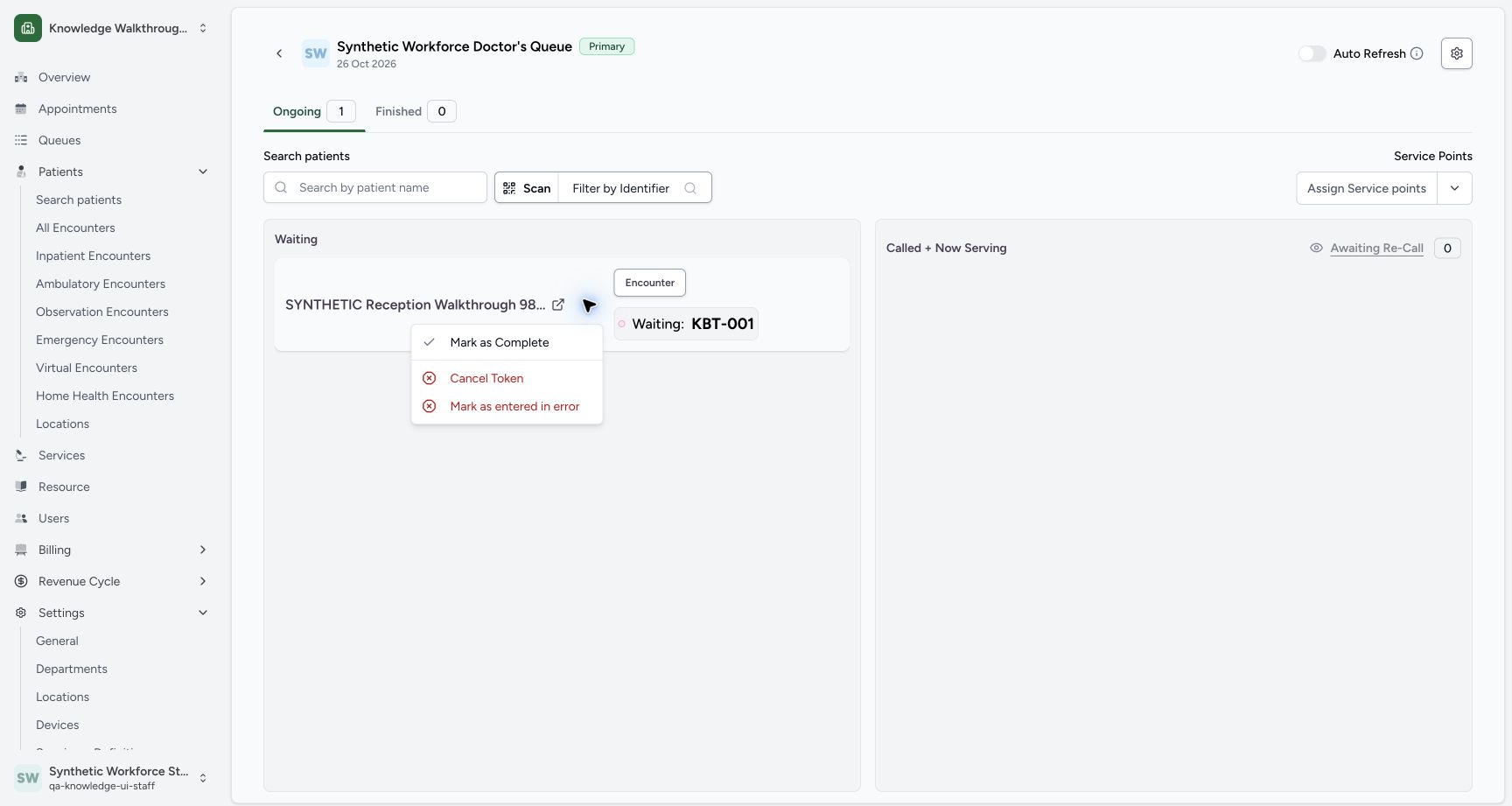
Open the actual Waiting-token menu, inspect each patient-specific warning and choose Cancel to leave the saved token unchanged.
Staff · Receptionist
 12
12Actual Waiting token menu offers Mark as Complete, Cancel Token and Mark as entered in error; no serving action without assigned service point.
Capture details
Exact committed 8d99, existing ordinary Staff on the isolated synthetic Clinic. Actual Waiting token menu offers Mark as Complete, Cancel Token and Mark as entered in error; no serving action without assigned service point. Genuine unchanged wide screenshot; no image edit or lifecycle write.
Image SHA-256 2c49f52b1b512b1ede2e1e3095d3efc8ff155889e6ea7bfc7e5102512553d939
- Cancel Token: Open the cancellation warning.
- Mark as entered in error: Open the separate correction warning when reviewing that action.
 123
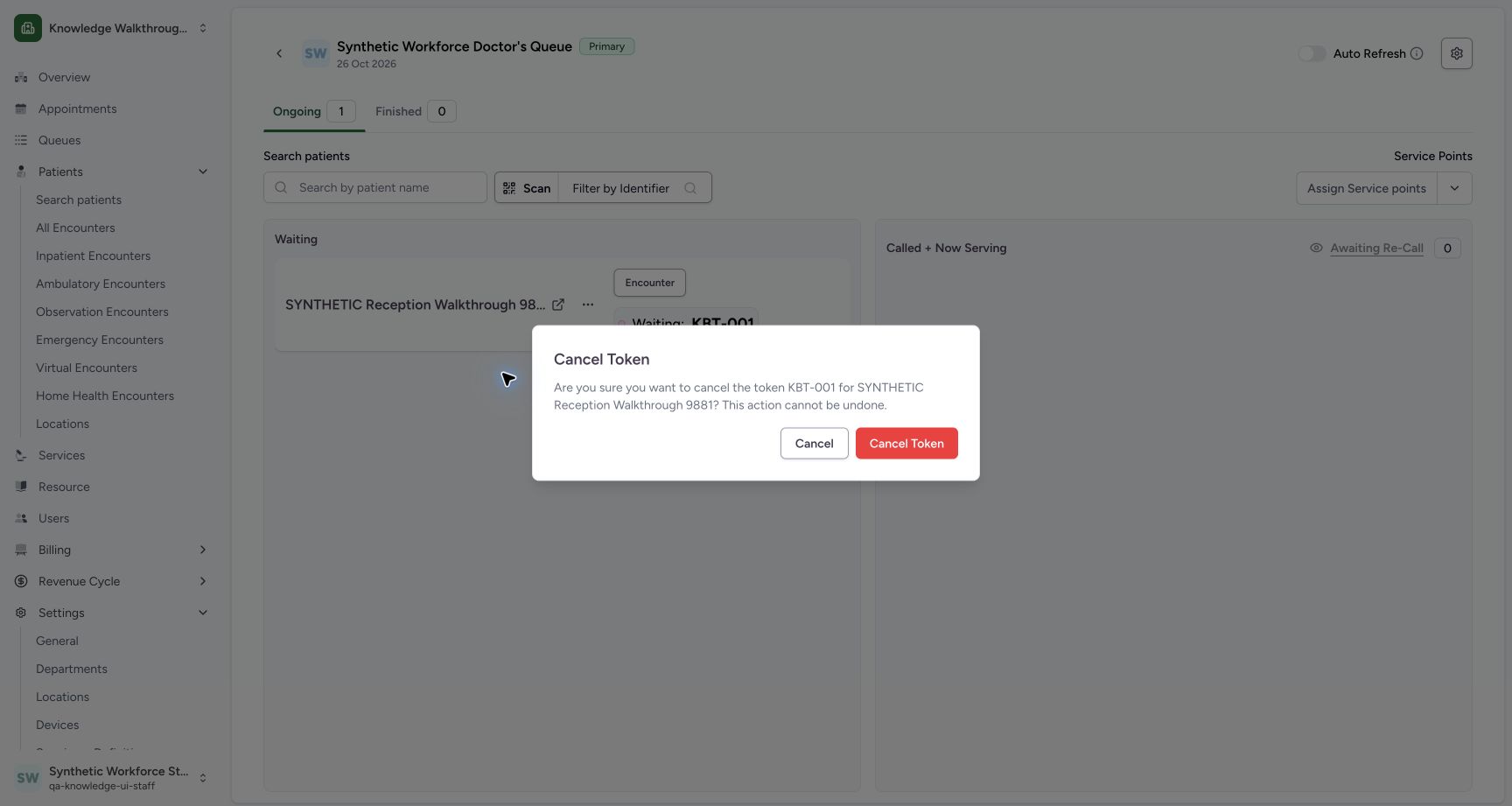
123Actual cancellation warning identifies KBT-001 and the intended fictional patient; neutral Cancel is focused. No destructive confirmation.
Capture details
Exact committed 8d99, existing ordinary Staff on the isolated synthetic Clinic. Actual cancellation warning identifies KBT-001 and the intended fictional patient; neutral Cancel is focused. No destructive confirmation. Genuine unchanged wide screenshot; no image edit or lifecycle write.
Image SHA-256 e3a025d64d53ef90ada66eafe3f7ace0a562967606d1a08afef8cbcd924ec864
- Cancel: Dismiss this warning without confirming token cancellation.
- Cancellation confirmation: This red confirmation was not selected in this exercise.
- Token and patient warning: Read KBT-001 and the full intended patient name in the warning.
 123
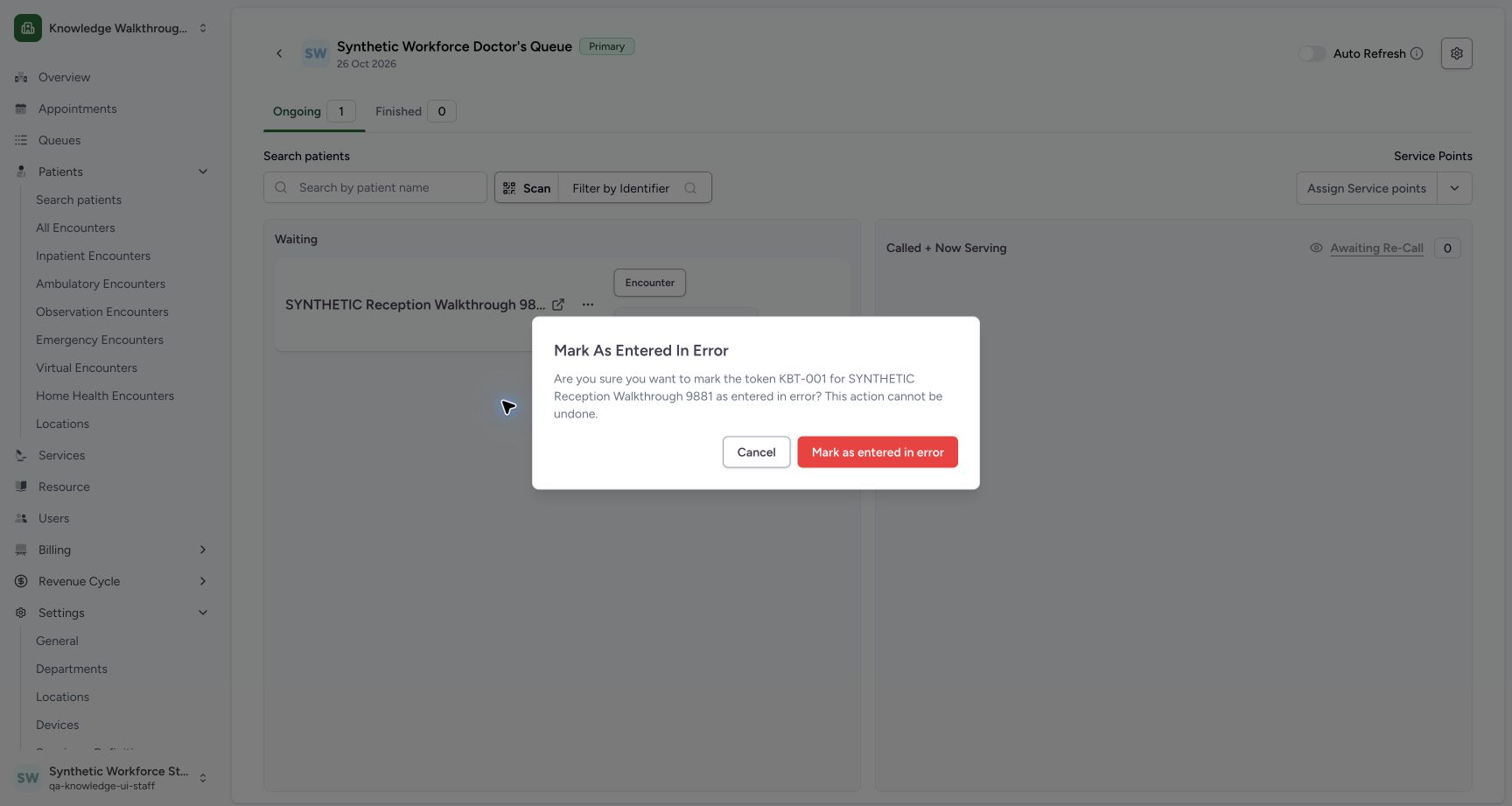
123Actual entered-in-error warning identifies the token and patient; neutral Cancel is focused and confirmation remains unclicked.
Capture details
Exact committed 8d99, existing ordinary Staff on the isolated synthetic Clinic. Actual entered-in-error warning identifies the token and patient; neutral Cancel is focused and confirmation remains unclicked. Genuine unchanged wide screenshot; no image edit or lifecycle write.
Image SHA-256 ab7def5a5bdd97f6be7c0aa12ca40ba0b4cade6492085d82c58af417c061cd06
- Cancel: Dismiss the correction warning without changing token status.
- Correction confirmation: This red confirmation was not selected in this exercise.
- Correction warning: Read the exact token and patient named in this separate warning.
 123
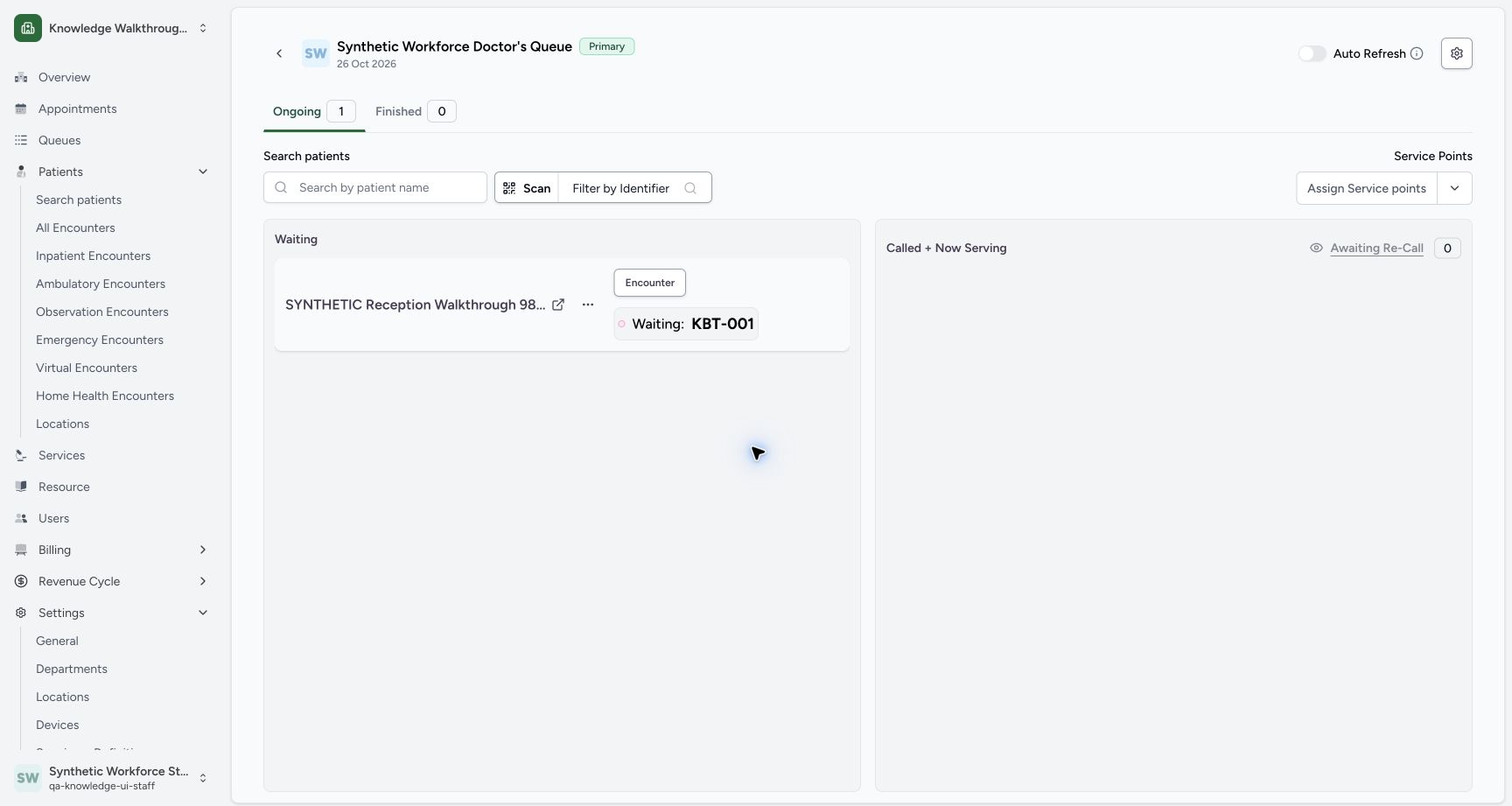
123Stable board after neutral Cancel closes entered-in-error warning: Waiting KBT-001, Ongoing1, Finished0 unchanged.
Capture details
Exact committed 8d99, existing ordinary Staff on the isolated synthetic Clinic. Stable board after neutral Cancel closes entered-in-error warning: Waiting KBT-001, Ongoing1, Finished0 unchanged. Genuine unchanged wide screenshot; no image edit or lifecycle write.
Image SHA-256 a07bf78d4f37bdc92c22a4a1697b9bea140704093dfc6b2864c6524bcecee7cb
- Waiting: KBT-001: Verify the original token still appears in Waiting.
- Ongoing 1: Read the retained Ongoing count.
- Finished 0: Read the retained Finished count.
11 of 11 content blocks have reviewed image alignment. Missing overview or prerequisite images remain open.
Before you begin
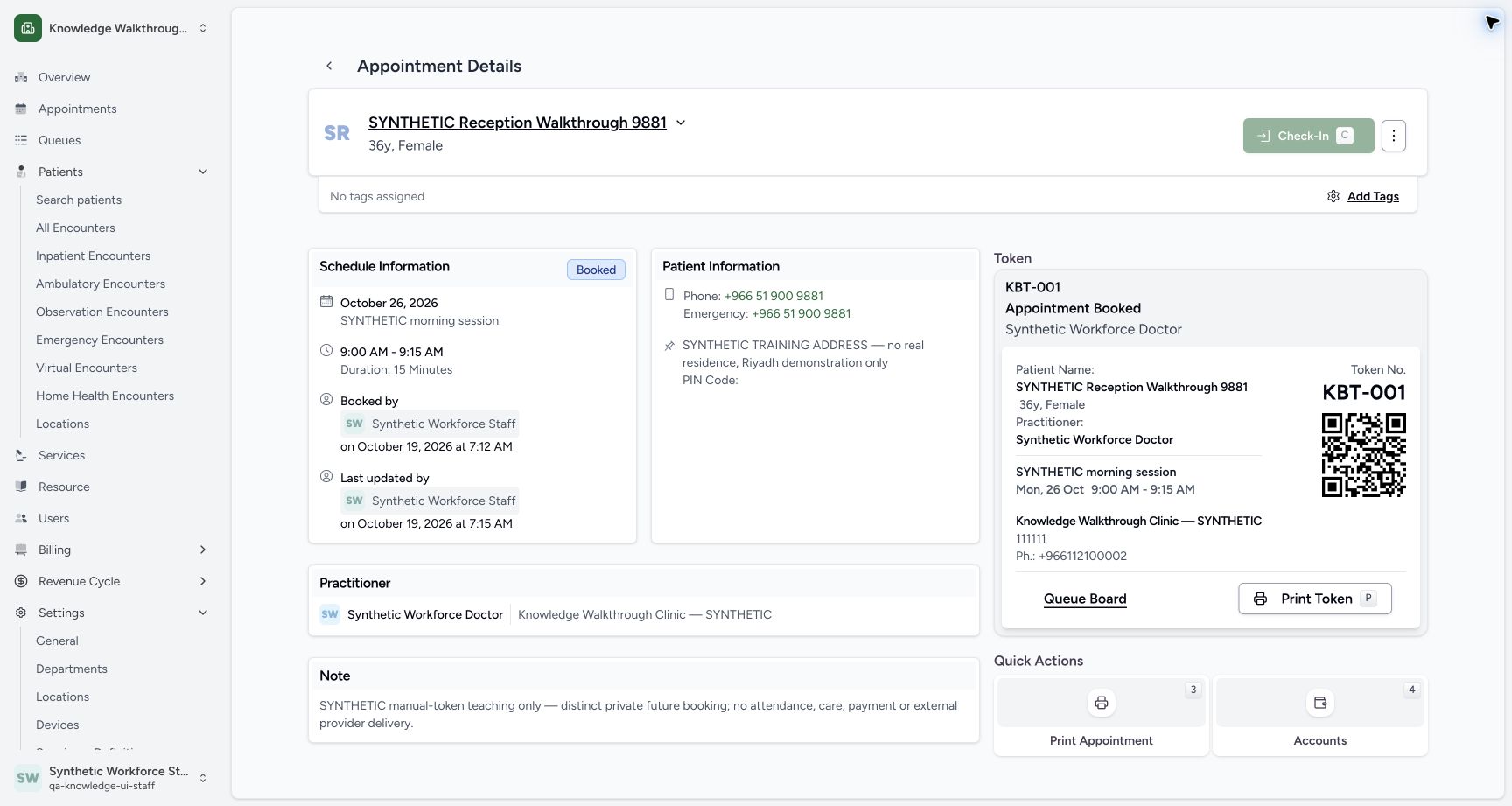
- Use the existing ordinary Staff account and the saved fictional appointment for SYNTHETIC Reception Walkthrough 9881, with token KBT-001 and Synthetic Workforce Doctor. The pictured appointment is 26 October, 09:00–09:15; this is a dated synthetic software exercise.
 12
12Recorded release 8d99bb8a · 2026-10-19T04:45:50.442Z · 1728 × 921 Existing normal Staff appointment and KBT-001 Queue board entry; future Check-In remains disabled.
Capture details
Exact committed 8d99, existing ordinary Staff on the isolated synthetic Clinic. Existing normal Staff appointment and KBT-001 Queue board entry; future Check-In remains disabled. Genuine unchanged wide screenshot; no image edit or lifecycle write.
Image SHA-256
060a2108810b7467632bd34e46ebaea6f00b85628eb63b2e18dc976ff85e2265- Queue Board: Open the exact queue from the saved token card.
- Saved token and patient: Check the intended fictional patient and KBT-001 before opening its queue.
1. Open the saved token’s queue
On Appointment Details, verify SYNTHETIC Reception Walkthrough 9881, Synthetic Workforce Doctor and KBT-001. Use Queue Board from that saved token card.
12Existing normal Staff appointment and KBT-001 Queue board entry; future Check-In remains disabled.
Capture details
Exact committed 8d99, existing ordinary Staff on the isolated synthetic Clinic. Existing normal Staff appointment and KBT-001 Queue board entry; future Check-In remains disabled. Genuine unchanged wide screenshot; no image edit or lifecycle write.
Image SHA-256 060a2108810b7467632bd34e46ebaea6f00b85628eb63b2e18dc976ff85e2265
- Queue Board: Open the exact queue from the saved token card.
- Saved token and patient: Check the intended fictional patient and KBT-001 before opening its queue.
2. Check the queue and Waiting token
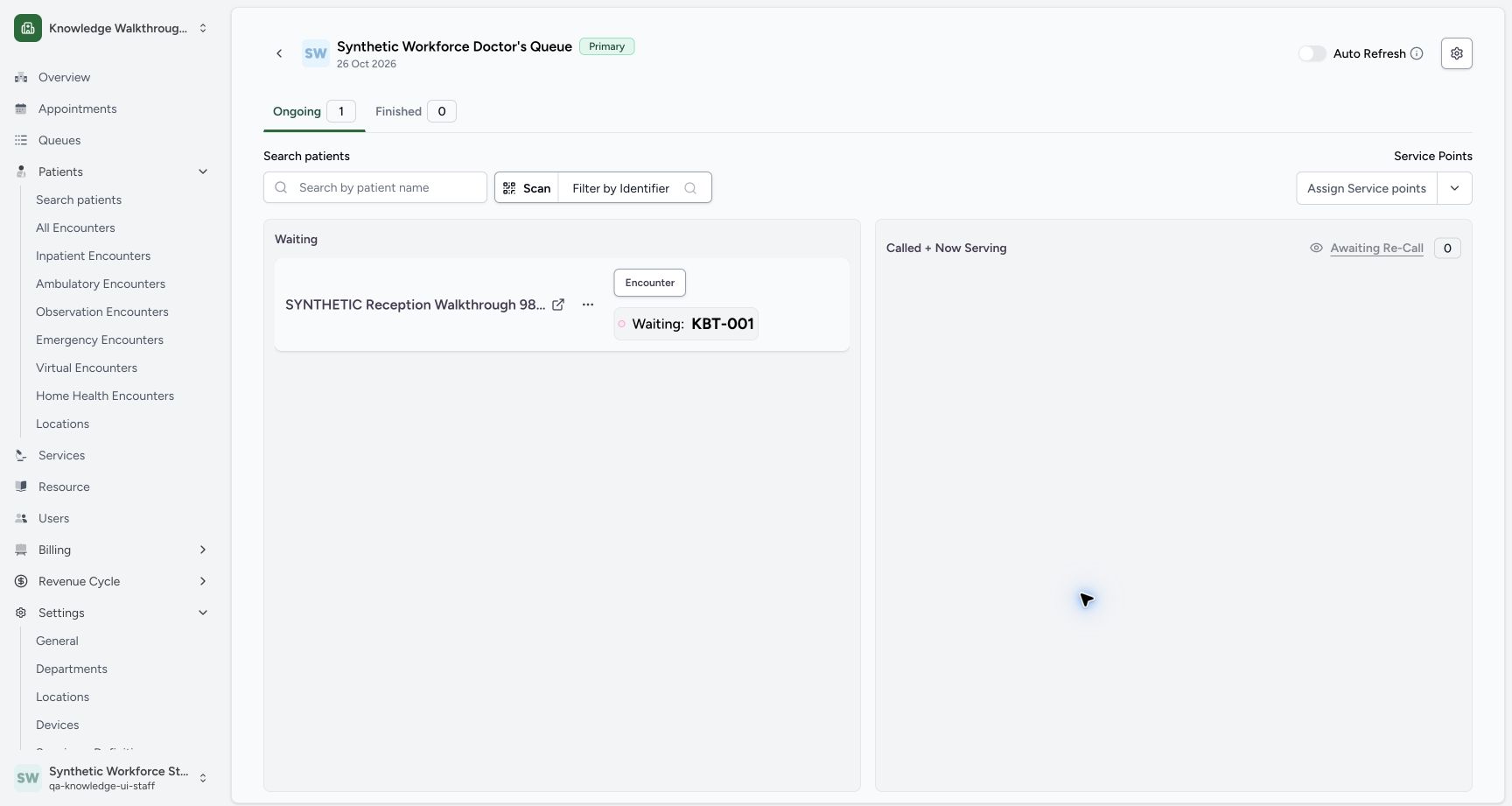
Check Synthetic Workforce Doctor’s Queue, 26 Oct 2026, Primary, Ongoing 1 and Waiting: KBT-001. Open the token card’s three-dot Actions menu.
 1234
1234Actual future Doctor queue, Waiting KBT-001, Ongoing1 and Finished0; no service points assigned.
Capture details
Exact committed 8d99, existing ordinary Staff on the isolated synthetic Clinic. Actual future Doctor queue, Waiting KBT-001, Ongoing1 and Finished0; no service points assigned. Genuine unchanged wide screenshot; no image edit or lifecycle write.
Image SHA-256 d0522f911c7291c0dfccf55e638ce1e5b78b982f1f0ad691c9e2258b68ad02b0
- Actions: Open the three-dot menu for this Waiting token.
- Ongoing 1: Read the current Ongoing group count.
- Waiting: KBT-001: Verify the Waiting label and token number.
- 26 Oct 2026: Verify the queue date and Doctor header.
3. Open the cancellation warning
Choose Cancel Token from the token’s menu. This opens a separate warning; it is not the same as confirming the red action inside that warning.
12Actual Waiting token menu offers Mark as Complete, Cancel Token and Mark as entered in error; no serving action without assigned service point.
Capture details
Exact committed 8d99, existing ordinary Staff on the isolated synthetic Clinic. Actual Waiting token menu offers Mark as Complete, Cancel Token and Mark as entered in error; no serving action without assigned service point. Genuine unchanged wide screenshot; no image edit or lifecycle write.
Image SHA-256 2c49f52b1b512b1ede2e1e3095d3efc8ff155889e6ea7bfc7e5102512553d939
- Cancel Token: Open the cancellation warning.
- Mark as entered in error: Open the separate correction warning when reviewing that action.
123Actual cancellation warning identifies KBT-001 and the intended fictional patient; neutral Cancel is focused. No destructive confirmation.
Capture details
Exact committed 8d99, existing ordinary Staff on the isolated synthetic Clinic. Actual cancellation warning identifies KBT-001 and the intended fictional patient; neutral Cancel is focused. No destructive confirmation. Genuine unchanged wide screenshot; no image edit or lifecycle write.
Image SHA-256 e3a025d64d53ef90ada66eafe3f7ace0a562967606d1a08afef8cbcd924ec864
- Cancel: Dismiss this warning without confirming token cancellation.
- Cancellation confirmation: This red confirmation was not selected in this exercise.
- Token and patient warning: Read KBT-001 and the full intended patient name in the warning.
4. Read the cancellation warning and keep the token
Read the token KBT-001 and the full patient name in the Cancel Token warning. To back out, choose the neutral Cancel button. The warning closes and the token remains Waiting. The red Cancel Token confirmation is not selected in this exercise.
123Actual cancellation warning identifies KBT-001 and the intended fictional patient; neutral Cancel is focused. No destructive confirmation.
Capture details
Exact committed 8d99, existing ordinary Staff on the isolated synthetic Clinic. Actual cancellation warning identifies KBT-001 and the intended fictional patient; neutral Cancel is focused. No destructive confirmation. Genuine unchanged wide screenshot; no image edit or lifecycle write.
Image SHA-256 e3a025d64d53ef90ada66eafe3f7ace0a562967606d1a08afef8cbcd924ec864
- Cancel: Dismiss this warning without confirming token cancellation.
- Cancellation confirmation: This red confirmation was not selected in this exercise.
- Token and patient warning: Read KBT-001 and the full intended patient name in the warning.
 12
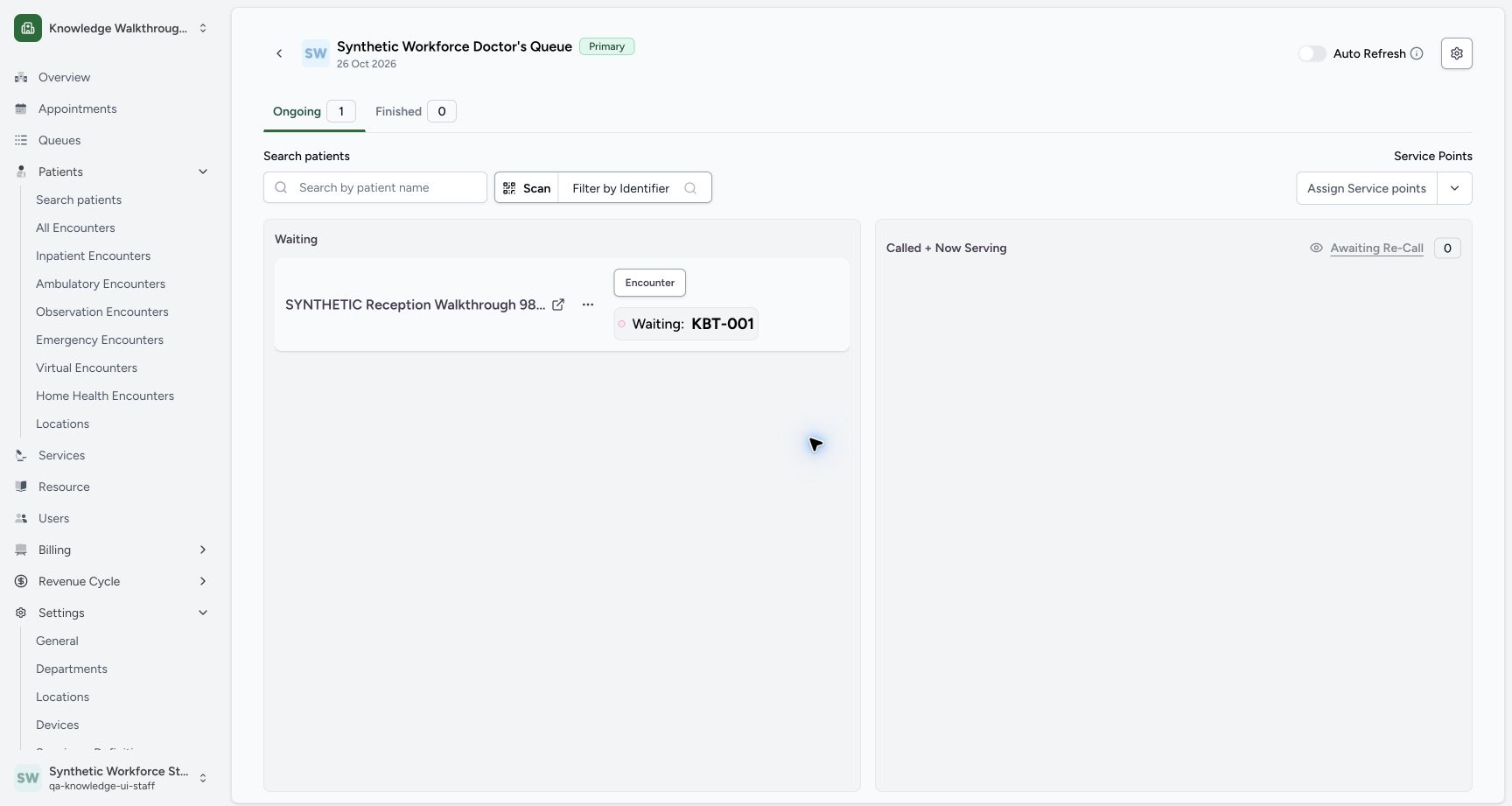
12Stable board after Cancel dialog closes: Waiting KBT-001 unchanged, Ongoing1 and Finished0.
Capture details
Exact committed 8d99, existing ordinary Staff on the isolated synthetic Clinic. Stable board after Cancel dialog closes: Waiting KBT-001 unchanged, Ongoing1 and Finished0. Genuine unchanged wide screenshot; no image edit or lifecycle write.
Image SHA-256 ec61b80a43ffa47ea2d34b35f99fb6f7d6e86416bf2a5dd7616356997068c183
- Actions: Reopen the token menu only after the warning closes.
- Still Waiting: The token remains in Waiting after neutral Cancel.
5. Open the separate correction warning
From the unchanged Waiting card, open Actions again and choose Mark as entered in error. The reopened menu has the same two separate actions; read the correction warning rather than treating it as cancellation.
12Stable board after Cancel dialog closes: Waiting KBT-001 unchanged, Ongoing1 and Finished0.
Capture details
Exact committed 8d99, existing ordinary Staff on the isolated synthetic Clinic. Stable board after Cancel dialog closes: Waiting KBT-001 unchanged, Ongoing1 and Finished0. Genuine unchanged wide screenshot; no image edit or lifecycle write.
Image SHA-256 ec61b80a43ffa47ea2d34b35f99fb6f7d6e86416bf2a5dd7616356997068c183
- Actions: Reopen the token menu only after the warning closes.
- Still Waiting: The token remains in Waiting after neutral Cancel.
12Actual Waiting token menu offers Mark as Complete, Cancel Token and Mark as entered in error; no serving action without assigned service point.
Capture details
Exact committed 8d99, existing ordinary Staff on the isolated synthetic Clinic. Actual Waiting token menu offers Mark as Complete, Cancel Token and Mark as entered in error; no serving action without assigned service point. Genuine unchanged wide screenshot; no image edit or lifecycle write.
Image SHA-256 2c49f52b1b512b1ede2e1e3095d3efc8ff155889e6ea7bfc7e5102512553d939
- Cancel Token: Open the cancellation warning.
- Mark as entered in error: Open the separate correction warning when reviewing that action.
123Actual entered-in-error warning identifies the token and patient; neutral Cancel is focused and confirmation remains unclicked.
Capture details
Exact committed 8d99, existing ordinary Staff on the isolated synthetic Clinic. Actual entered-in-error warning identifies the token and patient; neutral Cancel is focused and confirmation remains unclicked. Genuine unchanged wide screenshot; no image edit or lifecycle write.
Image SHA-256 ab7def5a5bdd97f6be7c0aa12ca40ba0b4cade6492085d82c58af417c061cd06
- Cancel: Dismiss the correction warning without changing token status.
- Correction confirmation: This red confirmation was not selected in this exercise.
- Correction warning: Read the exact token and patient named in this separate warning.
6. Back out of the correction warning
Check KBT-001 and SYNTHETIC Reception Walkthrough 9881 in the Mark As Entered In Error warning, then choose neutral Cancel. The red Mark as entered in error confirmation is not selected.
123Actual entered-in-error warning identifies the token and patient; neutral Cancel is focused and confirmation remains unclicked.
Capture details
Exact committed 8d99, existing ordinary Staff on the isolated synthetic Clinic. Actual entered-in-error warning identifies the token and patient; neutral Cancel is focused and confirmation remains unclicked. Genuine unchanged wide screenshot; no image edit or lifecycle write.
Image SHA-256 ab7def5a5bdd97f6be7c0aa12ca40ba0b4cade6492085d82c58af417c061cd06
- Cancel: Dismiss the correction warning without changing token status.
- Correction confirmation: This red confirmation was not selected in this exercise.
- Correction warning: Read the exact token and patient named in this separate warning.
7. Verify the unchanged queue checkpoint
After the warning closes, verify Waiting: KBT-001, Ongoing 1 and Finished 0 again. The saved token remains Waiting; neither warning was confirmed.
123Stable board after neutral Cancel closes entered-in-error warning: Waiting KBT-001, Ongoing1, Finished0 unchanged.
Capture details
Exact committed 8d99, existing ordinary Staff on the isolated synthetic Clinic. Stable board after neutral Cancel closes entered-in-error warning: Waiting KBT-001, Ongoing1, Finished0 unchanged. Genuine unchanged wide screenshot; no image edit or lifecycle write.
Image SHA-256 a07bf78d4f37bdc92c22a4a1697b9bea140704093dfc6b2864c6524bcecee7cb
- Waiting: KBT-001: Verify the original token still appears in Waiting.
- Ongoing 1: Read the retained Ongoing count.
- Finished 0: Read the retained Finished count.
Keep appointment and token actions separate
The appointment page shows Booked and a disabled Check-In for this pictured dated example. Its queue separately shows Waiting: KBT-001. This walkthrough opens and dismisses token warnings; it does not confirm token cancellation or correction, check in the appointment, demonstrate attendance or serve the patient.
12Existing normal Staff appointment and KBT-001 Queue board entry; future Check-In remains disabled.
Capture details
Exact committed 8d99, existing ordinary Staff on the isolated synthetic Clinic. Existing normal Staff appointment and KBT-001 Queue board entry; future Check-In remains disabled. Genuine unchanged wide screenshot; no image edit or lifecycle write.
Image SHA-256 060a2108810b7467632bd34e46ebaea6f00b85628eb63b2e18dc976ff85e2265
- Queue Board: Open the exact queue from the saved token card.
- Saved token and patient: Check the intended fictional patient and KBT-001 before opening its queue.
1234Actual future Doctor queue, Waiting KBT-001, Ongoing1 and Finished0; no service points assigned.
Capture details
Exact committed 8d99, existing ordinary Staff on the isolated synthetic Clinic. Actual future Doctor queue, Waiting KBT-001, Ongoing1 and Finished0; no service points assigned. Genuine unchanged wide screenshot; no image edit or lifecycle write.
Image SHA-256 d0522f911c7291c0dfccf55e638ce1e5b78b982f1f0ad691c9e2258b68ad02b0
- Actions: Open the three-dot menu for this Waiting token.
- Ongoing 1: Read the current Ongoing group count.
- Waiting: KBT-001: Verify the Waiting label and token number.
- 26 Oct 2026: Verify the queue date and Doctor header.
123Stable board after neutral Cancel closes entered-in-error warning: Waiting KBT-001, Ongoing1, Finished0 unchanged.
Capture details
Exact committed 8d99, existing ordinary Staff on the isolated synthetic Clinic. Stable board after neutral Cancel closes entered-in-error warning: Waiting KBT-001, Ongoing1, Finished0 unchanged. Genuine unchanged wide screenshot; no image edit or lifecycle write.
Image SHA-256 a07bf78d4f37bdc92c22a4a1697b9bea140704093dfc6b2864c6524bcecee7cb
- Waiting: KBT-001: Verify the original token still appears in Waiting.
- Ongoing 1: Read the retained Ongoing count.
- Finished 0: Read the retained Finished count.
Troubleshooting
The warning is not the action you intended
Stop and read its title, token number and patient name. Use neutral Cancel to close either pictured warning. The red Cancel Token and Mark as entered in error buttons are distinct confirmation actions and are not used in this safe-review exercise.
123Actual cancellation warning identifies KBT-001 and the intended fictional patient; neutral Cancel is focused. No destructive confirmation.
Capture details
Exact committed 8d99, existing ordinary Staff on the isolated synthetic Clinic. Actual cancellation warning identifies KBT-001 and the intended fictional patient; neutral Cancel is focused. No destructive confirmation. Genuine unchanged wide screenshot; no image edit or lifecycle write.
Image SHA-256 e3a025d64d53ef90ada66eafe3f7ace0a562967606d1a08afef8cbcd924ec864
- Cancel: Dismiss this warning without confirming token cancellation.
- Cancellation confirmation: This red confirmation was not selected in this exercise.
- Token and patient warning: Read KBT-001 and the full intended patient name in the warning.
123Actual entered-in-error warning identifies the token and patient; neutral Cancel is focused and confirmation remains unclicked.
Capture details
Exact committed 8d99, existing ordinary Staff on the isolated synthetic Clinic. Actual entered-in-error warning identifies the token and patient; neutral Cancel is focused and confirmation remains unclicked. Genuine unchanged wide screenshot; no image edit or lifecycle write.
Image SHA-256 ab7def5a5bdd97f6be7c0aa12ca40ba0b4cade6492085d82c58af417c061cd06
- Cancel: Dismiss the correction warning without changing token status.
- Correction confirmation: This red confirmation was not selected in this exercise.
- Correction warning: Read the exact token and patient named in this separate warning.
Source evidence
Every citation uses this exact committed version. The private source repository requires access.
- repositories/platform/mansoq-web/src/pages/Appointments/components/AppointmentTokenCard.tsx:240 ·
8d99bb8a4712f6aa8446bcd3b40bf62dae280d39Source file checksum
f18c9dcb58f45984837456a01b185d304e9f1ec7c667365d6f6d5d6450bc5f9b - repositories/platform/mansoq-web/src/pages/Facility/queues/OngoingQueueTokenCard.tsx:211 ·
8d99bb8a4712f6aa8446bcd3b40bf62dae280d39Source file checksum
3a2b10251d298c80a650d797148ace8b3b9418296175c6880901cc7ae4703aae - repositories/platform/mansoq-web/src/pages/Facility/queues/OngoingQueueTokenCard.tsx:222 ·
8d99bb8a4712f6aa8446bcd3b40bf62dae280d39Source file checksum
3a2b10251d298c80a650d797148ace8b3b9418296175c6880901cc7ae4703aae - repositories/platform/mansoq-web/src/pages/Facility/queues/OngoingQueueTokenCard.tsx:430 ·
8d99bb8a4712f6aa8446bcd3b40bf62dae280d39Source file checksum
3a2b10251d298c80a650d797148ace8b3b9418296175c6880901cc7ae4703aae - repositories/platform/mansoq-web/src/pages/Facility/queues/CancelTokenDialog.tsx:43 ·
8d99bb8a4712f6aa8446bcd3b40bf62dae280d39Source file checksum
febdd87fa4b06f186b8ab43f3d6308913a5c9bf197aae590ae4247c0af7be242 - repositories/platform/mansoq-web/src/types/tokens/token/token.ts:64 ·
8d99bb8a4712f6aa8446bcd3b40bf62dae280d39Source file checksum
ed1eb1556d132c66e67ab71fa9329d13cc703d5417d8b8ef4a247bba8adcf579 - repositories/platform/mansoq-core/mansoq/security/authorization/token.py:98 ·
8d99bb8a4712f6aa8446bcd3b40bf62dae280d39Source file checksum
d6ae61964447710ba49fd85fc0116be0ccacb1cca6457d5ffcd57b742f5d72bb