 MANSOQ
 Scheduling and appointments · VERSION 8d99bb8a
Save an appointment token as a local PDF
Check the saved token, open the real browser print preview and save a separate local PDF.
Staff · Receptionist
 12
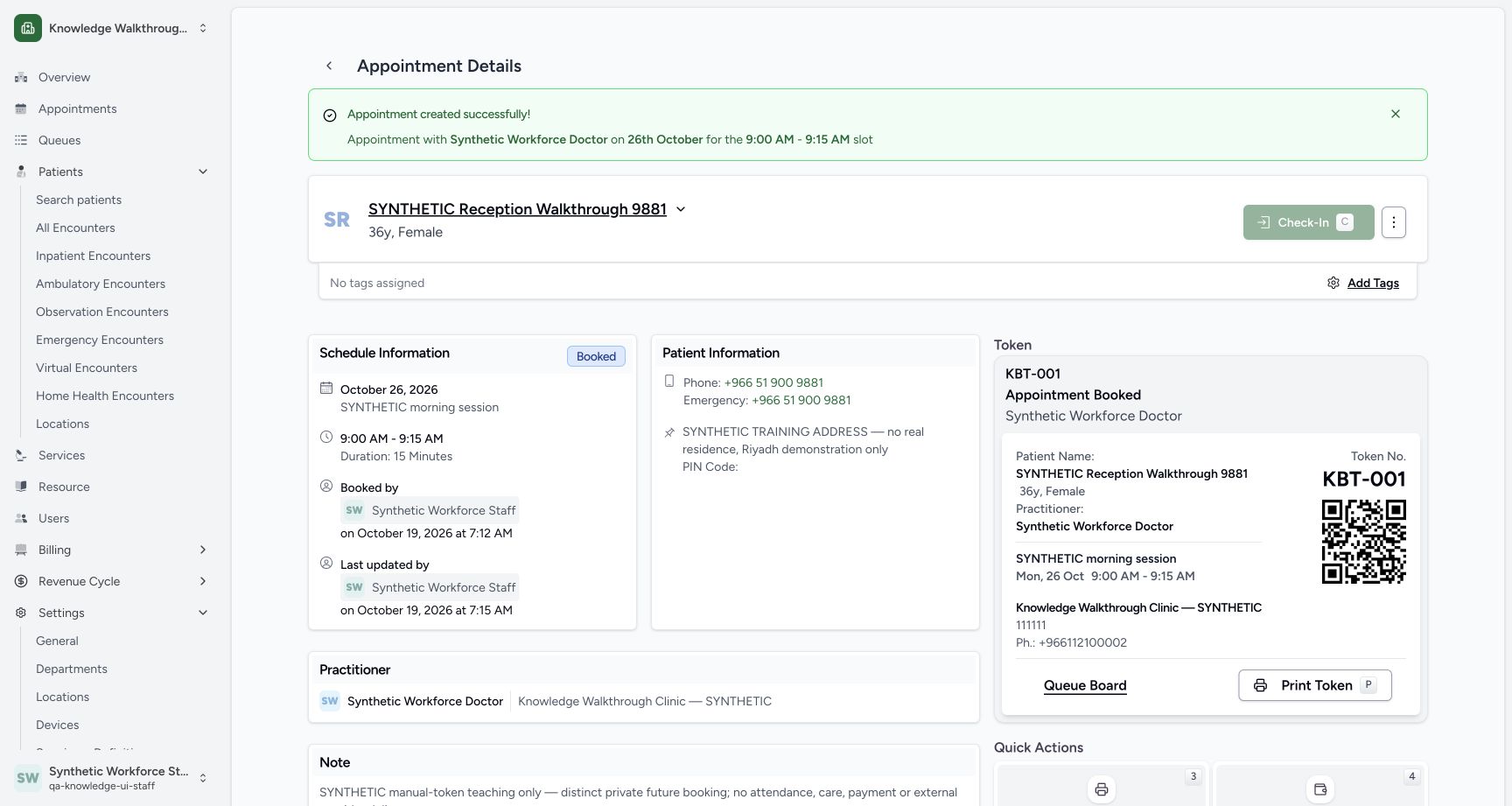
12Review the Print Token entry point
Capture details
Exact committed 8d99bb8a. Existing normal non-superuser Staff in its assigned fictional Clinic. Review the Print Token entry point. Genuine original image, no cropping, resizing or edits.
Image SHA-256 fedf246cb84aa47cbd8a8f57a2252b62b2fb1b8672a6d4b51588e76c148b5e93
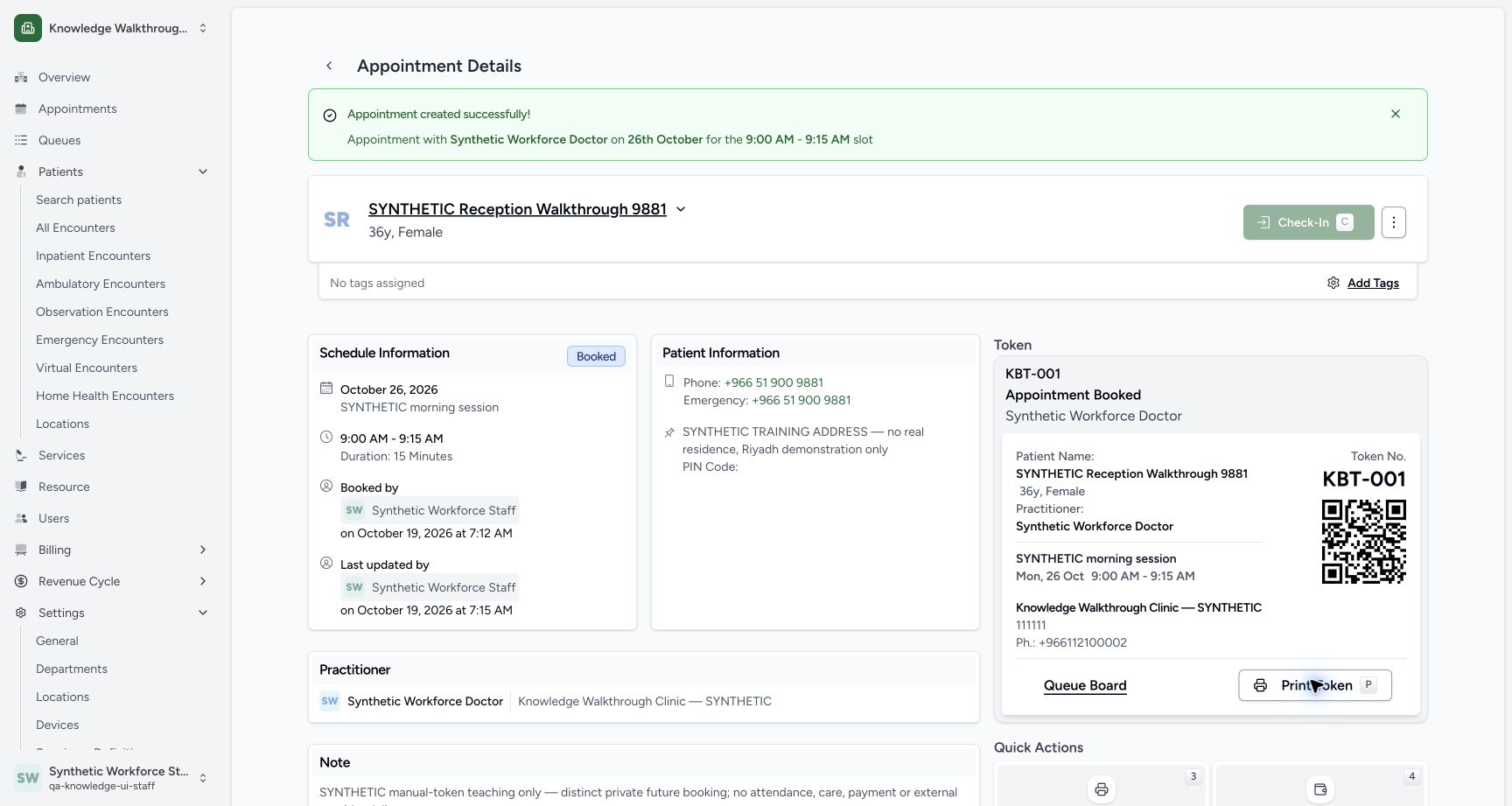
- Print Token: Open the actual token print dialog.
- Check identity: Verify KBT-001 and the intended synthetic patient first.
 12345
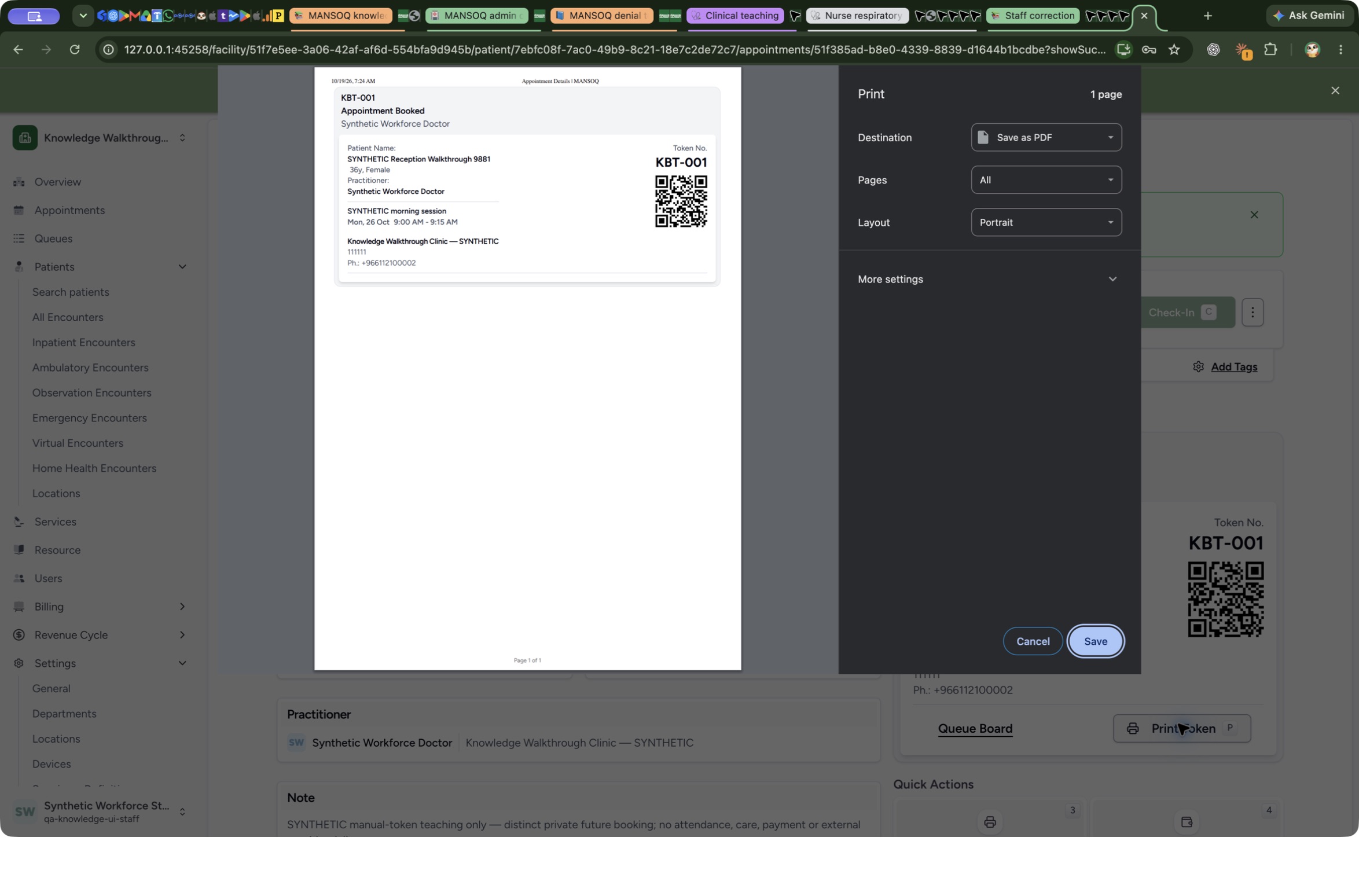
12345Review the clean native Chrome token Print preview
Native macOS print/save dialog.
Capture details
Exact committed 8d99bb8a. Existing normal non-superuser Staff in its assigned fictional Clinic. Review the clean native Chrome token Print preview. Genuine original image, no cropping, resizing or edits.
Image SHA-256 3d2a8e5bc2aa432aca07cf0d5c2cba053a4f4a53a41dc37a8153df9ebdb83125
- Save as PDF: Check the actual local destination.
- All pages: Check that all pages are selected.
- Portrait: Review the actual layout.
- Save: Open the local Save panel.
- Cancel: Close a review-only print preview without another output.
 12
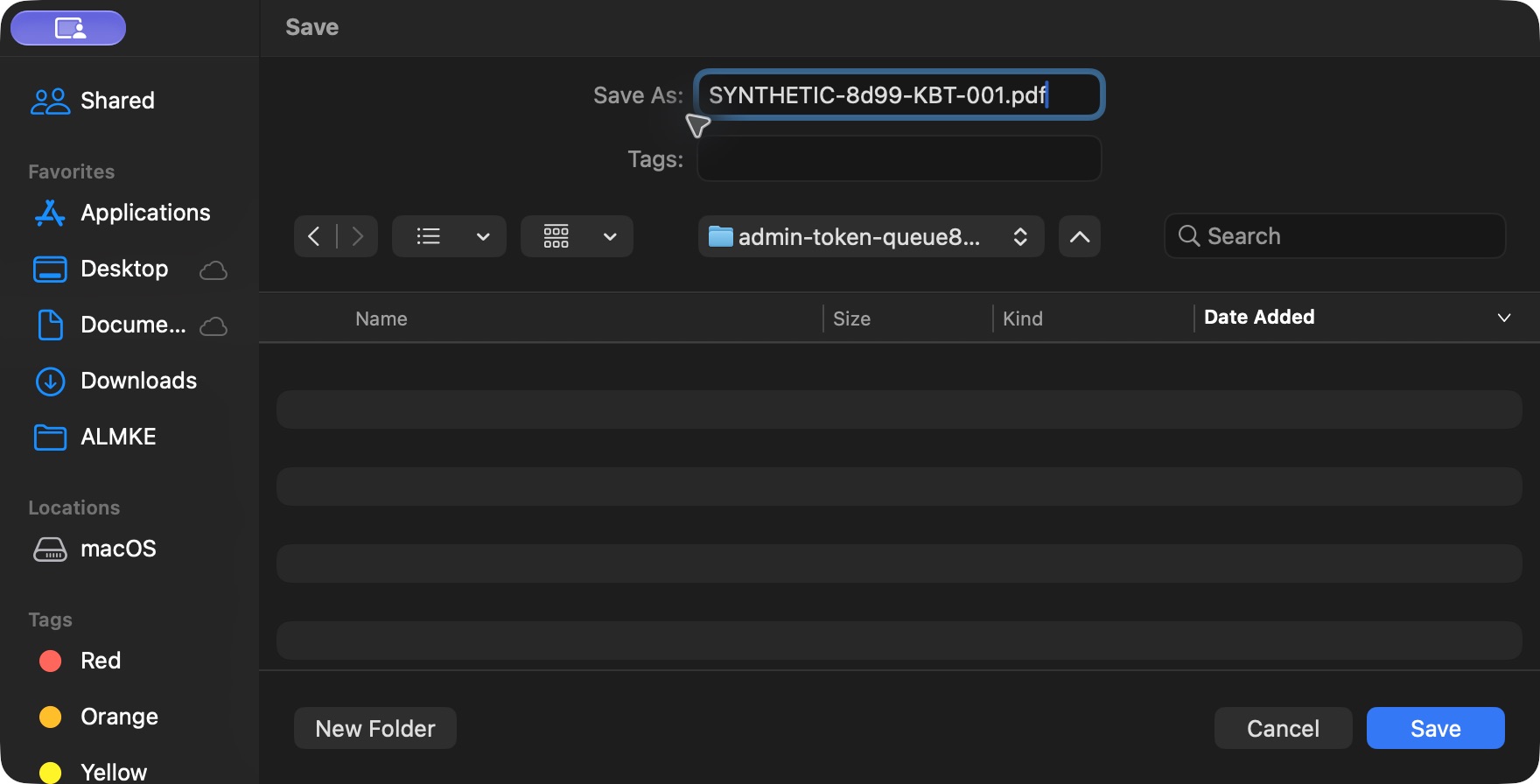
12Save the synthetic token PDF in the native macOS dialog
Native macOS print/save dialog.
Capture details
Exact committed 8d99bb8a. Existing normal non-superuser Staff in its assigned fictional Clinic. Save the synthetic token PDF in the native macOS dialog. Genuine original image, no cropping, resizing or edits.
Image SHA-256 e0ad7b6f363f89d1320a8e6e66bd18986bc8f599fa70a05379c82e3655271506
- Distinct local filename: Use a separate synthetic PDF filename.
- Save: Save the actual PDF to the chosen local folder.
8 of 8 content blocks have reviewed image alignment. Missing overview or prerequisite images remain open.
Before you begin
- Start from the existing Booked appointment with saved KBT-001 under normal Staff. This example uses macOS Chrome Save as PDF; browser, operating-system, paper and content differences may change the native controls or page count.12
Recorded release 8d99bb8a · 2026-10-19T04:19:46.777Z · 1728 × 921 Review the Print Token entry point
Capture details
Exact committed 8d99bb8a. Existing normal non-superuser Staff in its assigned fictional Clinic. Review the Print Token entry point. Genuine original image, no cropping, resizing or edits.
Image SHA-256
fedf246cb84aa47cbd8a8f57a2252b62b2fb1b8672a6d4b51588e76c148b5e93- Print Token: Open the actual token print dialog.
- Check identity: Verify KBT-001 and the intended synthetic patient first.
1. Check the saved token before printing
Verify the intended patient, KBT-001, Doctor and 26 October, 09:00–09:15 on the token card. Use Print Token.
12Review the Print Token entry point
Capture details
Exact committed 8d99bb8a. Existing normal non-superuser Staff in its assigned fictional Clinic. Review the Print Token entry point. Genuine original image, no cropping, resizing or edits.
Image SHA-256 fedf246cb84aa47cbd8a8f57a2252b62b2fb1b8672a6d4b51588e76c148b5e93
- Print Token: Open the actual token print dialog.
- Check identity: Verify KBT-001 and the intended synthetic patient first.
2. Review the actual print preview
In the real Chrome Print dialog, check Save as PDF, All pages and Portrait. The pictured token preview is one page and shows the intended patient, Doctor, time, Clinic and KBT-001. Use Save to open the local Save panel.
12345Review the clean native Chrome token Print preview
Native macOS print/save dialog.
Capture details
Exact committed 8d99bb8a. Existing normal non-superuser Staff in its assigned fictional Clinic. Review the clean native Chrome token Print preview. Genuine original image, no cropping, resizing or edits.
Image SHA-256 3d2a8e5bc2aa432aca07cf0d5c2cba053a4f4a53a41dc37a8153df9ebdb83125
- Save as PDF: Check the actual local destination.
- All pages: Check that all pages are selected.
- Portrait: Review the actual layout.
- Save: Open the local Save panel.
- Cancel: Close a review-only print preview without another output.
3. Choose a distinct local filename and Save
In the macOS Save panel, choose the intended local folder and use a distinct name such as SYNTHETIC-8d99-KBT-001.pdf. Select Save. The independently retained output is one A4 PDF page with the correct token, patient and appointment context.
12Save the synthetic token PDF in the native macOS dialog
Native macOS print/save dialog.
Capture details
Exact committed 8d99bb8a. Existing normal non-superuser Staff in its assigned fictional Clinic. Save the synthetic token PDF in the native macOS dialog. Genuine original image, no cropping, resizing or edits.
Image SHA-256 e0ad7b6f363f89d1320a8e6e66bd18986bc8f599fa70a05379c82e3655271506
- Distinct local filename: Use a separate synthetic PDF filename.
- Save: Save the actual PDF to the chosen local folder.
4. Open and inspect the saved PDF
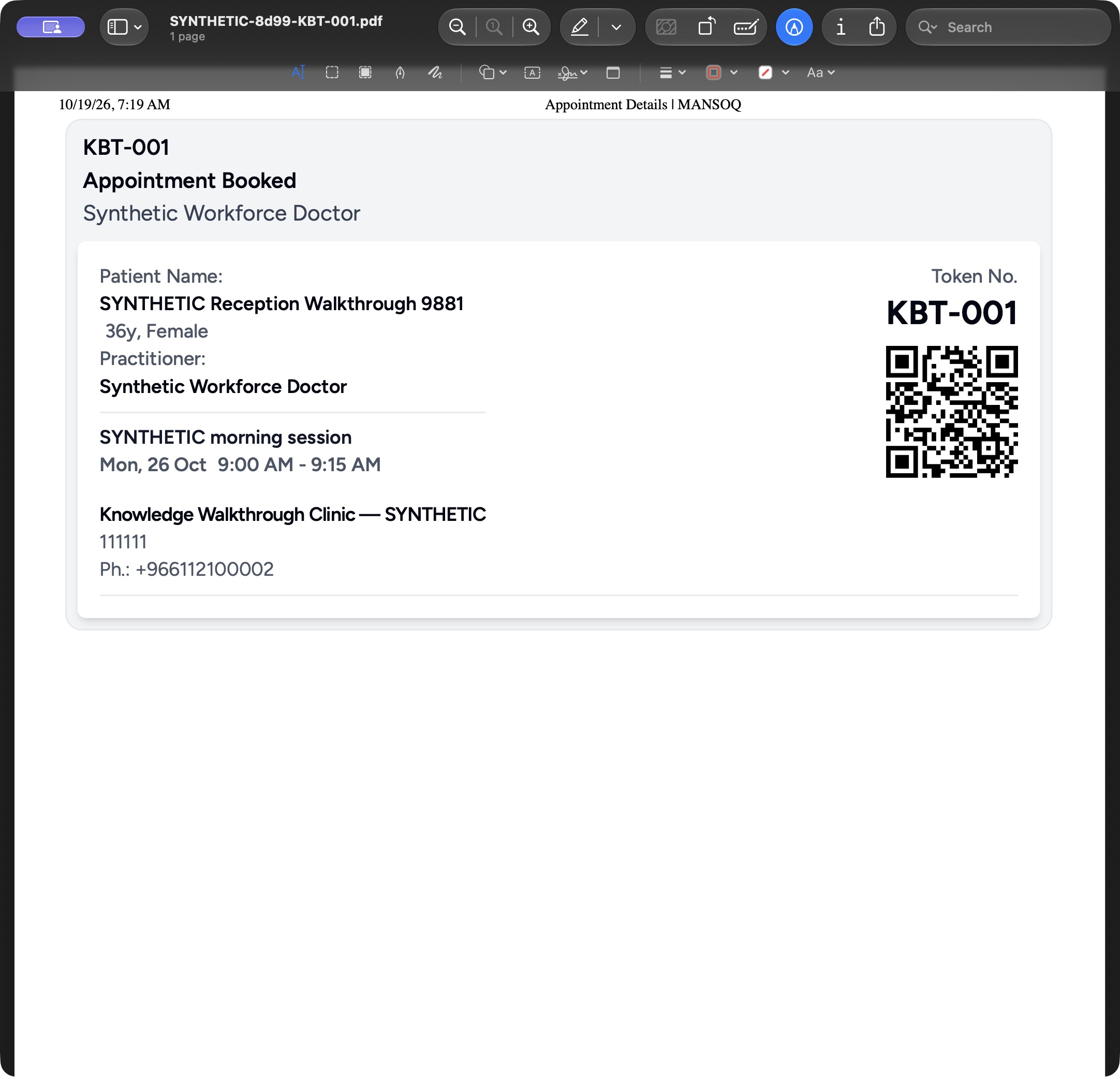
Open the saved SYNTHETIC-8d99-KBT-001.pdf in your local PDF viewer. In the pictured macOS Preview window, check the filename and 1 page, then verify SYNTHETIC Reception Walkthrough 9881, Synthetic Workforce Doctor, KBT-001, Mon, 26 Oct 9:00 AM–9:15 AM and the fictional Clinic. This is the saved file, separate from the browser print preview.
 1234
1234Review the actual saved token PDF in macOS Preview
Saved PDF in Preview (macOS) · page 1 of 1.
Capture details
Exact committed8d99 application output; the existing73,128-byte PDF was opened normally through Preview File/Open and read-only reviewed. No new output, document edit or HIMS business write. Original2164×2080 native window pixels retained.
Image SHA-256 cccb0233327b48dc0be07413fe8f291045b162e740efeb3463e6a69f2a38910b
- Saved filename and one page: The native viewer identifies the exact saved synthetic PDF and its page count.
- Intended patient: Verify SYNTHETIC Reception Walkthrough 9881.
- KBT-001: Verify the saved token number.
- 26 October, 09:00–09:15: Check the saved appointment time with the Doctor and Clinic.
5. Verify the retained record after local output
After the native dialogs close, the appointment remains Booked with the same KBT-001, patient and schedule. The saved PDF was rendered and checked separately; printing did not change this booking, token or allocation.
 12
12Verify printing retained the same saved appointment and token
Capture details
Exact committed 8d99bb8a. Existing normal non-superuser Staff in its assigned fictional Clinic. Verify printing retained the same saved appointment and token. Genuine original image, no cropping, resizing or edits.
Image SHA-256 a233123caec9835aaca7c46888ddc72ece1cd5cb106999428c6be79faf935ad0
- Still Booked: Printing has not changed the appointment status.
- Same KBT-001: The same saved token remains visible.
Close a review-only print preview safely
Use Cancel in the native Print dialog to close a preview without saving another file. The clean pictured preview was reacquired read-only and cancelled after the earlier actual PDF Save; it does not represent a second output.
12345Review the clean native Chrome token Print preview
Native macOS print/save dialog.
Capture details
Exact committed 8d99bb8a. Existing normal non-superuser Staff in its assigned fictional Clinic. Review the clean native Chrome token Print preview. Genuine original image, no cropping, resizing or edits.
Image SHA-256 3d2a8e5bc2aa432aca07cf0d5c2cba053a4f4a53a41dc37a8153df9ebdb83125
- Save as PDF: Check the actual local destination.
- All pages: Check that all pages are selected.
- Portrait: Review the actual layout.
- Save: Open the local Save panel.
- Cancel: Close a review-only print preview without another output.
Source evidence
Every citation uses this exact committed version. The private source repository requires access.
- repositories/platform/mansoq-web/src/pages/Appointments/components/AppointmentTokenCard.tsx:1 ·
8d99bb8a4712f6aa8446bcd3b40bf62dae280d39Source file checksum
f18c9dcb58f45984837456a01b185d304e9f1ec7c667365d6f6d5d6450bc5f9b - repositories/platform/mansoq-web/src/pages/Appointments/AppointmentDetail.tsx:330 ·
8d99bb8a4712f6aa8446bcd3b40bf62dae280d39Source file checksum
8fc77ee6f1f7b145e2987ba272e80f35631e17907ea91cd305738250b137b839