 MANSOQ
 IT & Integrations · VERSION 912828b3
Read token verification without confusing it with access
Read the required token input and exact empty-object success while keeping cryptographic verification separate from current access.
IT administrator · Integration engineer · Developer
 123
123Read untyped verification’s boundary
Capture details
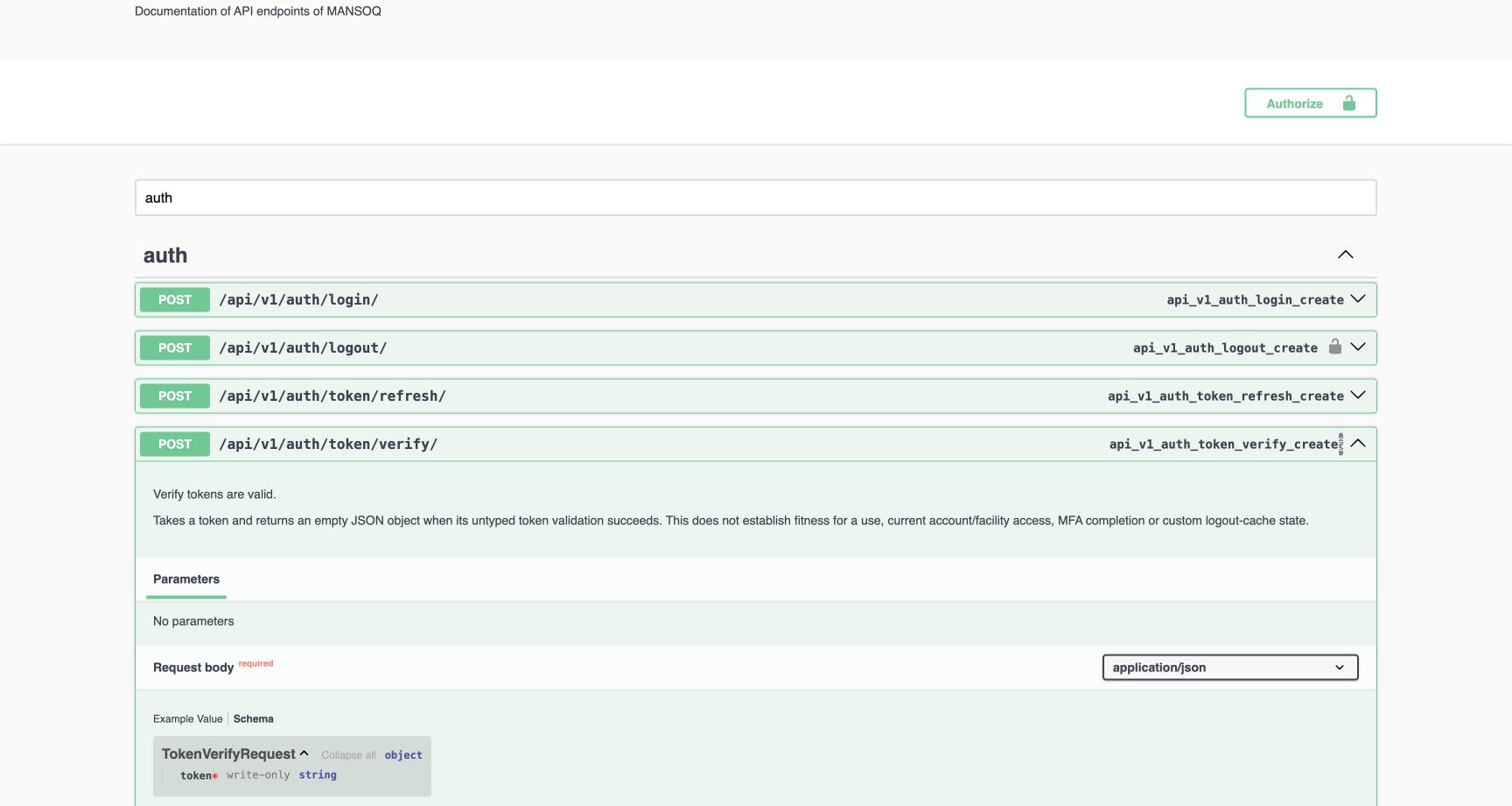
Fresh genuine 1728×921 Chrome capture of the exact committed 912828b3 read-only API reference. No credentials were entered or endpoint requests submitted. The verify operation explicitly limits its result: untyped token validation does not establish current account/facility access, MFA completion or custom logout-cache state. Request Schema requires one write-only token string.
Image SHA-256 4dffa431af2a4d606fbd6e676e195d526e8b71cdedf7b0d15957af71d70f4db7
- Exact verification path: Confirm the verify operation rather than refresh.
- Limited meaning: Read the full limitation before interpreting an empty successful result.
- Required token input: The schema contains a type and required marker, not a secret.
 123
123Read exact empty-object verification success
Capture details
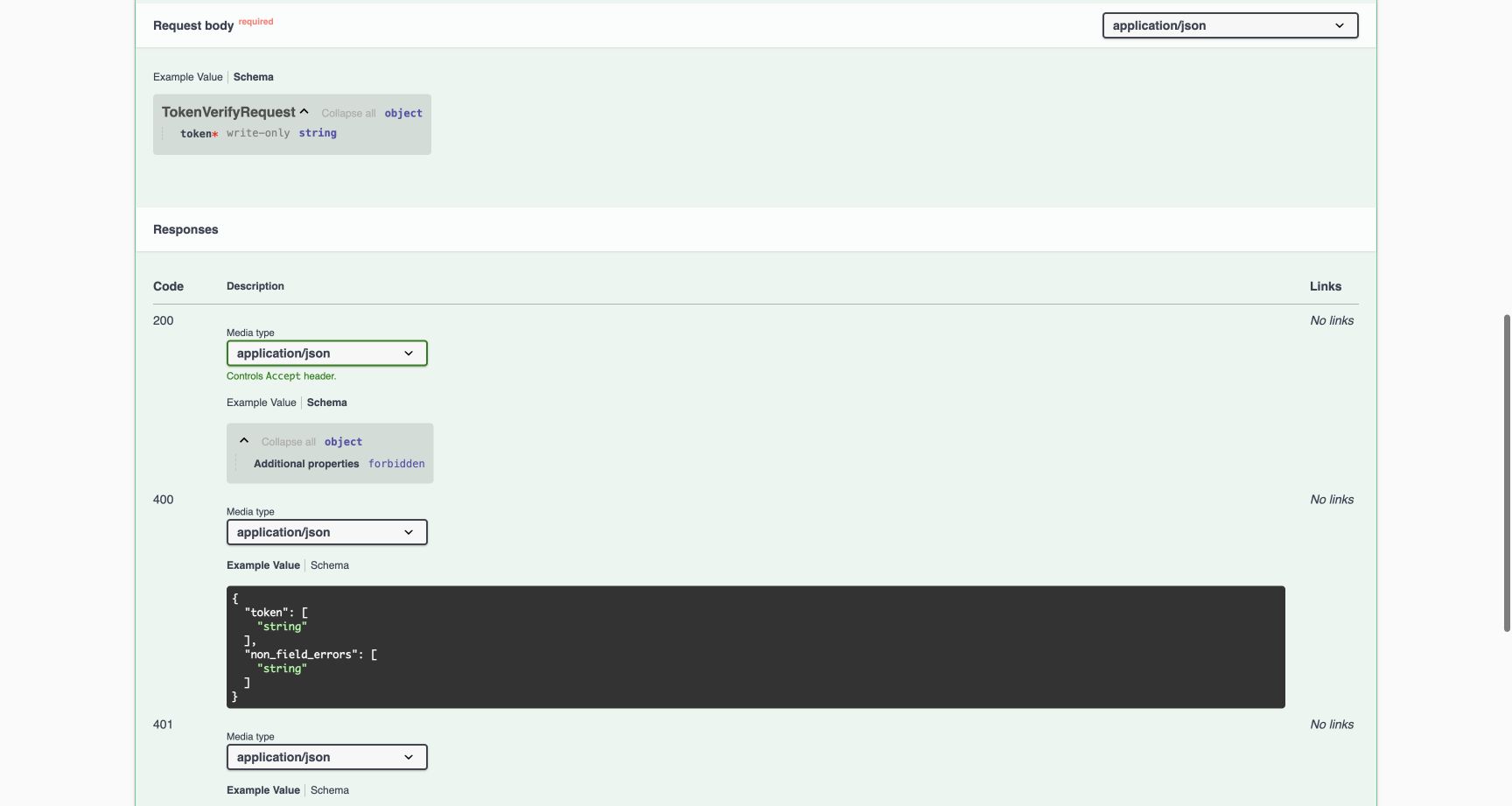
Fresh genuine 1728×921 Chrome capture of the exact committed 912828b3 read-only API reference. No credentials were entered or endpoint requests submitted. HTTP 200 Schema is an object with no defined properties and additional properties forbidden. The required token input is visible above. It does not return a token pair or permission record.
Image SHA-256 e250b8243e6ea7c51e8b23ea6a0e2f61de099154106bf7543caab61d1eb1dcf8
- Write-only token: Use the exact documented input name.
- HTTP 200 schema: This is the successful response definition.
- No additional properties: The successful JSON object is exactly empty; no access or refresh field is returned.
6 of 6 content blocks have reviewed image alignment. Missing overview or prerequisite images remain open.
Before you begin
- Use the reference for release 912828b3. Its source receipt and schema fingerprint identify this local documentation export; the API label and schema dialect are separate.
 1234567
Recorded release 912828b3 · 2026-10-19 · 1728 × 921 Compare the exact documentation source
Capture details
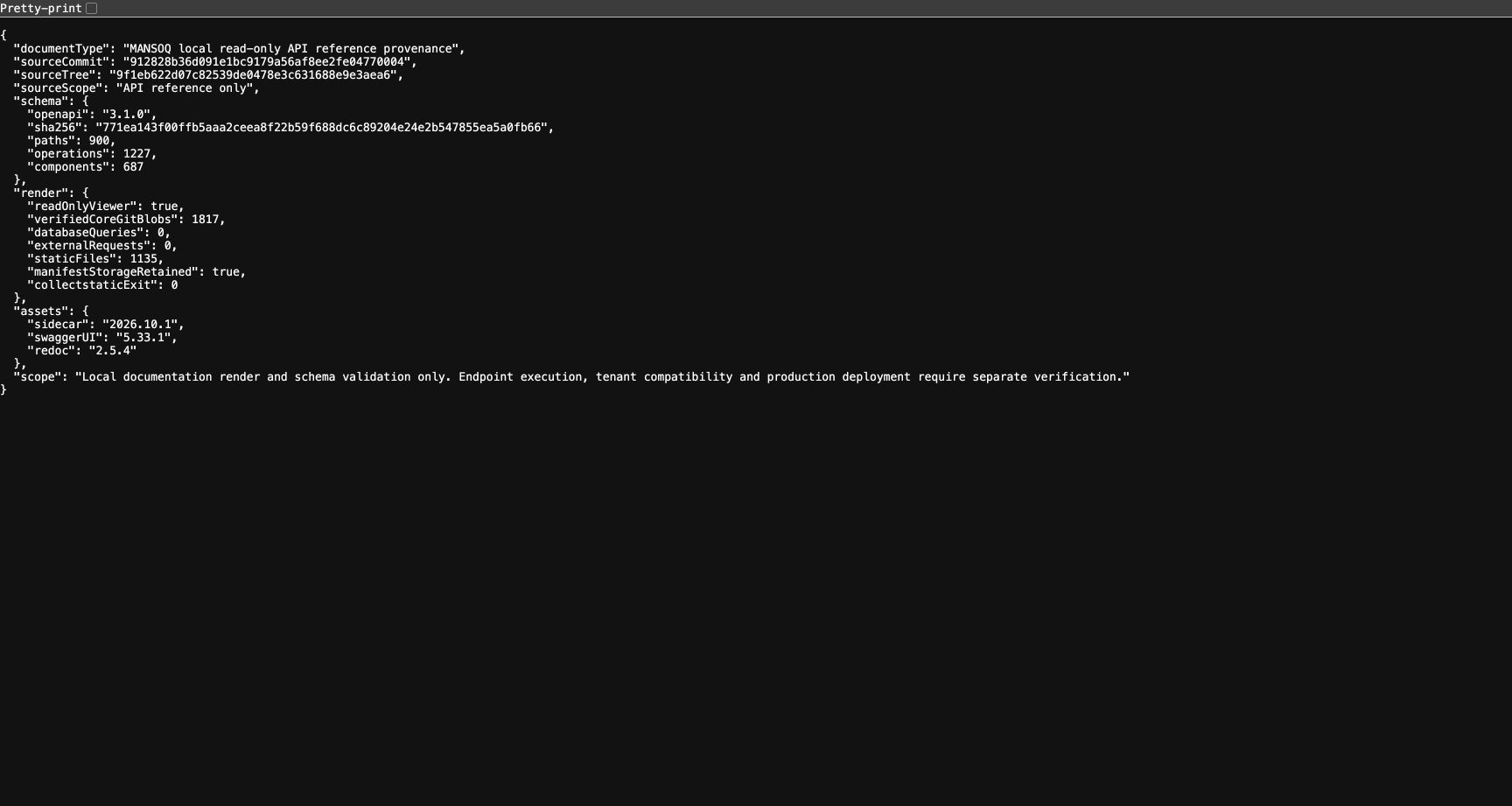
Fresh genuine 1728×921 Chrome capture of the exact committed 912828b3 read-only API reference. No credentials were entered or endpoint requests submitted. The genuine privacy-minimized local documentation receipt shows full release 912828b3 commit/tree, OpenAPI 3.1, its schema fingerprint, 900 paths, 1,227 operations, 687 schema components and verified read-only zero-query rendering. It contains no local filesystem path.
Image SHA-256
99de6c8b2ce55151bb26d366204657af1b66c26e48742b8502ba5f5b60bd54a2- Full committed release: Compare the exact sourceCommit, not only a short label.
- Source tree: This is the retained committed Git tree.
- Exact schema fingerprint: Compare the complete SHA256 with the selected schema artifact.
- Read-only viewer: This describes documentation browsing, not request execution.
- Verified source count: All 1,817 core source blobs were checked against this release.
- Zero data queries: The documentation export did not query application data.
- Bounded scope: Endpoint execution, tenant compatibility and production deployment need separate evidence.
 1234567
Recorded release 912828b3 · 2026-10-19 · 1728 × 921 Find the three auth operations safely
Capture details
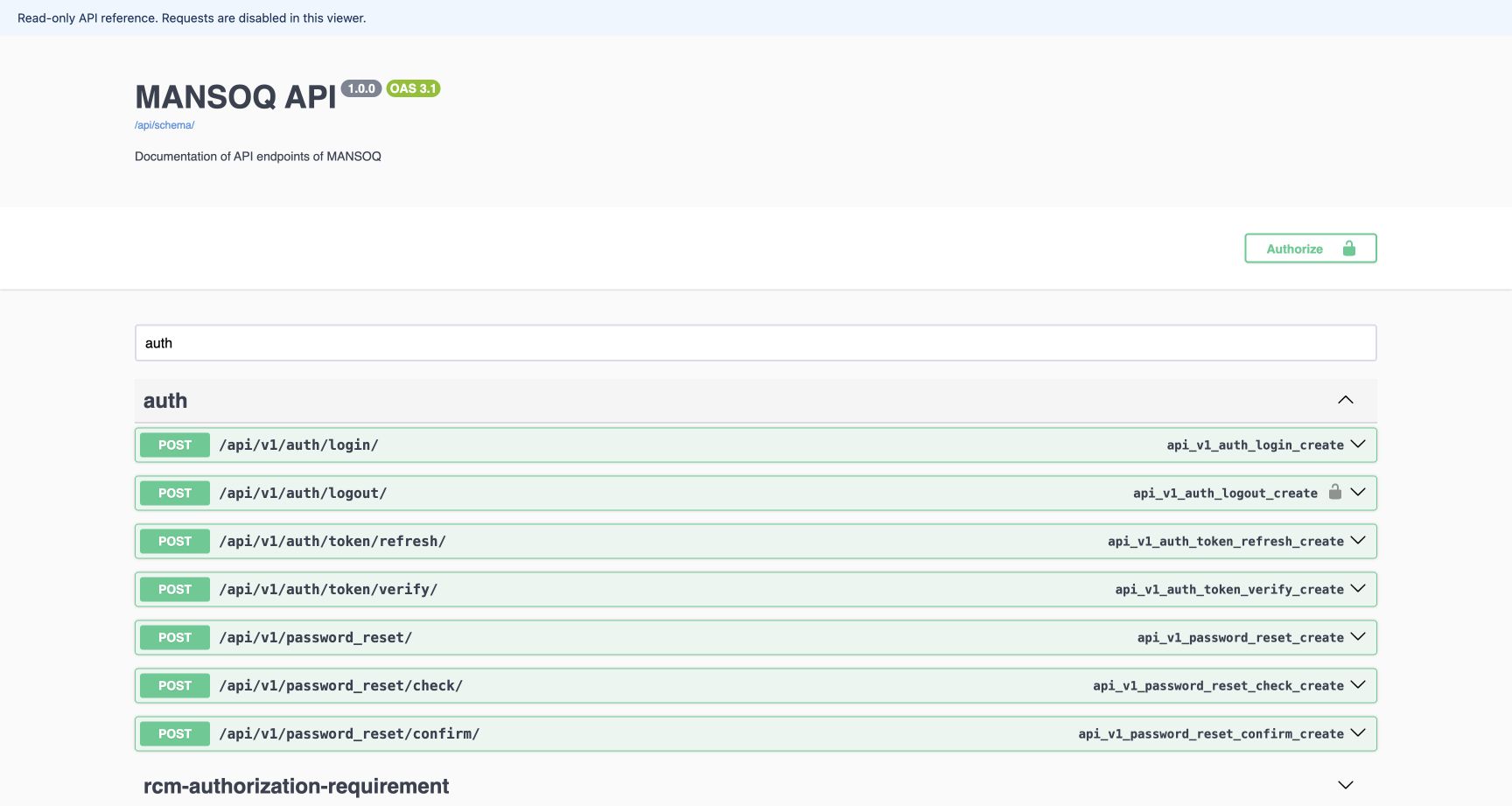
Fresh genuine 1728×921 Chrome capture of the exact committed 912828b3 read-only API reference. No credentials were entered or endpoint requests submitted. The installed read-only Swagger reader shows the separate API 1.0.0 and OAS 3.1 labels and the auth operation group. Logout has a security marker; refresh and verify are separate paths. No credentials were entered.
Image SHA-256
b3a5df58e18c5f9c47e13754d34a9c3a500c21ce9cba800d21c786967d28f23a- Requests disabled: The reference banner states that requests are disabled.
- API label and dialect: API 1.0.0 and OAS 3.1 are separate from the Git release in the source receipt.
- Filter the auth group: Use the group filter to locate authentication contracts.
- Authenticated logout: Read this path separately from refresh and verify.
- Security requirement: The lock indicates that the logout operation declares authentication, not that this viewer has signed in.
- Refresh contract: Read the required input and rotation-specific response here.
- Verification contract: Read the limited token-validation contract here.
- The reference is read-only. These frames show contract types and examples, not credentials or live request results. Actual calls and deployment-specific authorization require their own verified workflow.1234567
Recorded release 912828b3 · 2026-10-19 · 1728 × 921 Find the three auth operations safely
Capture details
Fresh genuine 1728×921 Chrome capture of the exact committed 912828b3 read-only API reference. No credentials were entered or endpoint requests submitted. The installed read-only Swagger reader shows the separate API 1.0.0 and OAS 3.1 labels and the auth operation group. Logout has a security marker; refresh and verify are separate paths. No credentials were entered.
Image SHA-256
b3a5df58e18c5f9c47e13754d34a9c3a500c21ce9cba800d21c786967d28f23a- Requests disabled: The reference banner states that requests are disabled.
- API label and dialect: API 1.0.0 and OAS 3.1 are separate from the Git release in the source receipt.
- Filter the auth group: Use the group filter to locate authentication contracts.
- Authenticated logout: Read this path separately from refresh and verify.
- Security requirement: The lock indicates that the logout operation declares authentication, not that this viewer has signed in.
- Refresh contract: Read the required input and rotation-specific response here.
- Verification contract: Read the limited token-validation contract here.
123Recorded release 912828b3 · 2026-10-19 · 1728 × 921 Read untyped verification’s boundary
Capture details
Fresh genuine 1728×921 Chrome capture of the exact committed 912828b3 read-only API reference. No credentials were entered or endpoint requests submitted. The verify operation explicitly limits its result: untyped token validation does not establish current account/facility access, MFA completion or custom logout-cache state. Request Schema requires one write-only token string.
Image SHA-256
4dffa431af2a4d606fbd6e676e195d526e8b71cdedf7b0d15957af71d70f4db7- Exact verification path: Confirm the verify operation rather than refresh.
- Limited meaning: Read the full limitation before interpreting an empty successful result.
- Required token input: The schema contains a type and required marker, not a secret.
123Recorded release 912828b3 · 2026-10-19 · 1728 × 921 Read exact empty-object verification success
Capture details
Fresh genuine 1728×921 Chrome capture of the exact committed 912828b3 read-only API reference. No credentials were entered or endpoint requests submitted. HTTP 200 Schema is an object with no defined properties and additional properties forbidden. The required token input is visible above. It does not return a token pair or permission record.
Image SHA-256
e250b8243e6ea7c51e8b23ea6a0e2f61de099154106bf7543caab61d1eb1dcf8- Write-only token: Use the exact documented input name.
- HTTP 200 schema: This is the successful response definition.
- No additional properties: The successful JSON object is exactly empty; no access or refresh field is returned.
1. Read the token input and exact success
Open POST /api/v1/auth/token/verify/. Request Schema requires one write-only token string. Response 200 is an empty JSON object. It is not an access/refresh pair, a user profile or a facility permission result. These screenshots show schema definitions and placeholders.
123Read untyped verification’s boundary
Capture details
Fresh genuine 1728×921 Chrome capture of the exact committed 912828b3 read-only API reference. No credentials were entered or endpoint requests submitted. The verify operation explicitly limits its result: untyped token validation does not establish current account/facility access, MFA completion or custom logout-cache state. Request Schema requires one write-only token string.
Image SHA-256 4dffa431af2a4d606fbd6e676e195d526e8b71cdedf7b0d15957af71d70f4db7
- Exact verification path: Confirm the verify operation rather than refresh.
- Limited meaning: Read the full limitation before interpreting an empty successful result.
- Required token input: The schema contains a type and required marker, not a secret.
123Read exact empty-object verification success
Capture details
Fresh genuine 1728×921 Chrome capture of the exact committed 912828b3 read-only API reference. No credentials were entered or endpoint requests submitted. HTTP 200 Schema is an object with no defined properties and additional properties forbidden. The required token input is visible above. It does not return a token pair or permission record.
Image SHA-256 e250b8243e6ea7c51e8b23ea6a0e2f61de099154106bf7543caab61d1eb1dcf8
- Write-only token: Use the exact documented input name.
- HTTP 200 schema: This is the successful response definition.
- No additional properties: The successful JSON object is exactly empty; no access or refresh field is returned.
2. Read the documented refusal shapes
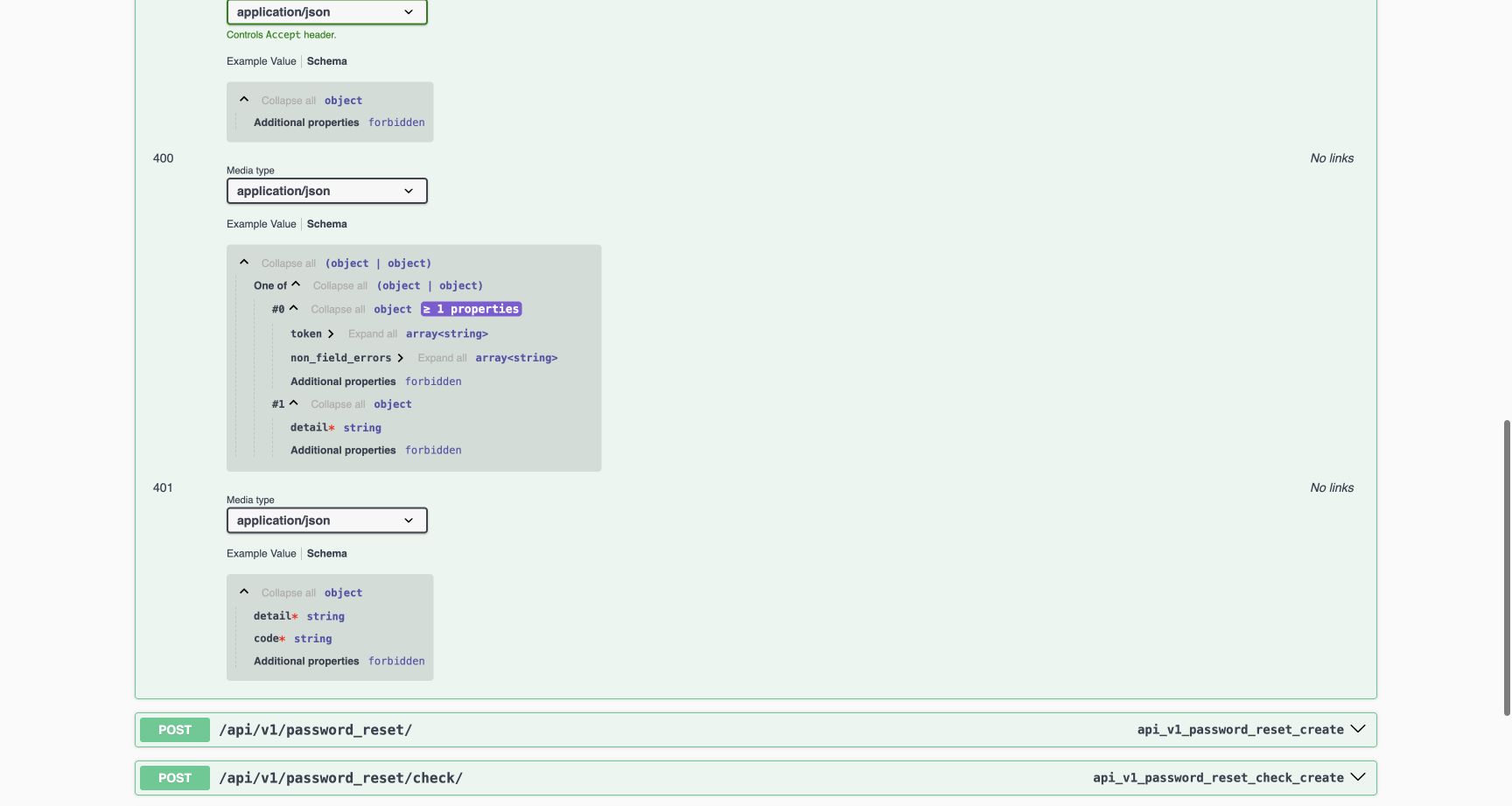
Expand HTTP 400 and 401. Required-field or parser failures and signed-token errors have different documented shapes. Handle the response status and actual JSON deliberately; an empty successful object should not be replaced with an invented payload.
 12345
12345Read verification’s input and signed-token errors
Capture details
Fresh genuine 1728×921 Chrome capture of the exact committed 912828b3 read-only API reference. No credentials were entered or endpoint requests submitted. The 400 schema alternatives show token/non_field_errors arrays or required detail. The 401 schema requires detail and code. These contract definitions are separate from a live access check.
Image SHA-256 d0877e7621e28ce2bd8b6aaeec85b16d0ea27cba8f6ba2e2e99ffa7f216dacf4
- Required-input failure: Read the 400 alternatives deliberately.
- Token error array: At least one field error property is required in this alternative.
- Detail alternative: Parser failures can use the required detail object.
- Signed-token error: Read HTTP 401 separately from input validation.
- Required error code: The signed-token error requires a code string alongside detail.
3. Keep verification separate from authorization and logout state
Read the operation description. Untyped verification does not establish fitness for a use, current account/facility access, MFA completion or custom logout-cache state. A separate normal local check observed verify returning an empty object for a logged-out access token while the protected current-user endpoint refused it. That bounded result does not authorize reuse of the token or establish a tenant grant.
123Read untyped verification’s boundary
Capture details
Fresh genuine 1728×921 Chrome capture of the exact committed 912828b3 read-only API reference. No credentials were entered or endpoint requests submitted. The verify operation explicitly limits its result: untyped token validation does not establish current account/facility access, MFA completion or custom logout-cache state. Request Schema requires one write-only token string.
Image SHA-256 4dffa431af2a4d606fbd6e676e195d526e8b71cdedf7b0d15957af71d70f4db7
- Exact verification path: Confirm the verify operation rather than refresh.
- Limited meaning: Read the full limitation before interpreting an empty successful result.
- Required token input: The schema contains a type and required marker, not a secret.
Source evidence
Every citation uses this exact committed version. The private source repository requires access.
- repositories/platform/mansoq-core/config/auth_views.py:195 ·
912828b36d091e1bc9179a56af8ee2fe04770004Source file checksum
2f6466c03f5102a08bf18968bf240dcd34f8c9f9b69311b0499e1c32765cb6e1 - repositories/platform/mansoq-core/config/authentication.py:14 ·
912828b36d091e1bc9179a56af8ee2fe04770004Source file checksum
532bb63371c2a4c4e922b757188ae0056afc36db0b840136dda61e9bb9229875 - repositories/platform/mansoq-core/config/settings/base.py:416 ·
912828b36d091e1bc9179a56af8ee2fe04770004Source file checksum
34f8931a2bae5a35f45bf6247695ee6bac09ccada3be766773861b4245817d6f - repositories/platform/mansoq-core/config/urls.py:35 ·
912828b36d091e1bc9179a56af8ee2fe04770004Source file checksum
14593164ca85aed7c7e6926b744fb87058c7d70fd43f1e3eb5a54a71bea12023 - repositories/platform/mansoq-core/config/documentation.py:7 ·
912828b36d091e1bc9179a56af8ee2fe04770004Source file checksum
b79f1c087f7d49823e12aa2f91661fbba1ab19c7d94fb86c3281e2edacfe23a0 - repositories/platform/mansoq-core/mansoq/emr/tests/test_auth_token_contracts.py:95 ·
912828b36d091e1bc9179a56af8ee2fe04770004Source file checksum
61c26be02e14e7150493aeffd6334008dc72c4ca2a2b3271223e4d3b71acd4b9