 MANSOQ
 Medication administration · VERSION 912828b3
Complete an in-progress administration entry with an end time
Open an existing in-progress entry, change it to Completed, enter a distinct end and verify the saved result. This version permits the completion end while keeping the existing start locked.
Nurse
 12
12Review the existing in-progress entry before completing it
Capture details
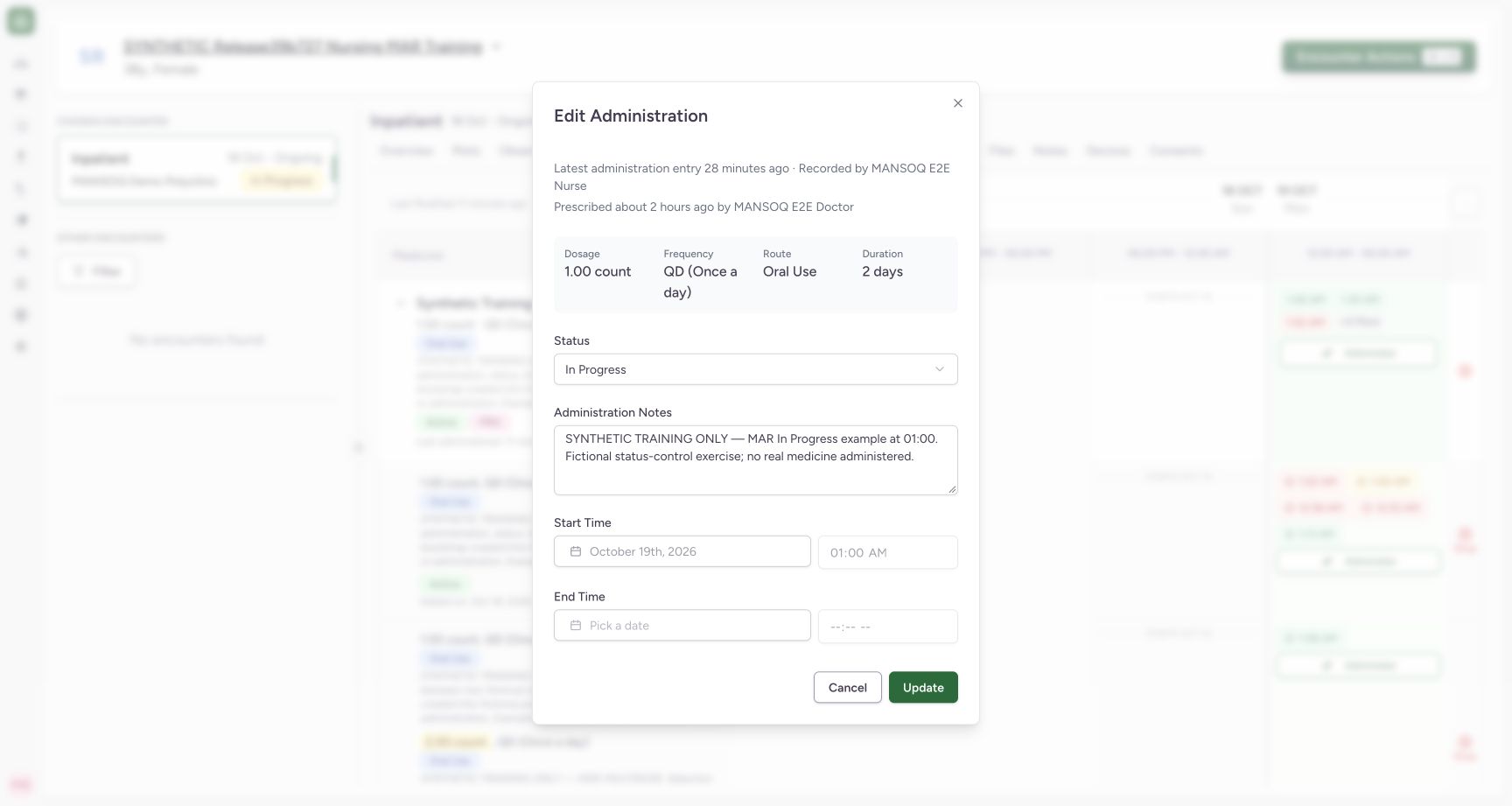
Exact committed release 912828b3 on a separate isolated nonproduction clone. Existing Nurse; fictional Polyclinic Inpatient software exercise only. The cloned saved event starts at 01:00 local and has no end. Its existing start is locked; end is disabled while status remains In Progress. This entry is selected for the completion software exercise.
Image SHA-256 f2087b5d80454a24f6ea161dfc1f9d8e0b0a939dc3802f30582a89f2d88cf834
- In Progress status: Review the exact saved event before changing its status.
- No end while in progress: The saved ongoing entry has no completion end time.
 12
12Verify the saved completion and distinct end
Capture details
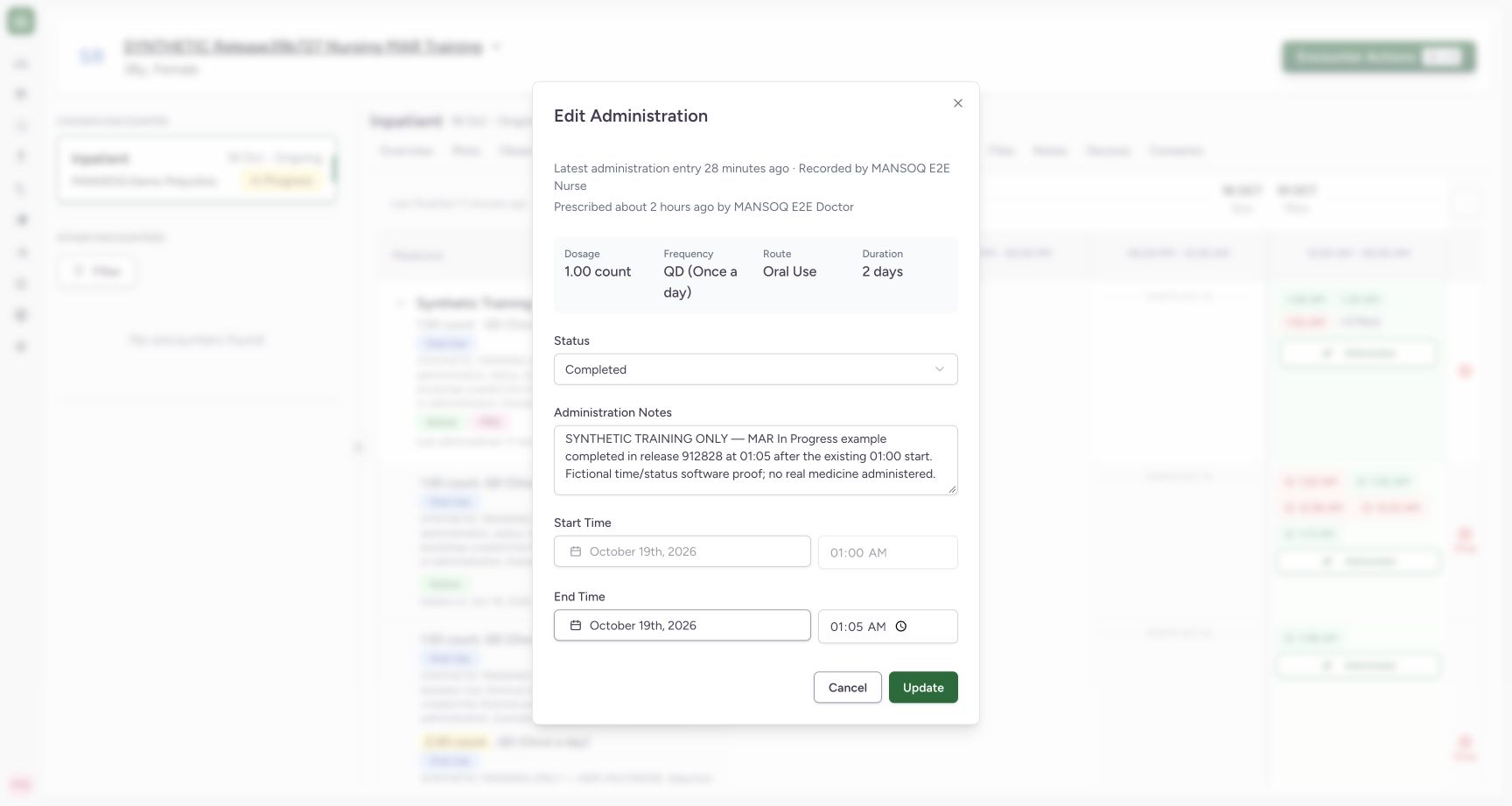
Exact committed release 912828b3 on a separate isolated nonproduction clone. Existing Nurse; fictional Polyclinic Inpatient software exercise only. After one normal Update, independent Nurse and Doctor GET200 show the same event ID, Completed, start 01:00 and end 01:05 local. Count remains seven and the other six event objects are unchanged. This reopened form shows the saved outcome.
Image SHA-256 8959beaa3bda62f49a993cdb1d5dbb0acc9273745a3828c4dd88592b676c7dfb
- Saved Completed status: Reopen the same event to verify its persisted status.
- Saved 01:05 end: The persisted end differs from the unchanged 01:00 start.
7 of 7 content blocks have reviewed image alignment. Missing overview or prerequisite images remain open.
Before you begin
- Confirm the intended patient, active encounter, request and existing in-progress event. The fictional example starts at 01:00 local on 19 October 2026 and initially has no end.
 123
123Recorded release 912828b3 · 2026-10-18T22:42:31.811Z · 1728 × 921 Open the chosen encounter medication history
Capture details
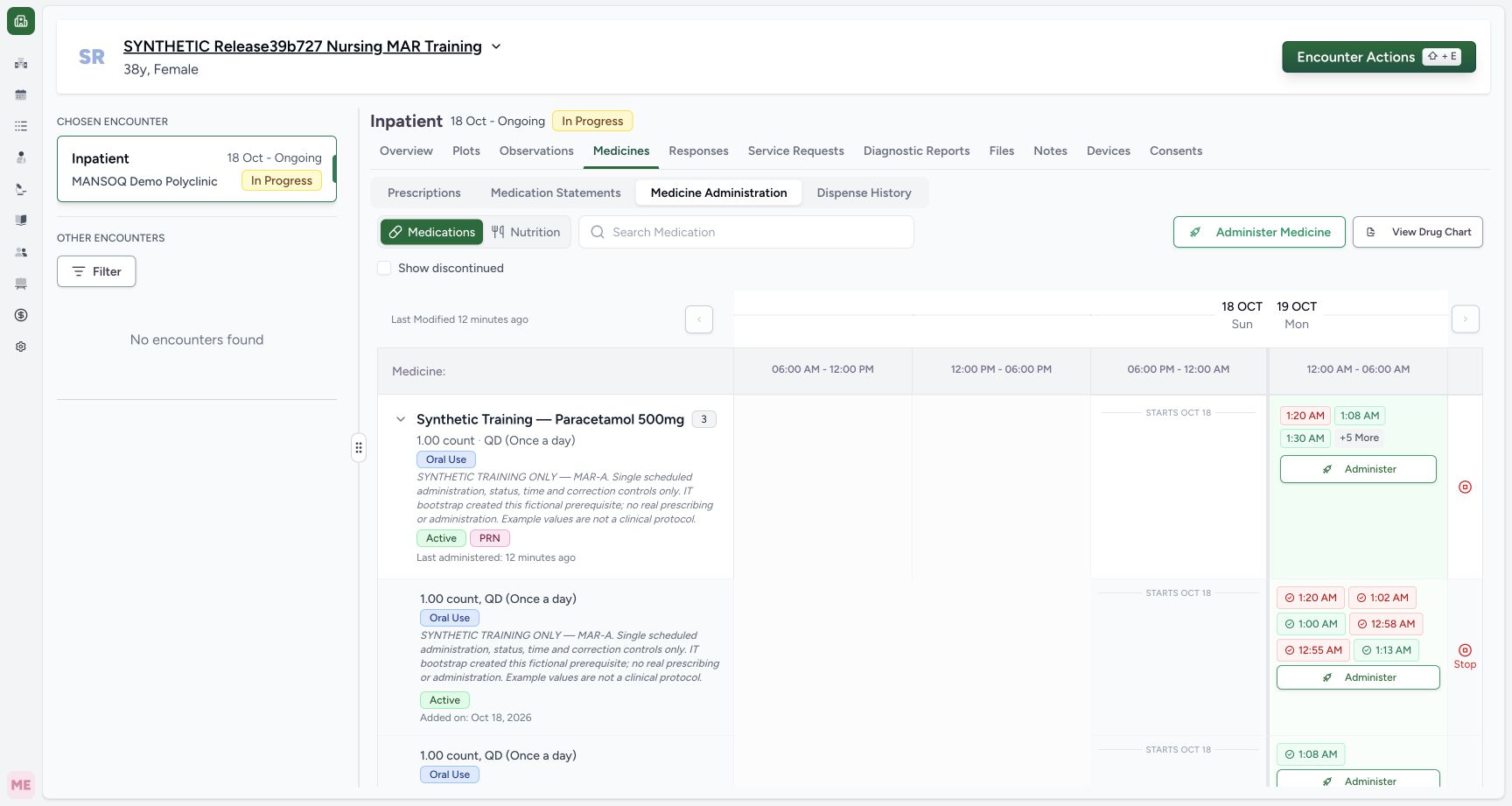
Exact committed release 912828b3 on a separate isolated nonproduction clone. Existing Nurse; fictional Polyclinic Inpatient software exercise only. Exact release 912828 after the two bounded UI writes: same existing event completed with a distinct end and one new Not Done entry. Eight events across three active requests. The group is expanded so the learner can inspect a specific occurrence rather than relying on the collapsed summary.
Image SHA-256
26c3114f9d592588ca0de65ddf17dc0e55e55281aa96af48de5edfa462874eef- Medicine Administration workspace: Choose Medicines, then Medicine Administration, in the verified active encounter.
- Inspect a specific occurrence: This is the same entry used for the completion demonstration; expand a group to distinguish its individual request rows.
- Inspect the saved 2 count entry: This separate multi-instruction request contains the existing event whose dose is locked.
12Recorded release 912828b3 · 2026-10-18T22:41:05.681Z · 1728 × 921 Review the existing in-progress entry before completing it
Capture details
Exact committed release 912828b3 on a separate isolated nonproduction clone. Existing Nurse; fictional Polyclinic Inpatient software exercise only. The cloned saved event starts at 01:00 local and has no end. Its existing start is locked; end is disabled while status remains In Progress. This entry is selected for the completion software exercise.
Image SHA-256
f2087b5d80454a24f6ea161dfc1f9d8e0b0a939dc3802f30582a89f2d88cf834- In Progress status: Review the exact saved event before changing its status.
- No end while in progress: The saved ongoing entry has no completion end time.
- Use the authorized account and facility documentation policy. Example times demonstrate software controls only and do not determine clinical timing or whether an event should be completed.
 123
123Recorded release 912828b3 · 2026-10-18T22:41:15.265Z · 1728 × 921 Complete an in-progress entry with a distinct end
Capture details
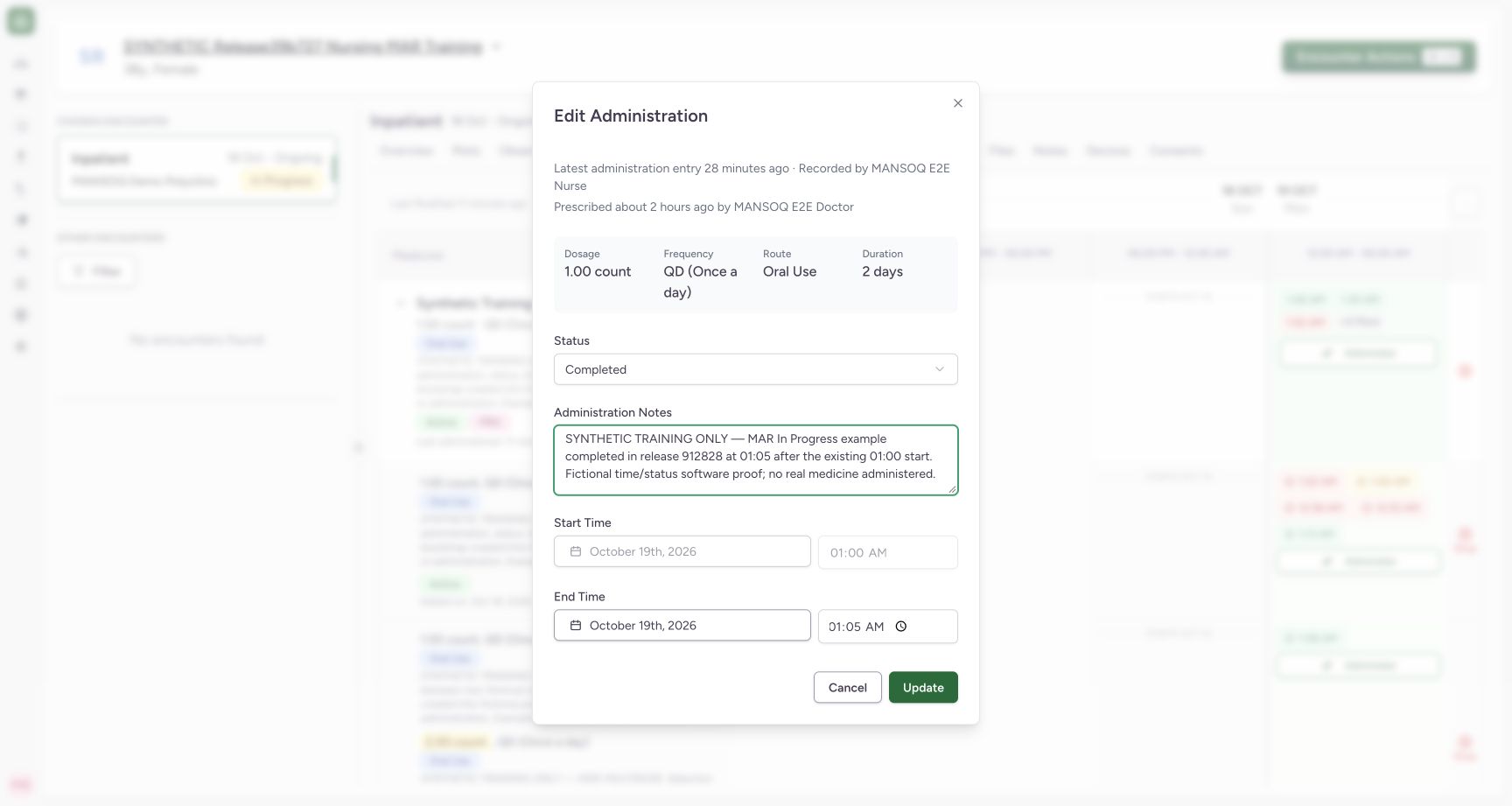
Exact committed release 912828b3 on a separate isolated nonproduction clone. Existing Nurse; fictional Polyclinic Inpatient software exercise only. Status is now Completed. The original 01:00 start remains locked while the enabled end contains 01:05. Notes are optional software input and carry fictional context here. This frame is an unsaved review state before Update.
Image SHA-256
6b439e9e4144769eef460e9c74f525249a984c42bd57b4e0abaaafa058384f1a- Choose Completed: Select the intended final event status under facility policy.
- Enter the actual completion end: The end is editable after leaving In Progress; this fictional example uses 01:05 after a 01:00 start.
- Review then update once: Save the existing event after checking its identity, status and occurrence.
1. Inspect the existing ongoing entry
Open the specific occurrence in the expanded medication request row. Confirm In Progress, the original start and an empty end. In this example the start is 01:00. The existing start is locked; the end is disabled while the status remains In Progress.
123Open the chosen encounter medication history
Capture details
Exact committed release 912828b3 on a separate isolated nonproduction clone. Existing Nurse; fictional Polyclinic Inpatient software exercise only. Exact release 912828 after the two bounded UI writes: same existing event completed with a distinct end and one new Not Done entry. Eight events across three active requests. The group is expanded so the learner can inspect a specific occurrence rather than relying on the collapsed summary.
Image SHA-256 26c3114f9d592588ca0de65ddf17dc0e55e55281aa96af48de5edfa462874eef
- Medicine Administration workspace: Choose Medicines, then Medicine Administration, in the verified active encounter.
- Inspect a specific occurrence: This is the same entry used for the completion demonstration; expand a group to distinguish its individual request rows.
- Inspect the saved 2 count entry: This separate multi-instruction request contains the existing event whose dose is locked.
12Review the existing in-progress entry before completing it
Capture details
Exact committed release 912828b3 on a separate isolated nonproduction clone. Existing Nurse; fictional Polyclinic Inpatient software exercise only. The cloned saved event starts at 01:00 local and has no end. Its existing start is locked; end is disabled while status remains In Progress. This entry is selected for the completion software exercise.
Image SHA-256 f2087b5d80454a24f6ea161dfc1f9d8e0b0a939dc3802f30582a89f2d88cf834
- In Progress status: Review the exact saved event before changing its status.
- No end while in progress: The saved ongoing entry has no completion end time.
2. Choose Completed and review its end
Choose Completed in Status. The end becomes available while the original start remains locked. Enter the intended completion date and time, checking that the end is not before the start or in the future. The fictional example uses 01:05 after the unchanged 01:00 start. Administration Notes is optional software input; record appropriate context under facility policy. Review the event, then select Update once.
123Complete an in-progress entry with a distinct end
Capture details
Exact committed release 912828b3 on a separate isolated nonproduction clone. Existing Nurse; fictional Polyclinic Inpatient software exercise only. Status is now Completed. The original 01:00 start remains locked while the enabled end contains 01:05. Notes are optional software input and carry fictional context here. This frame is an unsaved review state before Update.
Image SHA-256 6b439e9e4144769eef460e9c74f525249a984c42bd57b4e0abaaafa058384f1a
- Choose Completed: Select the intended final event status under facility policy.
- Enter the actual completion end: The end is editable after leaving In Progress; this fictional example uses 01:05 after a 01:00 start.
- Review then update once: Save the existing event after checking its identity, status and occurrence.
3. Reopen the same event and verify the result
After saving finishes, reopen the same occurrence. Confirm Completed, the unchanged start and the intended distinct end. This saved example shows 01:00–01:05. Independent normal Nurse and Doctor reads confirmed the same event ID, unchanged total of seven events and no change to the other six event objects; the update did not create another administration.
12Verify the saved completion and distinct end
Capture details
Exact committed release 912828b3 on a separate isolated nonproduction clone. Existing Nurse; fictional Polyclinic Inpatient software exercise only. After one normal Update, independent Nurse and Doctor GET200 show the same event ID, Completed, start 01:00 and end 01:05 local. Count remains seven and the other six event objects are unchanged. This reopened form shows the saved outcome.
Image SHA-256 8959beaa3bda62f49a993cdb1d5dbb0acc9273745a3828c4dd88592b676c7dfb
- Saved Completed status: Reopen the same event to verify its persisted status.
- Saved 01:05 end: The persisted end differs from the unchanged 01:00 start.
A change of status is not a new administration
This lesson updates one existing event. The existing start and dose remain fixed in this form; the completion end is editable after leaving In Progress. The screenshots qualify this exact committed version and one Nurse workflow in a fictional Polyclinic inpatient encounter. They do not qualify an event replacement, another role, a closed encounter or a clinical decision to complete an event.
12Review the existing in-progress entry before completing it
Capture details
Exact committed release 912828b3 on a separate isolated nonproduction clone. Existing Nurse; fictional Polyclinic Inpatient software exercise only. The cloned saved event starts at 01:00 local and has no end. Its existing start is locked; end is disabled while status remains In Progress. This entry is selected for the completion software exercise.
Image SHA-256 f2087b5d80454a24f6ea161dfc1f9d8e0b0a939dc3802f30582a89f2d88cf834
- In Progress status: Review the exact saved event before changing its status.
- No end while in progress: The saved ongoing entry has no completion end time.
123Complete an in-progress entry with a distinct end
Capture details
Exact committed release 912828b3 on a separate isolated nonproduction clone. Existing Nurse; fictional Polyclinic Inpatient software exercise only. Status is now Completed. The original 01:00 start remains locked while the enabled end contains 01:05. Notes are optional software input and carry fictional context here. This frame is an unsaved review state before Update.
Image SHA-256 6b439e9e4144769eef460e9c74f525249a984c42bd57b4e0abaaafa058384f1a
- Choose Completed: Select the intended final event status under facility policy.
- Enter the actual completion end: The end is editable after leaving In Progress; this fictional example uses 01:05 after a 01:00 start.
- Review then update once: Save the existing event after checking its identity, status and occurrence.
12Verify the saved completion and distinct end
Capture details
Exact committed release 912828b3 on a separate isolated nonproduction clone. Existing Nurse; fictional Polyclinic Inpatient software exercise only. After one normal Update, independent Nurse and Doctor GET200 show the same event ID, Completed, start 01:00 and end 01:05 local. Count remains seven and the other six event objects are unchanged. This reopened form shows the saved outcome.
Image SHA-256 8959beaa3bda62f49a993cdb1d5dbb0acc9273745a3828c4dd88592b676c7dfb
- Saved Completed status: Reopen the same event to verify its persisted status.
- Saved 01:05 end: The persisted end differs from the unchanged 01:00 start.
Source evidence
Every citation uses this exact committed version. The private source repository requires access.
- repositories/platform/mansoq-web/src/components/Medicine/MedicationAdministration/MedicineAdminForm.tsx:292 ·
912828b36d091e1bc9179a56af8ee2fe04770004Source file checksum
490b23b1796a5dbbf0477802f806614fe9f64a33de3a6c2b19ccf6ed0482c7ba - repositories/platform/mansoq-web/src/components/Medicine/MedicationAdministration/MedicineAdminForm.tsx:813 ·
912828b36d091e1bc9179a56af8ee2fe04770004Source file checksum
490b23b1796a5dbbf0477802f806614fe9f64a33de3a6c2b19ccf6ed0482c7ba - repositories/platform/mansoq-core/mansoq/emr/resources/medication/administration/spec.py:166 ·
912828b36d091e1bc9179a56af8ee2fe04770004Source file checksum
b9549599f7137f28773491f3d79ced93730be81df46083248a9049e1ba3dd626