 MANSOQ
 Medication administration · VERSION 912828b3
Select a new-entry dose and recognize the saved-dose lock
A new entry still permits choosing between differing ordered instructions. An existing entry shows its saved dose with disabled options, preventing a draft dosage change that the update contract cannot save.
Nurse
 1
1Select an ordered instruction for a new entry
Capture details
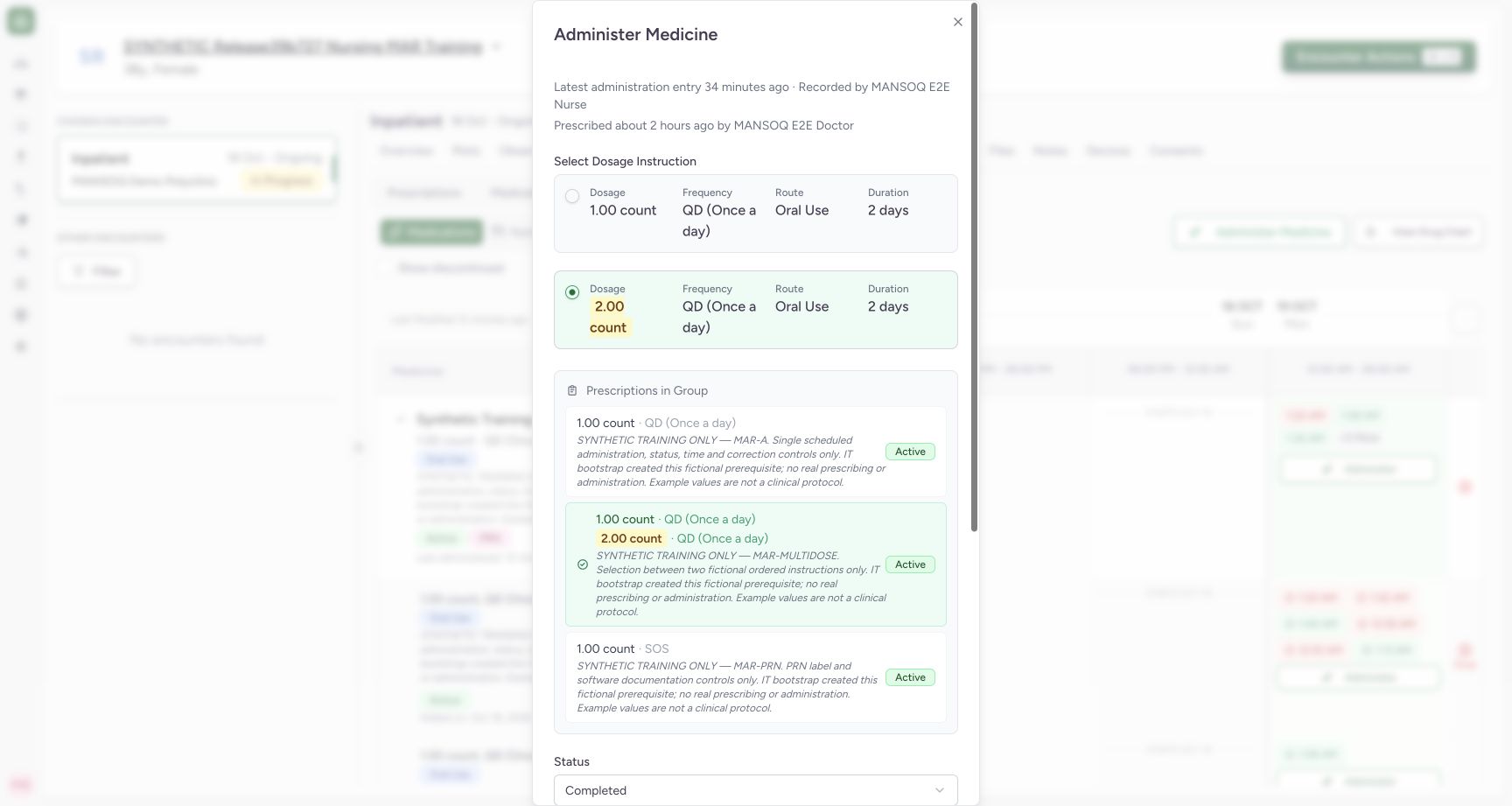
Exact committed release 912828b3 on a separate isolated nonproduction clone. Existing Nurse; fictional Polyclinic Inpatient software exercise only. For a new event on the separate multi-instruction request, dose radio controls remain enabled and the second 2 count instruction can be selected. This is an unsaved draft demonstration and is cancelled after capture; it does not create another event.
Image SHA-256 f6694c00a2964a46ba2ea981327fbb435ae1ccc1338fd7abd1dab00f517f6578
- New-entry dose selection remains available: Choose the intended instruction only for a new entry after checking the actual order and facility policy.
 12
12Keep an existing administration dose locked
Capture details
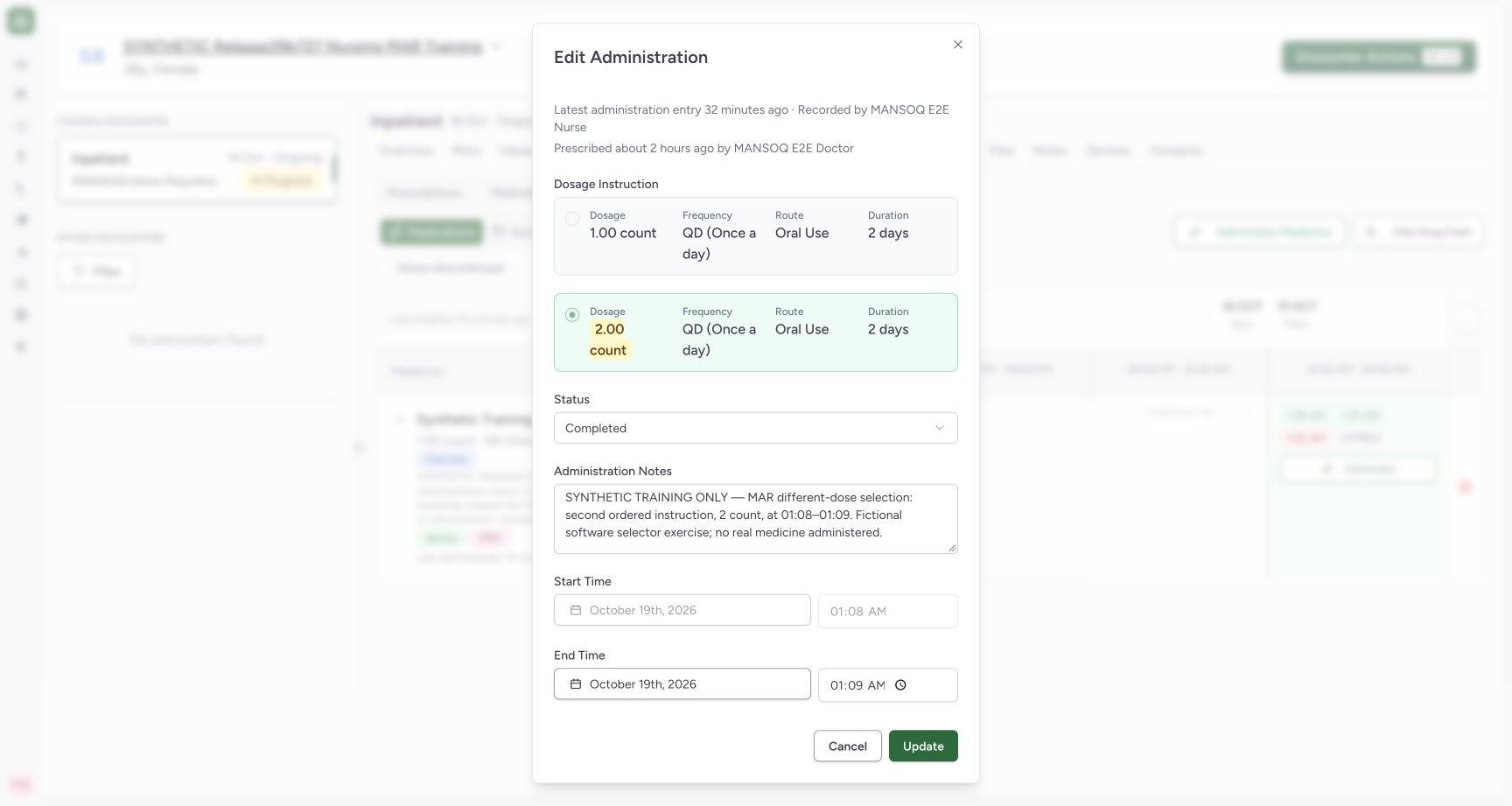
Exact committed release 912828b3 on a separate isolated nonproduction clone. Existing Nurse; fictional Polyclinic Inpatient software exercise only. Both saved-dose radio controls are disabled. Clicking the visible 1 count card text left the persisted 2 count selection unchanged. This is a read-only selection check; no Update is submitted.
Image SHA-256 4374aeb0f598c0e78019adf1d385ddbdc9faaa9ae217bd219b1a76a0a479092c
- Disabled alternative dose: An existing event dose cannot be changed through this form.
- Original dose remains selected: Review the saved dose. Use the supported correction workflow under facility policy rather than changing this locked selector.
6 of 6 content blocks have reviewed image alignment. Missing overview or prerequisite images remain open.
Before you begin
- Confirm the intended request and ordered instructions. The fictional MAR-MULTIDOSE request has 1-count and 2-count alternatives; these demonstrate the selector and are not dose recommendations.
 123
123Recorded release 912828b3 · 2026-10-18T22:42:31.811Z · 1728 × 921 Open the chosen encounter medication history
Capture details
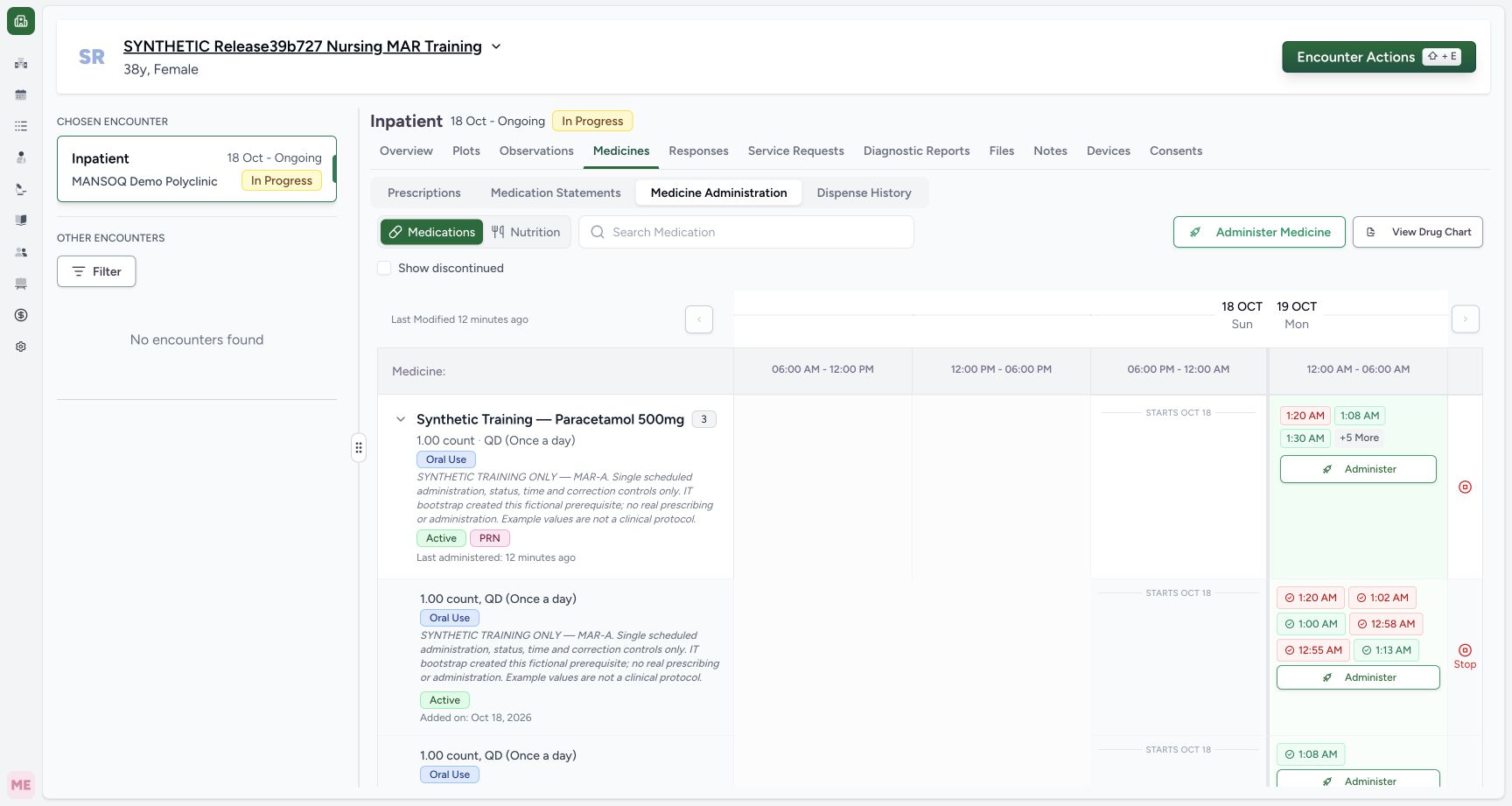
Exact committed release 912828b3 on a separate isolated nonproduction clone. Existing Nurse; fictional Polyclinic Inpatient software exercise only. Exact release 912828 after the two bounded UI writes: same existing event completed with a distinct end and one new Not Done entry. Eight events across three active requests. The group is expanded so the learner can inspect a specific occurrence rather than relying on the collapsed summary.
Image SHA-256
26c3114f9d592588ca0de65ddf17dc0e55e55281aa96af48de5edfa462874eef- Medicine Administration workspace: Choose Medicines, then Medicine Administration, in the verified active encounter.
- Inspect a specific occurrence: This is the same entry used for the completion demonstration; expand a group to distinguish its individual request rows.
- Inspect the saved 2 count entry: This separate multi-instruction request contains the existing event whose dose is locked.
1Recorded release 912828b3 · 2026-10-18T22:42:13.627Z · 1728 × 921 Select an ordered instruction for a new entry
Capture details
Exact committed release 912828b3 on a separate isolated nonproduction clone. Existing Nurse; fictional Polyclinic Inpatient software exercise only. For a new event on the separate multi-instruction request, dose radio controls remain enabled and the second 2 count instruction can be selected. This is an unsaved draft demonstration and is cancelled after capture; it does not create another event.
Image SHA-256
f6694c00a2964a46ba2ea981327fbb435ae1ccc1338fd7abd1dab00f517f6578- New-entry dose selection remains available: Choose the intended instruction only for a new entry after checking the actual order and facility policy.
- Use the authorized account and facility correction policy. The existing saved event in this lesson contains 2 count; the new-entry selection is demonstrated only as a cancelled draft.12
Recorded release 912828b3 · 2026-10-18T22:40:54.740Z · 1728 × 921 Keep an existing administration dose locked
Capture details
Exact committed release 912828b3 on a separate isolated nonproduction clone. Existing Nurse; fictional Polyclinic Inpatient software exercise only. Both saved-dose radio controls are disabled. Clicking the visible 1 count card text left the persisted 2 count selection unchanged. This is a read-only selection check; no Update is submitted.
Image SHA-256
4374aeb0f598c0e78019adf1d385ddbdc9faaa9ae217bd219b1a76a0a479092c- Disabled alternative dose: An existing event dose cannot be changed through this form.
- Original dose remains selected: Review the saved dose. Use the supported correction workflow under facility policy rather than changing this locked selector.
1. Choose an instruction on a new entry
Open Administer and select the intended multi-instruction request in Prescriptions in Group. For a new entry, Select Dosage Instruction remains available. Check dose, unit, frequency, route and duration, then choose the intended option. The example selects the second, 2 count. This particular demonstration cancels the draft and does not save another event.
1Select an ordered instruction for a new entry
Capture details
Exact committed release 912828b3 on a separate isolated nonproduction clone. Existing Nurse; fictional Polyclinic Inpatient software exercise only. For a new event on the separate multi-instruction request, dose radio controls remain enabled and the second 2 count instruction can be selected. This is an unsaved draft demonstration and is cancelled after capture; it does not create another event.
Image SHA-256 f6694c00a2964a46ba2ea981327fbb435ae1ccc1338fd7abd1dab00f517f6578
- New-entry dose selection remains available: Choose the intended instruction only for a new entry after checking the actual order and facility policy.
2. Inspect the locked dose on an existing entry
Open the existing occurrence in its individual request row. The heading is Dosage Instruction and both radio options are disabled. The saved 2-count option remains selected; clicking the visible alternative card text does not change it. Do not interpret this form as supporting a saved dosage edit. Cancel the inspection when no supported change is intended.
123Open the chosen encounter medication history
Capture details
Exact committed release 912828b3 on a separate isolated nonproduction clone. Existing Nurse; fictional Polyclinic Inpatient software exercise only. Exact release 912828 after the two bounded UI writes: same existing event completed with a distinct end and one new Not Done entry. Eight events across three active requests. The group is expanded so the learner can inspect a specific occurrence rather than relying on the collapsed summary.
Image SHA-256 26c3114f9d592588ca0de65ddf17dc0e55e55281aa96af48de5edfa462874eef
- Medicine Administration workspace: Choose Medicines, then Medicine Administration, in the verified active encounter.
- Inspect a specific occurrence: This is the same entry used for the completion demonstration; expand a group to distinguish its individual request rows.
- Inspect the saved 2 count entry: This separate multi-instruction request contains the existing event whose dose is locked.
12Keep an existing administration dose locked
Capture details
Exact committed release 912828b3 on a separate isolated nonproduction clone. Existing Nurse; fictional Polyclinic Inpatient software exercise only. Both saved-dose radio controls are disabled. Clicking the visible 1 count card text left the persisted 2 count selection unchanged. This is a read-only selection check; no Update is submitted.
Image SHA-256 4374aeb0f598c0e78019adf1d385ddbdc9faaa9ae217bd219b1a76a0a479092c
- Disabled alternative dose: An existing event dose cannot be changed through this form.
- Original dose remains selected: Review the saved dose. Use the supported correction workflow under facility policy rather than changing this locked selector.
Use the supported correction process for an incorrect saved dose
The existing-event update contract covers status, note and end time, not dosage or start. Use the approved correction process under facility policy rather than trying to change the locked instruction or adding another administration to compensate. After the read-only saved-dose check and cancelled new-entry draft, independent Nurse and Doctor reads confirmed the same eight event objects and the original 2-count saved dose. This lesson does not qualify a new differing-dose save on this version.
12Keep an existing administration dose locked
Capture details
Exact committed release 912828b3 on a separate isolated nonproduction clone. Existing Nurse; fictional Polyclinic Inpatient software exercise only. Both saved-dose radio controls are disabled. Clicking the visible 1 count card text left the persisted 2 count selection unchanged. This is a read-only selection check; no Update is submitted.
Image SHA-256 4374aeb0f598c0e78019adf1d385ddbdc9faaa9ae217bd219b1a76a0a479092c
- Disabled alternative dose: An existing event dose cannot be changed through this form.
- Original dose remains selected: Review the saved dose. Use the supported correction workflow under facility policy rather than changing this locked selector.
1Select an ordered instruction for a new entry
Capture details
Exact committed release 912828b3 on a separate isolated nonproduction clone. Existing Nurse; fictional Polyclinic Inpatient software exercise only. For a new event on the separate multi-instruction request, dose radio controls remain enabled and the second 2 count instruction can be selected. This is an unsaved draft demonstration and is cancelled after capture; it does not create another event.
Image SHA-256 f6694c00a2964a46ba2ea981327fbb435ae1ccc1338fd7abd1dab00f517f6578
- New-entry dose selection remains available: Choose the intended instruction only for a new entry after checking the actual order and facility policy.
Source evidence
Every citation uses this exact committed version. The private source repository requires access.
- repositories/platform/mansoq-web/src/components/Medicine/MedicationAdministration/MedicineAdminForm.tsx:103 ·
912828b36d091e1bc9179a56af8ee2fe04770004Source file checksum
490b23b1796a5dbbf0477802f806614fe9f64a33de3a6c2b19ccf6ed0482c7ba - repositories/platform/mansoq-core/mansoq/emr/resources/medication/administration/spec.py:166 ·
912828b36d091e1bc9179a56af8ee2fe04770004Source file checksum
b9549599f7137f28773491f3d79ced93730be81df46083248a9049e1ba3dd626