 MANSOQ
 Clinical assessment · VERSION 96ca7318
Review a current diagnosis beside its retained corrected record
Open the installed Diagnosis form, identify the editable current record and separate disabled Entered in Error record, review history authors and original onset, then cancel without submitting. These genuine Doctor screenshots use a fictional Polyclinic inpatient case on exact release 96ca7318.
Doctor
 12
12Distinguish the editable copied diagnosis from the corrected record
Capture details
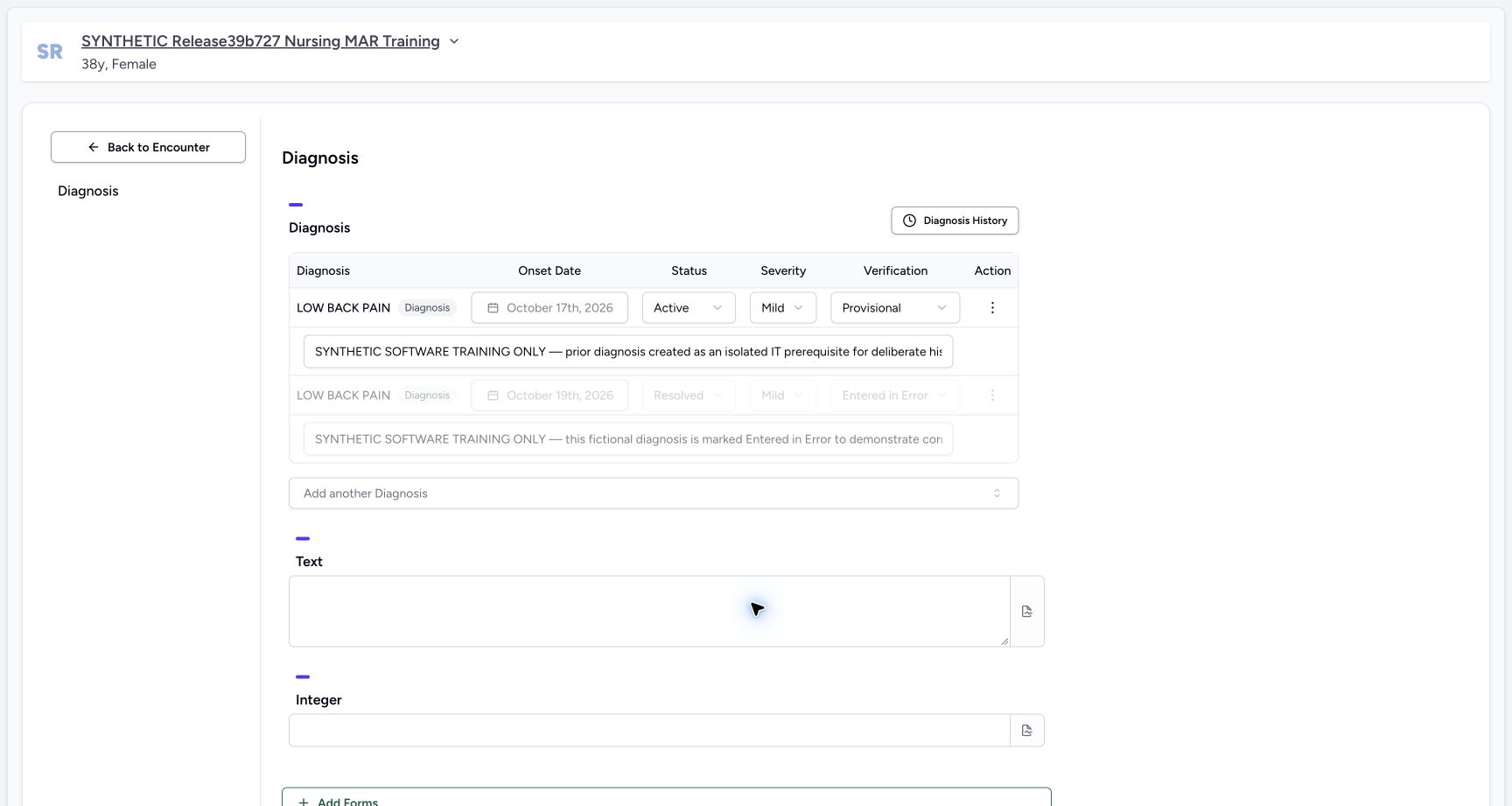
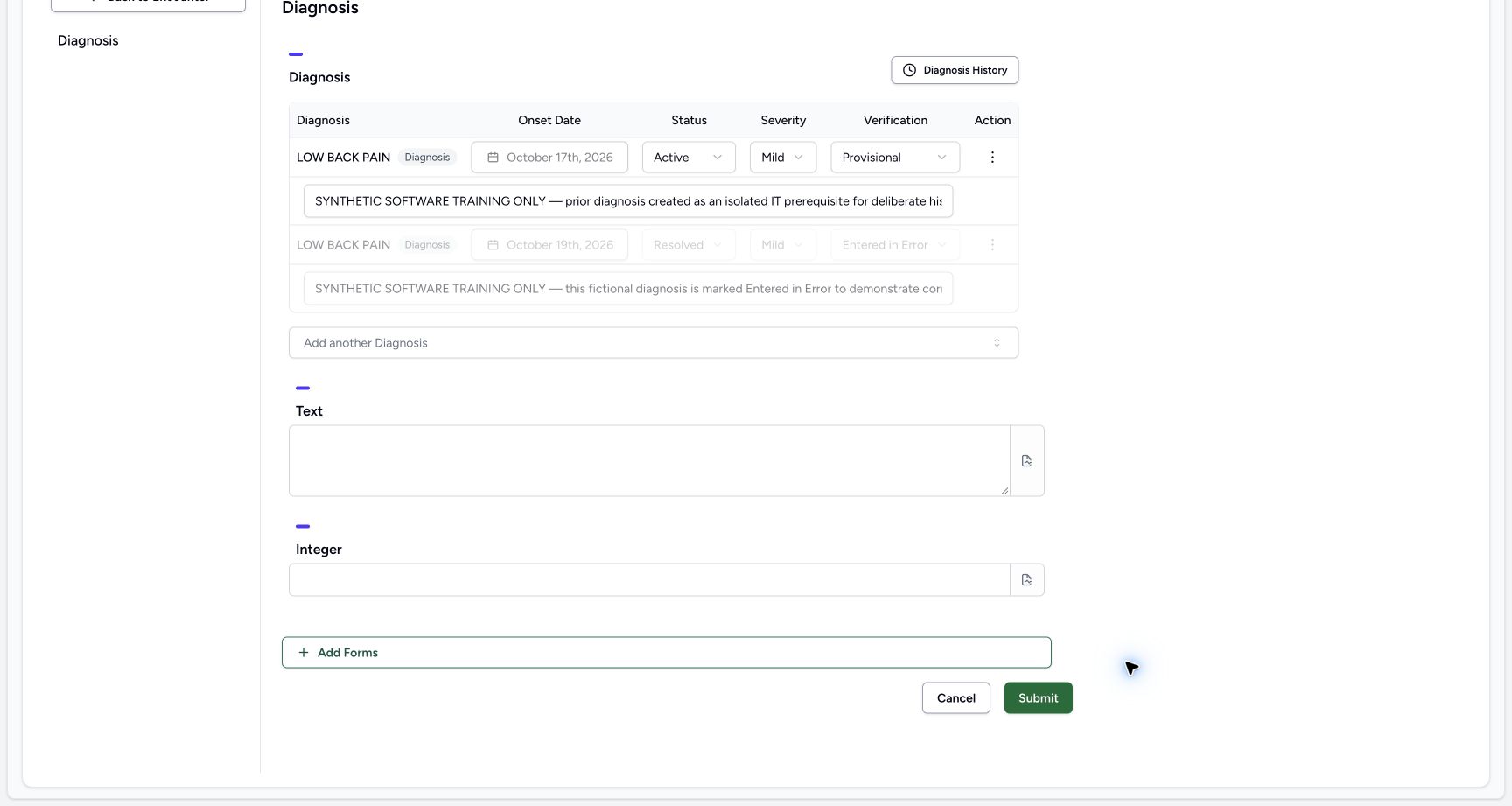
Exact committed release 96ca7318 on an isolated nonproduction clone, using an existing Doctor and fictional Polyclinic inpatient case. The synthetic patient name retains an earlier release label. The exact 96ca Doctor Diagnosis form loads two persisted LOW BACK PAIN rows. The copied current record is sorted first, has original October 17 onset and editable Active/Mild/Provisional controls. The original corrected record remains separate with October 19 onset, Resolved/Mild/Entered in Error and disabled controls/note/action. Shared term identity does not transfer the corrected record’s disabled state to the copied record. No changes have been submitted.
Image SHA-256 2f0747c5ca800a2201c6d48b461daaec35864125ff35175cdba4ca6d3b782795
- Current copied record: This row retains the historical October 17 onset and editable Active, Mild and Provisional fields.
- Corrected record remains disabled: The separate Entered in Error row retains its original fields and disabled controls despite sharing the same term.
 123
123Review historical diagnosis authors and original onset
Capture details
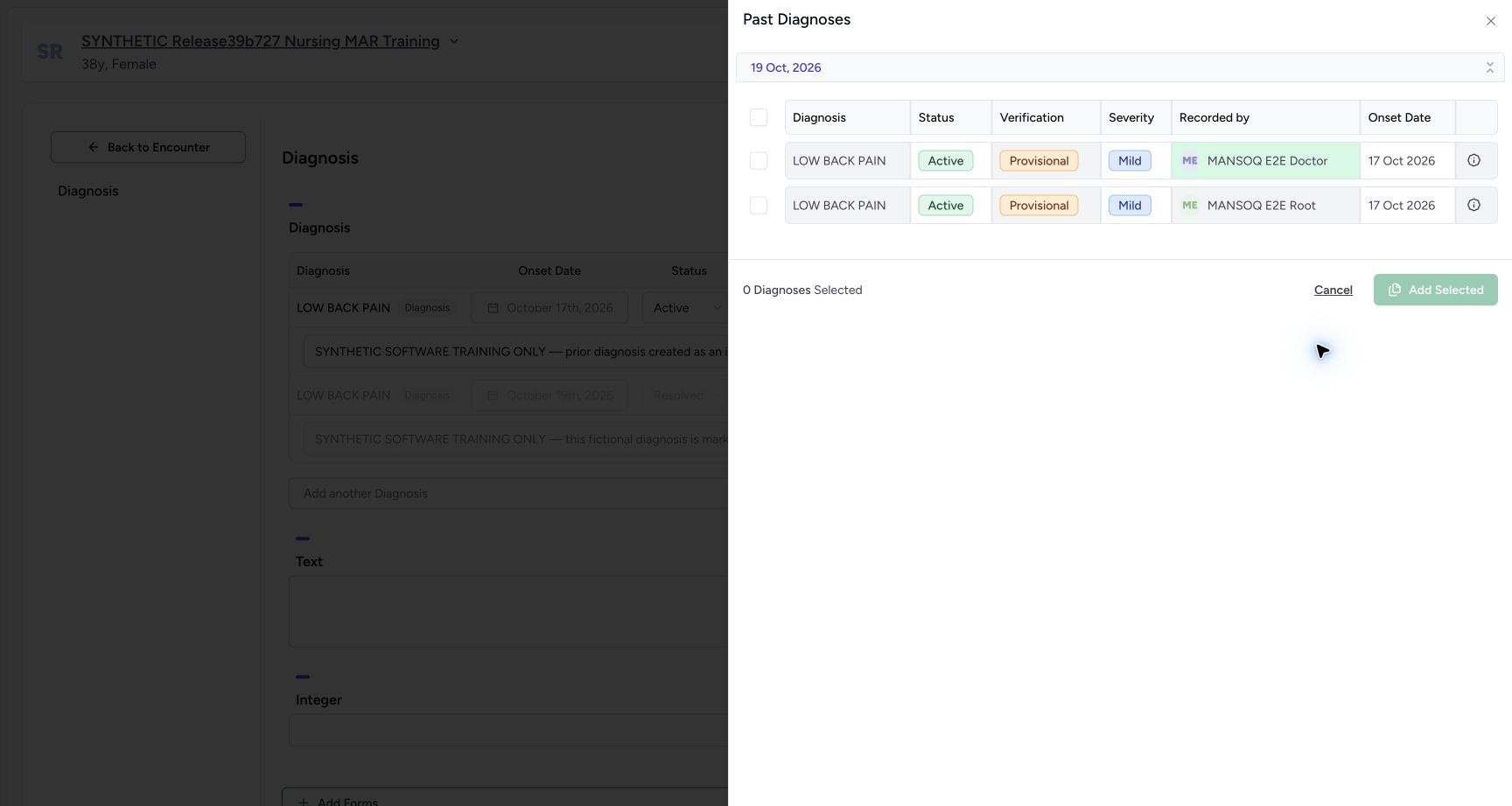
Exact committed release 96ca7318 on an isolated nonproduction clone, using an existing Doctor and fictional Polyclinic inpatient case. The synthetic patient name retains an earlier release label. After the normal history request finishes, Past Diagnoses lists two non-error Active LOW BACK PAIN records with distinct Doctor and Root recorded-by accounts and October 17 onset. The October 19 group heading is separate from original onset. Existing Entered in Error records are excluded. This fixture does not prove Resolved historical visibility because both eligible retained records are Active. No record is selected or copied in this inspection.
Image SHA-256 9f7d721256b60addbe1e7fc8c91a925ad8bc38b674658b832cb58dc3b3180569
- Original onset dates: Both retained Active records show October 17 onset; the grouping heading is October 19.
- Distinct record authors: Read Doctor versus Root recorded-by context rather than inferring a shared record from the same term.
- Cancel without copying: Leave the history selector without adding another diagnosis.
 123
123Return to the unchanged active encounter assessment
Capture details
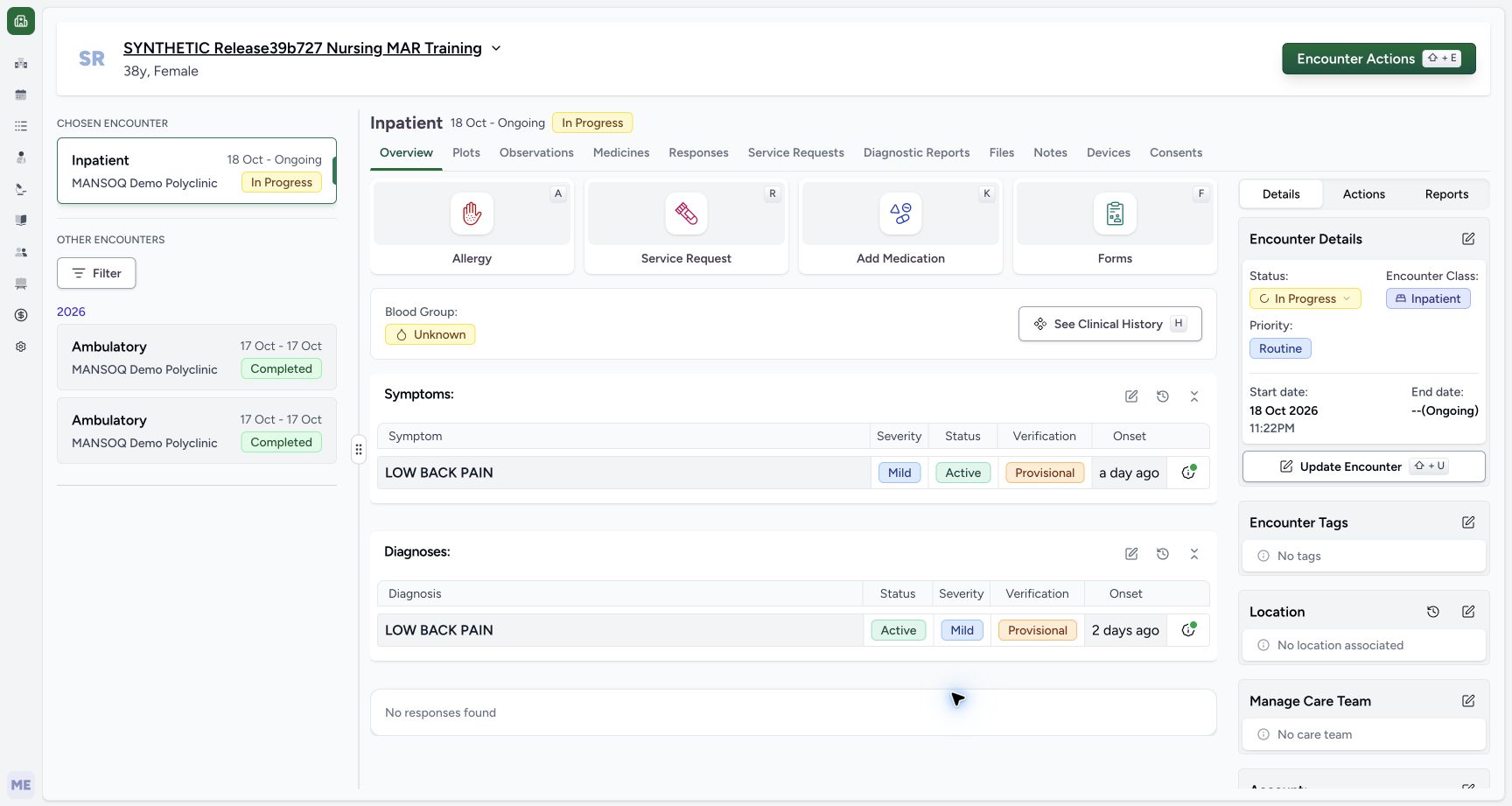
Exact committed release 96ca7318 on an isolated nonproduction clone, using an existing Doctor and fictional Polyclinic inpatient case. The synthetic patient name retains an earlier release label. After Cancel and the actual browser leave confirmation, the Doctor returns to the selected encounter’s Overview. The active LOW BACK PAIN diagnosis and active symptom remain visible, with their separate history controls. No Diagnosis Submit occurred and no clinical fields were changed. This screenshot is the returned product workspace, not the browser confirmation dialog.
Image SHA-256 17996707cfce0e742d832763b0deb9f607db5175a0cb6c85aefd20b45a096651
- Forms entry: Forms opens the installed Diagnosis selector used in this review.
- Diagnosis history link: The history control is separate from the active diagnosis summary.
- Active assessment context: The current copied Active diagnosis remains visible after cancelling the form review.
10 of 10 content blocks have reviewed image alignment. Missing overview or prerequisite images remain open.
Before you begin
- Confirm the intended patient and selected encounter and use an authorized Doctor account. This example already contains a saved Active diagnosis copied from a reviewed prior record and a separate corrected Entered in Error diagnosis with the same installed LOW BACK PAIN term. The synthetic patient name retains an earlier release label; the actual captured software is 96ca7318.12
Recorded release 96ca7318 · 2026-10-19T01:56:09.164Z · 1728 × 921 Distinguish the editable copied diagnosis from the corrected record
Capture details
Exact committed release 96ca7318 on an isolated nonproduction clone, using an existing Doctor and fictional Polyclinic inpatient case. The synthetic patient name retains an earlier release label. The exact 96ca Doctor Diagnosis form loads two persisted LOW BACK PAIN rows. The copied current record is sorted first, has original October 17 onset and editable Active/Mild/Provisional controls. The original corrected record remains separate with October 19 onset, Resolved/Mild/Entered in Error and disabled controls/note/action. Shared term identity does not transfer the corrected record’s disabled state to the copied record. No changes have been submitted.
Image SHA-256
2f0747c5ca800a2201c6d48b461daaec35864125ff35175cdba4ca6d3b782795- Current copied record: This row retains the historical October 17 onset and editable Active, Mild and Provisional fields.
- Corrected record remains disabled: The separate Entered in Error row retains its original fields and disabled controls despite sharing the same term.
123Recorded release 96ca7318 · 2026-10-19T01:57:57.502Z · 1728 × 921 Return to the unchanged active encounter assessment
Capture details
Exact committed release 96ca7318 on an isolated nonproduction clone, using an existing Doctor and fictional Polyclinic inpatient case. The synthetic patient name retains an earlier release label. After Cancel and the actual browser leave confirmation, the Doctor returns to the selected encounter’s Overview. The active LOW BACK PAIN diagnosis and active symptom remain visible, with their separate history controls. No Diagnosis Submit occurred and no clinical fields were changed. This screenshot is the returned product workspace, not the browser confirmation dialog.
Image SHA-256
17996707cfce0e742d832763b0deb9f607db5175a0cb6c85aefd20b45a096651- Forms entry: Forms opens the installed Diagnosis selector used in this review.
- Diagnosis history link: The history control is separate from the active diagnosis summary.
- Active assessment context: The current copied Active diagnosis remains visible after cancelling the form review.
- This is a read-only software exercise using fictional records and notes, not a clinical finding, diagnosis or treatment recommendation. The installed demonstration Diagnosis form also contains optional Text and Integer questions. Leave those questions untouched and do not choose Submit in this review.
 1
1Recorded release 96ca7318 · 2026-10-19T01:55:53.265Z · 1728 × 921 Select the Diagnosis form in the encounter’s Forms menu
Capture details
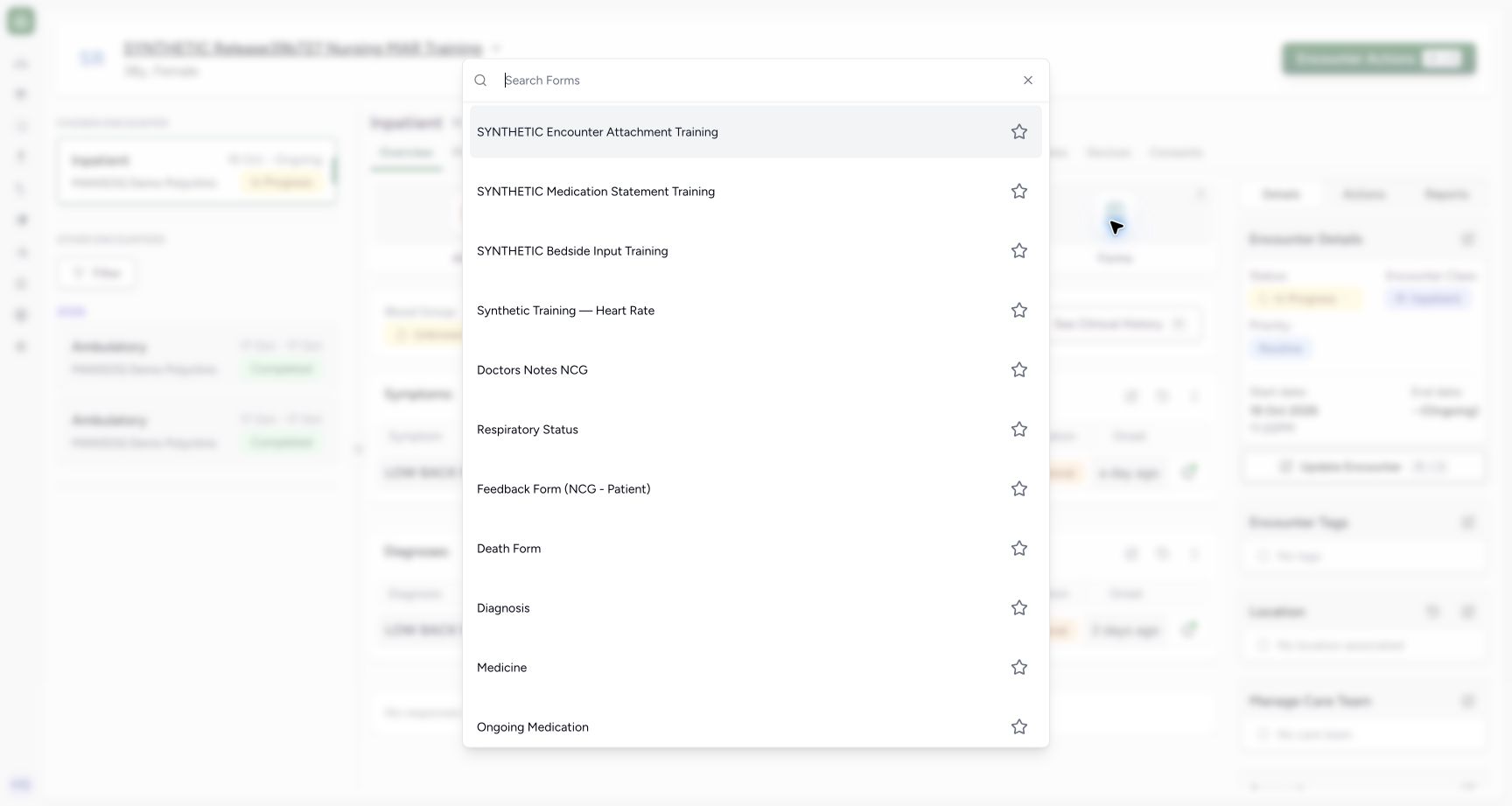
Exact committed release 96ca7318 on an isolated nonproduction clone, using an existing Doctor and fictional Polyclinic inpatient case. The synthetic patient name retains an earlier release label. The existing Doctor opens Forms from the selected fictional inpatient encounter’s Overview. The genuine form selector lists Diagnosis among the installed forms. This read-only sequence will inspect existing same-code corrected and editable diagnosis records and then cancel, preserving all clinical records.
Image SHA-256
d5db8d89c3b25f187d0ea26688c356075ca20a7b2c189463d5a2172939ee6e8d- Diagnosis form: Choose the actual Diagnosis entry after confirming the selected encounter.
 1
1Recorded release 96ca7318 · 2026-10-19T01:57:04.316Z · 1728 × 921 Cancel the diagnosis review without submitting unchanged rows
Capture details
Exact committed release 96ca7318 on an isolated nonproduction clone, using an existing Doctor and fictional Polyclinic inpatient case. The synthetic patient name retains an earlier release label. The historical selector has been closed with Cancel. Natural form scrolling reveals Cancel and Submit while preserving both saved same-code diagnosis rows. This read-only lesson does not edit any field, add a historical record or select Submit; Cancel returns to the encounter unchanged.
Image SHA-256
7ecd4abcf888e3fcd7d6922380aaf1ca120193e98cfaeec68df7f076acd85615- Cancel the form: Choose Cancel for this review; Submit is a separate write action.
1. Open the intended encounter’s Diagnosis form
On the selected encounter’s Overview, choose Forms, then the installed Diagnosis entry. Confirm the patient again on the form. This opens the demonstration form used in this facility; other facilities may configure different form collections.
123Return to the unchanged active encounter assessment
Capture details
Exact committed release 96ca7318 on an isolated nonproduction clone, using an existing Doctor and fictional Polyclinic inpatient case. The synthetic patient name retains an earlier release label. After Cancel and the actual browser leave confirmation, the Doctor returns to the selected encounter’s Overview. The active LOW BACK PAIN diagnosis and active symptom remain visible, with their separate history controls. No Diagnosis Submit occurred and no clinical fields were changed. This screenshot is the returned product workspace, not the browser confirmation dialog.
Image SHA-256 17996707cfce0e742d832763b0deb9f607db5175a0cb6c85aefd20b45a096651
- Forms entry: Forms opens the installed Diagnosis selector used in this review.
- Diagnosis history link: The history control is separate from the active diagnosis summary.
- Active assessment context: The current copied Active diagnosis remains visible after cancelling the form review.
1Select the Diagnosis form in the encounter’s Forms menu
Capture details
Exact committed release 96ca7318 on an isolated nonproduction clone, using an existing Doctor and fictional Polyclinic inpatient case. The synthetic patient name retains an earlier release label. The existing Doctor opens Forms from the selected fictional inpatient encounter’s Overview. The genuine form selector lists Diagnosis among the installed forms. This read-only sequence will inspect existing same-code corrected and editable diagnosis records and then cancel, preserving all clinical records.
Image SHA-256 d5db8d89c3b25f187d0ea26688c356075ca20a7b2c189463d5a2172939ee6e8d
- Diagnosis form: Choose the actual Diagnosis entry after confirming the selected encounter.
12Distinguish the editable copied diagnosis from the corrected record
Capture details
Exact committed release 96ca7318 on an isolated nonproduction clone, using an existing Doctor and fictional Polyclinic inpatient case. The synthetic patient name retains an earlier release label. The exact 96ca Doctor Diagnosis form loads two persisted LOW BACK PAIN rows. The copied current record is sorted first, has original October 17 onset and editable Active/Mild/Provisional controls. The original corrected record remains separate with October 19 onset, Resolved/Mild/Entered in Error and disabled controls/note/action. Shared term identity does not transfer the corrected record’s disabled state to the copied record. No changes have been submitted.
Image SHA-256 2f0747c5ca800a2201c6d48b461daaec35864125ff35175cdba4ca6d3b782795
- Current copied record: This row retains the historical October 17 onset and editable Active, Mild and Provisional fields.
- Corrected record remains disabled: The separate Entered in Error row retains its original fields and disabled controls despite sharing the same term.
2. Identify the two separate saved records
The first LOW BACK PAIN row is the saved current copy: it retains October 17 onset with Active, Mild and Provisional values. Its status, severity, verification, note and action controls remain editable. The separate corrected row retains October 19 onset with Resolved, Mild and Entered in Error; its controls and note are disabled. Sharing a terminology code does not make them the same persisted record. Both saved onset controls are locked.
12Distinguish the editable copied diagnosis from the corrected record
Capture details
Exact committed release 96ca7318 on an isolated nonproduction clone, using an existing Doctor and fictional Polyclinic inpatient case. The synthetic patient name retains an earlier release label. The exact 96ca Doctor Diagnosis form loads two persisted LOW BACK PAIN rows. The copied current record is sorted first, has original October 17 onset and editable Active/Mild/Provisional controls. The original corrected record remains separate with October 19 onset, Resolved/Mild/Entered in Error and disabled controls/note/action. Shared term identity does not transfer the corrected record’s disabled state to the copied record. No changes have been submitted.
Image SHA-256 2f0747c5ca800a2201c6d48b461daaec35864125ff35175cdba4ca6d3b782795
- Current copied record: This row retains the historical October 17 onset and editable Active, Mild and Provisional fields.
- Corrected record remains disabled: The separate Entered in Error row retains its original fields and disabled controls despite sharing the same term.
3. Inspect the current row’s available status choices
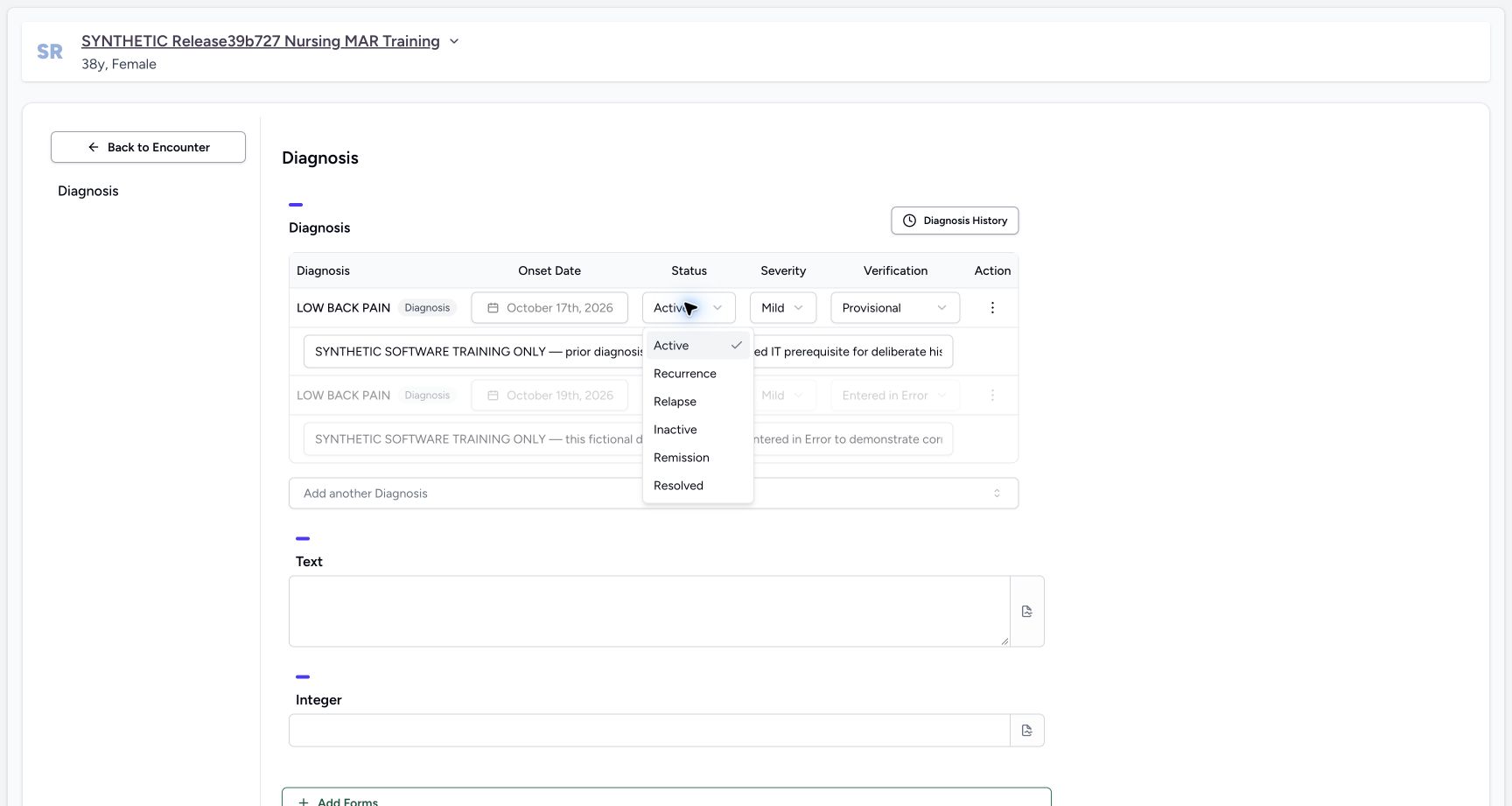
Open Active on the current copied row to view Active, Recurrence, Relapse, Inactive, Remission and Resolved. The corrected row remains disabled underneath. Dismiss the menu with Escape without selecting a new status. This demonstrates which current row is editable; it does not save a lifecycle change or change the corrected row.
 12
12Open the editable current diagnosis row’s status choices
Capture details
Exact committed release 96ca7318 on an isolated nonproduction clone, using an existing Doctor and fictional Polyclinic inpatient case. The synthetic patient name retains an earlier release label. The copied current diagnosis row’s Active control opens its actual status menu with Active, Recurrence, Relapse, Inactive, Remission and Resolved. The original corrected row remains disabled. This sequence only opens the menu and dismisses it without a new selection; it does not amend either persisted diagnosis.
Image SHA-256 a7022fb0e7308711dbbb5563c8cf940209b185b8a86599180a871cbde204b9b9
- Current row status menu: The Active row opens its normal choices; this inspection does not select a different status.
- Separate disabled correction: The original Entered in Error row remains disabled underneath the open menu.
12Distinguish the editable copied diagnosis from the corrected record
Capture details
Exact committed release 96ca7318 on an isolated nonproduction clone, using an existing Doctor and fictional Polyclinic inpatient case. The synthetic patient name retains an earlier release label. The exact 96ca Doctor Diagnosis form loads two persisted LOW BACK PAIN rows. The copied current record is sorted first, has original October 17 onset and editable Active/Mild/Provisional controls. The original corrected record remains separate with October 19 onset, Resolved/Mild/Entered in Error and disabled controls/note/action. Shared term identity does not transfer the corrected record’s disabled state to the copied record. No changes have been submitted.
Image SHA-256 2f0747c5ca800a2201c6d48b461daaec35864125ff35175cdba4ca6d3b782795
- Current copied record: This row retains the historical October 17 onset and editable Active, Mild and Provisional fields.
- Corrected record remains disabled: The separate Entered in Error row retains its original fields and disabled controls despite sharing the same term.
4. Read history authors and onset separately
Choose Diagnosis History and wait for the historical results to load. This fixture shows two eligible non-error Active records with distinct Doctor and Root recorded-by accounts. Both retain October 17 onset, while the group heading is October 19. Read the author and original onset rather than treating the group date or shared term as record identity. No row is selected in this inspection; choose Cancel to leave the selector without copying.
123Review historical diagnosis authors and original onset
Capture details
Exact committed release 96ca7318 on an isolated nonproduction clone, using an existing Doctor and fictional Polyclinic inpatient case. The synthetic patient name retains an earlier release label. After the normal history request finishes, Past Diagnoses lists two non-error Active LOW BACK PAIN records with distinct Doctor and Root recorded-by accounts and October 17 onset. The October 19 group heading is separate from original onset. Existing Entered in Error records are excluded. This fixture does not prove Resolved historical visibility because both eligible retained records are Active. No record is selected or copied in this inspection.
Image SHA-256 9f7d721256b60addbe1e7fc8c91a925ad8bc38b674658b832cb58dc3b3180569
- Original onset dates: Both retained Active records show October 17 onset; the grouping heading is October 19.
- Distinct record authors: Read Doctor versus Root recorded-by context rather than inferring a shared record from the same term.
- Cancel without copying: Leave the history selector without adding another diagnosis.
5. Cancel the form and confirm the saved assessment
Scroll to the form’s Cancel control and choose it without Submit. In this actual review, the browser displayed “You have unsaved changes. Are you sure you want to leave?” even though no clinical field was changed. OK confirmed leaving and returned to Overview. The current Active diagnosis and symptom remain visible. Independent ordinary Doctor and Nurse readbacks confirmed all six diagnosis-category records, three symptom records, fourteen administration records and four requests were unchanged. The mapped pictures show the form before leaving and Overview afterward; the intermediate browser confirmation has a recorded text observation but no publishable wide screenshot.
1Cancel the diagnosis review without submitting unchanged rows
Capture details
Exact committed release 96ca7318 on an isolated nonproduction clone, using an existing Doctor and fictional Polyclinic inpatient case. The synthetic patient name retains an earlier release label. The historical selector has been closed with Cancel. Natural form scrolling reveals Cancel and Submit while preserving both saved same-code diagnosis rows. This read-only lesson does not edit any field, add a historical record or select Submit; Cancel returns to the encounter unchanged.
Image SHA-256 7ecd4abcf888e3fcd7d6922380aaf1ca120193e98cfaeec68df7f076acd85615
- Cancel the form: Choose Cancel for this review; Submit is a separate write action.
123Return to the unchanged active encounter assessment
Capture details
Exact committed release 96ca7318 on an isolated nonproduction clone, using an existing Doctor and fictional Polyclinic inpatient case. The synthetic patient name retains an earlier release label. After Cancel and the actual browser leave confirmation, the Doctor returns to the selected encounter’s Overview. The active LOW BACK PAIN diagnosis and active symptom remain visible, with their separate history controls. No Diagnosis Submit occurred and no clinical fields were changed. This screenshot is the returned product workspace, not the browser confirmation dialog.
Image SHA-256 17996707cfce0e742d832763b0deb9f607db5175a0cb6c85aefd20b45a096651
- Forms entry: Forms opens the installed Diagnosis selector used in this review.
- Diagnosis history link: The history control is separate from the active diagnosis summary.
- Active assessment context: The current copied Active diagnosis remains visible after cancelling the form review.
Separate current assessment, history and corrected data
The active Overview summary, historical selector and editable form serve different purposes. The corrected Entered in Error record remains visible and disabled in the form; the history selector excludes Error records. Both eligible historical records in this fixture are Active, so this lesson does not prove that a Resolved non-error historical record appears. That needs its own fictional prerequisite and observed flow.
12Distinguish the editable copied diagnosis from the corrected record
Capture details
Exact committed release 96ca7318 on an isolated nonproduction clone, using an existing Doctor and fictional Polyclinic inpatient case. The synthetic patient name retains an earlier release label. The exact 96ca Doctor Diagnosis form loads two persisted LOW BACK PAIN rows. The copied current record is sorted first, has original October 17 onset and editable Active/Mild/Provisional controls. The original corrected record remains separate with October 19 onset, Resolved/Mild/Entered in Error and disabled controls/note/action. Shared term identity does not transfer the corrected record’s disabled state to the copied record. No changes have been submitted.
Image SHA-256 2f0747c5ca800a2201c6d48b461daaec35864125ff35175cdba4ca6d3b782795
- Current copied record: This row retains the historical October 17 onset and editable Active, Mild and Provisional fields.
- Corrected record remains disabled: The separate Entered in Error row retains its original fields and disabled controls despite sharing the same term.
123Review historical diagnosis authors and original onset
Capture details
Exact committed release 96ca7318 on an isolated nonproduction clone, using an existing Doctor and fictional Polyclinic inpatient case. The synthetic patient name retains an earlier release label. After the normal history request finishes, Past Diagnoses lists two non-error Active LOW BACK PAIN records with distinct Doctor and Root recorded-by accounts and October 17 onset. The October 19 group heading is separate from original onset. Existing Entered in Error records are excluded. This fixture does not prove Resolved historical visibility because both eligible retained records are Active. No record is selected or copied in this inspection.
Image SHA-256 9f7d721256b60addbe1e7fc8c91a925ad8bc38b674658b832cb58dc3b3180569
- Original onset dates: Both retained Active records show October 17 onset; the grouping heading is October 19.
- Distinct record authors: Read Doctor versus Root recorded-by context rather than inferring a shared record from the same term.
- Cancel without copying: Leave the history selector without adding another diagnosis.
123Return to the unchanged active encounter assessment
Capture details
Exact committed release 96ca7318 on an isolated nonproduction clone, using an existing Doctor and fictional Polyclinic inpatient case. The synthetic patient name retains an earlier release label. After Cancel and the actual browser leave confirmation, the Doctor returns to the selected encounter’s Overview. The active LOW BACK PAIN diagnosis and active symptom remain visible, with their separate history controls. No Diagnosis Submit occurred and no clinical fields were changed. This screenshot is the returned product workspace, not the browser confirmation dialog.
Image SHA-256 17996707cfce0e742d832763b0deb9f607db5175a0cb6c85aefd20b45a096651
- Forms entry: Forms opens the installed Diagnosis selector used in this review.
- Diagnosis history link: The history control is separate from the active diagnosis summary.
- Active assessment context: The current copied Active diagnosis remains visible after cancelling the form review.
Observed scope and confirmation evidence gap
This lesson qualifies one Doctor’s read-only desktop review of existing records in a fictional Polyclinic inpatient encounter on exact release 96ca7318. It does not demonstrate a new saved diagnosis, a new historical copy, mobile interaction, other facility permissions or a physical clinical assertion. The browser confirmation was handled normally, but its screenshot remains open: tab capture is unavailable during that native confirmation and the available native window was narrow. No unsuitable or fabricated confirmation picture is used.
1Cancel the diagnosis review without submitting unchanged rows
Capture details
Exact committed release 96ca7318 on an isolated nonproduction clone, using an existing Doctor and fictional Polyclinic inpatient case. The synthetic patient name retains an earlier release label. The historical selector has been closed with Cancel. Natural form scrolling reveals Cancel and Submit while preserving both saved same-code diagnosis rows. This read-only lesson does not edit any field, add a historical record or select Submit; Cancel returns to the encounter unchanged.
Image SHA-256 7ecd4abcf888e3fcd7d6922380aaf1ca120193e98cfaeec68df7f076acd85615
- Cancel the form: Choose Cancel for this review; Submit is a separate write action.
123Return to the unchanged active encounter assessment
Capture details
Exact committed release 96ca7318 on an isolated nonproduction clone, using an existing Doctor and fictional Polyclinic inpatient case. The synthetic patient name retains an earlier release label. After Cancel and the actual browser leave confirmation, the Doctor returns to the selected encounter’s Overview. The active LOW BACK PAIN diagnosis and active symptom remain visible, with their separate history controls. No Diagnosis Submit occurred and no clinical fields were changed. This screenshot is the returned product workspace, not the browser confirmation dialog.
Image SHA-256 17996707cfce0e742d832763b0deb9f607db5175a0cb6c85aefd20b45a096651
- Forms entry: Forms opens the installed Diagnosis selector used in this review.
- Diagnosis history link: The history control is separate from the active diagnosis summary.
- Active assessment context: The current copied Active diagnosis remains visible after cancelling the form review.
Source evidence
Every citation uses this exact committed version. The private source repository requires access.
- repositories/platform/mansoq-web/src/components/Questionnaire/QuestionTypes/DiagnosisQuestion.tsx:368 ·
96ca7318eb2b93f5fa477908a1543075e0d1f056Source file checksum
56a14d11bcc3aef66d9dc2d220b29d4c22ff671eed6ed4c4676ddf59b7920159 - repositories/platform/mansoq-web/src/components/Questionnaire/QuestionTypes/DiagnosisQuestion.tsx:393 ·
96ca7318eb2b93f5fa477908a1543075e0d1f056Source file checksum
56a14d11bcc3aef66d9dc2d220b29d4c22ff671eed6ed4c4676ddf59b7920159 - repositories/platform/mansoq-web/src/components/Questionnaire/QuestionTypes/DiagnosisQuestion.tsx:562 ·
96ca7318eb2b93f5fa477908a1543075e0d1f056Source file checksum
56a14d11bcc3aef66d9dc2d220b29d4c22ff671eed6ed4c4676ddf59b7920159 - repositories/platform/mansoq-web/src/components/Questionnaire/QuestionTypes/DiagnosisQuestion.tsx:702 ·
96ca7318eb2b93f5fa477908a1543075e0d1f056Source file checksum
56a14d11bcc3aef66d9dc2d220b29d4c22ff671eed6ed4c4676ddf59b7920159 - repositories/platform/mansoq-web/src/components/HistoricalRecordSelector/index.tsx:1 ·
96ca7318eb2b93f5fa477908a1543075e0d1f056Source file checksum
0ab03afa6a5954112061e0bf07b15cd3f4c901444f3c3de8a8e194524ef1f0c2 - repositories/platform/mansoq-web/src/components/HistoricalRecordSelector/RecordItem.tsx:1 ·
96ca7318eb2b93f5fa477908a1543075e0d1f056Source file checksum
91960b93e01760bc021d0a08d2684905e269a1091bff162bf0e4c3b5e63ef468 - repositories/platform/mansoq-web/src/components/Questionnaire/QuestionnaireForm.tsx:583 ·
96ca7318eb2b93f5fa477908a1543075e0d1f056Source file checksum
e6e48112c033602b02815eb3685119882242f22b14975dffc3feba7d96e20923 - repositories/platform/mansoq-web/src/components/Patient/diagnosis/DiagnosisTable.tsx:1 ·
96ca7318eb2b93f5fa477908a1543075e0d1f056Source file checksum
45e40342661a50ac9ad52a4e34cfc2dc4d153ce389dc8829ffdb52c0f44f4c19