 MANSOQ
 Clinical assessment · VERSION 96ca7318
Review a Resolved diagnosis and return to the intended encounter
Inspect a retained Resolved diagnosis, its author, note and completed source encounter. Distinguish a sidebar preview from the chosen encounter, then inspect the same prior record in Diagnosis History without copying it. This fictional Doctor desktop example uses exact release 96ca7318.
Doctor
 1234
1234Read the retained Resolved diagnosis on the timeline
Capture details
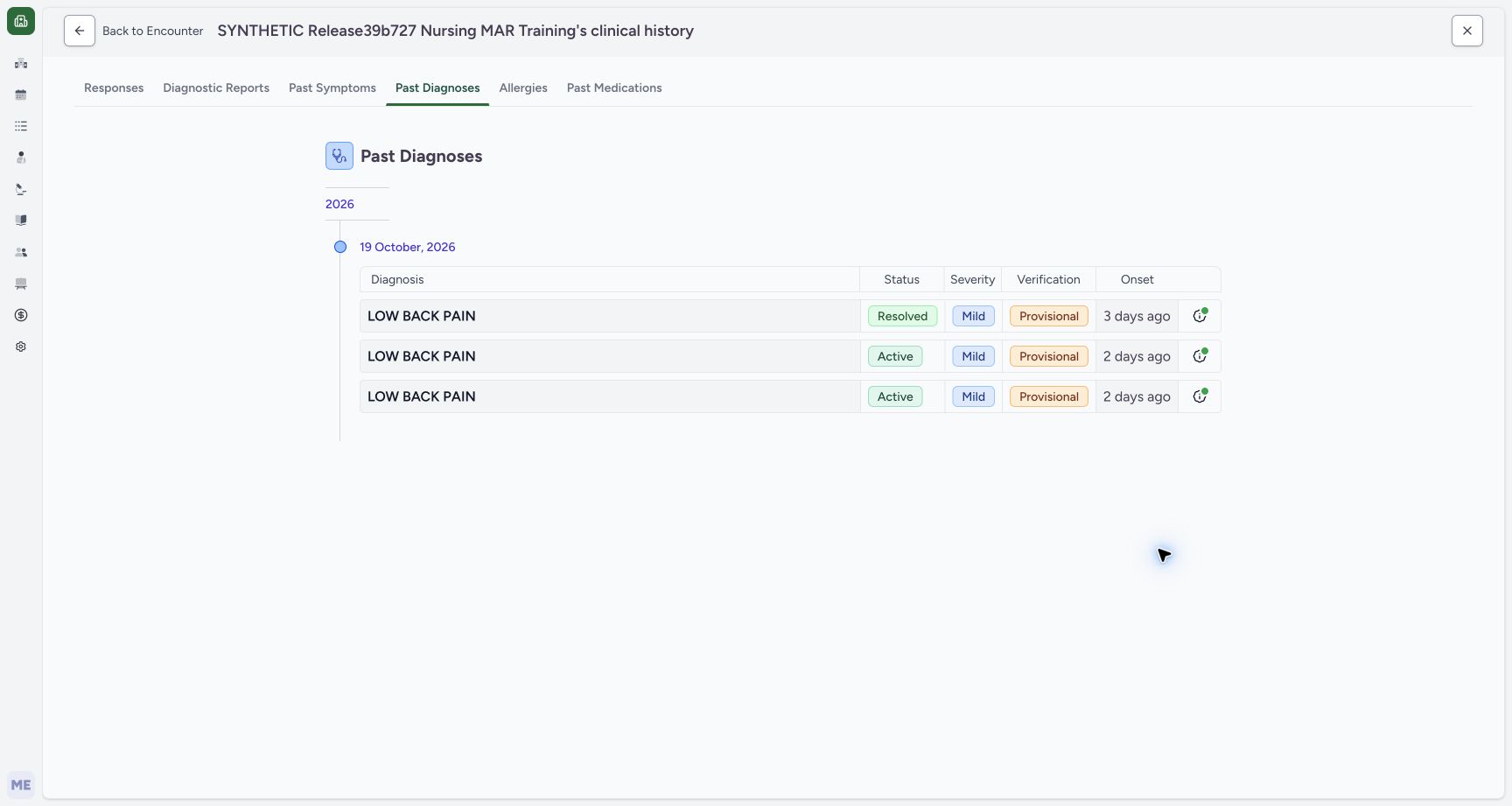
Exact committed release 96ca7318 on an isolated nonproduction clone, using an existing Doctor and fictional Polyclinic inpatient case. The synthetic patient name retains an earlier release label. The normal Doctor Past Diagnoses timeline has loaded three non-error records: the newly prepared prior Resolved example and two original Active records. Existing Entered in Error records remain excluded from this diagnosis-category view. The grouping date is October 19 creation date, separate from the new record’s October 16 onset. No clinical record is changed.
Image SHA-256 5ef51cc9d4c34bab0ec382bf7e6b777e68c998716df8ee2b7a189ddaf9eabbc9
- Resolved non-error record: The new separate prior record is visible alongside two retained Active records.
- Recorded-date grouping: October 19 groups when these records were created; the Onset column describes each original onset separately.
- Record information: Open this row’s information control to inspect its author, note and source encounter.
- Back to Encounter: Return from the clinical-history timeline to the encounter that opened this history.
 12
12Distinguish another encounter’s preview from the chosen encounter
Capture details
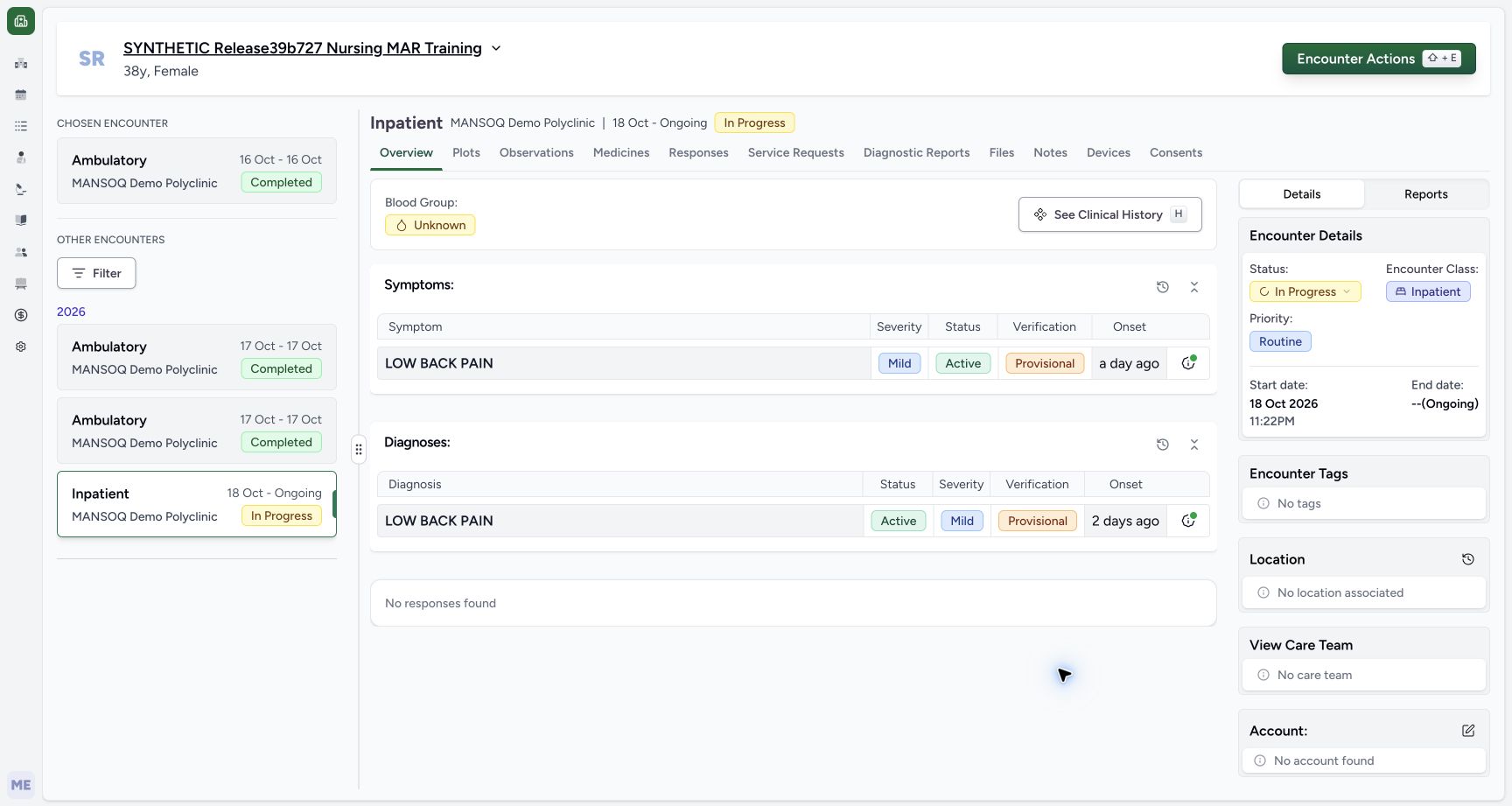
Exact committed release 96ca7318 on an isolated nonproduction clone, using an existing Doctor and fictional Polyclinic inpatient case. The synthetic patient name retains an earlier release label. Selecting the existing Inpatient sidebar card opens a read-only selectedEncounter preview while the chosen encounter remains the completed October 16 source. The ongoing Inpatient heading and current Active assessment are visible on the right, but this does not switch the chosen encounter or restore its editing controls. This navigation boundary is retained explicitly before returning through browser history to the original encounter.
Image SHA-256 4dd20fb8c0c1fd623dd11a8a8c53e30321311a34376a504ff59dda9654156534
- Chosen encounter remains the source: The left chosen card still identifies the completed October 16 Ambulatory source.
- Previewed Inpatient context: The right panel previews the ongoing Inpatient encounter after selecting its sidebar card.
 123
123Read the resolved prior record in the current form’s history selector
Capture details
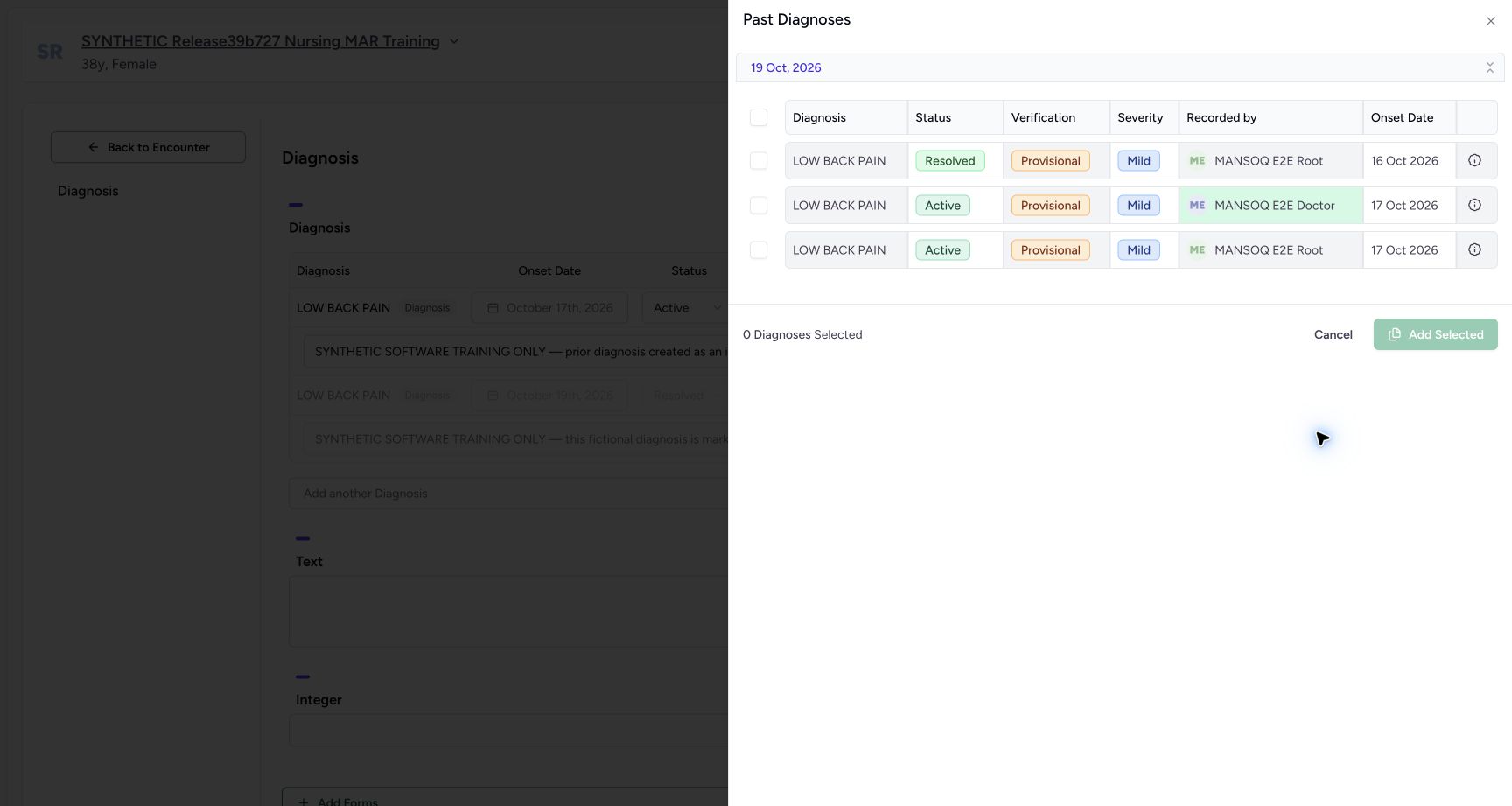
Exact committed release 96ca7318 on an isolated nonproduction clone, using an existing Doctor and fictional Polyclinic inpatient case. The synthetic patient name retains an earlier release label. The actual Diagnosis History selector has loaded the separate Resolved/Provisional/Mild record with Root recorded-by context and October 16 onset, alongside the two original non-error Active records. The counter remains zero and Add Selected is disabled. This inspection proves actual Resolved non-error visibility; it does not copy or reactivate that record.
Image SHA-256 a9cd626982d89a99b62392a9ad0ea26a01ec01f647985bd7d13b5b3556e40761
- Resolved prior record: The selector includes the non-error Resolved record without making it a current Active diagnosis.
- Prerequisite author: The source record retains Root recorded-by context and October 16 onset.
- Cancel without copying: No diagnosis is selected; Cancel leaves all source and current records unchanged.
13 of 13 content blocks have reviewed image alignment. Missing overview or prerequisite images remain open.
Before you begin
- Use an authorized Doctor account and confirm the intended synthetic patient and ongoing Inpatient encounter. A separate IT prerequisite, performed through normal authorized APIs by the existing Root account, prepared one completed October 16 Ambulatory encounter with a Resolved, Mild, Provisional LOW BACK PAIN diagnosis. The installed terminology code was checked before use. This fictional software example is not a clinical finding, diagnosis or treatment recommendation.
 12
12Recorded release 96ca7318 · 2026-10-19T02:12:35.488Z · 1728 × 921 Open history separately from the current active assessment
Capture details
Exact committed release 96ca7318 on an isolated nonproduction clone, using an existing Doctor and fictional Polyclinic inpatient case. The synthetic patient name retains an earlier release label. The Doctor reloads the existing current inpatient encounter after IT separately prepares one fictional completed October 16 encounter and Resolved non-error diagnosis. The original current Active diagnosis remains in the Overview summary; all original records are preserved. The left sidebar also lists the new separate prior encounter. This is normal Doctor review, not proof that the Doctor created the IT prerequisite.
Image SHA-256
cbfe2edc7a4cf72612958e8b939d1fc3d284be23faeb85e7b1f7e3b9da68dd1c- Diagnosis history: Open the patient’s diagnosis timeline without changing the current encounter’s Active diagnosis.
- Current Active diagnosis: The existing active assessment remains separate from a prior Resolved record.
 123
123Recorded release 96ca7318 · 2026-10-19T02:14:28.078Z · 1728 × 921 Read the resolved record’s author and source controls
Capture details
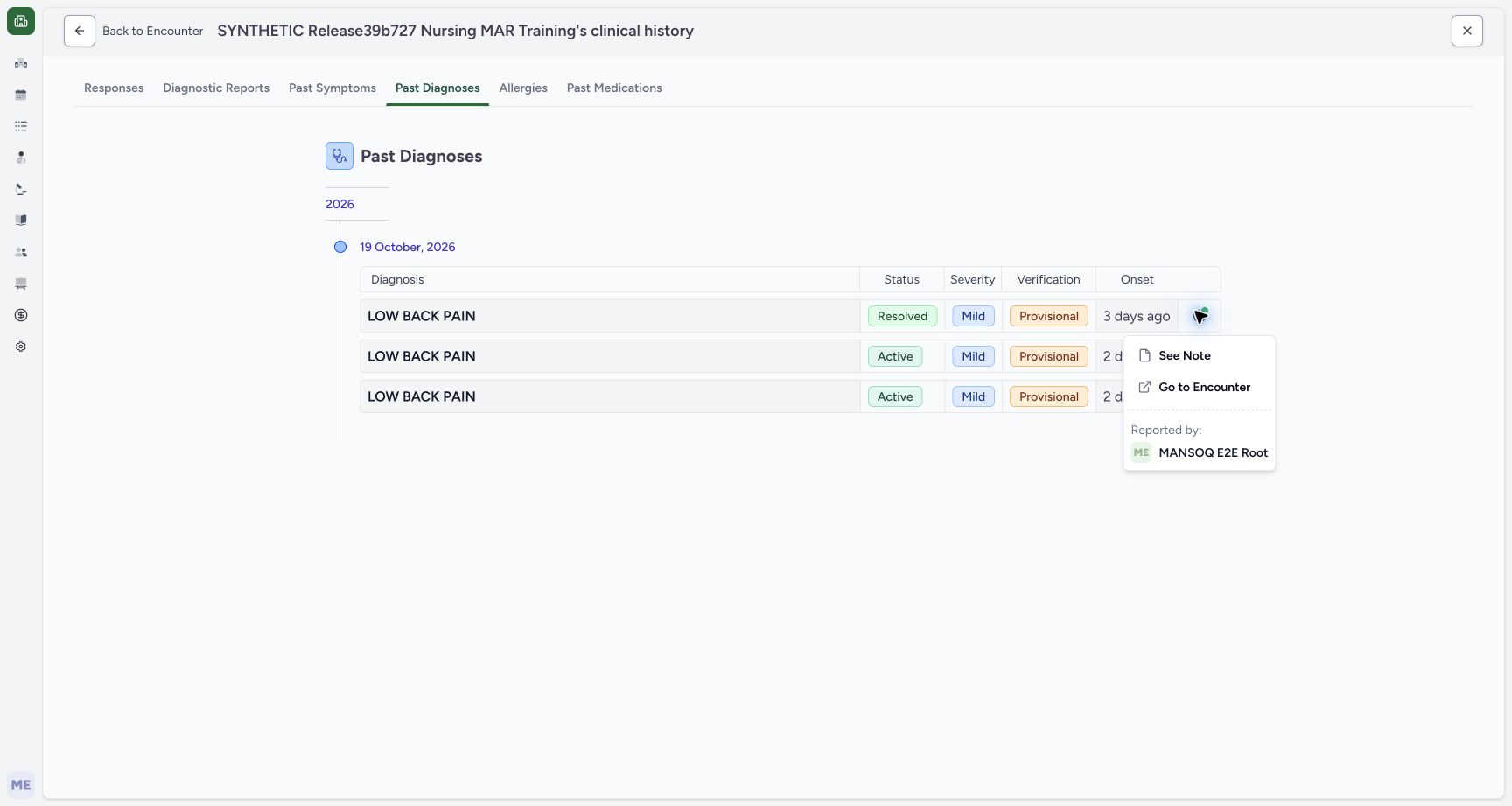
Exact committed release 96ca7318 on an isolated nonproduction clone, using an existing Doctor and fictional Polyclinic inpatient case. The synthetic patient name retains an earlier release label. The Resolved timeline row’s actual information menu identifies Reported by MANSOQ E2E Root and provides See Note and Go to Encounter. This separates the prerequisite author from the current reviewing Doctor and links the record to its source encounter. No record is selected for copying or changed.
Image SHA-256
c2e84ebd079c17f87dfe6d88fb7a741d7141fde5d2ee2a880a3c1388de0760f6- Reported-by Root context: The prerequisite record was created by the existing IT Root account; the Doctor is reviewing it.
- See Note: Inspect the saved note before interpreting or reusing a historical record.
- Go to Encounter: Open the source encounter associated with this specific record.
 123
123Recorded release 96ca7318 · 2026-10-19T02:15:27.686Z · 1728 × 921 Verify the diagnosis record’s completed source encounter
Capture details
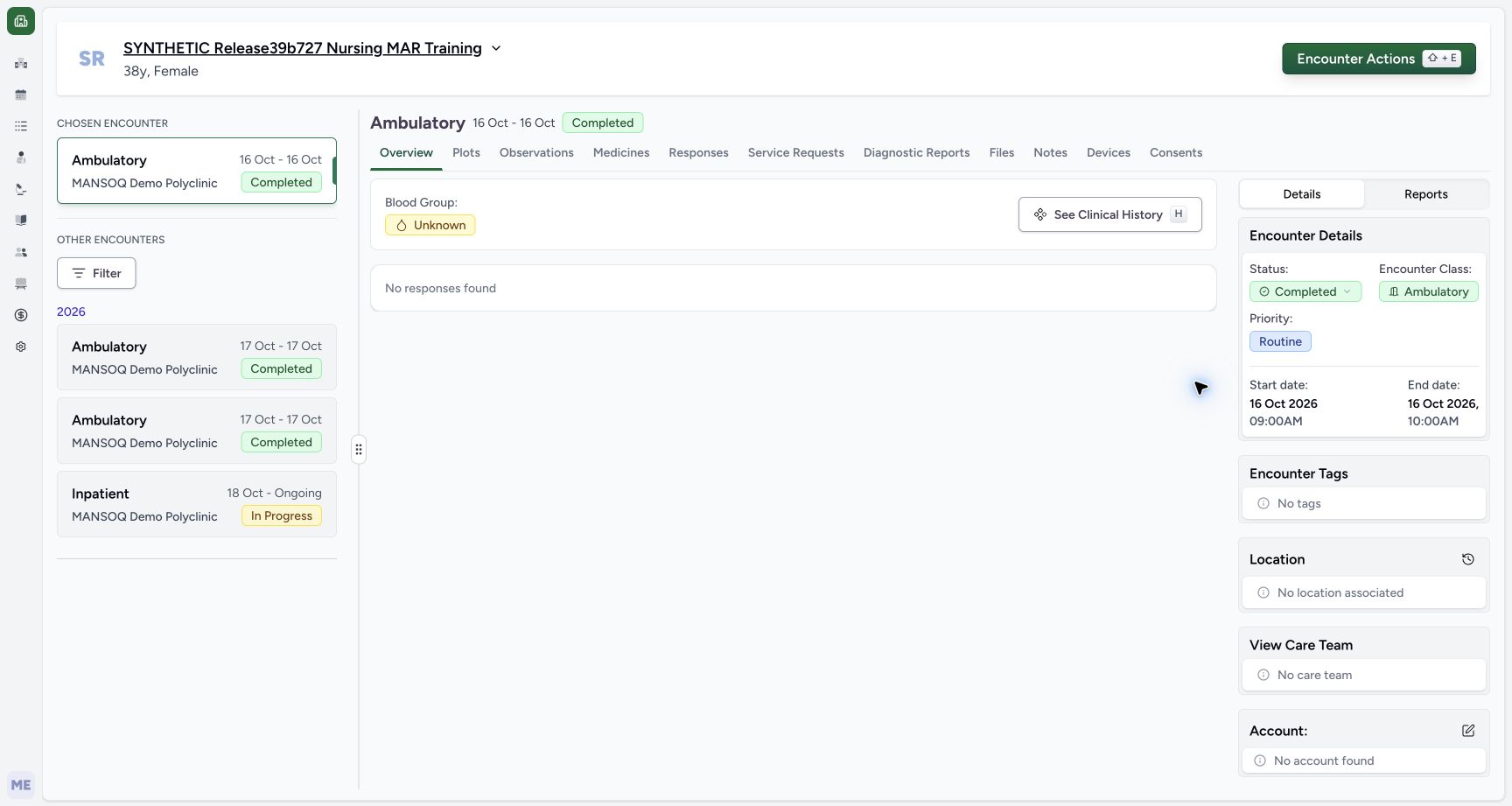
Exact committed release 96ca7318 on an isolated nonproduction clone, using an existing Doctor and fictional Polyclinic inpatient case. The synthetic patient name retains an earlier release label. The Resolved record’s Go to Encounter control opens its actual separate completed October 16 Ambulatory source as the chosen encounter. The saved 09:00–10:00 period is visible and no clinical write controls are used. The active assessment summary is empty for this resolved-only source; that does not delete the retained historical diagnosis. The existing ongoing Inpatient encounter remains selectable as a read-only sidebar preview; selecting it does not change the chosen encounter.
Image SHA-256
3bcfba8f34685c14655b978b9a4ac9058a55c8aaa713135d84736a31c4ba491c- Completed source encounter: Go to Encounter selected the separately prepared October 16 Ambulatory encounter.
- Source encounter dates: The saved source visit runs October 16, 09:00–10:00 in this fictional example.
- Preview the ongoing Inpatient encounter: Select the card to review another encounter. This opens a preview and does not switch the chosen encounter.
- The existing current Active diagnosis and separate corrected Entered in Error row must remain unchanged. This lesson reviews history only: do not select a history checkbox, choose Add Selected or Submit. The patient name retains an older release label; the captured software is exact 96ca7318. The installed demonstration Diagnosis form also has optional Text and Integer inputs; leave them untouched.
 12
12Recorded release 96ca7318 · 2026-10-19T02:17:27.072Z · 1728 × 921 Open historical diagnoses from the current encounter form
Capture details
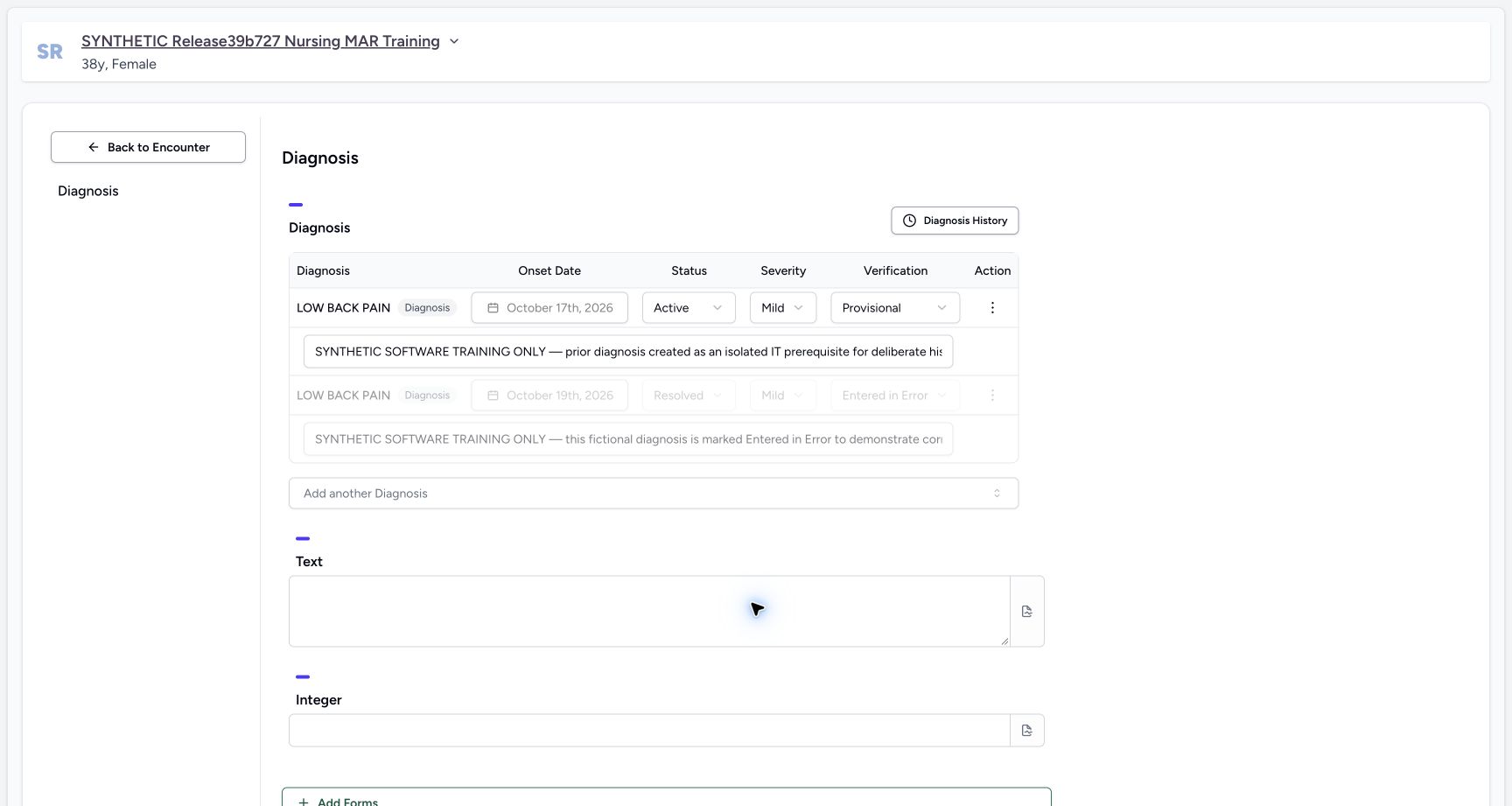
Exact committed release 96ca7318 on an isolated nonproduction clone, using an existing Doctor and fictional Polyclinic inpatient case. The synthetic patient name retains an earlier release label. The Doctor reopens the installed Diagnosis form from the restored current Inpatient encounter. Its existing Active and disabled Entered in Error rows remain unchanged. Diagnosis History opens a separate prior-record selector. No form field has been edited and no Submit action is taken.
Image SHA-256
2f0747c5ca800a2201c6d48b461daaec35864125ff35175cdba4ca6d3b782795- Diagnosis History selector: Open the historical record selector without changing the current form rows.
- Existing current Active row: The original current diagnosis remains separate from the newly prepared prior Resolved record.
123Recorded release 96ca7318 · 2026-10-19T02:17:46.375Z · 1728 × 921 Read the resolved prior record in the current form’s history selector
Capture details
Exact committed release 96ca7318 on an isolated nonproduction clone, using an existing Doctor and fictional Polyclinic inpatient case. The synthetic patient name retains an earlier release label. The actual Diagnosis History selector has loaded the separate Resolved/Provisional/Mild record with Root recorded-by context and October 16 onset, alongside the two original non-error Active records. The counter remains zero and Add Selected is disabled. This inspection proves actual Resolved non-error visibility; it does not copy or reactivate that record.
Image SHA-256
a9cd626982d89a99b62392a9ad0ea26a01ec01f647985bd7d13b5b3556e40761- Resolved prior record: The selector includes the non-error Resolved record without making it a current Active diagnosis.
- Prerequisite author: The source record retains Root recorded-by context and October 16 onset.
- Cancel without copying: No diagnosis is selected; Cancel leaves all source and current records unchanged.
1. Open the diagnosis timeline from the current assessment
Confirm the ongoing Inpatient card under Chosen Encounter and the current Active diagnosis in Overview. Choose the diagnosis history icon beside the Diagnoses heading, then wait for Past Diagnoses to load. The timeline is a separate history view, not a replacement of the current Active assessment.
12Open history separately from the current active assessment
Capture details
Exact committed release 96ca7318 on an isolated nonproduction clone, using an existing Doctor and fictional Polyclinic inpatient case. The synthetic patient name retains an earlier release label. The Doctor reloads the existing current inpatient encounter after IT separately prepares one fictional completed October 16 encounter and Resolved non-error diagnosis. The original current Active diagnosis remains in the Overview summary; all original records are preserved. The left sidebar also lists the new separate prior encounter. This is normal Doctor review, not proof that the Doctor created the IT prerequisite.
Image SHA-256 cbfe2edc7a4cf72612958e8b939d1fc3d284be23faeb85e7b1f7e3b9da68dd1c
- Diagnosis history: Open the patient’s diagnosis timeline without changing the current encounter’s Active diagnosis.
- Current Active diagnosis: The existing active assessment remains separate from a prior Resolved record.
1234Read the retained Resolved diagnosis on the timeline
Capture details
Exact committed release 96ca7318 on an isolated nonproduction clone, using an existing Doctor and fictional Polyclinic inpatient case. The synthetic patient name retains an earlier release label. The normal Doctor Past Diagnoses timeline has loaded three non-error records: the newly prepared prior Resolved example and two original Active records. Existing Entered in Error records remain excluded from this diagnosis-category view. The grouping date is October 19 creation date, separate from the new record’s October 16 onset. No clinical record is changed.
Image SHA-256 5ef51cc9d4c34bab0ec382bf7e6b777e68c998716df8ee2b7a189ddaf9eabbc9
- Resolved non-error record: The new separate prior record is visible alongside two retained Active records.
- Recorded-date grouping: October 19 groups when these records were created; the Onset column describes each original onset separately.
- Record information: Open this row’s information control to inspect its author, note and source encounter.
- Back to Encounter: Return from the clinical-history timeline to the encounter that opened this history.
2. Read status and onset separately from the group date
This timeline shows the new Resolved non-error record and two retained Active records. The October 19 heading groups their recorded creation date. The Resolved row’s onset is three days earlier, October 16; the other two rows retain October 17 onset. Read Status and Onset together. The current assessment excludes the Resolved example, while history retains it.
1234Read the retained Resolved diagnosis on the timeline
Capture details
Exact committed release 96ca7318 on an isolated nonproduction clone, using an existing Doctor and fictional Polyclinic inpatient case. The synthetic patient name retains an earlier release label. The normal Doctor Past Diagnoses timeline has loaded three non-error records: the newly prepared prior Resolved example and two original Active records. Existing Entered in Error records remain excluded from this diagnosis-category view. The grouping date is October 19 creation date, separate from the new record’s October 16 onset. No clinical record is changed.
Image SHA-256 5ef51cc9d4c34bab0ec382bf7e6b777e68c998716df8ee2b7a189ddaf9eabbc9
- Resolved non-error record: The new separate prior record is visible alongside two retained Active records.
- Recorded-date grouping: October 19 groups when these records were created; the Onset column describes each original onset separately.
- Record information: Open this row’s information control to inspect its author, note and source encounter.
- Back to Encounter: Return from the clinical-history timeline to the encounter that opened this history.
12Open history separately from the current active assessment
Capture details
Exact committed release 96ca7318 on an isolated nonproduction clone, using an existing Doctor and fictional Polyclinic inpatient case. The synthetic patient name retains an earlier release label. The Doctor reloads the existing current inpatient encounter after IT separately prepares one fictional completed October 16 encounter and Resolved non-error diagnosis. The original current Active diagnosis remains in the Overview summary; all original records are preserved. The left sidebar also lists the new separate prior encounter. This is normal Doctor review, not proof that the Doctor created the IT prerequisite.
Image SHA-256 cbfe2edc7a4cf72612958e8b939d1fc3d284be23faeb85e7b1f7e3b9da68dd1c
- Diagnosis history: Open the patient’s diagnosis timeline without changing the current encounter’s Active diagnosis.
- Current Active diagnosis: The existing active assessment remains separate from a prior Resolved record.
3. Inspect the author and saved note
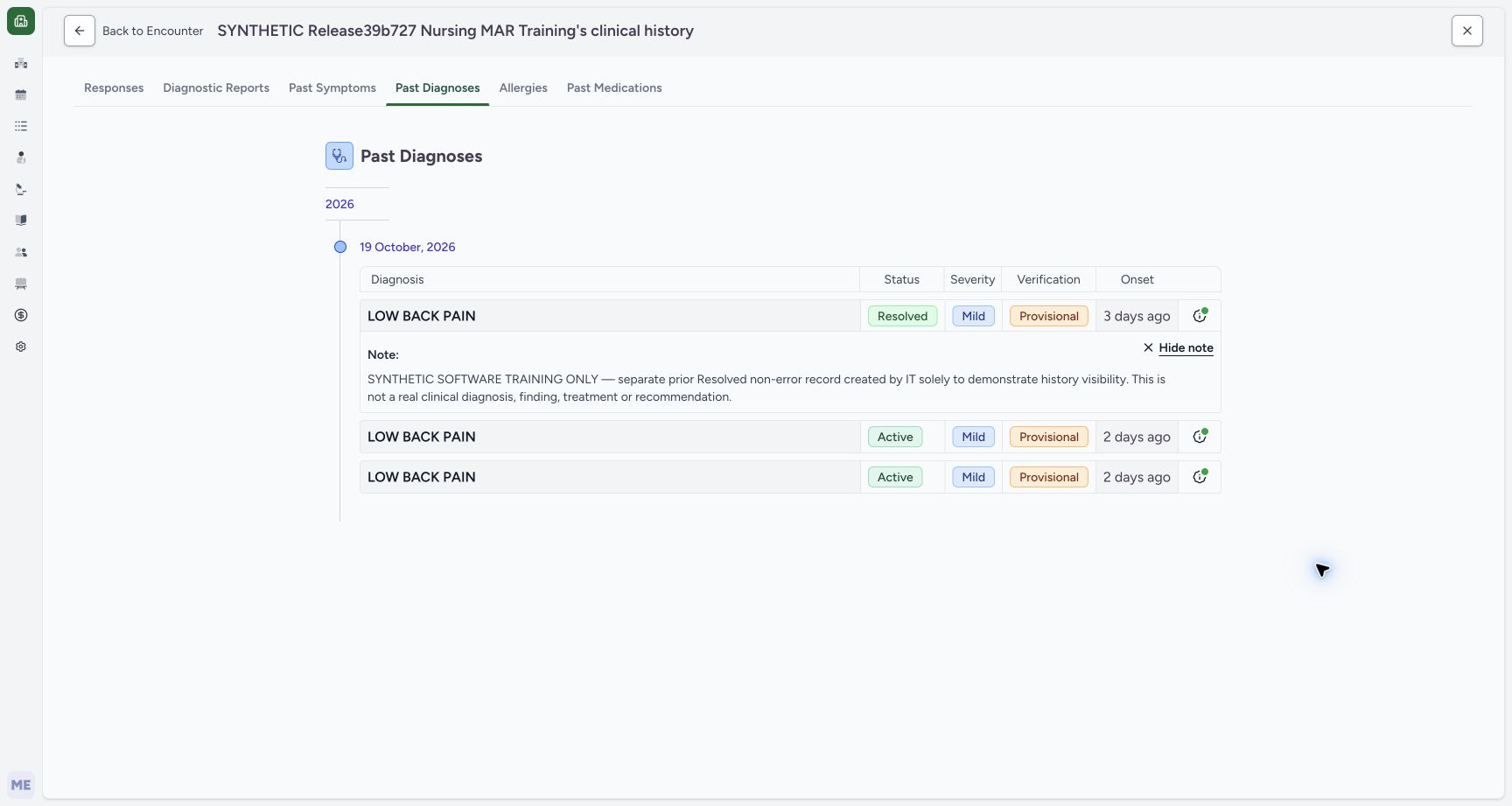
Open the Resolved row’s information control. Reported by identifies MANSOQ E2E Root, the separate prerequisite author; the reviewing Doctor did not create this record. Choose See Note to read the saved fictional training context, then Hide note to collapse it. The note explicitly says it is a software example rather than a real diagnosis, finding, treatment or recommendation.
123Read the resolved record’s author and source controls
Capture details
Exact committed release 96ca7318 on an isolated nonproduction clone, using an existing Doctor and fictional Polyclinic inpatient case. The synthetic patient name retains an earlier release label. The Resolved timeline row’s actual information menu identifies Reported by MANSOQ E2E Root and provides See Note and Go to Encounter. This separates the prerequisite author from the current reviewing Doctor and links the record to its source encounter. No record is selected for copying or changed.
Image SHA-256 c2e84ebd079c17f87dfe6d88fb7a741d7141fde5d2ee2a880a3c1388de0760f6
- Reported-by Root context: The prerequisite record was created by the existing IT Root account; the Doctor is reviewing it.
- See Note: Inspect the saved note before interpreting or reusing a historical record.
- Go to Encounter: Open the source encounter associated with this specific record.
 12
12Read the retained resolved-history training note
Capture details
Exact committed release 96ca7318 on an isolated nonproduction clone, using an existing Doctor and fictional Polyclinic inpatient case. The synthetic patient name retains an earlier release label. See Note expands the Resolved row’s retained note inline. It explicitly states this is a separate prior Resolved non-error record prepared by IT for software teaching, not a real clinical diagnosis, finding, treatment or recommendation. The displayed note is read only and no form is submitted.
Image SHA-256 a50b92e40f3d8471defe1edd78b2a305ab6a96416c537866f1b5e1d7e0a5566b
- Saved note context: The note explicitly identifies this as a separate fictional IT prerequisite for history visibility.
- Hide note: Collapse the inline note after reviewing its context.
4. Open the record’s actual completed source encounter
Open the same information menu and choose Go to Encounter. The October 16 Ambulatory encounter becomes the chosen encounter. Confirm Completed and its saved 09:00–10:00 period in Encounter Details. Its active assessment is empty because this prerequisite contains only the Resolved diagnosis; the retained history record has not been deleted.
123Read the resolved record’s author and source controls
Capture details
Exact committed release 96ca7318 on an isolated nonproduction clone, using an existing Doctor and fictional Polyclinic inpatient case. The synthetic patient name retains an earlier release label. The Resolved timeline row’s actual information menu identifies Reported by MANSOQ E2E Root and provides See Note and Go to Encounter. This separates the prerequisite author from the current reviewing Doctor and links the record to its source encounter. No record is selected for copying or changed.
Image SHA-256 c2e84ebd079c17f87dfe6d88fb7a741d7141fde5d2ee2a880a3c1388de0760f6
- Reported-by Root context: The prerequisite record was created by the existing IT Root account; the Doctor is reviewing it.
- See Note: Inspect the saved note before interpreting or reusing a historical record.
- Go to Encounter: Open the source encounter associated with this specific record.
123Verify the diagnosis record’s completed source encounter
Capture details
Exact committed release 96ca7318 on an isolated nonproduction clone, using an existing Doctor and fictional Polyclinic inpatient case. The synthetic patient name retains an earlier release label. The Resolved record’s Go to Encounter control opens its actual separate completed October 16 Ambulatory source as the chosen encounter. The saved 09:00–10:00 period is visible and no clinical write controls are used. The active assessment summary is empty for this resolved-only source; that does not delete the retained historical diagnosis. The existing ongoing Inpatient encounter remains selectable as a read-only sidebar preview; selecting it does not change the chosen encounter.
Image SHA-256 3bcfba8f34685c14655b978b9a4ac9058a55c8aaa713135d84736a31c4ba491c
- Completed source encounter: Go to Encounter selected the separately prepared October 16 Ambulatory encounter.
- Source encounter dates: The saved source visit runs October 16, 09:00–10:00 in this fictional example.
- Preview the ongoing Inpatient encounter: Select the card to review another encounter. This opens a preview and does not switch the chosen encounter.
5. Recognize a sidebar preview before attempting edits
Choose the existing ongoing Inpatient card under Other Encounters. The right panel now previews that Inpatient encounter and its Active assessment, but the left Chosen Encounter card still identifies the completed October 16 source. Forms and normal current-encounter editing controls are absent in this preview. Selecting the sidebar card does not itself change the chosen encounter.
123Verify the diagnosis record’s completed source encounter
Capture details
Exact committed release 96ca7318 on an isolated nonproduction clone, using an existing Doctor and fictional Polyclinic inpatient case. The synthetic patient name retains an earlier release label. The Resolved record’s Go to Encounter control opens its actual separate completed October 16 Ambulatory source as the chosen encounter. The saved 09:00–10:00 period is visible and no clinical write controls are used. The active assessment summary is empty for this resolved-only source; that does not delete the retained historical diagnosis. The existing ongoing Inpatient encounter remains selectable as a read-only sidebar preview; selecting it does not change the chosen encounter.
Image SHA-256 3bcfba8f34685c14655b978b9a4ac9058a55c8aaa713135d84736a31c4ba491c
- Completed source encounter: Go to Encounter selected the separately prepared October 16 Ambulatory encounter.
- Source encounter dates: The saved source visit runs October 16, 09:00–10:00 in this fictional example.
- Preview the ongoing Inpatient encounter: Select the card to review another encounter. This opens a preview and does not switch the chosen encounter.
12Distinguish another encounter’s preview from the chosen encounter
Capture details
Exact committed release 96ca7318 on an isolated nonproduction clone, using an existing Doctor and fictional Polyclinic inpatient case. The synthetic patient name retains an earlier release label. Selecting the existing Inpatient sidebar card opens a read-only selectedEncounter preview while the chosen encounter remains the completed October 16 source. The ongoing Inpatient heading and current Active assessment are visible on the right, but this does not switch the chosen encounter or restore its editing controls. This navigation boundary is retained explicitly before returning through browser history to the original encounter.
Image SHA-256 4dd20fb8c0c1fd623dd11a8a8c53e30321311a34376a504ff59dda9654156534
- Chosen encounter remains the source: The left chosen card still identifies the completed October 16 Ambulatory source.
- Previewed Inpatient context: The right panel previews the ongoing Inpatient encounter after selecting its sidebar card.
6. Return to the original chosen encounter
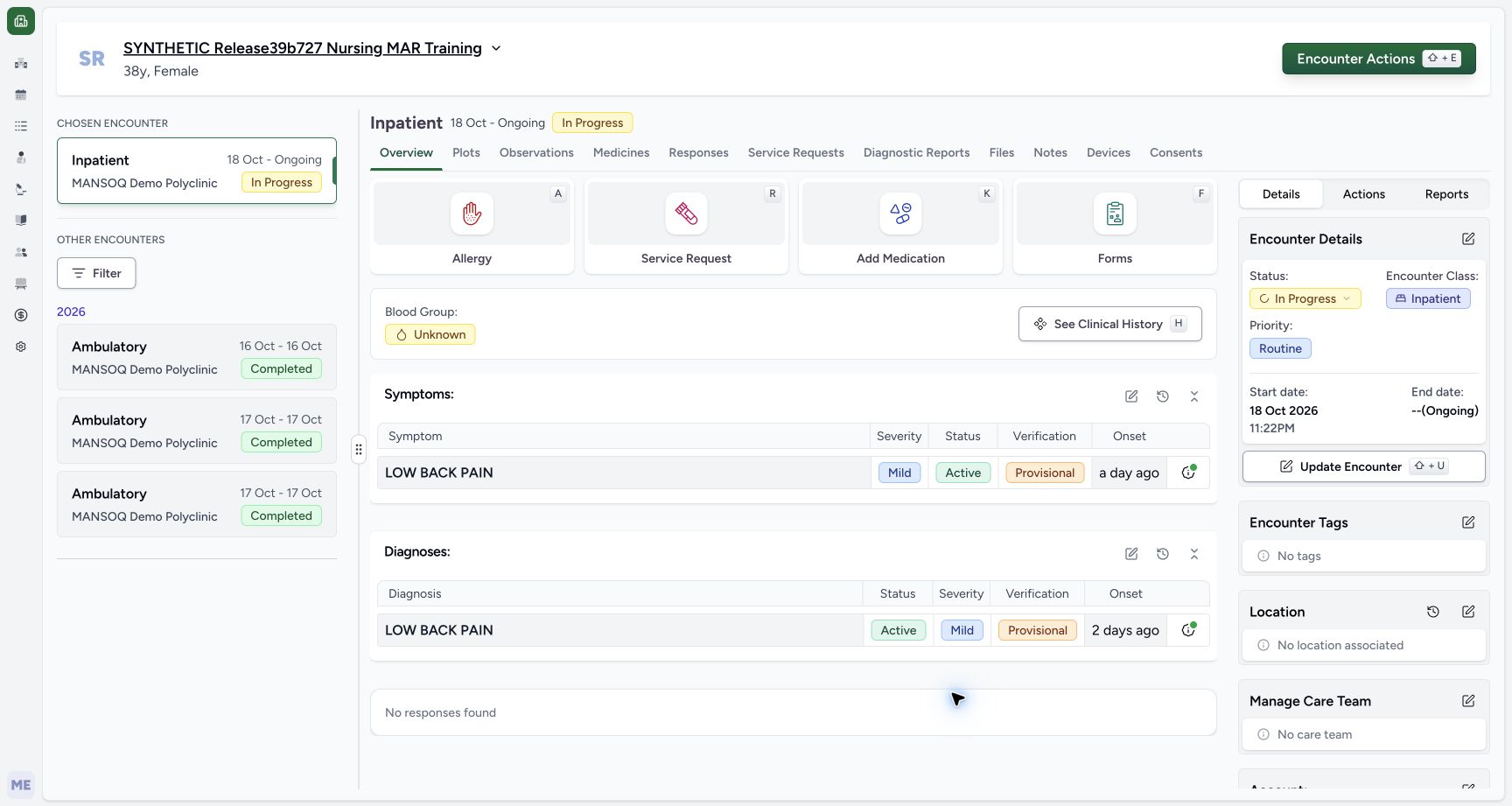
In this observed navigation sequence, use browser Back once to leave the Inpatient preview and return to the completed source, then Back again to return to Past Diagnoses. Choose that history page’s Back to Encounter control. Confirm the original ongoing Inpatient is now the Chosen Encounter and Forms is visible again before continuing.
12Distinguish another encounter’s preview from the chosen encounter
Capture details
Exact committed release 96ca7318 on an isolated nonproduction clone, using an existing Doctor and fictional Polyclinic inpatient case. The synthetic patient name retains an earlier release label. Selecting the existing Inpatient sidebar card opens a read-only selectedEncounter preview while the chosen encounter remains the completed October 16 source. The ongoing Inpatient heading and current Active assessment are visible on the right, but this does not switch the chosen encounter or restore its editing controls. This navigation boundary is retained explicitly before returning through browser history to the original encounter.
Image SHA-256 4dd20fb8c0c1fd623dd11a8a8c53e30321311a34376a504ff59dda9654156534
- Chosen encounter remains the source: The left chosen card still identifies the completed October 16 Ambulatory source.
- Previewed Inpatient context: The right panel previews the ongoing Inpatient encounter after selecting its sidebar card.
1234Read the retained Resolved diagnosis on the timeline
Capture details
Exact committed release 96ca7318 on an isolated nonproduction clone, using an existing Doctor and fictional Polyclinic inpatient case. The synthetic patient name retains an earlier release label. The normal Doctor Past Diagnoses timeline has loaded three non-error records: the newly prepared prior Resolved example and two original Active records. Existing Entered in Error records remain excluded from this diagnosis-category view. The grouping date is October 19 creation date, separate from the new record’s October 16 onset. No clinical record is changed.
Image SHA-256 5ef51cc9d4c34bab0ec382bf7e6b777e68c998716df8ee2b7a189ddaf9eabbc9
- Resolved non-error record: The new separate prior record is visible alongside two retained Active records.
- Recorded-date grouping: October 19 groups when these records were created; the Onset column describes each original onset separately.
- Record information: Open this row’s information control to inspect its author, note and source encounter.
- Back to Encounter: Return from the clinical-history timeline to the encounter that opened this history.
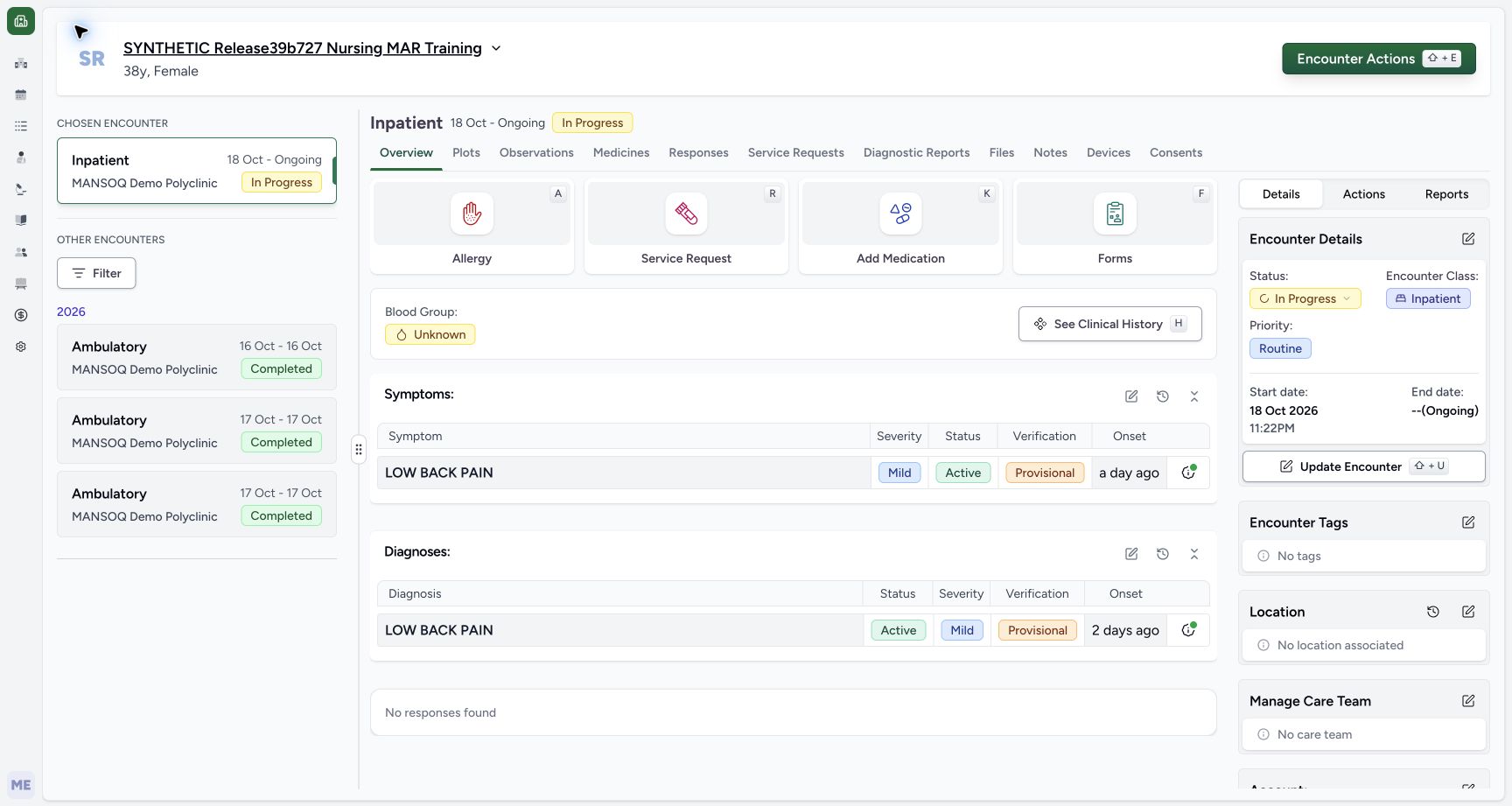 12
12Restore the original chosen Inpatient encounter before using Forms
Capture details
Exact committed release 96ca7318 on an isolated nonproduction clone, using an existing Doctor and fictional Polyclinic inpatient case. The synthetic patient name retains an earlier release label. Browser Back first leaves the selectedEncounter preview and then returns to the original diagnosis timeline. Its Back to Encounter control restores the actual original Inpatient route and chosen card. The normal Forms controls return and the original Active diagnosis remains unchanged. No prior or current record is amended.
Image SHA-256 20e86fc804581d13b4881c76e4747ee6d81507ae3fa0226f7a7a302560477194
- Original chosen encounter restored: The left chosen card and right heading both identify the ongoing Inpatient encounter.
- Forms restored: The normal current-encounter form entry is available again in this Doctor context.
7. Inspect the same Resolved record in the form history selector
Choose Forms and the installed Diagnosis entry, then Diagnosis History. The loaded selector includes the prior Resolved record with Root recorded-by context and October 16 onset, alongside the two original Active records. Keep the selection count at zero; Add Selected remains disabled. Choose Cancel without checking any row. This proves visibility of a non-error Resolved record, not a new copy or reactivation.
12Restore the original chosen Inpatient encounter before using Forms
Capture details
Exact committed release 96ca7318 on an isolated nonproduction clone, using an existing Doctor and fictional Polyclinic inpatient case. The synthetic patient name retains an earlier release label. Browser Back first leaves the selectedEncounter preview and then returns to the original diagnosis timeline. Its Back to Encounter control restores the actual original Inpatient route and chosen card. The normal Forms controls return and the original Active diagnosis remains unchanged. No prior or current record is amended.
Image SHA-256 20e86fc804581d13b4881c76e4747ee6d81507ae3fa0226f7a7a302560477194
- Original chosen encounter restored: The left chosen card and right heading both identify the ongoing Inpatient encounter.
- Forms restored: The normal current-encounter form entry is available again in this Doctor context.
12Open historical diagnoses from the current encounter form
Capture details
Exact committed release 96ca7318 on an isolated nonproduction clone, using an existing Doctor and fictional Polyclinic inpatient case. The synthetic patient name retains an earlier release label. The Doctor reopens the installed Diagnosis form from the restored current Inpatient encounter. Its existing Active and disabled Entered in Error rows remain unchanged. Diagnosis History opens a separate prior-record selector. No form field has been edited and no Submit action is taken.
Image SHA-256 2f0747c5ca800a2201c6d48b461daaec35864125ff35175cdba4ca6d3b782795
- Diagnosis History selector: Open the historical record selector without changing the current form rows.
- Existing current Active row: The original current diagnosis remains separate from the newly prepared prior Resolved record.
123Read the resolved prior record in the current form’s history selector
Capture details
Exact committed release 96ca7318 on an isolated nonproduction clone, using an existing Doctor and fictional Polyclinic inpatient case. The synthetic patient name retains an earlier release label. The actual Diagnosis History selector has loaded the separate Resolved/Provisional/Mild record with Root recorded-by context and October 16 onset, alongside the two original non-error Active records. The counter remains zero and Add Selected is disabled. This inspection proves actual Resolved non-error visibility; it does not copy or reactivate that record.
Image SHA-256 a9cd626982d89a99b62392a9ad0ea26a01ec01f647985bd7d13b5b3556e40761
- Resolved prior record: The selector includes the non-error Resolved record without making it a current Active diagnosis.
- Prerequisite author: The source record retains Root recorded-by context and October 16 onset.
- Cancel without copying: No diagnosis is selected; Cancel leaves all source and current records unchanged.
8. Leave the form and verify the saved current assessment
Choose Back to Encounter on the Diagnosis form without Submit. The existing browser confirmation says “You have unsaved changes. Are you sure you want to leave?”; OK leaves the form. The intermediate confirmation was observed as text but has no publishable wide screenshot. The returned Overview shows the original chosen Inpatient and unchanged current Active diagnosis. Independent ordinary Doctor and Nurse readbacks verified all seven condition records (four diagnoses and three symptoms), fourteen administrations, four requests and the current and three prior encounters remained unchanged after this review.
12Open historical diagnoses from the current encounter form
Capture details
Exact committed release 96ca7318 on an isolated nonproduction clone, using an existing Doctor and fictional Polyclinic inpatient case. The synthetic patient name retains an earlier release label. The Doctor reopens the installed Diagnosis form from the restored current Inpatient encounter. Its existing Active and disabled Entered in Error rows remain unchanged. Diagnosis History opens a separate prior-record selector. No form field has been edited and no Submit action is taken.
Image SHA-256 2f0747c5ca800a2201c6d48b461daaec35864125ff35175cdba4ca6d3b782795
- Diagnosis History selector: Open the historical record selector without changing the current form rows.
- Existing current Active row: The original current diagnosis remains separate from the newly prepared prior Resolved record.
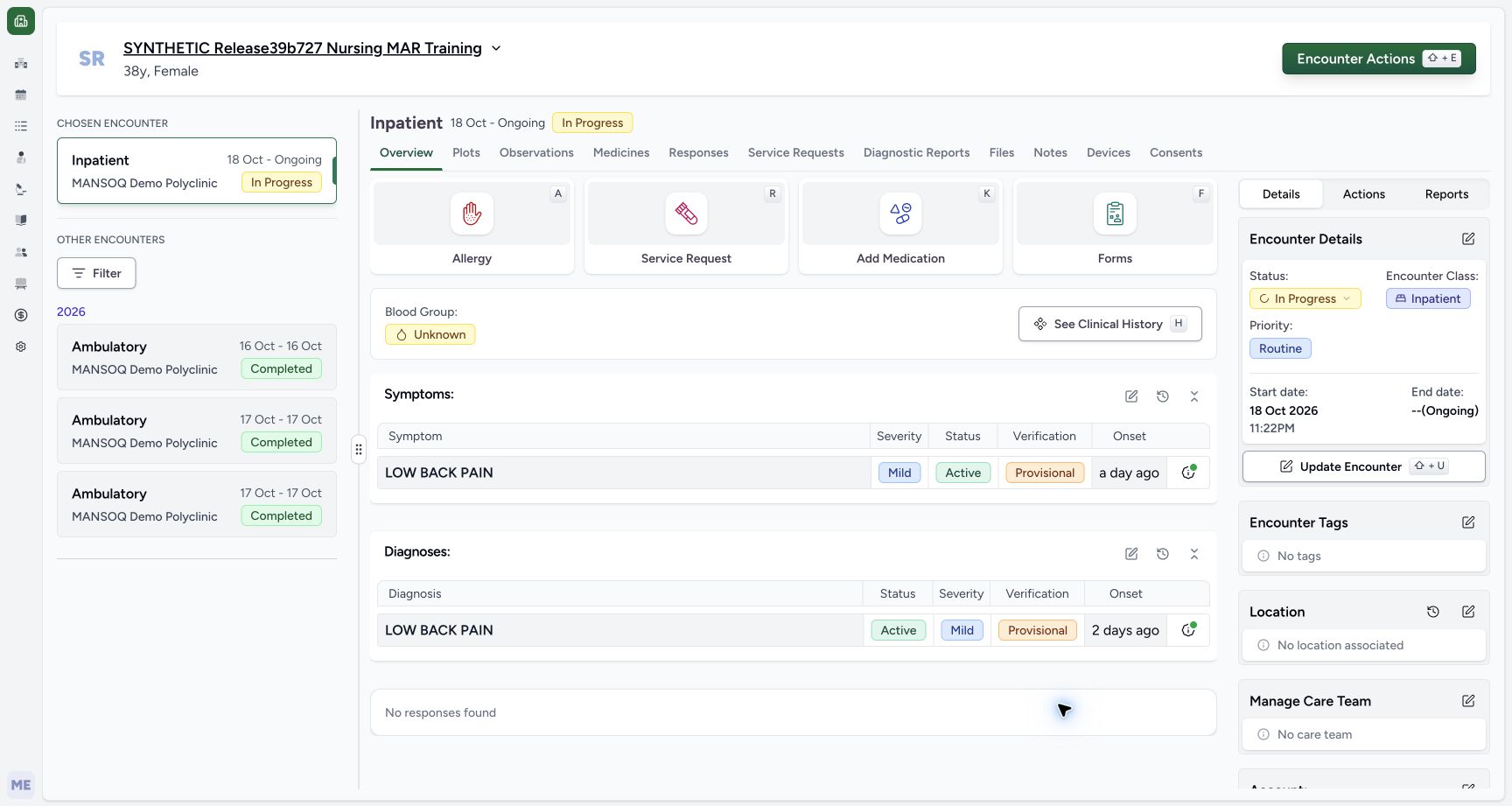 12
12Finish the history review on the original ongoing encounter
Capture details
Exact committed release 96ca7318 on an isolated nonproduction clone, using an existing Doctor and fictional Polyclinic inpatient case. The synthetic patient name retains an earlier release label. After cancelling the selector, Back to Encounter raises the existing browser unsaved-changes confirmation. OK leaves the form normally, with no Submit. The Doctor returns to the original chosen Inpatient encounter and unchanged current Active assessment. The intermediate browser confirmation remains text-only evidence; no screenshot of that native dialog is claimed.
Image SHA-256 f1f2834fe588b6821fecfbef54119b7c1c04829732afeaddb04be9fc98ba8cc1
- Original chosen encounter: The review ends on the original Inpatient encounter with no selectedEncounter preview.
- Unchanged current assessment: The existing Active diagnosis remains in the current summary; the prior Resolved record remains history.
Retained history and active assessment serve different purposes
This exact source and observed case keep non-error Resolved diagnoses available in Past Diagnoses and the form’s history selector while the active Overview continues to show its current Active assessment. Entered in Error records remain excluded from these history lists. The same terminology code, recorded date or patient does not replace the individual record, author, original onset and source encounter as context.
1234Read the retained Resolved diagnosis on the timeline
Capture details
Exact committed release 96ca7318 on an isolated nonproduction clone, using an existing Doctor and fictional Polyclinic inpatient case. The synthetic patient name retains an earlier release label. The normal Doctor Past Diagnoses timeline has loaded three non-error records: the newly prepared prior Resolved example and two original Active records. Existing Entered in Error records remain excluded from this diagnosis-category view. The grouping date is October 19 creation date, separate from the new record’s October 16 onset. No clinical record is changed.
Image SHA-256 5ef51cc9d4c34bab0ec382bf7e6b777e68c998716df8ee2b7a189ddaf9eabbc9
- Resolved non-error record: The new separate prior record is visible alongside two retained Active records.
- Recorded-date grouping: October 19 groups when these records were created; the Onset column describes each original onset separately.
- Record information: Open this row’s information control to inspect its author, note and source encounter.
- Back to Encounter: Return from the clinical-history timeline to the encounter that opened this history.
123Read the resolved record’s author and source controls
Capture details
Exact committed release 96ca7318 on an isolated nonproduction clone, using an existing Doctor and fictional Polyclinic inpatient case. The synthetic patient name retains an earlier release label. The Resolved timeline row’s actual information menu identifies Reported by MANSOQ E2E Root and provides See Note and Go to Encounter. This separates the prerequisite author from the current reviewing Doctor and links the record to its source encounter. No record is selected for copying or changed.
Image SHA-256 c2e84ebd079c17f87dfe6d88fb7a741d7141fde5d2ee2a880a3c1388de0760f6
- Reported-by Root context: The prerequisite record was created by the existing IT Root account; the Doctor is reviewing it.
- See Note: Inspect the saved note before interpreting or reusing a historical record.
- Go to Encounter: Open the source encounter associated with this specific record.
123Read the resolved prior record in the current form’s history selector
Capture details
Exact committed release 96ca7318 on an isolated nonproduction clone, using an existing Doctor and fictional Polyclinic inpatient case. The synthetic patient name retains an earlier release label. The actual Diagnosis History selector has loaded the separate Resolved/Provisional/Mild record with Root recorded-by context and October 16 onset, alongside the two original non-error Active records. The counter remains zero and Add Selected is disabled. This inspection proves actual Resolved non-error visibility; it does not copy or reactivate that record.
Image SHA-256 a9cd626982d89a99b62392a9ad0ea26a01ec01f647985bd7d13b5b3556e40761
- Resolved prior record: The selector includes the non-error Resolved record without making it a current Active diagnosis.
- Prerequisite author: The source record retains Root recorded-by context and October 16 onset.
- Cancel without copying: No diagnosis is selected; Cancel leaves all source and current records unchanged.
12Finish the history review on the original ongoing encounter
Capture details
Exact committed release 96ca7318 on an isolated nonproduction clone, using an existing Doctor and fictional Polyclinic inpatient case. The synthetic patient name retains an earlier release label. After cancelling the selector, Back to Encounter raises the existing browser unsaved-changes confirmation. OK leaves the form normally, with no Submit. The Doctor returns to the original chosen Inpatient encounter and unchanged current Active assessment. The intermediate browser confirmation remains text-only evidence; no screenshot of that native dialog is claimed.
Image SHA-256 f1f2834fe588b6821fecfbef54119b7c1c04829732afeaddb04be9fc98ba8cc1
- Original chosen encounter: The review ends on the original Inpatient encounter with no selectedEncounter preview.
- Unchanged current assessment: The existing Active diagnosis remains in the current summary; the prior Resolved record remains history.
Observed scope and remaining evidence gap
This lesson qualifies one authorized Doctor’s read-only desktop review in a synthetic Polyclinic case. IT preparation is separately recorded and does not imply Doctor authority to create prerequisites or change permissions. No history row was copied, no lifecycle or clinical field was changed, and no mobile or other-facility permission claim is made. The intermediate leave-confirmation screenshot remains an explicit gap; the genuine form-before and saved Overview-after frames do not pretend to depict that prompt.
123Verify the diagnosis record’s completed source encounter
Capture details
Exact committed release 96ca7318 on an isolated nonproduction clone, using an existing Doctor and fictional Polyclinic inpatient case. The synthetic patient name retains an earlier release label. The Resolved record’s Go to Encounter control opens its actual separate completed October 16 Ambulatory source as the chosen encounter. The saved 09:00–10:00 period is visible and no clinical write controls are used. The active assessment summary is empty for this resolved-only source; that does not delete the retained historical diagnosis. The existing ongoing Inpatient encounter remains selectable as a read-only sidebar preview; selecting it does not change the chosen encounter.
Image SHA-256 3bcfba8f34685c14655b978b9a4ac9058a55c8aaa713135d84736a31c4ba491c
- Completed source encounter: Go to Encounter selected the separately prepared October 16 Ambulatory encounter.
- Source encounter dates: The saved source visit runs October 16, 09:00–10:00 in this fictional example.
- Preview the ongoing Inpatient encounter: Select the card to review another encounter. This opens a preview and does not switch the chosen encounter.
12Open historical diagnoses from the current encounter form
Capture details
Exact committed release 96ca7318 on an isolated nonproduction clone, using an existing Doctor and fictional Polyclinic inpatient case. The synthetic patient name retains an earlier release label. The Doctor reopens the installed Diagnosis form from the restored current Inpatient encounter. Its existing Active and disabled Entered in Error rows remain unchanged. Diagnosis History opens a separate prior-record selector. No form field has been edited and no Submit action is taken.
Image SHA-256 2f0747c5ca800a2201c6d48b461daaec35864125ff35175cdba4ca6d3b782795
- Diagnosis History selector: Open the historical record selector without changing the current form rows.
- Existing current Active row: The original current diagnosis remains separate from the newly prepared prior Resolved record.
123Read the resolved prior record in the current form’s history selector
Capture details
Exact committed release 96ca7318 on an isolated nonproduction clone, using an existing Doctor and fictional Polyclinic inpatient case. The synthetic patient name retains an earlier release label. The actual Diagnosis History selector has loaded the separate Resolved/Provisional/Mild record with Root recorded-by context and October 16 onset, alongside the two original non-error Active records. The counter remains zero and Add Selected is disabled. This inspection proves actual Resolved non-error visibility; it does not copy or reactivate that record.
Image SHA-256 a9cd626982d89a99b62392a9ad0ea26a01ec01f647985bd7d13b5b3556e40761
- Resolved prior record: The selector includes the non-error Resolved record without making it a current Active diagnosis.
- Prerequisite author: The source record retains Root recorded-by context and October 16 onset.
- Cancel without copying: No diagnosis is selected; Cancel leaves all source and current records unchanged.
12Finish the history review on the original ongoing encounter
Capture details
Exact committed release 96ca7318 on an isolated nonproduction clone, using an existing Doctor and fictional Polyclinic inpatient case. The synthetic patient name retains an earlier release label. After cancelling the selector, Back to Encounter raises the existing browser unsaved-changes confirmation. OK leaves the form normally, with no Submit. The Doctor returns to the original chosen Inpatient encounter and unchanged current Active assessment. The intermediate browser confirmation remains text-only evidence; no screenshot of that native dialog is claimed.
Image SHA-256 f1f2834fe588b6821fecfbef54119b7c1c04829732afeaddb04be9fc98ba8cc1
- Original chosen encounter: The review ends on the original Inpatient encounter with no selectedEncounter preview.
- Unchanged current assessment: The existing Active diagnosis remains in the current summary; the prior Resolved record remains history.
Source evidence
Every citation uses this exact committed version. The private source repository requires access.
- repositories/platform/mansoq-web/src/components/Patient/diagnosis/list.tsx:65 ·
96ca7318eb2b93f5fa477908a1543075e0d1f056Source file checksum
5662a180f3653fa2e8fbabf2f931d3e9a65792f22e9e7d534b108772601863ed - repositories/platform/mansoq-web/src/components/Patient/diagnosis/list.tsx:103 ·
96ca7318eb2b93f5fa477908a1543075e0d1f056Source file checksum
5662a180f3653fa2e8fbabf2f931d3e9a65792f22e9e7d534b108772601863ed - repositories/platform/mansoq-web/src/components/Patient/diagnosis/DiagnosisTable.tsx:220 ·
96ca7318eb2b93f5fa477908a1543075e0d1f056Source file checksum
45e40342661a50ac9ad52a4e34cfc2dc4d153ce389dc8829ffdb52c0f44f4c19 - repositories/platform/mansoq-web/src/components/Patient/Common/ClinicalInformationRow.tsx:1 ·
96ca7318eb2b93f5fa477908a1543075e0d1f056Source file checksum
087ba137455f77d10d911c939b4123d81561668f5ec15f265af7f13d7ba72975 - repositories/platform/mansoq-web/src/pages/Encounters/EncounterHistorySelector.tsx:427 ·
96ca7318eb2b93f5fa477908a1543075e0d1f056Source file checksum
b02c8e66ae497608e32ffbe8ba7ea19234928b7ef7cf6c2440af327a1d34facf - repositories/platform/mansoq-web/src/pages/Encounters/utils/EncounterProvider.tsx:128 ·
96ca7318eb2b93f5fa477908a1543075e0d1f056Source file checksum
d2609fc0452c91c20104237bf02be40ecb3bf48225011aba1f4bca2d50620d75 - repositories/platform/mansoq-web/src/pages/Encounters/utils/EncounterProvider.tsx:164 ·
96ca7318eb2b93f5fa477908a1543075e0d1f056Source file checksum
d2609fc0452c91c20104237bf02be40ecb3bf48225011aba1f4bca2d50620d75 - repositories/platform/mansoq-web/src/components/Questionnaire/QuestionTypes/DiagnosisQuestion.tsx:562 ·
96ca7318eb2b93f5fa477908a1543075e0d1f056Source file checksum
56a14d11bcc3aef66d9dc2d220b29d4c22ff671eed6ed4c4676ddf59b7920159 - repositories/platform/mansoq-web/src/components/Questionnaire/QuestionTypes/DiagnosisQuestion.tsx:662 ·
96ca7318eb2b93f5fa477908a1543075e0d1f056Source file checksum
56a14d11bcc3aef66d9dc2d220b29d4c22ff671eed6ed4c4676ddf59b7920159 - repositories/platform/mansoq-web/src/components/HistoricalRecordSelector/index.tsx:1 ·
96ca7318eb2b93f5fa477908a1543075e0d1f056Source file checksum
0ab03afa6a5954112061e0bf07b15cd3f4c901444f3c3de8a8e194524ef1f0c2 - repositories/platform/mansoq-web/src/components/Questionnaire/QuestionnaireForm.tsx:583 ·
96ca7318eb2b93f5fa477908a1543075e0d1f056Source file checksum
e6e48112c033602b02815eb3685119882242f22b14975dffc3feba7d96e20923