 MANSOQ
 Laboratory and diagnostics · VERSION 96ca7318
Add a component control range and cancel conflicting-rule removal
Add a clearly synthetic numeric rule to the Decimal component, persist it, inspect the saved summary and cancel the root/component conflict-removal confirmation.
Facility Admin
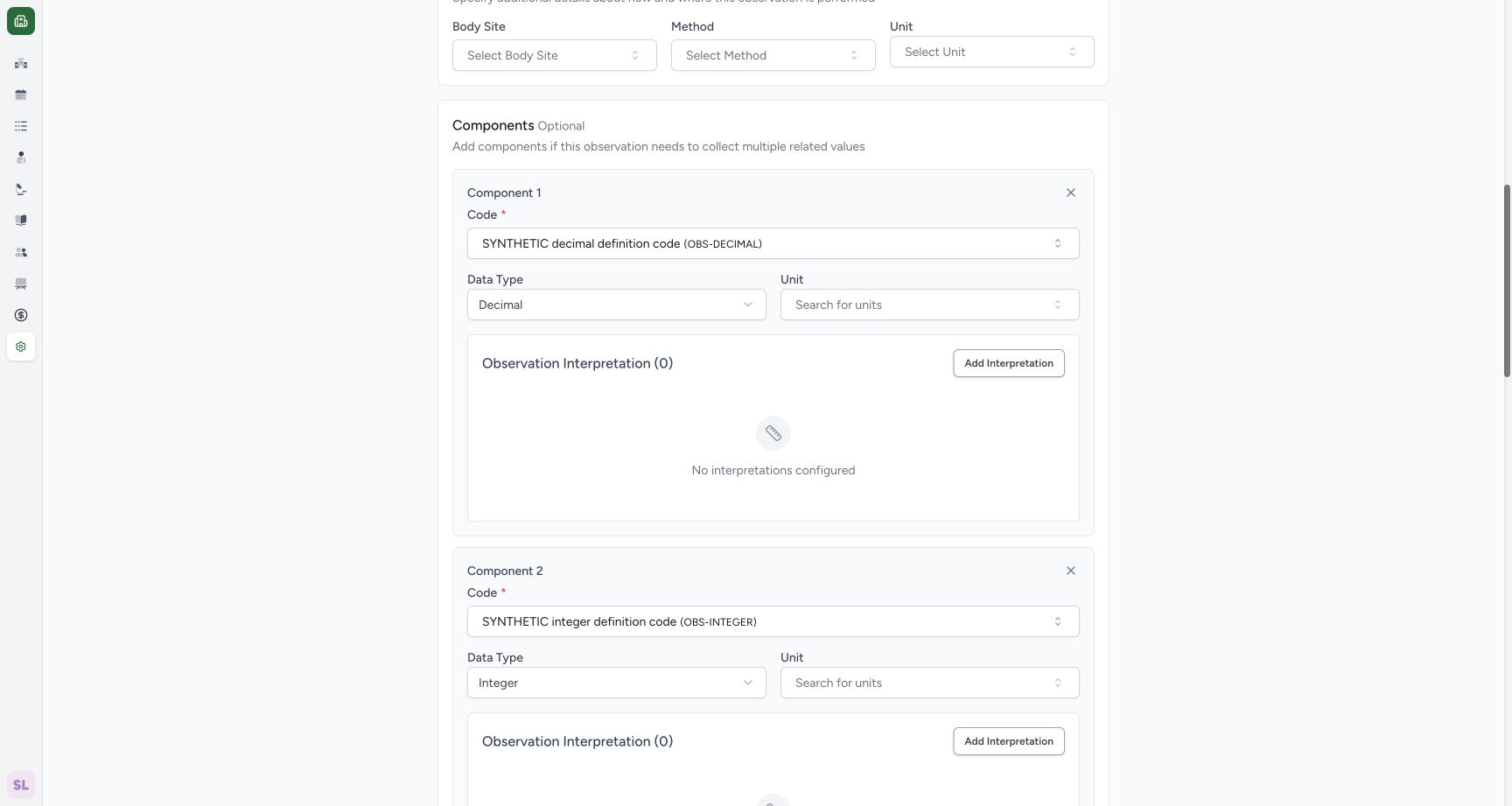 1
1decimal component interpretation entry
Capture details
Exact 96ca source. Fictional definition metadata and software-control limits only; no patient result, clinical reference-range or licensed terminology qualification.
Image SHA-256 3f6aaeaa7aaa448c111a7620df6cf30778e28a2ac1dd6d55d9fda12403a9353f
- Component Add Interpretation: Open the Decimal component interpretation sheet.
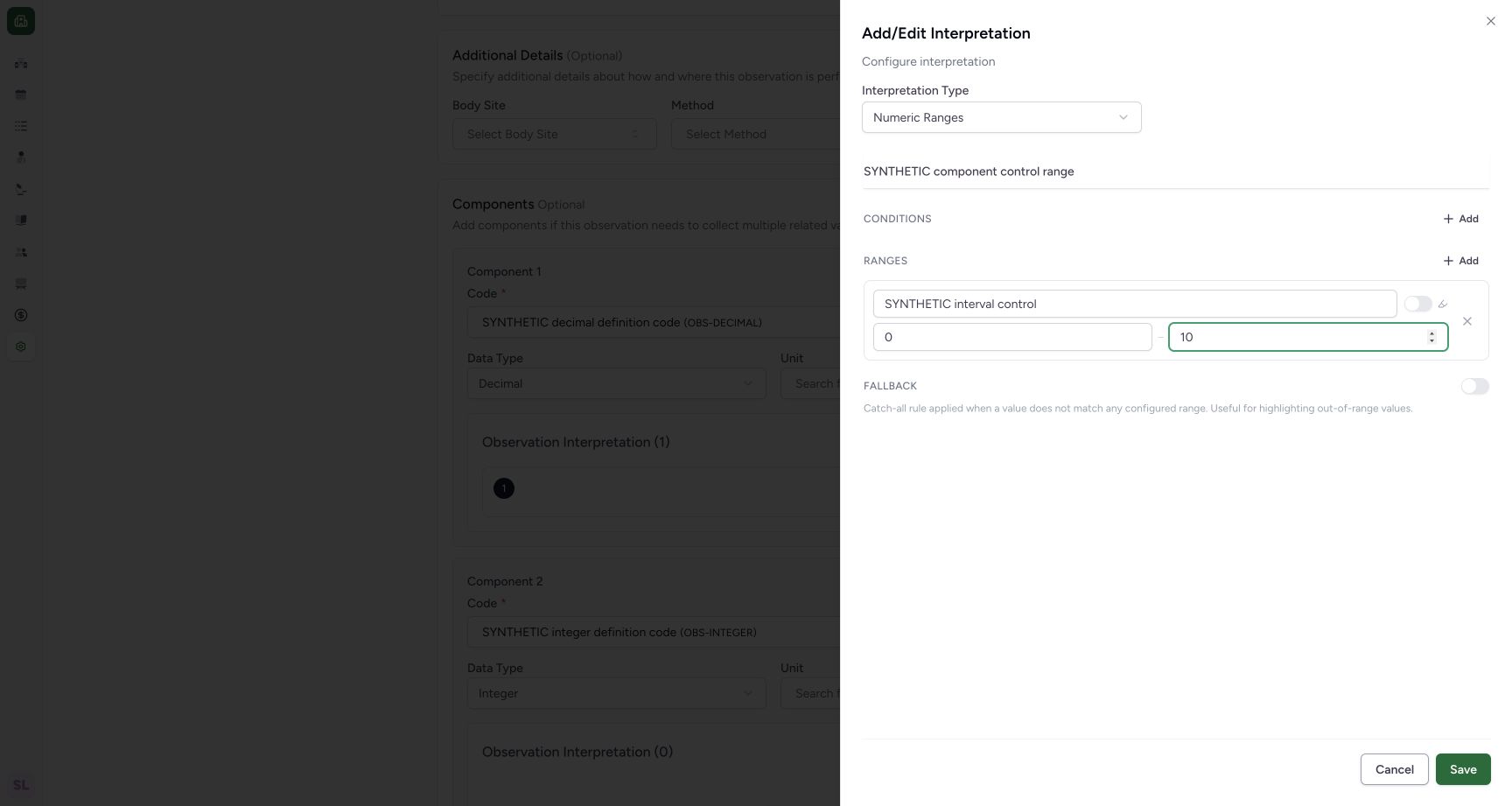 12345
12345synthetic component range review
Capture details
Exact 96ca source. Fictional definition metadata and software-control limits only; no patient result, clinical reference-range or licensed terminology qualification.
Image SHA-256 4110751340baf599d55c5dda0917b9672c59f04e0bb2552e368f6818c720e64f
- Synthetic title: Review the named software-control rule.
- Synthetic display: Review the display text.
- Minimum 0: Review 0 as the training minimum.
- Maximum 10: Review 10 as the training maximum.
- Sheet Save: Save the local rule to the parent form.
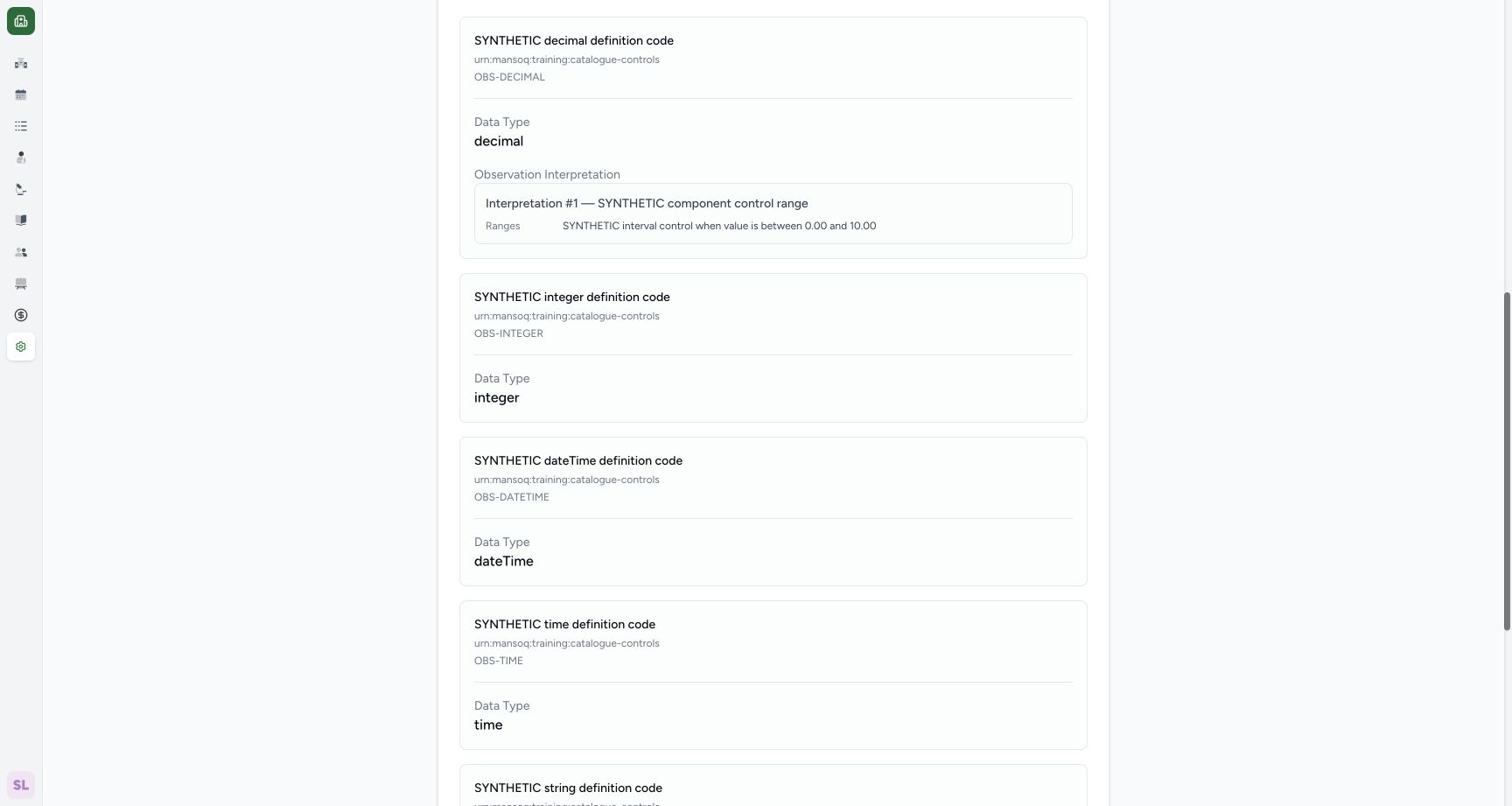 1
1saved component range detail
Capture details
Exact 96ca source. Fictional definition metadata and software-control limits only; no patient result, clinical reference-range or licensed terminology qualification.
Image SHA-256 7647be070268e8ee6097ca402427dad51c553b09dfc4aefd61894c5b62df3fee
- Saved component rule: Read the saved component range and display in the definition detail.
12 of 12 content blocks have reviewed image alignment. Missing overview or prerequisite images remain open.
Before you begin
- Use the pictured fictional component-control definition with its existing Decimal component. The description explicitly identifies this record as software training without clinical meaning or a patient result.
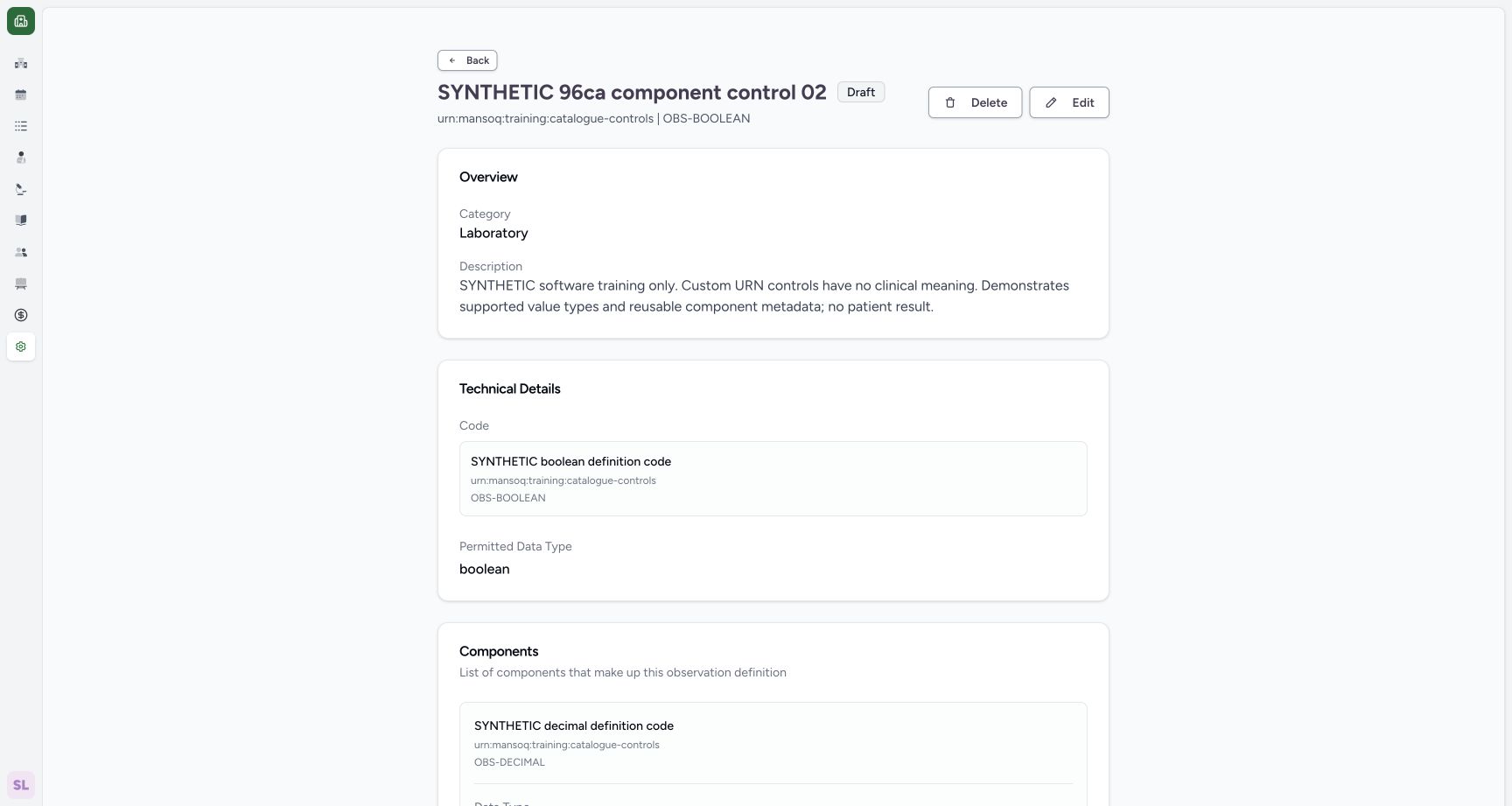 1
1Recorded release 96ca7318 · 2026-10-19T02:40:23.195Z · 1728 × 921 draft definition edit entry
Capture details
Exact 96ca source. Fictional definition metadata and software-control limits only; no patient result, clinical reference-range or licensed terminology qualification.
Image SHA-256
dbb090ba3a77b7d5261e0ff30f351505cde58ee2869b24be624125b531f86278- Edit: Open the saved fictional definition editor.
1Recorded release 96ca7318 · 2026-10-19T02:40:34.771Z · 1728 × 921 decimal component interpretation entry
Capture details
Exact 96ca source. Fictional definition metadata and software-control limits only; no patient result, clinical reference-range or licensed terminology qualification.
Image SHA-256
3f6aaeaa7aaa448c111a7620df6cf30778e28a2ac1dd6d55d9fda12403a9353f- Component Add Interpretation: Open the Decimal component interpretation sheet.
1. Open the component editor
Open the saved synthetic definition and use Edit. Scroll to Component 1, identified by OBS-DECIMAL and Decimal.
1draft definition edit entry
Capture details
Exact 96ca source. Fictional definition metadata and software-control limits only; no patient result, clinical reference-range or licensed terminology qualification.
Image SHA-256 dbb090ba3a77b7d5261e0ff30f351505cde58ee2869b24be624125b531f86278
- Edit: Open the saved fictional definition editor.
1decimal component interpretation entry
Capture details
Exact 96ca source. Fictional definition metadata and software-control limits only; no patient result, clinical reference-range or licensed terminology qualification.
Image SHA-256 3f6aaeaa7aaa448c111a7620df6cf30778e28a2ac1dd6d55d9fda12403a9353f
- Component Add Interpretation: Open the Decimal component interpretation sheet.
2. Open its interpretation sheet
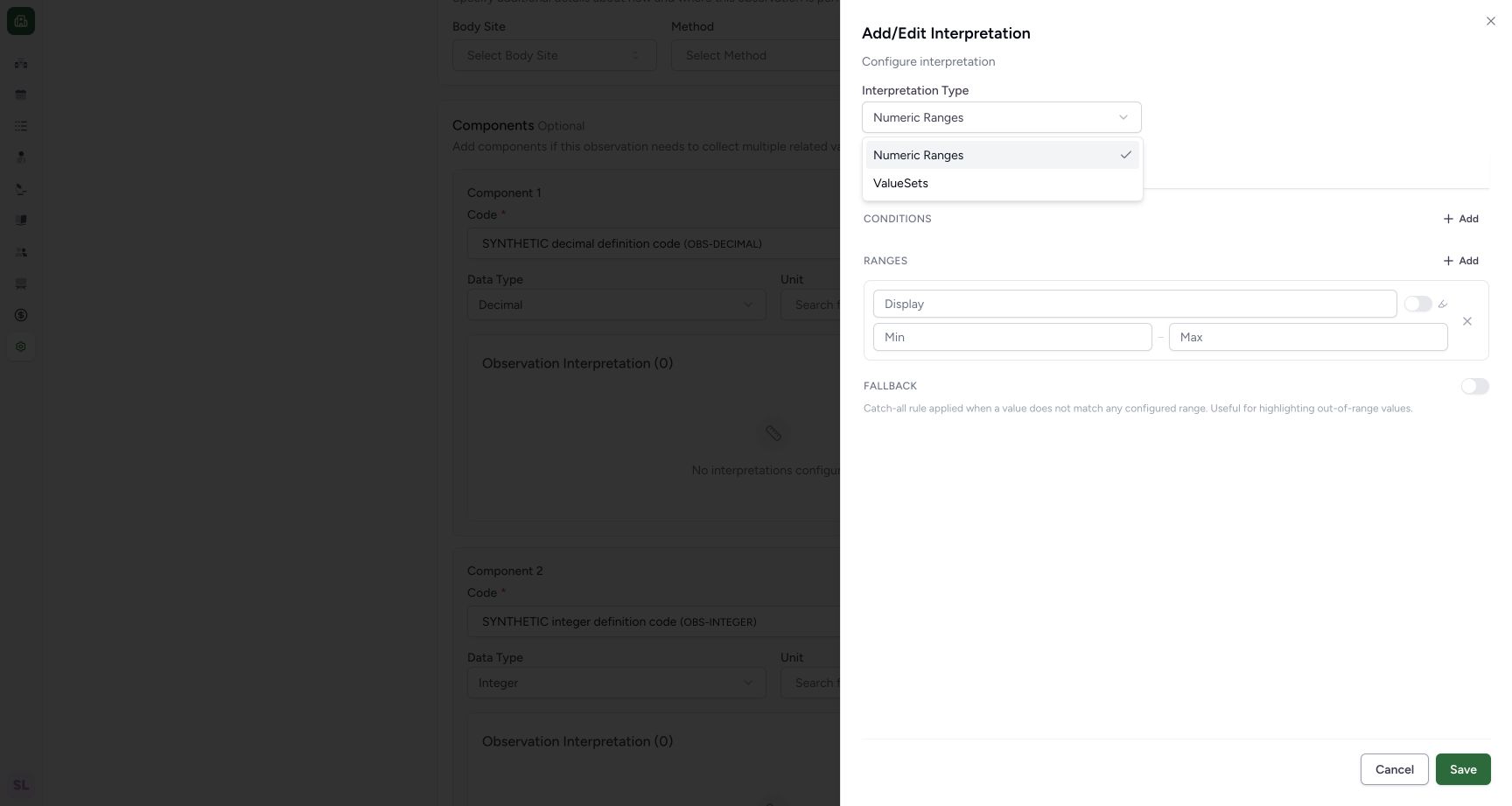
Use the Decimal component's own Add Interpretation. Open Interpretation Type and choose Numeric Ranges.
1decimal component interpretation entry
Capture details
Exact 96ca source. Fictional definition metadata and software-control limits only; no patient result, clinical reference-range or licensed terminology qualification.
Image SHA-256 3f6aaeaa7aaa448c111a7620df6cf30778e28a2ac1dd6d55d9fda12403a9353f
- Component Add Interpretation: Open the Decimal component interpretation sheet.
 12345
12345numeric component rule empty
Capture details
Exact 96ca source. Fictional definition metadata and software-control limits only; no patient result, clinical reference-range or licensed terminology qualification.
Image SHA-256 2c142dc51552e3218615c13a95769e4b600481798d804d595f8a4375cfb96984
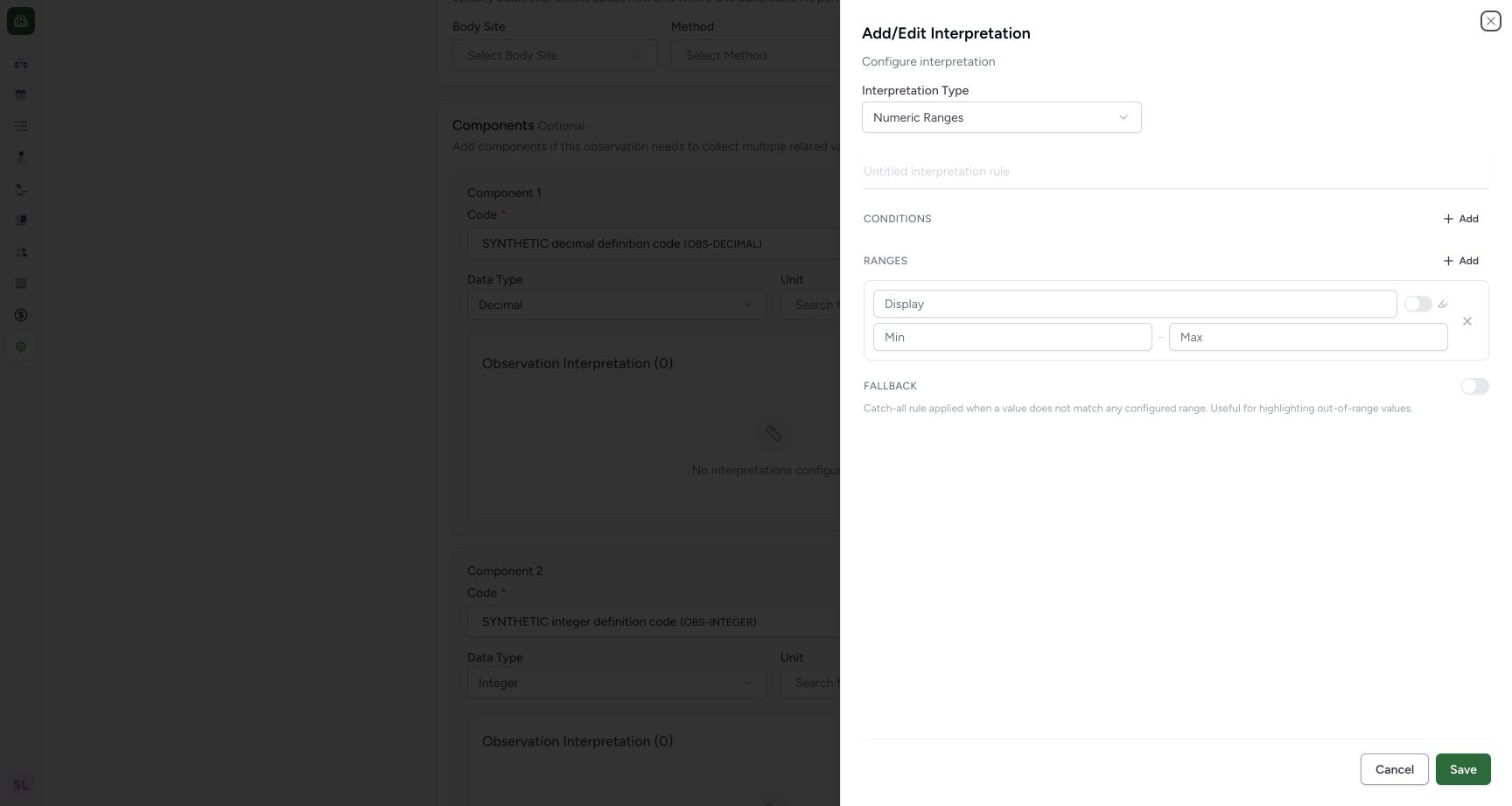
- Interpretation Type: Open the interpretation-type menu.
- Rule title: Enter an explicit synthetic title.
- Display: Enter the synthetic display text.
- Minimum: Enter the software-control lower limit.
- Maximum: Enter the software-control upper limit.
 1
1select numeric interpretation type
Capture details
Exact 96ca source. Fictional definition metadata and software-control limits only; no patient result, clinical reference-range or licensed terminology qualification.
Image SHA-256 ea775e2f88733224e20a6fd458c826687ce42f551c0fb116a52188a4ffe1032e
- Numeric Ranges: Choose the numeric interpretation type.
3. Enter the synthetic control rule
Enter SYNTHETIC component control range as the title and SYNTHETIC interval control as the display. Enter 0 for Min and 10 for Max. Keep the pictured highlight switch and Fallback off, and leave Conditions empty. These numbers are software-control examples with no clinical authority.
12345numeric component rule empty
Capture details
Exact 96ca source. Fictional definition metadata and software-control limits only; no patient result, clinical reference-range or licensed terminology qualification.
Image SHA-256 2c142dc51552e3218615c13a95769e4b600481798d804d595f8a4375cfb96984
- Interpretation Type: Open the interpretation-type menu.
- Rule title: Enter an explicit synthetic title.
- Display: Enter the synthetic display text.
- Minimum: Enter the software-control lower limit.
- Maximum: Enter the software-control upper limit.
12345synthetic component range review
Capture details
Exact 96ca source. Fictional definition metadata and software-control limits only; no patient result, clinical reference-range or licensed terminology qualification.
Image SHA-256 4110751340baf599d55c5dda0917b9672c59f04e0bb2552e368f6818c720e64f
- Synthetic title: Review the named software-control rule.
- Synthetic display: Review the display text.
- Minimum 0: Review 0 as the training minimum.
- Maximum 10: Review 10 as the training maximum.
- Sheet Save: Save the local rule to the parent form.
4. Save the local rule
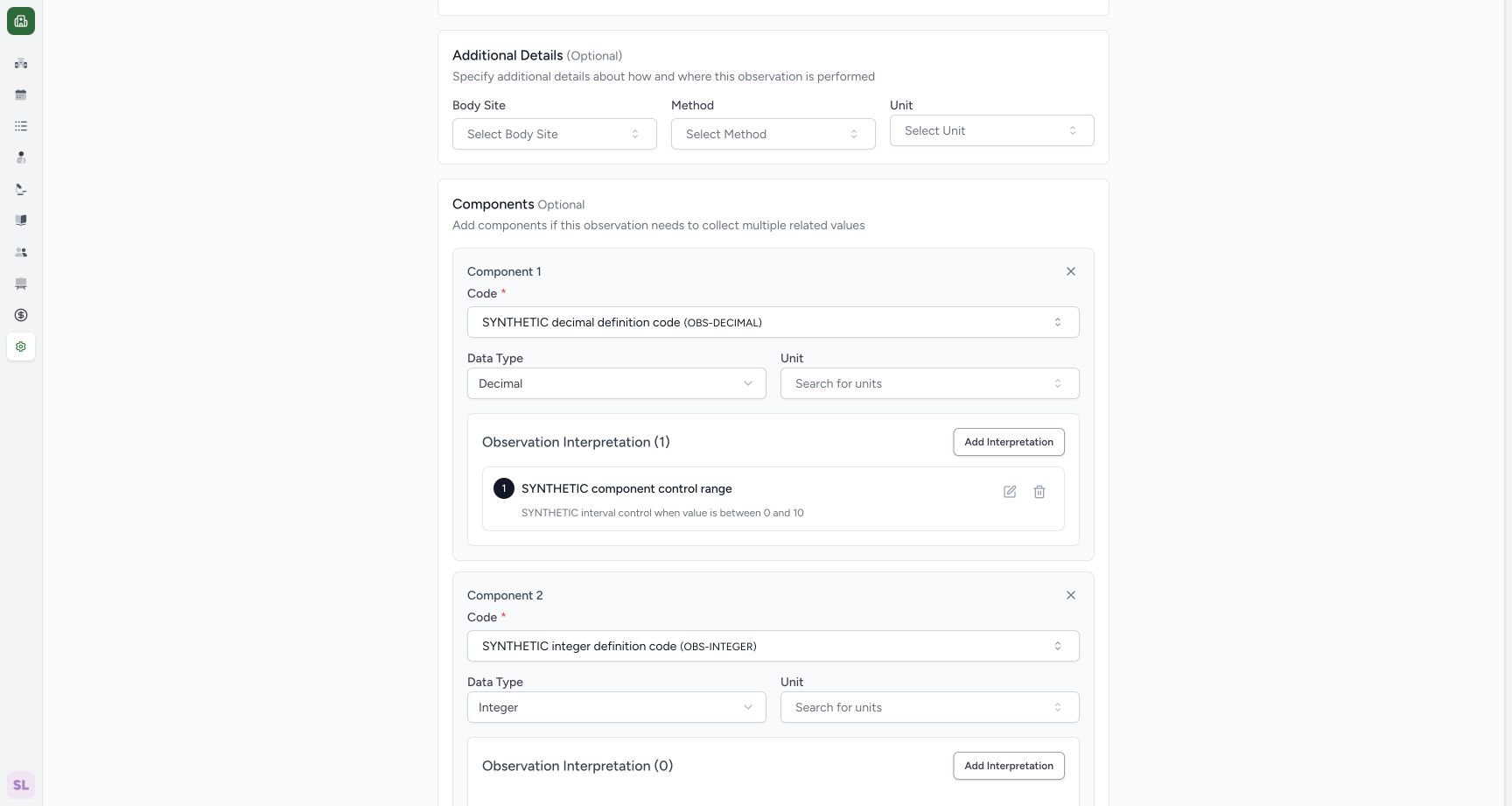
Use the sheet's Save. The sheet closes and the component panel shows Observation Interpretation (1) with the synthetic 0–10 summary. The parent definition still needs its own Save.
12345synthetic component range review
Capture details
Exact 96ca source. Fictional definition metadata and software-control limits only; no patient result, clinical reference-range or licensed terminology qualification.
Image SHA-256 4110751340baf599d55c5dda0917b9672c59f04e0bb2552e368f6818c720e64f
- Synthetic title: Review the named software-control rule.
- Synthetic display: Review the display text.
- Minimum 0: Review 0 as the training minimum.
- Maximum 10: Review 10 as the training maximum.
- Sheet Save: Save the local rule to the parent form.
 1
1component rule local summary
Capture details
Exact 96ca source. Fictional definition metadata and software-control limits only; no patient result, clinical reference-range or licensed terminology qualification.
Image SHA-256 6e026af35041775154257bacd61d9a1f0e62e304baaa12c0eceddac93520d487
- Local rule summary: Read the synthetic component title and0–10 summary.
5. Persist and inspect the component range
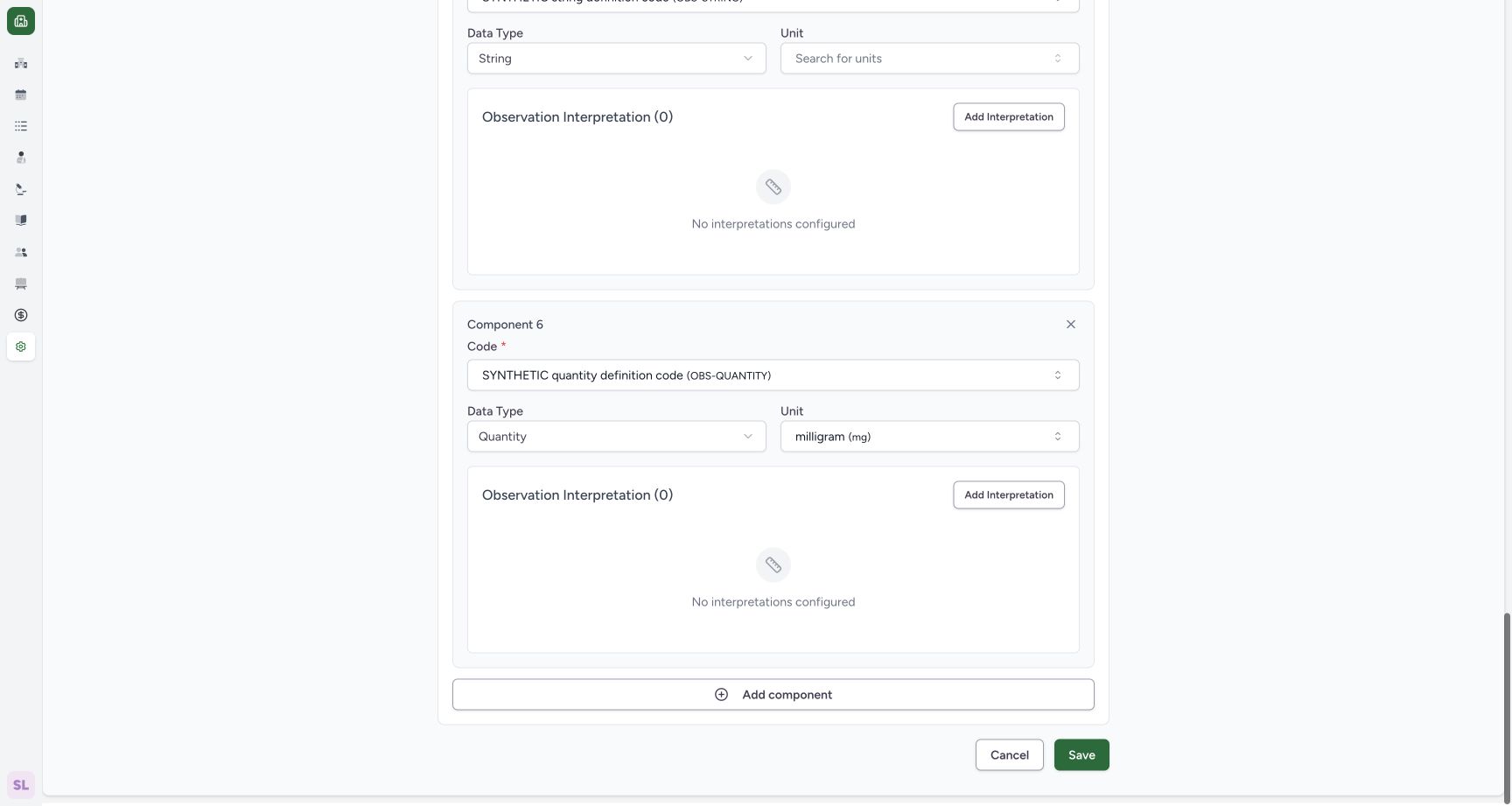
Scroll to the parent footer and use Save. The saved definition detail now displays SYNTHETIC component control range under the Decimal component, with the 0.00–10.00 summary.
 1
1definition save after component rule
Capture details
Exact 96ca source. Fictional definition metadata and software-control limits only; no patient result, clinical reference-range or licensed terminology qualification.
Image SHA-256 14449910c395dd81349e73265d87d21c514250dc40cb01bc6e2580db74672e25
- Parent Save: Persist the component rule in the definition.
1saved component range detail
Capture details
Exact 96ca source. Fictional definition metadata and software-control limits only; no patient result, clinical reference-range or licensed terminology qualification.
Image SHA-256 7647be070268e8ee6097ca402427dad51c553b09dfc4aefd61894c5b62df3fee
- Saved component rule: Read the saved component range and display in the definition detail.
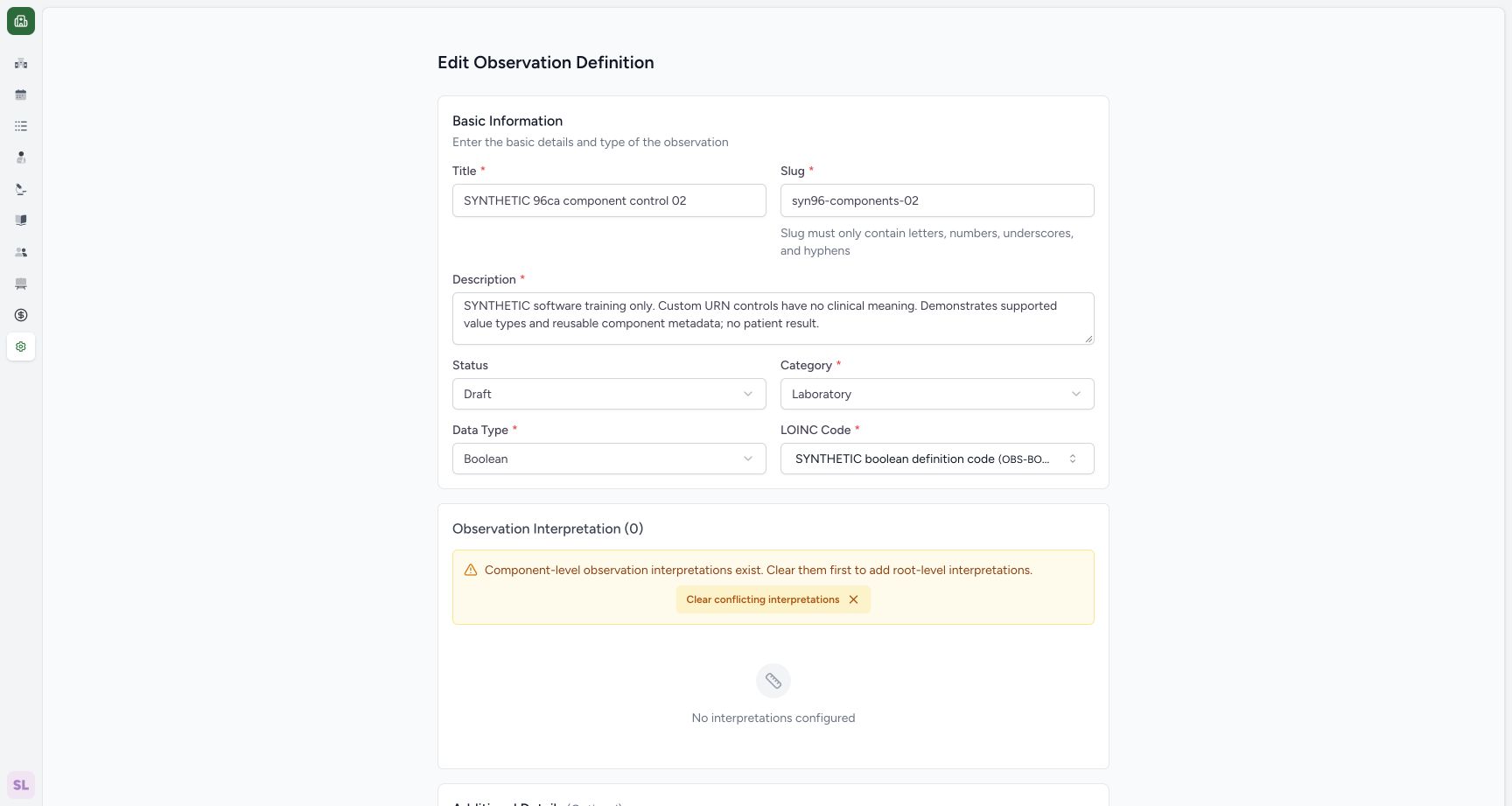
6. Read the root/component conflict message
Reopen Edit. The parent Observation Interpretation area states that component-level interpretations exist and must be cleared before root-level interpretations can be added.
1draft definition edit entry
Capture details
Exact 96ca source. Fictional definition metadata and software-control limits only; no patient result, clinical reference-range or licensed terminology qualification.
Image SHA-256 dbb090ba3a77b7d5261e0ff30f351505cde58ee2869b24be624125b531f86278
- Edit: Open the saved fictional definition editor.
 1
1root component conflict message
Capture details
Exact 96ca source. Fictional definition metadata and software-control limits only; no patient result, clinical reference-range or licensed terminology qualification.
Image SHA-256 65c4b582a59f1b223295569fa815c538cad14fd99e7ad4b8da239f27b1b5a000
- Clear conflicting interpretations: Open the confirmation without clearing immediately.
7. Inspect and cancel removal
Use Clear conflicting interpretations. The confirmation says it would remove all component-level observation interpretations. Choose Cancel to retain the saved component rule.
1root component conflict message
Capture details
Exact 96ca source. Fictional definition metadata and software-control limits only; no patient result, clinical reference-range or licensed terminology qualification.
Image SHA-256 65c4b582a59f1b223295569fa815c538cad14fd99e7ad4b8da239f27b1b5a000
- Clear conflicting interpretations: Open the confirmation without clearing immediately.
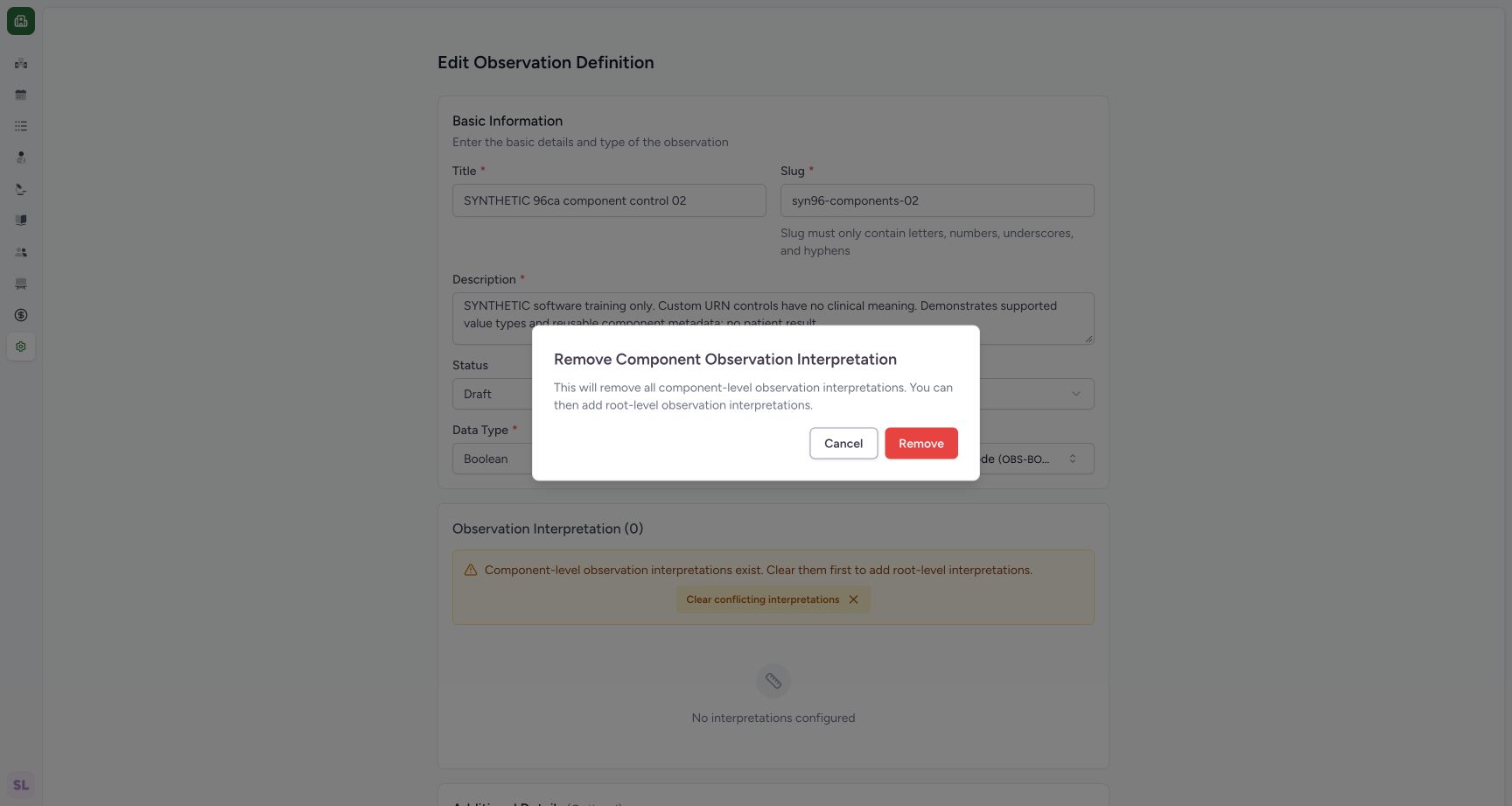 1
1cancel component rule removal
Capture details
Exact 96ca source. Fictional definition metadata and software-control limits only; no patient result, clinical reference-range or licensed terminology qualification.
Image SHA-256 7483ae1ca8aedc141fd0fb376189a7c85c234ba70852a3e167ecdeee4ffb8ccf
- Cancel removal: Keep the saved component interpretation.
8. Leave the parent editor unchanged
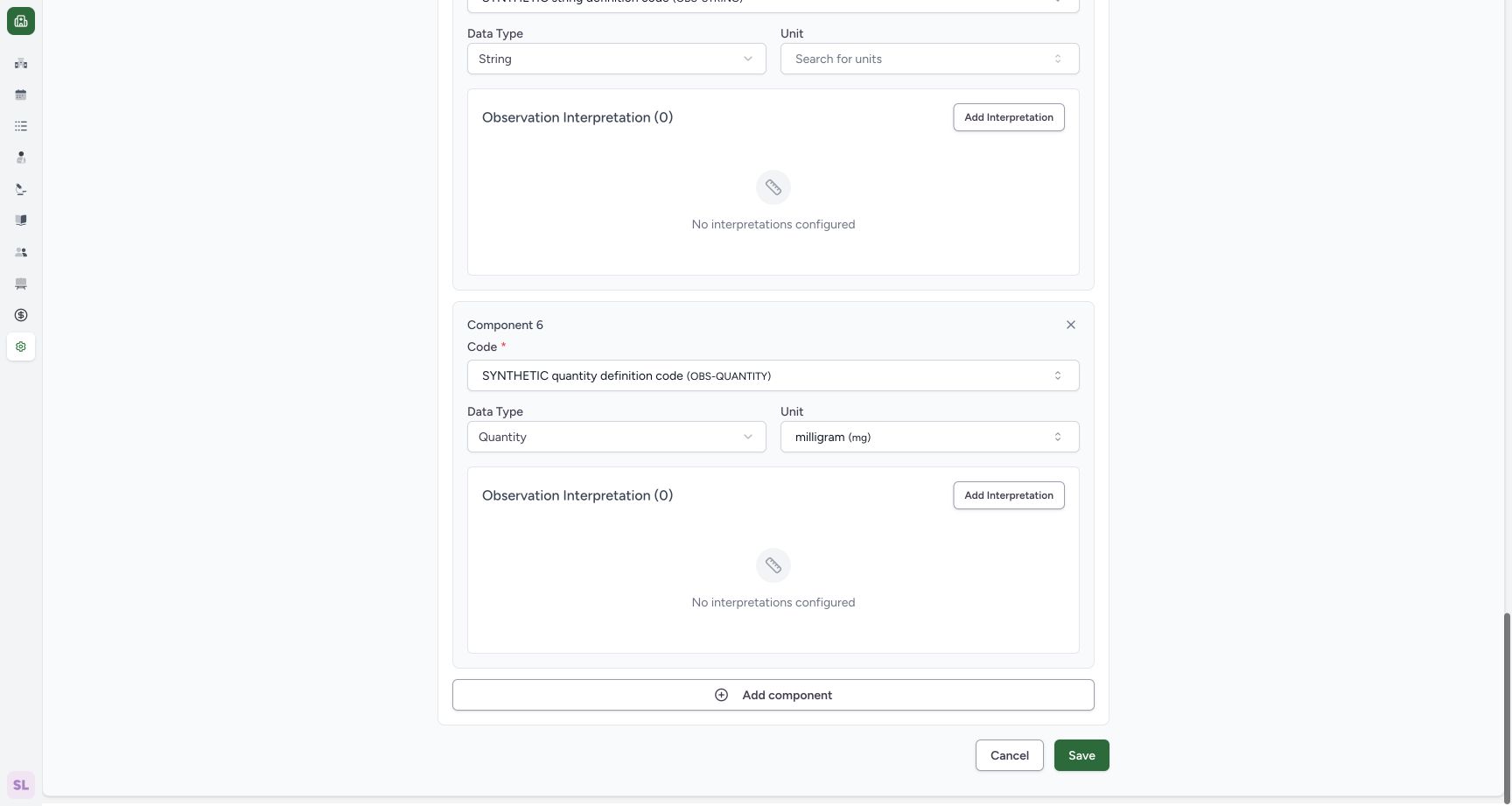
Scroll to the editor footer and use Cancel. This worked example keeps the saved component rule; no new parent rule is created.
 1
1cancel parent after conflict review
Capture details
Exact 96ca source. Fictional definition metadata and software-control limits only; no patient result, clinical reference-range or licensed terminology qualification.
Image SHA-256 f2b2972c2b7b6f7f25ba07d208370b050eb75ca0e3a38df0302a172c09c71203
- Parent Cancel: Leave the editor without another update.
Definition metadata only
The saved record is explicitly described as synthetic software training. Its custom URN identifies the fictional catalogue controls. This lesson configures reusable metadata and does not enter or evaluate a patient observation.
1draft definition edit entry
Capture details
Exact 96ca source. Fictional definition metadata and software-control limits only; no patient result, clinical reference-range or licensed terminology qualification.
Image SHA-256 dbb090ba3a77b7d5261e0ff30f351505cde58ee2869b24be624125b531f86278
- Edit: Open the saved fictional definition editor.
1saved component range detail
Capture details
Exact 96ca source. Fictional definition metadata and software-control limits only; no patient result, clinical reference-range or licensed terminology qualification.
Image SHA-256 7647be070268e8ee6097ca402427dad51c553b09dfc4aefd61894c5b62df3fee
- Saved component rule: Read the saved component range and display in the definition detail.
Troubleshooting
The parent Add Interpretation action is unavailable
The pictured parent area explains the conflict with component-level interpretations. Inspect Clear conflicting interpretations to see the removal warning; in this lesson choose Cancel to keep the component rule.
1root component conflict message
Capture details
Exact 96ca source. Fictional definition metadata and software-control limits only; no patient result, clinical reference-range or licensed terminology qualification.
Image SHA-256 65c4b582a59f1b223295569fa815c538cad14fd99e7ad4b8da239f27b1b5a000
- Clear conflicting interpretations: Open the confirmation without clearing immediately.
1cancel component rule removal
Capture details
Exact 96ca source. Fictional definition metadata and software-control limits only; no patient result, clinical reference-range or licensed terminology qualification.
Image SHA-256 7483ae1ca8aedc141fd0fb376189a7c85c234ba70852a3e167ecdeee4ffb8ccf
- Cancel removal: Keep the saved component interpretation.
Source evidence
Every citation uses this exact committed version. The private source repository requires access.
- repositories/platform/mansoq-web/src/pages/Facility/settings/observationDefinition/ObservationDefinitionForm.tsx:1 ·
96ca7318eb2b93f5fa477908a1543075e0d1f056Source file checksum
4b96425f4d9e9cadf10720dcecbbe8ae323c85afab53e591358d1437c2a800ad - repositories/platform/mansoq-web/src/pages/Facility/settings/observationDefinition/components/ObservationInterpretation.tsx:1 ·
96ca7318eb2b93f5fa477908a1543075e0d1f056Source file checksum
200c53076207a089f8ecacb64376ce21317ffe85b4400ac9f7707dd38cff1946 - repositories/platform/mansoq-web/src/pages/Facility/settings/observationDefinition/components/QualifiedRangeEditor.tsx:1 ·
96ca7318eb2b93f5fa477908a1543075e0d1f056Source file checksum
f26bb215205d50355b9c9acc645d3bf85d97bb2ccfd9786ffd32a845f5b15dd5 - repositories/platform/mansoq-web/src/pages/Facility/settings/observationDefinition/components/NumericRangeEditor.tsx:1 ·
96ca7318eb2b93f5fa477908a1543075e0d1f056Source file checksum
ab206b256ebd9291e43f3f80b14169ef0594ba30aba65019dcce07da1ef1a00f - repositories/platform/mansoq-core/mansoq/emr/api/viewsets/observation_definition.py:1 ·
96ca7318eb2b93f5fa477908a1543075e0d1f056Source file checksum
266ba9db30988a6c5bd0c2b01e7f609e6fa8f0754641ef079f3e8d1843a20935