 MANSOQ
 Laboratory and diagnostics · VERSION 96ca7318
Create a Boolean definition with six typed components
Create one Draft definition with Boolean parent metadata and Decimal, Integer, DateTime, Time, String and Quantity components, select a unit, and inspect the saved configuration.
Facility Admin
 12
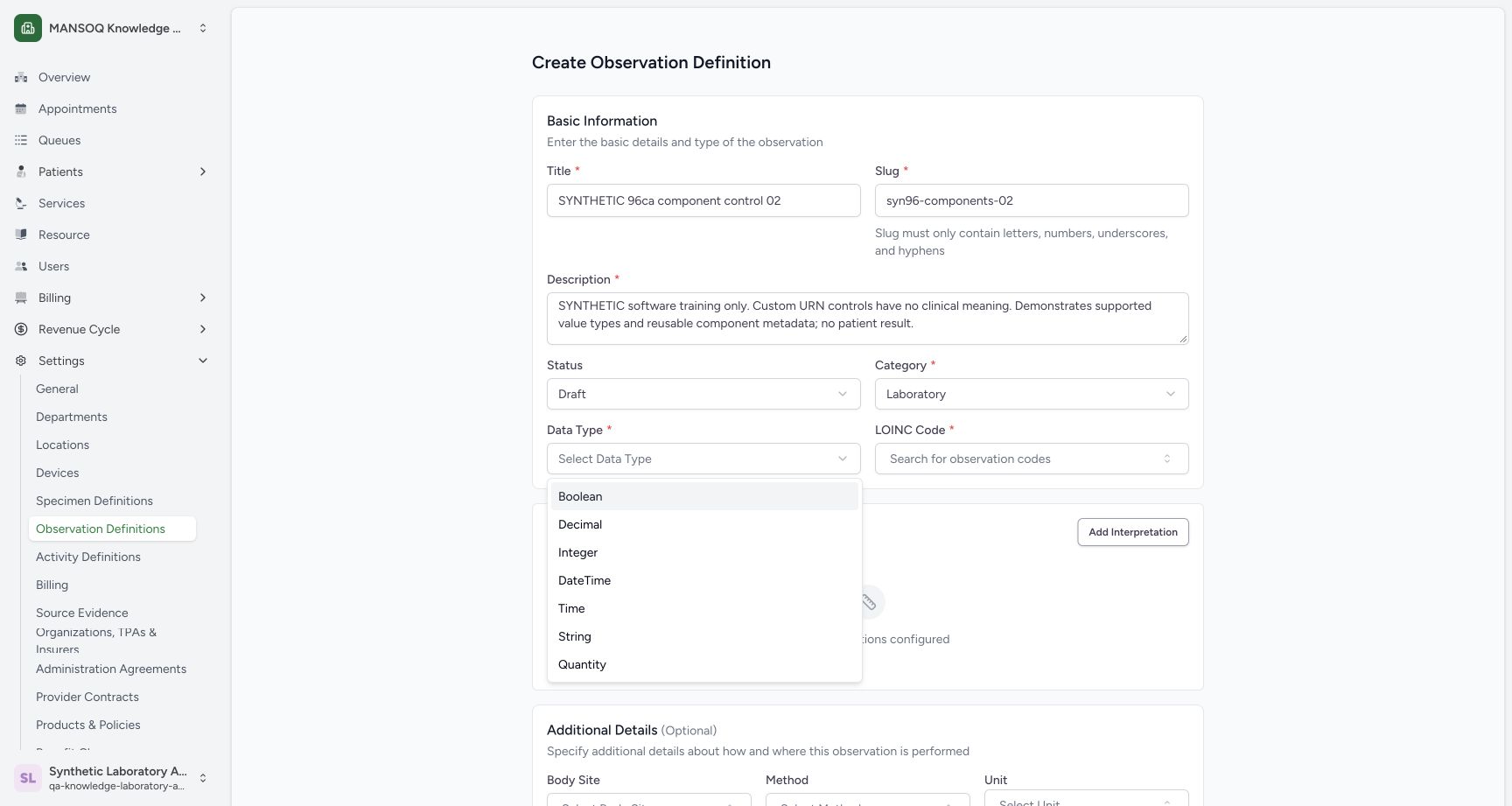
12supported data type menu
Capture details
Exact committed 96ca source; custom training URNs demonstrate definition metadata. No patient result, clinical interpretation validation or licensed terminology qualification.
Image SHA-256 7f58d86b5530b628db403ff7d4a6b70fa9fc882510a04ffc3dda1c9eb71029f5
- Boolean: Select Boolean for the parent.
- Short slug: The example uses syn96-components-02.
 123
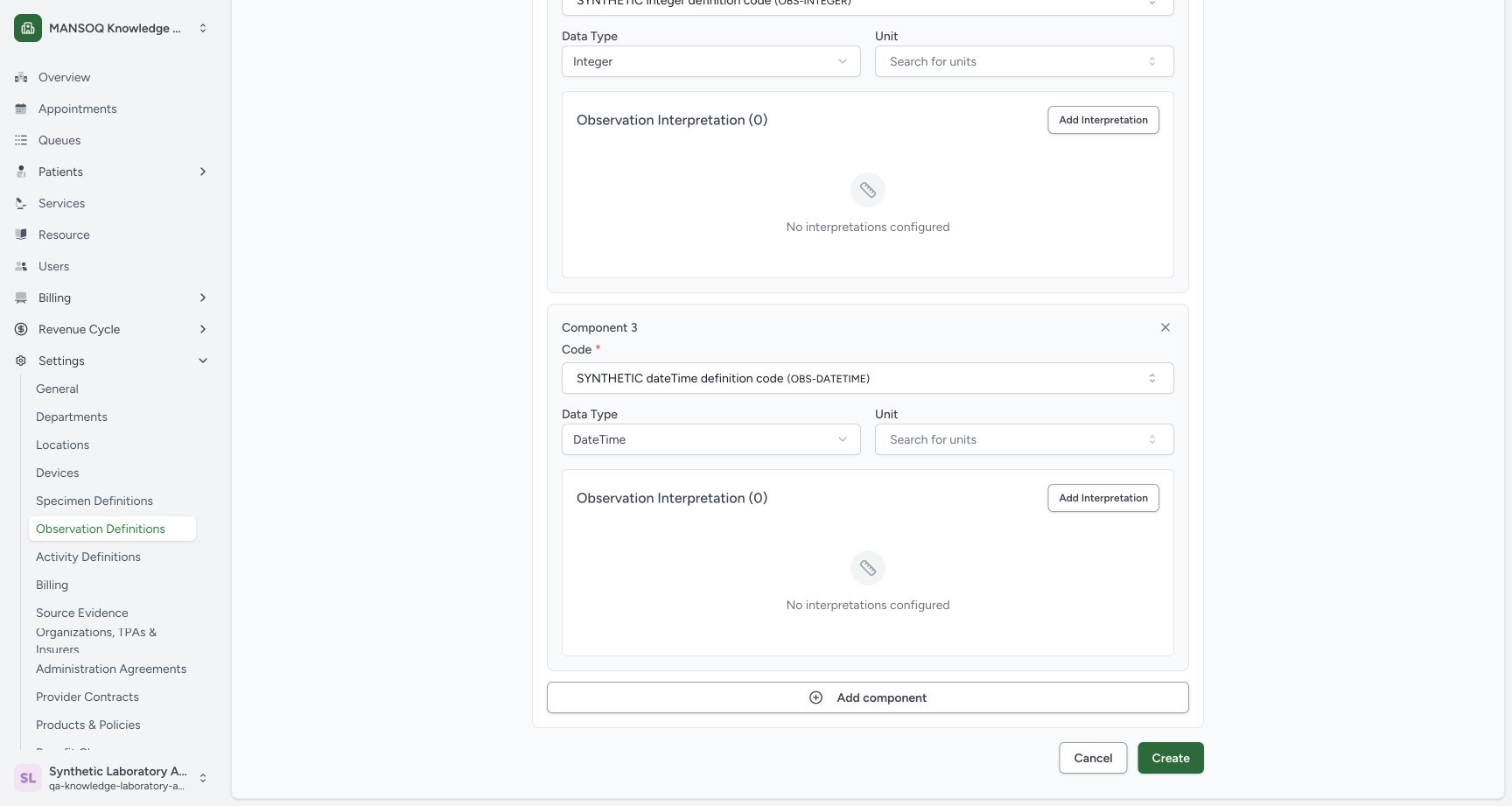
123datetime component configured
Capture details
Exact committed 96ca source; custom training URNs demonstrate definition metadata. No patient result, clinical interpretation validation or licensed terminology qualification.
Image SHA-256 e5bc085577c0d7f5335627ff30c11bf9d9ea7c660eb6f842b971af31c5dddb2c
- DateTime component code: Review the selected fictional DateTime code.
- DateTime selector: Choose the component type.
- Add component: Append another component row.
 12345
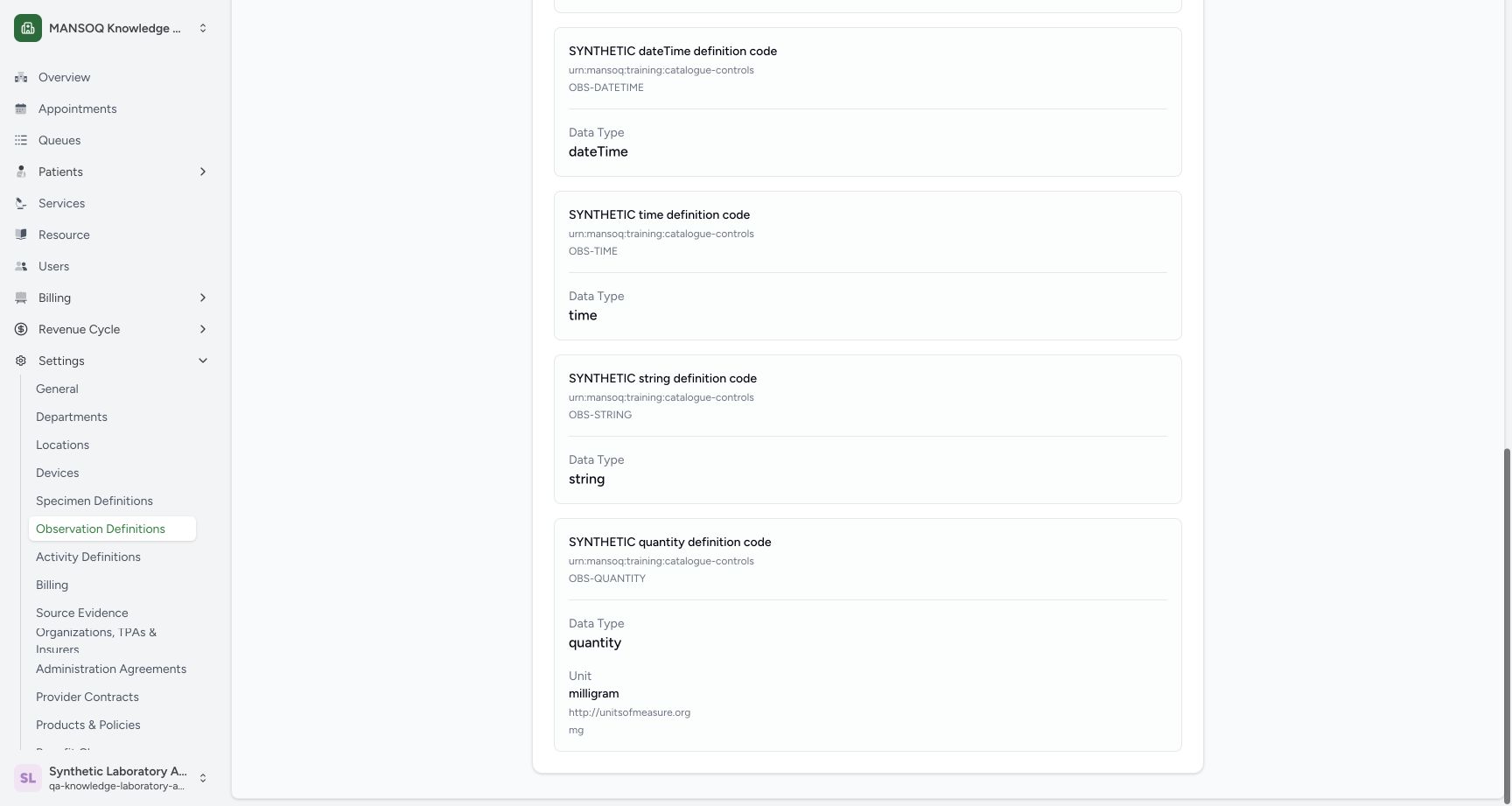
12345saved time string quantity unit
Capture details
Exact committed 96ca source; custom training URNs demonstrate definition metadata. No patient result, clinical interpretation validation or licensed terminology qualification.
Image SHA-256 b38e2e402865f694f7f8e26c9a5aed8e4883a51ad27241b100a35515982c6ce4
- Saved DateTime: Read the persisted dateTime type.
- Saved Time: Read the persisted time type.
- Saved String: Read the persisted string type.
- Saved Quantity: Read the persisted quantity type.
- Saved unit: Read milligram and its UCUM system/code.
20 of 20 content blocks have reviewed image alignment. Missing overview or prerequisite images remain open.
Before you begin
- Use the pictured fictional Laboratory session. This worked example uses the explicitly synthetic custom URN codes displayed in the saved technical details.
 12
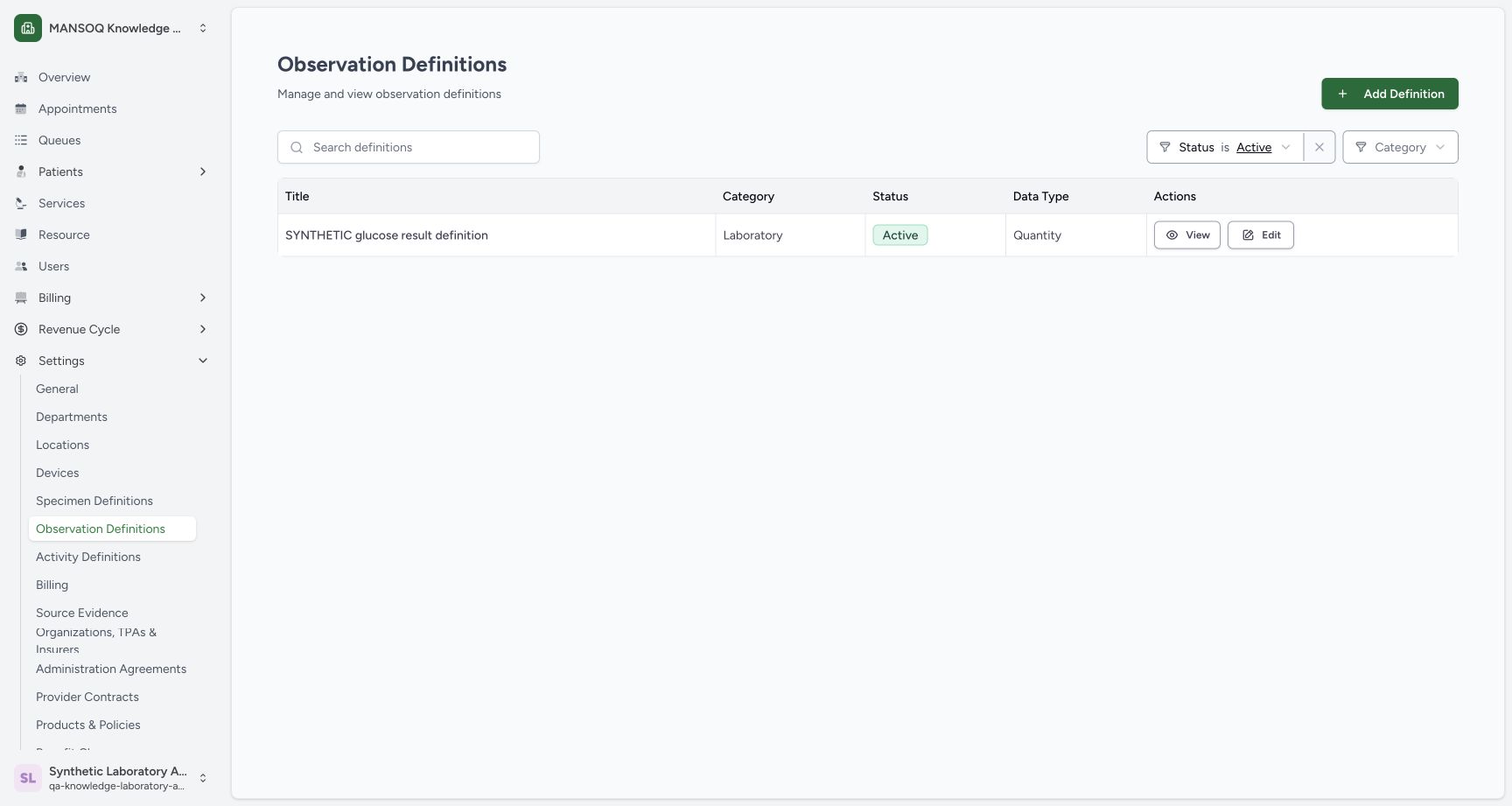
12Recorded release 96ca7318 · 2026-10-19T02:06:12.919Z · 1728 × 921 lab catalogue before new types
Capture details
Exact committed 96ca source; custom training URNs demonstrate definition metadata. No patient result, clinical interpretation validation or licensed terminology qualification.
Image SHA-256
770220c888f5afe4447269dbb0ca3ce584c5e108263e46061779ee1c8681bc77- Add Definition: Open a new definition.
- Observation Definitions: Open the observation catalogue.
 1
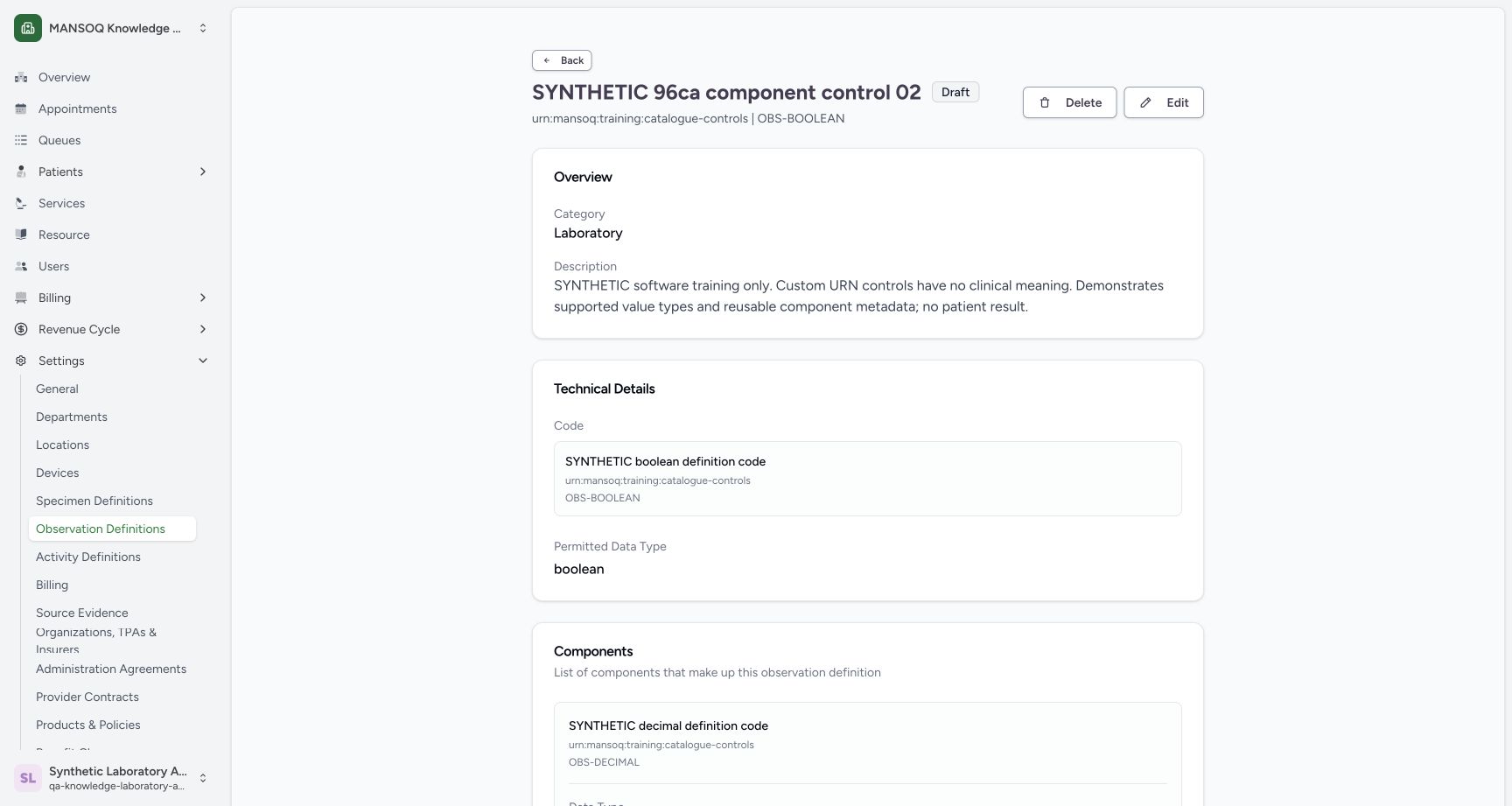
1Recorded release 96ca7318 · 2026-10-19T02:25:42.408Z · 1728 × 921 saved parent and components
Capture details
Exact committed 96ca source; custom training URNs demonstrate definition metadata. No patient result, clinical interpretation validation or licensed terminology qualification.
Image SHA-256
7970603112fbc857bf9107a9517399c0e003974daae2989187a530c46cd156ae- Edit: Inspect the saved editor without changing its values.
1. Open a new definition
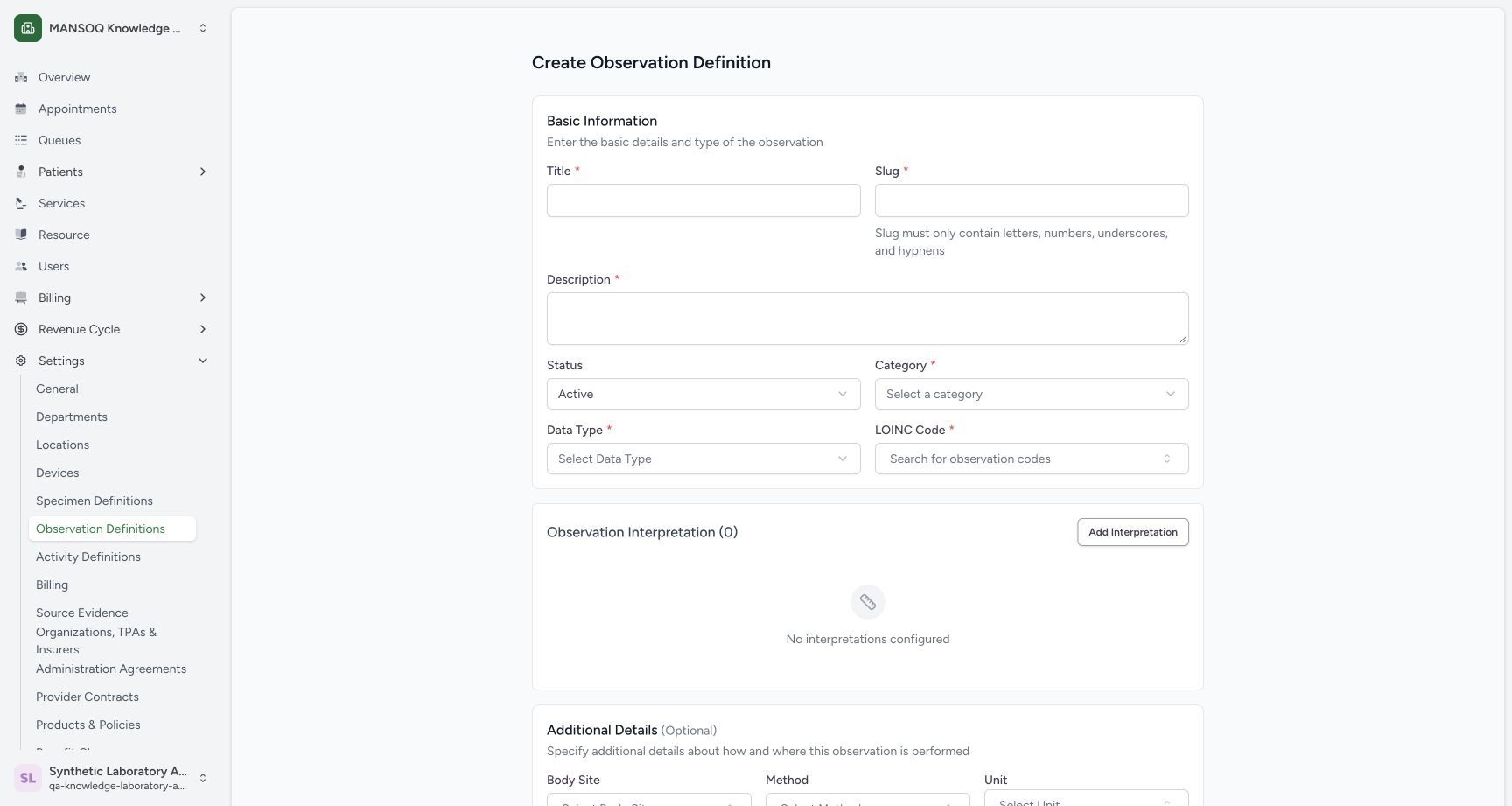
Open Settings → Observation Definitions and choose Add Definition. The Create form opens with its required basic fields.
12lab catalogue before new types
Capture details
Exact committed 96ca source; custom training URNs demonstrate definition metadata. No patient result, clinical interpretation validation or licensed terminology qualification.
Image SHA-256 770220c888f5afe4447269dbb0ca3ce584c5e108263e46061779ee1c8681bc77
- Add Definition: Open a new definition.
- Observation Definitions: Open the observation catalogue.
 123456
empty create form
Capture details
Exact committed 96ca source; custom training URNs demonstrate definition metadata. No patient result, clinical interpretation validation or licensed terminology qualification.
Image SHA-256 2c7b75c76def8e4f459670528f08dd766cf69fb5af74210256401075c9a068c3
- Title: Enter a distinct title.
- Slug: Use the short slug shown in the completed example.
- Description: Describe the fictional software-control example.
- Status: Choose Draft.
- Category: Choose Laboratory.
- Data Type: Open the parent type menu.
2. Enter distinct training details
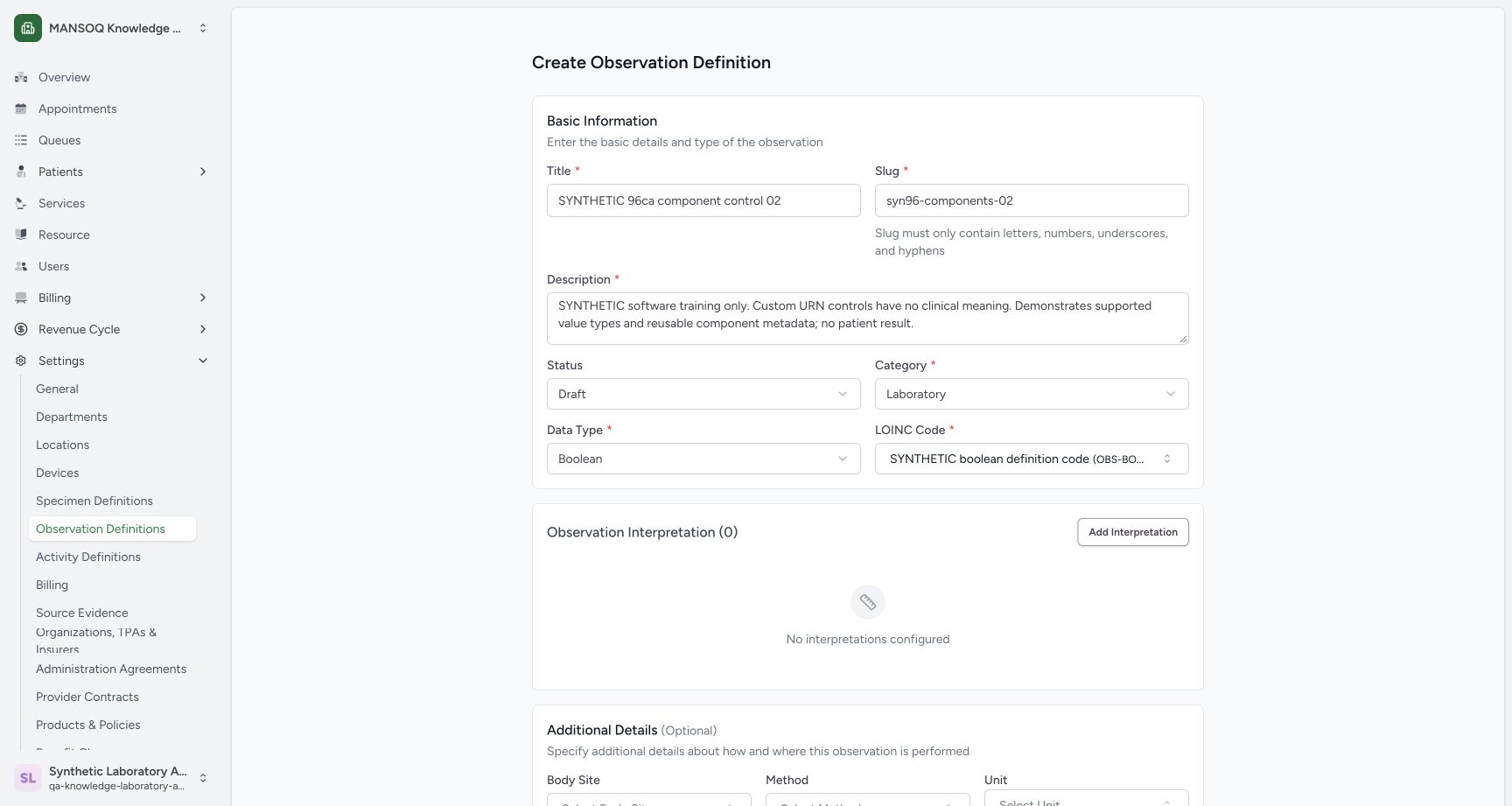
Enter the pictured synthetic title and description. Use syn96-components-02 as the short slug. Choose Draft status and Laboratory category.
123456empty create form
Capture details
Exact committed 96ca source; custom training URNs demonstrate definition metadata. No patient result, clinical interpretation validation or licensed terminology qualification.
Image SHA-256 2c7b75c76def8e4f459670528f08dd766cf69fb5af74210256401075c9a068c3
- Title: Enter a distinct title.
- Slug: Use the short slug shown in the completed example.
- Description: Describe the fictional software-control example.
- Status: Choose Draft.
- Category: Choose Laboratory.
- Data Type: Open the parent type menu.
12supported data type menu
Capture details
Exact committed 96ca source; custom training URNs demonstrate definition metadata. No patient result, clinical interpretation validation or licensed terminology qualification.
Image SHA-256 7f58d86b5530b628db403ff7d4a6b70fa9fc882510a04ffc3dda1c9eb71029f5
- Boolean: Select Boolean for the parent.
- Short slug: The example uses syn96-components-02.
 123
123parent boolean basic review
Capture details
Exact committed 96ca source; custom training URNs demonstrate definition metadata. No patient result, clinical interpretation validation or licensed terminology qualification.
Image SHA-256 797b51b2a413901e280fd8f23c043eead433959b2e5a3184ce1f2384654a6f1e
- Boolean parent: Review the chosen parent type.
- Custom code: Review the selected synthetic code.
- Draft: The new record is being prepared as Draft.
3. Choose Boolean and its custom code
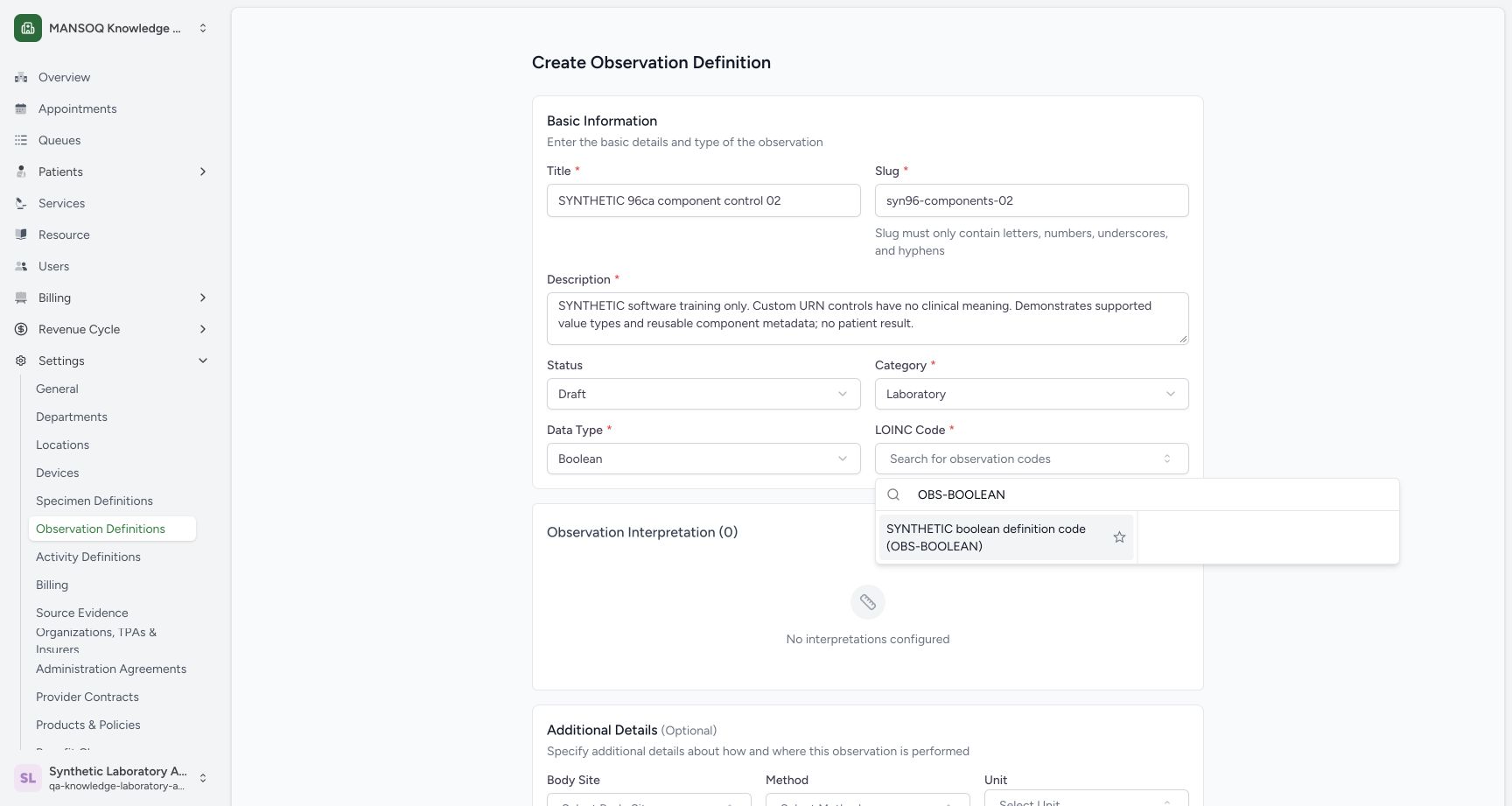
Open Data Type and select Boolean. Open the field labelled LOINC Code, search OBS-BOOLEAN, and select SYNTHETIC boolean definition code. The saved technical details identify this example's actual custom URN; it is not a LOINC concept.
12supported data type menu
Capture details
Exact committed 96ca source; custom training URNs demonstrate definition metadata. No patient result, clinical interpretation validation or licensed terminology qualification.
Image SHA-256 7f58d86b5530b628db403ff7d4a6b70fa9fc882510a04ffc3dda1c9eb71029f5
- Boolean: Select Boolean for the parent.
- Short slug: The example uses syn96-components-02.
 12
12parent custom boolean code
Capture details
Exact committed 96ca source; custom training URNs demonstrate definition metadata. No patient result, clinical interpretation validation or licensed terminology qualification.
Image SHA-256 e980ee3c58555bbabab242c7012f4aecd8e936617b9c940d148c0e75c4204747
- Search OBS-BOOLEAN: Search the installed custom code.
- SYNTHETIC Boolean code: Select the explicitly fictional result.
123parent boolean basic review
Capture details
Exact committed 96ca source; custom training URNs demonstrate definition metadata. No patient result, clinical interpretation validation or licensed terminology qualification.
Image SHA-256 797b51b2a413901e280fd8f23c043eead433959b2e5a3184ce1f2384654a6f1e
- Boolean parent: Review the chosen parent type.
- Custom code: Review the selected synthetic code.
- Draft: The new record is being prepared as Draft.
1saved parent and components
Capture details
Exact committed 96ca source; custom training URNs demonstrate definition metadata. No patient result, clinical interpretation validation or licensed terminology qualification.
Image SHA-256 7970603112fbc857bf9107a9517399c0e003974daae2989187a530c46cd156ae
- Edit: Inspect the saved editor without changing its values.
4. Start the component list
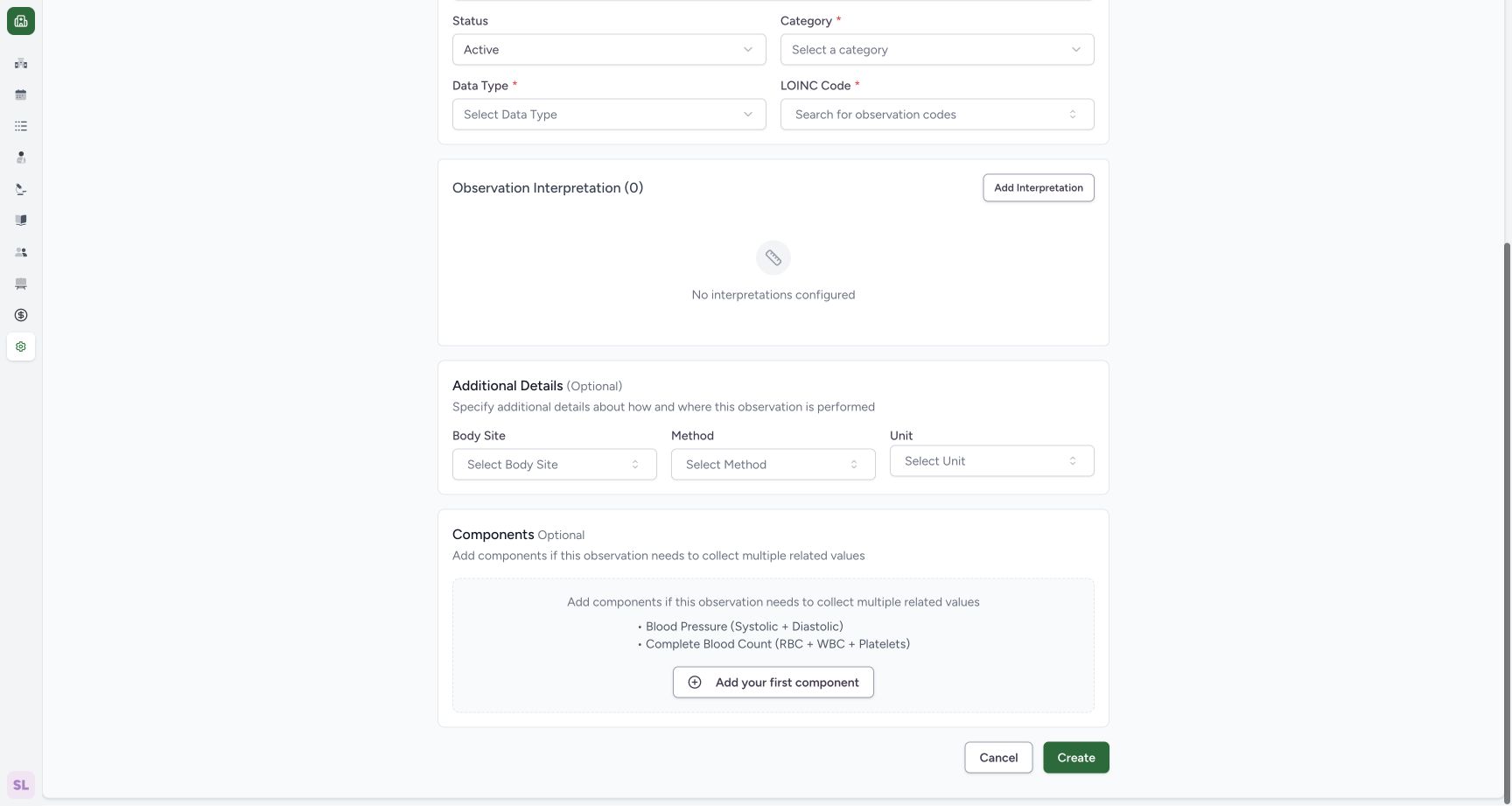
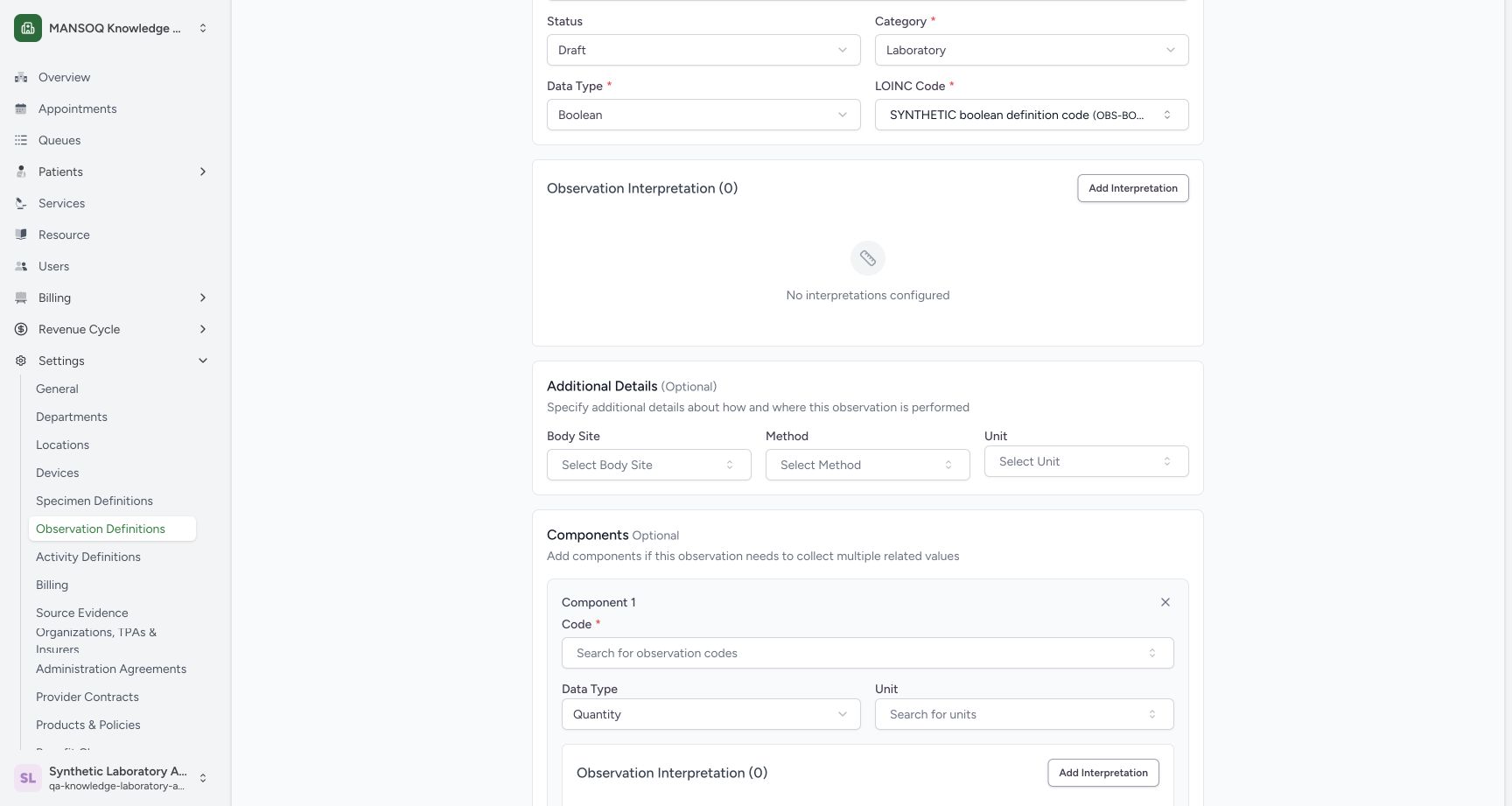
Scroll to Components and use Add your first component. Each row provides its own required Code, Data Type, optional Unit, and interpretation controls. The empty-form entry image was revisited read-only to show this button; no second definition was created.
 12
12add first component entry
Capture details
Exact committed 96ca source; custom training URNs demonstrate definition metadata. No patient result, clinical interpretation validation or licensed terminology qualification.
Image SHA-256 aa17f975ff320b38d017112db449f7ee1eeddbc4c404ad174c83f64e4688345b
- Add your first component: Begin the component list.
- Cancel: This empty-form context recapture was cancelled.
 12
12first component controls
Capture details
Exact committed 96ca source; custom training URNs demonstrate definition metadata. No patient result, clinical interpretation validation or licensed terminology qualification.
Image SHA-256 83e8e00f755552c4c9c6c04e77e5af0ae05176d6168ed6cb9213e95cf2602f63
- Component Code: Open the component code lookup.
- Component Data Type: Open the component type menu.
5. Configure the Decimal component
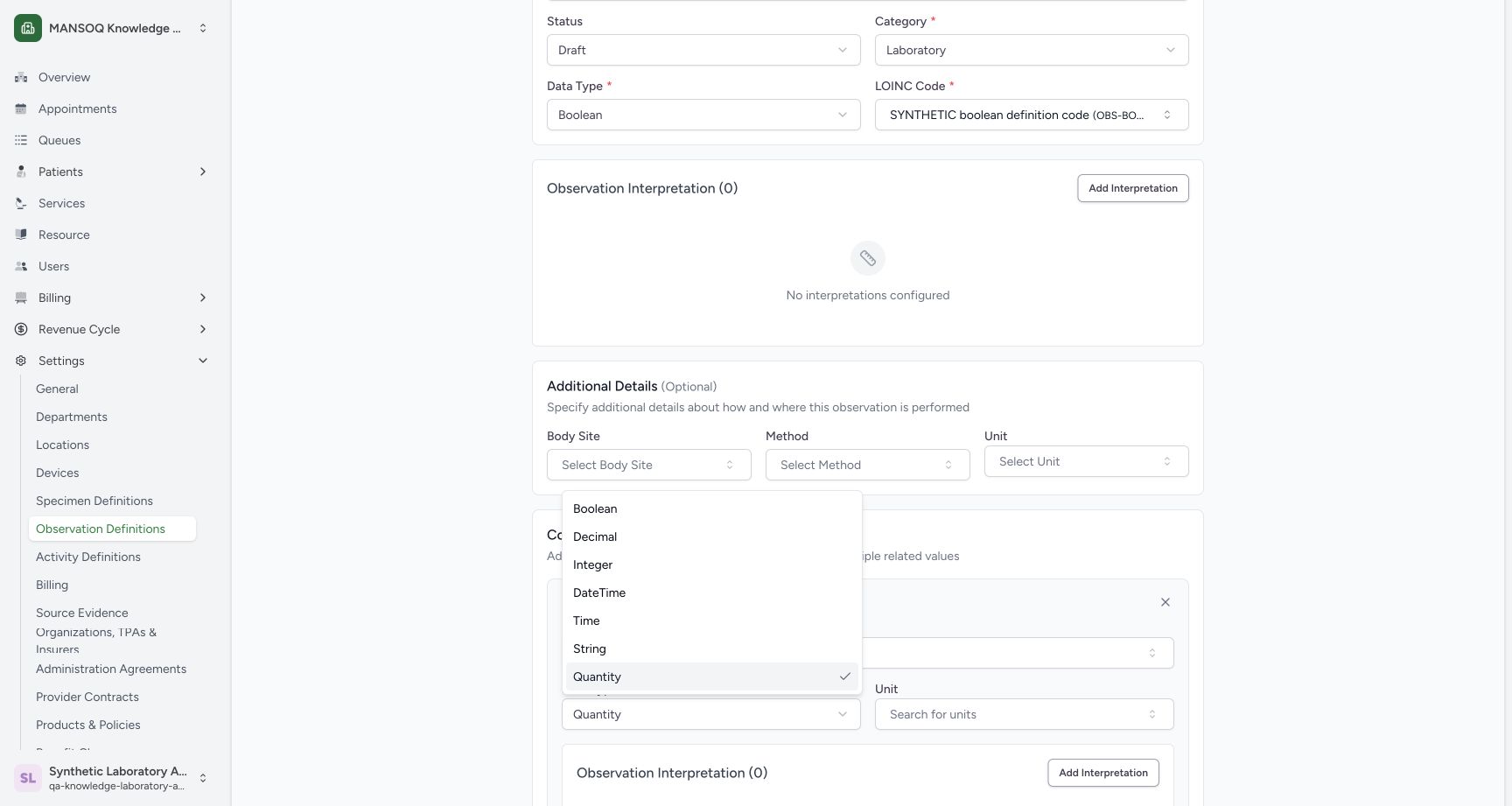
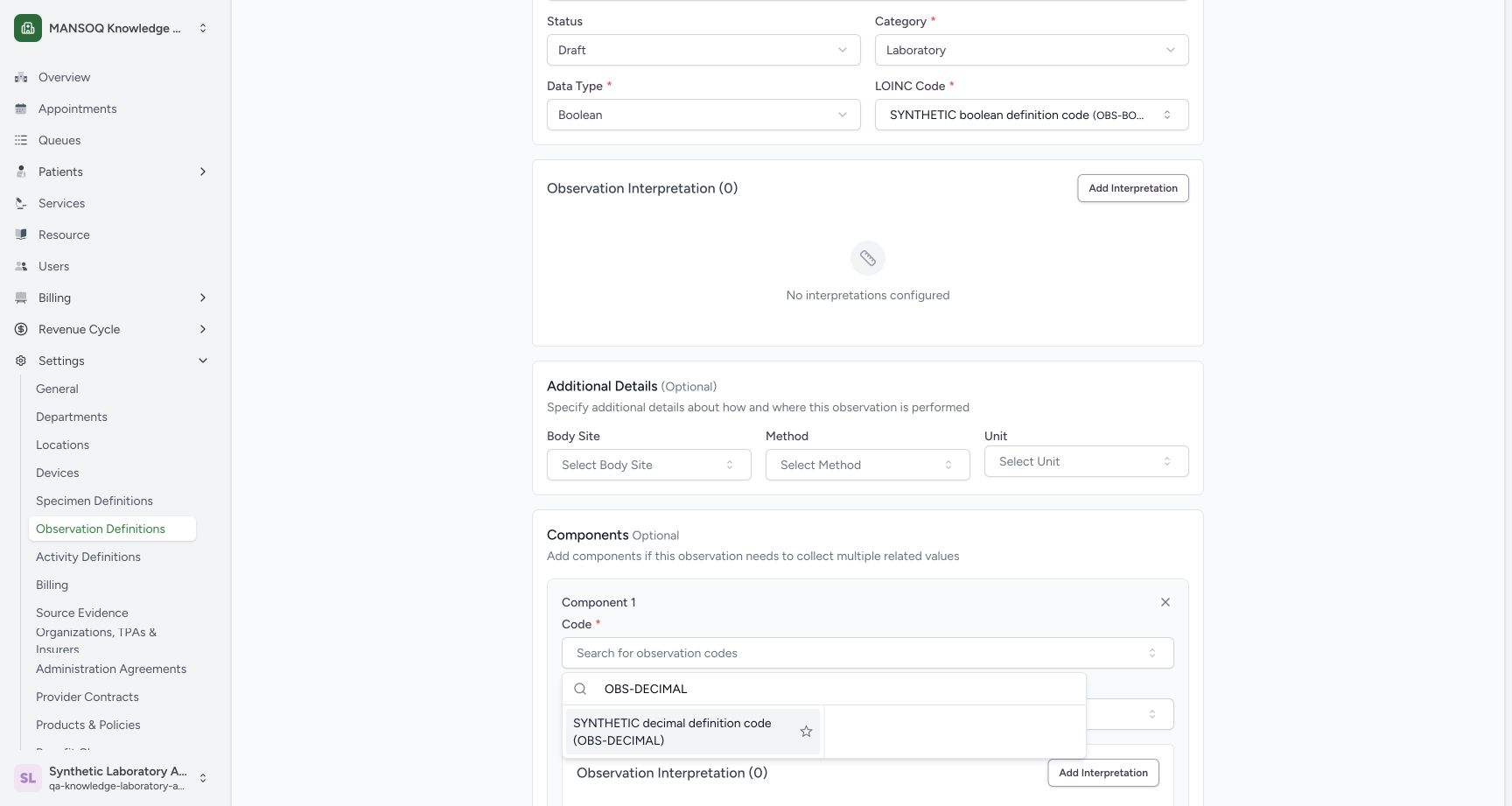
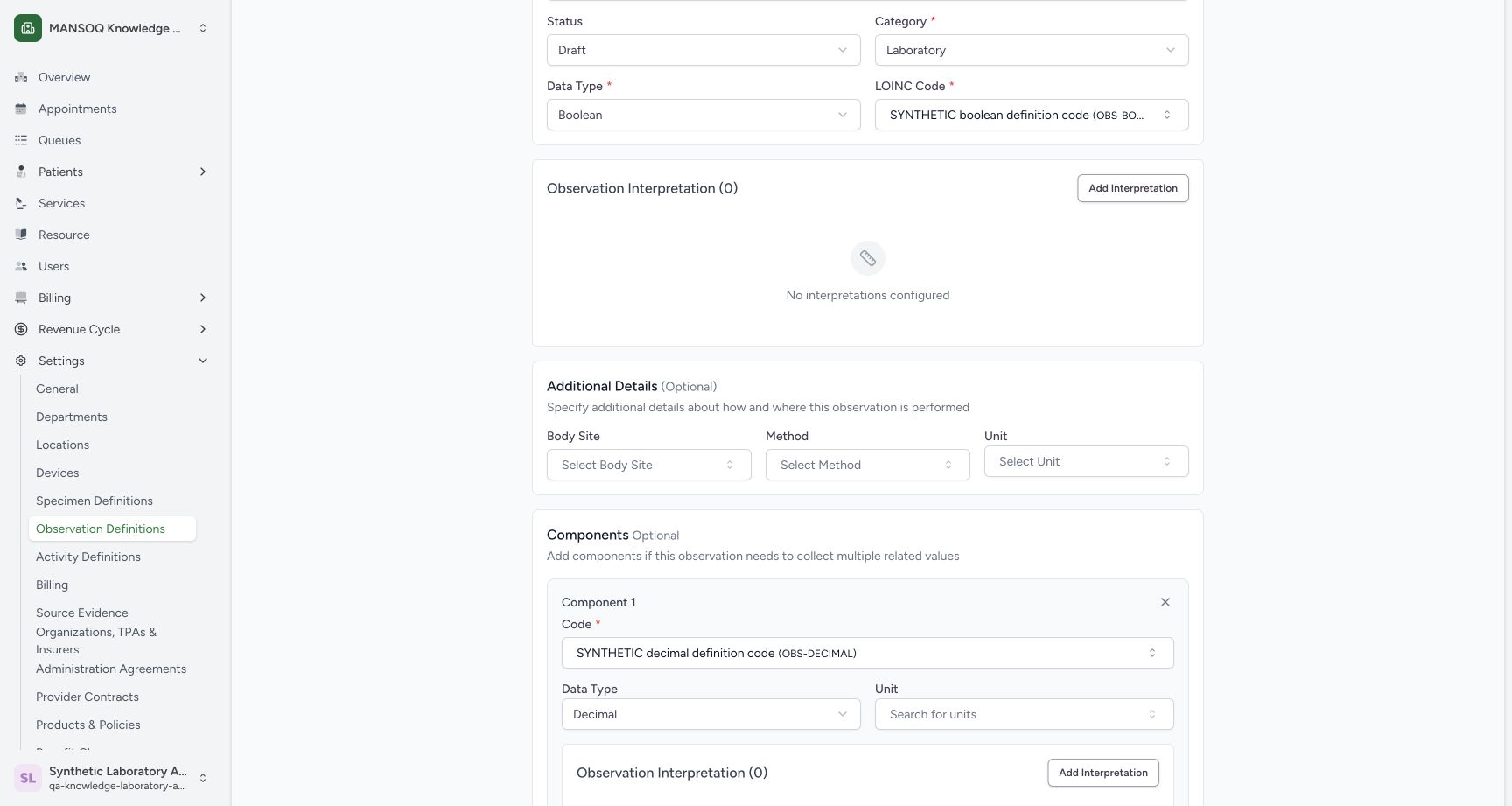
In Component 1, choose Decimal from its Data Type menu. Open Code, search OBS-DECIMAL, and select the synthetic result. Review the selected Decimal code and type.
 12
12component type menu
Capture details
Exact committed 96ca source; custom training URNs demonstrate definition metadata. No patient result, clinical interpretation validation or licensed terminology qualification.
Image SHA-256 b7e1b94b4cfaeeb686d6df332aed106edd572c047acb62012f39ec4fa42cac46
- Decimal: Choose Decimal for Component 1.
- Integer option: The same menu offers Integer for a later component.
 12
12component decimal code lookup
Capture details
Exact committed 96ca source; custom training URNs demonstrate definition metadata. No patient result, clinical interpretation validation or licensed terminology qualification.
Image SHA-256 7603e68d074c7708b4953822493f5a140da283ecd5af3f51a911b458ab6e873e
- Search OBS-DECIMAL: Search for the custom Decimal code.
- SYNTHETIC Decimal code: Select the fictional Decimal result.
 12
12decimal component configured
Capture details
Exact committed 96ca source; custom training URNs demonstrate definition metadata. No patient result, clinical interpretation validation or licensed terminology qualification.
Image SHA-256 7df6c61d34e180841fd398841d333109424ffb6951450277598a2c8a81dd6bdc
- Selected Decimal code: Review OBS-DECIMAL.
- Decimal Data Type: The first component uses Decimal.
6. Repeat the component controls
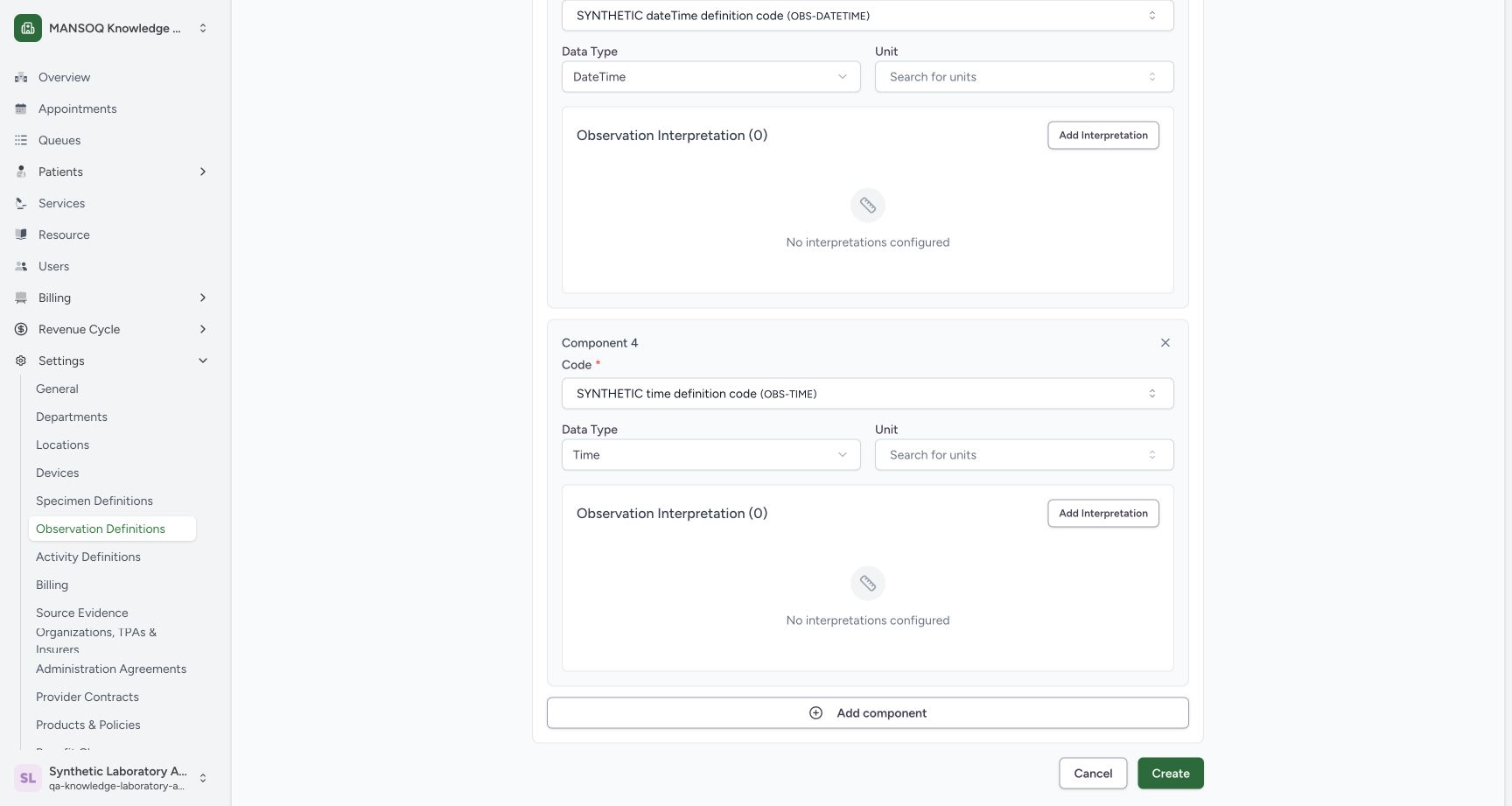
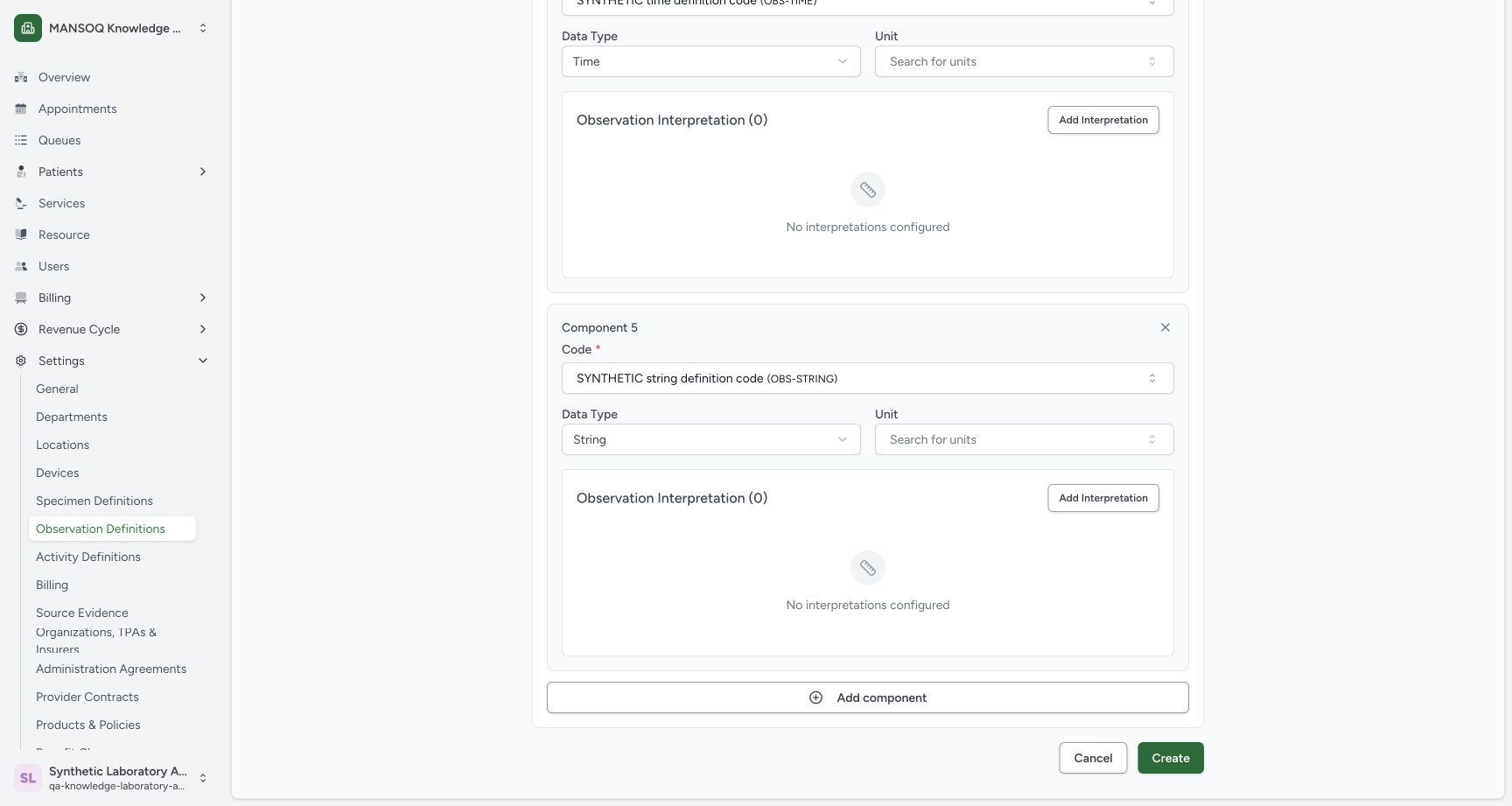
Use Add component at the bottom of the list to append each further row. The pictured DateTime, Time and String stages show this repeated action. Each new row has its own Code and Data Type controls.
123datetime component configured
Capture details
Exact committed 96ca source; custom training URNs demonstrate definition metadata. No patient result, clinical interpretation validation or licensed terminology qualification.
Image SHA-256 e5bc085577c0d7f5335627ff30c11bf9d9ea7c660eb6f842b971af31c5dddb2c
- DateTime component code: Review the selected fictional DateTime code.
- DateTime selector: Choose the component type.
- Add component: Append another component row.
 123
123time component configured
Capture details
Exact committed 96ca source; custom training URNs demonstrate definition metadata. No patient result, clinical interpretation validation or licensed terminology qualification.
Image SHA-256 706b3d8e51a19f4abe76d987056292181f5d2f5cbc69e4e63b3fdc4aa38ad7a4
- Time component code: Review the selected fictional Time code.
- Time selector: Review the selected Time type.
- Add component: Append another component row.
 123
123string component configured
Capture details
Exact committed 96ca source; custom training URNs demonstrate definition metadata. No patient result, clinical interpretation validation or licensed terminology qualification.
Image SHA-256 be8c61adc2cffb48c8279c0e3d59849bc28f2b61f0bd8e6a24b2a54d2e263fe0
- String component code: Review the selected fictional String code.
- String selector: Review the selected String type.
- Add component: Append another component row.
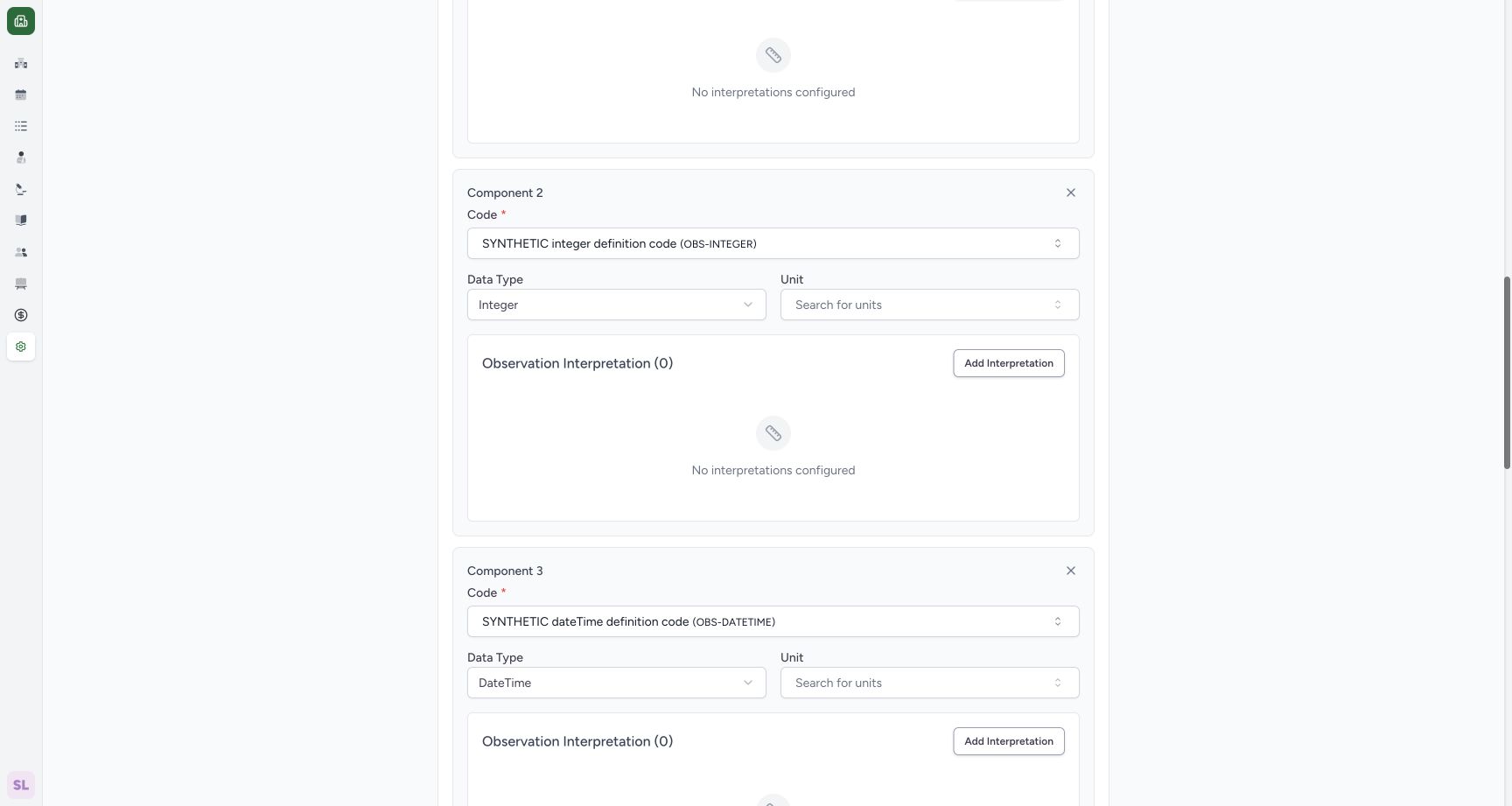
7. Configure the Integer component
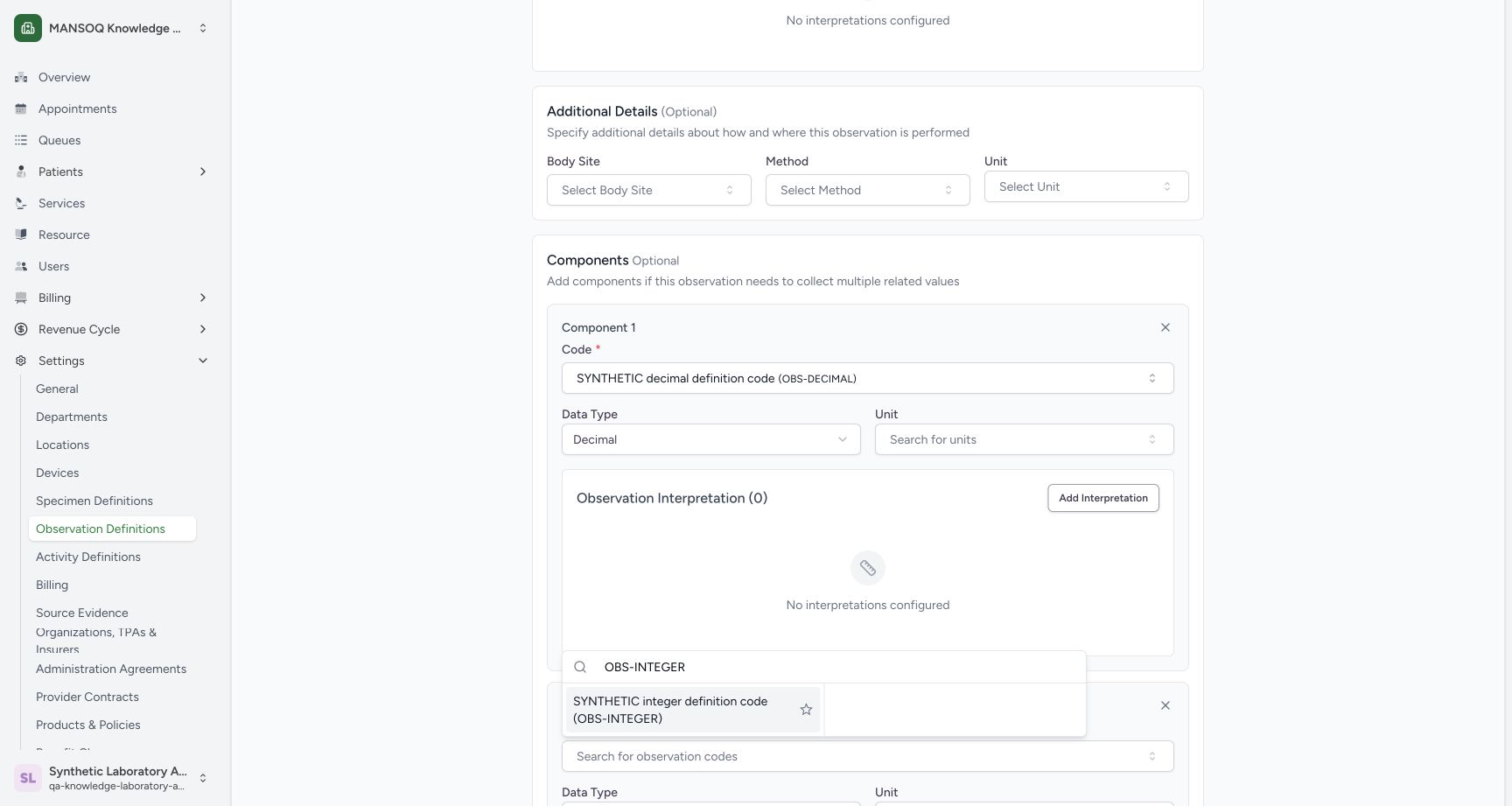
For Component 2, select Integer, search OBS-INTEGER in Code, and choose the synthetic result. The saved editor context confirms both the exact code and Integer selection.
12component type menu
Capture details
Exact committed 96ca source; custom training URNs demonstrate definition metadata. No patient result, clinical interpretation validation or licensed terminology qualification.
Image SHA-256 b7e1b94b4cfaeeb686d6df332aed106edd572c047acb62012f39ec4fa42cac46
- Decimal: Choose Decimal for Component 1.
- Integer option: The same menu offers Integer for a later component.
 12
12integer code lookup
Capture details
Exact committed 96ca source; custom training URNs demonstrate definition metadata. No patient result, clinical interpretation validation or licensed terminology qualification.
Image SHA-256 43baa01cd730d95552e1cdf9e58a8ef8e19fec5f3a03d7a712ac2a7f069356aa
- Search OBS-INTEGER: Search the installed custom Integer code.
- SYNTHETIC Integer code: Select the fictional Integer result.
 12
12saved integer full control
Capture details
Exact committed 96ca source; custom training URNs demonstrate definition metadata. No patient result, clinical interpretation validation or licensed terminology qualification.
Image SHA-256 03dceb2ba26b77279014ec4b0c2cac67ec79f9c7ab9816a3df58811b129197b4
- Saved Integer code: Review the persisted OBS-INTEGER component code.
- Saved Integer type: Review the persisted Integer selection.
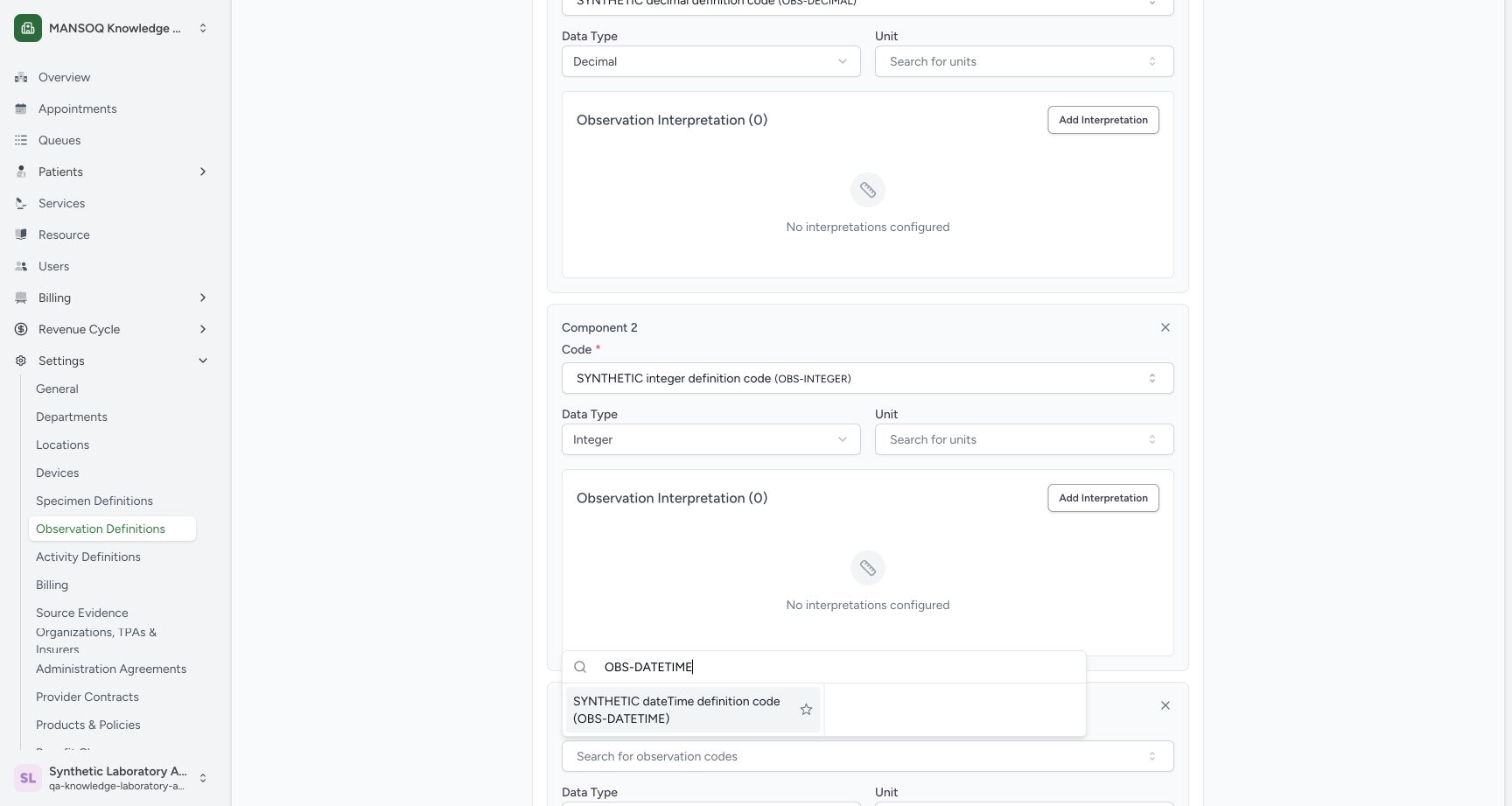
8. Configure the DateTime component
For Component 3, choose DateTime and select the OBS-DATETIME synthetic code. Review both selections in the component panel.
12component type menu
Capture details
Exact committed 96ca source; custom training URNs demonstrate definition metadata. No patient result, clinical interpretation validation or licensed terminology qualification.
Image SHA-256 b7e1b94b4cfaeeb686d6df332aed106edd572c047acb62012f39ec4fa42cac46
- Decimal: Choose Decimal for Component 1.
- Integer option: The same menu offers Integer for a later component.
 12
12datetime code lookup
Capture details
Exact committed 96ca source; custom training URNs demonstrate definition metadata. No patient result, clinical interpretation validation or licensed terminology qualification.
Image SHA-256 616b6ed18dcdd434ca98b606ec2758cd0129df4ed5a15f4372288a791a2266f7
- Search OBS-DATETIME: Search the installed custom DateTime code.
- SYNTHETIC DateTime code: Select the fictional DateTime result.
123datetime component configured
Capture details
Exact committed 96ca source; custom training URNs demonstrate definition metadata. No patient result, clinical interpretation validation or licensed terminology qualification.
Image SHA-256 e5bc085577c0d7f5335627ff30c11bf9d9ea7c660eb6f842b971af31c5dddb2c
- DateTime component code: Review the selected fictional DateTime code.
- DateTime selector: Choose the component type.
- Add component: Append another component row.
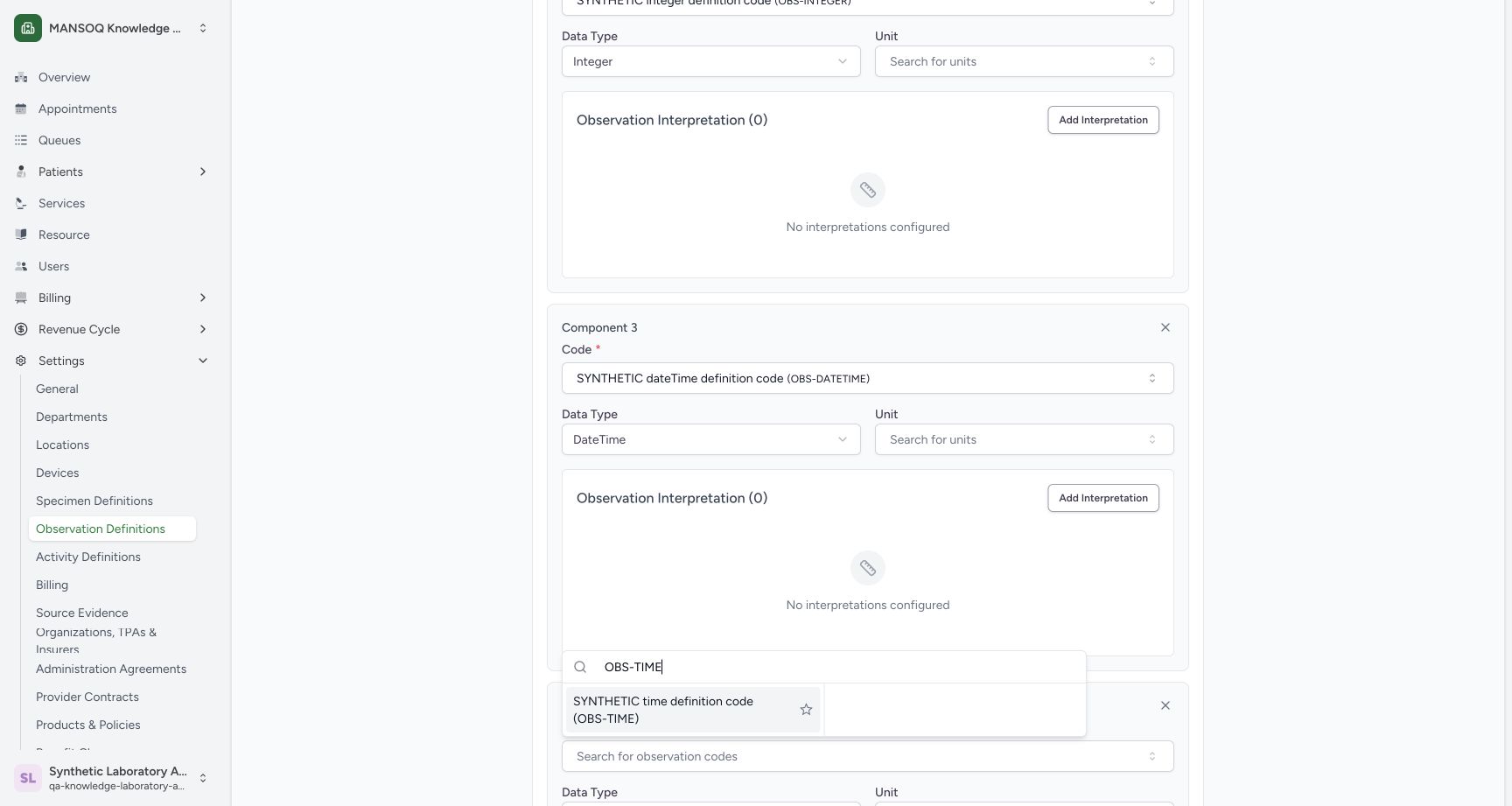
9. Configure the Time component
For Component 4, choose Time, search OBS-TIME, and select the synthetic result. Review the Time selection and code.
12component type menu
Capture details
Exact committed 96ca source; custom training URNs demonstrate definition metadata. No patient result, clinical interpretation validation or licensed terminology qualification.
Image SHA-256 b7e1b94b4cfaeeb686d6df332aed106edd572c047acb62012f39ec4fa42cac46
- Decimal: Choose Decimal for Component 1.
- Integer option: The same menu offers Integer for a later component.
 12
12time code lookup
Capture details
Exact committed 96ca source; custom training URNs demonstrate definition metadata. No patient result, clinical interpretation validation or licensed terminology qualification.
Image SHA-256 671ae68b9313abdce6c938805d46668956ff4f83544154b9de7ab440c5c57d31
- Search OBS-TIME: Search the custom code.
- SYNTHETIC Time code: Select the fictional result.
123time component configured
Capture details
Exact committed 96ca source; custom training URNs demonstrate definition metadata. No patient result, clinical interpretation validation or licensed terminology qualification.
Image SHA-256 706b3d8e51a19f4abe76d987056292181f5d2f5cbc69e4e63b3fdc4aa38ad7a4
- Time component code: Review the selected fictional Time code.
- Time selector: Review the selected Time type.
- Add component: Append another component row.
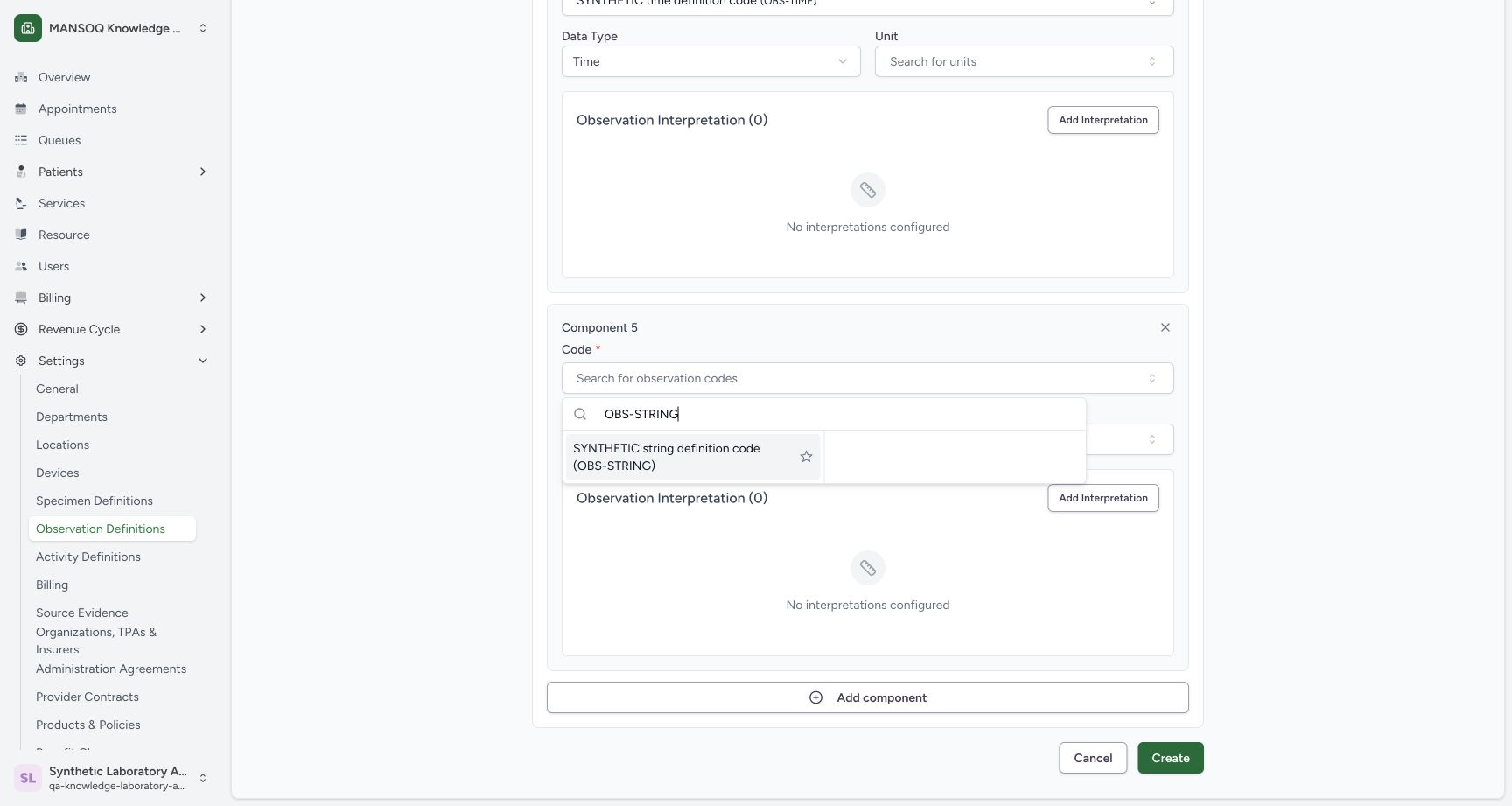
10. Configure the String component
For Component 5, choose String, search OBS-STRING, and select its synthetic result. This is a component of the new definition; the earlier separate String definition is retained.
12component type menu
Capture details
Exact committed 96ca source; custom training URNs demonstrate definition metadata. No patient result, clinical interpretation validation or licensed terminology qualification.
Image SHA-256 b7e1b94b4cfaeeb686d6df332aed106edd572c047acb62012f39ec4fa42cac46
- Decimal: Choose Decimal for Component 1.
- Integer option: The same menu offers Integer for a later component.
 12
12string code lookup
Capture details
Exact committed 96ca source; custom training URNs demonstrate definition metadata. No patient result, clinical interpretation validation or licensed terminology qualification.
Image SHA-256 25d6492fe70931c9ada35e85f4c8e4ac11dd0c4f58ee40d6c73eb56f80dfeb99
- Search OBS-STRING: Search the custom code.
- SYNTHETIC String code: Select the fictional result.
123string component configured
Capture details
Exact committed 96ca source; custom training URNs demonstrate definition metadata. No patient result, clinical interpretation validation or licensed terminology qualification.
Image SHA-256 be8c61adc2cffb48c8279c0e3d59849bc28f2b61f0bd8e6a24b2a54d2e263fe0
- String component code: Review the selected fictional String code.
- String selector: Review the selected String type.
- Add component: Append another component row.
 1
1saved draft row
Capture details
Exact committed 96ca source; custom training URNs demonstrate definition metadata. No patient result, clinical interpretation validation or licensed terminology qualification.
Image SHA-256 a7efba8dc491c3b285e619a5e6d57197848e8022e302eac7b1769044d3b4170b
- View new definition: Open the new Boolean parent row.
11. Configure the Quantity component
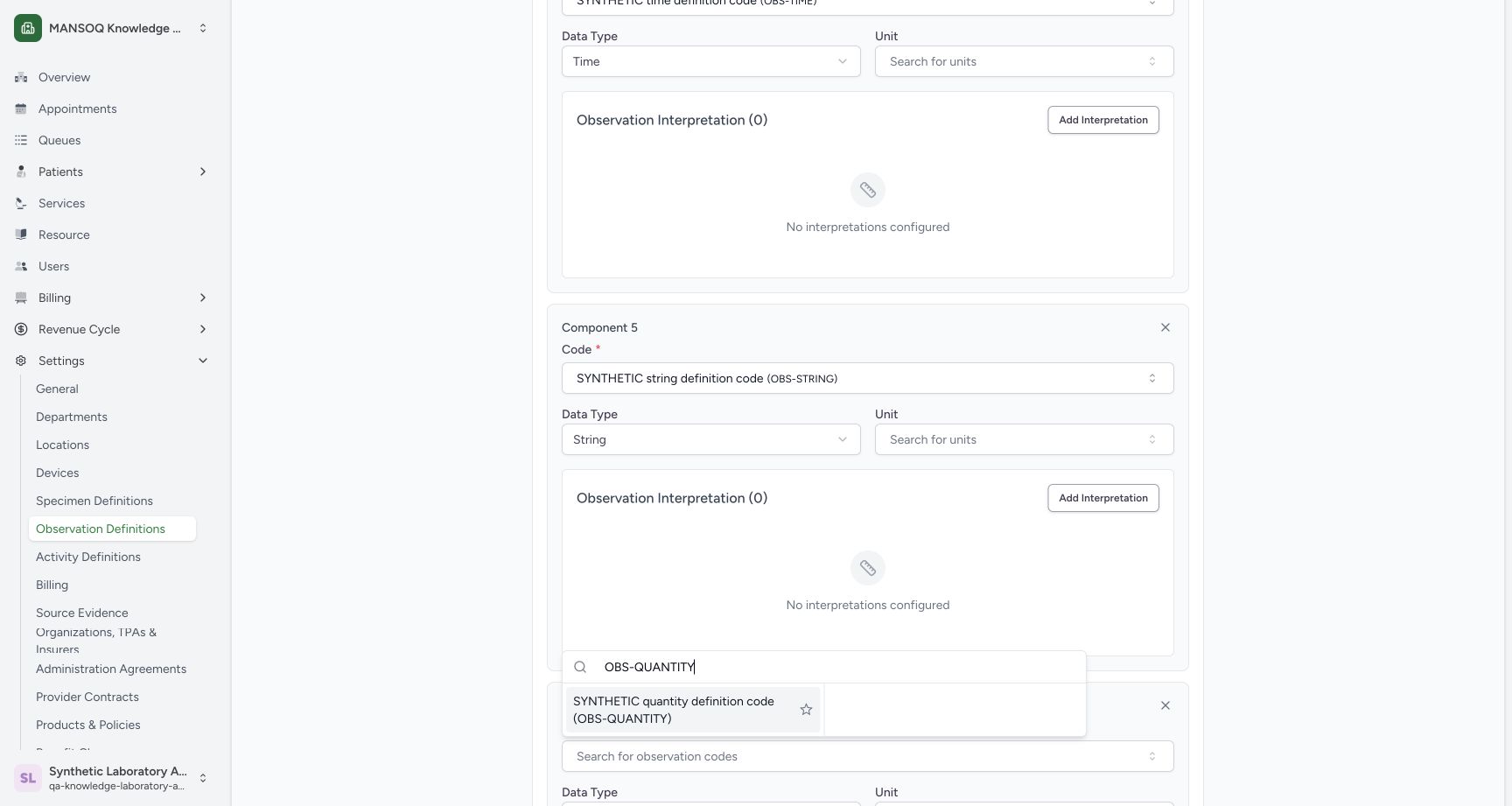
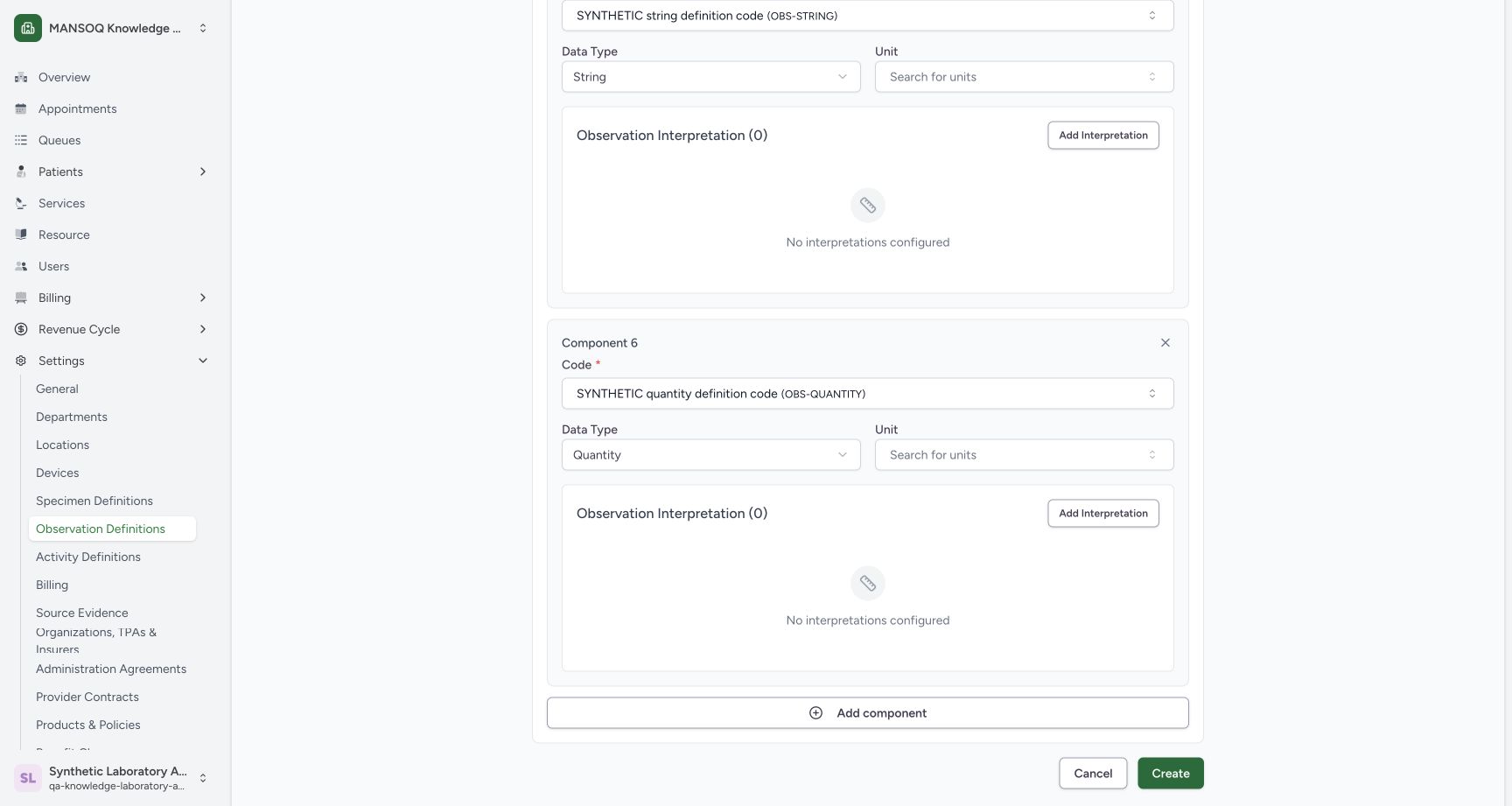
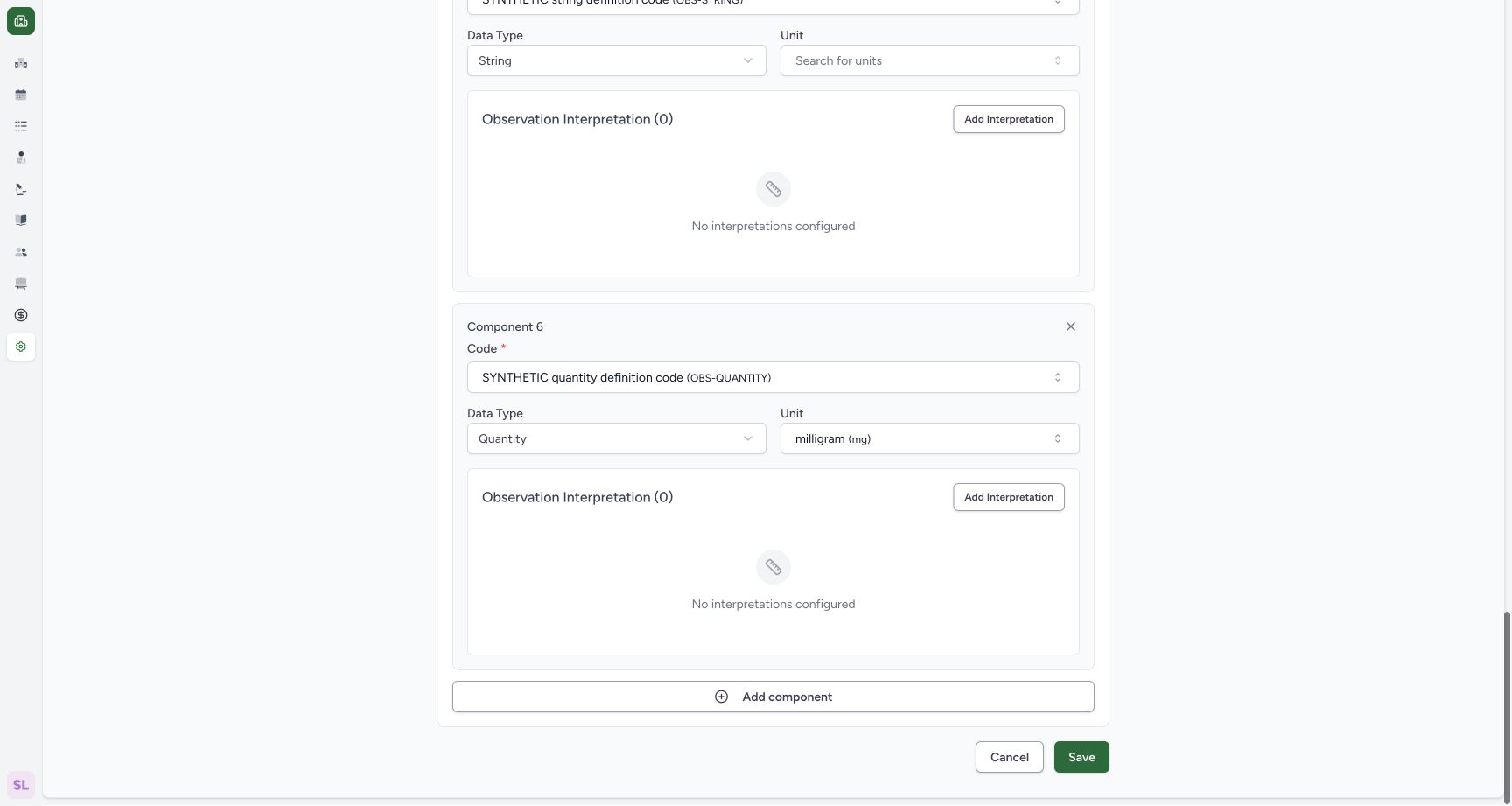
For Component 6, retain Quantity, search OBS-QUANTITY, and select its synthetic result. This row also has a separate Unit lookup.
 12
12quantity code lookup
Capture details
Exact committed 96ca source; custom training URNs demonstrate definition metadata. No patient result, clinical interpretation validation or licensed terminology qualification.
Image SHA-256 1ebe46d2f86a203aa33506b586758c6dbea474db14d154670047fd63c3382d39
- Search OBS-QUANTITY: Search the custom code.
- SYNTHETIC Quantity code: Select the fictional result.
 123
123quantity component unit control
Capture details
Exact committed 96ca source; custom training URNs demonstrate definition metadata. No patient result, clinical interpretation validation or licensed terminology qualification.
Image SHA-256 d98a44b89adb1bf980a923b63fc460b25e63f91e76e2aa9349120da8478dbdb8
- Quantity component code: Review the selected fictional Quantity code.
- Quantity selector: Review Quantity type.
- Unit: Open this component's optional unit lookup.
12. Select the Quantity unit
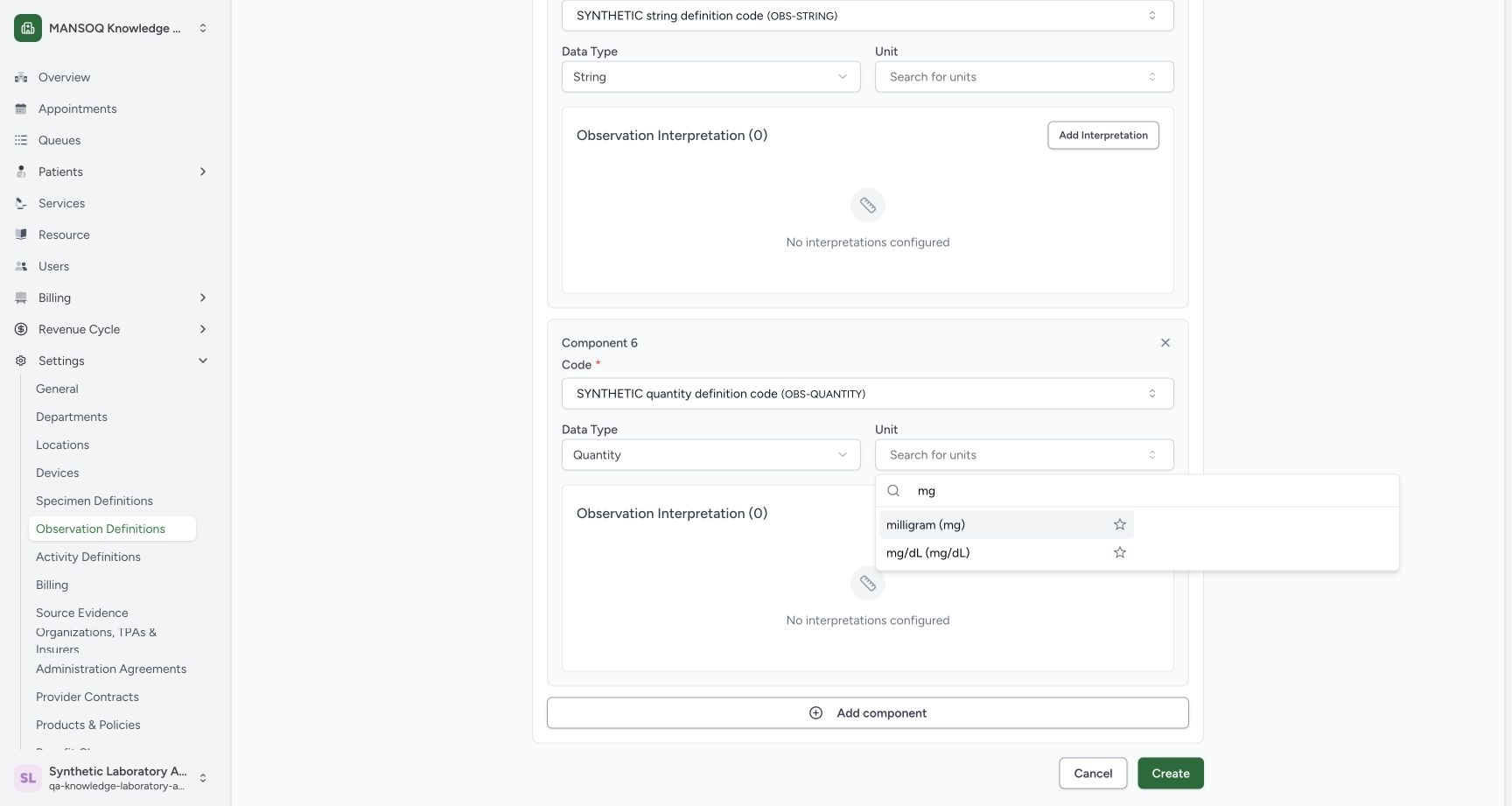
Open Component 6's Unit, search mg, and select milligram (mg). The selected unit remains visible. Other components' units and all interpretation lists remain unset in this basic metadata example.
123quantity component unit control
Capture details
Exact committed 96ca source; custom training URNs demonstrate definition metadata. No patient result, clinical interpretation validation or licensed terminology qualification.
Image SHA-256 d98a44b89adb1bf980a923b63fc460b25e63f91e76e2aa9349120da8478dbdb8
- Quantity component code: Review the selected fictional Quantity code.
- Quantity selector: Review Quantity type.
- Unit: Open this component's optional unit lookup.
 12
12quantity unit lookup
Capture details
Exact committed 96ca source; custom training URNs demonstrate definition metadata. No patient result, clinical interpretation validation or licensed terminology qualification.
Image SHA-256 6c2e40ddaff9e22102c36c0447620b6aaa142c4f973d09e50208f4b12e36a5d7
- Search mg: Search installed units.
- milligram (mg): Select this installed unit.
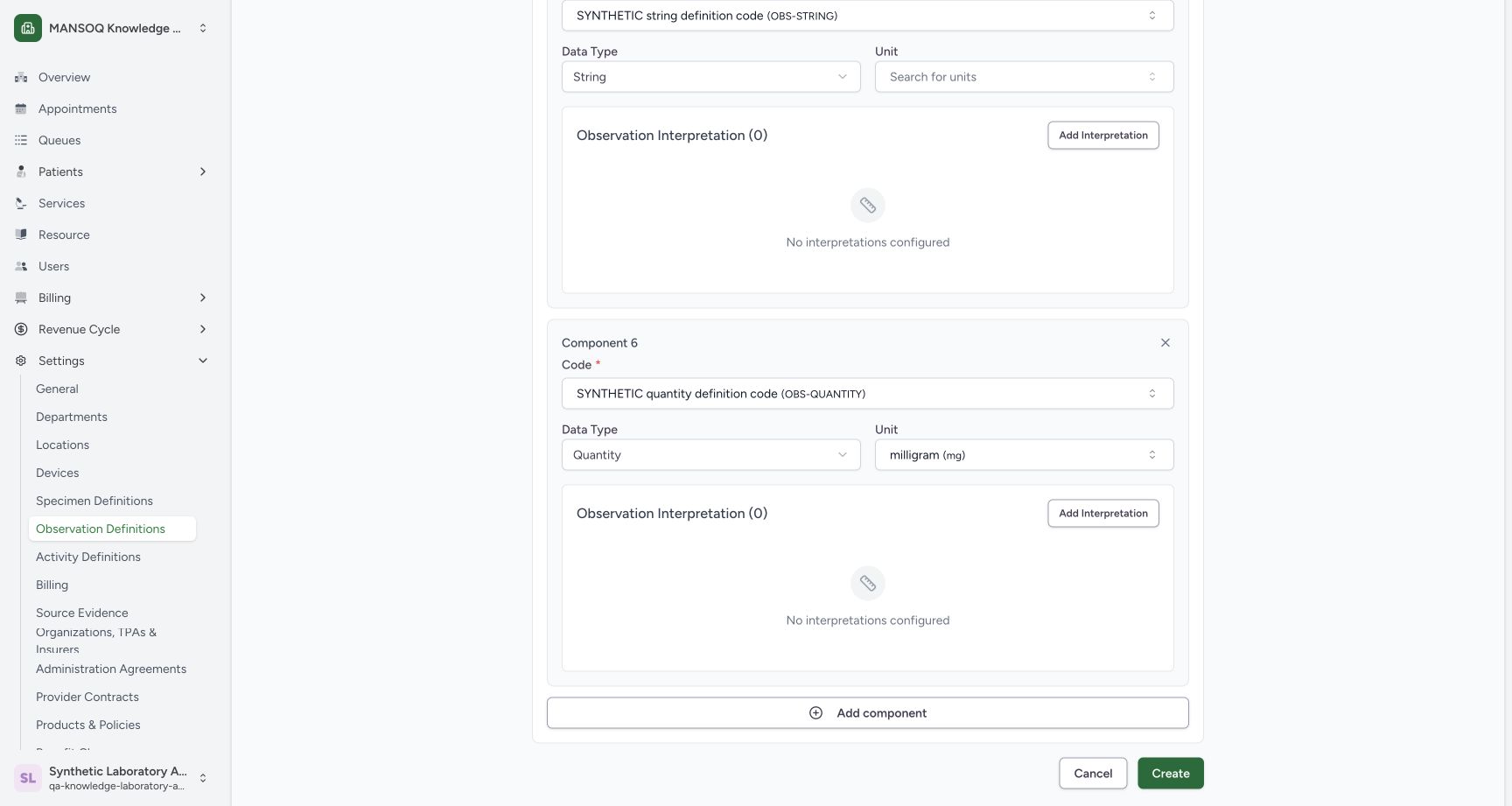 12
12quantity component configured
Capture details
Exact committed 96ca source; custom training URNs demonstrate definition metadata. No patient result, clinical interpretation validation or licensed terminology qualification.
Image SHA-256 9b79fd4d53276f86b4c2d0c84901eda173903dd8c172f7e3ba779f15853a2497
- Selected unit: Review milligram (mg).
- Create: Save the completed definition once.
12first component controls
Capture details
Exact committed 96ca source; custom training URNs demonstrate definition metadata. No patient result, clinical interpretation validation or licensed terminology qualification.
Image SHA-256 83e8e00f755552c4c9c6c04e77e5af0ae05176d6168ed6cb9213e95cf2602f63
- Component Code: Open the component code lookup.
- Component Data Type: Open the component type menu.
12decimal component configured
Capture details
Exact committed 96ca source; custom training URNs demonstrate definition metadata. No patient result, clinical interpretation validation or licensed terminology qualification.
Image SHA-256 7df6c61d34e180841fd398841d333109424ffb6951450277598a2c8a81dd6bdc
- Selected Decimal code: Review OBS-DECIMAL.
- Decimal Data Type: The first component uses Decimal.
123datetime component configured
Capture details
Exact committed 96ca source; custom training URNs demonstrate definition metadata. No patient result, clinical interpretation validation or licensed terminology qualification.
Image SHA-256 e5bc085577c0d7f5335627ff30c11bf9d9ea7c660eb6f842b971af31c5dddb2c
- DateTime component code: Review the selected fictional DateTime code.
- DateTime selector: Choose the component type.
- Add component: Append another component row.
123time component configured
Capture details
Exact committed 96ca source; custom training URNs demonstrate definition metadata. No patient result, clinical interpretation validation or licensed terminology qualification.
Image SHA-256 706b3d8e51a19f4abe76d987056292181f5d2f5cbc69e4e63b3fdc4aa38ad7a4
- Time component code: Review the selected fictional Time code.
- Time selector: Review the selected Time type.
- Add component: Append another component row.
123string component configured
Capture details
Exact committed 96ca source; custom training URNs demonstrate definition metadata. No patient result, clinical interpretation validation or licensed terminology qualification.
Image SHA-256 be8c61adc2cffb48c8279c0e3d59849bc28f2b61f0bd8e6a24b2a54d2e263fe0
- String component code: Review the selected fictional String code.
- String selector: Review the selected String type.
- Add component: Append another component row.
13. Create the completed definition
Review the configured components, then use Create once. The application returns to the catalogue with Active selected; that filter does not show a new Draft record.
12quantity component configured
Capture details
Exact committed 96ca source; custom training URNs demonstrate definition metadata. No patient result, clinical interpretation validation or licensed terminology qualification.
Image SHA-256 9b79fd4d53276f86b4c2d0c84901eda173903dd8c172f7e3ba779f15853a2497
- Selected unit: Review milligram (mg).
- Create: Save the completed definition once.
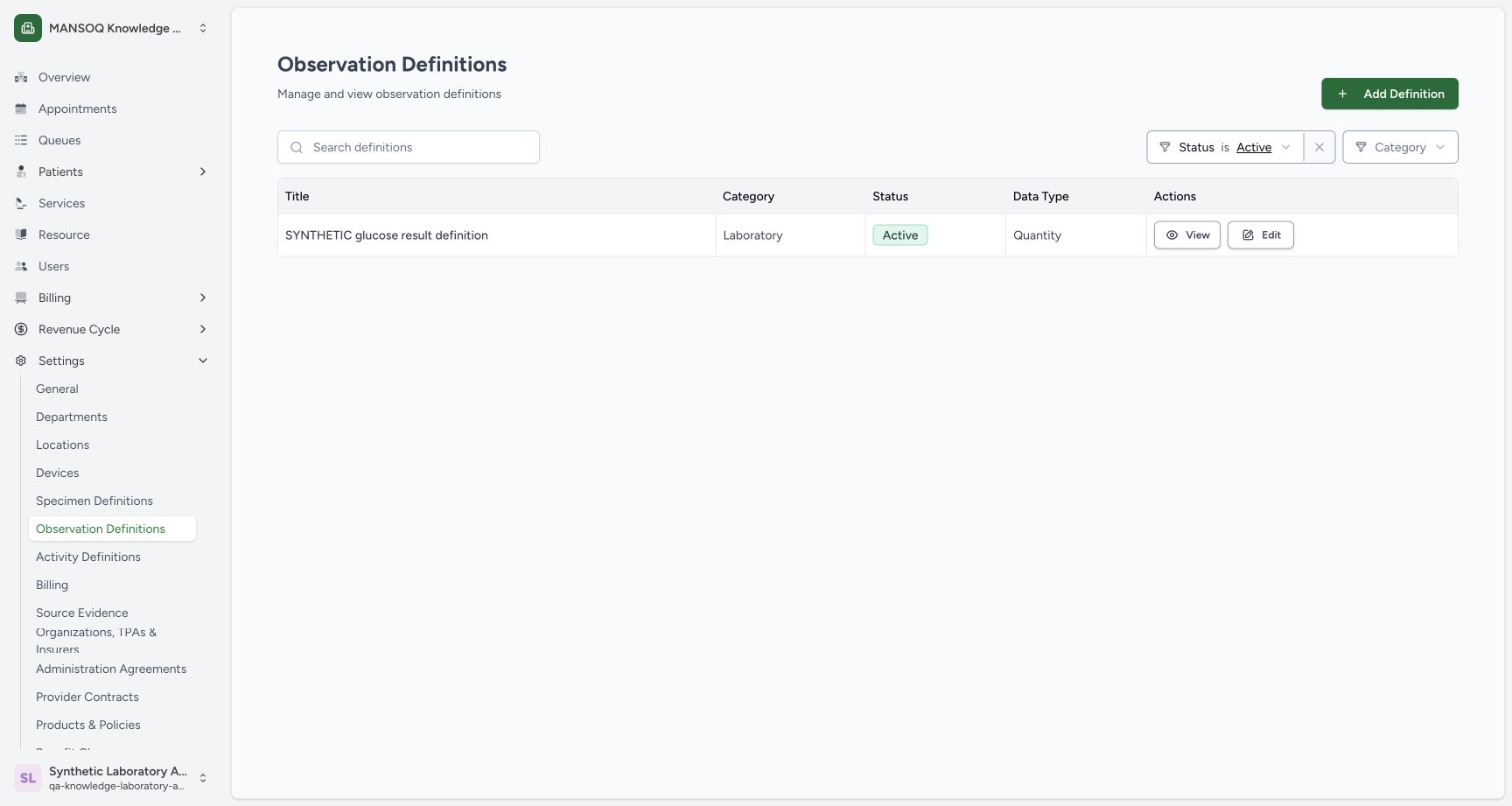 1
1Created record and Active filter
Capture details
Exact committed 96ca source; custom training URNs demonstrate definition metadata. No patient result, clinical interpretation validation or licensed terminology qualification.
Image SHA-256 770220c888f5afe4447269dbb0ca3ce584c5e108263e46061779ee1c8681bc77
- Active filter: The default Active filter does not include the new Draft.
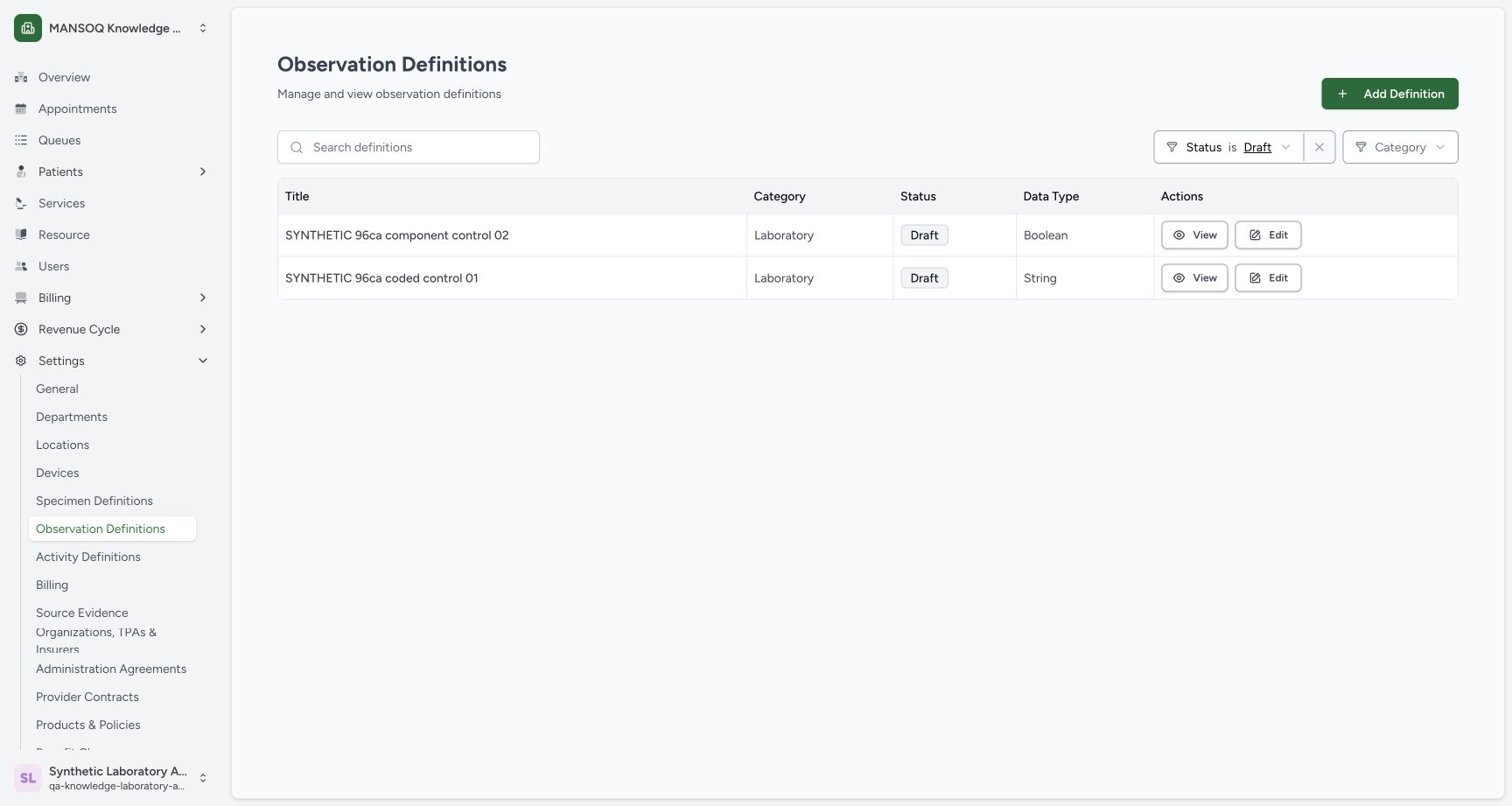
14. Find and open the saved Draft
Open the Status filter and select Draft. The new component-control row appears with Boolean data type. Choose its View action.
1Created record and Active filter
Capture details
Exact committed 96ca source; custom training URNs demonstrate definition metadata. No patient result, clinical interpretation validation or licensed terminology qualification.
Image SHA-256 770220c888f5afe4447269dbb0ca3ce584c5e108263e46061779ee1c8681bc77
- Active filter: The default Active filter does not include the new Draft.
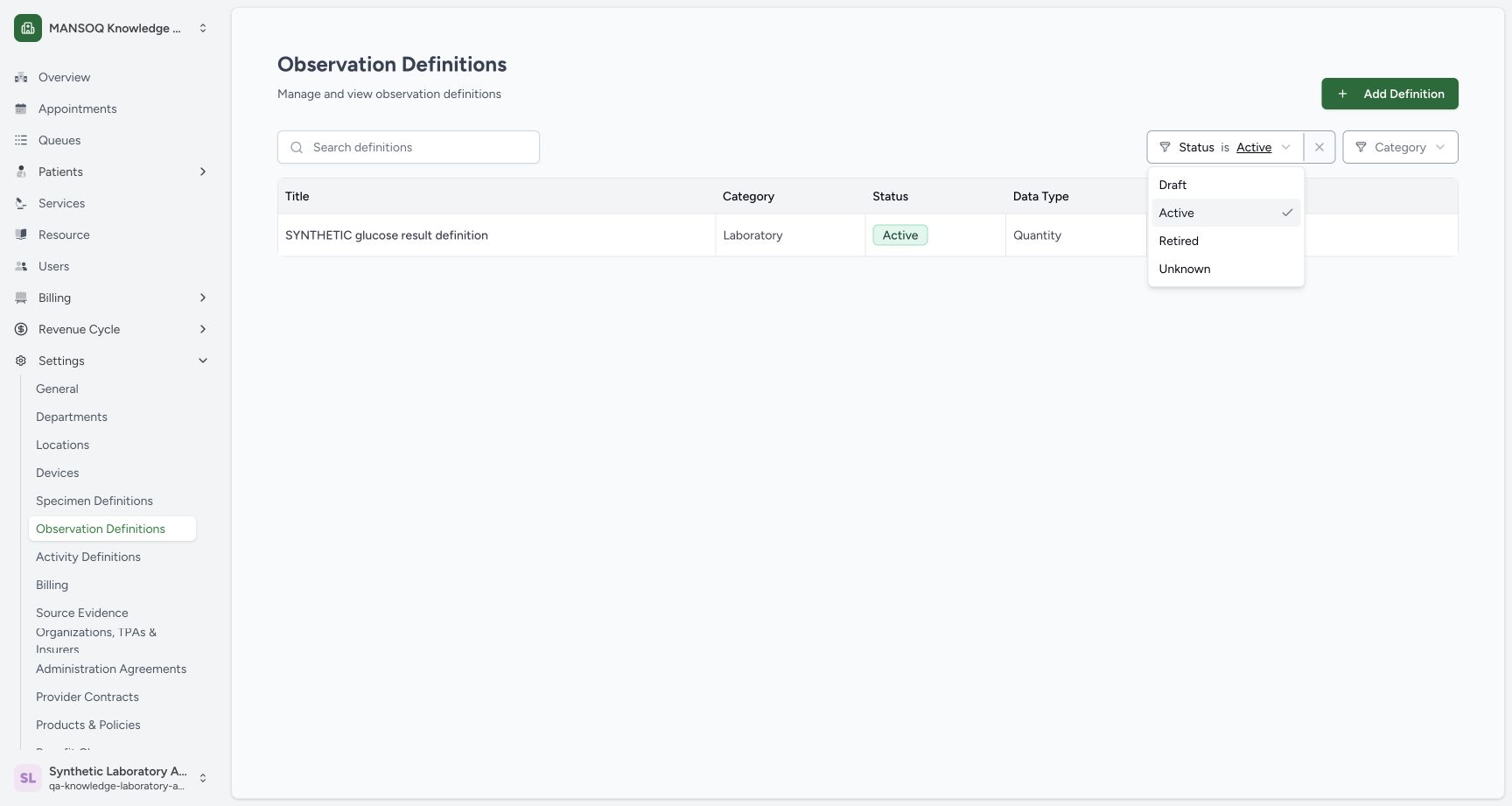 1
1draft status filter
Capture details
Exact committed 96ca source; custom training URNs demonstrate definition metadata. No patient result, clinical interpretation validation or licensed terminology qualification.
Image SHA-256 fd37a0dd6b79895b31bfb249bf7fd51b0f3160e43997ed313ac472f5cee50995
- Draft: Select Draft in the Status filter.
1saved draft row
Capture details
Exact committed 96ca source; custom training URNs demonstrate definition metadata. No patient result, clinical interpretation validation or licensed terminology qualification.
Image SHA-256 a7efba8dc491c3b285e619a5e6d57197848e8022e302eac7b1769044d3b4170b
- View new definition: Open the new Boolean parent row.
15. Inspect persisted types and unit
The saved detail shows the custom URN and parent boolean type. Scroll through the component cards to read decimal, integer, dateTime, time, string and quantity. The Quantity card retains milligram, http://unitsofmeasure.org, and mg.
1saved parent and components
Capture details
Exact committed 96ca source; custom training URNs demonstrate definition metadata. No patient result, clinical interpretation validation or licensed terminology qualification.
Image SHA-256 7970603112fbc857bf9107a9517399c0e003974daae2989187a530c46cd156ae
- Edit: Inspect the saved editor without changing its values.
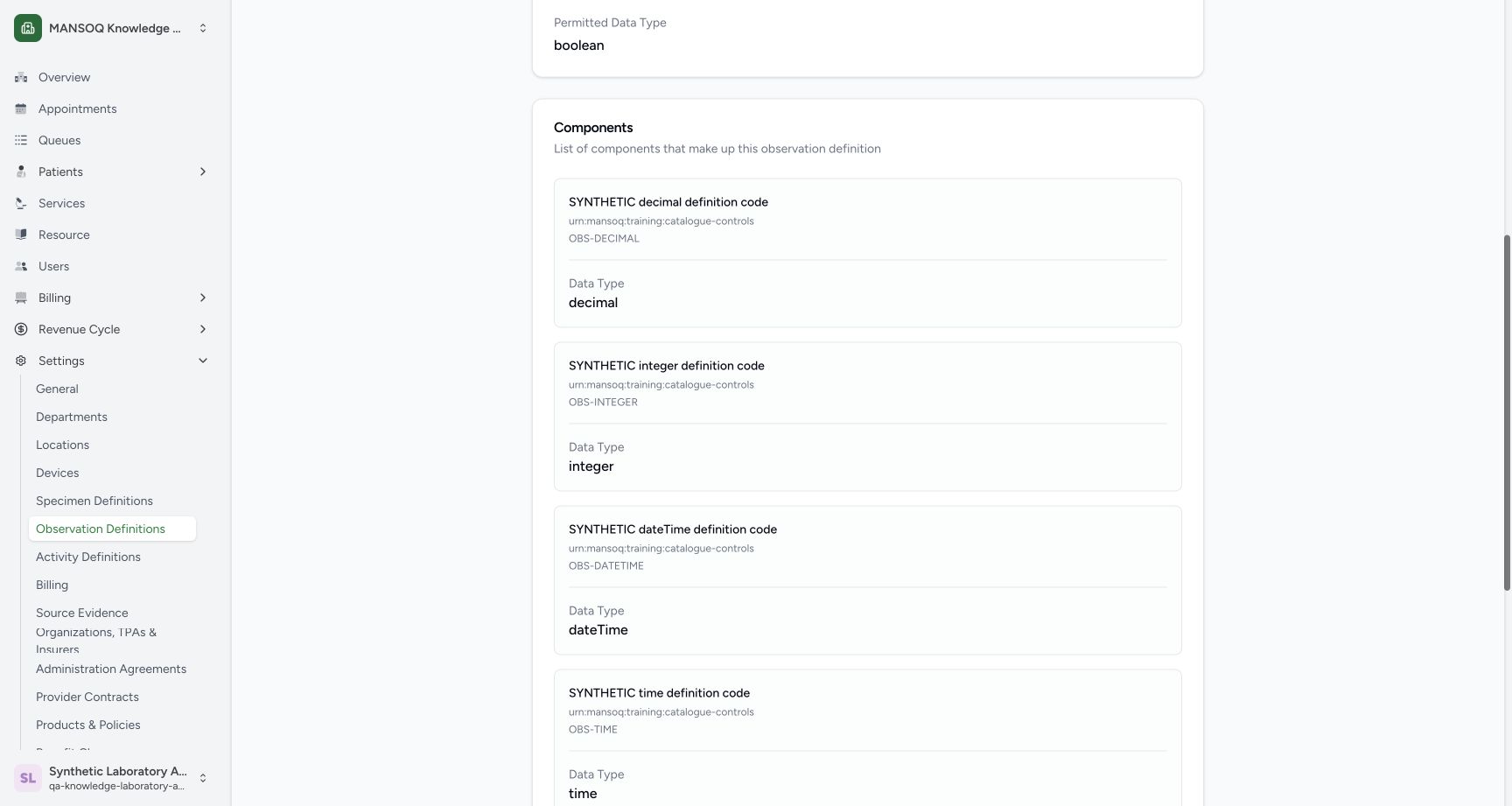 123
123Saved Decimal, Integer and DateTime components
Capture details
Exact committed 96ca source; custom training URNs demonstrate definition metadata. No patient result, clinical interpretation validation or licensed terminology qualification.
Image SHA-256 dc03839eb08009f375e722e9af0bb12a4e980efbcf900193b77eea23132c8c12
- Saved Decimal: Read the persisted decimal component type.
- Saved Integer: Read the persisted integer component type.
- Saved DateTime: Read the persisted dateTime component type.
12345saved time string quantity unit
Capture details
Exact committed 96ca source; custom training URNs demonstrate definition metadata. No patient result, clinical interpretation validation or licensed terminology qualification.
Image SHA-256 b38e2e402865f694f7f8e26c9a5aed8e4883a51ad27241b100a35515982c6ce4
- Saved DateTime: Read the persisted dateTime type.
- Saved Time: Read the persisted time type.
- Saved String: Read the persisted string type.
- Saved Quantity: Read the persisted quantity type.
- Saved unit: Read milligram and its UCUM system/code.
16. Inspect the saved editor without resaving
Use Edit on the saved detail. The reopened Integer panel retains OBS-INTEGER and Integer. Scroll to the editor footer and use Cancel to leave it without another save.
1saved parent and components
Capture details
Exact committed 96ca source; custom training URNs demonstrate definition metadata. No patient result, clinical interpretation validation or licensed terminology qualification.
Image SHA-256 7970603112fbc857bf9107a9517399c0e003974daae2989187a530c46cd156ae
- Edit: Inspect the saved editor without changing its values.
12saved integer full control
Capture details
Exact committed 96ca source; custom training URNs demonstrate definition metadata. No patient result, clinical interpretation validation or licensed terminology qualification.
Image SHA-256 03dceb2ba26b77279014ec4b0c2cac67ec79f9c7ab9816a3df58811b129197b4
- Saved Integer code: Review the persisted OBS-INTEGER component code.
- Saved Integer type: Review the persisted Integer selection.
 1
1cancel persisted editor
Capture details
Exact committed 96ca source; custom training URNs demonstrate definition metadata. No patient result, clinical interpretation validation or licensed terminology qualification.
Image SHA-256 09a3bd421928d42f8b8337b31934789e584fd69b9ff1467c313869c8f6c8296d
- Cancel: Leave the saved editor without another save.
Custom metadata example
The description explicitly labels this as synthetic software training without clinical meaning or a patient result. The parent and component cards display urn:mansoq:training:catalogue-controls. These are reusable definition settings; the lesson does not enter a patient value.
1saved parent and components
Capture details
Exact committed 96ca source; custom training URNs demonstrate definition metadata. No patient result, clinical interpretation validation or licensed terminology qualification.
Image SHA-256 7970603112fbc857bf9107a9517399c0e003974daae2989187a530c46cd156ae
- Edit: Inspect the saved editor without changing its values.
123Saved Decimal, Integer and DateTime components
Capture details
Exact committed 96ca source; custom training URNs demonstrate definition metadata. No patient result, clinical interpretation validation or licensed terminology qualification.
Image SHA-256 dc03839eb08009f375e722e9af0bb12a4e980efbcf900193b77eea23132c8c12
- Saved Decimal: Read the persisted decimal component type.
- Saved Integer: Read the persisted integer component type.
- Saved DateTime: Read the persisted dateTime component type.
12345saved time string quantity unit
Capture details
Exact committed 96ca source; custom training URNs demonstrate definition metadata. No patient result, clinical interpretation validation or licensed terminology qualification.
Image SHA-256 b38e2e402865f694f7f8e26c9a5aed8e4883a51ad27241b100a35515982c6ce4
- Saved DateTime: Read the persisted dateTime type.
- Saved Time: Read the persisted time type.
- Saved String: Read the persisted string type.
- Saved Quantity: Read the persisted quantity type.
- Saved unit: Read milligram and its UCUM system/code.
Troubleshooting
The new row is absent after Create
The pictured return state has Active selected while the new definition is Draft. Choose Draft in the Status filter to see the saved Boolean row; do not create a duplicate merely because the first filter hides it.
1Created record and Active filter
Capture details
Exact committed 96ca source; custom training URNs demonstrate definition metadata. No patient result, clinical interpretation validation or licensed terminology qualification.
Image SHA-256 770220c888f5afe4447269dbb0ca3ce584c5e108263e46061779ee1c8681bc77
- Active filter: The default Active filter does not include the new Draft.
1draft status filter
Capture details
Exact committed 96ca source; custom training URNs demonstrate definition metadata. No patient result, clinical interpretation validation or licensed terminology qualification.
Image SHA-256 fd37a0dd6b79895b31bfb249bf7fd51b0f3160e43997ed313ac472f5cee50995
- Draft: Select Draft in the Status filter.
1saved draft row
Capture details
Exact committed 96ca source; custom training URNs demonstrate definition metadata. No patient result, clinical interpretation validation or licensed terminology qualification.
Image SHA-256 a7efba8dc491c3b285e619a5e6d57197848e8022e302eac7b1769044d3b4170b
- View new definition: Open the new Boolean parent row.
Source evidence
Every citation uses this exact committed version. The private source repository requires access.
- repositories/platform/mansoq-core/mansoq/emr/api/viewsets/observation_definition.py:1 ·
96ca7318eb2b93f5fa477908a1543075e0d1f056Source file checksum
266ba9db30988a6c5bd0c2b01e7f609e6fa8f0754641ef079f3e8d1843a20935 - repositories/platform/mansoq-web/src/pages/Facility/settings/observationDefinition/ObservationDefinitionForm.tsx:1 ·
96ca7318eb2b93f5fa477908a1543075e0d1f056Source file checksum
4b96425f4d9e9cadf10720dcecbbe8ae323c85afab53e591358d1437c2a800ad - repositories/platform/mansoq-web/src/types/emr/observationDefinition/observationDefinition.ts:1 ·
96ca7318eb2b93f5fa477908a1543075e0d1f056Source file checksum
410ab320a92fa0297f8cab554412e9f064b1c3e7da92e811cd1c6049dba15d08