 MANSOQ
 Laboratory and diagnostics · VERSION 96ca7318
Create a String definition with custom coding and a coded interpretation
Create a Draft String definition, select the pictured local code, Body Site and Method, load a later ValueSet page, configure a coded rule and verify the saved result.
Facility Admin
 12
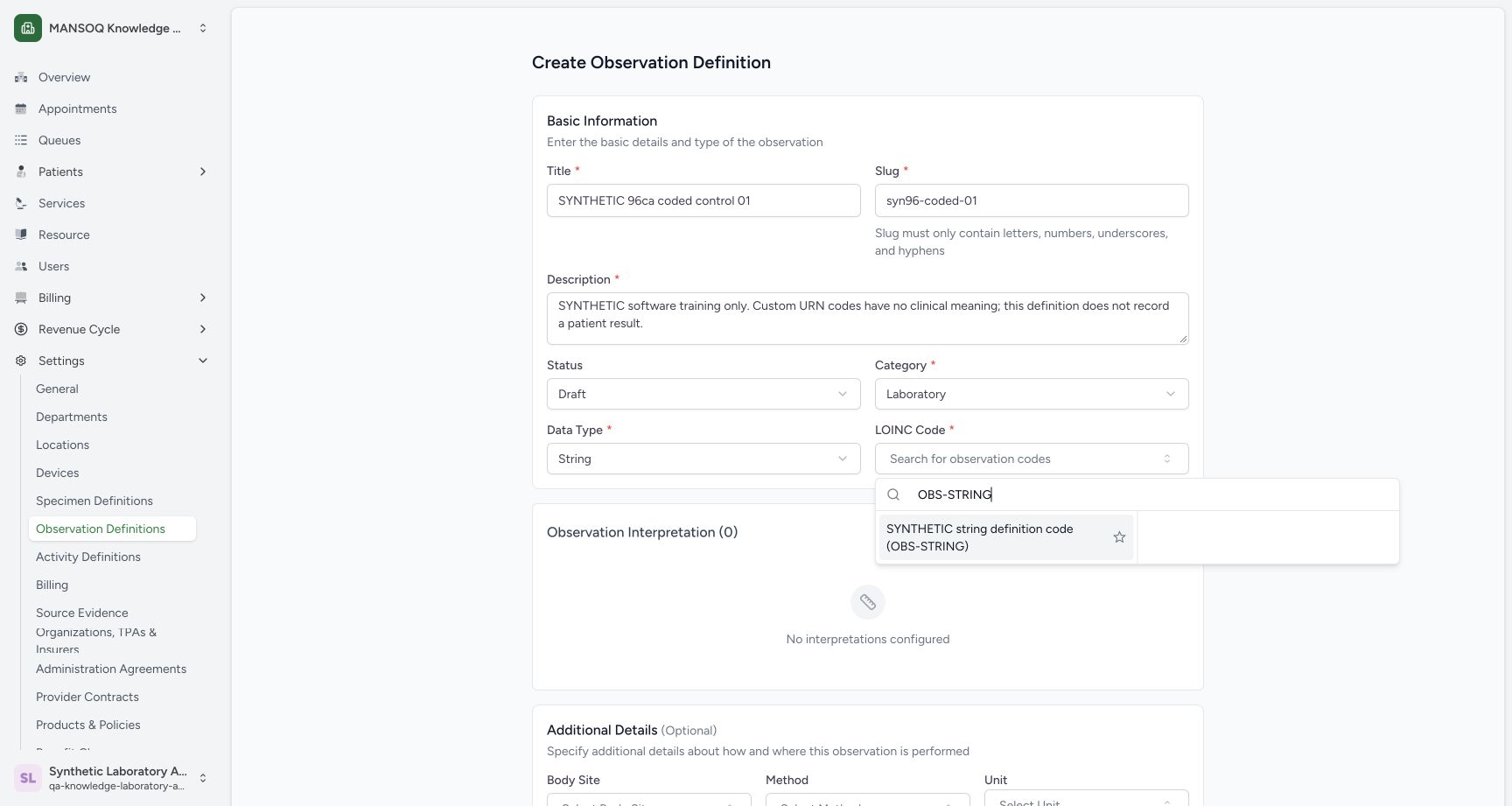
12Select the synthetic observation code
Capture details
Exact committed 96ca source. Custom training URNs demonstrate software controls; licensed terminology and clinical result evaluation are not qualified.
Image SHA-256 258a19001fb5e6b736b50dfd652cec7fa585e3475d30bc629f4cb141514dcdc0
- OBS-STRING search: Search the custom training observation code.
- Synthetic result: Select the explicitly synthetic result.
 123
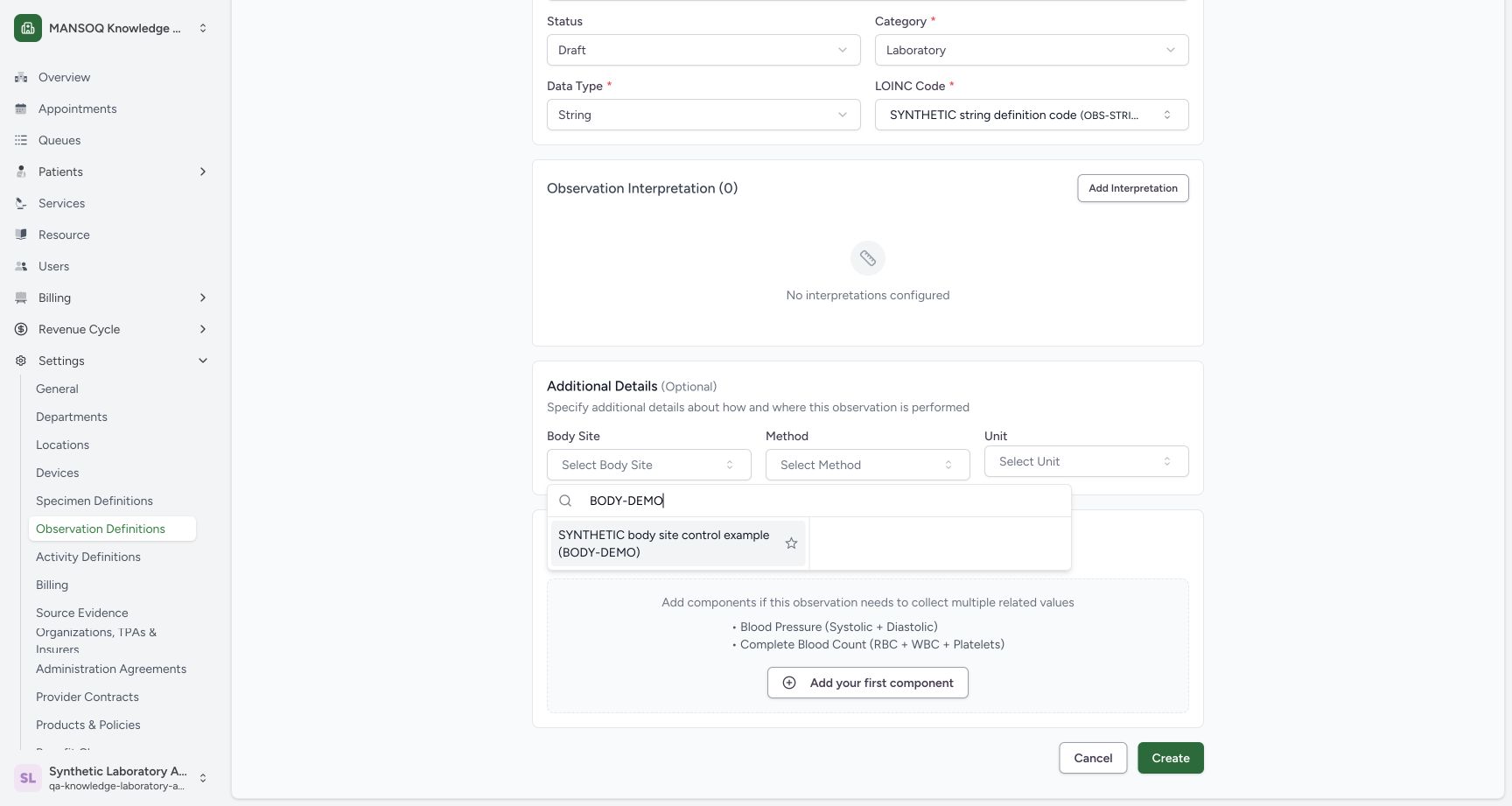
123Select the local Body Site example
Capture details
Exact committed 96ca source. Custom training URNs demonstrate software controls; licensed terminology and clinical result evaluation are not qualified.
Image SHA-256 111f61731cfc22adbf38fab7e4cb1827d0efb51c8dde7b2bb88151482fe8d4d8
- Body Site: Open the optional Body Site picker.
- BODY-DEMO search: Search the configured custom training code.
- Synthetic Body Site result: Select the local synthetic example.
 12
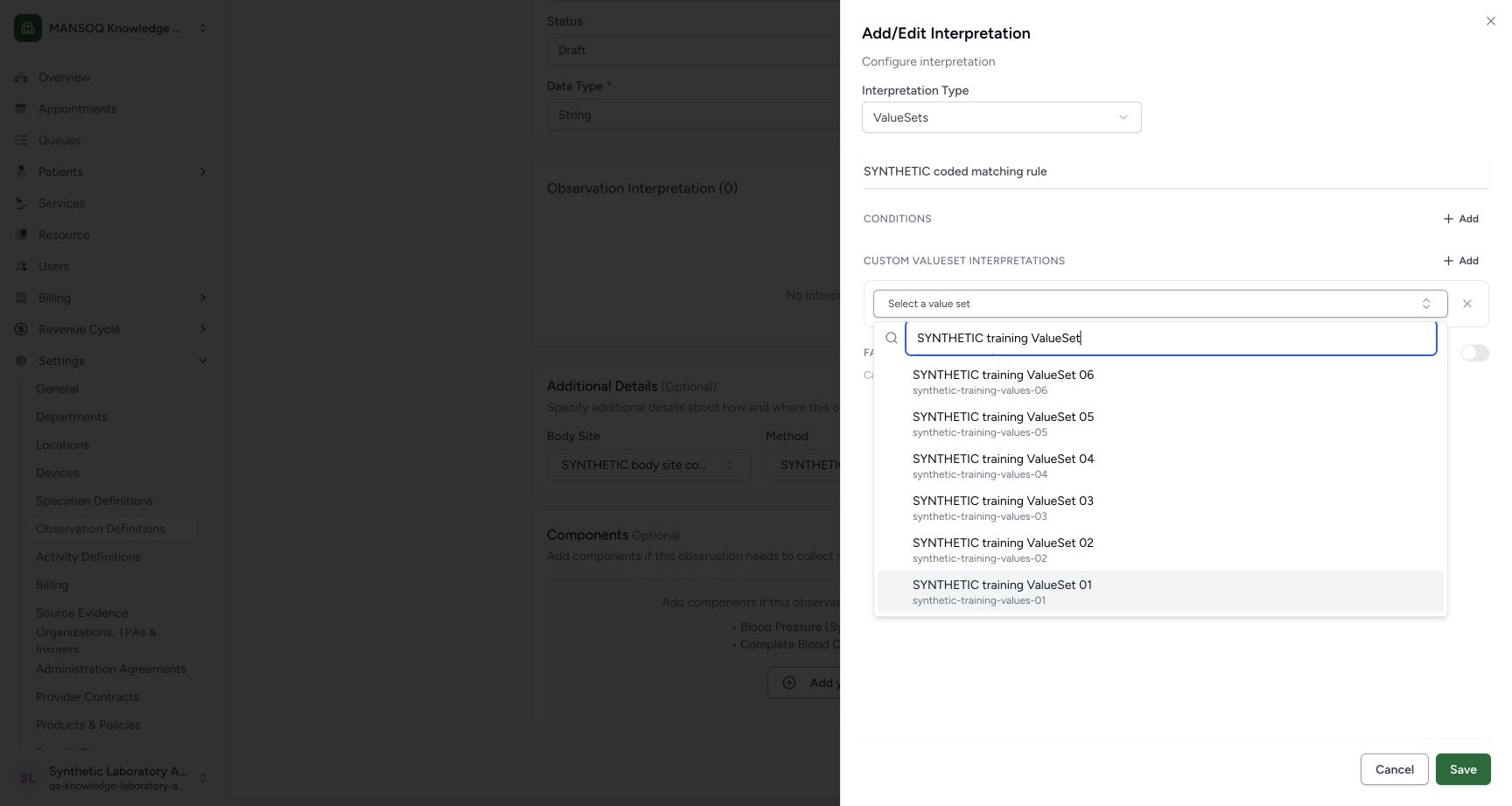
12Select the final loaded ValueSet
Capture details
Exact committed 96ca source. Custom training URNs demonstrate software controls; licensed terminology and clinical result evaluation are not qualified.
Image SHA-256 c243f52f88ffa84dd151d20ba303df4838f473186ac1e2c74c44fc40df9b5805
- Search keyboard focus: After Load More, End reaches the last loaded choice.
- ValueSet 01: Select this later-page result, or press Enter when highlighted.
 12345
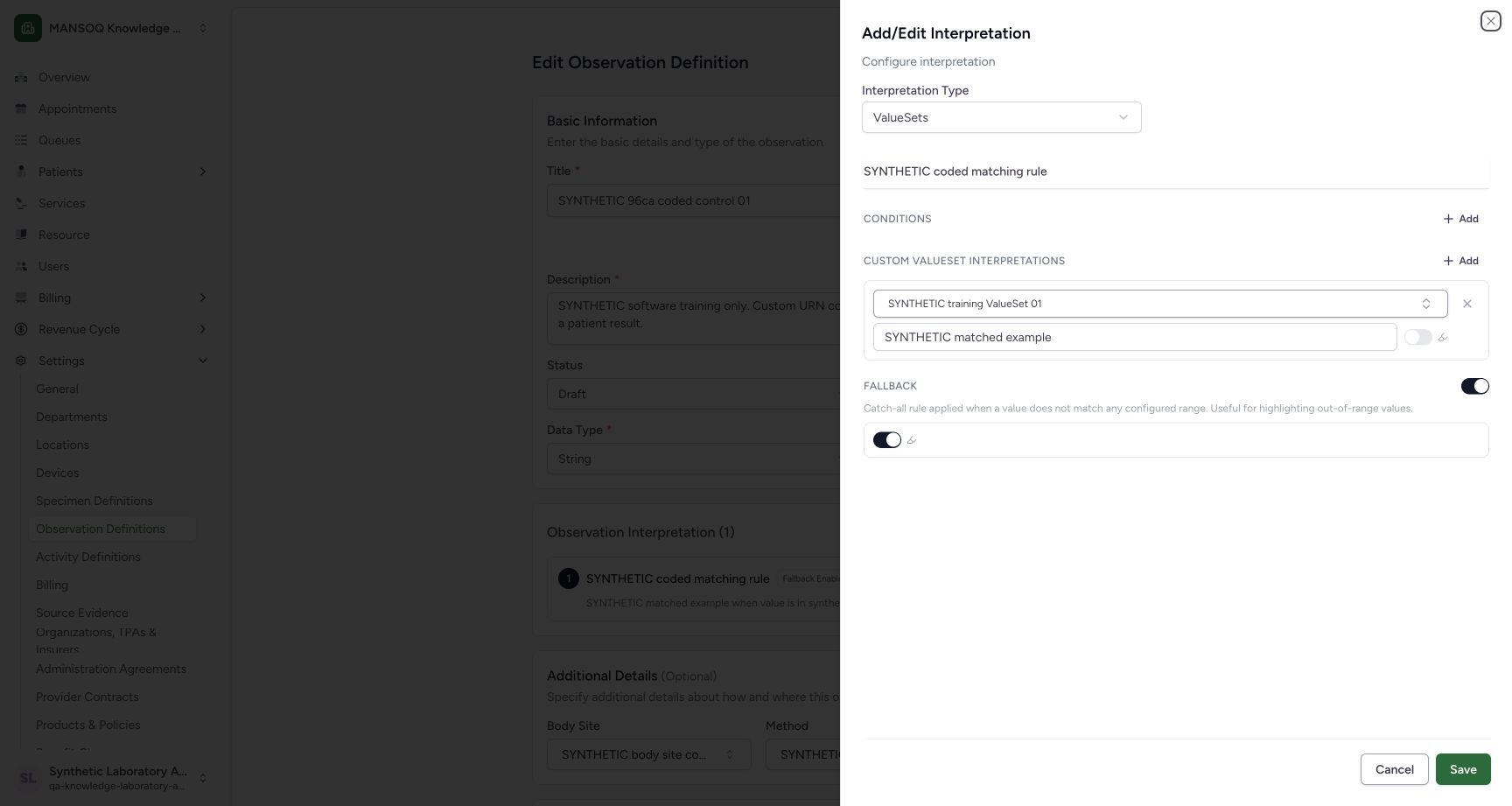
12345Inspect the persisted coded rule
Capture details
Exact committed 96ca source. Custom training URNs demonstrate software controls; licensed terminology and clinical result evaluation are not qualified.
Image SHA-256 f45862c0911ce76a64764317f63b78e3109cd76e04a4e7758bcbf33ad2b3169a
- Saved ValueSets mode: The persisted coded rule reopens in ValueSets mode.
- Resolved ValueSet name: The retained slug resolves to ValueSet 01 after reopening.
- Saved display: The saved matched display is retained.
- Saved fallback: The fallback remains enabled.
- Cancel inspection: Close the inspection sheet without a local edit.
18 of 18 content blocks have reviewed image alignment. Missing overview or prerequisite images remain open.
Before you begin
- Use the pictured existing Laboratory Facility Admin account in the fictional Laboratory. This worked example uses the explicitly synthetic custom URN displayed in the saved technical details.
 12
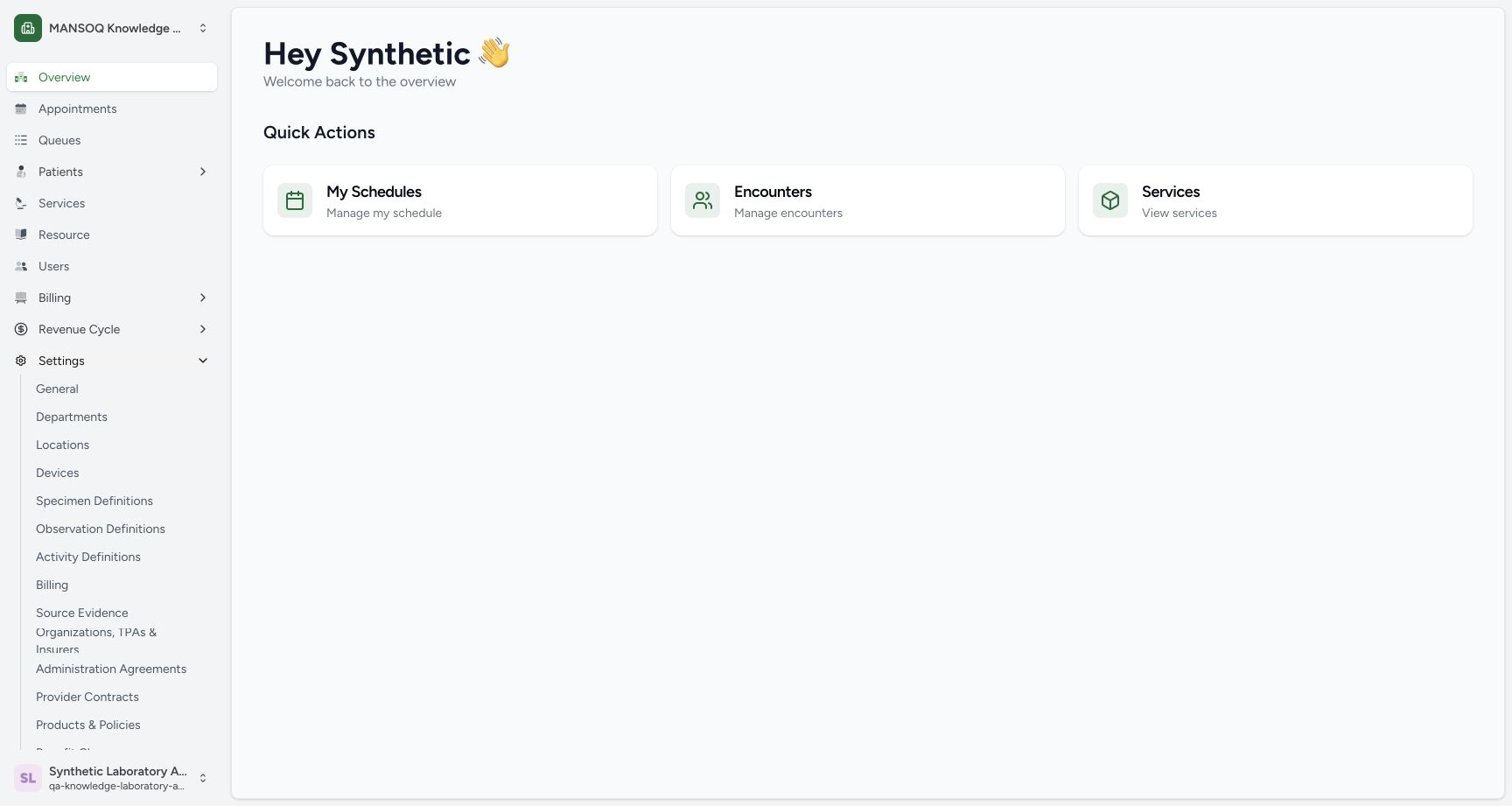
12Recorded release 96ca7318 · 2026-10-19T01:26:47.800Z · 1728 × 921 Open the observation settings
Capture details
Exact committed 96ca source. Custom training URNs demonstrate software controls; licensed terminology and clinical result evaluation are not qualified.
Image SHA-256
6e8e9685ee55d73103400c512bee2177ccab694c7037530172b421a70c31e80f- Settings: Expand Settings.
- Observation Definitions: Open the observation catalogue.
 1234
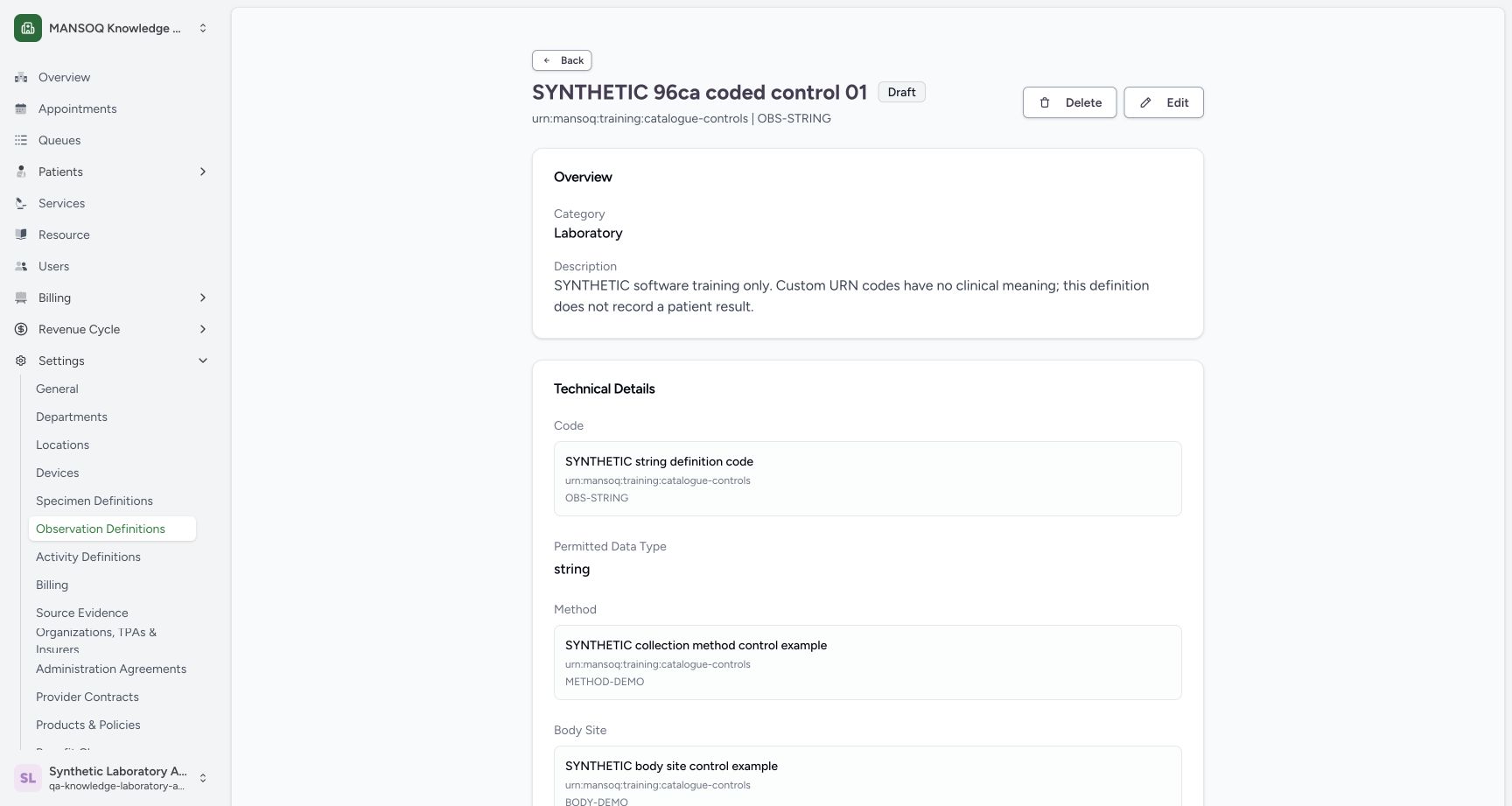
1234Recorded release 96ca7318 · 2026-10-19T01:30:53.812Z · 1728 × 921 Read the saved custom-code details
Capture details
Exact committed 96ca source. Custom training URNs demonstrate software controls; licensed terminology and clinical result evaluation are not qualified.
Image SHA-256
d6edebfa0a6aecd14ef18e14e7a1033f55e4718a150aac45165d64f312fd4430- Custom URN: The saved code system is explicitly synthetic.
- String type: The saved permitted data type is string.
- Method: The saved method has the synthetic URN and METHOD-DEMO code.
- Edit: Open the saved definition editor for an inspection.
1. Open the observation form
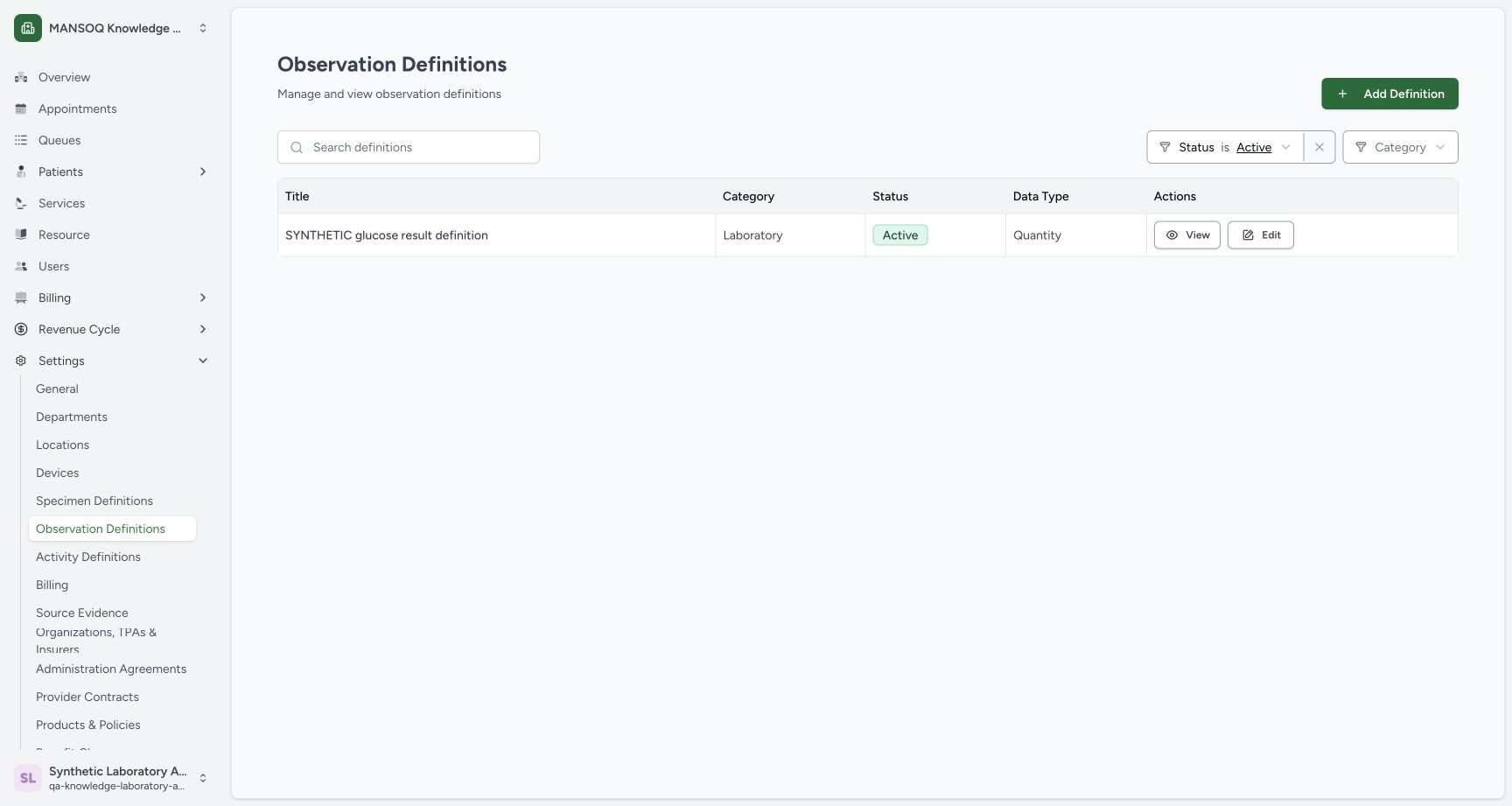
Open Settings → Observation Definitions. The catalogue's Add Definition action opens the pictured Create Observation Definition form.
12Open the observation settings
Capture details
Exact committed 96ca source. Custom training URNs demonstrate software controls; licensed terminology and clinical result evaluation are not qualified.
Image SHA-256 6e8e9685ee55d73103400c512bee2177ccab694c7037530172b421a70c31e80f
- Settings: Expand Settings.
- Observation Definitions: Open the observation catalogue.
 12
12Find the catalogue Add Definition action
Capture details
Exact committed 96ca source. Custom training URNs demonstrate software controls; licensed terminology and clinical result evaluation are not qualified.
Image SHA-256 770220c888f5afe4447269dbb0ca3ce584c5e108263e46061779ee1c8681bc77
- Add Definition: Start a new observation definition from the catalogue.
- Observation Definitions: This is the selected settings catalogue.
 1234567
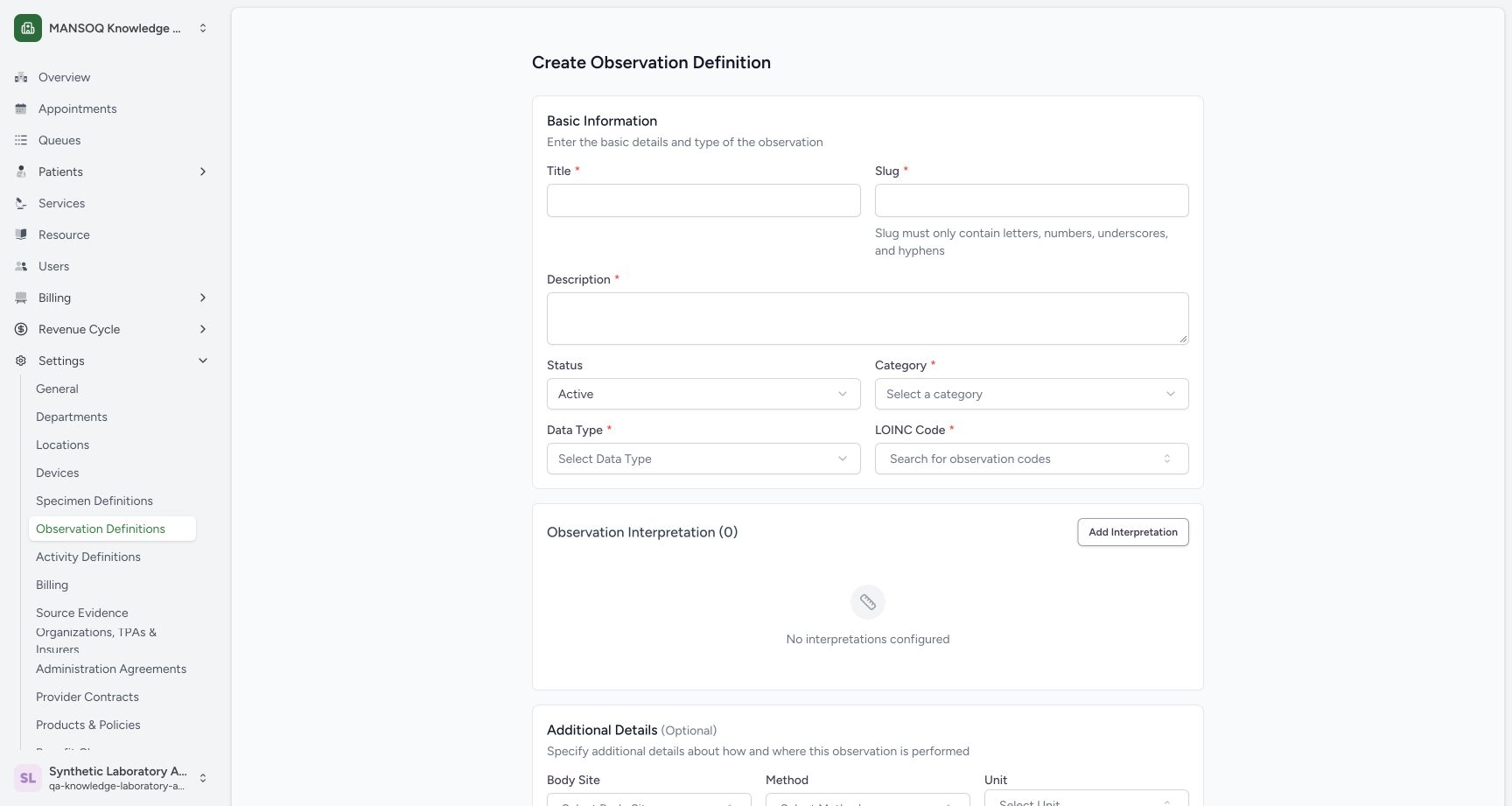
Inspect the required definition fields
Capture details
Exact committed 96ca source. Custom training URNs demonstrate software controls; licensed terminology and clinical result evaluation are not qualified.
Image SHA-256 2c7b75c76def8e4f459670528f08dd766cf69fb5af74210256401075c9a068c3
- Title: Enter a unique training title.
- Slug: Use the permitted slug characters and length.
- Description: Explain the software-only training purpose.
- Status: This example changes Active to Draft.
- Category: Choose Laboratory.
- Data Type: Choose the data type.
- LOINC Code: This exact label opens the observation code picker.
2. Enter the basic training details
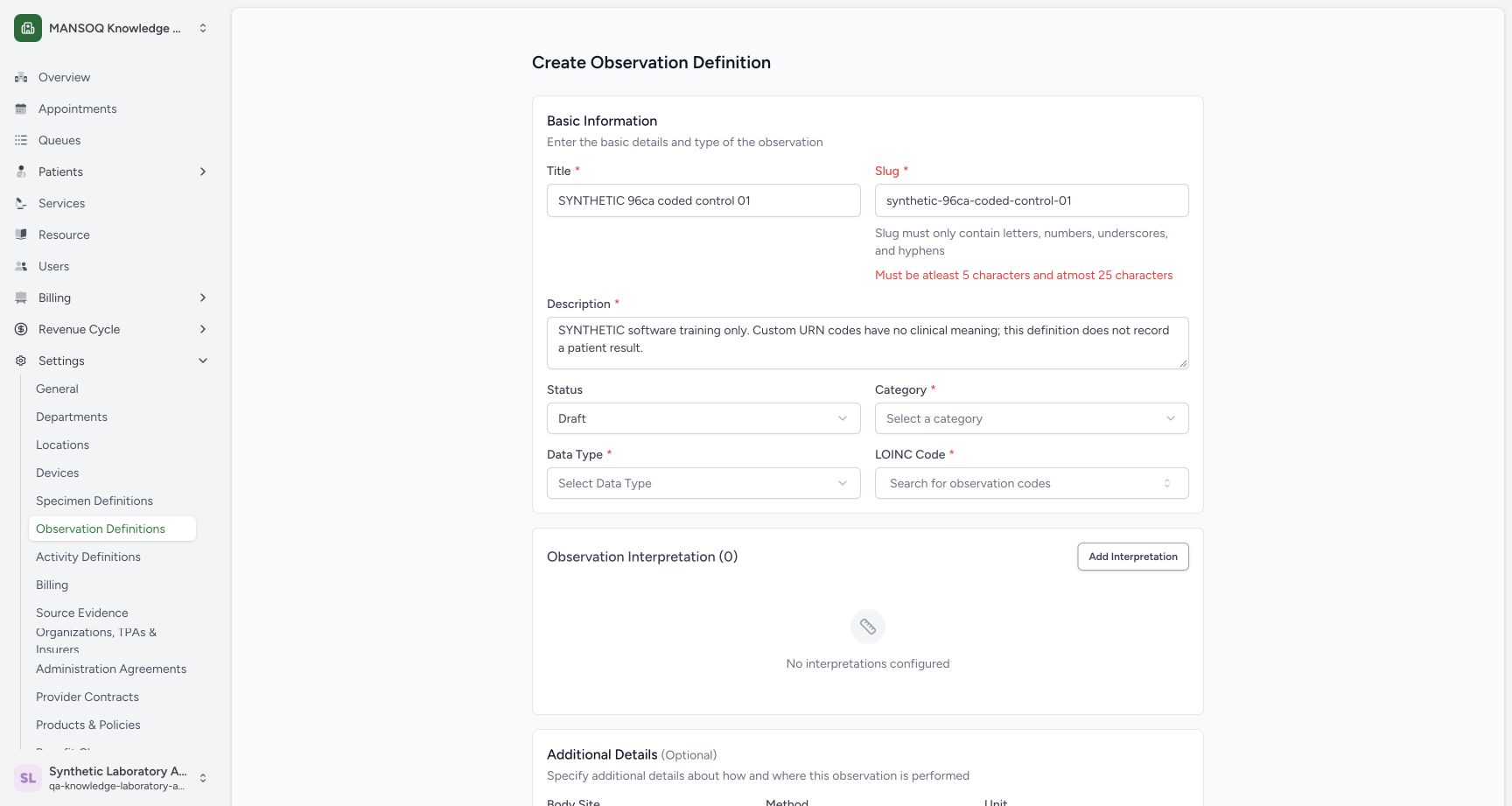
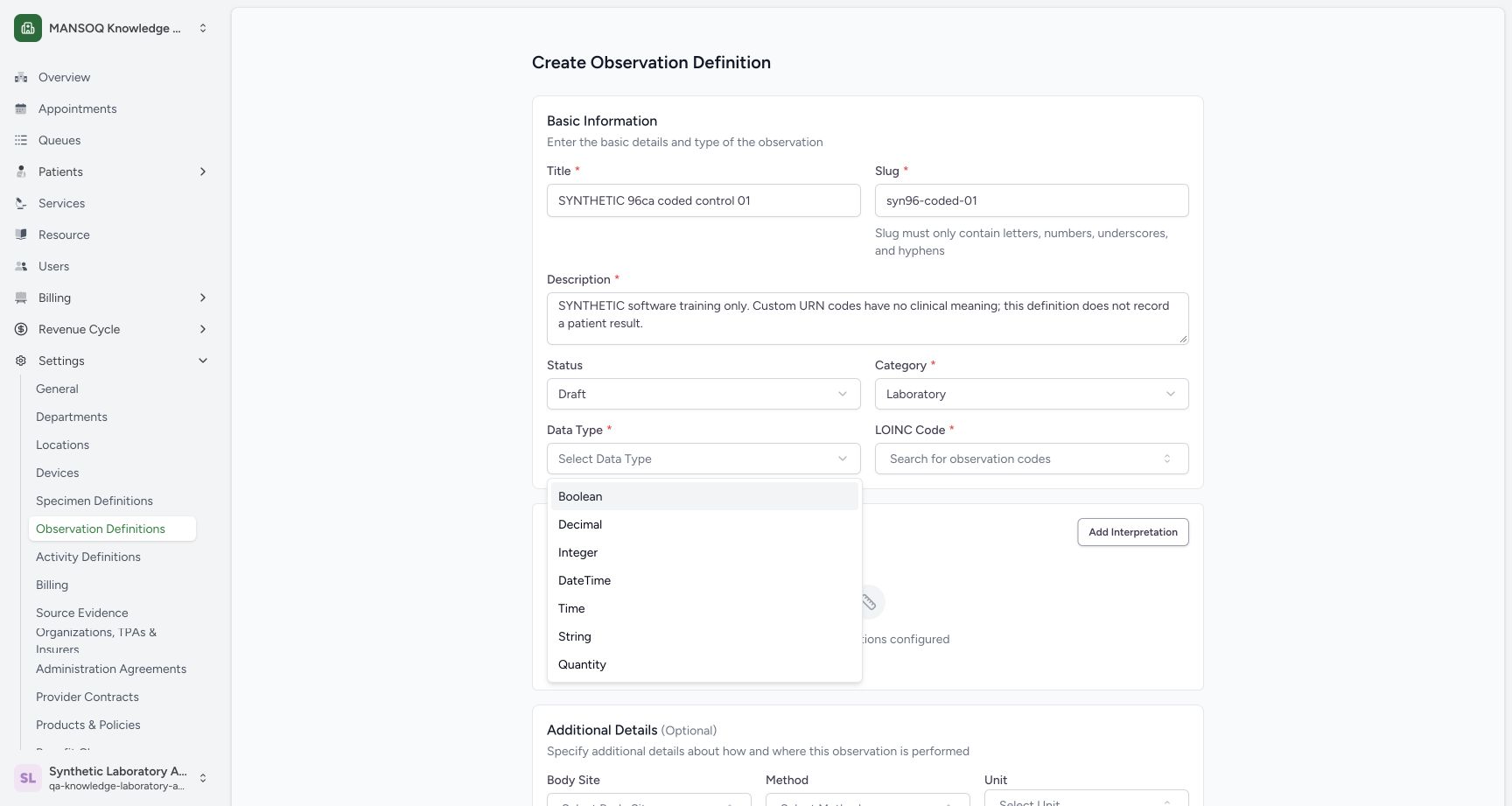
Enter the pictured synthetic title and description. Use the short slug syn96-coded-01, select Draft and Laboratory, then choose String from Data Type. The menu also displays Boolean, Decimal, Integer, DateTime, Time and Quantity; this lesson saves only String.
 12
12Recognize the slug length validation
Capture details
Exact committed 96ca source. Custom training URNs demonstrate software controls; licensed terminology and clinical result evaluation are not qualified.
Image SHA-256 738c7ea633169f2a8273446d6e944d9588dfb418bd434aadbf71119952543c93
- Overlong slug: This example exceeds the permitted length.
- Length validation: The UI requires at least 5 and at most 25 characters.
 1234
1234Choose String from the supported data types
Capture details
Exact committed 96ca source. Custom training URNs demonstrate software controls; licensed terminology and clinical result evaluation are not qualified.
Image SHA-256 2871ed61951bf86c9dbe4ebc42883d4d339a16bdf973e8b668163fca23938cdc
- String: Select String for this worked example.
- Corrected slug: The shorter syn96-coded-01 slug is retained.
- Draft: The training definition remains Draft.
- Laboratory: The category is Laboratory.
12Select the synthetic observation code
Capture details
Exact committed 96ca source. Custom training URNs demonstrate software controls; licensed terminology and clinical result evaluation are not qualified.
Image SHA-256 258a19001fb5e6b736b50dfd652cec7fa585e3475d30bc629f4cb141514dcdc0
- OBS-STRING search: Search the custom training observation code.
- Synthetic result: Select the explicitly synthetic result.
3. Choose the explicit custom observation code
Open the field labelled LOINC Code, search OBS-STRING, and select SYNTHETIC string definition code. In this training clone the result belongs to urn:mansoq:training:catalogue-controls, as the saved technical details show; it is not a LOINC concept.
12Select the synthetic observation code
Capture details
Exact committed 96ca source. Custom training URNs demonstrate software controls; licensed terminology and clinical result evaluation are not qualified.
Image SHA-256 258a19001fb5e6b736b50dfd652cec7fa585e3475d30bc629f4cb141514dcdc0
- OBS-STRING search: Search the custom training observation code.
- Synthetic result: Select the explicitly synthetic result.
1234Read the saved custom-code details
Capture details
Exact committed 96ca source. Custom training URNs demonstrate software controls; licensed terminology and clinical result evaluation are not qualified.
Image SHA-256 d6edebfa0a6aecd14ef18e14e7a1033f55e4718a150aac45165d64f312fd4430
- Custom URN: The saved code system is explicitly synthetic.
- String type: The saved permitted data type is string.
- Method: The saved method has the synthetic URN and METHOD-DEMO code.
- Edit: Open the saved definition editor for an inspection.
4. Choose Body Site and Method
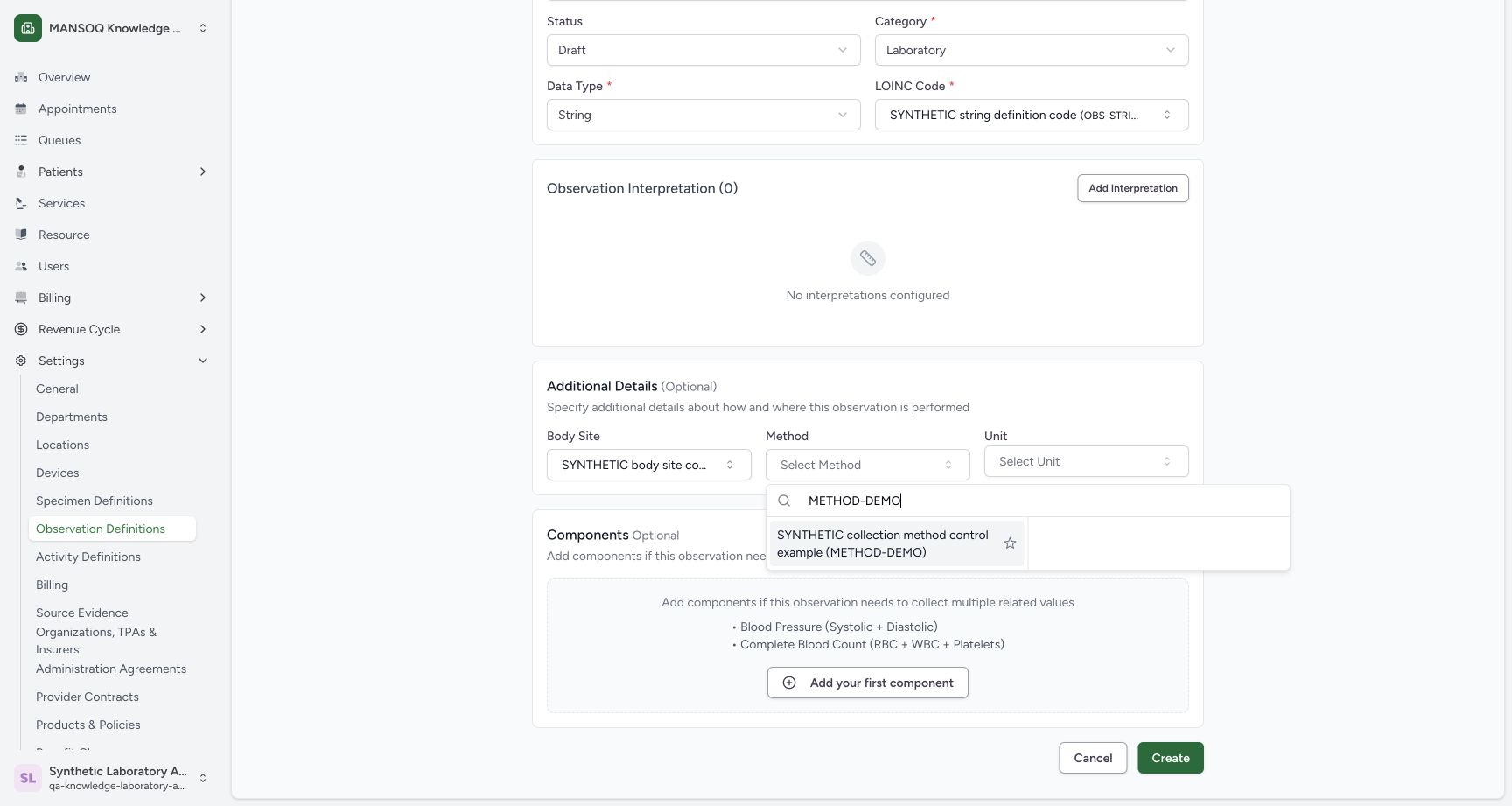
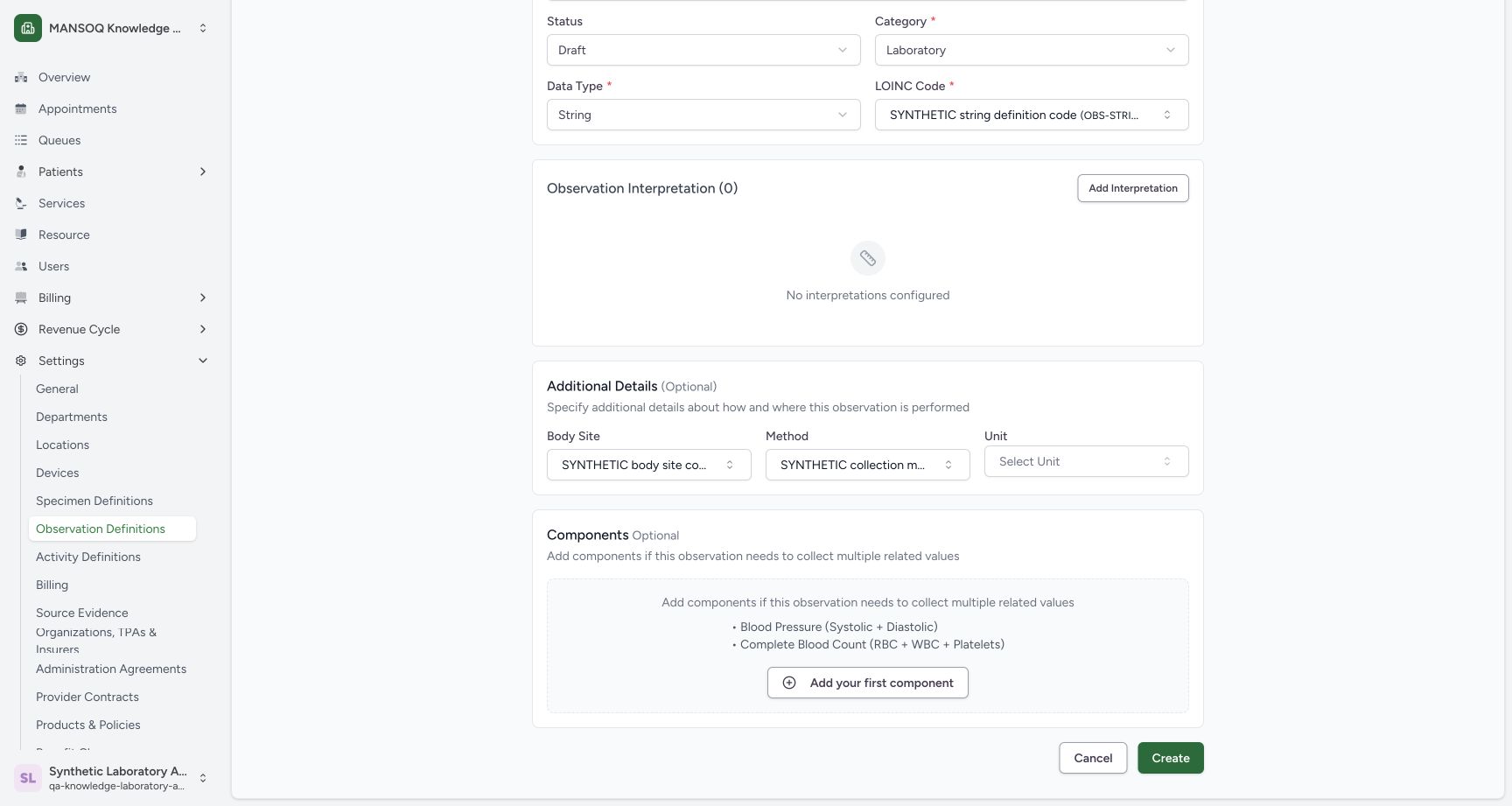
Scroll to Additional Details. Open Body Site, search BODY-DEMO, and select its synthetic result. Open Method, search METHOD-DEMO, and select that synthetic result. Both selected labels remain visible in the draft.
123Select the local Body Site example
Capture details
Exact committed 96ca source. Custom training URNs demonstrate software controls; licensed terminology and clinical result evaluation are not qualified.
Image SHA-256 111f61731cfc22adbf38fab7e4cb1827d0efb51c8dde7b2bb88151482fe8d4d8
- Body Site: Open the optional Body Site picker.
- BODY-DEMO search: Search the configured custom training code.
- Synthetic Body Site result: Select the local synthetic example.
 123
123Select the local Method example
Capture details
Exact committed 96ca source. Custom training URNs demonstrate software controls; licensed terminology and clinical result evaluation are not qualified.
Image SHA-256 247cf4065e872ef4149f4a79475c6254ab0bcb8a73e7c6cf52662a4aad6e7f29
- Method: Open the optional Method picker.
- METHOD-DEMO search: Search the custom training code.
- Synthetic Method result: Select the local synthetic method example.
 123
123Review the optional codes and open interpretations
Capture details
Exact committed 96ca source. Custom training URNs demonstrate software controls; licensed terminology and clinical result evaluation are not qualified.
Image SHA-256 4ff9e5d832d63ad6f4e4587876b5603f4afd6fab03c4e9673ab0f1f6eb06dec0
- Body Site retained: The selected Body Site remains in the draft.
- Method retained: The selected Method remains in the draft.
- Add Interpretation: Open the separate local interpretation sheet.
5. Open the coded interpretation editor
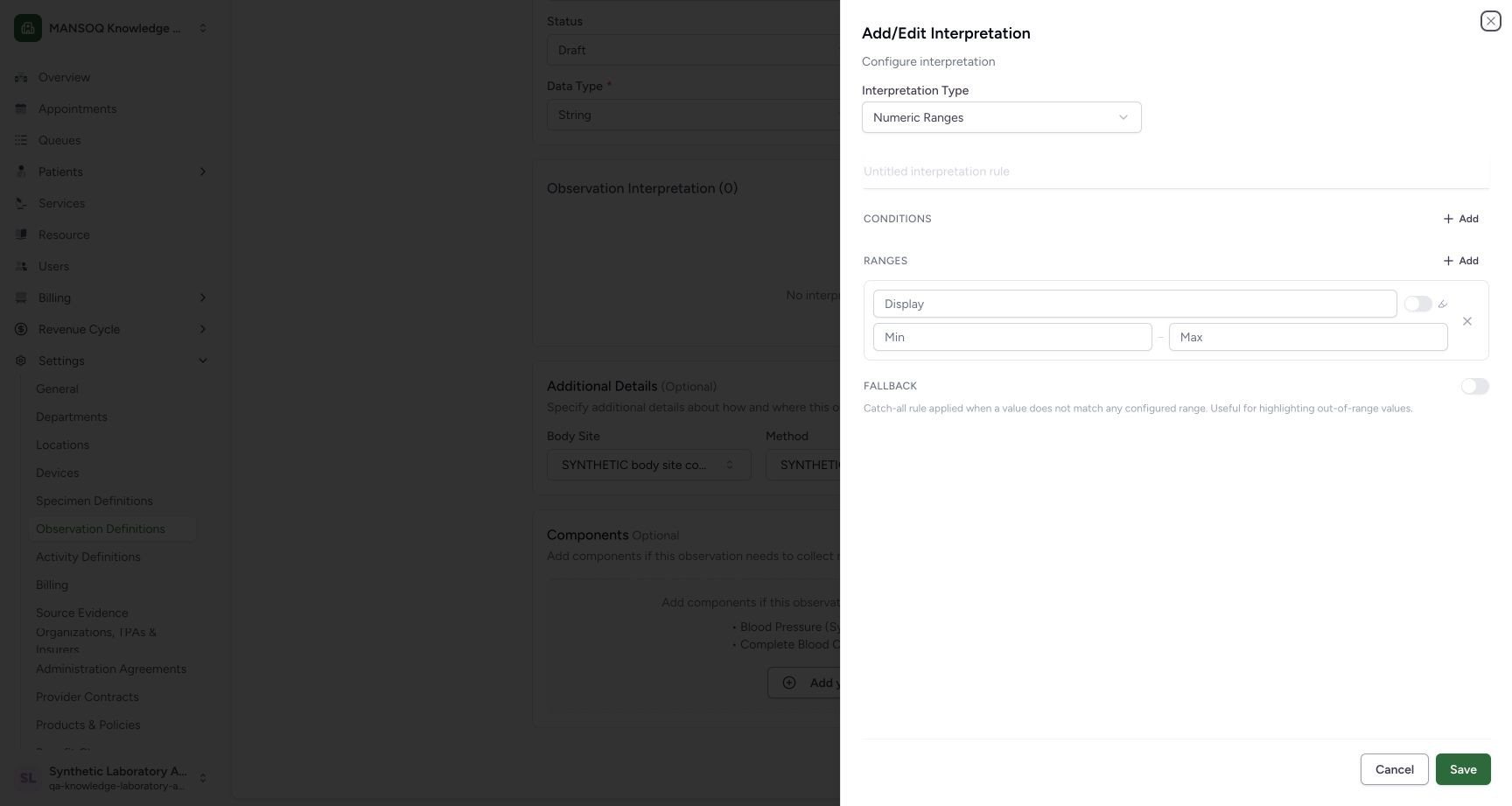
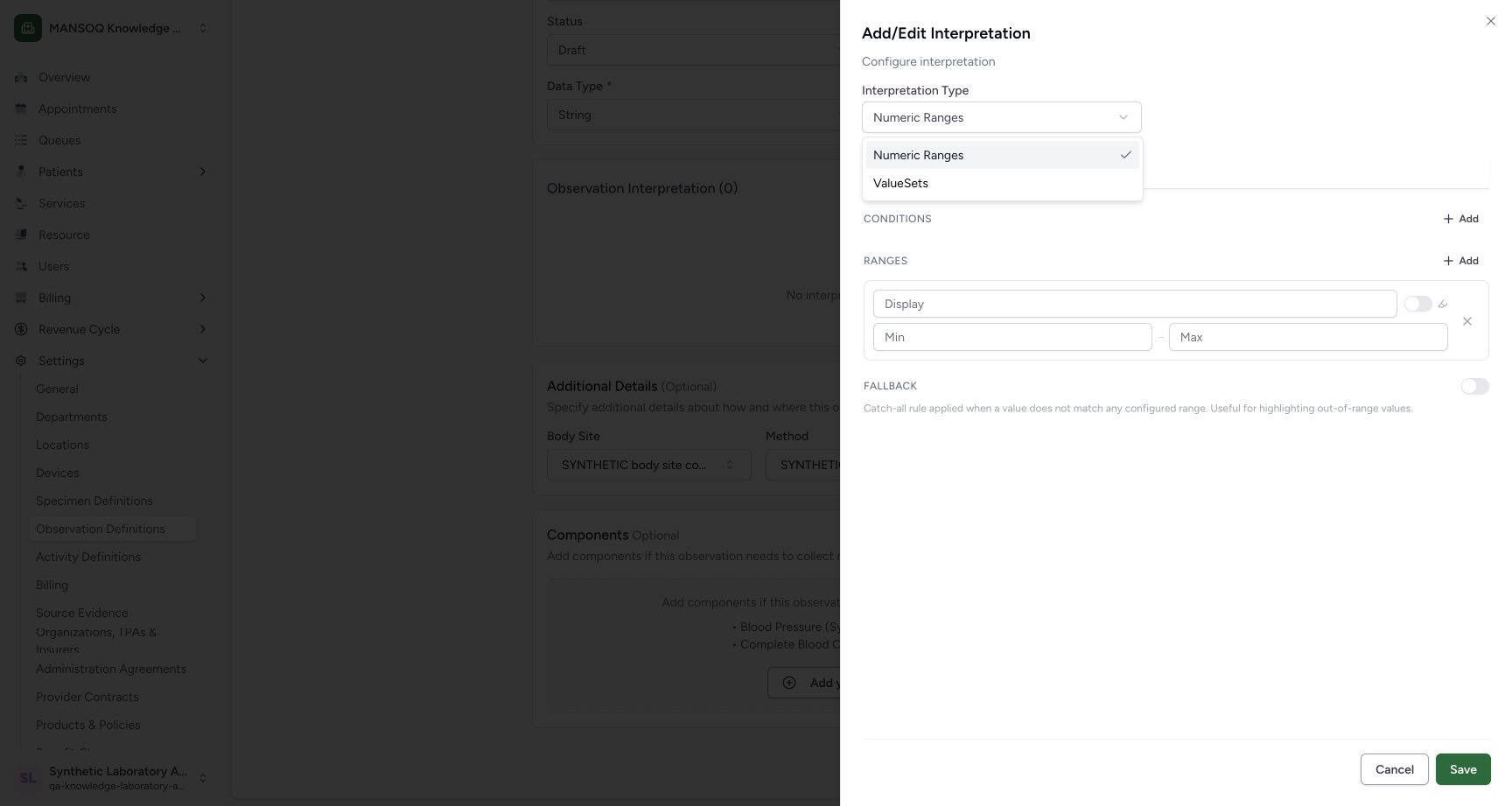
Use Add Interpretation. Open Interpretation Type in the sheet and choose ValueSets.
123Review the optional codes and open interpretations
Capture details
Exact committed 96ca source. Custom training URNs demonstrate software controls; licensed terminology and clinical result evaluation are not qualified.
Image SHA-256 4ff9e5d832d63ad6f4e4587876b5603f4afd6fab03c4e9673ab0f1f6eb06dec0
- Body Site retained: The selected Body Site remains in the draft.
- Method retained: The selected Method remains in the draft.
- Add Interpretation: Open the separate local interpretation sheet.
 123
123Find the labelled interpretation selector
Capture details
Exact committed 96ca source. Custom training URNs demonstrate software controls; licensed terminology and clinical result evaluation are not qualified.
Image SHA-256 7754468296f68d073026a5c03436c1dc11fbbf0ae5abacfa94acffc879dfe10b
- Interpretation Type: Open the labelled mode selector.
- Rule title: This sheet has its own rule title.
- Sheet Save: This saves the local rule into the parent draft.
 12
12Choose ValueSets interpretation mode
Capture details
Exact committed 96ca source. Custom training URNs demonstrate software controls; licensed terminology and clinical result evaluation are not qualified.
Image SHA-256 83cffca369ef8e179e1df72f41d109d320a04f37f24f5df80003d7e4997173ba
- ValueSets: Select ValueSets for a coded interpretation.
- Numeric Ranges: Numeric Ranges is the alternative mode.
6. Name the rule and search ValueSets
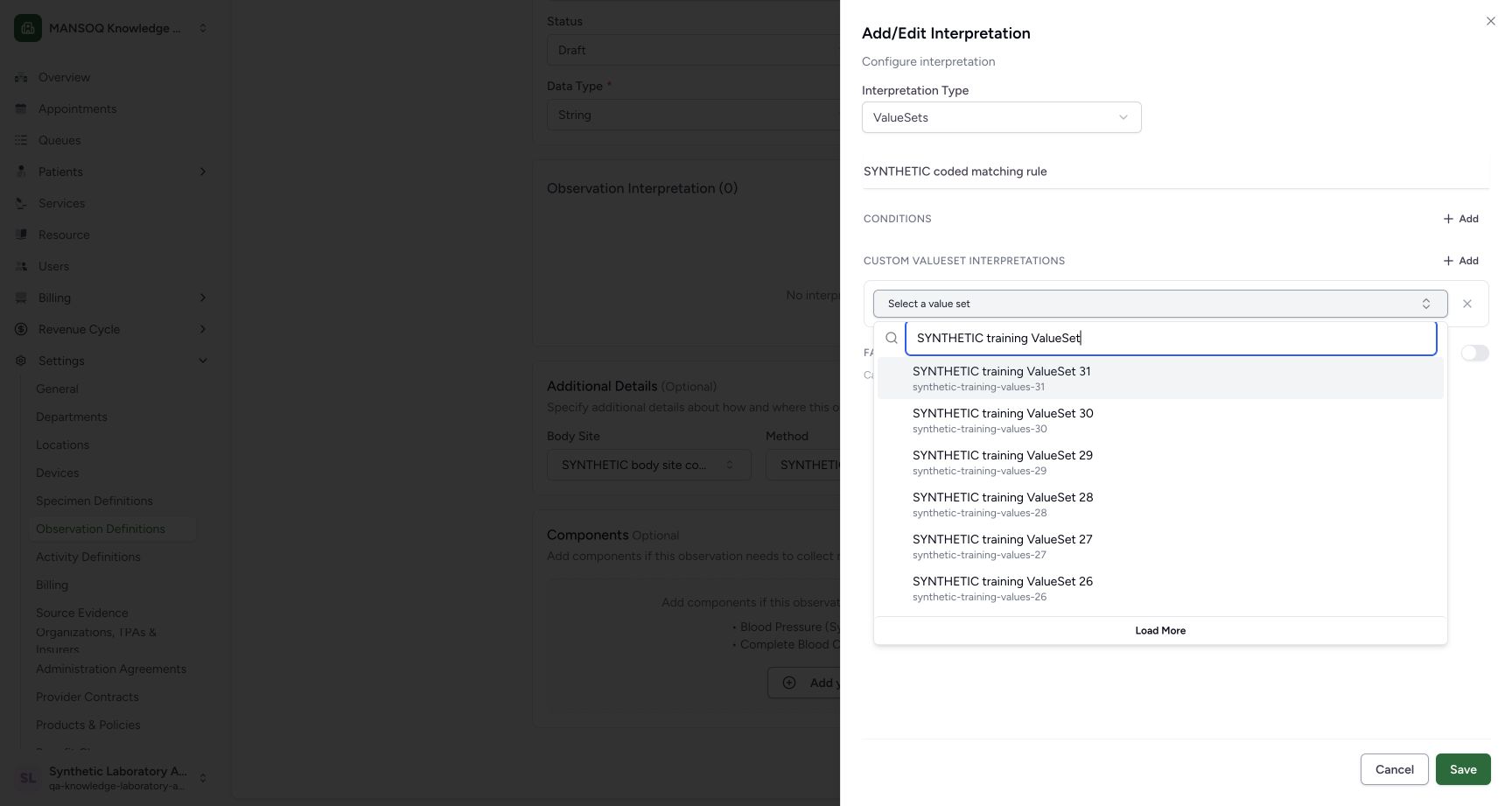
Enter SYNTHETIC coded matching rule as the rule title. Open Select a value set and search SYNTHETIC training ValueSet.
 1234
1234Search ValueSets and load another page
Capture details
Exact committed 96ca source. Custom training URNs demonstrate software controls; licensed terminology and clinical result evaluation are not qualified.
Image SHA-256 2724650ce0d47cf073d210721310a625c0f1669ee7c4e690d6339765218bf144
- Rule title: The synthetic rule title is entered.
- ValueSet picker: Open the custom ValueSet picker.
- Search: Search by the displayed ValueSet name.
- Load More: Load the next server page.
7. Load and select a later result
Use Load More. With the search box focused, End reaches the final loaded SYNTHETIC training ValueSet 01 result in this example. Select it, or press Enter while it is highlighted. The selected label then appears in the rule.
1234Search ValueSets and load another page
Capture details
Exact committed 96ca source. Custom training URNs demonstrate software controls; licensed terminology and clinical result evaluation are not qualified.
Image SHA-256 2724650ce0d47cf073d210721310a625c0f1669ee7c4e690d6339765218bf144
- Rule title: The synthetic rule title is entered.
- ValueSet picker: Open the custom ValueSet picker.
- Search: Search by the displayed ValueSet name.
- Load More: Load the next server page.
12Select the final loaded ValueSet
Capture details
Exact committed 96ca source. Custom training URNs demonstrate software controls; licensed terminology and clinical result evaluation are not qualified.
Image SHA-256 c243f52f88ffa84dd151d20ba303df4838f473186ac1e2c74c44fc40df9b5805
- Search keyboard focus: After Load More, End reaches the last loaded choice.
- ValueSet 01: Select this later-page result, or press Enter when highlighted.
 123456
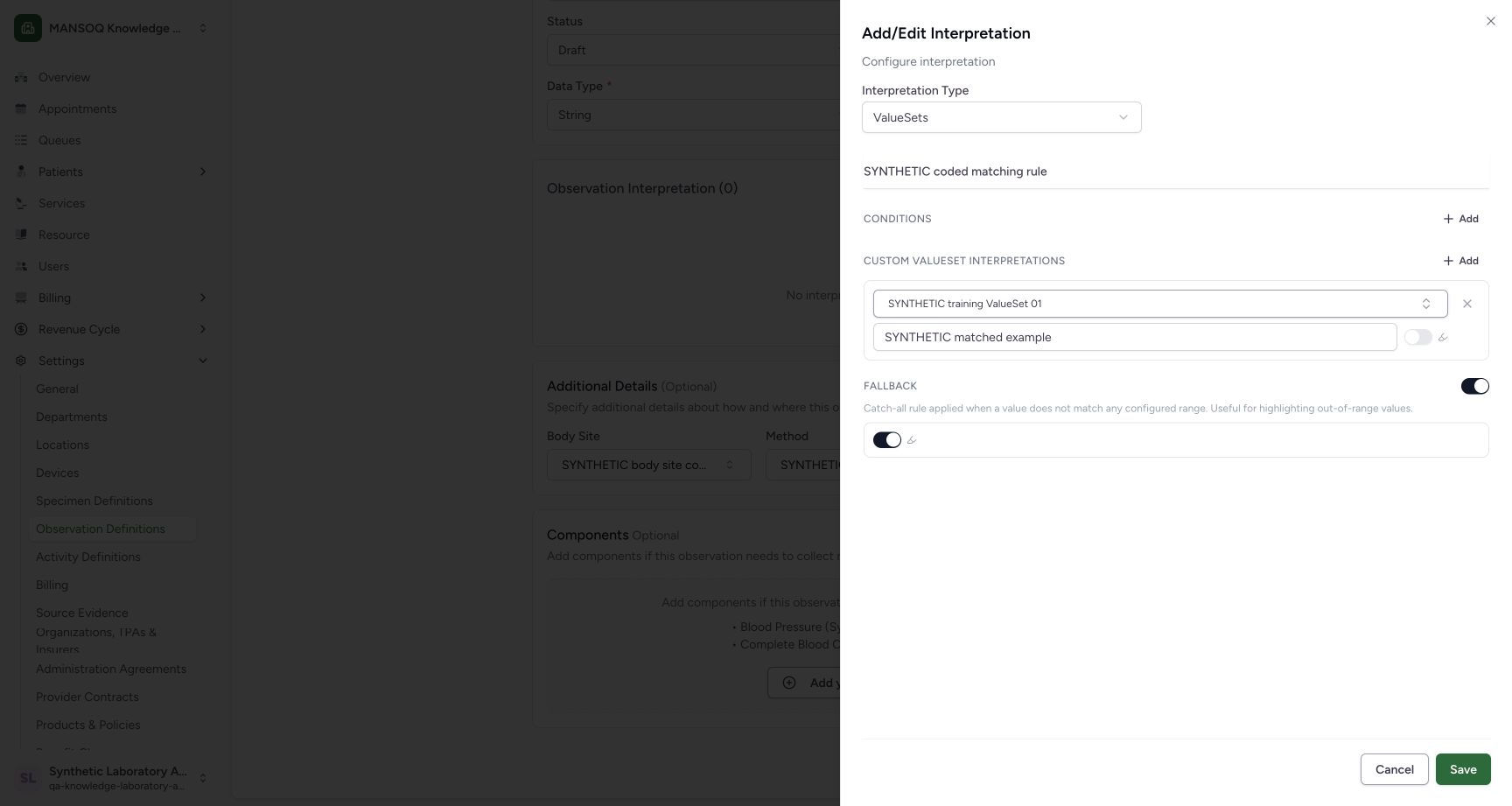
Review the coded rule and fallback
Capture details
Exact committed 96ca source. Custom training URNs demonstrate software controls; licensed terminology and clinical result evaluation are not qualified.
Image SHA-256 22e13020b9f897319f24ec887cf840ab7ae1c415fd9f4b7fe55d8e5918c0ad48
- ValueSets mode: The coded mode is selected.
- Selected set: The rule retains ValueSet 01.
- Matched display: Enter the synthetic matched display.
- Fallback: Enable the pictured catch-all fallback.
- Fallback highlight: The fallback highlighting switch is enabled.
- Sheet Save: Save this local rule into the definition draft.
8. Configure the matched display and fallback
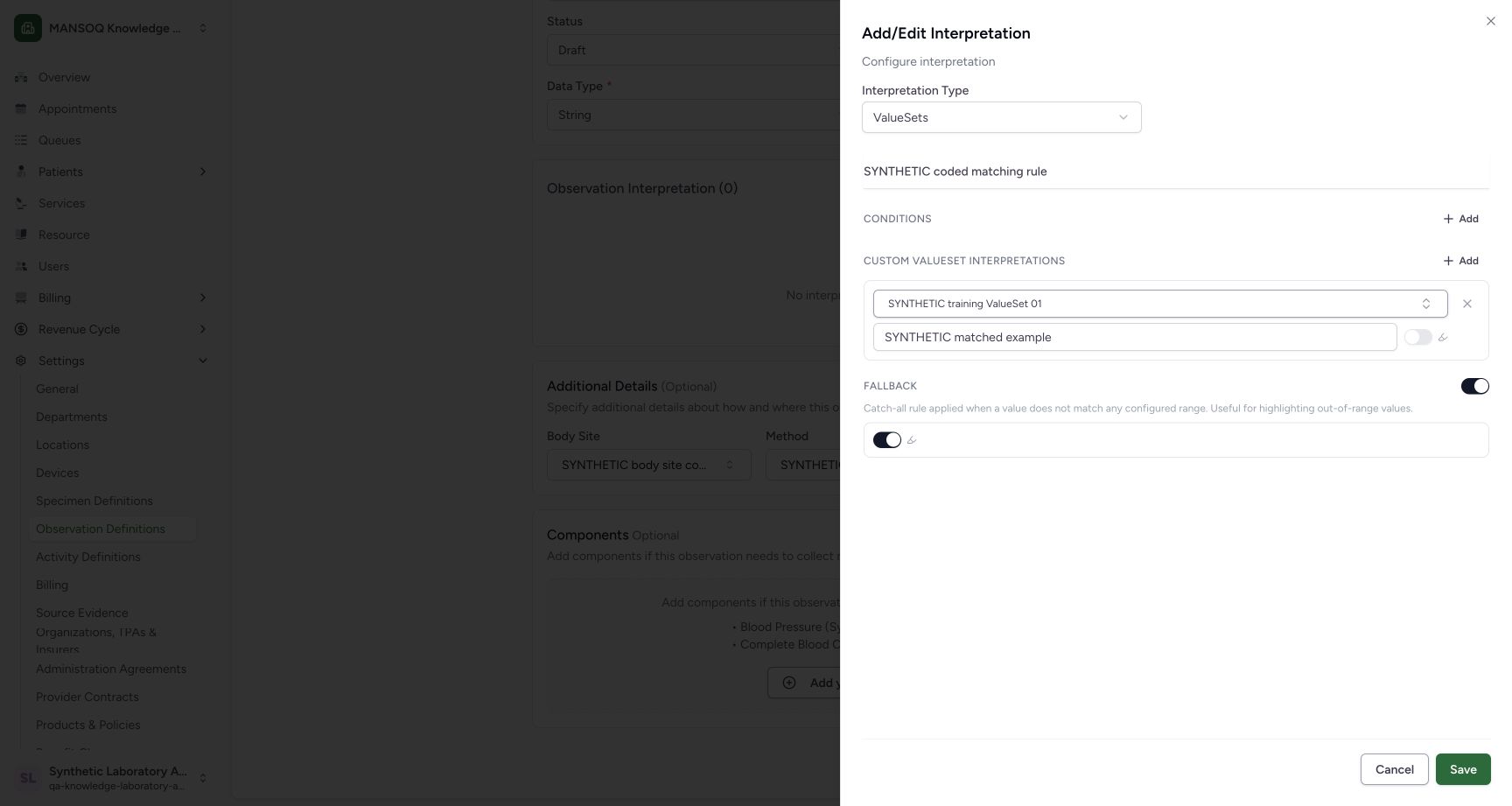
Enter SYNTHETIC matched example in the display field beneath ValueSet 01. Enable Fallback and retain its pictured highlighting switch enabled. The matched-rule highlight switch remains off. This is a synthetic configuration example; no patient observation is evaluated.
123456Review the coded rule and fallback
Capture details
Exact committed 96ca source. Custom training URNs demonstrate software controls; licensed terminology and clinical result evaluation are not qualified.
Image SHA-256 22e13020b9f897319f24ec887cf840ab7ae1c415fd9f4b7fe55d8e5918c0ad48
- ValueSets mode: The coded mode is selected.
- Selected set: The rule retains ValueSet 01.
- Matched display: Enter the synthetic matched display.
- Fallback: Enable the pictured catch-all fallback.
- Fallback highlight: The fallback highlighting switch is enabled.
- Sheet Save: Save this local rule into the definition draft.
9. Save the local rule
Review the set, display and fallback, then use the sheet's Save. The sheet closes and the parent form shows Observation Interpretation (1) with the coded rule summary. This local save has not yet created the definition.
 12345
12345Verify Cancel preserved the coded values
Capture details
Exact committed 96ca source. Custom training URNs demonstrate software controls; licensed terminology and clinical result evaluation are not qualified.
Image SHA-256 22e13020b9f897319f24ec887cf840ab7ae1c415fd9f4b7fe55d8e5918c0ad48
- ValueSets retained: The original mode is unchanged.
- ValueSet 01 retained: The selected set remains present.
- Display retained: The authored display remains present.
- Fallback retained: The fallback remains enabled.
- Sheet Save: Save the reviewed local rule.
 12345
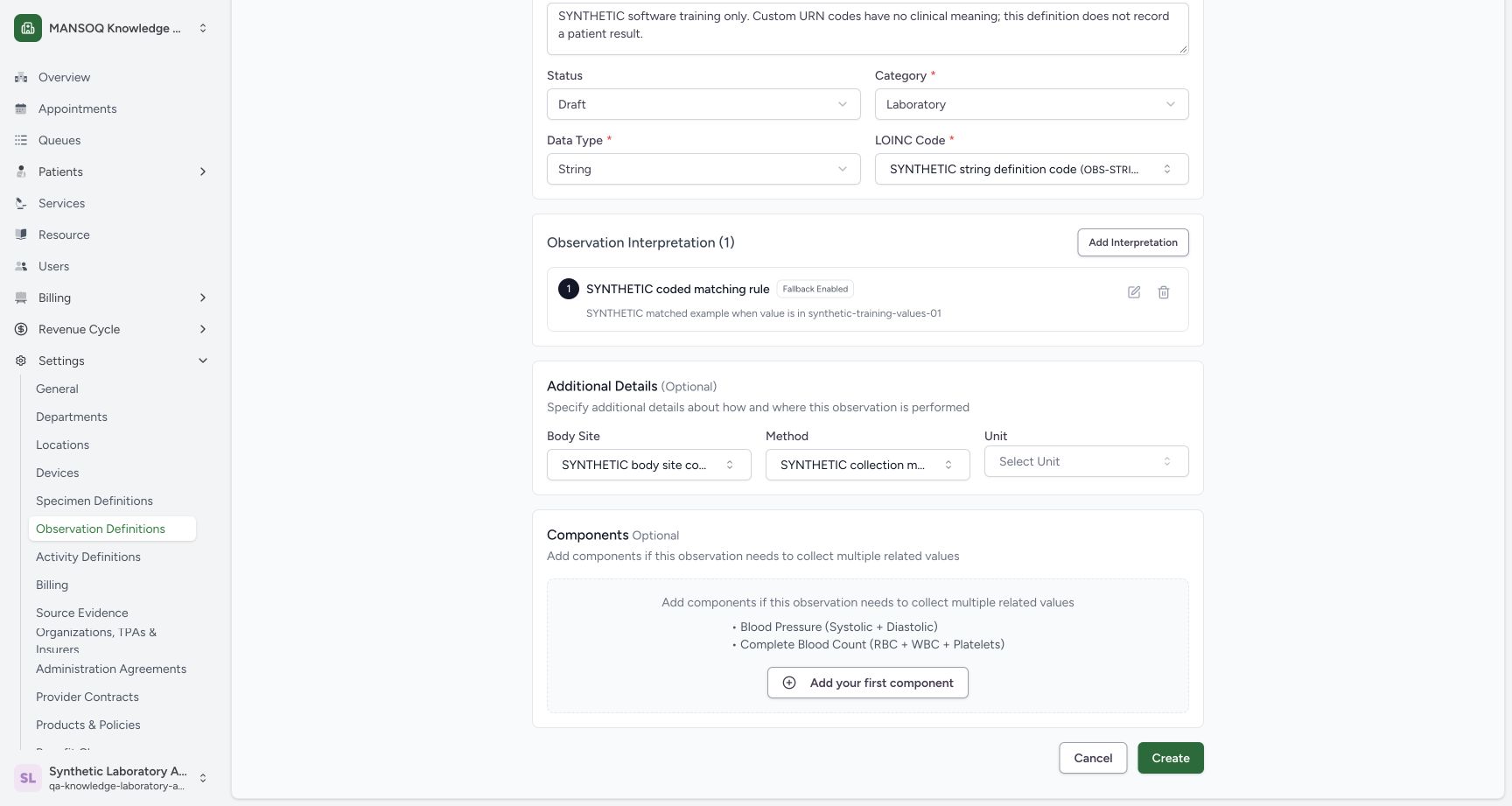
12345Review the parent summary before Create
Capture details
Exact committed 96ca source. Custom training URNs demonstrate software controls; licensed terminology and clinical result evaluation are not qualified.
Image SHA-256 3573ce50adaa8f8ae0784a34594c39457045d86f927cf603ebc1b737a2321117
- Local coded-rule summary: The parent draft now summarizes the rule.
- Body Site: The optional Body Site remains selected.
- Method: The optional Method remains selected.
- Create: Create is the separate database save.
- Edit interpretation: This pencil reopens the parent rule.
10. Create the definition
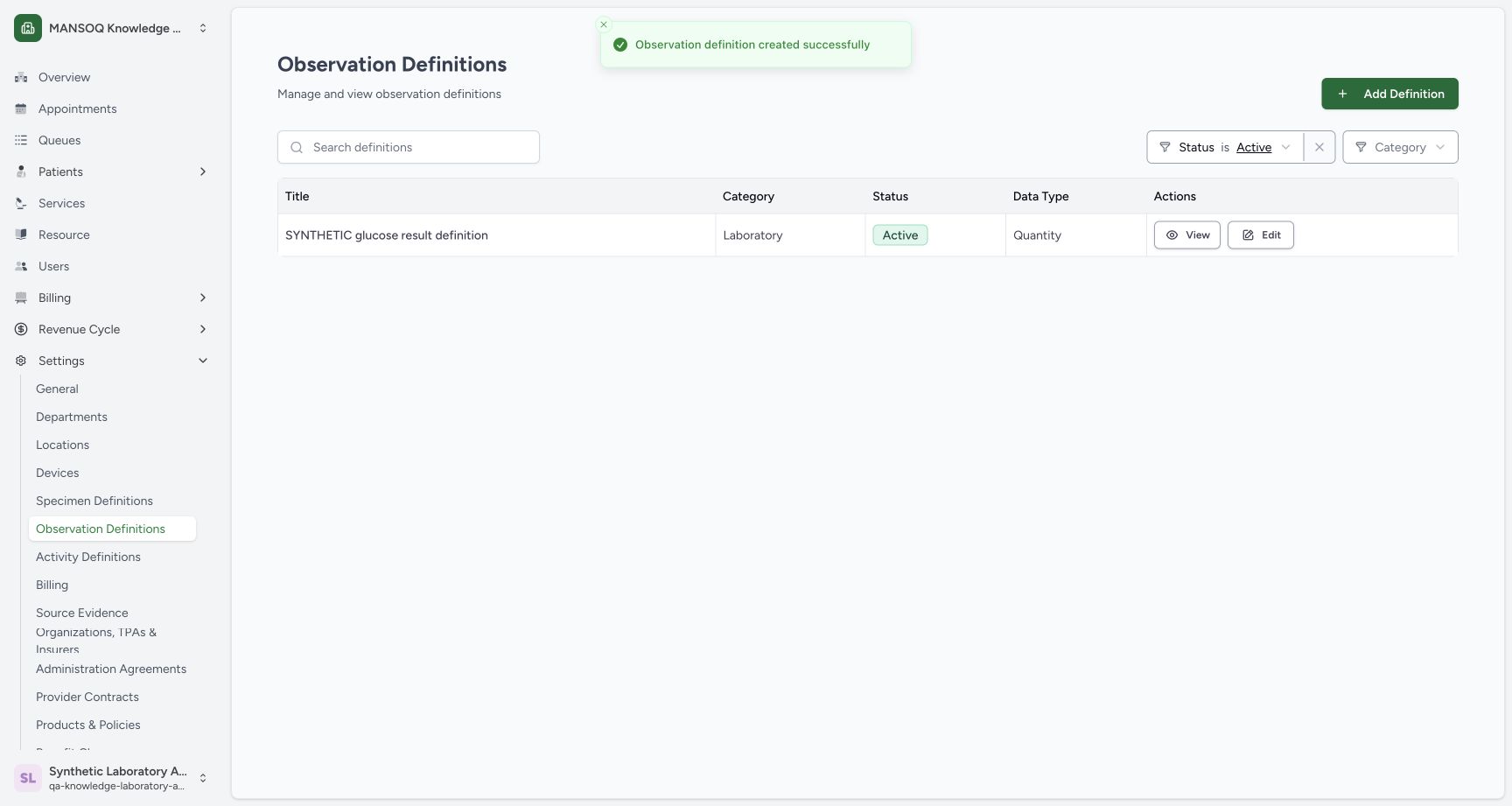
Review the parent summary and optional codes, then use Create once. The catalogue reports Observation definition created successfully and returns to its default Active filter.
12345Review the parent summary before Create
Capture details
Exact committed 96ca source. Custom training URNs demonstrate software controls; licensed terminology and clinical result evaluation are not qualified.
Image SHA-256 3573ce50adaa8f8ae0784a34594c39457045d86f927cf603ebc1b737a2321117
- Local coded-rule summary: The parent draft now summarizes the rule.
- Body Site: The optional Body Site remains selected.
- Method: The optional Method remains selected.
- Create: Create is the separate database save.
- Edit interpretation: This pencil reopens the parent rule.
 123
123Recognize creation success under the Active filter
Capture details
Exact committed 96ca source. Custom training URNs demonstrate software controls; licensed terminology and clinical result evaluation are not qualified.
Image SHA-256 281a312d42d70931cccf0f15815e24ad8a5b3e77fe01a6656e27c7cb1e5e7950
- Creation success: The normal UI reports a successful creation.
- Active filter: A Draft record is hidden by this Active filter.
- Add Definition: The catalogue entry for a new definition remains available.
11. Find the saved Draft
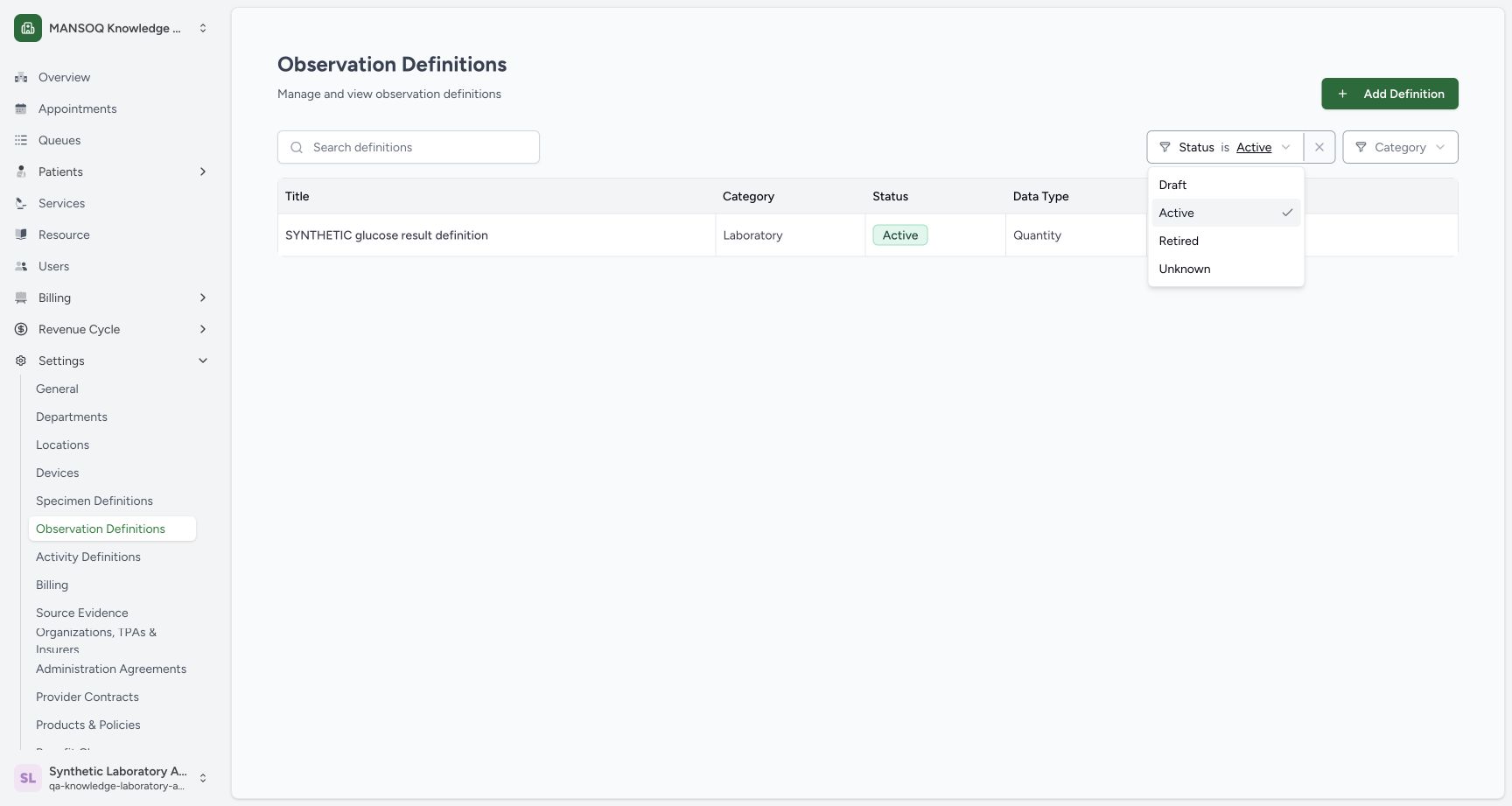
Open the catalogue Status filter and choose Draft. The new row appears with Draft status and String data type. Use its View action.
123Recognize creation success under the Active filter
Capture details
Exact committed 96ca source. Custom training URNs demonstrate software controls; licensed terminology and clinical result evaluation are not qualified.
Image SHA-256 281a312d42d70931cccf0f15815e24ad8a5b3e77fe01a6656e27c7cb1e5e7950
- Creation success: The normal UI reports a successful creation.
- Active filter: A Draft record is hidden by this Active filter.
- Add Definition: The catalogue entry for a new definition remains available.
 1
1Select the Draft catalogue filter
Capture details
Exact committed 96ca source. Custom training URNs demonstrate software controls; licensed terminology and clinical result evaluation are not qualified.
Image SHA-256 fd37a0dd6b79895b31bfb249bf7fd51b0f3160e43997ed313ac472f5cee50995
- Draft: Choose Draft to find the new training record.
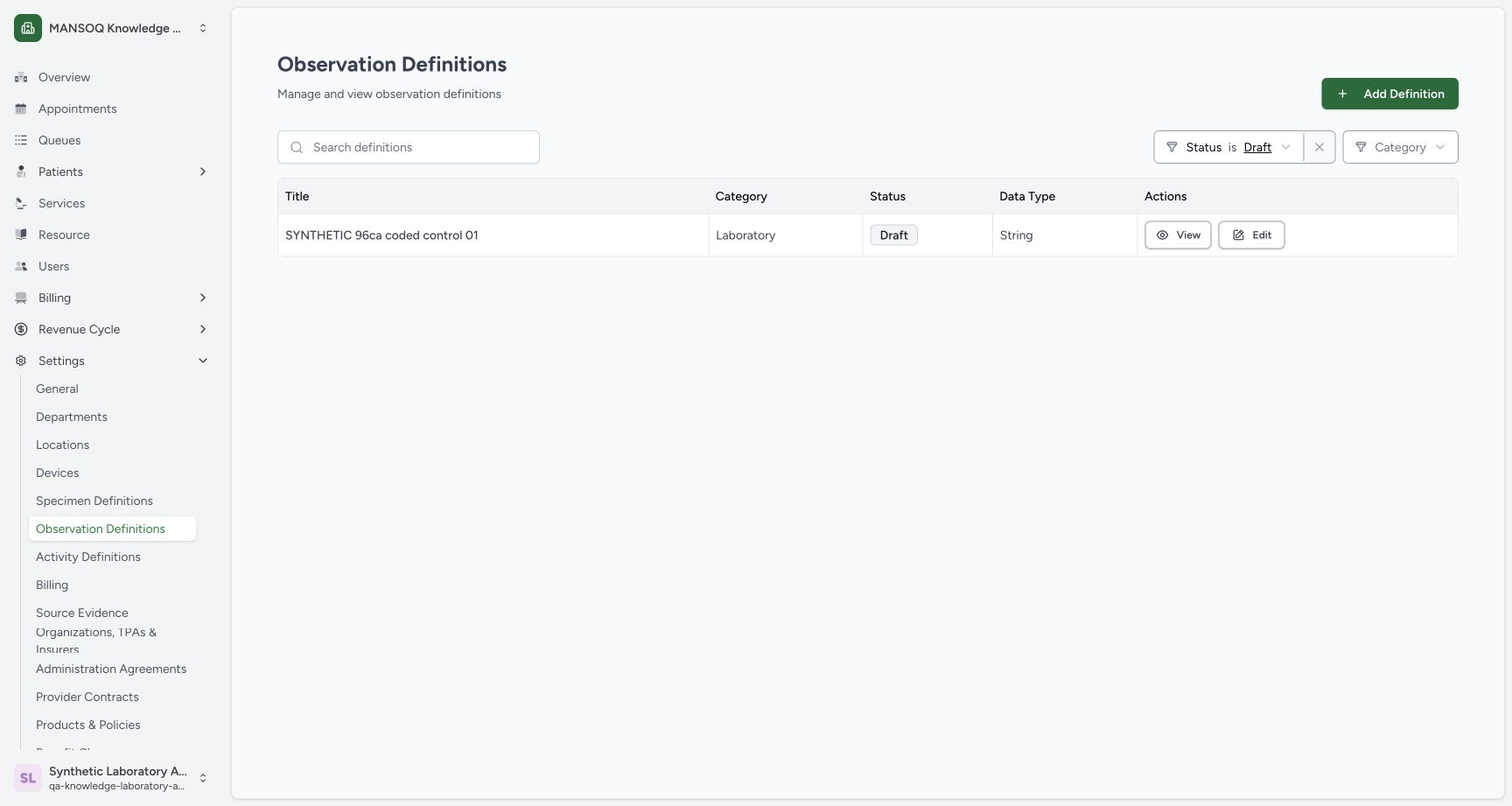 1234
1234Open the saved Draft row
Capture details
Exact committed 96ca source. Custom training URNs demonstrate software controls; licensed terminology and clinical result evaluation are not qualified.
Image SHA-256 abcdf506dd8351e919929c9c3b6cb3ed4256ff6519e1fe18bc0de5c74775f6e9
- Draft filter: The correct filter is selected.
- Saved String row: The new definition is shown as Draft and String.
- View: Open the saved detail.
- Add Definition: Use this catalogue action to start a new definition.
12. Review persisted configuration
The saved detail identifies the custom URN, string permitted type, synthetic Method and Body Site. Scroll down to the saved Observation Interpretation card to inspect the ValueSet 01 reference and Fallback Enabled summary.
1234Read the saved custom-code details
Capture details
Exact committed 96ca source. Custom training URNs demonstrate software controls; licensed terminology and clinical result evaluation are not qualified.
Image SHA-256 d6edebfa0a6aecd14ef18e14e7a1033f55e4718a150aac45165d64f312fd4430
- Custom URN: The saved code system is explicitly synthetic.
- String type: The saved permitted data type is string.
- Method: The saved method has the synthetic URN and METHOD-DEMO code.
- Edit: Open the saved definition editor for an inspection.
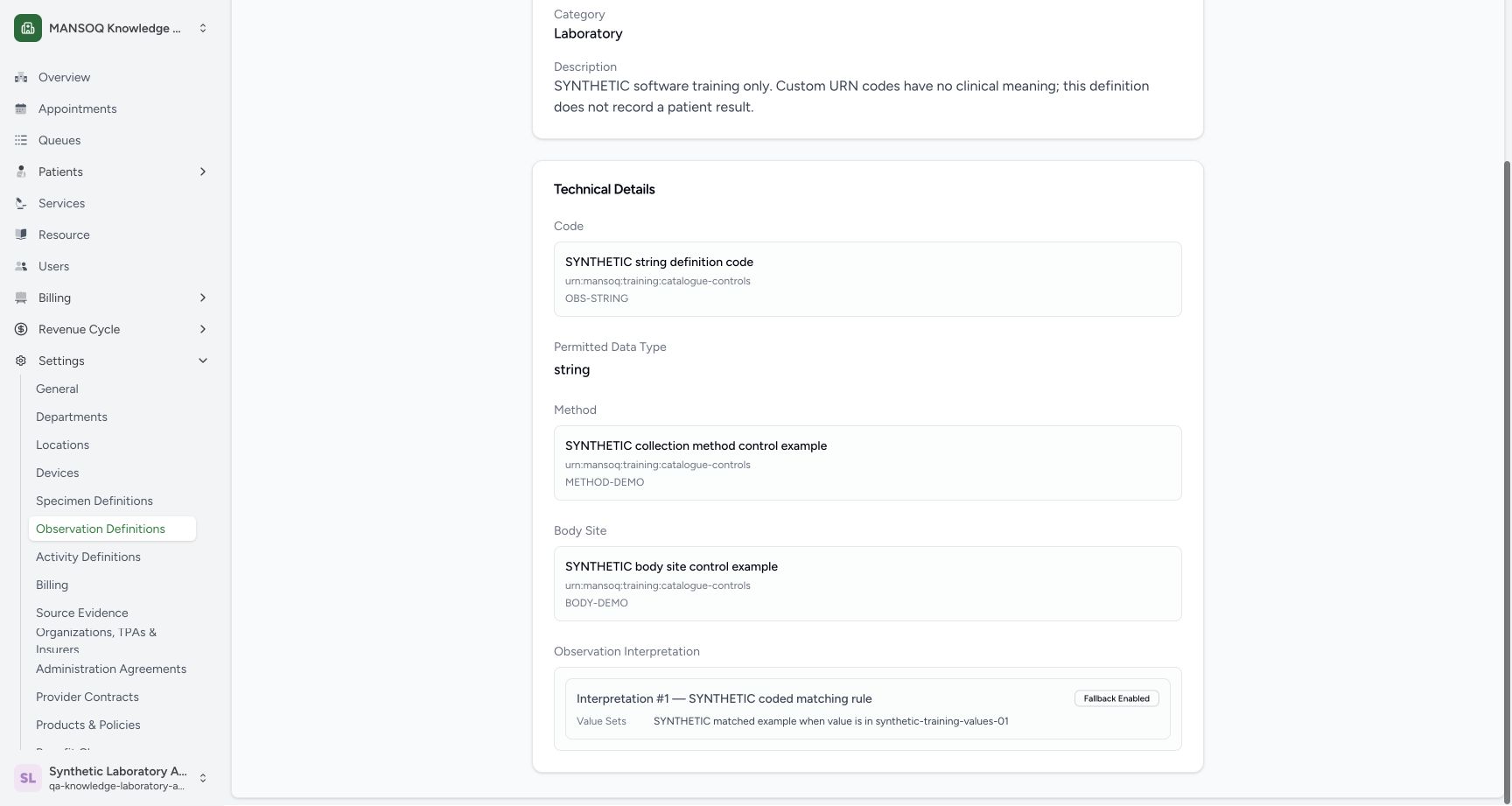 1234
1234Read the complete saved coding and rule
Capture details
Exact committed 96ca source. Custom training URNs demonstrate software controls; licensed terminology and clinical result evaluation are not qualified.
Image SHA-256 c69c3cc5343fa3f6da1ead273f718170363278781f142d263263dce7b9a2a4d0
- Custom observation code: The saved observation code uses the custom training URN.
- Saved Method: The full synthetic Method code and URN are retained.
- Saved Body Site: The full synthetic Body Site code and URN are retained.
- Saved coded interpretation: The saved rule references ValueSet 01 and has fallback enabled.
13. Inspect the persisted editor
Use Edit on the saved detail, then the coded card's Edit interpretation pencil. The reopened sheet resolves SYNTHETIC training ValueSet 01 and retains the matched display and enabled fallback. Use Cancel in the sheet, then Cancel in the parent editor to leave the saved definition unchanged.
1234Read the saved custom-code details
Capture details
Exact committed 96ca source. Custom training URNs demonstrate software controls; licensed terminology and clinical result evaluation are not qualified.
Image SHA-256 d6edebfa0a6aecd14ef18e14e7a1033f55e4718a150aac45165d64f312fd4430
- Custom URN: The saved code system is explicitly synthetic.
- String type: The saved permitted data type is string.
- Method: The saved method has the synthetic URN and METHOD-DEMO code.
- Edit: Open the saved definition editor for an inspection.
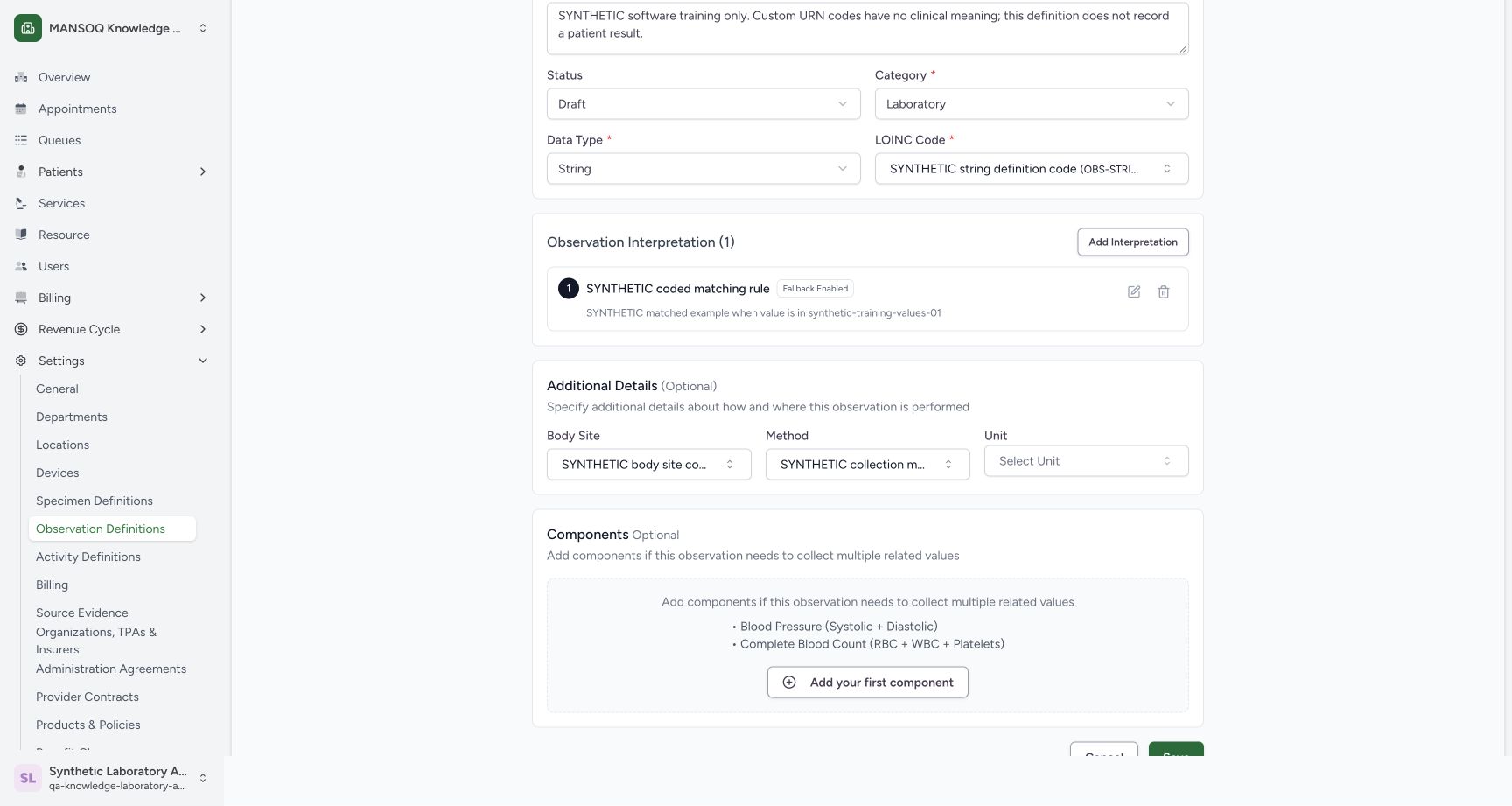 123
123Find Edit interpretation on the saved editor
Capture details
Exact committed 96ca source. Custom training URNs demonstrate software controls; licensed terminology and clinical result evaluation are not qualified.
Image SHA-256 dde24be92566376365cf393aa2686af183d92d2684aa1e8883fe5af90774bffd
- Edit interpretation: Open the persisted rule for inspection.
- Saved coded summary: The editor retains the coded rule summary.
- Cancel editor: Return without saving any change.
12345Inspect the persisted coded rule
Capture details
Exact committed 96ca source. Custom training URNs demonstrate software controls; licensed terminology and clinical result evaluation are not qualified.
Image SHA-256 f45862c0911ce76a64764317f63b78e3109cd76e04a4e7758bcbf33ad2b3169a
- Saved ValueSets mode: The persisted coded rule reopens in ValueSets mode.
- Resolved ValueSet name: The retained slug resolves to ValueSet 01 after reopening.
- Saved display: The saved matched display is retained.
- Saved fallback: The fallback remains enabled.
- Cancel inspection: Close the inspection sheet without a local edit.
Custom training terminology
The saved description explicitly identifies this as software training without clinical meaning or a patient result. The technical details display urn:mansoq:training:catalogue-controls for the configured codes. Treat these examples as custom training data.
1234Read the saved custom-code details
Capture details
Exact committed 96ca source. Custom training URNs demonstrate software controls; licensed terminology and clinical result evaluation are not qualified.
Image SHA-256 d6edebfa0a6aecd14ef18e14e7a1033f55e4718a150aac45165d64f312fd4430
- Custom URN: The saved code system is explicitly synthetic.
- String type: The saved permitted data type is string.
- Method: The saved method has the synthetic URN and METHOD-DEMO code.
- Edit: Open the saved definition editor for an inspection.
1234Read the complete saved coding and rule
Capture details
Exact committed 96ca source. Custom training URNs demonstrate software controls; licensed terminology and clinical result evaluation are not qualified.
Image SHA-256 c69c3cc5343fa3f6da1ead273f718170363278781f142d263263dce7b9a2a4d0
- Custom observation code: The saved observation code uses the custom training URN.
- Saved Method: The full synthetic Method code and URN are retained.
- Saved Body Site: The full synthetic Body Site code and URN are retained.
- Saved coded interpretation: The saved rule references ValueSet 01 and has fallback enabled.
Troubleshooting
The slug displays a length validation error
The pictured overlong slug produces Must be atleast 5 characters and atmost 25 characters. The shorter syn96-coded-01 value clears that error before the data type is selected.
12Recognize the slug length validation
Capture details
Exact committed 96ca source. Custom training URNs demonstrate software controls; licensed terminology and clinical result evaluation are not qualified.
Image SHA-256 738c7ea633169f2a8273446d6e944d9588dfb418bd434aadbf71119952543c93
- Overlong slug: This example exceeds the permitted length.
- Length validation: The UI requires at least 5 and at most 25 characters.
1234Choose String from the supported data types
Capture details
Exact committed 96ca source. Custom training URNs demonstrate software controls; licensed terminology and clinical result evaluation are not qualified.
Image SHA-256 2871ed61951bf86c9dbe4ebc42883d4d339a16bdf973e8b668163fca23938cdc
- String: Select String for this worked example.
- Corrected slug: The shorter syn96-coded-01 slug is retained.
- Draft: The training definition remains Draft.
- Laboratory: The category is Laboratory.
The newly created Draft is absent from the Active list
The pictured success state still has Active selected. Change the Status filter to Draft; the saved String record then appears. Do not recreate it merely because the first filter hides it.
123Recognize creation success under the Active filter
Capture details
Exact committed 96ca source. Custom training URNs demonstrate software controls; licensed terminology and clinical result evaluation are not qualified.
Image SHA-256 281a312d42d70931cccf0f15815e24ad8a5b3e77fe01a6656e27c7cb1e5e7950
- Creation success: The normal UI reports a successful creation.
- Active filter: A Draft record is hidden by this Active filter.
- Add Definition: The catalogue entry for a new definition remains available.
1Select the Draft catalogue filter
Capture details
Exact committed 96ca source. Custom training URNs demonstrate software controls; licensed terminology and clinical result evaluation are not qualified.
Image SHA-256 fd37a0dd6b79895b31bfb249bf7fd51b0f3160e43997ed313ac472f5cee50995
- Draft: Choose Draft to find the new training record.
1234Open the saved Draft row
Capture details
Exact committed 96ca source. Custom training URNs demonstrate software controls; licensed terminology and clinical result evaluation are not qualified.
Image SHA-256 abcdf506dd8351e919929c9c3b6cb3ed4256ff6519e1fe18bc0de5c74775f6e9
- Draft filter: The correct filter is selected.
- Saved String row: The new definition is shown as Draft and String.
- View: Open the saved detail.
- Add Definition: Use this catalogue action to start a new definition.
Source evidence
Every citation uses this exact committed version. The private source repository requires access.
- repositories/platform/mansoq-web/src/pages/Facility/settings/observationDefinition/ObservationDefinitionForm.tsx:1 ·
96ca7318eb2b93f5fa477908a1543075e0d1f056Source file checksum
4b96425f4d9e9cadf10720dcecbbe8ae323c85afab53e591358d1437c2a800ad - repositories/platform/mansoq-web/src/pages/Facility/settings/observationDefinition/components/ObservationInterpretation.tsx:1 ·
96ca7318eb2b93f5fa477908a1543075e0d1f056Source file checksum
200c53076207a089f8ecacb64376ce21317ffe85b4400ac9f7707dd38cff1946 - repositories/platform/mansoq-web/src/pages/Facility/settings/observationDefinition/components/InterpretationValueSetSelect.tsx:1 ·
96ca7318eb2b93f5fa477908a1543075e0d1f056Source file checksum
a3e623b022720b4aaa51f51565a140308ba6c9e6eb89fb5324b2fa1594f812e1 - repositories/platform/mansoq-web/src/pages/Facility/settings/observationDefinition/components/InterpretationField.tsx:1 ·
96ca7318eb2b93f5fa477908a1543075e0d1f056Source file checksum
e8eeadd51c85e4d83abc70c573e73510798e29e362c0711cd411a7d70d2796ee