 MANSOQ
 Medication administration · VERSION 96ca7318
Reach retained medication and nutrition events with Show more
Expand group and individual request histories, reach a fourth nutrition event, and inspect saved event context without changing it. The genuine Nurse screenshots use a fictional Polyclinic inpatient encounter on exact release 96ca7318.
Nurse
 1
1Read the medication group’s initial three-event preview
Capture details
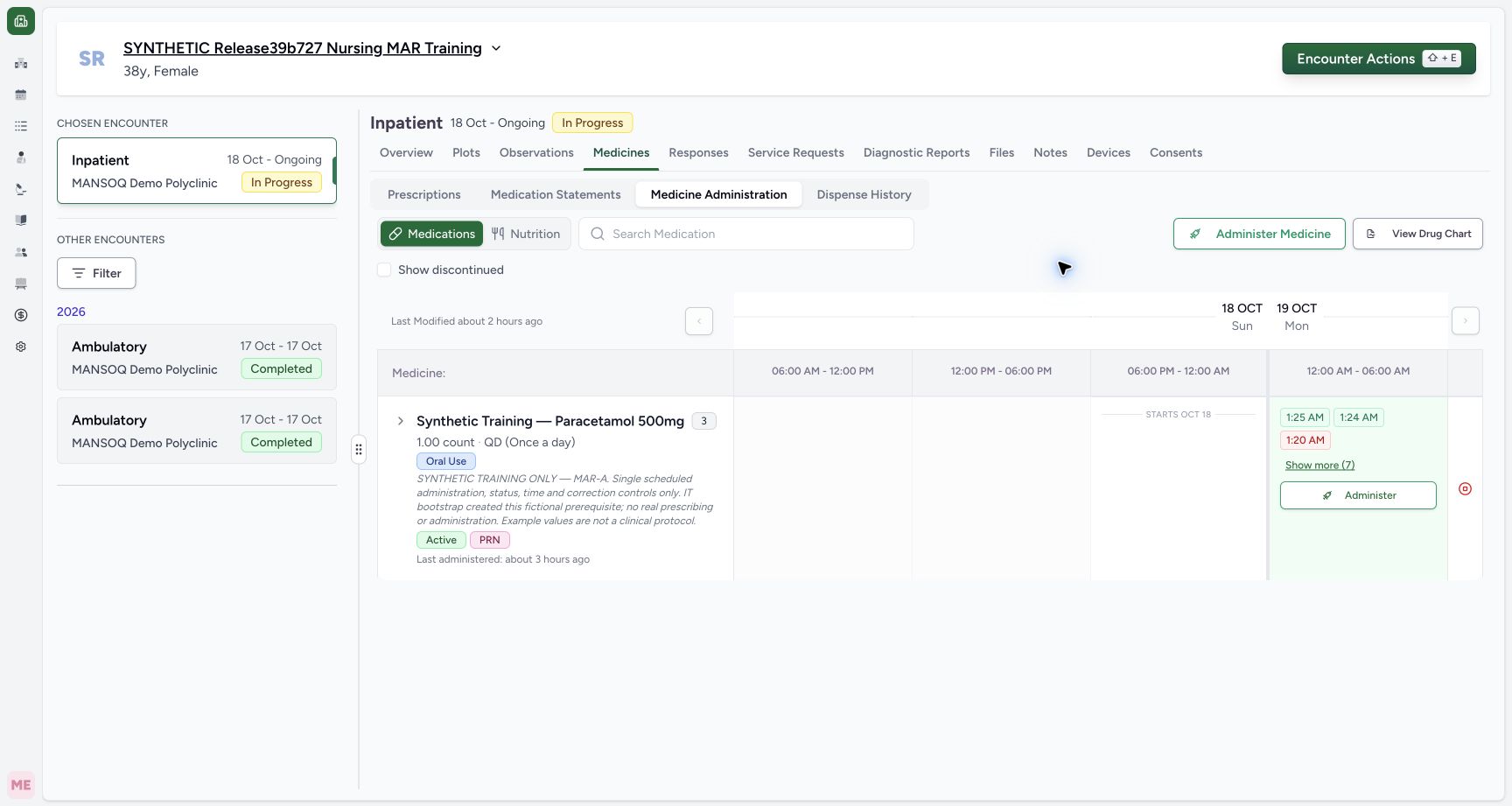
Exact committed release 96ca7318 on an isolated nonproduction clone, using an existing Nurse and fictional Polyclinic inpatient case. The synthetic patient name retains an earlier release label. Genuine saved Nurse medication administration history on exact release 96ca7318. The collapsed same-product group contains three requests and ten medication events. Its initial preview shows the 01:25 Completed, 01:24 Completed and 01:20 Not Done entries, followed by Show more (7). No event has been created or changed.
Image SHA-256 5e5a90fc50390e0c800567d65e1c77853a79ddddc6dd666fb40960874daa4ece
- Show more (7): Expand the seven additional medication events beyond this three-event preview.
 123
123Review all seven events on one scheduled request
Capture details
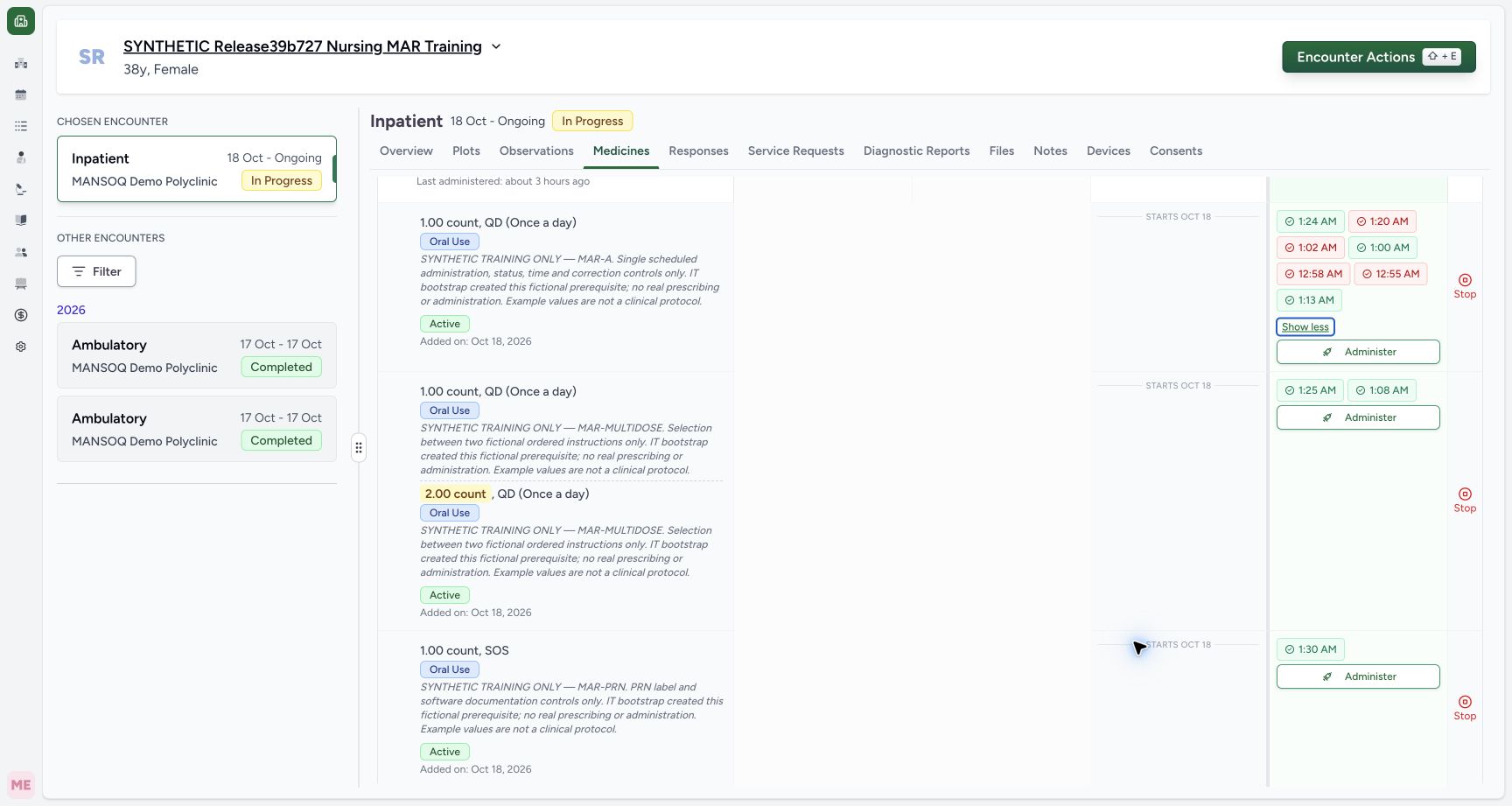
Exact committed release 96ca7318 on an isolated nonproduction clone, using an existing Nurse and fictional Polyclinic inpatient case. The synthetic patient name retains an earlier release label. The individual scheduled request’s Show more (4) control was activated with Space. Natural scrolling exposes all seven event markers, including the retained 00:55 Entered in Error and 01:13 Completed entries. The focused Show less button remains reachable. The multi-instruction and PRN requests below retain their own distinct events. All records remain unchanged.
Image SHA-256 1b0b3a3a70f3d8e2f697d9ec02b8b057a3f987674b2e7f7d10cd22f6981823cb
- Seventh retained event: The 01:13 Completed event is reachable with the same request’s expanded history.
- Keyboard-focused Show less: Space activates the focused button to collapse this request’s additional entries.
- Separate multi-instruction request: The next request retains its own two instruction lines and two event markers.
 12
12Reach all four retained nutrition events
Capture details
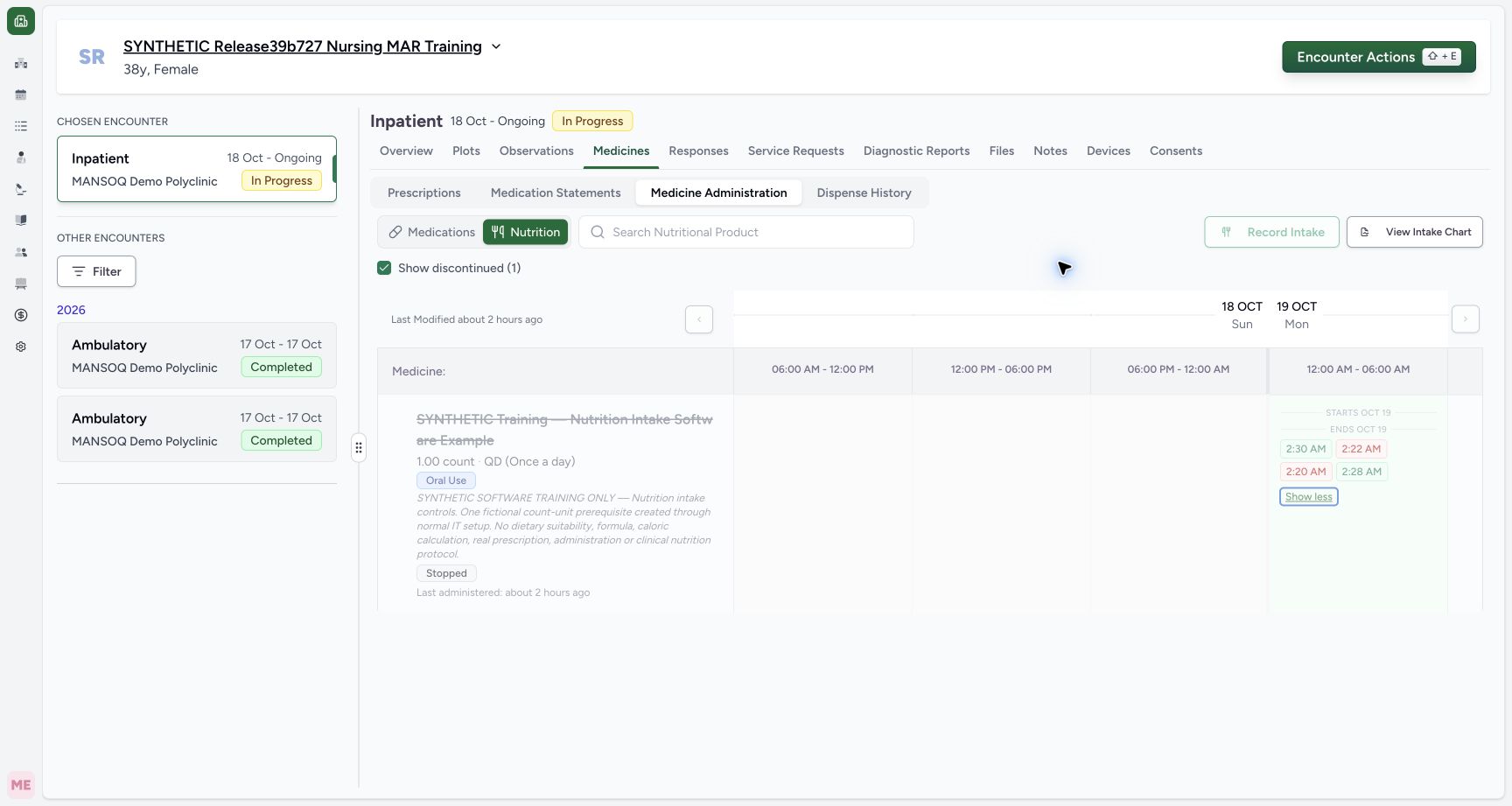
Exact committed release 96ca7318 on an isolated nonproduction clone, using an existing Nurse and fictional Polyclinic inpatient case. The synthetic patient name retains an earlier release label. The ended nutrition request’s Show more (1) was activated with Space. Its fourth saved event, 02:28 Completed, is now reachable alongside 02:30 Completed, 02:22 Entered in Error and 02:20 Not Done. The actual de-emphasized Stopped-row styling is preserved. No record is created, edited, restored or deleted.
Image SHA-256 bdaf82f7ffaf414e421e1f3d4ad61b0154fe3f23bcd2ca1638efe91586b1370d
- Fourth saved event: The retained 02:28 Completed entry is visible after expansion.
- Focused Show less: Space on the focused control collapses the additional entry again.
12 of 12 content blocks have reviewed image alignment. Missing overview or prerequisite images remain open.
Before you begin
- Confirm the intended patient and encounter and use an authorized account. This example retains three active same-product medication requests with ten events and one ended nutrition request with four events. The synthetic patient name retains an earlier release label; the captured software is 96ca7318.1
Recorded release 96ca7318 · 2026-10-19T01:49:54.759Z · 1728 × 921 Read the medication group’s initial three-event preview
Capture details
Exact committed release 96ca7318 on an isolated nonproduction clone, using an existing Nurse and fictional Polyclinic inpatient case. The synthetic patient name retains an earlier release label. Genuine saved Nurse medication administration history on exact release 96ca7318. The collapsed same-product group contains three requests and ten medication events. Its initial preview shows the 01:25 Completed, 01:24 Completed and 01:20 Not Done entries, followed by Show more (7). No event has been created or changed.
Image SHA-256
5e5a90fc50390e0c800567d65e1c77853a79ddddc6dd666fb40960874daa4ece- Show more (7): Expand the seven additional medication events beyond this three-event preview.
 12
12Recorded release 96ca7318 · 2026-10-19T01:51:43.774Z · 1728 × 921 Read the ended nutrition request’s three-event preview
Capture details
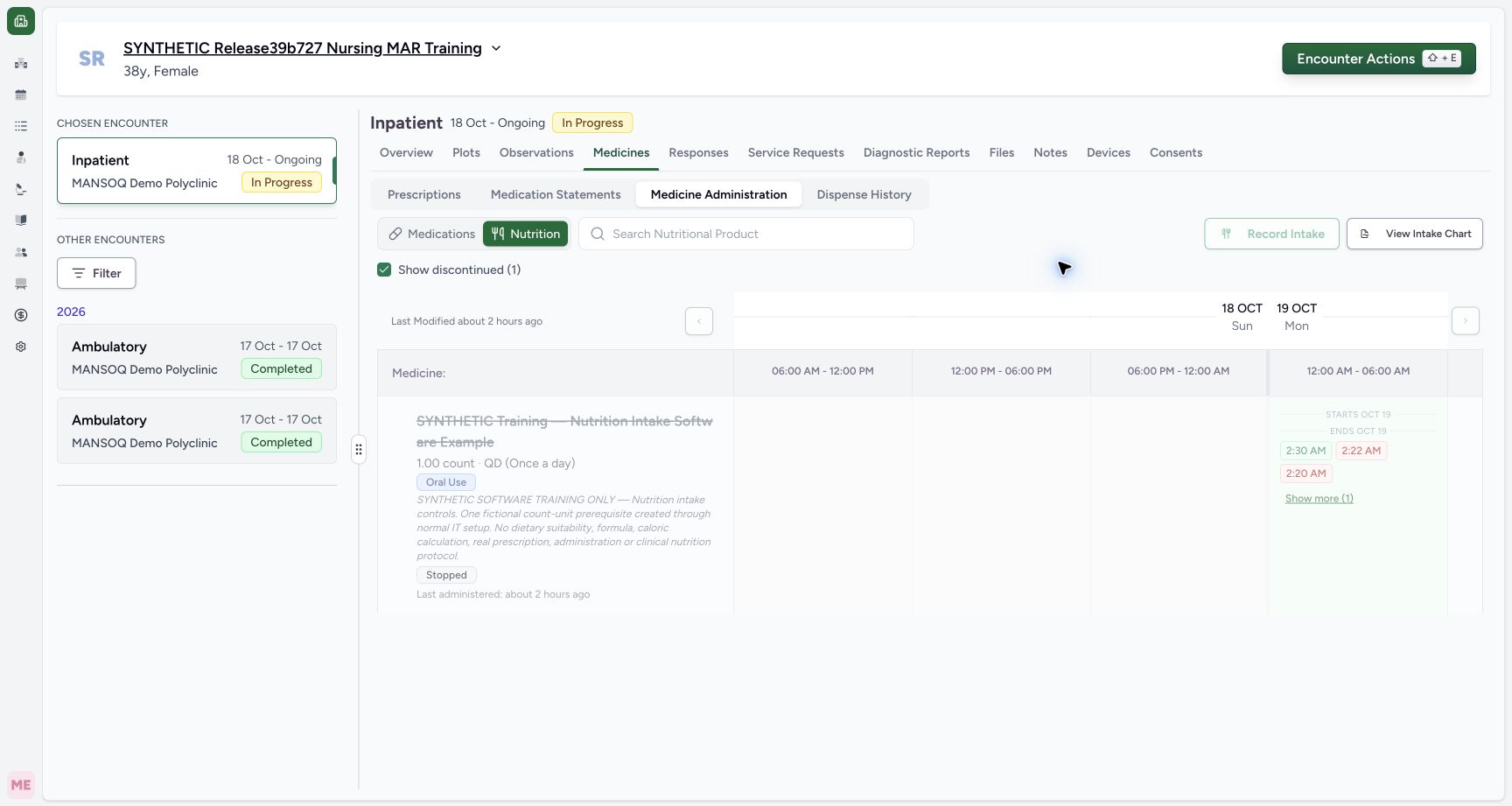
Exact committed release 96ca7318 on an isolated nonproduction clone, using an existing Nurse and fictional Polyclinic inpatient case. The synthetic patient name retains an earlier release label. The normal Nurse Nutrition history now shows the one Stopped request with its actual de-emphasized styling. The initial preview contains 02:30 Completed, 02:22 Entered in Error and 02:20 Not Done, followed by Show more (1). Its fourth 02:28 Completed event remains retained and can be reached through this control. No order or event is changed.
Image SHA-256
cd907f5f8fb2532888bb885ff23ee99e89cb11ea30f467806339ca87b1c38a04- Discontinued history selected: The checked filter reveals the retained Stopped request.
- Show more (1): One additional event remains beyond the three visible preview entries.
- The example orders, doses, times and notes are fictional software prerequisites. This lesson reviews existing records only. Do not select Administer, Record Intake, Stop or Update when following this read-only history exercise.
 123
123Recorded release 96ca7318 · 2026-10-19T01:50:26.326Z · 1728 × 921 Read the retained Entered in Error event without changing it
Capture details
Exact committed release 96ca7318 on an isolated nonproduction clone, using an existing Nurse and fictional Polyclinic inpatient case. The synthetic patient name retains an earlier release label. The actual retained 00:55 Entered in Error event opens from the expanded group. The saved correction note, disabled original start and existing 00:56 end remain visible. The request-context header labels the latest administration entry and requester; it is not a separate selected-event performer statement. This lesson reads the existing event and closes with Cancel, without Update.
Image SHA-256
f6df2c758475c67a20222465f5d064004a17319dd8ead1069ba1d7bf8960f774- Retained event status: The opened saved event retains Entered in Error.
- Original start remains locked: The saved start controls are disabled; this example retains its original 00:55 start.
- Cancel the read-only review: Use Cancel to close without selecting Update.
 123
123Recorded release 96ca7318 · 2026-10-19T01:52:05.765Z · 1728 × 921 Read the selected nutrition event under its product heading
Capture details
Exact committed release 96ca7318 on an isolated nonproduction clone, using an existing Nurse and fictional Polyclinic inpatient case. The synthetic patient name retains an earlier release label. The formerly fourth nutrition event opens normally. The dialog now displays the actual nutrition product heading, Completed status, original locked 02:28 start, existing 02:28 end and retained fictional note. The header’s latest-entry context is distinct from the selected event fields. This is read-only inspection; Cancel closes it without Update.
Image SHA-256
01207a1623bec203f25579eda482f0e3ee66dac6d5105c75232ab2d276b9751b- Nutrition product context: The dialog identifies the selected nutrition product above the saved event fields.
- Locked original start: The saved Completed example retains its original 02:28 start.
- Cancel without Update: Close the inspection without modifying the retained event.
1. Read the initial group preview
Open Medicines, Medicine Administration and Medications. The collapsed product group shows a count of three requests. Its initial event preview contains three buttons, followed by Show more (7). The number in parentheses counts additional event entries beyond the preview; it is not a count of medication requests.
1Read the medication group’s initial three-event preview
Capture details
Exact committed release 96ca7318 on an isolated nonproduction clone, using an existing Nurse and fictional Polyclinic inpatient case. The synthetic patient name retains an earlier release label. Genuine saved Nurse medication administration history on exact release 96ca7318. The collapsed same-product group contains three requests and ten medication events. Its initial preview shows the 01:25 Completed, 01:24 Completed and 01:20 Not Done entries, followed by Show more (7). No event has been created or changed.
Image SHA-256 5e5a90fc50390e0c800567d65e1c77853a79ddddc6dd666fb40960874daa4ece
- Show more (7): Expand the seven additional medication events beyond this three-event preview.
2. Expand and inspect all group events
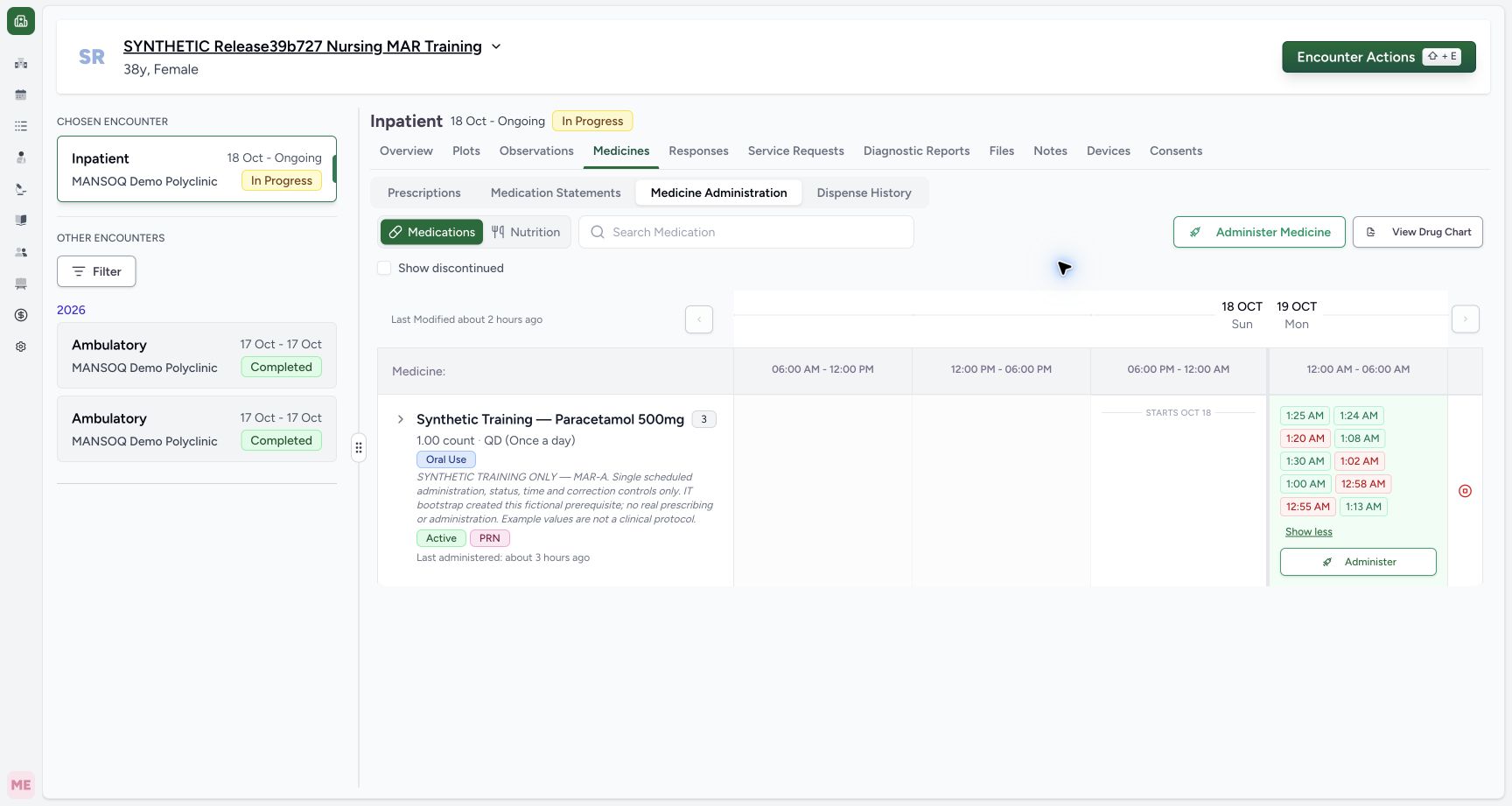
Select Show more (7) to expose all ten saved medication event buttons. The expanded group contains Completed, Not Done, Cancelled and Entered in Error entries. Read the accessible event label or open the event for its precise status and dose; color alone is insufficient. Event order is not a single chronological timeline. Select Show less to collapse the preview. In this actual sequence, Space also activated the focused Show less button.
 12
12Inspect all ten retained medication event markers
Capture details
Exact committed release 96ca7318 on an isolated nonproduction clone, using an existing Nurse and fictional Polyclinic inpatient case. The synthetic patient name retains an earlier release label. The actual collapsed three-request group is expanded with Show more. All ten medication event buttons are now visible, including Completed, Not Done, Cancelled and Entered in Error. Their precise status is available in each accessible button label and opened event form; color alone is not the status definition. No administration record is edited.
Image SHA-256 aaf93a21b1a092ef3f48c9043392f25fad715bff9d8ca65f642d6c56e172b9cb
- Additional saved events: The expanded group retains Completed and non-completed event buttons, including Entered in Error.
- Show less: Collapse the expanded preview after reviewing its retained events.
1Read the medication group’s initial three-event preview
Capture details
Exact committed release 96ca7318 on an isolated nonproduction clone, using an existing Nurse and fictional Polyclinic inpatient case. The synthetic patient name retains an earlier release label. Genuine saved Nurse medication administration history on exact release 96ca7318. The collapsed same-product group contains three requests and ten medication events. Its initial preview shows the 01:25 Completed, 01:24 Completed and 01:20 Not Done entries, followed by Show more (7). No event has been created or changed.
Image SHA-256 5e5a90fc50390e0c800567d65e1c77853a79ddddc6dd666fb40960874daa4ece
- Show more (7): Expand the seven additional medication events beyond this three-event preview.
3. Open a retained corrected event and cancel
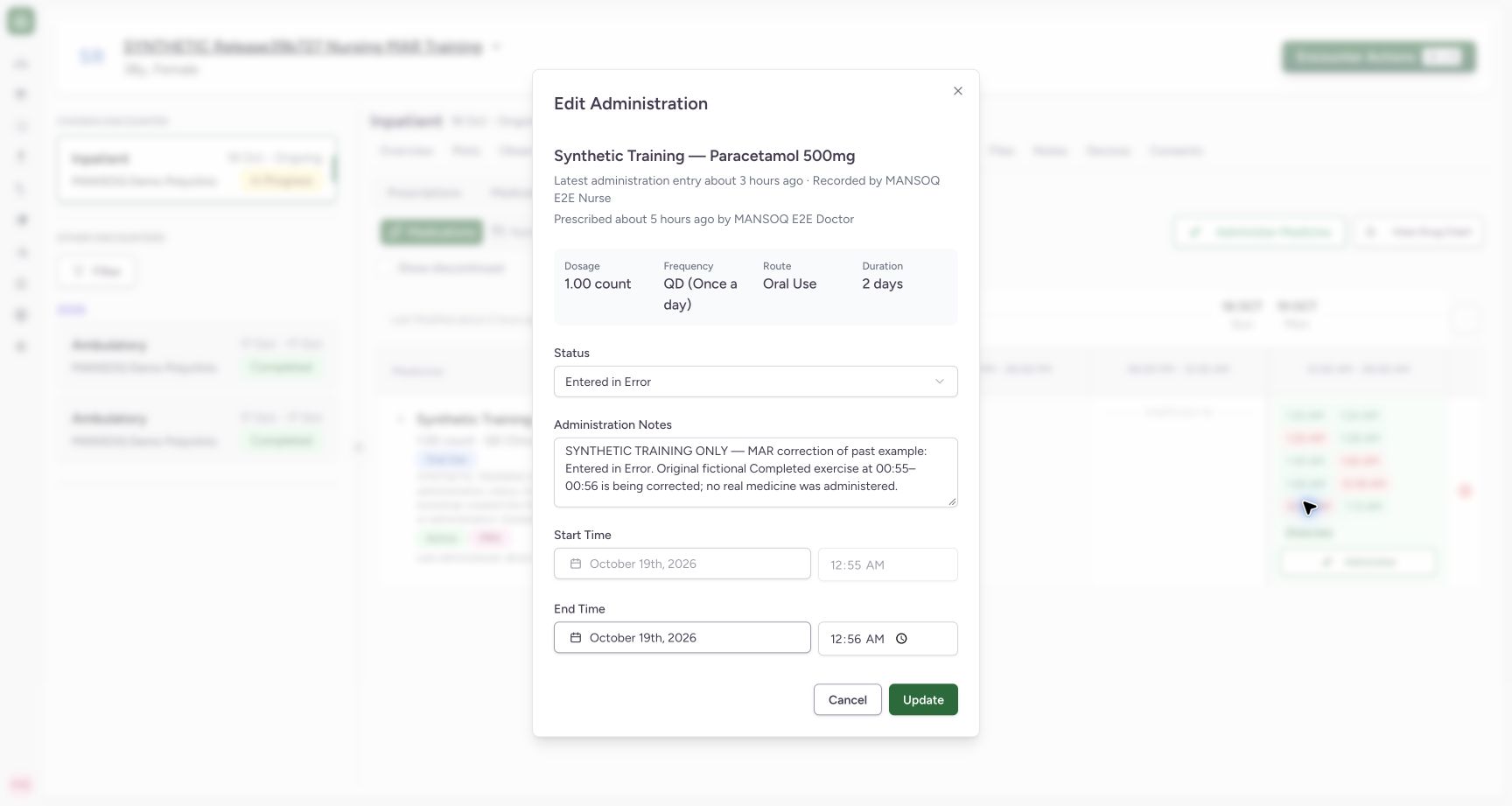
From the expanded group, open the 00:55 Entered in Error event. Read its existing status, correction note, locked original 00:55 start and retained 00:56 end. The header describes the request’s latest administration entry and prescriber context; it is separate from the selected event’s fields. This dialog still contains Update, so choose Cancel to leave the saved event unchanged.
123Read the retained Entered in Error event without changing it
Capture details
Exact committed release 96ca7318 on an isolated nonproduction clone, using an existing Nurse and fictional Polyclinic inpatient case. The synthetic patient name retains an earlier release label. The actual retained 00:55 Entered in Error event opens from the expanded group. The saved correction note, disabled original start and existing 00:56 end remain visible. The request-context header labels the latest administration entry and requester; it is not a separate selected-event performer statement. This lesson reads the existing event and closes with Cancel, without Update.
Image SHA-256 f6df2c758475c67a20222465f5d064004a17319dd8ead1069ba1d7bf8960f774
- Retained event status: The opened saved event retains Entered in Error.
- Original start remains locked: The saved start controls are disabled; this example retains its original 00:55 start.
- Cancel the read-only review: Use Cancel to close without selecting Update.
4. Separate group history from one request’s history
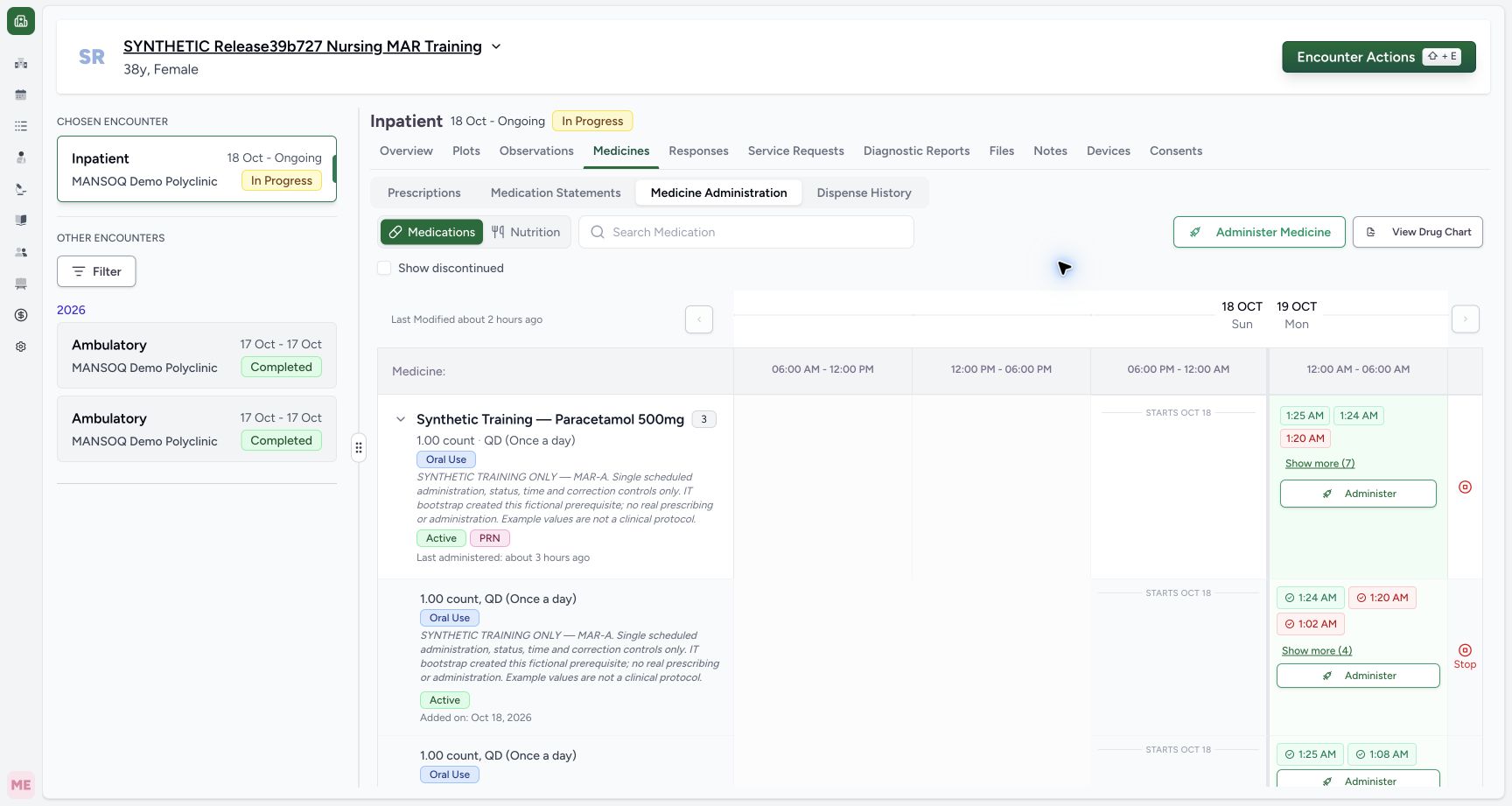
Use the chevron beside the product name to expand the three individual requests. The first scheduled request has its own three-event preview and Show more (4), for seven events in that request. The group preview above still summarizes events from all three requests. Read the instruction and request row before opening an event.
 12
12Expand the same-product group to its individual request rows
Capture details
Exact committed release 96ca7318 on an isolated nonproduction clone, using an existing Nurse and fictional Polyclinic inpatient case. The synthetic patient name retains an earlier release label. The product group is expanded to its separate request rows. The first scheduled request shows Completed 01:24, Not Done 01:20 and Cancelled 01:02 in its three-event preview, plus Show more (4). The group-level ten-event preview above remains separate from this request-level seven-event history. No clinical record is changed.
Image SHA-256 ee82af4b39115f36c4f4156104aa0349c7d326f4410331efc20384d9f26722f7
- Request row expansion: This chevron reveals the separate requests beneath the product group.
- Show more (4): This single scheduled request has four more saved entries beyond its initial three-event preview.
5. Reach every individual request event
Focus the first request’s Show more (4) button and press Space, or select it normally. Scroll the workspace as needed to inspect all seven entries, including the retained 00:55 Entered in Error and 01:13 Completed events. Show less remains reachable and collapses this request’s additional entries. The separate multi-instruction request below retains its own two dose instruction lines and two events; the PRN request retains its own event.
123Review all seven events on one scheduled request
Capture details
Exact committed release 96ca7318 on an isolated nonproduction clone, using an existing Nurse and fictional Polyclinic inpatient case. The synthetic patient name retains an earlier release label. The individual scheduled request’s Show more (4) control was activated with Space. Natural scrolling exposes all seven event markers, including the retained 00:55 Entered in Error and 01:13 Completed entries. The focused Show less button remains reachable. The multi-instruction and PRN requests below retain their own distinct events. All records remain unchanged.
Image SHA-256 1b0b3a3a70f3d8e2f697d9ec02b8b057a3f987674b2e7f7d10cd22f6981823cb
- Seventh retained event: The 01:13 Completed event is reachable with the same request’s expanded history.
- Keyboard-focused Show less: Space activates the focused button to collapse this request’s additional entries.
- Separate multi-instruction request: The next request retains its own two instruction lines and two event markers.
12Expand the same-product group to its individual request rows
Capture details
Exact committed release 96ca7318 on an isolated nonproduction clone, using an existing Nurse and fictional Polyclinic inpatient case. The synthetic patient name retains an earlier release label. The product group is expanded to its separate request rows. The first scheduled request shows Completed 01:24, Not Done 01:20 and Cancelled 01:02 in its three-event preview, plus Show more (4). The group-level ten-event preview above remains separate from this request-level seven-event history. No clinical record is changed.
Image SHA-256 ee82af4b39115f36c4f4156104aa0349c7d326f4410331efc20384d9f26722f7
- Request row expansion: This chevron reveals the separate requests beneath the product group.
- Show more (4): This single scheduled request has four more saved entries beyond its initial three-event preview.
6. Reveal an ended nutrition request
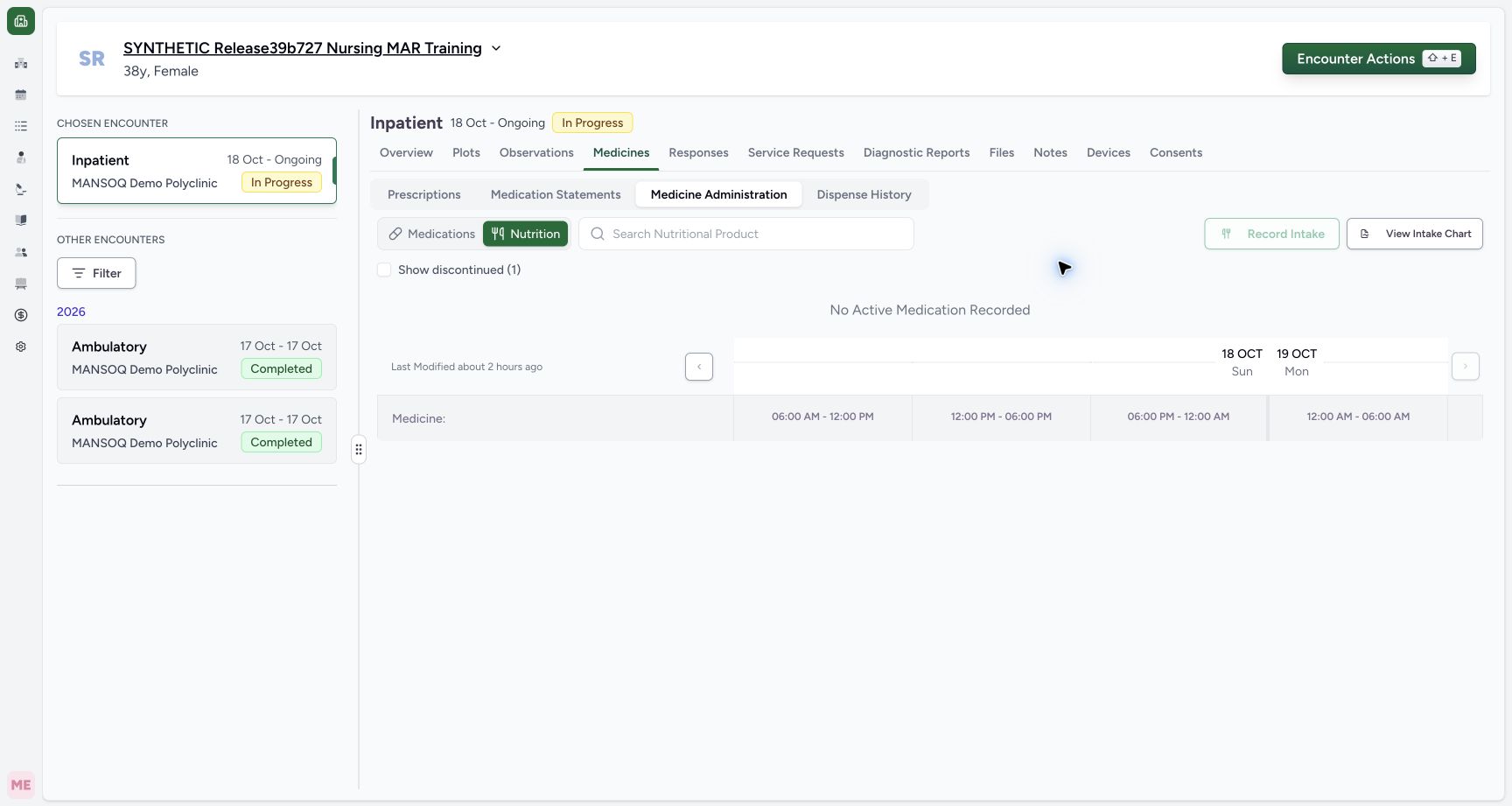
Select Nutrition. With Show discontinued (1) unchecked, this fixture has no visible active nutrition request: the screen uses the generic No Active Medication Recorded message and Record Intake is disabled. Check Show discontinued (1) to reveal the retained Stopped request. Its initial preview shows 02:30 Completed, 02:22 Entered in Error and 02:20 Not Done, followed by Show more (1). The de-emphasized row is the actual stopped-history styling; those records have not been deleted.
 12
12Recognize hidden discontinued nutrition history
Capture details
Exact committed release 96ca7318 on an isolated nonproduction clone, using an existing Nurse and fictional Polyclinic inpatient case. The synthetic patient name retains an earlier release label. The saved Nutrition tab has one ended request and no active request. Show discontinued (1) is unchecked, so the generic No Active Medication Recorded message appears and Record Intake is disabled. The retained ended request and its four events are hidden by the display filter, not deleted.
Image SHA-256 5dd0ef760b3969488142033c6a6e72a3eab520d540f1156ececa306cf3f74c10
- Show discontinued (1): Select this checkbox to reveal the one ended nutrition request and its retained events.
- Record Intake disabled: There is no active nutrition request in this fixture; reviewing history does not authorize a new intake.
12Read the ended nutrition request’s three-event preview
Capture details
Exact committed release 96ca7318 on an isolated nonproduction clone, using an existing Nurse and fictional Polyclinic inpatient case. The synthetic patient name retains an earlier release label. The normal Nurse Nutrition history now shows the one Stopped request with its actual de-emphasized styling. The initial preview contains 02:30 Completed, 02:22 Entered in Error and 02:20 Not Done, followed by Show more (1). Its fourth 02:28 Completed event remains retained and can be reached through this control. No order or event is changed.
Image SHA-256 cd907f5f8fb2532888bb885ff23ee99e89cb11ea30f467806339ca87b1c38a04
- Discontinued history selected: The checked filter reveals the retained Stopped request.
- Show more (1): One additional event remains beyond the three visible preview entries.
7. Reach and inspect the fourth nutrition event
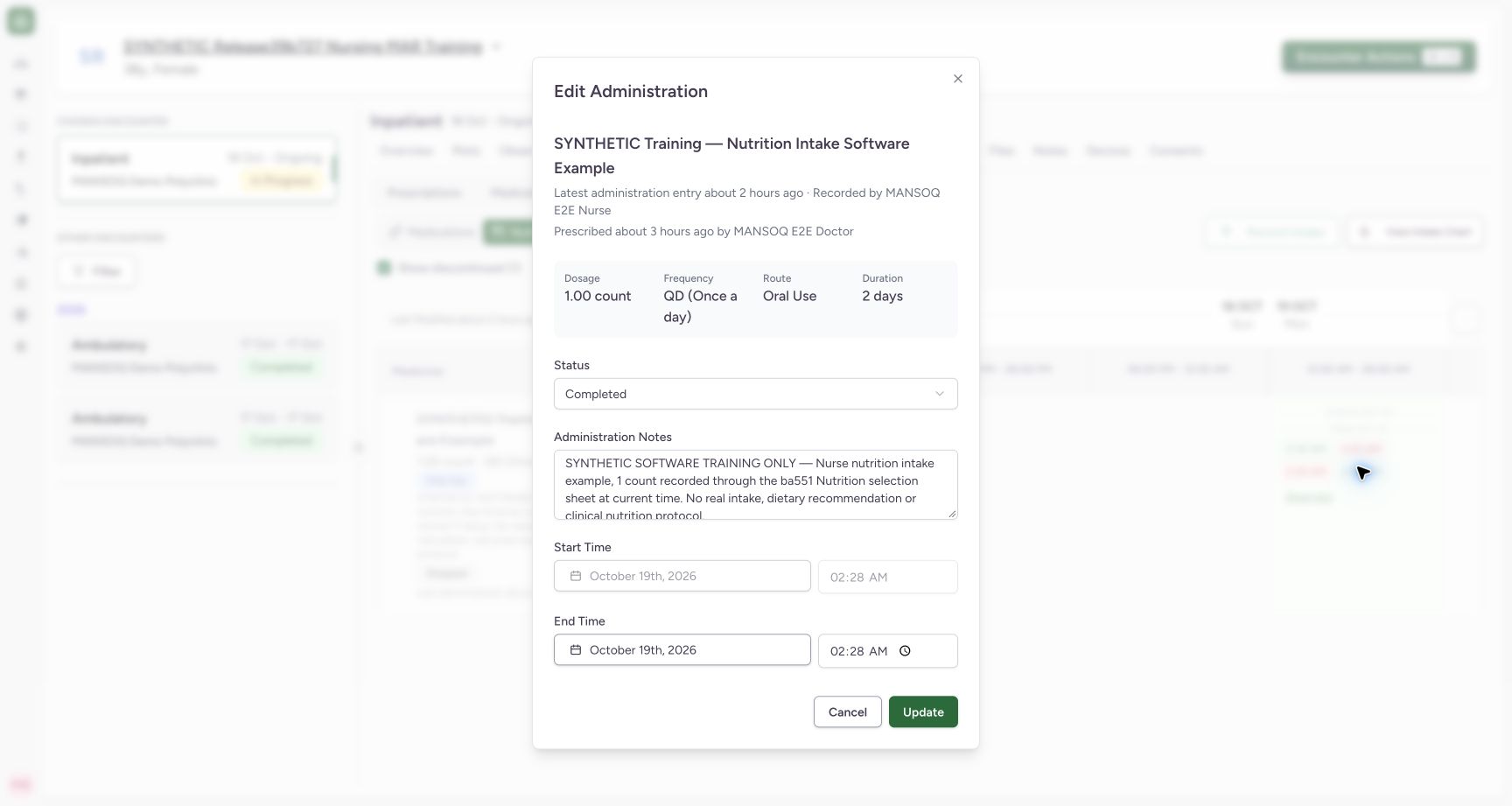
Focus Show more (1) and press Space, or select it normally. The fourth retained entry, 02:28 Completed, becomes available alongside the other three. Open that button to confirm the nutrition product heading, Completed status, locked original 02:28 start, existing 02:28 end and retained fictional note. The heading identifies the selected product. Choose Cancel without Update, then use Show less if you want the initial preview again.
12Reach all four retained nutrition events
Capture details
Exact committed release 96ca7318 on an isolated nonproduction clone, using an existing Nurse and fictional Polyclinic inpatient case. The synthetic patient name retains an earlier release label. The ended nutrition request’s Show more (1) was activated with Space. Its fourth saved event, 02:28 Completed, is now reachable alongside 02:30 Completed, 02:22 Entered in Error and 02:20 Not Done. The actual de-emphasized Stopped-row styling is preserved. No record is created, edited, restored or deleted.
Image SHA-256 bdaf82f7ffaf414e421e1f3d4ad61b0154fe3f23bcd2ca1638efe91586b1370d
- Fourth saved event: The retained 02:28 Completed entry is visible after expansion.
- Focused Show less: Space on the focused control collapses the additional entry again.
123Read the selected nutrition event under its product heading
Capture details
Exact committed release 96ca7318 on an isolated nonproduction clone, using an existing Nurse and fictional Polyclinic inpatient case. The synthetic patient name retains an earlier release label. The formerly fourth nutrition event opens normally. The dialog now displays the actual nutrition product heading, Completed status, original locked 02:28 start, existing 02:28 end and retained fictional note. The header’s latest-entry context is distinct from the selected event fields. This is read-only inspection; Cancel closes it without Update.
Image SHA-256 01207a1623bec203f25579eda482f0e3ee66dac6d5105c75232ab2d276b9751b
- Nutrition product context: The dialog identifies the selected nutrition product above the saved event fields.
- Locked original start: The saved Completed example retains its original 02:28 start.
- Cancel without Update: Close the inspection without modifying the retained event.
Visibility controls preserve the saved audit records
Show more, Show less and Show discontinued change what is displayed. They do not create, restore, correct or delete an event. Independent ordinary Nurse and Doctor readbacks after this sequence confirmed all fourteen administration records, all four requests and the existing diagnoses and symptoms were unchanged. The per-request Completed chart is a separate presentation from this all-status history.
12Inspect all ten retained medication event markers
Capture details
Exact committed release 96ca7318 on an isolated nonproduction clone, using an existing Nurse and fictional Polyclinic inpatient case. The synthetic patient name retains an earlier release label. The actual collapsed three-request group is expanded with Show more. All ten medication event buttons are now visible, including Completed, Not Done, Cancelled and Entered in Error. Their precise status is available in each accessible button label and opened event form; color alone is not the status definition. No administration record is edited.
Image SHA-256 aaf93a21b1a092ef3f48c9043392f25fad715bff9d8ca65f642d6c56e172b9cb
- Additional saved events: The expanded group retains Completed and non-completed event buttons, including Entered in Error.
- Show less: Collapse the expanded preview after reviewing its retained events.
123Review all seven events on one scheduled request
Capture details
Exact committed release 96ca7318 on an isolated nonproduction clone, using an existing Nurse and fictional Polyclinic inpatient case. The synthetic patient name retains an earlier release label. The individual scheduled request’s Show more (4) control was activated with Space. Natural scrolling exposes all seven event markers, including the retained 00:55 Entered in Error and 01:13 Completed entries. The focused Show less button remains reachable. The multi-instruction and PRN requests below retain their own distinct events. All records remain unchanged.
Image SHA-256 1b0b3a3a70f3d8e2f697d9ec02b8b057a3f987674b2e7f7d10cd22f6981823cb
- Seventh retained event: The 01:13 Completed event is reachable with the same request’s expanded history.
- Keyboard-focused Show less: Space activates the focused button to collapse this request’s additional entries.
- Separate multi-instruction request: The next request retains its own two instruction lines and two event markers.
12Reach all four retained nutrition events
Capture details
Exact committed release 96ca7318 on an isolated nonproduction clone, using an existing Nurse and fictional Polyclinic inpatient case. The synthetic patient name retains an earlier release label. The ended nutrition request’s Show more (1) was activated with Space. Its fourth saved event, 02:28 Completed, is now reachable alongside 02:30 Completed, 02:22 Entered in Error and 02:20 Not Done. The actual de-emphasized Stopped-row styling is preserved. No record is created, edited, restored or deleted.
Image SHA-256 bdaf82f7ffaf414e421e1f3d4ad61b0154fe3f23bcd2ca1638efe91586b1370d
- Fourth saved event: The retained 02:28 Completed entry is visible after expansion.
- Focused Show less: Space on the focused control collapses the additional entry again.
Scope of this observed history lesson
This lesson covers the demonstrated authorized Nurse on one fictional Polyclinic inpatient encounter, including grouped medication history, an individual scheduled request and an ended single nutrition request. It does not qualify every role or facility, a physical performer, clinical suitability or the authority to amend a saved event. Request-context recorder captions are distinct from selected-event fields.
1Read the medication group’s initial three-event preview
Capture details
Exact committed release 96ca7318 on an isolated nonproduction clone, using an existing Nurse and fictional Polyclinic inpatient case. The synthetic patient name retains an earlier release label. Genuine saved Nurse medication administration history on exact release 96ca7318. The collapsed same-product group contains three requests and ten medication events. Its initial preview shows the 01:25 Completed, 01:24 Completed and 01:20 Not Done entries, followed by Show more (7). No event has been created or changed.
Image SHA-256 5e5a90fc50390e0c800567d65e1c77853a79ddddc6dd666fb40960874daa4ece
- Show more (7): Expand the seven additional medication events beyond this three-event preview.
123Read the retained Entered in Error event without changing it
Capture details
Exact committed release 96ca7318 on an isolated nonproduction clone, using an existing Nurse and fictional Polyclinic inpatient case. The synthetic patient name retains an earlier release label. The actual retained 00:55 Entered in Error event opens from the expanded group. The saved correction note, disabled original start and existing 00:56 end remain visible. The request-context header labels the latest administration entry and requester; it is not a separate selected-event performer statement. This lesson reads the existing event and closes with Cancel, without Update.
Image SHA-256 f6df2c758475c67a20222465f5d064004a17319dd8ead1069ba1d7bf8960f774
- Retained event status: The opened saved event retains Entered in Error.
- Original start remains locked: The saved start controls are disabled; this example retains its original 00:55 start.
- Cancel the read-only review: Use Cancel to close without selecting Update.
123Read the selected nutrition event under its product heading
Capture details
Exact committed release 96ca7318 on an isolated nonproduction clone, using an existing Nurse and fictional Polyclinic inpatient case. The synthetic patient name retains an earlier release label. The formerly fourth nutrition event opens normally. The dialog now displays the actual nutrition product heading, Completed status, original locked 02:28 start, existing 02:28 end and retained fictional note. The header’s latest-entry context is distinct from the selected event fields. This is read-only inspection; Cancel closes it without Update.
Image SHA-256 01207a1623bec203f25579eda482f0e3ee66dac6d5105c75232ab2d276b9751b
- Nutrition product context: The dialog identifies the selected nutrition product above the saved event fields.
- Locked original start: The saved Completed example retains its original 02:28 start.
- Cancel without Update: Close the inspection without modifying the retained event.
Source evidence
Every citation uses this exact committed version. The private source repository requires access.
- repositories/platform/mansoq-web/src/components/Medicine/MedicationAdministration/GroupedMedicationRow.tsx:53 ·
96ca7318eb2b93f5fa477908a1543075e0d1f056Source file checksum
e497c113ba63d31c09068cdab1ebe7c495794548f218112599914ef06cc191d2 - repositories/platform/mansoq-web/src/components/Medicine/MedicationAdministration/GroupedMedicationRow.tsx:308 ·
96ca7318eb2b93f5fa477908a1543075e0d1f056Source file checksum
e497c113ba63d31c09068cdab1ebe7c495794548f218112599914ef06cc191d2 - repositories/platform/mansoq-web/src/components/Medicine/MedicationAdministration/GroupedMedicationRow.tsx:562 ·
96ca7318eb2b93f5fa477908a1543075e0d1f056Source file checksum
e497c113ba63d31c09068cdab1ebe7c495794548f218112599914ef06cc191d2 - repositories/platform/mansoq-web/src/components/Medicine/MedicationAdministration/AdministrationTab.tsx:642 ·
96ca7318eb2b93f5fa477908a1543075e0d1f056Source file checksum
170c246835ea1966b8512f5baf72ff0ea60635f28cbcec6a465bb8c17506555f - repositories/platform/mansoq-web/src/components/Medicine/MedicationAdministration/MedicineAdminDialog.tsx:1 ·
96ca7318eb2b93f5fa477908a1543075e0d1f056Source file checksum
c6ccd39c46d4093d346e97987eebd9dd1b51ffae1c8688f5305a7eed5336d6f2