 MANSOQ
 Nursing observations · VERSION 96ca7318
Record and verify a synthetic heart-rate observation
Use the configured Heart Rate form, recover from required-field validation, save a fictional value with a note, then verify its response, observation, server effective time and Pulse history on exact release 96ca7318.
Nurse
 12
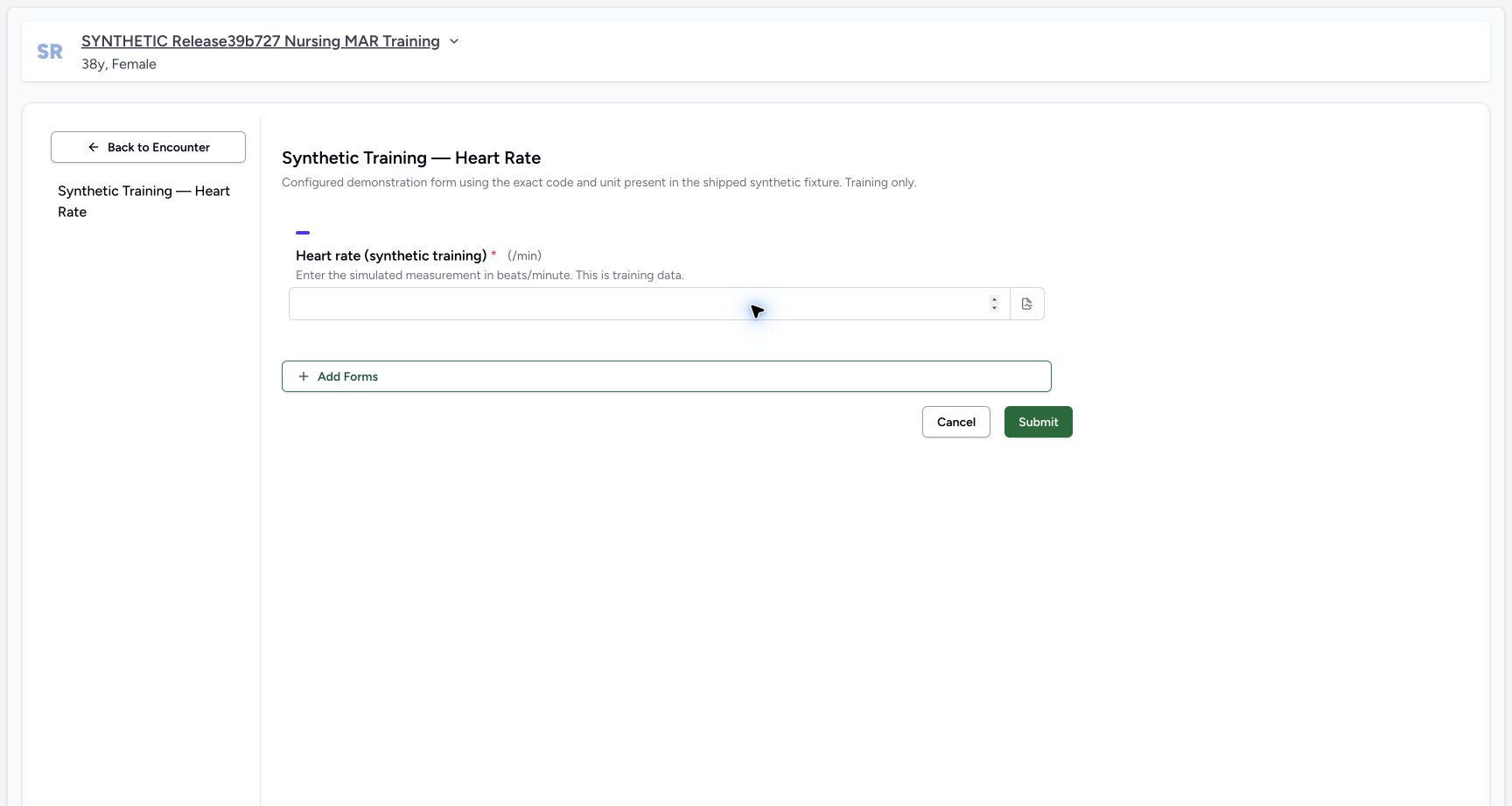
12Check the required heart-rate input and fixed unit
Capture details
Exact committed release 96ca7318 on an isolated nonproduction clone, using an existing Nurse and fictional Polyclinic inpatient case. The synthetic patient name retains an earlier release label. The configured required Integer control displays fixed /min unit and explicit synthetic training instruction. No effective-time/backdating input is rendered, despite the stored collect_time flag. No field value or clinical record has been written.
Image SHA-256 246b08fc57fb39faa4bed3a7a462d2c60bf8e2ebf7d2280b64d54392c18685c6
- Required numeric value: This configured Integer question is required and displays/min as its fixed unit.
- Submit: An empty required input is validated before a save request.
 123
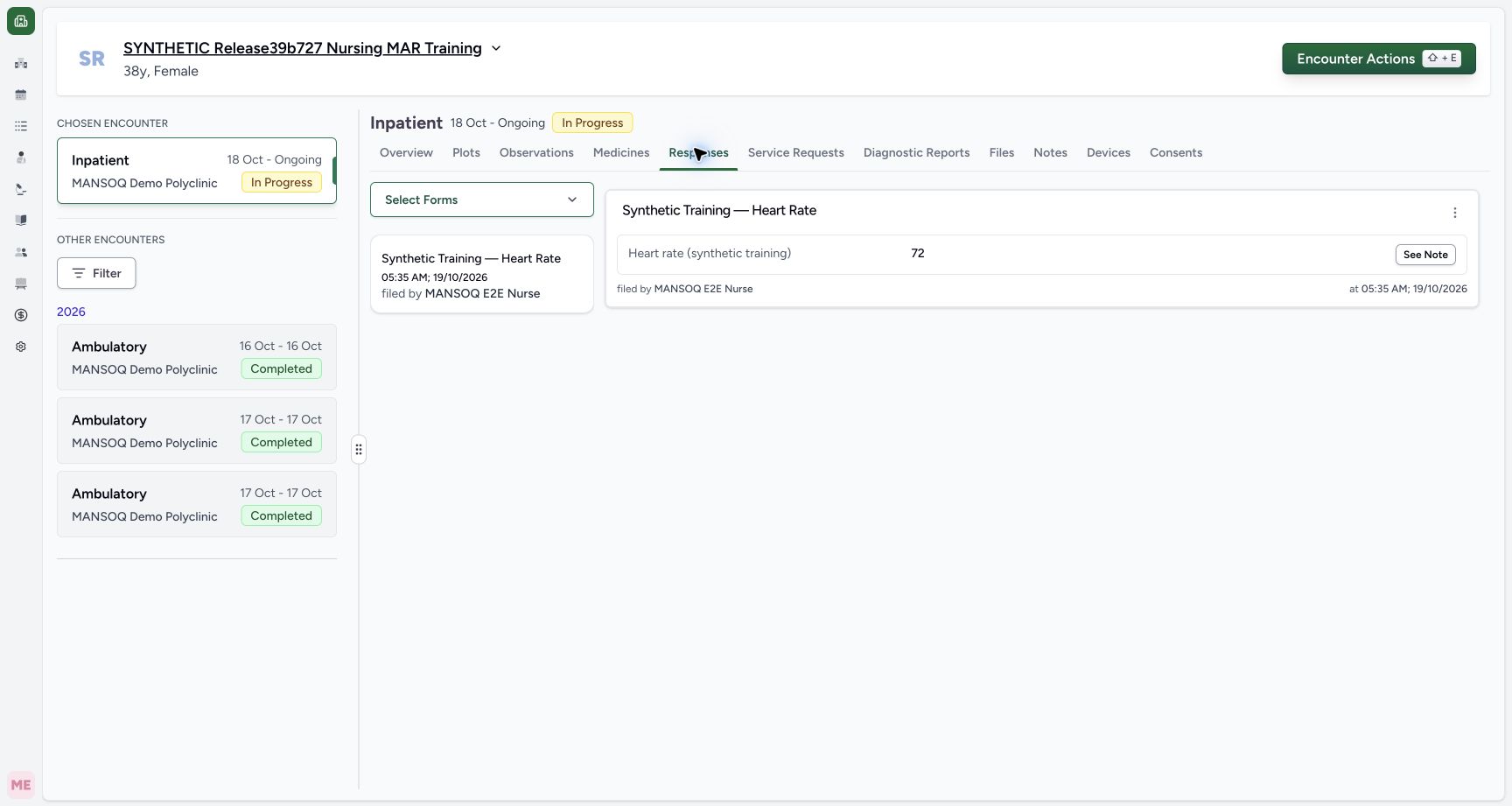
123Verify the persisted Nurse response
Capture details
Exact committed release 96ca7318 on an isolated nonproduction clone, using an existing Nurse and fictional Polyclinic inpatient case. The synthetic patient name retains an earlier release label. Normal Responses tab shows the saved72 response filed by the existing Nurse at 05:35 AM on October 19. Independent ordinary Nurse/Doctor reads confirm a new Completed response and Final observation with value 72, UCUM /min and server effective time2026-10-19T02:35:35.601029Z. The response card does not display its unit; the form and independent observation record establish that unit.
Image SHA-256 844f334f6847bed72dead51be3ab51712192954f9b578b3d159dd4d4cf4f2798
- Saved response value 72: This is the persisted response value; the card does not show the unit.
- See saved note: Open the retained training note from the saved response.
- Observations tab: Review the linked observation and its effective time separately.
 12
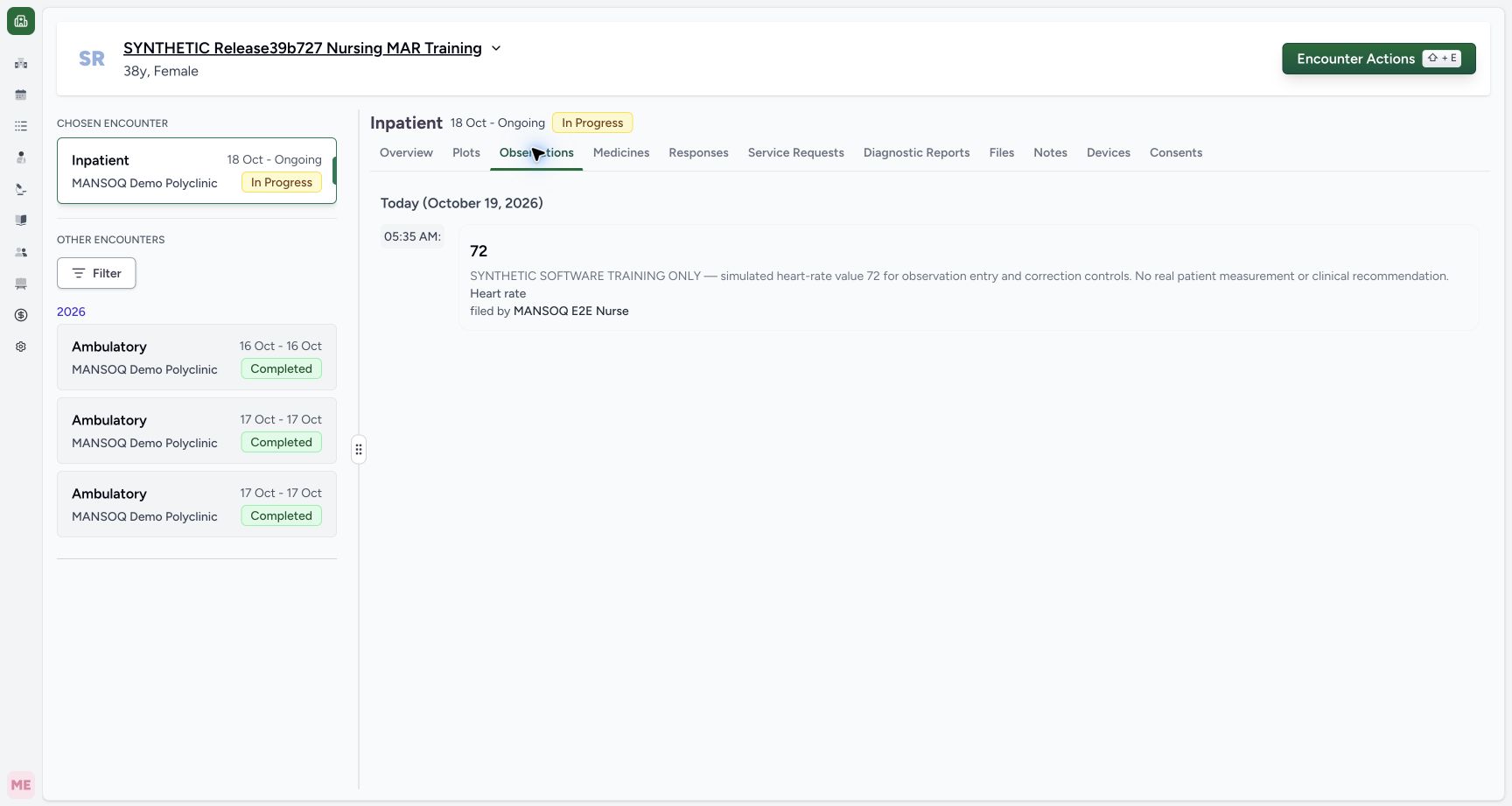
12Read the saved observation’s value, time and author
Capture details
Exact committed release 96ca7318 on an isolated nonproduction clone, using an existing Nurse and fictional Polyclinic inpatient case. The synthetic patient name retains an earlier release label. Actual Observations tab shows72, saved fictional note, Heart rate label and Nurse filed-by context grouped Today at 05:35 AM. This is the server effective time, independently read as 2026-10-19T02:35:35.601029Z. The card does not render the stored/min unit; do not infer another unit from its bare72 label.
Image SHA-256 2d219039d35668743786e9a0b58f315ff38263e6c8a1a41e03c4fcccbe793774
- Saved observation value: This value is linked to the saved questionnaire response; its effective time and filed-by Nurse appear in the same entry.
- Plots: Open the numeric plot and observation history views for the selected encounter.
 1
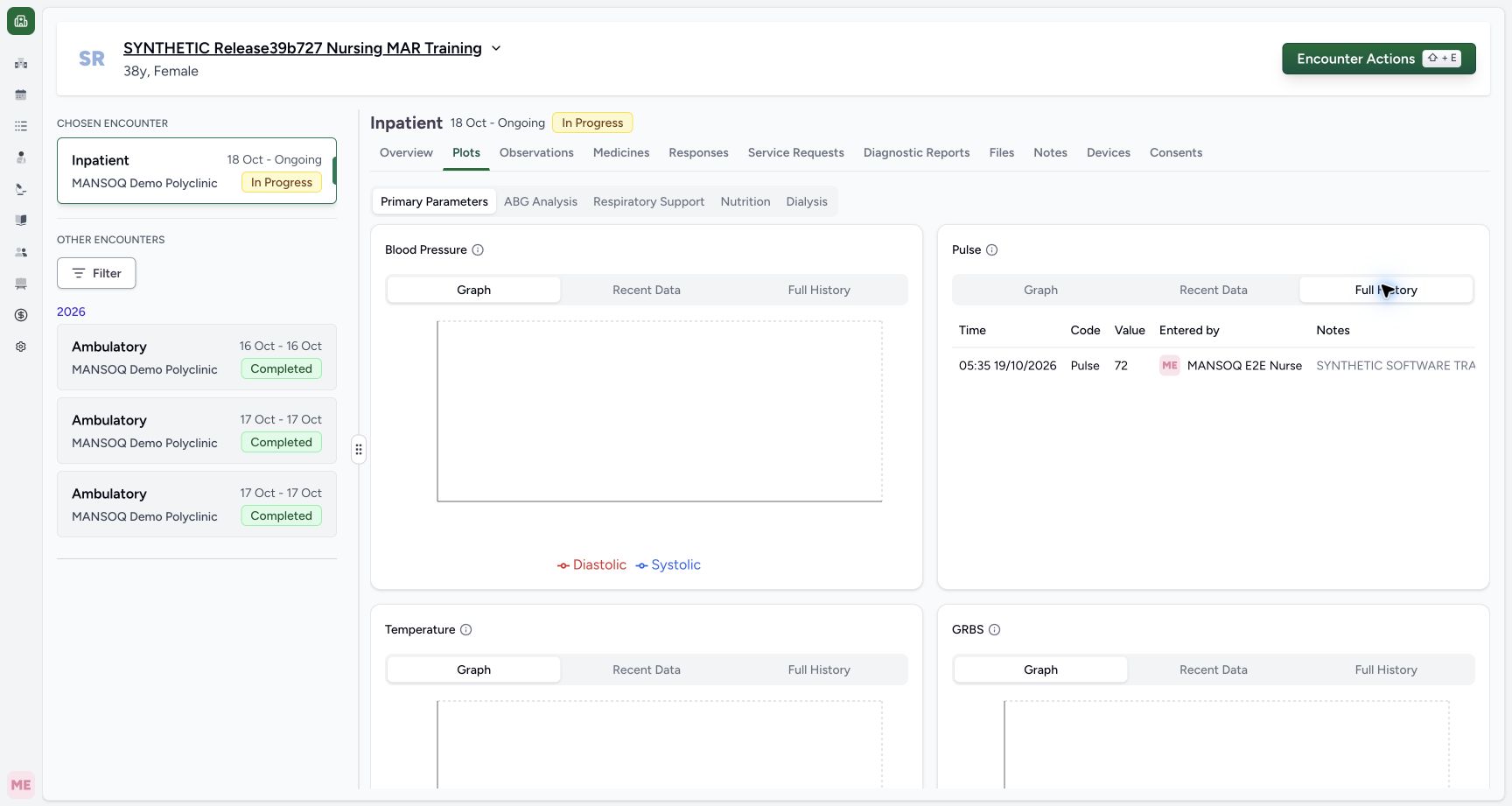
1Verify the selected encounter’s retained Pulse history
Capture details
Exact committed release 96ca7318 on an isolated nonproduction clone, using an existing Nurse and fictional Polyclinic inpatient case. The synthetic patient name retains an earlier release label. The fully loaded Pulse Full History table shows the same saved observation effective time, configured Pulse label for the Heart rate code,72, Nurse entered-by identity and fictional note. Current-source requests include the selected encounter filter. This is one observation, not a physical trend or an edit history.
Image SHA-256 35a545ea1a188c90aaf2c7db7cc18bee6a038c94b4e48ee7470b37cf79423042
- Responses: Return to the source response before using its supported correction action.
11 of 11 content blocks have reviewed image alignment. Missing overview or prerequisite images remain open.
Before you begin
- Use an authorized Nurse account and confirm the intended patient and ongoing Inpatient encounter. This Polyclinic example has an existing active Synthetic Training — Heart Rate form, with required Integer input, installed LOINC Heart rate code 8867-4 and fixed UCUM /min unit displayed as beats/minute. No new permission, code or configuration was added for this flow.
 12
12Recorded release 96ca7318 · 2026-10-19T02:33:48.318Z · 1728 × 921 Open Forms on the intended ongoing encounter
Capture details
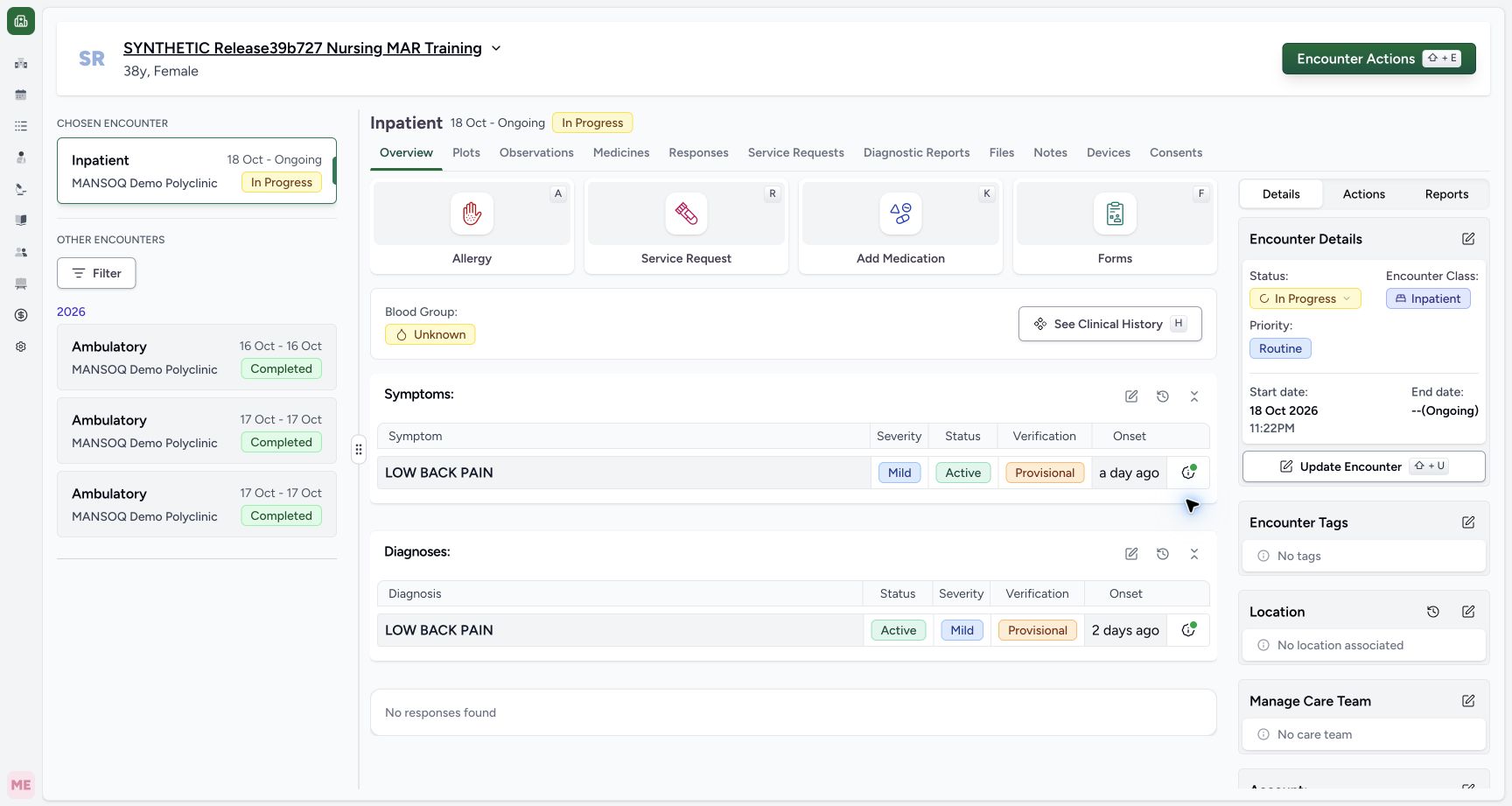
Exact committed release 96ca7318 on an isolated nonproduction clone, using an existing Nurse and fictional Polyclinic inpatient case. The synthetic patient name retains an earlier release label. Ordinary existing Nurse on exact committed 96ca. The existing fictional patient and current Inpatient encounter are confirmed. No prior observations exist for this selected encounter; all prior diagnoses, symptoms, administrations and requests remain unchanged. The configured synthetic Heart Rate form will be used through normal UI.
Image SHA-256
68ff09b207f7a9eb41760d9a7c4f7a1eccf3ce9e3241a89a5d3e650ecbf2e5dd- Forms: Open the encounter form collection after confirming the intended patient and chosen encounter.
- Chosen encounter context: This is the ongoing Inpatient encounter for the fictional software exercise.
 1
1Recorded release 96ca7318 · 2026-10-19T02:34:00.055Z · 1728 × 921 Select the configured synthetic Heart Rate form
Capture details
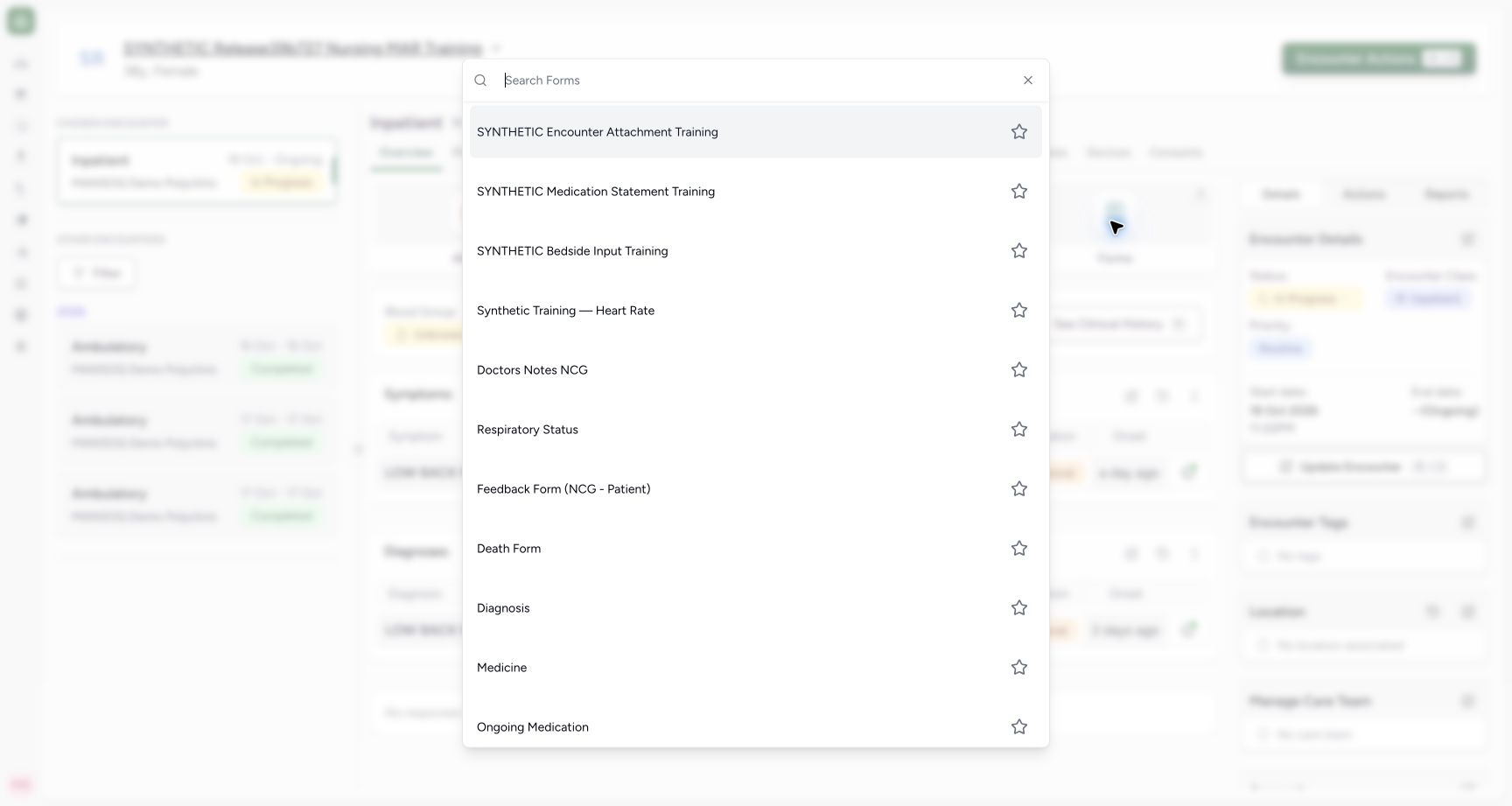
Exact committed release 96ca7318 on an isolated nonproduction clone, using an existing Nurse and fictional Polyclinic inpatient case. The synthetic patient name retains an earlier release label. Actual configured encounter form collection. The existing synthetic Heart Rate form uses the installed LOINC 8867-4 code and UCUM /min unit; other listed forms are not submitted in this exercise.
Image SHA-256
74c936309433b427639c57ea4446330a27a143d9c14c4be30a7a2c8f68998f00- Synthetic Training — Heart Rate: Choose the configured synthetic observation form, rather than a different clinical template.
12Recorded release 96ca7318 · 2026-10-19T02:34:08.383Z · 1728 × 921 Check the required heart-rate input and fixed unit
Capture details
Exact committed release 96ca7318 on an isolated nonproduction clone, using an existing Nurse and fictional Polyclinic inpatient case. The synthetic patient name retains an earlier release label. The configured required Integer control displays fixed /min unit and explicit synthetic training instruction. No effective-time/backdating input is rendered, despite the stored collect_time flag. No field value or clinical record has been written.
Image SHA-256
246b08fc57fb39faa4bed3a7a462d2c60bf8e2ebf7d2280b64d54392c18685c6- Required numeric value: This configured Integer question is required and displays/min as its fixed unit.
- Submit: An empty required input is validated before a save request.
- This is a fictional software exercise, not a physical measurement or clinical recommendation. The synthetic patient name retains an older release label; actual captured software is 96ca7318. The selected encounter initially has no observations. Existing diagnoses, symptoms, administrations and requests are preserved.12
Recorded release 96ca7318 · 2026-10-19T02:34:08.383Z · 1728 × 921 Check the required heart-rate input and fixed unit
Capture details
Exact committed release 96ca7318 on an isolated nonproduction clone, using an existing Nurse and fictional Polyclinic inpatient case. The synthetic patient name retains an earlier release label. The configured required Integer control displays fixed /min unit and explicit synthetic training instruction. No effective-time/backdating input is rendered, despite the stored collect_time flag. No field value or clinical record has been written.
Image SHA-256
246b08fc57fb39faa4bed3a7a462d2c60bf8e2ebf7d2280b64d54392c18685c6- Required numeric value: This configured Integer question is required and displays/min as its fixed unit.
- Submit: An empty required input is validated before a save request.
 1
1Recorded release 96ca7318 · 2026-10-19T02:35:28.415Z · 1728 × 921 Record optional observation context
Capture details
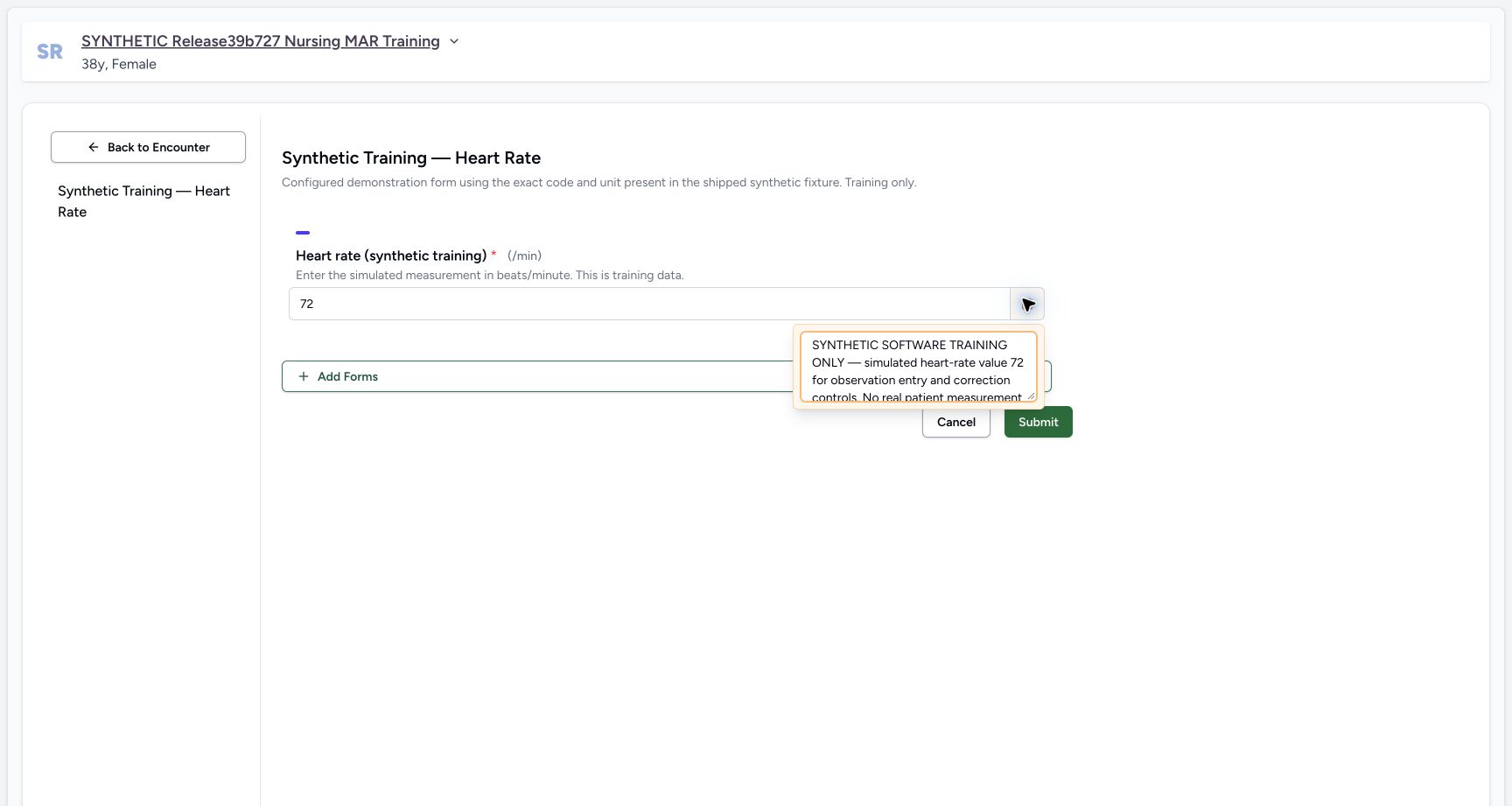
Exact committed release 96ca7318 on an isolated nonproduction clone, using an existing Nurse and fictional Polyclinic inpatient case. The synthetic patient name retains an earlier release label. The question note popover contains explicit fictional training context. This optional note is separate from the required numeric input; no effective-time/backdating control exists here. The observation is still unsaved.
Image SHA-256
3025b5ba839899d743cd7cc758230ada277b31300c13661901fbe7853c8c1582- Optional question note: This note explains the fictional software example and is saved with the observation.
1. Open the configured Heart Rate form
From the intended ongoing encounter’s Overview, choose Forms, then Synthetic Training — Heart Rate. Confirm the patient name again on the opened form. Other facilities may configure different forms; this example uses the existing training form rather than submitting a different clinical template.
12Open Forms on the intended ongoing encounter
Capture details
Exact committed release 96ca7318 on an isolated nonproduction clone, using an existing Nurse and fictional Polyclinic inpatient case. The synthetic patient name retains an earlier release label. Ordinary existing Nurse on exact committed 96ca. The existing fictional patient and current Inpatient encounter are confirmed. No prior observations exist for this selected encounter; all prior diagnoses, symptoms, administrations and requests remain unchanged. The configured synthetic Heart Rate form will be used through normal UI.
Image SHA-256 68ff09b207f7a9eb41760d9a7c4f7a1eccf3ce9e3241a89a5d3e650ecbf2e5dd
- Forms: Open the encounter form collection after confirming the intended patient and chosen encounter.
- Chosen encounter context: This is the ongoing Inpatient encounter for the fictional software exercise.
1Select the configured synthetic Heart Rate form
Capture details
Exact committed release 96ca7318 on an isolated nonproduction clone, using an existing Nurse and fictional Polyclinic inpatient case. The synthetic patient name retains an earlier release label. Actual configured encounter form collection. The existing synthetic Heart Rate form uses the installed LOINC 8867-4 code and UCUM /min unit; other listed forms are not submitted in this exercise.
Image SHA-256 74c936309433b427639c57ea4446330a27a143d9c14c4be30a7a2c8f68998f00
- Synthetic Training — Heart Rate: Choose the configured synthetic observation form, rather than a different clinical template.
12Check the required heart-rate input and fixed unit
Capture details
Exact committed release 96ca7318 on an isolated nonproduction clone, using an existing Nurse and fictional Polyclinic inpatient case. The synthetic patient name retains an earlier release label. The configured required Integer control displays fixed /min unit and explicit synthetic training instruction. No effective-time/backdating input is rendered, despite the stored collect_time flag. No field value or clinical record has been written.
Image SHA-256 246b08fc57fb39faa4bed3a7a462d2c60bf8e2ebf7d2280b64d54392c18685c6
- Required numeric value: This configured Integer question is required and displays/min as its fixed unit.
- Submit: An empty required input is validated before a save request.
2. Check the required value and fixed unit
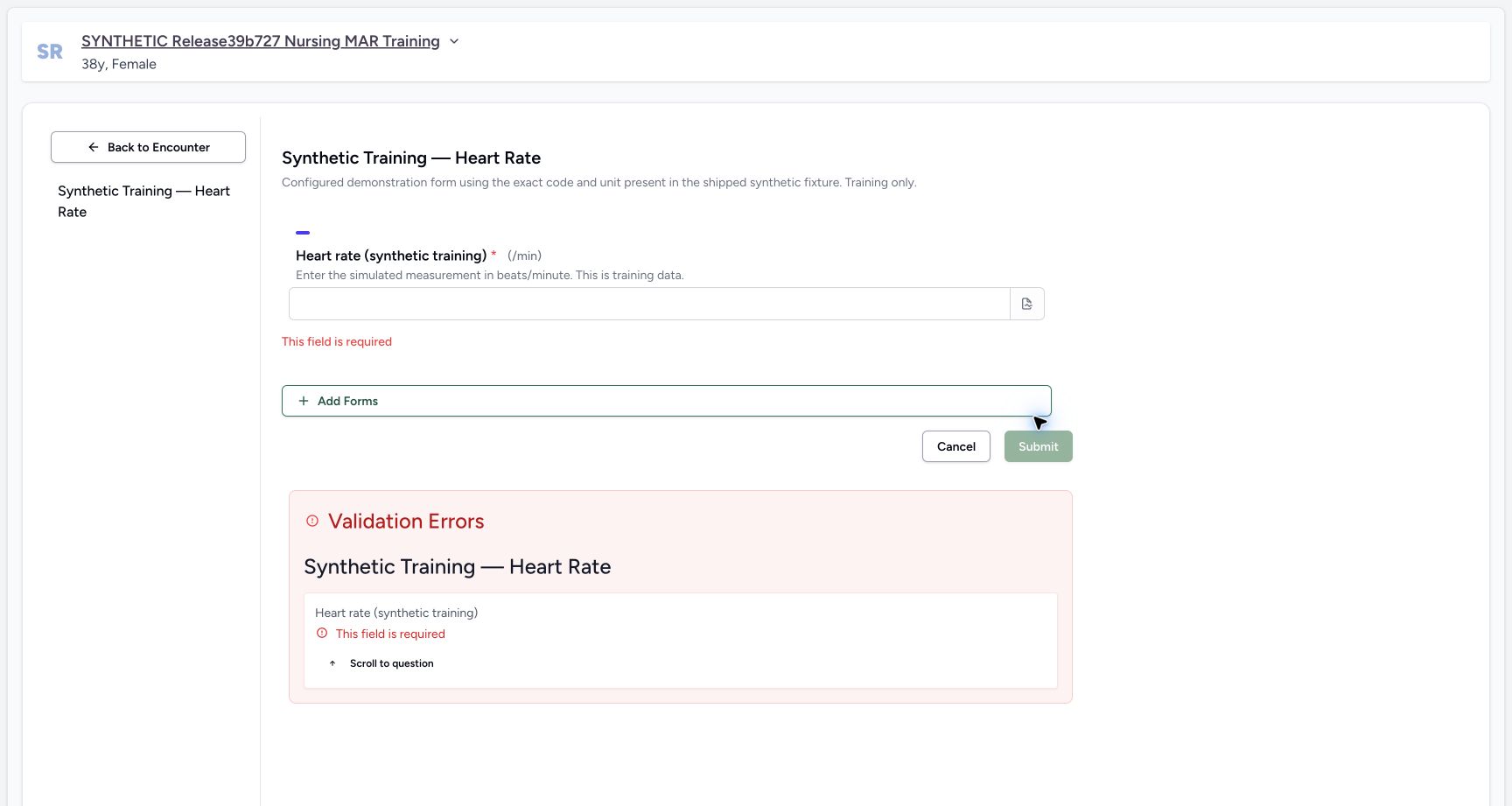
Read the required Heart rate (synthetic training) question and its /min label. The description specifies beats/minute. In this demonstration, choosing Submit with an empty input produces inline “This field is required” and a Validation Errors summary. Scroll to question returns to the missing input. Client validation prevents this empty form from being saved.
12Check the required heart-rate input and fixed unit
Capture details
Exact committed release 96ca7318 on an isolated nonproduction clone, using an existing Nurse and fictional Polyclinic inpatient case. The synthetic patient name retains an earlier release label. The configured required Integer control displays fixed /min unit and explicit synthetic training instruction. No effective-time/backdating input is rendered, despite the stored collect_time flag. No field value or clinical record has been written.
Image SHA-256 246b08fc57fb39faa4bed3a7a462d2c60bf8e2ebf7d2280b64d54392c18685c6
- Required numeric value: This configured Integer question is required and displays/min as its fixed unit.
- Submit: An empty required input is validated before a save request.
 12
12Recover from an empty required observation
Capture details
Exact committed release 96ca7318 on an isolated nonproduction clone, using an existing Nurse and fictional Polyclinic inpatient case. The synthetic patient name retains an earlier release label. Normal Submit on the empty Heart Rate form displays inline and summary validation errors. No observation submission request was made. The input can be completed to clear this client validation.
Image SHA-256 30eff9a145d95b83f62f90dd4b9919982031c62b392b7d5eb3d50398a911bc72
- Required field to complete: Enter the simulated numeric value in the required input.
- Scroll to question: The validation summary links back to the required question.
3. Enter the simulated value and optional context
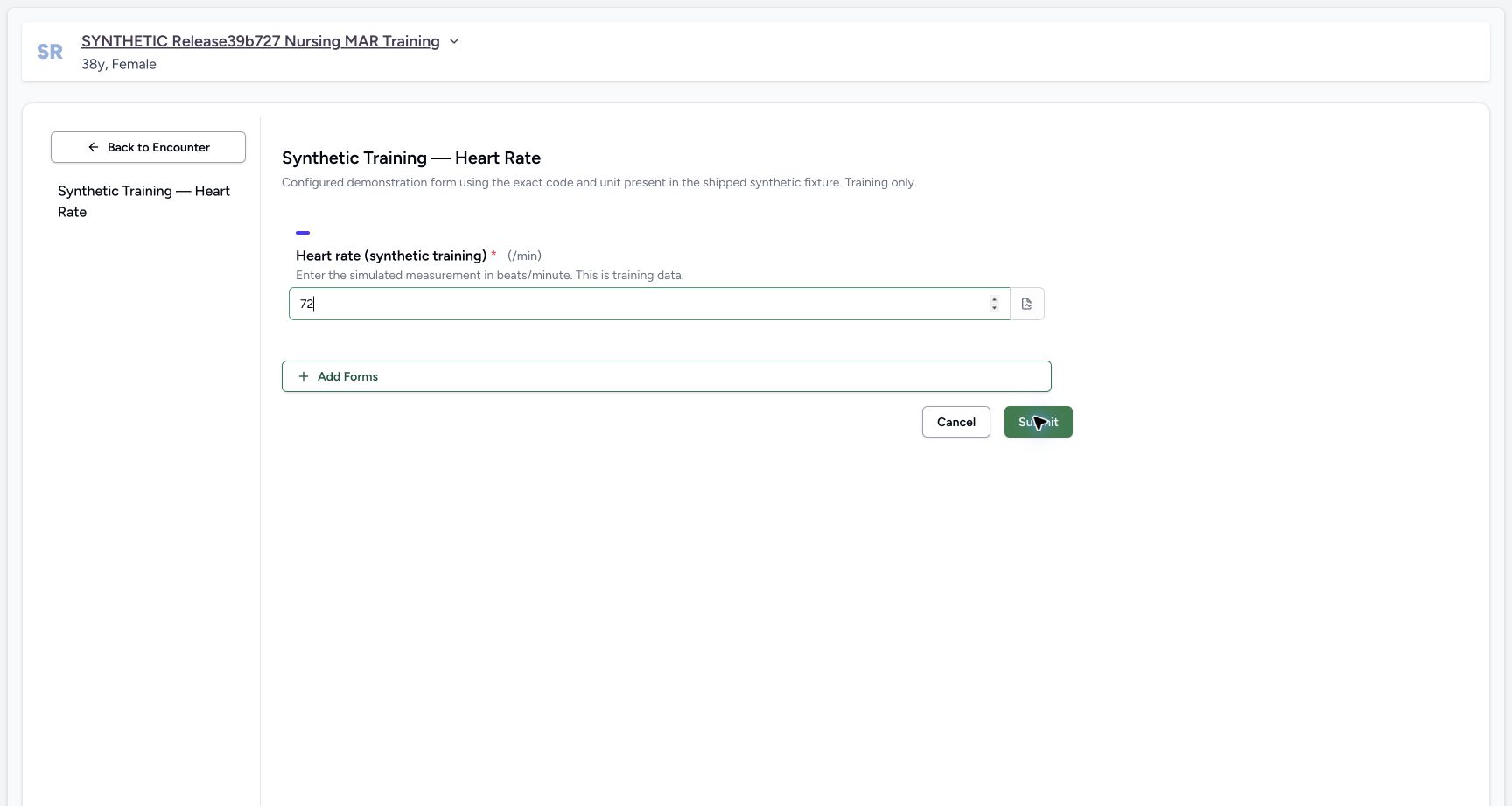
Enter 72 only as a synthetic demonstration value. The required-field errors clear. Open the question’s note icon and enter context identifying the software exercise and that no real measurement occurred. The note is optional in the software; it is separate from the required numeric value. Escape closes the note popover without discarding its entered text.
 12
12Review the pending simulated heart-rate value
Capture details
Exact committed release 96ca7318 on an isolated nonproduction clone, using an existing Nurse and fictional Polyclinic inpatient case. The synthetic patient name retains an earlier release label. After the required error,72 is entered only as a fictional software-training value. The validation errors clear, the fixed /min unit remains and no Save has occurred. This is not a physical measurement or clinical recommendation.
Image SHA-256 9b0664a1287f5ccfe90ac3280f896f162a59390a14f83f18bf981cb4416362a1
- Pending value 72: The numeric value is still an unsaved form input; its configured unit is/min.
- Question options: Open the question menu to add contextual training notes if needed.
1Record optional observation context
Capture details
Exact committed release 96ca7318 on an isolated nonproduction clone, using an existing Nurse and fictional Polyclinic inpatient case. The synthetic patient name retains an earlier release label. The question note popover contains explicit fictional training context. This optional note is separate from the required numeric input; no effective-time/backdating control exists here. The observation is still unsaved.
Image SHA-256 3025b5ba839899d743cd7cc758230ada277b31300c13661901fbe7853c8c1582
- Optional question note: This note explains the fictional software example and is saved with the observation.
 12
12Submit the reviewed synthetic observation
Capture details
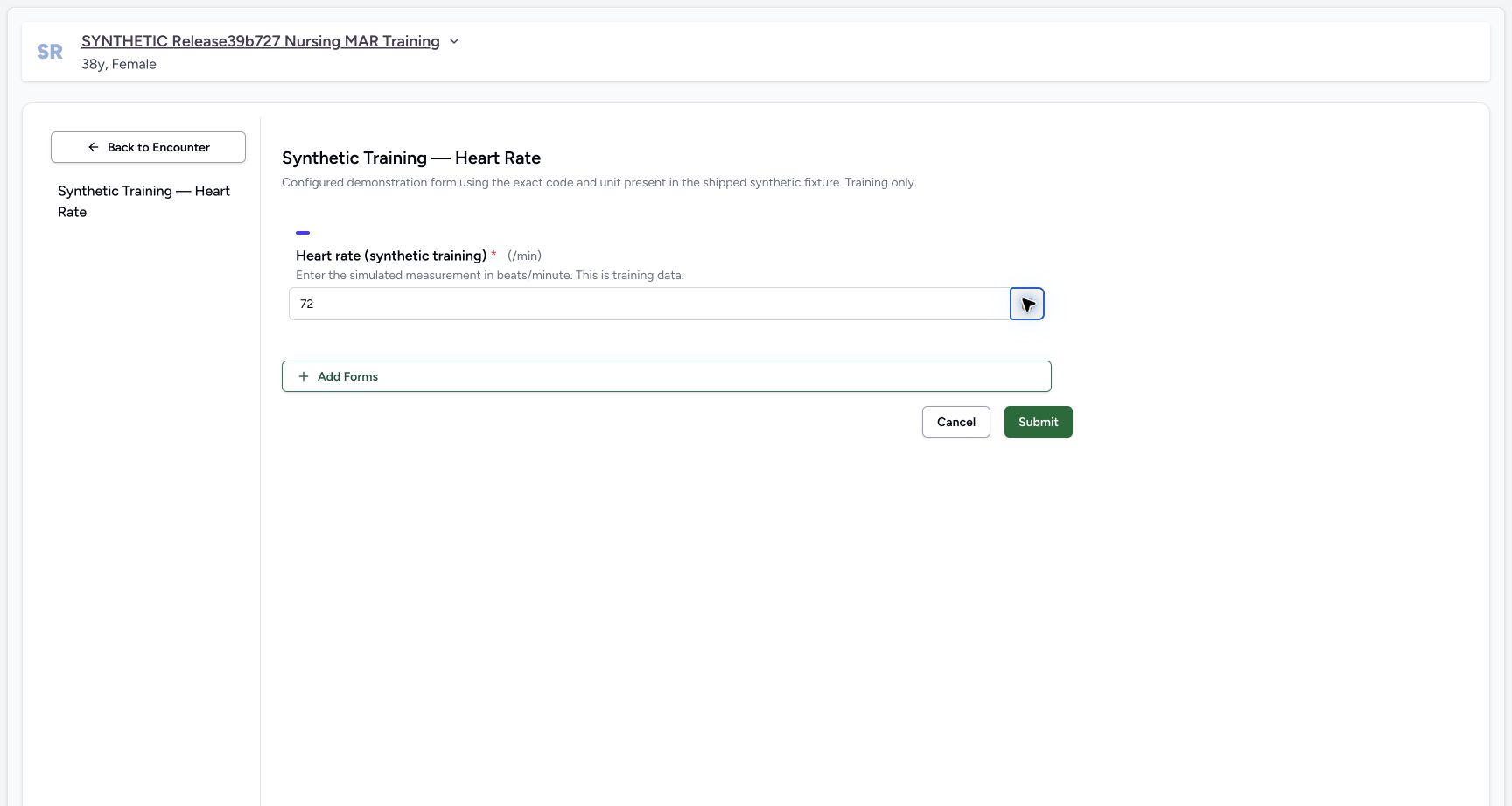
Exact committed release 96ca7318 on an isolated nonproduction clone, using an existing Nurse and fictional Polyclinic inpatient case. The synthetic patient name retains an earlier release label. The required simulated value 72 and optional fictional note have been entered; configured /min unit and patient context are checked. Submit will create a new questionnaire response and linked observation using server effective time. No backdated effective time is supplied.
Image SHA-256 c9235893c97542fc3a0cf9750c2a44b1b5d728c29db19fc202722cdd7913e0a0
- Submit reviewed entry: Save this distinct fictional observation once after reviewing patient, value and configured unit.
- Reviewed numeric input: 72 is a synthetic demonstration value only.
4. Submit once and verify the saved response
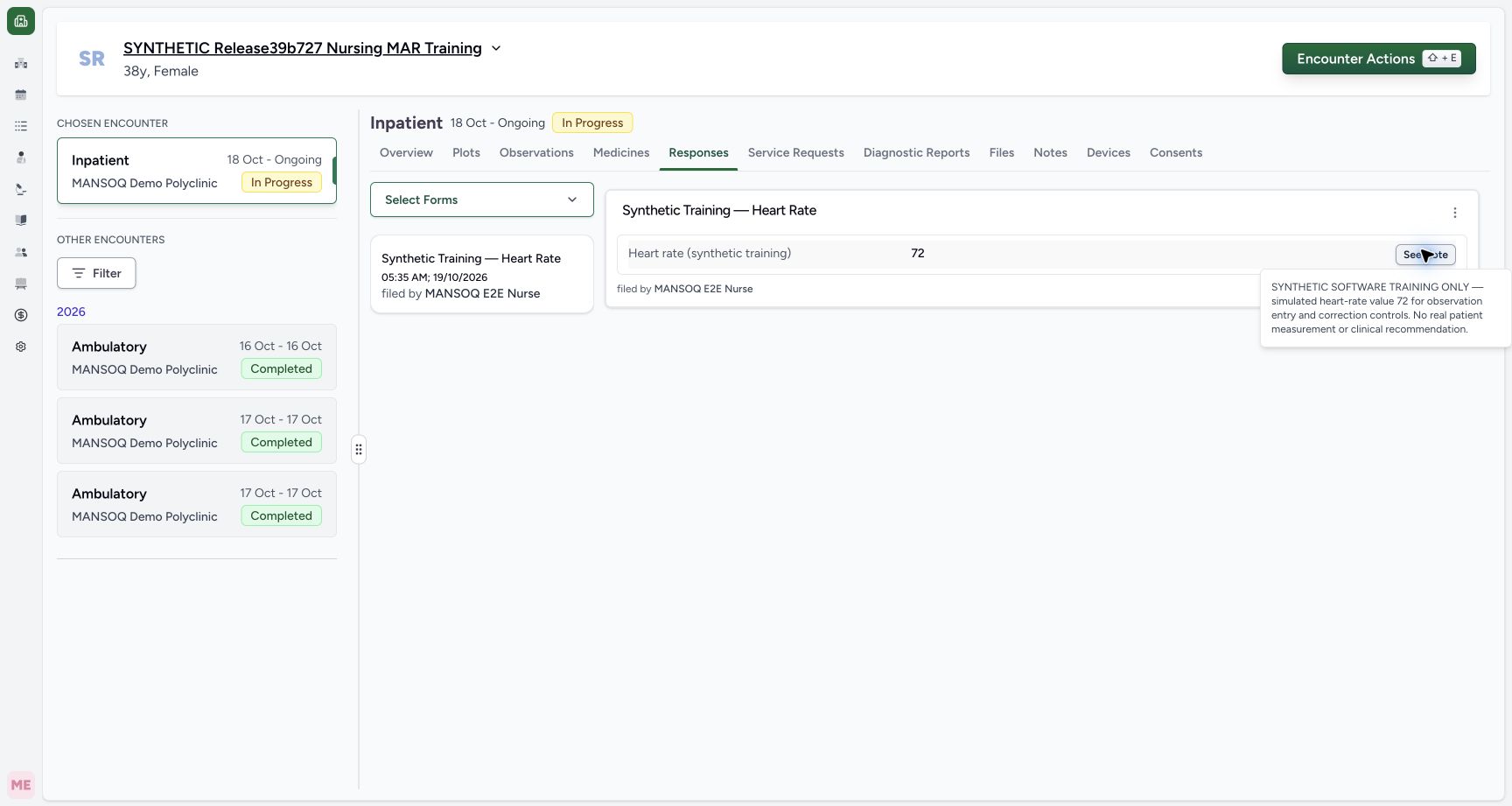
Review the patient, simulated 72 and configured /min unit, then choose Submit once. After success, open Responses. The saved Synthetic Training — Heart Rate card shows 72 filed by MANSOQ E2E Nurse at 05:35 AM on October 19 in this example. Choose See Note to inspect the retained fictional note. The response card does not repeat the unit; the form configuration and independently read observation record establish /min.
12Submit the reviewed synthetic observation
Capture details
Exact committed release 96ca7318 on an isolated nonproduction clone, using an existing Nurse and fictional Polyclinic inpatient case. The synthetic patient name retains an earlier release label. The required simulated value 72 and optional fictional note have been entered; configured /min unit and patient context are checked. Submit will create a new questionnaire response and linked observation using server effective time. No backdated effective time is supplied.
Image SHA-256 c9235893c97542fc3a0cf9750c2a44b1b5d728c29db19fc202722cdd7913e0a0
- Submit reviewed entry: Save this distinct fictional observation once after reviewing patient, value and configured unit.
- Reviewed numeric input: 72 is a synthetic demonstration value only.
123Verify the persisted Nurse response
Capture details
Exact committed release 96ca7318 on an isolated nonproduction clone, using an existing Nurse and fictional Polyclinic inpatient case. The synthetic patient name retains an earlier release label. Normal Responses tab shows the saved72 response filed by the existing Nurse at 05:35 AM on October 19. Independent ordinary Nurse/Doctor reads confirm a new Completed response and Final observation with value 72, UCUM /min and server effective time2026-10-19T02:35:35.601029Z. The response card does not display its unit; the form and independent observation record establish that unit.
Image SHA-256 844f334f6847bed72dead51be3ab51712192954f9b578b3d159dd4d4cf4f2798
- Saved response value 72: This is the persisted response value; the card does not show the unit.
- See saved note: Open the retained training note from the saved response.
- Observations tab: Review the linked observation and its effective time separately.
 1
1Review the retained observation note
Capture details
Exact committed release 96ca7318 on an isolated nonproduction clone, using an existing Nurse and fictional Polyclinic inpatient case. The synthetic patient name retains an earlier release label. See Note on the saved response displays the exact fictional training note entered before Submit. This is a saved readback, not the earlier unsaved popover. No record is changed by this inspection.
Image SHA-256 9600917151fea194d7a311eb607ee34507b99a56a2113f02db29ee8297275253
- Saved note expanded: The response retains its explicit fictional software-training context.
5. Read the observation’s effective time and author
Close the note with Escape and choose Observations. The new entry shows 72, Heart rate, the retained note and Nurse filed-by context, grouped Today at 05:35 AM. This exact source assigns effective_datetime at server submission time; the saved value is 2026-10-19T02:35:35.601029Z, corresponding to the displayed local time. This form does not render an effective-time or backdating control. The observation card also omits the stored unit, so refer to the configured /min form rather than assuming another unit.
1Review the retained observation note
Capture details
Exact committed release 96ca7318 on an isolated nonproduction clone, using an existing Nurse and fictional Polyclinic inpatient case. The synthetic patient name retains an earlier release label. See Note on the saved response displays the exact fictional training note entered before Submit. This is a saved readback, not the earlier unsaved popover. No record is changed by this inspection.
Image SHA-256 9600917151fea194d7a311eb607ee34507b99a56a2113f02db29ee8297275253
- Saved note expanded: The response retains its explicit fictional software-training context.
12Read the saved observation’s value, time and author
Capture details
Exact committed release 96ca7318 on an isolated nonproduction clone, using an existing Nurse and fictional Polyclinic inpatient case. The synthetic patient name retains an earlier release label. Actual Observations tab shows72, saved fictional note, Heart rate label and Nurse filed-by context grouped Today at 05:35 AM. This is the server effective time, independently read as 2026-10-19T02:35:35.601029Z. The card does not render the stored/min unit; do not infer another unit from its bare72 label.
Image SHA-256 2d219039d35668743786e9a0b58f315ff38263e6c8a1a41e03c4fcccbe793774
- Saved observation value: This value is linked to the saved questionnaire response; its effective time and filed-by Nurse appear in the same entry.
- Plots: Open the numeric plot and observation history views for the selected encounter.
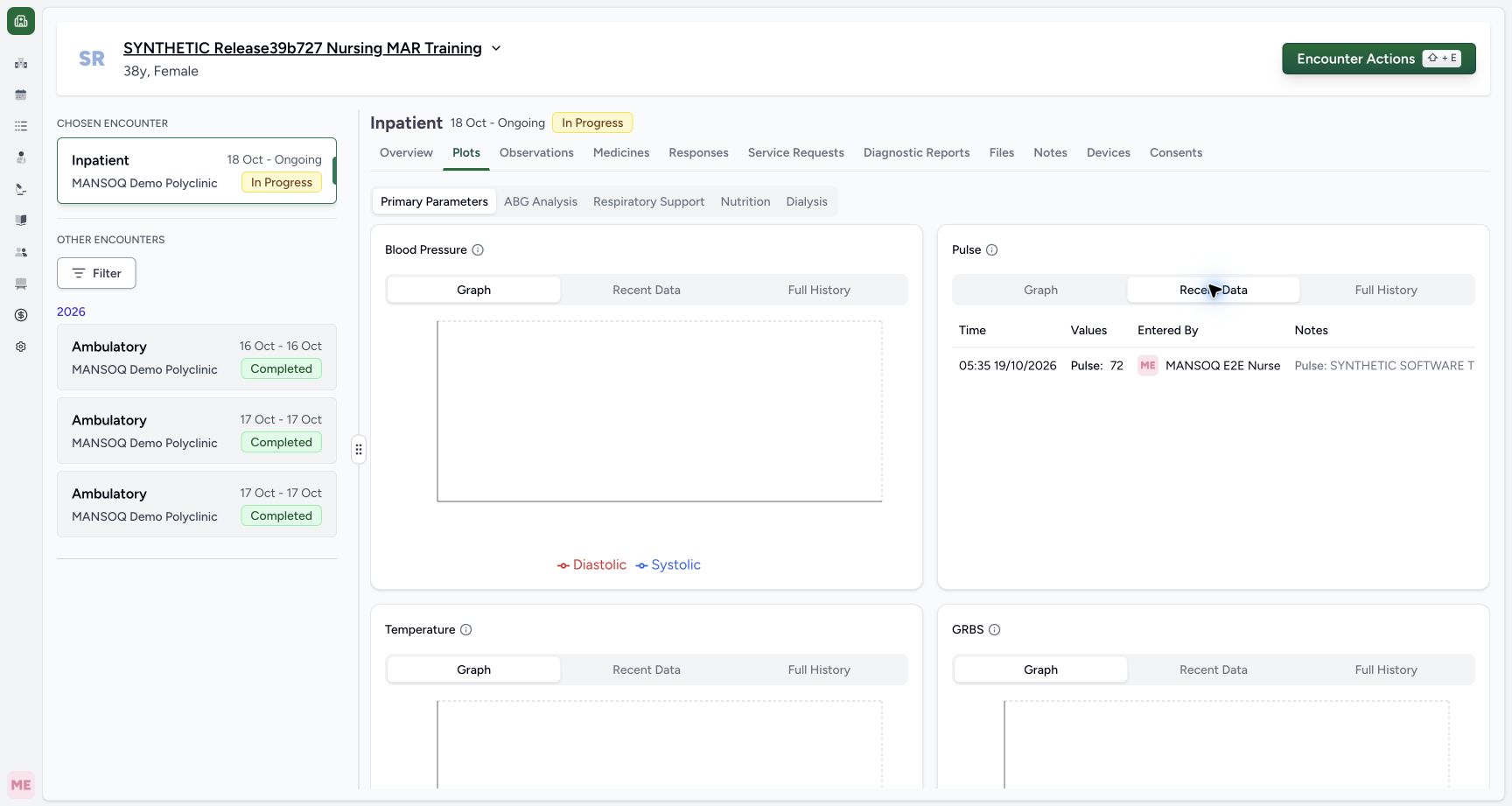
6. Review Pulse graph, recent data and full history
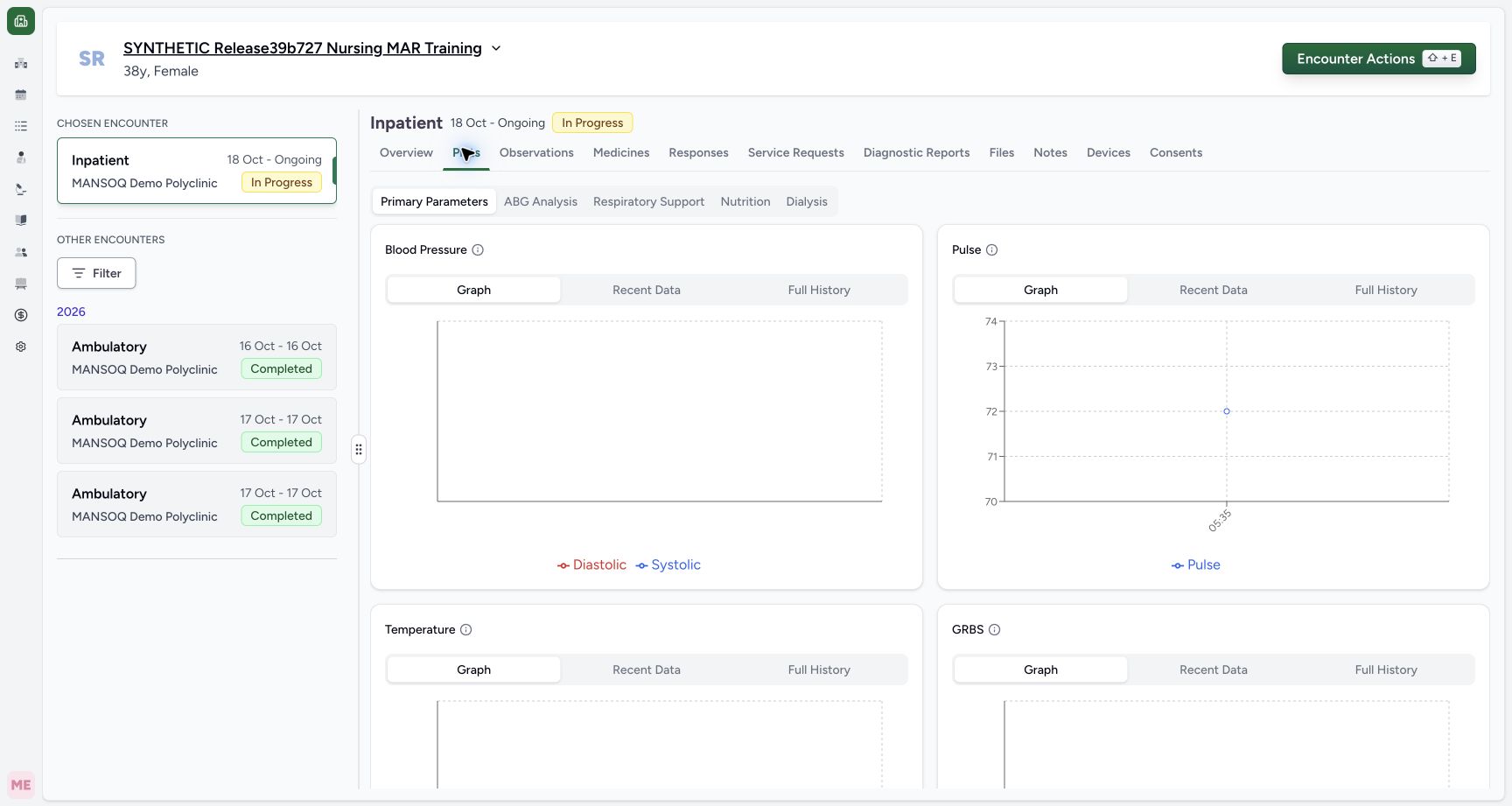
Choose Plots and locate Pulse under Primary Parameters. Its Graph shows the synthetic 72 point at 05:35. On this same Pulse card, choose Recent Data to inspect time, value, entered-by Nurse and note context, then Full History to inspect the retained observation row. The Code column uses this plot’s configured “Pulse” label for Heart rate. Long notes are clipped in these narrow table cells; use the saved response’s See Note for the complete context. These views are filtered to the selected encounter in this source.
 12
12Review the selected encounter’s Pulse plot
Capture details
Exact committed release 96ca7318 on an isolated nonproduction clone, using an existing Nurse and fictional Polyclinic inpatient case. The synthetic patient name retains an earlier release label. Primary Parameters Pulse graph includes the newly saved72 at 05:35 local for installed Heart rate code8867-4. This is a software plotting demonstration, not a clinical trend interpretation. The Graph, Recent Data and Full History controls belong to this Pulse card.
Image SHA-256 35bb09421255148d3924f2171ee84019af31684c2b8f655459c2ed715ad899b5
- Pulse Recent Data: Switch this Pulse card to its recent observation data.
- Pulse Full History: Read historical observations for this card and selected encounter.
 1
1Read recent Pulse data with author and note
Capture details
Exact committed release 96ca7318 on an isolated nonproduction clone, using an existing Nurse and fictional Polyclinic inpatient case. The synthetic patient name retains an earlier release label. Pulse Recent Data displays05:35 October 19, Pulse72, the existing Nurse and saved fictional note. The displayed time corresponds to the server effective datetime. This table does not provide a value edit or effective-time edit control.
Image SHA-256 749064ca655a7e644b380fddebffd0c7c057490515c2470cfc48d9c8130f316c
- Pulse Full History: Open the complete paginated observation history for this Pulse code and selected encounter.
1Verify the selected encounter’s retained Pulse history
Capture details
Exact committed release 96ca7318 on an isolated nonproduction clone, using an existing Nurse and fictional Polyclinic inpatient case. The synthetic patient name retains an earlier release label. The fully loaded Pulse Full History table shows the same saved observation effective time, configured Pulse label for the Heart rate code,72, Nurse entered-by identity and fictional note. Current-source requests include the selected encounter filter. This is one observation, not a physical trend or an edit history.
Image SHA-256 35a545ea1a188c90aaf2c7db7cc18bee6a038c94b4e48ee7470b37cf79423042
- Responses: Return to the source response before using its supported correction action.
1Review the retained observation note
Capture details
Exact committed release 96ca7318 on an isolated nonproduction clone, using an existing Nurse and fictional Polyclinic inpatient case. The synthetic patient name retains an earlier release label. See Note on the saved response displays the exact fictional training note entered before Submit. This is a saved readback, not the earlier unsaved popover. No record is changed by this inspection.
Image SHA-256 9600917151fea194d7a311eb607ee34507b99a56a2113f02db29ee8297275253
- Saved note expanded: The response retains its explicit fictional software-training context.
Effective time and unit controls actually available
The saved form has collect_time enabled in configuration, but this renderer does not consume that flag as a time input and the generic submission does not send taken_at. The observation conversion assigns the current server time. This lesson therefore qualifies the actual saved time and fixed-unit behavior, not backdated observations, selectable units or a measurement protocol. Those additional controls remain unobserved or unavailable in this flow.
12Check the required heart-rate input and fixed unit
Capture details
Exact committed release 96ca7318 on an isolated nonproduction clone, using an existing Nurse and fictional Polyclinic inpatient case. The synthetic patient name retains an earlier release label. The configured required Integer control displays fixed /min unit and explicit synthetic training instruction. No effective-time/backdating input is rendered, despite the stored collect_time flag. No field value or clinical record has been written.
Image SHA-256 246b08fc57fb39faa4bed3a7a462d2c60bf8e2ebf7d2280b64d54392c18685c6
- Required numeric value: This configured Integer question is required and displays/min as its fixed unit.
- Submit: An empty required input is validated before a save request.
12Submit the reviewed synthetic observation
Capture details
Exact committed release 96ca7318 on an isolated nonproduction clone, using an existing Nurse and fictional Polyclinic inpatient case. The synthetic patient name retains an earlier release label. The required simulated value 72 and optional fictional note have been entered; configured /min unit and patient context are checked. Submit will create a new questionnaire response and linked observation using server effective time. No backdated effective time is supplied.
Image SHA-256 c9235893c97542fc3a0cf9750c2a44b1b5d728c29db19fc202722cdd7913e0a0
- Submit reviewed entry: Save this distinct fictional observation once after reviewing patient, value and configured unit.
- Reviewed numeric input: 72 is a synthetic demonstration value only.
12Read the saved observation’s value, time and author
Capture details
Exact committed release 96ca7318 on an isolated nonproduction clone, using an existing Nurse and fictional Polyclinic inpatient case. The synthetic patient name retains an earlier release label. Actual Observations tab shows72, saved fictional note, Heart rate label and Nurse filed-by context grouped Today at 05:35 AM. This is the server effective time, independently read as 2026-10-19T02:35:35.601029Z. The card does not render the stored/min unit; do not infer another unit from its bare72 label.
Image SHA-256 2d219039d35668743786e9a0b58f315ff38263e6c8a1a41e03c4fcccbe793774
- Saved observation value: This value is linked to the saved questionnaire response; its effective time and filed-by Nurse appear in the same entry.
- Plots: Open the numeric plot and observation history views for the selected encounter.
Verified scope
Ordinary Nurse and Doctor reads independently verified one new Completed response and one Final observation with the same 72, /min unit, fictional note and Nurse actor. This is one desktop Nurse entry in a configured Polyclinic encounter, not all vital-sign types, physical clinical validation, every facility permission or observation correction. The correction and replacement lessons separately show a concrete source limitation.
123Verify the persisted Nurse response
Capture details
Exact committed release 96ca7318 on an isolated nonproduction clone, using an existing Nurse and fictional Polyclinic inpatient case. The synthetic patient name retains an earlier release label. Normal Responses tab shows the saved72 response filed by the existing Nurse at 05:35 AM on October 19. Independent ordinary Nurse/Doctor reads confirm a new Completed response and Final observation with value 72, UCUM /min and server effective time2026-10-19T02:35:35.601029Z. The response card does not display its unit; the form and independent observation record establish that unit.
Image SHA-256 844f334f6847bed72dead51be3ab51712192954f9b578b3d159dd4d4cf4f2798
- Saved response value 72: This is the persisted response value; the card does not show the unit.
- See saved note: Open the retained training note from the saved response.
- Observations tab: Review the linked observation and its effective time separately.
1Review the retained observation note
Capture details
Exact committed release 96ca7318 on an isolated nonproduction clone, using an existing Nurse and fictional Polyclinic inpatient case. The synthetic patient name retains an earlier release label. See Note on the saved response displays the exact fictional training note entered before Submit. This is a saved readback, not the earlier unsaved popover. No record is changed by this inspection.
Image SHA-256 9600917151fea194d7a311eb607ee34507b99a56a2113f02db29ee8297275253
- Saved note expanded: The response retains its explicit fictional software-training context.
12Read the saved observation’s value, time and author
Capture details
Exact committed release 96ca7318 on an isolated nonproduction clone, using an existing Nurse and fictional Polyclinic inpatient case. The synthetic patient name retains an earlier release label. Actual Observations tab shows72, saved fictional note, Heart rate label and Nurse filed-by context grouped Today at 05:35 AM. This is the server effective time, independently read as 2026-10-19T02:35:35.601029Z. The card does not render the stored/min unit; do not infer another unit from its bare72 label.
Image SHA-256 2d219039d35668743786e9a0b58f315ff38263e6c8a1a41e03c4fcccbe793774
- Saved observation value: This value is linked to the saved questionnaire response; its effective time and filed-by Nurse appear in the same entry.
- Plots: Open the numeric plot and observation history views for the selected encounter.
1Verify the selected encounter’s retained Pulse history
Capture details
Exact committed release 96ca7318 on an isolated nonproduction clone, using an existing Nurse and fictional Polyclinic inpatient case. The synthetic patient name retains an earlier release label. The fully loaded Pulse Full History table shows the same saved observation effective time, configured Pulse label for the Heart rate code,72, Nurse entered-by identity and fictional note. Current-source requests include the selected encounter filter. This is one observation, not a physical trend or an edit history.
Image SHA-256 35a545ea1a188c90aaf2c7db7cc18bee6a038c94b4e48ee7470b37cf79423042
- Responses: Return to the source response before using its supported correction action.
Source evidence
Every citation uses this exact committed version. The private source repository requires access.
- repositories/platform/mansoq-web/src/components/Questionnaire/QuestionnaireForm.tsx:740 ·
96ca7318eb2b93f5fa477908a1543075e0d1f056Source file checksum
e6e48112c033602b02815eb3685119882242f22b14975dffc3feba7d96e20923 - repositories/platform/mansoq-web/src/components/Questionnaire/QuestionnaireForm.tsx:857 ·
96ca7318eb2b93f5fa477908a1543075e0d1f056Source file checksum
e6e48112c033602b02815eb3685119882242f22b14975dffc3feba7d96e20923 - repositories/platform/mansoq-web/src/components/Questionnaire/QuestionTypes/NumberQuestion.tsx:22 ·
96ca7318eb2b93f5fa477908a1543075e0d1f056Source file checksum
fd8183d93ed6c65e651dfc6b790c5ebc740fceef5cf6d0d5dc3d107f465b8dab - repositories/platform/mansoq-web/src/components/Questionnaire/QuestionRenderer.tsx:55 ·
96ca7318eb2b93f5fa477908a1543075e0d1f056Source file checksum
9d82262b8344fca498cf3303b31faed7e0174773e3d5405da21000df84ba206a - repositories/platform/mansoq-core/mansoq/emr/resources/questionnaire/utils.py:354 ·
96ca7318eb2b93f5fa477908a1543075e0d1f056Source file checksum
8425858d2179a66f482f38a3fd7f0fc0dcb70a4bcd85450fe7ce748b3081826c - repositories/platform/mansoq-core/mansoq/emr/resources/questionnaire_response/spec.py:24 ·
96ca7318eb2b93f5fa477908a1543075e0d1f056Source file checksum
e1aff7243f7557d61fa33271652df53ce0fe0220505abdf3f5d20cdb5fa1a555 - repositories/platform/mansoq-web/src/pages/Encounters/tabs/observations.tsx:76 ·
96ca7318eb2b93f5fa477908a1543075e0d1f056Source file checksum
652b6beefcdf45cd3b2813248c1d020583d7593fd0791819abd3fdc4f431f949 - repositories/platform/mansoq-web/src/pages/Encounters/tabs/observations.tsx:140 ·
96ca7318eb2b93f5fa477908a1543075e0d1f056Source file checksum
652b6beefcdf45cd3b2813248c1d020583d7593fd0791819abd3fdc4f431f949 - repositories/platform/mansoq-web/src/components/Common/Charts/ObservationChart.tsx:118 ·
96ca7318eb2b93f5fa477908a1543075e0d1f056Source file checksum
dcfb2e78c7a32f179608af2bfbfc447914ec0768636453b97be6e9d04fd272d8 - repositories/platform/mansoq-web/src/components/Common/Charts/ObservationHistoryTable.tsx:70 ·
96ca7318eb2b93f5fa477908a1543075e0d1f056Source file checksum
03fc5ded1d44bab0f10b9e2c404913b2b280599a615b09e63b127b8459953745 - repositories/platform/mansoq-core/mansoq/emr/api/viewsets/observation.py:45 ·
96ca7318eb2b93f5fa477908a1543075e0d1f056Source file checksum
9bf1491928c5879124ddc218e334865fd6be8c0906353b503552933d65c55555