 MANSOQ
 Nutrition intake · VERSION 96ca7318
Review an ended nutrition request on the intake chart
Keep the chart’s empty-state controls reachable, include a discontinued request, inspect its retained Completed occurrences and return to all-status nutrition history. This read-only Nurse lesson uses a fictional Polyclinic inpatient case on exact release 96ca7318.
Nurse
 123
123Use the nutrition chart controls when all requests are ended
Capture details
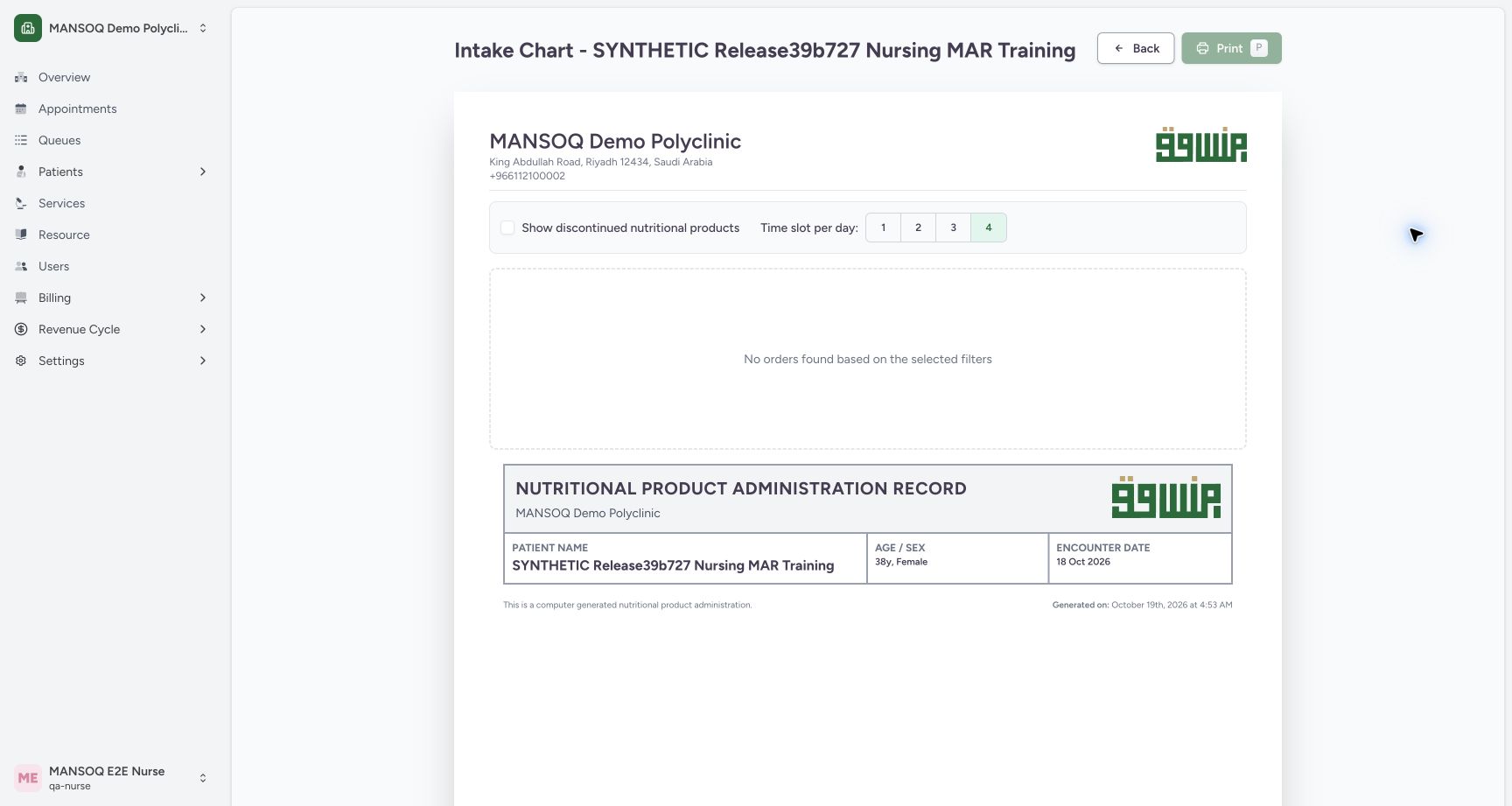
Exact committed release 96ca7318 on an isolated nonproduction clone, using an existing Nurse and fictional Polyclinic inpatient case. The synthetic patient name retains an earlier release label. The genuine 96ca Intake Chart opens with all nutrition requests ended and Show discontinued unchecked. It shows No orders found based on the selected filters, retains the patient and encounter context, keeps Back and display controls reachable, and disables Print. This is a filtered-empty state, not evidence that retained intake events were deleted.
Image SHA-256 321ce1c0b2bb73cf32d37951b9bf3856efd6aadfa77c4e86929869bfa54713f8
- Show discontinued nutritional products: The unchecked filter hides the ended request; the control remains reachable.
- Back remains available: Return to the encounter without changing an order or event.
- Print disabled while filtered empty: No matching request rows are selected for printing in this state.
 123
123Reveal the ended nutrition request’s Completed chart history
Capture details
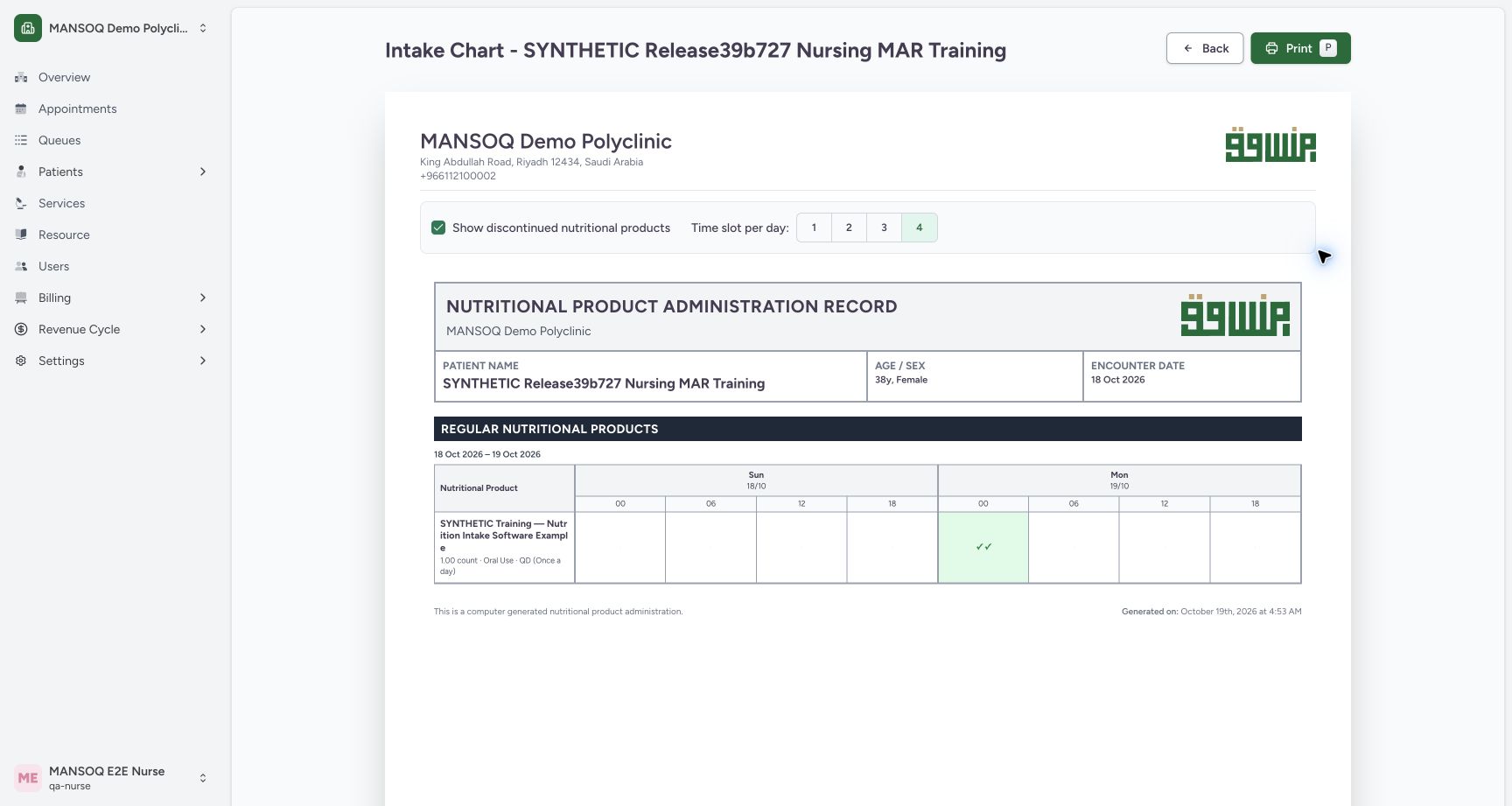
Exact committed release 96ca7318 on an isolated nonproduction clone, using an existing Nurse and fictional Polyclinic inpatient case. The synthetic patient name retains an earlier release label. The selected chart-level Show discontinued nutritional products filter reveals the one ended request with two Completed occurrences. Its separate Not Done and Entered in Error records remain in all-status history and are excluded by the Completed-only chart query. Patient/facility/encounter context and Back remain visible. No event or request state changed.
Image SHA-256 62ade1ddf5433138bf6218c643f9b6ad2ac8290a0705bf92c0e34597db8c6710
- Include discontinued request: This chart-level filter now includes the ended nutrition request.
- Two Completed occurrences: The request retains two Completed markers; Not Done and Entered in Error are excluded from this chart.
- Print now available: A matching request row is visible, so the output control is enabled.
 12
12Scroll to the second retained Completed nutrition event
Capture details
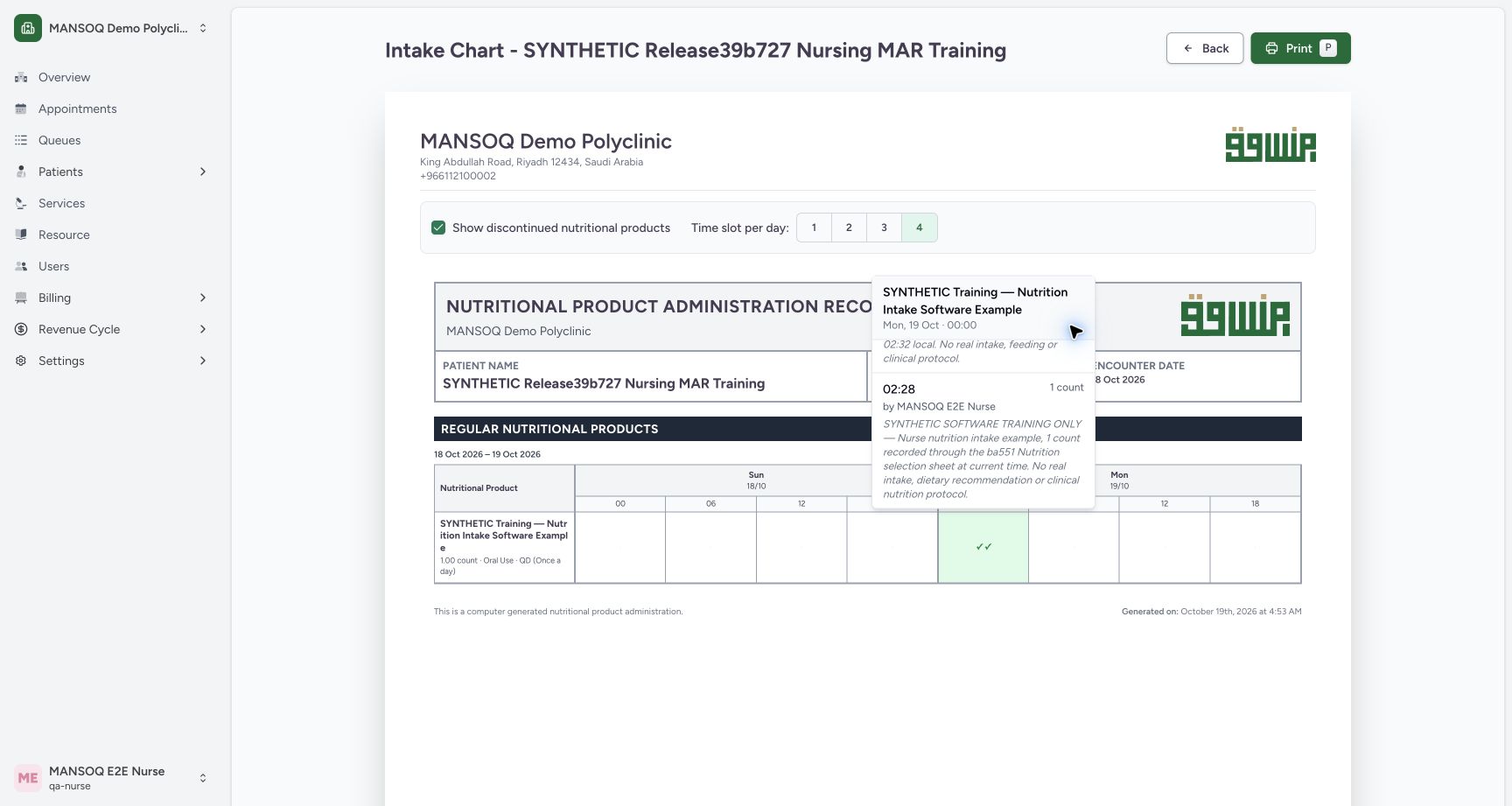
Exact committed release 96ca7318 on an isolated nonproduction clone, using an existing Nurse and fictional Polyclinic inpatient case. The synthetic patient name retains an earlier release label. Natural scrolling inside the same ended request’s detail list reveals the complete second 02:28 Completed event, 1 count dose, Nurse recorded-by context and retained fictional note. Both original Completed records remain reachable after discontinuation. The actual start is separate from the 00:00 chart interval, and no data is updated.
Image SHA-256 9f91dc654dd2c757e11ed27e8203f414a6b95859aca29c20373803c42147aa55
- Actual 02:28 occurrence: This second retained Completed event has its own original 02:28 start.
- Recorded-by context: Read the account beside this individual event without covering its name.
9 of 9 content blocks have reviewed image alignment. Missing overview or prerequisite images remain open.
Before you begin
- Confirm the intended patient, selected encounter and authorized account. This fictional case has one Stopped nutrition request with four retained intake events: two Completed, one Not Done and one Entered in Error. No request is active. The synthetic patient name retains an earlier release label; the captured software is 96ca7318.
 12
12Recorded release 96ca7318 · 2026-10-19T01:54:23.100Z · 1728 × 921 Return from the empty chart to retained nutrition history
Capture details
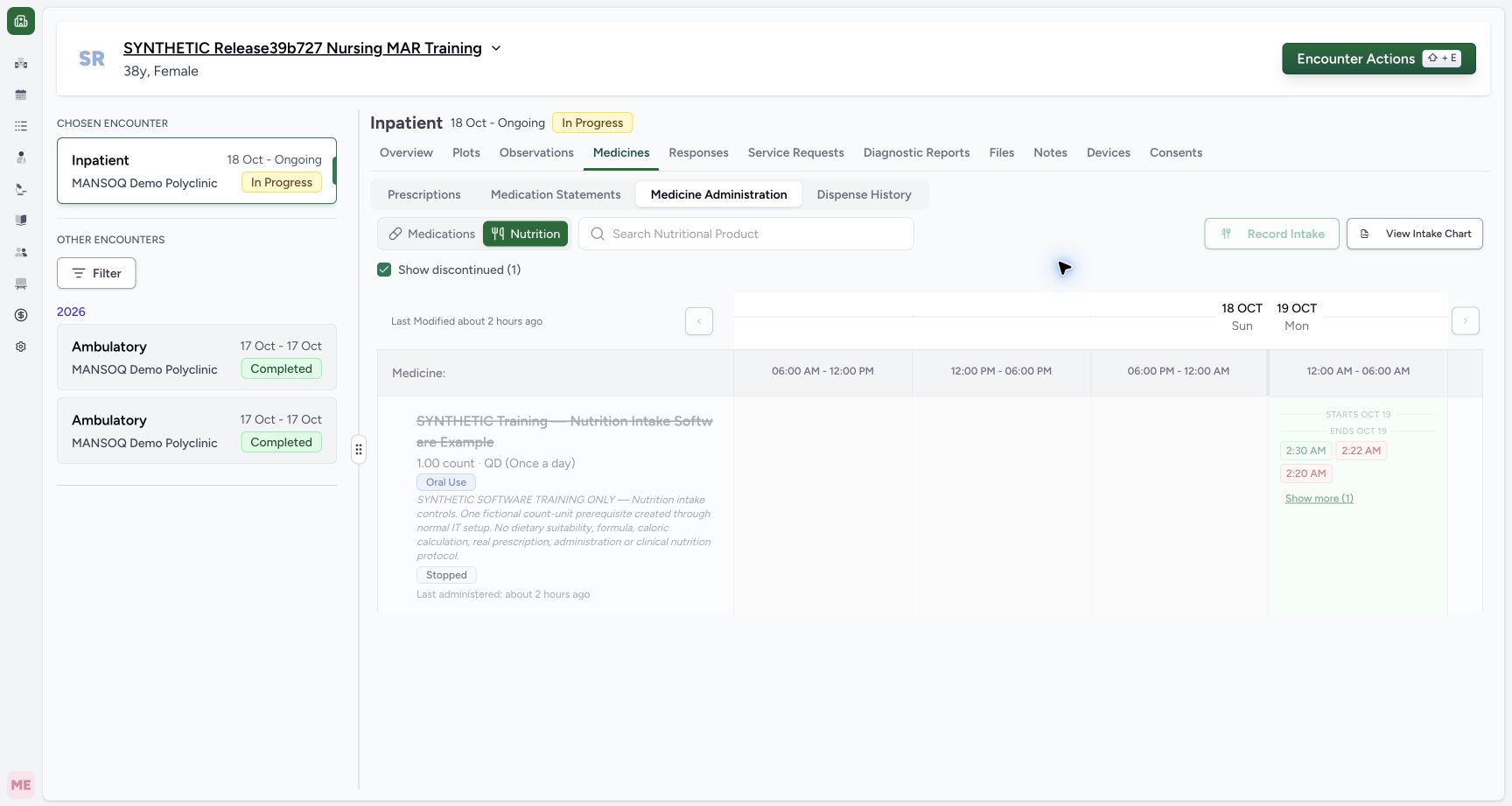
Exact committed release 96ca7318 on an isolated nonproduction clone, using an existing Nurse and fictional Polyclinic inpatient case. The synthetic patient name retains an earlier release label. The chart-level filter was unchecked again, restoring its filtered-empty state with Back still reachable. Back returned to Medicines; Medicine Administration then Nutrition and the workspace Show discontinued (1) filter restore the saved Stopped-request history. The visible initial three entries and Show more (1) remain intact. No event, order or clinical record changed.
Image SHA-256
7d751b8a64159856ea3605463eb8c74b9ea4a7905818c523361e4fd8eb83ef7e- History filter selected: This workspace filter is separate from the chart’s Show discontinued control.
- Retained all-status history: Show more (1) remains available to reach the fourth saved intake event.
123Recorded release 96ca7318 · 2026-10-19T01:53:50.112Z · 1728 × 921 Reveal the ended nutrition request’s Completed chart history
Capture details
Exact committed release 96ca7318 on an isolated nonproduction clone, using an existing Nurse and fictional Polyclinic inpatient case. The synthetic patient name retains an earlier release label. The selected chart-level Show discontinued nutritional products filter reveals the one ended request with two Completed occurrences. Its separate Not Done and Entered in Error records remain in all-status history and are excluded by the Completed-only chart query. Patient/facility/encounter context and Back remain visible. No event or request state changed.
Image SHA-256
62ade1ddf5433138bf6218c643f9b6ad2ac8290a0705bf92c0e34597db8c6710- Include discontinued request: This chart-level filter now includes the ended nutrition request.
- Two Completed occurrences: The request retains two Completed markers; Not Done and Entered in Error are excluded from this chart.
- Print now available: A matching request row is visible, so the output control is enabled.
- The request, quantity and intake notes are fictional software examples, not a nutrition assessment or feeding protocol. This lesson only reviews the saved chart and history. It does not restart the request, record a new intake or authorize an amendment.
 12
12Recorded release 96ca7318 · 2026-10-19T01:54:02.697Z · 1728 × 921 Read the ended request’s retained completed occurrence
Capture details
Exact committed release 96ca7318 on an isolated nonproduction clone, using an existing Nurse and fictional Polyclinic inpatient case. The synthetic patient name retains an earlier release label. The ended request’s two-checkmark chart cell opens its Completed-event details. The first visible event starts at 02:30, has a 1 count dose, Nurse recorded-by context and its retained fictional completion note. The separate 00:00 heading is the chart interval. The second 02:28 occurrence continues below and can be inspected by scrolling within the detail list. No event is changed.
Image SHA-256
ef03d900ed4ad99486ba265115b4bd0d7a6330cce45bccb63701b878d4c997ee- Actual 02:30 occurrence: Read the event’s actual start separately from the 00:00 chart interval heading.
- Recorded-by account: The shown account comes from the saved event creator, not independent proof of a physical performer.
12Recorded release 96ca7318 · 2026-10-19T01:54:23.100Z · 1728 × 921 Return from the empty chart to retained nutrition history
Capture details
Exact committed release 96ca7318 on an isolated nonproduction clone, using an existing Nurse and fictional Polyclinic inpatient case. The synthetic patient name retains an earlier release label. The chart-level filter was unchecked again, restoring its filtered-empty state with Back still reachable. Back returned to Medicines; Medicine Administration then Nutrition and the workspace Show discontinued (1) filter restore the saved Stopped-request history. The visible initial three entries and Show more (1) remain intact. No event, order or clinical record changed.
Image SHA-256
7d751b8a64159856ea3605463eb8c74b9ea4a7905818c523361e4fd8eb83ef7e- History filter selected: This workspace filter is separate from the chart’s Show discontinued control.
- Retained all-status history: Show more (1) remains available to reach the fourth saved intake event.
1. Open the selected encounter’s intake chart
In Medicines, open Medicine Administration and Nutrition, then choose View Intake Chart. Confirm the patient and encounter on the printable view. With the chart’s Show discontinued nutritional products filter unchecked, this ended-only fixture shows No orders found based on the selected filters. This means the current filter has no matching request rows, not that the intake records were deleted.
12Return from the empty chart to retained nutrition history
Capture details
Exact committed release 96ca7318 on an isolated nonproduction clone, using an existing Nurse and fictional Polyclinic inpatient case. The synthetic patient name retains an earlier release label. The chart-level filter was unchecked again, restoring its filtered-empty state with Back still reachable. Back returned to Medicines; Medicine Administration then Nutrition and the workspace Show discontinued (1) filter restore the saved Stopped-request history. The visible initial three entries and Show more (1) remain intact. No event, order or clinical record changed.
Image SHA-256 7d751b8a64159856ea3605463eb8c74b9ea4a7905818c523361e4fd8eb83ef7e
- History filter selected: This workspace filter is separate from the chart’s Show discontinued control.
- Retained all-status history: Show more (1) remains available to reach the fourth saved intake event.
123Use the nutrition chart controls when all requests are ended
Capture details
Exact committed release 96ca7318 on an isolated nonproduction clone, using an existing Nurse and fictional Polyclinic inpatient case. The synthetic patient name retains an earlier release label. The genuine 96ca Intake Chart opens with all nutrition requests ended and Show discontinued unchecked. It shows No orders found based on the selected filters, retains the patient and encounter context, keeps Back and display controls reachable, and disables Print. This is a filtered-empty state, not evidence that retained intake events were deleted.
Image SHA-256 321ce1c0b2bb73cf32d37951b9bf3856efd6aadfa77c4e86929869bfa54713f8
- Show discontinued nutritional products: The unchecked filter hides the ended request; the control remains reachable.
- Back remains available: Return to the encounter without changing an order or event.
- Print disabled while filtered empty: No matching request rows are selected for printing in this state.
2. Use the controls in the filtered-empty state
Back and Show discontinued nutritional products remain reachable even when every nutrition request is ended. Print is disabled while no request rows match the selected filters. Select the discontinued checkbox to review the retained request; use Back if you only need to return to the encounter.
123Use the nutrition chart controls when all requests are ended
Capture details
Exact committed release 96ca7318 on an isolated nonproduction clone, using an existing Nurse and fictional Polyclinic inpatient case. The synthetic patient name retains an earlier release label. The genuine 96ca Intake Chart opens with all nutrition requests ended and Show discontinued unchecked. It shows No orders found based on the selected filters, retains the patient and encounter context, keeps Back and display controls reachable, and disables Print. This is a filtered-empty state, not evidence that retained intake events were deleted.
Image SHA-256 321ce1c0b2bb73cf32d37951b9bf3856efd6aadfa77c4e86929869bfa54713f8
- Show discontinued nutritional products: The unchecked filter hides the ended request; the control remains reachable.
- Back remains available: Return to the encounter without changing an order or event.
- Print disabled while filtered empty: No matching request rows are selected for printing in this state.
3. Read the retained Completed chart markers
With Show discontinued nutritional products checked, the ended request appears under Regular Nutritional Products and Print becomes available. The displayed 18–19 October chart has two checkmarks in the 19 October 00 interval. They represent its two Completed occurrences. The Not Done and Entered in Error records remain in all-status history and are excluded from the chart’s Completed-only query.
123Reveal the ended nutrition request’s Completed chart history
Capture details
Exact committed release 96ca7318 on an isolated nonproduction clone, using an existing Nurse and fictional Polyclinic inpatient case. The synthetic patient name retains an earlier release label. The selected chart-level Show discontinued nutritional products filter reveals the one ended request with two Completed occurrences. Its separate Not Done and Entered in Error records remain in all-status history and are excluded by the Completed-only chart query. Patient/facility/encounter context and Back remain visible. No event or request state changed.
Image SHA-256 62ade1ddf5433138bf6218c643f9b6ad2ac8290a0705bf92c0e34597db8c6710
- Include discontinued request: This chart-level filter now includes the ended nutrition request.
- Two Completed occurrences: The request retains two Completed markers; Not Done and Entered in Error are excluded from this chart.
- Print now available: A matching request row is visible, so the output control is enabled.
4. Inspect both individual completed occurrences
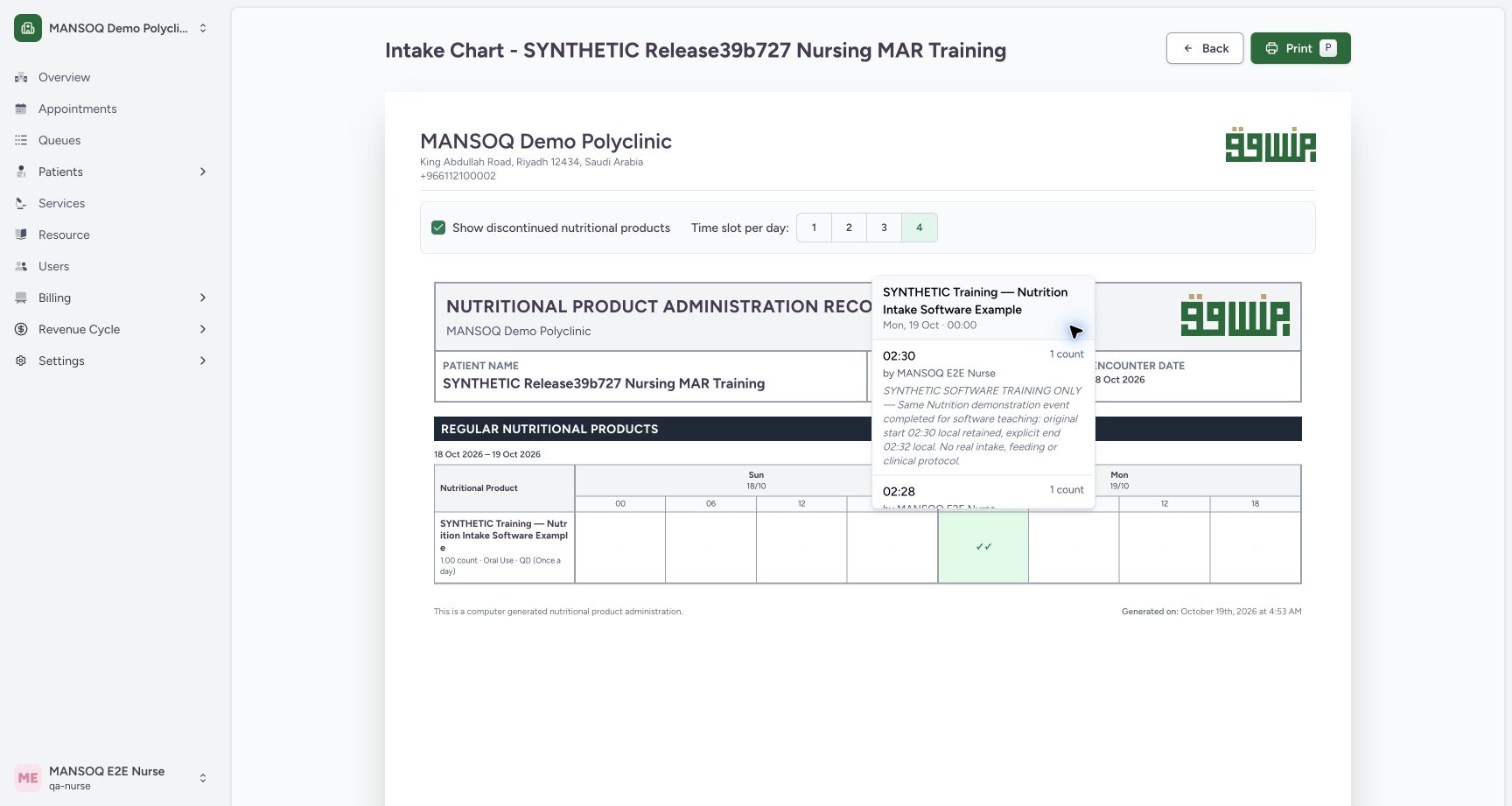
Select the two-checkmark cell. The first visible event starts at 02:30 with 1 count and its retained fictional completion note. Scroll inside the detail list to inspect the separate 02:28 event, its 1 count and retained note. The heading’s 00:00 identifies the chart interval; read 02:30 or 02:28 on each individual event for the actual start. The displayed recorded-by account comes from the event creator and is not independent proof of a physical performer.
12Read the ended request’s retained completed occurrence
Capture details
Exact committed release 96ca7318 on an isolated nonproduction clone, using an existing Nurse and fictional Polyclinic inpatient case. The synthetic patient name retains an earlier release label. The ended request’s two-checkmark chart cell opens its Completed-event details. The first visible event starts at 02:30, has a 1 count dose, Nurse recorded-by context and its retained fictional completion note. The separate 00:00 heading is the chart interval. The second 02:28 occurrence continues below and can be inspected by scrolling within the detail list. No event is changed.
Image SHA-256 ef03d900ed4ad99486ba265115b4bd0d7a6330cce45bccb63701b878d4c997ee
- Actual 02:30 occurrence: Read the event’s actual start separately from the 00:00 chart interval heading.
- Recorded-by account: The shown account comes from the saved event creator, not independent proof of a physical performer.
12Scroll to the second retained Completed nutrition event
Capture details
Exact committed release 96ca7318 on an isolated nonproduction clone, using an existing Nurse and fictional Polyclinic inpatient case. The synthetic patient name retains an earlier release label. Natural scrolling inside the same ended request’s detail list reveals the complete second 02:28 Completed event, 1 count dose, Nurse recorded-by context and retained fictional note. Both original Completed records remain reachable after discontinuation. The actual start is separate from the 00:00 chart interval, and no data is updated.
Image SHA-256 9f91dc654dd2c757e11ed27e8203f414a6b95859aca29c20373803c42147aa55
- Actual 02:28 occurrence: This second retained Completed event has its own original 02:28 start.
- Recorded-by context: Read the account beside this individual event without covering its name.
5. Return to the saved all-status history
Close the detail list, then uncheck Show discontinued nutritional products if you want to restore the filtered-empty chart. Back remains available. Use it to return to Medicines, select Medicine Administration, then Nutrition, and check the workspace’s Show discontinued (1) filter. This workspace filter is separate from the chart filter. The retained Stopped request, three-event preview and Show more (1) control remain available. Independent ordinary Nurse and Doctor readbacks confirmed all fourteen administrations, all four requests and the existing diagnoses and symptoms were unchanged.
123Use the nutrition chart controls when all requests are ended
Capture details
Exact committed release 96ca7318 on an isolated nonproduction clone, using an existing Nurse and fictional Polyclinic inpatient case. The synthetic patient name retains an earlier release label. The genuine 96ca Intake Chart opens with all nutrition requests ended and Show discontinued unchecked. It shows No orders found based on the selected filters, retains the patient and encounter context, keeps Back and display controls reachable, and disables Print. This is a filtered-empty state, not evidence that retained intake events were deleted.
Image SHA-256 321ce1c0b2bb73cf32d37951b9bf3856efd6aadfa77c4e86929869bfa54713f8
- Show discontinued nutritional products: The unchecked filter hides the ended request; the control remains reachable.
- Back remains available: Return to the encounter without changing an order or event.
- Print disabled while filtered empty: No matching request rows are selected for printing in this state.
12Return from the empty chart to retained nutrition history
Capture details
Exact committed release 96ca7318 on an isolated nonproduction clone, using an existing Nurse and fictional Polyclinic inpatient case. The synthetic patient name retains an earlier release label. The chart-level filter was unchecked again, restoring its filtered-empty state with Back still reachable. Back returned to Medicines; Medicine Administration then Nutrition and the workspace Show discontinued (1) filter restore the saved Stopped-request history. The visible initial three entries and Show more (1) remain intact. No event, order or clinical record changed.
Image SHA-256 7d751b8a64159856ea3605463eb8c74b9ea4a7905818c523361e4fd8eb83ef7e
- History filter selected: This workspace filter is separate from the chart’s Show discontinued control.
- Retained all-status history: Show more (1) remains available to reach the fourth saved intake event.
Keep discontinuation and record history distinct
The Doctor previously stopped the request; this Nurse sequence only controls visibility and reads retained data. It neither reverses the request status nor writes another intake. This lesson qualifies the observed ended-only chart and return path on one fictional Polyclinic encounter. It does not qualify every role, facility or empty/no-order variant, and does not include a new native PDF export.
123Use the nutrition chart controls when all requests are ended
Capture details
Exact committed release 96ca7318 on an isolated nonproduction clone, using an existing Nurse and fictional Polyclinic inpatient case. The synthetic patient name retains an earlier release label. The genuine 96ca Intake Chart opens with all nutrition requests ended and Show discontinued unchecked. It shows No orders found based on the selected filters, retains the patient and encounter context, keeps Back and display controls reachable, and disables Print. This is a filtered-empty state, not evidence that retained intake events were deleted.
Image SHA-256 321ce1c0b2bb73cf32d37951b9bf3856efd6aadfa77c4e86929869bfa54713f8
- Show discontinued nutritional products: The unchecked filter hides the ended request; the control remains reachable.
- Back remains available: Return to the encounter without changing an order or event.
- Print disabled while filtered empty: No matching request rows are selected for printing in this state.
123Reveal the ended nutrition request’s Completed chart history
Capture details
Exact committed release 96ca7318 on an isolated nonproduction clone, using an existing Nurse and fictional Polyclinic inpatient case. The synthetic patient name retains an earlier release label. The selected chart-level Show discontinued nutritional products filter reveals the one ended request with two Completed occurrences. Its separate Not Done and Entered in Error records remain in all-status history and are excluded by the Completed-only chart query. Patient/facility/encounter context and Back remain visible. No event or request state changed.
Image SHA-256 62ade1ddf5433138bf6218c643f9b6ad2ac8290a0705bf92c0e34597db8c6710
- Include discontinued request: This chart-level filter now includes the ended nutrition request.
- Two Completed occurrences: The request retains two Completed markers; Not Done and Entered in Error are excluded from this chart.
- Print now available: A matching request row is visible, so the output control is enabled.
12Return from the empty chart to retained nutrition history
Capture details
Exact committed release 96ca7318 on an isolated nonproduction clone, using an existing Nurse and fictional Polyclinic inpatient case. The synthetic patient name retains an earlier release label. The chart-level filter was unchecked again, restoring its filtered-empty state with Back still reachable. Back returned to Medicines; Medicine Administration then Nutrition and the workspace Show discontinued (1) filter restore the saved Stopped-request history. The visible initial three entries and Show more (1) remain intact. No event, order or clinical record changed.
Image SHA-256 7d751b8a64159856ea3605463eb8c74b9ea4a7905818c523361e4fd8eb83ef7e
- History filter selected: This workspace filter is separate from the chart’s Show discontinued control.
- Retained all-status history: Show more (1) remains available to reach the fourth saved intake event.
Source evidence
Every citation uses this exact committed version. The private source repository requires access.
- repositories/platform/mansoq-web/src/components/Medicine/MedicationAdministration/AdministrationTab.tsx:758 ·
96ca7318eb2b93f5fa477908a1543075e0d1f056Source file checksum
170c246835ea1966b8512f5baf72ff0ea60635f28cbcec6a465bb8c17506555f - repositories/platform/mansoq-web/src/components/Medicine/MedicationAdministration/PrintMedicationAdministration.tsx:113 ·
96ca7318eb2b93f5fa477908a1543075e0d1f056Source file checksum
78672ab923c3b78431be155d28256e3dac6ae32d52b336eaedbd26bcfb8ebb52 - repositories/platform/mansoq-web/src/components/Medicine/MedicationAdministration/PrintMedicationAdministration.tsx:131 ·
96ca7318eb2b93f5fa477908a1543075e0d1f056Source file checksum
78672ab923c3b78431be155d28256e3dac6ae32d52b336eaedbd26bcfb8ebb52 - repositories/platform/mansoq-web/src/components/Medicine/MedicationAdministration/PrintMedicationAdministration.tsx:244 ·
96ca7318eb2b93f5fa477908a1543075e0d1f056Source file checksum
78672ab923c3b78431be155d28256e3dac6ae32d52b336eaedbd26bcfb8ebb52 - repositories/platform/mansoq-web/src/components/Medicine/MedicationAdministration/PrintMedicationAdministration.tsx:277 ·
96ca7318eb2b93f5fa477908a1543075e0d1f056Source file checksum
78672ab923c3b78431be155d28256e3dac6ae32d52b336eaedbd26bcfb8ebb52 - repositories/platform/mansoq-web/src/components/Medicine/MedicationAdministration/PrintMedicationAdministration.tsx:629 ·
96ca7318eb2b93f5fa477908a1543075e0d1f056Source file checksum
78672ab923c3b78431be155d28256e3dac6ae32d52b336eaedbd26bcfb8ebb52 - repositories/platform/mansoq-web/src/MansoqUI/misc/PrintPreview.tsx:1 ·
96ca7318eb2b93f5fa477908a1543075e0d1f056Source file checksum
66b44ba3d2996d2db6d1d37c275a084db50c2ac1d68468f5355cc2522c67679b