 MANSOQ
 Pharmacy · VERSION b946bd3d
Abandon an unpaid Preparation order and verify its saved results
Create one separate synthetic Preparation without using an earlier prescription. Verify its new invoice is unpaid, abandon the order, and reload the retained cancellation, restored stock, original account credit and empty Draft invoice.
Pharmacist
 1234567
Review the saved unpaid Preparation
Capture details
Isolated synthetic software exercise at MANSOQ Demo Polyclinic/Main Pharmacy. No physical medicine, clinical treatment, payment, cash payout or external exchange is involved.
Image SHA-256 35bdef7f06c5371f7f79a0ac519f6b45adc5a015c07a509b3d5177c257a3e965
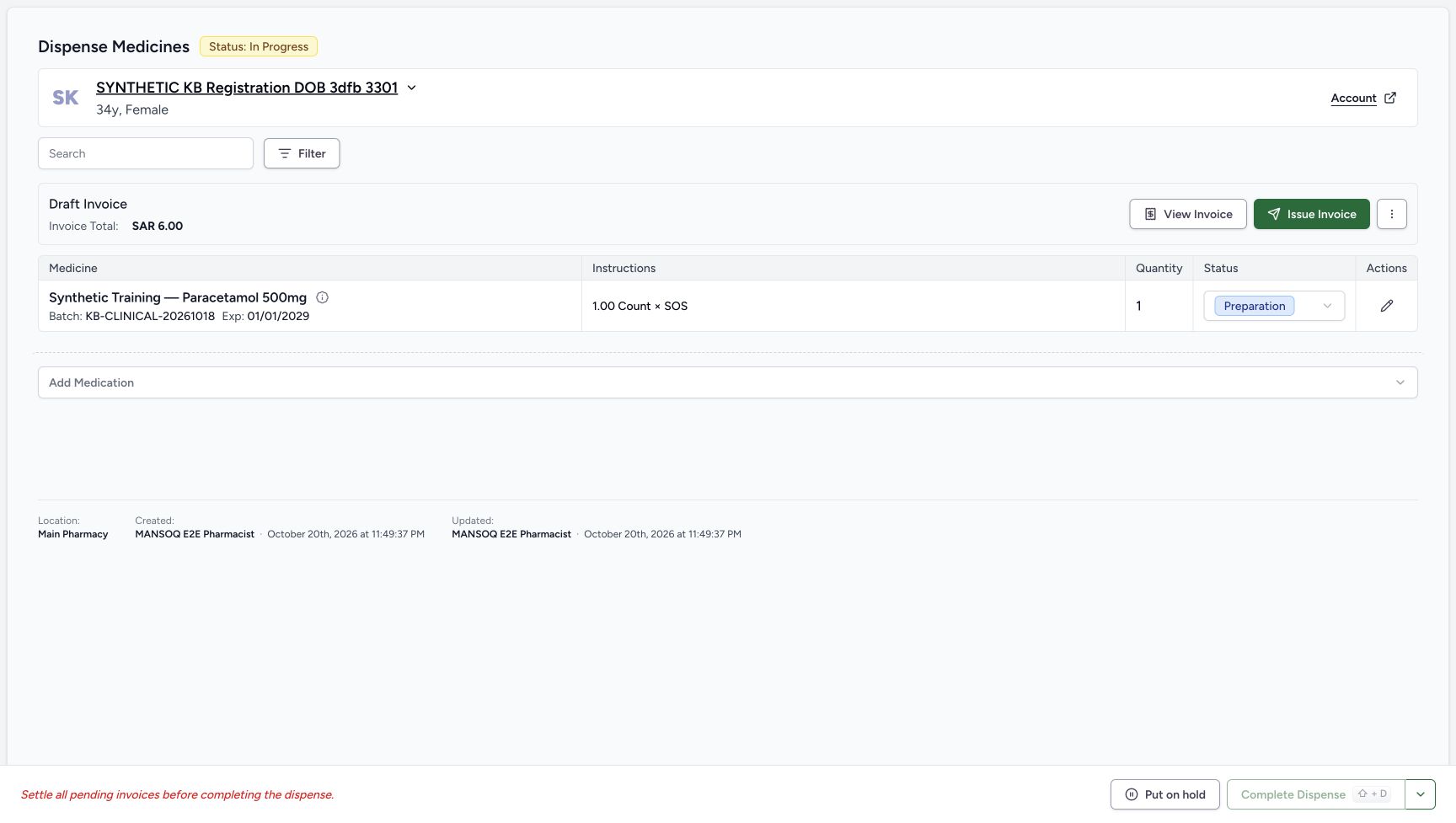
- Verify order In Progress: This is the newly saved separate order.
- Verify medicine row Preparation: The unit has not been completed as a dispense.
- Match the saved batch: The full KB-CLINICAL-20261018 identity is visible.
- Verify the saved quantity is one: Keep the same single unit for cancellation.
- Read the Draft invoice total SAR 6.00: The invoice is unpaid and unissued.
- Open View Invoice: Check this new Draft before cancellation.
- Open the order status split-arrow: Use this after returning from the invoice and checking stock.
 1234
1234Verify the saved cancellation after reload
Capture details
Isolated synthetic software exercise at MANSOQ Demo Polyclinic/Main Pharmacy. No physical medicine, clinical treatment, payment, cash payout or external exchange is involved.
Image SHA-256 aa5dd4d6e2ba310023ebfa0df2969ba27d00b1357c2dbce33c0e38ed924f26b8
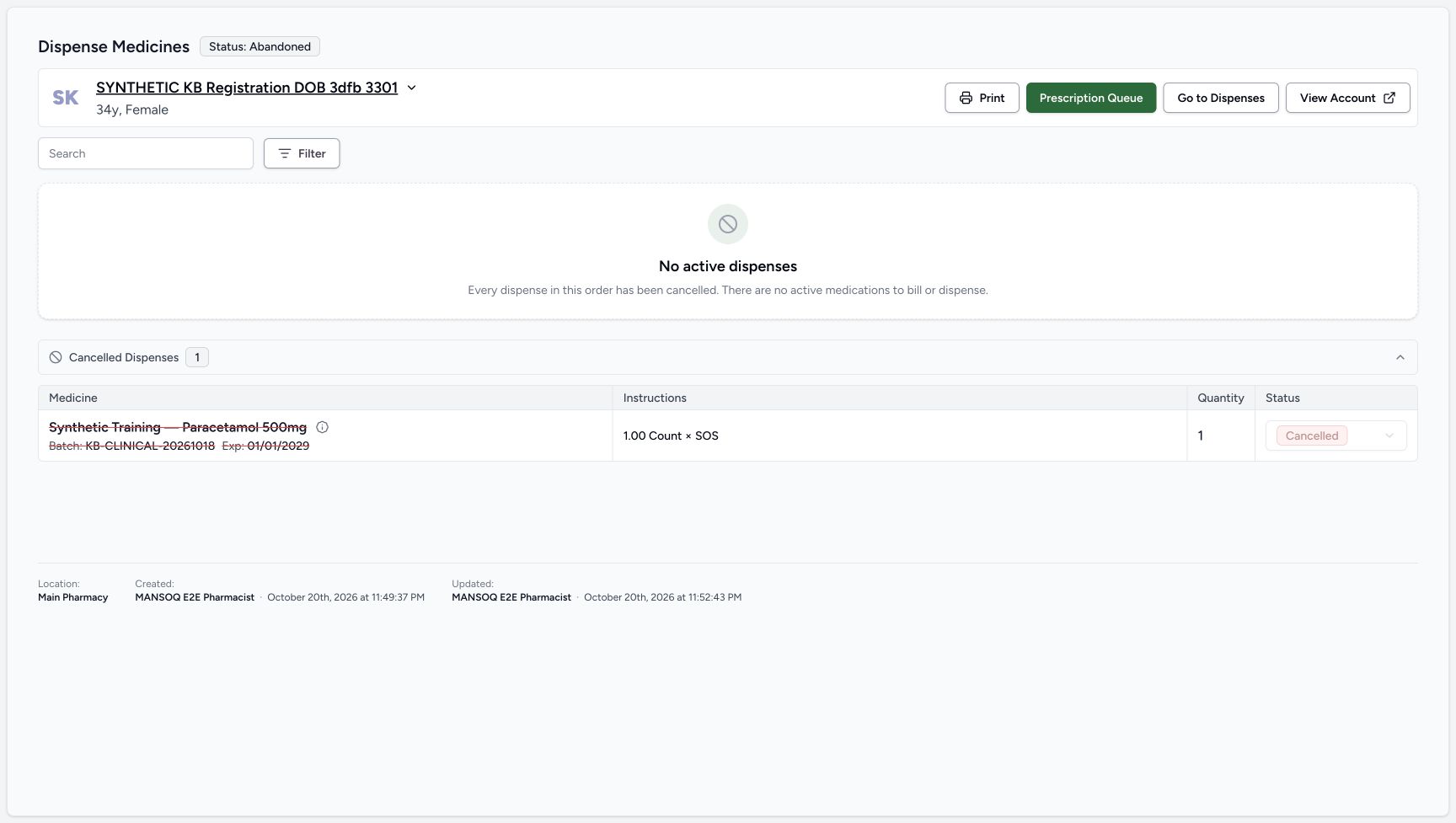
- Verify order Abandoned after reload: The saved order outcome persists.
- Read No active dispenses: There are no active medications left on this order.
- Verify the medicine row is Cancelled: The original one-unit row remains in cancellation history.
- Choose View Account: This post-cancellation control opens the account in the same tab.
 12
12Verify restored stock after reload
Capture details
Isolated synthetic software exercise at MANSOQ Demo Polyclinic/Main Pharmacy. No physical medicine, clinical treatment, payment, cash payout or external exchange is involved.
Image SHA-256 9b2370cd163830425653739a2e450478181717320ab7c388582648cfde8c7094
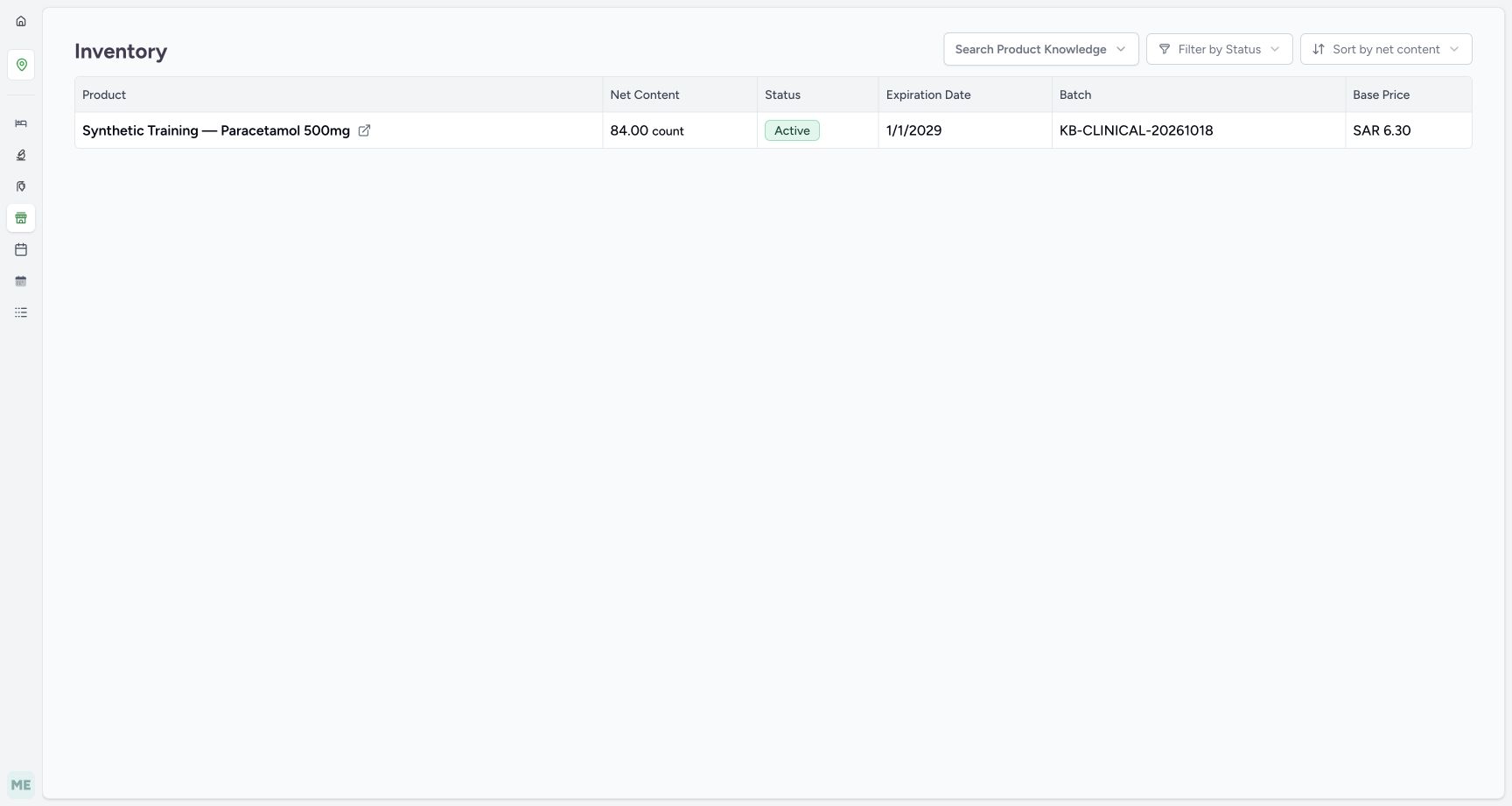
- Verify stock is restored to eighty-four: Cancellation has restored the single prepared unit.
- Verify the same batch identity: Match KB-CLINICAL-20261018 after reload.
 1234567
Verify the same empty Draft invoice after reload
Capture details
Isolated synthetic software exercise at MANSOQ Demo Polyclinic/Main Pharmacy. No physical medicine, clinical treatment, payment, cash payout or external exchange is involved.
Image SHA-256 7ed7f366da73e845743fb89d20e80e729d4b1f0eae745e5d54e1e9888d13f9ec
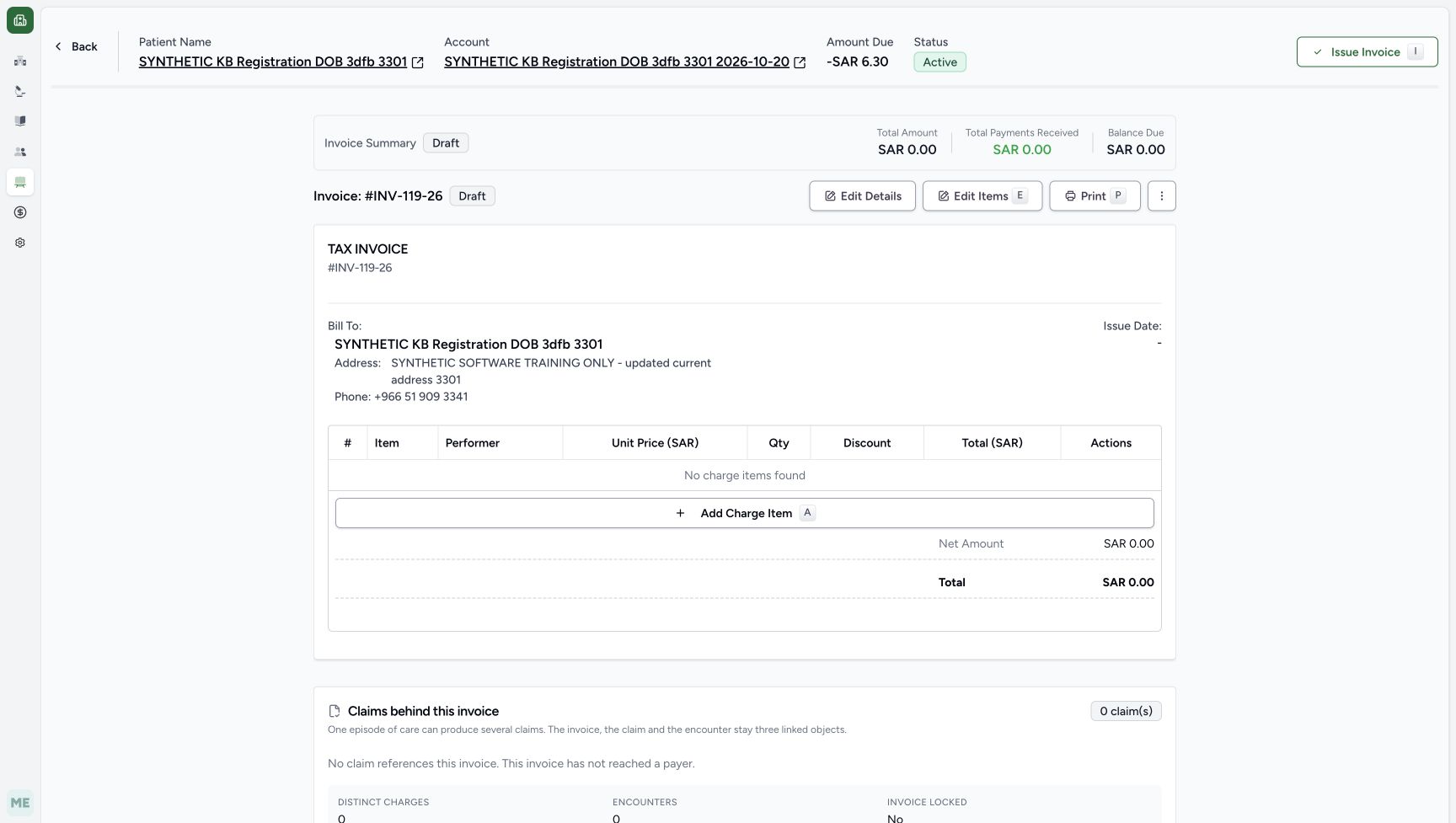
- Verify the same INV-119-26 is Draft: This is the retained invoice, not a newly created invoice.
- Read account due minus SAR 6.30: The earlier credit is still separate from this zero invoice.
- Verify no charge items remain: The cancelled preparation charge is no longer reserved in this Draft.
- Verify invoice payments zero: Cancellation did not create a payment or refund.
- Verify invoice balance zero: The empty Draft has no amount to collect.
- Verify Issue Date is still blank: The invoice remains unissued.
- Read the empty invoice total zero: Normal reload retains the saved empty result.
17 of 17 content blocks have reviewed image alignment.
Before you begin
- Use the existing authorised Pharmacist at MANSOQ Demo Polyclinic/Main Pharmacy and the existing SYNTHETIC KB Registration DOB 3dfb 3301 patient. This isolated software exercise is not a clinical recommendation and involves no physical medicine or money movement.
 12
12Recorded release b946bd3d · 2026-10-20T20:48:04.644188+00:00 · 1728 × 977 Verify the existing Pharmacist account
Capture details
Isolated synthetic software exercise at MANSOQ Demo Polyclinic/Main Pharmacy. No physical medicine, clinical treatment, payment, cash payout or external exchange is involved.
Image SHA-256
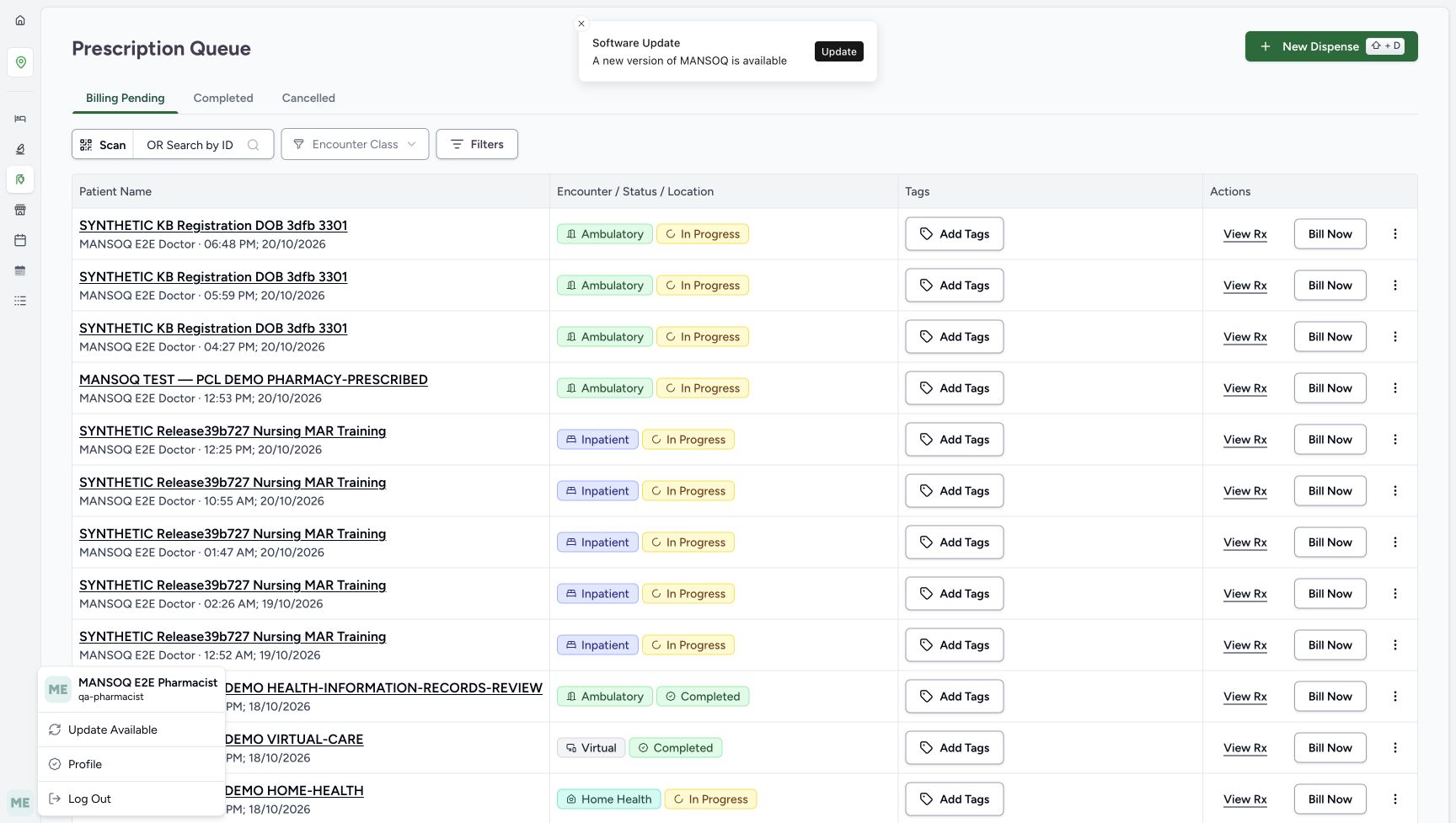
dcc91fa2b1fca381a0bc10dfd9ca7c1b9044d8bb5c63de562e0f8ce3621b8825- Verify the Pharmacist account: Use the existing authorised Pharmacist for Main Pharmacy.
- Read the account username: The exercise uses qa-pharmacist.
 1234
1234Recorded release b946bd3d · 2026-10-20T20:48:22.128189+00:00 · 1728 × 977 Verify the selected patient before proceeding
Capture details
Isolated synthetic software exercise at MANSOQ Demo Polyclinic/Main Pharmacy. No physical medicine, clinical treatment, payment, cash payout or external exchange is involved.
Image SHA-256
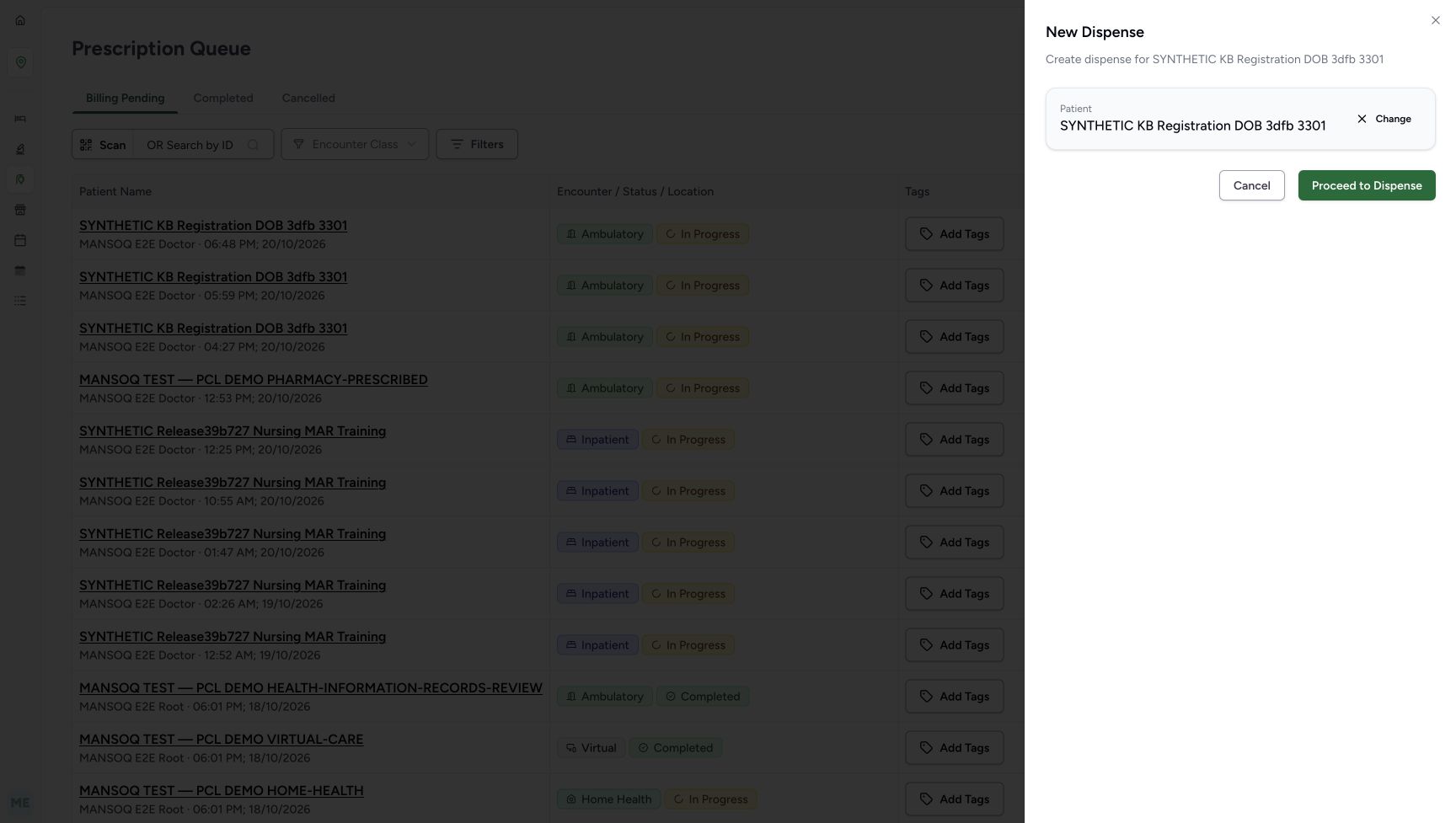
333b0b0b9b18c0dba842382ce705b07670acbf8fca5170f0fd3012d8b4772dd6- Verify the selected patient: Check the synthetic patient identity before proceeding.
- Choose Proceed to Dispense: Continue only with the intended existing patient.
- Choose Change if the patient is wrong: Return to patient selection before proceeding.
- Choose Cancel to stop patient selection: Leave this selection without proceeding with the wrong patient.
- Use the existing synthetic Paracetamol product 06281086104491 and batch KB-CLINICAL-20261018, starting with 84 units available. Continue only with the new unpaid, unissued Draft invoice in this exercise; keep all earlier prescriptions, paid sales, payments and returns unchanged.
 1234
1234Recorded release b946bd3d · 2026-10-20T20:49:25.707414+00:00 · 1728 × 977 Verify the full batch and available stock
Capture details
Isolated synthetic software exercise at MANSOQ Demo Polyclinic/Main Pharmacy. No physical medicine, clinical treatment, payment, cash payout or external exchange is involved.
Image SHA-256
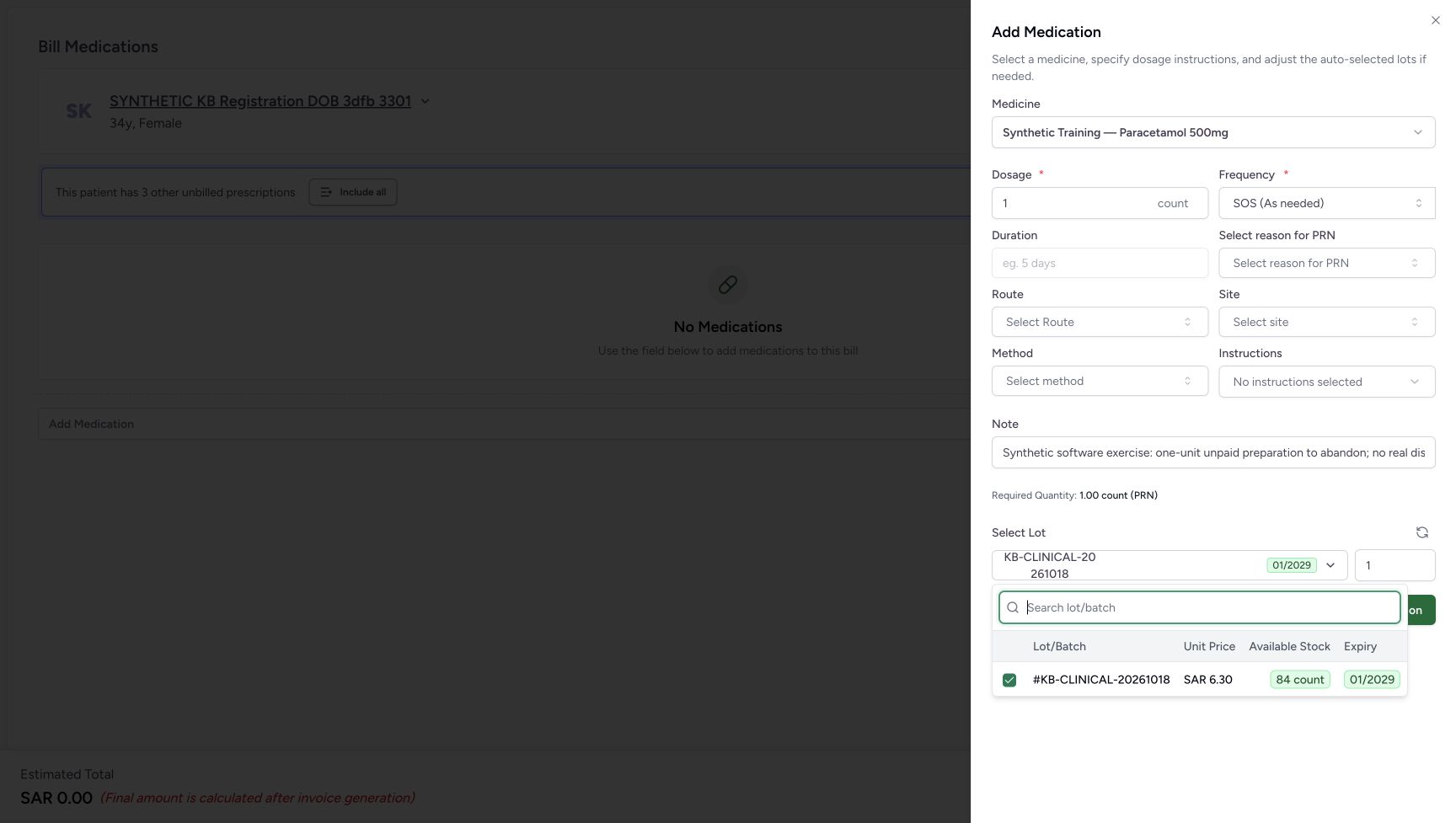
babbca6574b701fdaabd6cd44867affc4c92cf929a8d61b47abd8a907e8ef138- Match the full batch identity: Use KB-CLINICAL-20261018; the closed label is shortened.
- Read unit price SAR 6.30: This is the price shown for the selected batch.
- Read eighty-four available: The one-unit preparation starts from this available stock.
- Verify expiry January 2029: Keep the exact selected batch.
 12345678
Recorded release b946bd3d · 2026-10-20T20:50:33.317701+00:00 · 1728 × 977 Verify the new invoice is unpaid
Capture details
Isolated synthetic software exercise at MANSOQ Demo Polyclinic/Main Pharmacy. No physical medicine, clinical treatment, payment, cash payout or external exchange is involved.
Image SHA-256
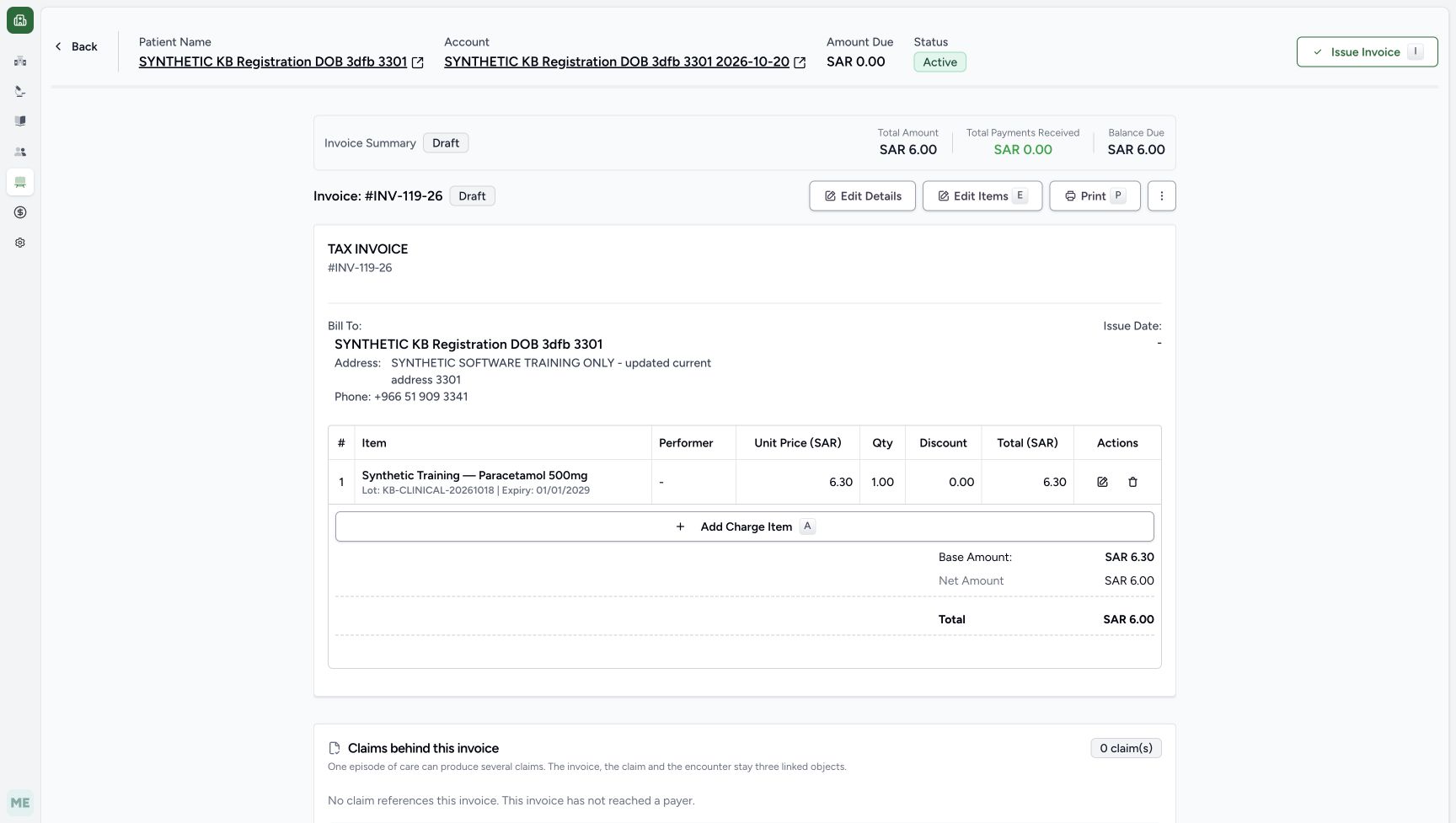
0ec4cbae8236f073a70b6c106c3ff29fac21c40a4dae8218332aa4dbf619973d- Verify INV-119-26 is Draft: Match this new invoice before cancelling its preparation.
- Verify the Issue Date is blank: This exercise does not issue the invoice.
- Read the separate account due zero: This global account field does not mean the Draft invoice is paid.
- Verify invoice payments zero: No payment has been recorded for this new invoice.
- Read invoice balance SAR 6.00: The new Draft remains unpaid.
- Read base amount SAR 6.30: Keep the line/base amount separate from the rounded total.
- Read displayed total SAR 6.00: This is the current rounded invoice total.
- Choose the invoice page Back button: Return directly to the saved preparation order.
1. Start New Dispense for the existing patient
From the Main Pharmacy Prescription Queue, choose New Dispense. Use Patient Name search and enter SYNTHETIC KB Registration DOB 3dfb 3301. Select the matching existing result, verify the selected patient, then choose Proceed to Dispense. If the identity is wrong, use Change or Cancel before proceeding.
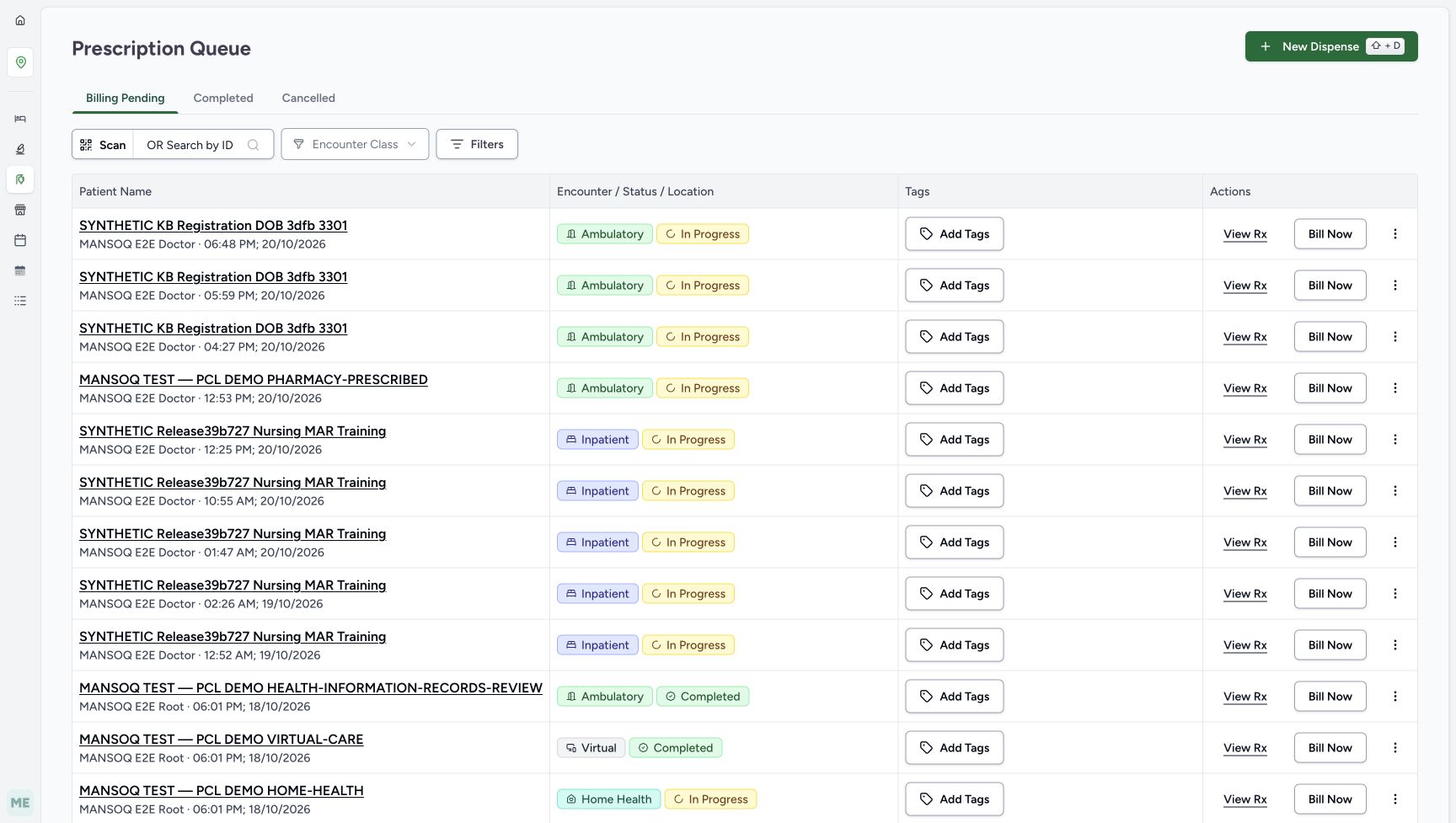 1
1Start a separate New Dispense
Capture details
Isolated synthetic software exercise at MANSOQ Demo Polyclinic/Main Pharmacy. No physical medicine, clinical treatment, payment, cash payout or external exchange is involved.
Image SHA-256 bfb8210c7ed317e5857d1d4525eead19548ac8a5ba53b13c7f836b430405f22c
- Choose New Dispense: Start a separate preparation without billing an earlier prescription.
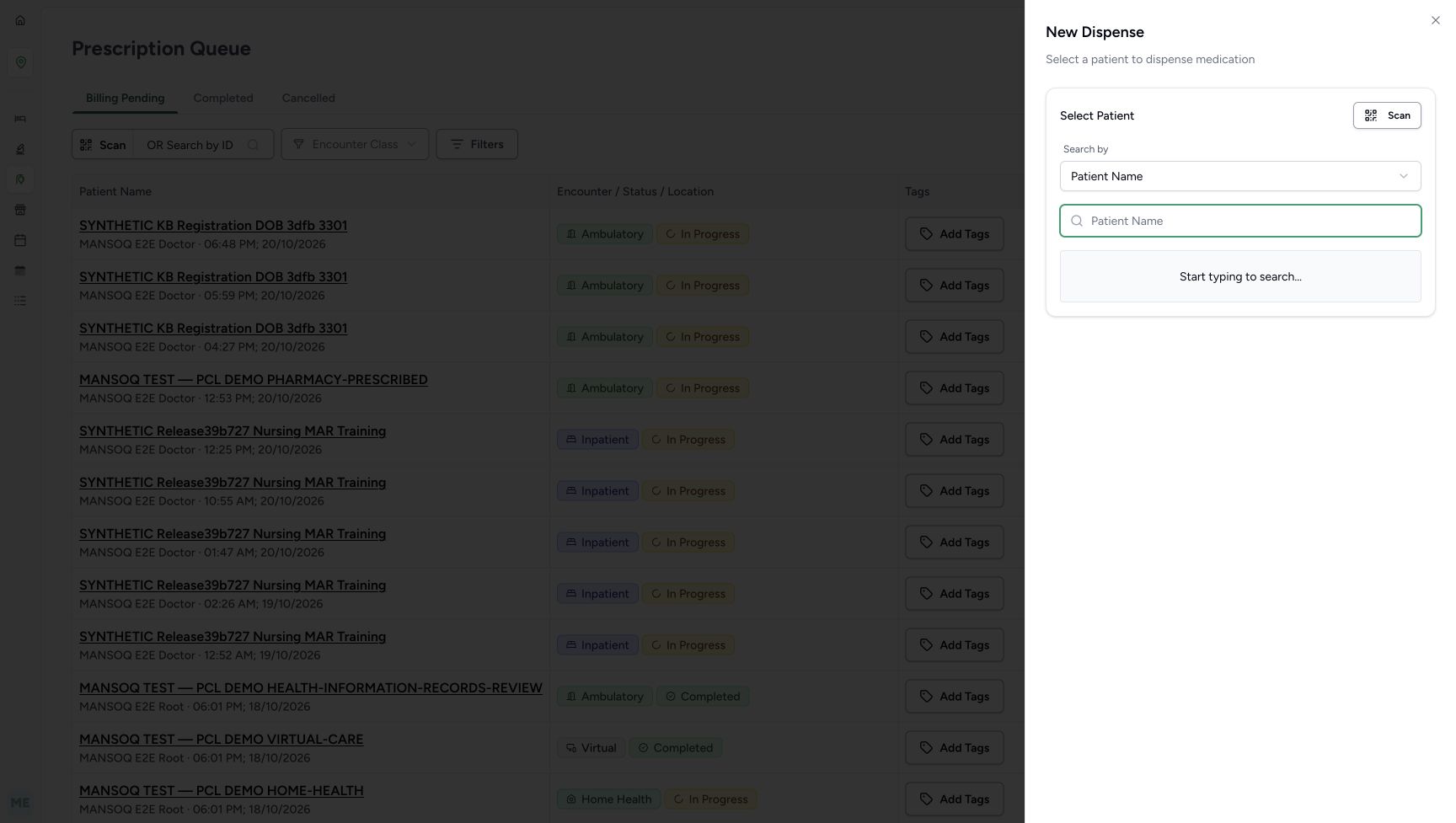 12
12Search for the existing patient
Capture details
Isolated synthetic software exercise at MANSOQ Demo Polyclinic/Main Pharmacy. No physical medicine, clinical treatment, payment, cash payout or external exchange is involved.
Image SHA-256 3a9d642872ad26651c94101dbbeb1ec959b9cafb80ad5223c67b1035f32d70a1
- Verify Patient Name search: Use the existing synthetic patient rather than registering another.
- Enter the existing patient name: Search for SYNTHETIC KB Registration DOB 3dfb 3301.
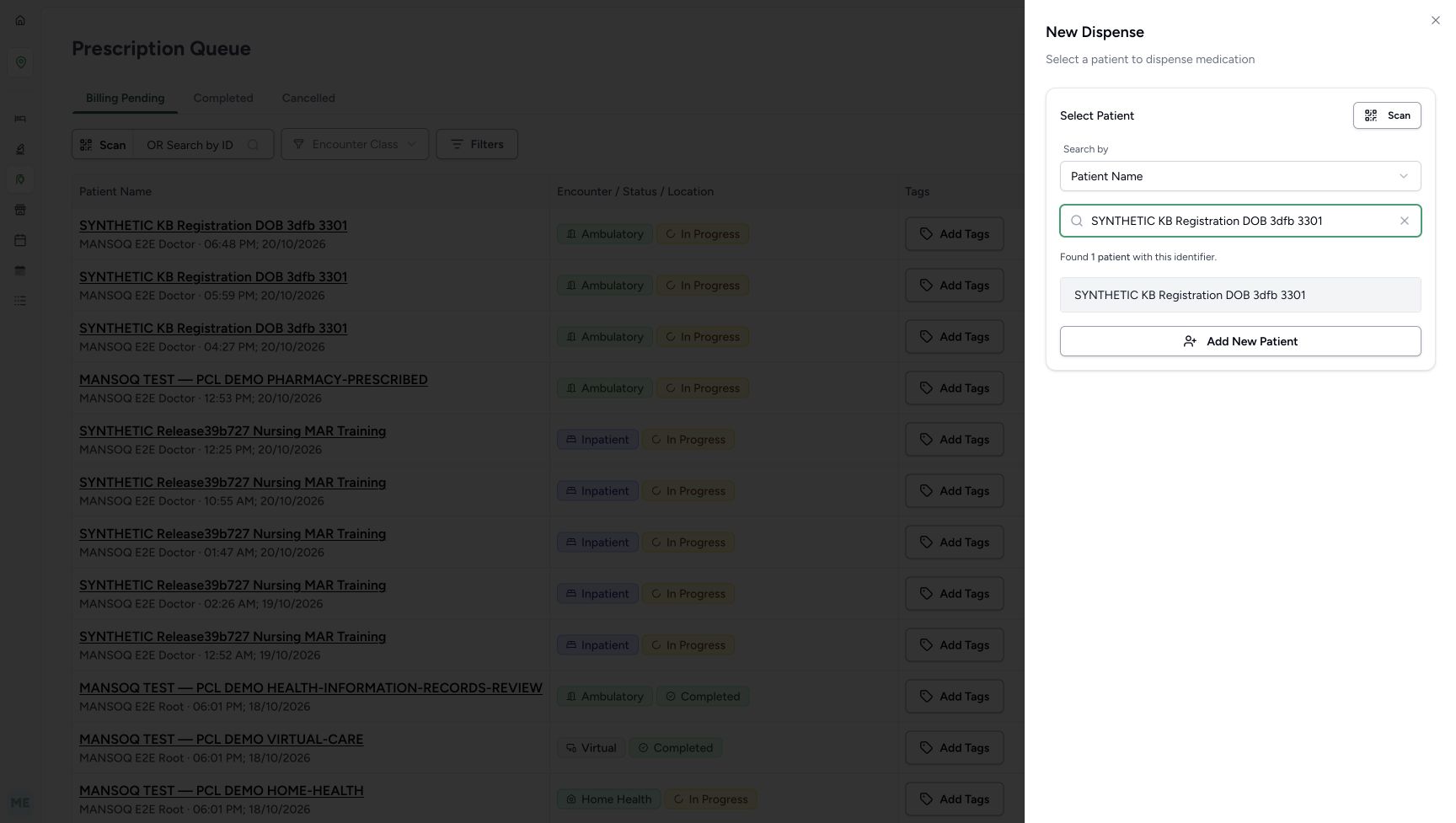 12
12Select the matching existing patient
Capture details
Isolated synthetic software exercise at MANSOQ Demo Polyclinic/Main Pharmacy. No physical medicine, clinical treatment, payment, cash payout or external exchange is involved.
Image SHA-256 56fbf8276f1487db307254b31b10ad99e7d2524e63c47f2a1ca02fe1ada44d0c
- Verify the entered name: Match the complete synthetic patient name.
- Select the matching patient result: Check the existing record before proceeding.
1234Verify the selected patient before proceeding
Capture details
Isolated synthetic software exercise at MANSOQ Demo Polyclinic/Main Pharmacy. No physical medicine, clinical treatment, payment, cash payout or external exchange is involved.
Image SHA-256 333b0b0b9b18c0dba842382ce705b07670acbf8fca5170f0fd3012d8b4772dd6
- Verify the selected patient: Check the synthetic patient identity before proceeding.
- Choose Proceed to Dispense: Continue only with the intended existing patient.
- Choose Change if the patient is wrong: Return to patient selection before proceeding.
- Choose Cancel to stop patient selection: Leave this selection without proceeding with the wrong patient.
2. Choose the intended active encounter
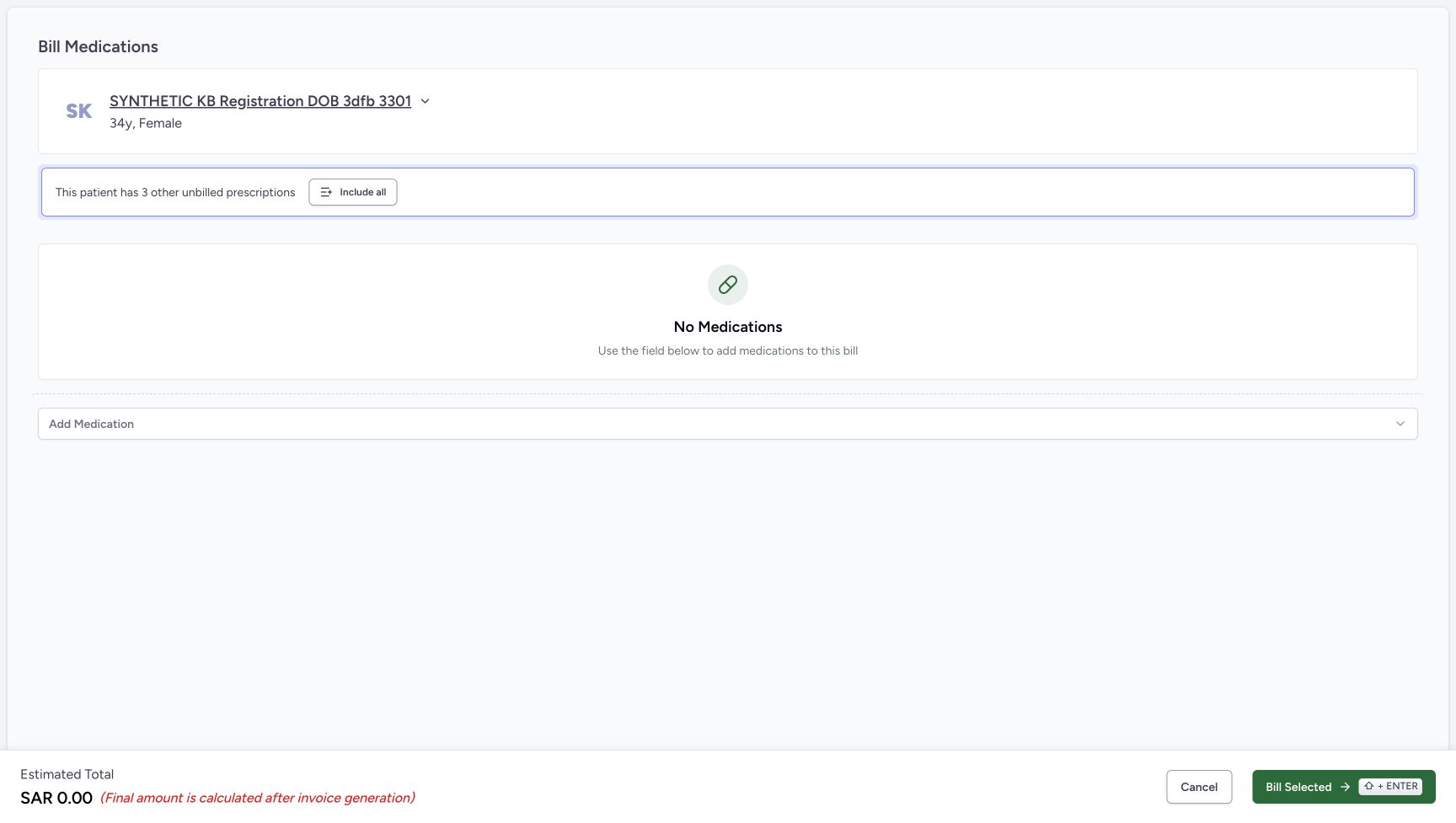
On the verified patient home, use the active Ambulatory encounter dated October 20, 2026 at 03:19 PM. Choose Dispense Medicine on that card. Verify the standalone Bill Medications page starts with No Medications. Leave Include all unused so the earlier unbilled prescriptions are not added.
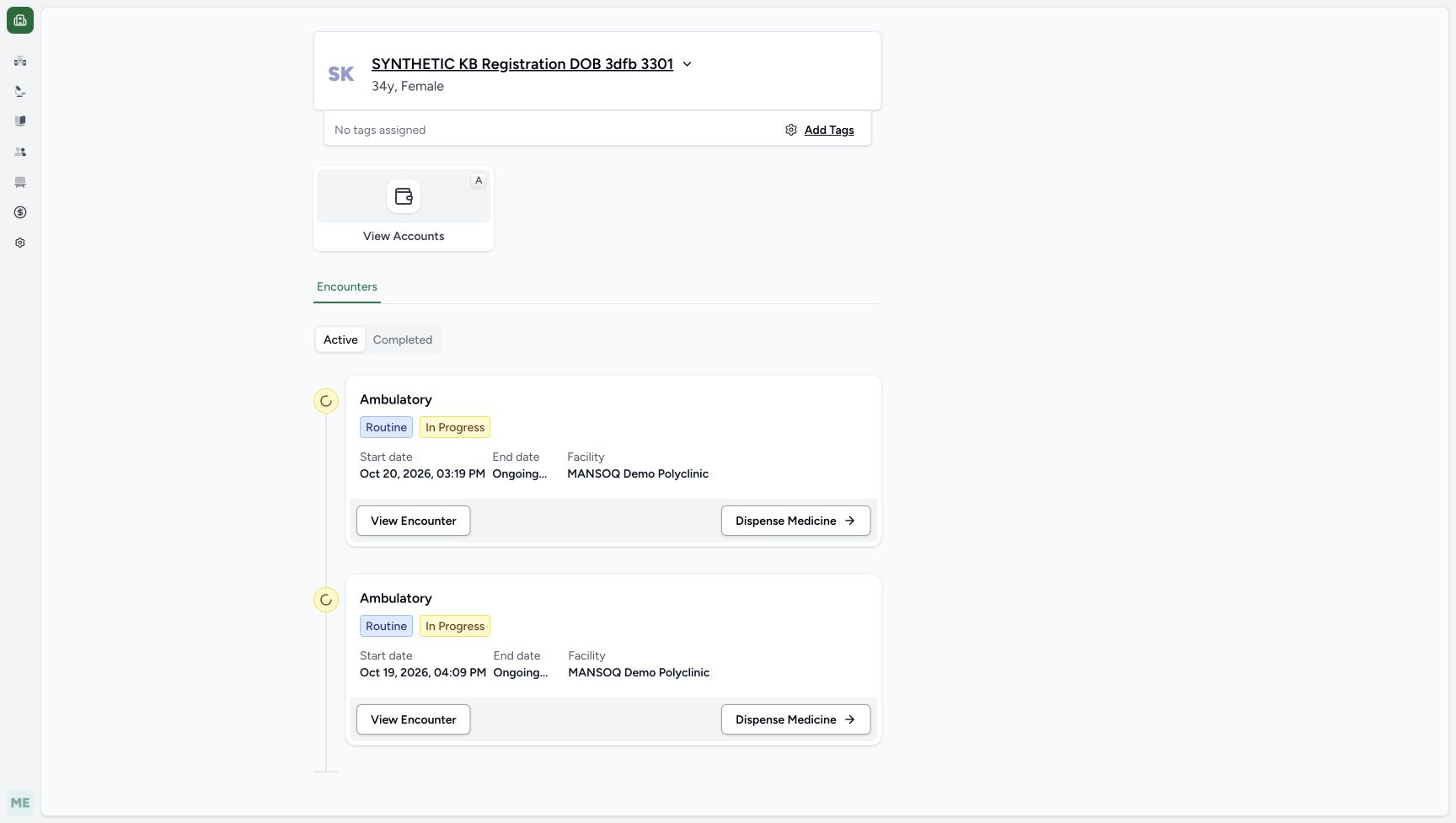 123
123Choose the matching active encounter
Capture details
Isolated synthetic software exercise at MANSOQ Demo Polyclinic/Main Pharmacy. No physical medicine, clinical treatment, payment, cash payout or external exchange is involved.
Image SHA-256 44b479a7d3efbd617d57d21692b6293e1f55d0e2254cdce7c9e63490447650cc
- Verify the patient identity: Keep this existing synthetic patient throughout the exercise.
- Match the October twentieth encounter: Use the active Ambulatory encounter at 03:19 PM.
- Choose Dispense Medicine on this encounter: Use the upper matching encounter card.
 12
12Start with an empty standalone bill
Capture details
Isolated synthetic software exercise at MANSOQ Demo Polyclinic/Main Pharmacy. No physical medicine, clinical treatment, payment, cash payout or external exchange is involved.
Image SHA-256 32146b673a6e3c9a81e6b0e32be89dfbbdb7bc673b8f8ea337d3469216bb8ec5
- Verify the standalone bill is empty: No earlier prescription is included in this preparation.
- Open Add Medication: Choose the single synthetic product for this separate bill.
3. Add one reviewed synthetic unit without saving it yet
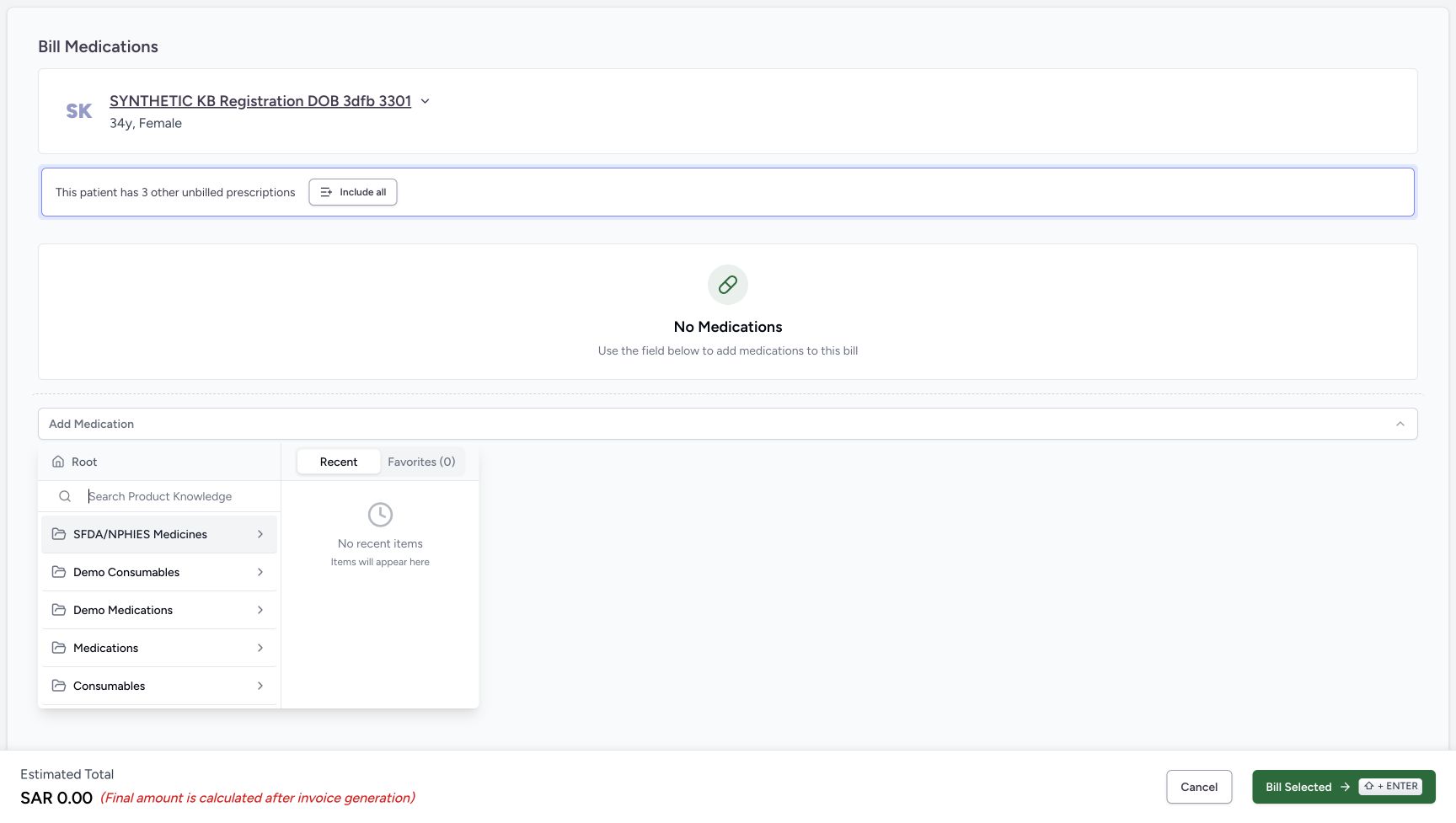
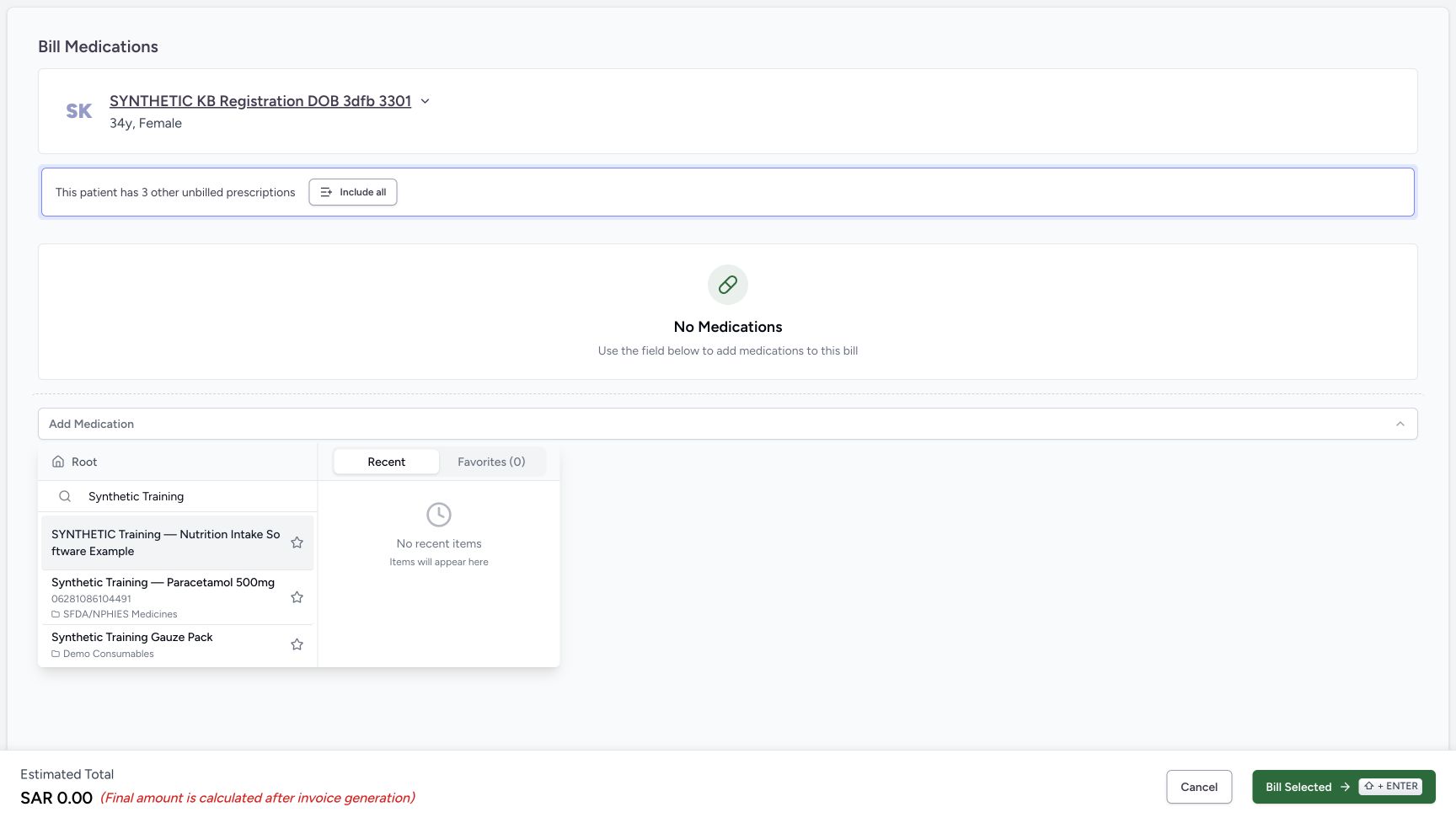
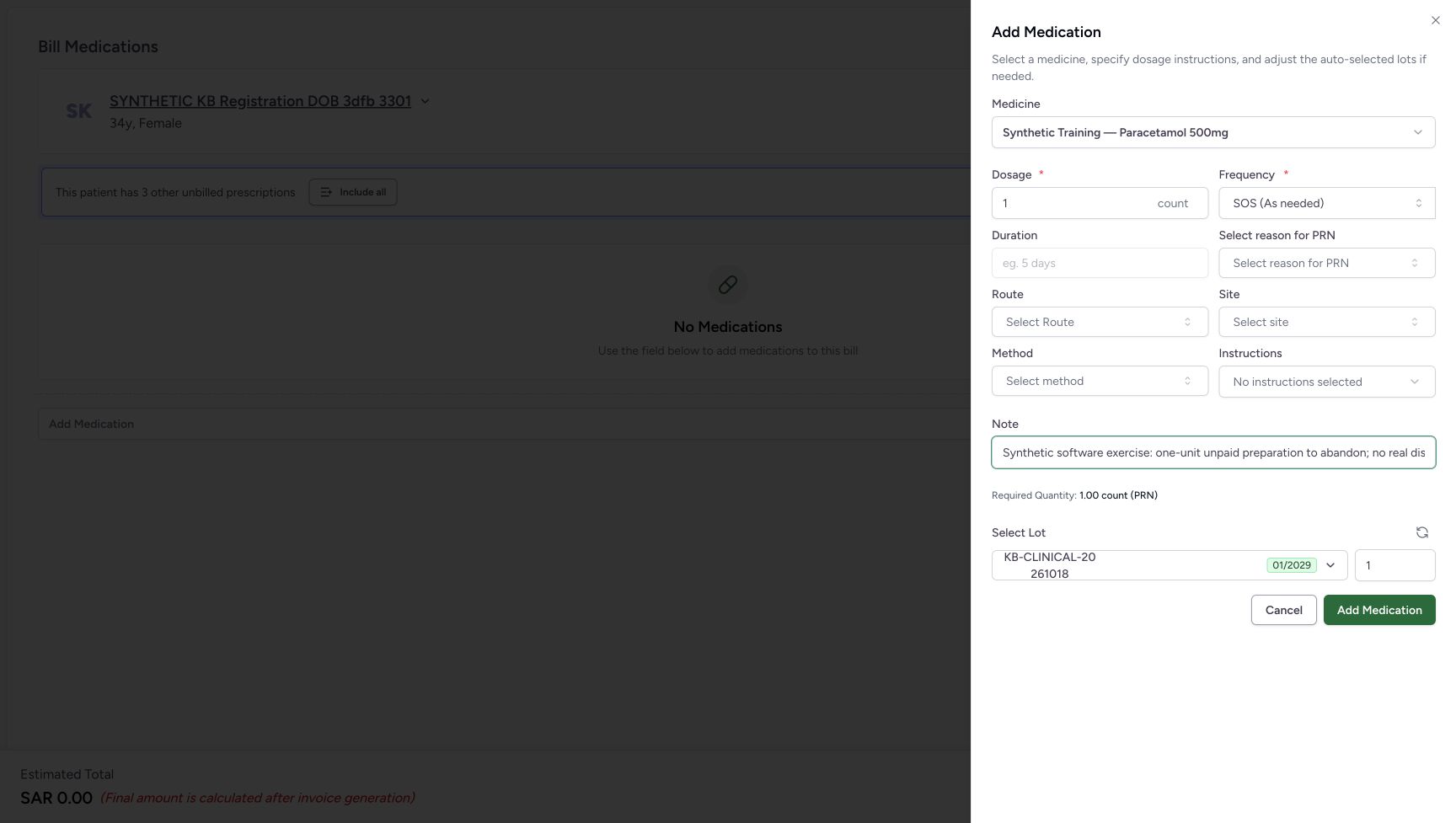
Open Add Medication. Search at Root for Synthetic Training and choose Synthetic Training — Paracetamol 500mg, product code 06281086104491. In this fictional software example, verify the displayed one-count SOS instructions and required quantity one. Open the lot list and match full batch KB-CLINICAL-20261018, expiry January 2029, unit price SAR 6.30 and 84 available. Closed lot labels are shortened. Keep selected quantity one, press Escape to close the list, then choose Add Medication. This adds an unsaved line; it does not yet create the Preparation.
12Start with an empty standalone bill
Capture details
Isolated synthetic software exercise at MANSOQ Demo Polyclinic/Main Pharmacy. No physical medicine, clinical treatment, payment, cash payout or external exchange is involved.
Image SHA-256 32146b673a6e3c9a81e6b0e32be89dfbbdb7bc673b8f8ea337d3469216bb8ec5
- Verify the standalone bill is empty: No earlier prescription is included in this preparation.
- Open Add Medication: Choose the single synthetic product for this separate bill.
 12
12Search Product Knowledge at Root
Capture details
Isolated synthetic software exercise at MANSOQ Demo Polyclinic/Main Pharmacy. No physical medicine, clinical treatment, payment, cash payout or external exchange is involved.
Image SHA-256 8bd35d56cc3799d257473ef9705672773d598a8ee60a1d91d822ef11ecd7271e
- Verify Root search: Search the product catalogue from Root.
- Search for Synthetic Training: Use the exact product identity in the results.
 1
1Choose the exact Paracetamol product
Capture details
Isolated synthetic software exercise at MANSOQ Demo Polyclinic/Main Pharmacy. No physical medicine, clinical treatment, payment, cash payout or external exchange is involved.
Image SHA-256 509d15f65bad7e9c11144c0e8e360d14217d73a8e3efd9e4d91aaebaec6629b8
- Choose Synthetic Training Paracetamol: Match product code 06281086104491, not the other synthetic results.
 123456
Review the one-unit unsaved medication
Capture details
Isolated synthetic software exercise at MANSOQ Demo Polyclinic/Main Pharmacy. No physical medicine, clinical treatment, payment, cash payout or external exchange is involved.
Image SHA-256 41ffcfe8394167fedb6dd150e46aee93e2f3a9fb6c0c4ba44d703e914c80b1a5
- Verify the selected product: Use Synthetic Training — Paracetamol 500mg.
- Verify dosage one count: This is a fictional software example, not clinical advice.
- Verify SOS frequency: Keep the example instructions shown in this exercise.
- Open the selected lot list: Read the full batch identity and available quantity.
- Verify selected quantity one: Only one unit will be prepared.
- Choose Add Medication after closing the lot list: Press Escape to close the list, then add this reviewed unsaved line.
1234Verify the full batch and available stock
Capture details
Isolated synthetic software exercise at MANSOQ Demo Polyclinic/Main Pharmacy. No physical medicine, clinical treatment, payment, cash payout or external exchange is involved.
Image SHA-256 babbca6574b701fdaabd6cd44867affc4c92cf929a8d61b47abd8a907e8ef138
- Match the full batch identity: Use KB-CLINICAL-20261018; the closed label is shortened.
- Read unit price SAR 6.30: This is the price shown for the selected batch.
- Read eighty-four available: The one-unit preparation starts from this available stock.
- Verify expiry January 2029: Keep the exact selected batch.
4. Bill the single line once and inspect the saved Preparation
Review Other Items: one selected Paracetamol line, quantity one, price and estimate SAR 6.30. Choose Bill Selected once and wait for the saved order. Verify the order is In Progress, the one-unit medicine row remains Preparation, and the new Draft invoice shows SAR 6.00. Keep this order open; do not complete the dispense or issue the invoice.
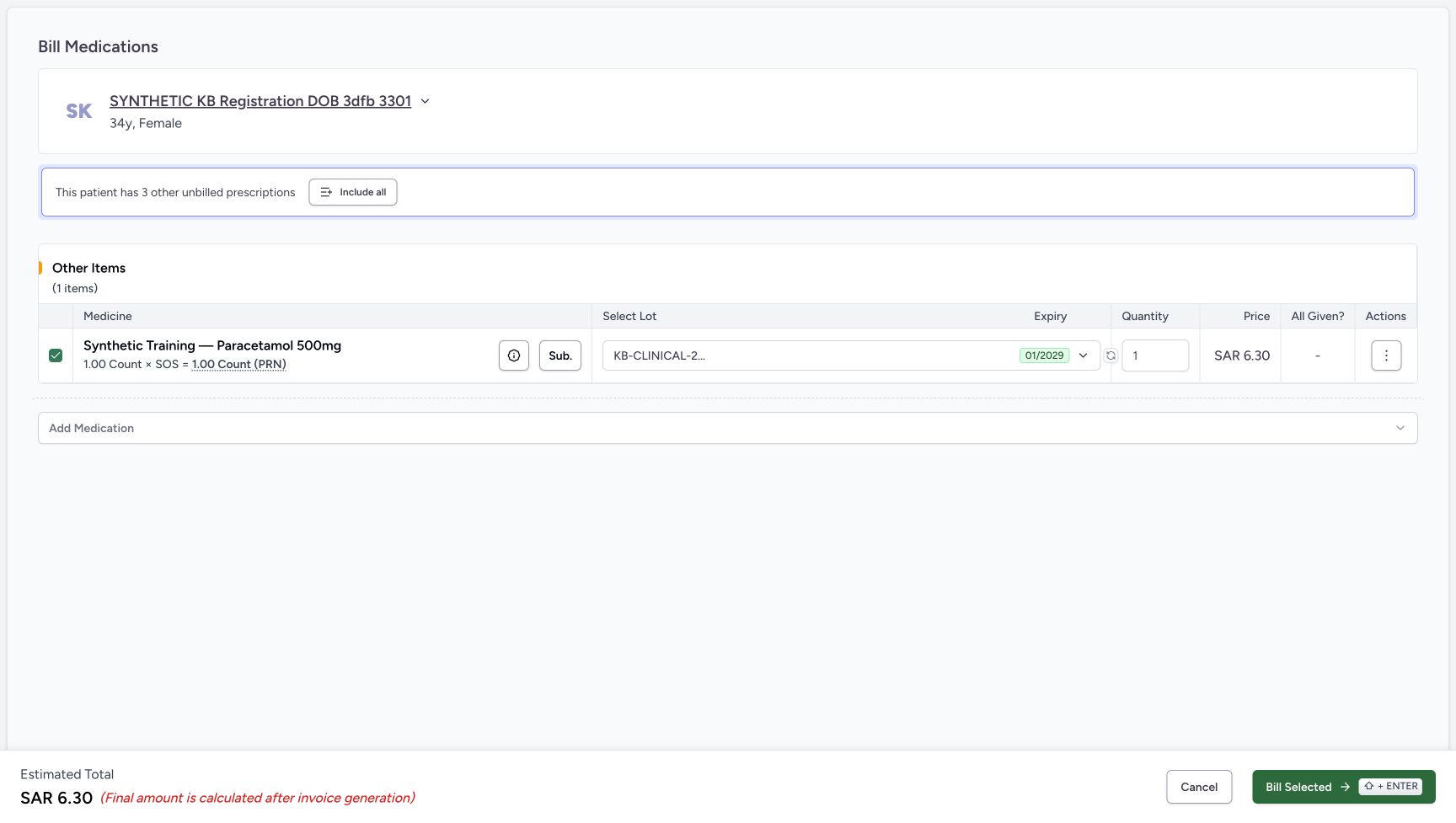 12345
12345Review one unsaved line before billing
Capture details
Isolated synthetic software exercise at MANSOQ Demo Polyclinic/Main Pharmacy. No physical medicine, clinical treatment, payment, cash payout or external exchange is involved.
Image SHA-256 4c59dde89a377c0f18fa2584f7e8a1052f14cf899f251ec8ca651a3bf637f523
- Verify the one line is selected: Only the separate Other Items line is included.
- Verify quantity one: Check the unsaved quantity before billing.
- Read line price SAR 6.30: The estimate is separate from the rounded invoice readout.
- Read estimated total SAR 6.30: Add Medication has not yet created the saved preparation.
- Choose Bill Selected once: Wait for the saved order before taking another action.
1234567Review the saved unpaid Preparation
Capture details
Isolated synthetic software exercise at MANSOQ Demo Polyclinic/Main Pharmacy. No physical medicine, clinical treatment, payment, cash payout or external exchange is involved.
Image SHA-256 35bdef7f06c5371f7f79a0ac519f6b45adc5a015c07a509b3d5177c257a3e965
- Verify order In Progress: This is the newly saved separate order.
- Verify medicine row Preparation: The unit has not been completed as a dispense.
- Match the saved batch: The full KB-CLINICAL-20261018 identity is visible.
- Verify the saved quantity is one: Keep the same single unit for cancellation.
- Read the Draft invoice total SAR 6.00: The invoice is unpaid and unissued.
- Open View Invoice: Check this new Draft before cancellation.
- Open the order status split-arrow: Use this after returning from the invoice and checking stock.
5. Verify the invoice is unpaid, then return to the order
Choose View Invoice. Match INV-119-26 and verify Draft, blank Issue Date, zero invoice payments and SAR 6.00 invoice balance. The account header happens to show zero due because of the existing account credit; that does not mean this new invoice is paid. The line and Base Amount are SAR 6.30, while its displayed rounded Total is SAR 6.00. Choose the page Back button to return directly to the saved order.
1234567Review the saved unpaid Preparation
Capture details
Isolated synthetic software exercise at MANSOQ Demo Polyclinic/Main Pharmacy. No physical medicine, clinical treatment, payment, cash payout or external exchange is involved.
Image SHA-256 35bdef7f06c5371f7f79a0ac519f6b45adc5a015c07a509b3d5177c257a3e965
- Verify order In Progress: This is the newly saved separate order.
- Verify medicine row Preparation: The unit has not been completed as a dispense.
- Match the saved batch: The full KB-CLINICAL-20261018 identity is visible.
- Verify the saved quantity is one: Keep the same single unit for cancellation.
- Read the Draft invoice total SAR 6.00: The invoice is unpaid and unissued.
- Open View Invoice: Check this new Draft before cancellation.
- Open the order status split-arrow: Use this after returning from the invoice and checking stock.
12345678Verify the new invoice is unpaid
Capture details
Isolated synthetic software exercise at MANSOQ Demo Polyclinic/Main Pharmacy. No physical medicine, clinical treatment, payment, cash payout or external exchange is involved.
Image SHA-256 0ec4cbae8236f073a70b6c106c3ff29fac21c40a4dae8218332aa4dbf619973d
- Verify INV-119-26 is Draft: Match this new invoice before cancelling its preparation.
- Verify the Issue Date is blank: This exercise does not issue the invoice.
- Read the separate account due zero: This global account field does not mean the Draft invoice is paid.
- Verify invoice payments zero: No payment has been recorded for this new invoice.
- Read invoice balance SAR 6.00: The new Draft remains unpaid.
- Read base amount SAR 6.30: Keep the line/base amount separate from the rounded total.
- Read displayed total SAR 6.00: This is the current rounded invoice total.
- Choose the invoice page Back button: Return directly to the saved preparation order.
6. Check the one-unit stock deduction in a second tab
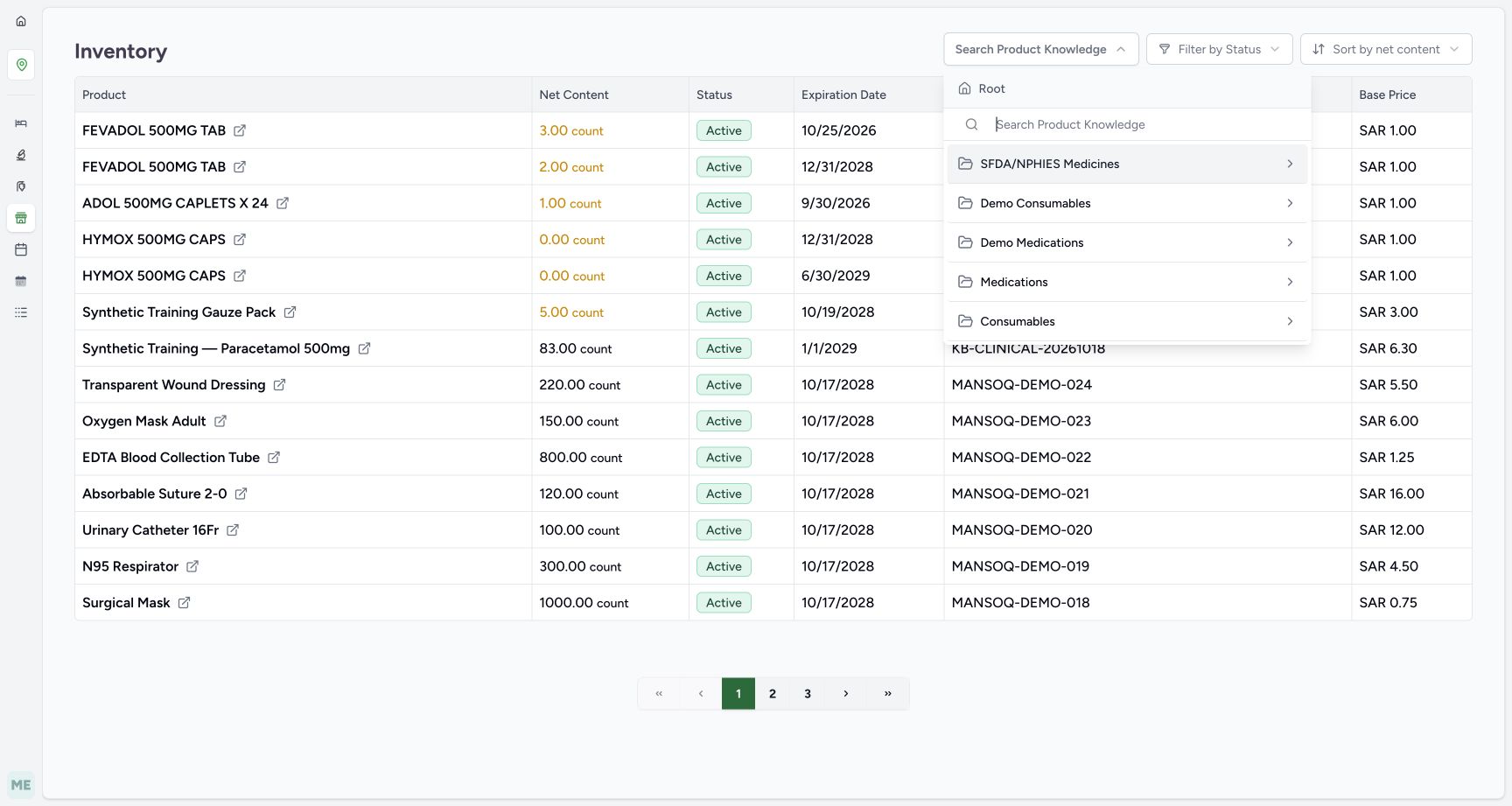
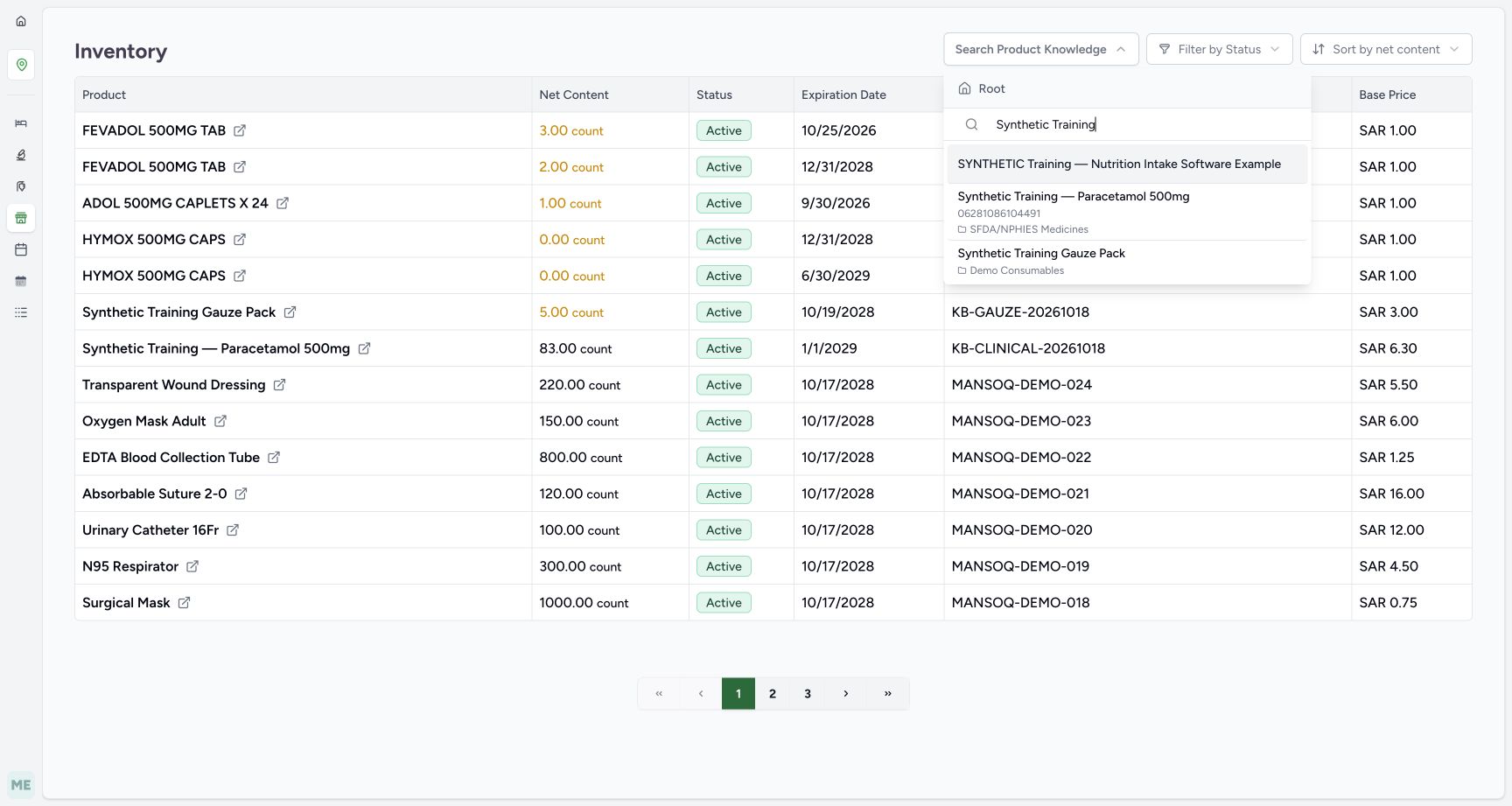
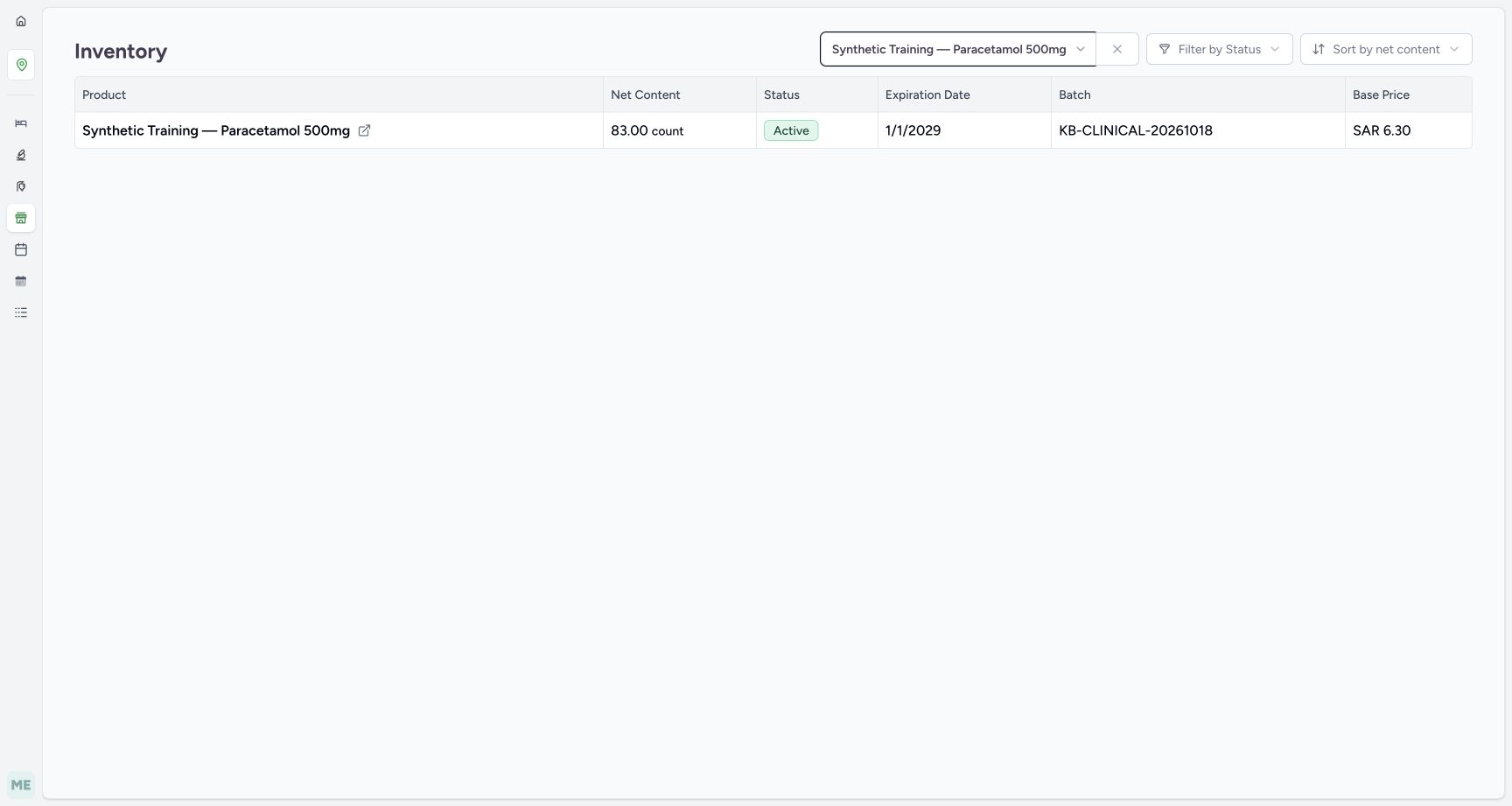
Open the same Main Pharmacy Prescription Queue in a second Pharmacist tab, keeping the saved order open in the original tab. Choose the visible Inventory icon, then Items in its flyout. Open Search Product Knowledge and search at Root for Synthetic Training. Select the exact Paracetamol product 06281086104491 and press Escape to close the picker. Match batch KB-CLINICAL-20261018 at 83 units: one fewer than the earlier 84. Keep this filtered stock tab open.
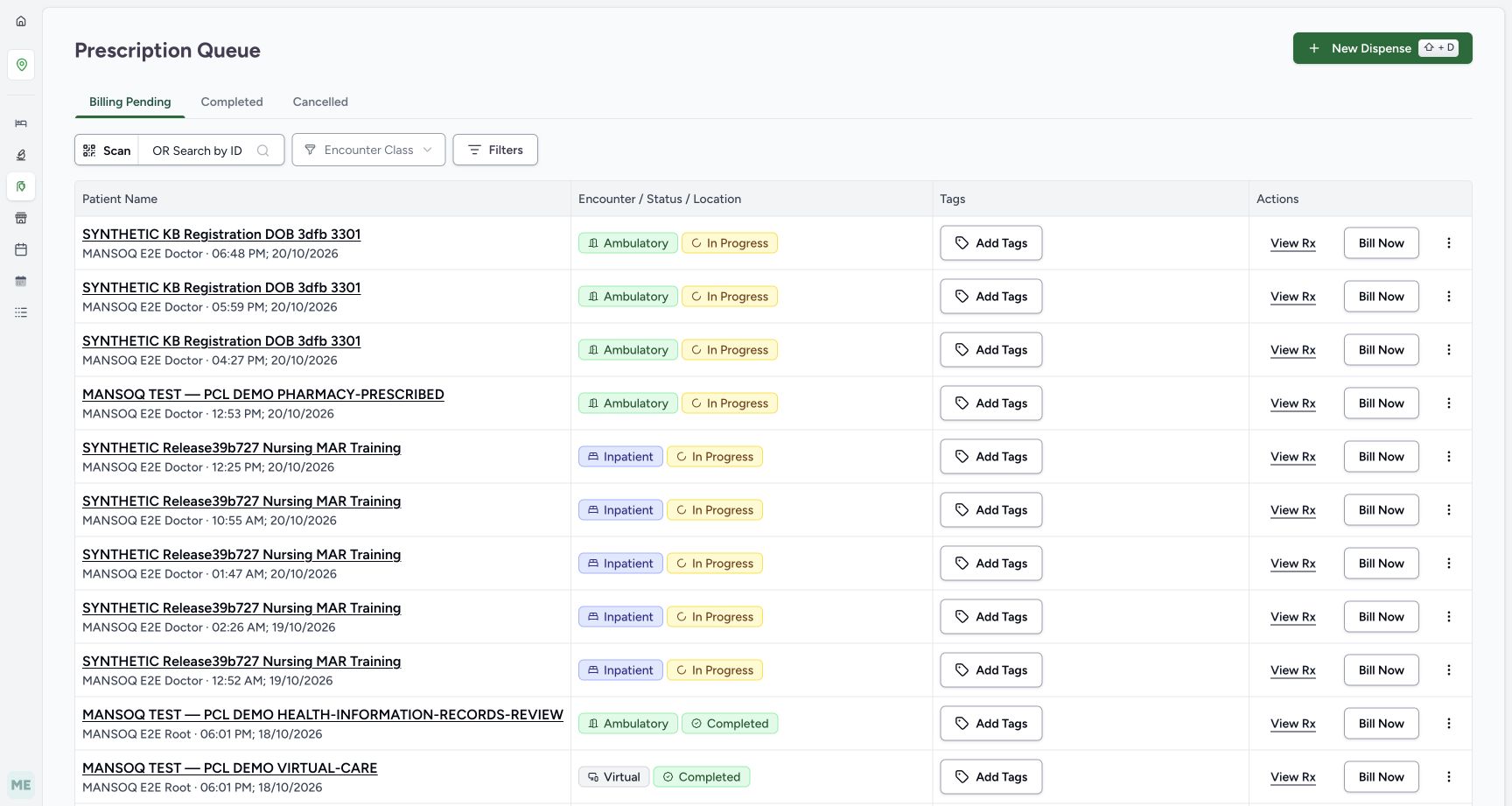 1
1Open inventory from a second Main Pharmacy tab
Capture details
Isolated synthetic software exercise at MANSOQ Demo Polyclinic/Main Pharmacy. No physical medicine, clinical treatment, payment, cash payout or external exchange is involved.
Image SHA-256 2e1358a9a514159a99c4baa4d2c9ef9f482c71ad9ce14dd9a1691159b7e95af9
- Open Inventory in the second tab: Keep the saved order open in the original tab.
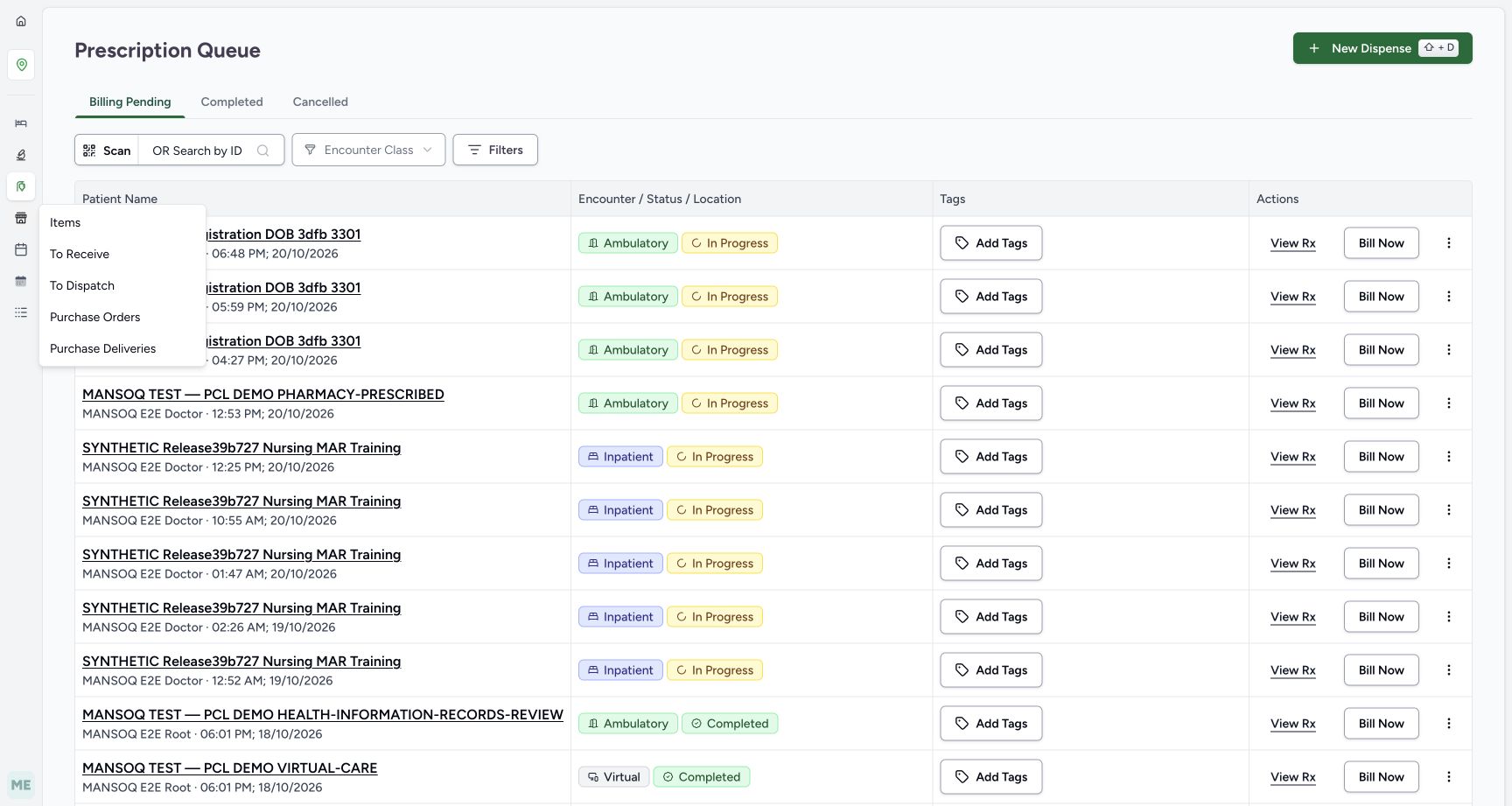 1
1Choose Items in the Inventory flyout
Capture details
Isolated synthetic software exercise at MANSOQ Demo Polyclinic/Main Pharmacy. No physical medicine, clinical treatment, payment, cash payout or external exchange is involved.
Image SHA-256 c8d6f90e25b9adfd35e2e7cfe8f2fa1d05c0d7db6d2af51e0c7f4c882223ec7f
- Choose Items: Open the inventory readback without changing stock.
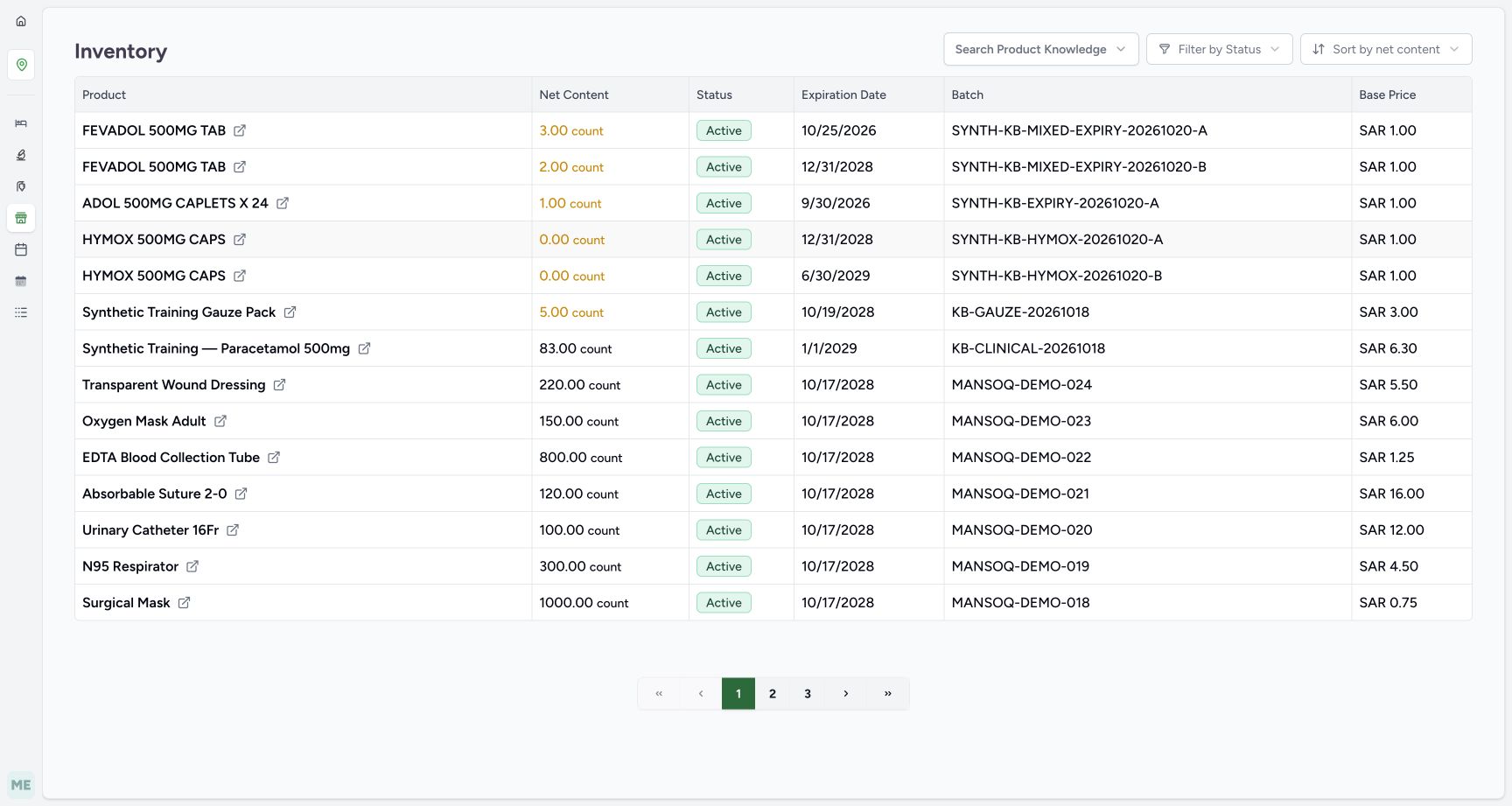 1
1Open the inventory product search
Capture details
Isolated synthetic software exercise at MANSOQ Demo Polyclinic/Main Pharmacy. No physical medicine, clinical treatment, payment, cash payout or external exchange is involved.
Image SHA-256 ee98c4bb752a482743469fda4cf3ba372d54687de6c599e763bb9ad91542e849
- Open Search Product Knowledge: Filter to the same exact Paracetamol product.
 12
12Search inventory at Root
Capture details
Isolated synthetic software exercise at MANSOQ Demo Polyclinic/Main Pharmacy. No physical medicine, clinical treatment, payment, cash payout or external exchange is involved.
Image SHA-256 5bcf6d26fe1a05751c566beb3ce85b77ba3808f1de6986b6969119a38286387d
- Verify Root search: Search the same product catalogue identity.
- Enter Synthetic Training: Find the exact Paracetamol product used in this order.
 1
1Choose the same Paracetamol inventory filter
Capture details
Isolated synthetic software exercise at MANSOQ Demo Polyclinic/Main Pharmacy. No physical medicine, clinical treatment, payment, cash payout or external exchange is involved.
Image SHA-256 ca160efc0aed66c0d0d8f96705a27f9495107c0599df82ced7d58178ed985eaa
- Choose the exact Paracetamol result: Match product code 06281086104491, then press Escape to close the picker.
 12
12Read stock after the saved preparation
Capture details
Isolated synthetic software exercise at MANSOQ Demo Polyclinic/Main Pharmacy. No physical medicine, clinical treatment, payment, cash payout or external exchange is involved.
Image SHA-256 d107711bf860a65abf1899c2f1d216c478bf9fc68d77676afa165f156d00f054
- Read stock eighty-three: The one-unit Preparation reduced the earlier eighty-four by one.
- Match the same original batch: Keep this filtered tab open for the later reload.
7. Abandon only this unpaid Preparation order
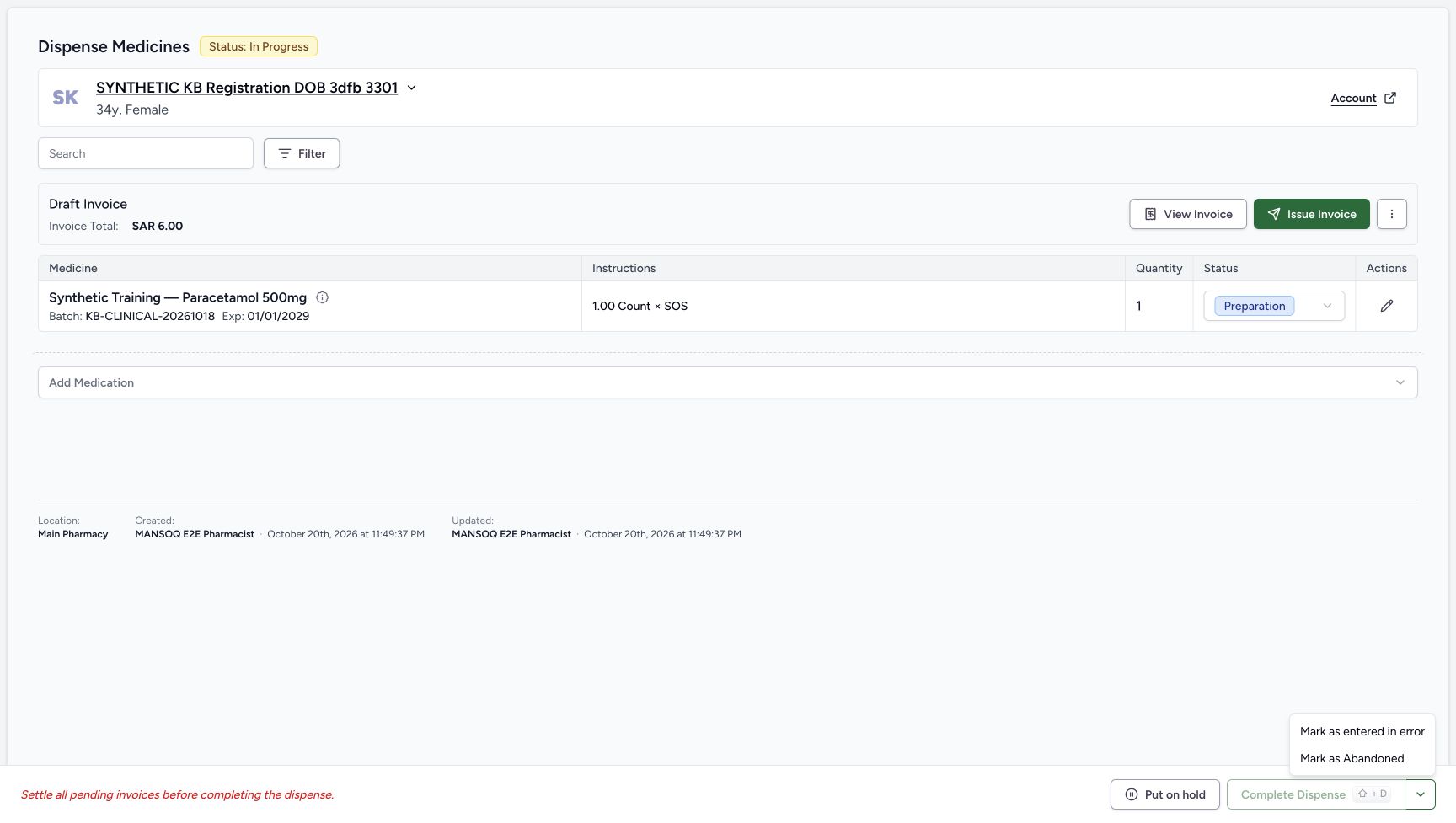
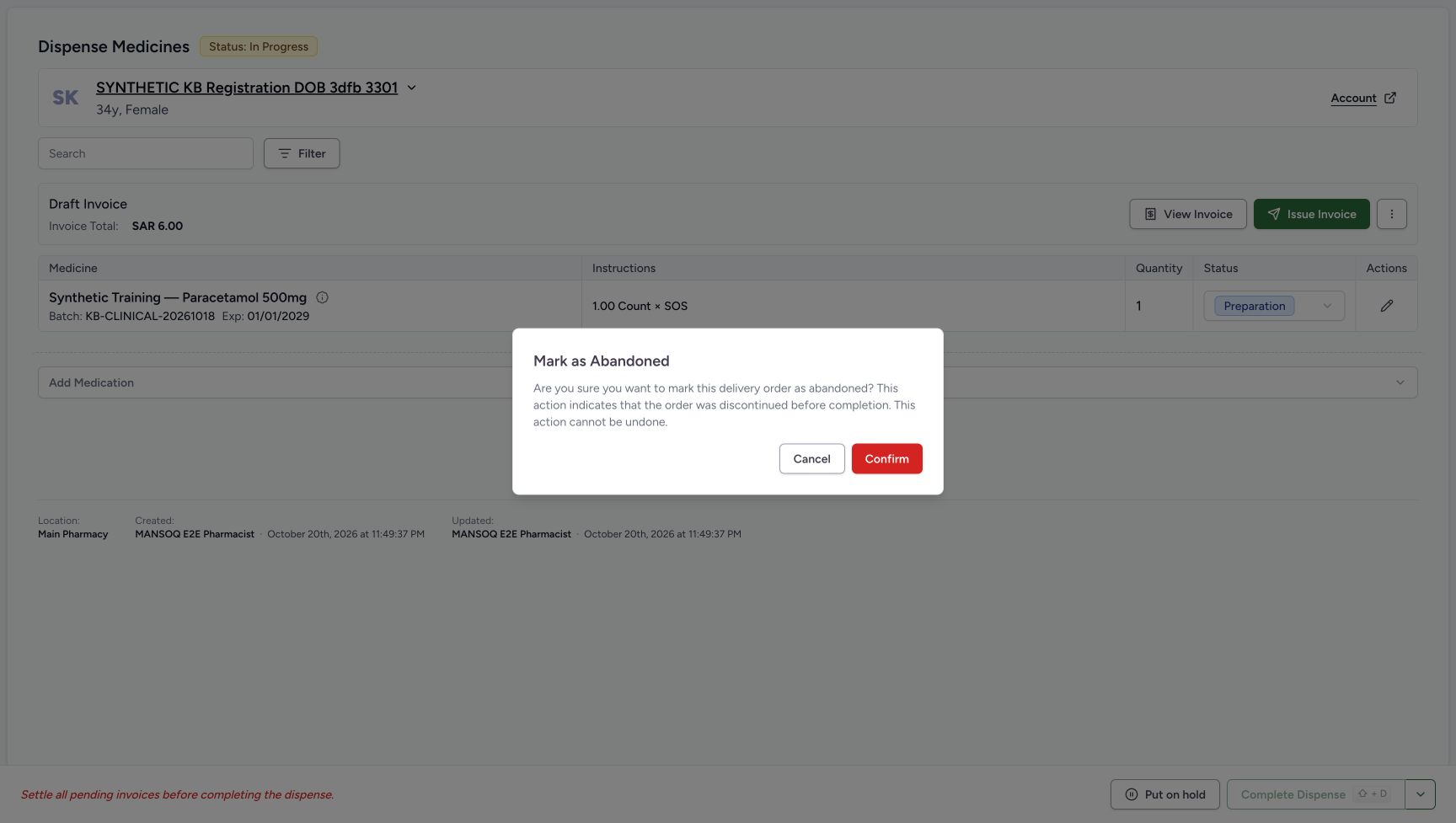
Switch back to the original saved order. Open the footer split-arrow beside Complete Dispense and choose Mark as Abandoned. Read the confirmation: the order is discontinued before completion and the action cannot be undone. Verify this is the intended unpaid order, then Confirm once. The separate entered-in-error action is not used in this exercise.
1234567Review the saved unpaid Preparation
Capture details
Isolated synthetic software exercise at MANSOQ Demo Polyclinic/Main Pharmacy. No physical medicine, clinical treatment, payment, cash payout or external exchange is involved.
Image SHA-256 35bdef7f06c5371f7f79a0ac519f6b45adc5a015c07a509b3d5177c257a3e965
- Verify order In Progress: This is the newly saved separate order.
- Verify medicine row Preparation: The unit has not been completed as a dispense.
- Match the saved batch: The full KB-CLINICAL-20261018 identity is visible.
- Verify the saved quantity is one: Keep the same single unit for cancellation.
- Read the Draft invoice total SAR 6.00: The invoice is unpaid and unissued.
- Open View Invoice: Check this new Draft before cancellation.
- Open the order status split-arrow: Use this after returning from the invoice and checking stock.
 1
1Choose the order Abandoned action
Capture details
Isolated synthetic software exercise at MANSOQ Demo Polyclinic/Main Pharmacy. No physical medicine, clinical treatment, payment, cash payout or external exchange is involved.
Image SHA-256 53118ae557d84fbdfa060ae662765d5fc586b6e5ca41793bd26bcbbdfee26be8
- Choose Mark as Abandoned: Discontinue this unpaid preparation before completion.
 12
12Confirm the order abandonment
Capture details
Isolated synthetic software exercise at MANSOQ Demo Polyclinic/Main Pharmacy. No physical medicine, clinical treatment, payment, cash payout or external exchange is involved.
Image SHA-256 c44068fd5cb6e3ed96e974539914b88f3dc2599c2e868120805b6d268fadc625
- Read the irreversible-action warning: Confirm only for the intended unpaid order.
- Confirm Mark as Abandoned once: Wait for the saved cancellation result.
8. Reload the retained cancellation and restored stock
After the save settles, reload the order normally. Verify order Abandoned, No active dispenses and one retained Cancelled Paracetamol row of quantity one. Switch to the filtered inventory tab and reload normally. Verify the same batch is back to 84 units. The unit was restored once; cancellation did not erase the retained order history.
1234Verify the saved cancellation after reload
Capture details
Isolated synthetic software exercise at MANSOQ Demo Polyclinic/Main Pharmacy. No physical medicine, clinical treatment, payment, cash payout or external exchange is involved.
Image SHA-256 aa5dd4d6e2ba310023ebfa0df2969ba27d00b1357c2dbce33c0e38ed924f26b8
- Verify order Abandoned after reload: The saved order outcome persists.
- Read No active dispenses: There are no active medications left on this order.
- Verify the medicine row is Cancelled: The original one-unit row remains in cancellation history.
- Choose View Account: This post-cancellation control opens the account in the same tab.
12Verify restored stock after reload
Capture details
Isolated synthetic software exercise at MANSOQ Demo Polyclinic/Main Pharmacy. No physical medicine, clinical treatment, payment, cash payout or external exchange is involved.
Image SHA-256 9b2370cd163830425653739a2e450478181717320ab7c388582648cfde8c7094
- Verify stock is restored to eighty-four: Cancellation has restored the single prepared unit.
- Verify the same batch identity: Match KB-CLINICAL-20261018 after reload.
9. Verify the original account credit and payments
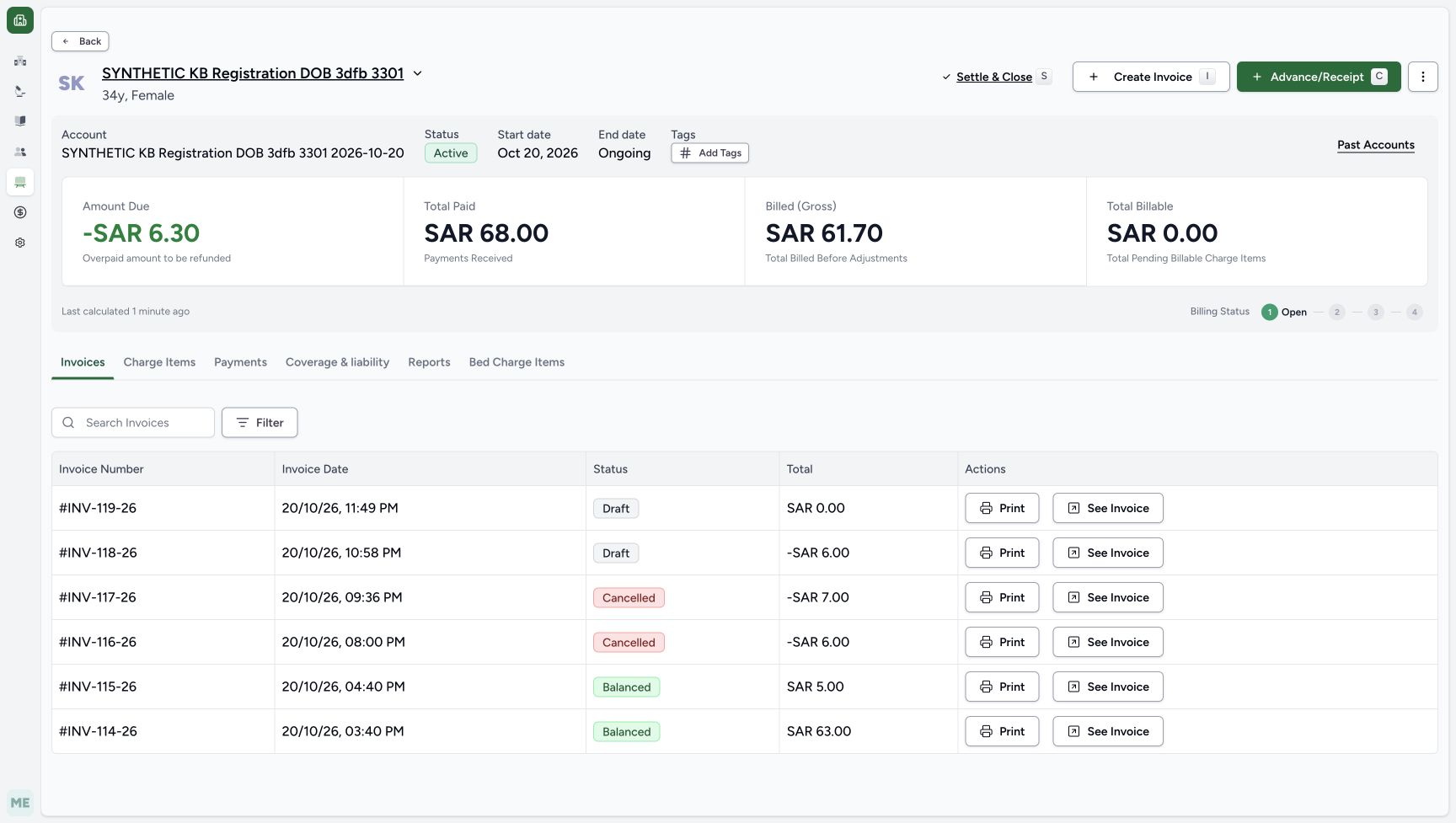
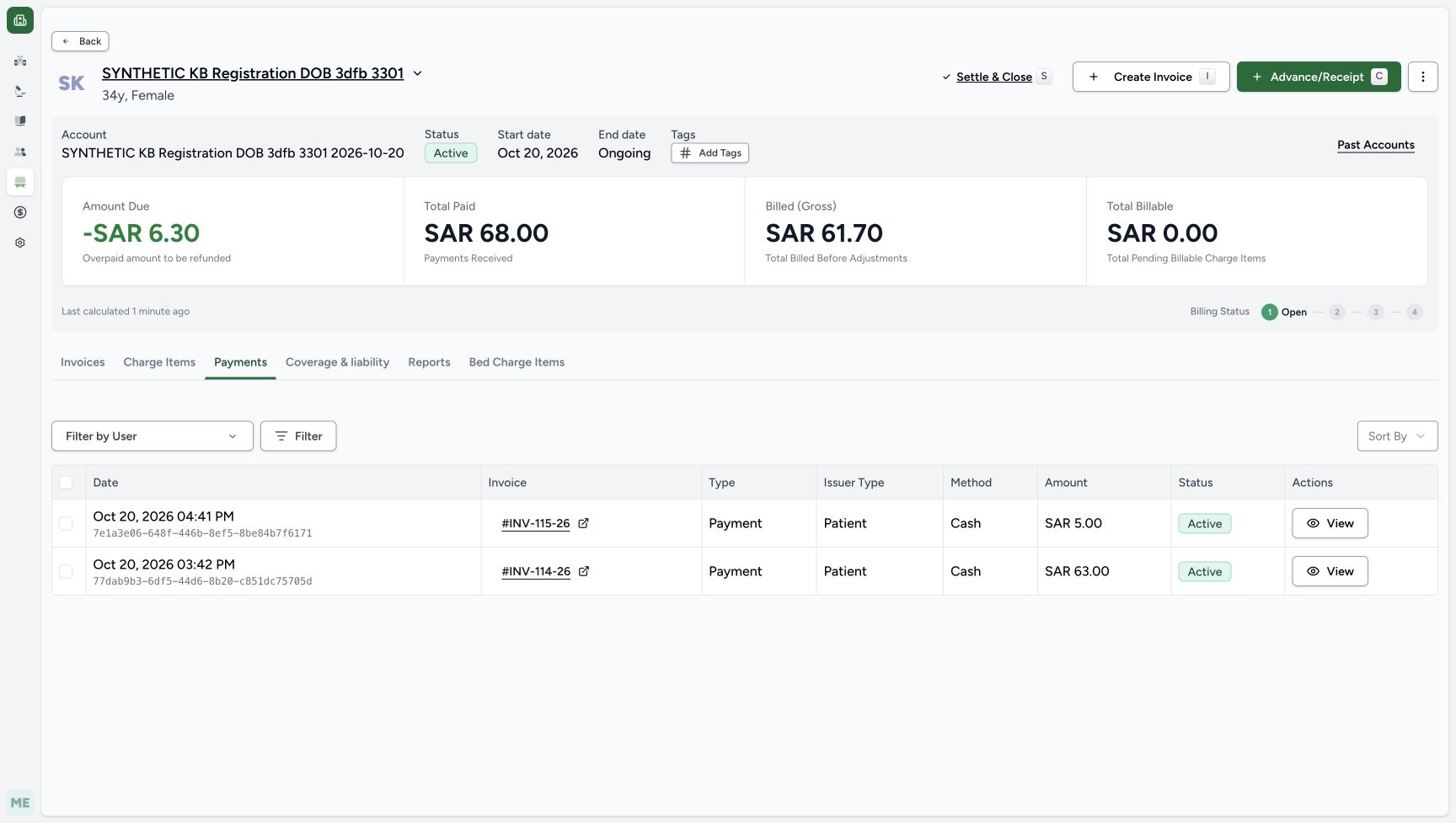
Return to the Abandoned order and choose View Account; this control opens the account in the same tab. Verify due −SAR 6.30, paid SAR 68.00 and gross SAR 61.70. INV-119-26 remains Draft at zero, while the earlier Draft credit INV-118-26 remains −SAR 6.00. Choose Payments and verify only the original active Cash entries of SAR 5.00 and SAR 63.00. No payment or cash refund is added.
1234Verify the saved cancellation after reload
Capture details
Isolated synthetic software exercise at MANSOQ Demo Polyclinic/Main Pharmacy. No physical medicine, clinical treatment, payment, cash payout or external exchange is involved.
Image SHA-256 aa5dd4d6e2ba310023ebfa0df2969ba27d00b1357c2dbce33c0e38ed924f26b8
- Verify order Abandoned after reload: The saved order outcome persists.
- Read No active dispenses: There are no active medications left on this order.
- Verify the medicine row is Cancelled: The original one-unit row remains in cancellation history.
- Choose View Account: This post-cancellation control opens the account in the same tab.
 12345678
Review the restored account and retained invoice
Capture details
Isolated synthetic software exercise at MANSOQ Demo Polyclinic/Main Pharmacy. No physical medicine, clinical treatment, payment, cash payout or external exchange is involved.
Image SHA-256 fc2ee699e4152e5804532adfe62eed18ad996b65c699a408ce33e382eb6283ee
- Read restored account due minus SAR 6.30: The existing account credit has returned.
- Verify paid SAR 68.00: The earlier paid total is unchanged.
- Read restored gross SAR 61.70: The cancelled preparation no longer adds its charge.
- Verify INV-119-26 remains Draft: Cancellation has not changed this invoice to Cancelled.
- Verify the new invoice total is zero: The cancelled charge has been removed.
- Keep the earlier Draft credit separate: INV-118-26 remains the earlier minus SAR 6.00 credit.
- Choose Payments: Read the two original cash entries.
- Open See Invoice for INV-119-26: Use this after returning to the Invoices tab.
 123
123Verify only the two original payments
Capture details
Isolated synthetic software exercise at MANSOQ Demo Polyclinic/Main Pharmacy. No physical medicine, clinical treatment, payment, cash payout or external exchange is involved.
Image SHA-256 01a14d0ce09ae3fcc7af1090c3daec4bcabc91dad26263e331929c403f0de4ff
- Verify the original SAR 5.00 cash entry: No new payment was made for the cancelled preparation.
- Verify the original SAR 63.00 cash entry: This earlier payment remains unchanged.
- Choose Invoices: Return to the invoice list, then select only INV-119-26.
10. Reopen and reload the same empty Draft invoice
Choose Invoices, then See Invoice only for INV-119-26. Reload the invoice normally. Verify it is still Draft, the Issue Date is blank, No charge items found is shown, and invoice Total, payments and balance are all zero. The account header retains its separate −SAR 6.30 credit. The same invoice is retained as an empty Draft; it has not been cancelled, issued or paid.
123Verify only the two original payments
Capture details
Isolated synthetic software exercise at MANSOQ Demo Polyclinic/Main Pharmacy. No physical medicine, clinical treatment, payment, cash payout or external exchange is involved.
Image SHA-256 01a14d0ce09ae3fcc7af1090c3daec4bcabc91dad26263e331929c403f0de4ff
- Verify the original SAR 5.00 cash entry: No new payment was made for the cancelled preparation.
- Verify the original SAR 63.00 cash entry: This earlier payment remains unchanged.
- Choose Invoices: Return to the invoice list, then select only INV-119-26.
12345678Review the restored account and retained invoice
Capture details
Isolated synthetic software exercise at MANSOQ Demo Polyclinic/Main Pharmacy. No physical medicine, clinical treatment, payment, cash payout or external exchange is involved.
Image SHA-256 fc2ee699e4152e5804532adfe62eed18ad996b65c699a408ce33e382eb6283ee
- Read restored account due minus SAR 6.30: The existing account credit has returned.
- Verify paid SAR 68.00: The earlier paid total is unchanged.
- Read restored gross SAR 61.70: The cancelled preparation no longer adds its charge.
- Verify INV-119-26 remains Draft: Cancellation has not changed this invoice to Cancelled.
- Verify the new invoice total is zero: The cancelled charge has been removed.
- Keep the earlier Draft credit separate: INV-118-26 remains the earlier minus SAR 6.00 credit.
- Choose Payments: Read the two original cash entries.
- Open See Invoice for INV-119-26: Use this after returning to the Invoices tab.
1234567Verify the same empty Draft invoice after reload
Capture details
Isolated synthetic software exercise at MANSOQ Demo Polyclinic/Main Pharmacy. No physical medicine, clinical treatment, payment, cash payout or external exchange is involved.
Image SHA-256 7ed7f366da73e845743fb89d20e80e729d4b1f0eae745e5d54e1e9888d13f9ec
- Verify the same INV-119-26 is Draft: This is the retained invoice, not a newly created invoice.
- Read account due minus SAR 6.30: The earlier credit is still separate from this zero invoice.
- Verify no charge items remain: The cancelled preparation charge is no longer reserved in this Draft.
- Verify invoice payments zero: Cancellation did not create a payment or refund.
- Verify invoice balance zero: The empty Draft has no amount to collect.
- Verify Issue Date is still blank: The invoice remains unissued.
- Read the empty invoice total zero: Normal reload retains the saved empty result.
The order, medicine row, stock and invoice have separate results
Abandoned is the order result. Its one Preparation medicine row becomes Cancelled and remains visible in history. Stock returns from 83 to 84. The cancelled line is removed from the same unissued Draft invoice, leaving it empty at zero. These readouts describe this one unpaid Preparation at the assigned pharmacy.
1234567Review the saved unpaid Preparation
Capture details
Isolated synthetic software exercise at MANSOQ Demo Polyclinic/Main Pharmacy. No physical medicine, clinical treatment, payment, cash payout or external exchange is involved.
Image SHA-256 35bdef7f06c5371f7f79a0ac519f6b45adc5a015c07a509b3d5177c257a3e965
- Verify order In Progress: This is the newly saved separate order.
- Verify medicine row Preparation: The unit has not been completed as a dispense.
- Match the saved batch: The full KB-CLINICAL-20261018 identity is visible.
- Verify the saved quantity is one: Keep the same single unit for cancellation.
- Read the Draft invoice total SAR 6.00: The invoice is unpaid and unissued.
- Open View Invoice: Check this new Draft before cancellation.
- Open the order status split-arrow: Use this after returning from the invoice and checking stock.
1234Verify the saved cancellation after reload
Capture details
Isolated synthetic software exercise at MANSOQ Demo Polyclinic/Main Pharmacy. No physical medicine, clinical treatment, payment, cash payout or external exchange is involved.
Image SHA-256 aa5dd4d6e2ba310023ebfa0df2969ba27d00b1357c2dbce33c0e38ed924f26b8
- Verify order Abandoned after reload: The saved order outcome persists.
- Read No active dispenses: There are no active medications left on this order.
- Verify the medicine row is Cancelled: The original one-unit row remains in cancellation history.
- Choose View Account: This post-cancellation control opens the account in the same tab.
12Verify restored stock after reload
Capture details
Isolated synthetic software exercise at MANSOQ Demo Polyclinic/Main Pharmacy. No physical medicine, clinical treatment, payment, cash payout or external exchange is involved.
Image SHA-256 9b2370cd163830425653739a2e450478181717320ab7c388582648cfde8c7094
- Verify stock is restored to eighty-four: Cancellation has restored the single prepared unit.
- Verify the same batch identity: Match KB-CLINICAL-20261018 after reload.
1234567Verify the same empty Draft invoice after reload
Capture details
Isolated synthetic software exercise at MANSOQ Demo Polyclinic/Main Pharmacy. No physical medicine, clinical treatment, payment, cash payout or external exchange is involved.
Image SHA-256 7ed7f366da73e845743fb89d20e80e729d4b1f0eae745e5d54e1e9888d13f9ec
- Verify the same INV-119-26 is Draft: This is the retained invoice, not a newly created invoice.
- Read account due minus SAR 6.30: The earlier credit is still separate from this zero invoice.
- Verify no charge items remain: The cancelled preparation charge is no longer reserved in this Draft.
- Verify invoice payments zero: Cancellation did not create a payment or refund.
- Verify invoice balance zero: The empty Draft has no amount to collect.
- Verify Issue Date is still blank: The invoice remains unissued.
- Read the empty invoice total zero: Normal reload retains the saved empty result.
An account total is not an invoice payment
Before abandonment, account due zero coexists with a new Draft invoice balance of SAR 6.00 and payments zero. After abandonment, the original account credit of −SAR 6.30 returns, while the original paid SAR 68.00 and two cash entries remain. Read the invoice and account fields separately. The observed SAR 6.30 line/base and SAR 6.00 invoice total are separate rounded readouts.
12345678Verify the new invoice is unpaid
Capture details
Isolated synthetic software exercise at MANSOQ Demo Polyclinic/Main Pharmacy. No physical medicine, clinical treatment, payment, cash payout or external exchange is involved.
Image SHA-256 0ec4cbae8236f073a70b6c106c3ff29fac21c40a4dae8218332aa4dbf619973d
- Verify INV-119-26 is Draft: Match this new invoice before cancelling its preparation.
- Verify the Issue Date is blank: This exercise does not issue the invoice.
- Read the separate account due zero: This global account field does not mean the Draft invoice is paid.
- Verify invoice payments zero: No payment has been recorded for this new invoice.
- Read invoice balance SAR 6.00: The new Draft remains unpaid.
- Read base amount SAR 6.30: Keep the line/base amount separate from the rounded total.
- Read displayed total SAR 6.00: This is the current rounded invoice total.
- Choose the invoice page Back button: Return directly to the saved preparation order.
12345678Review the restored account and retained invoice
Capture details
Isolated synthetic software exercise at MANSOQ Demo Polyclinic/Main Pharmacy. No physical medicine, clinical treatment, payment, cash payout or external exchange is involved.
Image SHA-256 fc2ee699e4152e5804532adfe62eed18ad996b65c699a408ce33e382eb6283ee
- Read restored account due minus SAR 6.30: The existing account credit has returned.
- Verify paid SAR 68.00: The earlier paid total is unchanged.
- Read restored gross SAR 61.70: The cancelled preparation no longer adds its charge.
- Verify INV-119-26 remains Draft: Cancellation has not changed this invoice to Cancelled.
- Verify the new invoice total is zero: The cancelled charge has been removed.
- Keep the earlier Draft credit separate: INV-118-26 remains the earlier minus SAR 6.00 credit.
- Choose Payments: Read the two original cash entries.
- Open See Invoice for INV-119-26: Use this after returning to the Invoices tab.
123Verify only the two original payments
Capture details
Isolated synthetic software exercise at MANSOQ Demo Polyclinic/Main Pharmacy. No physical medicine, clinical treatment, payment, cash payout or external exchange is involved.
Image SHA-256 01a14d0ce09ae3fcc7af1090c3daec4bcabc91dad26263e331929c403f0de4ff
- Verify the original SAR 5.00 cash entry: No new payment was made for the cancelled preparation.
- Verify the original SAR 63.00 cash entry: This earlier payment remains unchanged.
- Choose Invoices: Return to the invoice list, then select only INV-119-26.
1234567Verify the same empty Draft invoice after reload
Capture details
Isolated synthetic software exercise at MANSOQ Demo Polyclinic/Main Pharmacy. No physical medicine, clinical treatment, payment, cash payout or external exchange is involved.
Image SHA-256 7ed7f366da73e845743fb89d20e80e729d4b1f0eae745e5d54e1e9888d13f9ec
- Verify the same INV-119-26 is Draft: This is the retained invoice, not a newly created invoice.
- Read account due minus SAR 6.30: The earlier credit is still separate from this zero invoice.
- Verify no charge items remain: The cancelled preparation charge is no longer reserved in this Draft.
- Verify invoice payments zero: Cancellation did not create a payment or refund.
- Verify invoice balance zero: The empty Draft has no amount to collect.
- Verify Issue Date is still blank: The invoice remains unissued.
- Read the empty invoice total zero: Normal reload retains the saved empty result.
Troubleshooting
The patient, product, batch or quantity does not match
Stop before Bill Selected. Recheck the existing patient and encounter, exact product 06281086104491, full batch KB-CLINICAL-20261018 and quantity one. Use Change or Cancel while selecting a patient rather than continuing with the wrong record. A shortened closed lot label is not enough to verify the complete batch; open the list.
1234Verify the selected patient before proceeding
Capture details
Isolated synthetic software exercise at MANSOQ Demo Polyclinic/Main Pharmacy. No physical medicine, clinical treatment, payment, cash payout or external exchange is involved.
Image SHA-256 333b0b0b9b18c0dba842382ce705b07670acbf8fca5170f0fd3012d8b4772dd6
- Verify the selected patient: Check the synthetic patient identity before proceeding.
- Choose Proceed to Dispense: Continue only with the intended existing patient.
- Choose Change if the patient is wrong: Return to patient selection before proceeding.
- Choose Cancel to stop patient selection: Leave this selection without proceeding with the wrong patient.
123Choose the matching active encounter
Capture details
Isolated synthetic software exercise at MANSOQ Demo Polyclinic/Main Pharmacy. No physical medicine, clinical treatment, payment, cash payout or external exchange is involved.
Image SHA-256 44b479a7d3efbd617d57d21692b6293e1f55d0e2254cdce7c9e63490447650cc
- Verify the patient identity: Keep this existing synthetic patient throughout the exercise.
- Match the October twentieth encounter: Use the active Ambulatory encounter at 03:19 PM.
- Choose Dispense Medicine on this encounter: Use the upper matching encounter card.
1Choose the exact Paracetamol product
Capture details
Isolated synthetic software exercise at MANSOQ Demo Polyclinic/Main Pharmacy. No physical medicine, clinical treatment, payment, cash payout or external exchange is involved.
Image SHA-256 509d15f65bad7e9c11144c0e8e360d14217d73a8e3efd9e4d91aaebaec6629b8
- Choose Synthetic Training Paracetamol: Match product code 06281086104491, not the other synthetic results.
123456Review the one-unit unsaved medication
Capture details
Isolated synthetic software exercise at MANSOQ Demo Polyclinic/Main Pharmacy. No physical medicine, clinical treatment, payment, cash payout or external exchange is involved.
Image SHA-256 41ffcfe8394167fedb6dd150e46aee93e2f3a9fb6c0c4ba44d703e914c80b1a5
- Verify the selected product: Use Synthetic Training — Paracetamol 500mg.
- Verify dosage one count: This is a fictional software example, not clinical advice.
- Verify SOS frequency: Keep the example instructions shown in this exercise.
- Open the selected lot list: Read the full batch identity and available quantity.
- Verify selected quantity one: Only one unit will be prepared.
- Choose Add Medication after closing the lot list: Press Escape to close the list, then add this reviewed unsaved line.
1234Verify the full batch and available stock
Capture details
Isolated synthetic software exercise at MANSOQ Demo Polyclinic/Main Pharmacy. No physical medicine, clinical treatment, payment, cash payout or external exchange is involved.
Image SHA-256 babbca6574b701fdaabd6cd44867affc4c92cf929a8d61b47abd8a907e8ef138
- Match the full batch identity: Use KB-CLINICAL-20261018; the closed label is shortened.
- Read unit price SAR 6.30: This is the price shown for the selected batch.
- Read eighty-four available: The one-unit preparation starts from this available stock.
- Verify expiry January 2029: Keep the exact selected batch.
12345Review one unsaved line before billing
Capture details
Isolated synthetic software exercise at MANSOQ Demo Polyclinic/Main Pharmacy. No physical medicine, clinical treatment, payment, cash payout or external exchange is involved.
Image SHA-256 4c59dde89a377c0f18fa2584f7e8a1052f14cf899f251ec8ca651a3bf637f523
- Verify the one line is selected: Only the separate Other Items line is included.
- Verify quantity one: Check the unsaved quantity before billing.
- Read line price SAR 6.30: The estimate is separate from the rounded invoice readout.
- Read estimated total SAR 6.30: Add Medication has not yet created the saved preparation.
- Choose Bill Selected once: Wait for the saved order before taking another action.
A readback still shows the earlier stock or account amount
Use the saved order and normal reloads of the filtered stock tab, account and matching INV-119-26. Expect Abandoned with one Cancelled row, stock 84, restored due −SAR 6.30, unchanged paid SAR 68.00 and the same empty Draft invoice at zero. Do not repeat billing or record a payment to refresh a readback. An unrelated Software Update notice may appear; it is not the cancellation result.
12Verify the existing Pharmacist account
Capture details
Isolated synthetic software exercise at MANSOQ Demo Polyclinic/Main Pharmacy. No physical medicine, clinical treatment, payment, cash payout or external exchange is involved.
Image SHA-256 dcc91fa2b1fca381a0bc10dfd9ca7c1b9044d8bb5c63de562e0f8ce3621b8825
- Verify the Pharmacist account: Use the existing authorised Pharmacist for Main Pharmacy.
- Read the account username: The exercise uses qa-pharmacist.
1234Verify the saved cancellation after reload
Capture details
Isolated synthetic software exercise at MANSOQ Demo Polyclinic/Main Pharmacy. No physical medicine, clinical treatment, payment, cash payout or external exchange is involved.
Image SHA-256 aa5dd4d6e2ba310023ebfa0df2969ba27d00b1357c2dbce33c0e38ed924f26b8
- Verify order Abandoned after reload: The saved order outcome persists.
- Read No active dispenses: There are no active medications left on this order.
- Verify the medicine row is Cancelled: The original one-unit row remains in cancellation history.
- Choose View Account: This post-cancellation control opens the account in the same tab.
12Verify restored stock after reload
Capture details
Isolated synthetic software exercise at MANSOQ Demo Polyclinic/Main Pharmacy. No physical medicine, clinical treatment, payment, cash payout or external exchange is involved.
Image SHA-256 9b2370cd163830425653739a2e450478181717320ab7c388582648cfde8c7094
- Verify stock is restored to eighty-four: Cancellation has restored the single prepared unit.
- Verify the same batch identity: Match KB-CLINICAL-20261018 after reload.
12345678Review the restored account and retained invoice
Capture details
Isolated synthetic software exercise at MANSOQ Demo Polyclinic/Main Pharmacy. No physical medicine, clinical treatment, payment, cash payout or external exchange is involved.
Image SHA-256 fc2ee699e4152e5804532adfe62eed18ad996b65c699a408ce33e382eb6283ee
- Read restored account due minus SAR 6.30: The existing account credit has returned.
- Verify paid SAR 68.00: The earlier paid total is unchanged.
- Read restored gross SAR 61.70: The cancelled preparation no longer adds its charge.
- Verify INV-119-26 remains Draft: Cancellation has not changed this invoice to Cancelled.
- Verify the new invoice total is zero: The cancelled charge has been removed.
- Keep the earlier Draft credit separate: INV-118-26 remains the earlier minus SAR 6.00 credit.
- Choose Payments: Read the two original cash entries.
- Open See Invoice for INV-119-26: Use this after returning to the Invoices tab.
123Verify only the two original payments
Capture details
Isolated synthetic software exercise at MANSOQ Demo Polyclinic/Main Pharmacy. No physical medicine, clinical treatment, payment, cash payout or external exchange is involved.
Image SHA-256 01a14d0ce09ae3fcc7af1090c3daec4bcabc91dad26263e331929c403f0de4ff
- Verify the original SAR 5.00 cash entry: No new payment was made for the cancelled preparation.
- Verify the original SAR 63.00 cash entry: This earlier payment remains unchanged.
- Choose Invoices: Return to the invoice list, then select only INV-119-26.
1234567Verify the same empty Draft invoice after reload
Capture details
Isolated synthetic software exercise at MANSOQ Demo Polyclinic/Main Pharmacy. No physical medicine, clinical treatment, payment, cash payout or external exchange is involved.
Image SHA-256 7ed7f366da73e845743fb89d20e80e729d4b1f0eae745e5d54e1e9888d13f9ec
- Verify the same INV-119-26 is Draft: This is the retained invoice, not a newly created invoice.
- Read account due minus SAR 6.30: The earlier credit is still separate from this zero invoice.
- Verify no charge items remain: The cancelled preparation charge is no longer reserved in this Draft.
- Verify invoice payments zero: Cancellation did not create a payment or refund.
- Verify invoice balance zero: The empty Draft has no amount to collect.
- Verify Issue Date is still blank: The invoice remains unissued.
- Read the empty invoice total zero: Normal reload retains the saved empty result.
Source evidence
Every citation uses this exact committed version. The private source repository requires access.
- repositories/platform/mansoq-core/mansoq/emr/api/viewsets/inventory/dispense_order.py:41 ·
b946bd3d7ff6478c4546651c6d8b4a03bc342166Source file checksum
9cb9d980744a3ba649b1df233821b76ffe70a75e66996170d969bdd50595f87f - repositories/platform/mansoq-core/mansoq/emr/resources/account/sync_items.py:27 ·
b946bd3d7ff6478c4546651c6d8b4a03bc342166Source file checksum
935300e4d8c4228999cfeccf85ae483ee808f81054d7127dcfec1638ca7145be - repositories/platform/mansoq-core/mansoq/emr/resources/charge_item/handle_charge_item_cancel.py:8 ·
b946bd3d7ff6478c4546651c6d8b4a03bc342166Source file checksum
c01ac78aa61eda84f61972a76b067e261174c13e13155ea051e00d3c71856965 - repositories/platform/mansoq-core/mansoq/emr/resources/inventory/inventory_item/sync_inventory_item.py:74 ·
b946bd3d7ff6478c4546651c6d8b4a03bc342166Source file checksum
a6f8395ab8059b937700d212bbbcce46c1fc633848c38026c4c8ee9bc2e4c573 - repositories/platform/mansoq-core/mansoq/emr/resources/invoice/sync_items.py:47 ·
b946bd3d7ff6478c4546651c6d8b4a03bc342166Source file checksum
e232d244e2f09171c7cf76ffebd6da04bd62a6f9353de709224a08c0fde8cff3 - repositories/platform/mansoq-web/src/pages/Facility/billing/invoice/InvoiceShow.tsx:371 ·
b946bd3d7ff6478c4546651c6d8b4a03bc342166Source file checksum
9068995fbe413fe3e14031d9c832943cc14d9188a5f72be91d3c16baa53fc6ff - repositories/platform/mansoq-web/src/pages/Facility/billing/invoice/InvoicesData.tsx:253 ·
b946bd3d7ff6478c4546651c6d8b4a03bc342166Source file checksum
72c693044793da37720daa41d31d9f82dcfe7d5aa417fed2a973b78334bd0925 - repositories/platform/mansoq-web/src/pages/Facility/services/pharmacy/DispenseOrderView.tsx:285 ·
b946bd3d7ff6478c4546651c6d8b4a03bc342166Source file checksum
59bebd01a2422d3b62d5e57b0f3a9211d5eb03ddd94f81704e3dbecd47cd197d - repositories/platform/mansoq-web/src/pages/Facility/services/pharmacy/billMedications/modes/useNewDispenseMode.ts:17 ·
b946bd3d7ff6478c4546651c6d8b4a03bc342166Source file checksum
d6265b72f0885e44fa94c88ac7b8053d715c4aea310a9bb8c61c2ff636884545 - repositories/platform/mansoq-web/src/pages/Facility/services/pharmacy/billMedications/utils/useBillMedications.ts:108 ·
b946bd3d7ff6478c4546651c6d8b4a03bc342166Source file checksum
ac95fb2bf082bbb0e911754db978a5c4be73078def98c944d634db2713810b8d - repositories/platform/mansoq-web/src/pages/Facility/services/pharmacy/components/DispenseOrderViewFooter.tsx:104 ·
b946bd3d7ff6478c4546651c6d8b4a03bc342166Source file checksum
9ddc555df83d78afd04ed0e339630d6e67ccd52a1545d5103a835d8633d0acd6 - repositories/platform/mansoq-web/src/pages/Patient/PatientHome.tsx:95 ·
b946bd3d7ff6478c4546651c6d8b4a03bc342166Source file checksum
6da895751c6b651d03a005224258b61fb3dea2b443333783a0939295eb3305e6