 MANSOQ
 Doctor assessment · VERSION ba551c1d
Update diagnosis status and understand history filters
Review duplicate prevention, update one saved diagnosis from Active/Provisional to Resolved/Confirmed, then distinguish retained storage from filtered summary and history on exact ba551c1d.
Doctor
 12
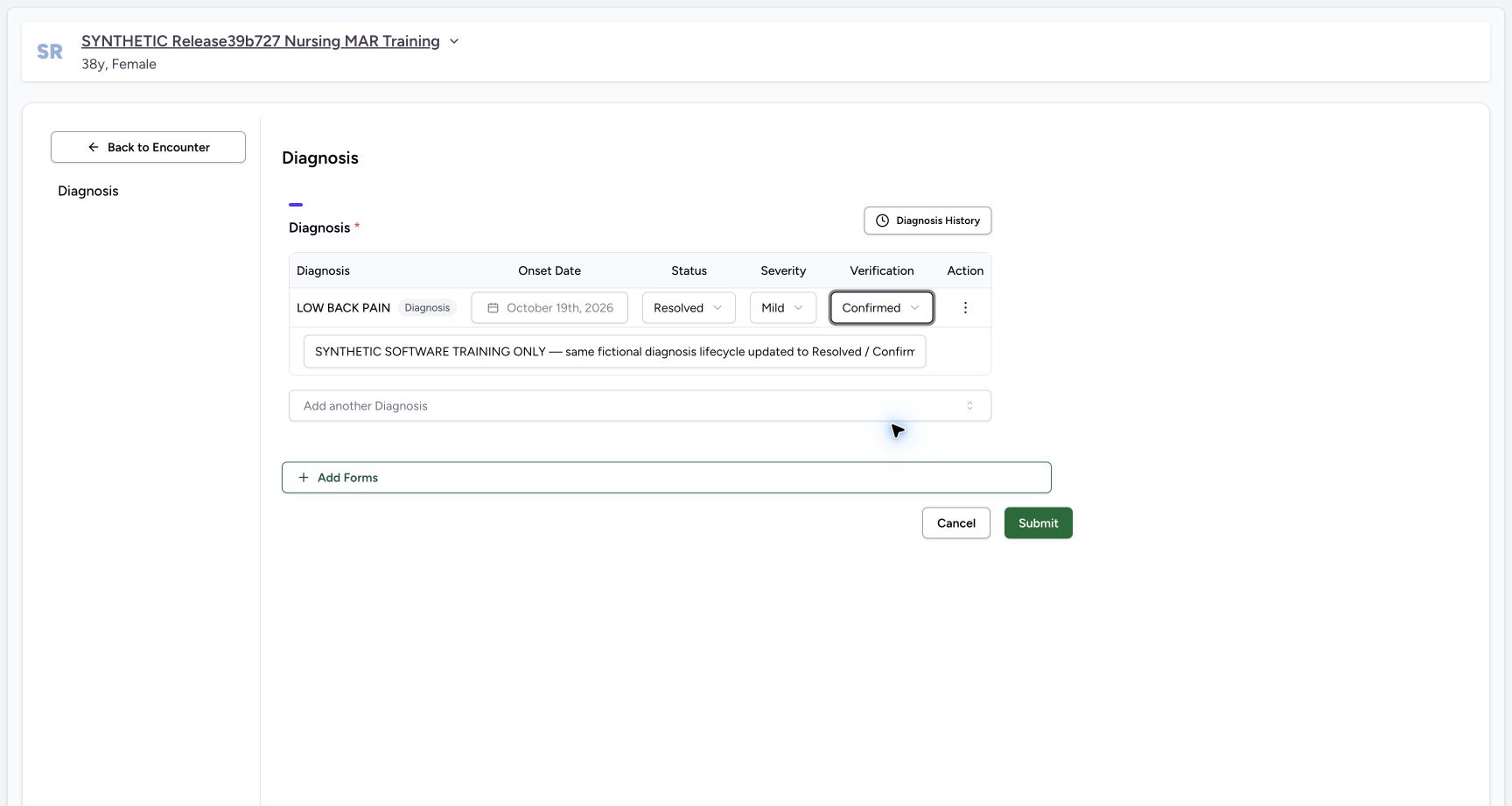
12Review a diagnosis lifecycle update
Capture details
Exact committed ba551c1d isolated synthetic clone, ordinary existing Doctor account, fictional Polyclinic inpatient encounter. The patient retains an earlier release name; actual captured source is ba551c1d. All examples are software training only, not real symptoms, diagnosis, treatment or clinical advice. Submitting updates the same condition; it should not create a second record. This changes clinical and verification states separately while preserving coding/onset.
Image SHA-256 5e411b4620c05cb29c7a0f7ed8275c4c30c1d968b50c9b40c816592c87e8353a
- Clinical status: Resolved is the clinical lifecycle value in this fictional example.
- Submit update: Save the reviewed same-record update once.
 12
12Resolved diagnosis remains in the selected encounter editor
Capture details
Exact committed ba551c1d isolated synthetic clone, ordinary existing Doctor account, fictional Polyclinic inpatient encounter. The patient retains an earlier release name; actual captured source is ba551c1d. All examples are software training only, not real symptoms, diagnosis, treatment or clinical advice. Normal reads verified the same saved UUID and original code/onset. This editor is encounter-specific and retrieves all current conditions, including non-active states.
Image SHA-256 97ad4b024174c63156d2324415e8e0f716fe2313a39008400241a1e5654e2a3f
- Retained resolved record: The condition still exists with its saved clinical lifecycle value.
- Diagnosis History selector: This selector uses a different query from the separate Past Diagnoses timeline. Review only settled current results; a same-session cached-row limitation is illustrated separately.
10 of 10 content blocks have reviewed image alignment. Missing overview or prerequisite images remain open.
Before you begin
- Use your existing authorized Doctor account and confirm the intended patient, selected encounter, facility and ongoing status. This observed account is qa-doctor; no permission or membership is added.
 1
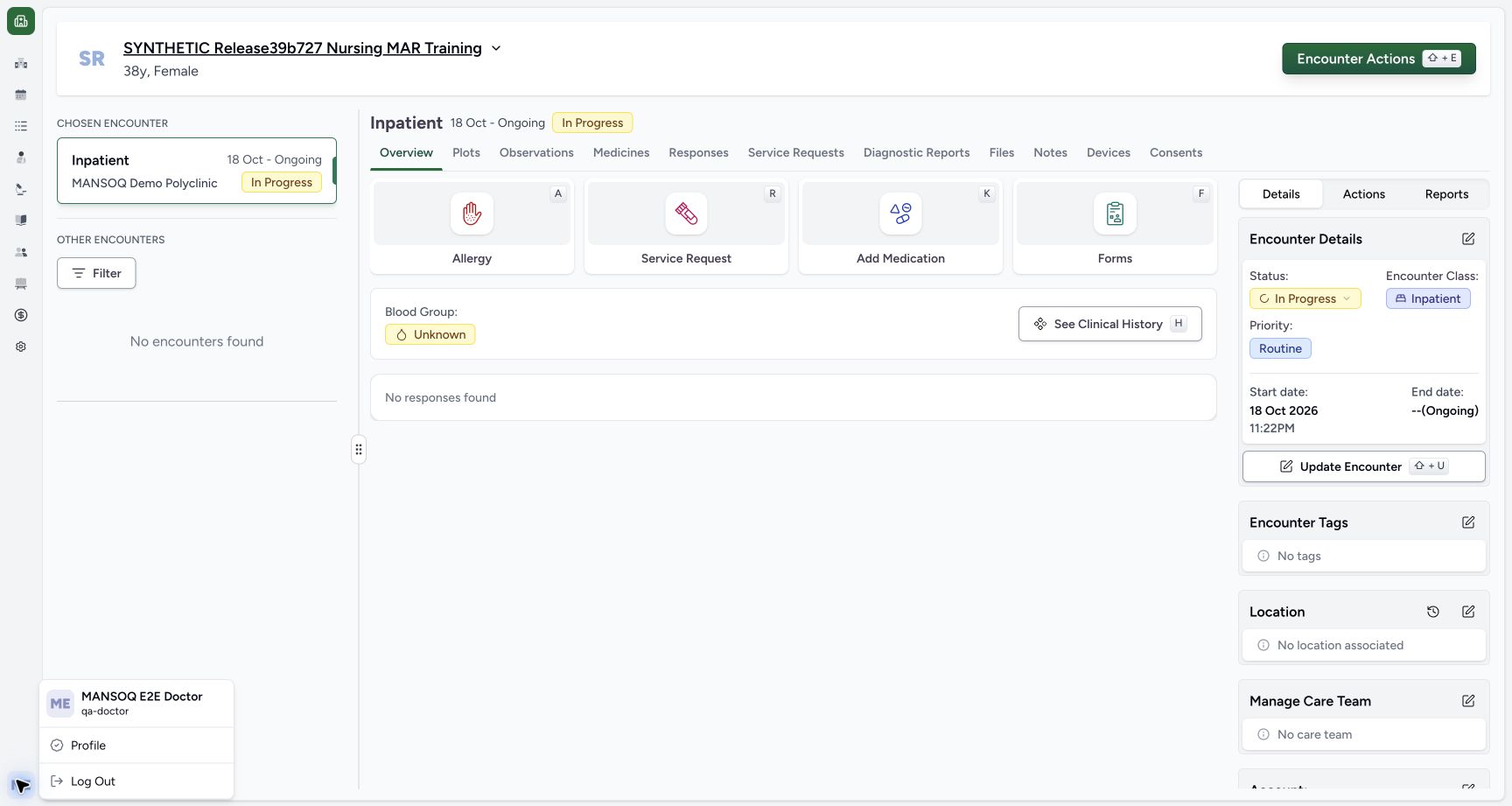
1Recorded release ba551c1d · 2026-10-19T00:03:34.348Z · 1728 × 921 Existing Doctor identity in the selected synthetic encounter
Capture details
Exact committed ba551c1d isolated synthetic clone, ordinary existing Doctor account, fictional Polyclinic inpatient encounter. The patient retains an earlier release name; actual captured source is ba551c1d. All examples are software training only, not real symptoms, diagnosis, treatment or clinical advice. Ordinary existing qa-doctor account. Medication and Nutrition events/requests are preserved; this branch concerns assessment documentation only.
Image SHA-256
f58ee93eda7e76a2bb930fb2508da3a97513acdfd479391e115bc991dd188f80- Doctor identity: Immediately right of the account avatar, the menu identifies MANSOQ E2E Doctor and qa-doctor. Confirm the authorized operator before documenting.
 12
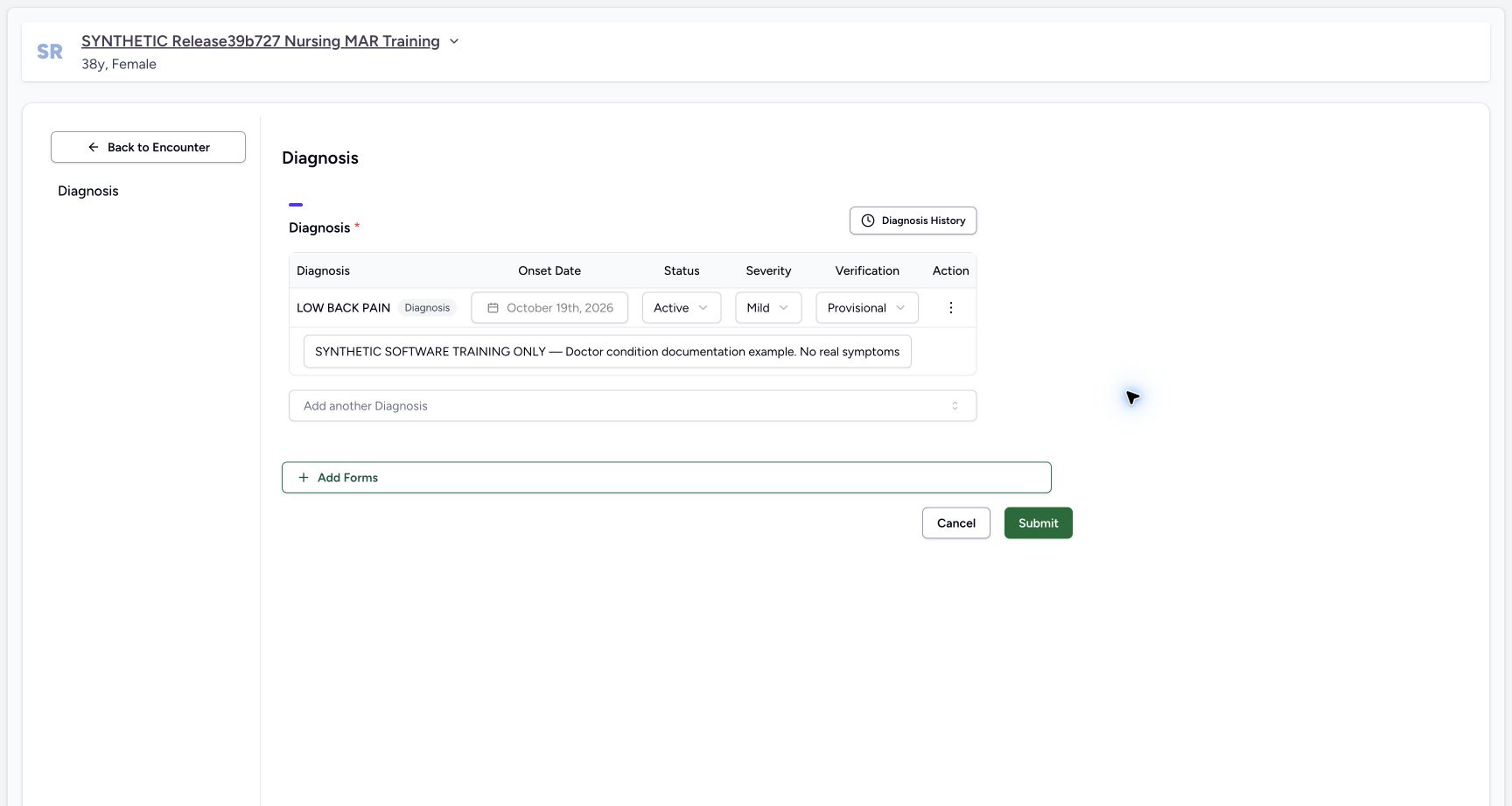
12Recorded release ba551c1d · 2026-10-19T00:06:19.428Z · 1728 × 921 Existing diagnosis keeps its saved onset
Capture details
Exact committed ba551c1d isolated synthetic clone, ordinary existing Doctor account, fictional Polyclinic inpatient encounter. The patient retains an earlier release name; actual captured source is ba551c1d. All examples are software training only, not real symptoms, diagnosis, treatment or clinical advice. The row has a stored UUID; onset is disabled by the actual form. Clinical Status, Severity, Verification and optional Notes remain editable for this authorized Doctor.
Image SHA-256
c900d5621e93c8ebf8d905532395b54d62d8a721070618101370ecf5e6886acf- Locked saved onset: This disabled date belongs to the saved condition. A new draft has a different editable onset control.
- Additional diagnosis: Additional coding must represent a deliberate separate condition; choosing an existing non-error code is refused.
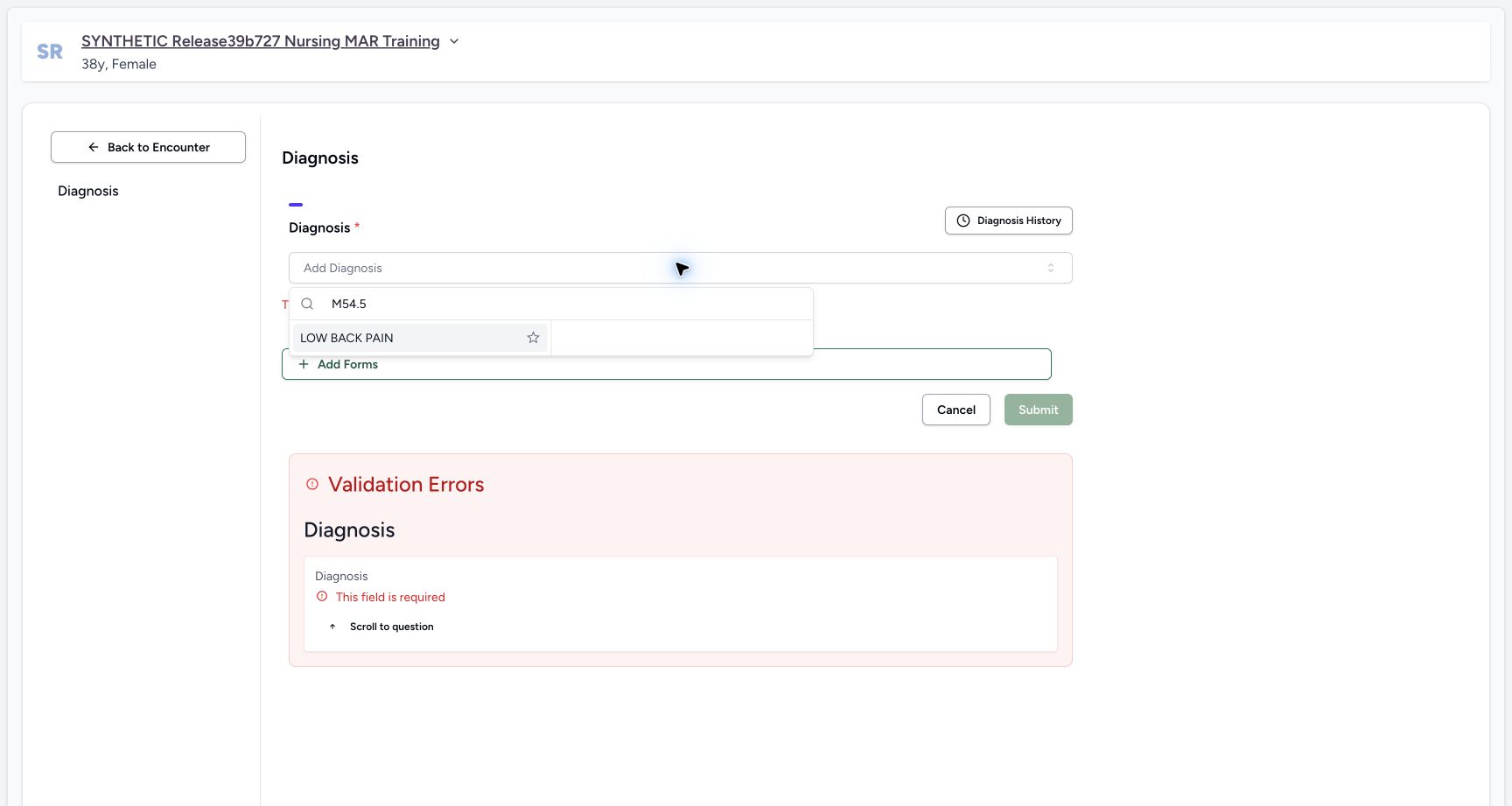
- All records here are fictional software training. LOW BACK PAIN is an actually returned installed ICD-10-AM terminology choice, M54.5. The example does not establish clinical findings, coding suitability, treatment or a medical decision.
 1
1Recorded release ba551c1d · 2026-10-19T00:04:35.783Z · 1728 × 921 Select an installed diagnosis terminology result
Capture details
Exact committed ba551c1d isolated synthetic clone, ordinary existing Doctor account, fictional Polyclinic inpatient encounter. The patient retains an earlier release name; actual captured source is ba551c1d. All examples are software training only, not real symptoms, diagnosis, treatment or clinical advice. Read-only normal terminology POST confirmed code M54.5, system http://hl7.org/fhir/sid/icd-10-am. No fabricated official code or new terminology installation is used. This fictional example is not a clinical diagnosis recommendation.
Image SHA-256
5902e4339fa9643c10a4250fe034f89431799a75d7018cbb8facd827c53e58ca- Installed result: Select the actually returned LOW BACK PAIN result. Search text alone does not save a coded diagnosis.
12Recorded release ba551c1d · 2026-10-19T00:06:57.586Z · 1728 × 921 Review a diagnosis lifecycle update
Capture details
Exact committed ba551c1d isolated synthetic clone, ordinary existing Doctor account, fictional Polyclinic inpatient encounter. The patient retains an earlier release name; actual captured source is ba551c1d. All examples are software training only, not real symptoms, diagnosis, treatment or clinical advice. Submitting updates the same condition; it should not create a second record. This changes clinical and verification states separately while preserving coding/onset.
Image SHA-256
5e411b4620c05cb29c7a0f7ed8275c4c30c1d968b50c9b40c816592c87e8353a- Clinical status: Resolved is the clinical lifecycle value in this fictional example.
- Submit update: Save the reviewed same-record update once.
1. Reopen the saved diagnosis
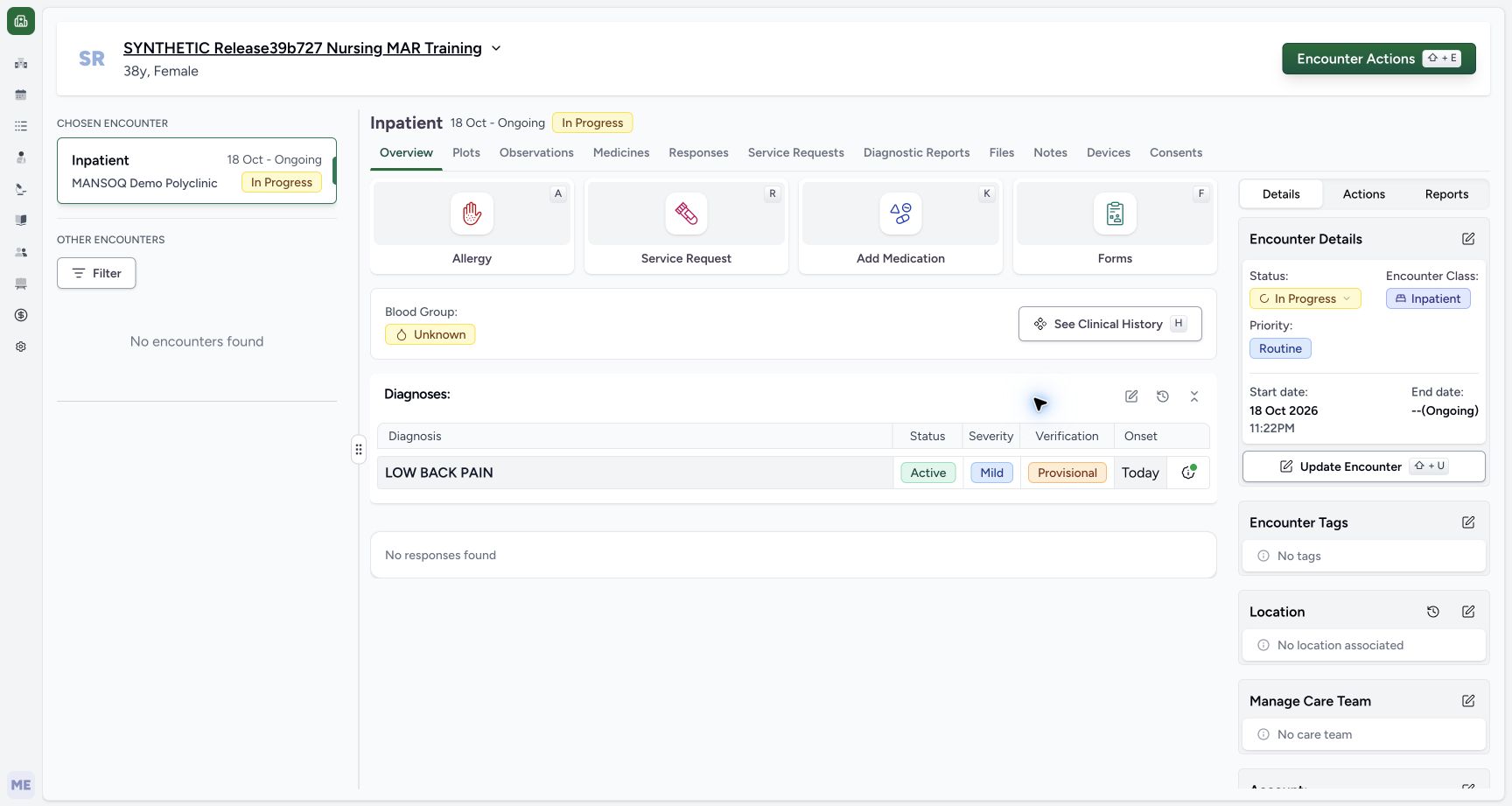
From the diagnosis summary edit icon, or Encounter Actions → Add Diagnosis, reopen the selected encounter Diagnosis editor. The existing condition retains its saved code, note, Mild severity and Provisional verification. Its onset is disabled because it already has a stored record identity. This is an update to an existing condition, not a new blank row.
 12
12Saved Doctor diagnosis in the encounter summary
Capture details
Exact committed ba551c1d isolated synthetic clone, ordinary existing Doctor account, fictional Polyclinic inpatient encounter. The patient retains an earlier release name; actual captured source is ba551c1d. All examples are software training only, not real symptoms, diagnosis, treatment or clinical advice. Ordinary Doctor and Nurse API reads independently verified one new condition UUID 99980e57… in this encounter with qa-doctor creator/updater. All14 administrations and 4 complete requests were equal to preflight, excluding only nested user last_login.
Image SHA-256 03363ca8801d995fd049d103c01420982e90073198d8083cb726500d1ac47282
- Saved diagnosis: The encounter summary displays the persisted coded condition and separate status, severity and verification fields.
- Diagnosis history: The clock icon beside the Diagnoses heading opens patient-level diagnosis history.
12Existing diagnosis keeps its saved onset
Capture details
Exact committed ba551c1d isolated synthetic clone, ordinary existing Doctor account, fictional Polyclinic inpatient encounter. The patient retains an earlier release name; actual captured source is ba551c1d. All examples are software training only, not real symptoms, diagnosis, treatment or clinical advice. The row has a stored UUID; onset is disabled by the actual form. Clinical Status, Severity, Verification and optional Notes remain editable for this authorized Doctor.
Image SHA-256 c900d5621e93c8ebf8d905532395b54d62d8a721070618101370ecf5e6886acf
- Locked saved onset: This disabled date belongs to the saved condition. A new draft has a different editable onset control.
- Additional diagnosis: Additional coding must represent a deliberate separate condition; choosing an existing non-error code is refused.
2. Recognize duplicate prevention
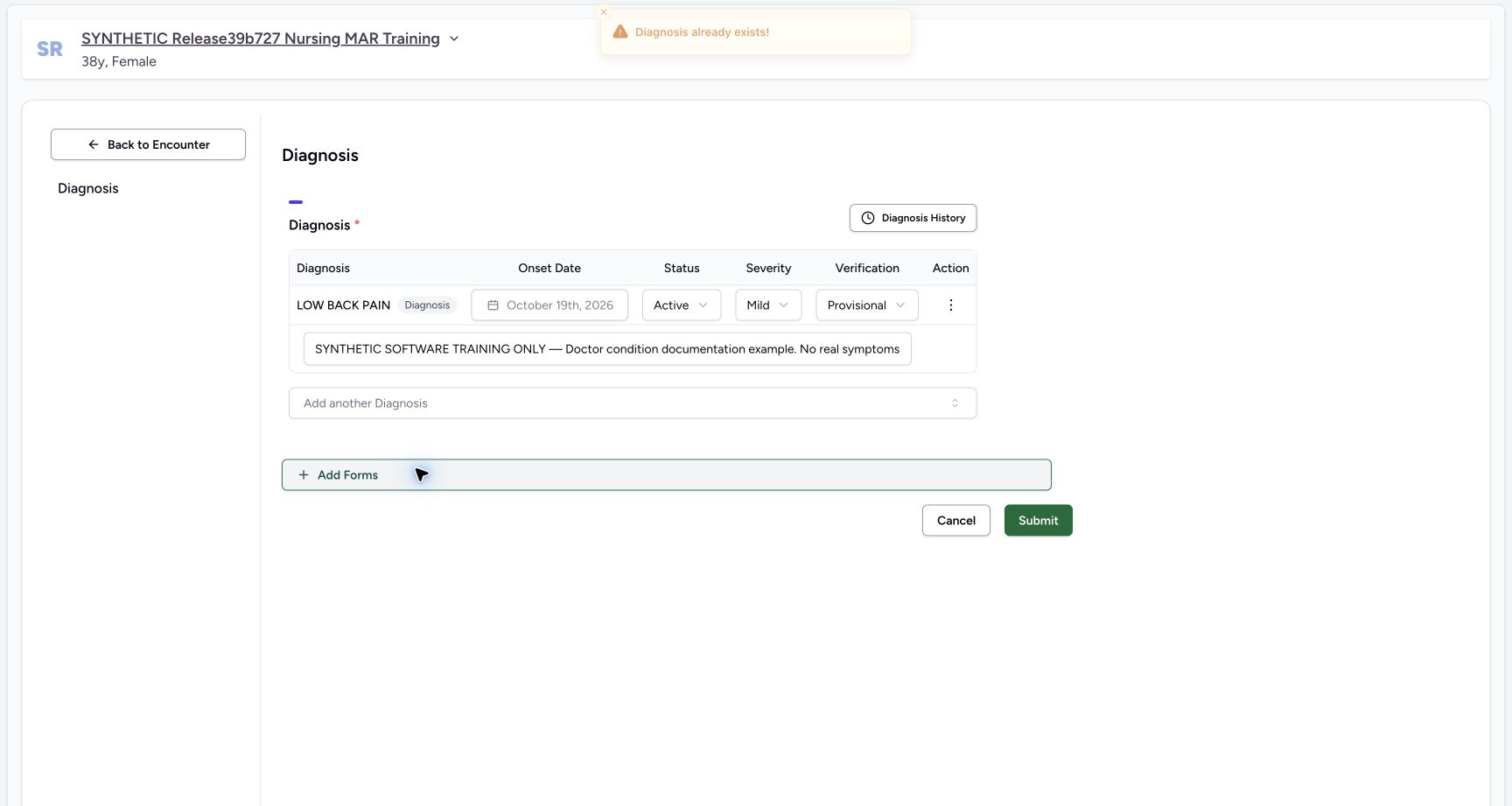
If Add another Diagnosis is searched for the same code already present in a non-error row, the UI warns Diagnosis already exists and keeps one row. The illustrated warning is at the top center. Do not submit a duplicate or assume this frontend guard is a server uniqueness rule for every coding system. Close the lookup and maintain the intended existing record instead.
12Existing diagnosis keeps its saved onset
Capture details
Exact committed ba551c1d isolated synthetic clone, ordinary existing Doctor account, fictional Polyclinic inpatient encounter. The patient retains an earlier release name; actual captured source is ba551c1d. All examples are software training only, not real symptoms, diagnosis, treatment or clinical advice. The row has a stored UUID; onset is disabled by the actual form. Clinical Status, Severity, Verification and optional Notes remain editable for this authorized Doctor.
Image SHA-256 c900d5621e93c8ebf8d905532395b54d62d8a721070618101370ecf5e6886acf
- Locked saved onset: This disabled date belongs to the saved condition. A new draft has a different editable onset control.
- Additional diagnosis: Additional coding must represent a deliberate separate condition; choosing an existing non-error code is refused.
 1
1Duplicate diagnosis is refused
Capture details
Exact committed ba551c1d isolated synthetic clone, ordinary existing Doctor account, fictional Polyclinic inpatient encounter. The patient retains an earlier release name; actual captured source is ba551c1d. All examples are software training only, not real symptoms, diagnosis, treatment or clinical advice. The same code is not added while a non-error row already exists. This is an observed UI guard, not proof of a server uniqueness constraint across every request or coding system.
Image SHA-256 d6db64cabfc26058cb05ac5bfe4574e973062de978276bb74fe455f6c2e4255d
- Duplicate warning: The top-center warning says Diagnosis already exists. The original row remains the only diagnosis.
3. Choose clinical status separately from verification
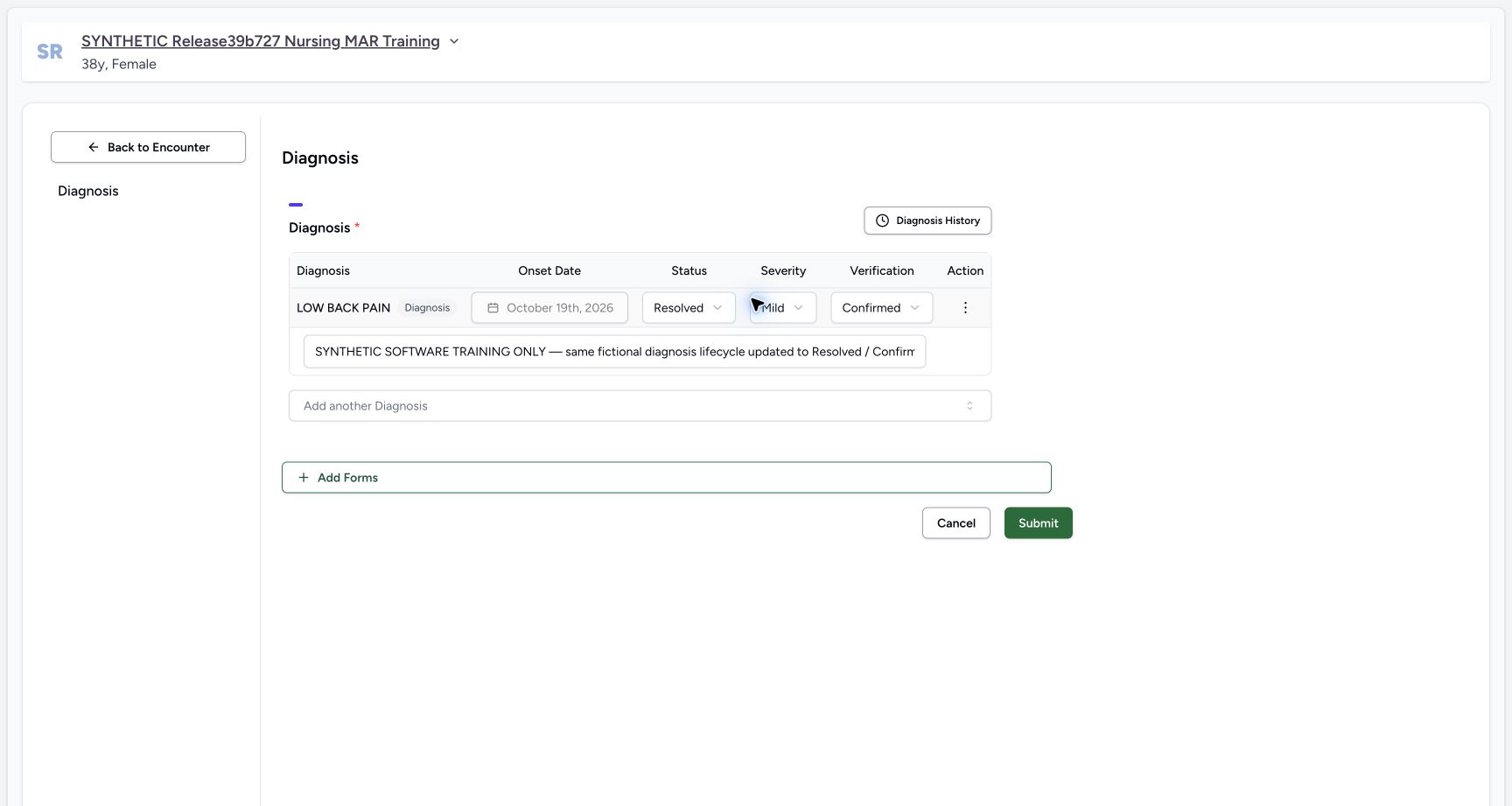
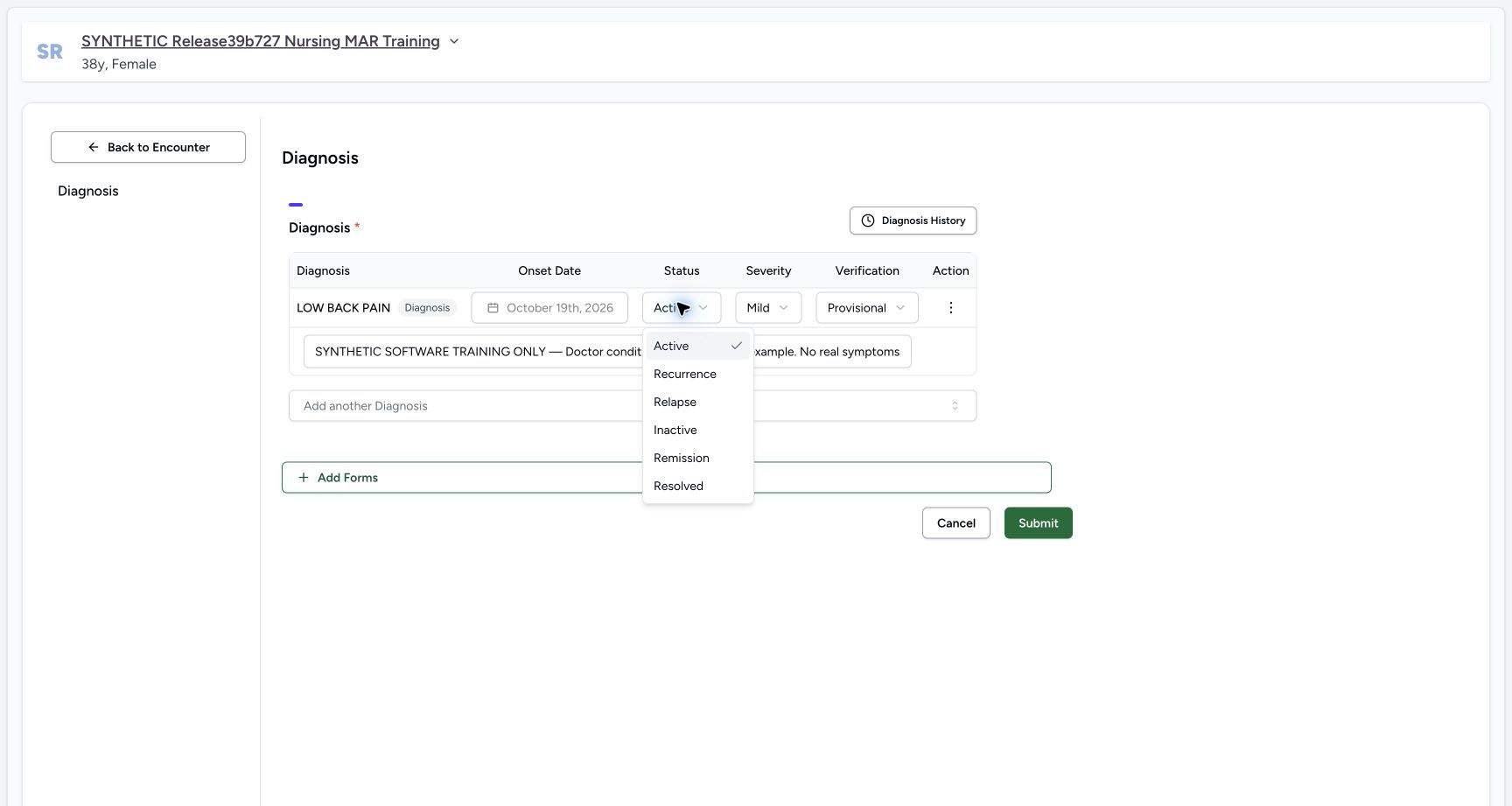
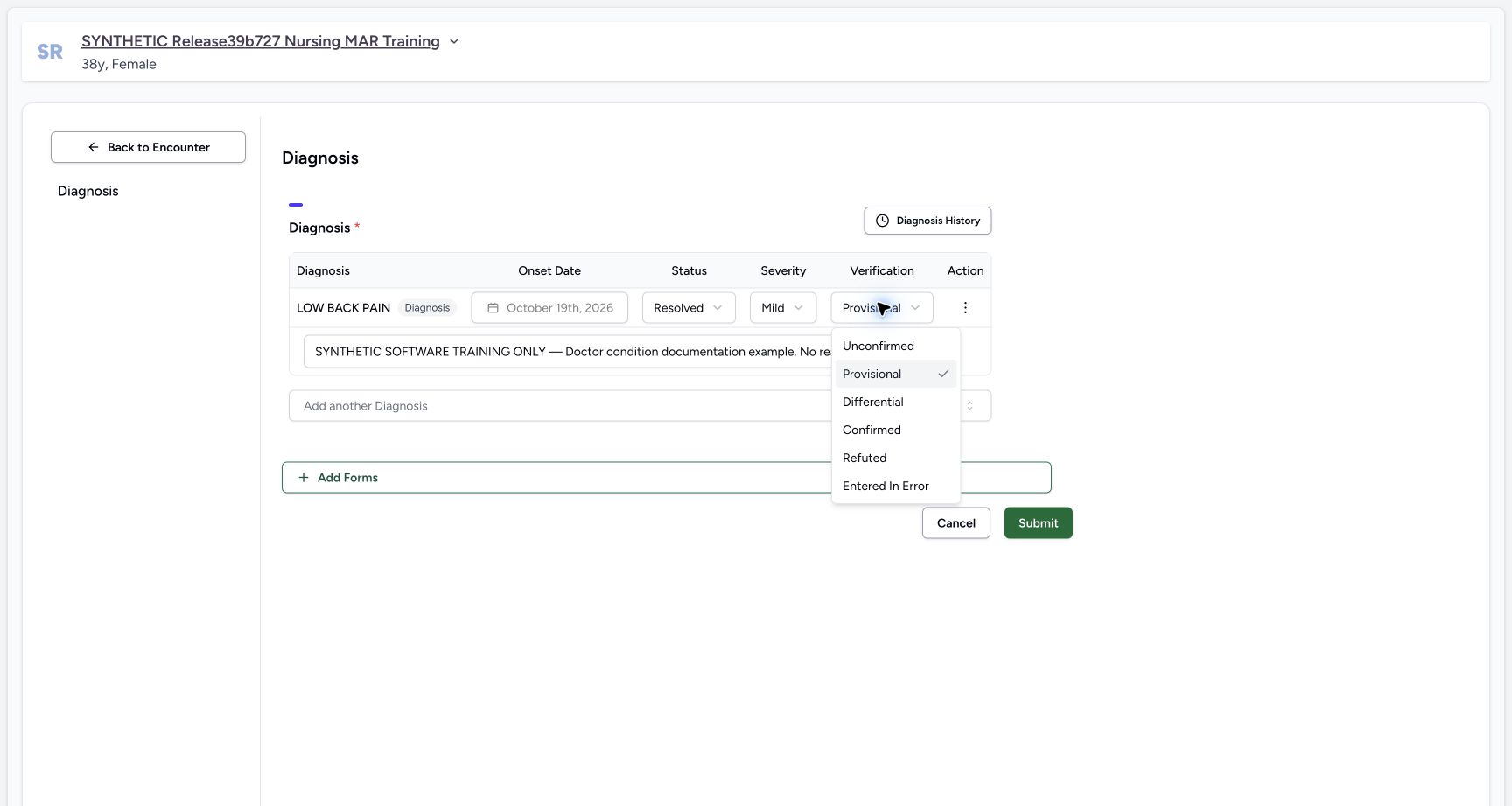
Open Status. The available clinical states are Active, Recurrence, Relapse, Inactive, Remission and Resolved. The fictional example selects Resolved. Open Verification separately and choose Confirmed. A saved row also exposes Entered in Error for correction; that verification state is distinct from Resolved clinical status. The menus show available choices, not clinical criteria or proof of every saved transition.
 1
1Diagnosis clinical-status choices
Capture details
Exact committed ba551c1d isolated synthetic clone, ordinary existing Doctor account, fictional Polyclinic inpatient encounter. The patient retains an earlier release name; actual captured source is ba551c1d. All examples are software training only, not real symptoms, diagnosis, treatment or clinical advice. Options are Active, Recurrence, Relapse, Inactive, Remission and Resolved. This sequence will save Resolved only; menu visibility does not establish all lifecycle paths or clinical criteria.
Image SHA-256 d57d1c04b4fcdf4c25241f38a9c64cba994f5f23c7836e30e2c73f2077fc8de8
- Resolved example: Choose the intended clinical state under facility policy. The example uses Resolved solely for synthetic lifecycle teaching.
 12
12Saved diagnosis includes correction verification option
Capture details
Exact committed ba551c1d isolated synthetic clone, ordinary existing Doctor account, fictional Polyclinic inpatient encounter. The patient retains an earlier release name; actual captured source is ba551c1d. All examples are software training only, not real symptoms, diagnosis, treatment or clinical advice. Unlike a new draft, an existing saved diagnosis can be marked Entered in Error. This frame only inspects that option; the current lifecycle update will choose Confirmed.
Image SHA-256 e33215db76c3b425245d00c504153b7f4fb4577d49aa69bae35a244be73ca5d5
- Saved-record correction: Entered in Error is a correction state for an existing record, distinct from Resolved clinical status.
- Confirmed example: This synthetic lifecycle update will explicitly choose Confirmed.
4. Review and submit the same-record update
Retain the original code, locked onset and Mild severity. Review Resolved status, Confirmed verification and appropriate optional context; this example explains its synthetic purpose. Choose Submit once. Ordinary Doctor and Nurse reads confirmed the original UUID, code and onset with Resolved/Confirmed and Doctor updater. No second diagnosis, medication event or request update was created.
12Review a diagnosis lifecycle update
Capture details
Exact committed ba551c1d isolated synthetic clone, ordinary existing Doctor account, fictional Polyclinic inpatient encounter. The patient retains an earlier release name; actual captured source is ba551c1d. All examples are software training only, not real symptoms, diagnosis, treatment or clinical advice. Submitting updates the same condition; it should not create a second record. This changes clinical and verification states separately while preserving coding/onset.
Image SHA-256 5e411b4620c05cb29c7a0f7ed8275c4c30c1d968b50c9b40c816592c87e8353a
- Clinical status: Resolved is the clinical lifecycle value in this fictional example.
- Submit update: Save the reviewed same-record update once.
12Resolved diagnosis remains in the selected encounter editor
Capture details
Exact committed ba551c1d isolated synthetic clone, ordinary existing Doctor account, fictional Polyclinic inpatient encounter. The patient retains an earlier release name; actual captured source is ba551c1d. All examples are software training only, not real symptoms, diagnosis, treatment or clinical advice. Normal reads verified the same saved UUID and original code/onset. This editor is encounter-specific and retrieves all current conditions, including non-active states.
Image SHA-256 97ad4b024174c63156d2324415e8e0f716fe2313a39008400241a1e5654e2a3f
- Retained resolved record: The condition still exists with its saved clinical lifecycle value.
- Diagnosis History selector: This selector uses a different query from the separate Past Diagnoses timeline. Review only settled current results; a same-session cached-row limitation is illustrated separately.
5. Interpret the active-summary and timeline boundary
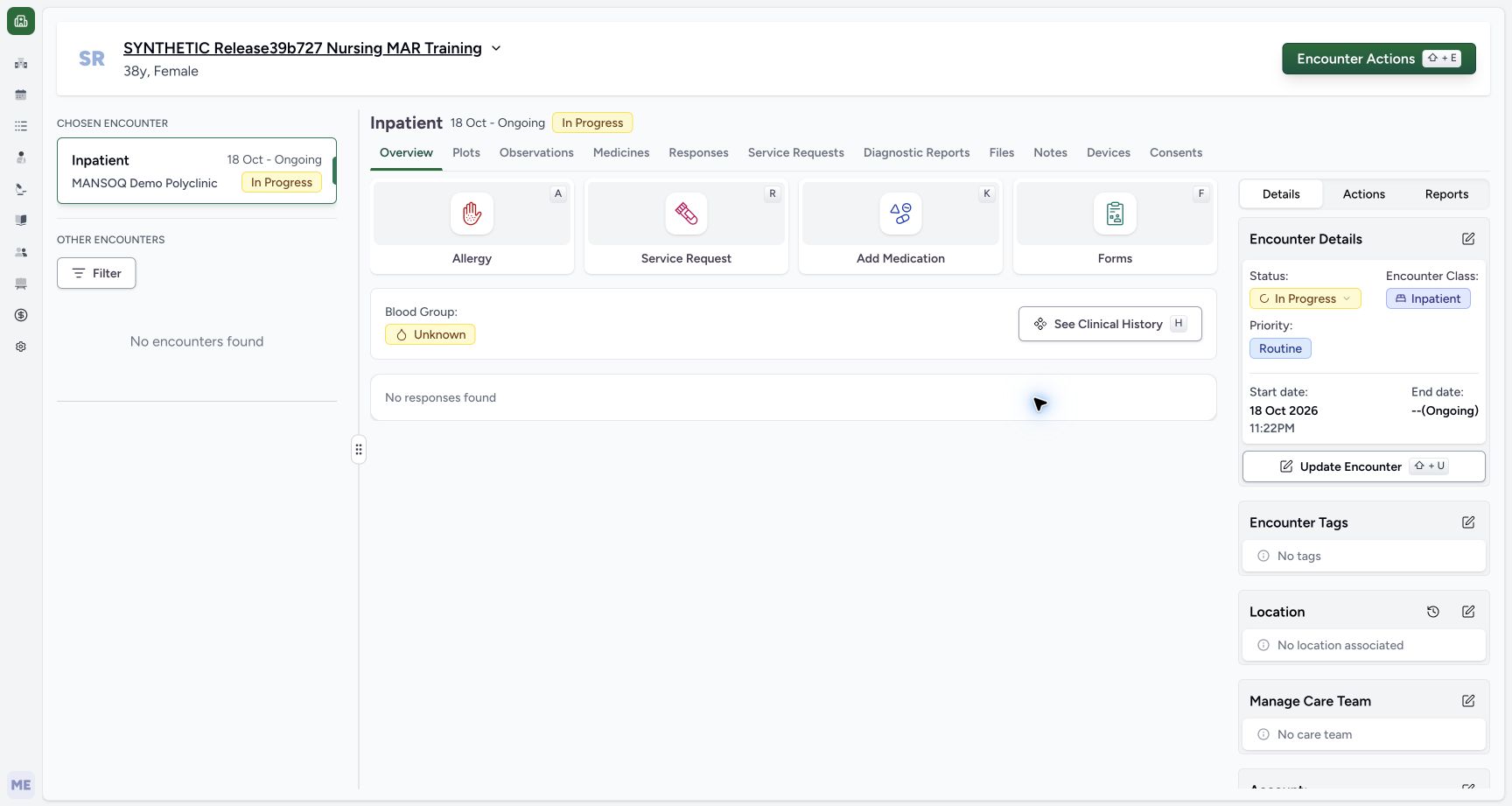
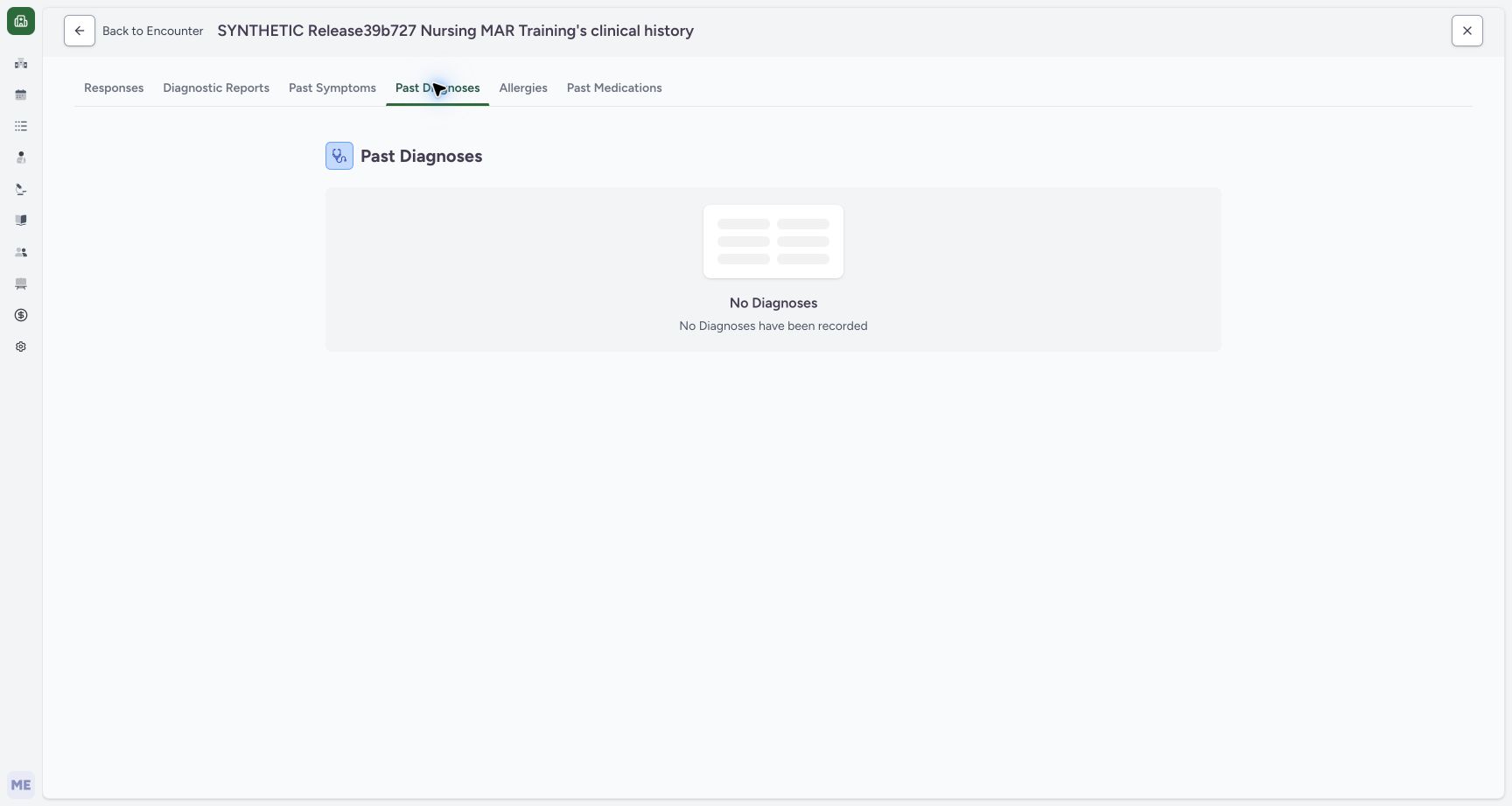
After the overview settles, the resolved diagnosis disappears from its active summary. Open See Clinical History → Past Diagnoses: this captured version says No Diagnoses have been recorded. Both views apply Active/Recurrence/Relapse filtering, so this empty message must not be taken as deletion or a complete patient audit. The independently verified resolved condition remains stored.
 12
12Resolved diagnosis leaves the active summary
Capture details
Exact committed ba551c1d isolated synthetic clone, ordinary existing Doctor account, fictional Polyclinic inpatient encounter. The patient retains an earlier release name; actual captured source is ba551c1d. All examples are software training only, not real symptoms, diagnosis, treatment or clinical advice. Normal Doctor/Nurse readbacks retain the same UUID with Resolved/Confirmed, original coding/onset and Doctor updater. The summary includes only Active/Recurrence/Relapse; absence is not deletion.
Image SHA-256 f052534bc1a8f7d5015af324c33bdf5c0f126ef672e3eeb2e6c62e84225e0e96
- Inspect history carefully: Open history knowing its diagnosis tab also applies active-state filters in this version.
- Reopen diagnosis: Use Add Diagnosis in Encounter Actions to reopen the editor, which still retrieves this selected encounter’s saved resolved record.
 12
12Past Diagnoses omits the retained resolved condition
Capture details
Exact committed ba551c1d isolated synthetic clone, ordinary existing Doctor account, fictional Polyclinic inpatient encounter. The patient retains an earlier release name; actual captured source is ba551c1d. All examples are software training only, not real symptoms, diagnosis, treatment or clinical advice. Source filters this timeline to Active/Recurrence/Relapse and excludes Entered in Error. Independent reads retain Resolved/Confirmed99980e57…; the empty message must not be interpreted as deletion or a complete audit.
Image SHA-256 047d3d1c647766863067a783f75c57af4111a68afbee5e87b9e27fdb8eaeadc7
- Filtered empty message: This version’s message reflects the active-state filter, despite a retained resolved condition.
- Back to Encounter: Use the actual Back control to return to the selected encounter and reopen its Diagnosis editor.
6. Inspect the retained condition through its editor
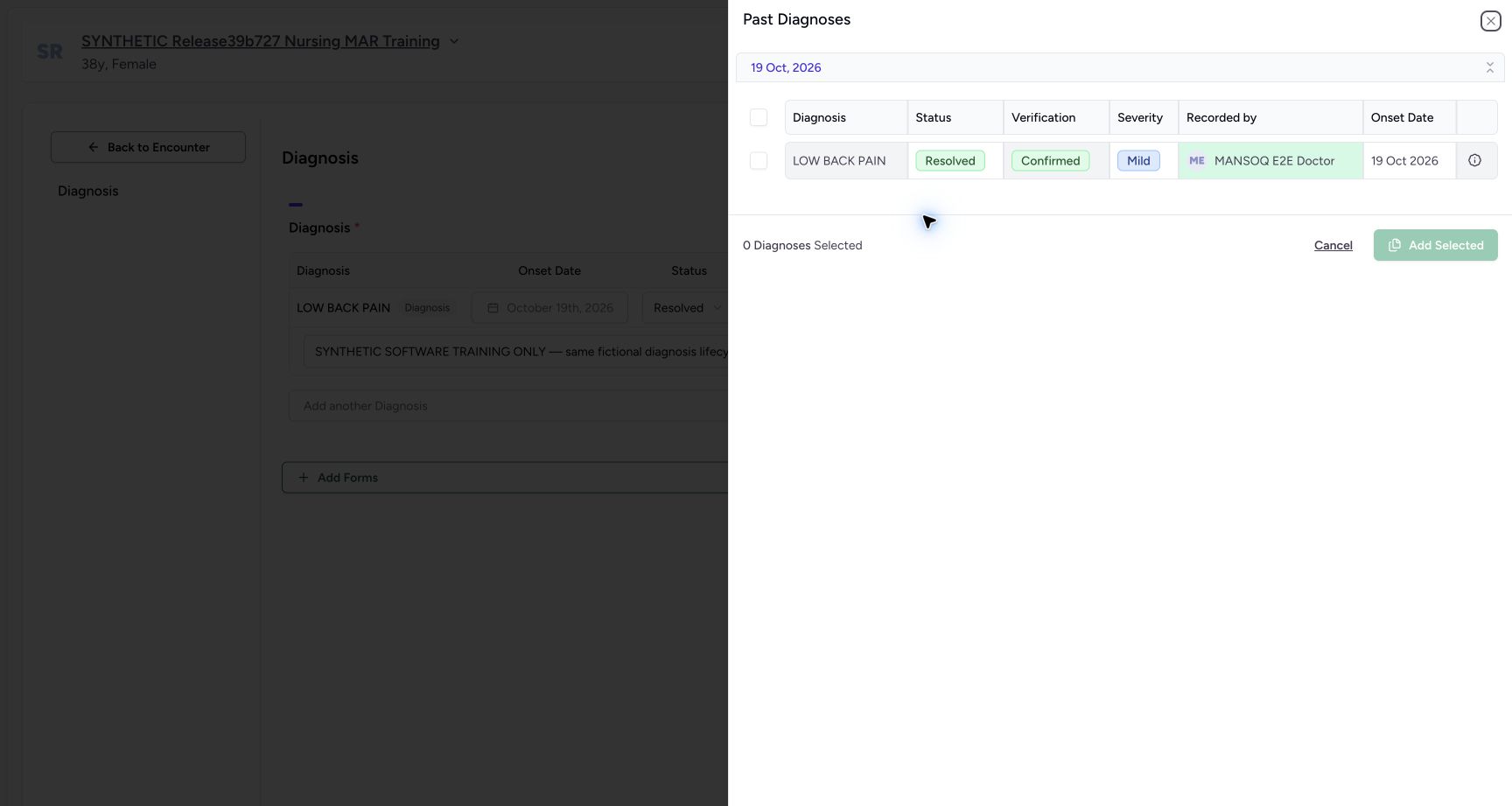
Return using Back to Encounter and reopen Encounter Actions → Add Diagnosis. The existing Resolved/Mild/Confirmed record remains in the editor. Diagnosis History opens a separate selection query and displays this non-error resolved condition with its creator and onset. In this example it is the same current encounter record, so it is not a new prior-encounter reuse demonstration. Close the selector after inspection; do not add the existing condition again.
12Past Diagnoses omits the retained resolved condition
Capture details
Exact committed ba551c1d isolated synthetic clone, ordinary existing Doctor account, fictional Polyclinic inpatient encounter. The patient retains an earlier release name; actual captured source is ba551c1d. All examples are software training only, not real symptoms, diagnosis, treatment or clinical advice. Source filters this timeline to Active/Recurrence/Relapse and excludes Entered in Error. Independent reads retain Resolved/Confirmed99980e57…; the empty message must not be interpreted as deletion or a complete audit.
Image SHA-256 047d3d1c647766863067a783f75c57af4111a68afbee5e87b9e27fdb8eaeadc7
- Filtered empty message: This version’s message reflects the active-state filter, despite a retained resolved condition.
- Back to Encounter: Use the actual Back control to return to the selected encounter and reopen its Diagnosis editor.
12Resolved diagnosis remains in the selected encounter editor
Capture details
Exact committed ba551c1d isolated synthetic clone, ordinary existing Doctor account, fictional Polyclinic inpatient encounter. The patient retains an earlier release name; actual captured source is ba551c1d. All examples are software training only, not real symptoms, diagnosis, treatment or clinical advice. Normal reads verified the same saved UUID and original code/onset. This editor is encounter-specific and retrieves all current conditions, including non-active states.
Image SHA-256 97ad4b024174c63156d2324415e8e0f716fe2313a39008400241a1e5654e2a3f
- Retained resolved record: The condition still exists with its saved clinical lifecycle value.
- Diagnosis History selector: This selector uses a different query from the separate Past Diagnoses timeline. Review only settled current results; a same-session cached-row limitation is illustrated separately.
 12
12Diagnosis History selector retains the resolved condition
Capture details
Exact committed ba551c1d isolated synthetic clone, ordinary existing Doctor account, fictional Polyclinic inpatient encounter. The patient retains an earlier release name; actual captured source is ba551c1d. All examples are software training only, not real symptoms, diagnosis, treatment or clinical advice. This selector excludes Entered in Error but does not apply the active-state filter used by the separate timeline. It currently includes the same selected encounter’s diagnosis; selecting it again would hit duplicate prevention.
Image SHA-256 dffce5cf31284b369949abf365b942b160da761f115baaaab3b9158bf6e0762f
- Select deliberately: Check source record, status, creator, onset and notes before copying. This row is already present in the current encounter.
- Add Selected: A selected historical record is added as a new draft only if it is not a non-error duplicate. Submission is separate.
Filtered history versus a lifecycle audit
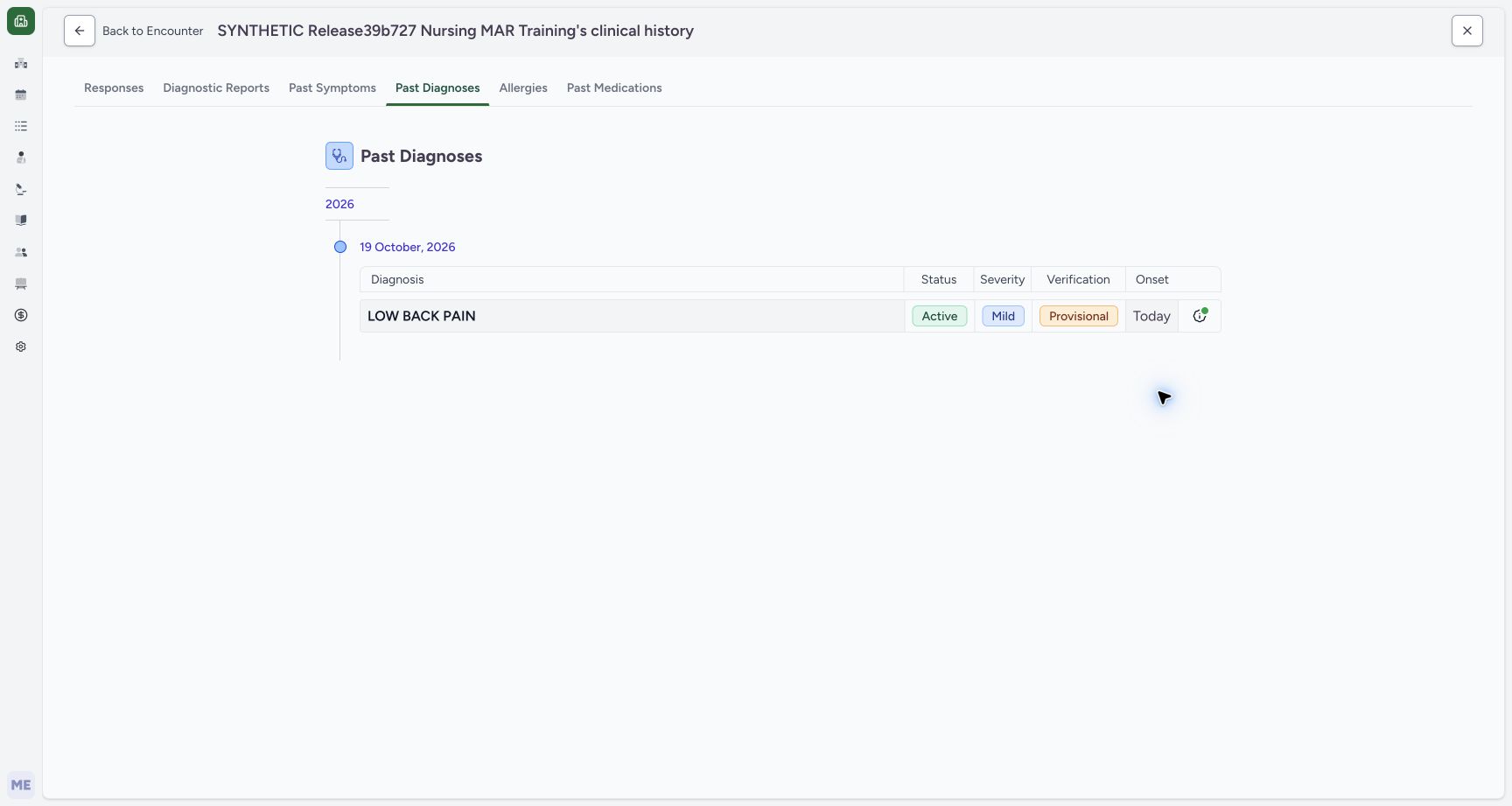
The Past Diagnoses page groups by creation date and filters to three active clinical states. The Diagnosis History selection sheet excludes Entered in Error but does not impose that same active filter. Neither label alone guarantees an all-status audit. The pictured state change is Active/Provisional → Resolved/Confirmed on one fictional UUID; the other clinical states remain separately unqualified.
 12
12Patient diagnosis history and its scope
Capture details
Exact committed ba551c1d isolated synthetic clone, ordinary existing Doctor account, fictional Polyclinic inpatient encounter. The patient retains an earlier release name; actual captured source is ba551c1d. All examples are software training only, not real symptoms, diagnosis, treatment or clinical advice. This view groups by creation date, not onset alone. Source filters Active/Recurrence/Relapse and excludes Entered in Error, so Past Diagnoses is not an unfiltered lifecycle audit of every condition.
Image SHA-256 5497aaff9e841f437a6c5a451e086eb513c6a2fb4e4281218795c8afdd96cae8
- Patient-level history: Past Diagnoses is the patient history tab; the example currently contains one Active diagnosis.
- Recorded-date group: History groups records under their creation date; inspect onset separately in the row.
12Past Diagnoses omits the retained resolved condition
Capture details
Exact committed ba551c1d isolated synthetic clone, ordinary existing Doctor account, fictional Polyclinic inpatient encounter. The patient retains an earlier release name; actual captured source is ba551c1d. All examples are software training only, not real symptoms, diagnosis, treatment or clinical advice. Source filters this timeline to Active/Recurrence/Relapse and excludes Entered in Error. Independent reads retain Resolved/Confirmed99980e57…; the empty message must not be interpreted as deletion or a complete audit.
Image SHA-256 047d3d1c647766863067a783f75c57af4111a68afbee5e87b9e27fdb8eaeadc7
- Filtered empty message: This version’s message reflects the active-state filter, despite a retained resolved condition.
- Back to Encounter: Use the actual Back control to return to the selected encounter and reopen its Diagnosis editor.
12Diagnosis History selector retains the resolved condition
Capture details
Exact committed ba551c1d isolated synthetic clone, ordinary existing Doctor account, fictional Polyclinic inpatient encounter. The patient retains an earlier release name; actual captured source is ba551c1d. All examples are software training only, not real symptoms, diagnosis, treatment or clinical advice. This selector excludes Entered in Error but does not apply the active-state filter used by the separate timeline. It currently includes the same selected encounter’s diagnosis; selecting it again would hit duplicate prevention.
Image SHA-256 dffce5cf31284b369949abf365b942b160da761f115baaaab3b9158bf6e0762f
- Select deliberately: Check source record, status, creator, onset and notes before copying. This row is already present in the current encounter.
- Add Selected: A selected historical record is added as a new draft only if it is not a non-error duplicate. Submission is separate.
Source evidence
Every citation uses this exact committed version. The private source repository requires access.
- repositories/platform/mansoq-web/src/components/Questionnaire/QuestionTypes/DiagnosisQuestion.tsx:91 ·
ba551c1d67031248136fd2016afe227b5fc994bdSource file checksum
800733fc03b30528ba90689524d5c3a39b2f777ffdbb9dc8ef5ad5e874c3e504 - repositories/platform/mansoq-web/src/components/Questionnaire/QuestionTypes/DiagnosisQuestion.tsx:321 ·
ba551c1d67031248136fd2016afe227b5fc994bdSource file checksum
800733fc03b30528ba90689524d5c3a39b2f777ffdbb9dc8ef5ad5e874c3e504 - repositories/platform/mansoq-web/src/components/Questionnaire/QuestionTypes/DiagnosisQuestion.tsx:448 ·
ba551c1d67031248136fd2016afe227b5fc994bdSource file checksum
800733fc03b30528ba90689524d5c3a39b2f777ffdbb9dc8ef5ad5e874c3e504 - repositories/platform/mansoq-web/src/components/Questionnaire/QuestionTypes/DiagnosisQuestion.tsx:508 ·
ba551c1d67031248136fd2016afe227b5fc994bdSource file checksum
800733fc03b30528ba90689524d5c3a39b2f777ffdbb9dc8ef5ad5e874c3e504 - repositories/platform/mansoq-web/src/components/Questionnaire/QuestionTypes/DiagnosisQuestion.tsx:648 ·
ba551c1d67031248136fd2016afe227b5fc994bdSource file checksum
800733fc03b30528ba90689524d5c3a39b2f777ffdbb9dc8ef5ad5e874c3e504 - repositories/platform/mansoq-web/src/components/Patient/diagnosis/list.tsx:65 ·
ba551c1d67031248136fd2016afe227b5fc994bdSource file checksum
e3342b6a04271d6cf1754c13bf1805fcc1d2f8badc05dc6b445b0349baab9cf0 - repositories/platform/mansoq-web/src/components/Patient/diagnosis/DiagnosisTable.tsx:187 ·
ba551c1d67031248136fd2016afe227b5fc994bdSource file checksum
45e40342661a50ac9ad52a4e34cfc2dc4d153ce389dc8829ffdb52c0f44f4c19 - repositories/platform/mansoq-web/src/components/HistoricalRecordSelector/index.tsx:184 ·
ba551c1d67031248136fd2016afe227b5fc994bdSource file checksum
ed49e6aa587ed90db0bd986cb9adc6596be31539fa1b865cf073c130e75a0ac8 - repositories/platform/mansoq-web/src/components/HistoricalRecordSelector/index.tsx:230 ·
ba551c1d67031248136fd2016afe227b5fc994bdSource file checksum
ed49e6aa587ed90db0bd986cb9adc6596be31539fa1b865cf073c130e75a0ac8 - repositories/platform/mansoq-web/src/pages/Encounters/tabs/overview/quick-actions.tsx:56 ·
ba551c1d67031248136fd2016afe227b5fc994bdSource file checksum
555331d2be0793af35974e2ac2b3642f222ebbb49ddbec83bdb74331a7d963d4 - repositories/platform/mansoq-core/mansoq/emr/api/viewsets/condition.py:103 ·
ba551c1d67031248136fd2016afe227b5fc994bdSource file checksum
5f00f0ffbe13f18a514cfa2bd5d91f5bf292b416066dba454c82d2f815e31a6c - repositories/platform/mansoq-core/mansoq/emr/api/viewsets/encounter_authz_base.py:13 ·
ba551c1d67031248136fd2016afe227b5fc994bdSource file checksum
71d6adda5026319eeca7f47eb673e81db1217b347ee8c8fa13f7e9701c60d3c9 - repositories/platform/mansoq-core/mansoq/emr/resources/condition/spec.py:52 ·
ba551c1d67031248136fd2016afe227b5fc994bdSource file checksum
53f9aa7a7b65f530950d3804ddfcad69fe786ca58c5e62ecb7531a1c7fa45a04 - repositories/platform/mansoq-core/mansoq/emr/resources/condition/valueset.py:14 ·
ba551c1d67031248136fd2016afe227b5fc994bdSource file checksum
836687dd3f5fffec0e1b06c53cf0209229ff8dded04d7ddd1a1e395642b56525