 MANSOQ
 Facility administration · VERSION ba551c1d
Correct the fictional Clinic’s existing default print logo address
Inspect the existing default template, correct its stale local demo address, save the single reviewed change and verify the reloaded branding.
IT administrator
 123
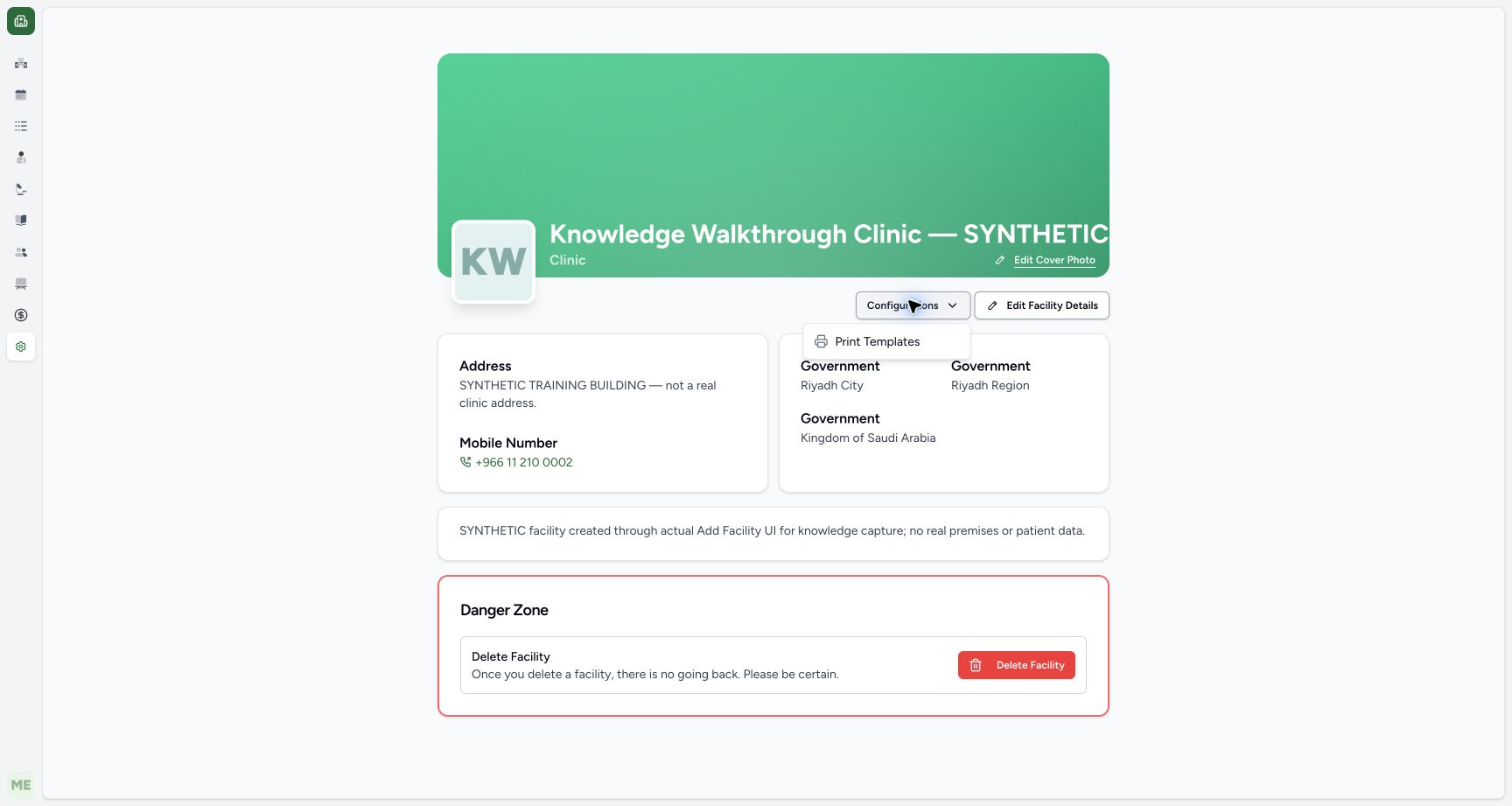
123Open the fictional Clinic print-template configuration
Capture details
Exact committed ba551 application and existing authorized local training superuser. Actual single-field fictional default-template correction.
Image SHA-256 e830ef8229e7205baa2875959f1f091ac09e1784276c136863087bb00ad4d23c
- Configurations: Open this existing authorized settings menu.
- Print Templates: Open the existing template editor.
- Intended fictional Clinic: Check the facility before configuration.
 12
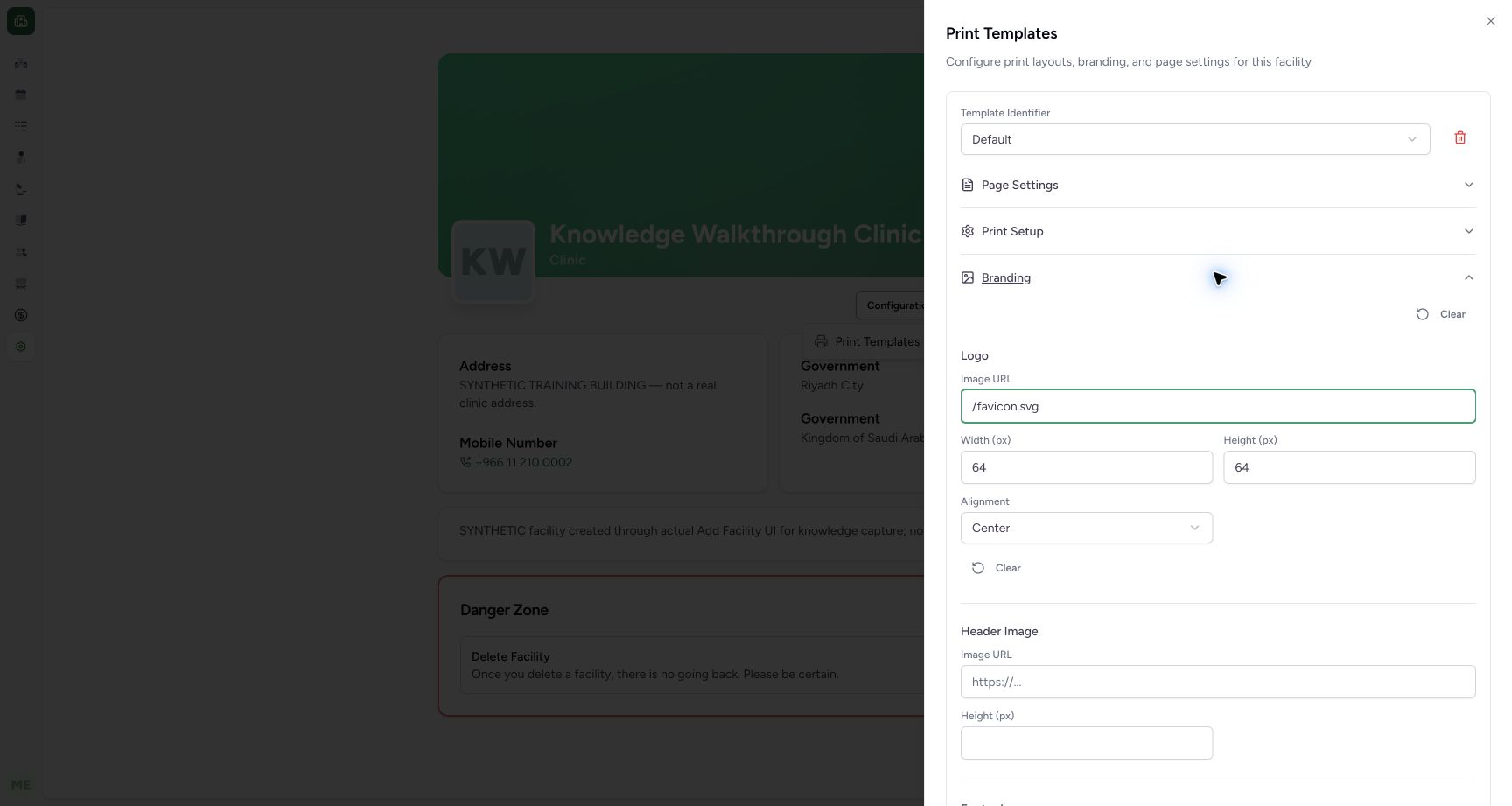
12Review the corrected relative demo logo URL
Capture details
Exact committed ba551 application and existing authorized local training superuser. Actual single-field fictional default-template correction.
Image SHA-256 6abb4d56e695012dda3b82970d8a0147a45afa7b2eaa3c93654615965350008f
- /favicon.svg: This known existing same-origin demo asset replaces only the stale URL.
- Branding heading: Collapse this group if needed to reveal the lower Save control.
 1234
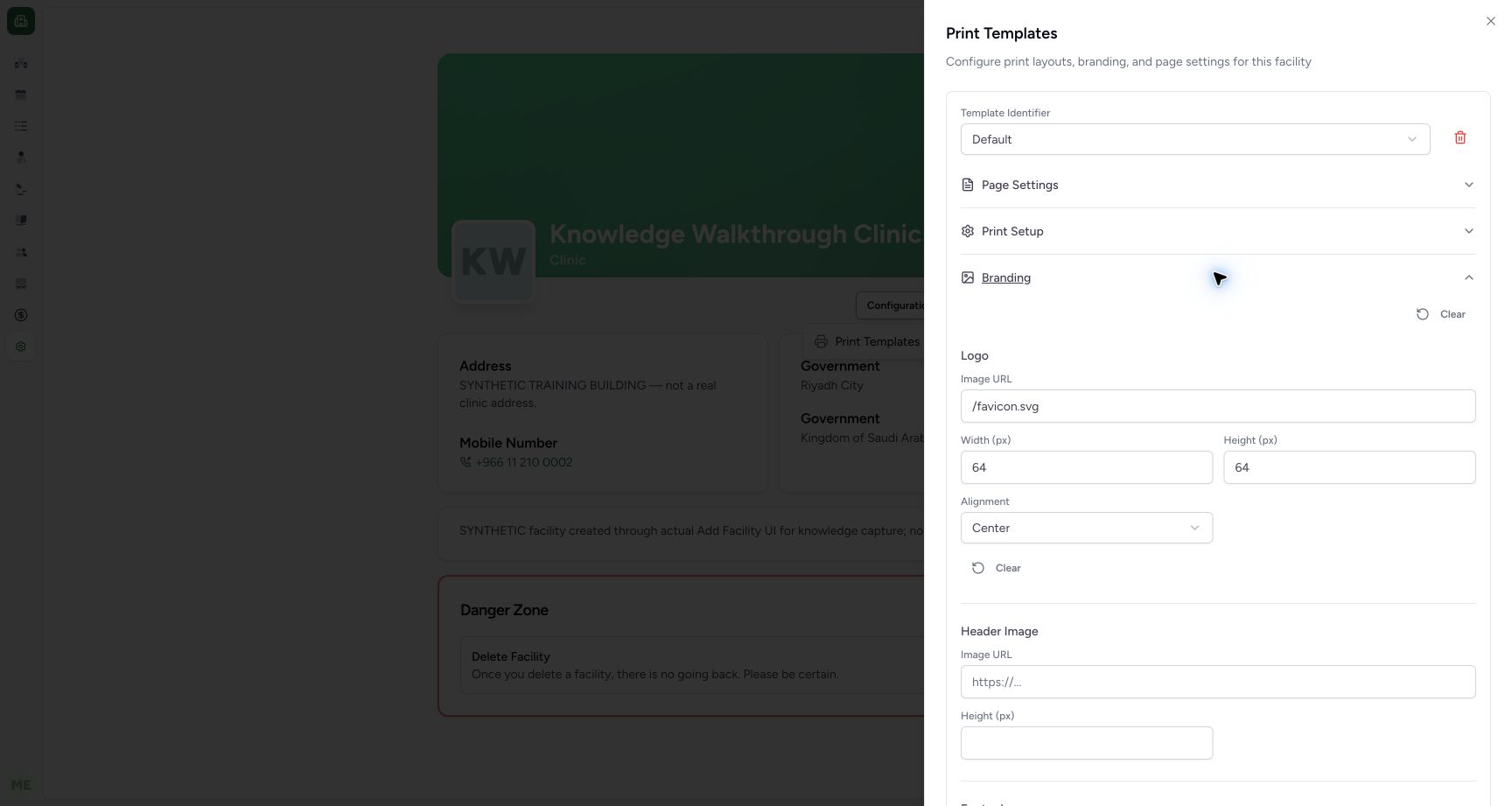
1234Verify the saved value after full reload
Capture details
Exact committed ba551 application and existing authorized local training superuser. Actual single-field fictional default-template correction.
Image SHA-256 14cb152bda33a512fa2fbd06f64d0af46c8cc992cfecabe67bab6f6d440dec18
- Saved /favicon.svg: The reopened Default template retains the corrected address.
- Width 64 retained: The width is unchanged.
- Height 64 retained: The height is unchanged.
- Center retained: The alignment is unchanged.
 12345
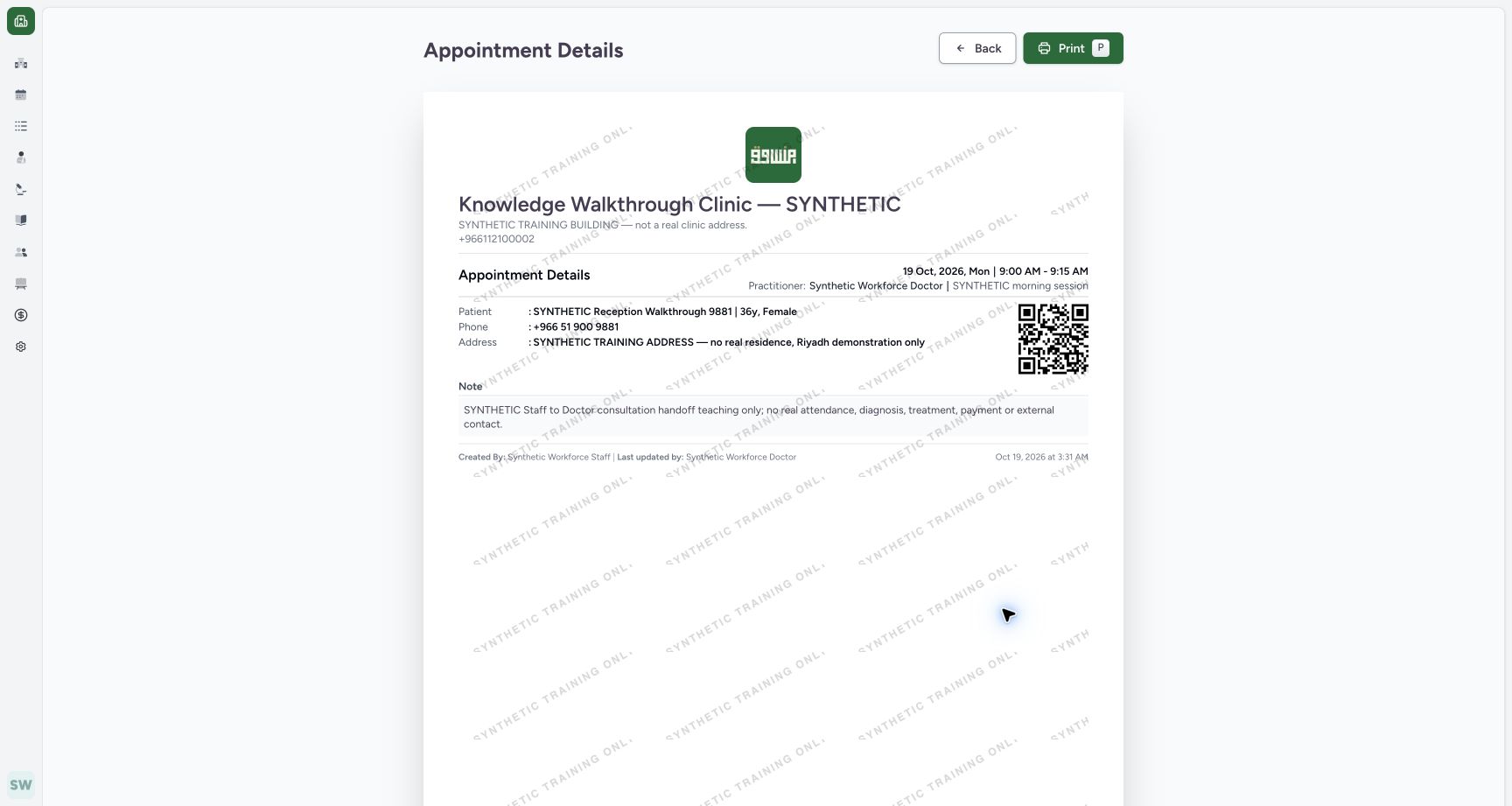
12345Review the branded appointment preview
Capture details
Exact committed ba551c1d application; existing non-superuser Staff in its assigned fictional Clinic. Native print/save frames show actual Chrome/macOS controls and local output only.
Image SHA-256 fc9471ed1ac91ea5334c95948fb3a6a761b5f4e3e02dc2f26e1b1c073f78eb6c
- Print: Open native printing after reviewing the displayed appointment.
- Back: Return without changing the appointment.
- Facility logo: The fictional logo now loads from the corrected existing template.
- Date and time: Review the intended 19 October 09:00–09:15 appointment.
- Patient identity: Verify the intended synthetic patient.
9 of 9 content blocks have reviewed image alignment. Missing overview or prerequisite images remain open.
Before you begin
- Start on the intended fictional Clinic’s General settings page with its existing Default print template.123
Recorded release ba551c1d · 2026-10-19T00:31:00.945Z · 1728 × 921 Open the fictional Clinic print-template configuration
Capture details
Exact committed ba551 application and existing authorized local training superuser. Actual single-field fictional default-template correction.
Image SHA-256
e830ef8229e7205baa2875959f1f091ac09e1784276c136863087bb00ad4d23c- Configurations: Open this existing authorized settings menu.
- Print Templates: Open the existing template editor.
- Intended fictional Clinic: Check the facility before configuration.
 12
12Recorded release ba551c1d · 2026-10-19T00:31:03.383Z · 1728 × 921 Inspect the existing Default template
Capture details
Exact committed ba551 application and existing authorized local training superuser. Actual single-field fictional default-template correction.
Image SHA-256
23a7954994c1c481ed440648969970c69d796e6d5be5670c4d6f4cc8f10396a4- Default template: Keep the existing template identifier.
- Branding: Expand this group to inspect the logo.
1. Open the intended print-template configuration
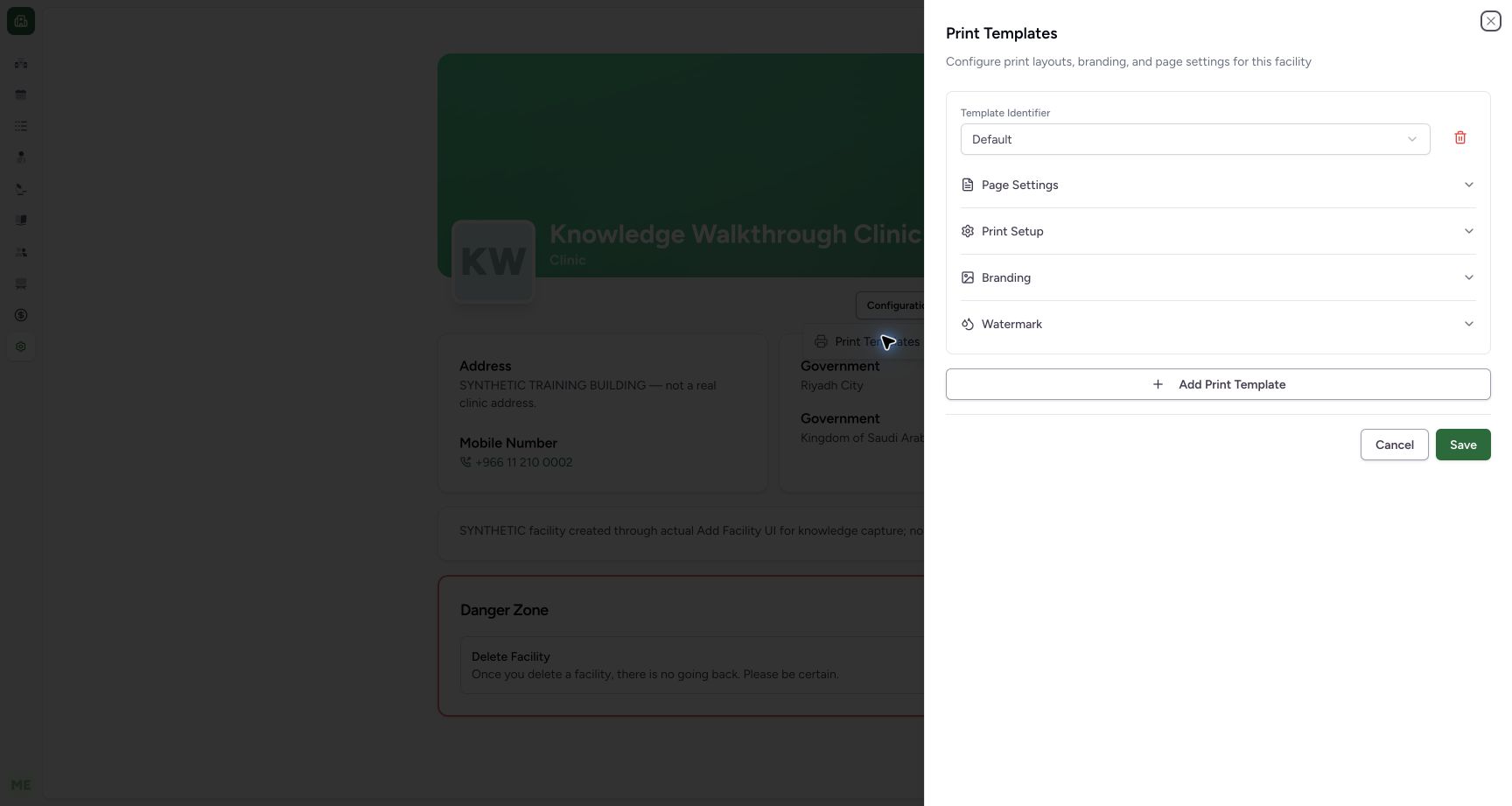
Check Knowledge Walkthrough Clinic — SYNTHETIC. Open Configurations → Print Templates on its General settings page.
123Open the fictional Clinic print-template configuration
Capture details
Exact committed ba551 application and existing authorized local training superuser. Actual single-field fictional default-template correction.
Image SHA-256 e830ef8229e7205baa2875959f1f091ac09e1784276c136863087bb00ad4d23c
- Configurations: Open this existing authorized settings menu.
- Print Templates: Open the existing template editor.
- Intended fictional Clinic: Check the facility before configuration.
2. Inspect the existing template and logo
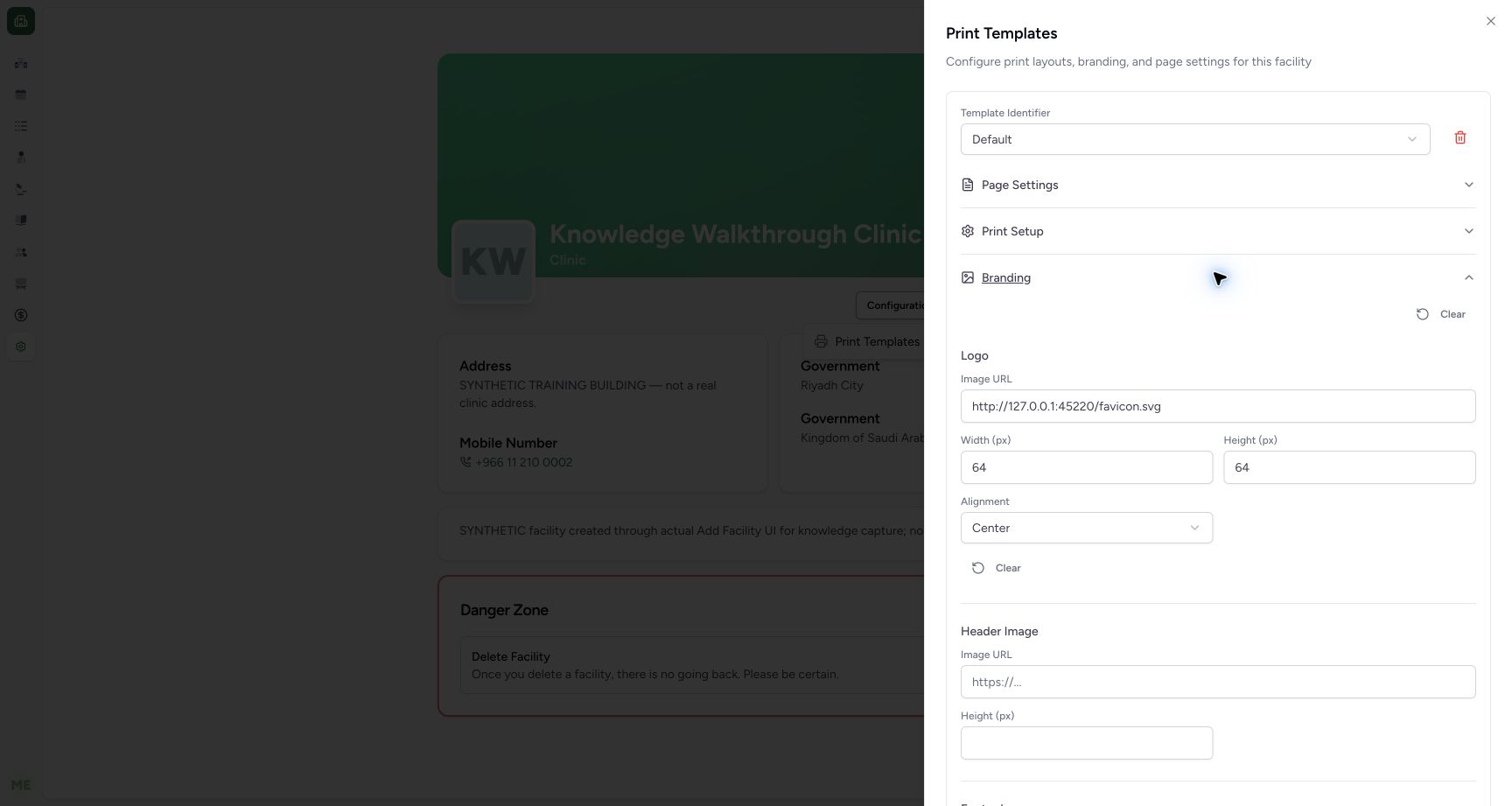
Keep the existing Default template and expand Branding. Inspect Logo → Image URL, its existing 64 pixel width and height, and Center alignment.
12Inspect the existing Default template
Capture details
Exact committed ba551 application and existing authorized local training superuser. Actual single-field fictional default-template correction.
Image SHA-256 23a7954994c1c481ed440648969970c69d796e6d5be5670c4d6f4cc8f10396a4
- Default template: Keep the existing template identifier.
- Branding: Expand this group to inspect the logo.
 1234
1234Inspect the stale demo-origin logo URL
Capture details
Exact committed ba551 application and existing authorized local training superuser. Actual single-field fictional default-template correction.
Image SHA-256 309fff60dc226e09517d683ca02d896839fa1597843773bc3161859895ad2d45
- Current logo Image URL: The fictional example still points to its earlier 45220 local origin.
- Width 64: Preserve the existing width.
- Height 64: Preserve the existing height.
- Center alignment: Preserve this existing alignment.
3. Correct only the demo image address
For this isolated fictional example, replace the stale earlier local-origin address with the known existing same-origin /favicon.svg. Keep width, height, alignment and other template fields unchanged. This is an existing demo asset, not an uploaded facility logo.
1234Inspect the stale demo-origin logo URL
Capture details
Exact committed ba551 application and existing authorized local training superuser. Actual single-field fictional default-template correction.
Image SHA-256 309fff60dc226e09517d683ca02d896839fa1597843773bc3161859895ad2d45
- Current logo Image URL: The fictional example still points to its earlier 45220 local origin.
- Width 64: Preserve the existing width.
- Height 64: Preserve the existing height.
- Center alignment: Preserve this existing alignment.
12Review the corrected relative demo logo URL
Capture details
Exact committed ba551 application and existing authorized local training superuser. Actual single-field fictional default-template correction.
Image SHA-256 6abb4d56e695012dda3b82970d8a0147a45afa7b2eaa3c93654615965350008f
- /favicon.svg: This known existing same-origin demo asset replaces only the stale URL.
- Branding heading: Collapse this group if needed to reveal the lower Save control.
4. Locate Save and save the reviewed correction
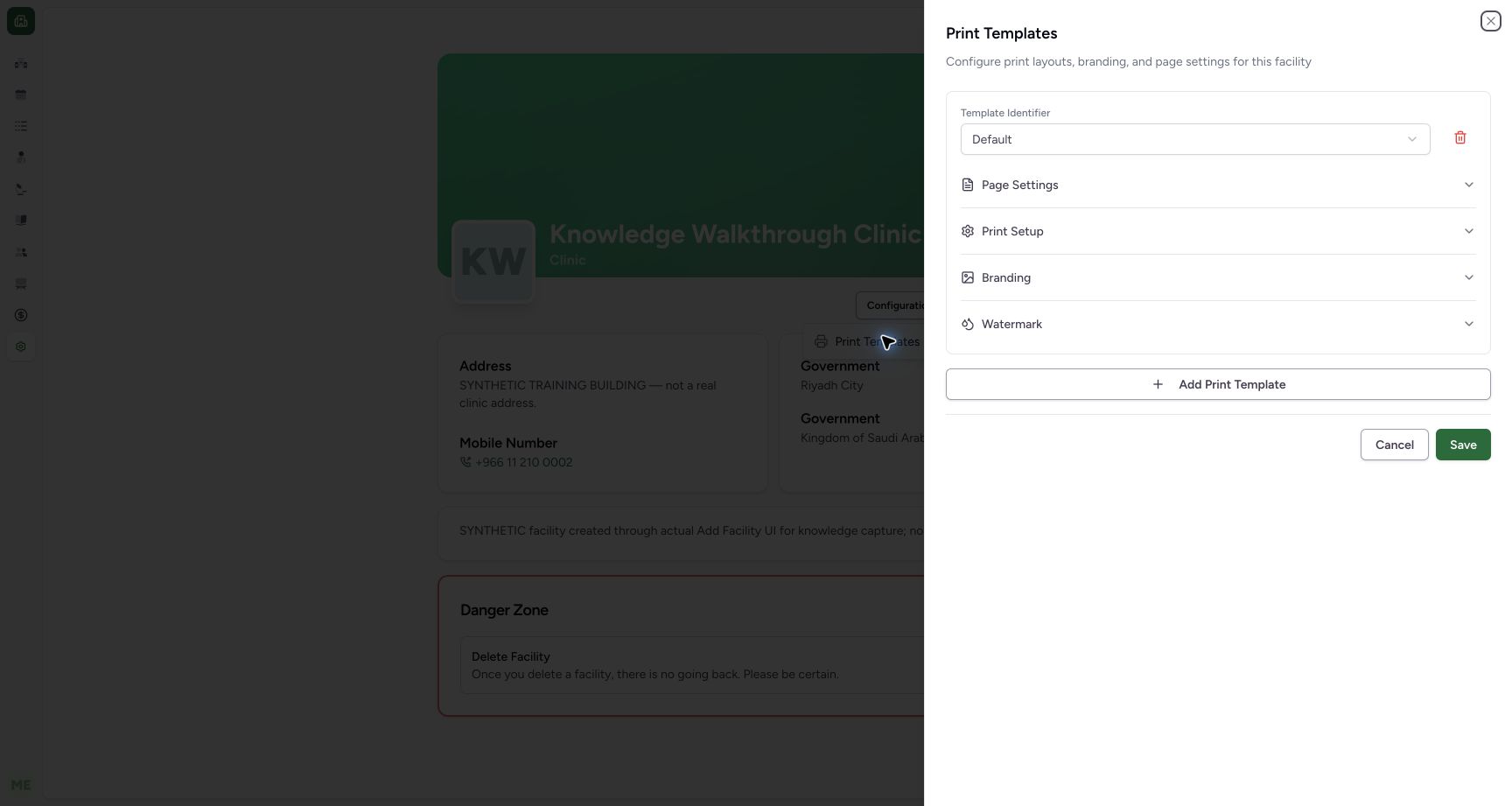
The Save control is beneath the template groups. Collapse Branding if the expanded group hides it, then use Save for the reviewed change. The separate collapsed illustration shows that actual control on a later read-only revisit; no second save was submitted for that illustration.
12Review the corrected relative demo logo URL
Capture details
Exact committed ba551 application and existing authorized local training superuser. Actual single-field fictional default-template correction.
Image SHA-256 6abb4d56e695012dda3b82970d8a0147a45afa7b2eaa3c93654615965350008f
- /favicon.svg: This known existing same-origin demo asset replaces only the stale URL.
- Branding heading: Collapse this group if needed to reveal the lower Save control.
 123
123Locate Save in the collapsed existing template editor
Capture details
Exact committed ba551 application and existing authorized local training superuser. This collapsed Save-location image is a later read-only revisit after the correction; Cancel closed it without another save.
Image SHA-256 23a7954994c1c481ed440648969970c69d796e6d5be5670c4d6f4cc8f10396a4
- Save: This actual control is below the template groups.
- Cancel: Use Cancel to close a read-only revisit.
- Collapsed Branding: Collapsing the group keeps lower controls visible.
5. Verify persistence after reload
After saving, reload the page normally and reopen Configurations → Print Templates → Branding. Confirm the same Default template retains /favicon.svg, width 64, height 64 and Center alignment.
123Open the fictional Clinic print-template configuration
Capture details
Exact committed ba551 application and existing authorized local training superuser. Actual single-field fictional default-template correction.
Image SHA-256 e830ef8229e7205baa2875959f1f091ac09e1784276c136863087bb00ad4d23c
- Configurations: Open this existing authorized settings menu.
- Print Templates: Open the existing template editor.
- Intended fictional Clinic: Check the facility before configuration.
12Inspect the existing Default template
Capture details
Exact committed ba551 application and existing authorized local training superuser. Actual single-field fictional default-template correction.
Image SHA-256 23a7954994c1c481ed440648969970c69d796e6d5be5670c4d6f4cc8f10396a4
- Default template: Keep the existing template identifier.
- Branding: Expand this group to inspect the logo.
1234Verify the saved value after full reload
Capture details
Exact committed ba551 application and existing authorized local training superuser. Actual single-field fictional default-template correction.
Image SHA-256 14cb152bda33a512fa2fbd06f64d0af46c8cc992cfecabe67bab6f6d440dec18
- Saved /favicon.svg: The reopened Default template retains the corrected address.
- Width 64 retained: The width is unchanged.
- Height 64 retained: The height is unchanged.
- Center retained: The alignment is unchanged.
6. Verify the actual appointment preview
In the ordinary Staff appointment preview, confirm the demo logo now renders above the fictional Clinic details. The separate Staff PDF lesson shows the actual native local-output flow.
12345Review the branded appointment preview
Capture details
Exact committed ba551c1d application; existing non-superuser Staff in its assigned fictional Clinic. Native print/save frames show actual Chrome/macOS controls and local output only.
Image SHA-256 fc9471ed1ac91ea5334c95948fb3a6a761b5f4e3e02dc2f26e1b1c073f78eb6c
- Print: Open native printing after reviewing the displayed appointment.
- Back: Return without changing the appointment.
- Facility logo: The fictional logo now loads from the corrected existing template.
- Date and time: Review the intended 19 October 09:00–09:15 appointment.
- Patient identity: Verify the intended synthetic patient.
Troubleshooting
The Save control is below the visible expanded Branding content
Use the Branding heading to collapse the group. The pictured collapsed editor shows Save and Cancel beneath the template groups.
12Review the corrected relative demo logo URL
Capture details
Exact committed ba551 application and existing authorized local training superuser. Actual single-field fictional default-template correction.
Image SHA-256 6abb4d56e695012dda3b82970d8a0147a45afa7b2eaa3c93654615965350008f
- /favicon.svg: This known existing same-origin demo asset replaces only the stale URL.
- Branding heading: Collapse this group if needed to reveal the lower Save control.
123Locate Save in the collapsed existing template editor
Capture details
Exact committed ba551 application and existing authorized local training superuser. This collapsed Save-location image is a later read-only revisit after the correction; Cancel closed it without another save.
Image SHA-256 23a7954994c1c481ed440648969970c69d796e6d5be5670c4d6f4cc8f10396a4
- Save: This actual control is below the template groups.
- Cancel: Use Cancel to close a read-only revisit.
- Collapsed Branding: Collapsing the group keeps lower controls visible.
Source evidence
Every citation uses this exact committed version. The private source repository requires access.
- repositories/platform/mansoq-web/src/components/Facility/FacilityHome.tsx:65 ·
ba551c1d67031248136fd2016afe227b5fc994bdSource file checksum
61e8da527e8a0e937450911e88a55e550a8dffb4ed8d164c4fbc73026f89054c - repositories/platform/mansoq-web/src/components/Facility/FacilityHome.tsx:232 ·
ba551c1d67031248136fd2016afe227b5fc994bdSource file checksum
61e8da527e8a0e937450911e88a55e550a8dffb4ed8d164c4fbc73026f89054c - repositories/platform/mansoq-web/src/components/Facility/FacilityHome.tsx:252 ·
ba551c1d67031248136fd2016afe227b5fc994bdSource file checksum
61e8da527e8a0e937450911e88a55e550a8dffb4ed8d164c4fbc73026f89054c - repositories/platform/mansoq-web/src/components/Facility/PrintTemplateSheet.tsx:69 ·
ba551c1d67031248136fd2016afe227b5fc994bdSource file checksum
fdd3fc7cf95288b1182ccf5310abdffcb6bf3f1166785d3c26d89531eac3dfe2 - repositories/platform/mansoq-web/src/components/Facility/PrintTemplateSheet.tsx:77 ·
ba551c1d67031248136fd2016afe227b5fc994bdSource file checksum
fdd3fc7cf95288b1182ccf5310abdffcb6bf3f1166785d3c26d89531eac3dfe2 - repositories/platform/mansoq-web/src/components/Facility/PrintTemplateSheet.tsx:88 ·
ba551c1d67031248136fd2016afe227b5fc994bdSource file checksum
fdd3fc7cf95288b1182ccf5310abdffcb6bf3f1166785d3c26d89531eac3dfe2 - repositories/platform/mansoq-web/src/components/Facility/PrintTemplateSheet.tsx:169 ·
ba551c1d67031248136fd2016afe227b5fc994bdSource file checksum
fdd3fc7cf95288b1182ccf5310abdffcb6bf3f1166785d3c26d89531eac3dfe2 - repositories/platform/mansoq-web/src/components/Facility/PrintTemplateSheet.tsx:496 ·
ba551c1d67031248136fd2016afe227b5fc994bdSource file checksum
fdd3fc7cf95288b1182ccf5310abdffcb6bf3f1166785d3c26d89531eac3dfe2 - repositories/platform/mansoq-web/src/MansoqUI/misc/PrintPreview.tsx:282 ·
ba551c1d67031248136fd2016afe227b5fc994bdSource file checksum
66b44ba3d2996d2db6d1d37c275a084db50c2ac1d68468f5355cc2522c67679b - repositories/platform/mansoq-web/src/MansoqUI/misc/PrintPreview.tsx:326 ·
ba551c1d67031248136fd2016afe227b5fc994bdSource file checksum
66b44ba3d2996d2db6d1d37c275a084db50c2ac1d68468f5355cc2522c67679b