 MANSOQ
 Medication administration · VERSION ba551c1d
Document several selected medication requests in one batch
Select individual active requests, prepare each event separately, resolve all visible validation errors, save once and inspect both persisted records. This observed Nurse workflow uses a fictional Polyclinic inpatient encounter.
Nurse
 123
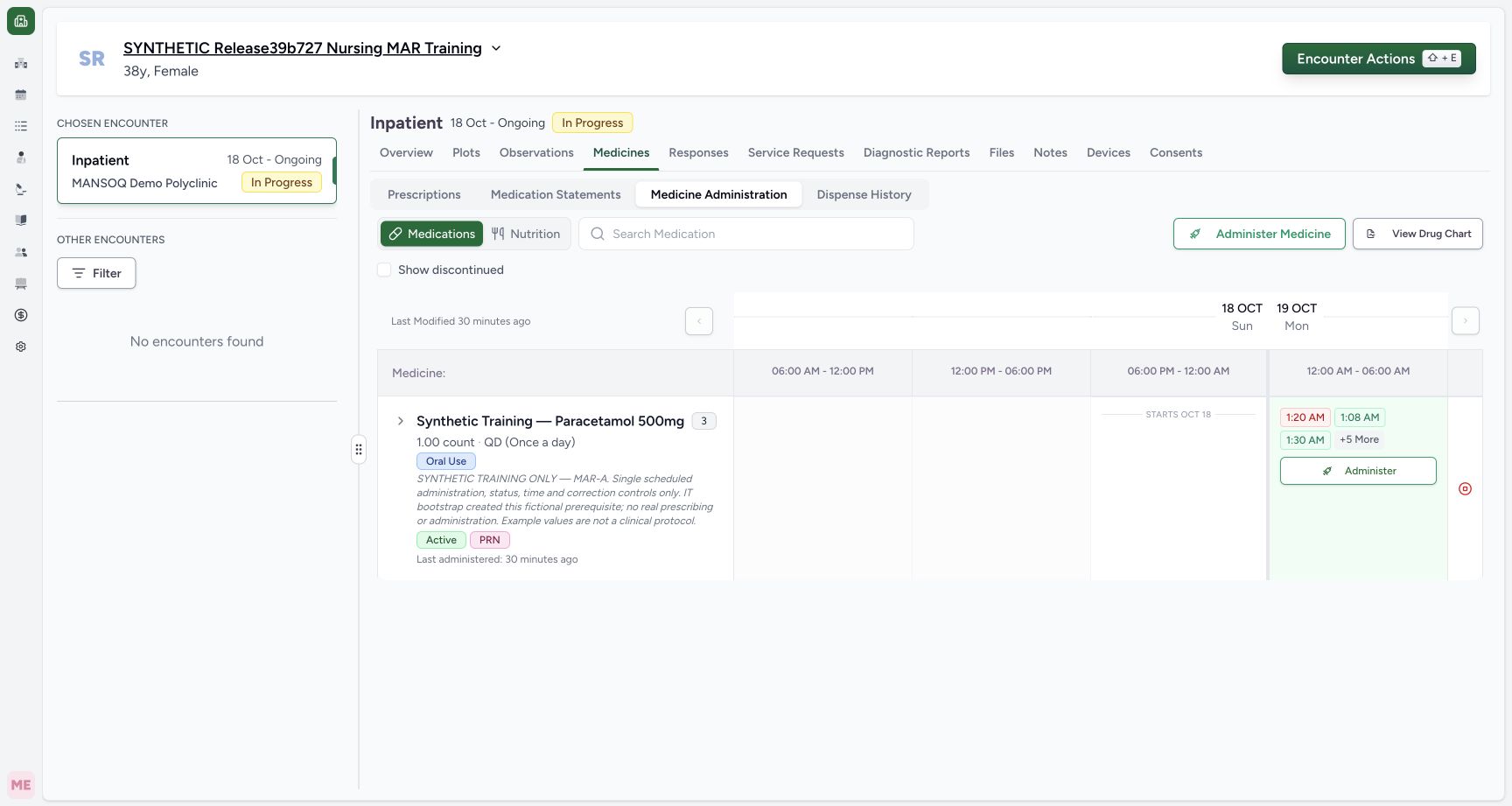
123Open bulk medication documentation in the intended encounter
Capture details
Exact committed release ba551c1d on an isolated nonproduction clone, using an existing Nurse and fictional Polyclinic Inpatient case. The synthetic patient name retains an earlier release label; the actual captured build is ba551c1d. Ordinary Nurse and Doctor API preflight verified the eight retained clinical records and actor identities before new writes. The active encounter and three active medication requests are visible; this top action opens multi-request selection rather than the individual request dialog.
Image SHA-256 1a50a9bb4b612cdffe710e7d789cffa53bc669a473de95743e6b9082b9667f49
- Confirm the intended patient: The fictional name is retained across the isolated clone; confirm the patient before documenting.
- Medicine Administration: Use the verified selected encounter and Medications workspace.
- Open multi-request selection: This top action opens the bulk sheet; individual row Administer is a different entry path.
 123
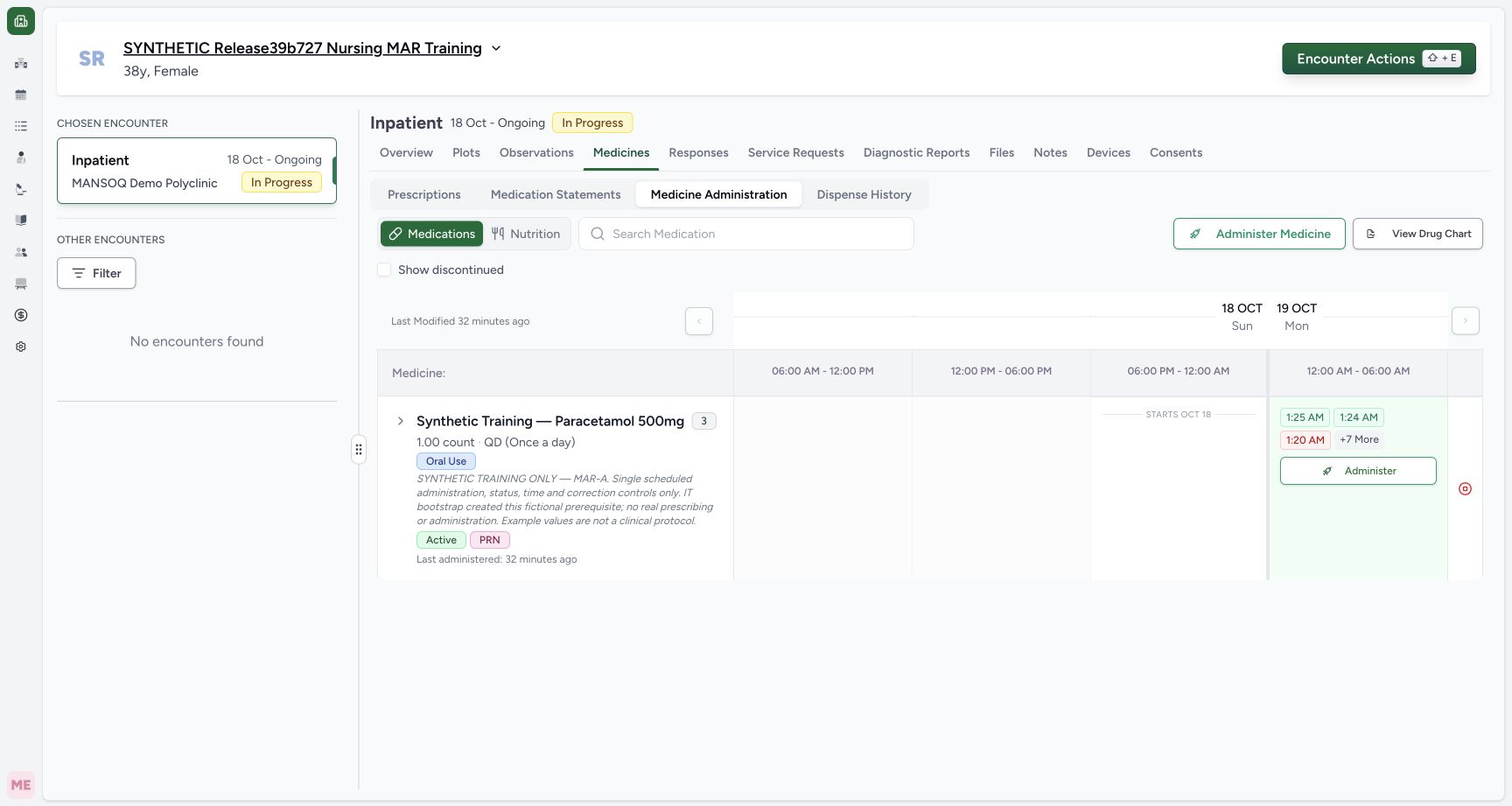
123Find both saved bulk entries in the chart
Capture details
Exact committed release ba551c1d on an isolated nonproduction clone, using an existing Nurse and fictional Polyclinic Inpatient case. The synthetic patient name retains an earlier release label; the actual captured build is ba551c1d. After one batch save, independent normal Nurse and Doctor GET200 confirm two new event IDs, the exact scheduled and multi-instruction requests, 1 count and 2 count, the intended Completed statuses and occurrence values. Total count is ten; prior eight clinical records and actor identities are unchanged. The two new occurrence chips are visible.
Image SHA-256 1ec0bf7c74f5820c1d5e997a4ae326e2145f108c2bb3e624a244cddee196bb43
- Scheduled entry at 01:24: Open this saved occurrence and verify its request, note and time.
- Separate multi-instruction entry at 01:25: This is a distinct saved event from the same batch.
- More history is present: This plain count indicator is not the expand control; use the group chevron to inspect individual request rows.
12 of 12 content blocks have reviewed image alignment. Missing overview or prerequisite images remain open.
Before you begin
- Confirm the intended patient, selected active encounter and individual requests before documenting. Several requests may share one product name; the example contains scheduled, multi-instruction and PRN requests.123
Recorded release ba551c1d · 2026-10-18T23:00:15.545Z · 1728 × 921 Open bulk medication documentation in the intended encounter
Capture details
Exact committed release ba551c1d on an isolated nonproduction clone, using an existing Nurse and fictional Polyclinic Inpatient case. The synthetic patient name retains an earlier release label; the actual captured build is ba551c1d. Ordinary Nurse and Doctor API preflight verified the eight retained clinical records and actor identities before new writes. The active encounter and three active medication requests are visible; this top action opens multi-request selection rather than the individual request dialog.
Image SHA-256
1a50a9bb4b612cdffe710e7d789cffa53bc669a473de95743e6b9082b9667f49- Confirm the intended patient: The fictional name is retained across the isolated clone; confirm the patient before documenting.
- Medicine Administration: Use the verified selected encounter and Medications workspace.
- Open multi-request selection: This top action opens the bulk sheet; individual row Administer is a different entry path.
 123
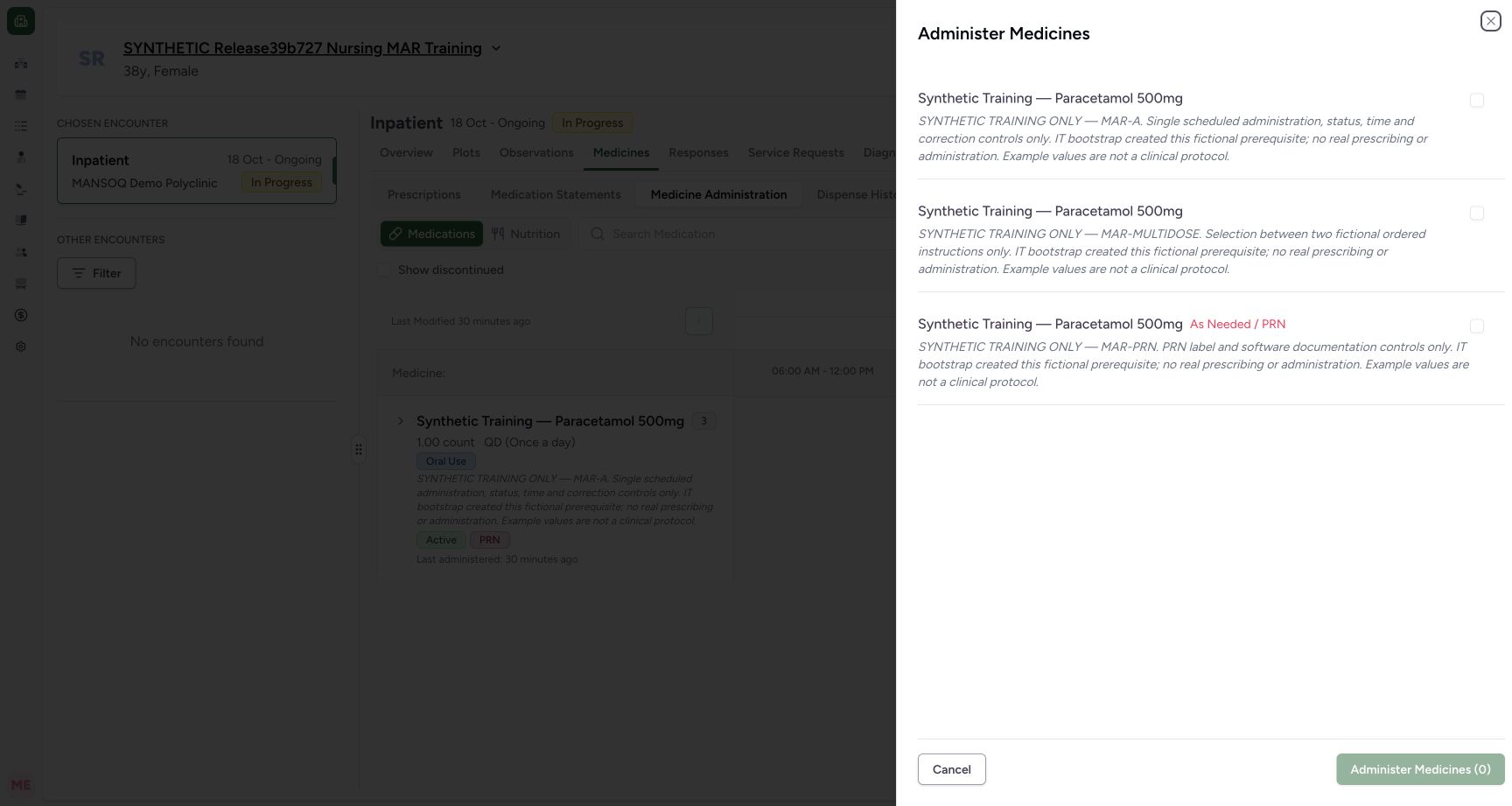
123Recorded release ba551c1d · 2026-10-18T23:00:21.297Z · 1728 × 921 Choose the individual requests for a bulk entry
Capture details
Exact committed release ba551c1d on an isolated nonproduction clone, using an existing Nurse and fictional Polyclinic Inpatient case. The synthetic patient name retains an earlier release label; the actual captured build is ba551c1d. The bulk sheet begins with three unchecked active requests and disabled Administer Medicines (0). Their shared product name does not distinguish them; their request notes and PRN label provide the individual context.
Image SHA-256
b13ac222e190cd7286de1e8885e34ef4cdebd10fc0e37252fe21c09cdc7250f2- Select the scheduled request: Read the MAR-A request note before selecting this request.
- Select the separate multi-instruction request: This is a distinct request despite sharing the same product name.
- Nothing selected: The batch action is disabled until at least one request is selected.
- Use the existing authorized account and facility documentation policy. The example quantities and times are fictional software values, not a treatment protocol. IT prerequisite orders were created separately from the actual Nurse batch save.
 1234
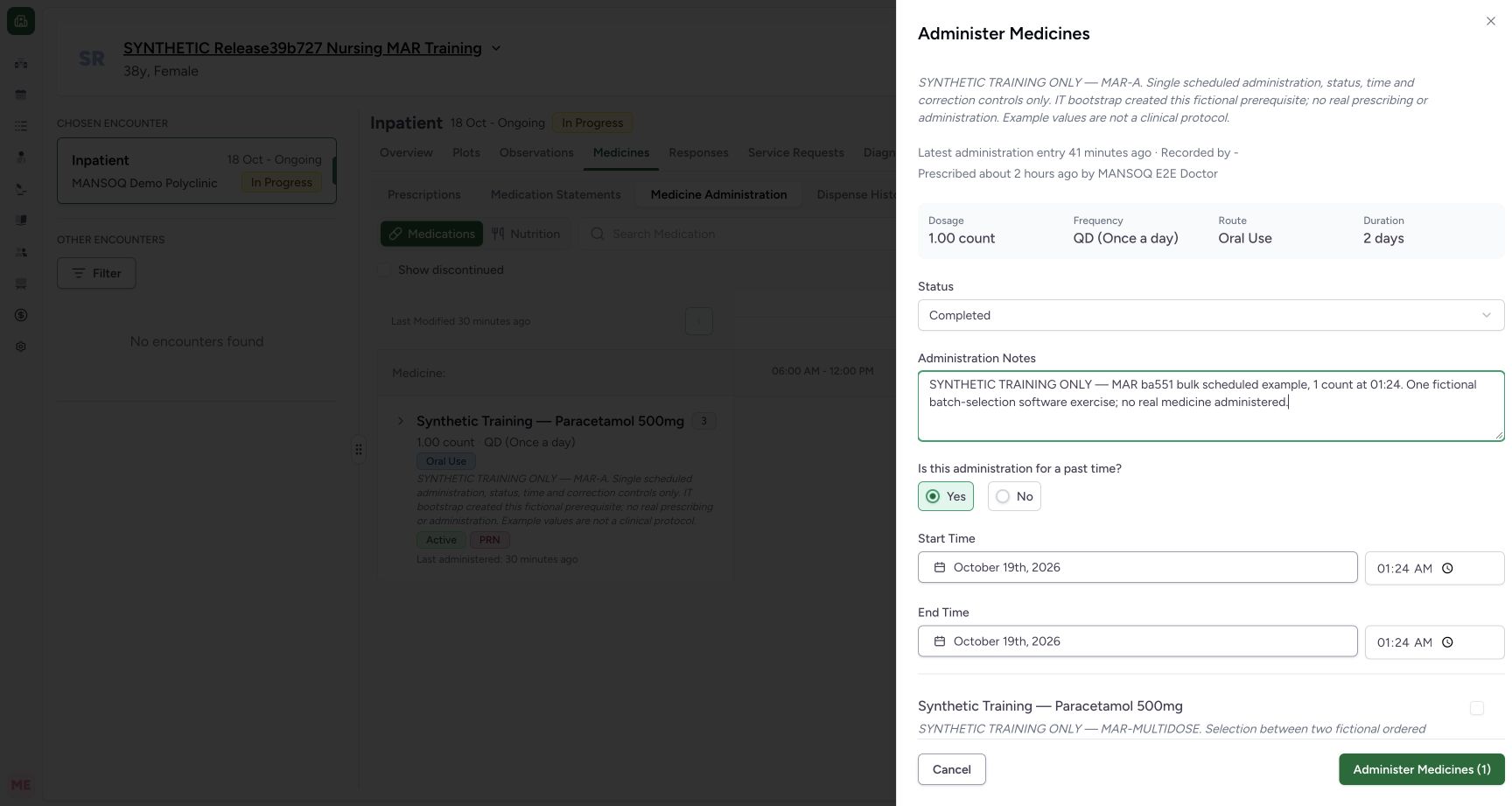
1234Recorded release ba551c1d · 2026-10-18T23:00:50.395Z · 1728 × 921 Review the first selected request before adding another
Capture details
Exact committed release ba551c1d on an isolated nonproduction clone, using an existing Nurse and fictional Polyclinic Inpatient case. The synthetic patient name retains an earlier release label; the actual captured build is ba551c1d. The first scheduled request is Completed with past start/end 01:24 and an optional identifying note. The prior future-time errors are cleared and the batch action is enabled for one selected request. Nothing has been saved yet.
Image SHA-256
a25385d79415ad9b9ee894c10c7c2c86b911b9d660363224bd1357c40e25da7d- First request status: Review this selected request’s event status separately from other selected requests.
- Optional context: This fictional note identifies the scheduled entry; software Notes is optional.
- Corrected start 01:24: The first draft now uses a valid past time.
- One selected draft: The footer count tracks selected medication requests, not historical doses.
 123456
Recorded release ba551c1d · 2026-10-18T23:01:09.538Z · 1728 × 921 Review the second selected request’s own occurrence
Capture details
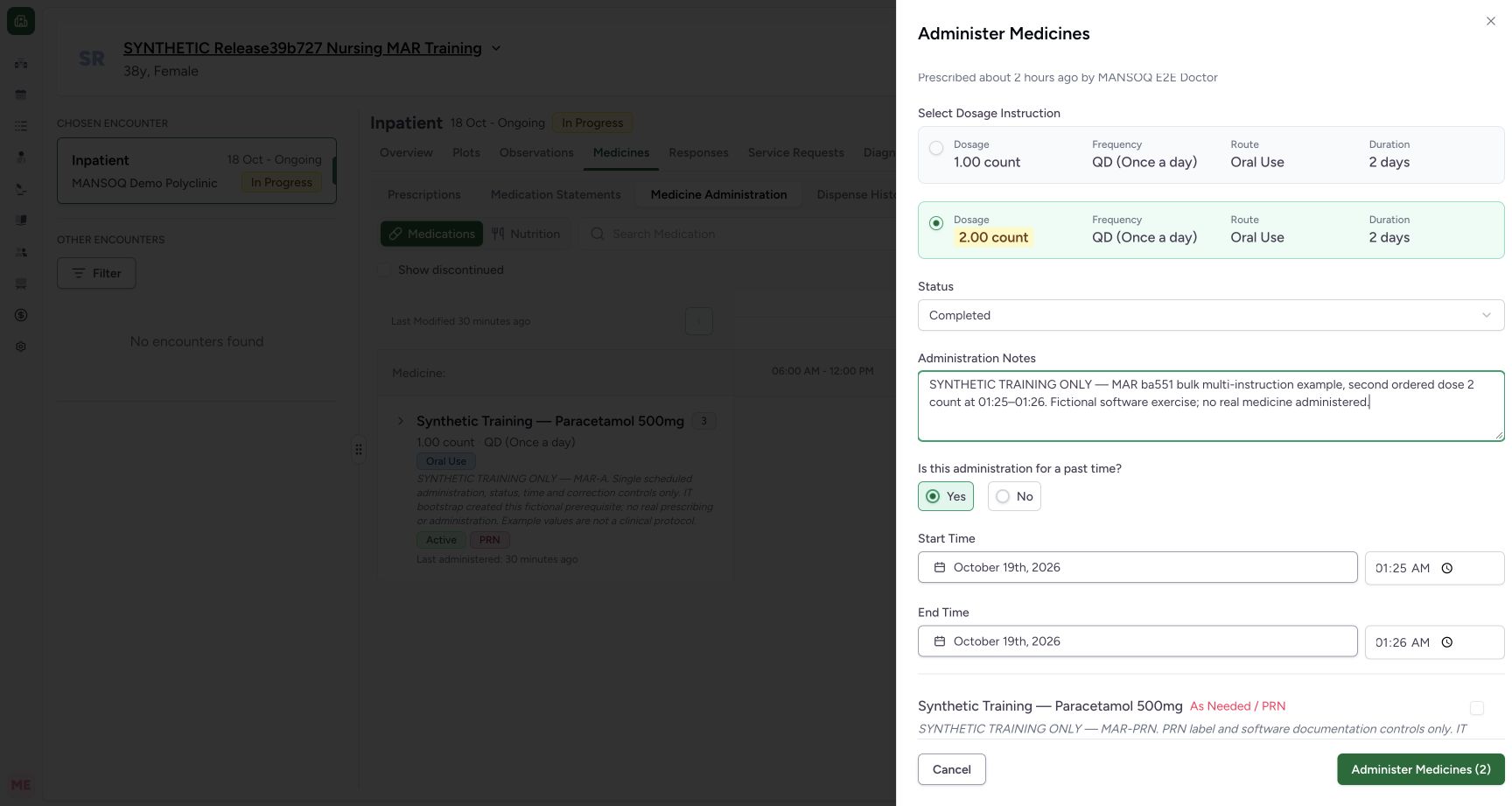
Exact committed release ba551c1d on an isolated nonproduction clone, using an existing Nurse and fictional Polyclinic Inpatient case. The synthetic patient name retains an earlier release label; the actual captured build is ba551c1d. Two requests are now selected. The second multi-instruction request has Completed, a separate optional note and past start 01:25/end 01:26. Its 2 count instruction was chosen above. This lower view belongs to the same unsaved two-entry batch.
Image SHA-256
2e32591aa1ed125009d802bde43e98e792c61d5f2714aee1d30f2db3cb6ba829- Second request context: Each selected request has its own optional note and status/time form.
- Second start 01:25: Check the occurrence of this request rather than applying the first request’s time automatically.
- Second end 01:26: This draft end is separate from the first request’s end.
- Two selected entries: Review both selected forms before one batch submission.
- Select the intended ordered instruction: This actual second-request radio circle selects the fictional 2 count instruction. Check the order; the example is not a dose recommendation.
- Choose the past-time Yes circle: Click the actual radio circle within this request’s form before entering its past dates and times. Repeated text-label accessibility remains unqualified on this version.
1. Open the bulk entry point
In the intended encounter, choose Medicines, then Medicine Administration and Medications. Use the top Administer Medicine action to open the bulk sheet. The Administer action inside a chart row opens a different individual-entry path.
123Open bulk medication documentation in the intended encounter
Capture details
Exact committed release ba551c1d on an isolated nonproduction clone, using an existing Nurse and fictional Polyclinic Inpatient case. The synthetic patient name retains an earlier release label; the actual captured build is ba551c1d. Ordinary Nurse and Doctor API preflight verified the eight retained clinical records and actor identities before new writes. The active encounter and three active medication requests are visible; this top action opens multi-request selection rather than the individual request dialog.
Image SHA-256 1a50a9bb4b612cdffe710e7d789cffa53bc669a473de95743e6b9082b9667f49
- Confirm the intended patient: The fictional name is retained across the isolated clone; confirm the patient before documenting.
- Medicine Administration: Use the verified selected encounter and Medications workspace.
- Open multi-request selection: This top action opens the bulk sheet; individual row Administer is a different entry path.
2. Select the exact requests
Read each request’s details and select its checkbox. The sheet begins with nothing selected and a disabled Administer Medicines (0) action. In this example the scheduled MAR-A request and separate MAR-MULTIDOSE request are selected; the PRN request is left unchecked. A shared product name does not mean these are the same request.
123Choose the individual requests for a bulk entry
Capture details
Exact committed release ba551c1d on an isolated nonproduction clone, using an existing Nurse and fictional Polyclinic Inpatient case. The synthetic patient name retains an earlier release label; the actual captured build is ba551c1d. The bulk sheet begins with three unchecked active requests and disabled Administer Medicines (0). Their shared product name does not distinguish them; their request notes and PRN label provide the individual context.
Image SHA-256 b13ac222e190cd7286de1e8885e34ef4cdebd10fc0e37252fe21c09cdc7250f2
- Select the scheduled request: Read the MAR-A request note before selecting this request.
- Select the separate multi-instruction request: This is a distinct request despite sharing the same product name.
- Nothing selected: The batch action is disabled until at least one request is selected.
1234Review the first selected request before adding another
Capture details
Exact committed release ba551c1d on an isolated nonproduction clone, using an existing Nurse and fictional Polyclinic Inpatient case. The synthetic patient name retains an earlier release label; the actual captured build is ba551c1d. The first scheduled request is Completed with past start/end 01:24 and an optional identifying note. The prior future-time errors are cleared and the batch action is enabled for one selected request. Nothing has been saved yet.
Image SHA-256 a25385d79415ad9b9ee894c10c7c2c86b911b9d660363224bd1357c40e25da7d
- First request status: Review this selected request’s event status separately from other selected requests.
- Optional context: This fictional note identifies the scheduled entry; software Notes is optional.
- Corrected start 01:24: The first draft now uses a valid past time.
- One selected draft: The footer count tracks selected medication requests, not historical doses.
123456Review the second selected request’s own occurrence
Capture details
Exact committed release ba551c1d on an isolated nonproduction clone, using an existing Nurse and fictional Polyclinic Inpatient case. The synthetic patient name retains an earlier release label; the actual captured build is ba551c1d. Two requests are now selected. The second multi-instruction request has Completed, a separate optional note and past start 01:25/end 01:26. Its 2 count instruction was chosen above. This lower view belongs to the same unsaved two-entry batch.
Image SHA-256 2e32591aa1ed125009d802bde43e98e792c61d5f2714aee1d30f2db3cb6ba829
- Second request context: Each selected request has its own optional note and status/time form.
- Second start 01:25: Check the occurrence of this request rather than applying the first request’s time automatically.
- Second end 01:26: This draft end is separate from the first request’s end.
- Two selected entries: Review both selected forms before one batch submission.
- Select the intended ordered instruction: This actual second-request radio circle selects the fictional 2 count instruction. Check the order; the example is not a dose recommendation.
- Choose the past-time Yes circle: Click the actual radio circle within this request’s form before entering its past dates and times. Repeated text-label accessibility remains unqualified on this version.
3. Prepare each selected form separately
Review the dosage information, Status and occurrence in each selected request’s form. For a past occurrence, choose Yes by clicking the radio circle within that request’s form before entering its start/end dates and times. Where ordered quantities differ, select the intended Dosage Instruction after checking the order. The first fictional event has 1 count, Completed and past start/end 01:24. The second has the selected 2 count instruction, Completed and past start 01:25/end 01:26. Administration Notes is optional in the software; record appropriate context under facility policy. Each example note identifies its own request and event.
1234Review the first selected request before adding another
Capture details
Exact committed release ba551c1d on an isolated nonproduction clone, using an existing Nurse and fictional Polyclinic Inpatient case. The synthetic patient name retains an earlier release label; the actual captured build is ba551c1d. The first scheduled request is Completed with past start/end 01:24 and an optional identifying note. The prior future-time errors are cleared and the batch action is enabled for one selected request. Nothing has been saved yet.
Image SHA-256 a25385d79415ad9b9ee894c10c7c2c86b911b9d660363224bd1357c40e25da7d
- First request status: Review this selected request’s event status separately from other selected requests.
- Optional context: This fictional note identifies the scheduled entry; software Notes is optional.
- Corrected start 01:24: The first draft now uses a valid past time.
- One selected draft: The footer count tracks selected medication requests, not historical doses.
123456Review the second selected request’s own occurrence
Capture details
Exact committed release ba551c1d on an isolated nonproduction clone, using an existing Nurse and fictional Polyclinic Inpatient case. The synthetic patient name retains an earlier release label; the actual captured build is ba551c1d. Two requests are now selected. The second multi-instruction request has Completed, a separate optional note and past start 01:25/end 01:26. Its 2 count instruction was chosen above. This lower view belongs to the same unsaved two-entry batch.
Image SHA-256 2e32591aa1ed125009d802bde43e98e792c61d5f2714aee1d30f2db3cb6ba829
- Second request context: Each selected request has its own optional note and status/time form.
- Second start 01:25: Check the occurrence of this request rather than applying the first request’s time automatically.
- Second end 01:26: This draft end is separate from the first request’s end.
- Two selected entries: Review both selected forms before one batch submission.
- Select the intended ordered instruction: This actual second-request radio circle selects the fictional 2 count instruction. Check the order; the example is not a dose recommendation.
- Choose the past-time Yes circle: Click the actual radio circle within this request’s form before entering its past dates and times. Repeated text-label accessibility remains unqualified on this version.
4. Resolve all selected-form errors before one save
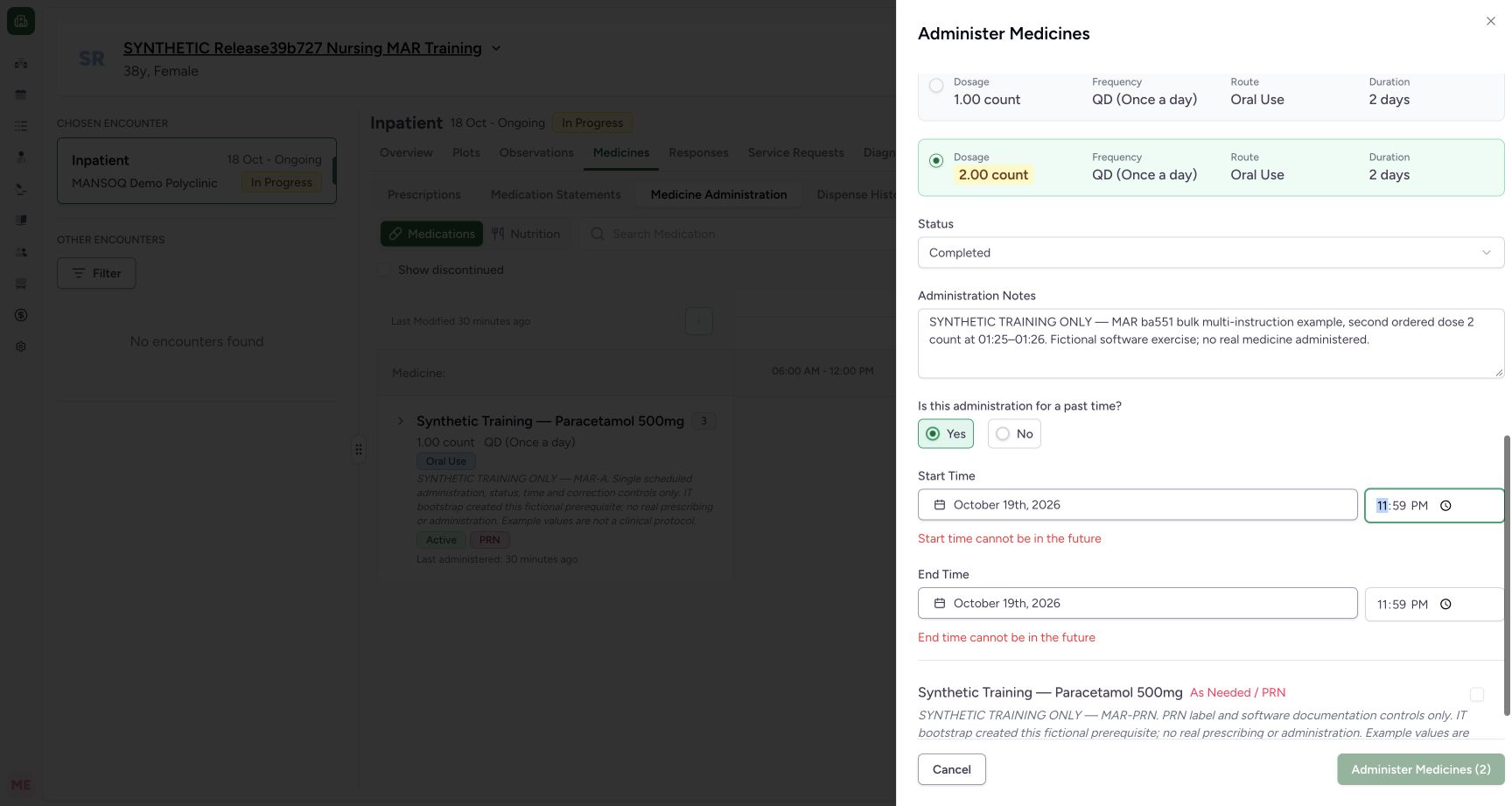
Review every selected form, including forms reached by scrolling. One invalid selected occurrence disables the aggregate batch action even when another selected form is valid. Correct the errors and check both forms again. When the selected count and all details are right, select Administer Medicines (2) once and wait for saving to finish. Do not submit an unchanged batch again merely because the outcome is uncertain; inspect the saved records first.
 123
123One invalid selected form blocks the two-entry batch
Capture details
Exact committed release ba551c1d on an isolated nonproduction clone, using an existing Nurse and fictional Polyclinic Inpatient case. The synthetic patient name retains an earlier release label; the actual captured build is ba551c1d. The first selected request remains valid at 01:24. A deliberately future 23:59 occurrence on the second selected request produces its timing errors and disables the aggregate Administer Medicines (2) action. No batch is submitted in this state.
Image SHA-256 939990e9924a26be2dd493b9508d5ade5647ae06b0b45d2386ba56d822653f0c
- Second form error: Correct the invalid request even when another selected form is valid.
- Second end error: Review the end as well as the start.
- Whole batch disabled: The selected count remains two while one invalid form blocks submission.
 123
123Review both selected forms and save once
Capture details
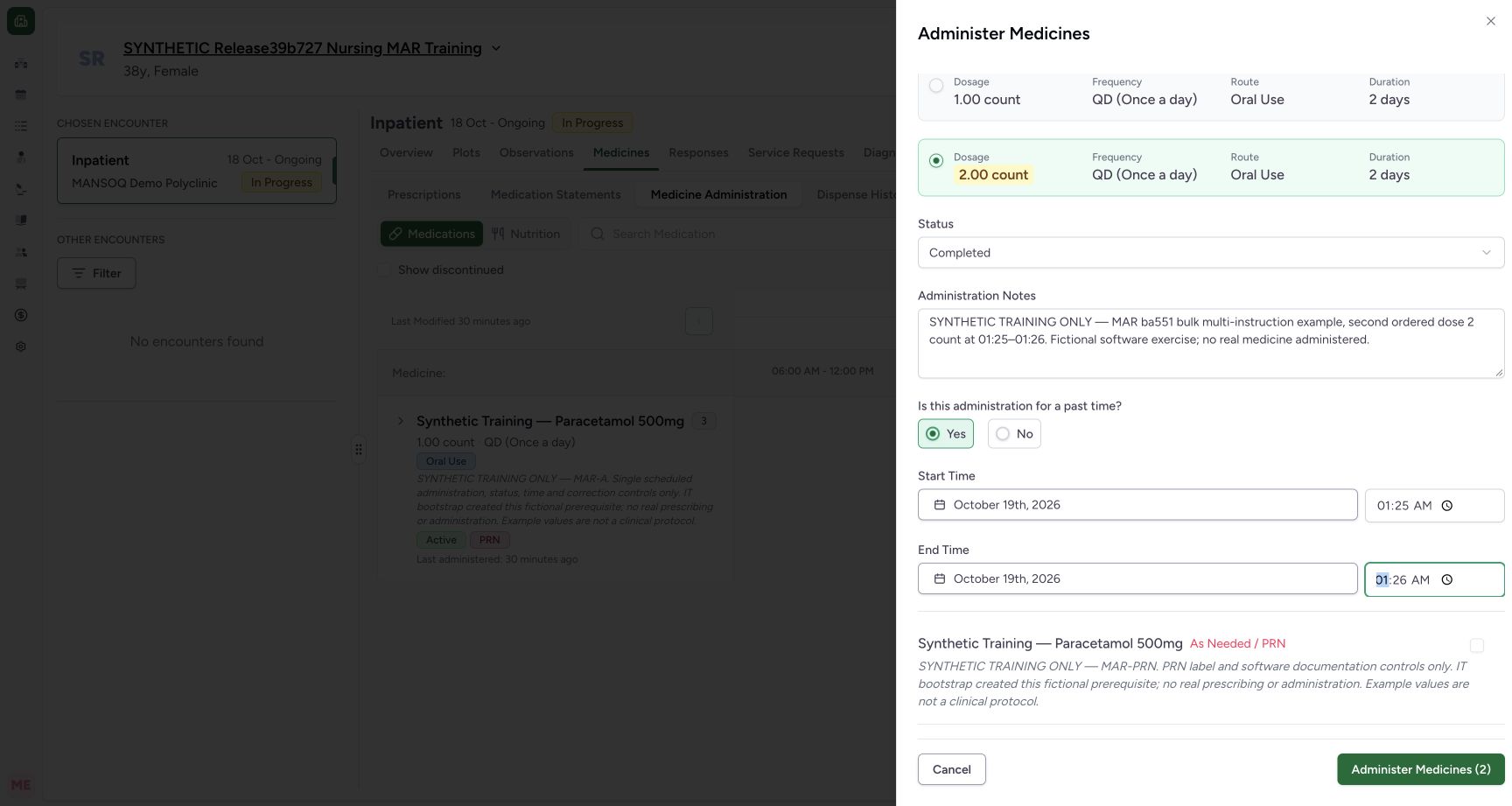
Exact committed release ba551c1d on an isolated nonproduction clone, using an existing Nurse and fictional Polyclinic Inpatient case. The synthetic patient name retains an earlier release label; the actual captured build is ba551c1d. After correcting the deliberate second-form error, both selected drafts are valid. DOM readback confirms selected scheduled and multi-instruction requests, unselected PRN request, times 01:24–01:24 and 01:25–01:26, two Completed statuses, second instruction selected and enabled two-entry submit. This is the final unsaved review before one batch submission.
Image SHA-256 e7fa485e3b099c6cf19ea29b1eec1525d48957507b1db91207a7c2690d1e16c0
- Corrected second start: Review both forms; the first remains 01:24 and the second is 01:25.
- Corrected second end: The second event end is 01:26.
- Save the reviewed batch once: The selected count is two and aggregate validation is now clear.
5. Find the two saved occurrences
After saving finishes, the chart shows the new 1:24 AM and 1:25 AM occurrence chips. Open the relevant occurrence to verify its record. A +7 More indicator reports additional history; it is plain text, so use the group chevron when you need to expand the individual request rows.
123Find both saved bulk entries in the chart
Capture details
Exact committed release ba551c1d on an isolated nonproduction clone, using an existing Nurse and fictional Polyclinic Inpatient case. The synthetic patient name retains an earlier release label; the actual captured build is ba551c1d. After one batch save, independent normal Nurse and Doctor GET200 confirm two new event IDs, the exact scheduled and multi-instruction requests, 1 count and 2 count, the intended Completed statuses and occurrence values. Total count is ten; prior eight clinical records and actor identities are unchanged. The two new occurrence chips are visible.
Image SHA-256 1ec0bf7c74f5820c1d5e997a4ae326e2145f108c2bb3e624a244cddee196bb43
- Scheduled entry at 01:24: Open this saved occurrence and verify its request, note and time.
- Separate multi-instruction entry at 01:25: This is a distinct saved event from the same batch.
- More history is present: This plain count indicator is not the expand control; use the group chevron to inspect individual request rows.
6. Inspect each saved event
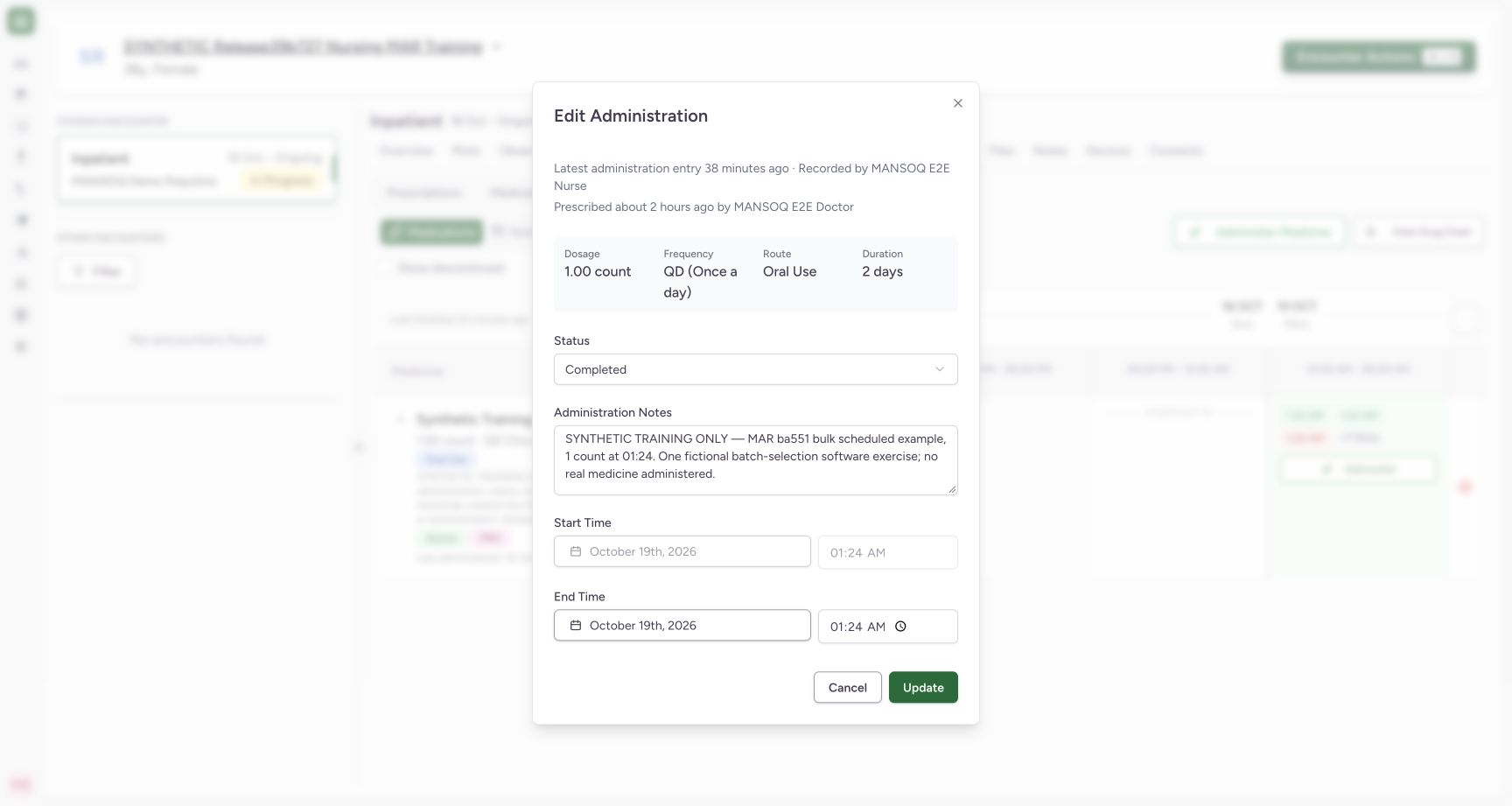
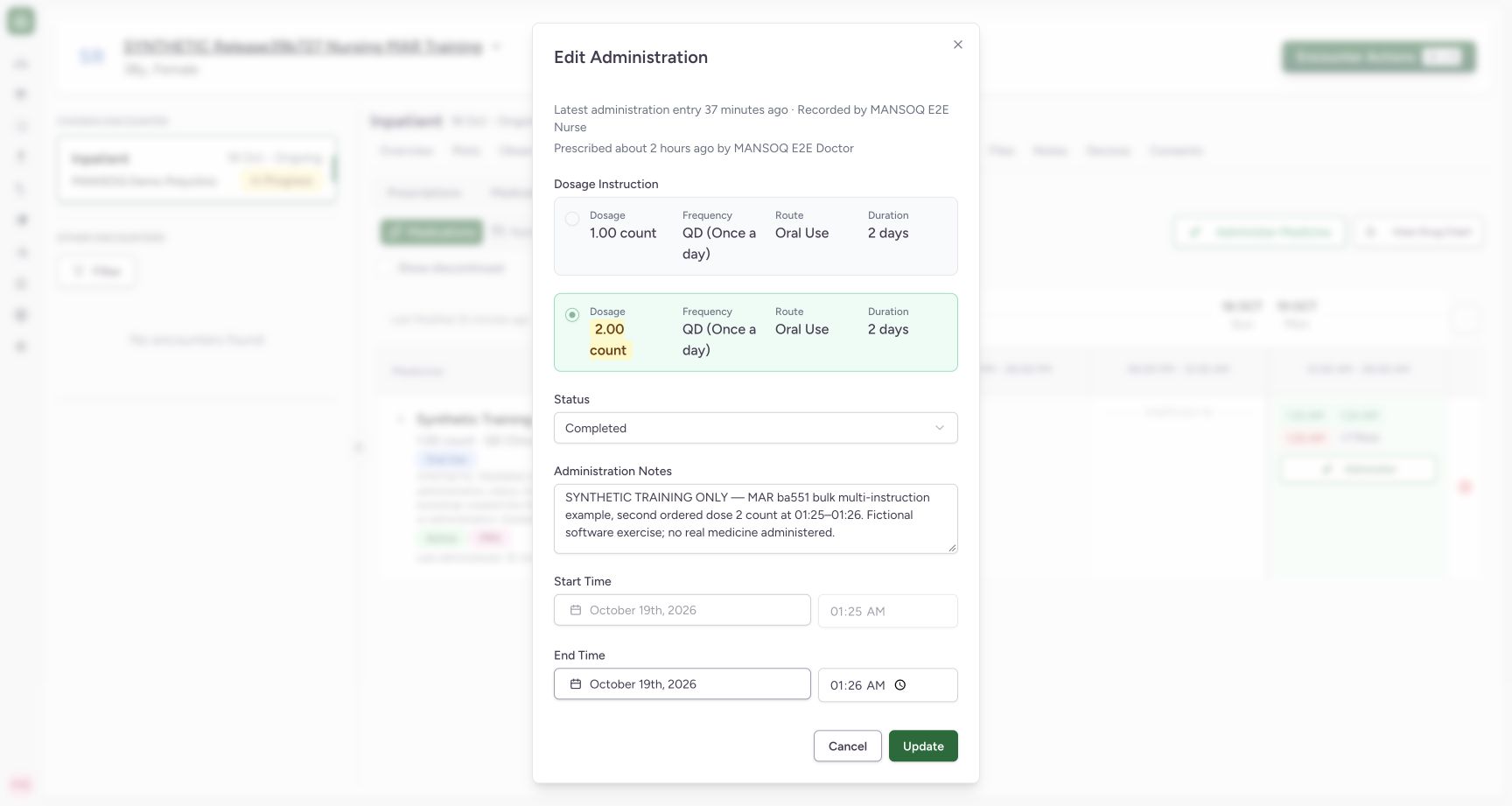
Open the scheduled entry and confirm its 1 count, identifying note, Completed status and 01:24 start/end. Open the multi-instruction entry and confirm its selected 2 count, separate note, Completed status and 01:25–01:26 occurrence. The saved-dose selector is locked on the existing multi-instruction event. Independent ordinary Nurse and Doctor reads verified exactly two new event IDs on the intended requests, total count ten, and unchanged prior eight clinical records and actor identities.
 123
123Verify the first persisted batch entry
Capture details
Exact committed release ba551c1d on an isolated nonproduction clone, using an existing Nurse and fictional Polyclinic Inpatient case. The synthetic patient name retains an earlier release label; the actual captured build is ba551c1d. The scheduled entry reopens as Completed with 1 count, the identifying optional note and saved 01:24 start/end. The exact request and new event ID were independently verified through normal Nurse/Doctor reads. No Update is performed during this inspection.
Image SHA-256 93ce8040f59faa53923103eac92df16927459e643c372861d3fc80365aacdb3c
- Saved scheduled dose: The first entry persisted 1 count on the scheduled request.
- Saved identifying context: This saved note distinguishes the first batch entry from the second.
- Saved first occurrence: The saved start is 01:24; its end is also 01:24.
 123
123Verify the second persisted instruction and occurrence
Capture details
Exact committed release ba551c1d on an isolated nonproduction clone, using an existing Nurse and fictional Polyclinic Inpatient case. The synthetic patient name retains an earlier release label; the actual captured build is ba551c1d. The second entry reopens with the 2 count instruction selected and locked, Completed, its separate identifying note and 01:25–01:26 occurrence. Independent Nurse/Doctor reads confirmed the new multi-instruction event ID and selected request. No Update is performed during inspection.
Image SHA-256 3fde02ea2dd6b1c7918b82d136a25c608ece406297facf4496f044181f9177a0
- Saved second ordered instruction: The chosen 2 count persisted in this actual new-entry batch save.
- Separate saved context: This saved note identifies the second request and event.
- Saved distinct end: The second event ends at 01:26 after its 01:25 start.
7. Recognize the reset before starting another batch
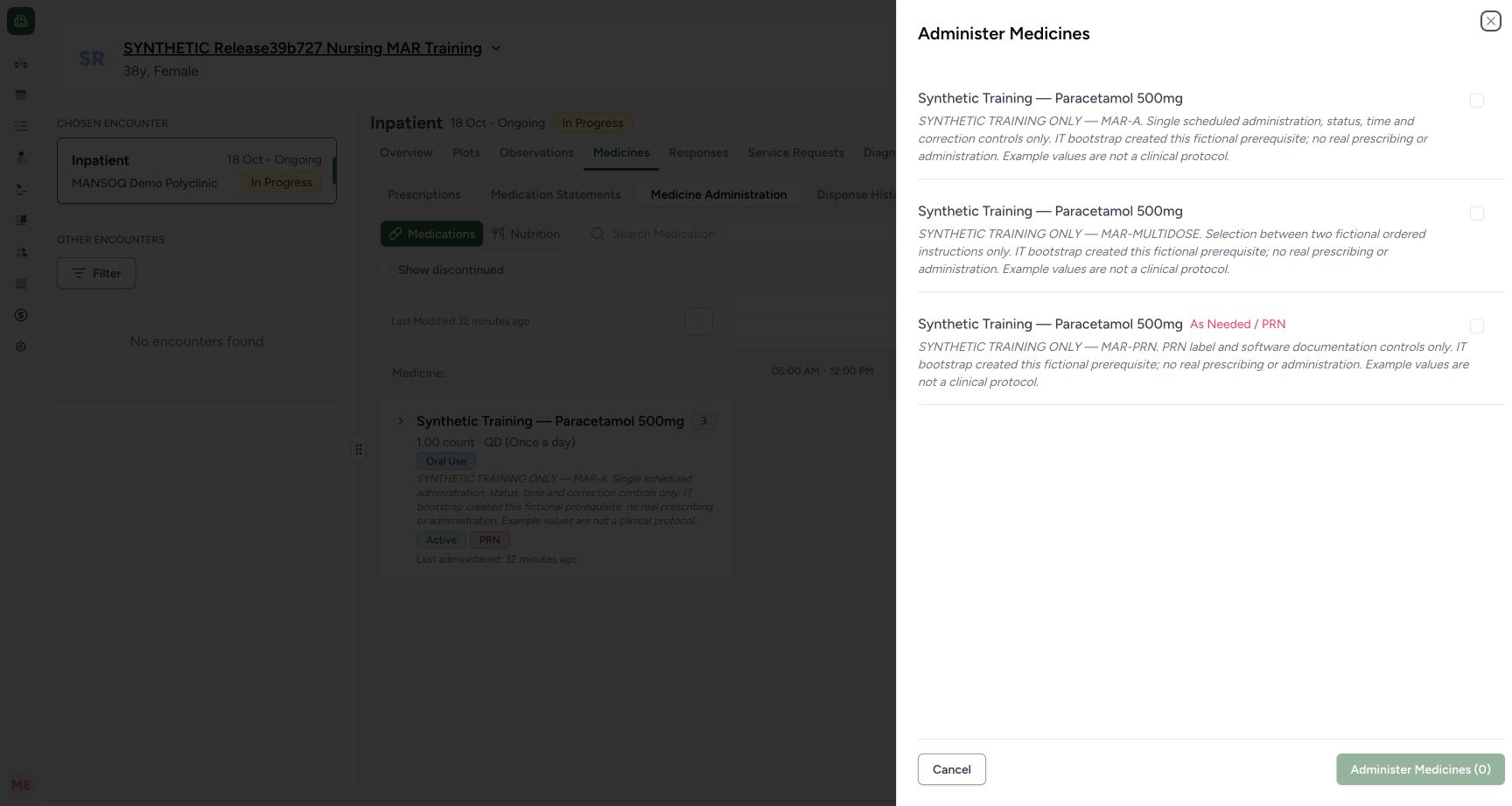
Reopening the top Administer Medicine action starts a new empty selection: the requests are unchecked and Administer Medicines (0) is disabled. That zero is the new draft selection count, not the count of saved history. Cancel the sheet when no new entries are intended. The inspections and this cancelled empty sheet did not add or change any of the ten saved clinical records.
 123
123Recognize that a reopened bulk sheet starts empty
Capture details
Exact committed release ba551c1d on an isolated nonproduction clone, using an existing Nurse and fictional Polyclinic Inpatient case. The synthetic patient name retains an earlier release label; the actual captured build is ba551c1d. After the successful batch and read-only event inspections, reopening the top action shows all three requests unchecked and disabled Administer Medicines (0). It does not retain or silently resubmit the saved two-entry selection. This empty sheet is cancelled without saving.
Image SHA-256 a5a7cc7aa557fab3636cd9f20d82a56a7e82d9dc5104116fb98f4e76c6982b63
- Selection is reset: Review and select requests deliberately for each new batch.
- No new batch selected: The zero count is a new empty draft state, not a count of saved history.
- Leave without adding records: Cancel this inspection when no new entries are intended.
Read the bulk header and saved-event attribution separately
This version’s bulk forms can show Latest administration entry with Recorded by -. That bulk header does not identify the event recorder. The reopened saved event forms show Recorded by MANSOQ E2E Nurse and Prescribed by MANSOQ E2E Doctor in this fictional case; independent record reads verify the actual audit actor identities. A recorder is not automatically the clinical performer. Full accessibility of repeated form labels is not qualified by this lesson.
1234Review the first selected request before adding another
Capture details
Exact committed release ba551c1d on an isolated nonproduction clone, using an existing Nurse and fictional Polyclinic Inpatient case. The synthetic patient name retains an earlier release label; the actual captured build is ba551c1d. The first scheduled request is Completed with past start/end 01:24 and an optional identifying note. The prior future-time errors are cleared and the batch action is enabled for one selected request. Nothing has been saved yet.
Image SHA-256 a25385d79415ad9b9ee894c10c7c2c86b911b9d660363224bd1357c40e25da7d
- First request status: Review this selected request’s event status separately from other selected requests.
- Optional context: This fictional note identifies the scheduled entry; software Notes is optional.
- Corrected start 01:24: The first draft now uses a valid past time.
- One selected draft: The footer count tracks selected medication requests, not historical doses.
123Verify the first persisted batch entry
Capture details
Exact committed release ba551c1d on an isolated nonproduction clone, using an existing Nurse and fictional Polyclinic Inpatient case. The synthetic patient name retains an earlier release label; the actual captured build is ba551c1d. The scheduled entry reopens as Completed with 1 count, the identifying optional note and saved 01:24 start/end. The exact request and new event ID were independently verified through normal Nurse/Doctor reads. No Update is performed during this inspection.
Image SHA-256 93ce8040f59faa53923103eac92df16927459e643c372861d3fc80365aacdb3c
- Saved scheduled dose: The first entry persisted 1 count on the scheduled request.
- Saved identifying context: This saved note distinguishes the first batch entry from the second.
- Saved first occurrence: The saved start is 01:24; its end is also 01:24.
123Verify the second persisted instruction and occurrence
Capture details
Exact committed release ba551c1d on an isolated nonproduction clone, using an existing Nurse and fictional Polyclinic Inpatient case. The synthetic patient name retains an earlier release label; the actual captured build is ba551c1d. The second entry reopens with the 2 count instruction selected and locked, Completed, its separate identifying note and 01:25–01:26 occurrence. Independent Nurse/Doctor reads confirmed the new multi-instruction event ID and selected request. No Update is performed during inspection.
Image SHA-256 3fde02ea2dd6b1c7918b82d136a25c608ece406297facf4496f044181f9177a0
- Saved second ordered instruction: The chosen 2 count persisted in this actual new-entry batch save.
- Separate saved context: This saved note identifies the second request and event.
- Saved distinct end: The second event ends at 01:26 after its 01:25 start.
What this batch lesson establishes
The demonstrated path selects two existing active requests, validates their separate drafts, saves two new Completed records and verifies both outcomes. It does not qualify all statuses in a batch, arbitrarily large batches, clinical dose choice, historical duplicate prevention, network retry guarantees, a runtime API-error rollback demonstration or another role/facility. Earlier versions and their limitations remain separate lessons.
123Choose the individual requests for a bulk entry
Capture details
Exact committed release ba551c1d on an isolated nonproduction clone, using an existing Nurse and fictional Polyclinic Inpatient case. The synthetic patient name retains an earlier release label; the actual captured build is ba551c1d. The bulk sheet begins with three unchecked active requests and disabled Administer Medicines (0). Their shared product name does not distinguish them; their request notes and PRN label provide the individual context.
Image SHA-256 b13ac222e190cd7286de1e8885e34ef4cdebd10fc0e37252fe21c09cdc7250f2
- Select the scheduled request: Read the MAR-A request note before selecting this request.
- Select the separate multi-instruction request: This is a distinct request despite sharing the same product name.
- Nothing selected: The batch action is disabled until at least one request is selected.
123One invalid selected form blocks the two-entry batch
Capture details
Exact committed release ba551c1d on an isolated nonproduction clone, using an existing Nurse and fictional Polyclinic Inpatient case. The synthetic patient name retains an earlier release label; the actual captured build is ba551c1d. The first selected request remains valid at 01:24. A deliberately future 23:59 occurrence on the second selected request produces its timing errors and disables the aggregate Administer Medicines (2) action. No batch is submitted in this state.
Image SHA-256 939990e9924a26be2dd493b9508d5ade5647ae06b0b45d2386ba56d822653f0c
- Second form error: Correct the invalid request even when another selected form is valid.
- Second end error: Review the end as well as the start.
- Whole batch disabled: The selected count remains two while one invalid form blocks submission.
123Verify the first persisted batch entry
Capture details
Exact committed release ba551c1d on an isolated nonproduction clone, using an existing Nurse and fictional Polyclinic Inpatient case. The synthetic patient name retains an earlier release label; the actual captured build is ba551c1d. The scheduled entry reopens as Completed with 1 count, the identifying optional note and saved 01:24 start/end. The exact request and new event ID were independently verified through normal Nurse/Doctor reads. No Update is performed during this inspection.
Image SHA-256 93ce8040f59faa53923103eac92df16927459e643c372861d3fc80365aacdb3c
- Saved scheduled dose: The first entry persisted 1 count on the scheduled request.
- Saved identifying context: This saved note distinguishes the first batch entry from the second.
- Saved first occurrence: The saved start is 01:24; its end is also 01:24.
123Verify the second persisted instruction and occurrence
Capture details
Exact committed release ba551c1d on an isolated nonproduction clone, using an existing Nurse and fictional Polyclinic Inpatient case. The synthetic patient name retains an earlier release label; the actual captured build is ba551c1d. The second entry reopens with the 2 count instruction selected and locked, Completed, its separate identifying note and 01:25–01:26 occurrence. Independent Nurse/Doctor reads confirmed the new multi-instruction event ID and selected request. No Update is performed during inspection.
Image SHA-256 3fde02ea2dd6b1c7918b82d136a25c608ece406297facf4496f044181f9177a0
- Saved second ordered instruction: The chosen 2 count persisted in this actual new-entry batch save.
- Separate saved context: This saved note identifies the second request and event.
- Saved distinct end: The second event ends at 01:26 after its 01:25 start.
Source evidence
Every citation uses this exact committed version. The private source repository requires access.
- repositories/platform/mansoq-web/src/components/Medicine/MedicationAdministration/MedicineAdminSheet.tsx:185 ·
ba551c1d67031248136fd2016afe227b5fc994bdSource file checksum
342ae4e4635dedb808bada1db0ef95248184feb0fd548a99f1016e69d764f5ef - repositories/platform/mansoq-web/src/components/Medicine/MedicationAdministration/MedicineAdminSheet.tsx:250 ·
ba551c1d67031248136fd2016afe227b5fc994bdSource file checksum
342ae4e4635dedb808bada1db0ef95248184feb0fd548a99f1016e69d764f5ef - repositories/platform/mansoq-web/src/components/Medicine/MedicationAdministration/MedicineAdminForm.tsx:609 ·
ba551c1d67031248136fd2016afe227b5fc994bdSource file checksum
490b23b1796a5dbbf0477802f806614fe9f64a33de3a6c2b19ccf6ed0482c7ba - repositories/platform/mansoq-web/src/components/Medicine/MedicationAdministration/AdministrationTab.tsx:834 ·
ba551c1d67031248136fd2016afe227b5fc994bdSource file checksum
170c246835ea1966b8512f5baf72ff0ea60635f28cbcec6a465bb8c17506555f - repositories/platform/mansoq-core/mansoq/emr/resources/medication/administration/spec.py:131 ·
ba551c1d67031248136fd2016afe227b5fc994bdSource file checksum
57ad204f4a0e2aa93376f8abff6f687e41fab8b3b90ea1dd136d5662f489f215