 MANSOQ
 Medication administration · VERSION ba551c1d
Resolve a disabled medication batch action and understand reset
Distinguish an empty selection from a selected form with invalid timing, correct the affected fields and recognize a fresh empty sheet after a successful save.
Nurse
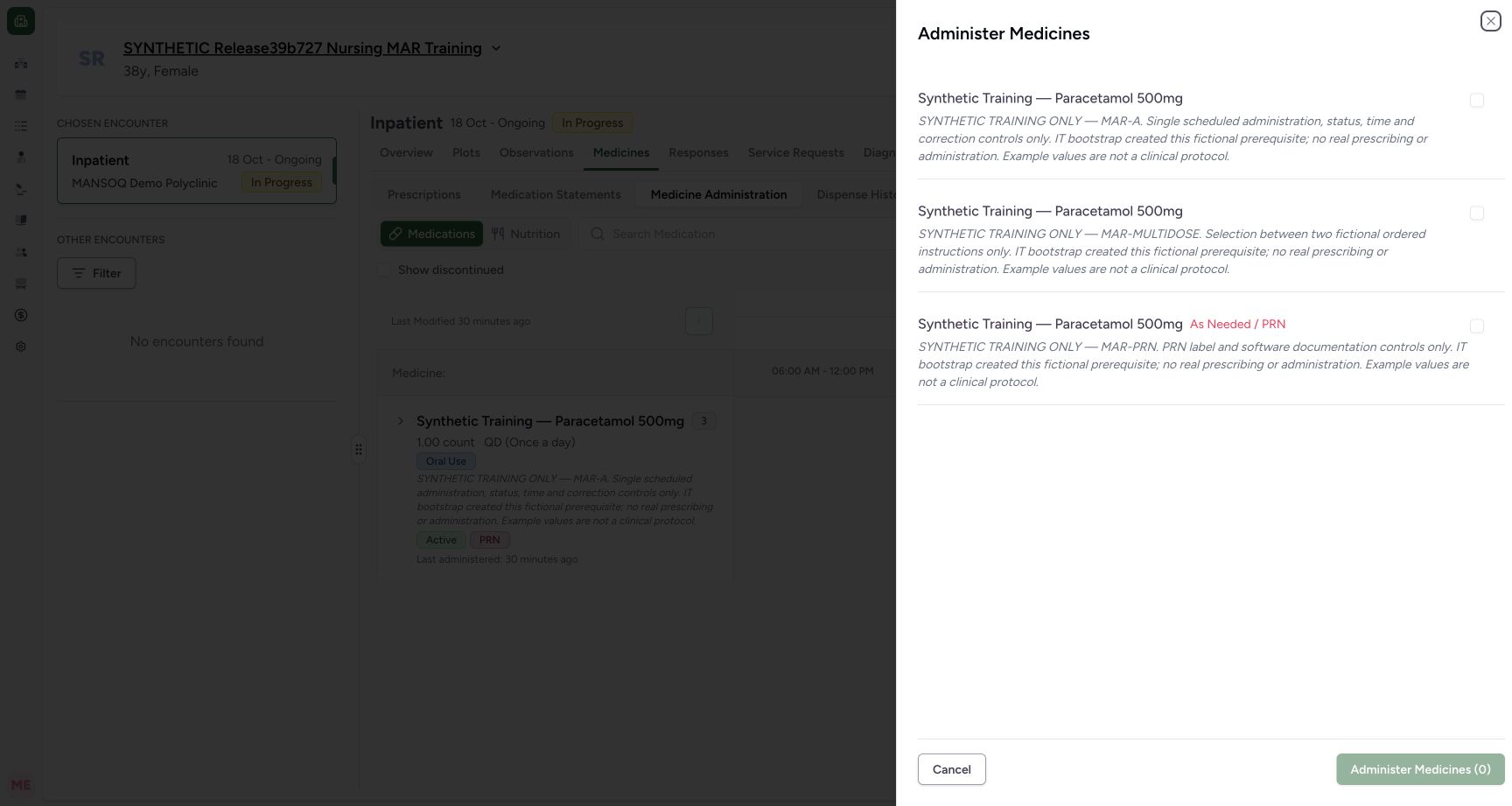 123
123Choose the individual requests for a bulk entry
Capture details
Exact committed release ba551c1d on an isolated nonproduction clone, using an existing Nurse and fictional Polyclinic Inpatient case. The synthetic patient name retains an earlier release label; the actual captured build is ba551c1d. The bulk sheet begins with three unchecked active requests and disabled Administer Medicines (0). Their shared product name does not distinguish them; their request notes and PRN label provide the individual context.
Image SHA-256 b13ac222e190cd7286de1e8885e34ef4cdebd10fc0e37252fe21c09cdc7250f2
- Select the scheduled request: Read the MAR-A request note before selecting this request.
- Select the separate multi-instruction request: This is a distinct request despite sharing the same product name.
- Nothing selected: The batch action is disabled until at least one request is selected.
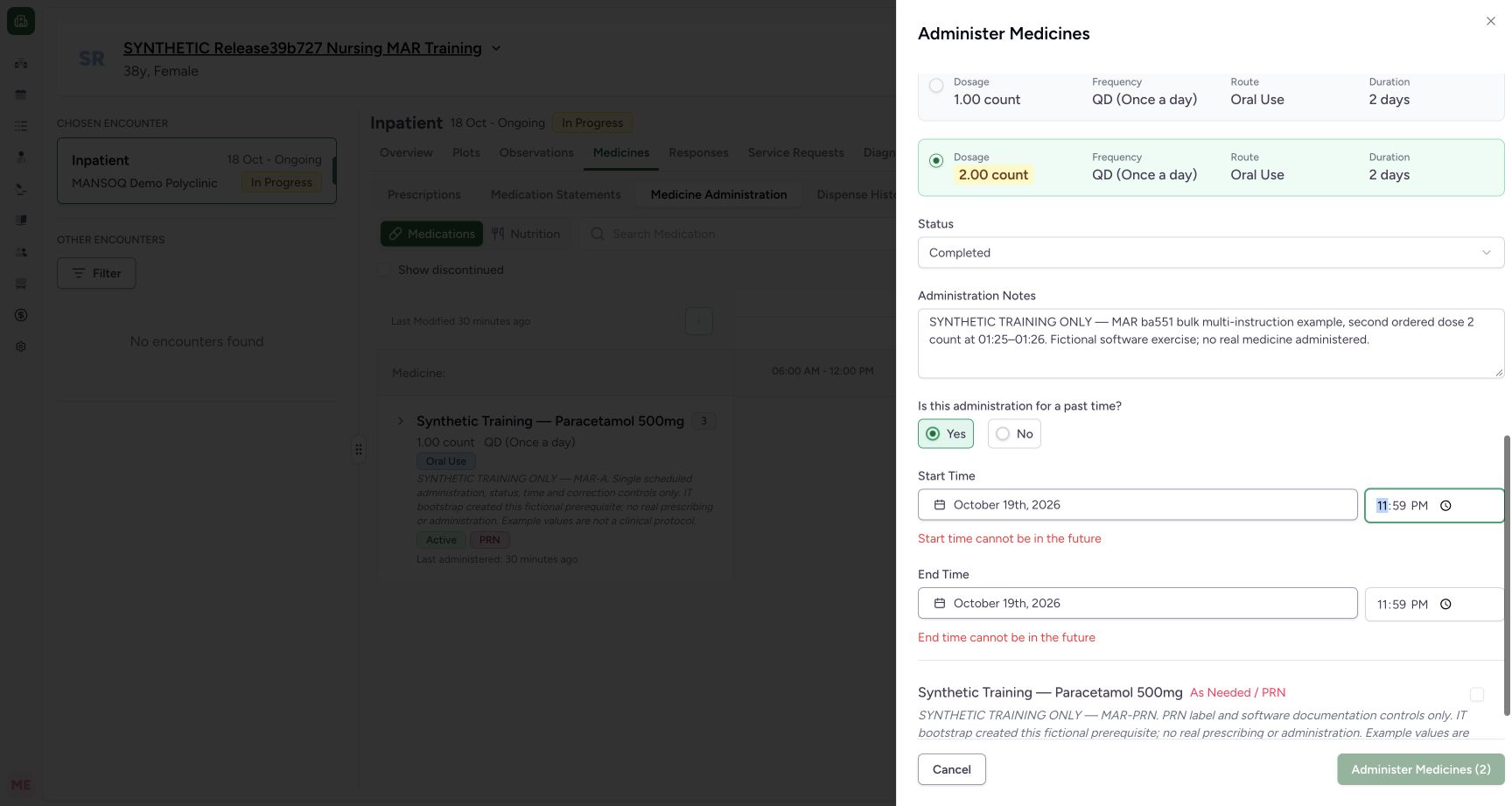 123
123One invalid selected form blocks the two-entry batch
Capture details
Exact committed release ba551c1d on an isolated nonproduction clone, using an existing Nurse and fictional Polyclinic Inpatient case. The synthetic patient name retains an earlier release label; the actual captured build is ba551c1d. The first selected request remains valid at 01:24. A deliberately future 23:59 occurrence on the second selected request produces its timing errors and disables the aggregate Administer Medicines (2) action. No batch is submitted in this state.
Image SHA-256 939990e9924a26be2dd493b9508d5ade5647ae06b0b45d2386ba56d822653f0c
- Second form error: Correct the invalid request even when another selected form is valid.
- Second end error: Review the end as well as the start.
- Whole batch disabled: The selected count remains two while one invalid form blocks submission.
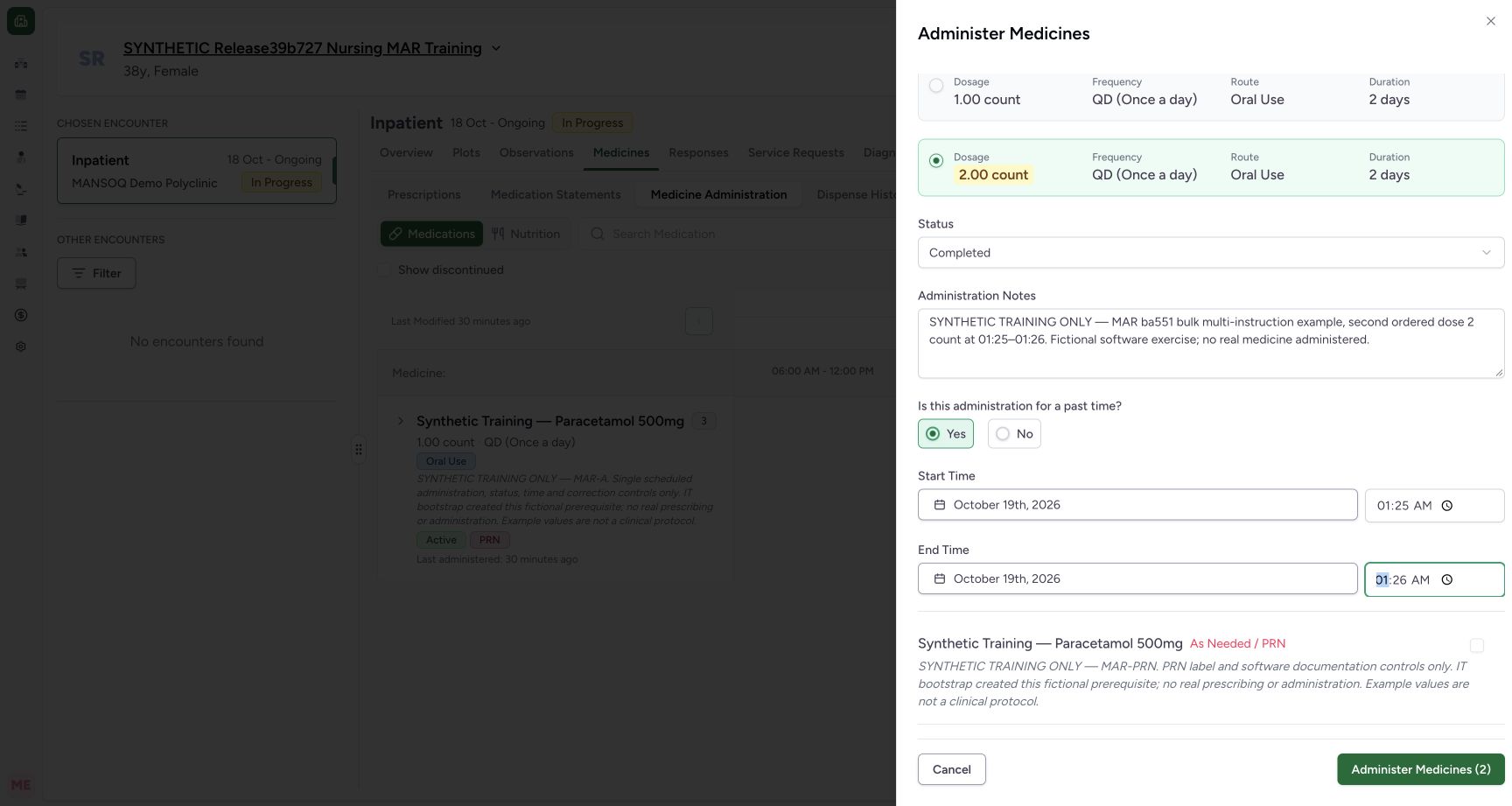 123
123Review both selected forms and save once
Capture details
Exact committed release ba551c1d on an isolated nonproduction clone, using an existing Nurse and fictional Polyclinic Inpatient case. The synthetic patient name retains an earlier release label; the actual captured build is ba551c1d. After correcting the deliberate second-form error, both selected drafts are valid. DOM readback confirms selected scheduled and multi-instruction requests, unselected PRN request, times 01:24–01:24 and 01:25–01:26, two Completed statuses, second instruction selected and enabled two-entry submit. This is the final unsaved review before one batch submission.
Image SHA-256 e7fa485e3b099c6cf19ea29b1eec1525d48957507b1db91207a7c2690d1e16c0
- Corrected second start: Review both forms; the first remains 01:24 and the second is 01:25.
- Corrected second end: The second event end is 01:26.
- Save the reviewed batch once: The selected count is two and aggregate validation is now clear.
8 of 8 content blocks have reviewed image alignment. Missing overview or prerequisite images remain open.
Before you begin
- Open the bulk sheet from the intended active encounter and check the individual request context. The fictional examples use the scheduled MAR-A request and the separate MAR-MULTIDOSE request.
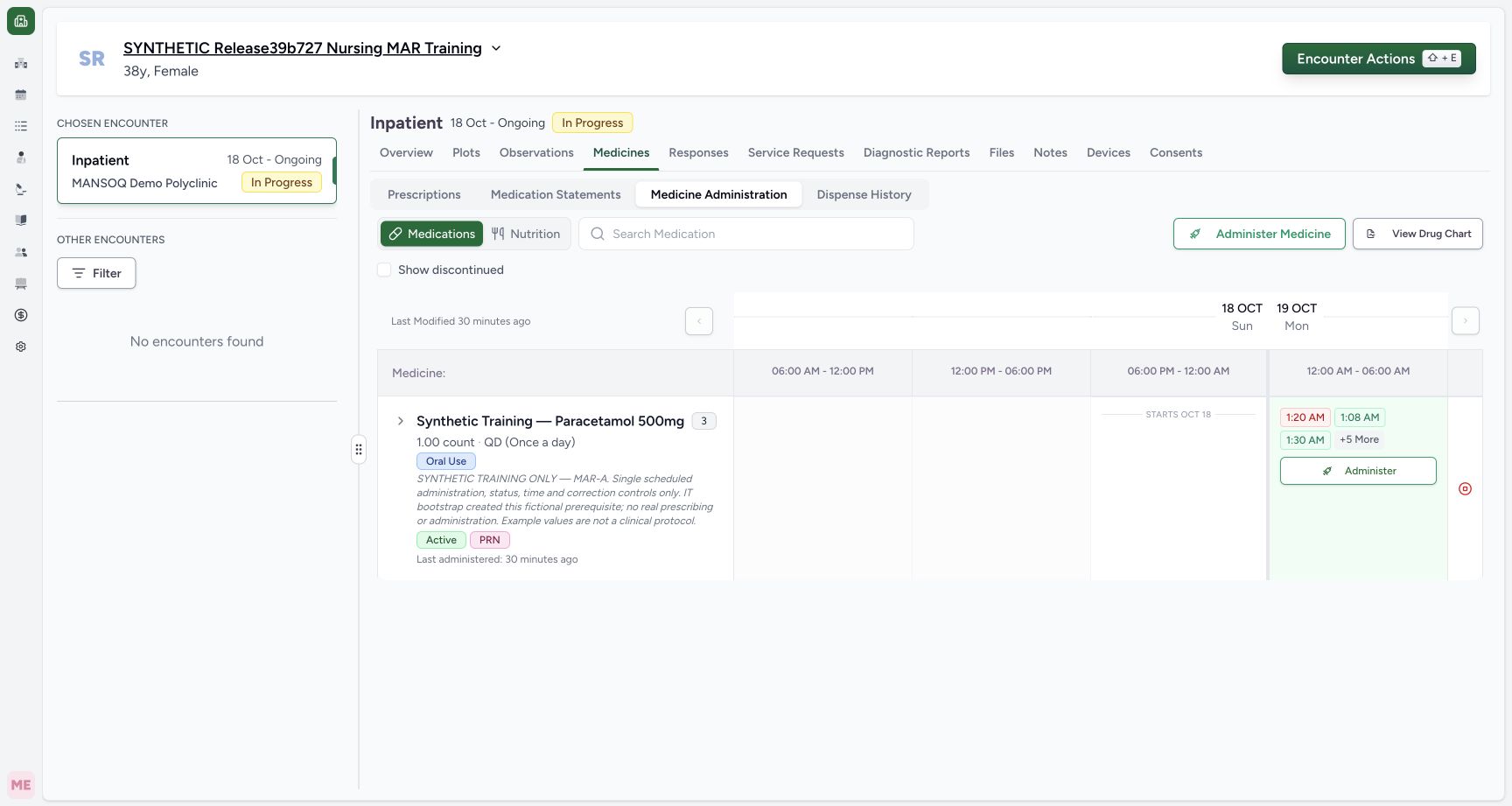 123
123Recorded release ba551c1d · 2026-10-18T23:00:15.545Z · 1728 × 921 Open bulk medication documentation in the intended encounter
Capture details
Exact committed release ba551c1d on an isolated nonproduction clone, using an existing Nurse and fictional Polyclinic Inpatient case. The synthetic patient name retains an earlier release label; the actual captured build is ba551c1d. Ordinary Nurse and Doctor API preflight verified the eight retained clinical records and actor identities before new writes. The active encounter and three active medication requests are visible; this top action opens multi-request selection rather than the individual request dialog.
Image SHA-256
1a50a9bb4b612cdffe710e7d789cffa53bc669a473de95743e6b9082b9667f49- Confirm the intended patient: The fictional name is retained across the isolated clone; confirm the patient before documenting.
- Medicine Administration: Use the verified selected encounter and Medications workspace.
- Open multi-request selection: This top action opens the bulk sheet; individual row Administer is a different entry path.
123Recorded release ba551c1d · 2026-10-18T23:00:21.297Z · 1728 × 921 Choose the individual requests for a bulk entry
Capture details
Exact committed release ba551c1d on an isolated nonproduction clone, using an existing Nurse and fictional Polyclinic Inpatient case. The synthetic patient name retains an earlier release label; the actual captured build is ba551c1d. The bulk sheet begins with three unchecked active requests and disabled Administer Medicines (0). Their shared product name does not distinguish them; their request notes and PRN label provide the individual context.
Image SHA-256
b13ac222e190cd7286de1e8885e34ef4cdebd10fc0e37252fe21c09cdc7250f2- Select the scheduled request: Read the MAR-A request note before selecting this request.
- Select the separate multi-instruction request: This is a distinct request despite sharing the same product name.
- Nothing selected: The batch action is disabled until at least one request is selected.
- Use the authorized account and facility documentation policy. Deliberately invalid future times are shown only as unsaved software checks; they were never submitted.
 123
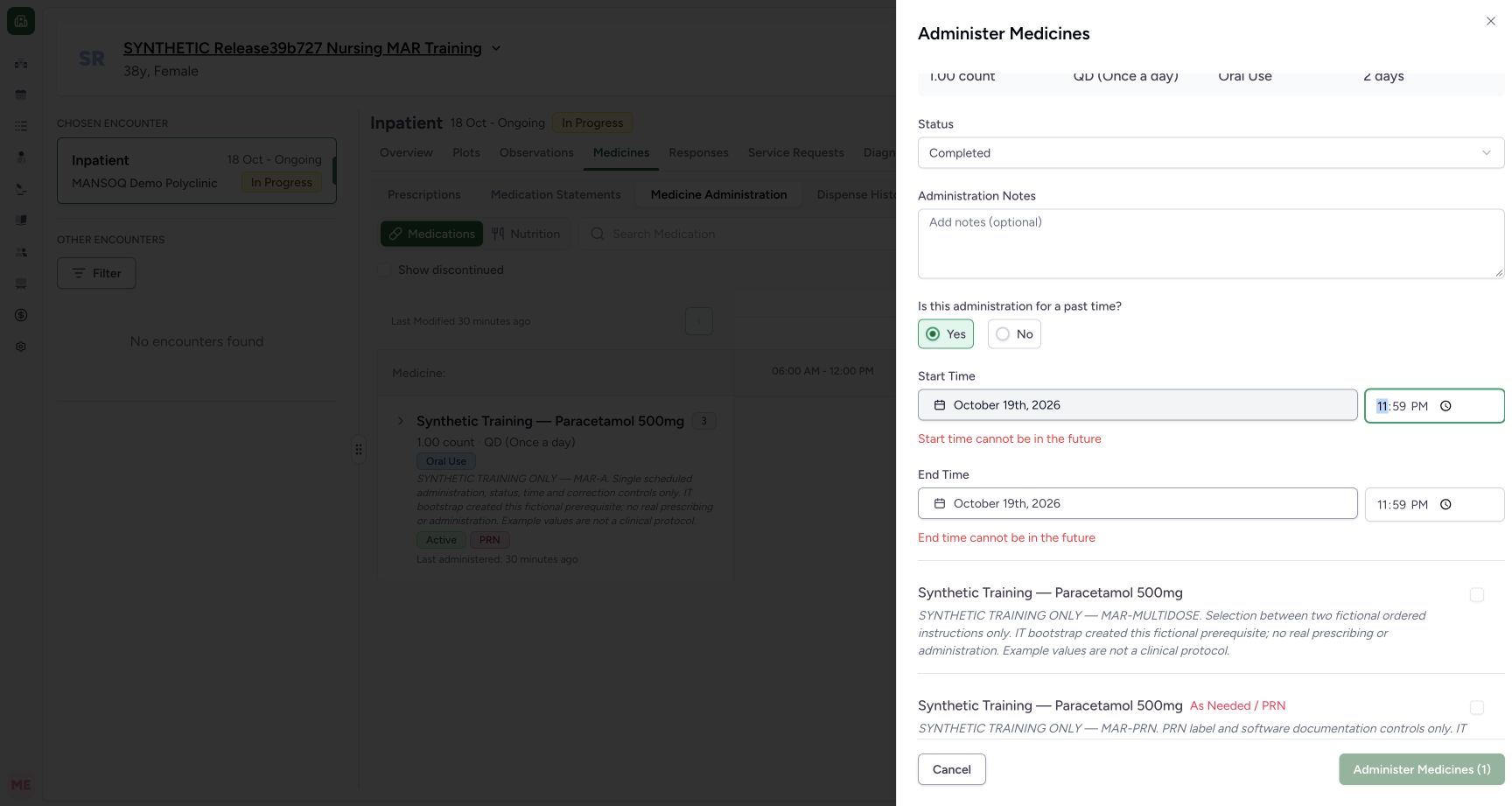
123Recorded release ba551c1d · 2026-10-18T23:00:32.888Z · 1728 × 921 Resolve invalid timing before submitting a batch
Capture details
Exact committed release ba551c1d on an isolated nonproduction clone, using an existing Nurse and fictional Polyclinic Inpatient case. The synthetic patient name retains an earlier release label; the actual captured build is ba551c1d. With only the scheduled request selected, a deliberately future 23:59 start/end shows both actual timing errors and disables Administer Medicines (1). This invalid draft is not submitted. The bulk form also shows Recorded by -; it has not supplied an event recorder in that header.
Image SHA-256
24ceefceae4f76923a3b9b11a3896c46df2adf38920c4a9de12588c37b586fa7- Start time validation: The selected form reports its invalid future start.
- End time validation: Changing a Completed start initialized its end to the same future time.
- Batch action disabled: Resolve the selected form error before saving a batch.
123Recorded release ba551c1d · 2026-10-18T23:01:22.278Z · 1728 × 921 One invalid selected form blocks the two-entry batch
Capture details
Exact committed release ba551c1d on an isolated nonproduction clone, using an existing Nurse and fictional Polyclinic Inpatient case. The synthetic patient name retains an earlier release label; the actual captured build is ba551c1d. The first selected request remains valid at 01:24. A deliberately future 23:59 occurrence on the second selected request produces its timing errors and disables the aggregate Administer Medicines (2) action. No batch is submitted in this state.
Image SHA-256
939990e9924a26be2dd493b9508d5ade5647ae06b0b45d2386ba56d822653f0c- Second form error: Correct the invalid request even when another selected form is valid.
- Second end error: Review the end as well as the start.
- Whole batch disabled: The selected count remains two while one invalid form blocks submission.
1. Check whether any request is selected
With all request checkboxes unchecked, Administer Medicines (0) is disabled. Select only the intended requests after reviewing their details. The number in the action is the current selection count, not the number of medication products or previously saved events.
123Choose the individual requests for a bulk entry
Capture details
Exact committed release ba551c1d on an isolated nonproduction clone, using an existing Nurse and fictional Polyclinic Inpatient case. The synthetic patient name retains an earlier release label; the actual captured build is ba551c1d. The bulk sheet begins with three unchecked active requests and disabled Administer Medicines (0). Their shared product name does not distinguish them; their request notes and PRN label provide the individual context.
Image SHA-256 b13ac222e190cd7286de1e8885e34ef4cdebd10fc0e37252fe21c09cdc7250f2
- Select the scheduled request: Read the MAR-A request note before selecting this request.
- Select the separate multi-instruction request: This is a distinct request despite sharing the same product name.
- Nothing selected: The batch action is disabled until at least one request is selected.
2. Correct the selected form’s actual timing errors
Selecting a request alone does not make an invalid occurrence saveable. The deliberate 23:59 future start/end shows Start time cannot be in the future and End time cannot be in the future, with Administer Medicines (1) disabled. Review the date and both times, then enter the intended valid occurrence. The corrected fictional first request shows 01:24 and no timing errors.
123Resolve invalid timing before submitting a batch
Capture details
Exact committed release ba551c1d on an isolated nonproduction clone, using an existing Nurse and fictional Polyclinic Inpatient case. The synthetic patient name retains an earlier release label; the actual captured build is ba551c1d. With only the scheduled request selected, a deliberately future 23:59 start/end shows both actual timing errors and disables Administer Medicines (1). This invalid draft is not submitted. The bulk form also shows Recorded by -; it has not supplied an event recorder in that header.
Image SHA-256 24ceefceae4f76923a3b9b11a3896c46df2adf38920c4a9de12588c37b586fa7
- Start time validation: The selected form reports its invalid future start.
- End time validation: Changing a Completed start initialized its end to the same future time.
- Batch action disabled: Resolve the selected form error before saving a batch.
 1234
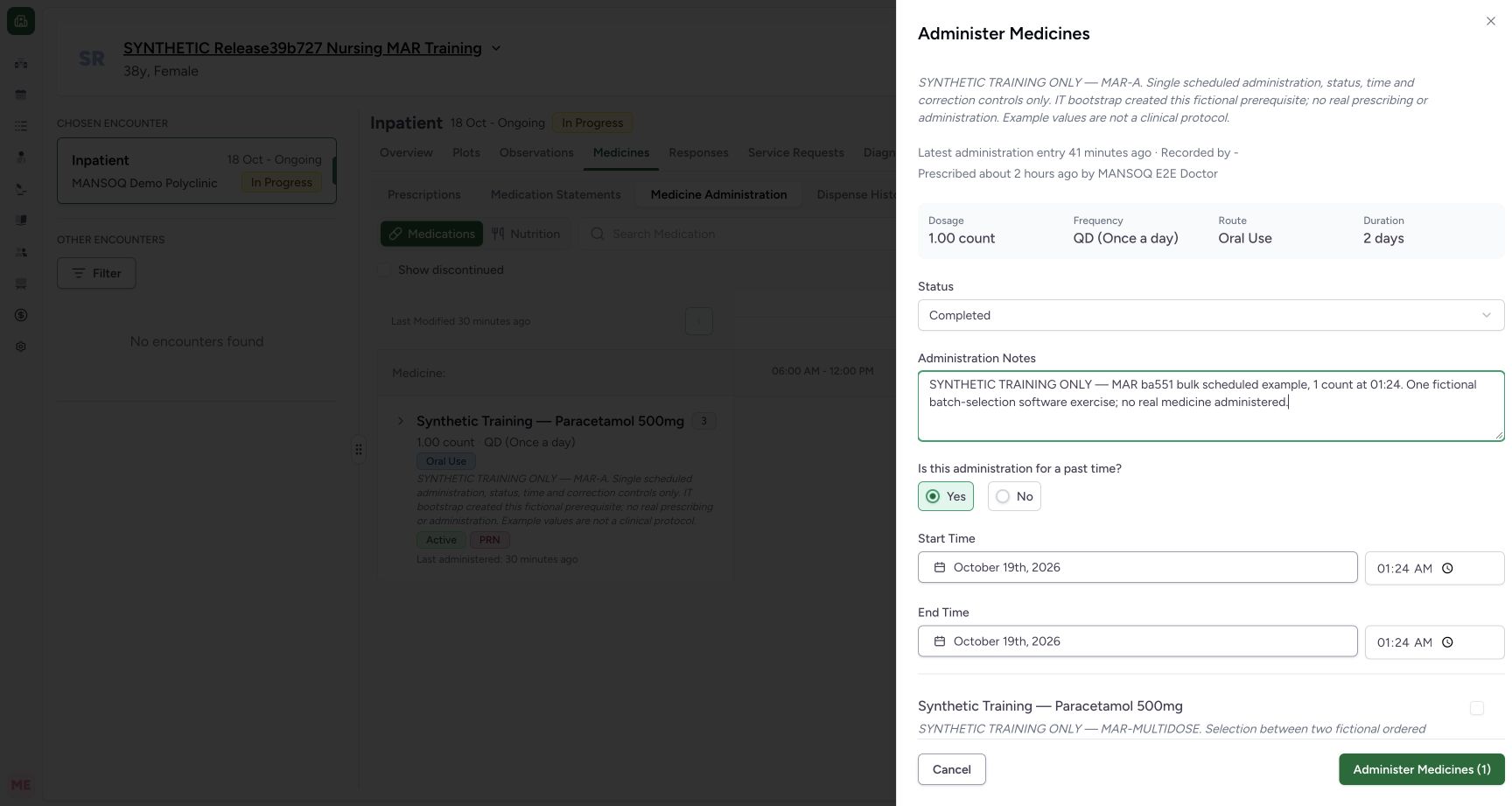
1234Review the first selected request before adding another
Capture details
Exact committed release ba551c1d on an isolated nonproduction clone, using an existing Nurse and fictional Polyclinic Inpatient case. The synthetic patient name retains an earlier release label; the actual captured build is ba551c1d. The first scheduled request is Completed with past start/end 01:24 and an optional identifying note. The prior future-time errors are cleared and the batch action is enabled for one selected request. Nothing has been saved yet.
Image SHA-256 a25385d79415ad9b9ee894c10c7c2c86b911b9d660363224bd1357c40e25da7d
- First request status: Review this selected request’s event status separately from other selected requests.
- Optional context: This fictional note identifies the scheduled entry; software Notes is optional.
- Corrected start 01:24: The first draft now uses a valid past time.
- One selected draft: The footer count tracks selected medication requests, not historical doses.
3. Check all selected forms, not just one
When two requests are selected, a future occurrence on the second request disables Administer Medicines (2) even though the first request remains valid. Scroll through the selected forms, resolve the visible errors and recheck the selected instructions, statuses and occurrences. In the final review the second request is corrected to 01:25–01:26, and the batch action is enabled for the two reviewed entries.
123One invalid selected form blocks the two-entry batch
Capture details
Exact committed release ba551c1d on an isolated nonproduction clone, using an existing Nurse and fictional Polyclinic Inpatient case. The synthetic patient name retains an earlier release label; the actual captured build is ba551c1d. The first selected request remains valid at 01:24. A deliberately future 23:59 occurrence on the second selected request produces its timing errors and disables the aggregate Administer Medicines (2) action. No batch is submitted in this state.
Image SHA-256 939990e9924a26be2dd493b9508d5ade5647ae06b0b45d2386ba56d822653f0c
- Second form error: Correct the invalid request even when another selected form is valid.
- Second end error: Review the end as well as the start.
- Whole batch disabled: The selected count remains two while one invalid form blocks submission.
123Review both selected forms and save once
Capture details
Exact committed release ba551c1d on an isolated nonproduction clone, using an existing Nurse and fictional Polyclinic Inpatient case. The synthetic patient name retains an earlier release label; the actual captured build is ba551c1d. After correcting the deliberate second-form error, both selected drafts are valid. DOM readback confirms selected scheduled and multi-instruction requests, unselected PRN request, times 01:24–01:24 and 01:25–01:26, two Completed statuses, second instruction selected and enabled two-entry submit. This is the final unsaved review before one batch submission.
Image SHA-256 e7fa485e3b099c6cf19ea29b1eec1525d48957507b1db91207a7c2690d1e16c0
- Corrected second start: Review both forms; the first remains 01:24 and the second is 01:25.
- Corrected second end: The second event end is 01:26.
- Save the reviewed batch once: The selected count is two and aggregate validation is now clear.
4. Distinguish a reset sheet from a failed save
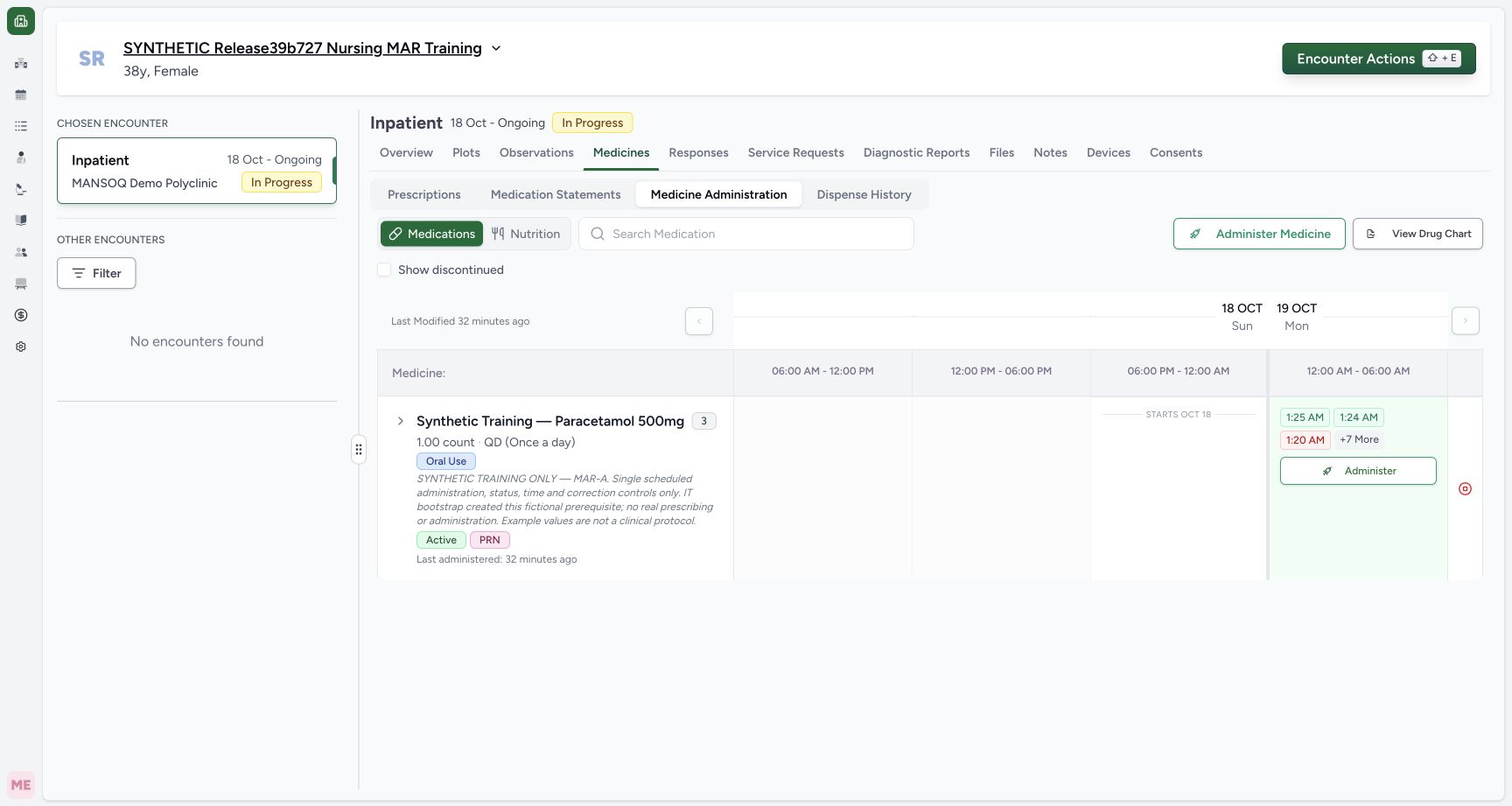
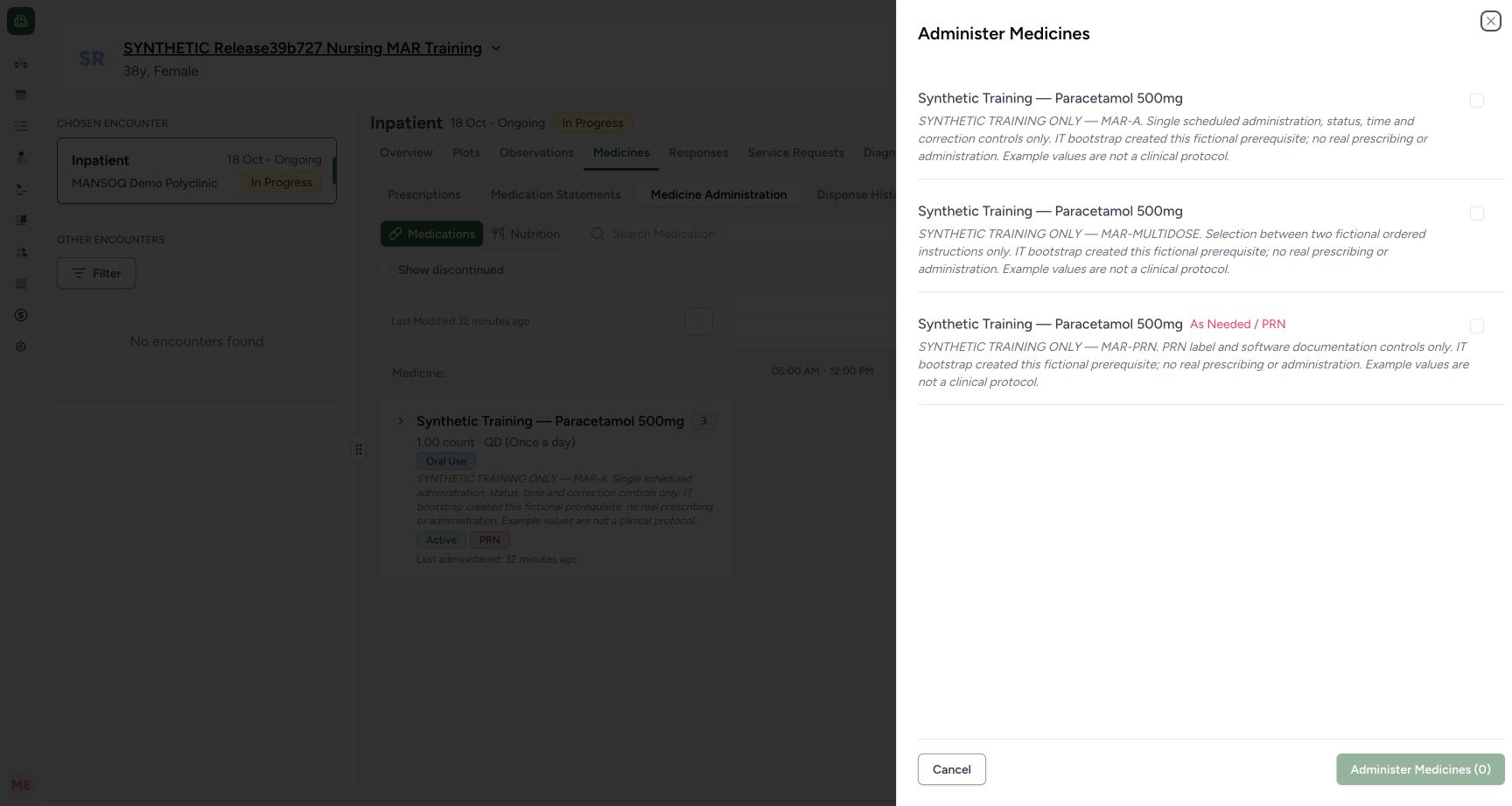
After the successful batch, both new saved occurrences are visible and can be inspected. Reopening the bulk action then shows a fresh disabled Administer Medicines (0) with unchecked requests. This reset is not evidence that the previous save failed. Inspect the existing chart and records before starting another batch; cancel the fresh empty sheet if no new entries are intended.
 123
123Find both saved bulk entries in the chart
Capture details
Exact committed release ba551c1d on an isolated nonproduction clone, using an existing Nurse and fictional Polyclinic Inpatient case. The synthetic patient name retains an earlier release label; the actual captured build is ba551c1d. After one batch save, independent normal Nurse and Doctor GET200 confirm two new event IDs, the exact scheduled and multi-instruction requests, 1 count and 2 count, the intended Completed statuses and occurrence values. Total count is ten; prior eight clinical records and actor identities are unchanged. The two new occurrence chips are visible.
Image SHA-256 1ec0bf7c74f5820c1d5e997a4ae326e2145f108c2bb3e624a244cddee196bb43
- Scheduled entry at 01:24: Open this saved occurrence and verify its request, note and time.
- Separate multi-instruction entry at 01:25: This is a distinct saved event from the same batch.
- More history is present: This plain count indicator is not the expand control; use the group chevron to inspect individual request rows.
 123
123Recognize that a reopened bulk sheet starts empty
Capture details
Exact committed release ba551c1d on an isolated nonproduction clone, using an existing Nurse and fictional Polyclinic Inpatient case. The synthetic patient name retains an earlier release label; the actual captured build is ba551c1d. After the successful batch and read-only event inspections, reopening the top action shows all three requests unchecked and disabled Administer Medicines (0). It does not retain or silently resubmit the saved two-entry selection. This empty sheet is cancelled without saving.
Image SHA-256 a5a7cc7aa557fab3636cd9f20d82a56a7e82d9dc5104116fb98f4e76c6982b63
- Selection is reset: Review and select requests deliberately for each new batch.
- No new batch selected: The zero count is a new empty draft state, not a count of saved history.
- Leave without adding records: Cancel this inspection when no new entries are intended.
Selection and validation are different checks
An empty selection and an invalid selected form both disable the batch action for different reasons. This lesson demonstrates the actual visible empty, one-invalid and two-selected/one-invalid states, their corrected drafts and the reset after a successful save. It does not establish automatic prevention of a repeated historical event or an arbitrary API retry guarantee. Administration Notes remains optional software input.
123Choose the individual requests for a bulk entry
Capture details
Exact committed release ba551c1d on an isolated nonproduction clone, using an existing Nurse and fictional Polyclinic Inpatient case. The synthetic patient name retains an earlier release label; the actual captured build is ba551c1d. The bulk sheet begins with three unchecked active requests and disabled Administer Medicines (0). Their shared product name does not distinguish them; their request notes and PRN label provide the individual context.
Image SHA-256 b13ac222e190cd7286de1e8885e34ef4cdebd10fc0e37252fe21c09cdc7250f2
- Select the scheduled request: Read the MAR-A request note before selecting this request.
- Select the separate multi-instruction request: This is a distinct request despite sharing the same product name.
- Nothing selected: The batch action is disabled until at least one request is selected.
123Resolve invalid timing before submitting a batch
Capture details
Exact committed release ba551c1d on an isolated nonproduction clone, using an existing Nurse and fictional Polyclinic Inpatient case. The synthetic patient name retains an earlier release label; the actual captured build is ba551c1d. With only the scheduled request selected, a deliberately future 23:59 start/end shows both actual timing errors and disables Administer Medicines (1). This invalid draft is not submitted. The bulk form also shows Recorded by -; it has not supplied an event recorder in that header.
Image SHA-256 24ceefceae4f76923a3b9b11a3896c46df2adf38920c4a9de12588c37b586fa7
- Start time validation: The selected form reports its invalid future start.
- End time validation: Changing a Completed start initialized its end to the same future time.
- Batch action disabled: Resolve the selected form error before saving a batch.
123One invalid selected form blocks the two-entry batch
Capture details
Exact committed release ba551c1d on an isolated nonproduction clone, using an existing Nurse and fictional Polyclinic Inpatient case. The synthetic patient name retains an earlier release label; the actual captured build is ba551c1d. The first selected request remains valid at 01:24. A deliberately future 23:59 occurrence on the second selected request produces its timing errors and disables the aggregate Administer Medicines (2) action. No batch is submitted in this state.
Image SHA-256 939990e9924a26be2dd493b9508d5ade5647ae06b0b45d2386ba56d822653f0c
- Second form error: Correct the invalid request even when another selected form is valid.
- Second end error: Review the end as well as the start.
- Whole batch disabled: The selected count remains two while one invalid form blocks submission.
123Review both selected forms and save once
Capture details
Exact committed release ba551c1d on an isolated nonproduction clone, using an existing Nurse and fictional Polyclinic Inpatient case. The synthetic patient name retains an earlier release label; the actual captured build is ba551c1d. After correcting the deliberate second-form error, both selected drafts are valid. DOM readback confirms selected scheduled and multi-instruction requests, unselected PRN request, times 01:24–01:24 and 01:25–01:26, two Completed statuses, second instruction selected and enabled two-entry submit. This is the final unsaved review before one batch submission.
Image SHA-256 e7fa485e3b099c6cf19ea29b1eec1525d48957507b1db91207a7c2690d1e16c0
- Corrected second start: Review both forms; the first remains 01:24 and the second is 01:25.
- Corrected second end: The second event end is 01:26.
- Save the reviewed batch once: The selected count is two and aggregate validation is now clear.
123Recognize that a reopened bulk sheet starts empty
Capture details
Exact committed release ba551c1d on an isolated nonproduction clone, using an existing Nurse and fictional Polyclinic Inpatient case. The synthetic patient name retains an earlier release label; the actual captured build is ba551c1d. After the successful batch and read-only event inspections, reopening the top action shows all three requests unchecked and disabled Administer Medicines (0). It does not retain or silently resubmit the saved two-entry selection. This empty sheet is cancelled without saving.
Image SHA-256 a5a7cc7aa557fab3636cd9f20d82a56a7e82d9dc5104116fb98f4e76c6982b63
- Selection is reset: Review and select requests deliberately for each new batch.
- No new batch selected: The zero count is a new empty draft state, not a count of saved history.
- Leave without adding records: Cancel this inspection when no new entries are intended.
Source evidence
Every citation uses this exact committed version. The private source repository requires access.
- repositories/platform/mansoq-web/src/components/Medicine/MedicationAdministration/MedicineAdminSheet.tsx:250 ·
ba551c1d67031248136fd2016afe227b5fc994bdSource file checksum
342ae4e4635dedb808bada1db0ef95248184feb0fd548a99f1016e69d764f5ef - repositories/platform/mansoq-web/src/components/Medicine/MedicationAdministration/MedicineAdminForm.tsx:292 ·
ba551c1d67031248136fd2016afe227b5fc994bdSource file checksum
490b23b1796a5dbbf0477802f806614fe9f64a33de3a6c2b19ccf6ed0482c7ba - repositories/platform/mansoq-web/src/components/Medicine/MedicationAdministration/MedicineAdminSheet.tsx:185 ·
ba551c1d67031248136fd2016afe227b5fc994bdSource file checksum
342ae4e4635dedb808bada1db0ef95248184feb0fd548a99f1016e69d764f5ef