 MANSOQ
 Nutrition intake · VERSION ba551c1d
Inspect and save the completed nutrition intake chart
Open the nutritional-product chart, inspect the saved intake, change time columns and verify the actual saved PDF. The observed Nurse workflow uses one fictional count-unit intake in a Polyclinic inpatient encounter.
Nurse
 1
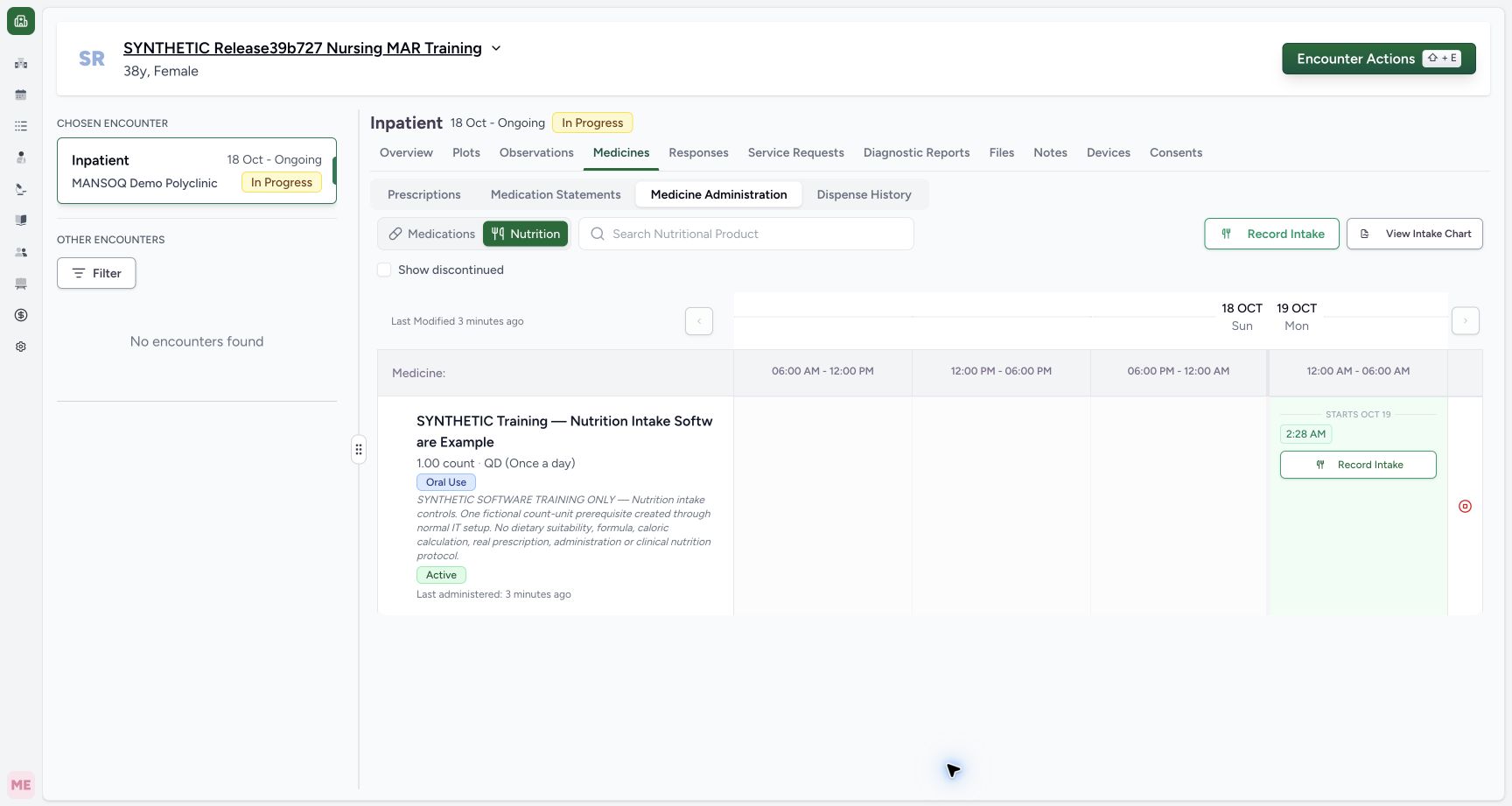
1Open the selected encounter’s intake chart
Capture details
Exact committed release ba551c1d on the isolated nonproduction clone, existing Nurse and fictional Polyclinic inpatient case. The retained patient name mentions an earlier release; the actual captured build is ba551c1d. A separately journaled normal IT prerequisite created one synthetic count-unit nutrition product/order with the existing Doctor requester; this is not Doctor UI prescribing or clinical nutrition. All ten prior administration records and three medication requests were independently verified unchanged before this Nurse workflow. The Nutrition workspace shows the saved 2:28 AM intake and a separate View Intake Chart action. This chart is for the nutritional-product requests, distinct from View Drug Chart in Medications.
Image SHA-256 8972e2c2ff918382ce1f51f9f8668e4e5e477145fe3c17145cd273b273879230
- View Intake Chart: Confirm Nutrition and the saved intended intake before opening its separate chart.
 123
123Inspect the actual saved intake chart in macOS Preview
Capture details
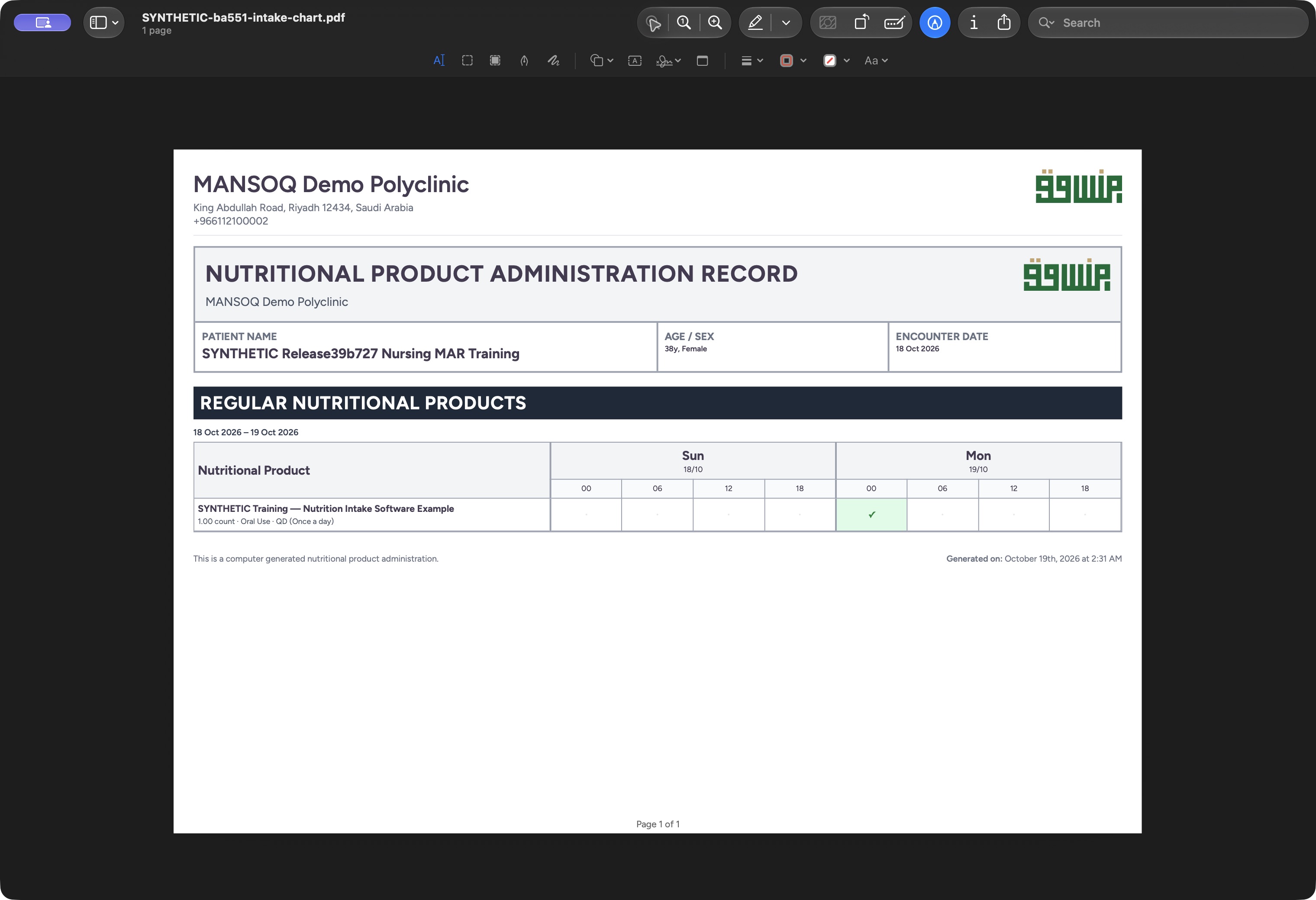
Actual native macOS UI while exporting or inspecting the nutrition intake chart from exact committed ba551c1d on the isolated fictional Nurse/Polyclinic case. The actual saved PDF is open as one landscape page. It contains the nutrition-product title, fictional patient/date interval, one completed marker and page footer. The interactive event time/creator/note detail is not printed.
Image SHA-256 3d2b82e131506a5218290567b6f1ffb017308f4e8a4fbca3db6ee38aed5991cd
- Actual saved intake PDF: Confirm the separate intake filename and the viewer’s one-page count.
- Retained completed marker: This output contains the one nutrition intake, distinct from the medication chart’s six events.
- Inspect the final page footer: Review the whole actual output page, including Page 1 of 1.
12 of 12 content blocks have reviewed image alignment. Missing overview or prerequisite images remain open.
Before you begin
- Confirm your authorized account, intended patient and selected encounter. Start from Medicines, Medicine Administration and Nutrition. The demonstrated software is exact ba551c1d; the retained synthetic patient name mentions an earlier release.1
Recorded release ba551c1d · 2026-10-18T23:30:53.258Z · 1728 × 921 Open the selected encounter’s intake chart
Capture details
Exact committed release ba551c1d on the isolated nonproduction clone, existing Nurse and fictional Polyclinic inpatient case. The retained patient name mentions an earlier release; the actual captured build is ba551c1d. A separately journaled normal IT prerequisite created one synthetic count-unit nutrition product/order with the existing Doctor requester; this is not Doctor UI prescribing or clinical nutrition. All ten prior administration records and three medication requests were independently verified unchanged before this Nurse workflow. The Nutrition workspace shows the saved 2:28 AM intake and a separate View Intake Chart action. This chart is for the nutritional-product requests, distinct from View Drug Chart in Medications.
Image SHA-256
8972e2c2ff918382ce1f51f9f8668e4e5e477145fe3c17145cd273b273879230- View Intake Chart: Confirm Nutrition and the saved intended intake before opening its separate chart.
- A nutritional-product order and saved intake must be available for this populated example. The preceding intake lesson created one Completed 1 count record at 02:28. The product/order were separately journaled IT prerequisites, not Doctor UI prescribing or a clinical nutrition protocol.1
Recorded release ba551c1d · 2026-10-18T23:30:53.258Z · 1728 × 921 Open the selected encounter’s intake chart
Capture details
Exact committed release ba551c1d on the isolated nonproduction clone, existing Nurse and fictional Polyclinic inpatient case. The retained patient name mentions an earlier release; the actual captured build is ba551c1d. A separately journaled normal IT prerequisite created one synthetic count-unit nutrition product/order with the existing Doctor requester; this is not Doctor UI prescribing or clinical nutrition. All ten prior administration records and three medication requests were independently verified unchanged before this Nurse workflow. The Nutrition workspace shows the saved 2:28 AM intake and a separate View Intake Chart action. This chart is for the nutritional-product requests, distinct from View Drug Chart in Medications.
Image SHA-256
8972e2c2ff918382ce1f51f9f8668e4e5e477145fe3c17145cd273b273879230- View Intake Chart: Confirm Nutrition and the saved intended intake before opening its separate chart.
 12
12Recorded release ba551c1d · 2026-10-18T23:31:20.791Z · 1728 × 921 Inspect the individual saved intake inside its chart cell
Capture details
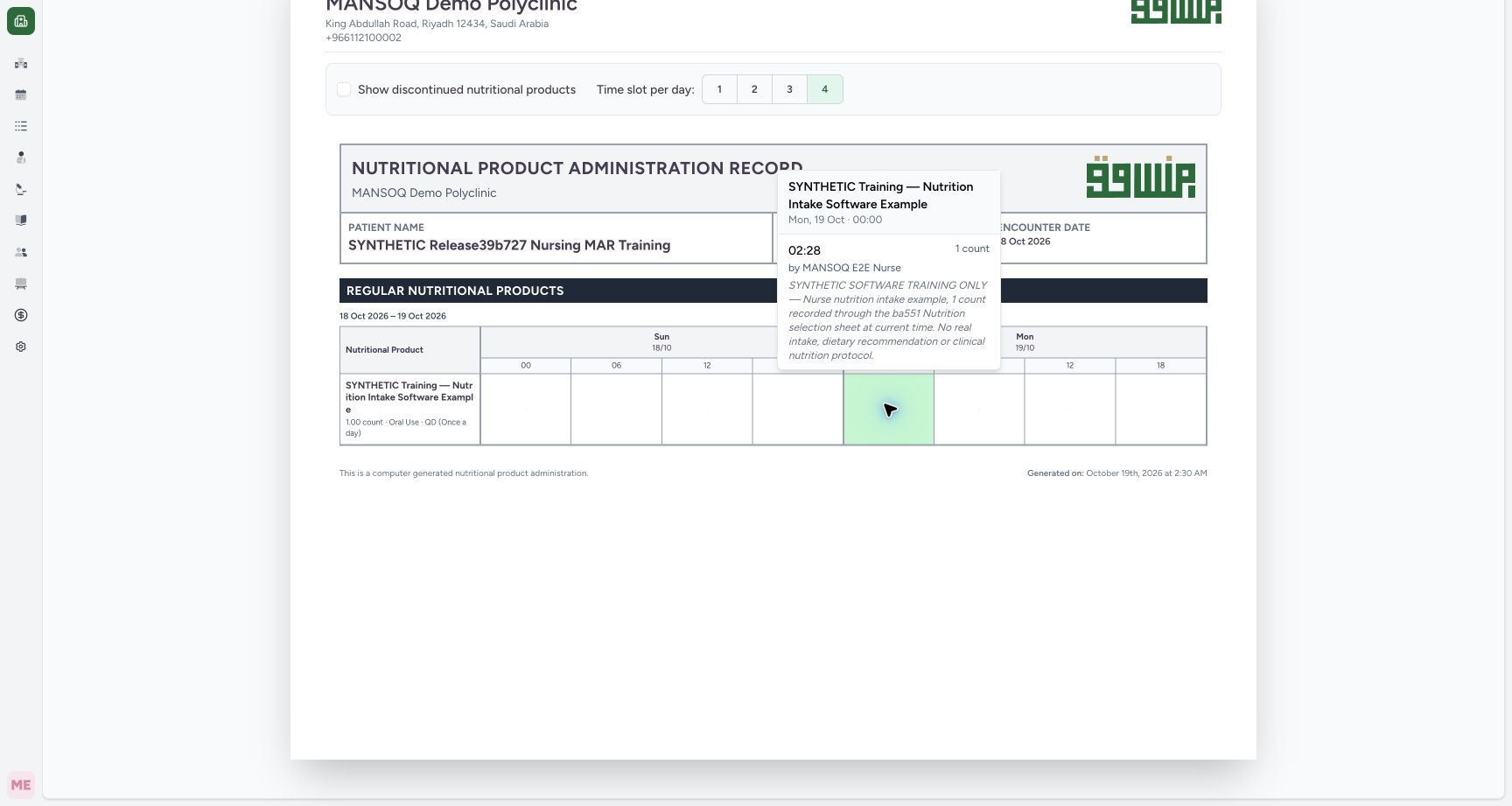
Exact committed release ba551c1d on the isolated nonproduction clone, existing Nurse and fictional Polyclinic inpatient case. The retained patient name mentions an earlier release; the actual captured build is ba551c1d. A separately journaled normal IT prerequisite created one synthetic count-unit nutrition product/order with the existing Doctor requester; this is not Doctor UI prescribing or clinical nutrition. All ten prior administration records and three medication requests were independently verified unchanged before this Nurse workflow. The single completed marker opens the saved nutrition intake’s 02:28 start, 1 count, Nurse creator and identifying note. This interactive detail is separate from the simplified printed marker.
Image SHA-256
88fc9b34a327f26e3317d0929b82b037e1fc361a6f0c7dc87b357e636fc1d495- Individual event row / time: Read the actual 02:28 occurrence immediately to the left of this marker; the 00:00 line above is the presentation-slot heading.
- Recorded event creator: Read the Nurse name immediately to the left of this marker. The name reflects the saved record creator, not an independent clinical-performer verification.
1. Open the separate intake chart
In Nutrition, choose View Intake Chart. This is distinct from View Drug Chart in Medications. Check the Nutritional Product Administration Record title, intended patient and encounter date on the new view.
1Open the selected encounter’s intake chart
Capture details
Exact committed release ba551c1d on the isolated nonproduction clone, existing Nurse and fictional Polyclinic inpatient case. The retained patient name mentions an earlier release; the actual captured build is ba551c1d. A separately journaled normal IT prerequisite created one synthetic count-unit nutrition product/order with the existing Doctor requester; this is not Doctor UI prescribing or clinical nutrition. All ten prior administration records and three medication requests were independently verified unchanged before this Nurse workflow. The Nutrition workspace shows the saved 2:28 AM intake and a separate View Intake Chart action. This chart is for the nutritional-product requests, distinct from View Drug Chart in Medications.
Image SHA-256 8972e2c2ff918382ce1f51f9f8668e4e5e477145fe3c17145cd273b273879230
- View Intake Chart: Confirm Nutrition and the saved intended intake before opening its separate chart.
 12
12Read the nutritional-product administration chart
Capture details
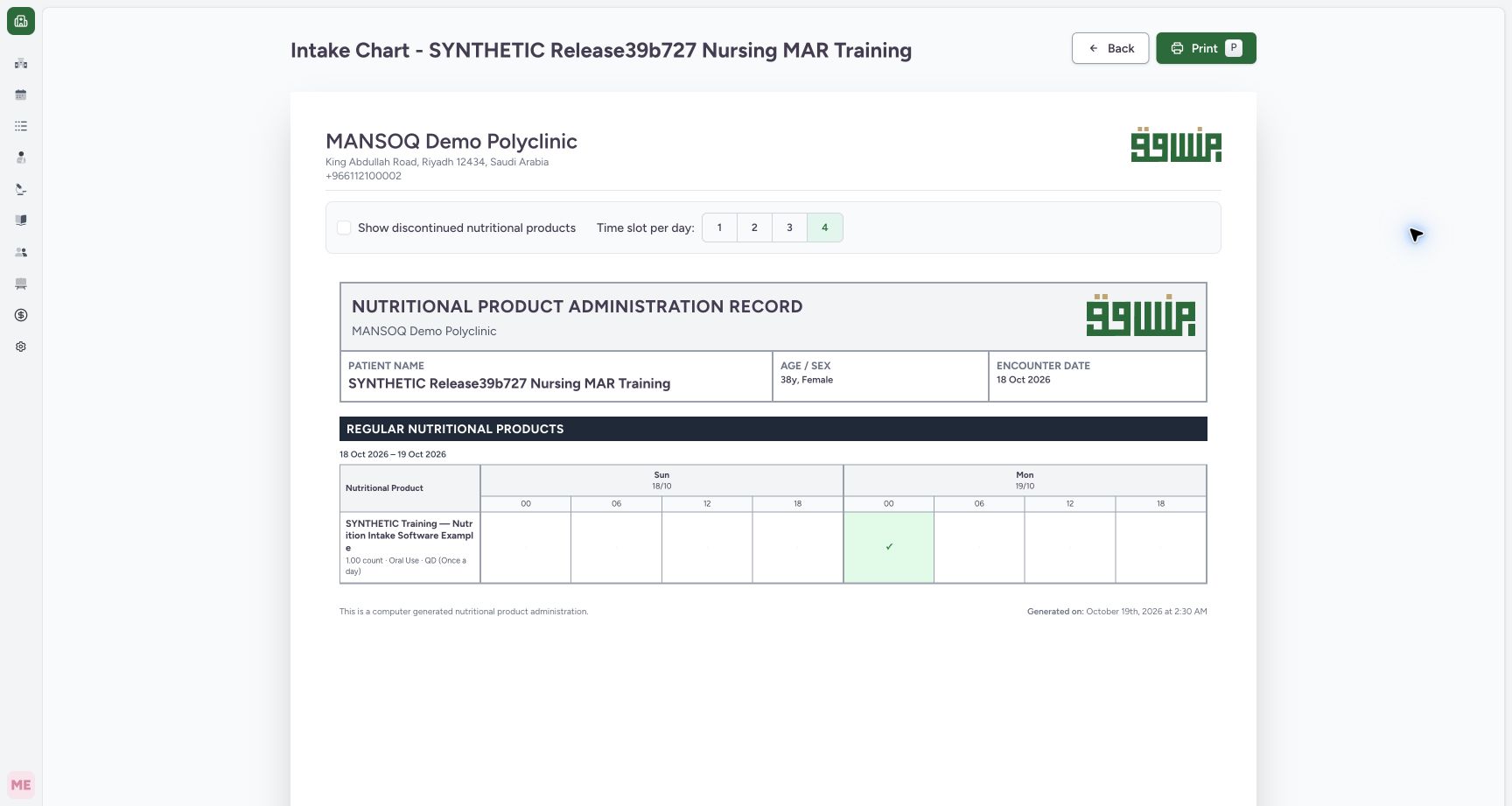
Exact committed release ba551c1d on the isolated nonproduction clone, existing Nurse and fictional Polyclinic inpatient case. The retained patient name mentions an earlier release; the actual captured build is ba551c1d. A separately journaled normal IT prerequisite created one synthetic count-unit nutrition product/order with the existing Doctor requester; this is not Doctor UI prescribing or clinical nutrition. All ten prior administration records and three medication requests were independently verified unchanged before this Nurse workflow. The separate chart is titled Nutritional Product Administration Record and contains only the nutrition order with one completed marker. The existing medication events are not added to this nutritional-product row. Default four slots show the intake in the 19 October 00 interval.
Image SHA-256 4cc4d5a3d73b9236f8d20d3024571bb8c7e38402e1ad24bebd927b04693e3171
- Confirm the output type: This view is the nutritional-product chart for the selected encounter.
- One completed intake: Open this cell to inspect the saved intake’s own time, quantity, recorder and note.
2. Read the chart’s interval and completed marker
The example spans 18–19 October, with four daily columns beginning at 00, 06, 12 and 18. Its single completed intake appears as a checkmark in the 19 October 00 interval. That heading is the start of a presentation interval, not the intake’s precise time. Only the nutritional-product request is represented in this row; the six Completed medication events are not added to it. The chart’s administration query is limited to Completed status.
12Read the nutritional-product administration chart
Capture details
Exact committed release ba551c1d on the isolated nonproduction clone, existing Nurse and fictional Polyclinic inpatient case. The retained patient name mentions an earlier release; the actual captured build is ba551c1d. A separately journaled normal IT prerequisite created one synthetic count-unit nutrition product/order with the existing Doctor requester; this is not Doctor UI prescribing or clinical nutrition. All ten prior administration records and three medication requests were independently verified unchanged before this Nurse workflow. The separate chart is titled Nutritional Product Administration Record and contains only the nutrition order with one completed marker. The existing medication events are not added to this nutritional-product row. Default four slots show the intake in the 19 October 00 interval.
Image SHA-256 4cc4d5a3d73b9236f8d20d3024571bb8c7e38402e1ad24bebd927b04693e3171
- Confirm the output type: This view is the nutritional-product chart for the selected encounter.
- One completed intake: Open this cell to inspect the saved intake’s own time, quantity, recorder and note.
3. Inspect the individual intake details
Select the populated checkmark cell. Review the individual 02:28 occurrence, 1 count, recorded-by Nurse and identifying note. The displayed person is the saved event creator and does not independently establish the clinical performer. Select the populated cell again to close its detail list before printing.
12Inspect the individual saved intake inside its chart cell
Capture details
Exact committed release ba551c1d on the isolated nonproduction clone, existing Nurse and fictional Polyclinic inpatient case. The retained patient name mentions an earlier release; the actual captured build is ba551c1d. A separately journaled normal IT prerequisite created one synthetic count-unit nutrition product/order with the existing Doctor requester; this is not Doctor UI prescribing or clinical nutrition. All ten prior administration records and three medication requests were independently verified unchanged before this Nurse workflow. The single completed marker opens the saved nutrition intake’s 02:28 start, 1 count, Nurse creator and identifying note. This interactive detail is separate from the simplified printed marker.
Image SHA-256 88fc9b34a327f26e3317d0929b82b037e1fc361a6f0c7dc87b357e636fc1d495
- Individual event row / time: Read the actual 02:28 occurrence immediately to the left of this marker; the 00:00 line above is the presentation-slot heading.
- Recorded event creator: Read the Nurse name immediately to the left of this marker. The name reflects the saved record creator, not an independent clinical-performer verification.
4. Choose the daily presentation columns
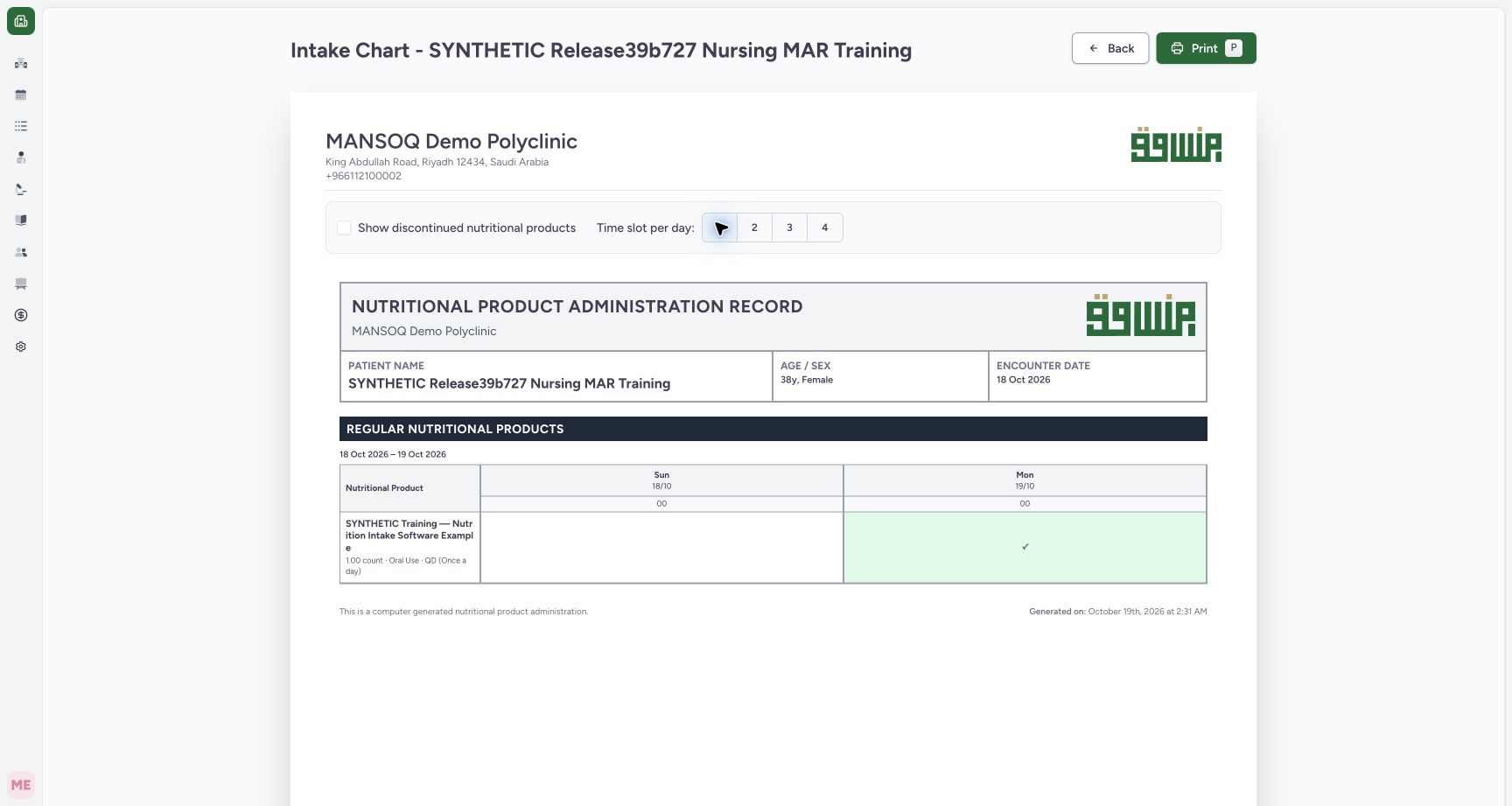
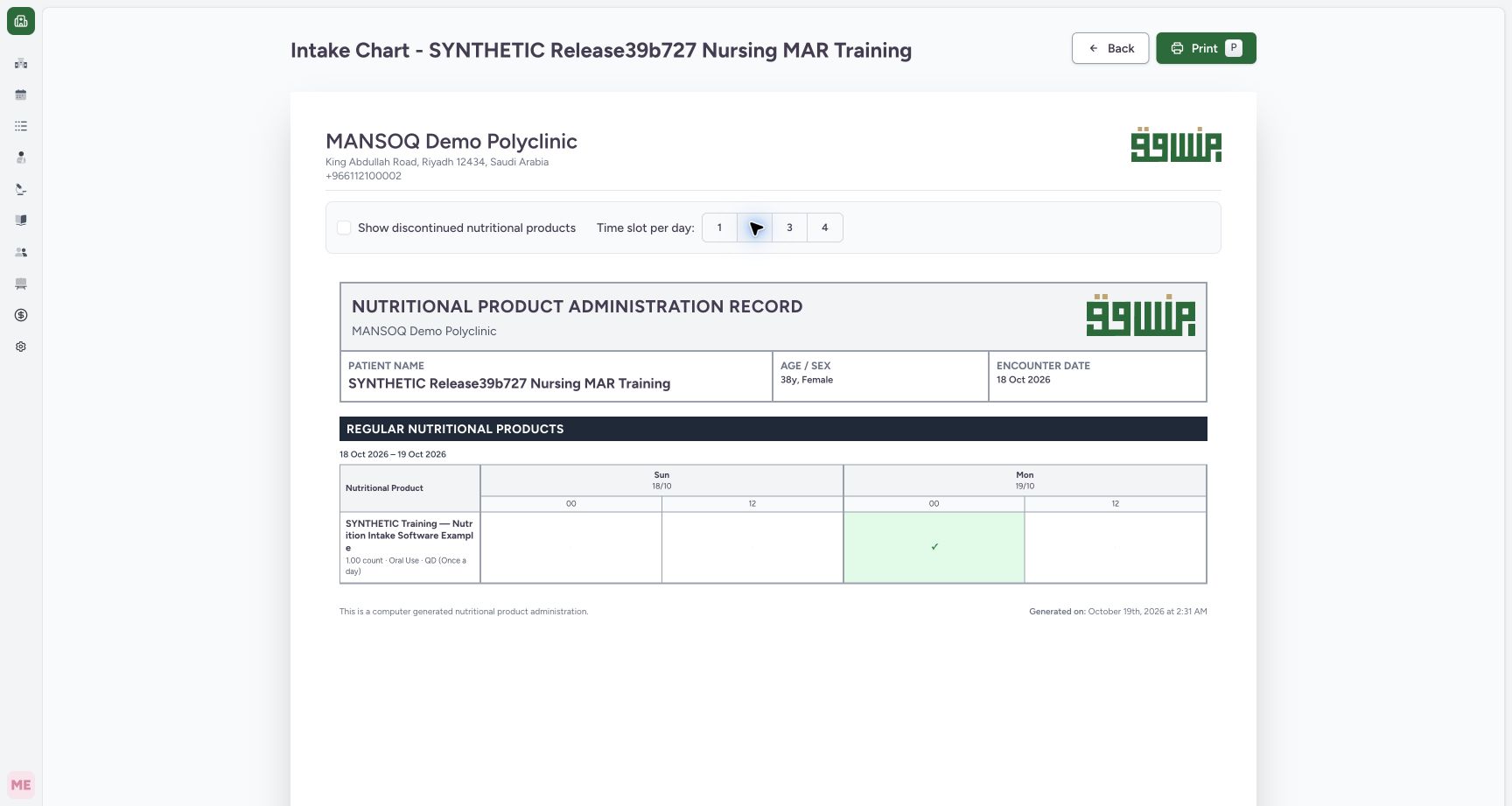
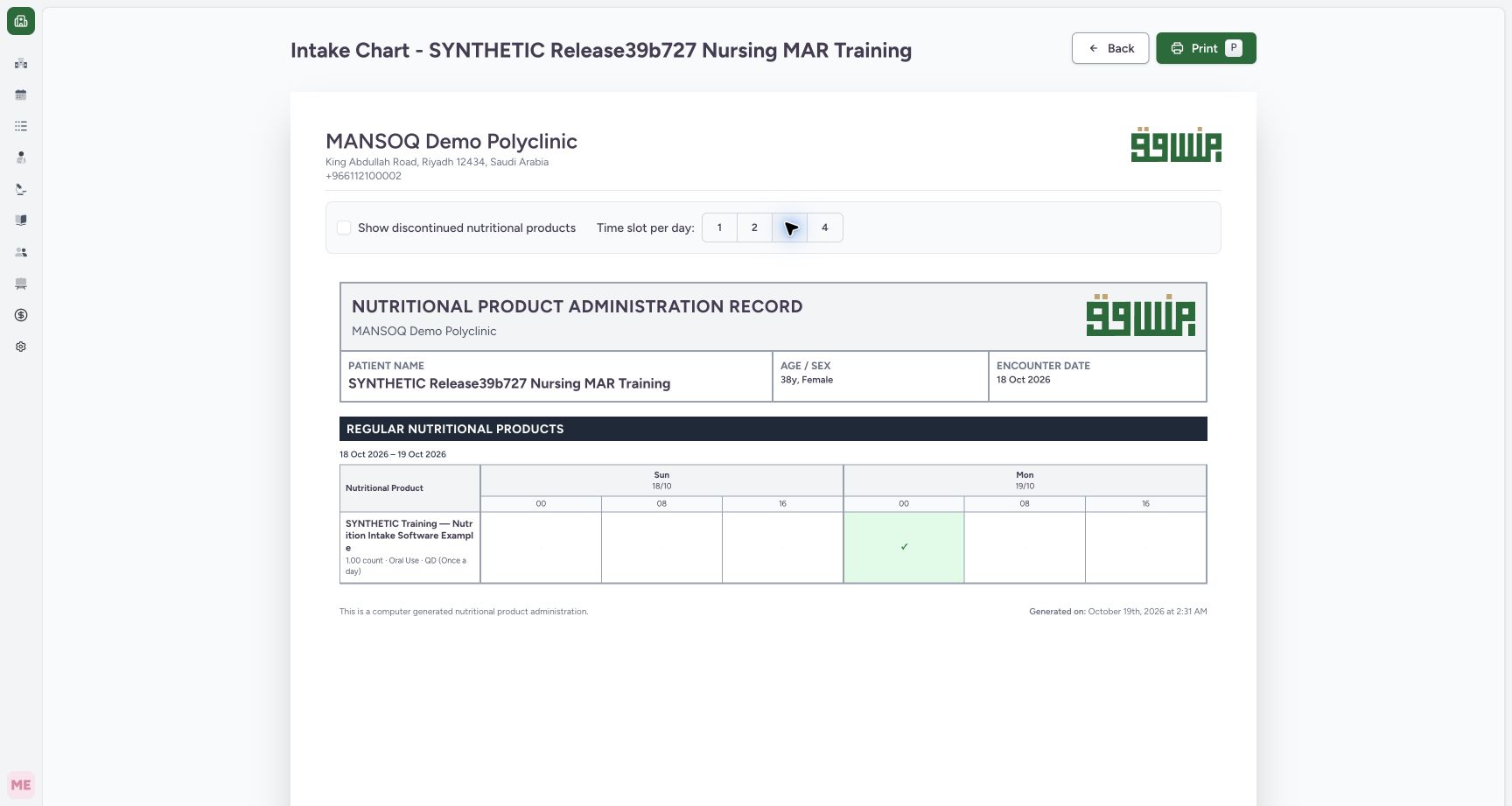
Use Time slot per day to choose 1, 2, 3 or 4. One gives a full-day column; two gives 00 and 12; three gives 00, 08 and 16; four gives 00, 06, 12 and 18. The single saved intake remains marked across these views. These controls regroup the presentation without changing its saved occurrence, quantity or status. Return to 4 for the demonstrated export.
 1
1View one full-day intake chart slot
Capture details
Exact committed release ba551c1d on the isolated nonproduction clone, existing Nurse and fictional Polyclinic inpatient case. The retained patient name mentions an earlier release; the actual captured build is ba551c1d. A separately journaled normal IT prerequisite created one synthetic count-unit nutrition product/order with the existing Doctor requester; this is not Doctor UI prescribing or clinical nutrition. All ten prior administration records and three medication requests were independently verified unchanged before this Nurse workflow. One slot displays one daily column starting at 00; the same single saved intake remains marked on 19 October.
Image SHA-256 de3f69625a1dc5a0d519f01b056be5777e17d2bf73aa99bb3f6ff0e0b3096a08
- One daily presentation slot: This changes chart columns, not the saved 02:28 intake occurrence.
 1
1View two twelve-hour intake chart slots
Capture details
Exact committed release ba551c1d on the isolated nonproduction clone, existing Nurse and fictional Polyclinic inpatient case. The retained patient name mentions an earlier release; the actual captured build is ba551c1d. A separately journaled normal IT prerequisite created one synthetic count-unit nutrition product/order with the existing Doctor requester; this is not Doctor UI prescribing or clinical nutrition. All ten prior administration records and three medication requests were independently verified unchanged before this Nurse workflow. Two slots display 00 and 12 daily headings, retaining the same single completed intake marker in the first 19 October interval.
Image SHA-256 0f731cbe236e6656fbc13c2b0e18ace2d9863f5864fdac447a5276983c95cda8
- Two twelve-hour intervals: The headings are presentation boundaries rather than individual intake times.
 1
1View three eight-hour intake chart slots
Capture details
Exact committed release ba551c1d on the isolated nonproduction clone, existing Nurse and fictional Polyclinic inpatient case. The retained patient name mentions an earlier release; the actual captured build is ba551c1d. A separately journaled normal IT prerequisite created one synthetic count-unit nutrition product/order with the existing Doctor requester; this is not Doctor UI prescribing or clinical nutrition. All ten prior administration records and three medication requests were independently verified unchanged before this Nurse workflow. Three slots display 00, 08 and 16 headings for each date, retaining the same single completed intake marker.
Image SHA-256 15a77491956ceaf74e9115f5a517ab3ff4dac0f76b48e6e0a68aba6a77bfe495
- Three eight-hour intervals: This presentation does not change the saved occurrence time, quantity or count.
12Read the nutritional-product administration chart
Capture details
Exact committed release ba551c1d on the isolated nonproduction clone, existing Nurse and fictional Polyclinic inpatient case. The retained patient name mentions an earlier release; the actual captured build is ba551c1d. A separately journaled normal IT prerequisite created one synthetic count-unit nutrition product/order with the existing Doctor requester; this is not Doctor UI prescribing or clinical nutrition. All ten prior administration records and three medication requests were independently verified unchanged before this Nurse workflow. The separate chart is titled Nutritional Product Administration Record and contains only the nutrition order with one completed marker. The existing medication events are not added to this nutritional-product row. Default four slots show the intake in the 19 October 00 interval.
Image SHA-256 4cc4d5a3d73b9236f8d20d3024571bb8c7e38402e1ad24bebd927b04693e3171
- Confirm the output type: This view is the nutritional-product chart for the selected encounter.
- One completed intake: Open this cell to inspect the saved intake’s own time, quantity, recorder and note.
5. Review the native Print preview
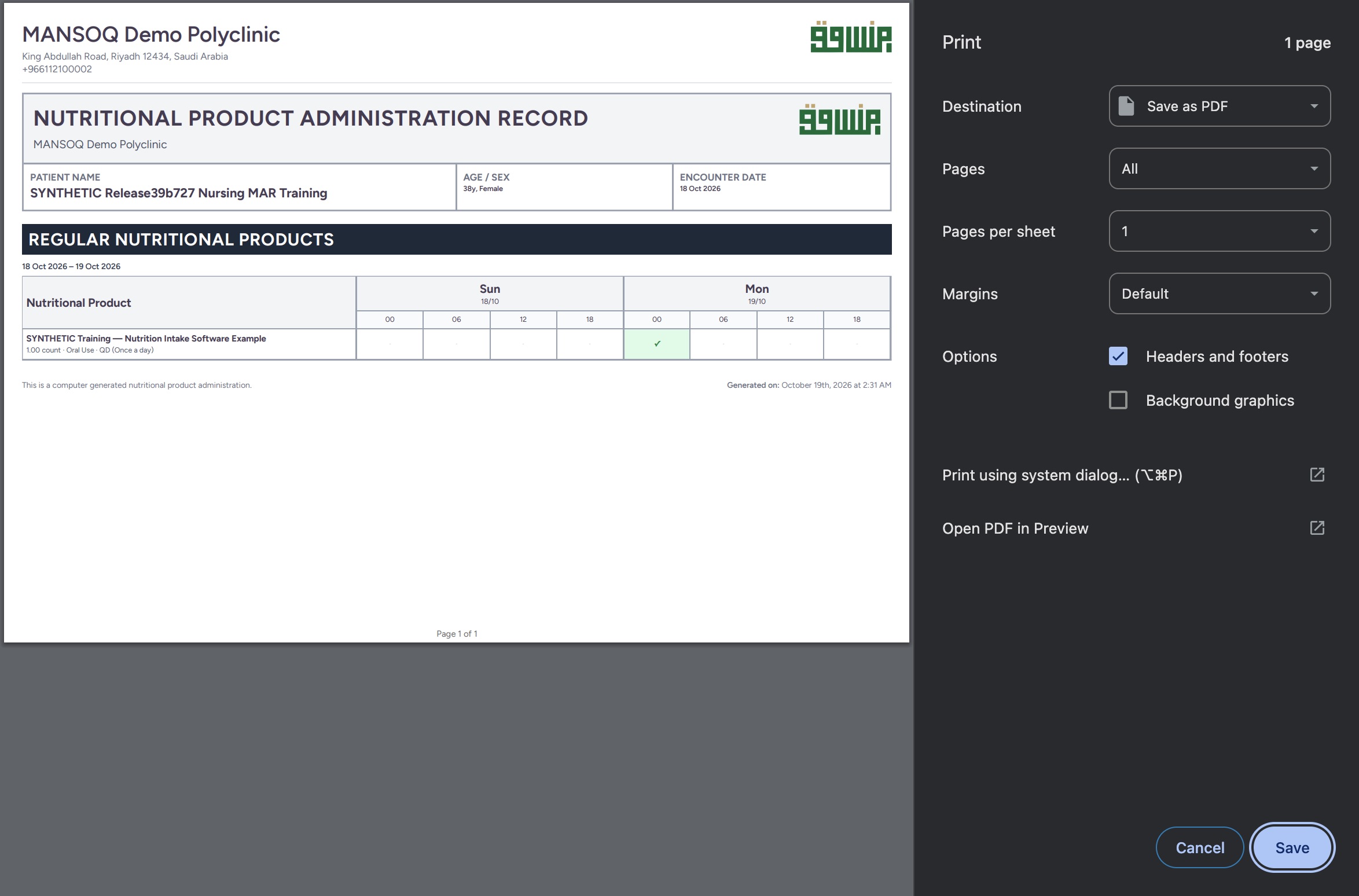
Choose Print. In the native Chrome Print dialog, confirm the output title, patient, dates, destination and page count. The actual example is one landscape page with one completed nutritional-product marker. Its table does not include the interactive event-detail popover. Use Save as PDF and continue to Save when an output file is intended.
 123
123Review the intake output in the macOS Chrome Print dialog
Capture details
Actual native macOS UI while exporting or inspecting the nutrition intake chart from exact committed ba551c1d on the isolated fictional Nurse/Polyclinic case. This clean native preview contains one landscape page and one completed intake marker. It shows the same already-saved chart content; after this replacement teaching capture, the preview is cancelled without saving another PDF.
Image SHA-256 3351524c13a6099d3c850c936fe0c16bc545e2e63e04ed3df5f103e4786cf088
- Actual one-page preview: Confirm the nutritional-product chart, intended patient and date interval.
- Save as PDF: The demonstrated output destination is a local PDF file.
- Save after review: Continue to the native Save panel when an output file is intended; the lesson’s actual saved file is inspected separately.
6. Save a distinct intake-chart PDF
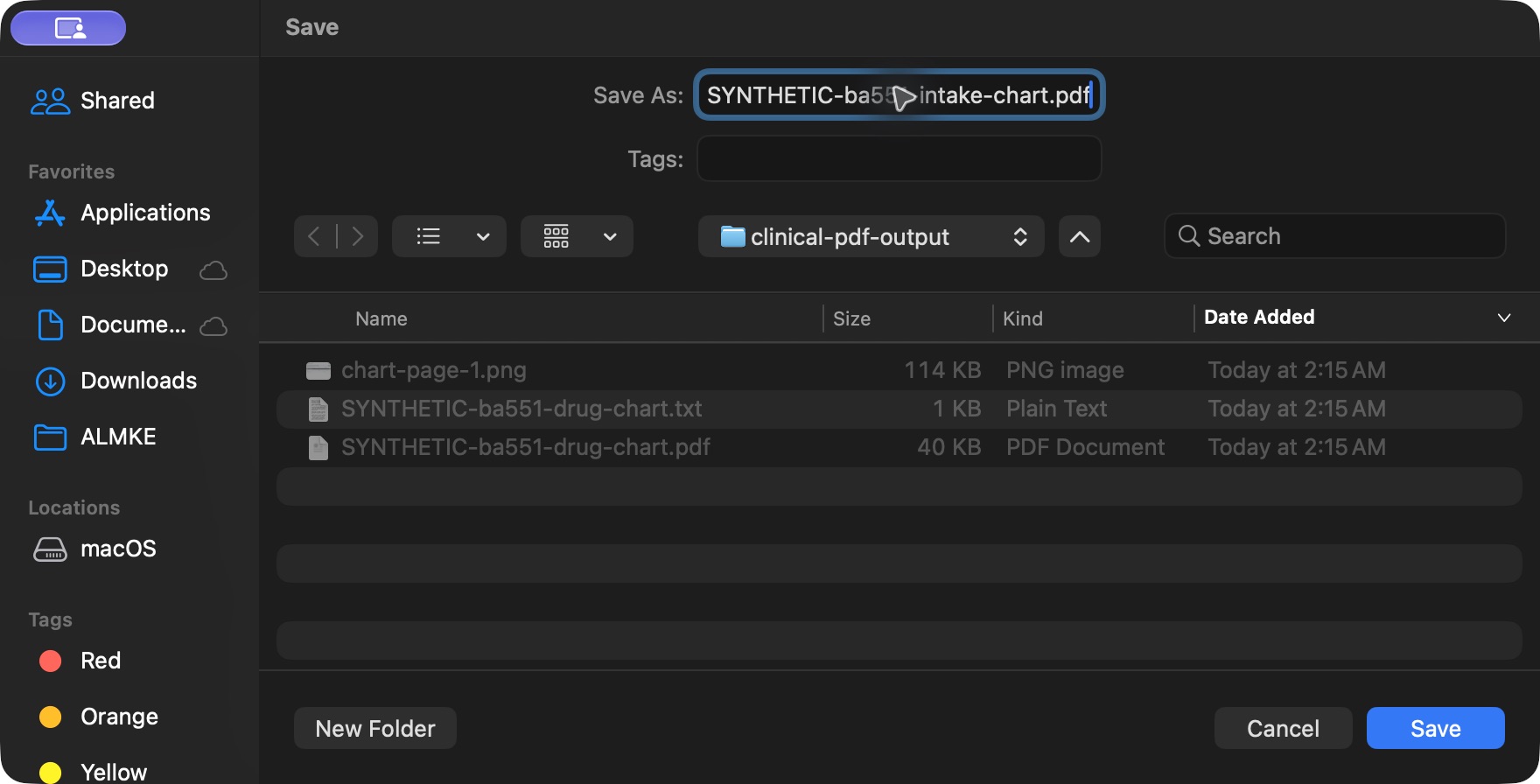
In the macOS Save dialog, review the filename and approved destination, then select Save once. This example saves SYNTHETIC-ba551-intake-chart.pdf into the private local training output folder. Native controls vary by operating system and browser; check the actual destination rather than assuming the example folder is your required location.
 123
123Save the nutrition chart through the macOS Save dialog
Capture details
Actual native macOS UI while exporting or inspecting the nutrition intake chart from exact committed ba551c1d on the isolated fictional Nurse/Polyclinic case. The actual native Save panel names the separate intake-chart PDF in the existing private local training output folder.
Image SHA-256 52bb9229be3715195005b38aaf32727c8c0f90b85f73338cd7ac3357d2275ca1
- Name the intake chart output: Use a distinct identifiable filename for this selected nutrition chart.
- Confirm the approved local folder: This synthetic example saves into the private local training output directory.
- Save once: Save the reviewed output, then open and inspect the actual PDF.
7. Open and inspect the saved output
Open the actual saved file in your normal document viewer. The example uses macOS Preview and zooms out to inspect the entire page. Confirm the separate intake filename, one-page count, nutritional-product title, intended patient/date interval, single completed marker, generated footer and Page 1 of 1. The PDF omits the event’s precise 02:28 time, creator and identifying note from the interactive popover; inspect the saved event when those details are needed.
123Inspect the actual saved intake chart in macOS Preview
Capture details
Actual native macOS UI while exporting or inspecting the nutrition intake chart from exact committed ba551c1d on the isolated fictional Nurse/Polyclinic case. The actual saved PDF is open as one landscape page. It contains the nutrition-product title, fictional patient/date interval, one completed marker and page footer. The interactive event time/creator/note detail is not printed.
Image SHA-256 3d2b82e131506a5218290567b6f1ffb017308f4e8a4fbca3db6ee38aed5991cd
- Actual saved intake PDF: Confirm the separate intake filename and the viewer’s one-page count.
- Retained completed marker: This output contains the one nutrition intake, distinct from the medication chart’s six events.
- Inspect the final page footer: Review the whole actual output page, including Page 1 of 1.
8. Return to the retained nutrition history
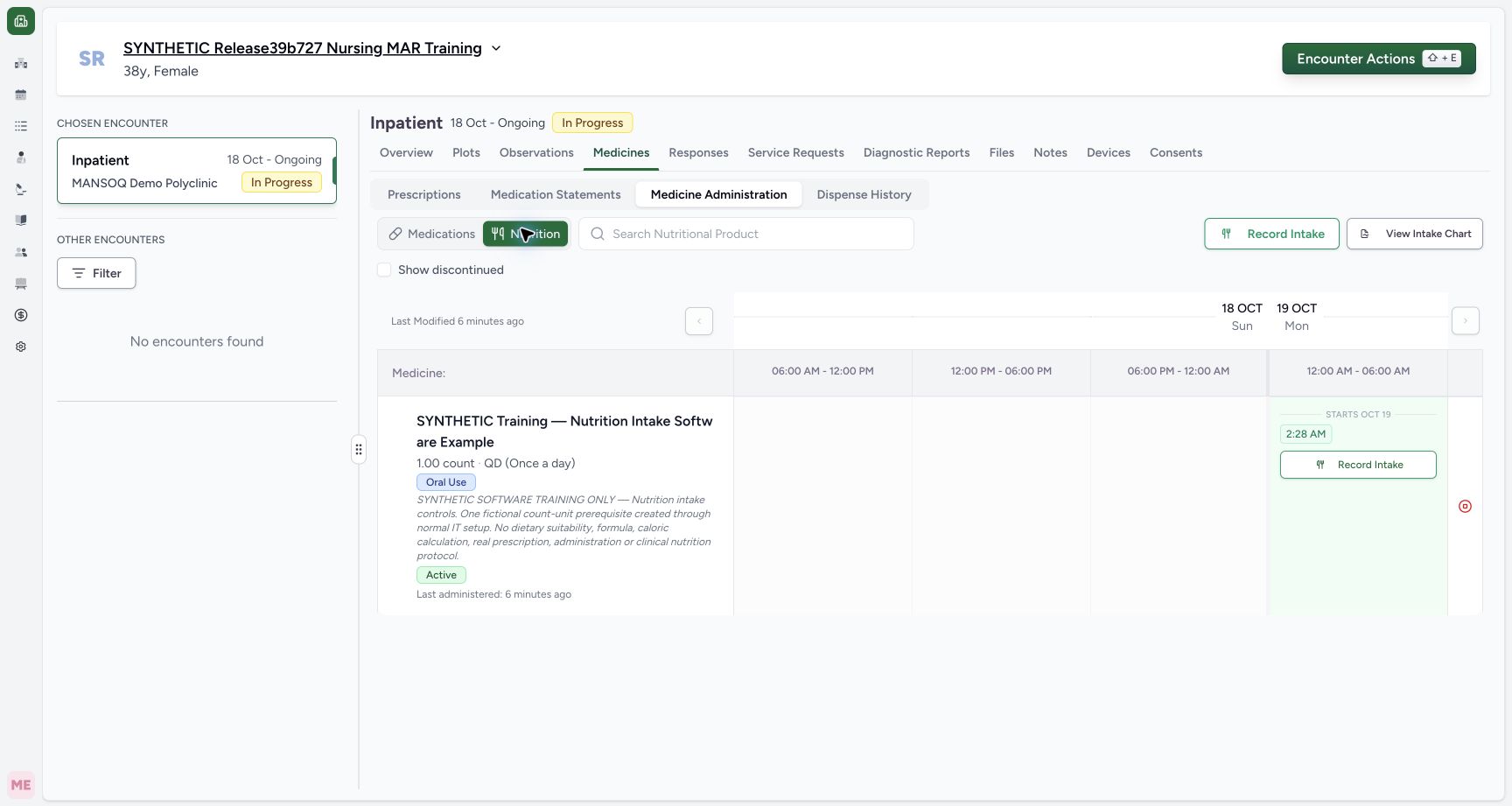
Use Back on the web chart. Medicines initially opens Prescriptions in this observed path, so select Medicine Administration and Nutrition again. The saved 2:28 AM occurrence remains visible. Independent ordinary Nurse readback verified all eleven administration records and all four requests were unchanged by the chart controls, PDF save and output inspection.
 12
12Return to the retained intake history after printing
Capture details
Exact committed release ba551c1d on the isolated nonproduction clone, existing Nurse and fictional Polyclinic inpatient case. The retained patient name mentions an earlier release; the actual captured build is ba551c1d. A separately journaled normal IT prerequisite created one synthetic count-unit nutrition product/order with the existing Doctor requester; this is not Doctor UI prescribing or clinical nutrition. All ten prior administration records and three medication requests were independently verified unchanged before this Nurse workflow. Back from the separate chart returns to Medicines. Select Medicine Administration and Nutrition again; the saved 2:28 intake remains visible. No chart controls, native preview, PDF save or output inspection intentionally change an intake record.
Image SHA-256 a1f5c722dfacfdc6dd41b74cdbddc9b3459ccf8c29830d33f484e1b17d37b92b
- Return to Nutrition: Re-select the intended workspace after Back resets the Medicines subtab.
- Retained saved intake: The existing occurrence remains present after the read-only chart/output workflow.
Keep the chart and full intake record distinct
The completed chart provides grouped presentation intervals and markers. The individual saved record provides its own occurrence, quantity, status and context. This lesson observes one authorized Nurse’s workflow in one fictional Polyclinic inpatient encounter; it does not qualify all statuses, discontinued-only requests, multiple nutrition orders, additional weeks or other roles/facilities.
12Read the nutritional-product administration chart
Capture details
Exact committed release ba551c1d on the isolated nonproduction clone, existing Nurse and fictional Polyclinic inpatient case. The retained patient name mentions an earlier release; the actual captured build is ba551c1d. A separately journaled normal IT prerequisite created one synthetic count-unit nutrition product/order with the existing Doctor requester; this is not Doctor UI prescribing or clinical nutrition. All ten prior administration records and three medication requests were independently verified unchanged before this Nurse workflow. The separate chart is titled Nutritional Product Administration Record and contains only the nutrition order with one completed marker. The existing medication events are not added to this nutritional-product row. Default four slots show the intake in the 19 October 00 interval.
Image SHA-256 4cc4d5a3d73b9236f8d20d3024571bb8c7e38402e1ad24bebd927b04693e3171
- Confirm the output type: This view is the nutritional-product chart for the selected encounter.
- One completed intake: Open this cell to inspect the saved intake’s own time, quantity, recorder and note.
12Inspect the individual saved intake inside its chart cell
Capture details
Exact committed release ba551c1d on the isolated nonproduction clone, existing Nurse and fictional Polyclinic inpatient case. The retained patient name mentions an earlier release; the actual captured build is ba551c1d. A separately journaled normal IT prerequisite created one synthetic count-unit nutrition product/order with the existing Doctor requester; this is not Doctor UI prescribing or clinical nutrition. All ten prior administration records and three medication requests were independently verified unchanged before this Nurse workflow. The single completed marker opens the saved nutrition intake’s 02:28 start, 1 count, Nurse creator and identifying note. This interactive detail is separate from the simplified printed marker.
Image SHA-256 88fc9b34a327f26e3317d0929b82b037e1fc361a6f0c7dc87b357e636fc1d495
- Individual event row / time: Read the actual 02:28 occurrence immediately to the left of this marker; the 00:00 line above is the presentation-slot heading.
- Recorded event creator: Read the Nurse name immediately to the left of this marker. The name reflects the saved record creator, not an independent clinical-performer verification.
123Inspect the actual saved intake chart in macOS Preview
Capture details
Actual native macOS UI while exporting or inspecting the nutrition intake chart from exact committed ba551c1d on the isolated fictional Nurse/Polyclinic case. The actual saved PDF is open as one landscape page. It contains the nutrition-product title, fictional patient/date interval, one completed marker and page footer. The interactive event time/creator/note detail is not printed.
Image SHA-256 3d2b82e131506a5218290567b6f1ffb017308f4e8a4fbca3db6ee38aed5991cd
- Actual saved intake PDF: Confirm the separate intake filename and the viewer’s one-page count.
- Retained completed marker: This output contains the one nutrition intake, distinct from the medication chart’s six events.
- Inspect the final page footer: Review the whole actual output page, including Page 1 of 1.
Source evidence
Every citation uses this exact committed version. The private source repository requires access.
- repositories/platform/mansoq-web/src/components/Medicine/MedicationAdministration/AdministrationTab.tsx:756 ·
ba551c1d67031248136fd2016afe227b5fc994bdSource file checksum
170c246835ea1966b8512f5baf72ff0ea60635f28cbcec6a465bb8c17506555f - repositories/platform/mansoq-web/src/components/Medicine/MedicationAdministration/PrintMedicationAdministration.tsx:65 ·
ba551c1d67031248136fd2016afe227b5fc994bdSource file checksum
c64e8c203d09b403e8ad253b698e15ef32be8e342ac74fac2b9c201f767b9c4a - repositories/platform/mansoq-web/src/components/Medicine/MedicationAdministration/PrintMedicationAdministration.tsx:104 ·
ba551c1d67031248136fd2016afe227b5fc994bdSource file checksum
c64e8c203d09b403e8ad253b698e15ef32be8e342ac74fac2b9c201f767b9c4a - repositories/platform/mansoq-web/src/components/Medicine/MedicationAdministration/PrintMedicationAdministration.tsx:178 ·
ba551c1d67031248136fd2016afe227b5fc994bdSource file checksum
c64e8c203d09b403e8ad253b698e15ef32be8e342ac74fac2b9c201f767b9c4a - repositories/platform/mansoq-web/src/components/Medicine/MedicationAdministration/PrintMedicationAdministration.tsx:288 ·
ba551c1d67031248136fd2016afe227b5fc994bdSource file checksum
c64e8c203d09b403e8ad253b698e15ef32be8e342ac74fac2b9c201f767b9c4a - repositories/platform/mansoq-web/src/components/Medicine/MedicationAdministration/PrintMedicationAdministration.tsx:620 ·
ba551c1d67031248136fd2016afe227b5fc994bdSource file checksum
c64e8c203d09b403e8ad253b698e15ef32be8e342ac74fac2b9c201f767b9c4a - repositories/platform/mansoq-web/src/MansoqUI/misc/PrintPreview.tsx:1 ·
ba551c1d67031248136fd2016afe227b5fc994bdSource file checksum
66b44ba3d2996d2db6d1d37c275a084db50c2ac1d68468f5355cc2522c67679b