 MANSOQ
 Nutrition intake · VERSION ba551c1d
Correct a saved nutrition entry and verify completed-chart scope
Select the intended saved entry, update it to Entered in Error with appropriate context, then verify its retained identity and the completed-only intake chart.
Nurse
 123
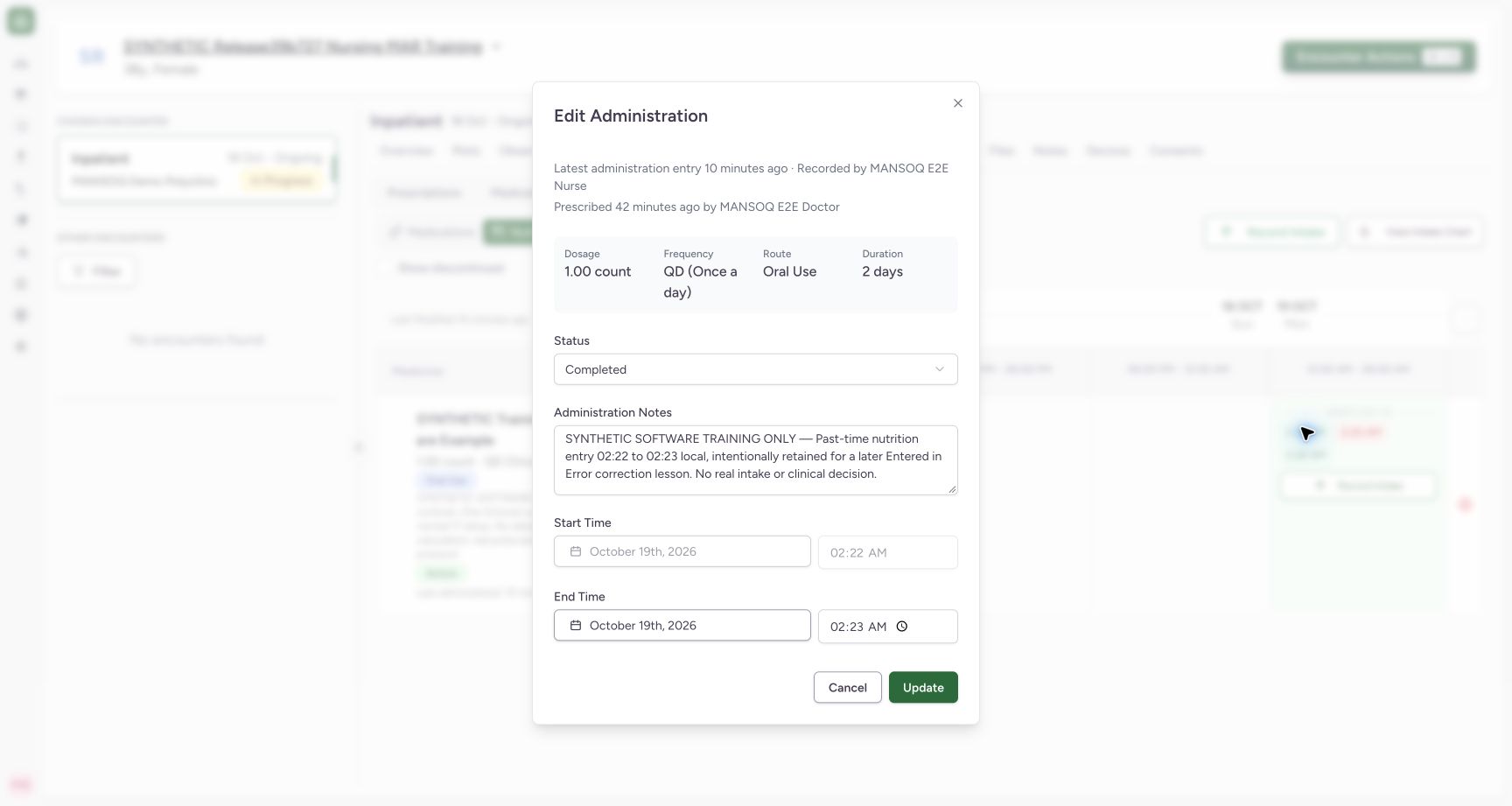
123Review the exact intake before a correction
Capture details
Exact committed release ba551c1d on the isolated nonproduction clone, existing Nurse and fictional Polyclinic inpatient case. The retained patient name mentions an earlier release; the actual captured build is ba551c1d. A separately journaled normal IT prerequisite created one synthetic count-unit nutrition product/order with the existing Doctor requester; this is not Doctor UI prescribing or clinical nutrition. All ten prior administration records and three medication requests were independently verified unchanged before this Nurse workflow. The saved 1-count entry is Completed before any correction. Start is locked; the existing note identifies this intentional software training record.
Image SHA-256 527f839d75745031270b15491c70dd2c9382f8695a2dcdb04c7eeb7b11fe2be8
- Current Completed status: Confirm the selected saved entry before changing its status.
- Existing note: Read identifying context; Notes remains optional software input.
- Locked 02:22 start: The saved start remains retained.
 123
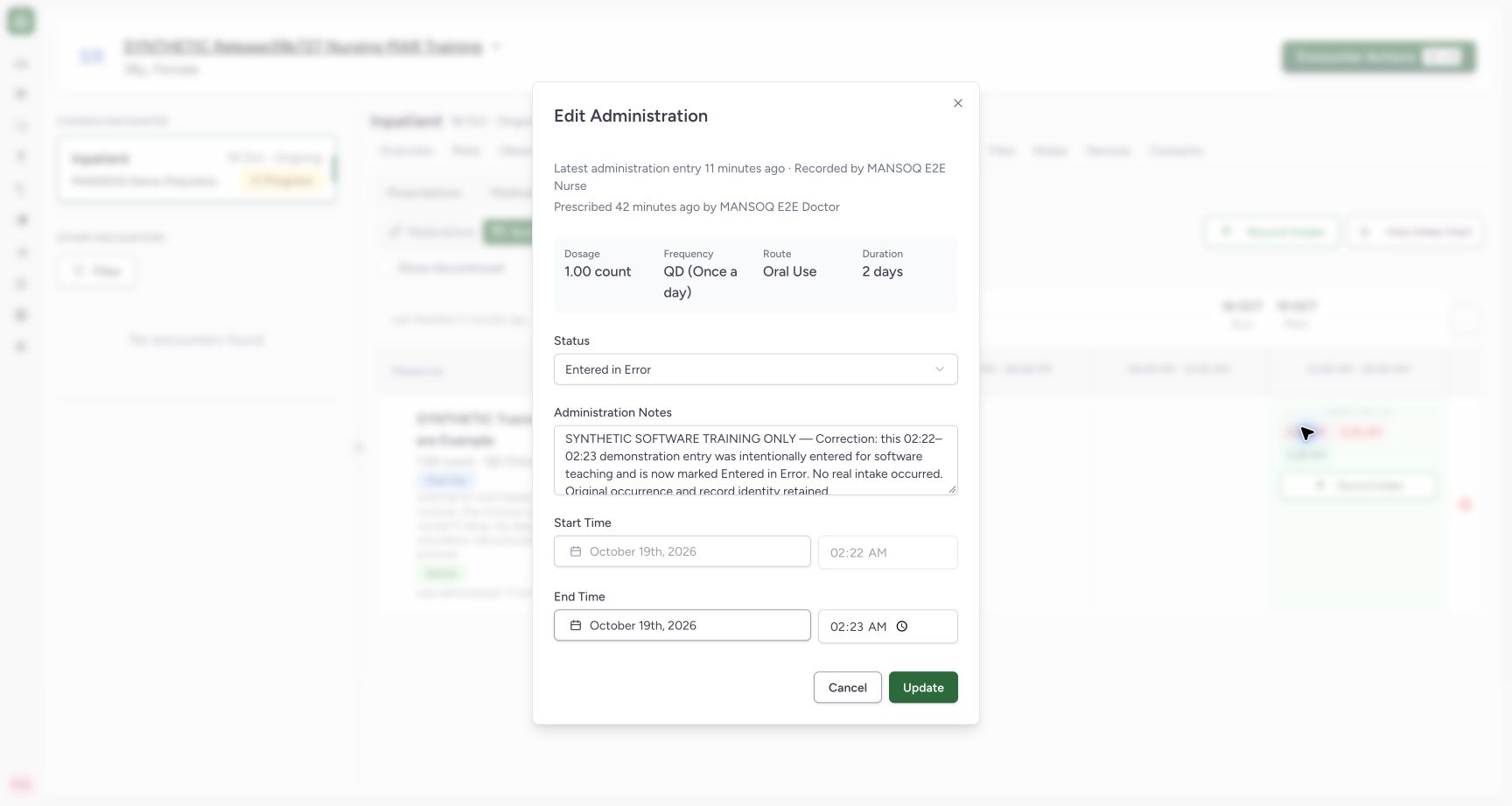
123Verify the saved Entered in Error correction
Capture details
Exact committed release ba551c1d on the isolated nonproduction clone, existing Nurse and fictional Polyclinic inpatient case. The retained patient name mentions an earlier release; the actual captured build is ba551c1d. A separately journaled normal IT prerequisite created one synthetic count-unit nutrition product/order with the existing Doctor requester; this is not Doctor UI prescribing or clinical nutrition. All ten prior administration records and three medication requests were independently verified unchanged before this Nurse workflow. The same retained record now shows Entered in Error, updated synthetic context, original 1 count and original 02:22–02:23 occurrence. Cancel after read-only inspection.
Image SHA-256 70533276f50bf4f8d2f1d769ce4bcaefc3994f14dd4a5f4b343eb8b88d155db7
- Saved Entered in Error: Verify the saved status on this retained record.
- Saved correction note: Read the saved context.
- Cancel inspection: Close without another update.
8 of 8 content blocks have reviewed image alignment. Missing overview or prerequisite images remain open.
Before you begin
- Use your authorized account and facility correction policy. Confirm the intended patient, selected encounter, Nutrition product and saved occurrence before changing an existing record. This observed Nurse example uses an intentionally fictional 02:22–02:23 entry in exact ba551c1d.
 12
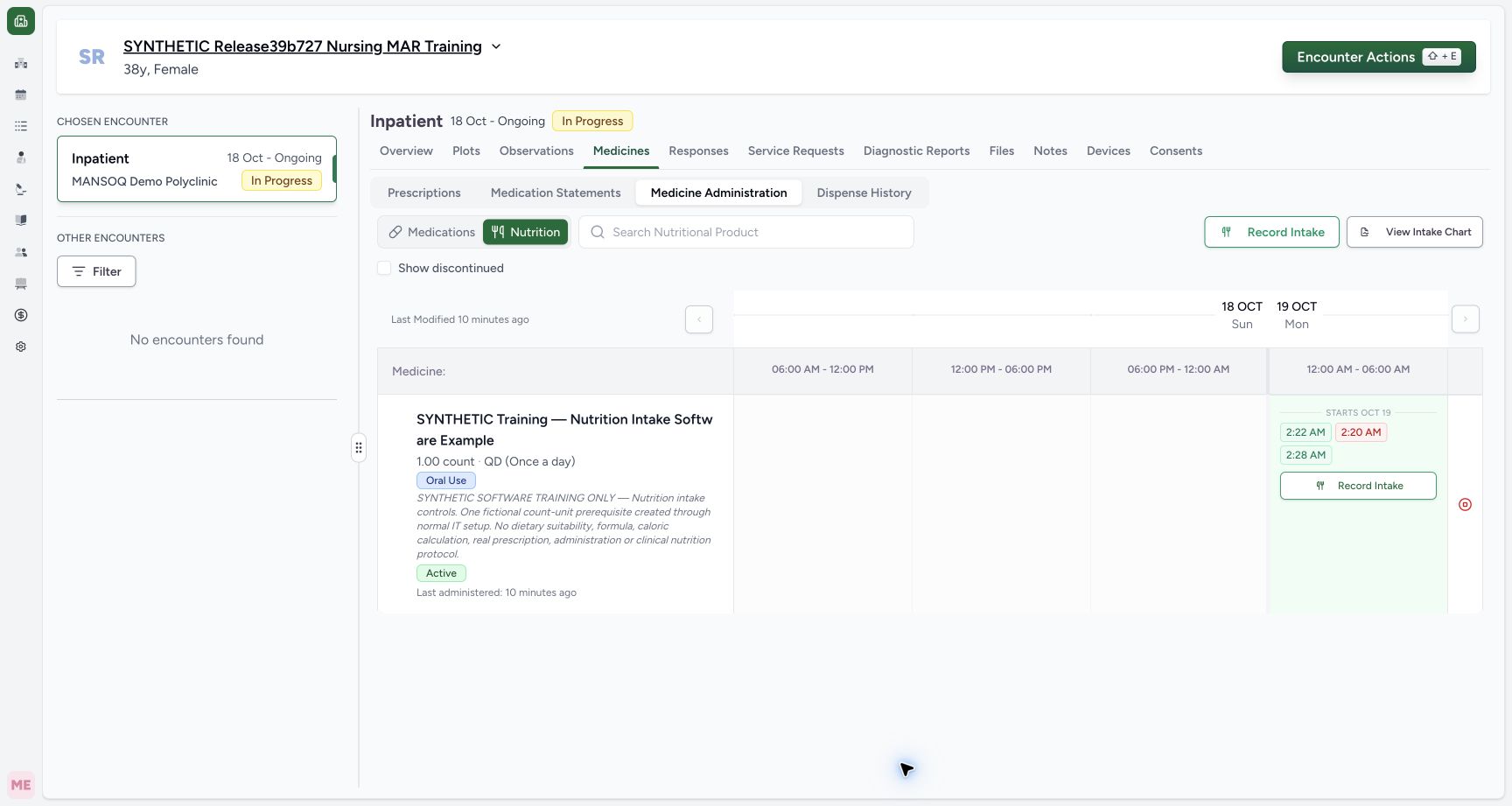
12Recorded release ba551c1d · 2026-10-18T23:38:11.426Z · 1728 × 921 Inspect the saved individual past-time intake
Capture details
Exact committed release ba551c1d on the isolated nonproduction clone, existing Nurse and fictional Polyclinic inpatient case. The retained patient name mentions an earlier release; the actual captured build is ba551c1d. A separately journaled normal IT prerequisite created one synthetic count-unit nutrition product/order with the existing Doctor requester; this is not Doctor UI prescribing or clinical nutrition. All ten prior administration records and three medication requests were independently verified unchanged before this Nurse workflow. One new Completed intake is independently verified at 02:22–02:23, distinct from the 02:20 Not Done and earlier 02:28 Completed entries.
Image SHA-256
11d2e023017b7316b9cc307d7760bc5a199519658cec5656a3a88a60b3d39915- Saved 2:22 entry: Open the intended saved record for inspection or an authorized correction.
- Not Done retained: The earlier non-intake record remains separate.
123Recorded release ba551c1d · 2026-10-18T23:38:16.995Z · 1728 × 921 Review the exact intake before a correction
Capture details
Exact committed release ba551c1d on the isolated nonproduction clone, existing Nurse and fictional Polyclinic inpatient case. The retained patient name mentions an earlier release; the actual captured build is ba551c1d. A separately journaled normal IT prerequisite created one synthetic count-unit nutrition product/order with the existing Doctor requester; this is not Doctor UI prescribing or clinical nutrition. All ten prior administration records and three medication requests were independently verified unchanged before this Nurse workflow. The saved 1-count entry is Completed before any correction. Start is locked; the existing note identifies this intentional software training record.
Image SHA-256
527f839d75745031270b15491c70dd2c9382f8695a2dcdb04c7eeb7b11fe2be8- Current Completed status: Confirm the selected saved entry before changing its status.
- Existing note: Read identifying context; Notes remains optional software input.
- Locked 02:22 start: The saved start remains retained.
1. Open and identify the existing entry
Choose the intended 2:22 AM chip in Nutrition administration history. The shared Edit Administration form shows the saved Completed status, 1 count, original 02:22–02:23 occurrence and identifying software-training context. Confirm the intended record before making a correction. Cancel when only inspection is needed.
12Inspect the saved individual past-time intake
Capture details
Exact committed release ba551c1d on the isolated nonproduction clone, existing Nurse and fictional Polyclinic inpatient case. The retained patient name mentions an earlier release; the actual captured build is ba551c1d. A separately journaled normal IT prerequisite created one synthetic count-unit nutrition product/order with the existing Doctor requester; this is not Doctor UI prescribing or clinical nutrition. All ten prior administration records and three medication requests were independently verified unchanged before this Nurse workflow. One new Completed intake is independently verified at 02:22–02:23, distinct from the 02:20 Not Done and earlier 02:28 Completed entries.
Image SHA-256 11d2e023017b7316b9cc307d7760bc5a199519658cec5656a3a88a60b3d39915
- Saved 2:22 entry: Open the intended saved record for inspection or an authorized correction.
- Not Done retained: The earlier non-intake record remains separate.
123Review the exact intake before a correction
Capture details
Exact committed release ba551c1d on the isolated nonproduction clone, existing Nurse and fictional Polyclinic inpatient case. The retained patient name mentions an earlier release; the actual captured build is ba551c1d. A separately journaled normal IT prerequisite created one synthetic count-unit nutrition product/order with the existing Doctor requester; this is not Doctor UI prescribing or clinical nutrition. All ten prior administration records and three medication requests were independently verified unchanged before this Nurse workflow. The saved 1-count entry is Completed before any correction. Start is locked; the existing note identifies this intentional software training record.
Image SHA-256 527f839d75745031270b15491c70dd2c9382f8695a2dcdb04c7eeb7b11fe2be8
- Current Completed status: Confirm the selected saved entry before changing its status.
- Existing note: Read identifying context; Notes remains optional software input.
- Locked 02:22 start: The saved start remains retained.
2. Choose the appropriate correction status
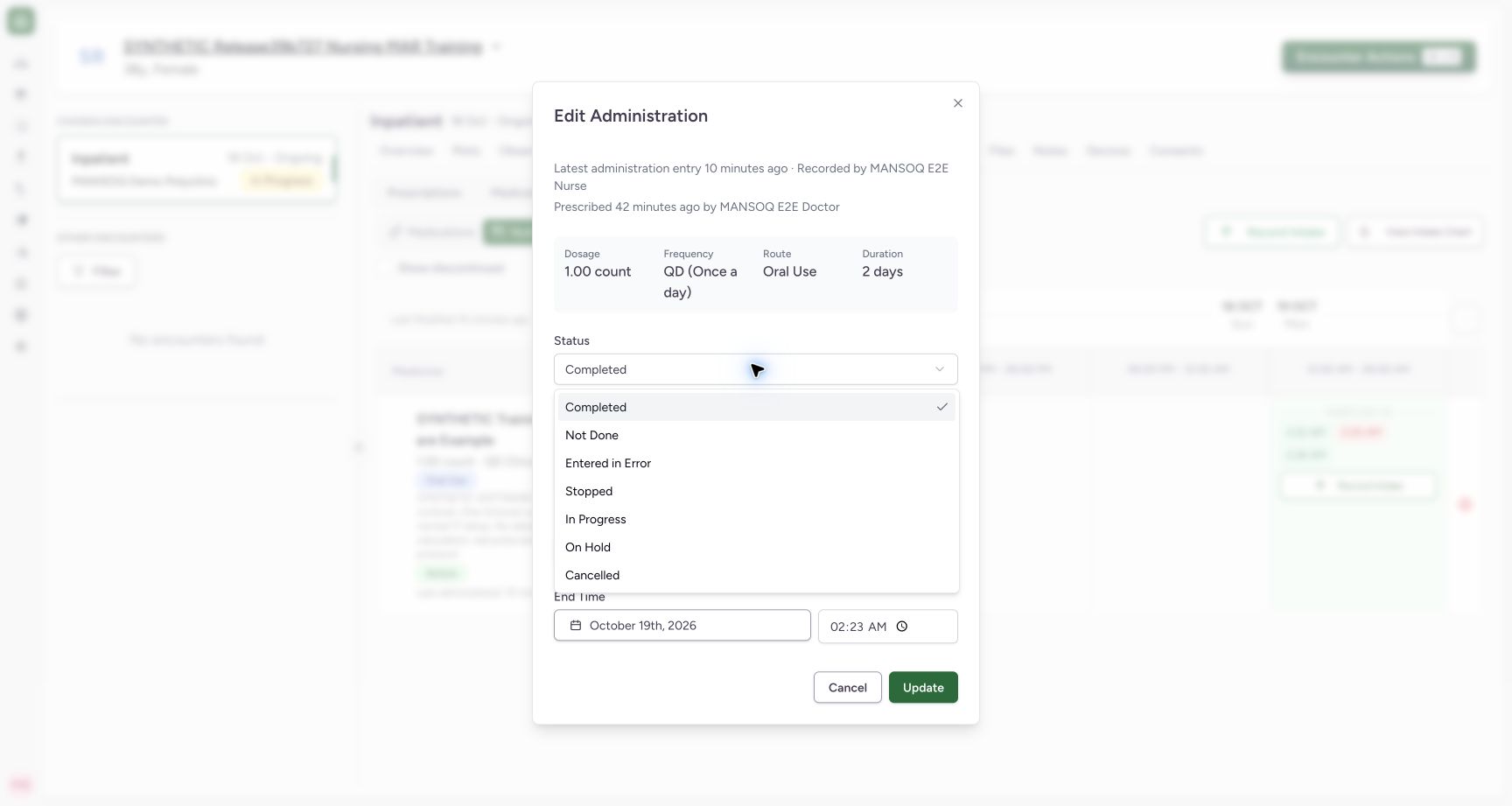
Open Status and select Entered in Error for this intentionally erroneous software example under the relevant correction policy. This changes the existing entry; it does not discontinue the nutritional-product request, delete history or record a replacement intake.
 1
1Choose Entered in Error for this correction
Capture details
Exact committed release ba551c1d on the isolated nonproduction clone, existing Nurse and fictional Polyclinic inpatient case. The retained patient name mentions an earlier release; the actual captured build is ba551c1d. A separately journaled normal IT prerequisite created one synthetic count-unit nutrition product/order with the existing Doctor requester; this is not Doctor UI prescribing or clinical nutrition. All ten prior administration records and three medication requests were independently verified unchanged before this Nurse workflow. This intentionally fictional correction uses Entered in Error on the intended 02:22 entry, not a replacement intake or request discontinuation.
Image SHA-256 dc1cdf828e25da6513e648e95b7271455d67d780d8fc2f55d3fe78a76bb041b3
- Entered in Error: Select the appropriate correction status under facility policy.
3. Review correction context and update once
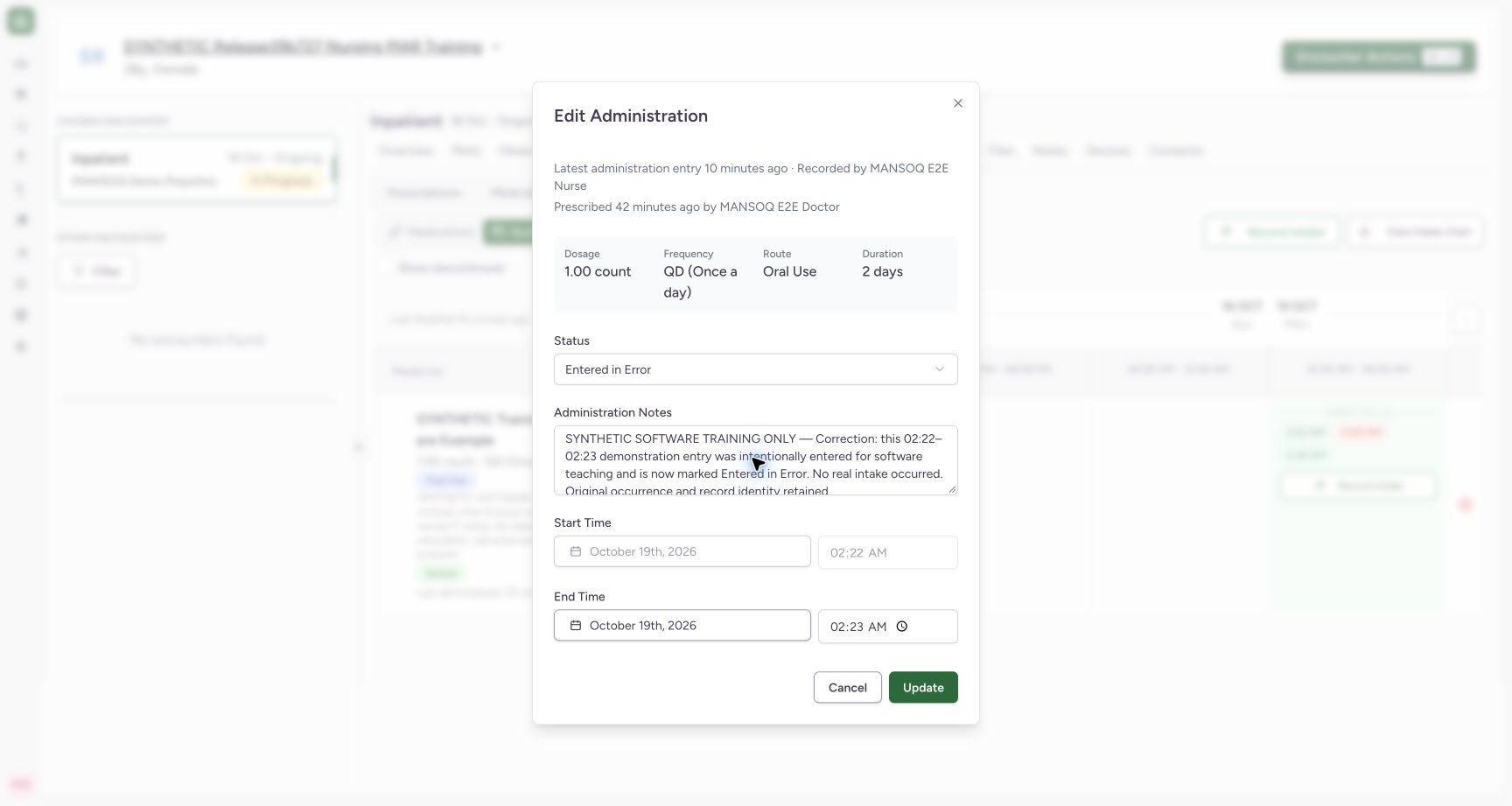
Administration Notes is optional in software. Record the appropriate correction context under facility policy; the example explains that no real intake occurred and identifies the intentional demonstration. Keep the intended quantity and retained occurrence. Review Entered in Error and choose Update once. Do not use a new Record Intake action to correct this existing entry.
 123
123Update the intended intake correction once
Capture details
Exact committed release ba551c1d on the isolated nonproduction clone, existing Nurse and fictional Polyclinic inpatient case. The retained patient name mentions an earlier release; the actual captured build is ba551c1d. A separately journaled normal IT prerequisite created one synthetic count-unit nutrition product/order with the existing Doctor requester; this is not Doctor UI prescribing or clinical nutrition. All ten prior administration records and three medication requests were independently verified unchanged before this Nurse workflow. Status and optional contextual note have changed; 1 count and 02:22–02:23 remain. Update changes the existing event rather than creating a replacement.
Image SHA-256 fea724901c181f6869db3533e830a252df3c9c4b623a7fc6fc5d9b8ea91adb00
- Entered in Error: Review the correction status.
- Correction context: Notes is optional in software; record appropriate context under facility policy.
- Update once: Save the reviewed correction on this existing event.
4. Verify the retained correction
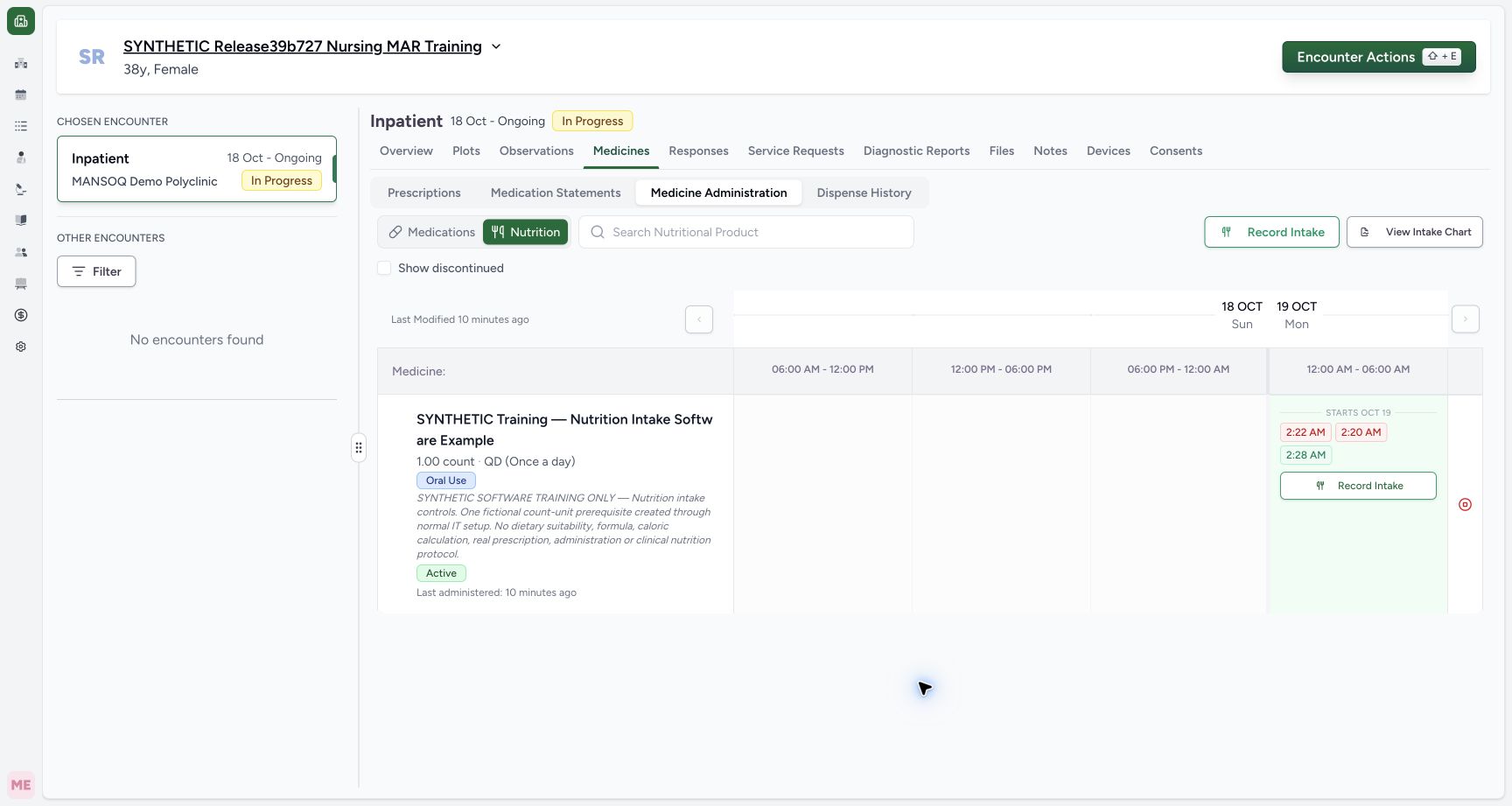
The 2:22 AM chip remains in history. Open it and confirm Entered in Error, the saved correction note, original 1 count and original 02:22–02:23. Independent ordinary Nurse and Doctor reads verified the same UUID, request and occurrence, with Nurse updater and no additional event created. Choose Cancel after inspection. All prior eleven events and all four complete requests remained unchanged.
 12
12Find the retained corrected intake
Capture details
Exact committed release ba551c1d on the isolated nonproduction clone, existing Nurse and fictional Polyclinic inpatient case. The retained patient name mentions an earlier release; the actual captured build is ba551c1d. A separately journaled normal IT prerequisite created one synthetic count-unit nutrition product/order with the existing Doctor requester; this is not Doctor UI prescribing or clinical nutrition. All ten prior administration records and three medication requests were independently verified unchanged before this Nurse workflow. The 02:22 chip remains after changing that record to Entered in Error; normal reads show the same UUID and unchanged dose/occurrence, with no new event created.
Image SHA-256 2b642de717f61e3fc1fb670751acacf5ca6f41fbb1e0e305844a02f2b5276121
- Retained corrected entry: Open the retained record to verify its correction.
- Original Completed intake: This earlier saved intake remains unchanged.
123Verify the saved Entered in Error correction
Capture details
Exact committed release ba551c1d on the isolated nonproduction clone, existing Nurse and fictional Polyclinic inpatient case. The retained patient name mentions an earlier release; the actual captured build is ba551c1d. A separately journaled normal IT prerequisite created one synthetic count-unit nutrition product/order with the existing Doctor requester; this is not Doctor UI prescribing or clinical nutrition. All ten prior administration records and three medication requests were independently verified unchanged before this Nurse workflow. The same retained record now shows Entered in Error, updated synthetic context, original 1 count and original 02:22–02:23 occurrence. Cancel after read-only inspection.
Image SHA-256 70533276f50bf4f8d2f1d769ce4bcaefc3994f14dd4a5f4b343eb8b88d155db7
- Saved Entered in Error: Verify the saved status on this retained record.
- Saved correction note: Read the saved context.
- Cancel inspection: Close without another update.
5. Read the completed-only chart accurately
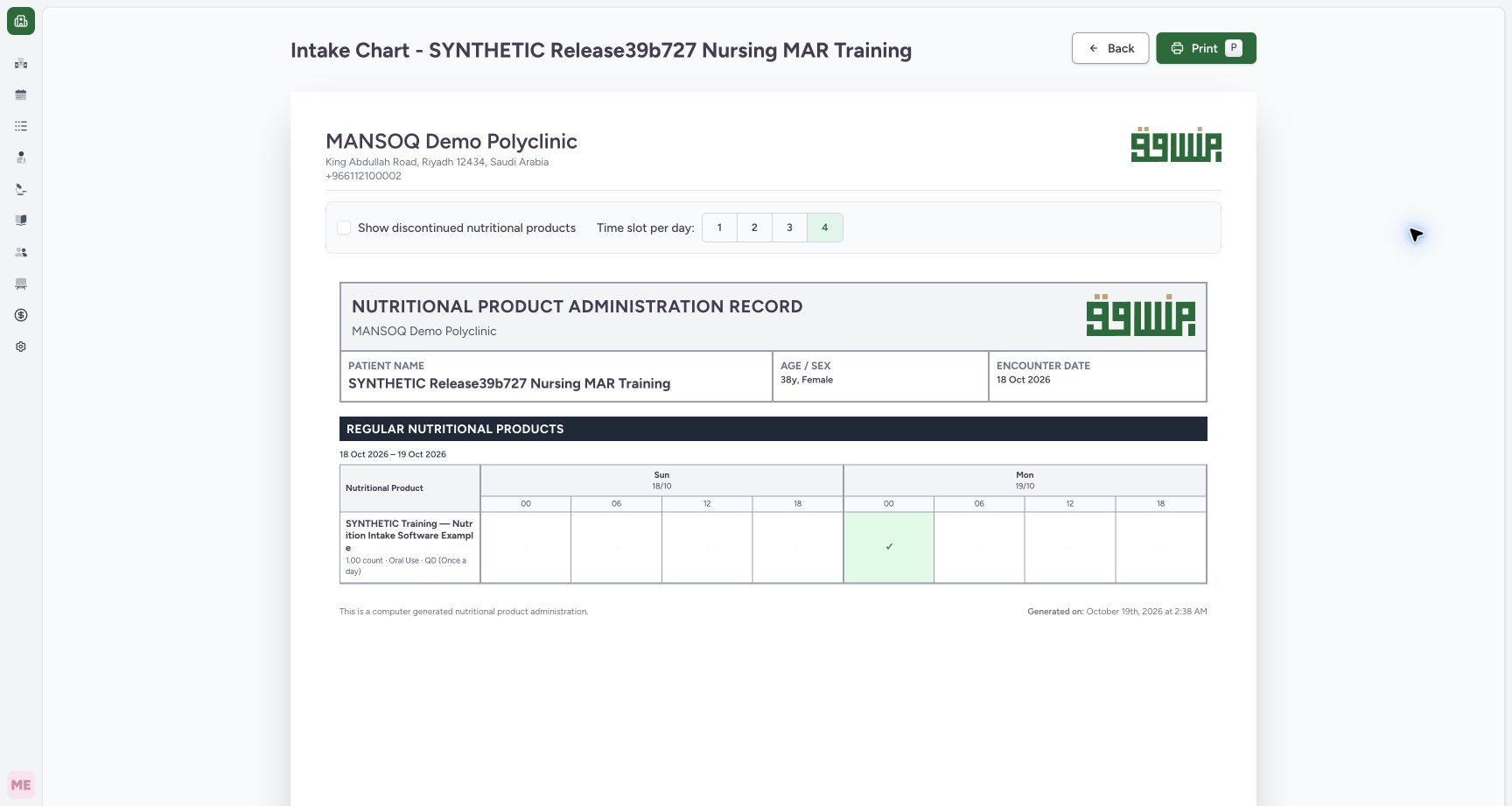
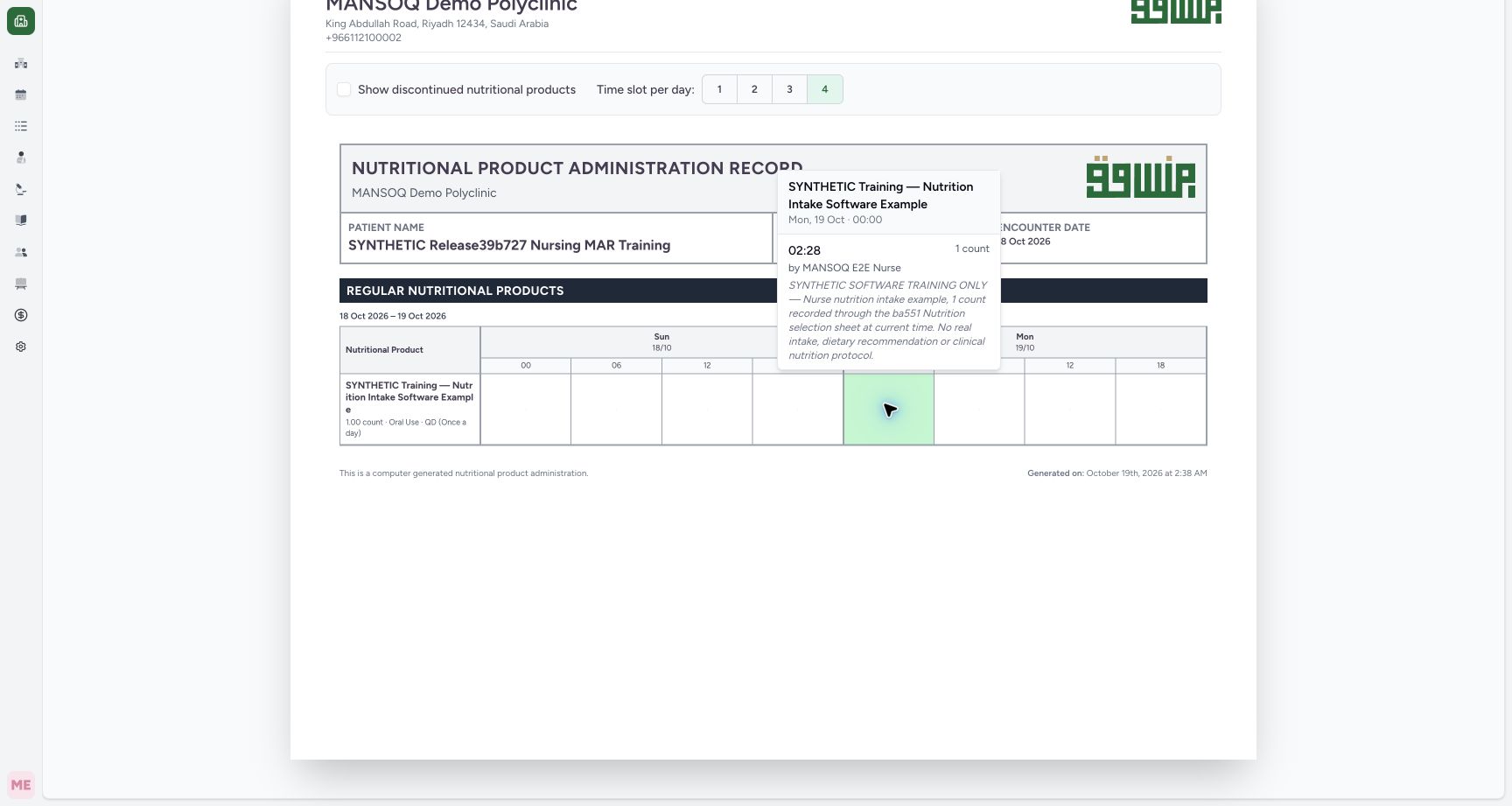
Return to history and choose View Intake Chart. This chart includes Completed nutrition events only. After this correction, it shows one marker for the original 02:28 Completed intake. Open that marker to confirm its own 02:28 occurrence, 1 count, recorded-by Nurse and identifying note. Not Done at 02:20 and Entered in Error at 02:22 remain available in administration history and are not counted as completed intake here.
 12
12Read the completed-only chart after correction
Capture details
Exact committed release ba551c1d on the isolated nonproduction clone, existing Nurse and fictional Polyclinic inpatient case. The retained patient name mentions an earlier release; the actual captured build is ba551c1d. A separately journaled normal IT prerequisite created one synthetic count-unit nutrition product/order with the existing Doctor requester; this is not Doctor UI prescribing or clinical nutrition. All ten prior administration records and three medication requests were independently verified unchanged before this Nurse workflow. The completed-only intake chart still shows one marker for the original 02:28 Completed entry. Not Done and Entered in Error remain in administration history and are not counted as completed intake here.
Image SHA-256 f5ce47d5f52c75a420bdcdc0869cb1ac417db99f787e38f57f73dbc84d220bc0
- One completed marker: Open this marker to inspect the included completed occurrence.
- Back to history: Use administration history to inspect other statuses.
 12
12Inspect which completed intake remains included
Capture details
Exact committed release ba551c1d on the isolated nonproduction clone, existing Nurse and fictional Polyclinic inpatient case. The retained patient name mentions an earlier release; the actual captured build is ba551c1d. A separately journaled normal IT prerequisite created one synthetic count-unit nutrition product/order with the existing Doctor requester; this is not Doctor UI prescribing or clinical nutrition. All ten prior administration records and three medication requests were independently verified unchanged before this Nurse workflow. The only included nutrition event remains the original 02:28, 1 count, Nurse-recorded entry. Corrected and Not Done events are inspected in administration history.
Image SHA-256 d1ae70d5c4ca39b92ad5fd9832dec06b14ac06087bb8b593eae0f57ee67dd3f3
- Individual event row / time: Read the actual 02:28 occurrence immediately to the left of this marker; the 00:00 line above is the presentation-slot heading.
- Recorded event creator: Read the Nurse name immediately to the left of this marker. The name reflects the saved record creator, not an independent clinical-performer verification.
Correction and audit scope
This observed path updates the existing record’s status and note while retaining its UUID, request, dose and occurrence. The saved readbacks establish creator/updater fields, not an immutable revision history or proof of the clinical performer. Other statuses, nutrition-request discontinuation, restoration, deletion and other roles/facilities require their own teaching.
123Update the intended intake correction once
Capture details
Exact committed release ba551c1d on the isolated nonproduction clone, existing Nurse and fictional Polyclinic inpatient case. The retained patient name mentions an earlier release; the actual captured build is ba551c1d. A separately journaled normal IT prerequisite created one synthetic count-unit nutrition product/order with the existing Doctor requester; this is not Doctor UI prescribing or clinical nutrition. All ten prior administration records and three medication requests were independently verified unchanged before this Nurse workflow. Status and optional contextual note have changed; 1 count and 02:22–02:23 remain. Update changes the existing event rather than creating a replacement.
Image SHA-256 fea724901c181f6869db3533e830a252df3c9c4b623a7fc6fc5d9b8ea91adb00
- Entered in Error: Review the correction status.
- Correction context: Notes is optional in software; record appropriate context under facility policy.
- Update once: Save the reviewed correction on this existing event.
123Verify the saved Entered in Error correction
Capture details
Exact committed release ba551c1d on the isolated nonproduction clone, existing Nurse and fictional Polyclinic inpatient case. The retained patient name mentions an earlier release; the actual captured build is ba551c1d. A separately journaled normal IT prerequisite created one synthetic count-unit nutrition product/order with the existing Doctor requester; this is not Doctor UI prescribing or clinical nutrition. All ten prior administration records and three medication requests were independently verified unchanged before this Nurse workflow. The same retained record now shows Entered in Error, updated synthetic context, original 1 count and original 02:22–02:23 occurrence. Cancel after read-only inspection.
Image SHA-256 70533276f50bf4f8d2f1d769ce4bcaefc3994f14dd4a5f4b343eb8b88d155db7
- Saved Entered in Error: Verify the saved status on this retained record.
- Saved correction note: Read the saved context.
- Cancel inspection: Close without another update.
Source evidence
Every citation uses this exact committed version. The private source repository requires access.
- repositories/platform/mansoq-web/src/components/Medicine/MedicationAdministration/AdministrationTab.tsx:360 ·
ba551c1d67031248136fd2016afe227b5fc994bdSource file checksum
170c246835ea1966b8512f5baf72ff0ea60635f28cbcec6a465bb8c17506555f - repositories/platform/mansoq-web/src/components/Medicine/MedicationAdministration/AdministrationTab.tsx:383 ·
ba551c1d67031248136fd2016afe227b5fc994bdSource file checksum
170c246835ea1966b8512f5baf72ff0ea60635f28cbcec6a465bb8c17506555f - repositories/platform/mansoq-web/src/components/Medicine/MedicationAdministration/MedicineAdminDialog.tsx:80 ·
ba551c1d67031248136fd2016afe227b5fc994bdSource file checksum
c6ccd39c46d4093d346e97987eebd9dd1b51ffae1c8688f5305a7eed5336d6f2 - repositories/platform/mansoq-web/src/components/Medicine/MedicationAdministration/MedicineAdminForm.tsx:245 ·
ba551c1d67031248136fd2016afe227b5fc994bdSource file checksum
490b23b1796a5dbbf0477802f806614fe9f64a33de3a6c2b19ccf6ed0482c7ba - repositories/platform/mansoq-web/src/components/Medicine/MedicationAdministration/MedicineAdminForm.tsx:292 ·
ba551c1d67031248136fd2016afe227b5fc994bdSource file checksum
490b23b1796a5dbbf0477802f806614fe9f64a33de3a6c2b19ccf6ed0482c7ba - repositories/platform/mansoq-web/src/components/Medicine/MedicationAdministration/MedicineAdminForm.tsx:678 ·
ba551c1d67031248136fd2016afe227b5fc994bdSource file checksum
490b23b1796a5dbbf0477802f806614fe9f64a33de3a6c2b19ccf6ed0482c7ba - repositories/platform/mansoq-web/src/components/Medicine/MedicationAdministration/MedicineAdminForm.tsx:719 ·
ba551c1d67031248136fd2016afe227b5fc994bdSource file checksum
490b23b1796a5dbbf0477802f806614fe9f64a33de3a6c2b19ccf6ed0482c7ba - repositories/platform/mansoq-web/src/components/Medicine/MedicationAdministration/PrintMedicationAdministration.tsx:104 ·
ba551c1d67031248136fd2016afe227b5fc994bdSource file checksum
c64e8c203d09b403e8ad253b698e15ef32be8e342ac74fac2b9c201f767b9c4a - repositories/platform/mansoq-web/src/components/Medicine/MedicationAdministration/PrintMedicationAdministration.tsx:636 ·
ba551c1d67031248136fd2016afe227b5fc994bdSource file checksum
c64e8c203d09b403e8ad253b698e15ef32be8e342ac74fac2b9c201f767b9c4a