 MANSOQ
 Nutrition intake · VERSION ba551c1d
Record and inspect an individual Not Done nutrition entry
Open the nutritional-product row action, choose an appropriate status and past occurrence, save once and inspect the retained Not Done record. Observed with an existing Nurse in a fictional Polyclinic inpatient encounter.
Nurse
 12
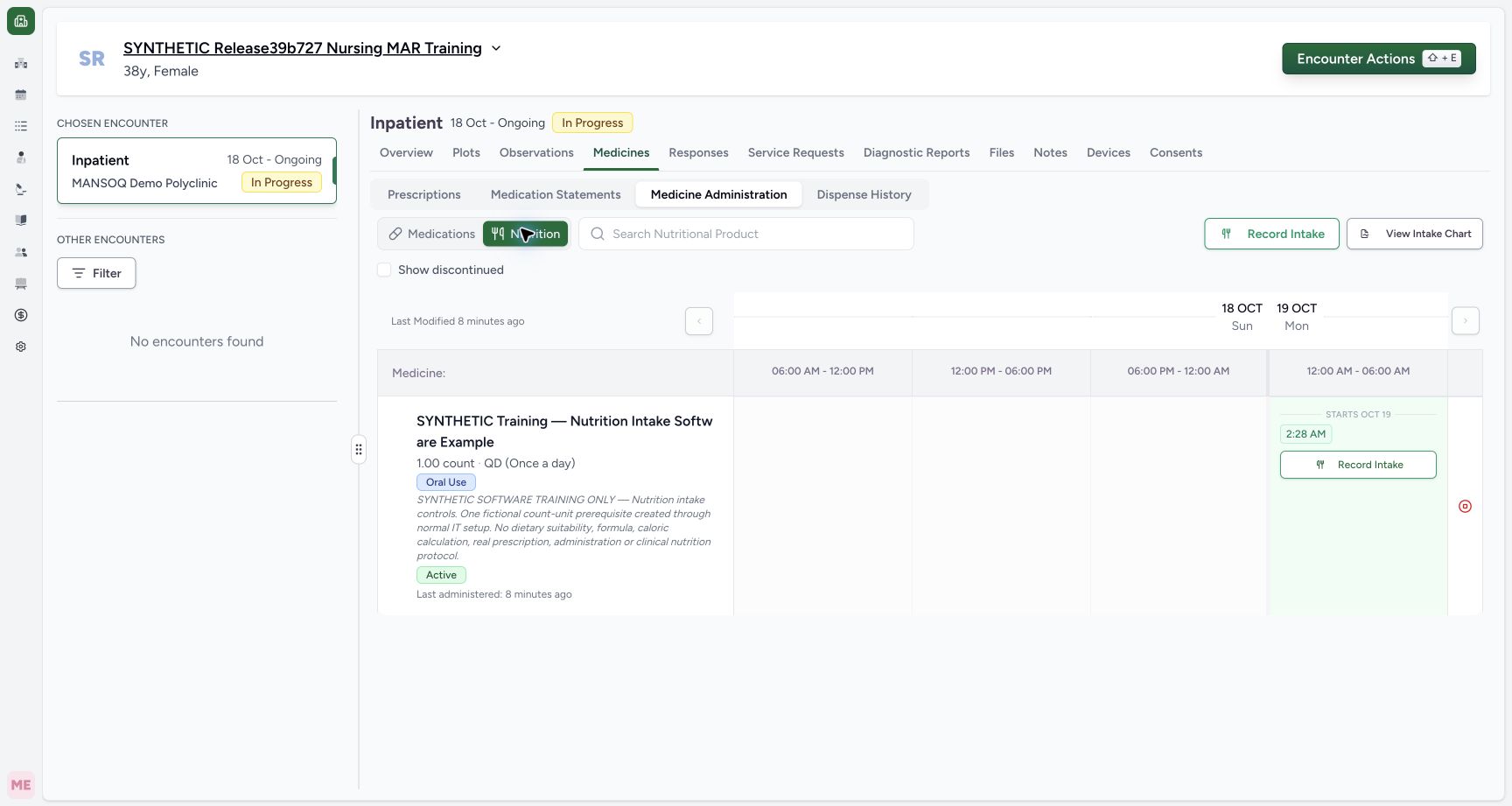
12Open an individual nutrition intake entry
Capture details
Exact committed release ba551c1d on the isolated nonproduction clone, existing Nurse and fictional Polyclinic inpatient case. The retained patient name mentions an earlier release; the actual captured build is ba551c1d. A separately journaled normal IT prerequisite created one synthetic count-unit nutrition product/order with the existing Doctor requester; this is not Doctor UI prescribing or clinical nutrition. All ten prior administration records and three medication requests were independently verified unchanged before this Nurse workflow. One fictional nutrition order and one existing saved intake; individual row action is distinct from the top selection sheet.
Image SHA-256 80f1c15a8c9b2a3ad1c3fccc66b1aca677a51fdcb62e337c9379be406f8cf5db
- Individual Record Intake: Use this row action for the intended nutritional-product request.
- Nutrition: Confirm the product type before starting an entry.
 1234
1234Inspect the retained Not Done record
Capture details
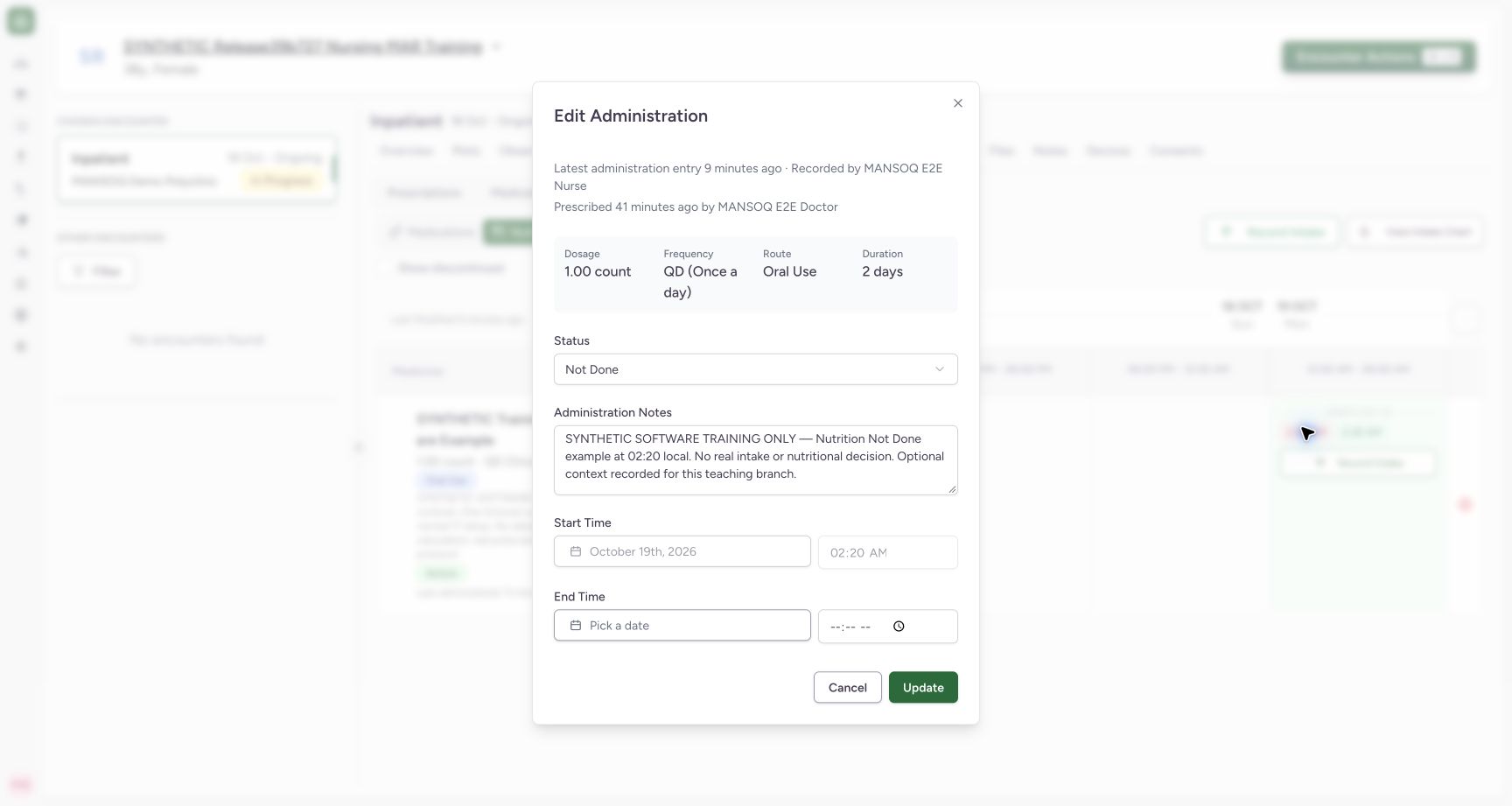
Exact committed release ba551c1d on the isolated nonproduction clone, existing Nurse and fictional Polyclinic inpatient case. The retained patient name mentions an earlier release; the actual captured build is ba551c1d. A separately journaled normal IT prerequisite created one synthetic count-unit nutrition product/order with the existing Doctor requester; this is not Doctor UI prescribing or clinical nutrition. All ten prior administration records and three medication requests were independently verified unchanged before this Nurse workflow. The saved Not Done record retains 02:20 and empty end; saved start is locked. The shared title is Edit Administration. Inspection is cancelled without an update.
Image SHA-256 eefab11d0120fe978db7dac19e26f698443ede8c8f704b4063c9018c2a5d0700
- Saved Not Done: Read the saved status rather than inferring it only from chip colour.
- Locked start: The existing occurrence start cannot be edited here.
- No end: No completion end was persisted.
- Cancel inspection: Return without modifying this retained entry.
9 of 9 content blocks have reviewed image alignment. Missing overview or prerequisite images remain open.
Before you begin
- Use your authorized account and confirm the intended patient, selected encounter and Nutrition tab. The fictional patient retains an earlier release name; these screenshots show exact ba551c1d.12
Recorded release ba551c1d · 2026-10-18T23:36:34.813Z · 1728 × 921 Open an individual nutrition intake entry
Capture details
Exact committed release ba551c1d on the isolated nonproduction clone, existing Nurse and fictional Polyclinic inpatient case. The retained patient name mentions an earlier release; the actual captured build is ba551c1d. A separately journaled normal IT prerequisite created one synthetic count-unit nutrition product/order with the existing Doctor requester; this is not Doctor UI prescribing or clinical nutrition. All ten prior administration records and three medication requests were independently verified unchanged before this Nurse workflow. One fictional nutrition order and one existing saved intake; individual row action is distinct from the top selection sheet.
Image SHA-256
80f1c15a8c9b2a3ad1c3fccc66b1aca677a51fdcb62e337c9379be406f8cf5db- Individual Record Intake: Use this row action for the intended nutritional-product request.
- Nutrition: Confirm the product type before starting an entry.
- The intended nutritional-product request must already exist. This example uses the separately identified synthetic IT prerequisite with an existing Doctor requester, 1 count and software-only instructions. It does not establish Doctor UI prescribing or nutritional suitability.
 12
12Recorded release ba551c1d · 2026-10-18T23:36:50.562Z · 1728 × 921 Review the individual intake draft
Capture details
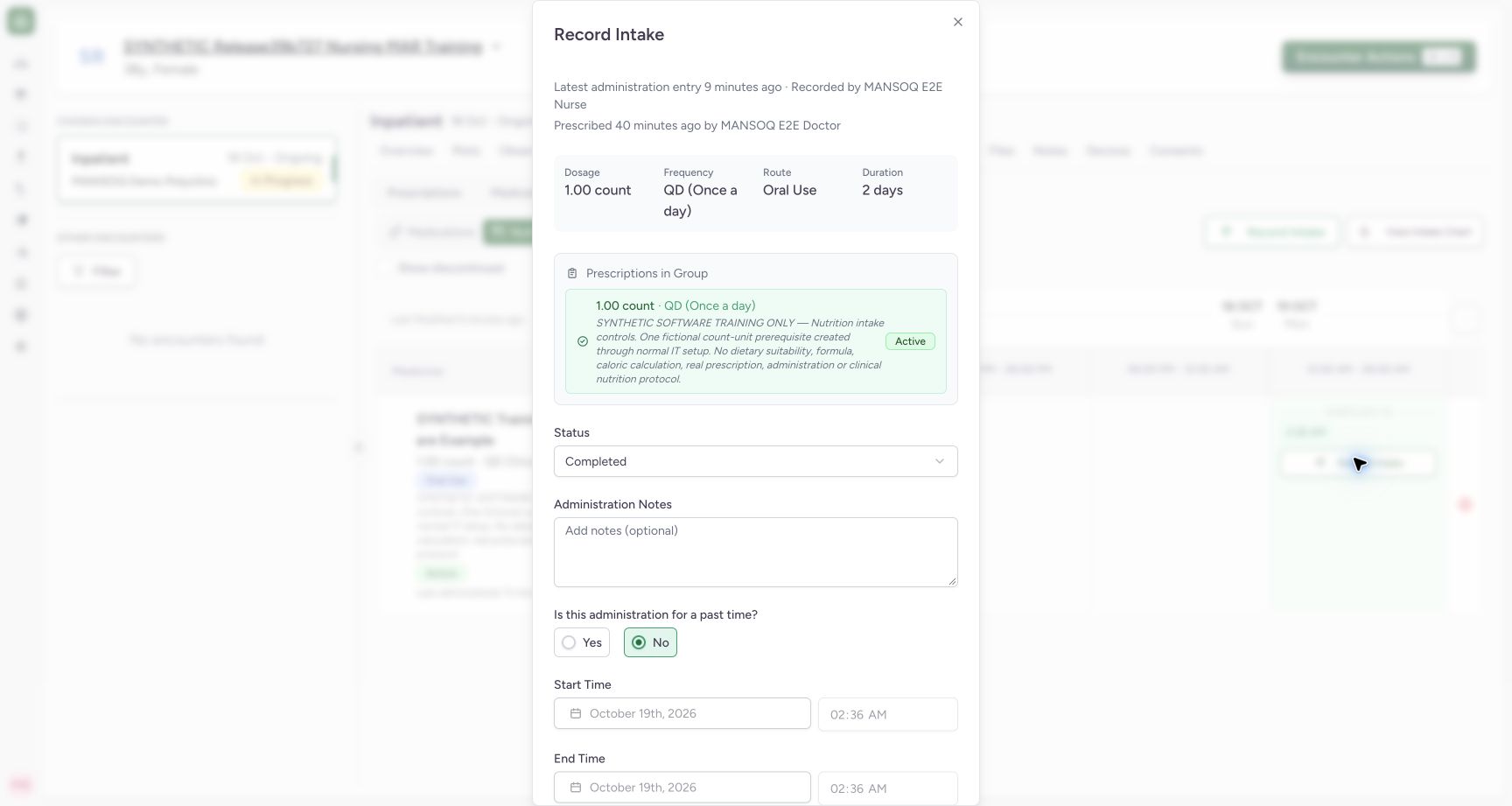
Exact committed release ba551c1d on the isolated nonproduction clone, existing Nurse and fictional Polyclinic inpatient case. The retained patient name mentions an earlier release; the actual captured build is ba551c1d. A separately journaled normal IT prerequisite created one synthetic count-unit nutrition product/order with the existing Doctor requester; this is not Doctor UI prescribing or clinical nutrition. All ten prior administration records and three medication requests were independently verified unchanged before this Nurse workflow. The individual dialog begins Completed and current-time No; request note identifies the order even though its product heading is blank in this committed build.
Image SHA-256
fd230cf7dc8f7eaf05ed0aafc926c87a81bb4a10a4b43cdf1351cffa6d1103ab- Status: Review status before changing timing.
- Past-time Yes: Select this actual radio circle to enter an earlier occurrence.
 1234
1234Recorded release ba551c1d · 2026-10-18T23:37:01.411Z · 1728 × 921 Review the past-time Not Done intake
Capture details
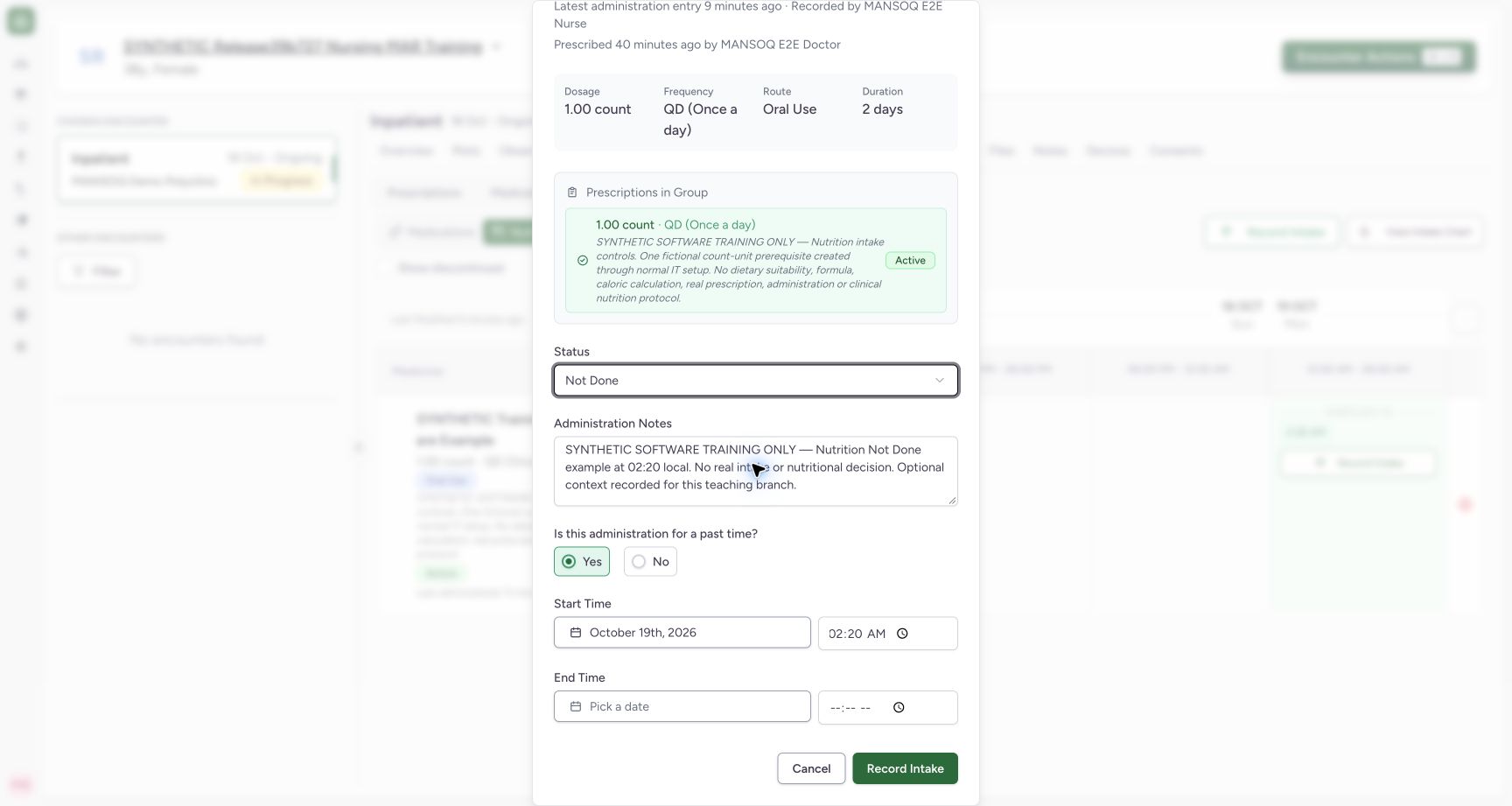
Exact committed release ba551c1d on the isolated nonproduction clone, existing Nurse and fictional Polyclinic inpatient case. The retained patient name mentions an earlier release; the actual captured build is ba551c1d. A separately journaled normal IT prerequisite created one synthetic count-unit nutrition product/order with the existing Doctor requester; this is not Doctor UI prescribing or clinical nutrition. All ten prior administration records and three medication requests were independently verified unchanged before this Nurse workflow. Yes is selected, start is 02:20 local, and end is empty after selecting Not Done. Notes is optional software input, filled only with synthetic context.
Image SHA-256
56543c329b632a897fc14277d2ac63a30af3e3f941795c61d8e2eda459d63a4e- Not Done: Verify that this entry does not represent completed intake.
- 02:20 start: Review the intended past occurrence and its date.
- Empty end: No completion end is entered for this Not Done example.
- Save once: Save the reviewed individual entry once.
1. Open the intended row action
From Medicines, choose Medicine Administration and Nutrition. Read the product name, instructions and request note. Choose Record Intake within that row for an individual entry. The top Record Intake action opens a selection sheet and is a separate path.
12Open an individual nutrition intake entry
Capture details
Exact committed release ba551c1d on the isolated nonproduction clone, existing Nurse and fictional Polyclinic inpatient case. The retained patient name mentions an earlier release; the actual captured build is ba551c1d. A separately journaled normal IT prerequisite created one synthetic count-unit nutrition product/order with the existing Doctor requester; this is not Doctor UI prescribing or clinical nutrition. All ten prior administration records and three medication requests were independently verified unchanged before this Nurse workflow. One fictional nutrition order and one existing saved intake; individual row action is distinct from the top selection sheet.
Image SHA-256 80f1c15a8c9b2a3ad1c3fccc66b1aca677a51fdcb62e337c9379be406f8cf5db
- Individual Record Intake: Use this row action for the intended nutritional-product request.
- Nutrition: Confirm the product type before starting an entry.
2. Review the individual draft
The individual Record Intake dialog begins Completed with No selected for a past time and automatically initialized occurrence fields. Confirm the intended request using its displayed instructions and identifying note. The product-name heading is blank in this captured build, so confirm the product in the preceding Nutrition row as well. Select the actual Yes radio circle to enter an earlier occurrence.
12Review the individual intake draft
Capture details
Exact committed release ba551c1d on the isolated nonproduction clone, existing Nurse and fictional Polyclinic inpatient case. The retained patient name mentions an earlier release; the actual captured build is ba551c1d. A separately journaled normal IT prerequisite created one synthetic count-unit nutrition product/order with the existing Doctor requester; this is not Doctor UI prescribing or clinical nutrition. All ten prior administration records and three medication requests were independently verified unchanged before this Nurse workflow. The individual dialog begins Completed and current-time No; request note identifies the order even though its product heading is blank in this committed build.
Image SHA-256 fd230cf7dc8f7eaf05ed0aafc926c87a81bb4a10a4b43cdf1351cffa6d1103ab
- Status: Review status before changing timing.
- Past-time Yes: Select this actual radio circle to enter an earlier occurrence.
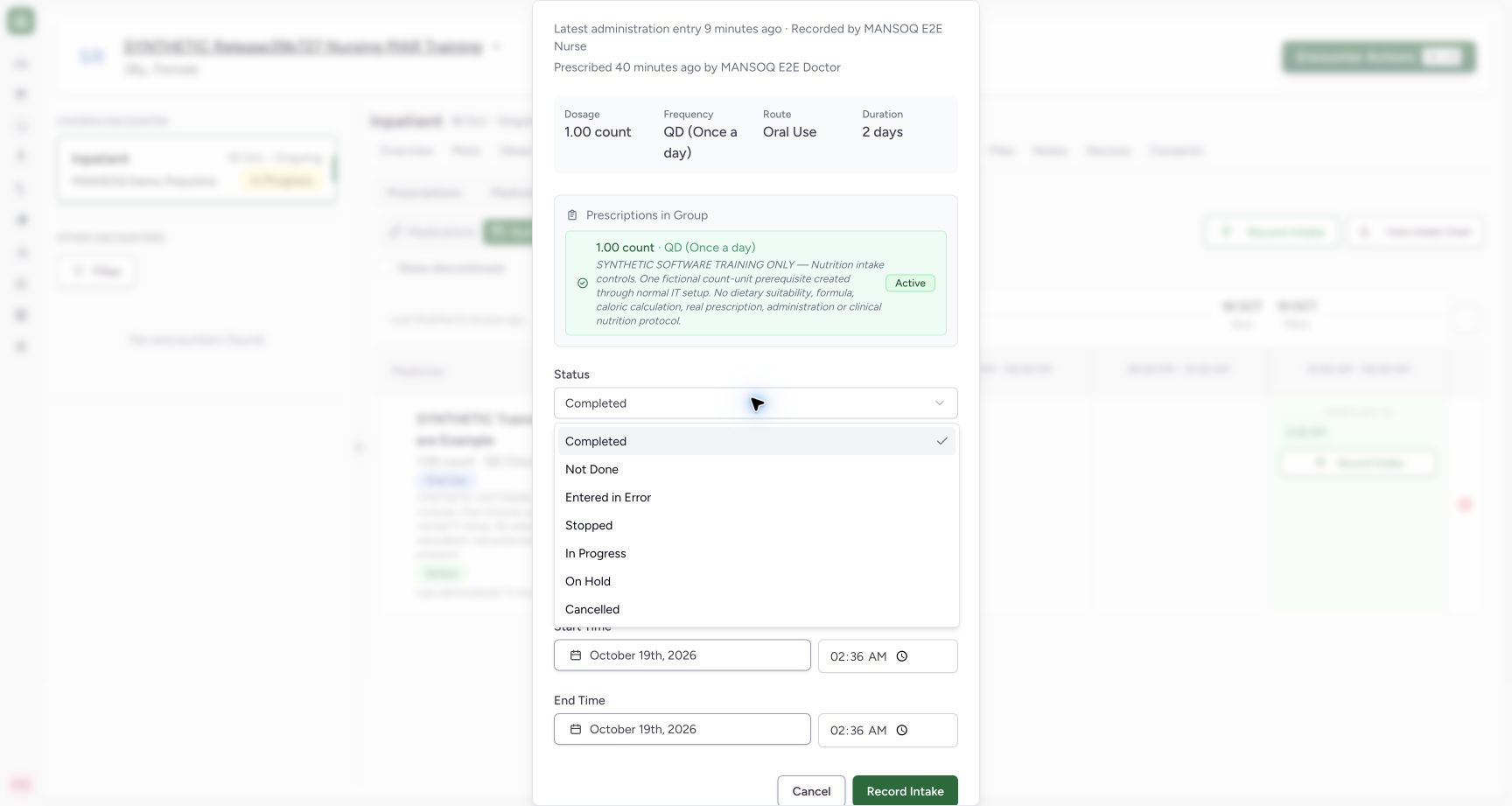
3. Select Not Done and enter the intended start
Open Status and choose Not Done only when that status accurately describes the intended record under facility policy. In this fictional example, Yes is selected and the start is 19 October 2026 at 02:20 local time. Selecting Not Done clears the completion end; leave it empty in this example. Administration Notes is optional software input. Record appropriate context under facility policy; the example note clearly identifies a synthetic non-intake.
 1
1Select Not Done for the fictional non-intake
Capture details
Exact committed release ba551c1d on the isolated nonproduction clone, existing Nurse and fictional Polyclinic inpatient case. The retained patient name mentions an earlier release; the actual captured build is ba551c1d. A separately journaled normal IT prerequisite created one synthetic count-unit nutrition product/order with the existing Doctor requester; this is not Doctor UI prescribing or clinical nutrition. All ten prior administration records and three medication requests were independently verified unchanged before this Nurse workflow. The menu exposes seven statuses. This branch selects Not Done; menu visibility alone does not demonstrate all status lifecycles.
Image SHA-256 a24c4b85dad0410c70ad5654539030ce87aafc30bc3837bdd43a7d70117dc4be
- Not Done: Select only the status that accurately represents the intended record.
1234Review the past-time Not Done intake
Capture details
Exact committed release ba551c1d on the isolated nonproduction clone, existing Nurse and fictional Polyclinic inpatient case. The retained patient name mentions an earlier release; the actual captured build is ba551c1d. A separately journaled normal IT prerequisite created one synthetic count-unit nutrition product/order with the existing Doctor requester; this is not Doctor UI prescribing or clinical nutrition. All ten prior administration records and three medication requests were independently verified unchanged before this Nurse workflow. Yes is selected, start is 02:20 local, and end is empty after selecting Not Done. Notes is optional software input, filled only with synthetic context.
Image SHA-256 56543c329b632a897fc14277d2ac63a30af3e3f941795c61d8e2eda459d63a4e
- Not Done: Verify that this entry does not represent completed intake.
- 02:20 start: Review the intended past occurrence and its date.
- Empty end: No completion end is entered for this Not Done example.
- Save once: Save the reviewed individual entry once.
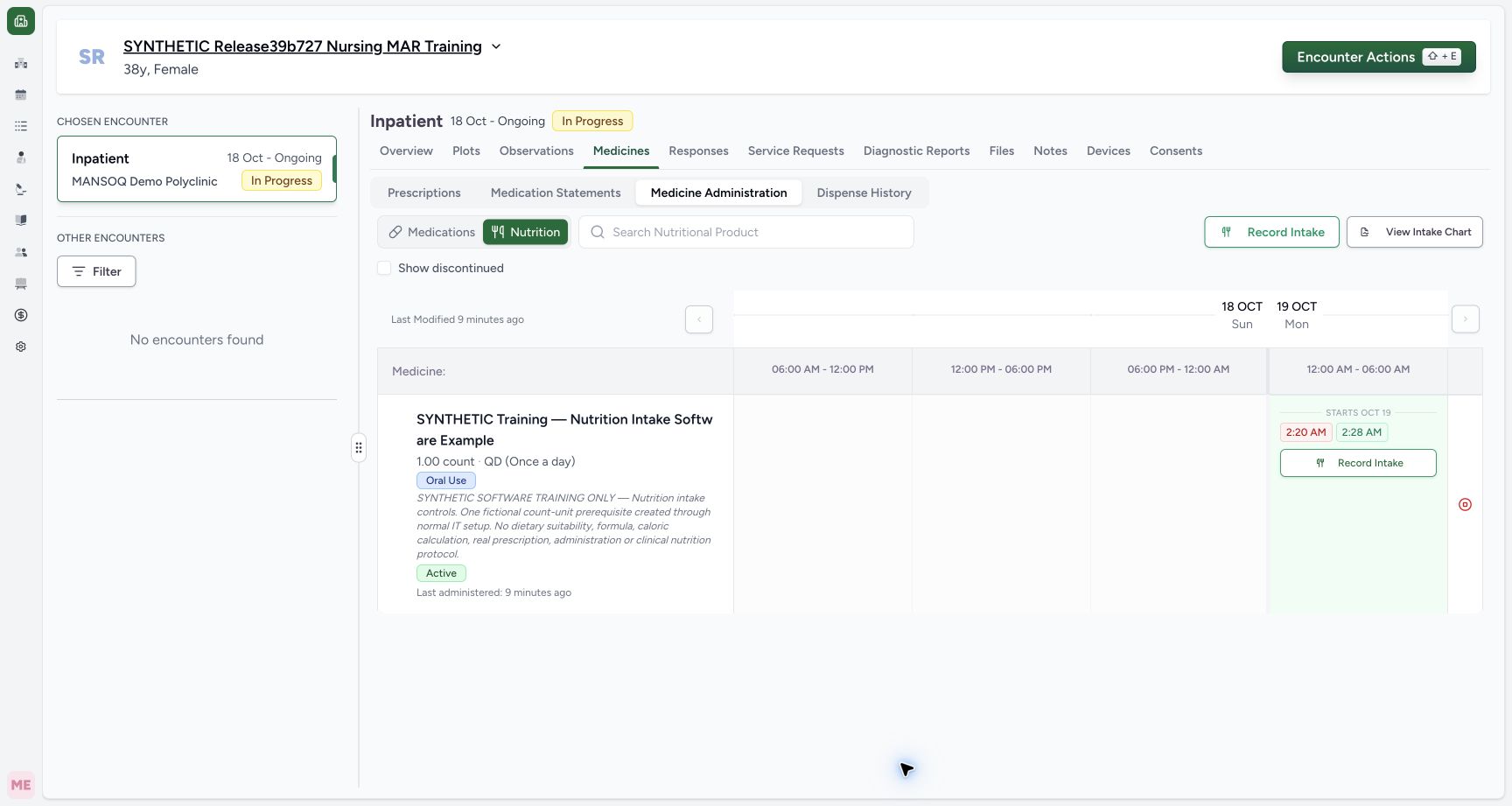
4. Save the reviewed individual entry once
Review status, request, quantity, start date/time and empty end. Choose Record Intake once and wait for saving to finish. The new 2:20 AM occurrence appears beside the earlier 2:28 AM intake. Ordinary Nurse and Doctor reads verified exactly one new Not Done record, 1 count, intended nutrition request, 02:20 start, null end and Nurse creator.
1234Review the past-time Not Done intake
Capture details
Exact committed release ba551c1d on the isolated nonproduction clone, existing Nurse and fictional Polyclinic inpatient case. The retained patient name mentions an earlier release; the actual captured build is ba551c1d. A separately journaled normal IT prerequisite created one synthetic count-unit nutrition product/order with the existing Doctor requester; this is not Doctor UI prescribing or clinical nutrition. All ten prior administration records and three medication requests were independently verified unchanged before this Nurse workflow. Yes is selected, start is 02:20 local, and end is empty after selecting Not Done. Notes is optional software input, filled only with synthetic context.
Image SHA-256 56543c329b632a897fc14277d2ac63a30af3e3f941795c61d8e2eda459d63a4e
- Not Done: Verify that this entry does not represent completed intake.
- 02:20 start: Review the intended past occurrence and its date.
- Empty end: No completion end is entered for this Not Done example.
- Save once: Save the reviewed individual entry once.
 12
12Find the saved Not Done intake
Capture details
Exact committed release ba551c1d on the isolated nonproduction clone, existing Nurse and fictional Polyclinic inpatient case. The retained patient name mentions an earlier release; the actual captured build is ba551c1d. A separately journaled normal IT prerequisite created one synthetic count-unit nutrition product/order with the existing Doctor requester; this is not Doctor UI prescribing or clinical nutrition. All ten prior administration records and three medication requests were independently verified unchanged before this Nurse workflow. Ordinary Nurse and Doctor reads confirm exactly one new Not Done event at 02:20 with null end; the earlier 02:28 Completed intake remains.
Image SHA-256 6d6ad4096f2bbb496bb6353fb9e9a249d90b837becbe8d676dc89461c16a75e7
- New 2:20 entry: Open this saved occurrence to inspect its actual status.
- Earlier completed entry: This previously saved intake remains separate.
5. Inspect the retained status
Open the saved 2:20 AM chip. The shared Edit Administration dialog shows Not Done, the identifying note, locked 02:20 start and empty end. Confirm status in this dialog rather than relying only on the chip colour. Choose Cancel after inspection when no update is intended; Update would save a change to this existing record.
1234Inspect the retained Not Done record
Capture details
Exact committed release ba551c1d on the isolated nonproduction clone, existing Nurse and fictional Polyclinic inpatient case. The retained patient name mentions an earlier release; the actual captured build is ba551c1d. A separately journaled normal IT prerequisite created one synthetic count-unit nutrition product/order with the existing Doctor requester; this is not Doctor UI prescribing or clinical nutrition. All ten prior administration records and three medication requests were independently verified unchanged before this Nurse workflow. The saved Not Done record retains 02:20 and empty end; saved start is locked. The shared title is Edit Administration. Inspection is cancelled without an update.
Image SHA-256 eefab11d0120fe978db7dac19e26f698443ede8c8f704b4063c9018c2a5d0700
- Saved Not Done: Read the saved status rather than inferring it only from chip colour.
- Locked start: The existing occurrence start cannot be edited here.
- No end: No completion end was persisted.
- Cancel inspection: Return without modifying this retained entry.
Keep non-intake separate from completed intake
Not Done is a retained administration record, rather than evidence of completed intake. The earlier 02:28 Completed record remains unchanged. This lesson demonstrates the individual Not Done path; it does not establish every listed status transition, automatic scheduling, refusal reasons, nutrition assessment or other roles/facilities.
12Find the saved Not Done intake
Capture details
Exact committed release ba551c1d on the isolated nonproduction clone, existing Nurse and fictional Polyclinic inpatient case. The retained patient name mentions an earlier release; the actual captured build is ba551c1d. A separately journaled normal IT prerequisite created one synthetic count-unit nutrition product/order with the existing Doctor requester; this is not Doctor UI prescribing or clinical nutrition. All ten prior administration records and three medication requests were independently verified unchanged before this Nurse workflow. Ordinary Nurse and Doctor reads confirm exactly one new Not Done event at 02:20 with null end; the earlier 02:28 Completed intake remains.
Image SHA-256 6d6ad4096f2bbb496bb6353fb9e9a249d90b837becbe8d676dc89461c16a75e7
- New 2:20 entry: Open this saved occurrence to inspect its actual status.
- Earlier completed entry: This previously saved intake remains separate.
1234Inspect the retained Not Done record
Capture details
Exact committed release ba551c1d on the isolated nonproduction clone, existing Nurse and fictional Polyclinic inpatient case. The retained patient name mentions an earlier release; the actual captured build is ba551c1d. A separately journaled normal IT prerequisite created one synthetic count-unit nutrition product/order with the existing Doctor requester; this is not Doctor UI prescribing or clinical nutrition. All ten prior administration records and three medication requests were independently verified unchanged before this Nurse workflow. The saved Not Done record retains 02:20 and empty end; saved start is locked. The shared title is Edit Administration. Inspection is cancelled without an update.
Image SHA-256 eefab11d0120fe978db7dac19e26f698443ede8c8f704b4063c9018c2a5d0700
- Saved Not Done: Read the saved status rather than inferring it only from chip colour.
- Locked start: The existing occurrence start cannot be edited here.
- No end: No completion end was persisted.
- Cancel inspection: Return without modifying this retained entry.
Source evidence
Every citation uses this exact committed version. The private source repository requires access.
- repositories/platform/mansoq-web/src/components/Medicine/MedicationAdministration/AdministrationTab.tsx:360 ·
ba551c1d67031248136fd2016afe227b5fc994bdSource file checksum
170c246835ea1966b8512f5baf72ff0ea60635f28cbcec6a465bb8c17506555f - repositories/platform/mansoq-web/src/components/Medicine/MedicationAdministration/AdministrationTab.tsx:383 ·
ba551c1d67031248136fd2016afe227b5fc994bdSource file checksum
170c246835ea1966b8512f5baf72ff0ea60635f28cbcec6a465bb8c17506555f - repositories/platform/mansoq-web/src/components/Medicine/MedicationAdministration/MedicineAdminDialog.tsx:80 ·
ba551c1d67031248136fd2016afe227b5fc994bdSource file checksum
c6ccd39c46d4093d346e97987eebd9dd1b51ffae1c8688f5305a7eed5336d6f2 - repositories/platform/mansoq-web/src/components/Medicine/MedicationAdministration/MedicineAdminForm.tsx:245 ·
ba551c1d67031248136fd2016afe227b5fc994bdSource file checksum
490b23b1796a5dbbf0477802f806614fe9f64a33de3a6c2b19ccf6ed0482c7ba - repositories/platform/mansoq-web/src/components/Medicine/MedicationAdministration/MedicineAdminForm.tsx:292 ·
ba551c1d67031248136fd2016afe227b5fc994bdSource file checksum
490b23b1796a5dbbf0477802f806614fe9f64a33de3a6c2b19ccf6ed0482c7ba - repositories/platform/mansoq-web/src/components/Medicine/MedicationAdministration/MedicineAdminForm.tsx:678 ·
ba551c1d67031248136fd2016afe227b5fc994bdSource file checksum
490b23b1796a5dbbf0477802f806614fe9f64a33de3a6c2b19ccf6ed0482c7ba - repositories/platform/mansoq-web/src/components/Medicine/MedicationAdministration/MedicineAdminForm.tsx:719 ·
ba551c1d67031248136fd2016afe227b5fc994bdSource file checksum
490b23b1796a5dbbf0477802f806614fe9f64a33de3a6c2b19ccf6ed0482c7ba