 MANSOQ
 Nutrition intake · VERSION ba551c1d
Record and verify an intake for a nutritional-product order
Select an existing nutritional-product request, review a current-time entry, save once and inspect the persisted intake. This observed Nurse workflow uses a fictional count-unit product in a Polyclinic inpatient encounter.
Nurse
 12
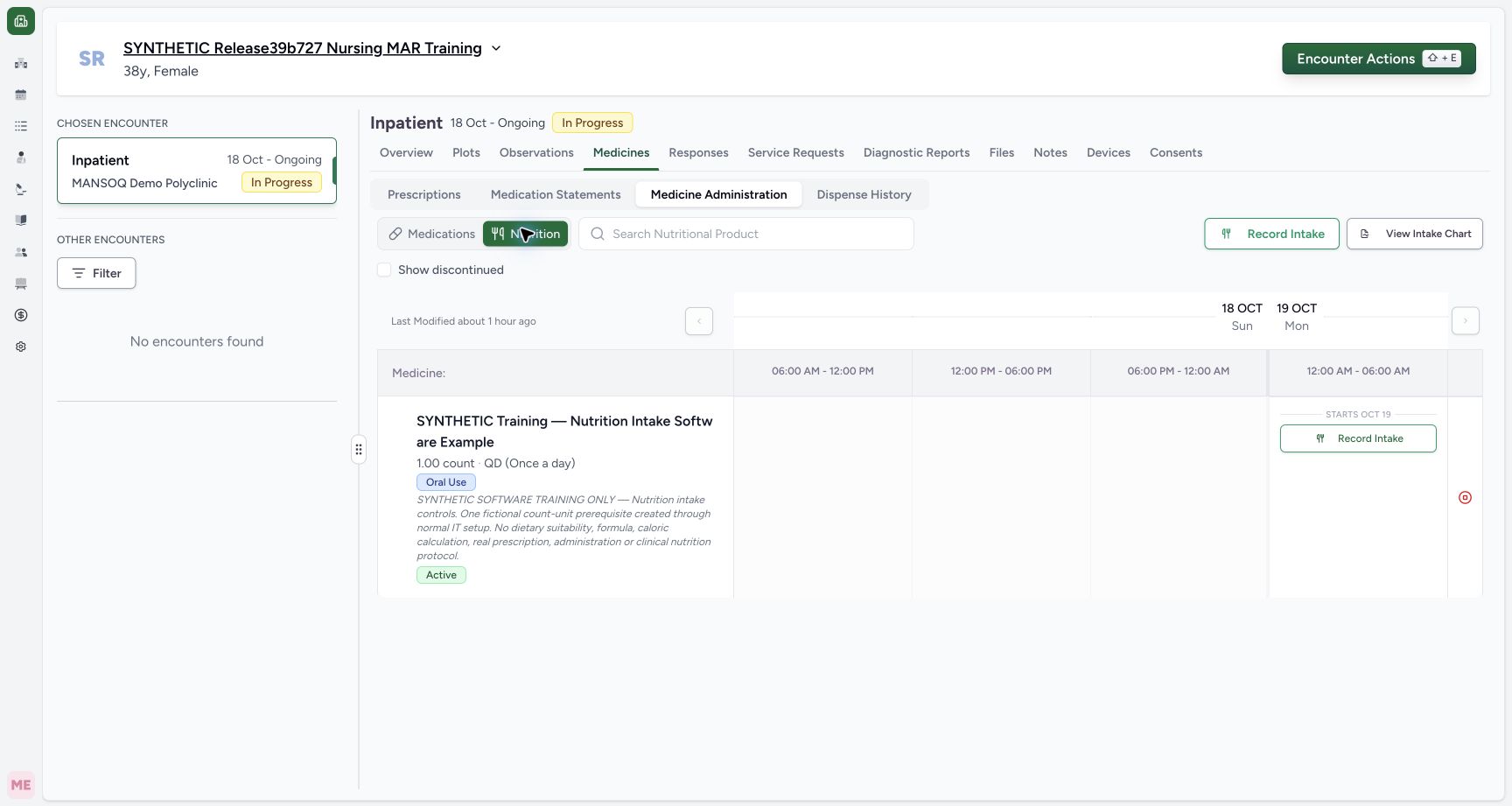
12Open Nutrition for the intended encounter
Capture details
Exact committed release ba551c1d on the isolated nonproduction clone, existing Nurse and fictional Polyclinic inpatient case. The retained patient name mentions an earlier release; the actual captured build is ba551c1d. A separately journaled normal IT prerequisite created one synthetic count-unit nutrition product/order with the existing Doctor requester; this is not Doctor UI prescribing or clinical nutrition. All ten prior administration records and three medication requests were independently verified unchanged before this Nurse workflow. Nutrition is selected and only the synthetic nutritional-product order appears. Both the top selection action and the individual row use Record Intake; the current table retains a generic Medicine heading.
Image SHA-256 664d17a87927955c35da945ea795e3864519aabe65cb24afa3059896880f04a1
- Nutrition workspace: Confirm this tab before selecting the intended nutritional-product order.
- Open intake selection: The top action opens the multi-request selection sheet; the row action opens an individual entry.
 1
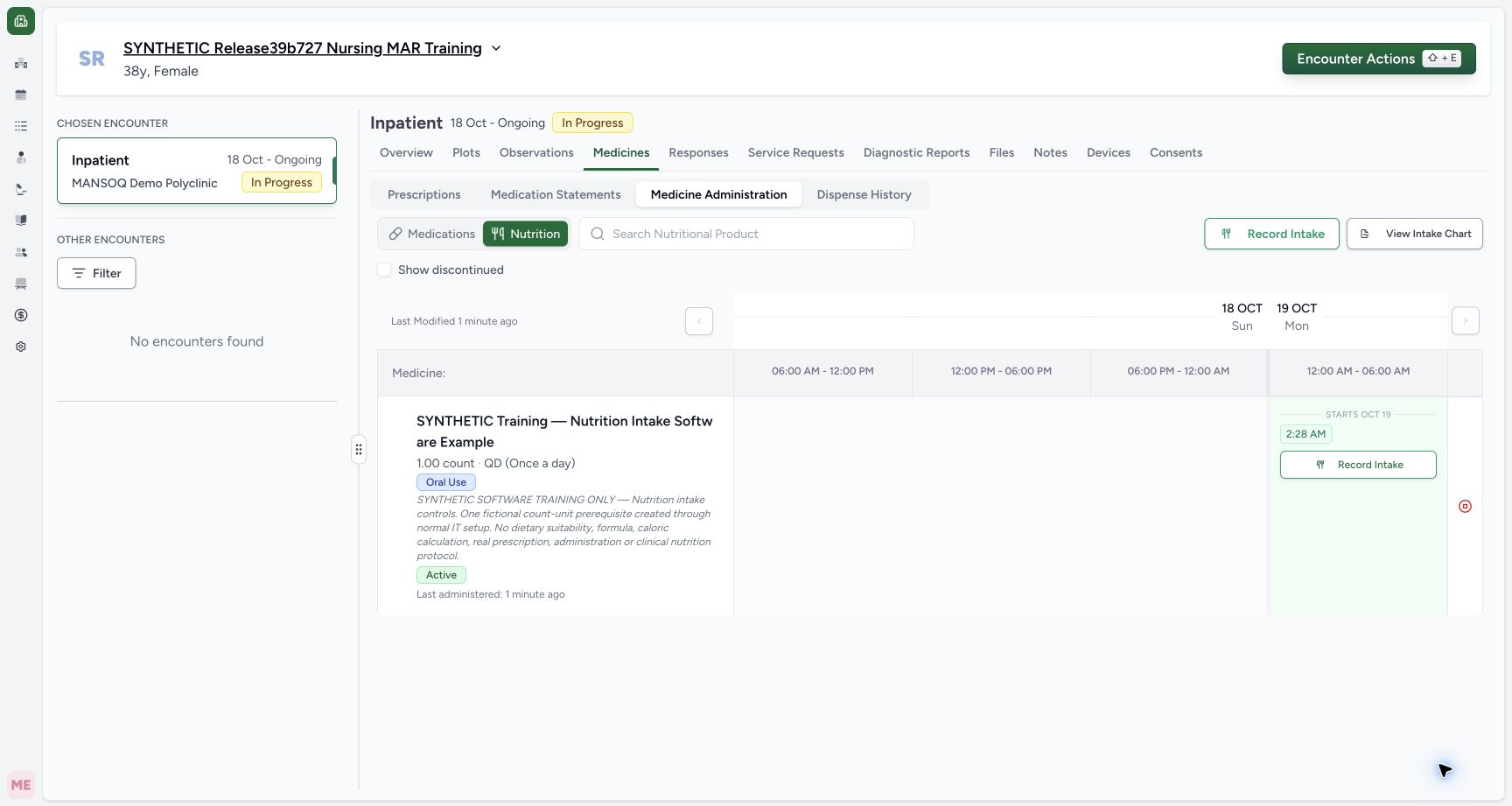
1Find the saved nutrition intake occurrence
Capture details
Exact committed release ba551c1d on the isolated nonproduction clone, existing Nurse and fictional Polyclinic inpatient case. The retained patient name mentions an earlier release; the actual captured build is ba551c1d. A separately journaled normal IT prerequisite created one synthetic count-unit nutrition product/order with the existing Doctor requester; this is not Doctor UI prescribing or clinical nutrition. All ten prior administration records and three medication requests were independently verified unchanged before this Nurse workflow. The saved intake appears as 2:28 AM on the synthetic nutrition order. Independent ordinary Nurse and Doctor reads verify exactly one new Completed intake with 1 count and Nurse creator, total eleven encounter events, and unchanged prior ten medication records.
Image SHA-256 b69ca0cbd5061c70120a5e45ed7ce3e442217a96659503c31e84bf1228854337
- Open the saved occurrence: This chip opens the existing intake record for inspection; the row Record Intake action starts a new entry.
11 of 11 content blocks have reviewed image alignment. Missing overview or prerequisite images remain open.
Before you begin
- Use your authorized account and confirm the intended patient and selected encounter. The example retains an earlier release label in the fictional patient name; the actual captured software is exact ba551c1d.12
Recorded release ba551c1d · 2026-10-18T23:28:46.903Z · 1728 × 921 Open Nutrition for the intended encounter
Capture details
Exact committed release ba551c1d on the isolated nonproduction clone, existing Nurse and fictional Polyclinic inpatient case. The retained patient name mentions an earlier release; the actual captured build is ba551c1d. A separately journaled normal IT prerequisite created one synthetic count-unit nutrition product/order with the existing Doctor requester; this is not Doctor UI prescribing or clinical nutrition. All ten prior administration records and three medication requests were independently verified unchanged before this Nurse workflow. Nutrition is selected and only the synthetic nutritional-product order appears. Both the top selection action and the individual row use Record Intake; the current table retains a generic Medicine heading.
Image SHA-256
664d17a87927955c35da945ea795e3864519aabe65cb24afa3059896880f04a1- Nutrition workspace: Confirm this tab before selecting the intended nutritional-product order.
- Open intake selection: The top action opens the multi-request selection sheet; the row action opens an individual entry.
- An appropriate active nutritional-product order must already be available. For this software demonstration, normal IT setup created one clearly synthetic product/order with an existing Doctor requester. That prerequisite is not Doctor UI prescribing, a nutritional suitability decision or a clinical protocol. The fictional quantity, route, frequency and duration are software values only.
 12
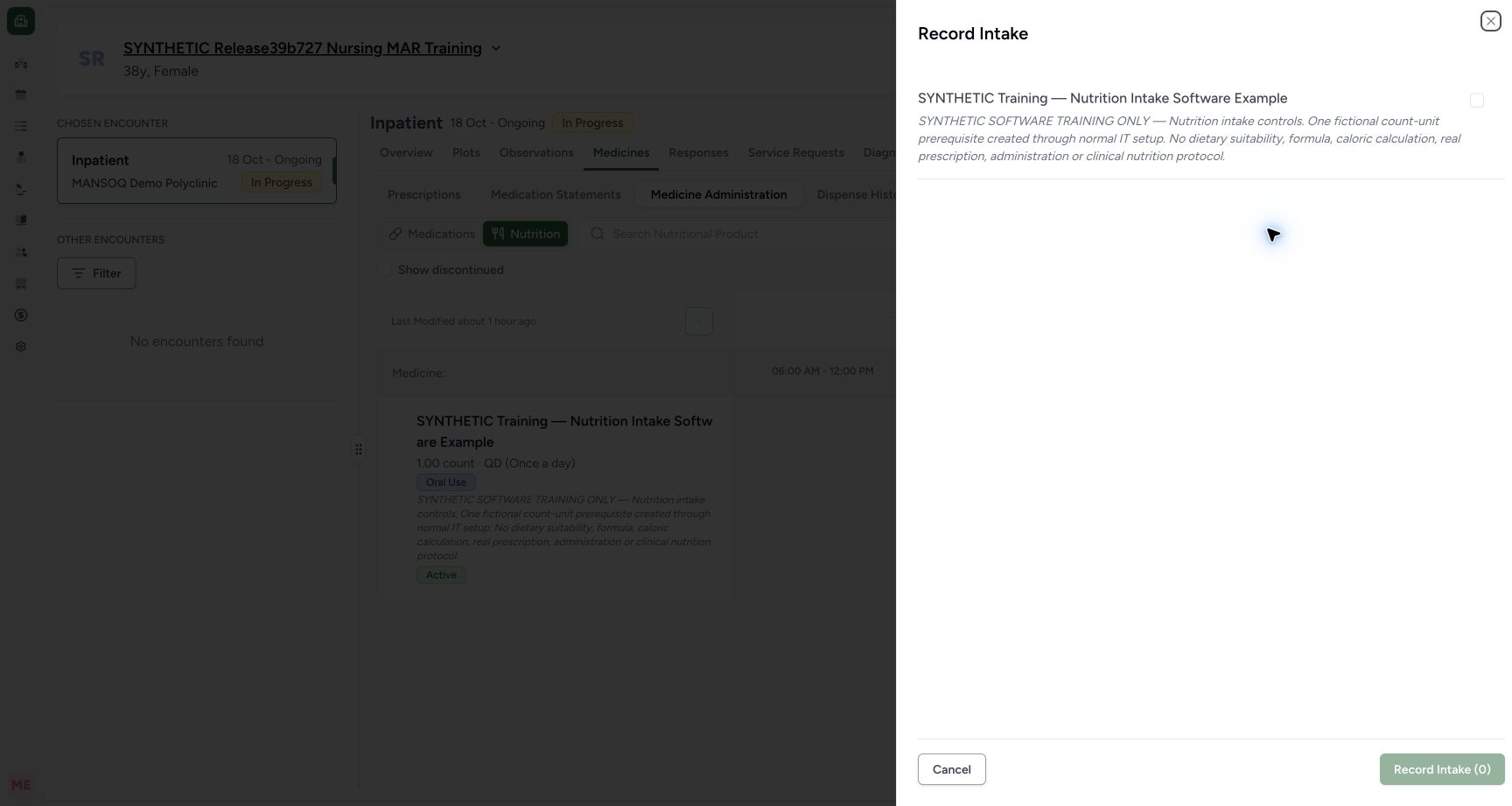
12Recorded release ba551c1d · 2026-10-18T23:28:52.461Z · 1728 × 921 Select the exact nutritional-product order
Capture details
Exact committed release ba551c1d on the isolated nonproduction clone, existing Nurse and fictional Polyclinic inpatient case. The retained patient name mentions an earlier release; the actual captured build is ba551c1d. A separately journaled normal IT prerequisite created one synthetic count-unit nutrition product/order with the existing Doctor requester; this is not Doctor UI prescribing or clinical nutrition. All ten prior administration records and three medication requests were independently verified unchanged before this Nurse workflow. The Record Intake sheet initially has no selected request and a disabled Record Intake (0) action. Only the synthetic nutritional-product request is listed in this example.
Image SHA-256
e3dfb7e236a10f0fcbd6fc359ae43f7557ad24b8c3720708c3750f3fb7576fbd- Select the intended order: Read the product name and request note before selecting this checkbox.
- No selected entries: This count is the current draft selection count, not saved intake history.
 123
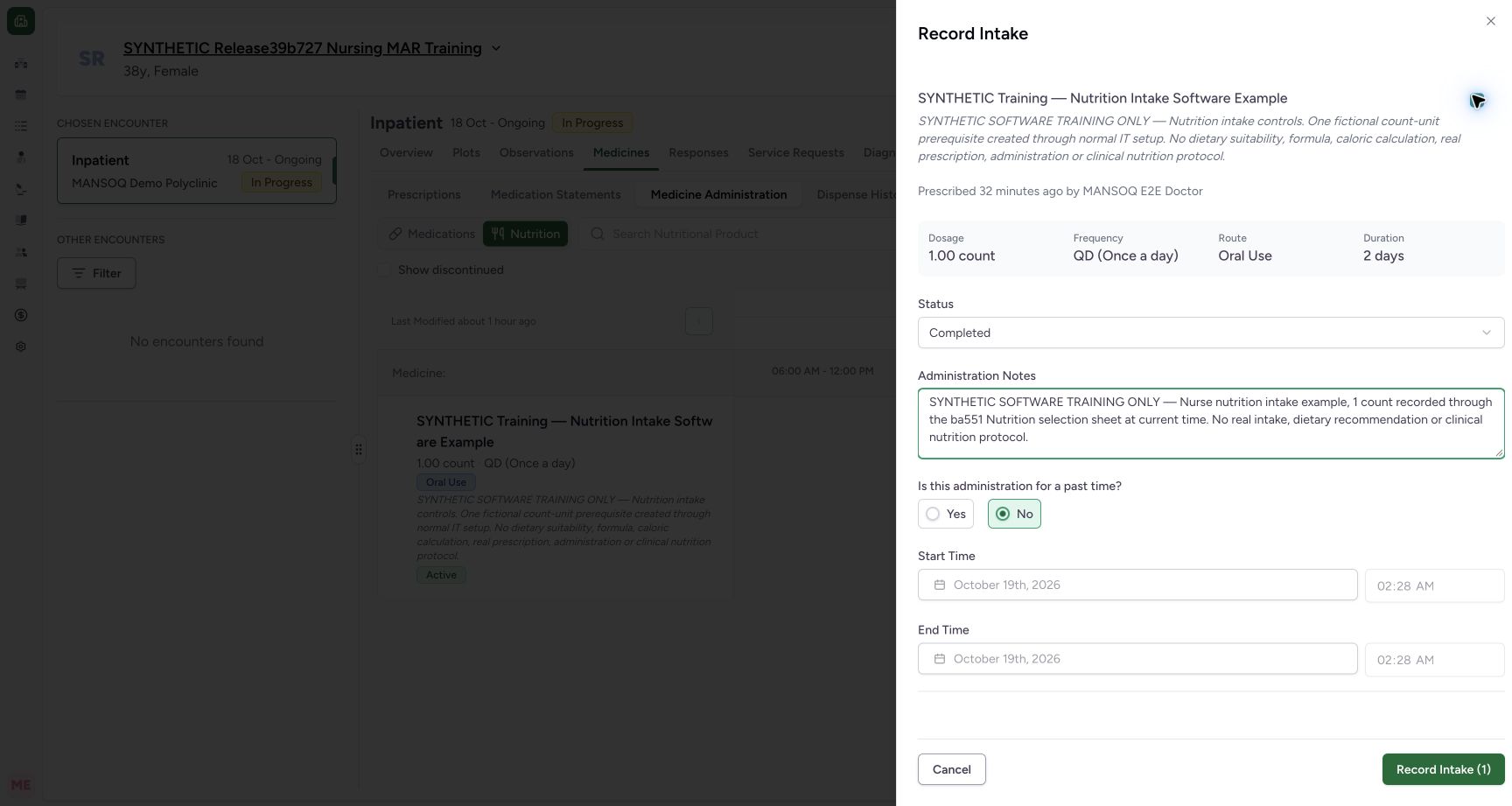
123Recorded release ba551c1d · 2026-10-18T23:29:07.362Z · 1728 × 921 Review one selected current-time intake before saving
Capture details
Exact committed release ba551c1d on the isolated nonproduction clone, existing Nurse and fictional Polyclinic inpatient case. The retained patient name mentions an earlier release; the actual captured build is ba551c1d. A separately journaled normal IT prerequisite created one synthetic count-unit nutrition product/order with the existing Doctor requester; this is not Doctor UI prescribing or clinical nutrition. All ten prior administration records and three medication requests were independently verified unchanged before this Nurse workflow. The exact nutritional-product order is selected with Completed status, fictional 1 count and No for a past time. The current start/end fields are automatically filled and disabled. Administration Notes is optional software input; the identifying note records the synthetic context. Record Intake (1) is enabled for this one selected draft.
Image SHA-256
a2cc419d07f6348bd29b8e2c48fc721c2955d2464686953f3ec5e570c4ec8faf- Review status: The example is Completed; use the appropriate documented state under facility policy.
- Current-time entry: No leaves start/end dates and times automatically filled and disabled.
- Save the one selected entry: Confirm the product, quantity, status, occurrence and note before saving once.
1. Open the Nutrition workspace
In the selected encounter, choose Medicines, Medicine Administration and Nutrition. Confirm the intended product and order details. The top Record Intake action opens a selection sheet; the Record Intake action inside a row starts an individual entry. This lesson uses the top selection action.
12Open Nutrition for the intended encounter
Capture details
Exact committed release ba551c1d on the isolated nonproduction clone, existing Nurse and fictional Polyclinic inpatient case. The retained patient name mentions an earlier release; the actual captured build is ba551c1d. A separately journaled normal IT prerequisite created one synthetic count-unit nutrition product/order with the existing Doctor requester; this is not Doctor UI prescribing or clinical nutrition. All ten prior administration records and three medication requests were independently verified unchanged before this Nurse workflow. Nutrition is selected and only the synthetic nutritional-product order appears. Both the top selection action and the individual row use Record Intake; the current table retains a generic Medicine heading.
Image SHA-256 664d17a87927955c35da945ea795e3864519aabe65cb24afa3059896880f04a1
- Nutrition workspace: Confirm this tab before selecting the intended nutritional-product order.
- Open intake selection: The top action opens the multi-request selection sheet; the row action opens an individual entry.
2. Select the intended order
Open the top Record Intake action. The sheet begins unchecked, with Record Intake (0) disabled. Read the product name and request note, then select the intended checkbox. The example has one nutritional-product order; the medication orders remain in their separate Medications workspace.
12Select the exact nutritional-product order
Capture details
Exact committed release ba551c1d on the isolated nonproduction clone, existing Nurse and fictional Polyclinic inpatient case. The retained patient name mentions an earlier release; the actual captured build is ba551c1d. A separately journaled normal IT prerequisite created one synthetic count-unit nutrition product/order with the existing Doctor requester; this is not Doctor UI prescribing or clinical nutrition. All ten prior administration records and three medication requests were independently verified unchanged before this Nurse workflow. The Record Intake sheet initially has no selected request and a disabled Record Intake (0) action. Only the synthetic nutritional-product request is listed in this example.
Image SHA-256 e3dfb7e236a10f0fcbd6fc359ae43f7557ad24b8c3720708c3750f3fb7576fbd
- Select the intended order: Read the product name and request note before selecting this checkbox.
- No selected entries: This count is the current draft selection count, not saved intake history.
123Review one selected current-time intake before saving
Capture details
Exact committed release ba551c1d on the isolated nonproduction clone, existing Nurse and fictional Polyclinic inpatient case. The retained patient name mentions an earlier release; the actual captured build is ba551c1d. A separately journaled normal IT prerequisite created one synthetic count-unit nutrition product/order with the existing Doctor requester; this is not Doctor UI prescribing or clinical nutrition. All ten prior administration records and three medication requests were independently verified unchanged before this Nurse workflow. The exact nutritional-product order is selected with Completed status, fictional 1 count and No for a past time. The current start/end fields are automatically filled and disabled. Administration Notes is optional software input; the identifying note records the synthetic context. Record Intake (1) is enabled for this one selected draft.
Image SHA-256 a2cc419d07f6348bd29b8e2c48fc721c2955d2464686953f3ec5e570c4ec8faf
- Review status: The example is Completed; use the appropriate documented state under facility policy.
- Current-time entry: No leaves start/end dates and times automatically filled and disabled.
- Save the one selected entry: Confirm the product, quantity, status, occurrence and note before saving once.
3. Review the selected entry and occurrence
Review the selected order’s dosage, frequency, route and duration, then Status. The fictional example has 1 count and Completed. With No selected for a past time, the start/end fields are automatically filled and disabled. Review those displayed times before saving: this example was initialized at 02:28 local time and retains that occurrence, rather than asserting that the clock is refreshed at submission. Administration Notes is optional software input; enter appropriate context under facility policy. The example note identifies the synthetic intake.
123Review one selected current-time intake before saving
Capture details
Exact committed release ba551c1d on the isolated nonproduction clone, existing Nurse and fictional Polyclinic inpatient case. The retained patient name mentions an earlier release; the actual captured build is ba551c1d. A separately journaled normal IT prerequisite created one synthetic count-unit nutrition product/order with the existing Doctor requester; this is not Doctor UI prescribing or clinical nutrition. All ten prior administration records and three medication requests were independently verified unchanged before this Nurse workflow. The exact nutritional-product order is selected with Completed status, fictional 1 count and No for a past time. The current start/end fields are automatically filled and disabled. Administration Notes is optional software input; the identifying note records the synthetic context. Record Intake (1) is enabled for this one selected draft.
Image SHA-256 a2cc419d07f6348bd29b8e2c48fc721c2955d2464686953f3ec5e570c4ec8faf
- Review status: The example is Completed; use the appropriate documented state under facility policy.
- Current-time entry: No leaves start/end dates and times automatically filled and disabled.
- Save the one selected entry: Confirm the product, quantity, status, occurrence and note before saving once.
4. Save once and wait for the result
When the selected count and entry details are correct, choose Record Intake (1) once and wait for saving to finish. The chart then shows the saved 2:28 AM occurrence on the nutritional-product row. If an outcome is uncertain, inspect saved history before creating another entry. Independent ordinary Nurse and Doctor reads verified exactly one new Completed record on the intended nutrition request, 1 count and Nurse creator; all ten previous medication records were unchanged.
123Review one selected current-time intake before saving
Capture details
Exact committed release ba551c1d on the isolated nonproduction clone, existing Nurse and fictional Polyclinic inpatient case. The retained patient name mentions an earlier release; the actual captured build is ba551c1d. A separately journaled normal IT prerequisite created one synthetic count-unit nutrition product/order with the existing Doctor requester; this is not Doctor UI prescribing or clinical nutrition. All ten prior administration records and three medication requests were independently verified unchanged before this Nurse workflow. The exact nutritional-product order is selected with Completed status, fictional 1 count and No for a past time. The current start/end fields are automatically filled and disabled. Administration Notes is optional software input; the identifying note records the synthetic context. Record Intake (1) is enabled for this one selected draft.
Image SHA-256 a2cc419d07f6348bd29b8e2c48fc721c2955d2464686953f3ec5e570c4ec8faf
- Review status: The example is Completed; use the appropriate documented state under facility policy.
- Current-time entry: No leaves start/end dates and times automatically filled and disabled.
- Save the one selected entry: Confirm the product, quantity, status, occurrence and note before saving once.
1Find the saved nutrition intake occurrence
Capture details
Exact committed release ba551c1d on the isolated nonproduction clone, existing Nurse and fictional Polyclinic inpatient case. The retained patient name mentions an earlier release; the actual captured build is ba551c1d. A separately journaled normal IT prerequisite created one synthetic count-unit nutrition product/order with the existing Doctor requester; this is not Doctor UI prescribing or clinical nutrition. All ten prior administration records and three medication requests were independently verified unchanged before this Nurse workflow. The saved intake appears as 2:28 AM on the synthetic nutrition order. Independent ordinary Nurse and Doctor reads verify exactly one new Completed intake with 1 count and Nurse creator, total eleven encounter events, and unchanged prior ten medication records.
Image SHA-256 b69ca0cbd5061c70120a5e45ed7ce3e442217a96659503c31e84bf1228854337
- Open the saved occurrence: This chip opens the existing intake record for inspection; the row Record Intake action starts a new entry.
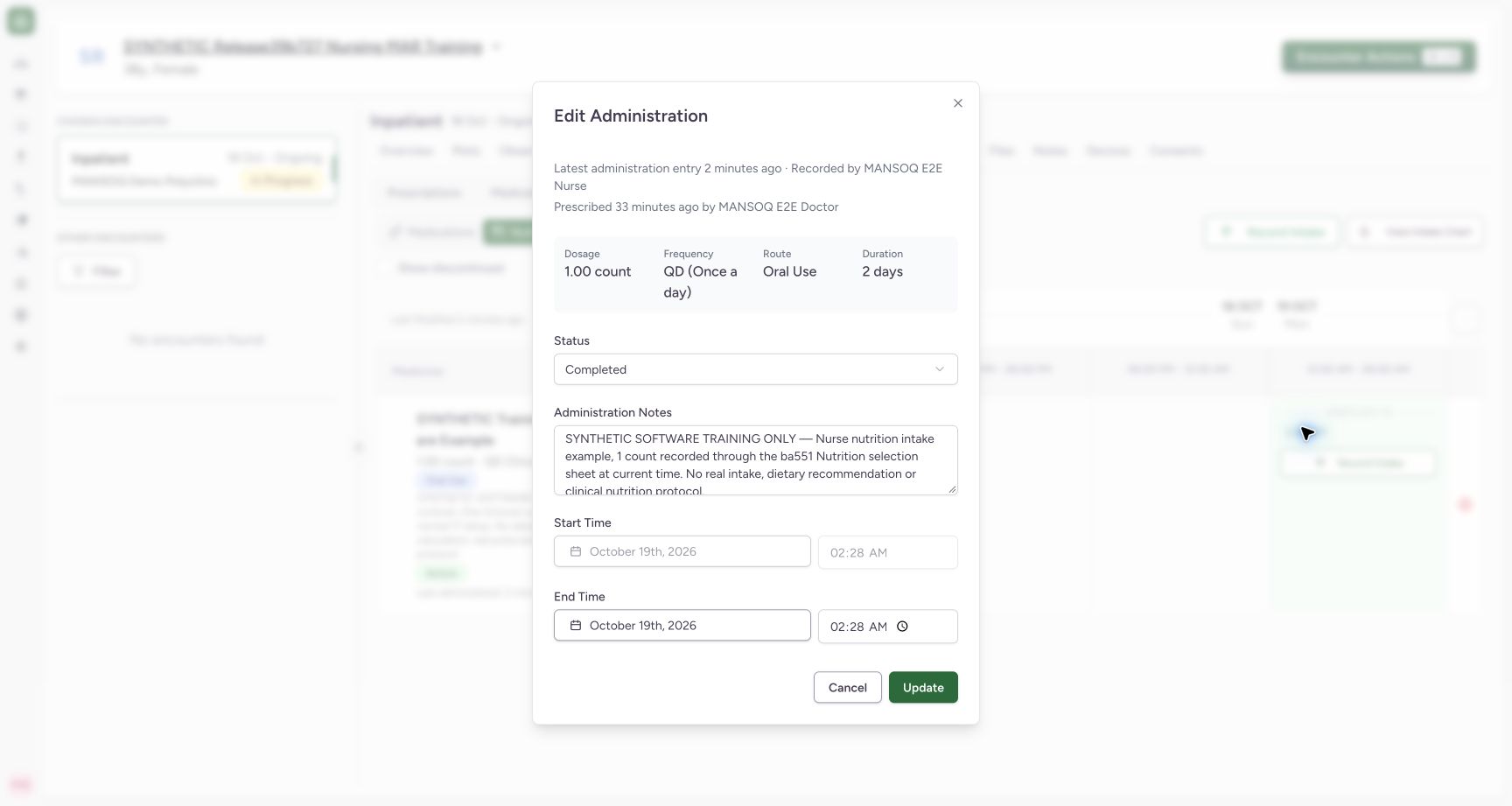
5. Inspect the saved intake record
Select the saved 2:28 AM occurrence chip. The existing record opens with the shared Edit Administration title. Confirm its 1 count, Completed status, identifying note and 02:28 start/end. Latest administration entry identifies the recorded-by Nurse, while Prescribed identifies the request’s Doctor requester; the latter order was separately created as an IT prerequisite in this case. A record creator is not automatically proof of the clinical performer. The saved start is disabled and the end is editable in this version. Use Cancel after inspection when no correction is intended.
 123
123Inspect the saved nutrition entry and recorder
Capture details
Exact committed release ba551c1d on the isolated nonproduction clone, existing Nurse and fictional Polyclinic inpatient case. The retained patient name mentions an earlier release; the actual captured build is ba551c1d. A separately journaled normal IT prerequisite created one synthetic count-unit nutrition product/order with the existing Doctor requester; this is not Doctor UI prescribing or clinical nutrition. All ten prior administration records and three medication requests were independently verified unchanged before this Nurse workflow. The existing record opens as Edit Administration, with Completed, 1 count, the saved identifying note and 02:28 start/end. Latest administration entry identifies the Nurse recorder and Prescribed identifies the existing Doctor requester; the request was an IT prerequisite. The saved start is disabled, while the end remains editable in this version. This is inspection only, with no update submitted.
Image SHA-256 cbdb326f67a41a6666a75ea5caa528075ebe7e46da7671ab581ca8bf6230700f
- Saved event recorder: The actual saved event’s creator is the Nurse; this label does not independently identify the clinical performer.
- Retained event context: Confirm the saved identifying note and the selected order’s quantity/status.
- Close without changing the record: Use Cancel after inspection when no correction is intended.
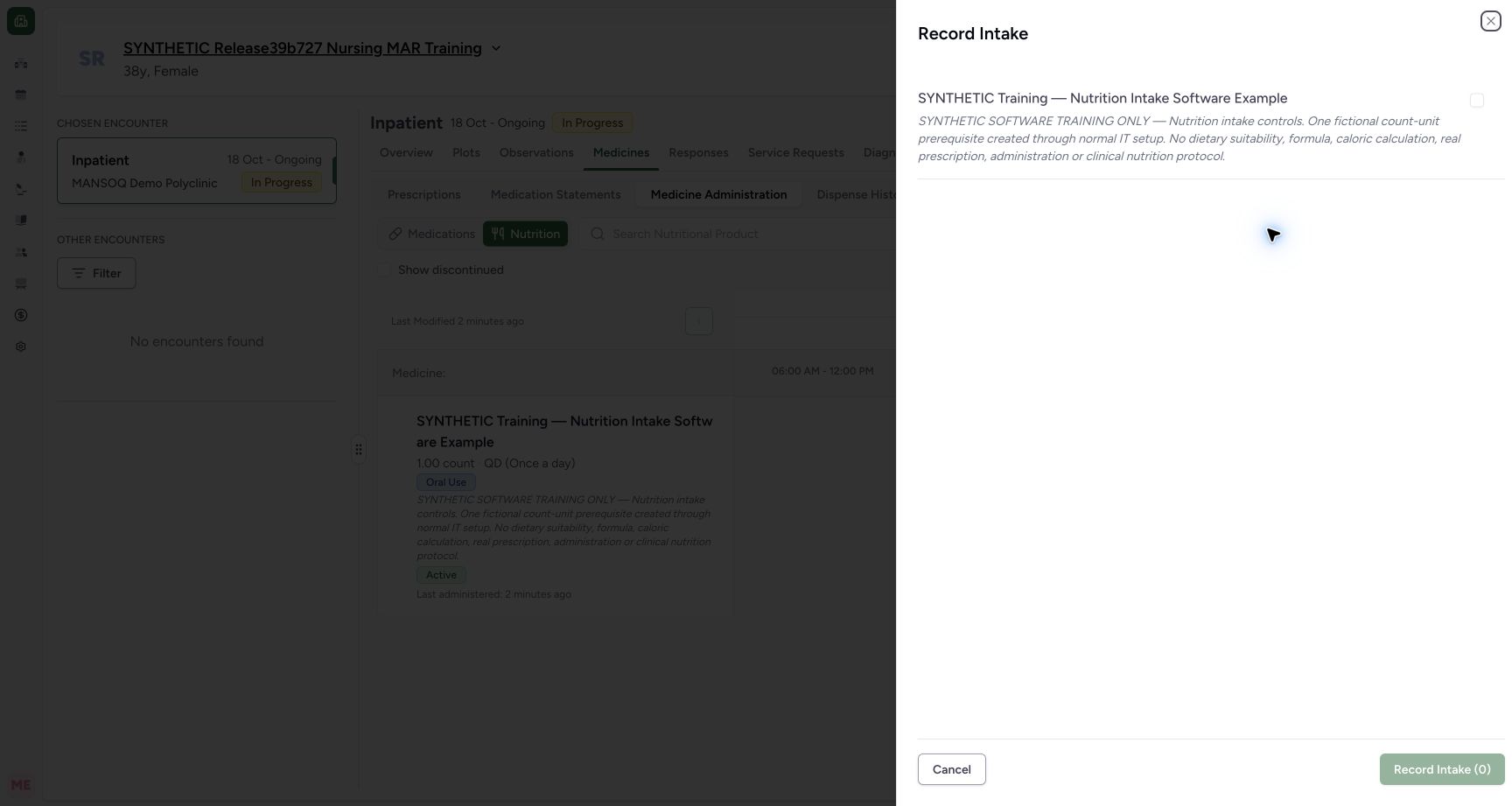
6. Recognize a fresh draft after the save
Reopening the top Record Intake action starts another unchecked sheet with Record Intake (0) disabled. That zero describes the new draft selection; it does not mean the earlier intake is missing. Cancel the empty sheet when no additional intake is intended. The saved-record inspection and this cancelled empty draft left all eleven encounter administration records unchanged.
1Find the saved nutrition intake occurrence
Capture details
Exact committed release ba551c1d on the isolated nonproduction clone, existing Nurse and fictional Polyclinic inpatient case. The retained patient name mentions an earlier release; the actual captured build is ba551c1d. A separately journaled normal IT prerequisite created one synthetic count-unit nutrition product/order with the existing Doctor requester; this is not Doctor UI prescribing or clinical nutrition. All ten prior administration records and three medication requests were independently verified unchanged before this Nurse workflow. The saved intake appears as 2:28 AM on the synthetic nutrition order. Independent ordinary Nurse and Doctor reads verify exactly one new Completed intake with 1 count and Nurse creator, total eleven encounter events, and unchanged prior ten medication records.
Image SHA-256 b69ca0cbd5061c70120a5e45ed7ce3e442217a96659503c31e84bf1228854337
- Open the saved occurrence: This chip opens the existing intake record for inspection; the row Record Intake action starts a new entry.
 12
12Recognize a new empty intake selection after saving
Capture details
Exact committed release ba551c1d on the isolated nonproduction clone, existing Nurse and fictional Polyclinic inpatient case. The retained patient name mentions an earlier release; the actual captured build is ba551c1d. A separately journaled normal IT prerequisite created one synthetic count-unit nutrition product/order with the existing Doctor requester; this is not Doctor UI prescribing or clinical nutrition. All ten prior administration records and three medication requests were independently verified unchanged before this Nurse workflow. Reopening the top action starts a new unchecked selection and disabled Record Intake (0), while the saved 2:28 occurrence remains behind the sheet. Zero represents a fresh draft, not a missing saved intake. This new empty selection is cancelled without a second save.
Image SHA-256 0e4c614dc4a49094eeba7cfd28c8455c6de0b1cd1c6b7f2dedf579dc0723b153
- Fresh draft selection count: The prior intake is already saved; this zero does not invite replaying it.
- Cancel the empty draft: Close the sheet when no additional intake is intended.
Read shared administration labels in their Nutrition context
This version reuses labels such as Medicine, Select for Administration, Administration Notes and Edit Administration inside the Nutrition workflow. Confirm the Nutrition tab, intended product and order rather than relying on one generic label. The saved intake is linked to the nutritional-product request and remains distinct from the existing medication records.
12Open Nutrition for the intended encounter
Capture details
Exact committed release ba551c1d on the isolated nonproduction clone, existing Nurse and fictional Polyclinic inpatient case. The retained patient name mentions an earlier release; the actual captured build is ba551c1d. A separately journaled normal IT prerequisite created one synthetic count-unit nutrition product/order with the existing Doctor requester; this is not Doctor UI prescribing or clinical nutrition. All ten prior administration records and three medication requests were independently verified unchanged before this Nurse workflow. Nutrition is selected and only the synthetic nutritional-product order appears. Both the top selection action and the individual row use Record Intake; the current table retains a generic Medicine heading.
Image SHA-256 664d17a87927955c35da945ea795e3864519aabe65cb24afa3059896880f04a1
- Nutrition workspace: Confirm this tab before selecting the intended nutritional-product order.
- Open intake selection: The top action opens the multi-request selection sheet; the row action opens an individual entry.
12Select the exact nutritional-product order
Capture details
Exact committed release ba551c1d on the isolated nonproduction clone, existing Nurse and fictional Polyclinic inpatient case. The retained patient name mentions an earlier release; the actual captured build is ba551c1d. A separately journaled normal IT prerequisite created one synthetic count-unit nutrition product/order with the existing Doctor requester; this is not Doctor UI prescribing or clinical nutrition. All ten prior administration records and three medication requests were independently verified unchanged before this Nurse workflow. The Record Intake sheet initially has no selected request and a disabled Record Intake (0) action. Only the synthetic nutritional-product request is listed in this example.
Image SHA-256 e3dfb7e236a10f0fcbd6fc359ae43f7557ad24b8c3720708c3750f3fb7576fbd
- Select the intended order: Read the product name and request note before selecting this checkbox.
- No selected entries: This count is the current draft selection count, not saved intake history.
123Inspect the saved nutrition entry and recorder
Capture details
Exact committed release ba551c1d on the isolated nonproduction clone, existing Nurse and fictional Polyclinic inpatient case. The retained patient name mentions an earlier release; the actual captured build is ba551c1d. A separately journaled normal IT prerequisite created one synthetic count-unit nutrition product/order with the existing Doctor requester; this is not Doctor UI prescribing or clinical nutrition. All ten prior administration records and three medication requests were independently verified unchanged before this Nurse workflow. The existing record opens as Edit Administration, with Completed, 1 count, the saved identifying note and 02:28 start/end. Latest administration entry identifies the Nurse recorder and Prescribed identifies the existing Doctor requester; the request was an IT prerequisite. The saved start is disabled, while the end remains editable in this version. This is inspection only, with no update submitted.
Image SHA-256 cbdb326f67a41a6666a75ea5caa528075ebe7e46da7671ab581ca8bf6230700f
- Saved event recorder: The actual saved event’s creator is the Nurse; this label does not independently identify the clinical performer.
- Retained event context: Confirm the saved identifying note and the selected order’s quantity/status.
- Close without changing the record: Use Cancel after inspection when no correction is intended.
What this intake lesson establishes
The observed path records one current-time Completed intake through the selection sheet, verifies its request, quantity, occurrence and recorder, and closes inspection without an update. Past-time entry, other intake statuses, corrections, discontinued nutrition requests, individual-entry creation, the intake chart/PDF and other roles/facilities require their own observed teaching. This lesson does not establish nutritional suitability, nutrient/calorie calculations, fluid balance or stock/billing effects.
123Review one selected current-time intake before saving
Capture details
Exact committed release ba551c1d on the isolated nonproduction clone, existing Nurse and fictional Polyclinic inpatient case. The retained patient name mentions an earlier release; the actual captured build is ba551c1d. A separately journaled normal IT prerequisite created one synthetic count-unit nutrition product/order with the existing Doctor requester; this is not Doctor UI prescribing or clinical nutrition. All ten prior administration records and three medication requests were independently verified unchanged before this Nurse workflow. The exact nutritional-product order is selected with Completed status, fictional 1 count and No for a past time. The current start/end fields are automatically filled and disabled. Administration Notes is optional software input; the identifying note records the synthetic context. Record Intake (1) is enabled for this one selected draft.
Image SHA-256 a2cc419d07f6348bd29b8e2c48fc721c2955d2464686953f3ec5e570c4ec8faf
- Review status: The example is Completed; use the appropriate documented state under facility policy.
- Current-time entry: No leaves start/end dates and times automatically filled and disabled.
- Save the one selected entry: Confirm the product, quantity, status, occurrence and note before saving once.
1Find the saved nutrition intake occurrence
Capture details
Exact committed release ba551c1d on the isolated nonproduction clone, existing Nurse and fictional Polyclinic inpatient case. The retained patient name mentions an earlier release; the actual captured build is ba551c1d. A separately journaled normal IT prerequisite created one synthetic count-unit nutrition product/order with the existing Doctor requester; this is not Doctor UI prescribing or clinical nutrition. All ten prior administration records and three medication requests were independently verified unchanged before this Nurse workflow. The saved intake appears as 2:28 AM on the synthetic nutrition order. Independent ordinary Nurse and Doctor reads verify exactly one new Completed intake with 1 count and Nurse creator, total eleven encounter events, and unchanged prior ten medication records.
Image SHA-256 b69ca0cbd5061c70120a5e45ed7ce3e442217a96659503c31e84bf1228854337
- Open the saved occurrence: This chip opens the existing intake record for inspection; the row Record Intake action starts a new entry.
123Inspect the saved nutrition entry and recorder
Capture details
Exact committed release ba551c1d on the isolated nonproduction clone, existing Nurse and fictional Polyclinic inpatient case. The retained patient name mentions an earlier release; the actual captured build is ba551c1d. A separately journaled normal IT prerequisite created one synthetic count-unit nutrition product/order with the existing Doctor requester; this is not Doctor UI prescribing or clinical nutrition. All ten prior administration records and three medication requests were independently verified unchanged before this Nurse workflow. The existing record opens as Edit Administration, with Completed, 1 count, the saved identifying note and 02:28 start/end. Latest administration entry identifies the Nurse recorder and Prescribed identifies the existing Doctor requester; the request was an IT prerequisite. The saved start is disabled, while the end remains editable in this version. This is inspection only, with no update submitted.
Image SHA-256 cbdb326f67a41a6666a75ea5caa528075ebe7e46da7671ab581ca8bf6230700f
- Saved event recorder: The actual saved event’s creator is the Nurse; this label does not independently identify the clinical performer.
- Retained event context: Confirm the saved identifying note and the selected order’s quantity/status.
- Close without changing the record: Use Cancel after inspection when no correction is intended.
Source evidence
Every citation uses this exact committed version. The private source repository requires access.
- repositories/platform/mansoq-web/src/components/Medicine/MedicationAdministration/AdministrationTab.tsx:708 ·
ba551c1d67031248136fd2016afe227b5fc994bdSource file checksum
170c246835ea1966b8512f5baf72ff0ea60635f28cbcec6a465bb8c17506555f - repositories/platform/mansoq-web/src/components/Medicine/MedicationAdministration/MedicineAdminSheet.tsx:185 ·
ba551c1d67031248136fd2016afe227b5fc994bdSource file checksum
342ae4e4635dedb808bada1db0ef95248184feb0fd548a99f1016e69d764f5ef - repositories/platform/mansoq-web/src/components/Medicine/MedicationAdministration/MedicineAdminSheet.tsx:269 ·
ba551c1d67031248136fd2016afe227b5fc994bdSource file checksum
342ae4e4635dedb808bada1db0ef95248184feb0fd548a99f1016e69d764f5ef - repositories/platform/mansoq-web/src/components/Medicine/MedicationAdministration/MedicineAdminForm.tsx:591 ·
ba551c1d67031248136fd2016afe227b5fc994bdSource file checksum
490b23b1796a5dbbf0477802f806614fe9f64a33de3a6c2b19ccf6ed0482c7ba - repositories/platform/mansoq-web/src/components/Medicine/MedicationAdministration/MedicineAdminForm.tsx:744 ·
ba551c1d67031248136fd2016afe227b5fc994bdSource file checksum
490b23b1796a5dbbf0477802f806614fe9f64a33de3a6c2b19ccf6ed0482c7ba - repositories/platform/mansoq-web/src/components/Medicine/MedicationAdministration/MedicineAdminDialog.tsx:81 ·
ba551c1d67031248136fd2016afe227b5fc994bdSource file checksum
c6ccd39c46d4093d346e97987eebd9dd1b51ffae1c8688f5305a7eed5336d6f2 - repositories/platform/mansoq-web/src/components/Medicine/MedicationAdministration/utils.ts:54 ·
ba551c1d67031248136fd2016afe227b5fc994bdSource file checksum
3df1d0c6fd4265ef3b0ea3d5704b463290b1f72b6ee0a77141f13d8debaccfbb