 MANSOQ
 Doctor assessment · VERSION ba551c1d
Record and verify an encounter diagnosis as Doctor
Open the system Diagnosis action, select installed terminology, review explicit values and optional context, then inspect the saved condition and its source encounter on exact ba551c1d.
Doctor
 12
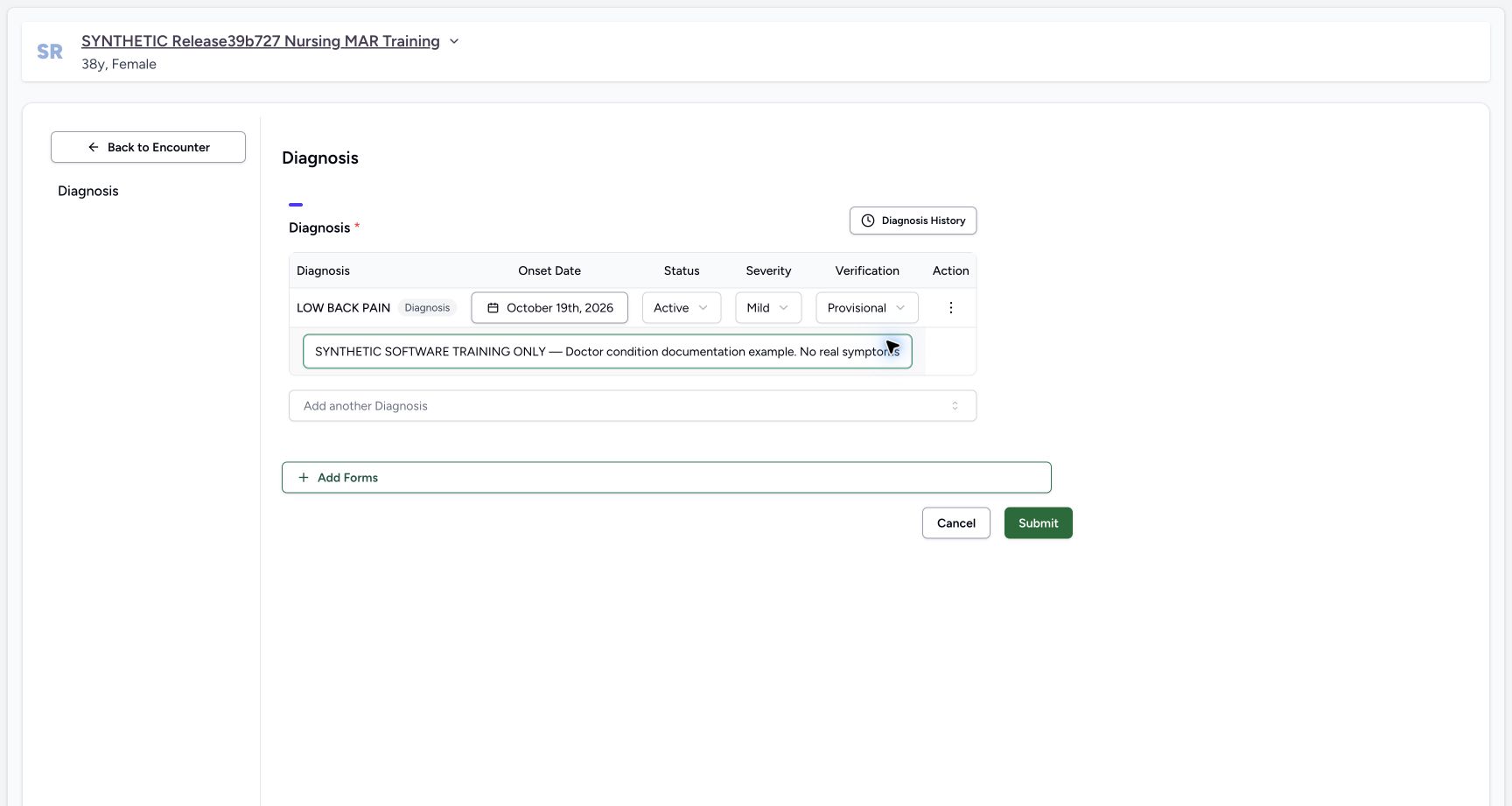
12Review the fictional diagnosis before Submit
Capture details
Exact committed ba551c1d isolated synthetic clone, ordinary existing Doctor account, fictional Polyclinic inpatient encounter. The patient retains an earlier release name; actual captured source is ba551c1d. All examples are software training only, not real symptoms, diagnosis, treatment or clinical advice. The row is a draft until Submit succeeds. Status, severity and verification are separate fields. The optional note labels this fictional software exercise.
Image SHA-256 c87165600a9f428cbd996c9eef87590721034de6fe9b7d2d84ada79bfec5fb95
- Submit once: Review the intended patient, code, nonfuture onset, Active/Mild/Provisional values and optional note before submitting once.
- Optional note: Appropriate context follows facility policy; Notes is not software-required.
 12
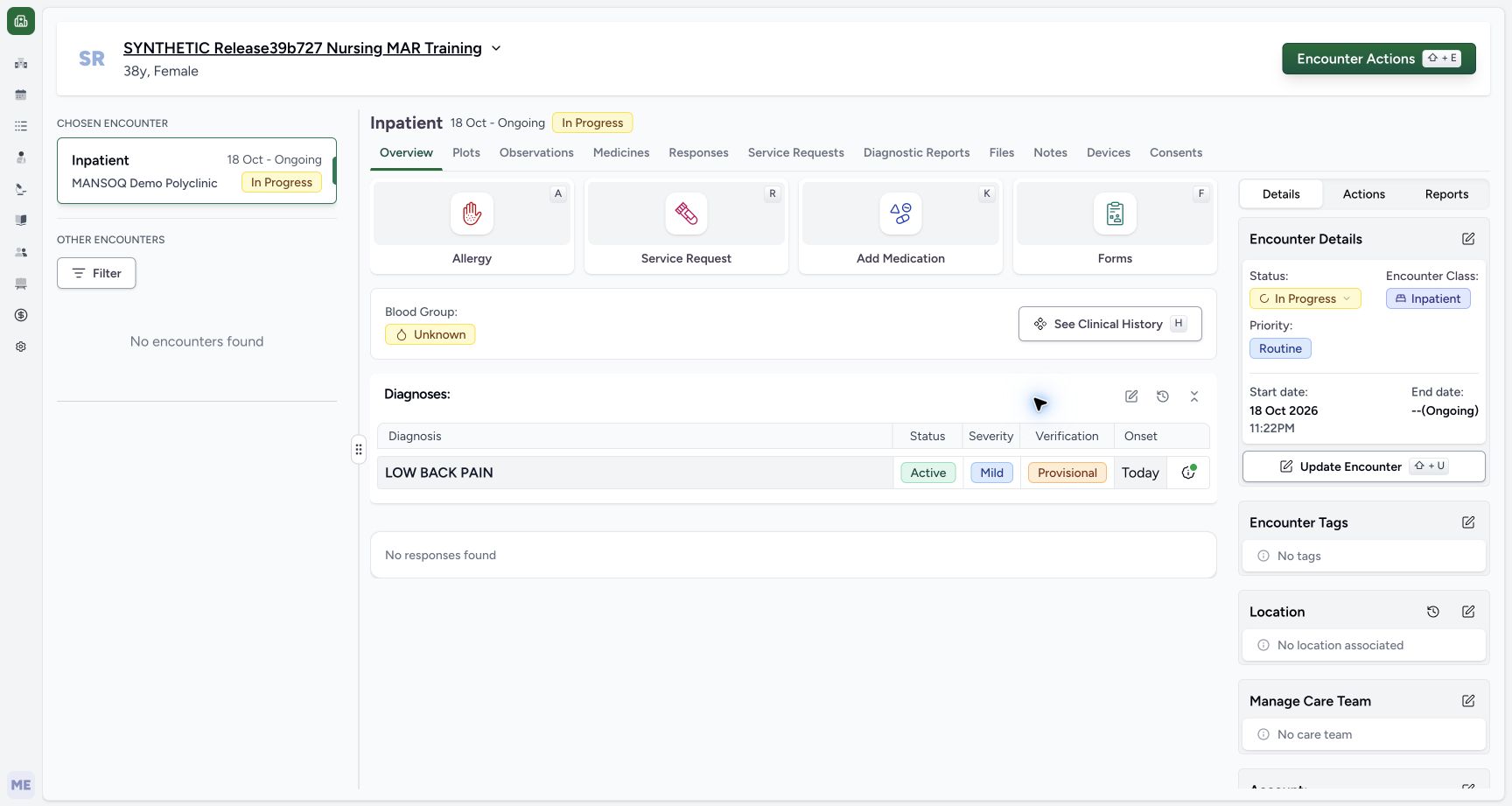
12Saved Doctor diagnosis in the encounter summary
Capture details
Exact committed ba551c1d isolated synthetic clone, ordinary existing Doctor account, fictional Polyclinic inpatient encounter. The patient retains an earlier release name; actual captured source is ba551c1d. All examples are software training only, not real symptoms, diagnosis, treatment or clinical advice. Ordinary Doctor and Nurse API reads independently verified one new condition UUID 99980e57… in this encounter with qa-doctor creator/updater. All14 administrations and 4 complete requests were equal to preflight, excluding only nested user last_login.
Image SHA-256 03363ca8801d995fd049d103c01420982e90073198d8083cb726500d1ac47282
- Saved diagnosis: The encounter summary displays the persisted coded condition and separate status, severity and verification fields.
- Diagnosis history: The clock icon beside the Diagnoses heading opens patient-level diagnosis history.
12 of 12 content blocks have reviewed image alignment. Missing overview or prerequisite images remain open.
Before you begin
- Use your existing authorized Doctor account and confirm the intended patient, selected encounter, facility and ongoing status. This observed account is qa-doctor; no permission or membership is added.
 1
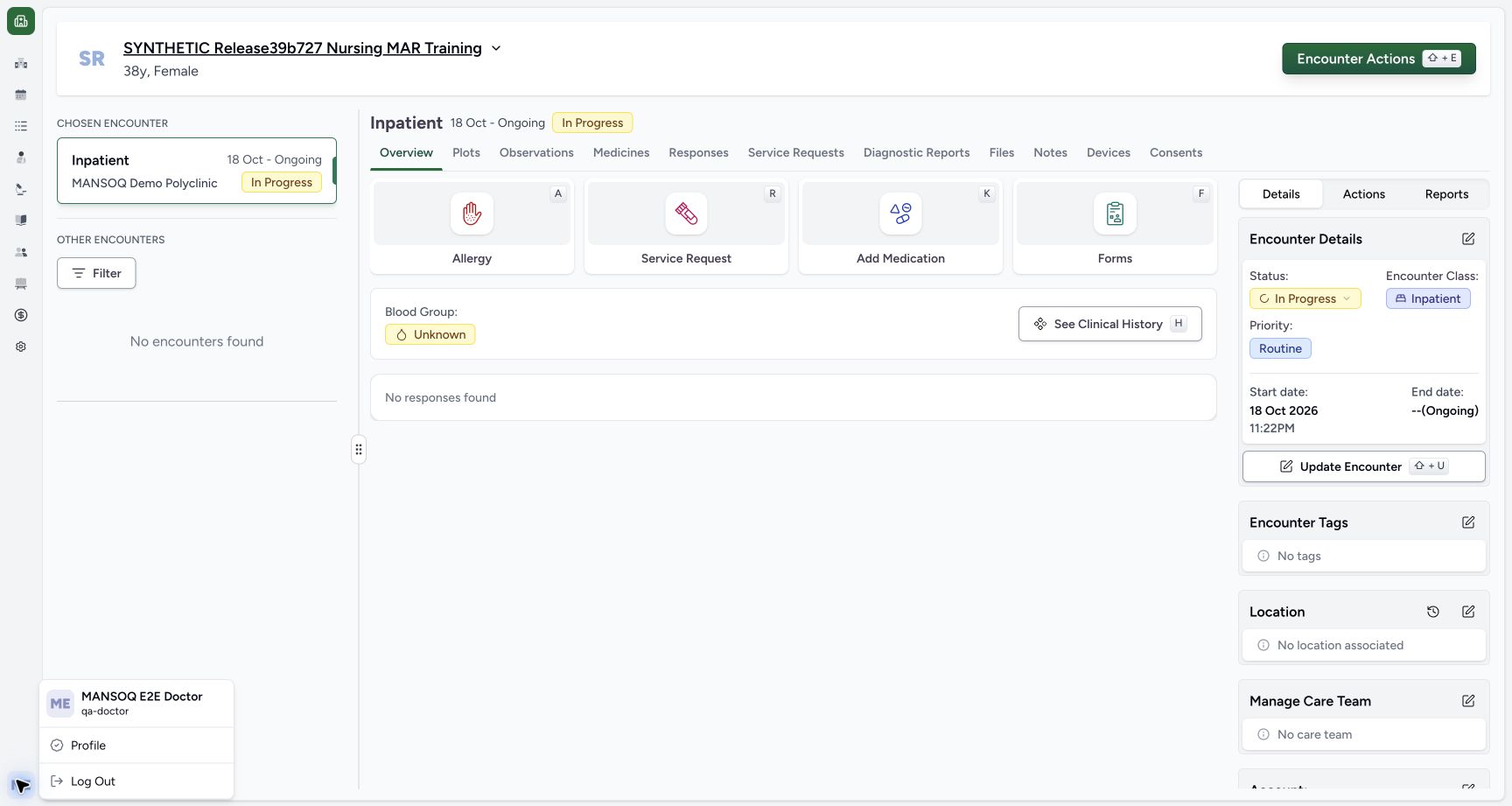
1Recorded release ba551c1d · 2026-10-19T00:03:34.348Z · 1728 × 921 Existing Doctor identity in the selected synthetic encounter
Capture details
Exact committed ba551c1d isolated synthetic clone, ordinary existing Doctor account, fictional Polyclinic inpatient encounter. The patient retains an earlier release name; actual captured source is ba551c1d. All examples are software training only, not real symptoms, diagnosis, treatment or clinical advice. Ordinary existing qa-doctor account. Medication and Nutrition events/requests are preserved; this branch concerns assessment documentation only.
Image SHA-256
f58ee93eda7e76a2bb930fb2508da3a97513acdfd479391e115bc991dd188f80- Doctor identity: Immediately right of the account avatar, the menu identifies MANSOQ E2E Doctor and qa-doctor. Confirm the authorized operator before documenting.
 123
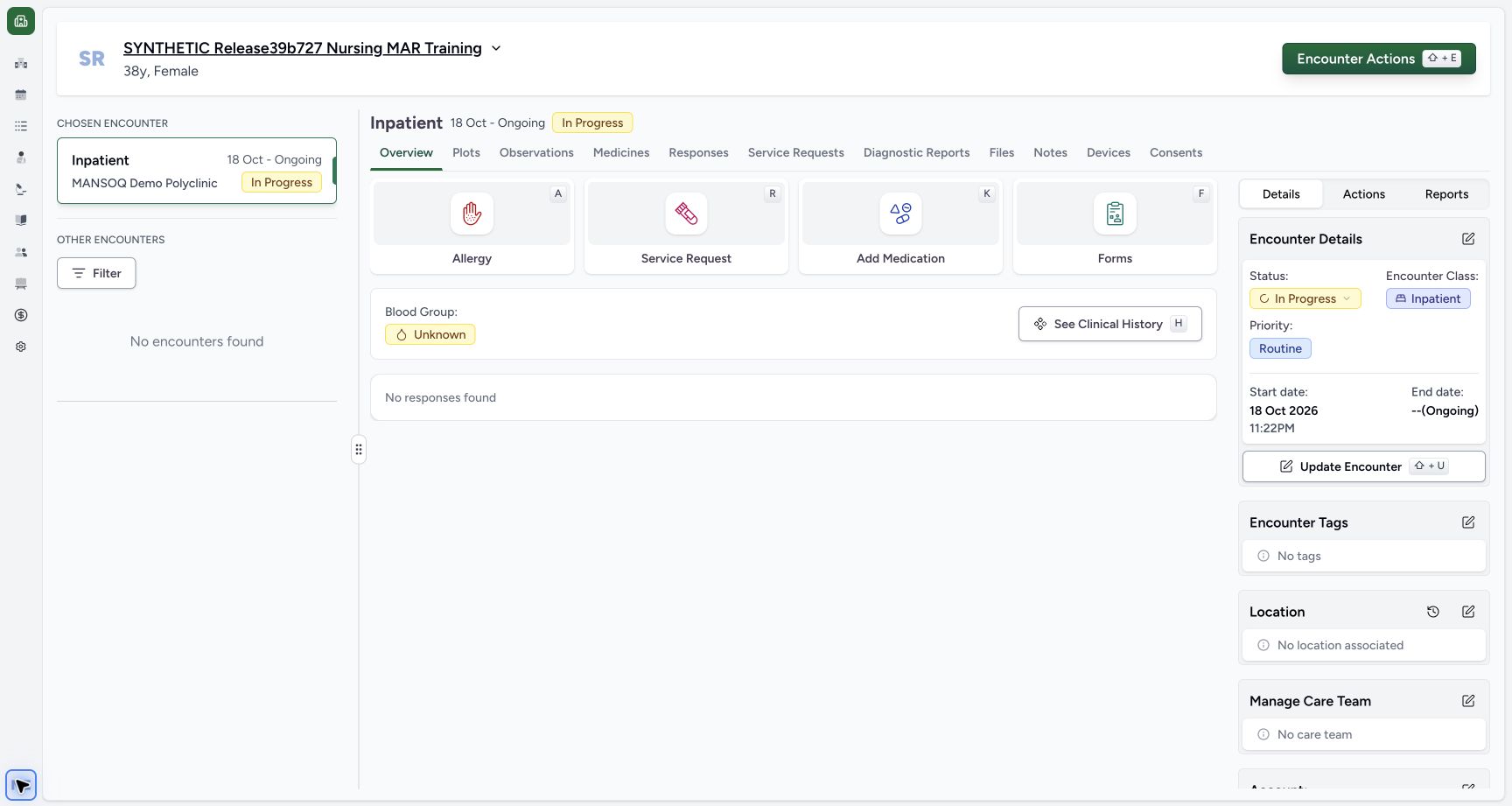
123Recorded release ba551c1d · 2026-10-19T00:03:40.412Z · 1728 × 921 Doctor assessment overview and selected encounter
Capture details
Exact committed ba551c1d isolated synthetic clone, ordinary existing Doctor account, fictional Polyclinic inpatient encounter. The patient retains an earlier release name; actual captured source is ba551c1d. All examples are software training only, not real symptoms, diagnosis, treatment or clinical advice. The selected fictional inpatient encounter is In Progress. No symptoms, diagnoses or questionnaire responses are present yet. Empty summary content does not prove that every patient chart is empty.
Image SHA-256
3836909959ec5463a972f87509bb558ccd7cc1a69c0c1b99c4827e85cd3935a8- Forms: Open Forms to choose the configured assessment or clinical system questionnaire.
- Chosen encounter: Confirm the selected encounter, facility and In Progress state at the left before entering new information.
- Clinical history: Patient history spans earlier records; it is separate from the selected encounter summary.
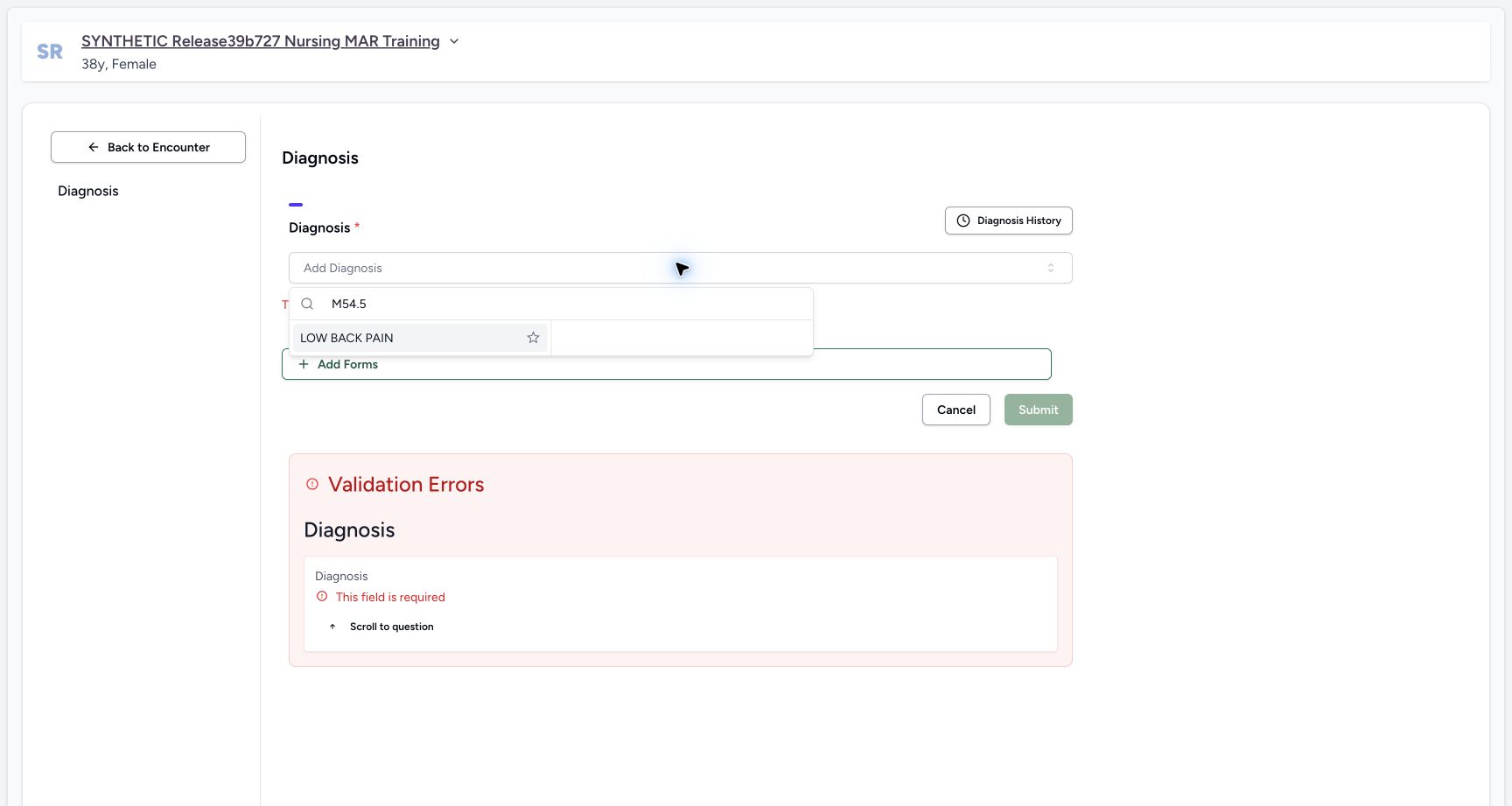
- All records here are fictional software training. LOW BACK PAIN is an actually returned installed ICD-10-AM terminology choice, M54.5. The example does not establish clinical findings, coding suitability, treatment or a medical decision.
 1
1Recorded release ba551c1d · 2026-10-19T00:04:35.783Z · 1728 × 921 Select an installed diagnosis terminology result
Capture details
Exact committed ba551c1d isolated synthetic clone, ordinary existing Doctor account, fictional Polyclinic inpatient encounter. The patient retains an earlier release name; actual captured source is ba551c1d. All examples are software training only, not real symptoms, diagnosis, treatment or clinical advice. Read-only normal terminology POST confirmed code M54.5, system http://hl7.org/fhir/sid/icd-10-am. No fabricated official code or new terminology installation is used. This fictional example is not a clinical diagnosis recommendation.
Image SHA-256
5902e4339fa9643c10a4250fe034f89431799a75d7018cbb8facd827c53e58ca- Installed result: Select the actually returned LOW BACK PAIN result. Search text alone does not save a coded diagnosis.
12Recorded release ba551c1d · 2026-10-19T00:05:20.957Z · 1728 × 921 Review the fictional diagnosis before Submit
Capture details
Exact committed ba551c1d isolated synthetic clone, ordinary existing Doctor account, fictional Polyclinic inpatient encounter. The patient retains an earlier release name; actual captured source is ba551c1d. All examples are software training only, not real symptoms, diagnosis, treatment or clinical advice. The row is a draft until Submit succeeds. Status, severity and verification are separate fields. The optional note labels this fictional software exercise.
Image SHA-256
c87165600a9f428cbd996c9eef87590721034de6fe9b7d2d84ada79bfec5fb95- Submit once: Review the intended patient, code, nonfuture onset, Active/Mild/Provisional values and optional note before submitting once.
- Optional note: Appropriate context follows facility policy; Notes is not software-required.
1. Confirm the operator and chosen encounter
Open the account menu and confirm your intended authorized Doctor identity. In Overview, verify the fictional patient and chosen Inpatient encounter at MANSOQ Demo Polyclinic. The encounter is In Progress. This software training starts with no conditions or assessment responses for this selected encounter.
1Existing Doctor identity in the selected synthetic encounter
Capture details
Exact committed ba551c1d isolated synthetic clone, ordinary existing Doctor account, fictional Polyclinic inpatient encounter. The patient retains an earlier release name; actual captured source is ba551c1d. All examples are software training only, not real symptoms, diagnosis, treatment or clinical advice. Ordinary existing qa-doctor account. Medication and Nutrition events/requests are preserved; this branch concerns assessment documentation only.
Image SHA-256 f58ee93eda7e76a2bb930fb2508da3a97513acdfd479391e115bc991dd188f80
- Doctor identity: Immediately right of the account avatar, the menu identifies MANSOQ E2E Doctor and qa-doctor. Confirm the authorized operator before documenting.
123Doctor assessment overview and selected encounter
Capture details
Exact committed ba551c1d isolated synthetic clone, ordinary existing Doctor account, fictional Polyclinic inpatient encounter. The patient retains an earlier release name; actual captured source is ba551c1d. All examples are software training only, not real symptoms, diagnosis, treatment or clinical advice. The selected fictional inpatient encounter is In Progress. No symptoms, diagnoses or questionnaire responses are present yet. Empty summary content does not prove that every patient chart is empty.
Image SHA-256 3836909959ec5463a972f87509bb558ccd7cc1a69c0c1b99c4827e85cd3935a8
- Forms: Open Forms to choose the configured assessment or clinical system questionnaire.
- Chosen encounter: Confirm the selected encounter, facility and In Progress state at the left before entering new information.
- Clinical history: Patient history spans earlier records; it is separate from the selected encounter summary.
2. Use the system Add Diagnosis action
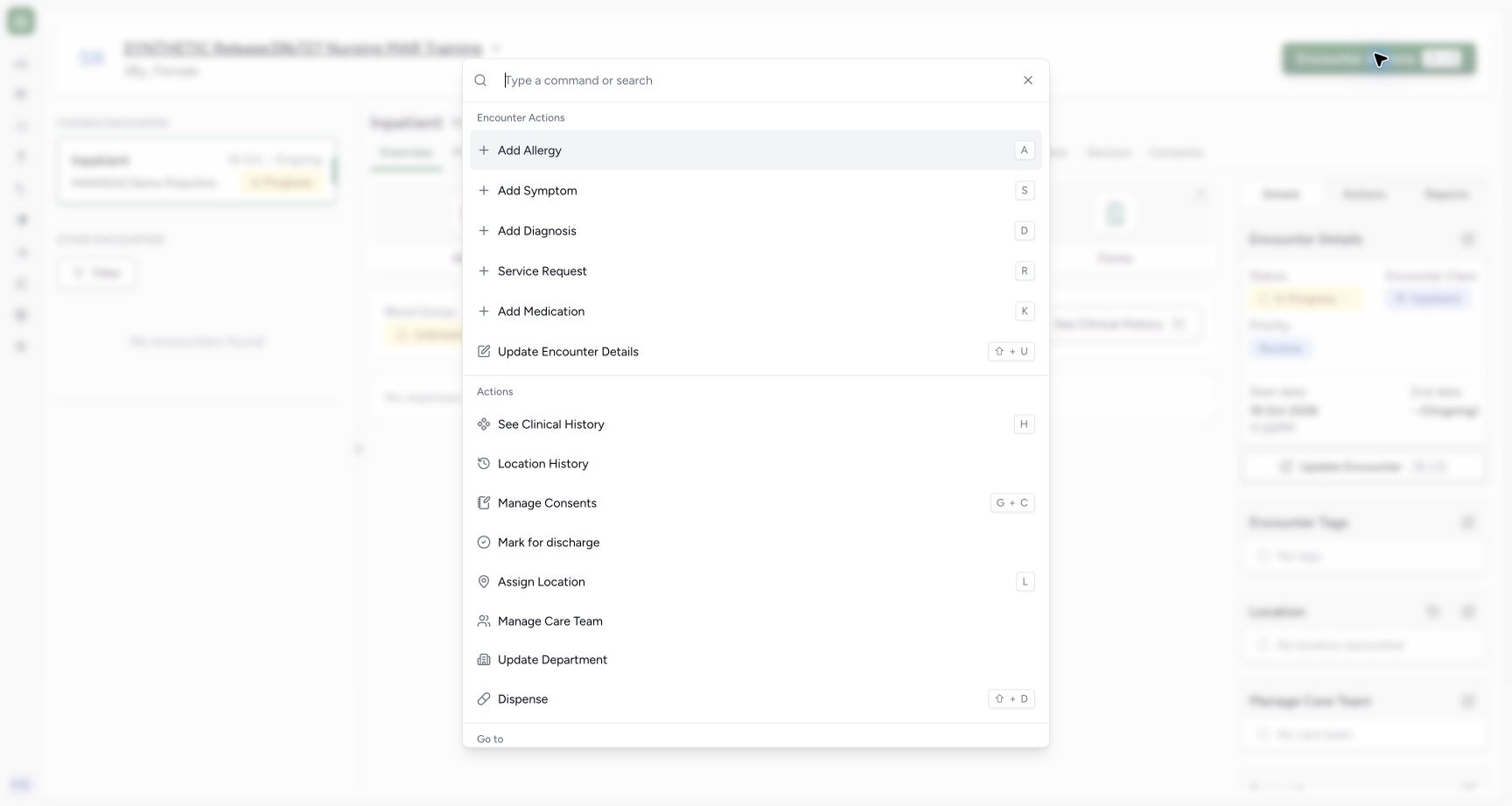
Open Encounter Actions and choose Add Diagnosis in the Encounter Actions group. Verify the Diagnosis form and selected patient. Installed forms can have similar titles; this lesson uses the system action, whose form has the required Diagnosis question. Forms and Add Diagnosis are separate entry points.
 12
12Doctor clinical actions versus installed questionnaires
Capture details
Exact committed ba551c1d isolated synthetic clone, ordinary existing Doctor account, fictional Polyclinic inpatient encounter. The patient retains an earlier release name; actual captured source is ba551c1d. All examples are software training only, not real symptoms, diagnosis, treatment or clinical advice. Installed questionnaire titles can differ from system actions. Use the intended action and verify the form title and selected patient/encounter.
Image SHA-256 9822a91466622019102542e0da2189eb5445b46da0513a1e7fbee1f63ade5df3
- Add Diagnosis: This system action opens the Diagnosis questionnaire for the selected encounter.
- Add Symptom: Symptoms use their own condition category and system questionnaire.
 12
12Diagnosis required-field validation
Capture details
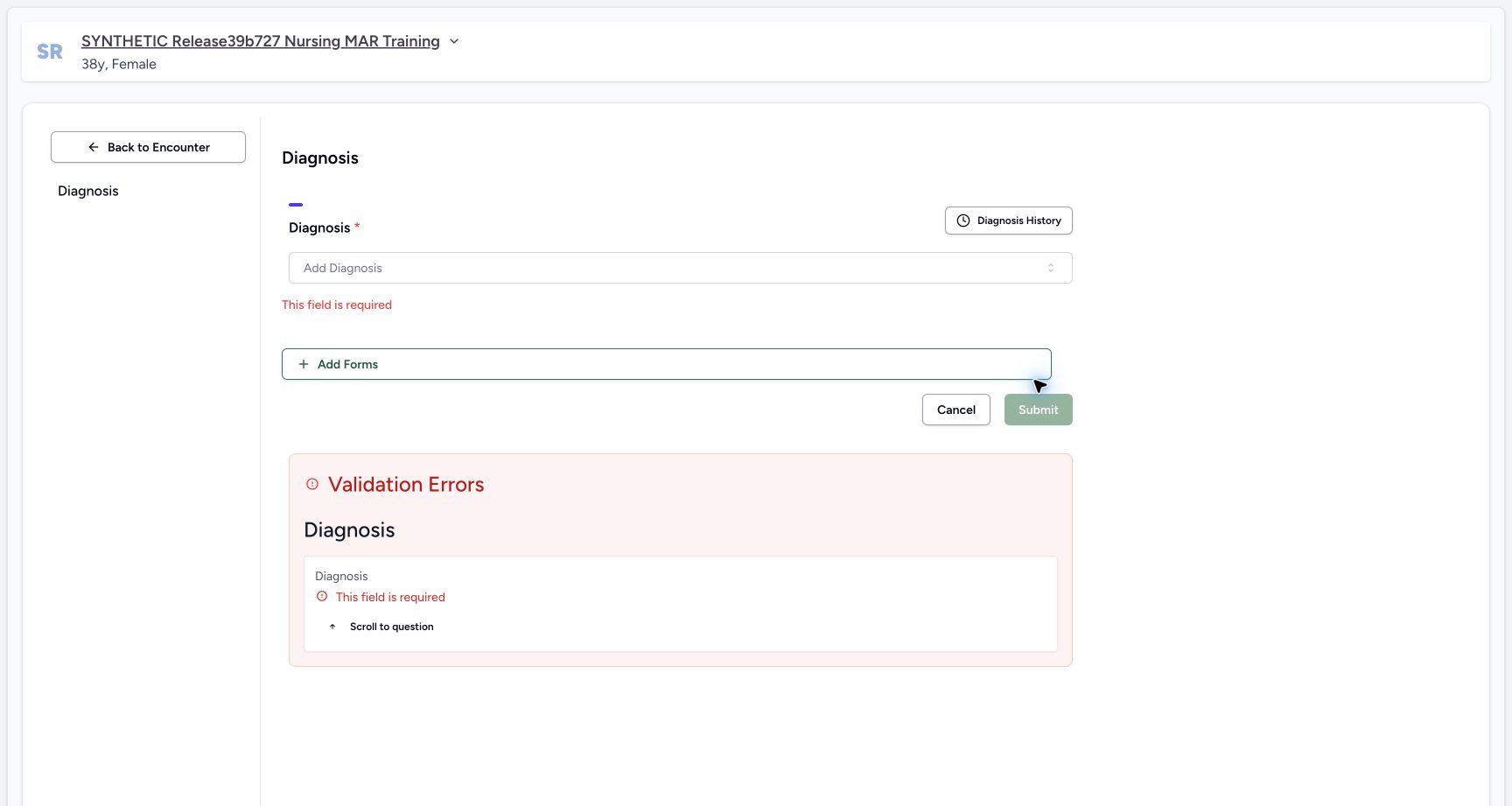
Exact committed ba551c1d isolated synthetic clone, ordinary existing Doctor account, fictional Polyclinic inpatient encounter. The patient retains an earlier release name; actual captured source is ba551c1d. All examples are software training only, not real symptoms, diagnosis, treatment or clinical advice. Actual required question is shown with validation summary. This refusal creates no diagnosis. Adding a coded condition is distinct from choosing its clinical or verification status.
Image SHA-256 873c7d23873c0820e1849fae38d37853591040fe5de8d02e1c79fefbd4462951
- Add Diagnosis: Choose the installed terminology entry after reading the required-field error.
- Validation summary: The form identifies the required missing diagnosis instead of submitting an empty condition.
3. Resolve the required-question error
An empty Submit is refused with This field is required and a Validation Errors summary. No diagnosis is saved by that refusal. Open Add Diagnosis, search for the intended coding and select the actually returned result. The illustrated search is M54.5 and its result is LOW BACK PAIN; a typed search alone does not save a coding.
12Diagnosis required-field validation
Capture details
Exact committed ba551c1d isolated synthetic clone, ordinary existing Doctor account, fictional Polyclinic inpatient encounter. The patient retains an earlier release name; actual captured source is ba551c1d. All examples are software training only, not real symptoms, diagnosis, treatment or clinical advice. Actual required question is shown with validation summary. This refusal creates no diagnosis. Adding a coded condition is distinct from choosing its clinical or verification status.
Image SHA-256 873c7d23873c0820e1849fae38d37853591040fe5de8d02e1c79fefbd4462951
- Add Diagnosis: Choose the installed terminology entry after reading the required-field error.
- Validation summary: The form identifies the required missing diagnosis instead of submitting an empty condition.
1Select an installed diagnosis terminology result
Capture details
Exact committed ba551c1d isolated synthetic clone, ordinary existing Doctor account, fictional Polyclinic inpatient encounter. The patient retains an earlier release name; actual captured source is ba551c1d. All examples are software training only, not real symptoms, diagnosis, treatment or clinical advice. Read-only normal terminology POST confirmed code M54.5, system http://hl7.org/fhir/sid/icd-10-am. No fabricated official code or new terminology installation is used. This fictional example is not a clinical diagnosis recommendation.
Image SHA-256 5902e4339fa9643c10a4250fe034f89431799a75d7018cbb8facd827c53e58ca
- Installed result: Select the actually returned LOW BACK PAIN result. Search text alone does not save a coded diagnosis.
4. Review each initialized value
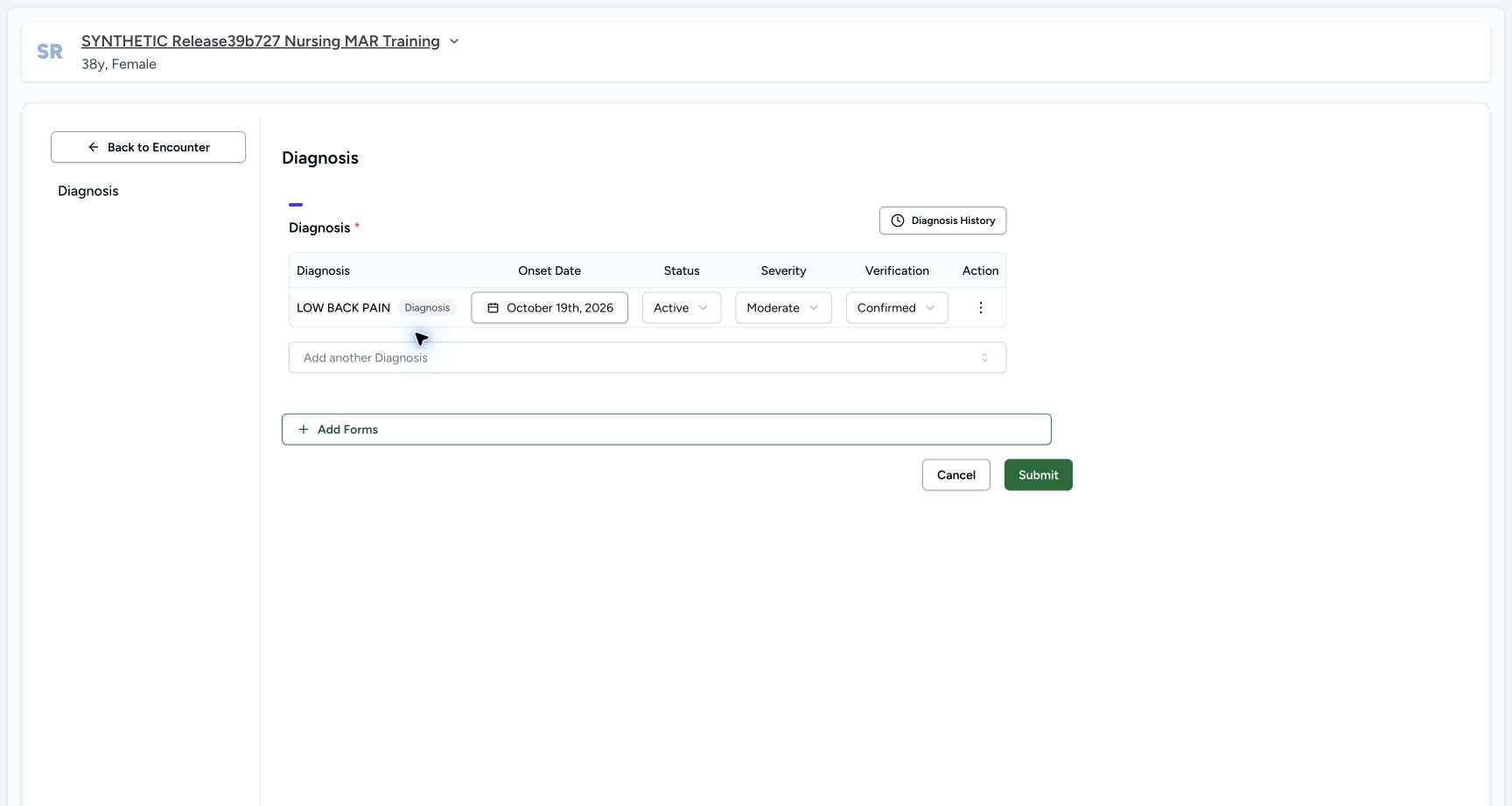
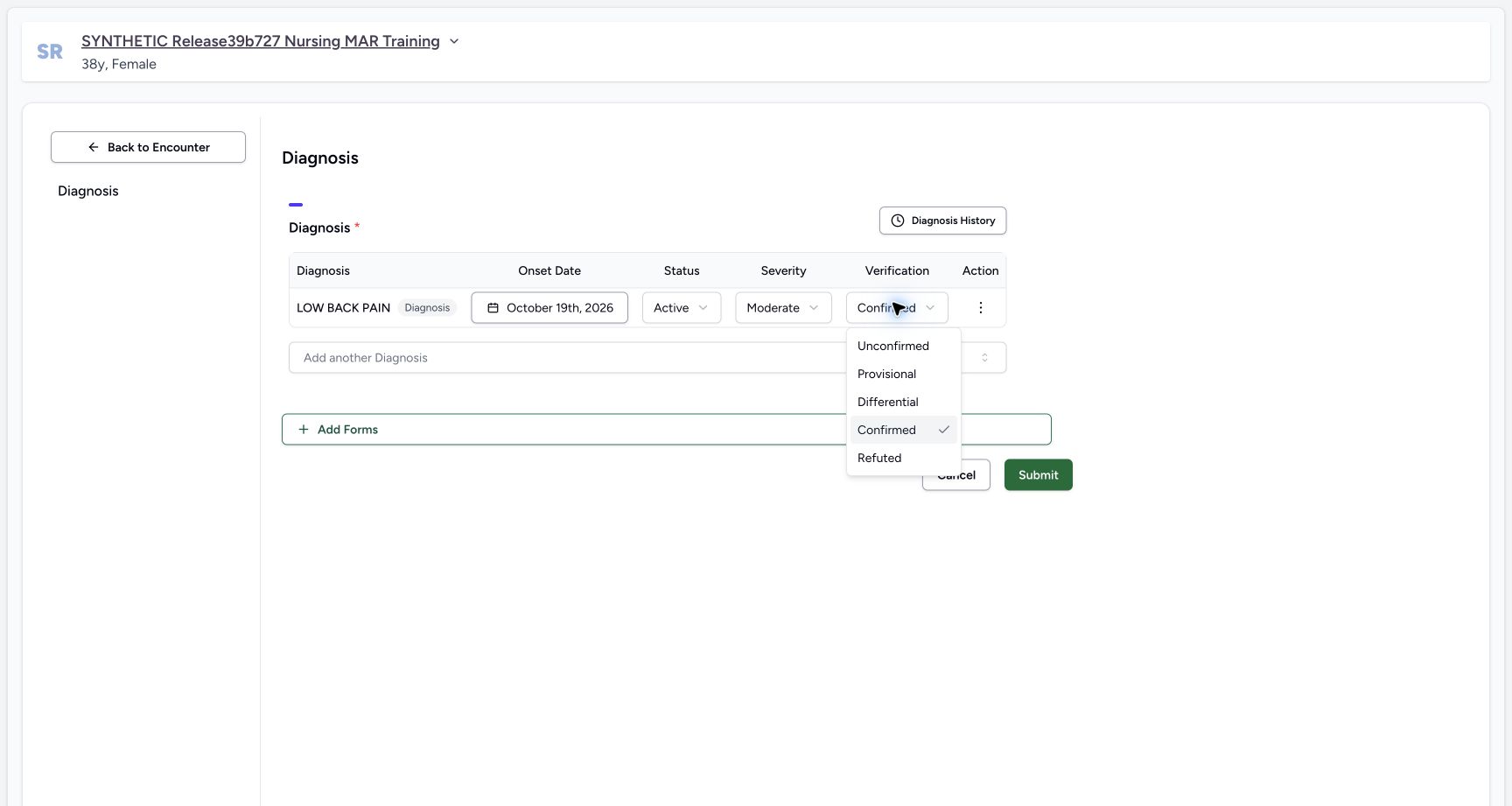
The new draft initializes the onset to the current date, Status to Active, Severity to Moderate and Verification to Confirmed. These software defaults do not establish clinical findings. Review each field under facility policy. A new onset can be edited to an appropriate nonfuture date. This fictional example keeps today and deliberately changes Severity to Mild and Verification to Provisional. The new-record verification menu excludes Entered in Error.
 123
123Review new diagnosis defaults before saving
Capture details
Exact committed ba551c1d isolated synthetic clone, ordinary existing Doctor account, fictional Polyclinic inpatient encounter. The patient retains an earlier release name; actual captured source is ba551c1d. All examples are software training only, not real symptoms, diagnosis, treatment or clinical advice. These are software defaults, not established clinical findings. Existing saved record onset is locked by source; a new draft can choose a nonfuture onset date.
Image SHA-256 44e3400ca675818385d71d947f571627f057c2eee7bdba3ba6a5c130d2b1f0c1
- Verification default: Review the initialized Confirmed value; change it to the intended documented verification status before saving.
- Severity default: Review the initialized Moderate severity. This fictional example will deliberately change it.
- Row actions: The ellipsis menu contains additional notes and removal controls for this row.
 1
1New diagnosis verification choices
Capture details
Exact committed ba551c1d isolated synthetic clone, ordinary existing Doctor account, fictional Polyclinic inpatient encounter. The patient retains an earlier release name; actual captured source is ba551c1d. All examples are software training only, not real symptoms, diagnosis, treatment or clinical advice. Entered in Error is intentionally unavailable for a new unsaved diagnosis; source permits that correction status for an existing record. Merely inspecting options does not qualify their saved transitions.
Image SHA-256 92ee8f1cca26dc52c2acf847c965f70ec5e0b5d44c876af5058dae0be05a5de6
- Provisional example: Select the intended verification state. This synthetic lesson chooses Provisional solely to demonstrate the control.
 12
12Diagnosis draft notes and removal controls
Capture details
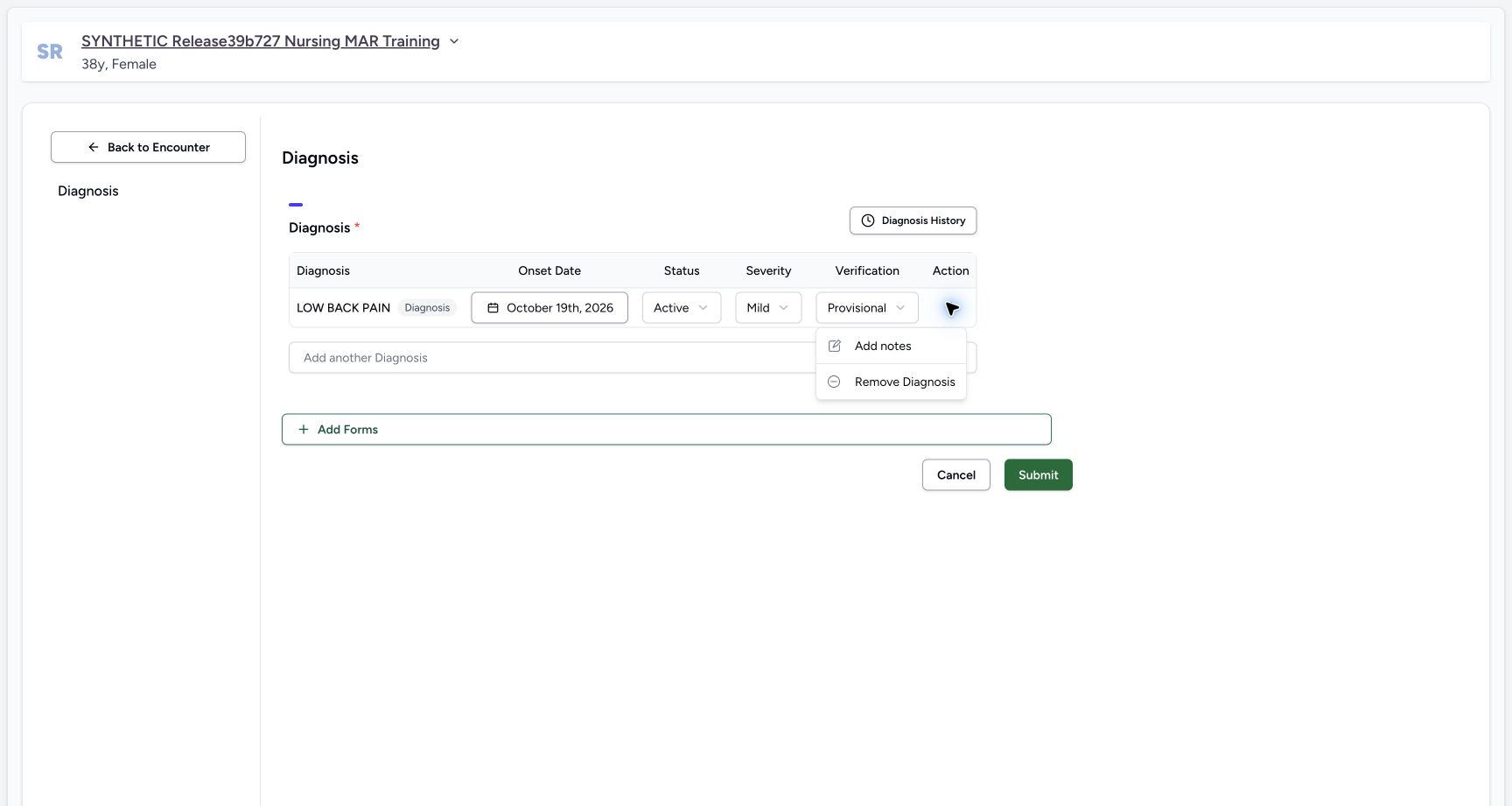
Exact committed ba551c1d isolated synthetic clone, ordinary existing Doctor account, fictional Polyclinic inpatient encounter. The patient retains an earlier release name; actual captured source is ba551c1d. All examples are software training only, not real symptoms, diagnosis, treatment or clinical advice. Remove on a new unsaved row drops the draft; Remove on an existing saved row instead marks Entered in Error for a later submitted correction. Neither is executed in this creation frame.
Image SHA-256 2087e865829278b34751a46fdd0cb2a19bc1078f1d9c604acc42499b99841ecb
- Add notes: Open the optional row note and record appropriate context under facility policy.
- Remove draft: For a new unsaved row this action removes the draft. Existing saved correction has different semantics.
5. Add appropriate optional context
Open the row ellipsis and choose Add notes. Enter appropriate context under facility policy; the Notes input is optional in the software. The pictured note explicitly identifies the fictional training exercise. Remove Diagnosis on an unsaved new row discards that draft; the same action has different correction semantics on an existing saved condition.
12Diagnosis draft notes and removal controls
Capture details
Exact committed ba551c1d isolated synthetic clone, ordinary existing Doctor account, fictional Polyclinic inpatient encounter. The patient retains an earlier release name; actual captured source is ba551c1d. All examples are software training only, not real symptoms, diagnosis, treatment or clinical advice. Remove on a new unsaved row drops the draft; Remove on an existing saved row instead marks Entered in Error for a later submitted correction. Neither is executed in this creation frame.
Image SHA-256 2087e865829278b34751a46fdd0cb2a19bc1078f1d9c604acc42499b99841ecb
- Add notes: Open the optional row note and record appropriate context under facility policy.
- Remove draft: For a new unsaved row this action removes the draft. Existing saved correction has different semantics.
12Review the fictional diagnosis before Submit
Capture details
Exact committed ba551c1d isolated synthetic clone, ordinary existing Doctor account, fictional Polyclinic inpatient encounter. The patient retains an earlier release name; actual captured source is ba551c1d. All examples are software training only, not real symptoms, diagnosis, treatment or clinical advice. The row is a draft until Submit succeeds. Status, severity and verification are separate fields. The optional note labels this fictional software exercise.
Image SHA-256 c87165600a9f428cbd996c9eef87590721034de6fe9b7d2d84ada79bfec5fb95
- Submit once: Review the intended patient, code, nonfuture onset, Active/Mild/Provisional values and optional note before submitting once.
- Optional note: Appropriate context follows facility policy; Notes is not software-required.
6. Submit the reviewed diagnosis once
Review the intended patient, installed code, nonfuture onset, Active status, Mild severity, Provisional verification and optional note. Choose Submit once. Wait for the overview to settle. It displays LOW BACK PAIN with the reviewed values. Separate ordinary Doctor and Nurse reads verified exactly one new condition in this selected encounter with Doctor creator and updater; all fourteen saved administration entries and four requests were unchanged.
12Review the fictional diagnosis before Submit
Capture details
Exact committed ba551c1d isolated synthetic clone, ordinary existing Doctor account, fictional Polyclinic inpatient encounter. The patient retains an earlier release name; actual captured source is ba551c1d. All examples are software training only, not real symptoms, diagnosis, treatment or clinical advice. The row is a draft until Submit succeeds. Status, severity and verification are separate fields. The optional note labels this fictional software exercise.
Image SHA-256 c87165600a9f428cbd996c9eef87590721034de6fe9b7d2d84ada79bfec5fb95
- Submit once: Review the intended patient, code, nonfuture onset, Active/Mild/Provisional values and optional note before submitting once.
- Optional note: Appropriate context follows facility policy; Notes is not software-required.
12Saved Doctor diagnosis in the encounter summary
Capture details
Exact committed ba551c1d isolated synthetic clone, ordinary existing Doctor account, fictional Polyclinic inpatient encounter. The patient retains an earlier release name; actual captured source is ba551c1d. All examples are software training only, not real symptoms, diagnosis, treatment or clinical advice. Ordinary Doctor and Nurse API reads independently verified one new condition UUID 99980e57… in this encounter with qa-doctor creator/updater. All14 administrations and 4 complete requests were equal to preflight, excluding only nested user last_login.
Image SHA-256 03363ca8801d995fd049d103c01420982e90073198d8083cb726500d1ac47282
- Saved diagnosis: The encounter summary displays the persisted coded condition and separate status, severity and verification fields.
- Diagnosis history: The clock icon beside the Diagnoses heading opens patient-level diagnosis history.
7. Inspect the author and saved note
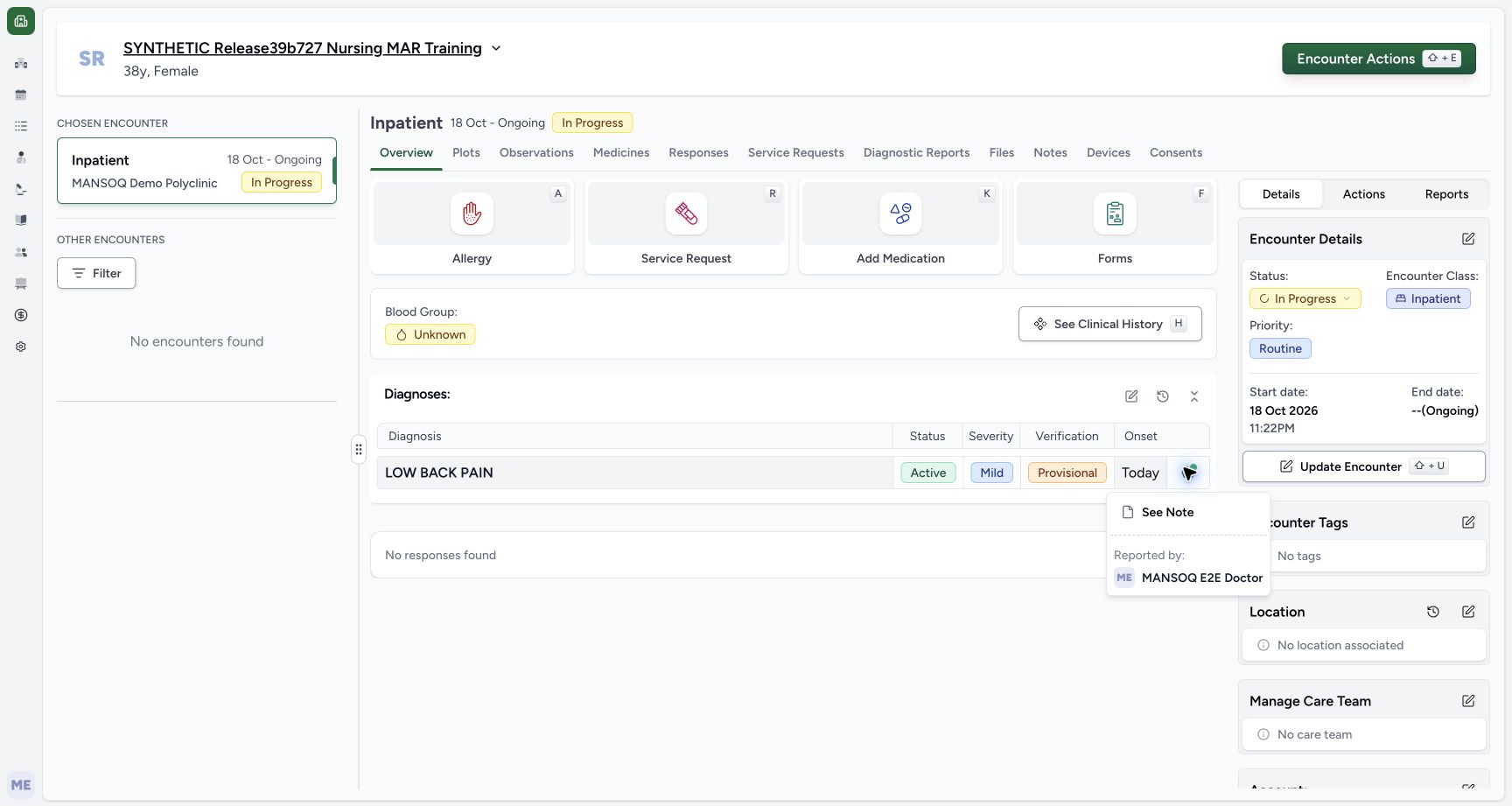
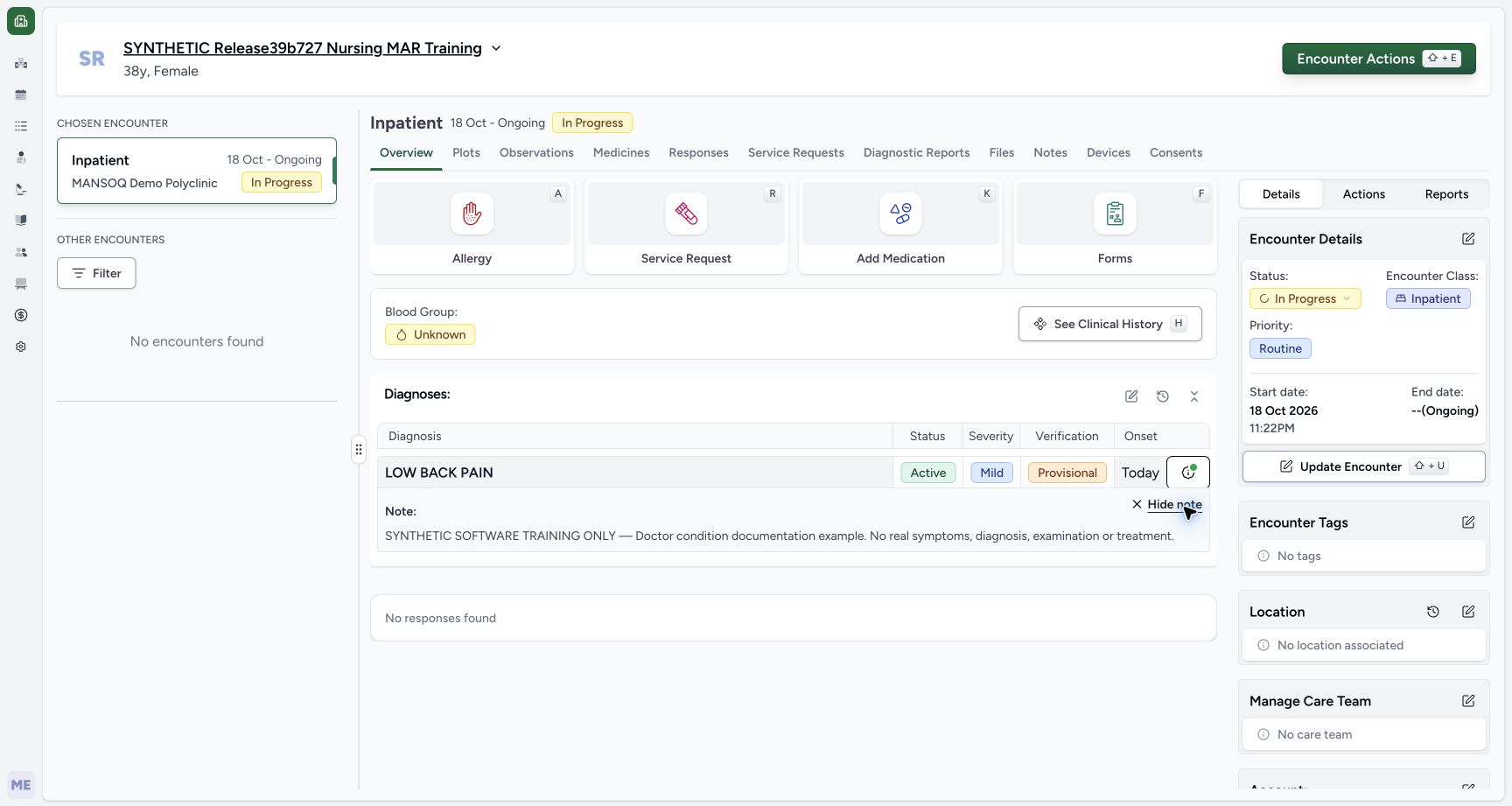
Open the saved row information menu. Reported by identifies MANSOQ E2E Doctor, the condition creator displayed by this component. Choose See Note to inspect the full saved synthetic context. Hide note closes its display without changing or deleting the stored condition. Reported by does not establish a separate clinical performer.
 12
12Saved diagnosis reported-by context
Capture details
Exact committed ba551c1d isolated synthetic clone, ordinary existing Doctor account, fictional Polyclinic inpatient encounter. The patient retains an earlier release name; actual captured source is ba551c1d. All examples are software training only, not real symptoms, diagnosis, treatment or clinical advice. Reported by is the saved condition creator displayed by this component. It is not an assertion about a separate clinical performer.
Image SHA-256 74b05b2735d999c8fb9af0f478e3c3f0cbe9f3cc55618e7e1a4537f38c3e2cd6
- See Note: Open the saved optional contextual note.
- Reported-by identity: Immediately left, Reported by identifies MANSOQ E2E Doctor as this condition creator.
 12
12Read the saved diagnosis note
Capture details
Exact committed ba551c1d isolated synthetic clone, ordinary existing Doctor account, fictional Polyclinic inpatient encounter. The patient retains an earlier release name; actual captured source is ba551c1d. All examples are software training only, not real symptoms, diagnosis, treatment or clinical advice. The full synthetic note persists and can be hidden without editing the condition. No response timeline entry is implied by the generic No responses found area below.
Image SHA-256 b385cbe6dc1d3840cc1ce3cb8cf0853d25068b4713df98fee6176bbff1dadbe3
- Hide note: This closes the note display without deleting or updating the stored note.
- Saved context: The expanded note explicitly identifies the fictional software example; the text runs immediately above this marker.
8. Find its history and source encounter
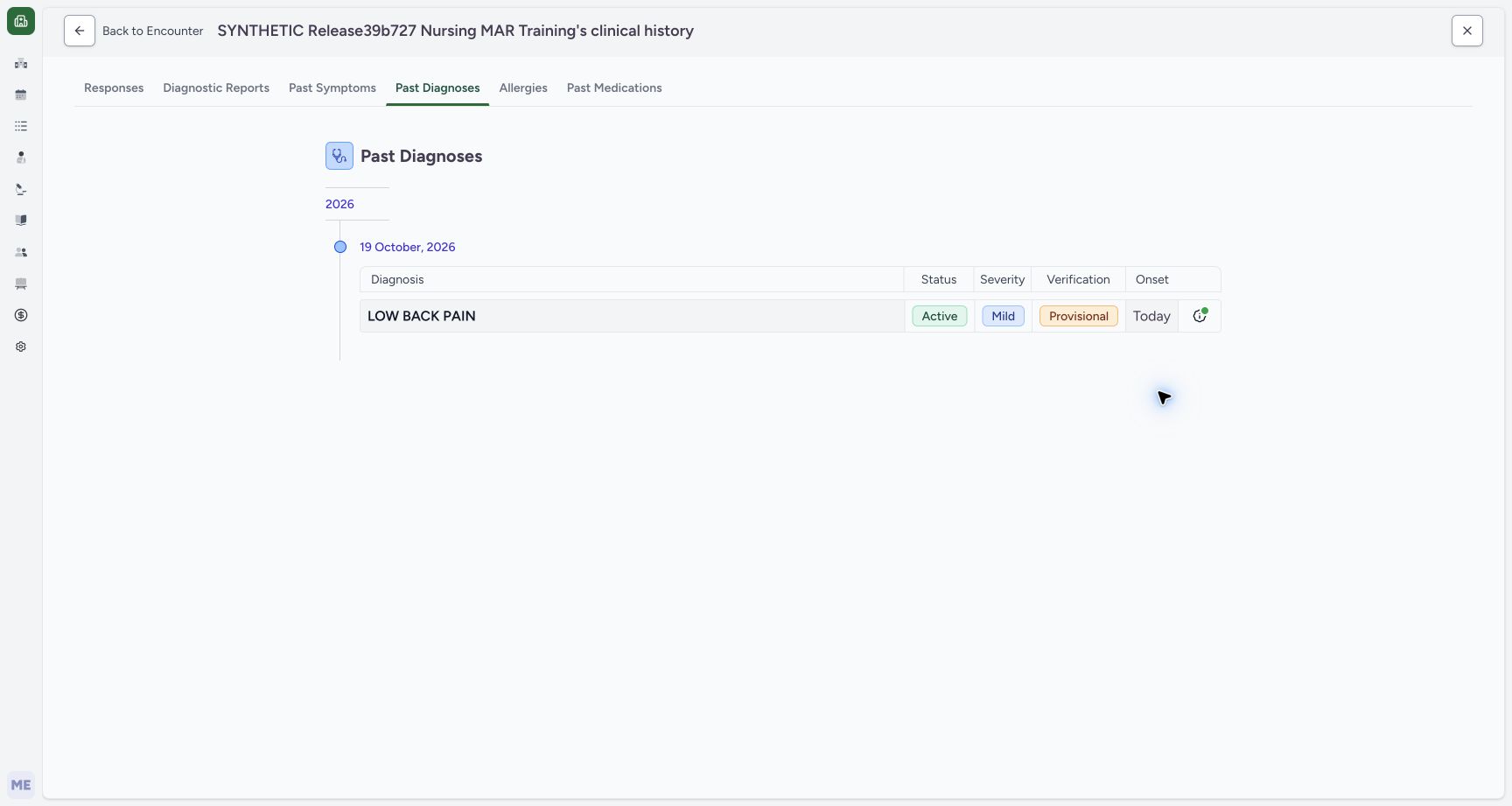
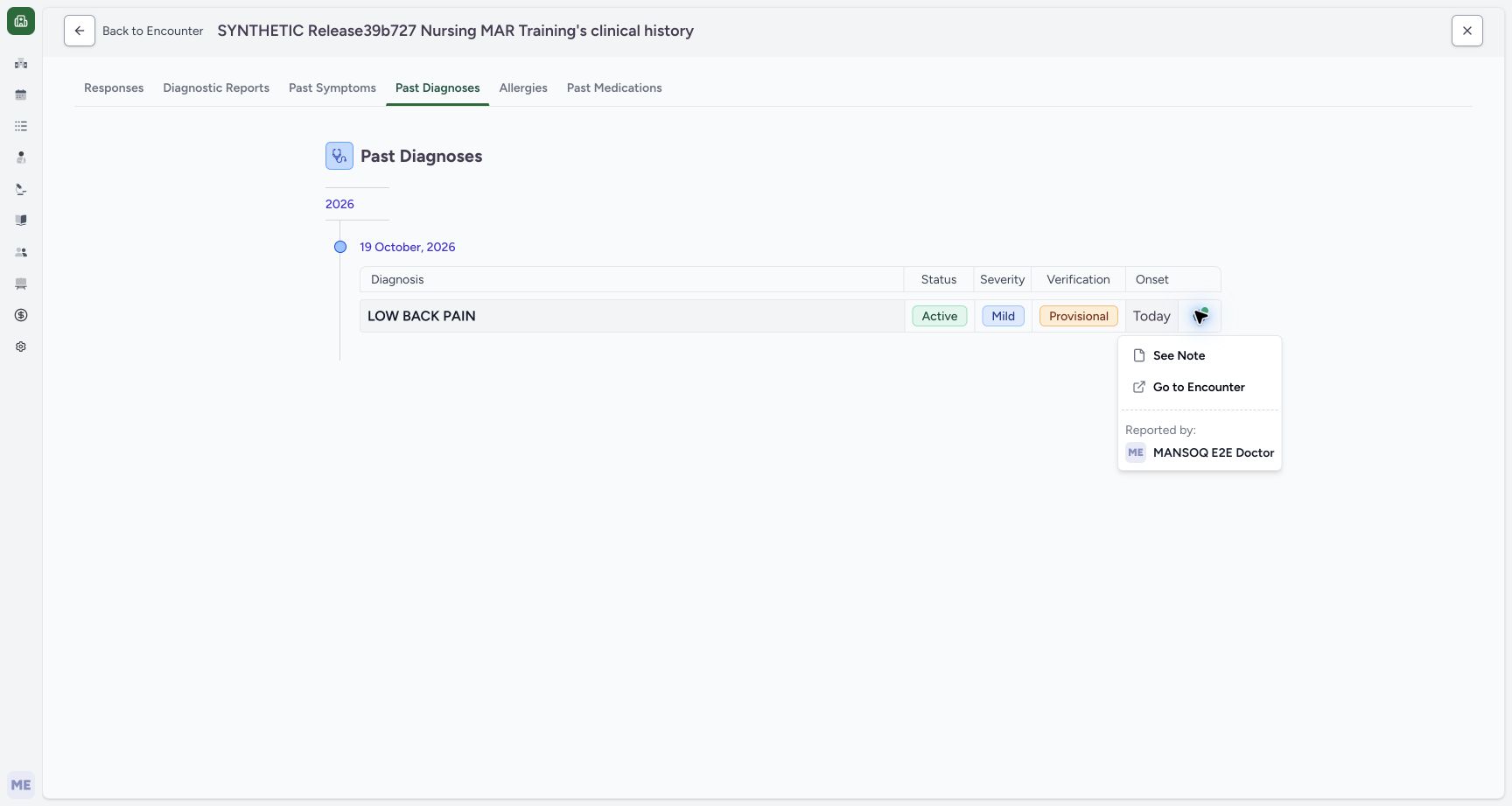
Choose the clock icon beside Diagnoses to open patient-level Past Diagnoses. The Active record appears under its creation date; onset is shown separately. Its information menu offers Go to Encounter, which returns to the actual encounter associated with this record. Recheck patient and encounter before editing. This version filters the history to Active, Recurrence and Relapse and excludes Entered in Error; it is not a complete unfiltered lifecycle audit.
12Saved Doctor diagnosis in the encounter summary
Capture details
Exact committed ba551c1d isolated synthetic clone, ordinary existing Doctor account, fictional Polyclinic inpatient encounter. The patient retains an earlier release name; actual captured source is ba551c1d. All examples are software training only, not real symptoms, diagnosis, treatment or clinical advice. Ordinary Doctor and Nurse API reads independently verified one new condition UUID 99980e57… in this encounter with qa-doctor creator/updater. All14 administrations and 4 complete requests were equal to preflight, excluding only nested user last_login.
Image SHA-256 03363ca8801d995fd049d103c01420982e90073198d8083cb726500d1ac47282
- Saved diagnosis: The encounter summary displays the persisted coded condition and separate status, severity and verification fields.
- Diagnosis history: The clock icon beside the Diagnoses heading opens patient-level diagnosis history.
 12
12Patient diagnosis history and its scope
Capture details
Exact committed ba551c1d isolated synthetic clone, ordinary existing Doctor account, fictional Polyclinic inpatient encounter. The patient retains an earlier release name; actual captured source is ba551c1d. All examples are software training only, not real symptoms, diagnosis, treatment or clinical advice. This view groups by creation date, not onset alone. Source filters Active/Recurrence/Relapse and excludes Entered in Error, so Past Diagnoses is not an unfiltered lifecycle audit of every condition.
Image SHA-256 5497aaff9e841f437a6c5a451e086eb513c6a2fb4e4281218795c8afdd96cae8
- Patient-level history: Past Diagnoses is the patient history tab; the example currently contains one Active diagnosis.
- Recorded-date group: History groups records under their creation date; inspect onset separately in the row.
 1
1Return from a history row to its source encounter
Capture details
Exact committed ba551c1d isolated synthetic clone, ordinary existing Doctor account, fictional Polyclinic inpatient encounter. The patient retains an earlier release name; actual captured source is ba551c1d. All examples are software training only, not real symptoms, diagnosis, treatment or clinical advice. Source encounter navigation uses the record encounter UUID. The current example returns to the same selected encounter; this is not proof of authorization to other encounters.
Image SHA-256 8a6a8f617afcb2459bc945c43d531b56c82d4ff428bfb2653a2fdcf667779aa1
- Go to Encounter: Open the actual source encounter associated with this condition. Recheck patient and encounter before editing.
Observed scope and remaining variants
The pictured writer is one existing Doctor in a Polyclinic Inpatient encounter. The independent Nurse checks are reads, not proof of Nurse diagnosis writing. This lesson does not qualify all facilities, roles, severity/status combinations, chronic-condition creation, diagnosis printing or reuse from another encounter. Diagnosis lifecycle and same-record correction have separate illustrated lessons.
1Existing Doctor identity in the selected synthetic encounter
Capture details
Exact committed ba551c1d isolated synthetic clone, ordinary existing Doctor account, fictional Polyclinic inpatient encounter. The patient retains an earlier release name; actual captured source is ba551c1d. All examples are software training only, not real symptoms, diagnosis, treatment or clinical advice. Ordinary existing qa-doctor account. Medication and Nutrition events/requests are preserved; this branch concerns assessment documentation only.
Image SHA-256 f58ee93eda7e76a2bb930fb2508da3a97513acdfd479391e115bc991dd188f80
- Doctor identity: Immediately right of the account avatar, the menu identifies MANSOQ E2E Doctor and qa-doctor. Confirm the authorized operator before documenting.
12Saved Doctor diagnosis in the encounter summary
Capture details
Exact committed ba551c1d isolated synthetic clone, ordinary existing Doctor account, fictional Polyclinic inpatient encounter. The patient retains an earlier release name; actual captured source is ba551c1d. All examples are software training only, not real symptoms, diagnosis, treatment or clinical advice. Ordinary Doctor and Nurse API reads independently verified one new condition UUID 99980e57… in this encounter with qa-doctor creator/updater. All14 administrations and 4 complete requests were equal to preflight, excluding only nested user last_login.
Image SHA-256 03363ca8801d995fd049d103c01420982e90073198d8083cb726500d1ac47282
- Saved diagnosis: The encounter summary displays the persisted coded condition and separate status, severity and verification fields.
- Diagnosis history: The clock icon beside the Diagnoses heading opens patient-level diagnosis history.
Source evidence
Every citation uses this exact committed version. The private source repository requires access.
- repositories/platform/mansoq-web/src/components/Questionnaire/QuestionTypes/DiagnosisQuestion.tsx:91 ·
ba551c1d67031248136fd2016afe227b5fc994bdSource file checksum
800733fc03b30528ba90689524d5c3a39b2f777ffdbb9dc8ef5ad5e874c3e504 - repositories/platform/mansoq-web/src/components/Questionnaire/QuestionTypes/DiagnosisQuestion.tsx:321 ·
ba551c1d67031248136fd2016afe227b5fc994bdSource file checksum
800733fc03b30528ba90689524d5c3a39b2f777ffdbb9dc8ef5ad5e874c3e504 - repositories/platform/mansoq-web/src/components/Questionnaire/QuestionTypes/DiagnosisQuestion.tsx:448 ·
ba551c1d67031248136fd2016afe227b5fc994bdSource file checksum
800733fc03b30528ba90689524d5c3a39b2f777ffdbb9dc8ef5ad5e874c3e504 - repositories/platform/mansoq-web/src/components/Questionnaire/QuestionTypes/DiagnosisQuestion.tsx:508 ·
ba551c1d67031248136fd2016afe227b5fc994bdSource file checksum
800733fc03b30528ba90689524d5c3a39b2f777ffdbb9dc8ef5ad5e874c3e504 - repositories/platform/mansoq-web/src/components/Questionnaire/QuestionTypes/DiagnosisQuestion.tsx:648 ·
ba551c1d67031248136fd2016afe227b5fc994bdSource file checksum
800733fc03b30528ba90689524d5c3a39b2f777ffdbb9dc8ef5ad5e874c3e504 - repositories/platform/mansoq-web/src/components/Patient/diagnosis/list.tsx:65 ·
ba551c1d67031248136fd2016afe227b5fc994bdSource file checksum
e3342b6a04271d6cf1754c13bf1805fcc1d2f8badc05dc6b445b0349baab9cf0 - repositories/platform/mansoq-web/src/components/Patient/diagnosis/DiagnosisTable.tsx:187 ·
ba551c1d67031248136fd2016afe227b5fc994bdSource file checksum
45e40342661a50ac9ad52a4e34cfc2dc4d153ce389dc8829ffdb52c0f44f4c19 - repositories/platform/mansoq-web/src/components/HistoricalRecordSelector/index.tsx:184 ·
ba551c1d67031248136fd2016afe227b5fc994bdSource file checksum
ed49e6aa587ed90db0bd986cb9adc6596be31539fa1b865cf073c130e75a0ac8 - repositories/platform/mansoq-web/src/components/HistoricalRecordSelector/index.tsx:230 ·
ba551c1d67031248136fd2016afe227b5fc994bdSource file checksum
ed49e6aa587ed90db0bd986cb9adc6596be31539fa1b865cf073c130e75a0ac8 - repositories/platform/mansoq-web/src/pages/Encounters/tabs/overview/quick-actions.tsx:56 ·
ba551c1d67031248136fd2016afe227b5fc994bdSource file checksum
555331d2be0793af35974e2ac2b3642f222ebbb49ddbec83bdb74331a7d963d4 - repositories/platform/mansoq-core/mansoq/emr/api/viewsets/condition.py:103 ·
ba551c1d67031248136fd2016afe227b5fc994bdSource file checksum
5f00f0ffbe13f18a514cfa2bd5d91f5bf292b416066dba454c82d2f815e31a6c - repositories/platform/mansoq-core/mansoq/emr/api/viewsets/encounter_authz_base.py:13 ·
ba551c1d67031248136fd2016afe227b5fc994bdSource file checksum
71d6adda5026319eeca7f47eb673e81db1217b347ee8c8fa13f7e9701c60d3c9 - repositories/platform/mansoq-core/mansoq/emr/resources/condition/spec.py:52 ·
ba551c1d67031248136fd2016afe227b5fc994bdSource file checksum
53f9aa7a7b65f530950d3804ddfcad69fe786ca58c5e62ecb7531a1c7fa45a04 - repositories/platform/mansoq-core/mansoq/emr/resources/condition/valueset.py:14 ·
ba551c1d67031248136fd2016afe227b5fc994bdSource file checksum
836687dd3f5fffec0e1b06c53cf0209229ff8dded04d7ddd1a1e395642b56525