 MANSOQ
 Scheduling and appointments · VERSION ba551c1d
Book a future private session around saved unavailability
Find an existing fictional patient, verify identity, choose the intended Doctor and future date, recognize blocked capacity and save one appointment.
Staff
 123
123Use Schedule Appointment on the existing patient
Capture details
Exact committed ba551c1d assets and backend. Existing non-superuser Staff in its assigned fictional Clinic, independent 45244 browser origin. Use Schedule Appointment on the existing patient.
Image SHA-256 644a4dcc810928109c5a3090363f9a4910fcb6bca36c77ef8a993ab733789511
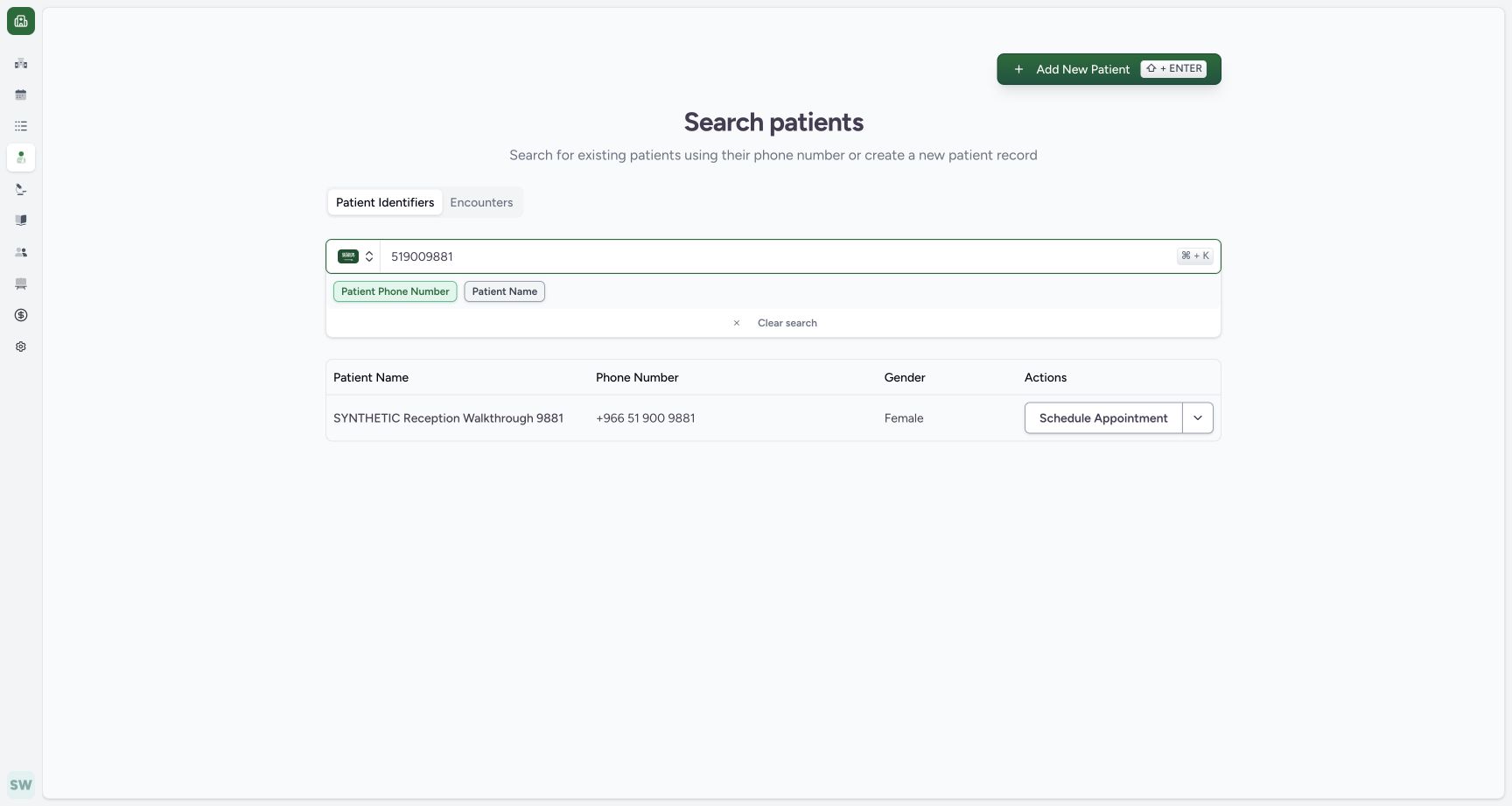
- Known contact search: Find the existing fictional patient using its known phone.
- Matching patient: Verify the intended existing synthetic identity.
- Schedule Appointment: Start assisted booking for this existing row.
 1234
1234Inspect the partial-day block in the booking selector
Capture details
Exact committed ba551c1d assets and backend. Existing non-superuser Staff in its assigned fictional Clinic, independent 45244 browser origin. Inspect the partial-day block in the booking selector.
Image SHA-256 cc3225326a2b922b9da8581563b8b6930482a3654fb64a1aea25d70de9a662ea
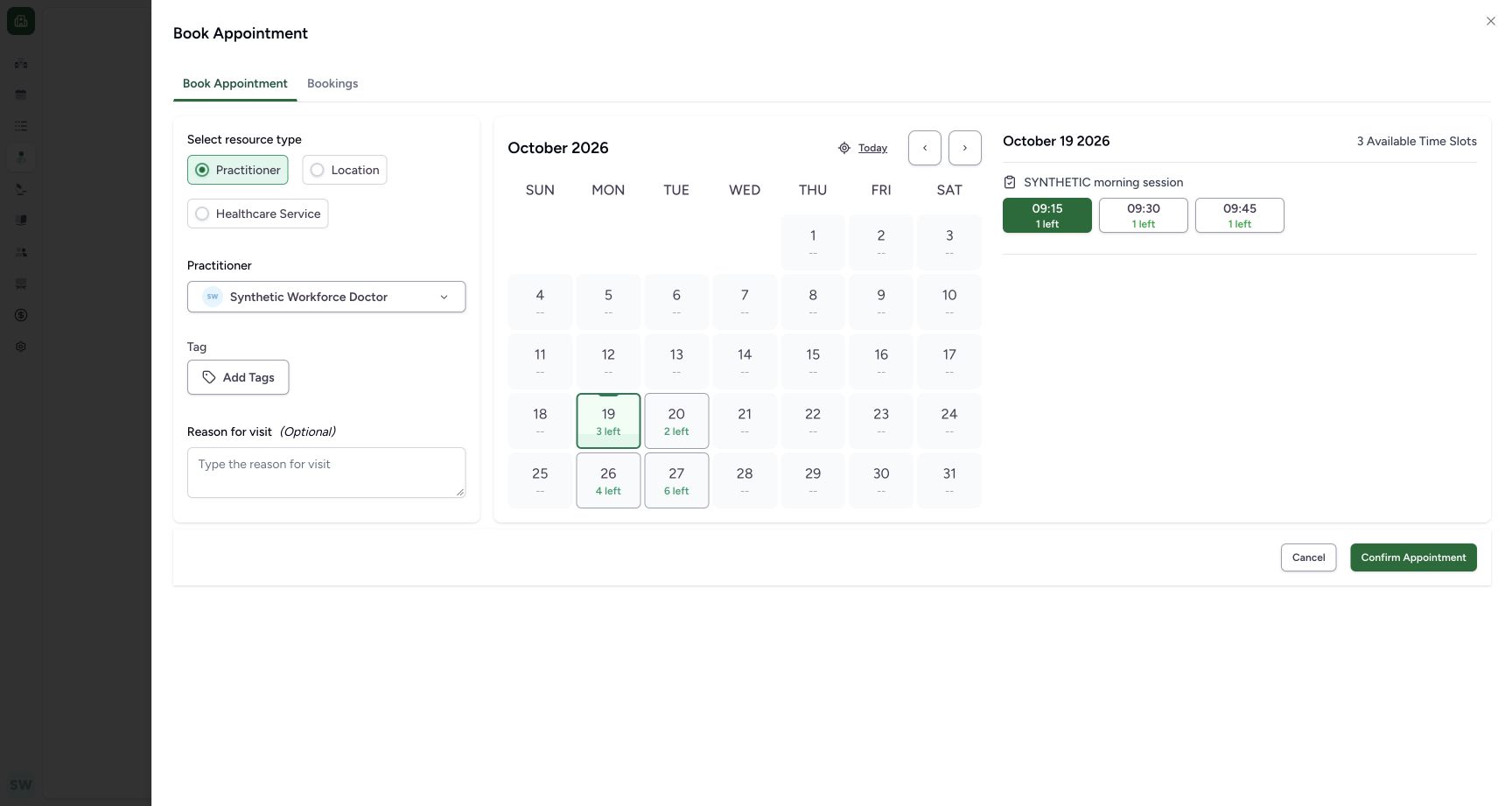
- 27 October selected: Check the intended future date.
- 3 Available Time Slots: Only three times are offered after the partial-day block.
- 09:30 / 2 left: Each shown time has capacity two; the blocked 09:15 time is absent.
- 29 October disabled: The separate full-day block still prevents choosing that date.
 123456
Verify the saved future Booked appointment
Capture details
Exact committed ba551c1d assets and backend. Existing non-superuser Staff in its assigned fictional Clinic, independent 45244 browser origin. Verify the saved future Booked appointment.
Image SHA-256 cce8b29e54a8631ac70871f56ff0649b674e298e72260136b4abfa22b513886e
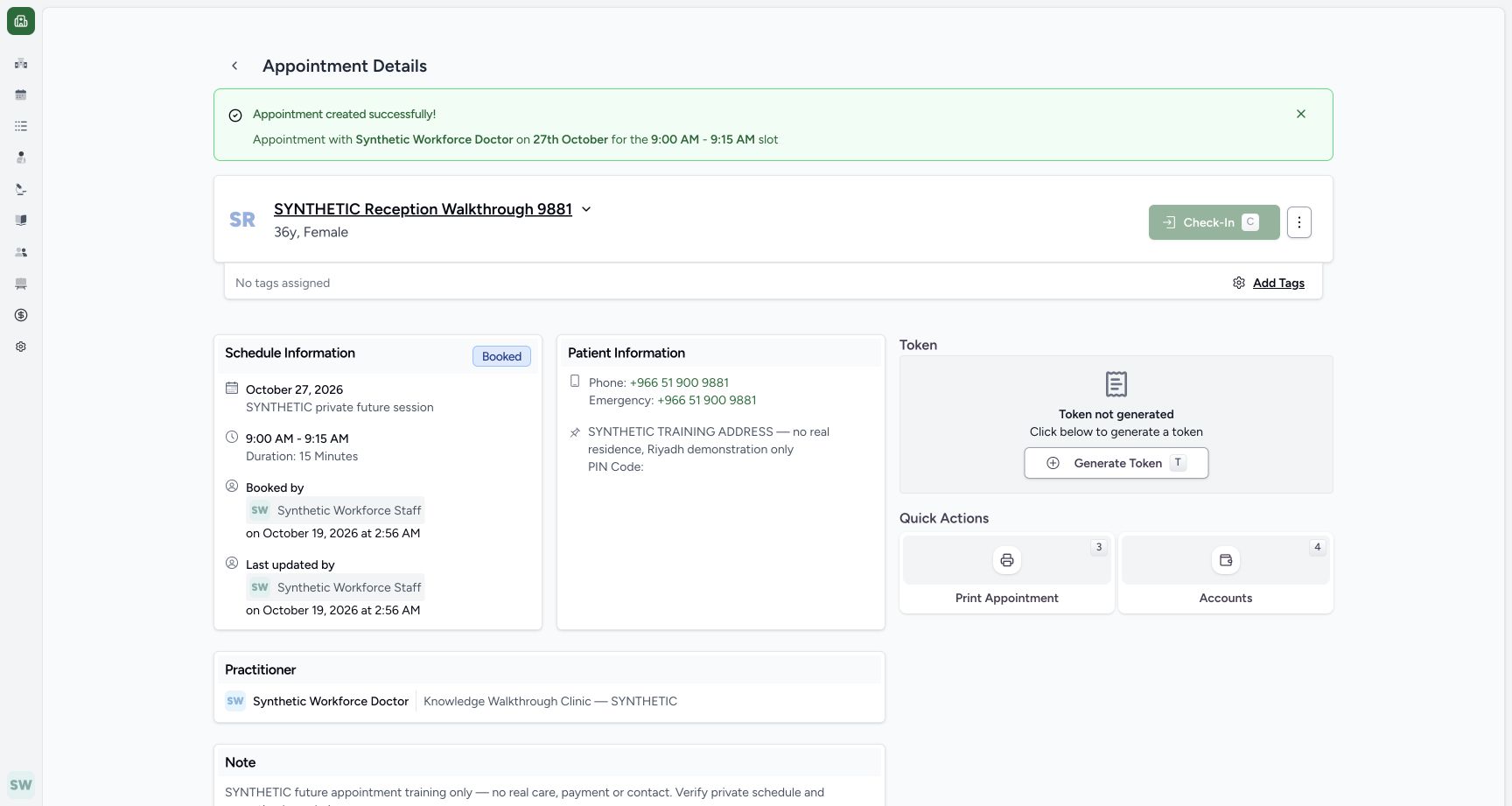
- Intended patient: Confirm the existing synthetic patient name.
- Booked: The appointment is saved Booked.
- 09:00–09:15: Confirm the saved time and 15-minute duration.
- Staff creator: The saved record names the actual Staff actor.
- Future Check-In disabled: The future appointment cannot be checked in in this pictured state.
- Actions: Open the saved appointment maintenance menu.
14 of 14 content blocks have reviewed image alignment. Missing overview or prerequisite images remain open.
Before you begin
- Use your existing authorized Clinic Staff account and the intended existing patient. The illustrated patient is SYNTHETIC Reception Walkthrough 9881.123
Recorded release ba551c1d · 2026-10-18T23:55:27.287Z · 1728 × 921 Use Schedule Appointment on the existing patient
Capture details
Exact committed ba551c1d assets and backend. Existing non-superuser Staff in its assigned fictional Clinic, independent 45244 browser origin. Use Schedule Appointment on the existing patient.
Image SHA-256
644a4dcc810928109c5a3090363f9a4910fcb6bca36c77ef8a993ab733789511- Known contact search: Find the existing fictional patient using its known phone.
- Matching patient: Verify the intended existing synthetic identity.
- Schedule Appointment: Start assisted booking for this existing row.
- The illustrated Doctor has a separate private Tuesday/Thursday schedule for 27–31 October 2026, a partial-day block on 27 October 09:15–09:30 and a full-day block on 29 October.
 123
123Recorded release ba551c1d · 2026-10-18T23:56:02.034Z · 1728 × 921 Recognize the future date and full-day block
Capture details
Exact committed ba551c1d assets and backend. Existing non-superuser Staff in its assigned fictional Clinic, independent 45244 browser origin. Recognize the future date and full-day block.
Image SHA-256
b98616e3cb5a6fd64a81a9524a5e8b21f0ef10bb81aee46ba96928fa9ae9091d- 27 October / 6 left: Choose the future date on the separate private template.
- 29 October disabled: The full-day blocked date is unavailable.
- Today initially selected: The initial date is 19 October; explicitly choose the intended future date.
1234Recorded release ba551c1d · 2026-10-18T23:56:08.975Z · 1728 × 921 Inspect the partial-day block in the booking selector
Capture details
Exact committed ba551c1d assets and backend. Existing non-superuser Staff in its assigned fictional Clinic, independent 45244 browser origin. Inspect the partial-day block in the booking selector.
Image SHA-256
cc3225326a2b922b9da8581563b8b6930482a3654fb64a1aea25d70de9a662ea- 27 October selected: Check the intended future date.
- 3 Available Time Slots: Only three times are offered after the partial-day block.
- 09:30 / 2 left: Each shown time has capacity two; the blocked 09:15 time is absent.
- 29 October disabled: The separate full-day block still prevents choosing that date.
1. Use the patient booking entry
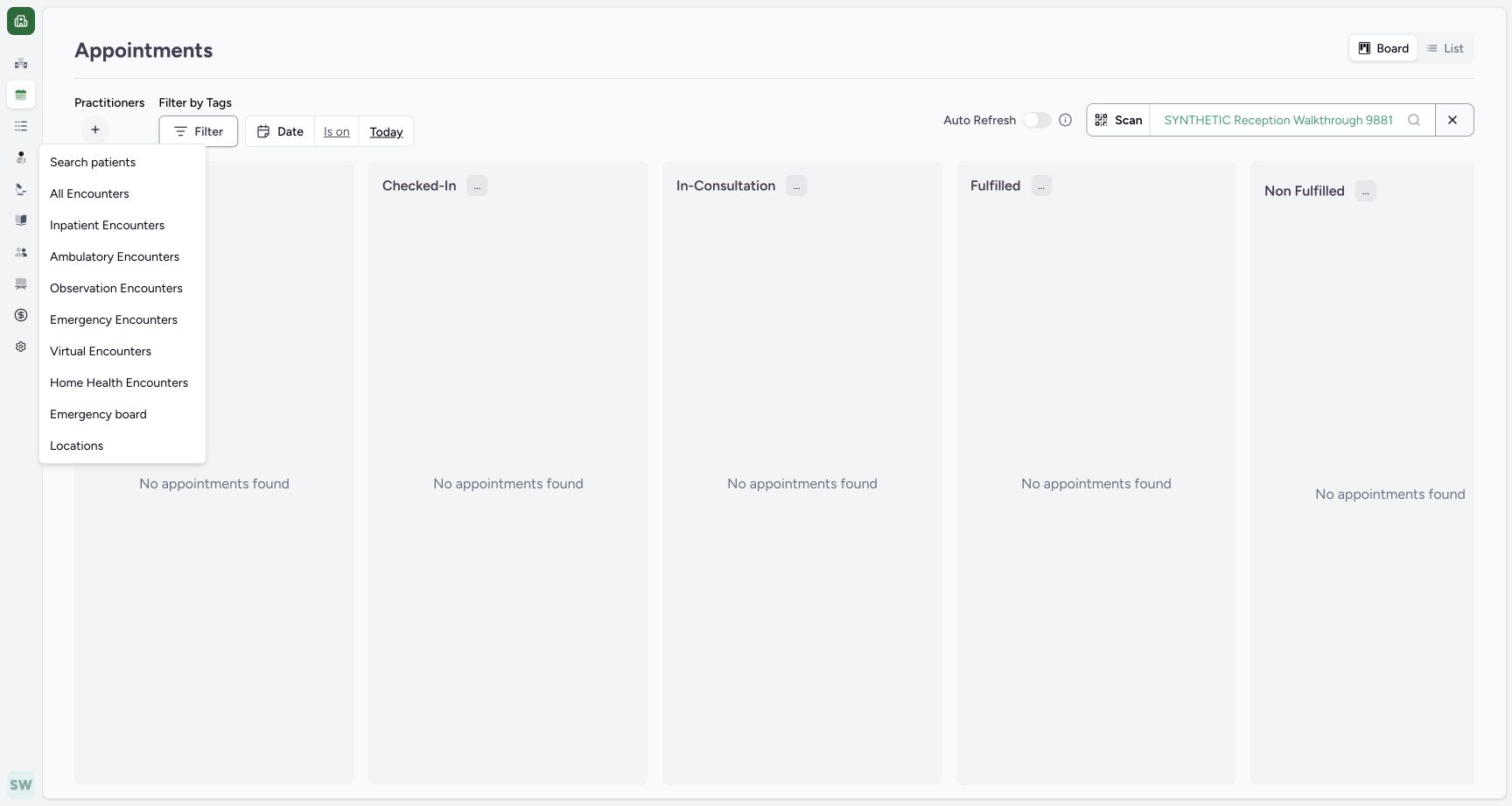
Open Patients → Search patients. Search the known existing phone, confirm the matching synthetic name and use that row’s Schedule Appointment. Do not use Add New Patient for this existing record.
 1
1Open Patients → Search patients
Capture details
Exact committed ba551c1d assets and backend. Existing non-superuser Staff in its assigned fictional Clinic, independent 45244 browser origin. Open Patients → Search patients.
Image SHA-256 6fcff9b30b2c6e303ad737b7d1fbf864773bd9ce68bbfdeea6bdf8aebac29328
- Search patients: Open the normal assisted-booking entry in Patients.
123Use Schedule Appointment on the existing patient
Capture details
Exact committed ba551c1d assets and backend. Existing non-superuser Staff in its assigned fictional Clinic, independent 45244 browser origin. Use Schedule Appointment on the existing patient.
Image SHA-256 644a4dcc810928109c5a3090363f9a4910fcb6bca36c77ef8a993ab733789511
- Known contact search: Find the existing fictional patient using its known phone.
- Matching patient: Verify the intended existing synthetic identity.
- Schedule Appointment: Start assisted booking for this existing row.
2. Verify the existing identity
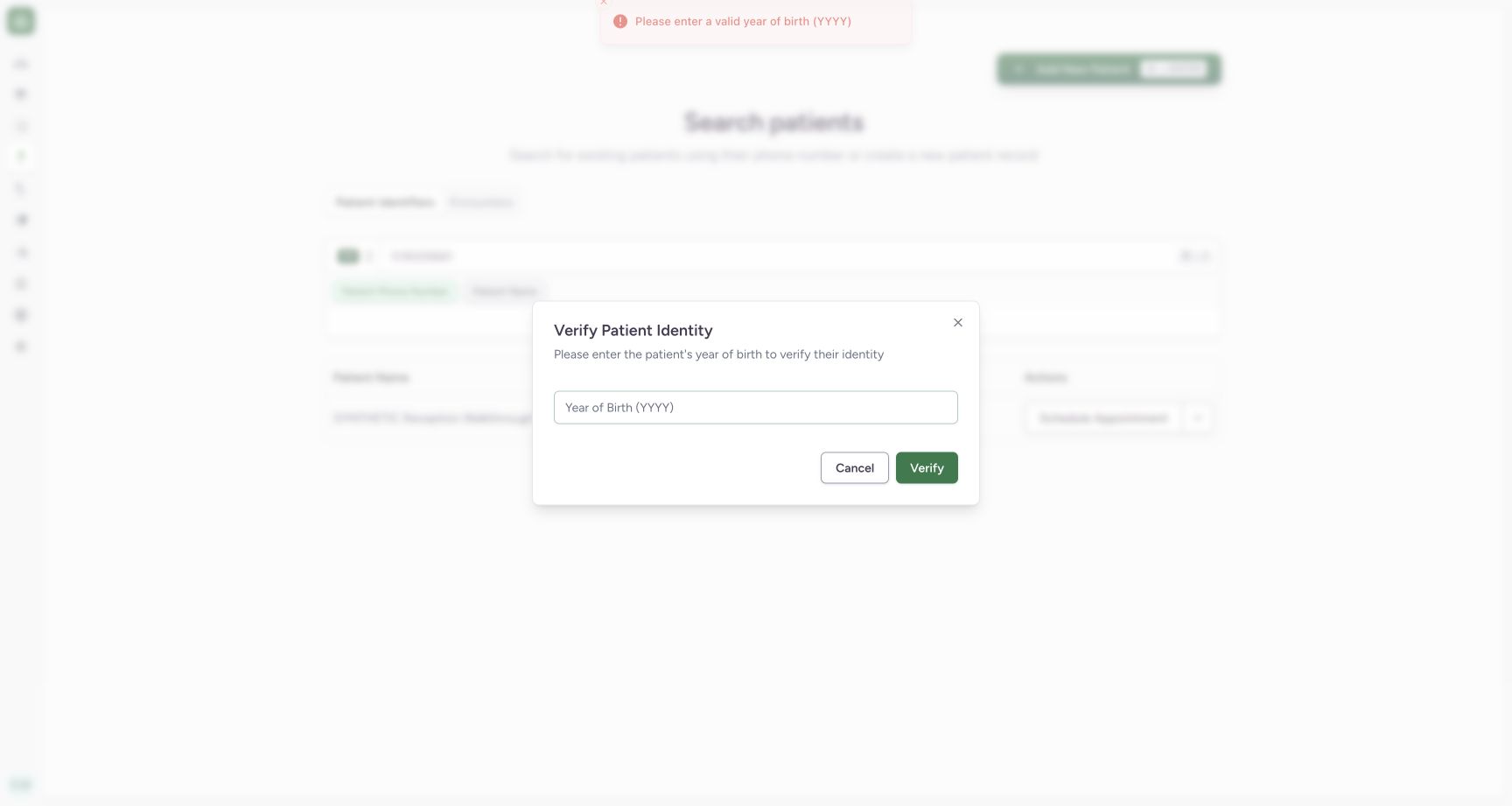
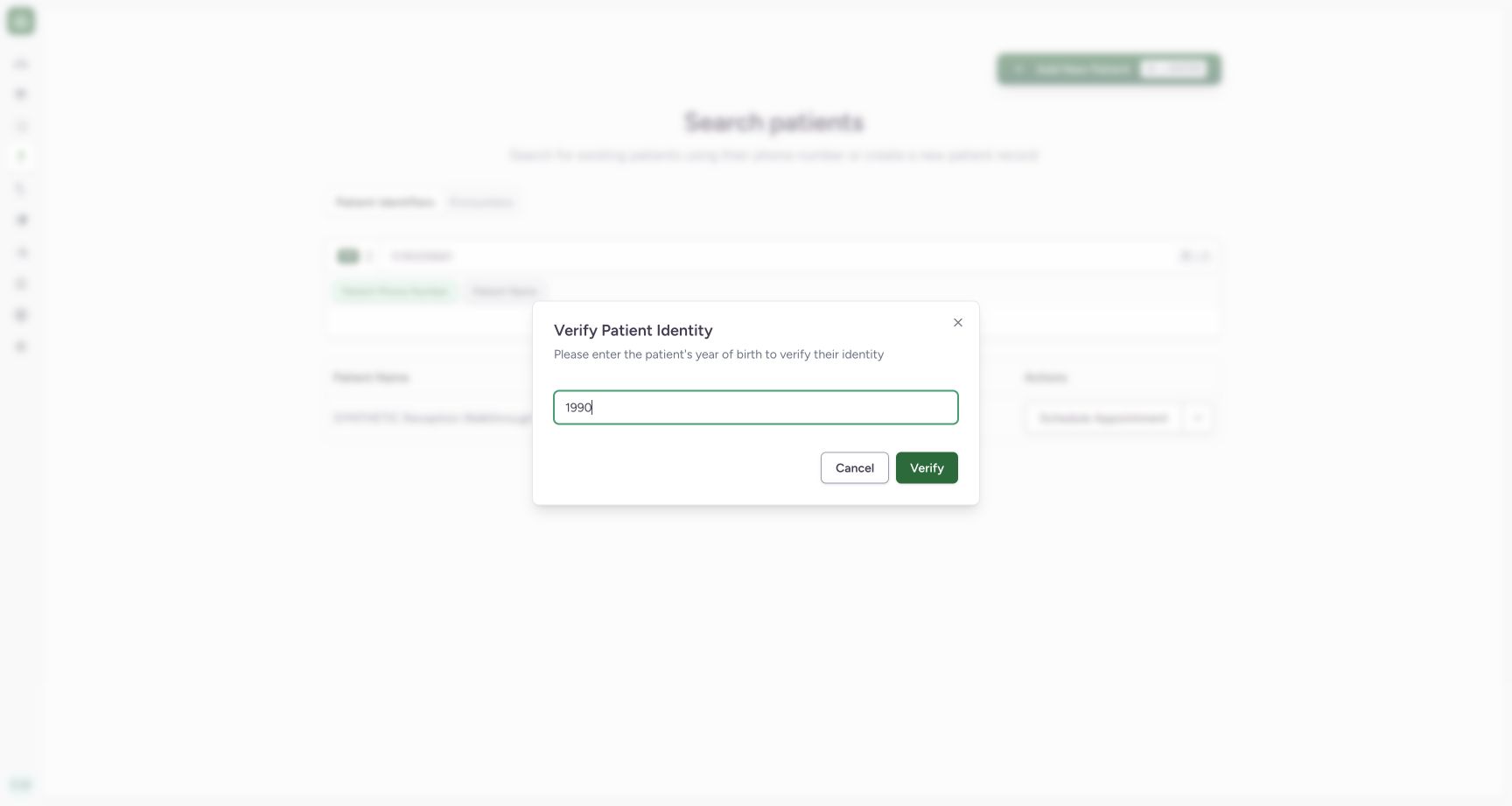
The dialog requires a valid four-digit year of birth. The blank attempt shows the actual feedback. Enter the independently known 1990 for this fictional patient and use Verify.
 123
123Recognize the required year-of-birth feedback
Capture details
Exact committed ba551c1d assets and backend. Existing non-superuser Staff in its assigned fictional Clinic, independent 45244 browser origin. Recognize the required year-of-birth feedback.
Image SHA-256 8f1d9cbd33bfd7e9f7fff121503ed66db17fa26798ce76b31ba4c5658a71bd3d
- Year of Birth: Complete the required four-digit year.
- Verify: The blank verification attempt produces the pictured feedback.
- Actual feedback: The transient message requests a valid year of birth.
 12
12Enter the known synthetic year and verify
Capture details
Exact committed ba551c1d assets and backend. Existing non-superuser Staff in its assigned fictional Clinic, independent 45244 browser origin. Enter the known synthetic year and verify.
Image SHA-256 b599216a98d99e4cd1cae001d0cb23b9936d5d289d3c5f57e2954692787879ba
- 1990: This is the independently known year for the fictional patient.
- Verify: Continue through the normal existing-patient check.
3. Choose the booking resource
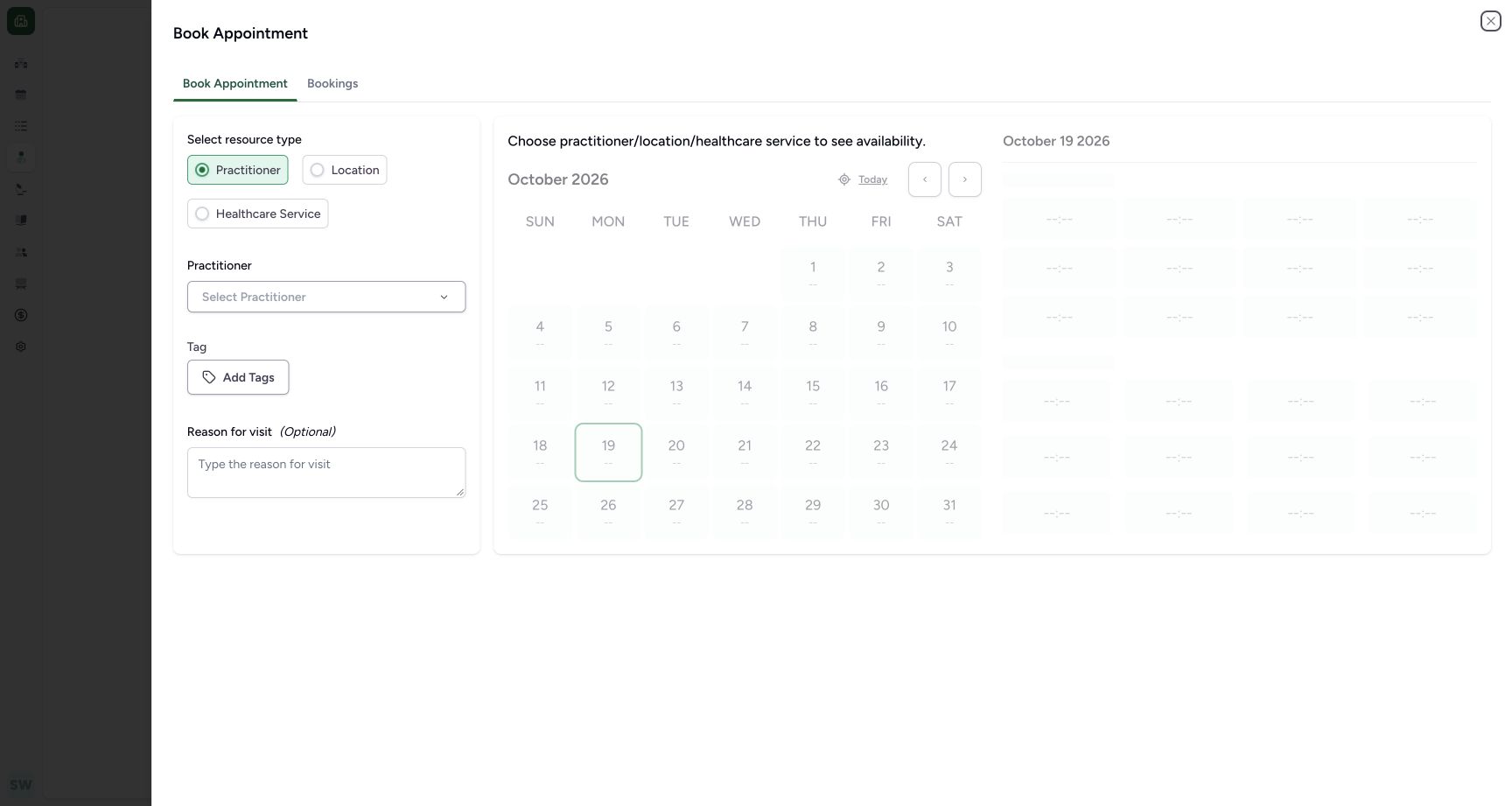
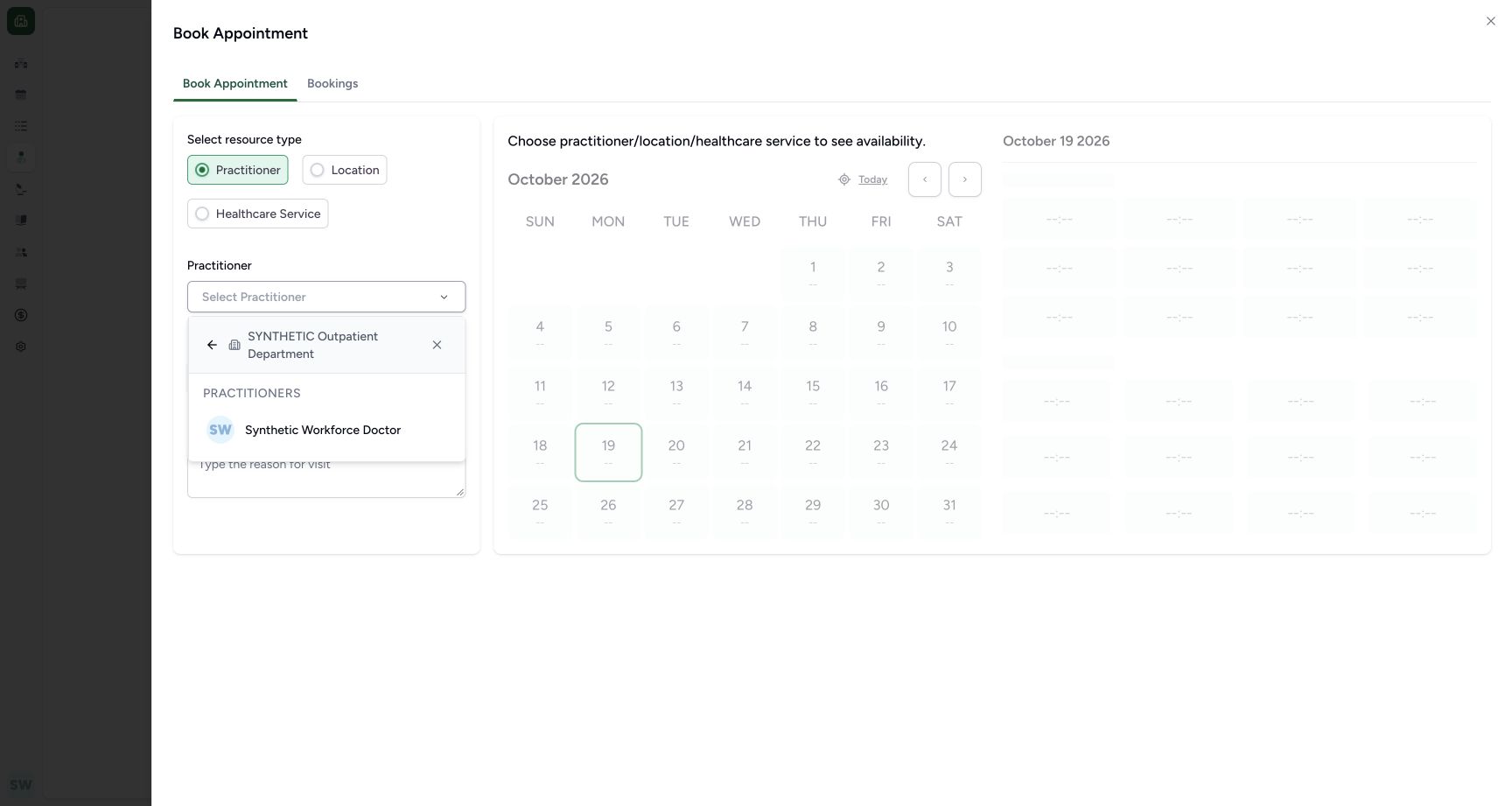
Keep Practitioner selected and open Select Practitioner. Availability cannot be chosen until a resource is selected. In the existing SYNTHETIC Outpatient Department, choose Synthetic Workforce Doctor.
 123
123Choose a resource before loading availability
Capture details
Exact committed ba551c1d assets and backend. Existing non-superuser Staff in its assigned fictional Clinic, independent 45244 browser origin. Choose a resource before loading availability.
Image SHA-256 9009c1a662167219581f7f200900ecd9695afc9eca278596708c7ce68400ad26
- Practitioner: This lesson uses the Practitioner resource type.
- Select Practitioner: Choose the existing authorized Doctor.
- Bookings: Use this tab later to find the saved appointment history.
 12
12Choose the Doctor in the existing department
Capture details
Exact committed ba551c1d assets and backend. Existing non-superuser Staff in its assigned fictional Clinic, independent 45244 browser origin. Choose the Doctor in the existing department.
Image SHA-256 2bc2b20651f49d1f928c4fa7fbd37862f802fa0d9daf6393e8109d8a28ae7dba
- Existing department: The selector is within SYNTHETIC Outpatient Department.
- Synthetic Workforce Doctor: Choose the intended existing practitioner.
4. Select the intended future date
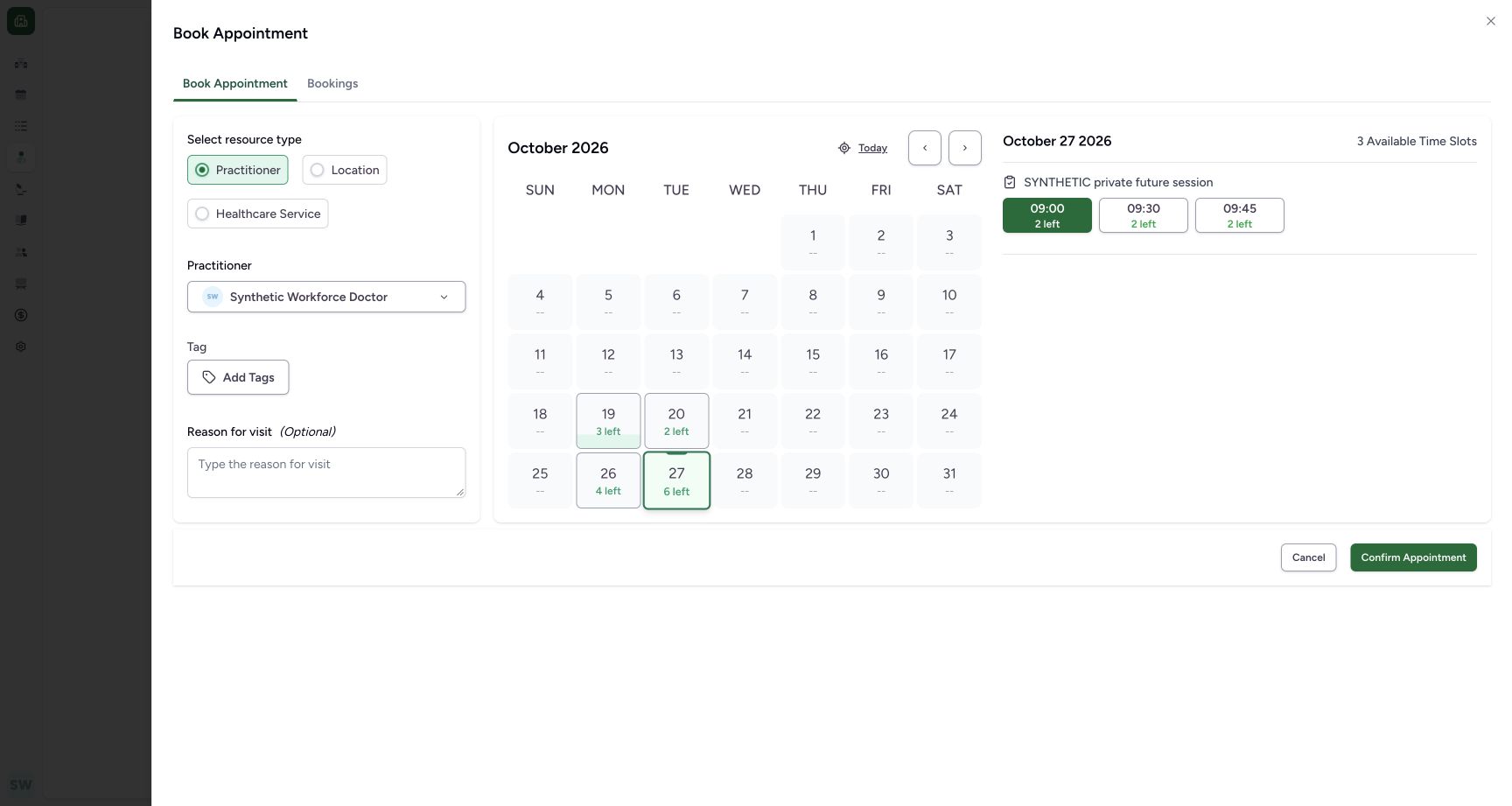
The form initially selects 19 October. Choose 27 October / 6 left for the separate private future session. 29 October is disabled under the full-day exception. Confirm the date rather than assuming the default is the intended appointment date.
123Recognize the future date and full-day block
Capture details
Exact committed ba551c1d assets and backend. Existing non-superuser Staff in its assigned fictional Clinic, independent 45244 browser origin. Recognize the future date and full-day block.
Image SHA-256 b98616e3cb5a6fd64a81a9524a5e8b21f0ef10bb81aee46ba96928fa9ae9091d
- 27 October / 6 left: Choose the future date on the separate private template.
- 29 October disabled: The full-day blocked date is unavailable.
- Today initially selected: The initial date is 19 October; explicitly choose the intended future date.
1234Inspect the partial-day block in the booking selector
Capture details
Exact committed ba551c1d assets and backend. Existing non-superuser Staff in its assigned fictional Clinic, independent 45244 browser origin. Inspect the partial-day block in the booking selector.
Image SHA-256 cc3225326a2b922b9da8581563b8b6930482a3654fb64a1aea25d70de9a662ea
- 27 October selected: Check the intended future date.
- 3 Available Time Slots: Only three times are offered after the partial-day block.
- 09:30 / 2 left: Each shown time has capacity two; the blocked 09:15 time is absent.
- 29 October disabled: The separate full-day block still prevents choosing that date.
5. Review the remaining times and capacity
On 27 October, the partial-day block removes 09:15. The actual choices are 09:00, 09:30 and 09:45, each showing 2 left. This is three time slots and six remaining patient places in this fictional schedule.
1234Inspect the partial-day block in the booking selector
Capture details
Exact committed ba551c1d assets and backend. Existing non-superuser Staff in its assigned fictional Clinic, independent 45244 browser origin. Inspect the partial-day block in the booking selector.
Image SHA-256 cc3225326a2b922b9da8581563b8b6930482a3654fb64a1aea25d70de9a662ea
- 27 October selected: Check the intended future date.
- 3 Available Time Slots: Only three times are offered after the partial-day block.
- 09:30 / 2 left: Each shown time has capacity two; the blocked 09:15 time is absent.
- 29 October disabled: The separate full-day block still prevents choosing that date.
6. Check that a time is selected
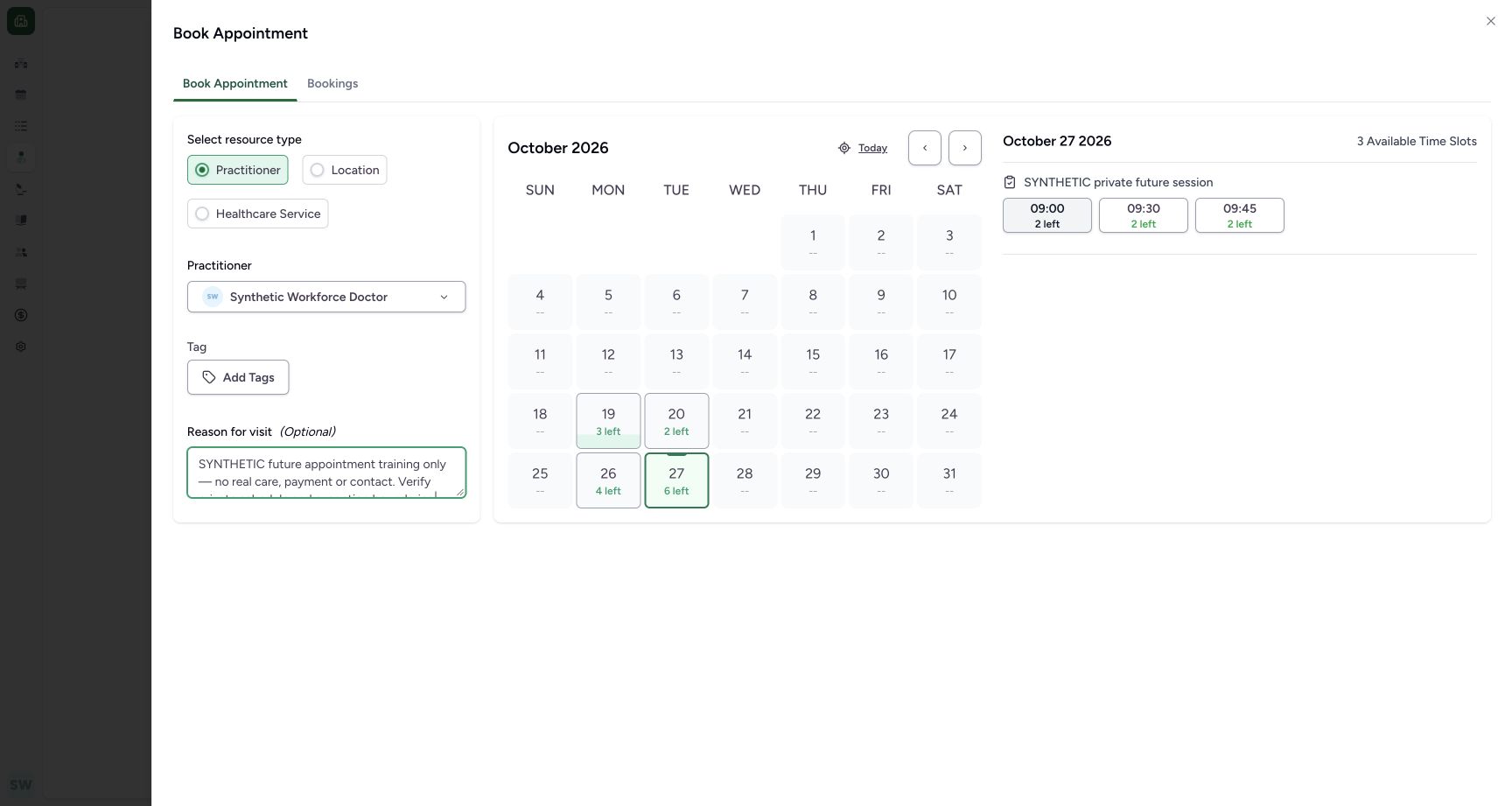
Check the intended time is green. Clicking an already selected time clears it; the unselected state shown here has no Confirm Appointment button. Select the intended 09:00 time again if necessary.
 1
1Select a time before confirming
Capture details
Exact committed ba551c1d assets and backend. Existing non-superuser Staff in its assigned fictional Clinic, independent 45244 browser origin. Select a time before confirming.
Image SHA-256 bb712f00e178d3780464e205bd187139e008959b8cc0e9df46efef9ac3dcd784
- Unselected 09:00: The time is not green in this state. Select the intended time to restore confirmation controls.
 123
123Review the selected time and confirm once
Capture details
Exact committed ba551c1d assets and backend. Existing non-superuser Staff in its assigned fictional Clinic, independent 45244 browser origin. Review the selected time and confirm once.
Image SHA-256 c43cb308a81ab70b7a3cd4867fc24da03e4d9270abadb09c75c95c3c677367e0
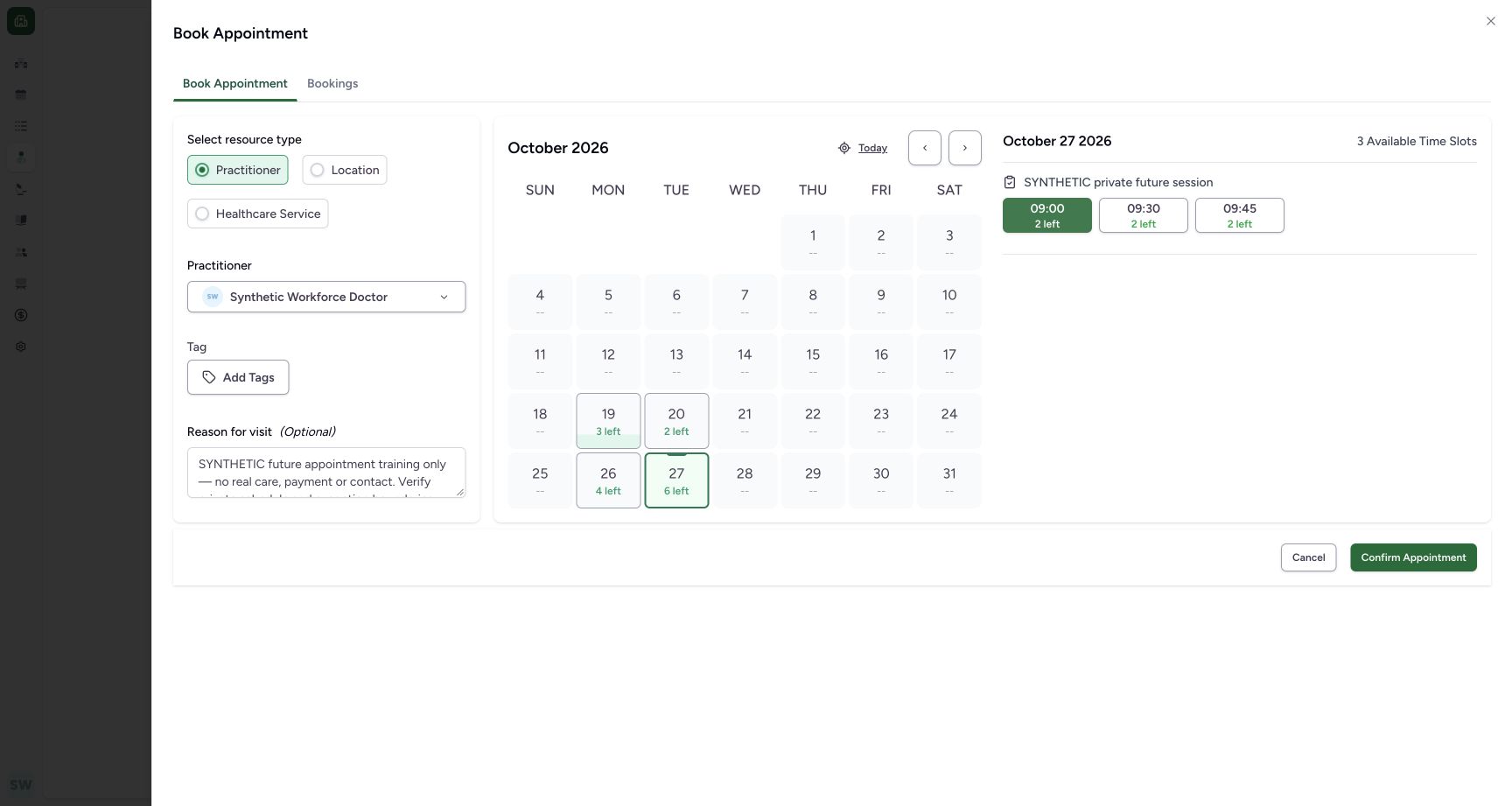
- Selected 09:00: Green indicates the intended time is selected.
- Training-only note: The optional reason identifies the fictional training example.
- Confirm Appointment: Submit the single reviewed appointment once.
7. Review the note and confirm once
Confirm 27 October, the green 09:00 selection and intended Doctor. Enter an optional clearly synthetic reason and use Confirm Appointment once.
123Review the selected time and confirm once
Capture details
Exact committed ba551c1d assets and backend. Existing non-superuser Staff in its assigned fictional Clinic, independent 45244 browser origin. Review the selected time and confirm once.
Image SHA-256 c43cb308a81ab70b7a3cd4867fc24da03e4d9270abadb09c75c95c3c677367e0
- Selected 09:00: Green indicates the intended time is selected.
- Training-only note: The optional reason identifies the fictional training example.
- Confirm Appointment: Submit the single reviewed appointment once.
8. Verify the saved Booked detail
Confirm the intended patient, Doctor, Booked status, 27 October 2026, 09:00–09:15, 15 Minutes and Staff creator. The pictured future Check-In control is disabled. Independent normal Staff reads confirm one allocated place on the intended private schedule.
123456Verify the saved future Booked appointment
Capture details
Exact committed ba551c1d assets and backend. Existing non-superuser Staff in its assigned fictional Clinic, independent 45244 browser origin. Verify the saved future Booked appointment.
Image SHA-256 cce8b29e54a8631ac70871f56ff0649b674e298e72260136b4abfa22b513886e
- Intended patient: Confirm the existing synthetic patient name.
- Booked: The appointment is saved Booked.
- 09:00–09:15: Confirm the saved time and 15-minute duration.
- Staff creator: The saved record names the actual Staff actor.
- Future Check-In disabled: The future appointment cannot be checked in in this pictured state.
- Actions: Open the saved appointment maintenance menu.
A time slot and remaining places are different counts
The page shows 3 Available Time Slots, with 2 left on each offered time. The 27 October calendar total is 6 left. These are the actual capacity values in this fictional example.
1234Inspect the partial-day block in the booking selector
Capture details
Exact committed ba551c1d assets and backend. Existing non-superuser Staff in its assigned fictional Clinic, independent 45244 browser origin. Inspect the partial-day block in the booking selector.
Image SHA-256 cc3225326a2b922b9da8581563b8b6930482a3654fb64a1aea25d70de9a662ea
- 27 October selected: Check the intended future date.
- 3 Available Time Slots: Only three times are offered after the partial-day block.
- 09:30 / 2 left: Each shown time has capacity two; the blocked 09:15 time is absent.
- 29 October disabled: The separate full-day block still prevents choosing that date.
Troubleshooting
Confirm Appointment is missing
Check the intended time is selected in green. The pictured unselected state has no confirmation control; selecting 09:00 restores it.
1Select a time before confirming
Capture details
Exact committed ba551c1d assets and backend. Existing non-superuser Staff in its assigned fictional Clinic, independent 45244 browser origin. Select a time before confirming.
Image SHA-256 bb712f00e178d3780464e205bd187139e008959b8cc0e9df46efef9ac3dcd784
- Unselected 09:00: The time is not green in this state. Select the intended time to restore confirmation controls.
123Review the selected time and confirm once
Capture details
Exact committed ba551c1d assets and backend. Existing non-superuser Staff in its assigned fictional Clinic, independent 45244 browser origin. Review the selected time and confirm once.
Image SHA-256 c43cb308a81ab70b7a3cd4867fc24da03e4d9270abadb09c75c95c3c677367e0
- Selected 09:00: Green indicates the intended time is selected.
- Training-only note: The optional reason identifies the fictional training example.
- Confirm Appointment: Submit the single reviewed appointment once.
A blocked date or time cannot be selected
Use the displayed availability. The saved partial-day block excludes 09:15 on 27 October; the full-day 29 October date is disabled. Choose an actually offered time/date instead.
123Recognize the future date and full-day block
Capture details
Exact committed ba551c1d assets and backend. Existing non-superuser Staff in its assigned fictional Clinic, independent 45244 browser origin. Recognize the future date and full-day block.
Image SHA-256 b98616e3cb5a6fd64a81a9524a5e8b21f0ef10bb81aee46ba96928fa9ae9091d
- 27 October / 6 left: Choose the future date on the separate private template.
- 29 October disabled: The full-day blocked date is unavailable.
- Today initially selected: The initial date is 19 October; explicitly choose the intended future date.
1234Inspect the partial-day block in the booking selector
Capture details
Exact committed ba551c1d assets and backend. Existing non-superuser Staff in its assigned fictional Clinic, independent 45244 browser origin. Inspect the partial-day block in the booking selector.
Image SHA-256 cc3225326a2b922b9da8581563b8b6930482a3654fb64a1aea25d70de9a662ea
- 27 October selected: Check the intended future date.
- 3 Available Time Slots: Only three times are offered after the partial-day block.
- 09:30 / 2 left: Each shown time has capacity two; the blocked 09:15 time is absent.
- 29 October disabled: The separate full-day block still prevents choosing that date.
Source evidence
Every citation uses this exact committed version. The private source repository requires access.
- repositories/platform/mansoq-web/src/components/Patient/PatientIndex.tsx:202 ·
ba551c1d67031248136fd2016afe227b5fc994bdSource file checksum
b7f38ea49ab4aee4872fd6f35263f9a23a609f9cb2622332ea741192fb3013de - repositories/platform/mansoq-web/src/components/Patient/PatientIndex.tsx:226 ·
ba551c1d67031248136fd2016afe227b5fc994bdSource file checksum
b7f38ea49ab4aee4872fd6f35263f9a23a609f9cb2622332ea741192fb3013de - repositories/platform/mansoq-web/src/pages/Appointments/BookAppointment/AppointmentFormSection.tsx:1 ·
ba551c1d67031248136fd2016afe227b5fc994bdSource file checksum
70d5997871ee4e7ba13f972dde21302af32e966b4d41cdc20c179d47e2eb11e3 - repositories/platform/mansoq-web/src/pages/Appointments/BookAppointment/BookAppointmentDetails.tsx:76 ·
ba551c1d67031248136fd2016afe227b5fc994bdSource file checksum
10a7aab902525f4669d7219477e1ca6b7e333f38fbecc8552f608fbc721023f2 - repositories/platform/mansoq-web/src/pages/Appointments/BookAppointment/BookAppointmentDetails.tsx:144 ·
ba551c1d67031248136fd2016afe227b5fc994bdSource file checksum
10a7aab902525f4669d7219477e1ca6b7e333f38fbecc8552f608fbc721023f2 - repositories/platform/mansoq-web/src/pages/Appointments/BookAppointment/AppointmentSlotPicker.tsx:236 ·
ba551c1d67031248136fd2016afe227b5fc994bdSource file checksum
d2211acfcae4cf531e0b30aad5c9141c71caaaed7f04cc9dad2b32750f0ef1cc - repositories/platform/mansoq-web/src/pages/Appointments/BookAppointment/AppointmentDateSelection.tsx:1 ·
ba551c1d67031248136fd2016afe227b5fc994bdSource file checksum
074e85911458d3e6756aa3510707e85a086dd5ce5f370e69adc4306355efb42f - repositories/platform/mansoq-core/mansoq/emr/api/viewsets/scheduling/availability.py:92 ·
ba551c1d67031248136fd2016afe227b5fc994bdSource file checksum
1370c5b5f5cad98b4cceba59929dc88e82c70350615d5a3125d60cab54deec2c - repositories/platform/mansoq-core/mansoq/emr/api/viewsets/scheduling/availability.py:465 ·
ba551c1d67031248136fd2016afe227b5fc994bdSource file checksum
1370c5b5f5cad98b4cceba59929dc88e82c70350615d5a3125d60cab54deec2c - repositories/platform/mansoq-core/mansoq/security/authorization/scheduling.py:51 ·
ba551c1d67031248136fd2016afe227b5fc994bdSource file checksum
4ae4e0bc8d3e272fe818bdab734410d53e0c284063e55ca6333b6bef4349e42b