 MANSOQ
 Scheduling and appointments · VERSION ba551c1d
Find retained appointments with Board, List and date filters
Inspect practitioner selection, choose the actual history status group, correct an invalid date range and reopen a retained Cancelled appointment from its Board card.
Staff
 123
123Open the Practitioners filter
Capture details
Exact committed ba551c1d application; existing non-superuser Staff in its assigned fictional Clinic. Native print/save frames show actual Chrome/macOS controls and local output only.
Image SHA-256 f36ee6545ccd79ec4462599b4853f71cae5dacb083d785ee9f46492fc58b3d73
- Add practitioner filter: Open this plus control.
- Existing patient filter: The known fictional patient filter is already selected in this lesson.
- Board: Begin on the appointment Board.
 1234
1234Inspect the retained status rows
Capture details
Exact committed ba551c1d application; existing non-superuser Staff in its assigned fictional Clinic. Native print/save frames show actual Chrome/macOS controls and local output only.
Image SHA-256 07c215aca07c24aca091e8368979a30cda7c9c3f6a43cd927ec43ccd7f9bbef5
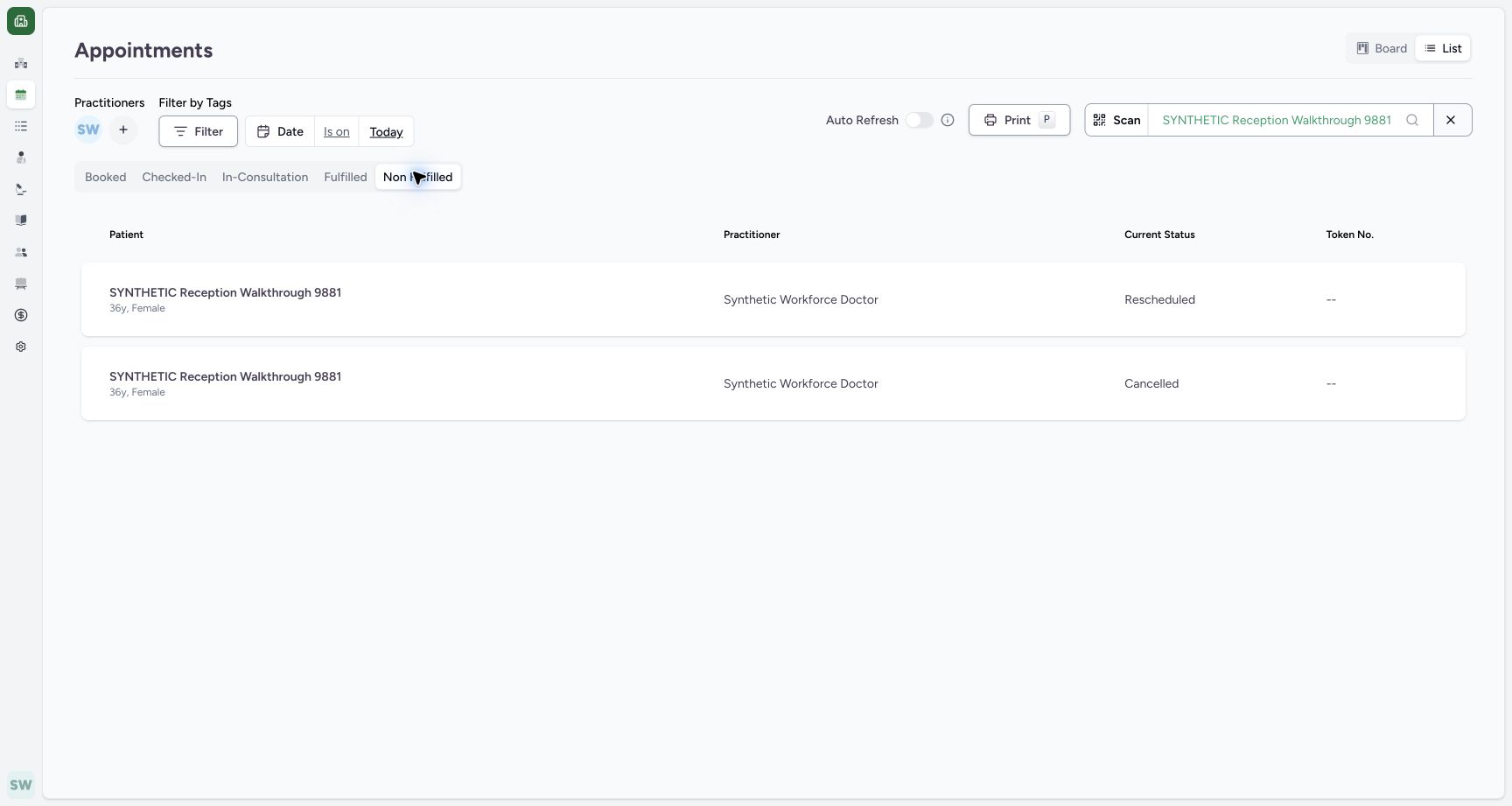
- Non Fulfilled selected: The history group is selected.
- Rescheduled row: The first matching row retains Rescheduled status.
- Cancelled row: The second row retains Cancelled status.
- Today date: Open this date value to choose the intended day.
 123
123Open the future retained card
Capture details
Exact committed ba551c1d application; existing non-superuser Staff in its assigned fictional Clinic. Native print/save frames show actual Chrome/macOS controls and local output only.
Image SHA-256 3dbe02e85188298087aa4c2bf73234f33680c5907e5f25eaad0193f052a6baec
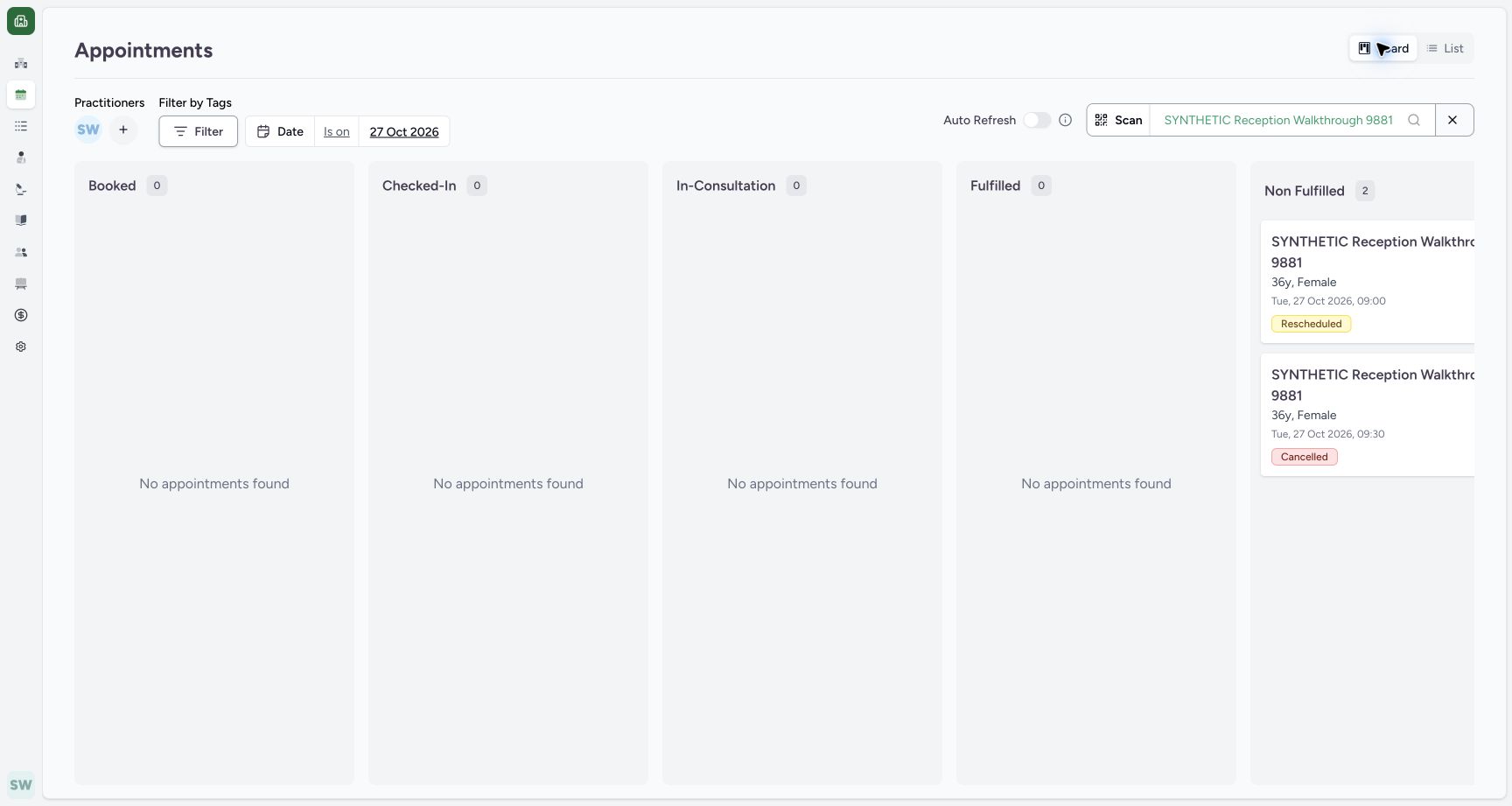
- 27 Oct 2026: The Board retains the intended date filter.
- 09:00 Rescheduled: The original appointment remains a separate linked card.
- 09:30 Cancelled: Open this actual card to verify the retained replacement.
 123
123Verify the retained Cancelled detail
Capture details
Exact committed ba551c1d application; existing non-superuser Staff in its assigned fictional Clinic. Native print/save frames show actual Chrome/macOS controls and local output only.
Image SHA-256 cf2a2356c1b30115cd1dc586487bf4a7af3fd4b5cbe3c8b07f27bd71857ad98e
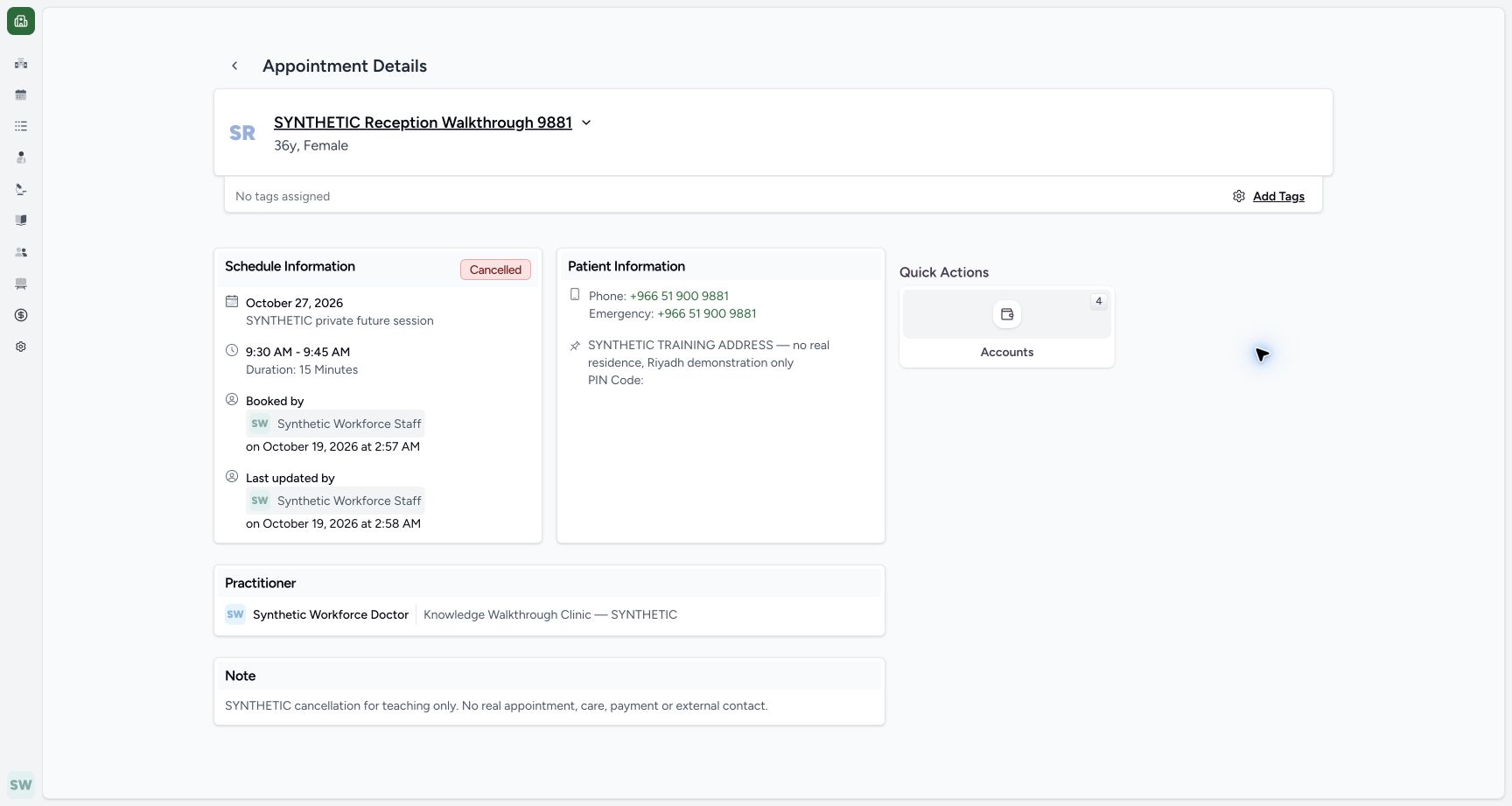
- Cancelled: The actual card opens this retained appointment.
- 09:30–09:45: The saved replacement time remains readable.
- Saved note: The cancellation reason is retained.
12 of 12 content blocks have reviewed image alignment. Missing overview or prerequisite images remain open.
Before you begin
- Start on Appointments in the assigned fictional Clinic with the known synthetic patient filter already selected. The five appointment records and intended Doctor already exist.123
Recorded release ba551c1d · 2026-10-19T00:30:03.457Z · 1728 × 921 Open the Practitioners filter
Capture details
Exact committed ba551c1d application; existing non-superuser Staff in its assigned fictional Clinic. Native print/save frames show actual Chrome/macOS controls and local output only.
Image SHA-256
f36ee6545ccd79ec4462599b4853f71cae5dacb083d785ee9f46492fc58b3d73- Add practitioner filter: Open this plus control.
- Existing patient filter: The known fictional patient filter is already selected in this lesson.
- Board: Begin on the appointment Board.
1. Inspect the practitioner filter
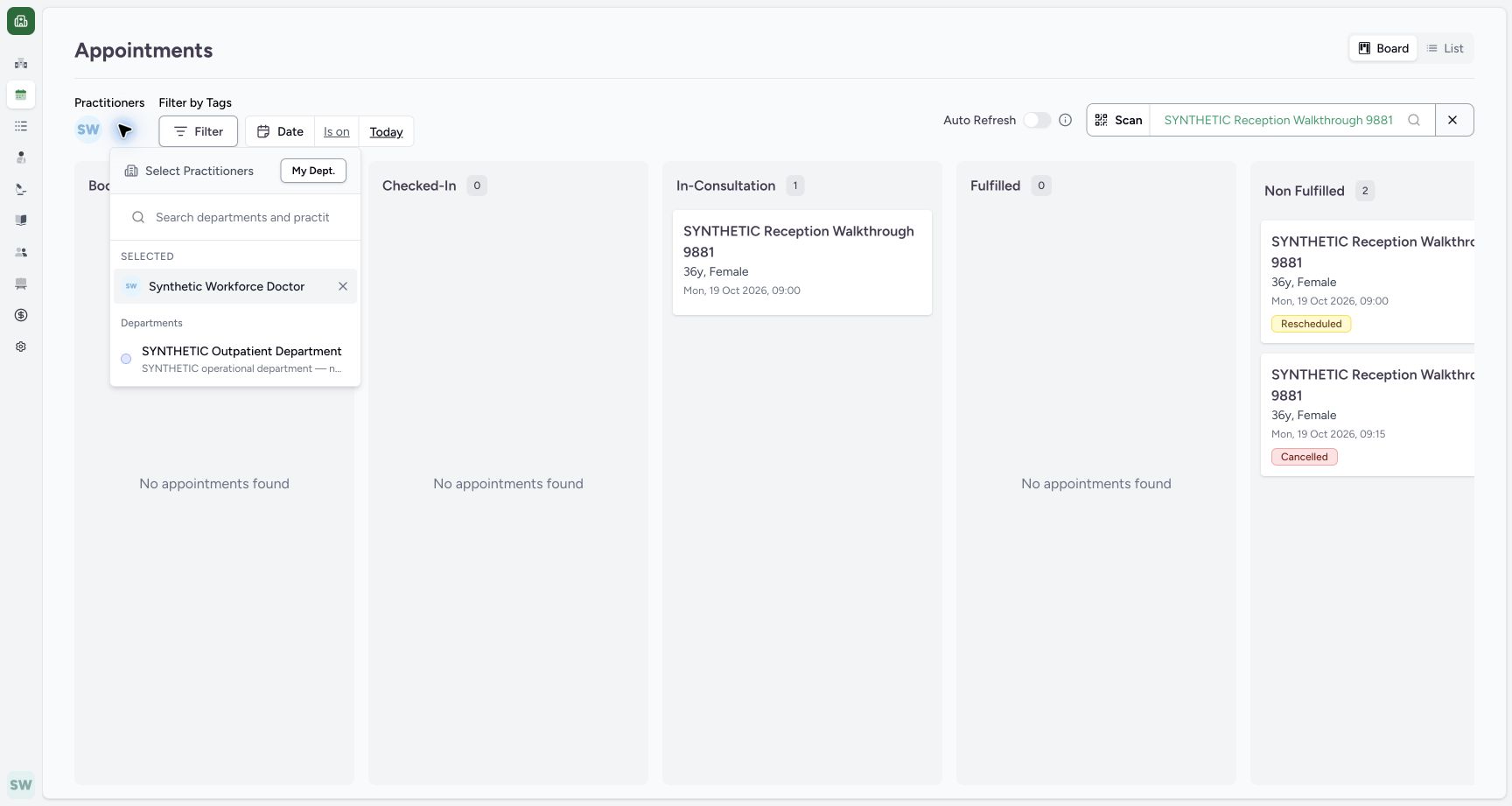
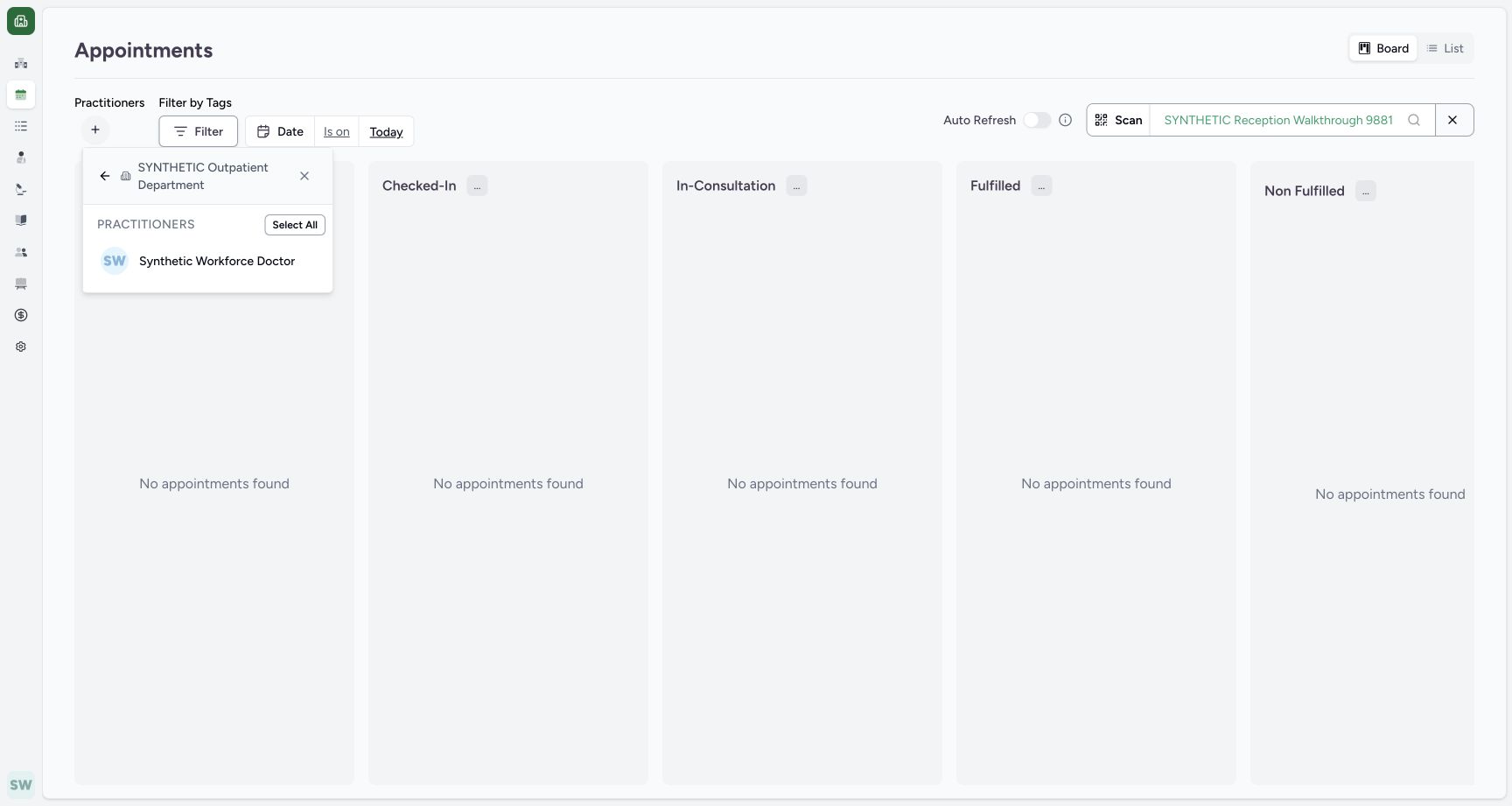
On Board, open the + under Practitioners. Inspect the selected Doctor and open SYNTHETIC Outpatient Department. The department view shows Synthetic Workforce Doctor. Select the intended Doctor only if not already selected; do not toggle off an existing selected practitioner.
123Open the Practitioners filter
Capture details
Exact committed ba551c1d application; existing non-superuser Staff in its assigned fictional Clinic. Native print/save frames show actual Chrome/macOS controls and local output only.
Image SHA-256 f36ee6545ccd79ec4462599b4853f71cae5dacb083d785ee9f46492fc58b3d73
- Add practitioner filter: Open this plus control.
- Existing patient filter: The known fictional patient filter is already selected in this lesson.
- Board: Begin on the appointment Board.
 12
12Inspect department and selected practitioner
Capture details
Exact committed ba551c1d application; existing non-superuser Staff in its assigned fictional Clinic. Native print/save frames show actual Chrome/macOS controls and local output only.
Image SHA-256 4c98d4686c6710afbdf7c136ac4cb5e55e32d2ff88b9bbe87700efd461fae6de
- Existing department: Open SYNTHETIC Outpatient Department.
- Selected Doctor: This view also shows the already selected Doctor; do not toggle it off accidentally.
 12
12Inspect the existing department Doctor option
Capture details
Exact committed ba551c1d application; existing non-superuser Staff in its assigned fictional Clinic. Native print/save frames show actual Chrome/macOS controls and local output only.
Image SHA-256 947b281143c92eca0db454ca718d792d563de52c40dfcdc8e3b5ae8365310b2e
- Existing department: The practitioner choices belong to this existing department.
- Doctor choice: Select the intended Doctor only if not already selected.
2. Read the Board groups
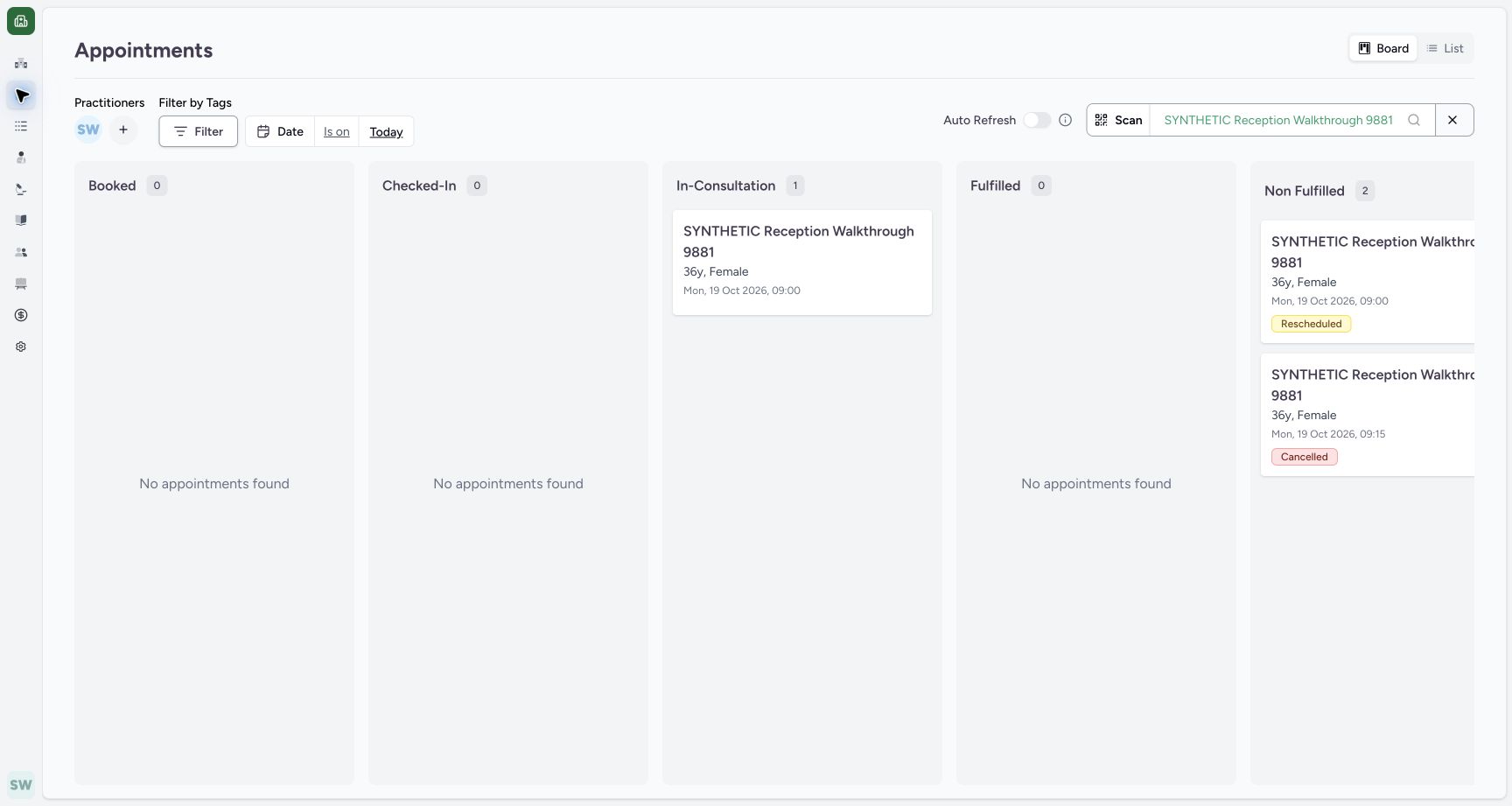
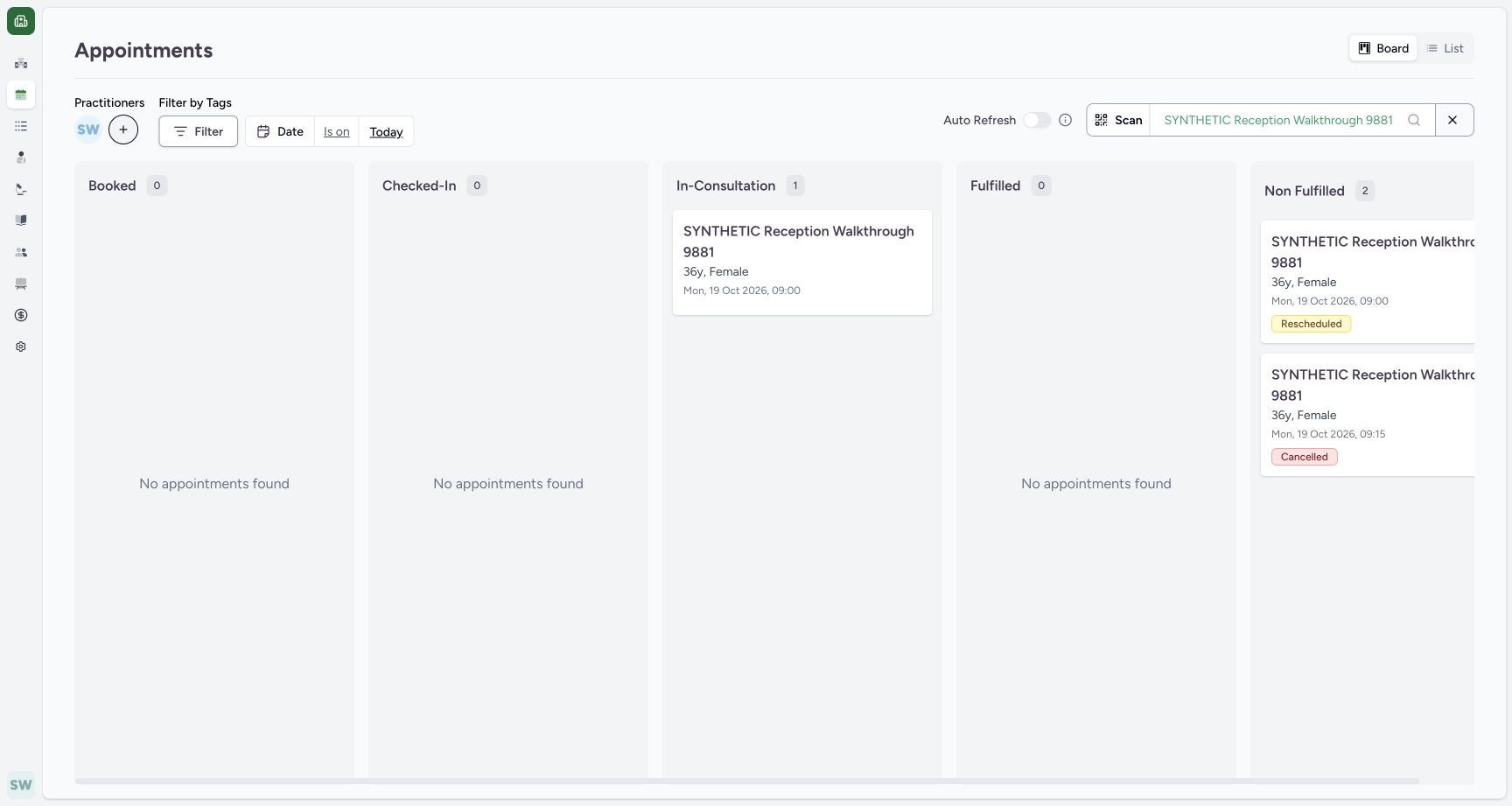
With the intended Doctor and existing patient filters active on Today, the Board shows one In-Consultation appointment and two Non Fulfilled history entries. Use List to inspect the status rows.
 123
123Read the current-day Board groups
Capture details
Exact committed ba551c1d application; existing non-superuser Staff in its assigned fictional Clinic. Native print/save frames show actual Chrome/macOS controls and local output only.
Image SHA-256 0a2aa4ac77b593ff98e1ca376342247e815ff0ae46786970cfaf5b72485ce2e3
- In-Consultation record: The saved 19 October appointment appears in its current group.
- Retained history: The two retained history records appear in Non Fulfilled.
- List: Switch to List to inspect status rows.
3. Choose the history status group in List
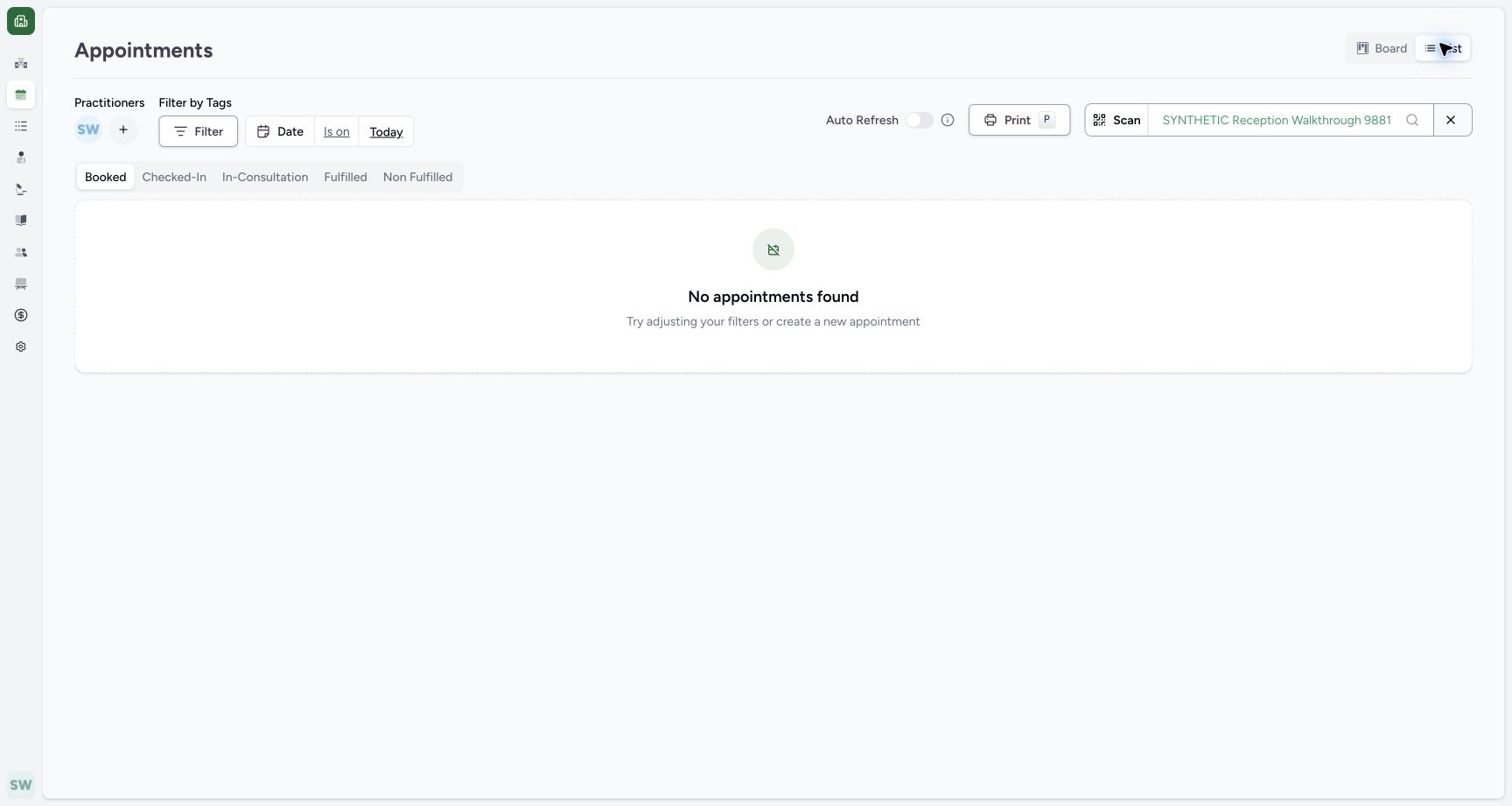
List initially selects Booked and shows no matching appointments under these filters. Choose Non Fulfilled to see the retained Rescheduled and Cancelled rows.
 123
123Recognize List status filtering
Capture details
Exact committed ba551c1d application; existing non-superuser Staff in its assigned fictional Clinic. Native print/save frames show actual Chrome/macOS controls and local output only.
Image SHA-256 6bad5bd36d2a8a3a8042bcc744582f893bfcbd8adb8d0566c943f6264cf048a3
- List selected: The page now uses List.
- Booked selected: This selected status has no matching records under these filters.
- Non Fulfilled: Choose this group to see the retained history rows.
1234Inspect the retained status rows
Capture details
Exact committed ba551c1d application; existing non-superuser Staff in its assigned fictional Clinic. Native print/save frames show actual Chrome/macOS controls and local output only.
Image SHA-256 07c215aca07c24aca091e8368979a30cda7c9c3f6a43cd927ec43ccd7f9bbef5
- Non Fulfilled selected: The history group is selected.
- Rescheduled row: The first matching row retains Rescheduled status.
- Cancelled row: The second row retains Cancelled status.
- Today date: Open this date value to choose the intended day.
4. Open the date editor
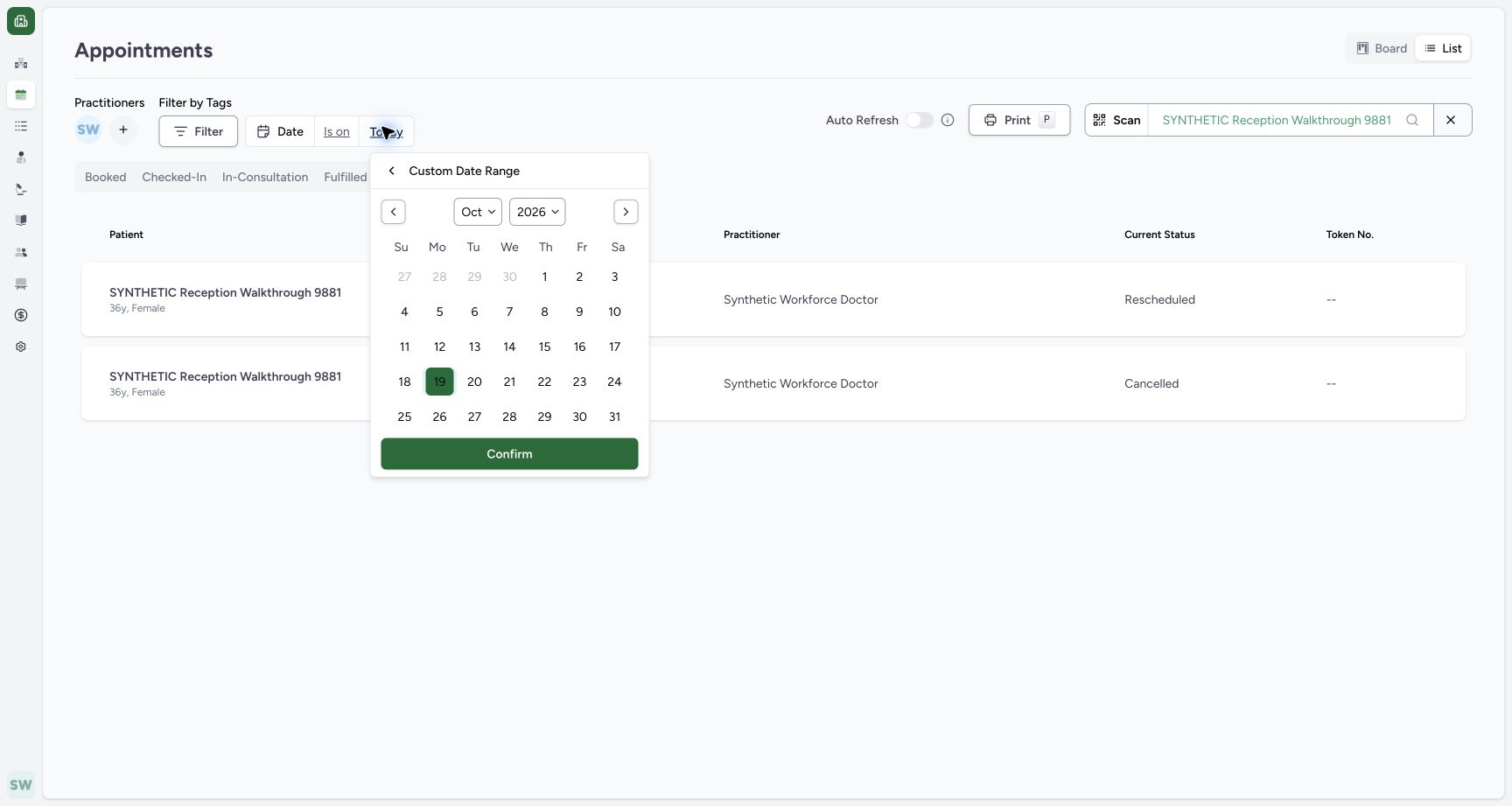
Open the date value currently labelled Today. Inspect the Custom Date Range editor before applying a different day.
1234Inspect the retained status rows
Capture details
Exact committed ba551c1d application; existing non-superuser Staff in its assigned fictional Clinic. Native print/save frames show actual Chrome/macOS controls and local output only.
Image SHA-256 07c215aca07c24aca091e8368979a30cda7c9c3f6a43cd927ec43ccd7f9bbef5
- Non Fulfilled selected: The history group is selected.
- Rescheduled row: The first matching row retains Rescheduled status.
- Cancelled row: The second row retains Cancelled status.
- Today date: Open this date value to choose the intended day.
 123
123Open the date selector
Capture details
Exact committed ba551c1d application; existing non-superuser Staff in its assigned fictional Clinic. Native print/save frames show actual Chrome/macOS controls and local output only.
Image SHA-256 71b03d7224c0457b0b0b415f29cd0023af8f95bc6d53632d17a8db8cd21c2b0e
- Date value: Open the current date value.
- Custom Date Range: The date editor belongs to this filter.
- Confirm: Review before applying the date filter.
5. Correct an invalid date order
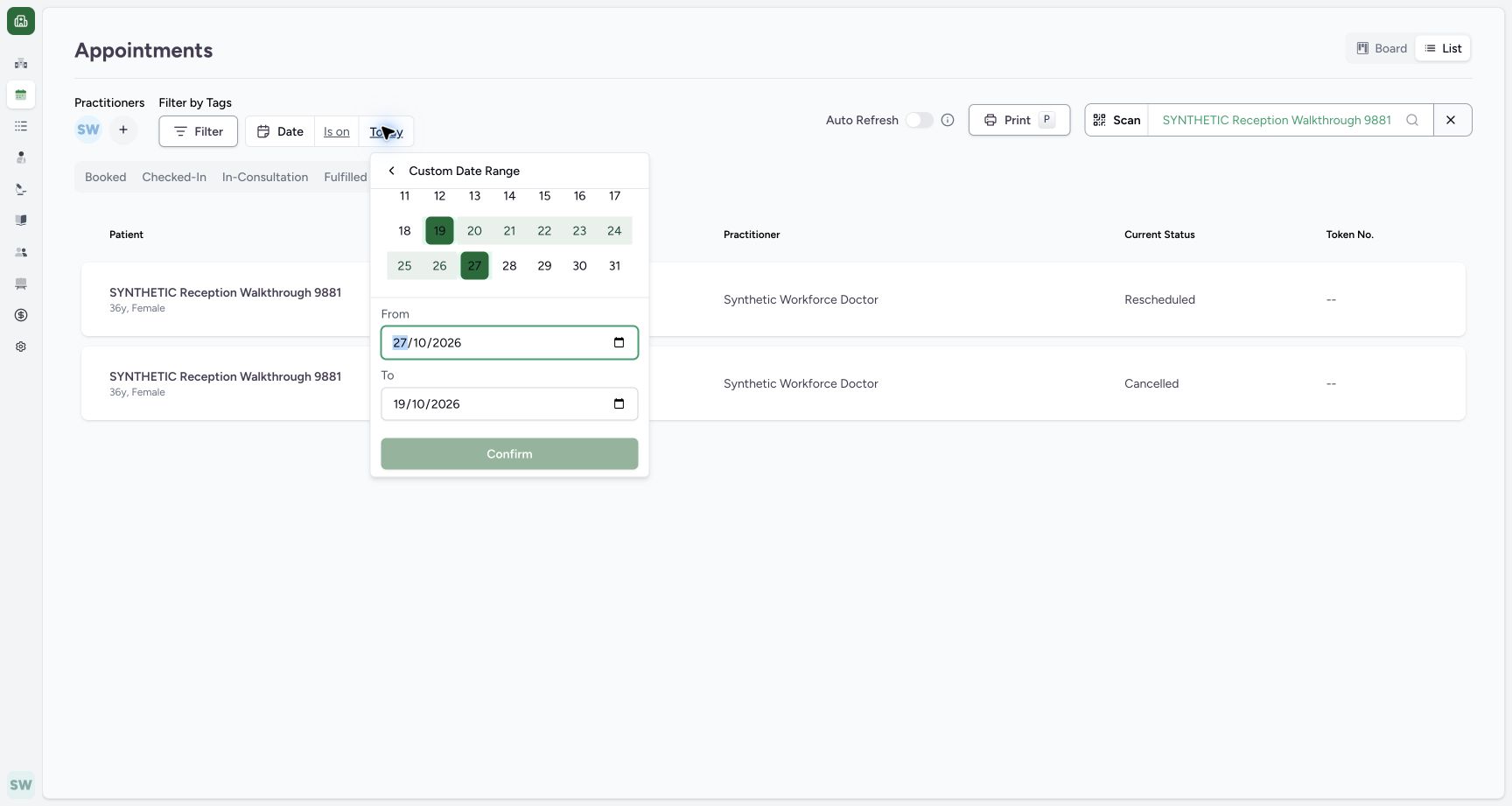
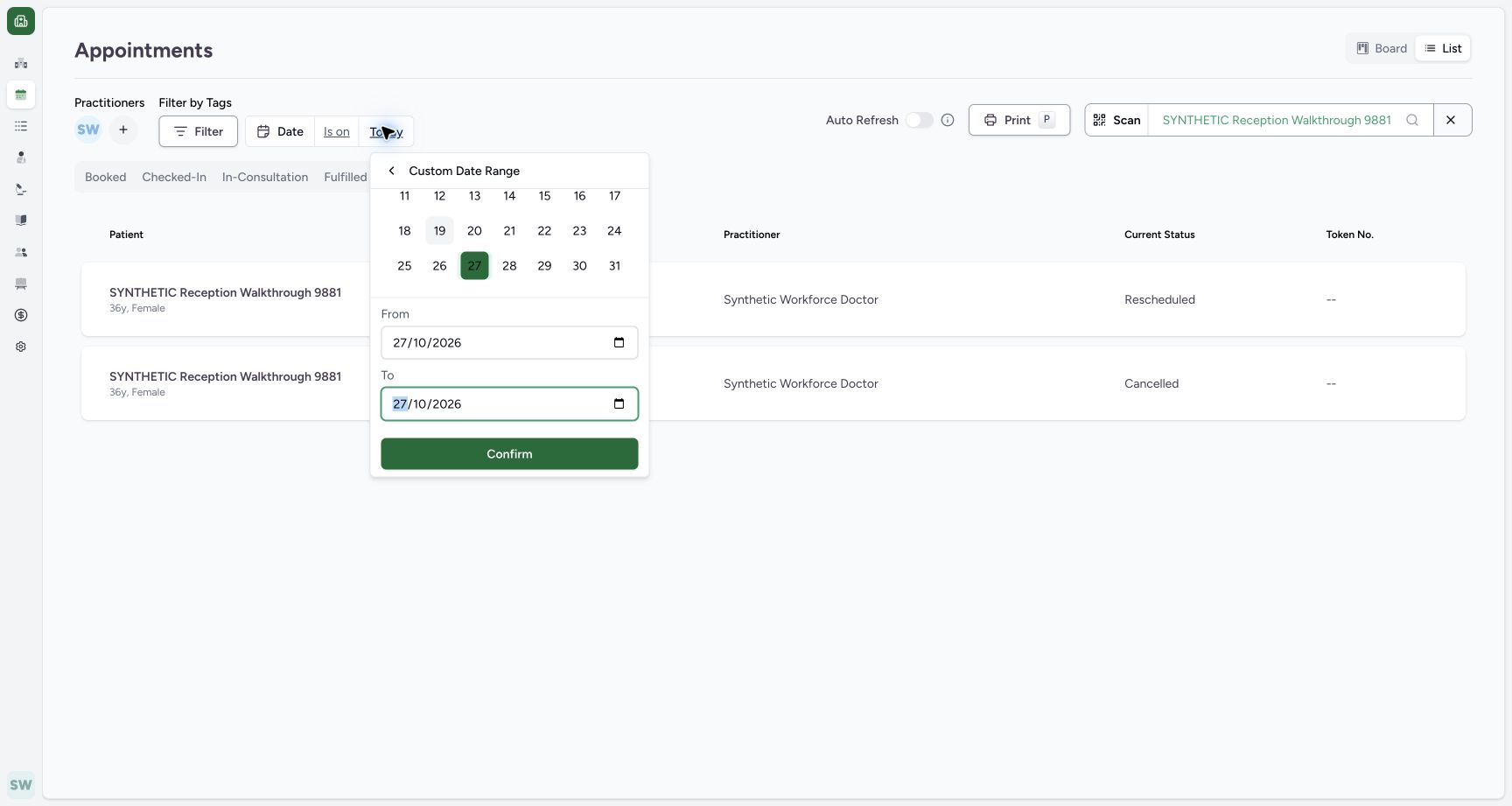
When From is 27/10/2026 and To is 19/10/2026, Confirm is disabled. Set To to 27/10/2026, matching the intended start date. Confirm is then enabled.
 123
123Recognize an invalid date order
Capture details
Exact committed ba551c1d application; existing non-superuser Staff in its assigned fictional Clinic. Native print/save frames show actual Chrome/macOS controls and local output only.
Image SHA-256 549a9af984057b13663f2c3639a4dc347bbe351867e5cbc85476a3f63668643c
- From 27 October: The start is later than the current end.
- To 19 October: Correct the end rather than submitting this order.
- Confirm disabled: The invalid range cannot be applied here.
 123
123Apply the reviewed single-day range
Capture details
Exact committed ba551c1d application; existing non-superuser Staff in its assigned fictional Clinic. Native print/save frames show actual Chrome/macOS controls and local output only.
Image SHA-256 6e92d8a8d36691e8e93c7b351e765f4ac38b278b4a6d8f7a628759e58c42f516
- From 27 October: The intended start is 27 October 2026.
- To 27 October: The intended end is the same day.
- Confirm enabled: Apply this reviewed date range.
6. Apply and inspect the future date
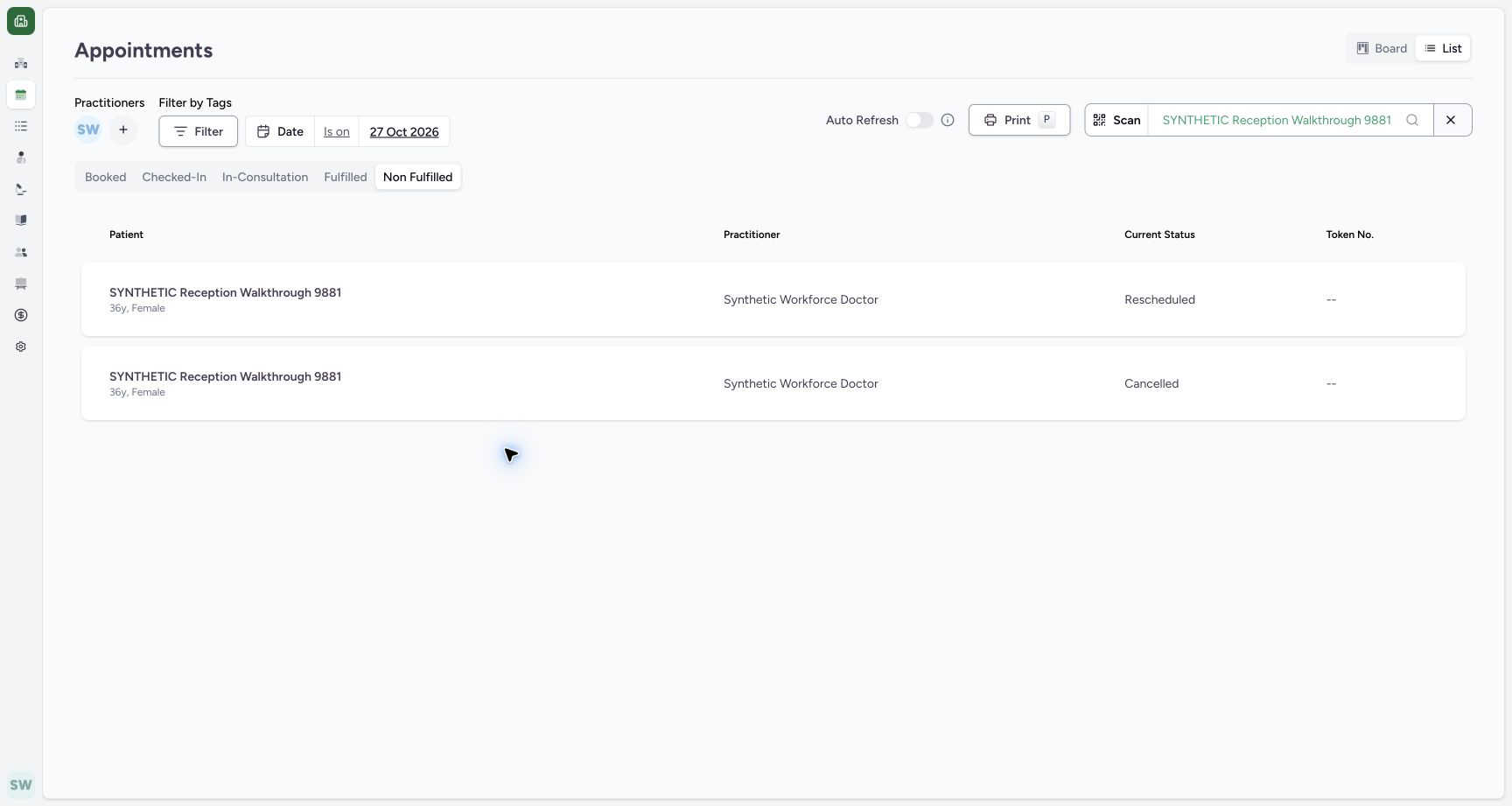
Use Confirm for the reviewed 27 October range. Check the applied 27 Oct 2026 date and Non Fulfilled group. The List shows the saved future Rescheduled and Cancelled rows.
123Apply the reviewed single-day range
Capture details
Exact committed ba551c1d application; existing non-superuser Staff in its assigned fictional Clinic. Native print/save frames show actual Chrome/macOS controls and local output only.
Image SHA-256 6e92d8a8d36691e8e93c7b351e765f4ac38b278b4a6d8f7a628759e58c42f516
- From 27 October: The intended start is 27 October 2026.
- To 27 October: The intended end is the same day.
- Confirm enabled: Apply this reviewed date range.
 12345
12345Read the future List results
Capture details
Exact committed ba551c1d application; existing non-superuser Staff in its assigned fictional Clinic. Native print/save frames show actual Chrome/macOS controls and local output only.
Image SHA-256 d289db37abe7cbb1c42ad3a6fd975c94ae89daf18136b35bf9d866f7d0e4dac2
- 27 Oct 2026: The intended date is applied.
- Non Fulfilled: The same history group is active.
- Rescheduled: First saved future record.
- Cancelled: Second saved future record.
- Board: Return to the Board for linked cards.
7. Use the actual Board history link
Switch to Board. The 27 October Non Fulfilled column contains separate 09:00 Rescheduled and 09:30 Cancelled cards. Open the actual 09:30 Cancelled card.
12345Read the future List results
Capture details
Exact committed ba551c1d application; existing non-superuser Staff in its assigned fictional Clinic. Native print/save frames show actual Chrome/macOS controls and local output only.
Image SHA-256 d289db37abe7cbb1c42ad3a6fd975c94ae89daf18136b35bf9d866f7d0e4dac2
- 27 Oct 2026: The intended date is applied.
- Non Fulfilled: The same history group is active.
- Rescheduled: First saved future record.
- Cancelled: Second saved future record.
- Board: Return to the Board for linked cards.
123Open the future retained card
Capture details
Exact committed ba551c1d application; existing non-superuser Staff in its assigned fictional Clinic. Native print/save frames show actual Chrome/macOS controls and local output only.
Image SHA-256 3dbe02e85188298087aa4c2bf73234f33680c5907e5f25eaad0193f052a6baec
- 27 Oct 2026: The Board retains the intended date filter.
- 09:00 Rescheduled: The original appointment remains a separate linked card.
- 09:30 Cancelled: Open this actual card to verify the retained replacement.
8. Verify the retained appointment detail
Confirm the opened record is Cancelled on 27 October 2026, 09:30–09:45, with the intended patient, Doctor and saved synthetic cancellation note. The record remains readable without another status change.
123Verify the retained Cancelled detail
Capture details
Exact committed ba551c1d application; existing non-superuser Staff in its assigned fictional Clinic. Native print/save frames show actual Chrome/macOS controls and local output only.
Image SHA-256 cf2a2356c1b30115cd1dc586487bf4a7af3fd4b5cbe3c8b07f27bd71857ad98e
- Cancelled: The actual card opens this retained appointment.
- 09:30–09:45: The saved replacement time remains readable.
- Saved note: The cancellation reason is retained.
Troubleshooting
The List is empty despite existing history
Inspect the active date, patient, practitioner and status. In this example Booked is empty; choosing Non Fulfilled shows the retained Rescheduled and Cancelled entries under the same other filters.
123Recognize List status filtering
Capture details
Exact committed ba551c1d application; existing non-superuser Staff in its assigned fictional Clinic. Native print/save frames show actual Chrome/macOS controls and local output only.
Image SHA-256 6bad5bd36d2a8a3a8042bcc744582f893bfcbd8adb8d0566c943f6264cf048a3
- List selected: The page now uses List.
- Booked selected: This selected status has no matching records under these filters.
- Non Fulfilled: Choose this group to see the retained history rows.
1234Inspect the retained status rows
Capture details
Exact committed ba551c1d application; existing non-superuser Staff in its assigned fictional Clinic. Native print/save frames show actual Chrome/macOS controls and local output only.
Image SHA-256 07c215aca07c24aca091e8368979a30cda7c9c3f6a43cd927ec43ccd7f9bbef5
- Non Fulfilled selected: The history group is selected.
- Rescheduled row: The first matching row retains Rescheduled status.
- Cancelled row: The second row retains Cancelled status.
- Today date: Open this date value to choose the intended day.
Confirm is disabled in the date editor
Check the date order. The pictured 27 October start and 19 October end cannot be confirmed; changing the end to 27 October enables confirmation.
123Recognize an invalid date order
Capture details
Exact committed ba551c1d application; existing non-superuser Staff in its assigned fictional Clinic. Native print/save frames show actual Chrome/macOS controls and local output only.
Image SHA-256 549a9af984057b13663f2c3639a4dc347bbe351867e5cbc85476a3f63668643c
- From 27 October: The start is later than the current end.
- To 19 October: Correct the end rather than submitting this order.
- Confirm disabled: The invalid range cannot be applied here.
123Apply the reviewed single-day range
Capture details
Exact committed ba551c1d application; existing non-superuser Staff in its assigned fictional Clinic. Native print/save frames show actual Chrome/macOS controls and local output only.
Image SHA-256 6e92d8a8d36691e8e93c7b351e765f4ac38b278b4a6d8f7a628759e58c42f516
- From 27 October: The intended start is 27 October 2026.
- To 27 October: The intended end is the same day.
- Confirm enabled: Apply this reviewed date range.
Source evidence
Every citation uses this exact committed version. The private source repository requires access.
- repositories/platform/mansoq-web/src/pages/Appointments/AppointmentsPage.tsx:110 ·
ba551c1d67031248136fd2016afe227b5fc994bdSource file checksum
465c14ff66869ff0996e51407ffa7d8f147f8b40db94bd463b8e9e988c119c25 - repositories/platform/mansoq-web/src/pages/Appointments/AppointmentsPage.tsx:267 ·
ba551c1d67031248136fd2016afe227b5fc994bdSource file checksum
465c14ff66869ff0996e51407ffa7d8f147f8b40db94bd463b8e9e988c119c25 - repositories/platform/mansoq-web/src/pages/Appointments/AppointmentsPage.tsx:365 ·
ba551c1d67031248136fd2016afe227b5fc994bdSource file checksum
465c14ff66869ff0996e51407ffa7d8f147f8b40db94bd463b8e9e988c119c25 - repositories/platform/mansoq-web/src/pages/Appointments/AppointmentsPage.tsx:465 ·
ba551c1d67031248136fd2016afe227b5fc994bdSource file checksum
465c14ff66869ff0996e51407ffa7d8f147f8b40db94bd463b8e9e988c119c25 - repositories/platform/mansoq-web/src/pages/Appointments/AppointmentsPage.tsx:797 ·
ba551c1d67031248136fd2016afe227b5fc994bdSource file checksum
465c14ff66869ff0996e51407ffa7d8f147f8b40db94bd463b8e9e988c119c25 - repositories/platform/mansoq-web/src/pages/Appointments/components/PractitionerSelector.tsx:1 ·
ba551c1d67031248136fd2016afe227b5fc994bdSource file checksum
fbff1cae7ee20060cda82aff258844a6a4040444176b5c0df23c6e90de1d0790