 MANSOQ
 Scheduling and appointments · VERSION ba551c1d
Print a filtered appointment list to a local PDF
Review the actual List status and filters, inspect the two-row printable summary, save a real local PDF and recognize the retained empty-list printing limitation.
Staff
 1234
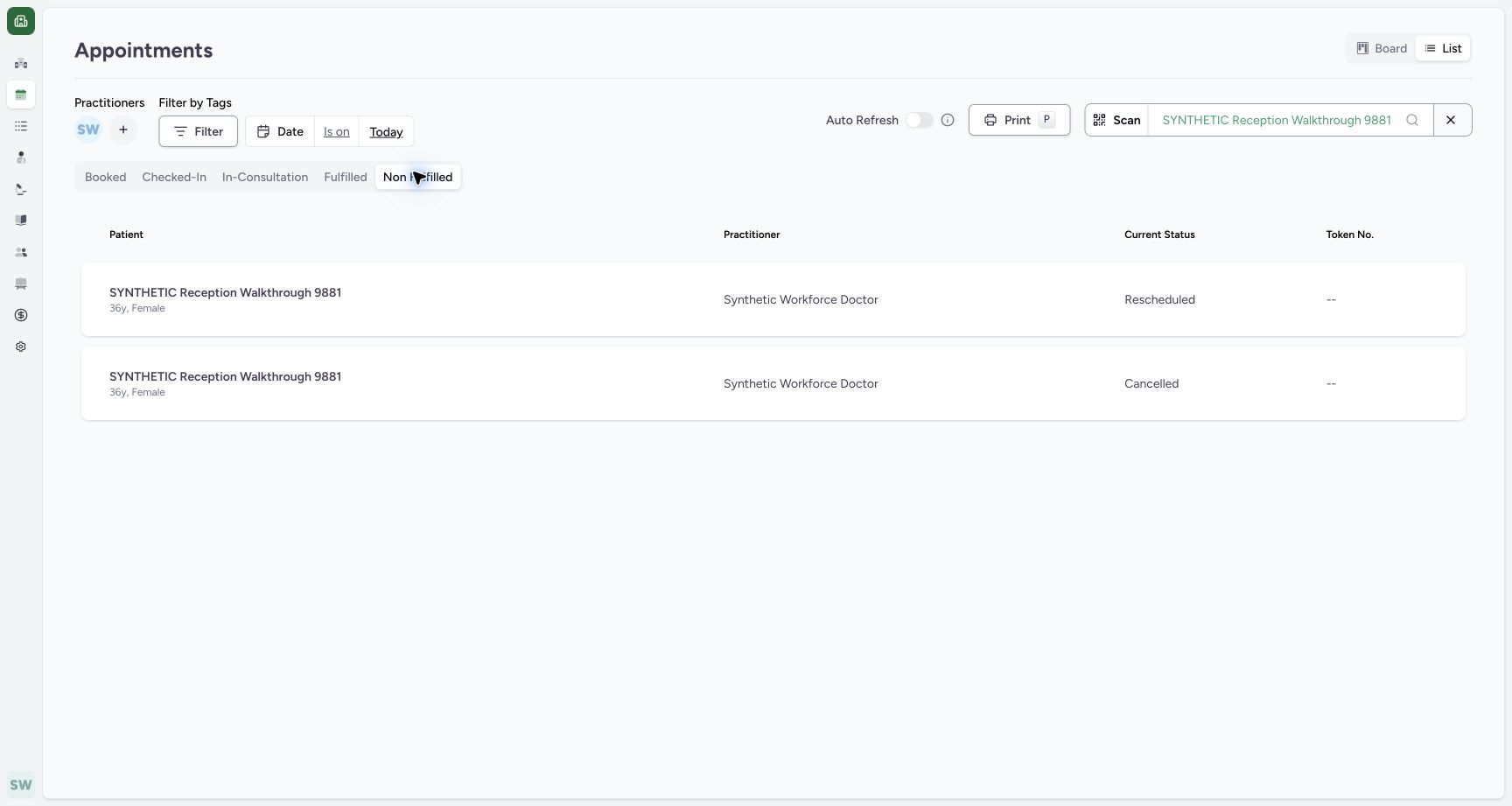
1234Review the two-row List before Print
Capture details
Exact committed ba551 application, normal existing Staff in its assigned fictional Clinic. Native PDF controls are real Chrome/macOS local output.
Image SHA-256 07c215aca07c24aca091e8368979a30cda7c9c3f6a43cd927ec43ccd7f9bbef5
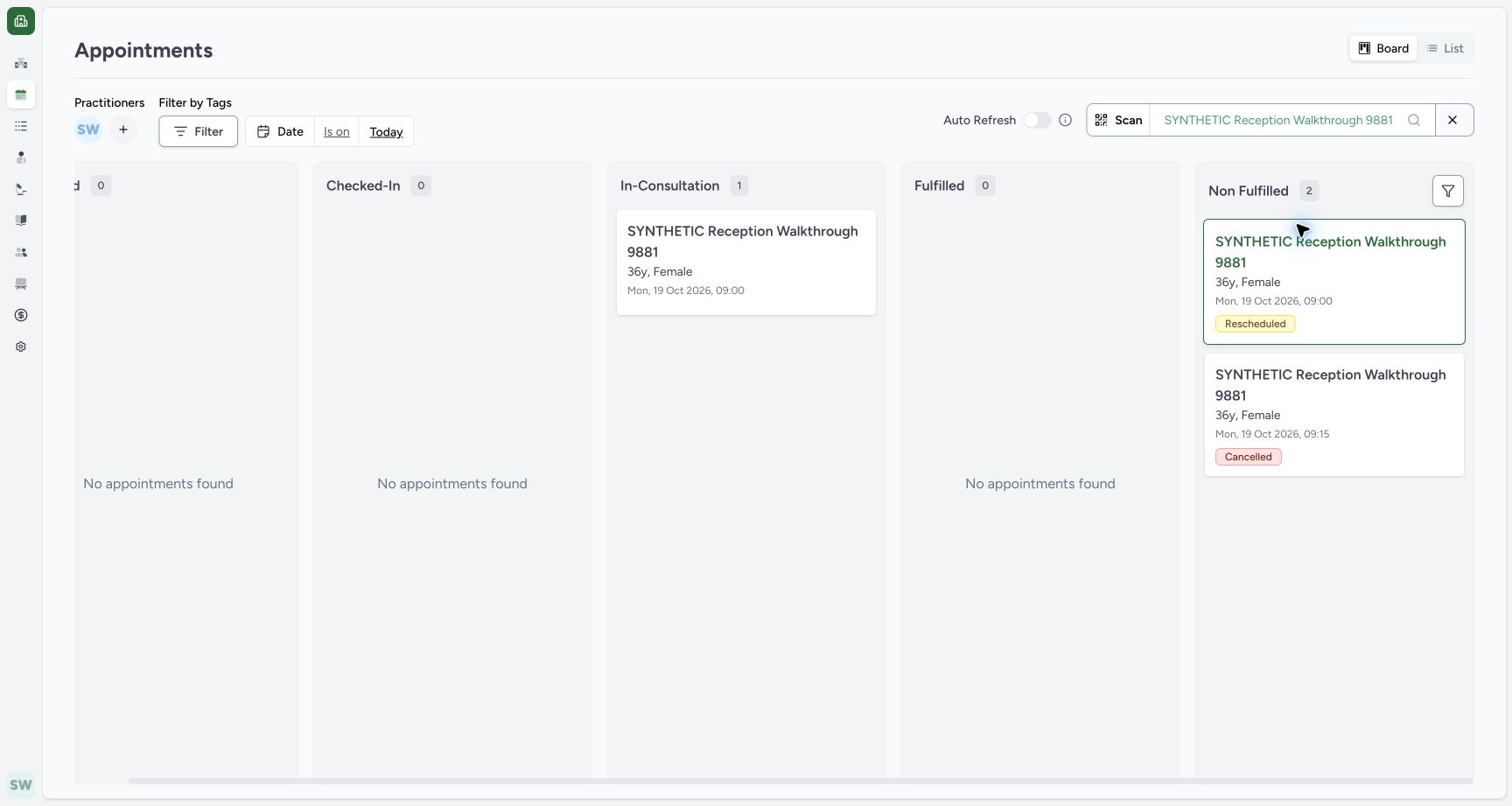
- Non Fulfilled: The intended history group is selected.
- Rescheduled: First retained matching status.
- Cancelled: Second retained matching status.
- Print: Open the printable list only after reviewing its rows.
 123456
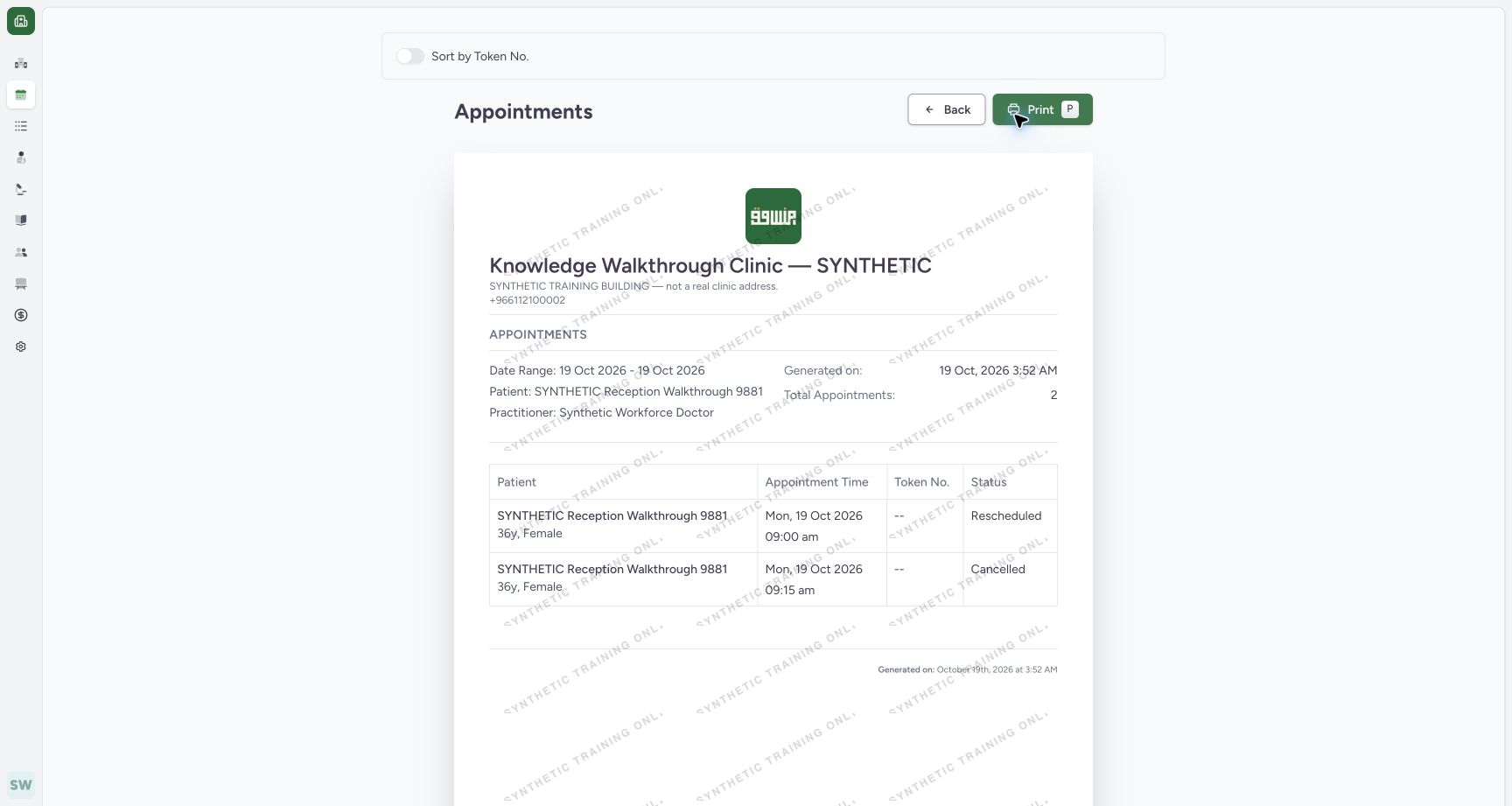
Review the actual filtered print preview
Capture details
Exact committed ba551 application, normal existing Staff in its assigned fictional Clinic. Native PDF controls are real Chrome/macOS local output.
Image SHA-256 16ddcd2c585e5f440751250bcd44d762b86c712641e5355e33fc2f2a8639d54b
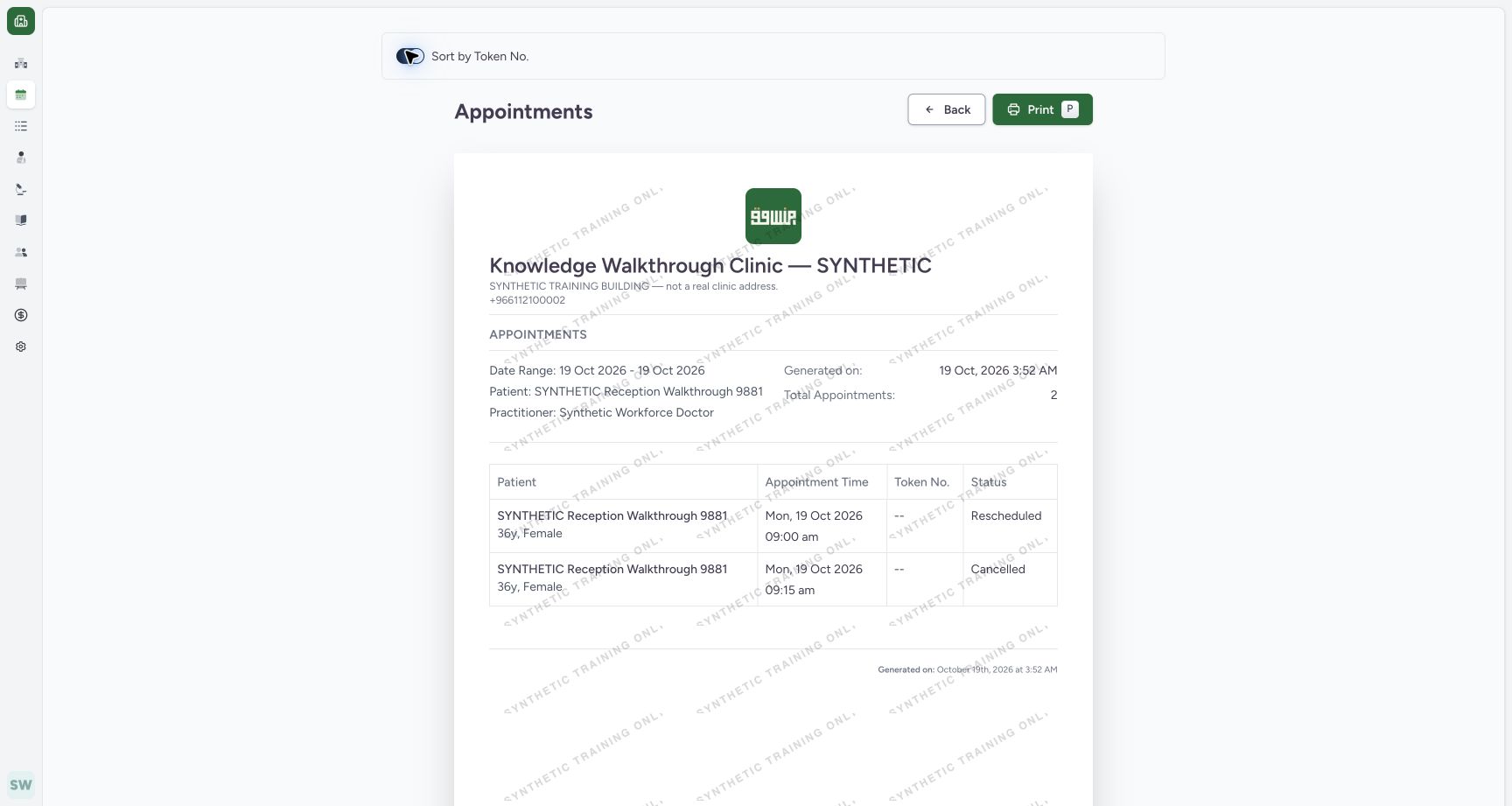
- Date range: Review the applied 19 October date range.
- Patient and Doctor: Review both filter identities.
- Total 2: This actual output contains two matching appointments.
- Print: Open native printing.
- Back: Return without modifying appointments.
- Sort switch off: The initial token sort is off.
 1234
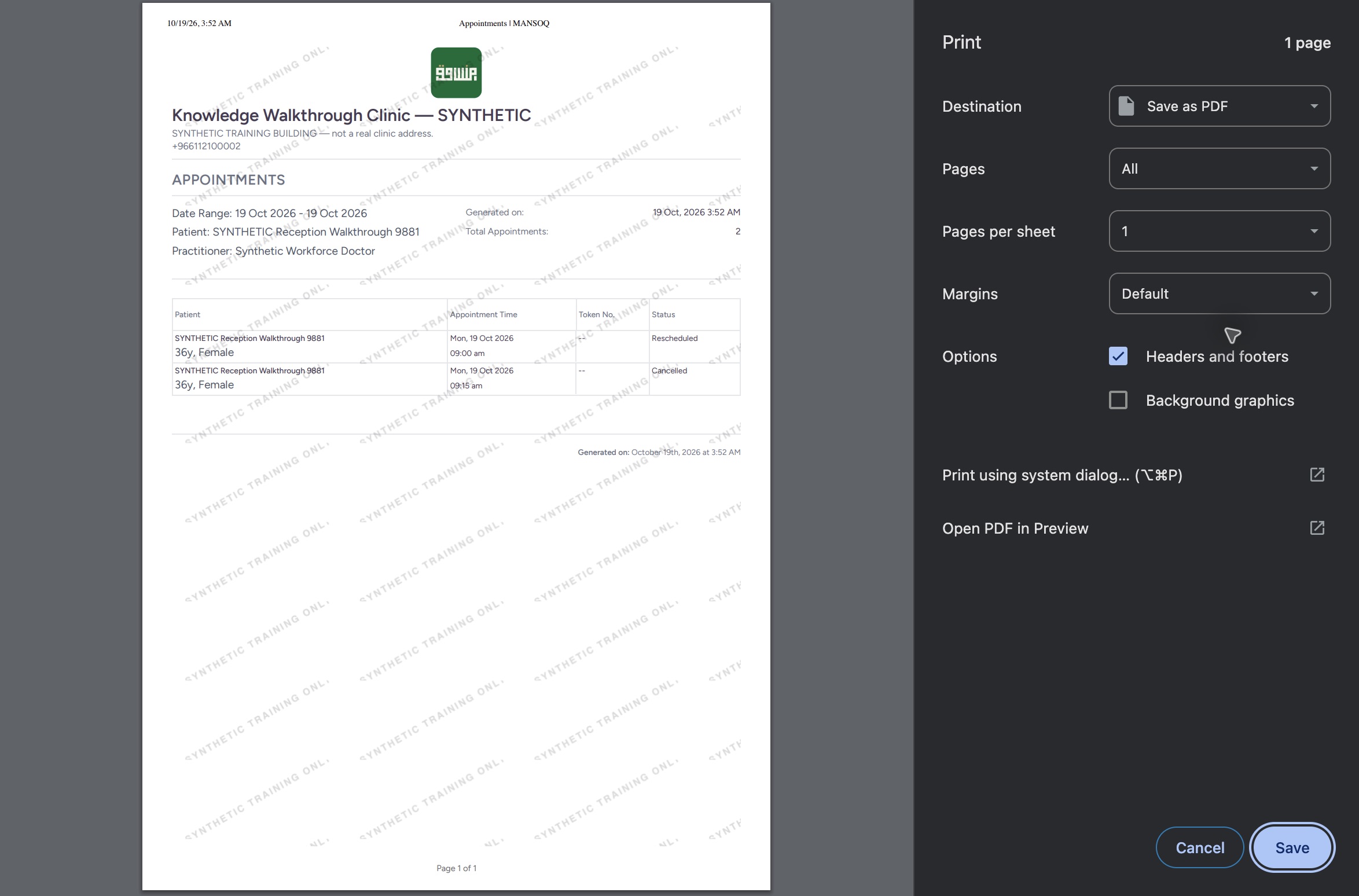
1234Review the genuine native one-page print dialog
Native macOS print/save dialog.
Capture details
Exact committed ba551 application, normal existing Staff in its assigned fictional Clinic. Native PDF controls are real Chrome/macOS local output.
Image SHA-256 7861b8089fa271a66a9f01a61081947e859b8354bcdc8a1a6371c94c62a89fe6
- Save as PDF: The actual native destination is local PDF.
- All pages: The dialog reports one page.
- Save: Open the local save dialog.
- Two retained rows: The native output includes both matching appointments.
 123
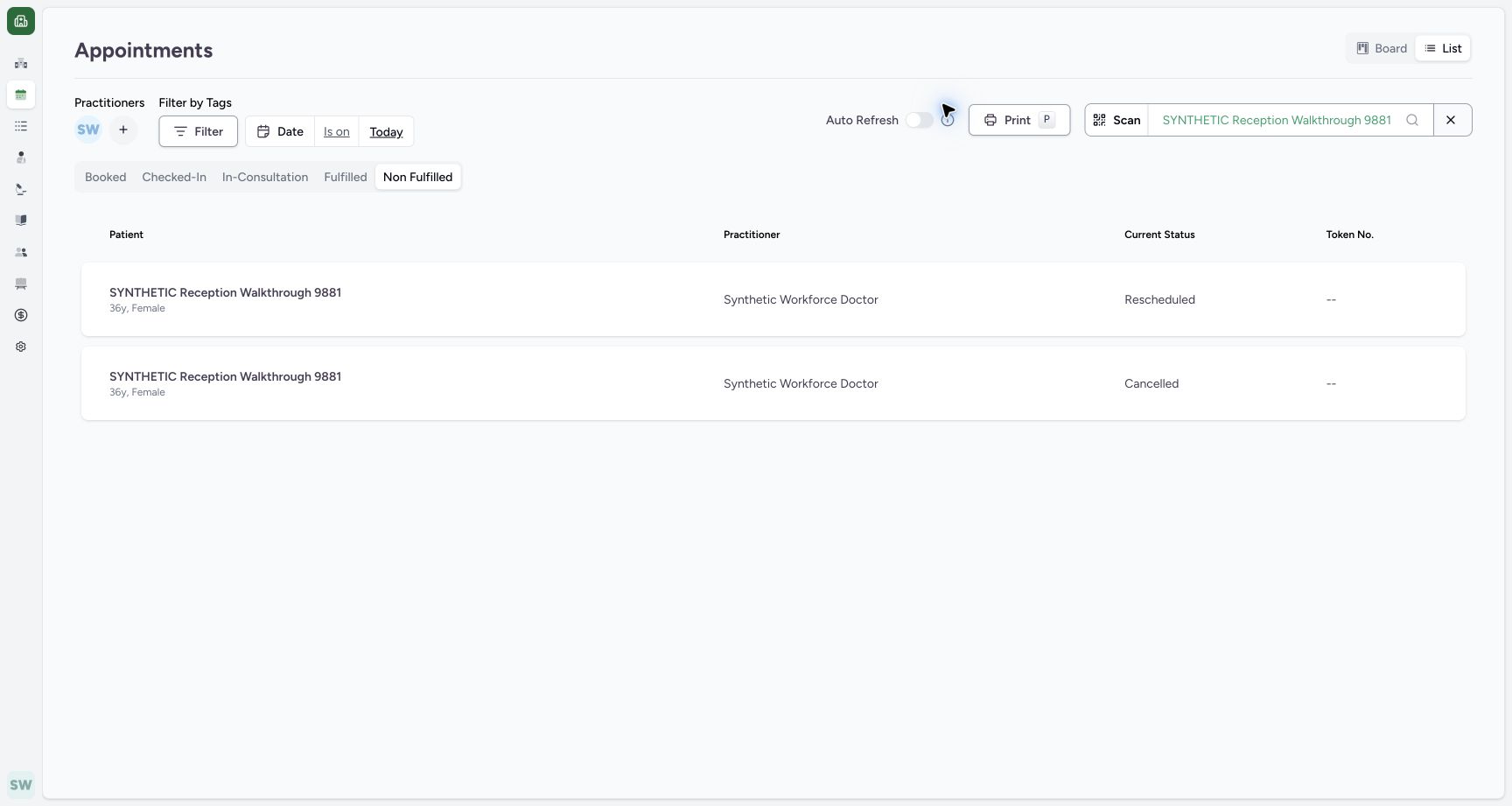
123Return to the unchanged two-row List
Capture details
Exact committed ba551 application, normal existing Staff in its assigned fictional Clinic. Native PDF controls are real Chrome/macOS local output.
Image SHA-256 a309a277cfd2cb0f9ed7a01147874dec9018e26b762262aa9341c209ed8bdd1c
- Same status filter: Non Fulfilled remains selected.
- Rescheduled retained: The first row remains unchanged.
- Cancelled retained: The second row remains unchanged.
10 of 10 content blocks have reviewed image alignment. Missing overview or prerequisite images remain open.
Before you begin
- Use the existing Staff session with Today, the intended Doctor and the known synthetic patient selected. The retained Non Fulfilled group has the two pictured history rows; the fictional Clinic default logo has already been corrected separately.1234
Recorded release ba551c1d · 2026-10-19T00:52:01.178Z · 1728 × 921 Review the two-row List before Print
Capture details
Exact committed ba551 application, normal existing Staff in its assigned fictional Clinic. Native PDF controls are real Chrome/macOS local output.
Image SHA-256
07c215aca07c24aca091e8368979a30cda7c9c3f6a43cd927ec43ccd7f9bbef5- Non Fulfilled: The intended history group is selected.
- Rescheduled: First retained matching status.
- Cancelled: Second retained matching status.
- Print: Open the printable list only after reviewing its rows.
123456Recorded release ba551c1d · 2026-10-19T00:52:09.872Z · 1728 × 921 Review the actual filtered print preview
Capture details
Exact committed ba551 application, normal existing Staff in its assigned fictional Clinic. Native PDF controls are real Chrome/macOS local output.
Image SHA-256
16ddcd2c585e5f440751250bcd44d762b86c712641e5355e33fc2f2a8639d54b- Date range: Review the applied 19 October date range.
- Patient and Doctor: Review both filter identities.
- Total 2: This actual output contains two matching appointments.
- Print: Open native printing.
- Back: Return without modifying appointments.
- Sort switch off: The initial token sort is off.
1. Choose the populated List status group
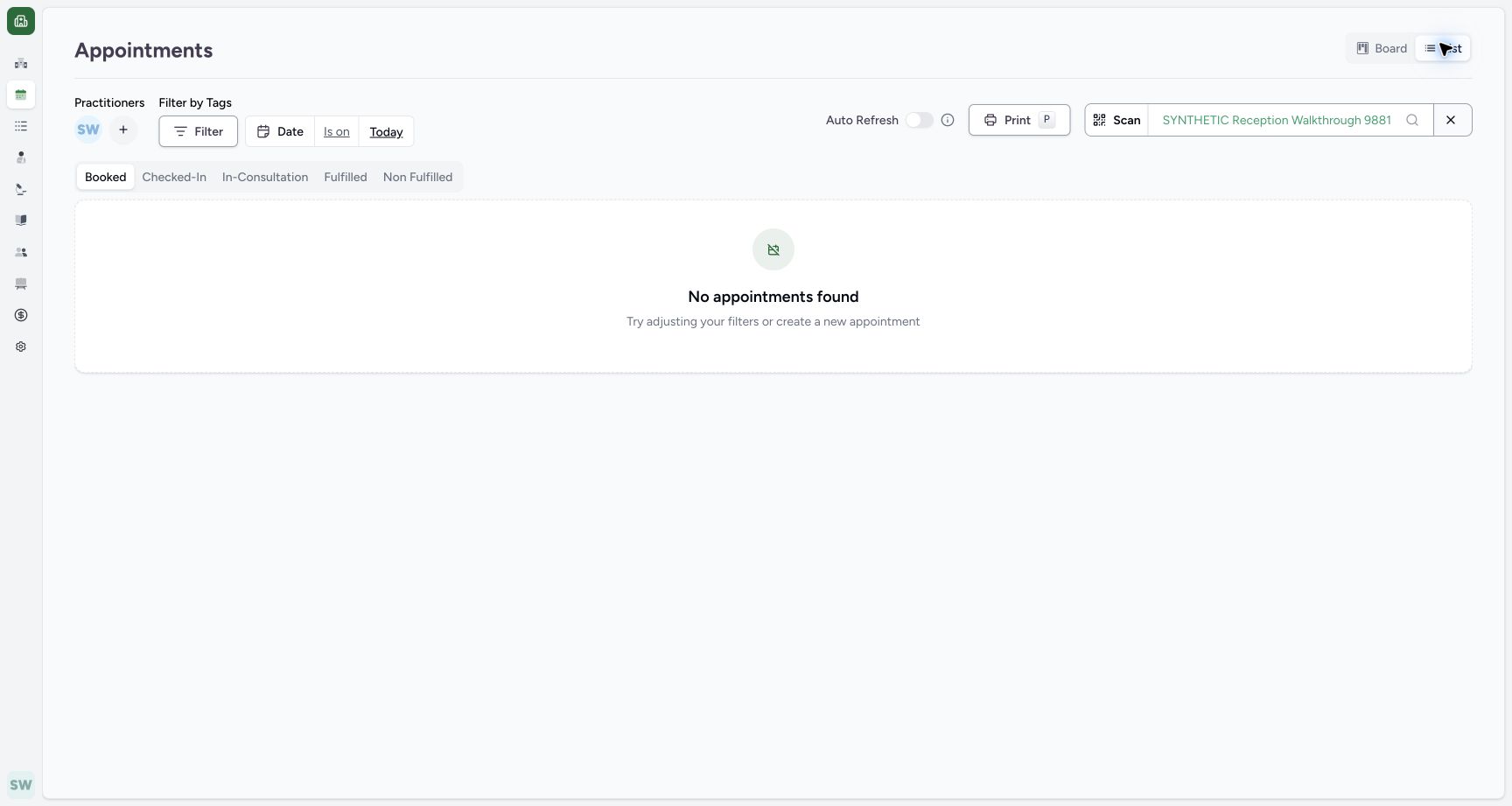
Switch to List. The pictured Booked selection is empty under these filters. Choose Non Fulfilled and review the retained Rescheduled and Cancelled rows before using Print.
 12
12Verify both history cards return
Capture details
Exact committed ba551 application, normal existing Staff in its assigned fictional Clinic. Native PDF controls are real Chrome/macOS local output.
Image SHA-256 45f8bf9aff4a4463f9b386ff6269616b1c0a92c74bed5b8d54ac53a845c30fa2
- Group count 2: No status chips remain; both history cards return.
- List: Switch to List for batch printing.
 12
12Inspect the List status tabs
Capture details
Exact committed ba551 application, normal existing Staff in its assigned fictional Clinic. Native PDF controls are real Chrome/macOS local output.
Image SHA-256 6bad5bd36d2a8a3a8042bcc744582f893bfcbd8adb8d0566c943f6264cf048a3
- Booked: This current selection is empty.
- Non Fulfilled: Select this group for the retained history rows.
1234Review the two-row List before Print
Capture details
Exact committed ba551 application, normal existing Staff in its assigned fictional Clinic. Native PDF controls are real Chrome/macOS local output.
Image SHA-256 07c215aca07c24aca091e8368979a30cda7c9c3f6a43cd927ec43ccd7f9bbef5
- Non Fulfilled: The intended history group is selected.
- Rescheduled: First retained matching status.
- Cancelled: Second retained matching status.
- Print: Open the printable list only after reviewing its rows.
2. Review the actual printable summary
Check the 19 October 2026 date range, intended patient and practitioner, Total Appointments: 2, and both retained statuses. Back returns to the List. This example is a two-row filtered output.
123456Review the actual filtered print preview
Capture details
Exact committed ba551 application, normal existing Staff in its assigned fictional Clinic. Native PDF controls are real Chrome/macOS local output.
Image SHA-256 16ddcd2c585e5f440751250bcd44d762b86c712641e5355e33fc2f2a8639d54b
- Date range: Review the applied 19 October date range.
- Patient and Doctor: Review both filter identities.
- Total 2: This actual output contains two matching appointments.
- Print: Open native printing.
- Back: Return without modifying appointments.
- Sort switch off: The initial token sort is off.
3. Inspect the token sorting control honestly
The Sort by Token No. switch can be enabled and disabled. Both pictured token fields are --, so this example does not verify numeric-token ordering. Restore the switch off for the pictured output.
123456Review the actual filtered print preview
Capture details
Exact committed ba551 application, normal existing Staff in its assigned fictional Clinic. Native PDF controls are real Chrome/macOS local output.
Image SHA-256 16ddcd2c585e5f440751250bcd44d762b86c712641e5355e33fc2f2a8639d54b
- Date range: Review the applied 19 October date range.
- Patient and Doctor: Review both filter identities.
- Total 2: This actual output contains two matching appointments.
- Print: Open native printing.
- Back: Return without modifying appointments.
- Sort switch off: The initial token sort is off.
 12
12Inspect token sort with missing tokens
Capture details
Exact committed ba551 application, normal existing Staff in its assigned fictional Clinic. Native PDF controls are real Chrome/macOS local output.
Image SHA-256 79fdd795a395538c6f13235ee2d53282b77f89329c39e0b328458c9796a2ebaa
- Sort switch on: The control was enabled for this review.
- Missing token: Both rows display --; this example cannot establish numeric token ordering.
4. Open native local PDF output
Use Print on the reviewed preview. In the actual native dialog, check Save as PDF, All pages and the one-page preview containing both rows. Use Save.
123456Review the actual filtered print preview
Capture details
Exact committed ba551 application, normal existing Staff in its assigned fictional Clinic. Native PDF controls are real Chrome/macOS local output.
Image SHA-256 16ddcd2c585e5f440751250bcd44d762b86c712641e5355e33fc2f2a8639d54b
- Date range: Review the applied 19 October date range.
- Patient and Doctor: Review both filter identities.
- Total 2: This actual output contains two matching appointments.
- Print: Open native printing.
- Back: Return without modifying appointments.
- Sort switch off: The initial token sort is off.
1234Review the genuine native one-page print dialog
Native macOS print/save dialog.
Capture details
Exact committed ba551 application, normal existing Staff in its assigned fictional Clinic. Native PDF controls are real Chrome/macOS local output.
Image SHA-256 7861b8089fa271a66a9f01a61081947e859b8354bcdc8a1a6371c94c62a89fe6
- Save as PDF: The actual native destination is local PDF.
- All pages: The dialog reports one page.
- Save: Open the local save dialog.
- Two retained rows: The native output includes both matching appointments.
5. Save the distinct synthetic file
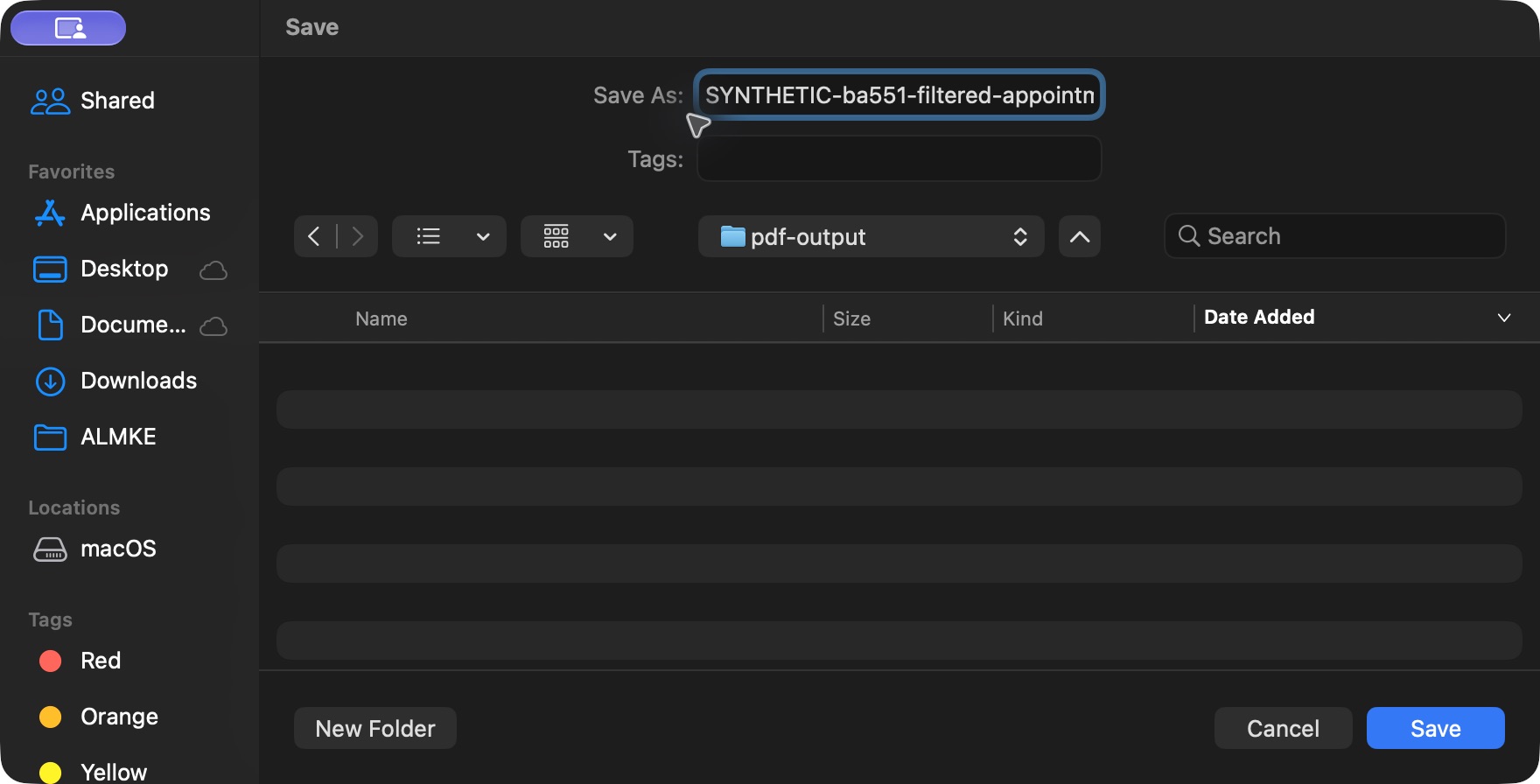
In the native file dialog, choose the isolated local pdf-output folder and distinct filename SYNTHETIC-ba551-filtered-appointment-list.pdf. Use Save. This saves a local PDF without external delivery or a physical printer.
 123
123Save the local synthetic batch PDF
Native macOS print/save dialog.
Capture details
Exact committed ba551 application, normal existing Staff in its assigned fictional Clinic. Native PDF controls are real Chrome/macOS local output.
Image SHA-256 fa55b09dc7ea70eebebd1d3bbfd3aaca141ad155f439470c879220f3198f2ca0
- Distinct filename: Use the distinct synthetic filename.
- Local output folder: This evidence folder is reserved for the example.
- Save: Save locally without external delivery.
6. Return to the retained List
Use the preview’s Back button. The same Non Fulfilled List and both retained statuses remain present.
123456Review the actual filtered print preview
Capture details
Exact committed ba551 application, normal existing Staff in its assigned fictional Clinic. Native PDF controls are real Chrome/macOS local output.
Image SHA-256 16ddcd2c585e5f440751250bcd44d762b86c712641e5355e33fc2f2a8639d54b
- Date range: Review the applied 19 October date range.
- Patient and Doctor: Review both filter identities.
- Total 2: This actual output contains two matching appointments.
- Print: Open native printing.
- Back: Return without modifying appointments.
- Sort switch off: The initial token sort is off.
123Return to the unchanged two-row List
Capture details
Exact committed ba551 application, normal existing Staff in its assigned fictional Clinic. Native PDF controls are real Chrome/macOS local output.
Image SHA-256 a309a277cfd2cb0f9ed7a01147874dec9018e26b762262aa9341c209ed8bdd1c
- Same status filter: Non Fulfilled remains selected.
- Rescheduled retained: The first row remains unchanged.
- Cancelled retained: The second row remains unchanged.
Avoid the observed empty-list printing boundary in this release
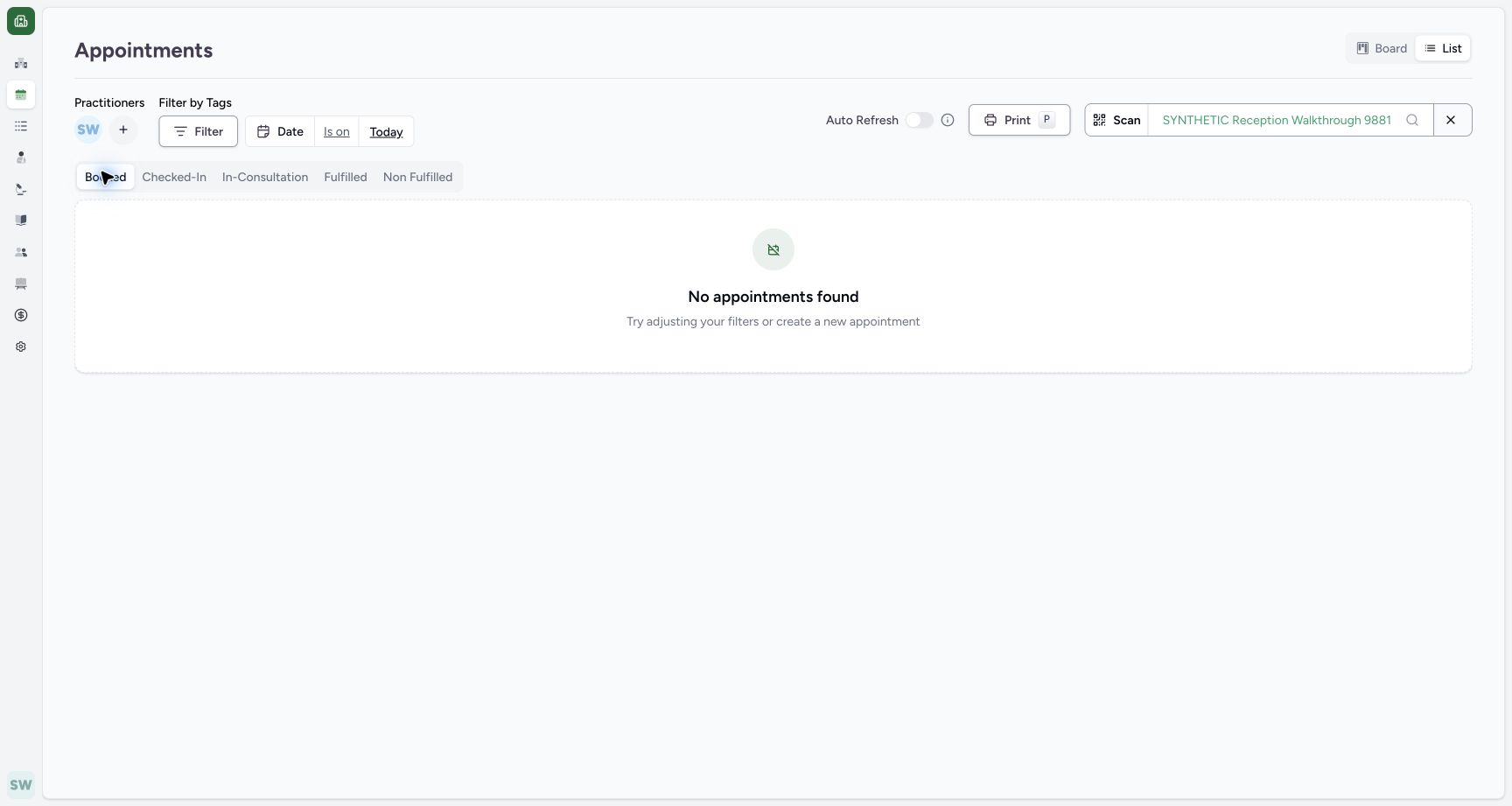
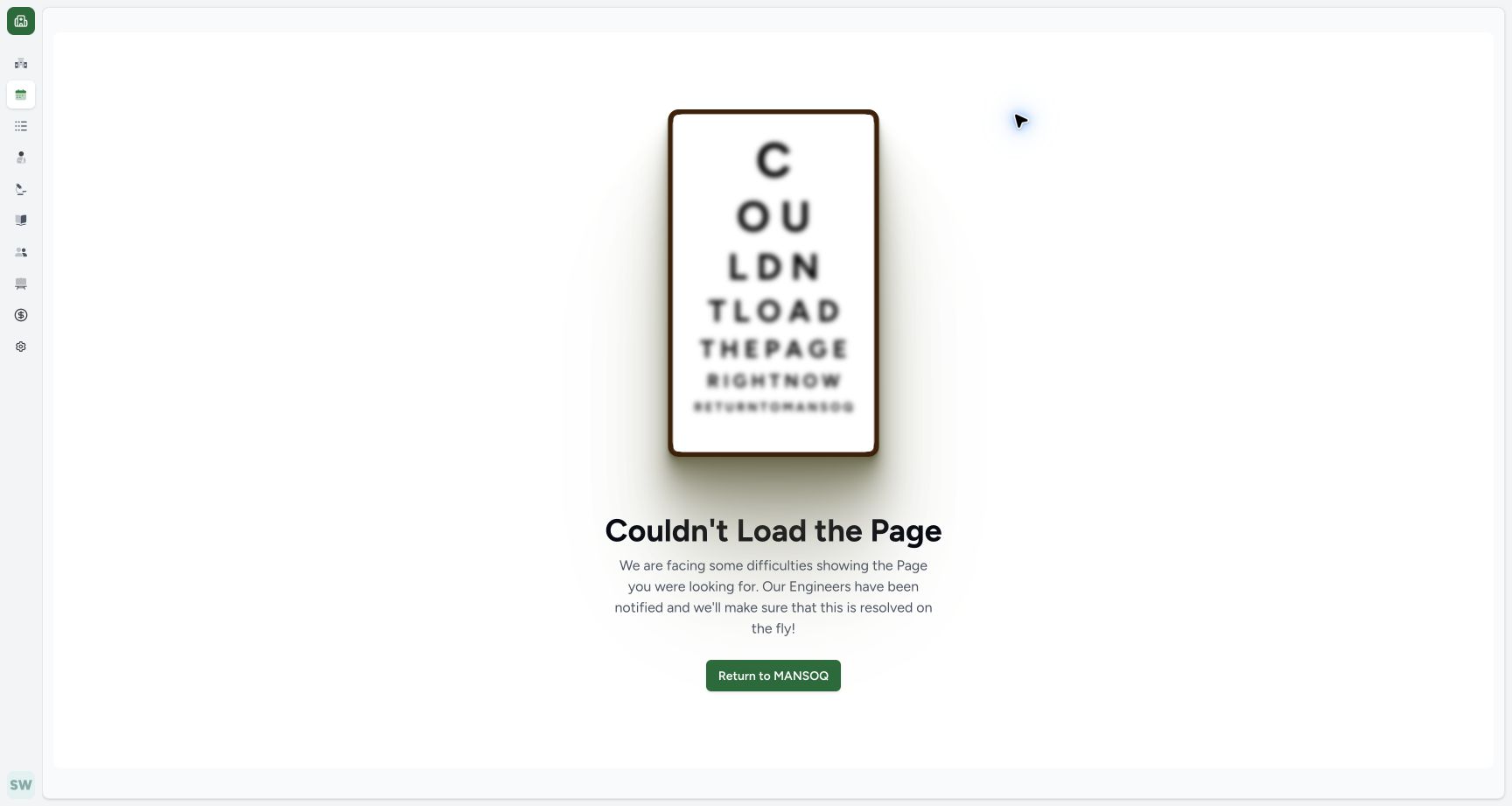
The pictured empty Booked List still exposes Print. Invoking it once produced Couldn’t Load the Page in this retained release. The populated Non Fulfilled list printed successfully; inspect matching rows before opening Print.
 123
123Recognize the empty List boundary
Capture details
Exact committed ba551 application, normal existing Staff in its assigned fictional Clinic. Native PDF controls are real Chrome/macOS local output.
Image SHA-256 8139bf3639487c0684a74bad63e405ba3c93fb03b1f770153406c8ea06aa5d7c
- Booked: The selected group has no matching rows.
- No appointments: The empty state is explicit.
- Print still visible: In this retained release, invoking this action with the empty selection caused the observed failure.
 1
1Recognize the actual empty-print failure
Capture details
Exact committed ba551 application, normal existing Staff in its assigned fictional Clinic. Native PDF controls are real Chrome/macOS local output.
Image SHA-256 d60ad5ead22bf3c00b8753f3d3692dd5803ae36c50f8f9a4f3383b9199d4c590
- Couldn't Load the Page: This is the actual failure after one empty-list Print action.
1234Review the two-row List before Print
Capture details
Exact committed ba551 application, normal existing Staff in its assigned fictional Clinic. Native PDF controls are real Chrome/macOS local output.
Image SHA-256 07c215aca07c24aca091e8368979a30cda7c9c3f6a43cd927ec43ccd7f9bbef5
- Non Fulfilled: The intended history group is selected.
- Rescheduled: First retained matching status.
- Cancelled: Second retained matching status.
- Print: Open the printable list only after reviewing its rows.
Troubleshooting
Empty-list Print opens Couldn’t Load the Page
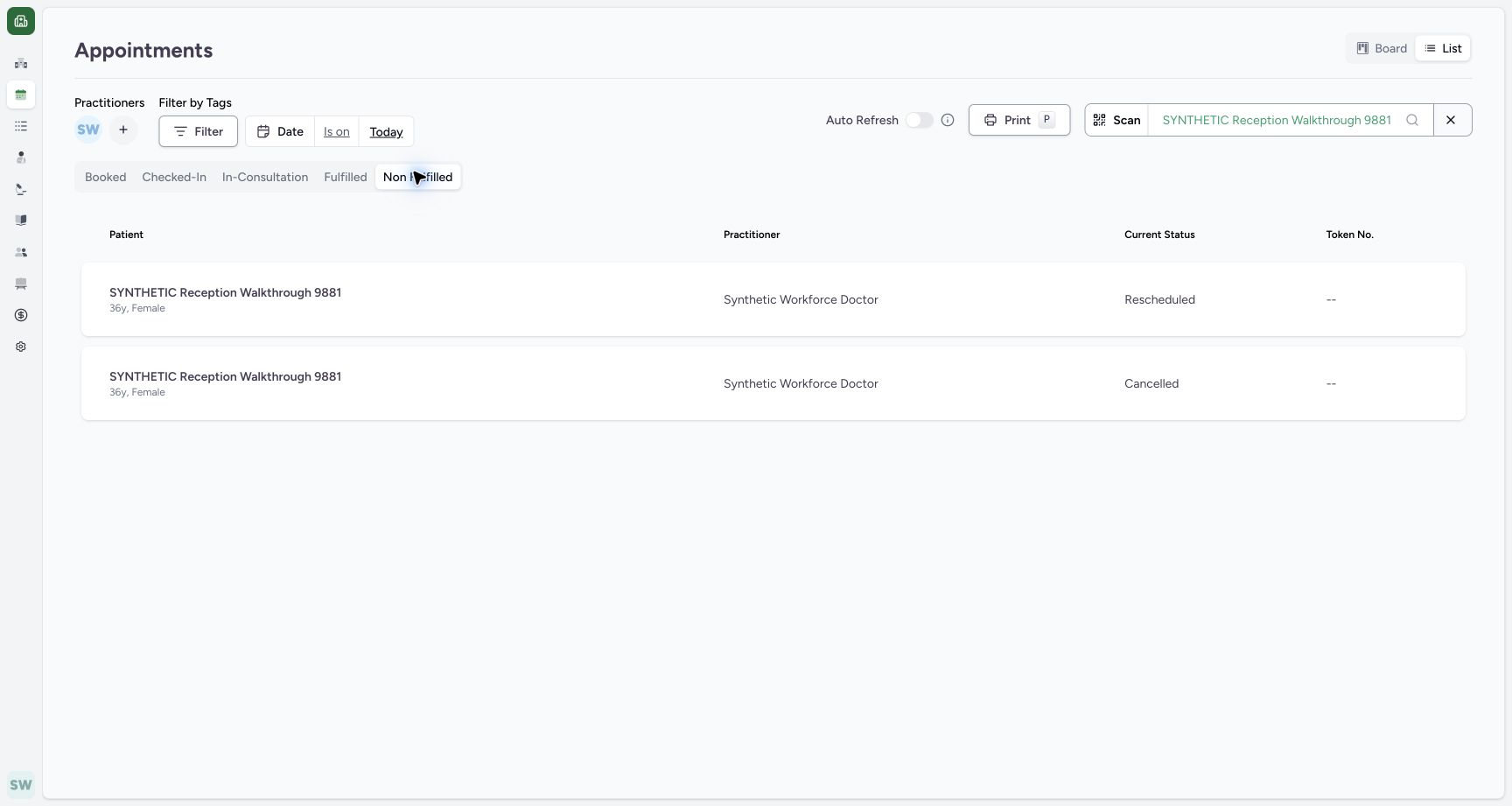
In the observed ba551 session, returning to the appointment List and reloading it recovered the page. Selecting the existing populated Non Fulfilled group restored both rows. Do not change appointment statuses to work around the empty selection.
123Recognize the empty List boundary
Capture details
Exact committed ba551 application, normal existing Staff in its assigned fictional Clinic. Native PDF controls are real Chrome/macOS local output.
Image SHA-256 8139bf3639487c0684a74bad63e405ba3c93fb03b1f770153406c8ea06aa5d7c
- Booked: The selected group has no matching rows.
- No appointments: The empty state is explicit.
- Print still visible: In this retained release, invoking this action with the empty selection caused the observed failure.
1Recognize the actual empty-print failure
Capture details
Exact committed ba551 application, normal existing Staff in its assigned fictional Clinic. Native PDF controls are real Chrome/macOS local output.
Image SHA-256 d60ad5ead22bf3c00b8753f3d3692dd5803ae36c50f8f9a4f3383b9199d4c590
- Couldn't Load the Page: This is the actual failure after one empty-list Print action.
 12
12Recover the normal List
Capture details
Exact committed ba551 application, normal existing Staff in its assigned fictional Clinic. Native PDF controls are real Chrome/macOS local output.
Image SHA-256 3d8ee217121e9ef6d379efa09d74280b6d03871dca038872ff1349bdbaea1df3
- Non Fulfilled restored: After returning and reloading the List, select the retained populated group.
- Rows recovered: The saved history rows remain readable.
Source evidence
Every citation uses this exact committed version. The private source repository requires access.
- repositories/platform/mansoq-web/src/pages/Appointments/AppointmentsPage.tsx:425 ·
ba551c1d67031248136fd2016afe227b5fc994bdSource file checksum
465c14ff66869ff0996e51407ffa7d8f147f8b40db94bd463b8e9e988c119c25 - repositories/platform/mansoq-web/src/pages/Appointments/components/PrintAppointments.tsx:65 ·
ba551c1d67031248136fd2016afe227b5fc994bdSource file checksum
cb1d0785b77f955858ce8b302172e6dd669ead799769842f01ac32c0fdf9a1fe - repositories/platform/mansoq-web/src/pages/Appointments/components/PrintAppointments.tsx:112 ·
ba551c1d67031248136fd2016afe227b5fc994bdSource file checksum
cb1d0785b77f955858ce8b302172e6dd669ead799769842f01ac32c0fdf9a1fe - repositories/platform/mansoq-web/src/pages/Appointments/components/PrintAppointments.tsx:161 ·
ba551c1d67031248136fd2016afe227b5fc994bdSource file checksum
cb1d0785b77f955858ce8b302172e6dd669ead799769842f01ac32c0fdf9a1fe - repositories/platform/mansoq-web/src/types/scheduling/schedule.ts:303 ·
ba551c1d67031248136fd2016afe227b5fc994bdSource file checksum
bc8fb7362d0d7e56d5f737927ea892a06714b2c8101635dae4ad23d215880726 - repositories/platform/mansoq-web/src/MansoqUI/misc/PrintPreview.tsx:282 ·
ba551c1d67031248136fd2016afe227b5fc994bdSource file checksum
66b44ba3d2996d2db6d1d37c275a084db50c2ac1d68468f5355cc2522c67679b