 MANSOQ
 Scheduling and appointments · VERSION ba551c1d
Search, verify and clear the appointment patient filter
Select an existing Doctor, search for the known fictional patient by phone or name, complete the pictured identity check and clear the patient filter.
Staff
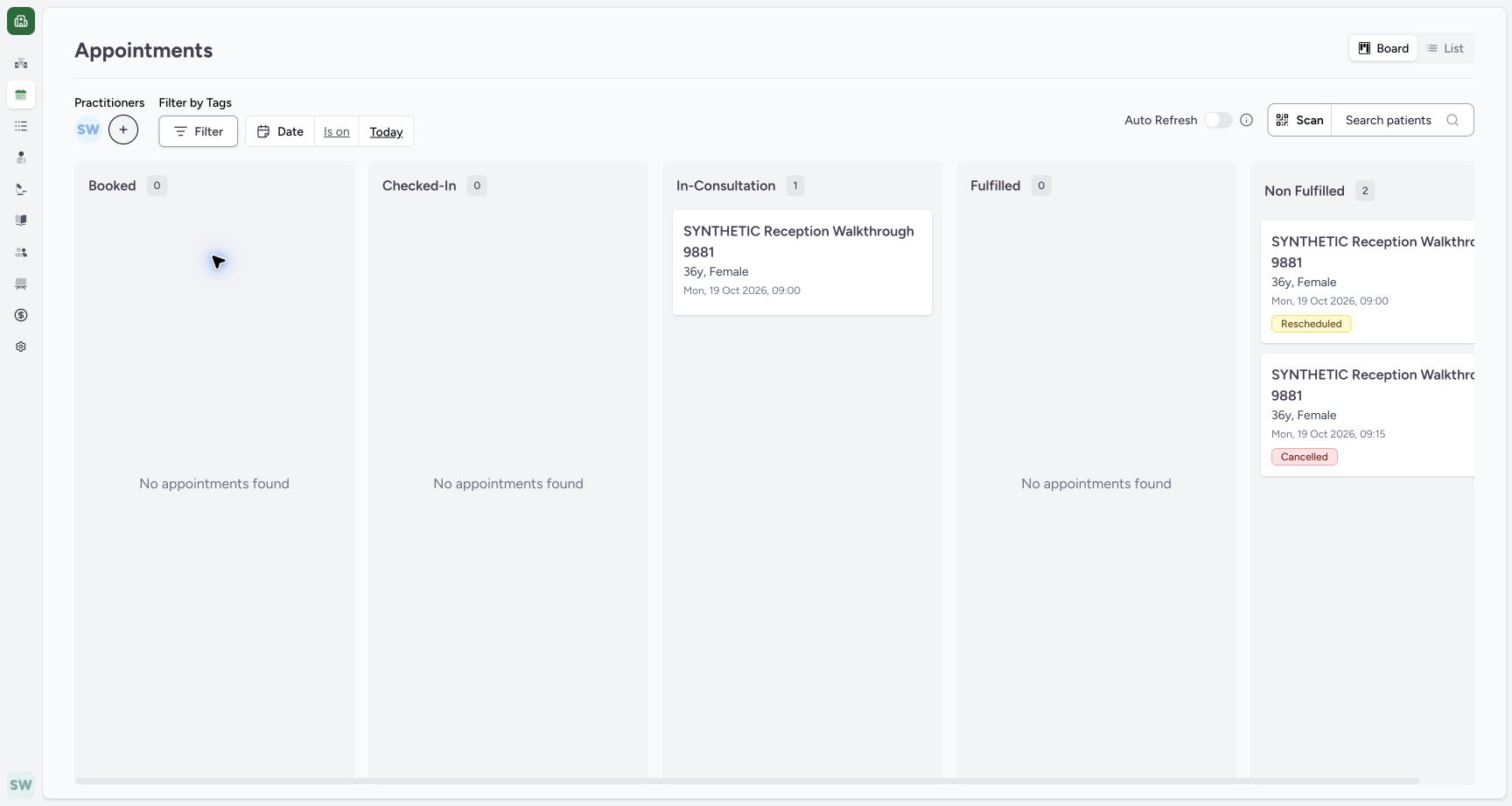 12
12Open patient search
Capture details
Exact committed ba551 application, normal existing Staff in its assigned fictional Clinic. Native PDF controls are real Chrome/macOS local output.
Image SHA-256 cba2b743e5a6274116687a8ed08693e56741d42d9a0ae29a193d471384e3f05b
- Search patients: Open the patient filter.
- Selected Doctor: The intended practitioner is now selected.
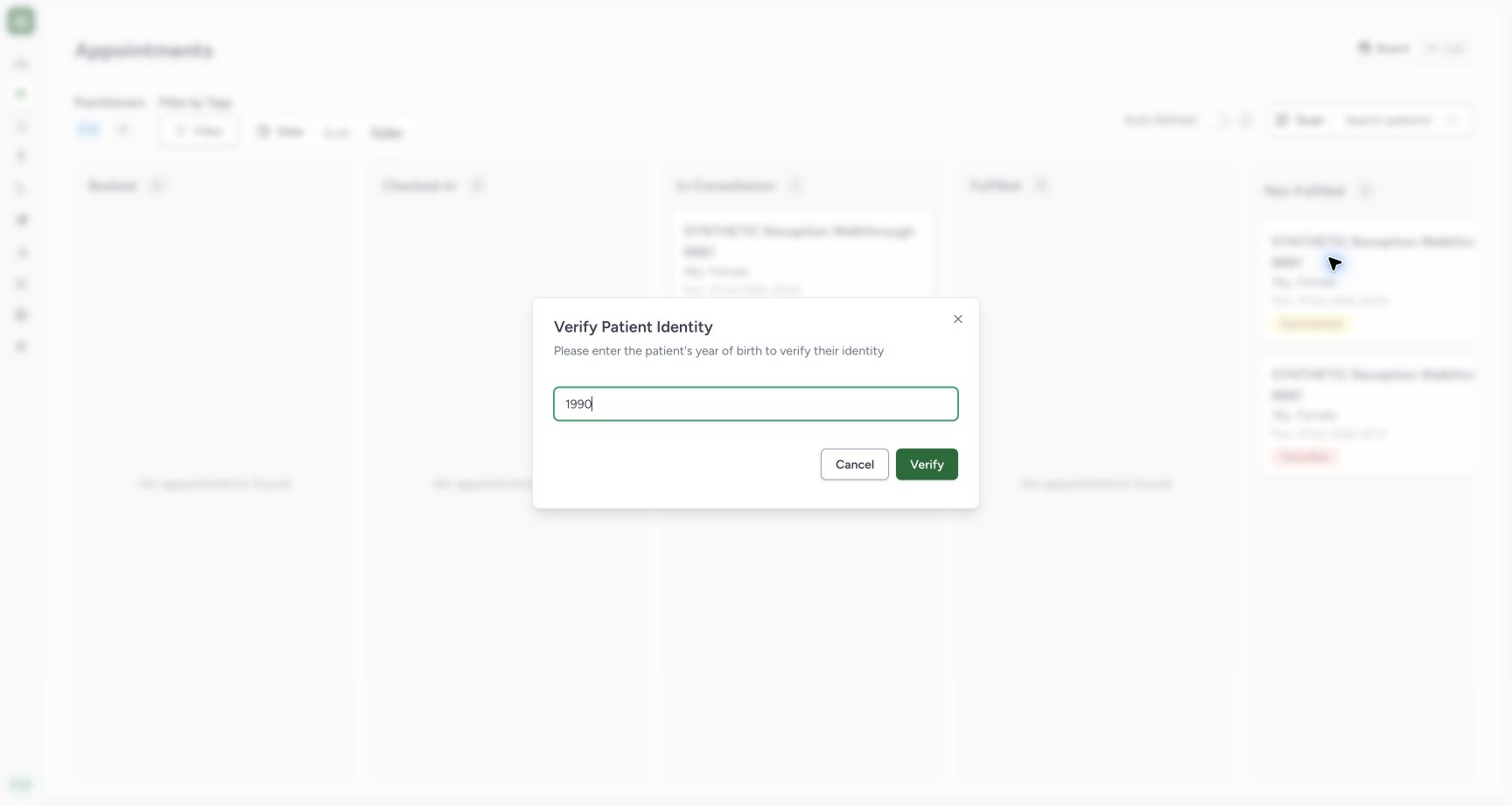 12
12Verify the known year
Capture details
Exact committed ba551 application, normal existing Staff in its assigned fictional Clinic. Native PDF controls are real Chrome/macOS local output.
Image SHA-256 10f91beaba96491f3f61a22f8fed64ef8976052ba381540a1c7cb3a4b0989fe8
- 1990: The known synthetic year is entered.
- Verify: Verify this patient identity.
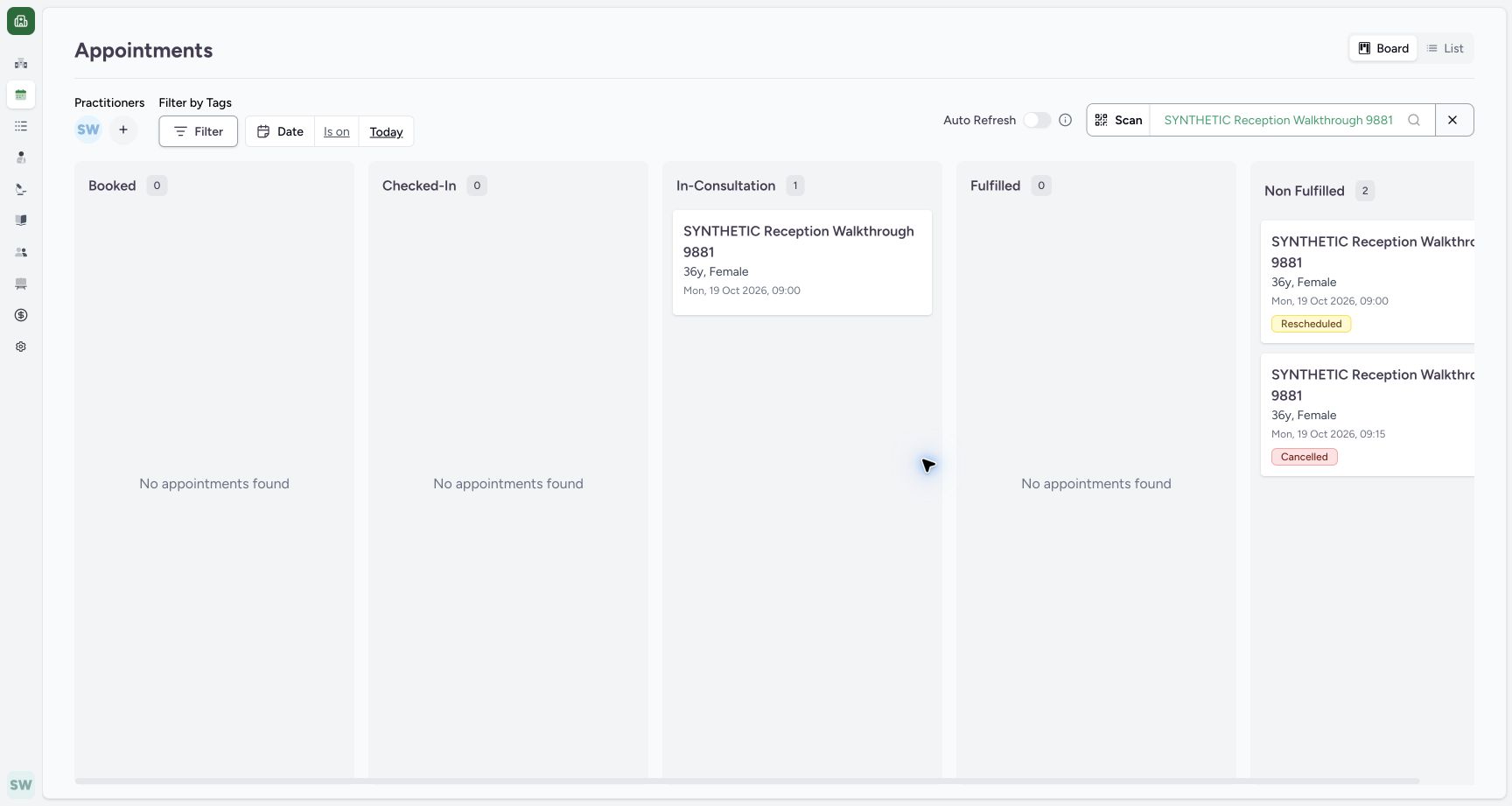 12
12Read and clear the selected patient
Capture details
Exact committed ba551 application, normal existing Staff in its assigned fictional Clinic. Native PDF controls are real Chrome/macOS local output.
Image SHA-256 c07d19439ec390f0f955d1b3090434f3ab66468807bd15172c96703cb00c5639
- Patient filter: The intended patient is now selected.
- Clear patient: The adjacent X removes only the patient filter.
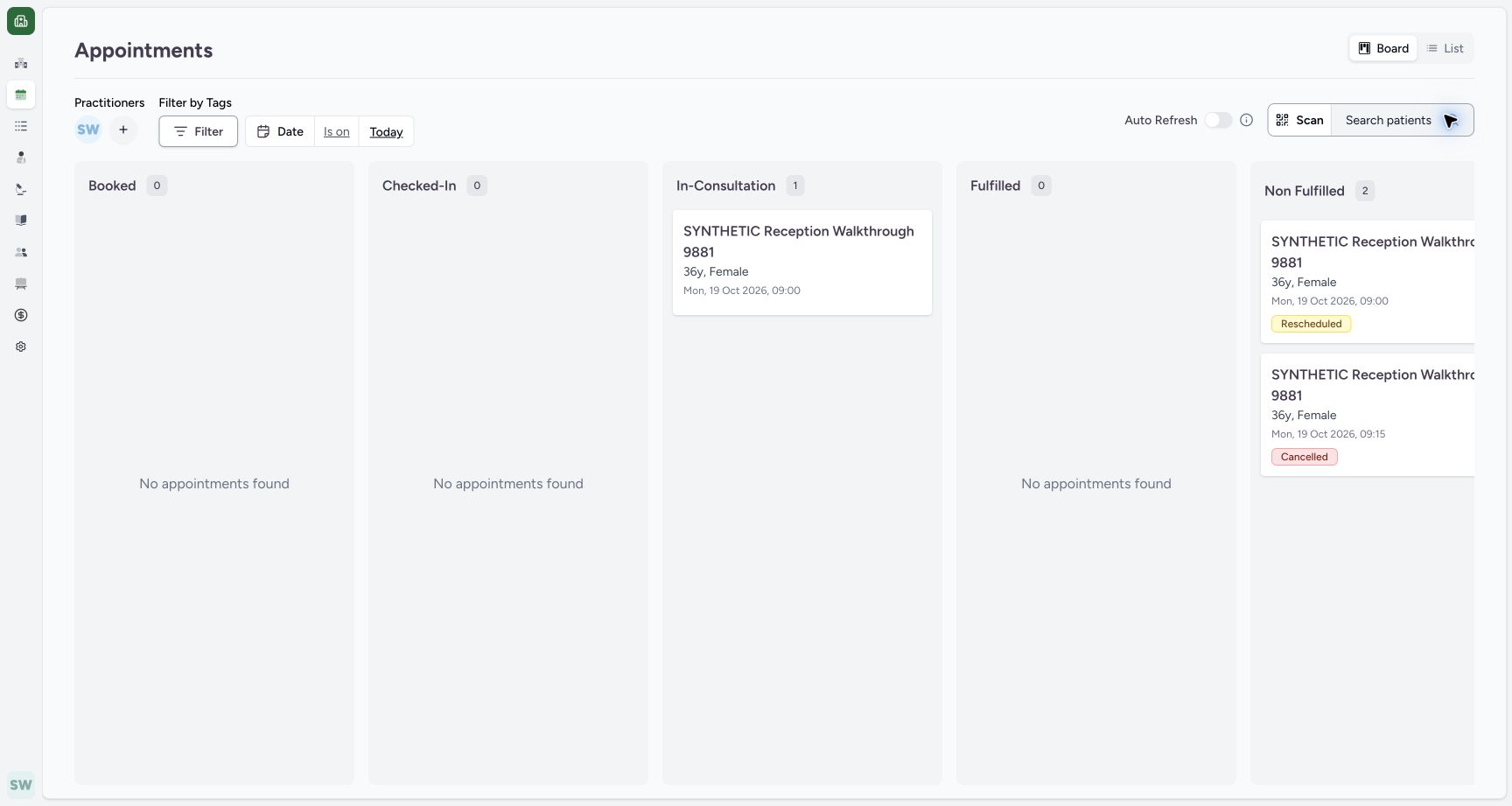 123
123Confirm the patient filter is cleared
Capture details
Exact committed ba551 application, normal existing Staff in its assigned fictional Clinic. Native PDF controls are real Chrome/macOS local output.
Image SHA-256 5ee045c3d08fadcef2455143cb6ecb54a4f22459fea23c9e636dafe1ef054754
- Search patients restored: The patient filter is cleared.
- Doctor retained: The practitioner filter remains selected.
- Date retained: Today remains selected.
8 of 8 content blocks have reviewed image alignment. Missing overview or prerequisite images remain open.
Before you begin
- Use the existing authorized Staff session in the assigned fictional Clinic. This example uses the existing synthetic patient and Doctor on Today; the known patient year is 1990.
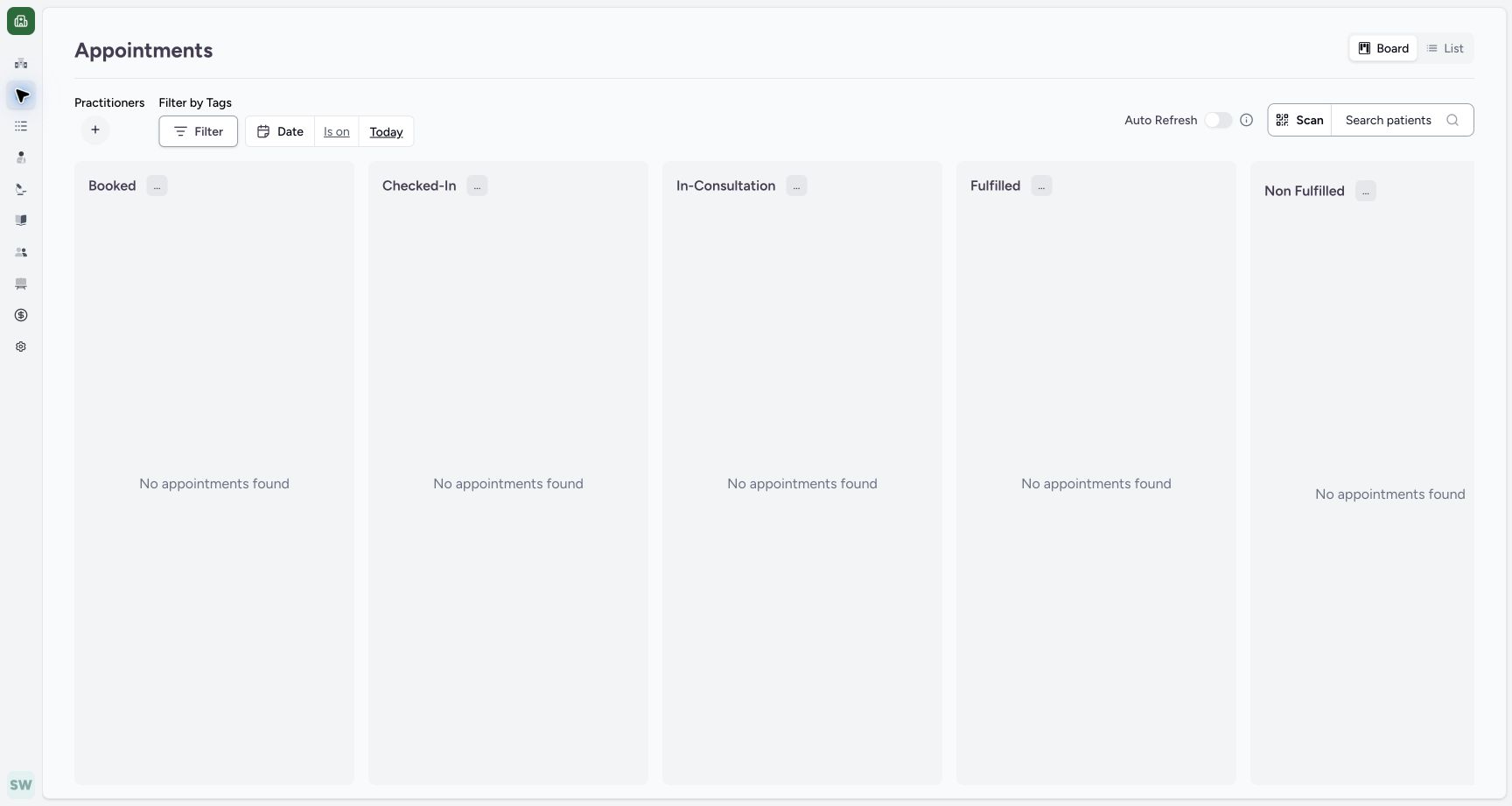 123
123Recorded release ba551c1d · 2026-10-19T00:50:00.946Z · 1728 × 921 Start on the current-day Board
Capture details
Exact committed ba551 application, normal existing Staff in its assigned fictional Clinic. Native PDF controls are real Chrome/macOS local output.
Image SHA-256
f43089a6aacf4d1928ce7bbc0510efefe12ff6c63abbe3f0a2e9f1c23a224e53- Practitioners +: Open the practitioner selector.
- Board: Board is selected.
- Today: Review the current date.
12Recorded release ba551c1d · 2026-10-19T00:50:43.754Z · 1728 × 921 Verify the known year
Capture details
Exact committed ba551 application, normal existing Staff in its assigned fictional Clinic. Native PDF controls are real Chrome/macOS local output.
Image SHA-256
10f91beaba96491f3f61a22f8fed64ef8976052ba381540a1c7cb3a4b0989fe8- 1990: The known synthetic year is entered.
- Verify: Verify this patient identity.
1. Select the existing Doctor
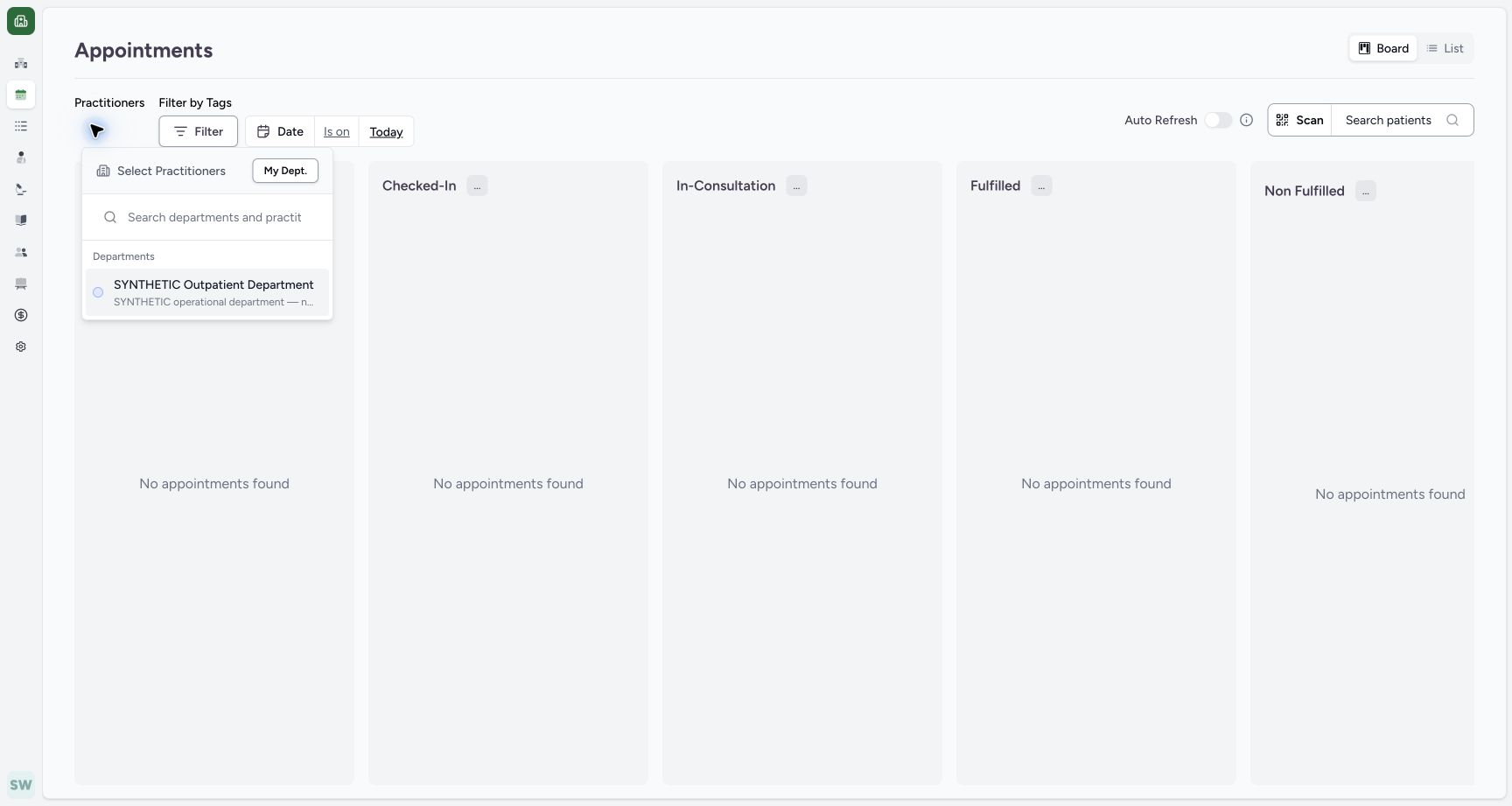
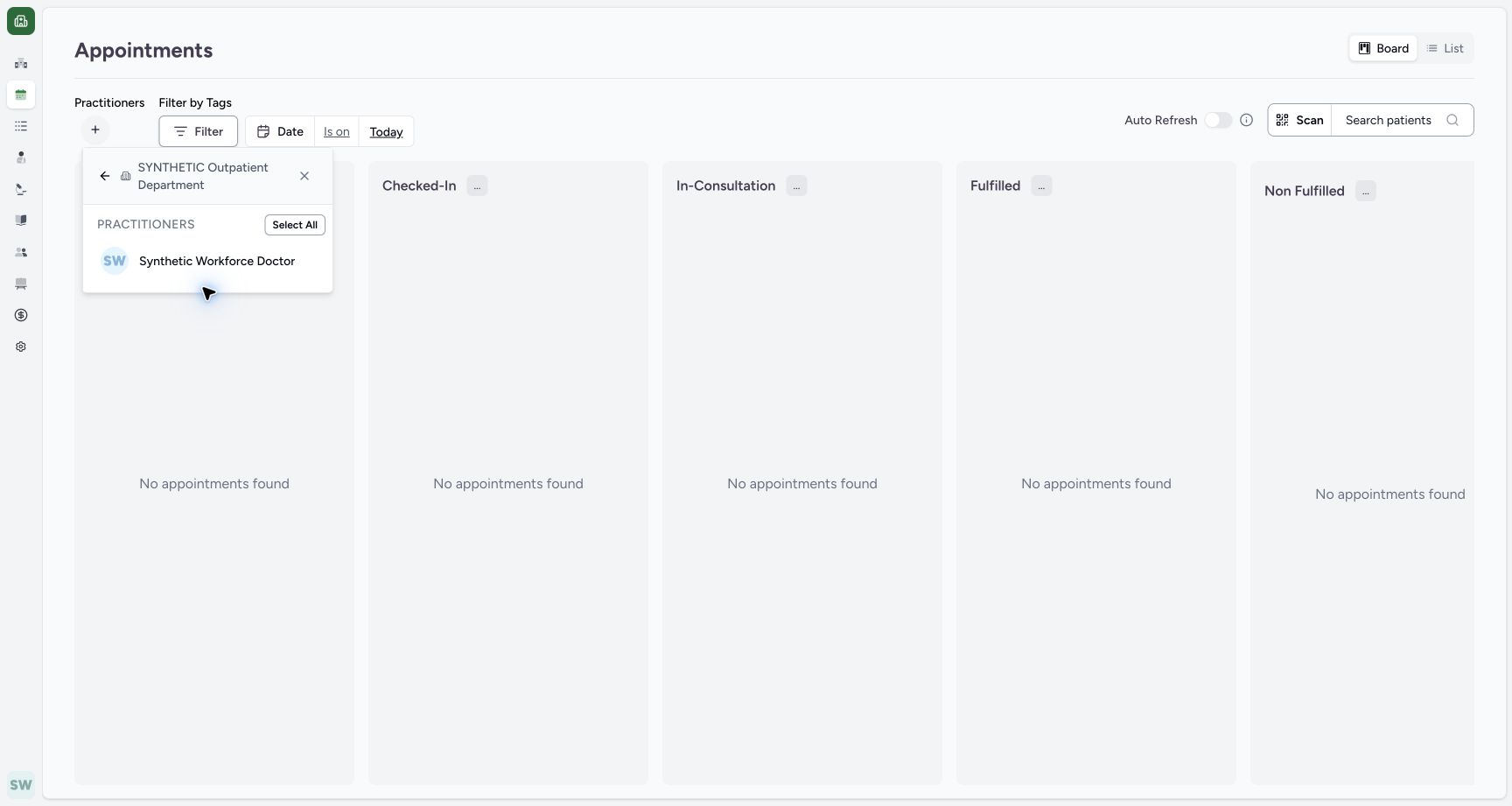
On Board, open + under Practitioners, open SYNTHETIC Outpatient Department, and select Synthetic Workforce Doctor. The populated Board then shows that Doctor selected.
123Start on the current-day Board
Capture details
Exact committed ba551 application, normal existing Staff in its assigned fictional Clinic. Native PDF controls are real Chrome/macOS local output.
Image SHA-256 f43089a6aacf4d1928ce7bbc0510efefe12ff6c63abbe3f0a2e9f1c23a224e53
- Practitioners +: Open the practitioner selector.
- Board: Board is selected.
- Today: Review the current date.
 1
1Choose the existing department
Capture details
Exact committed ba551 application, normal existing Staff in its assigned fictional Clinic. Native PDF controls are real Chrome/macOS local output.
Image SHA-256 62e4dae211addce72dd13ce2132516736b66d5d7ff6e783cb64aa17c8d07bde8
- Department: Open SYNTHETIC Outpatient Department.
 1
1Select the intended Doctor
Capture details
Exact committed ba551 application, normal existing Staff in its assigned fictional Clinic. Native PDF controls are real Chrome/macOS local output.
Image SHA-256 80d948ab35b43f55081bca235a2d7a92c36e2d1e45e6d73cbceeafbcd25fd924
- Synthetic Workforce Doctor: Select this existing practitioner.
12Open patient search
Capture details
Exact committed ba551 application, normal existing Staff in its assigned fictional Clinic. Native PDF controls are real Chrome/macOS local output.
Image SHA-256 cba2b743e5a6274116687a8ed08693e56741d42d9a0ae29a193d471384e3f05b
- Search patients: Open the patient filter.
- Selected Doctor: The intended practitioner is now selected.
2. Search by the known phone
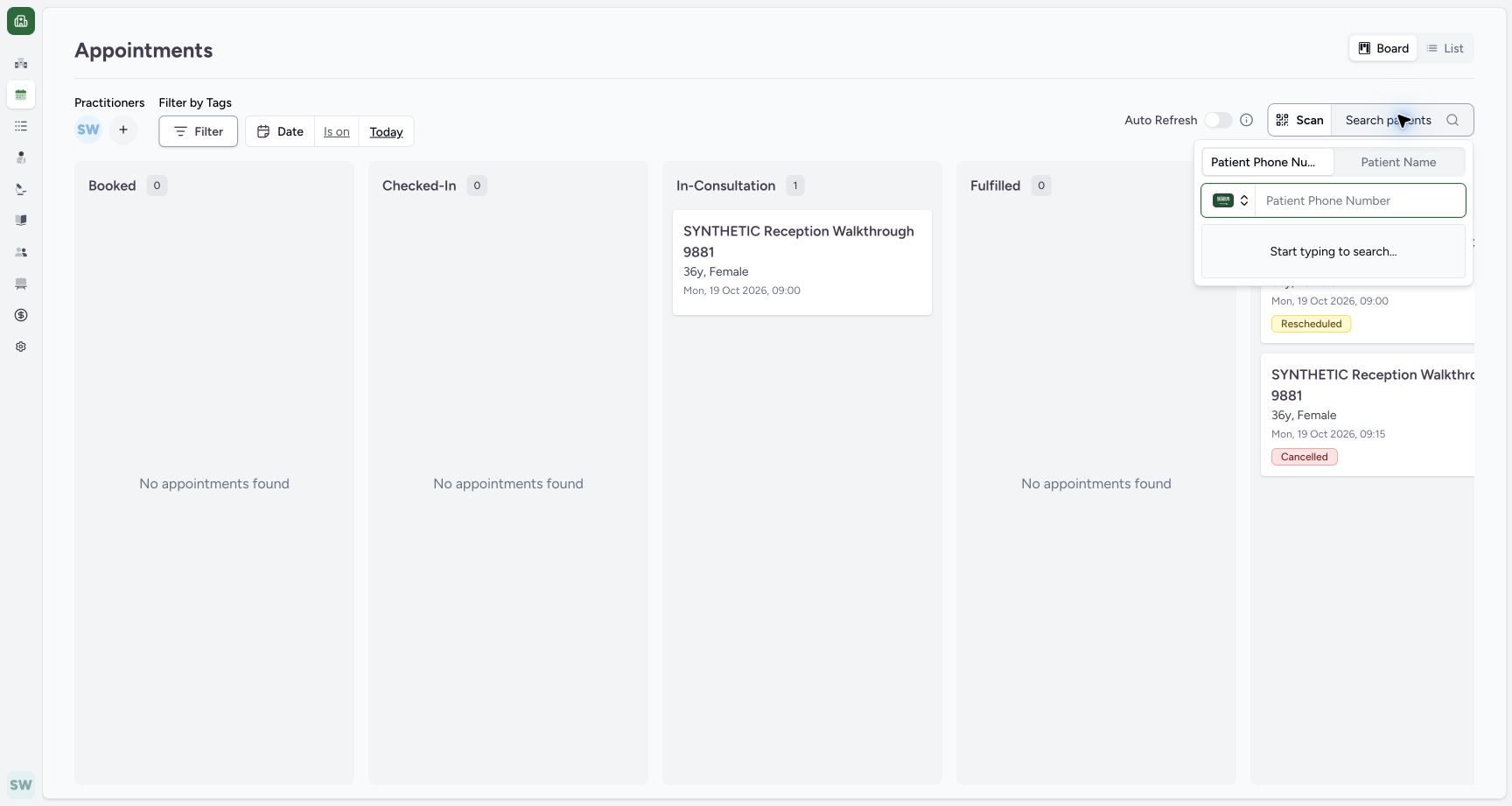
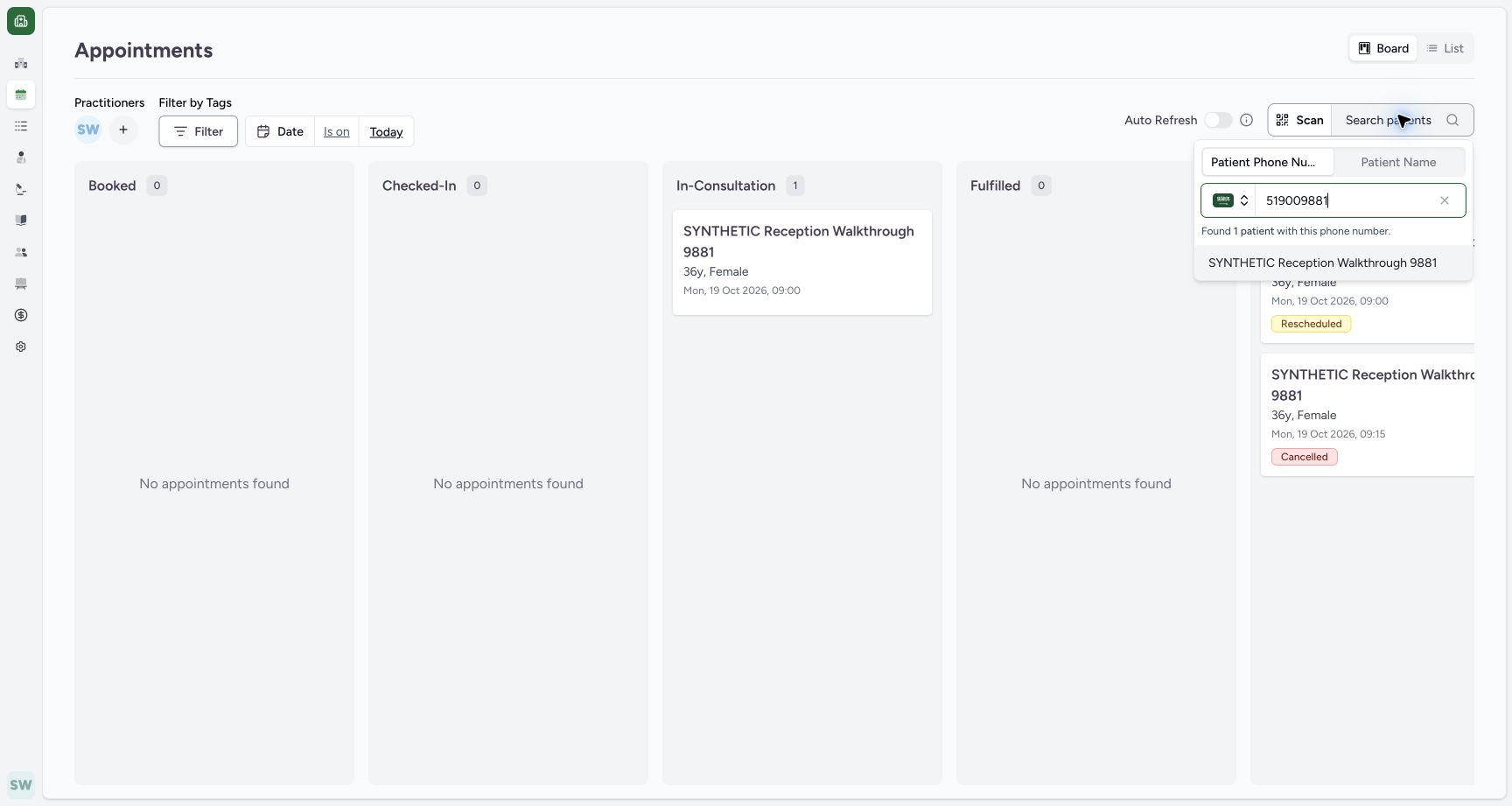
Open Search patients. Keep the selected Patient Phone Number mode and SA prefix. Enter the known synthetic local number 519009881. Select the intended SYNTHETIC Reception Walkthrough 9881 result.
12Open patient search
Capture details
Exact committed ba551 application, normal existing Staff in its assigned fictional Clinic. Native PDF controls are real Chrome/macOS local output.
Image SHA-256 cba2b743e5a6274116687a8ed08693e56741d42d9a0ae29a193d471384e3f05b
- Search patients: Open the patient filter.
- Selected Doctor: The intended practitioner is now selected.
 123
123Inspect the phone search input
Capture details
Exact committed ba551 application, normal existing Staff in its assigned fictional Clinic. Native PDF controls are real Chrome/macOS local output.
Image SHA-256 ccd06973f32f4b0ffe0226f0985a70cb8a871bfd0d1c818ff7f966de42325e14
- Phone mode: The phone-number tab is selected.
- SA prefix: This fictional phone uses the selected Saudi prefix.
- Phone number: Enter the known local number.
 12
12Select the matching phone result
Capture details
Exact committed ba551 application, normal existing Staff in its assigned fictional Clinic. Native PDF controls are real Chrome/macOS local output.
Image SHA-256 8c85fd93911bd8865db73b0ec119920e28991412d4070db2a85f3348b8f7f0c2
- Known phone: The synthetic local number is entered.
- Matching patient: Select the intended synthetic patient from the one result.
3. Complete the actual identity check
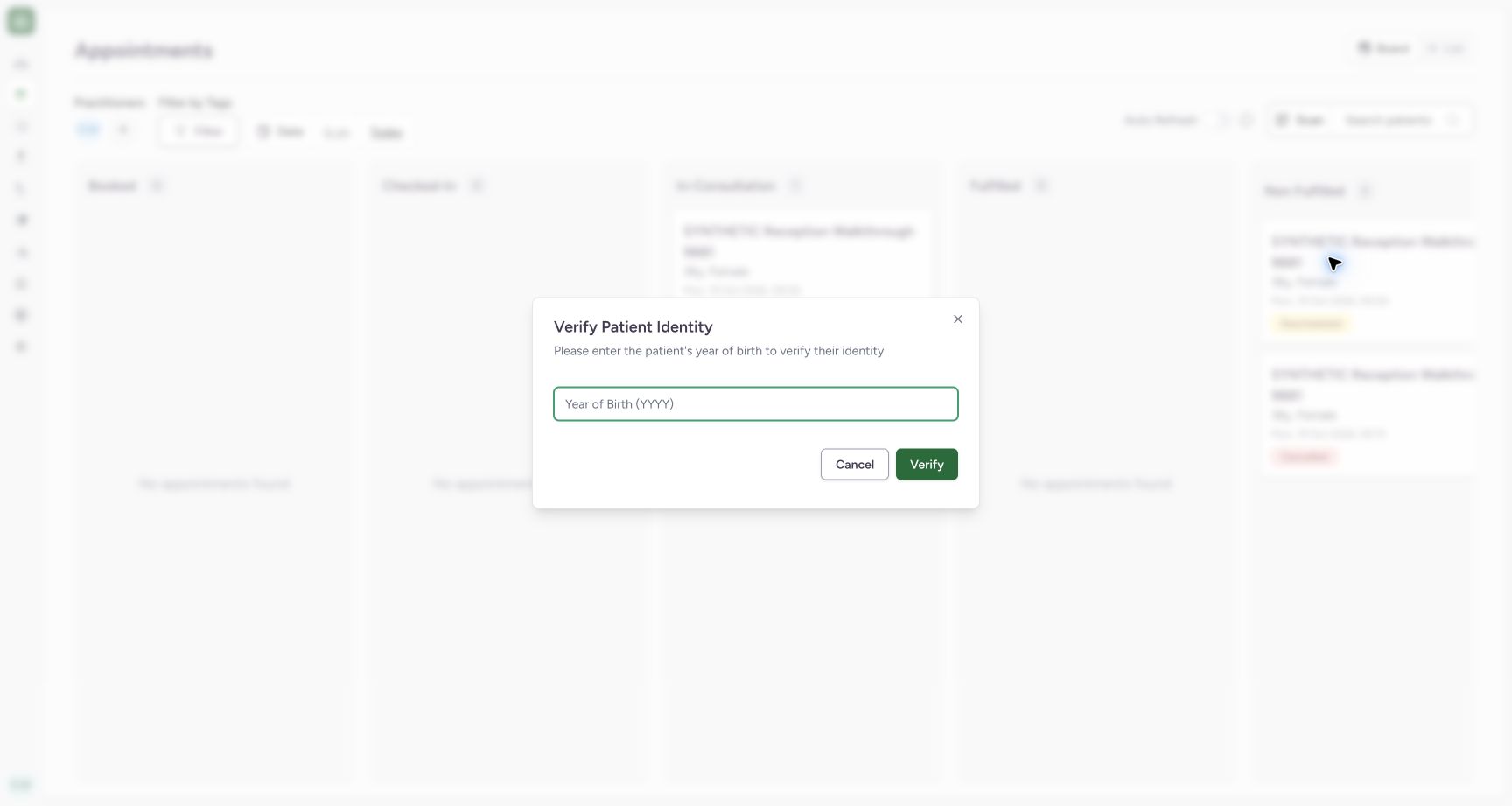
The pictured Verify Patient Identity dialog requests the year of birth. Enter the known synthetic year 1990 and use Verify. The patient name then appears as the selected Board filter.
 12
12Recognize the identity check
Capture details
Exact committed ba551 application, normal existing Staff in its assigned fictional Clinic. Native PDF controls are real Chrome/macOS local output.
Image SHA-256 3d78e163a2d2348d0c68b93af02ac5ee2b83490d4b73483bce0361b602227b31
- Year of birth: The identity dialog requests the known year.
- Verify: Submit only the known patient year.
12Verify the known year
Capture details
Exact committed ba551 application, normal existing Staff in its assigned fictional Clinic. Native PDF controls are real Chrome/macOS local output.
Image SHA-256 10f91beaba96491f3f61a22f8fed64ef8976052ba381540a1c7cb3a4b0989fe8
- 1990: The known synthetic year is entered.
- Verify: Verify this patient identity.
12Read and clear the selected patient
Capture details
Exact committed ba551 application, normal existing Staff in its assigned fictional Clinic. Native PDF controls are real Chrome/macOS local output.
Image SHA-256 c07d19439ec390f0f955d1b3090434f3ab66468807bd15172c96703cb00c5639
- Patient filter: The intended patient is now selected.
- Clear patient: The adjacent X removes only the patient filter.
4. Clear only the patient filter
Use the X beside the selected patient. Search patients returns while the Doctor and Today filters remain selected.
12Read and clear the selected patient
Capture details
Exact committed ba551 application, normal existing Staff in its assigned fictional Clinic. Native PDF controls are real Chrome/macOS local output.
Image SHA-256 c07d19439ec390f0f955d1b3090434f3ab66468807bd15172c96703cb00c5639
- Patient filter: The intended patient is now selected.
- Clear patient: The adjacent X removes only the patient filter.
123Confirm the patient filter is cleared
Capture details
Exact committed ba551 application, normal existing Staff in its assigned fictional Clinic. Native PDF controls are real Chrome/macOS local output.
Image SHA-256 5ee045c3d08fadcef2455143cb6ecb54a4f22459fea23c9e636dafe1ef054754
- Search patients restored: The patient filter is cleared.
- Doctor retained: The practitioner filter remains selected.
- Date retained: Today remains selected.
5. Use the alternative name search
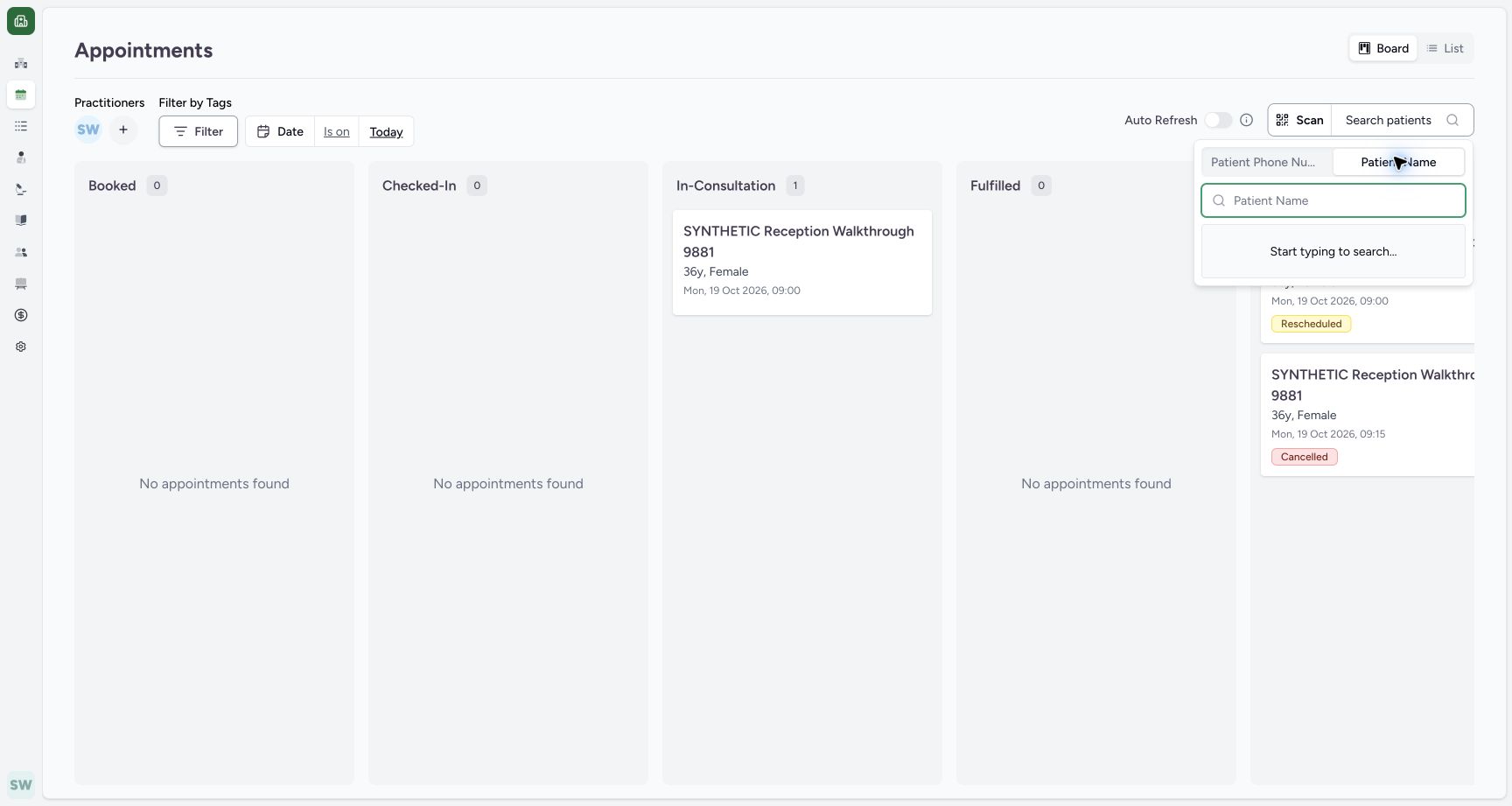
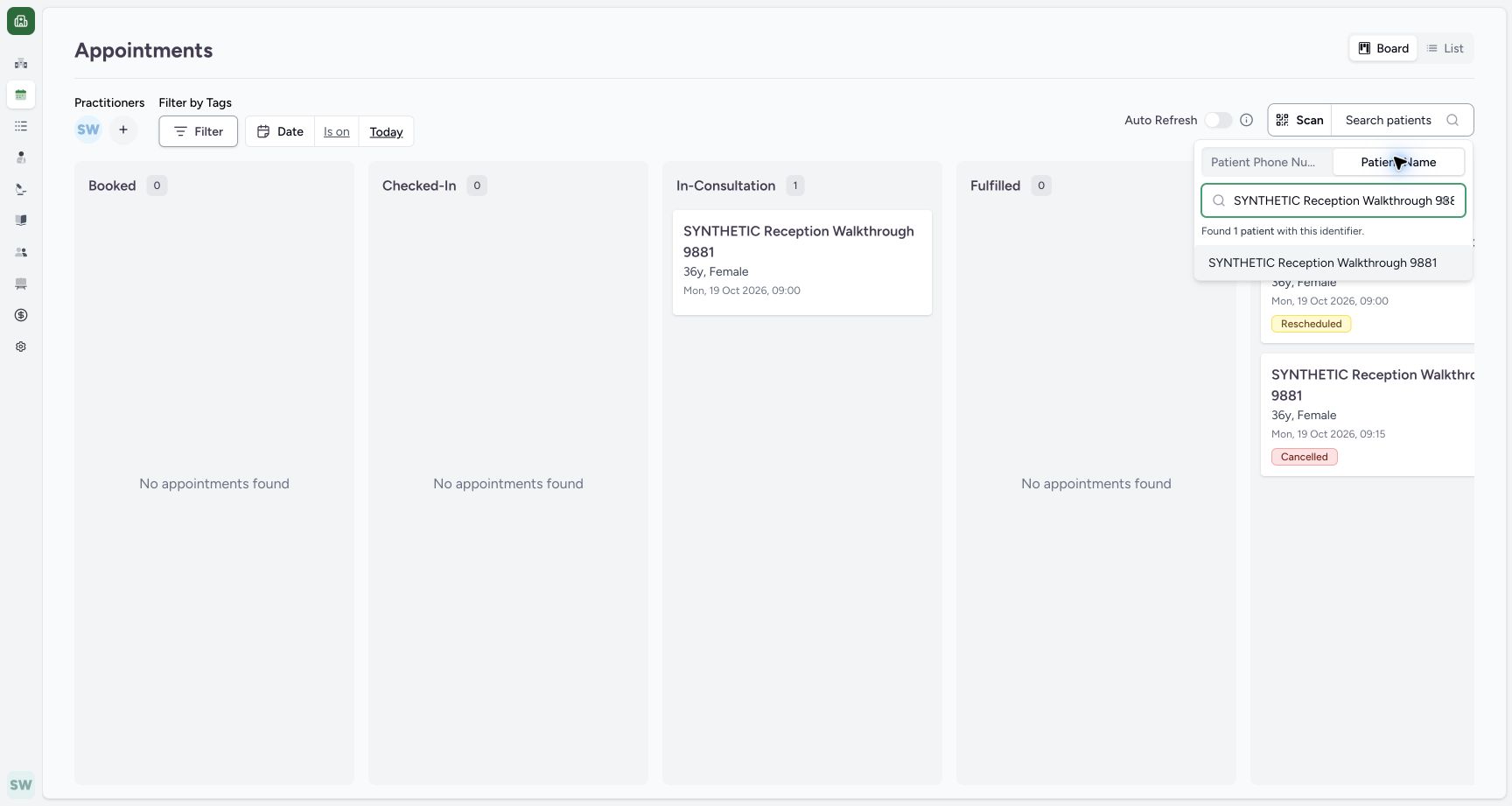
Open Search patients, choose Patient Name, and enter SYNTHETIC Reception Walkthrough 9881. Select the matching result. This same patient was already verified in this session; the lesson does not establish whether another patient or session requires a new check.
123Confirm the patient filter is cleared
Capture details
Exact committed ba551 application, normal existing Staff in its assigned fictional Clinic. Native PDF controls are real Chrome/macOS local output.
Image SHA-256 5ee045c3d08fadcef2455143cb6ecb54a4f22459fea23c9e636dafe1ef054754
- Search patients restored: The patient filter is cleared.
- Doctor retained: The practitioner filter remains selected.
- Date retained: Today remains selected.
 12
12Switch to name search
Capture details
Exact committed ba551 application, normal existing Staff in its assigned fictional Clinic. Native PDF controls are real Chrome/macOS local output.
Image SHA-256 263b0a764a3f6c4b06423b803c97354fde722ea1fd4d9974a5d60aa87caee39a
- Patient Name: Use the alternate name tab.
- Name input: Enter the known synthetic name.
 1
1Inspect the name result
Capture details
Exact committed ba551 application, normal existing Staff in its assigned fictional Clinic. Native PDF controls are real Chrome/macOS local output.
Image SHA-256 9e038770def1c2b28a6b7708c7aec5252c9fc689da28b66bd8113783af19a656
- Matching patient: Select the same intended patient from the name result.
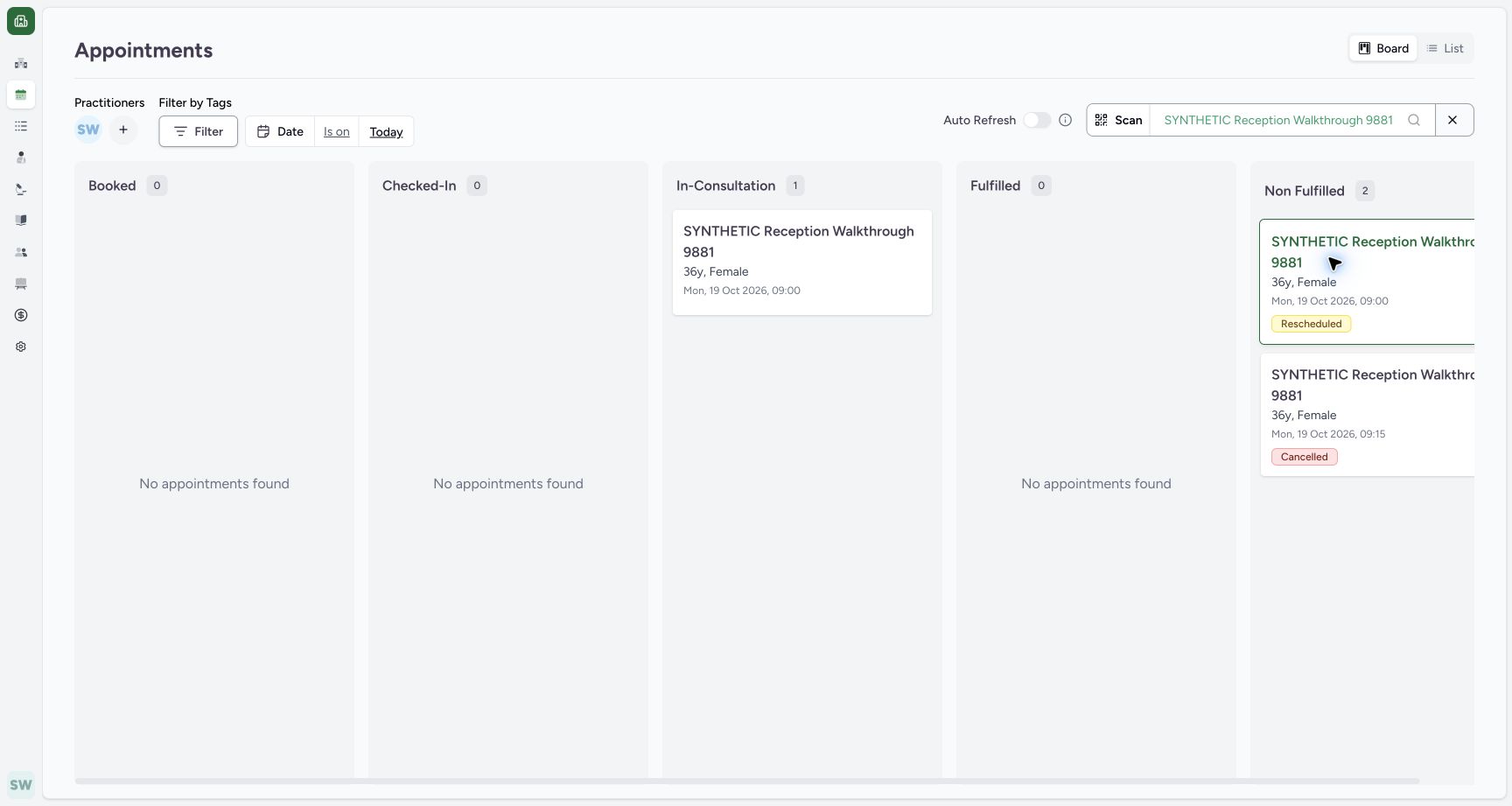 12
12Expose the right-hand Board group controls
Capture details
Exact committed ba551 application, normal existing Staff in its assigned fictional Clinic. Native PDF controls are real Chrome/macOS local output.
Image SHA-256 9b2c6cb65f53edabb9c5ad6173ff7248bdfb2a8afd198b63984d6eeb1ee641ce
- Horizontal scrollbar: Scroll the Board to the right if the Non Fulfilled group control is outside the viewport.
- Patient retained: The patient is selected again.
Troubleshooting
The Board is empty before choosing the Doctor
Inspect the Practitioners selection. In the pictured initial state no Doctor avatar is selected; opening the department and selecting the intended Doctor produces the existing cards.
123Start on the current-day Board
Capture details
Exact committed ba551 application, normal existing Staff in its assigned fictional Clinic. Native PDF controls are real Chrome/macOS local output.
Image SHA-256 f43089a6aacf4d1928ce7bbc0510efefe12ff6c63abbe3f0a2e9f1c23a224e53
- Practitioners +: Open the practitioner selector.
- Board: Board is selected.
- Today: Review the current date.
1Choose the existing department
Capture details
Exact committed ba551 application, normal existing Staff in its assigned fictional Clinic. Native PDF controls are real Chrome/macOS local output.
Image SHA-256 62e4dae211addce72dd13ce2132516736b66d5d7ff6e783cb64aa17c8d07bde8
- Department: Open SYNTHETIC Outpatient Department.
1Select the intended Doctor
Capture details
Exact committed ba551 application, normal existing Staff in its assigned fictional Clinic. Native PDF controls are real Chrome/macOS local output.
Image SHA-256 80d948ab35b43f55081bca235a2d7a92c36e2d1e45e6d73cbceeafbcd25fd924
- Synthetic Workforce Doctor: Select this existing practitioner.
12Open patient search
Capture details
Exact committed ba551 application, normal existing Staff in its assigned fictional Clinic. Native PDF controls are real Chrome/macOS local output.
Image SHA-256 cba2b743e5a6274116687a8ed08693e56741d42d9a0ae29a193d471384e3f05b
- Search patients: Open the patient filter.
- Selected Doctor: The intended practitioner is now selected.
Source evidence
Every citation uses this exact committed version. The private source repository requires access.
- repositories/platform/mansoq-web/src/pages/Appointments/AppointmentsPage.tsx:442 ·
ba551c1d67031248136fd2016afe227b5fc994bdSource file checksum
465c14ff66869ff0996e51407ffa7d8f147f8b40db94bd463b8e9e988c119c25 - repositories/platform/mansoq-web/src/components/Patient/PatientIdentifierFilter.tsx:1 ·
ba551c1d67031248136fd2016afe227b5fc994bdSource file checksum
50d2cc2acbb414040148b30d6664ccdcae33df64bc7b19953fe34ee6afd3eed7 - repositories/platform/mansoq-web/src/pages/Appointments/components/PractitionerSelector.tsx:1 ·
ba551c1d67031248136fd2016afe227b5fc994bdSource file checksum
fbff1cae7ee20060cda82aff258844a6a4040444176b5c0df23c6e90de1d0790