 MANSOQ
 Doctor assessment · VERSION ba551c1d
Review symptom duplicates, status, severity and verification
Search installed coding, recognize the duplicate warning, review the separate clinical controls and save a retained symptom lifecycle update with verified identity and history.
Doctor
 123
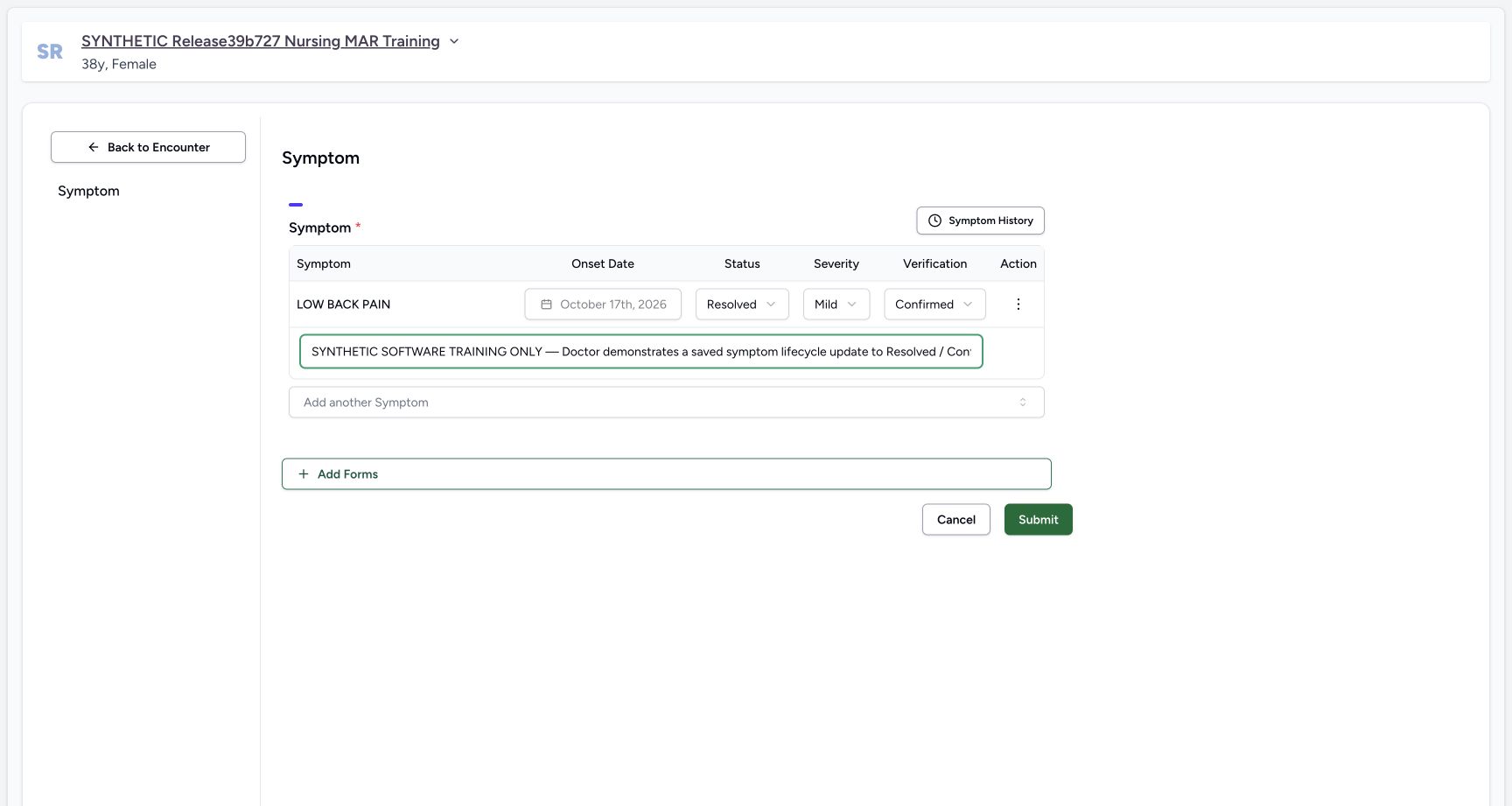
123Review the saved symptom lifecycle change before Submit
Capture details
Exact committed ba551c1d isolated synthetic clone, ordinary existing Doctor account, fictional Polyclinic inpatient example. Patient retains an earlier release name; captured source is ba551c1d. Software teaching only, not real clinical findings or advice. The same saved symptom is reviewed as Resolved / Mild / Confirmed with optional synthetic context. Locked onset remains 17 October; nothing is saved until Submit.
Image SHA-256 fbeff38940a3b2ab09ec2b331f3b2c410fc9e910465d2da870e2aaf16bd74319
- Clinical status: Resolved is the reviewed clinical status in this fictional software example.
- Verification: Confirmed is reviewed independently; this is not the Entered in Error correction state.
- Save reviewed update: Submit the reviewed changes once, then verify the retained record.
 12
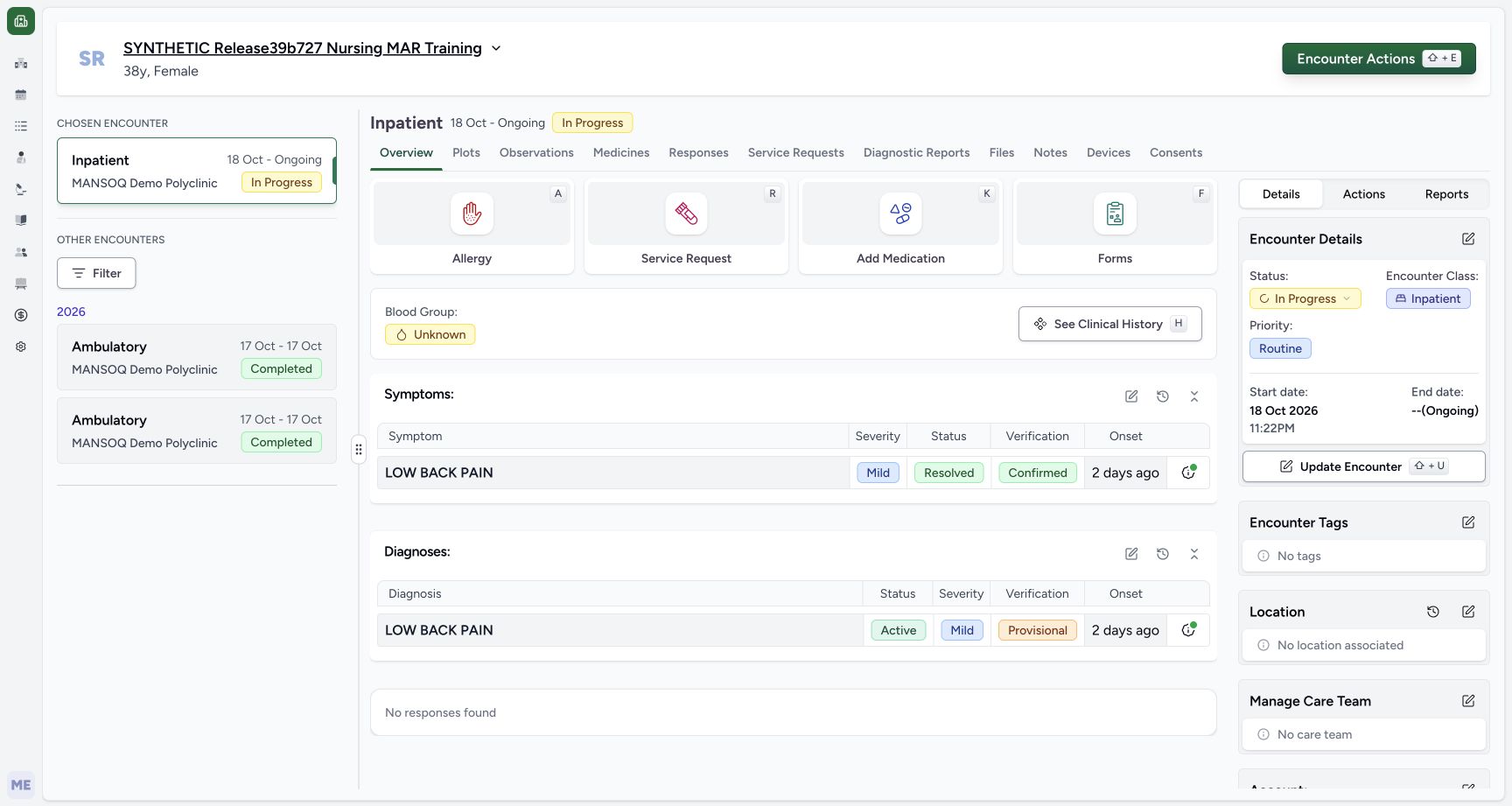
12Saved symptom remains visible as Resolved and Confirmed
Capture details
Exact committed ba551c1d isolated synthetic clone, ordinary existing Doctor account, fictional Polyclinic inpatient example. Patient retains an earlier release name; captured source is ba551c1d. Software teaching only, not real clinical findings or advice. The existing symptom UUID is retained as Resolved/Mild/Confirmed with unchanged onset and Doctor creator. Unlike an Entered in Error correction, this non-error symptom remains in the overview. Normal Doctor/Nurse reads verify the saved lifecycle state and preserved other records.
Image SHA-256 ed515ae4a1b57301b1fc7984802479e62494193c47e9b65b24239fef3811f9d6
- Saved current symptom: Reopen this current record for a later authorized review; the saved row remains present.
- Review patient history: Check retained symptom history after the lifecycle update.
11 of 11 content blocks have reviewed image alignment. Missing overview or prerequisite images remain open.
Before you begin
- Use the existing authorized Doctor and confirm the intended fictional patient and chosen In Progress Polyclinic inpatient encounter. The prior symptom-copy lesson has saved one current LOW BACK PAIN record as Active/Mild/Provisional. These are software training values, not real clinical findings or advice.
 1
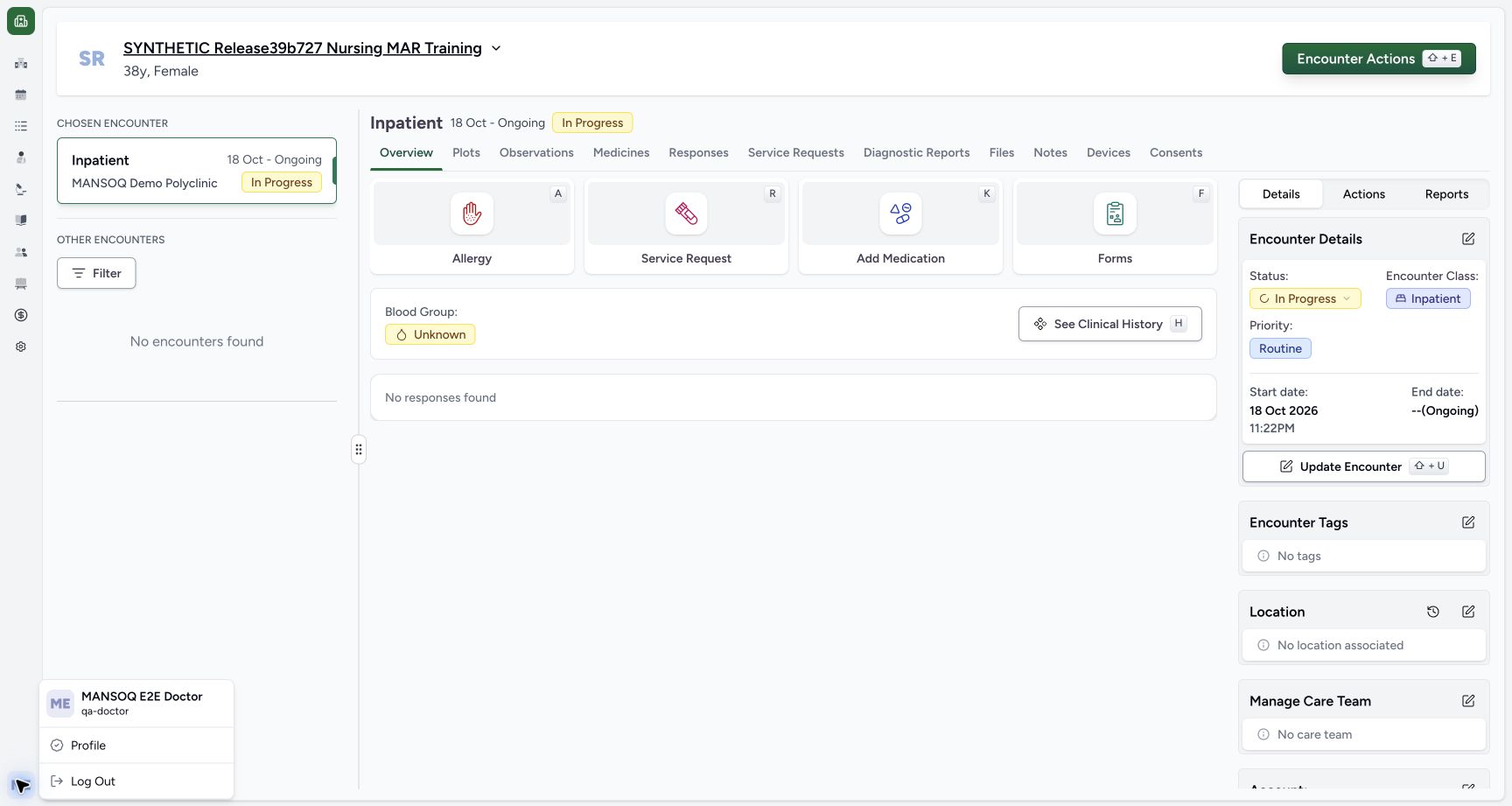
1Recorded release ba551c1d · 2026-10-19T00:03:34.348Z · 1728 × 921 Existing Doctor identity in the selected synthetic encounter
Capture details
Exact committed ba551c1d isolated synthetic clone, ordinary existing Doctor account, fictional Polyclinic inpatient encounter. The patient retains an earlier release name; actual captured source is ba551c1d. All examples are software training only, not real symptoms, diagnosis, treatment or clinical advice. Ordinary existing qa-doctor account. Medication and Nutrition events/requests are preserved; this branch concerns assessment documentation only.
Image SHA-256
f58ee93eda7e76a2bb930fb2508da3a97513acdfd479391e115bc991dd188f80- Doctor identity: Immediately right of the account avatar, the menu identifies MANSOQ E2E Doctor and qa-doctor. Confirm the authorized operator before documenting.
 123
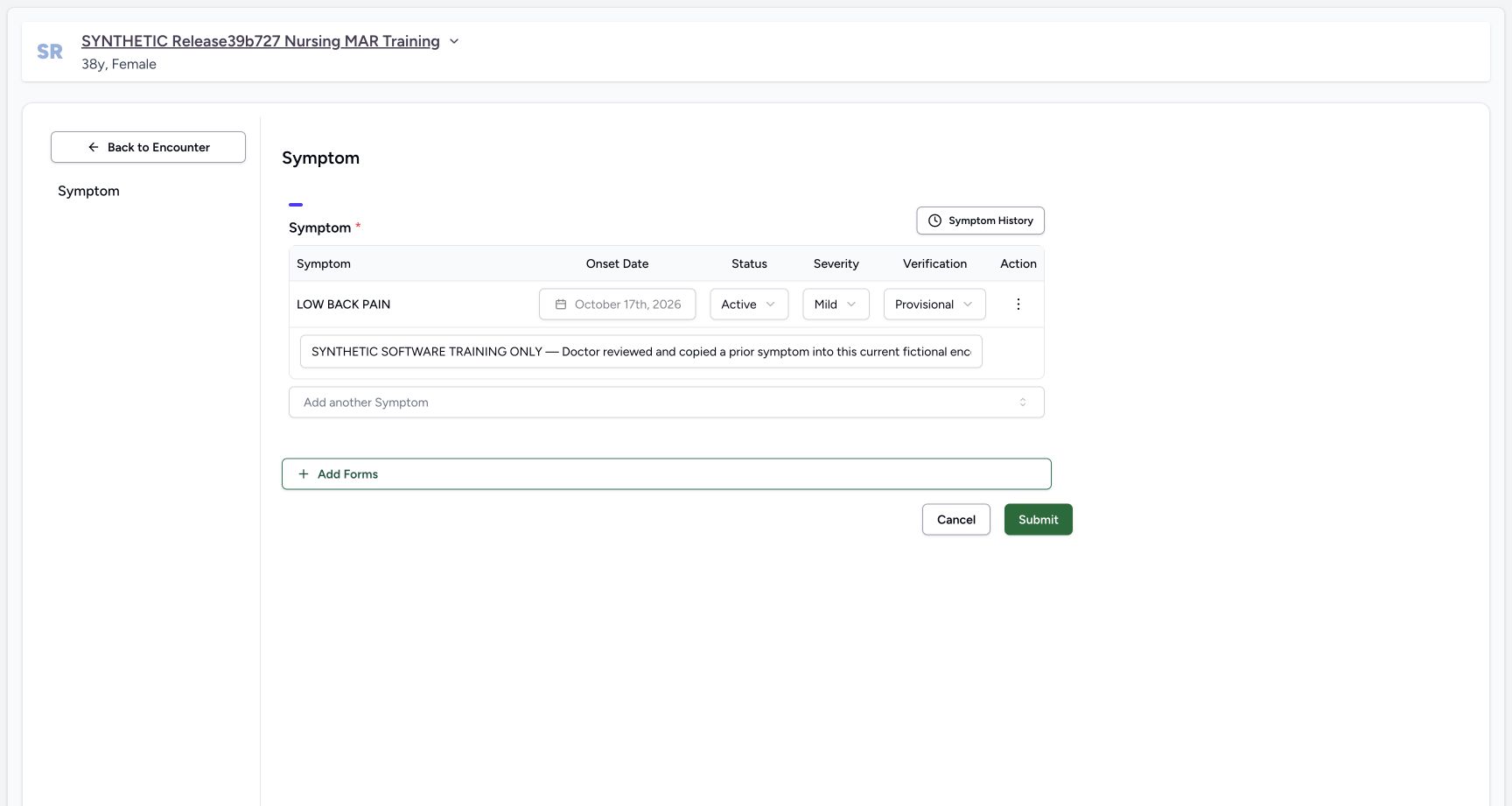
123Recorded release ba551c1d · 2026-10-19T00:37:57.344Z · 1728 × 921 Saved symptom editor locks onset and exposes separate clinical controls
Capture details
Exact committed ba551c1d isolated synthetic clone, ordinary existing Doctor account, fictional Polyclinic inpatient example. Patient retains an earlier release name; captured source is ba551c1d. Software teaching only, not real clinical findings or advice. The saved historical copy retains Doctor note and locked 17 October onset. Status, Severity and Verification are separate controls. No current edit is saved yet.
Image SHA-256
ae6336400377646ae3f6d7663e1260d1b0aa38eb160188713f862fd9ee077935- Saved onset lock: The existing symptom onset date is locked; use the correct supported record workflow rather than changing identity.
- Clinical status: Change the selected saved symptom clinical status only after review.
- Add another Symptom: Search installed terminology; a duplicate non-error code is blocked.
- Review the existing saved symptom before adding another code. Its onset is locked; its optional current context note and clinical controls are available for authorized review. Keep Symptoms and Diagnoses separate even when their displayed terminology matches.123
Recorded release ba551c1d · 2026-10-19T00:37:57.344Z · 1728 × 921 Saved symptom editor locks onset and exposes separate clinical controls
Capture details
Exact committed ba551c1d isolated synthetic clone, ordinary existing Doctor account, fictional Polyclinic inpatient example. Patient retains an earlier release name; captured source is ba551c1d. Software teaching only, not real clinical findings or advice. The saved historical copy retains Doctor note and locked 17 October onset. Status, Severity and Verification are separate controls. No current edit is saved yet.
Image SHA-256
ae6336400377646ae3f6d7663e1260d1b0aa38eb160188713f862fd9ee077935- Saved onset lock: The existing symptom onset date is locked; use the correct supported record workflow rather than changing identity.
- Clinical status: Change the selected saved symptom clinical status only after review.
- Add another Symptom: Search installed terminology; a duplicate non-error code is blocked.
1. Reopen the selected current symptom
Use the Symptoms edit icon from the current overview to open its system form. Confirm the existing row and patient banner. The saved 17 October onset is disabled. Status, Severity and Verification remain separate review controls; the optional note appears beneath the row.
 12
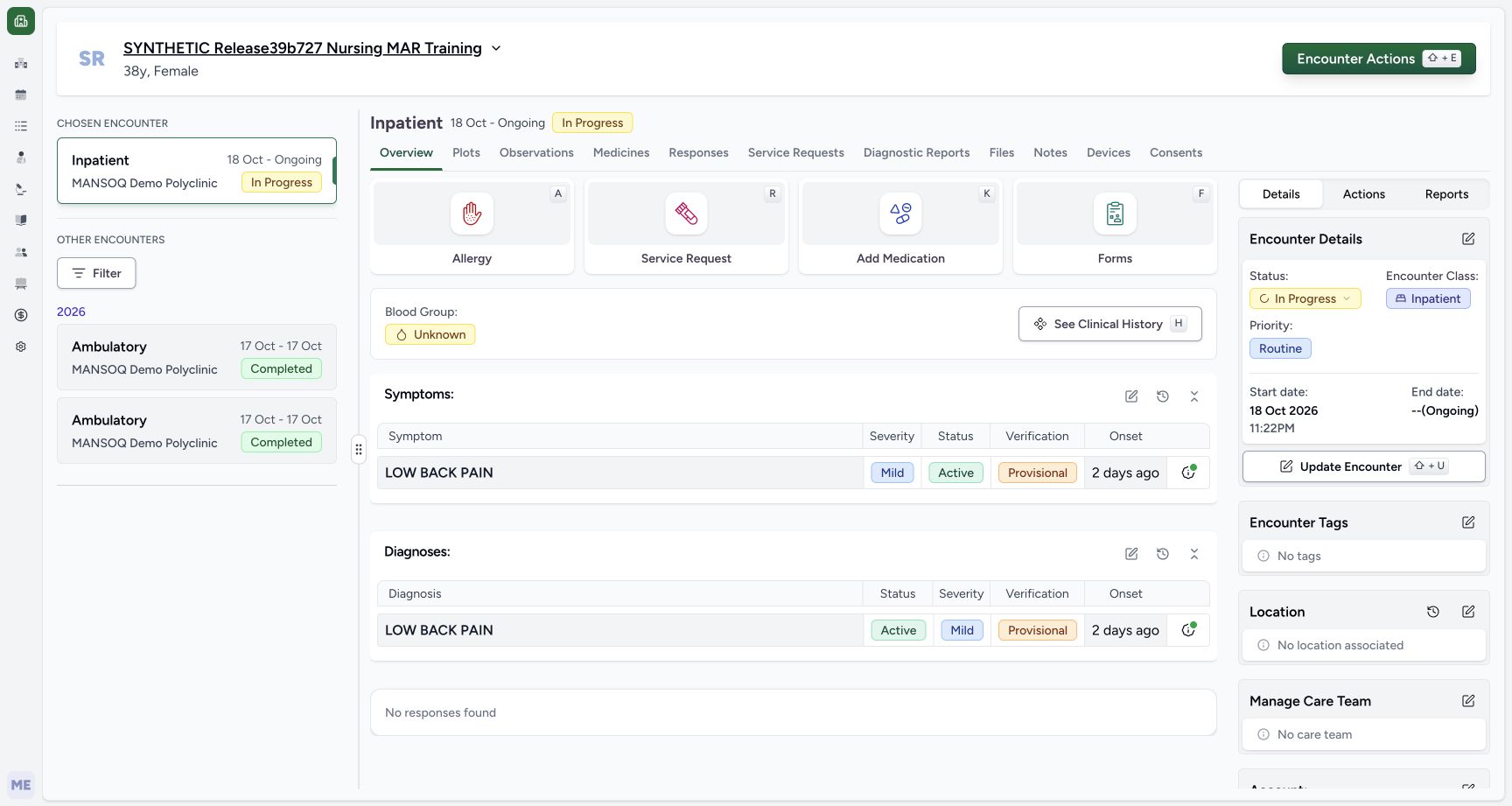
12Saved current symptom appears under the selected encounter
Capture details
Exact committed ba551c1d isolated synthetic clone, ordinary existing Doctor account, fictional Polyclinic inpatient encounter. The patient retains an earlier release name; actual captured source is ba551c1d. All examples are software training only, not real symptoms, diagnosis, treatment or clinical advice. The saved current symptom is Mild/Active/Provisional with 17 October calendar onset. Separate normal Doctor/Nurse reads verify its fresh current UUID and Doctor creator, with prior source and all category-qualified diagnoses, fourteen administrations and four requests preserved.
Image SHA-256 9ac1a33ed8284b82cfc8f3cd937ad5f9934d057ea7b261154258cfaee5645071
- Current Symptom editor: Reopen the chosen encounter symptom form to review the retained saved record.
- Saved symptom details: Open this symptom’s own note and reported-by details.
123Saved symptom editor locks onset and exposes separate clinical controls
Capture details
Exact committed ba551c1d isolated synthetic clone, ordinary existing Doctor account, fictional Polyclinic inpatient example. Patient retains an earlier release name; captured source is ba551c1d. Software teaching only, not real clinical findings or advice. The saved historical copy retains Doctor note and locked 17 October onset. Status, Severity and Verification are separate controls. No current edit is saved yet.
Image SHA-256 ae6336400377646ae3f6d7663e1260d1b0aa38eb160188713f862fd9ee077935
- Saved onset lock: The existing symptom onset date is locked; use the correct supported record workflow rather than changing identity.
- Clinical status: Change the selected saved symptom clinical status only after review.
- Add another Symptom: Search installed terminology; a duplicate non-error code is blocked.
2. Search installed coding and recognize a duplicate
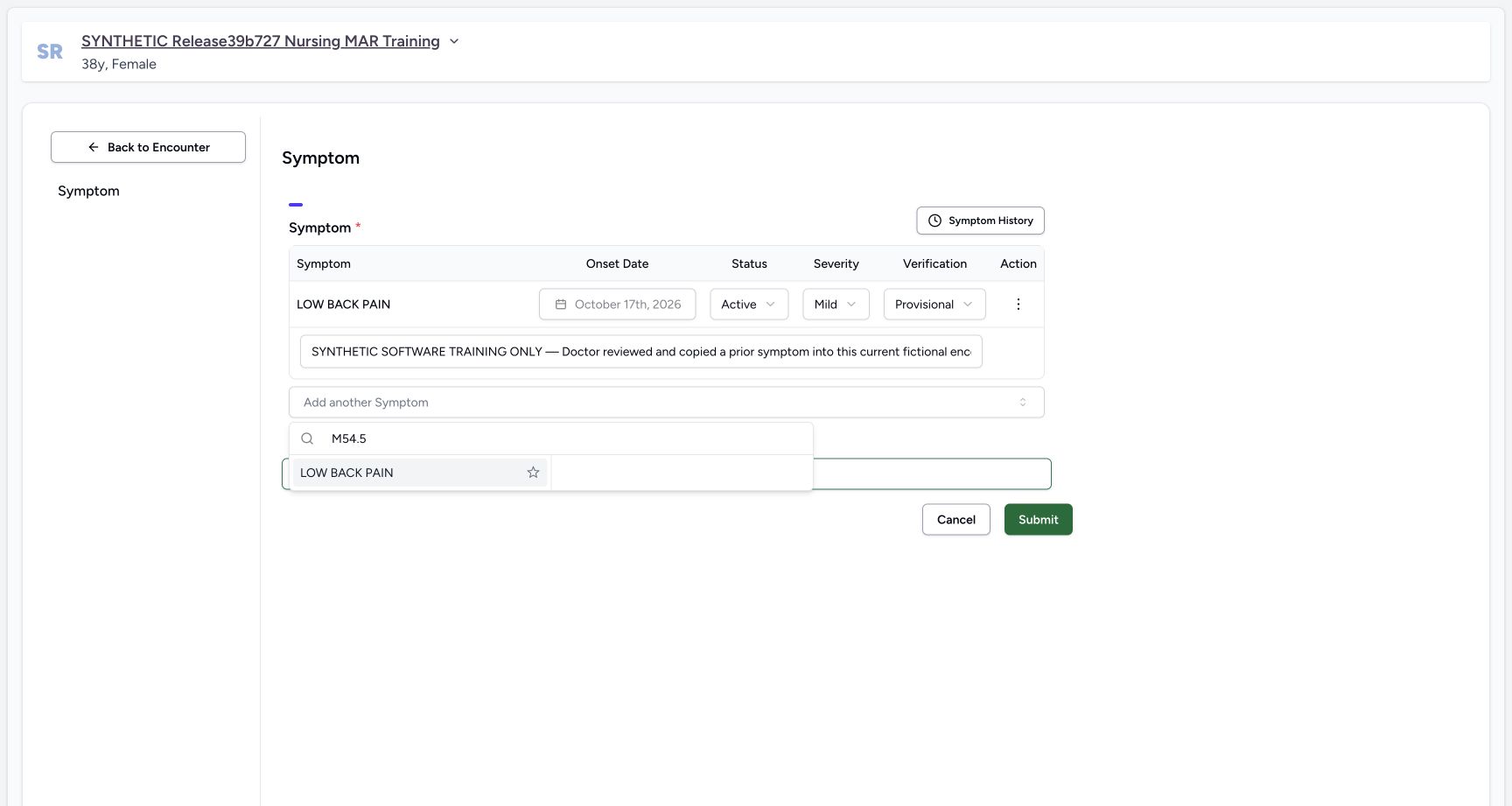
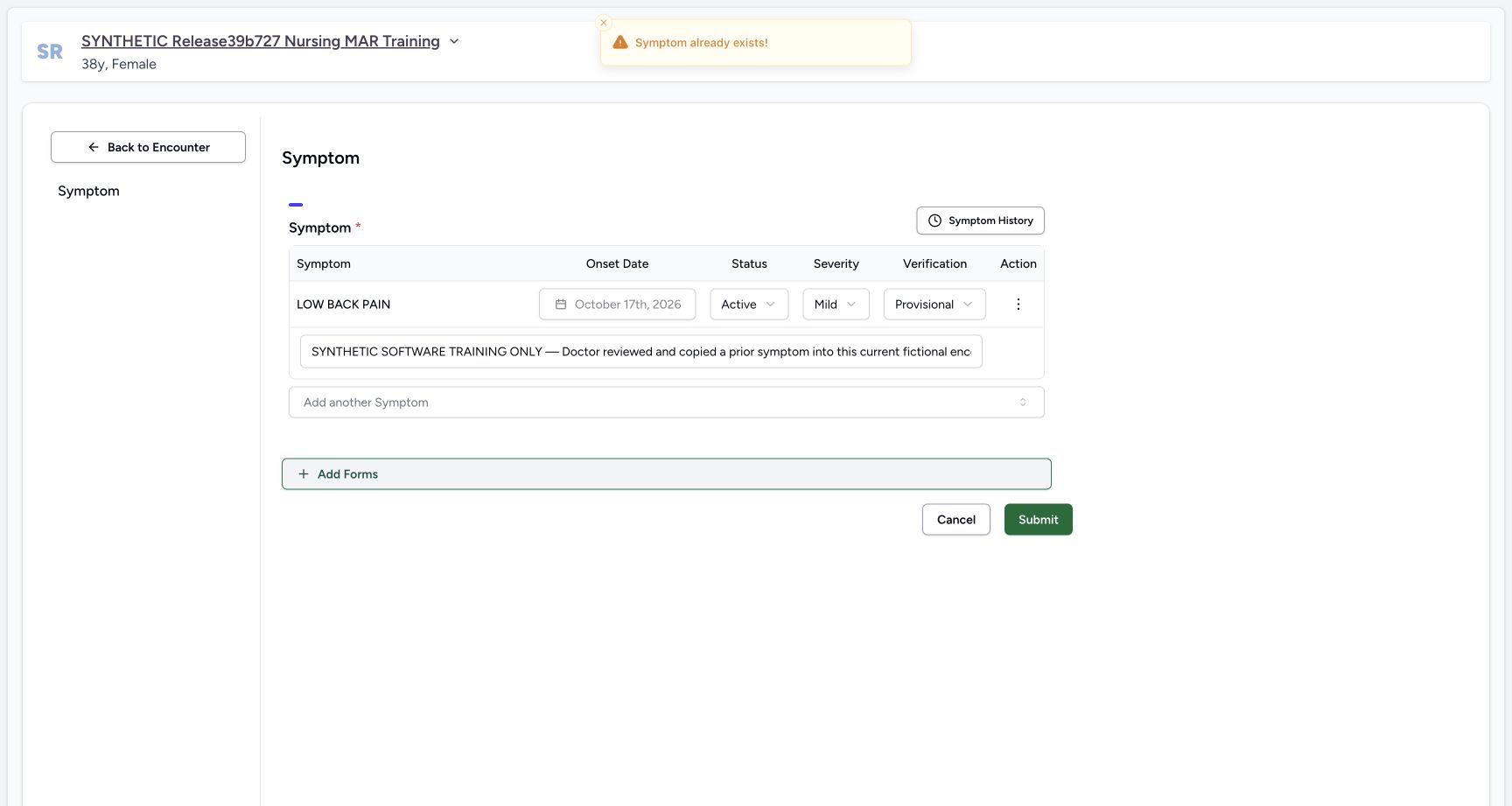
Open Add another Symptom, enter M54.5 and wait for the returned LOW BACK PAIN option. Selecting it while the current non-error symptom already has that code shows Symptom already exists! and leaves one row. Review the existing record rather than repeatedly adding the same code. This action has not submitted another condition.
123Saved symptom editor locks onset and exposes separate clinical controls
Capture details
Exact committed ba551c1d isolated synthetic clone, ordinary existing Doctor account, fictional Polyclinic inpatient example. Patient retains an earlier release name; captured source is ba551c1d. Software teaching only, not real clinical findings or advice. The saved historical copy retains Doctor note and locked 17 October onset. Status, Severity and Verification are separate controls. No current edit is saved yet.
Image SHA-256 ae6336400377646ae3f6d7663e1260d1b0aa38eb160188713f862fd9ee077935
- Saved onset lock: The existing symptom onset date is locked; use the correct supported record workflow rather than changing identity.
- Clinical status: Change the selected saved symptom clinical status only after review.
- Add another Symptom: Search installed terminology; a duplicate non-error code is blocked.
 12
12Installed M54.5 search returns LOW BACK PAIN
Capture details
Exact committed ba551c1d isolated synthetic clone, ordinary existing Doctor account, fictional Polyclinic inpatient example. Patient retains an earlier release name; captured source is ba551c1d. Software teaching only, not real clinical findings or advice. The actual installed condition terminology returns LOW BACK PAIN for M54.5. This is a software lookup example only. The existing current non-error symptom already has this code.
Image SHA-256 1672f51f1fcab75d9163d6f0c1681ac43ba433c492a29ed19bd95f132acb9eab
- Search installed coding: Enter the intended code or supported search term and wait for the returned option.
- Returned option: Choose only a deliberately reviewed returned coding option.
 1
1A duplicate non-error symptom code is blocked
Capture details
Exact committed ba551c1d isolated synthetic clone, ordinary existing Doctor account, fictional Polyclinic inpatient example. Patient retains an earlier release name; captured source is ba551c1d. Software teaching only, not real clinical findings or advice. Choosing the same installed code while a non-error current symptom exists produces the actual Symptom already exists warning and leaves one existing row. No submission or additional symptom save occurs.
Image SHA-256 77c7f7dd30ee8feeca1471e9f28279e35bdfe1fe8ccbb9ab0ba8ce75259fd862
- Duplicate warning: Review the existing symptom instead of repeatedly adding the same code.
3. Review clinical status independently
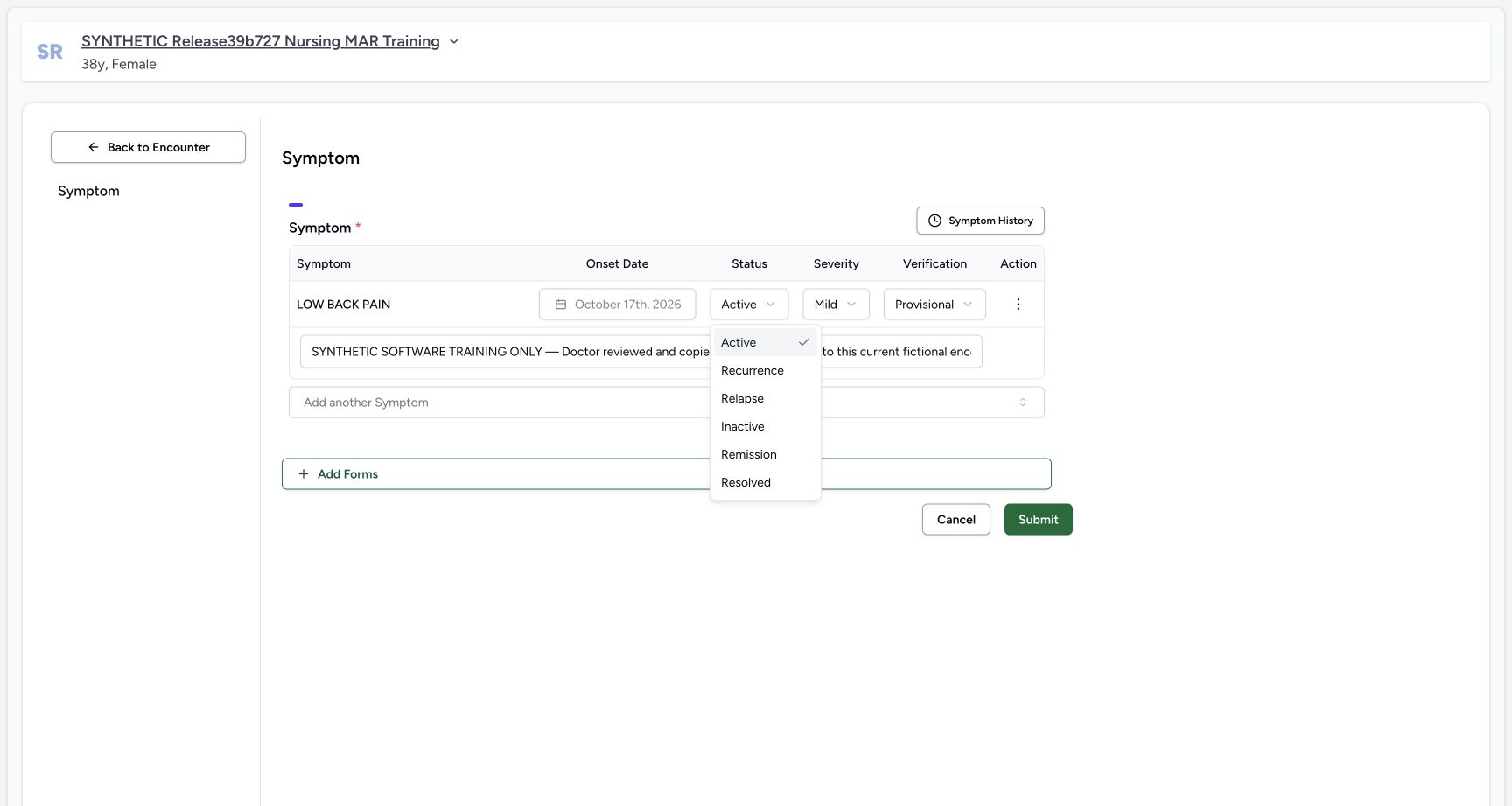
The Status control offers Active, Recurrence, Relapse, Inactive, Remission and Resolved. Choose the value appropriate to the authorized record review. This isolated fictional exercise chooses Resolved to teach a saved lifecycle change; it establishes no real clinical conclusion.
 1
1Symptom clinical status offers six distinct values
Capture details
Exact committed ba551c1d isolated synthetic clone, ordinary existing Doctor account, fictional Polyclinic inpatient example. Patient retains an earlier release name; captured source is ba551c1d. Software teaching only, not real clinical findings or advice. The actual Status dropdown exposes Active, Recurrence, Relapse, Inactive, Remission and Resolved. This exercise chooses Resolved only to demonstrate a fictional saved lifecycle change, not a real clinical conclusion.
Image SHA-256 1abe6a72d669b5a1014b0047b2e1b40053766b125bd800fbd5b7a4e411898797
- Resolved example: Choose the appropriate clinical status after authorized review; this exercise uses Resolved as synthetic software data.
4. Review severity independently
Severity offers Severe, Moderate and Mild. Review this field separately from clinical status. The example retains Mild while changing status. Viewing the choices does not imply every possible status/severity combination was saved.
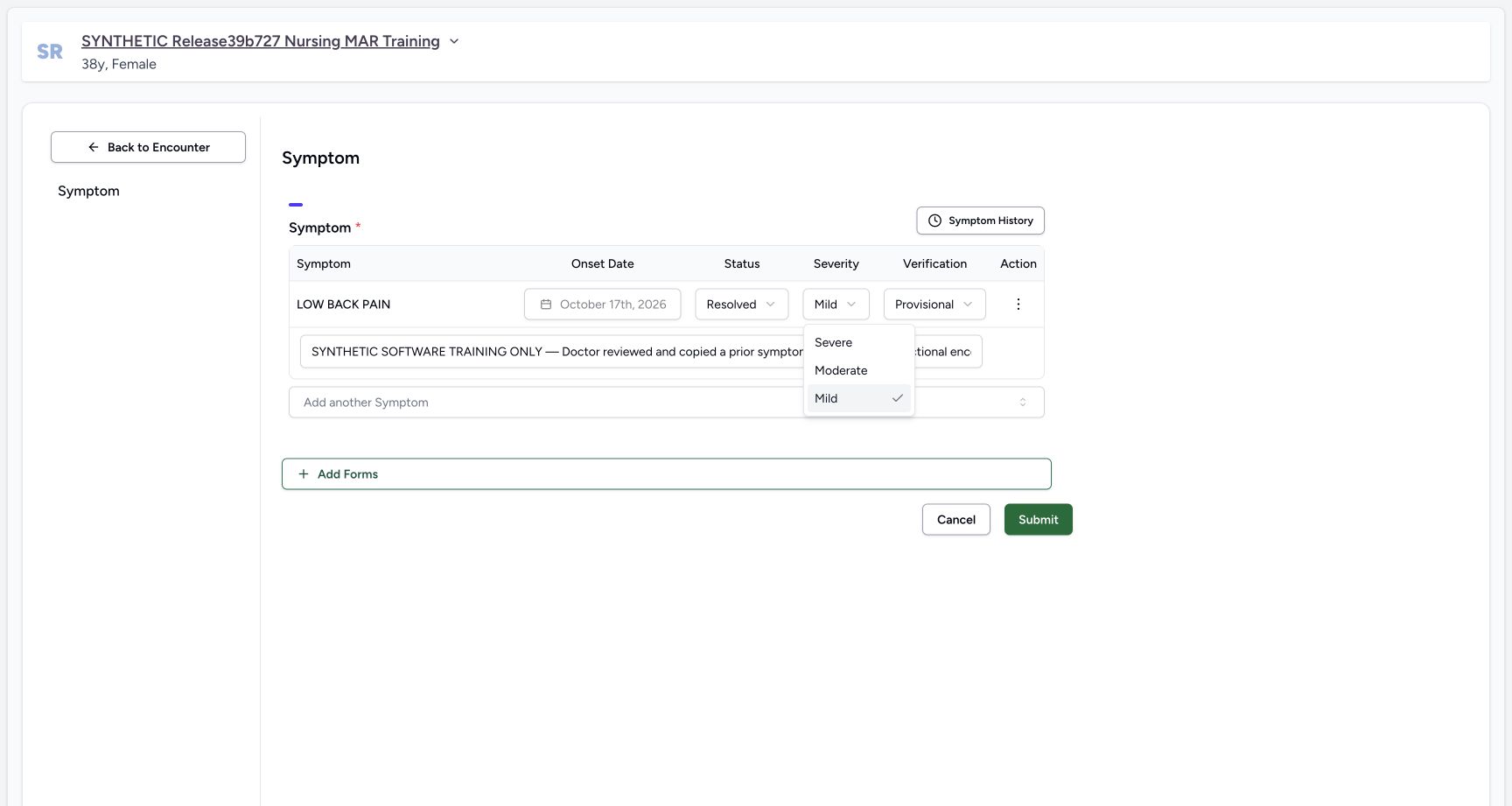 1
1Symptom severity is separate from clinical status
Capture details
Exact committed ba551c1d isolated synthetic clone, ordinary existing Doctor account, fictional Polyclinic inpatient example. Patient retains an earlier release name; captured source is ba551c1d. Software teaching only, not real clinical findings or advice. Severity offers Severe, Moderate and Mild. The fictional exercise retains Mild while changing clinical status; severity is not automatically inferred from the chosen status.
Image SHA-256 b08a26fe0767fbfd7e434f6c7649ae90c7b1cff7609cd2913861c23e68338157
- Retain reviewed severity: This example retains Mild; choose only the value appropriate to the authorized record review.
5. Review verification and optional documentation
For the existing saved symptom, Verification offers Unconfirmed, Provisional, Differential, Confirmed, Refuted and Entered in Error. This example selects Confirmed separately from Resolved clinical status. Entered in Error is the correction state taught in the related lesson. Notes is optional software input; record the appropriate context under facility policy. The example note explicitly describes fictional lifecycle training.
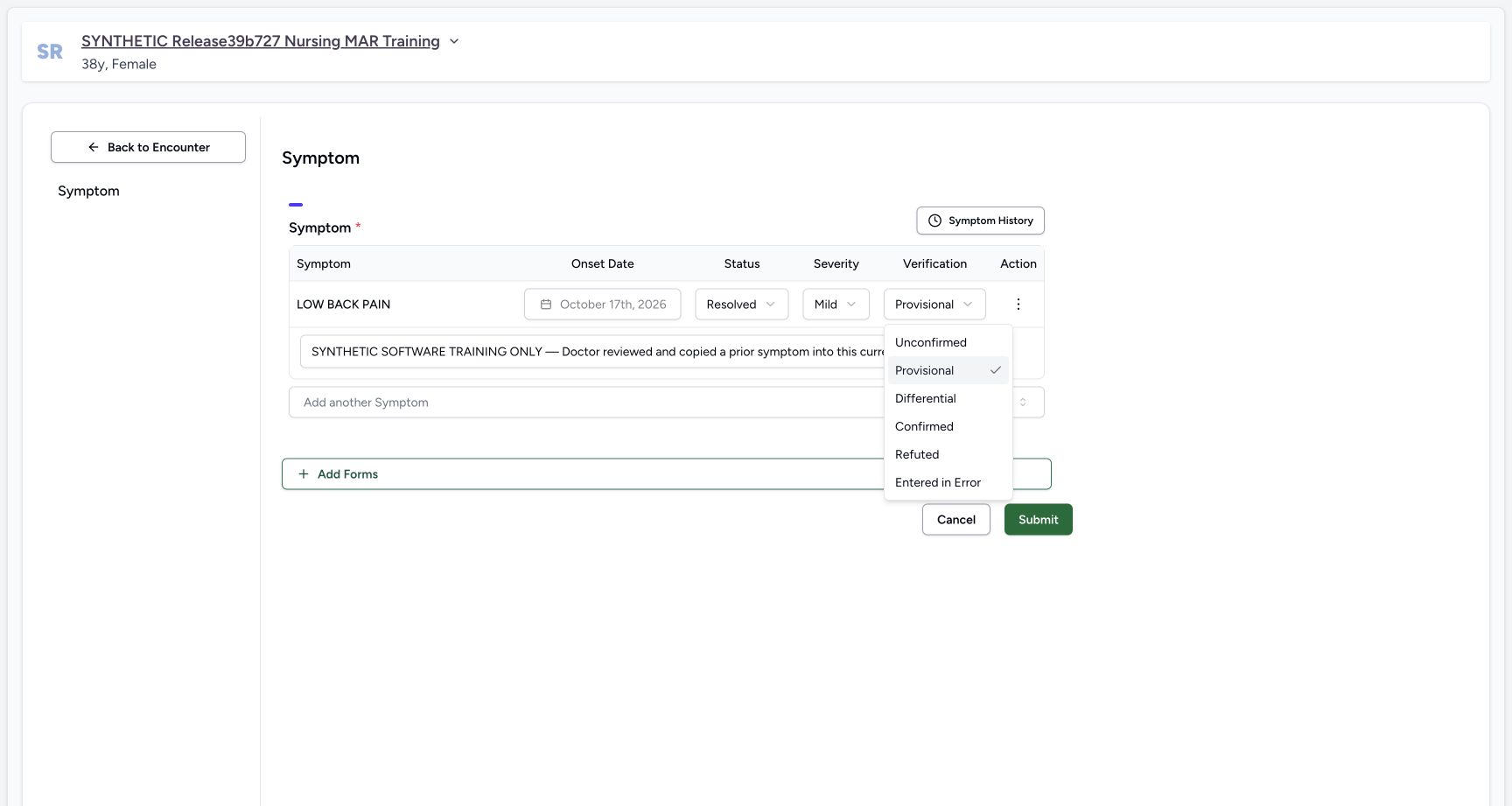 12
12Saved symptom verification includes a distinct correction state
Capture details
Exact committed ba551c1d isolated synthetic clone, ordinary existing Doctor account, fictional Polyclinic inpatient example. Patient retains an earlier release name; captured source is ba551c1d. Software teaching only, not real clinical findings or advice. The existing record exposes Unconfirmed, Provisional, Differential, Confirmed, Refuted and Entered in Error. Changing clinical status to Resolved is separate from marking a record erroneous.
Image SHA-256 efa48b26c2269b283321f72258fd77df6f962ad5f9acd85ca9b36e5f646dfe42
- Verification example: This fictional lifecycle example chooses Confirmed independently of Resolved clinical status.
- Correction status: Entered in Error is a verification correction state; it is different from Resolved clinical status.
123Review the saved symptom lifecycle change before Submit
Capture details
Exact committed ba551c1d isolated synthetic clone, ordinary existing Doctor account, fictional Polyclinic inpatient example. Patient retains an earlier release name; captured source is ba551c1d. Software teaching only, not real clinical findings or advice. The same saved symptom is reviewed as Resolved / Mild / Confirmed with optional synthetic context. Locked onset remains 17 October; nothing is saved until Submit.
Image SHA-256 fbeff38940a3b2ab09ec2b331f3b2c410fc9e910465d2da870e2aaf16bd74319
- Clinical status: Resolved is the reviewed clinical status in this fictional software example.
- Verification: Confirmed is reviewed independently; this is not the Entered in Error correction state.
- Save reviewed update: Submit the reviewed changes once, then verify the retained record.
6. Submit the reviewed lifecycle update once
Review Resolved, Mild, Confirmed, locked onset and the optional note, then select Submit once. Wait for the overview to settle. The current symptom remains visible as Resolved/Mild/Confirmed, while the separate diagnosis stays unchanged. Independent Doctor and Nurse reads verified the same symptom UUID, onset, code, category, creator and other identity fields; the intended status/verification/note and modification time changed.
123Review the saved symptom lifecycle change before Submit
Capture details
Exact committed ba551c1d isolated synthetic clone, ordinary existing Doctor account, fictional Polyclinic inpatient example. Patient retains an earlier release name; captured source is ba551c1d. Software teaching only, not real clinical findings or advice. The same saved symptom is reviewed as Resolved / Mild / Confirmed with optional synthetic context. Locked onset remains 17 October; nothing is saved until Submit.
Image SHA-256 fbeff38940a3b2ab09ec2b331f3b2c410fc9e910465d2da870e2aaf16bd74319
- Clinical status: Resolved is the reviewed clinical status in this fictional software example.
- Verification: Confirmed is reviewed independently; this is not the Entered in Error correction state.
- Save reviewed update: Submit the reviewed changes once, then verify the retained record.
12Saved symptom remains visible as Resolved and Confirmed
Capture details
Exact committed ba551c1d isolated synthetic clone, ordinary existing Doctor account, fictional Polyclinic inpatient example. Patient retains an earlier release name; captured source is ba551c1d. Software teaching only, not real clinical findings or advice. The existing symptom UUID is retained as Resolved/Mild/Confirmed with unchanged onset and Doctor creator. Unlike an Entered in Error correction, this non-error symptom remains in the overview. Normal Doctor/Nurse reads verify the saved lifecycle state and preserved other records.
Image SHA-256 ed515ae4a1b57301b1fc7984802479e62494193c47e9b65b24239fef3811f9d6
- Saved current symptom: Reopen this current record for a later authorized review; the saved row remains present.
- Review patient history: Check retained symptom history after the lifecycle update.
7. Review the retained resolved symptom in history
Open the current Symptoms history icon. Past Symptoms retains the Resolved/Confirmed current row alongside the separate Active/Provisional Root prior source. Use each row information menu when record identity is unclear. Return through the arrow beside Back to Encounter before further current work.
12Saved symptom remains visible as Resolved and Confirmed
Capture details
Exact committed ba551c1d isolated synthetic clone, ordinary existing Doctor account, fictional Polyclinic inpatient example. Patient retains an earlier release name; captured source is ba551c1d. Software teaching only, not real clinical findings or advice. The existing symptom UUID is retained as Resolved/Mild/Confirmed with unchanged onset and Doctor creator. Unlike an Entered in Error correction, this non-error symptom remains in the overview. Normal Doctor/Nurse reads verify the saved lifecycle state and preserved other records.
Image SHA-256 ed515ae4a1b57301b1fc7984802479e62494193c47e9b65b24239fef3811f9d6
- Saved current symptom: Reopen this current record for a later authorized review; the saved row remains present.
- Review patient history: Check retained symptom history after the lifecycle update.
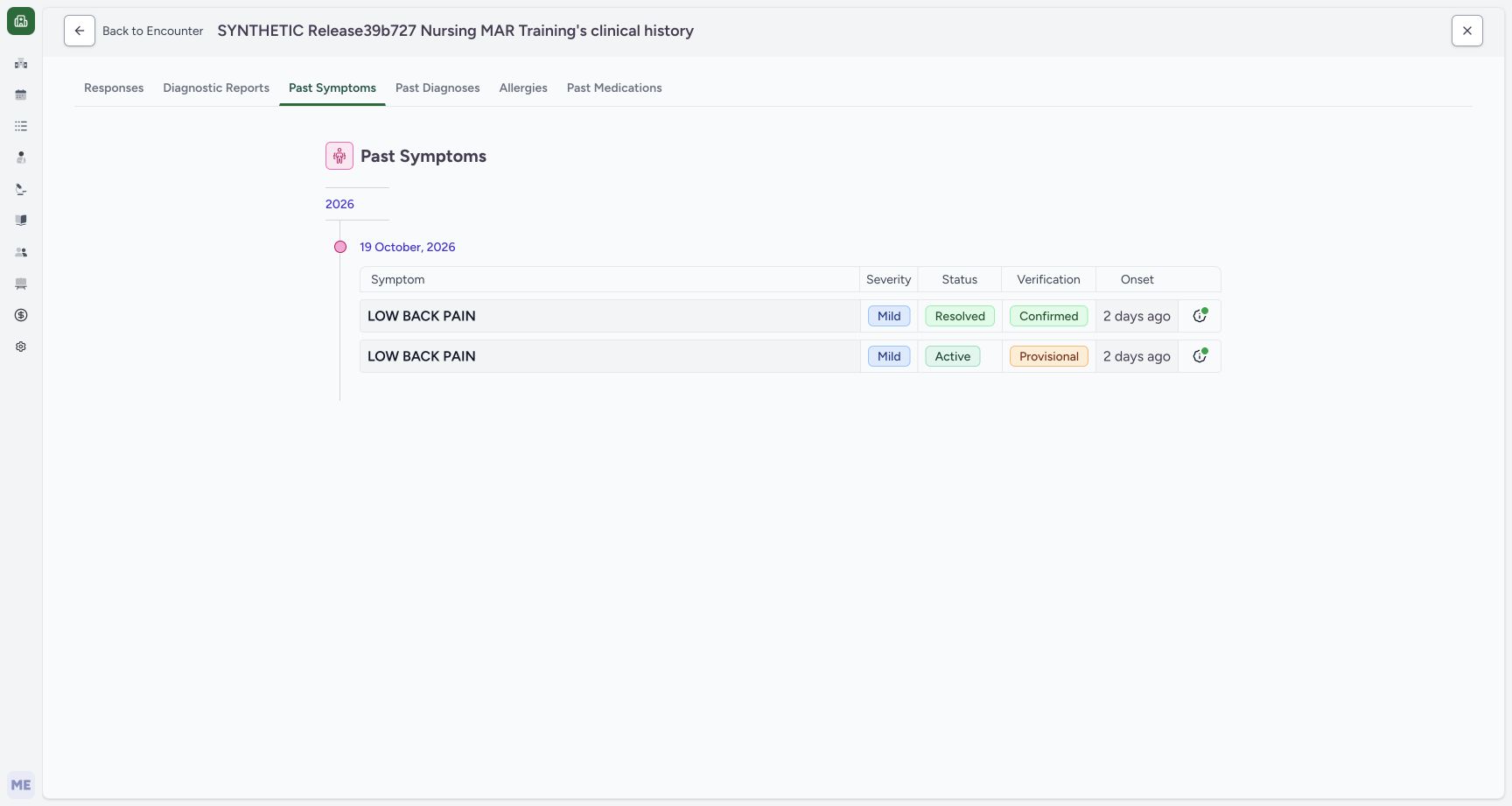 12
12Past Symptoms retains the resolved current record
Capture details
Exact committed ba551c1d isolated synthetic clone, ordinary existing Doctor account, fictional Polyclinic inpatient example. Patient retains an earlier release name; captured source is ba551c1d. Software teaching only, not real clinical findings or advice. The current Resolved/Confirmed row remains in patient history alongside the separate Active/Provisional prior source. This observed timeline does not hide resolved symptoms. It is not the same active-only Diagnosis behavior documented separately.
Image SHA-256 e850d65071811344565738cb107ec8b1b7e91be606f6c49f7f6b7ee923a7e3c4
- Retained symptom history: Review both distinct retained records and their separate clinical/verification values.
- Back to current encounter: Return through the original current-encounter target before correction work.
Saved scope and preserved records
The demonstrated saved transition is Active/Provisional to Resolved/Confirmed, with Mild retained. All six clinical statuses, all three severities and the existing-record verification choices were viewed; other saved combinations remain separate qualification. Normal role readbacks preserved the prior source encounter/conditions, all category-qualified diagnoses, fourteen administrations and four complete requests.
1Symptom clinical status offers six distinct values
Capture details
Exact committed ba551c1d isolated synthetic clone, ordinary existing Doctor account, fictional Polyclinic inpatient example. Patient retains an earlier release name; captured source is ba551c1d. Software teaching only, not real clinical findings or advice. The actual Status dropdown exposes Active, Recurrence, Relapse, Inactive, Remission and Resolved. This exercise chooses Resolved only to demonstrate a fictional saved lifecycle change, not a real clinical conclusion.
Image SHA-256 1abe6a72d669b5a1014b0047b2e1b40053766b125bd800fbd5b7a4e411898797
- Resolved example: Choose the appropriate clinical status after authorized review; this exercise uses Resolved as synthetic software data.
1Symptom severity is separate from clinical status
Capture details
Exact committed ba551c1d isolated synthetic clone, ordinary existing Doctor account, fictional Polyclinic inpatient example. Patient retains an earlier release name; captured source is ba551c1d. Software teaching only, not real clinical findings or advice. Severity offers Severe, Moderate and Mild. The fictional exercise retains Mild while changing clinical status; severity is not automatically inferred from the chosen status.
Image SHA-256 b08a26fe0767fbfd7e434f6c7649ae90c7b1cff7609cd2913861c23e68338157
- Retain reviewed severity: This example retains Mild; choose only the value appropriate to the authorized record review.
12Saved symptom verification includes a distinct correction state
Capture details
Exact committed ba551c1d isolated synthetic clone, ordinary existing Doctor account, fictional Polyclinic inpatient example. Patient retains an earlier release name; captured source is ba551c1d. Software teaching only, not real clinical findings or advice. The existing record exposes Unconfirmed, Provisional, Differential, Confirmed, Refuted and Entered in Error. Changing clinical status to Resolved is separate from marking a record erroneous.
Image SHA-256 efa48b26c2269b283321f72258fd77df6f962ad5f9acd85ca9b36e5f646dfe42
- Verification example: This fictional lifecycle example chooses Confirmed independently of Resolved clinical status.
- Correction status: Entered in Error is a verification correction state; it is different from Resolved clinical status.
12Saved symptom remains visible as Resolved and Confirmed
Capture details
Exact committed ba551c1d isolated synthetic clone, ordinary existing Doctor account, fictional Polyclinic inpatient example. Patient retains an earlier release name; captured source is ba551c1d. Software teaching only, not real clinical findings or advice. The existing symptom UUID is retained as Resolved/Mild/Confirmed with unchanged onset and Doctor creator. Unlike an Entered in Error correction, this non-error symptom remains in the overview. Normal Doctor/Nurse reads verify the saved lifecycle state and preserved other records.
Image SHA-256 ed515ae4a1b57301b1fc7984802479e62494193c47e9b65b24239fef3811f9d6
- Saved current symptom: Reopen this current record for a later authorized review; the saved row remains present.
- Review patient history: Check retained symptom history after the lifecycle update.
Source evidence
Every citation uses this exact committed version. The private source repository requires access.
- repositories/platform/mansoq-web/src/components/Questionnaire/QuestionTypes/SymptomQuestion.tsx:93 ·
ba551c1d67031248136fd2016afe227b5fc994bdSource file checksum
8c6a17b3d32910c554f8a37124e1a38aab39bfe49e6f5e3364342e999da8cb12 - repositories/platform/mansoq-web/src/components/Questionnaire/QuestionTypes/SymptomQuestion.tsx:241 ·
ba551c1d67031248136fd2016afe227b5fc994bdSource file checksum
8c6a17b3d32910c554f8a37124e1a38aab39bfe49e6f5e3364342e999da8cb12 - repositories/platform/mansoq-web/src/components/Questionnaire/QuestionTypes/SymptomQuestion.tsx:626 ·
ba551c1d67031248136fd2016afe227b5fc994bdSource file checksum
8c6a17b3d32910c554f8a37124e1a38aab39bfe49e6f5e3364342e999da8cb12 - repositories/platform/mansoq-web/src/components/Questionnaire/QuestionTypes/SymptomQuestion.tsx:726 ·
ba551c1d67031248136fd2016afe227b5fc994bdSource file checksum
8c6a17b3d32910c554f8a37124e1a38aab39bfe49e6f5e3364342e999da8cb12 - repositories/platform/mansoq-web/src/components/Questionnaire/QuestionTypes/SymptomQuestion.tsx:936 ·
ba551c1d67031248136fd2016afe227b5fc994bdSource file checksum
8c6a17b3d32910c554f8a37124e1a38aab39bfe49e6f5e3364342e999da8cb12 - repositories/platform/mansoq-web/src/components/Questionnaire/structured/handlers.ts:117 ·
ba551c1d67031248136fd2016afe227b5fc994bdSource file checksum
796209bfb43e9be152a55372f0118c6cf12c1c332477dc408f0fef012f9e3ad8 - repositories/platform/mansoq-web/src/components/Patient/symptoms/list.tsx:51 ·
ba551c1d67031248136fd2016afe227b5fc994bdSource file checksum
913b893cb4cdddc5069e6251ee1894b3b39dd2efe7269add6e342b4f435bd584