 MANSOQ
 Clinical · VERSION d20e68ed
Save and reload a fictional ten-count HYMOX Product request
Find the assigned existing patient and encounter, distinguish the exact HYMOX registration-code Product from a similarly named GTIN result, save one fictional one-count QD ten-day request and verify the same prescription after reload.
Doctor
 123456
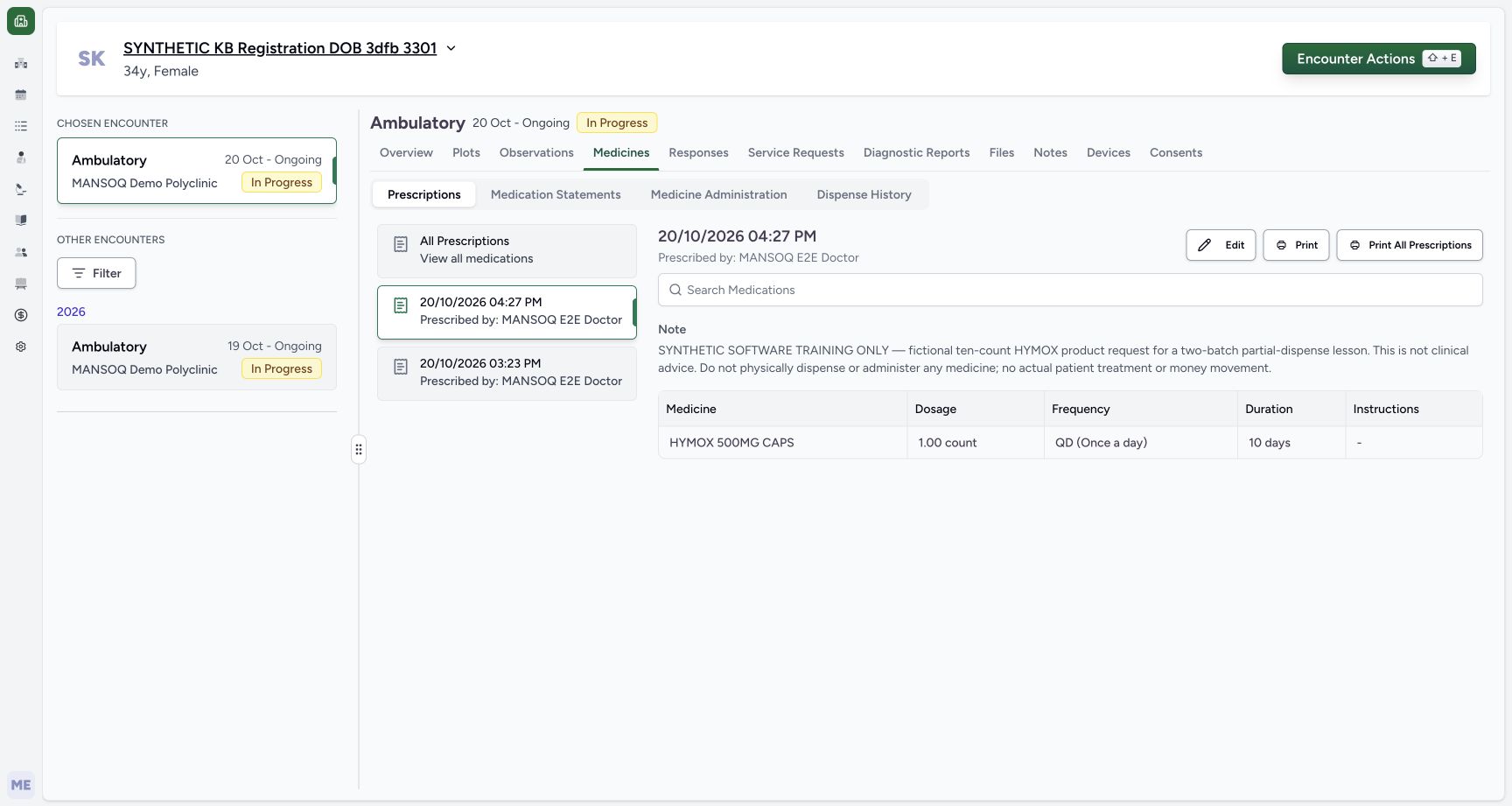
Settled saved new prescription detail
Capture details
Genuine unchanged natural 1728×921 Doctor original from exact local committed d20e source, LOCAL_UNPUSHED. This fictional prescription prerequisite does not demonstrate a stock, dispensing, billing, payment or clinical treatment outcome. No Active badge is pictured here. Active status and the default inpatient request category are established by the frozen saved-record check; that category does not establish an admission.
Image SHA-256 daea360c6e5fed44ac5ee85a7138be5884d7336566abda41f61dc16de386ba6a
- Match the saved prescription time: The detail header is October 20, 2026 at 04:27 PM.
- Read the retained software-only note: The saved prescription detail retains the full explicit fictional note.
- Read the single HYMOX row: This card contains one HYMOX 500MG CAPS row.
- Read saved one-count dose: The saved dose is 1.00 count.
- Read saved QD frequency: The saved frequency is QD Once a day.
- Read saved ten-day duration: The saved duration is ten days; Edit and Print are separate unused actions.
 12345
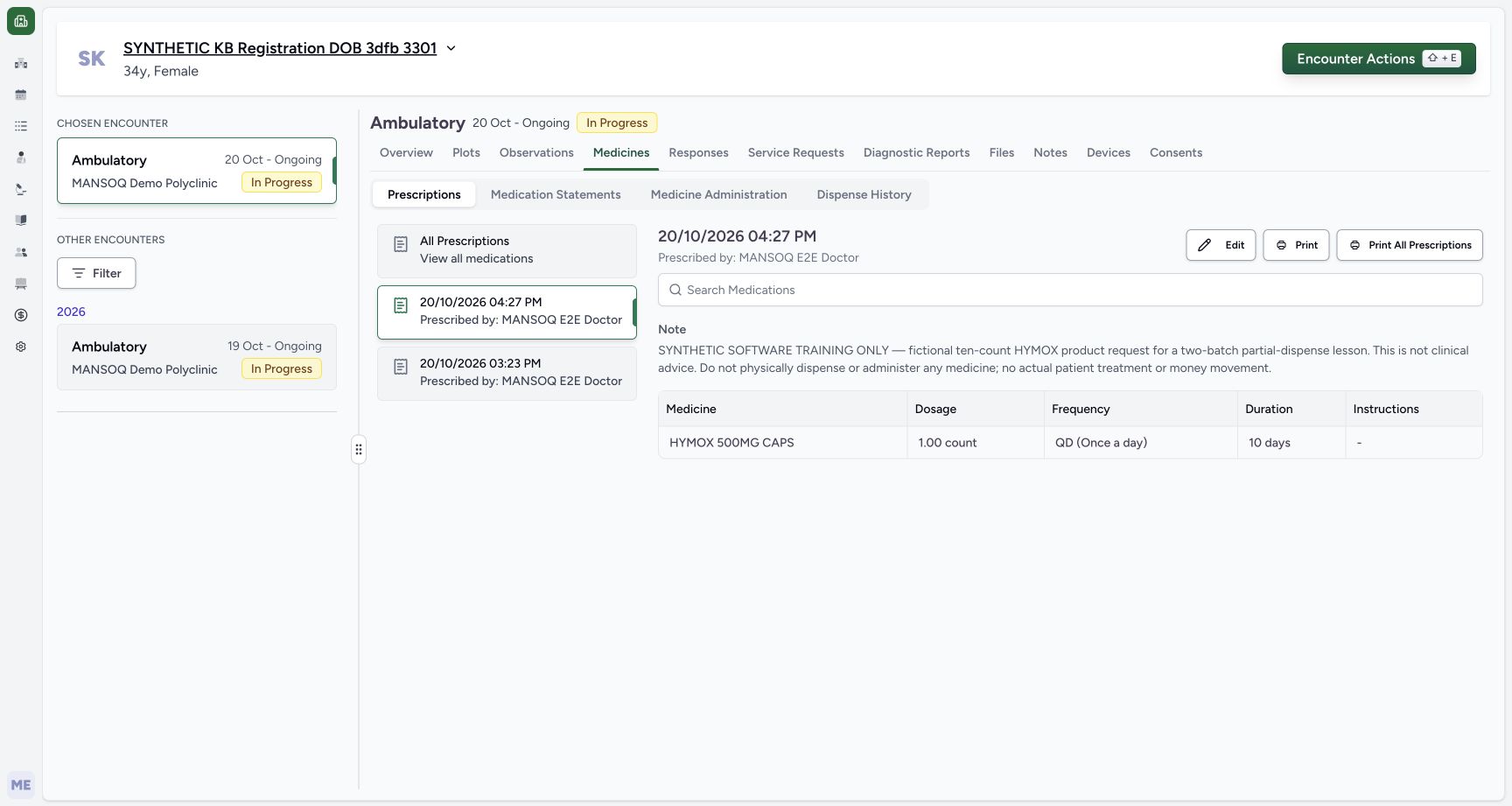
12345Same saved detail reopened after reload
Capture details
Genuine unchanged natural 1728×921 Doctor original from exact local committed d20e source, LOCAL_UNPUSHED. This fictional prescription prerequisite does not demonstrate a stock, dispensing, billing, payment or clinical treatment outcome. No Active badge is pictured here. Active status and the default inpatient request category are established by the frozen saved-record check; that category does not establish an admission.
Image SHA-256 daea360c6e5fed44ac5ee85a7138be5884d7336566abda41f61dc16de386ba6a
- Verify the same card after reload: The same 04:27 PM Doctor prescription is reopened.
- Verify the retained exact note: The fictional note is still present after normal reload.
- Verify one count retained: The single saved dose remains one count.
- Verify QD retained: The saved frequency remains QD.
- Verify ten days retained: The saved duration remains ten days; no second Submit was performed.
19 of 19 content blocks have reviewed image alignment.
Before you begin
- Use the authorised existing Doctor training account and assigned synthetic patient SYNTHETIC KB Registration DOB 3dfb 3301. The illustrated phone is 519093341 and identity-check birth year is 1992. Use only the approved fictional record; this lesson does not register a patient or edit demographics.
 12
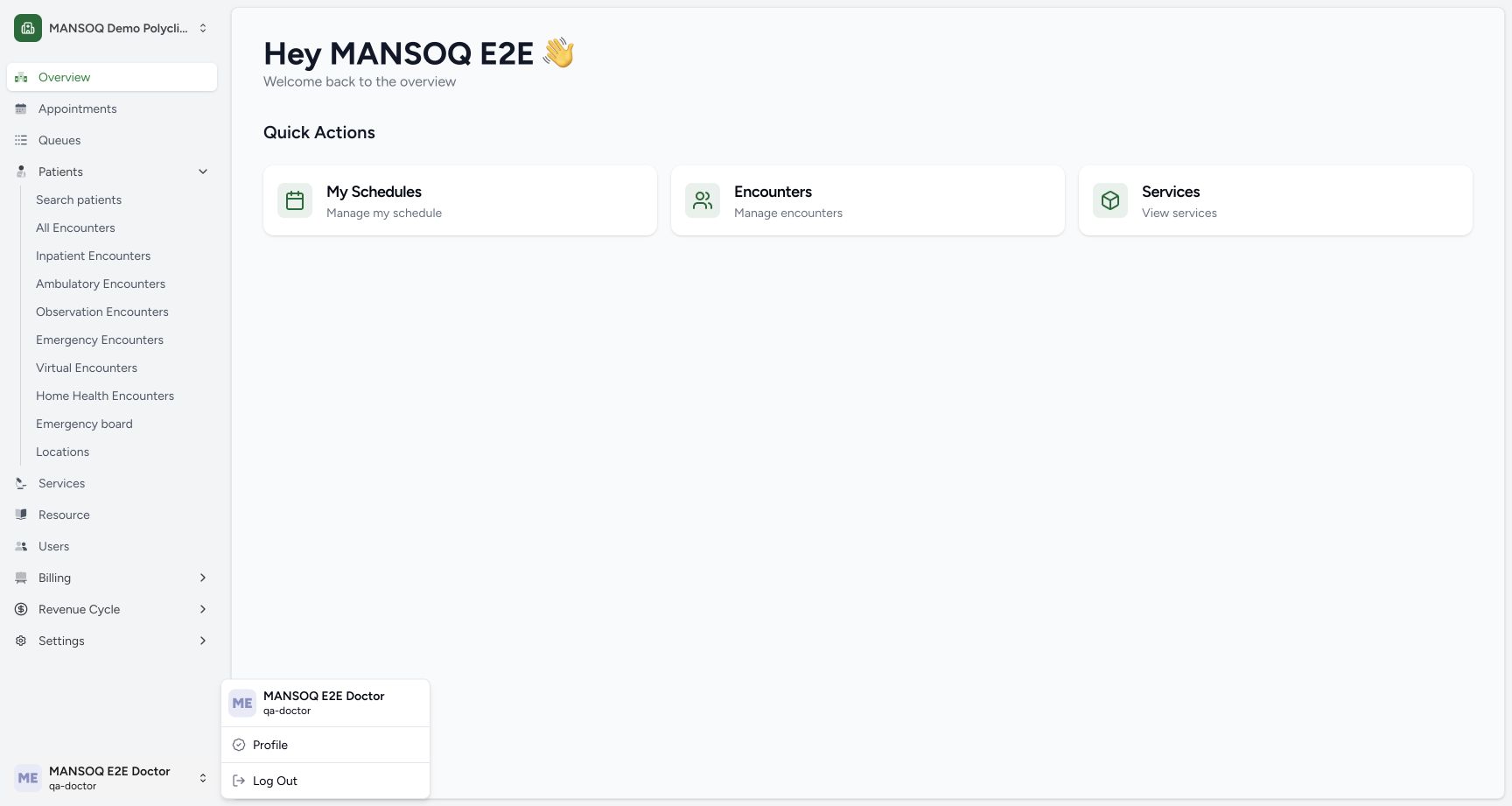
12Recorded release d20e68ed · 2026-10-20T13:23:14.730Z · 1728 × 921 Ordinary Doctor identity
Capture details
Genuine unchanged natural 1728×921 Doctor original from exact local committed d20e source, LOCAL_UNPUSHED. This fictional prescription prerequisite does not demonstrate a stock, dispensing, billing, payment or clinical treatment outcome.
Image SHA-256
29f65eb55d5354712ec9245f32232f4becf8a200f9332eaa973b7cc44c02a45d- Check the ordinary Doctor identity: The genuine account menu shows MANSOQ E2E Doctor and qa-doctor.
- Open Search patients: Use the existing facility patient search without registering another patient.
 123
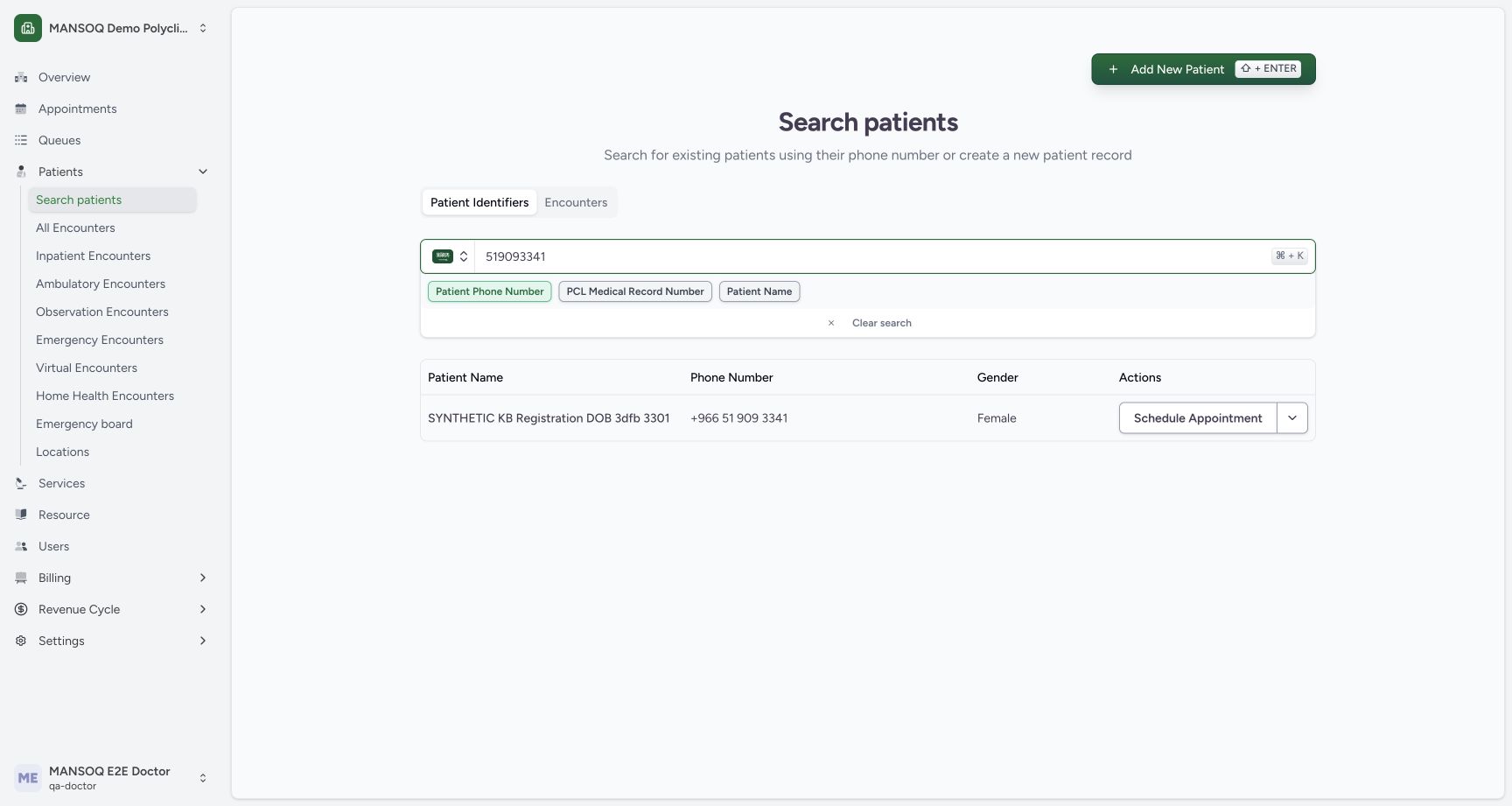
123Recorded release d20e68ed · 2026-10-20T13:24:06.926Z · 1728 × 921 Settled assigned-patient match
Capture details
Genuine unchanged natural 1728×921 Doctor original from exact local committed d20e source, LOCAL_UNPUSHED. This fictional prescription prerequisite does not demonstrate a stock, dispensing, billing, payment or clinical treatment outcome.
Image SHA-256
6ea58b31497aab5fa10ff923d90d883b554d16e7d71186d6bd83b712ead4dd28- Match the existing synthetic patient: The result is SYNTHETIC KB Registration DOB 3dfb 3301.
- Verify the matching phone: The existing result shows +966 51 909 3341.
- Open the row action menu: Use the row dropdown; Schedule Appointment is a separate action.
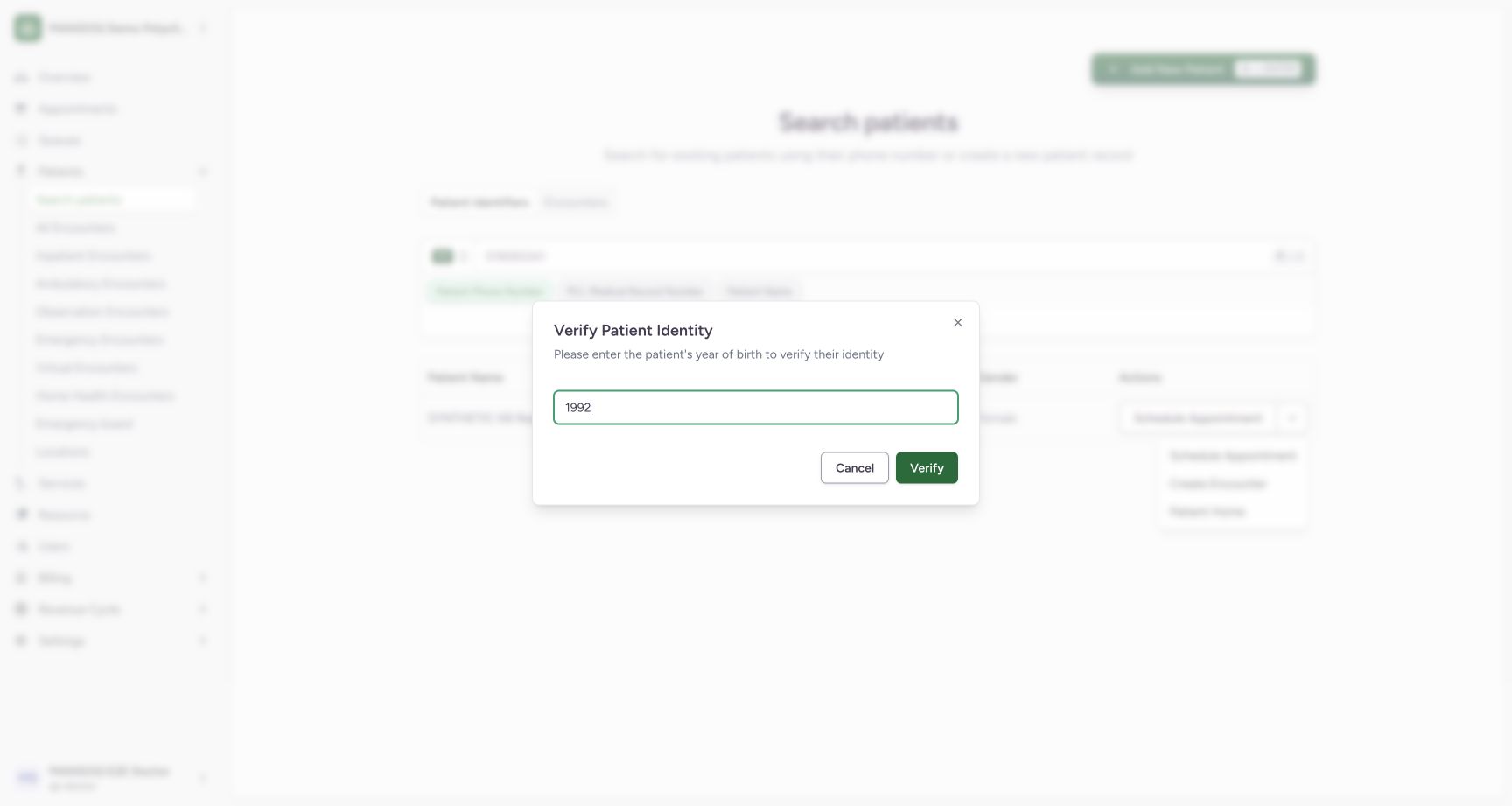 12
12Recorded release d20e68ed · 2026-10-20T13:24:19.618Z · 1728 × 921 Identity year ready
Capture details
Genuine unchanged natural 1728×921 Doctor original from exact local committed d20e source, LOCAL_UNPUSHED. This fictional prescription prerequisite does not demonstrate a stock, dispensing, billing, payment or clinical treatment outcome.
Image SHA-256
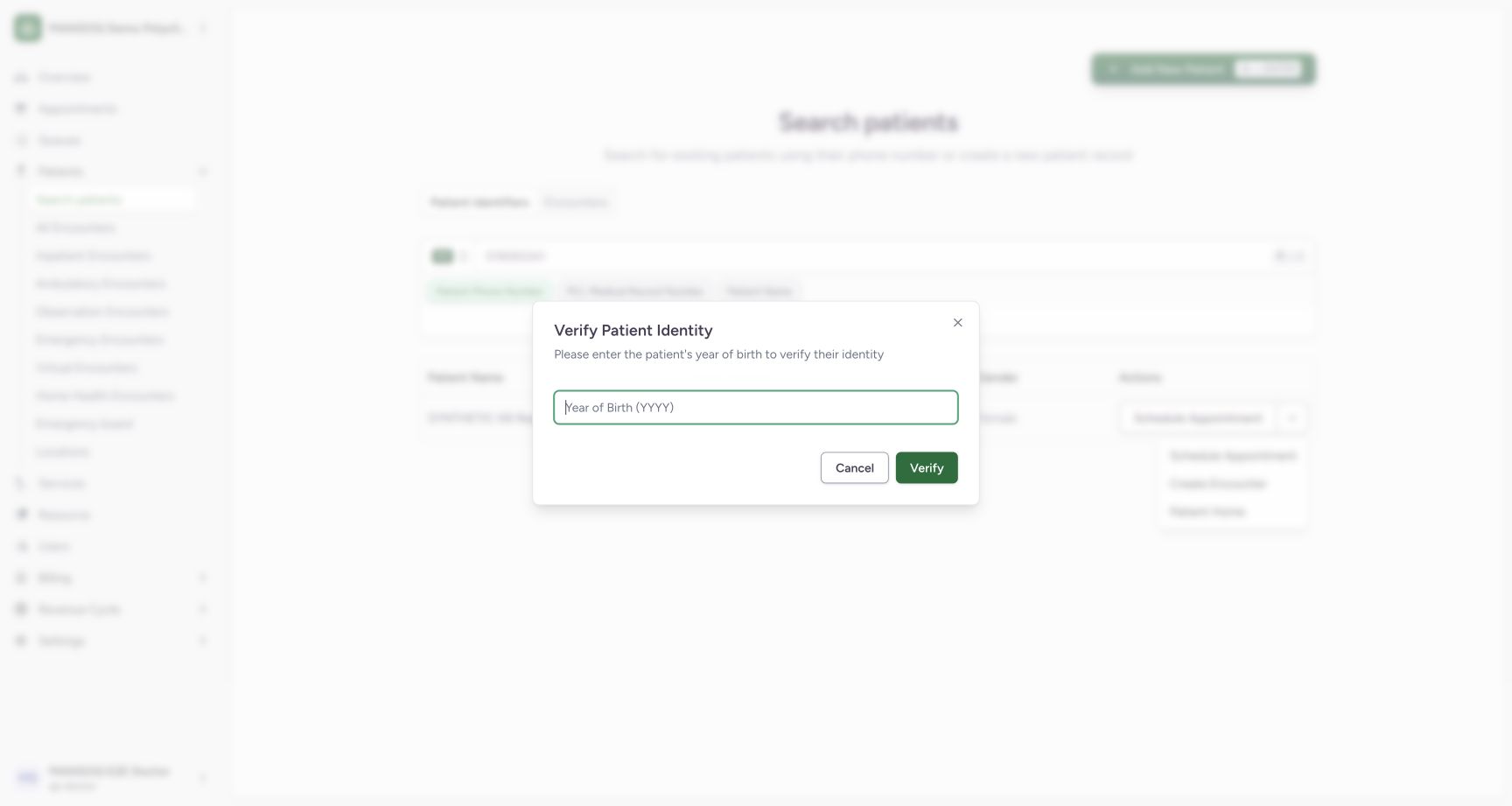
d9c0f8678e472c6bc950e26d3e32ff76b6847e47c49b1fa883072697b2a2b690- Enter assigned year 1992: Use the assigned synthetic year of birth in the normal identity check.
- Choose Verify: Verify the existing patient identity without editing demographics.
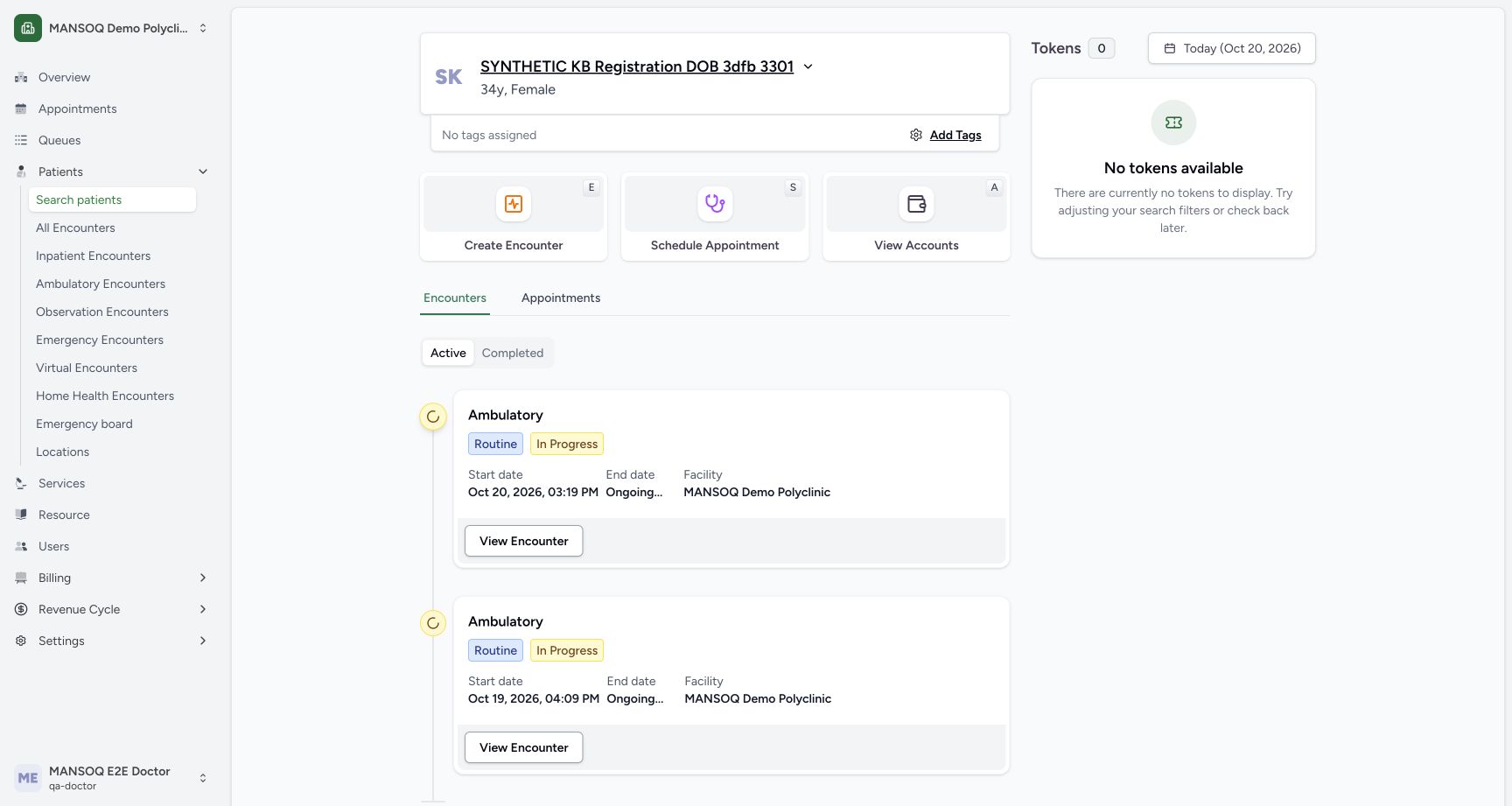 123
123Recorded release d20e68ed · 2026-10-20T13:24:27.706Z · 1728 × 921 Verified Patient Home
Capture details
Genuine unchanged natural 1728×921 Doctor original from exact local committed d20e source, LOCAL_UNPUSHED. This fictional prescription prerequisite does not demonstrate a stock, dispensing, billing, payment or clinical treatment outcome.
Image SHA-256
95df4184d0f5a6b5b7a2b59ea320da2438c1e331587b253c9a0a35f574aa8d27- Match the patient banner: The verified Patient Home belongs to the assigned synthetic registration patient.
- Match the existing October 20 encounter: The intended existing Ambulatory encounter starts at 03:19 PM on October 20, 2026.
- Choose View Encounter: Open that saved encounter instead of creating another.
- Use the existing Ambulatory In Progress encounter that starts October 20, 2026 at 03:19 PM. Its earlier encounter creation and the separate two-lot stock setup are prior work. Do not create another encounter or edit the earlier 03:23 PM Paracetamol prescription.123
Recorded release d20e68ed · 2026-10-20T13:24:27.706Z · 1728 × 921 Verified Patient Home
Capture details
Genuine unchanged natural 1728×921 Doctor original from exact local committed d20e source, LOCAL_UNPUSHED. This fictional prescription prerequisite does not demonstrate a stock, dispensing, billing, payment or clinical treatment outcome.
Image SHA-256
95df4184d0f5a6b5b7a2b59ea320da2438c1e331587b253c9a0a35f574aa8d27- Match the patient banner: The verified Patient Home belongs to the assigned synthetic registration patient.
- Match the existing October 20 encounter: The intended existing Ambulatory encounter starts at 03:19 PM on October 20, 2026.
- Choose View Encounter: Open that saved encounter instead of creating another.
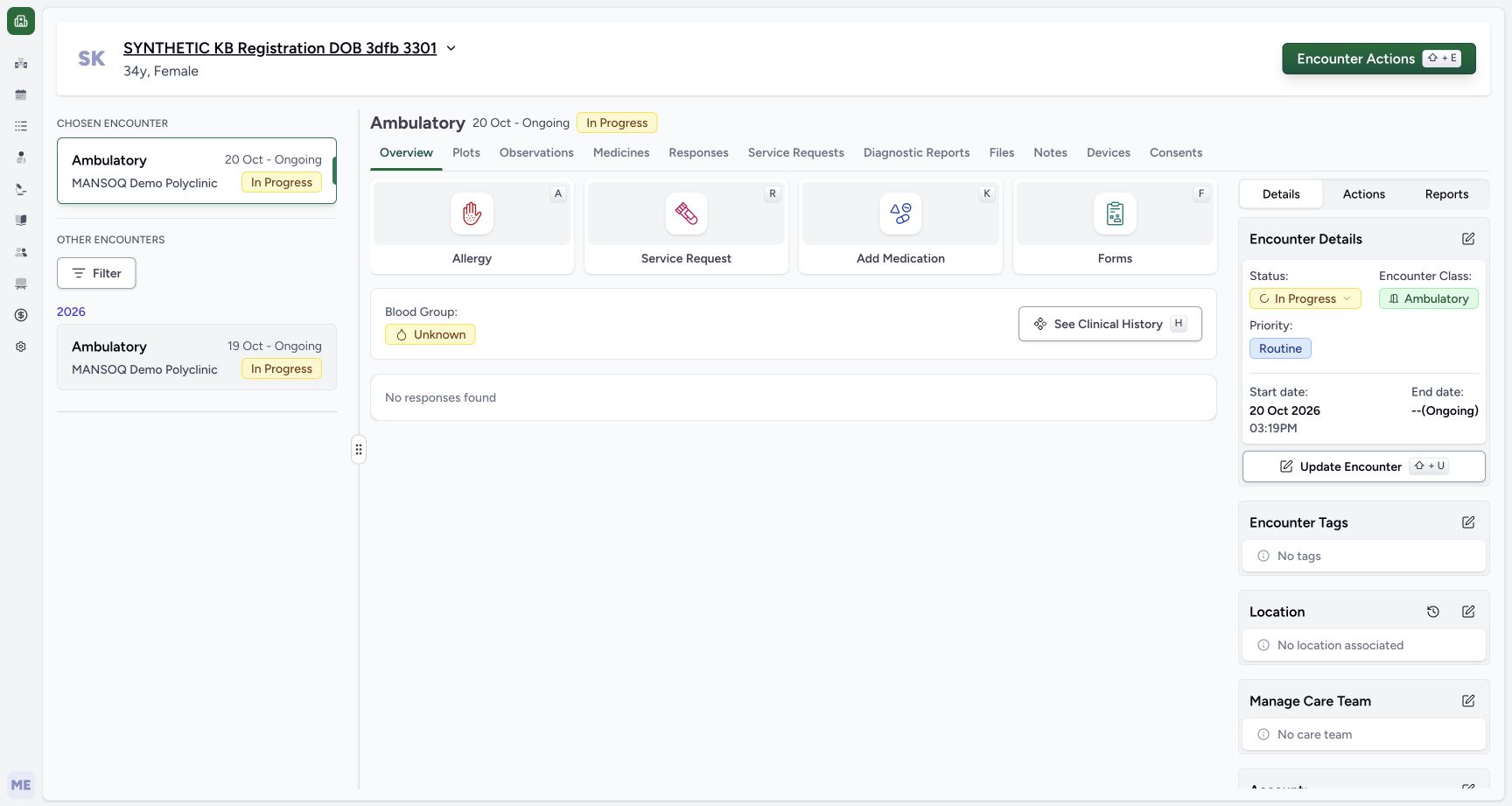 12
12Recorded release d20e68ed · 2026-10-20T13:24:40.758Z · 1728 × 921 Existing encounter Add Medication
Capture details
Genuine unchanged natural 1728×921 Doctor original from exact local committed d20e source, LOCAL_UNPUSHED. This fictional prescription prerequisite does not demonstrate a stock, dispensing, billing, payment or clinical treatment outcome.
Image SHA-256
3d82da328c17da550a1b01310b5520132095cb60a12205cf9c7298920a7c1102- Confirm the chosen existing encounter: The selected October 20 Ambulatory encounter remains In Progress.
- Choose Add Medication: Open the existing encounter medication request form.
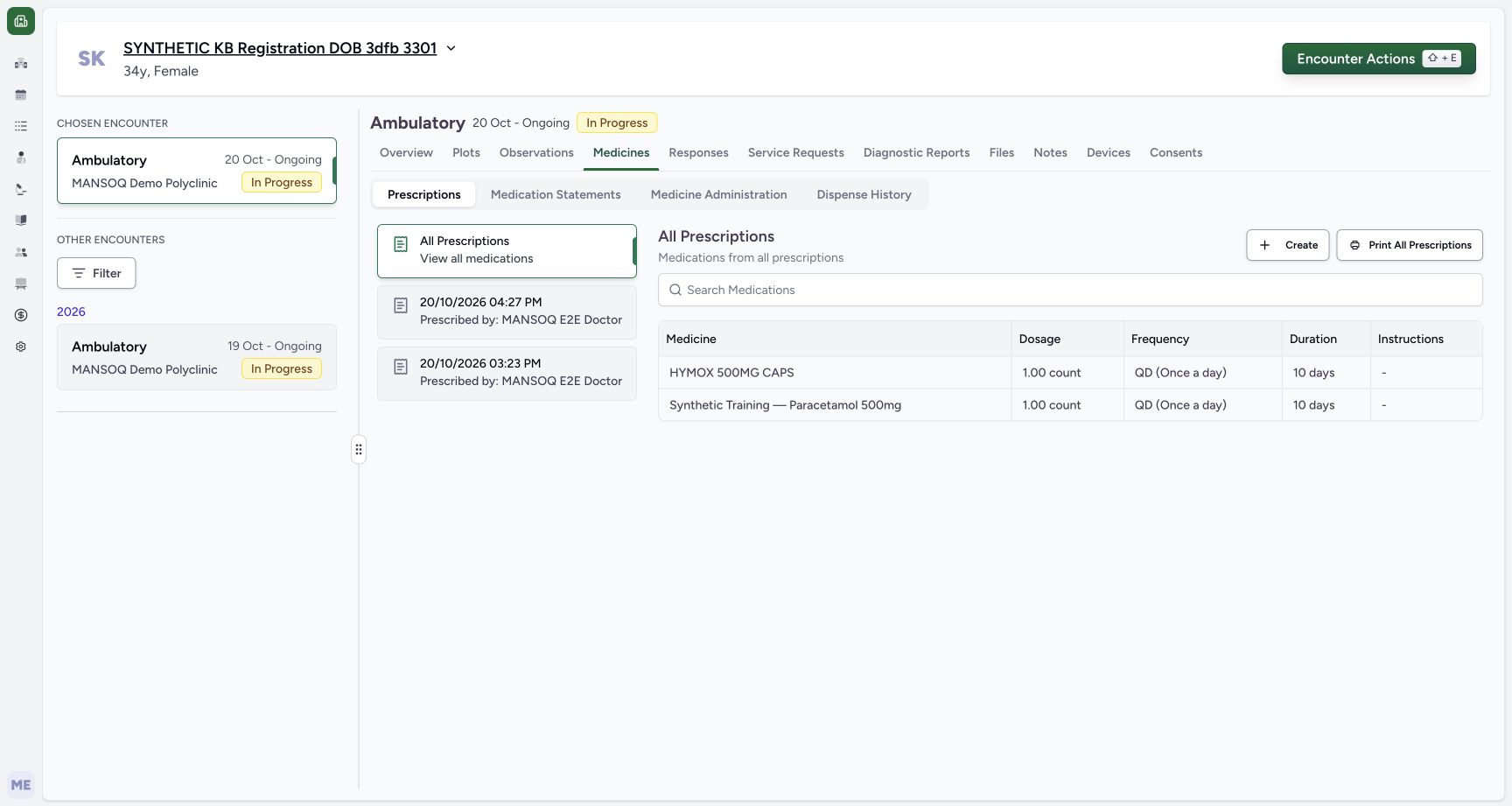 1234
1234Recorded release d20e68ed · 2026-10-20T13:27:59.326Z · 1728 × 921 Saved prescriptions list
Capture details
Genuine unchanged natural 1728×921 Doctor original from exact local committed d20e source, LOCAL_UNPUSHED. This fictional prescription prerequisite does not demonstrate a stock, dispensing, billing, payment or clinical treatment outcome.
Image SHA-256
81411c25b28ed8caafd06befa63e9f17d4fdb1b4da4f9ee2a9486be105d29377- Use Medicines: The existing encounter Medicines view is selected.
- Use Prescriptions: Prescriptions is distinct from Medication Statements or Dispense History.
- Open the new 04:27 PM card: The new Doctor prescription is above the earlier 03:23 PM prescription.
- Recognise the new HYMOX row: All Prescriptions includes the new HYMOX request alongside the separate earlier medicine.
- This is fictional software training only, not a clinical prescription recommendation. The schedule and Product are training inputs. Preserve the explicit note excluding clinical advice, physical dispensing or administration, actual treatment and money movement. This lesson ends before any partial dispense.
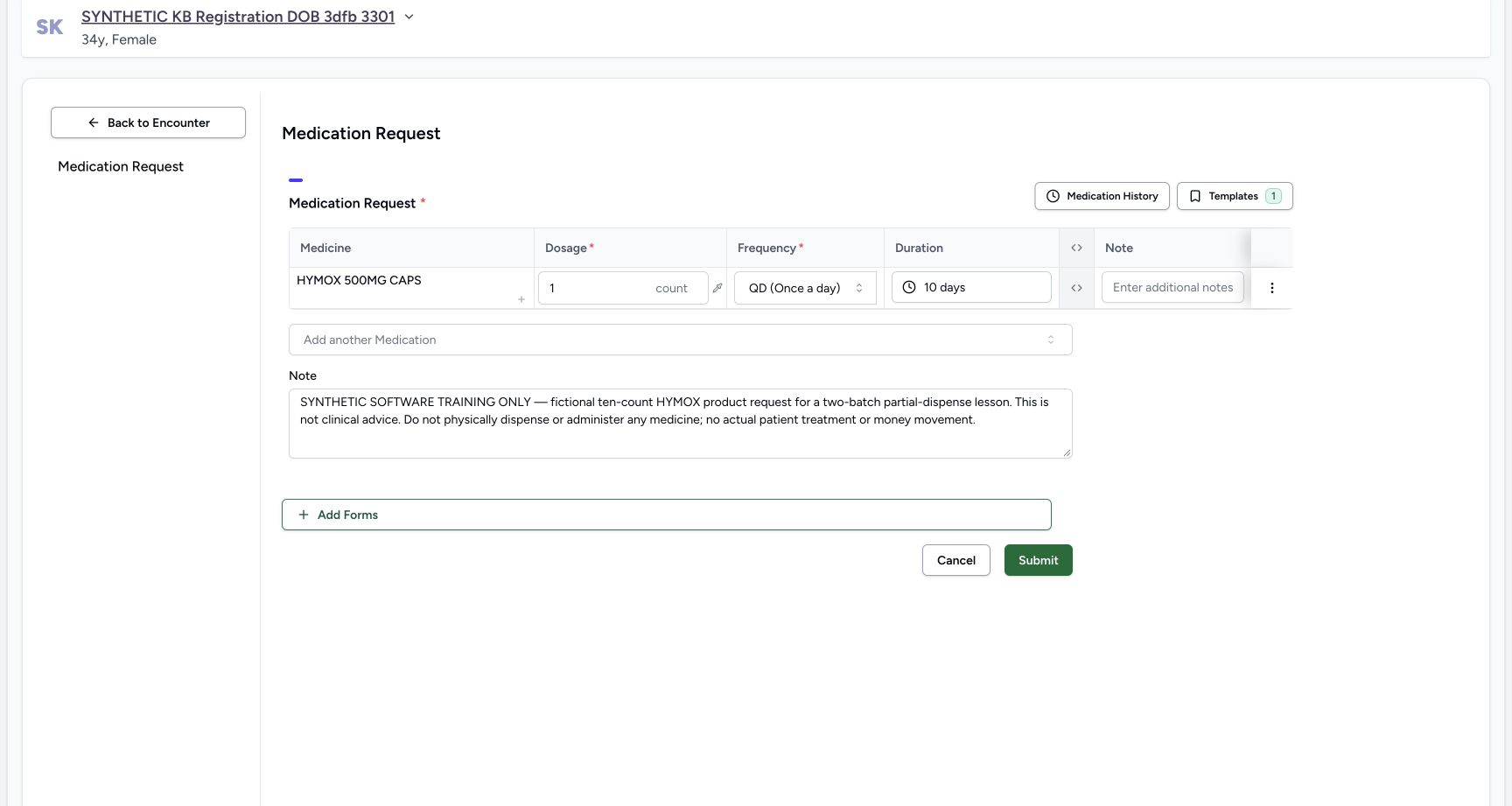 123456
Recorded release d20e68ed · 2026-10-20T13:27:17.254Z · 1728 × 921 One fictional ten-count schedule ready
Capture details
Genuine unchanged natural 1728×921 Doctor original from exact local committed d20e source, LOCAL_UNPUSHED. This fictional prescription prerequisite does not demonstrate a stock, dispensing, billing, payment or clinical treatment outcome.
Image SHA-256
7938f8208af0f7b32176069579e2784af67c757029d75440b84cfac063918bf6- Review the intended Product: The single row is HYMOX 500MG CAPS.
- Review one count: The dose value remains one count.
- Review QD Once a day: The selected frequency is QD.
- Review 10 days: The selected duration is ten days.
- Read the exact fictional note before saving: The prescription-level note remains explicit and unchanged.
- Submit once: Submit this one reviewed fictional request once.
12345Recorded release d20e68ed · 2026-10-20T13:29:32.425Z · 1728 × 921 Same saved detail reopened after reload
Capture details
Genuine unchanged natural 1728×921 Doctor original from exact local committed d20e source, LOCAL_UNPUSHED. This fictional prescription prerequisite does not demonstrate a stock, dispensing, billing, payment or clinical treatment outcome. No Active badge is pictured here. Active status and the default inpatient request category are established by the frozen saved-record check; that category does not establish an admission.
Image SHA-256
daea360c6e5fed44ac5ee85a7138be5884d7336566abda41f61dc16de386ba6a- Verify the same card after reload: The same 04:27 PM Doctor prescription is reopened.
- Verify the retained exact note: The fictional note is still present after normal reload.
- Verify one count retained: The single saved dose remains one count.
- Verify QD retained: The saved frequency remains QD.
- Verify ten days retained: The saved duration remains ten days; no second Submit was performed.
1. Find the assigned existing patient
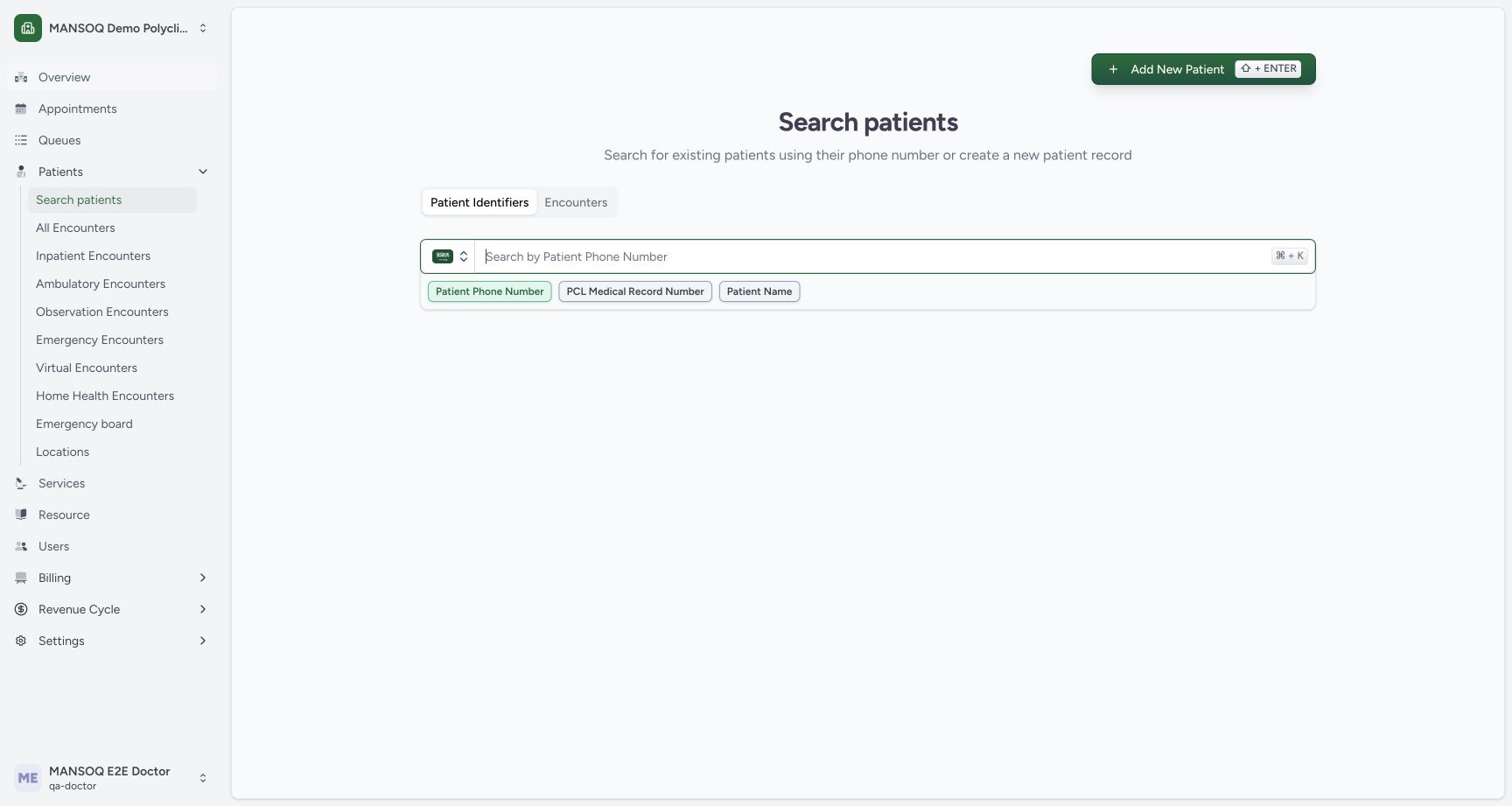
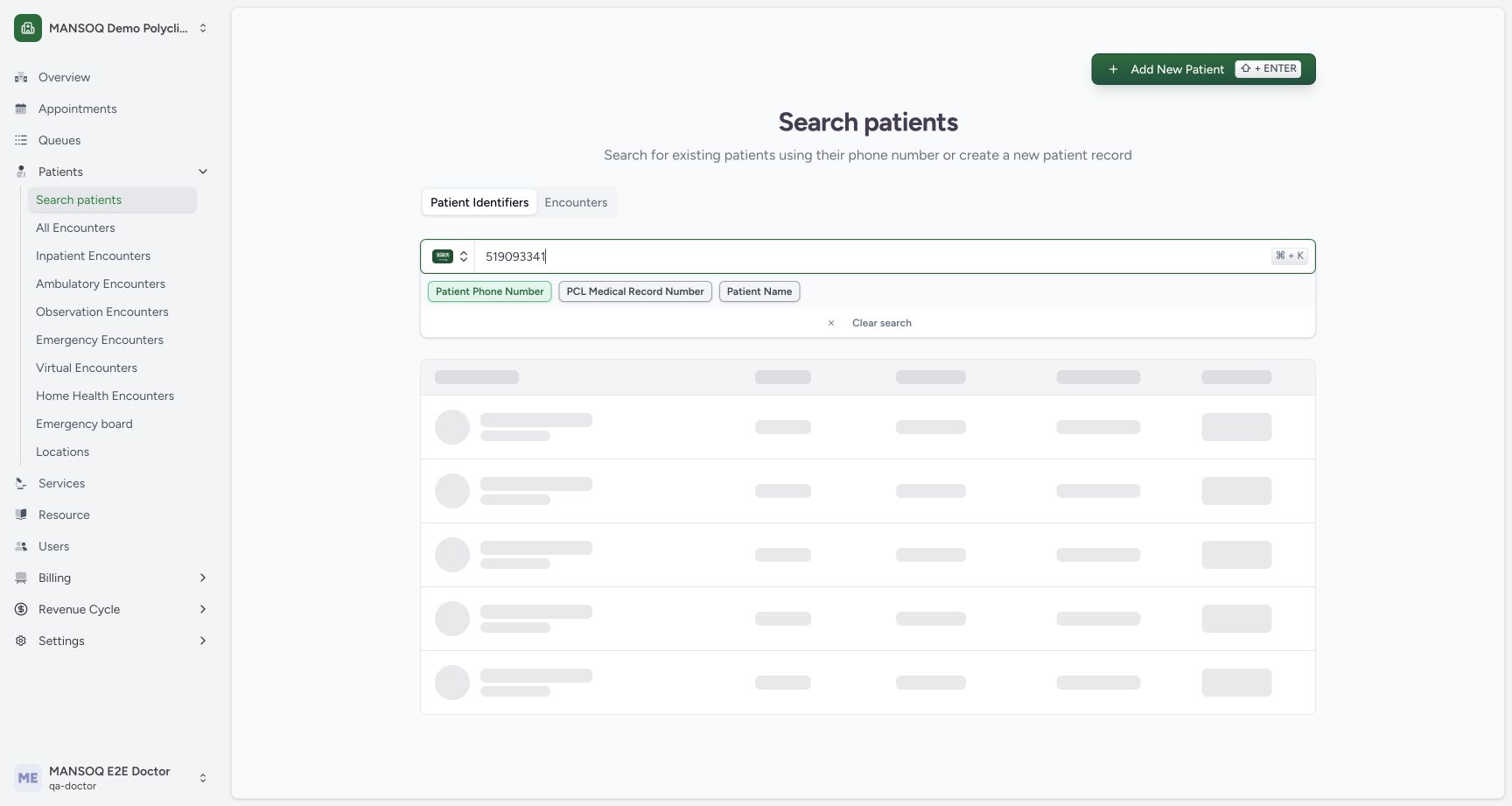
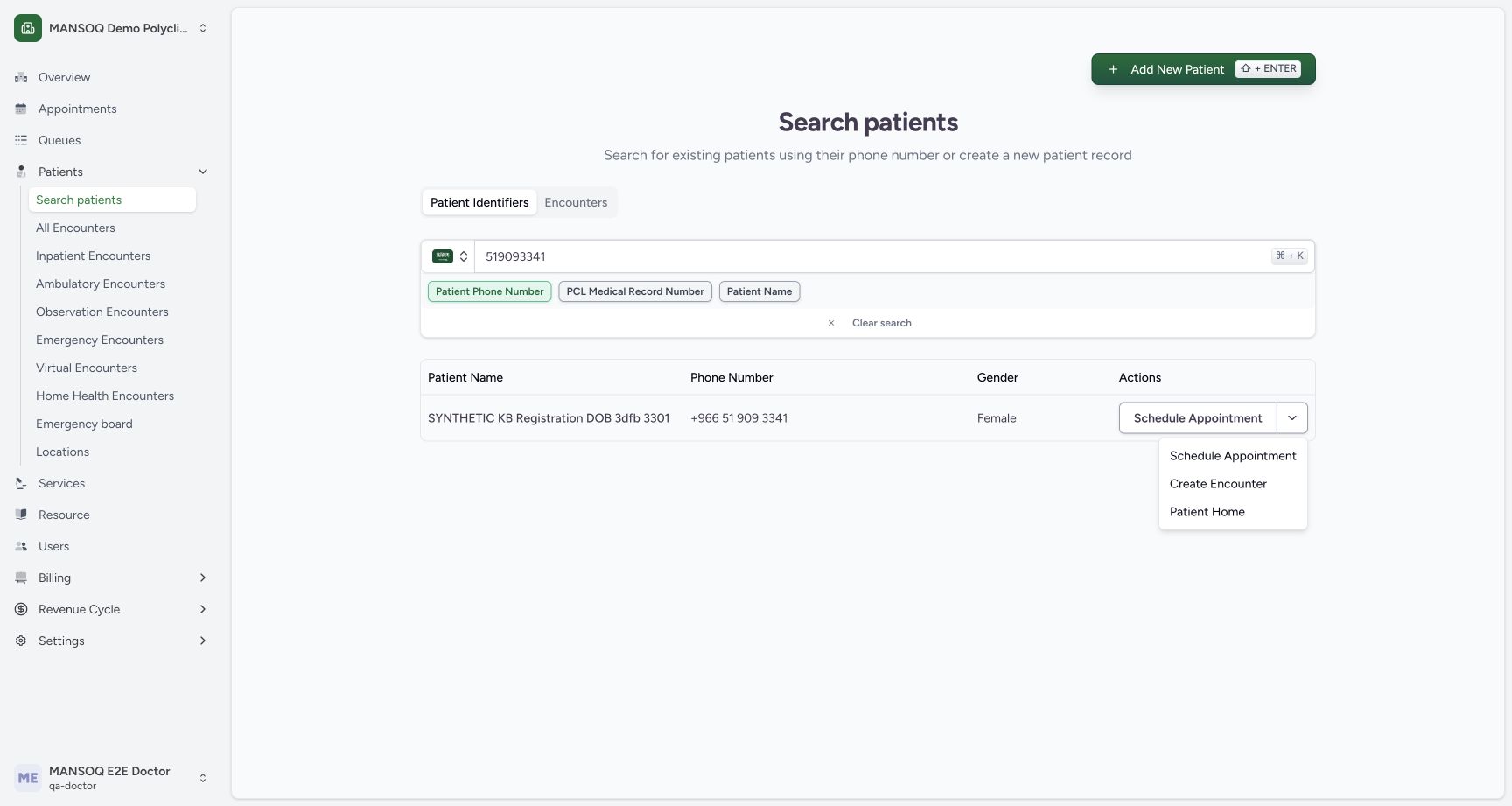
Confirm the ordinary Doctor identity. Open Search patients and use Patient Phone Number with the Saudi country selection. Enter 519093341. The first search picture is still loading; wait for the settled SYNTHETIC KB Registration DOB 3dfb 3301 result and verify its matching phone. Use that row’s dropdown rather than Add New Patient or Schedule Appointment.
12Ordinary Doctor identity
Capture details
Genuine unchanged natural 1728×921 Doctor original from exact local committed d20e source, LOCAL_UNPUSHED. This fictional prescription prerequisite does not demonstrate a stock, dispensing, billing, payment or clinical treatment outcome.
Image SHA-256 29f65eb55d5354712ec9245f32232f4becf8a200f9332eaa973b7cc44c02a45d
- Check the ordinary Doctor identity: The genuine account menu shows MANSOQ E2E Doctor and qa-doctor.
- Open Search patients: Use the existing facility patient search without registering another patient.
 12
12Existing-patient search entry
Capture details
Genuine unchanged natural 1728×921 Doctor original from exact local committed d20e source, LOCAL_UNPUSHED. This fictional prescription prerequisite does not demonstrate a stock, dispensing, billing, payment or clinical treatment outcome.
Image SHA-256 44a603bdfab33898c02997313fd281316548a759bae21efc2b8ba81474352c97
- Use Patient Phone Number: The recorded search uses the Saudi phone-number identifier.
- Enter the assigned fictional phone: Search 519093341 in the illustrated synthetic record context.
 12
12Patient search loading
Capture details
Genuine unchanged natural 1728×921 Doctor original from exact local committed d20e source, LOCAL_UNPUSHED. This fictional prescription prerequisite does not demonstrate a stock, dispensing, billing, payment or clinical treatment outcome. This is a loading view; the next settled matching result or detail is the outcome evidence.
Image SHA-256 370e72447563c0f3b07a7113c1aa8d40f4f2aba00ace35866d5b2f025f868e9b
- Check the entered phone: The search term is 519093341.
- Wait for the patient search: These skeleton rows are loading and are not a settled patient match.
123Settled assigned-patient match
Capture details
Genuine unchanged natural 1728×921 Doctor original from exact local committed d20e source, LOCAL_UNPUSHED. This fictional prescription prerequisite does not demonstrate a stock, dispensing, billing, payment or clinical treatment outcome.
Image SHA-256 6ea58b31497aab5fa10ff923d90d883b554d16e7d71186d6bd83b712ead4dd28
- Match the existing synthetic patient: The result is SYNTHETIC KB Registration DOB 3dfb 3301.
- Verify the matching phone: The existing result shows +966 51 909 3341.
- Open the row action menu: Use the row dropdown; Schedule Appointment is a separate action.
2. Open Patient Home and verify identity
Choose Patient Home from the row menu. The next frame is Verify Patient Identity, not the settled home page. Enter the assigned year 1992 and choose Verify. Match the existing synthetic patient banner when Patient Home settles. This is a normal identity check; it does not change the stored birth date.
 1
1Patient Home row action
Capture details
Genuine unchanged natural 1728×921 Doctor original from exact local committed d20e source, LOCAL_UNPUSHED. This fictional prescription prerequisite does not demonstrate a stock, dispensing, billing, payment or clinical treatment outcome.
Image SHA-256 b3ff9af57e9d57623cb2b0e22ec32921db762fc78a4987bbce728701dfac07ee
- Choose Patient Home: Navigate to the existing patient rather than Create Encounter or Schedule Appointment.
 1
1Identity dialog before verification
Capture details
Genuine unchanged natural 1728×921 Doctor original from exact local committed d20e source, LOCAL_UNPUSHED. This fictional prescription prerequisite does not demonstrate a stock, dispensing, billing, payment or clinical treatment outcome. Despite the historical filename, this frame pictures the normal identity dialog, not settled Patient Home.
Image SHA-256 aa58614f4fa8ac2a98a90f331751124e4e79f10422c42915b3e8e597d792f1cf
- Locate the identity year field: Patient Home first opens Verify Patient Identity; this frame is not the settled home page.
12Identity year ready
Capture details
Genuine unchanged natural 1728×921 Doctor original from exact local committed d20e source, LOCAL_UNPUSHED. This fictional prescription prerequisite does not demonstrate a stock, dispensing, billing, payment or clinical treatment outcome.
Image SHA-256 d9c0f8678e472c6bc950e26d3e32ff76b6847e47c49b1fa883072697b2a2b690
- Enter assigned year 1992: Use the assigned synthetic year of birth in the normal identity check.
- Choose Verify: Verify the existing patient identity without editing demographics.
123Verified Patient Home
Capture details
Genuine unchanged natural 1728×921 Doctor original from exact local committed d20e source, LOCAL_UNPUSHED. This fictional prescription prerequisite does not demonstrate a stock, dispensing, billing, payment or clinical treatment outcome.
Image SHA-256 95df4184d0f5a6b5b7a2b59ea320da2438c1e331587b253c9a0a35f574aa8d27
- Match the patient banner: The verified Patient Home belongs to the assigned synthetic registration patient.
- Match the existing October 20 encounter: The intended existing Ambulatory encounter starts at 03:19 PM on October 20, 2026.
- Choose View Encounter: Open that saved encounter instead of creating another.
3. Open the existing encounter and Add Medication
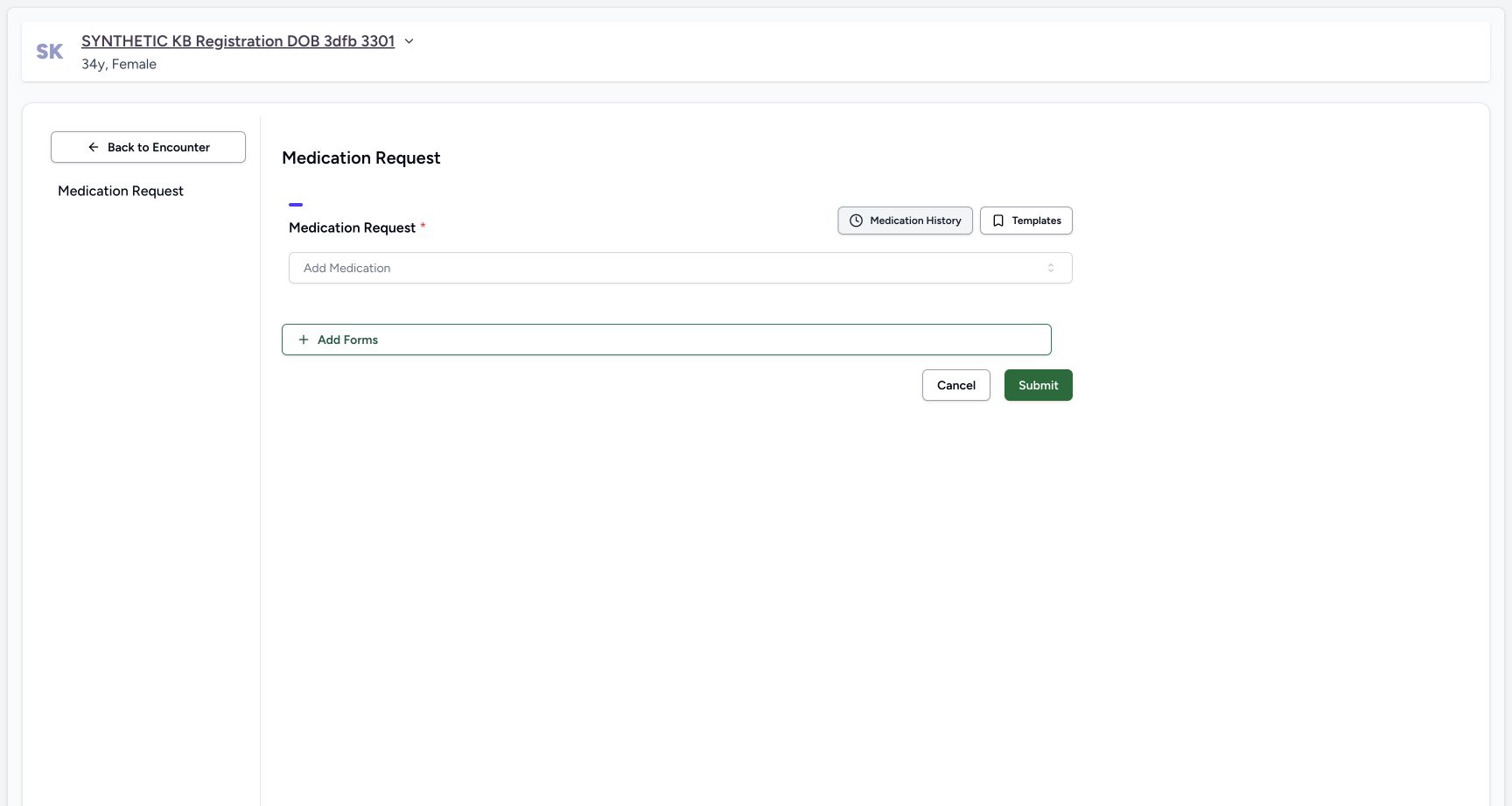
On Patient Home, match the October 20 Ambulatory In Progress encounter with start time 03:19 PM and choose View Encounter. Confirm it is the chosen encounter, then choose Add Medication. The Medication Request form opens with an empty required Add Medication selector. The separate Create Encounter and encounter-status actions are not used.
123Verified Patient Home
Capture details
Genuine unchanged natural 1728×921 Doctor original from exact local committed d20e source, LOCAL_UNPUSHED. This fictional prescription prerequisite does not demonstrate a stock, dispensing, billing, payment or clinical treatment outcome.
Image SHA-256 95df4184d0f5a6b5b7a2b59ea320da2438c1e331587b253c9a0a35f574aa8d27
- Match the patient banner: The verified Patient Home belongs to the assigned synthetic registration patient.
- Match the existing October 20 encounter: The intended existing Ambulatory encounter starts at 03:19 PM on October 20, 2026.
- Choose View Encounter: Open that saved encounter instead of creating another.
12Existing encounter Add Medication
Capture details
Genuine unchanged natural 1728×921 Doctor original from exact local committed d20e source, LOCAL_UNPUSHED. This fictional prescription prerequisite does not demonstrate a stock, dispensing, billing, payment or clinical treatment outcome.
Image SHA-256 3d82da328c17da550a1b01310b5520132095cb60a12205cf9c7298920a7c1102
- Confirm the chosen existing encounter: The selected October 20 Ambulatory encounter remains In Progress.
- Choose Add Medication: Open the existing encounter medication request form.
 1
1Empty medication request form
Capture details
Genuine unchanged natural 1728×921 Doctor original from exact local committed d20e source, LOCAL_UNPUSHED. This fictional prescription prerequisite does not demonstrate a stock, dispensing, billing, payment or clinical treatment outcome.
Image SHA-256 e954458bb0739cfa42085bf551a9f456fd28de2b6fdc92f9be4a5c42cf1041e8
- Open Add Medication: The new request form starts with an empty required medicine selector.
4. Use Product and choose the actual registration-code result
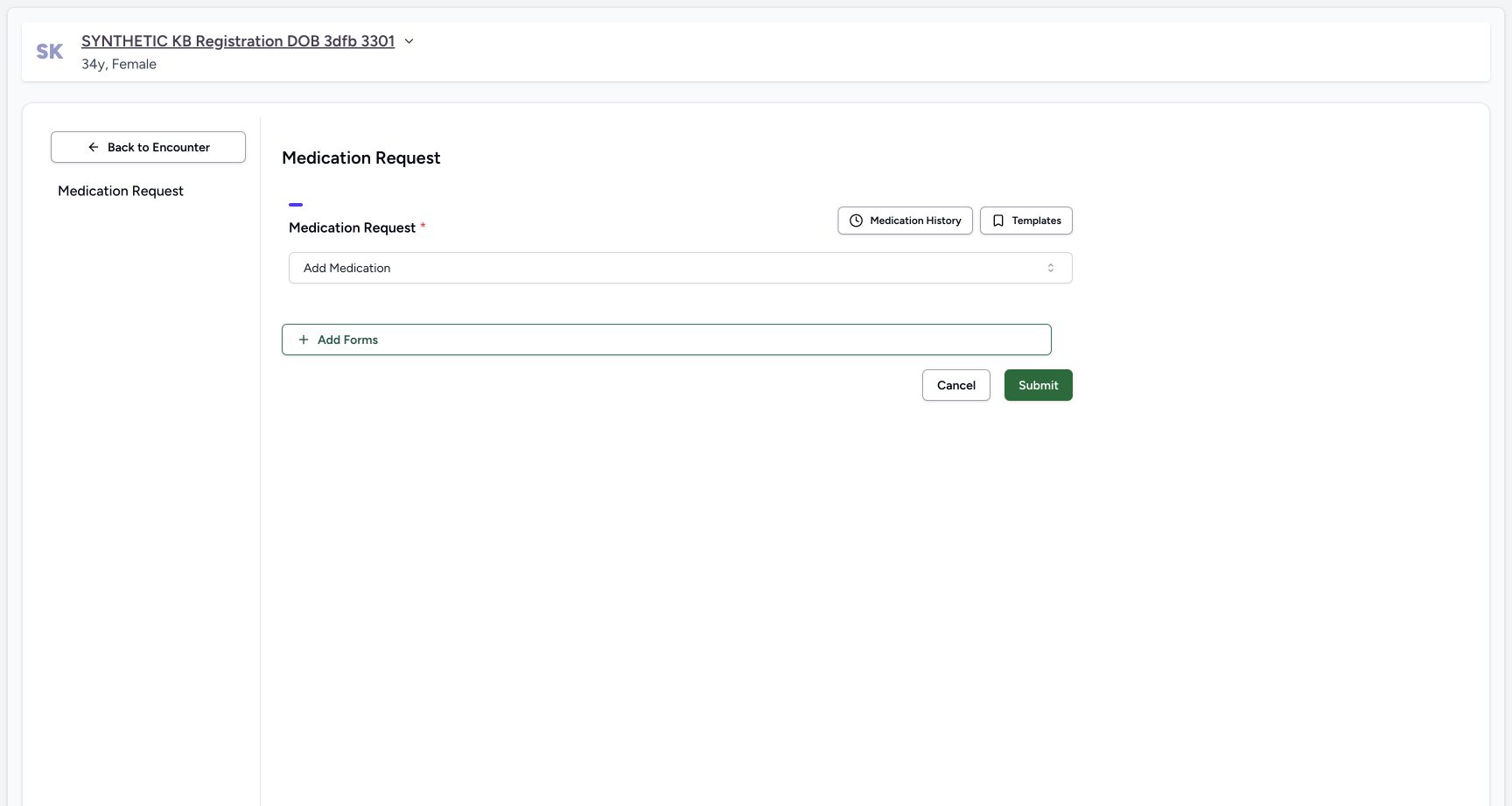
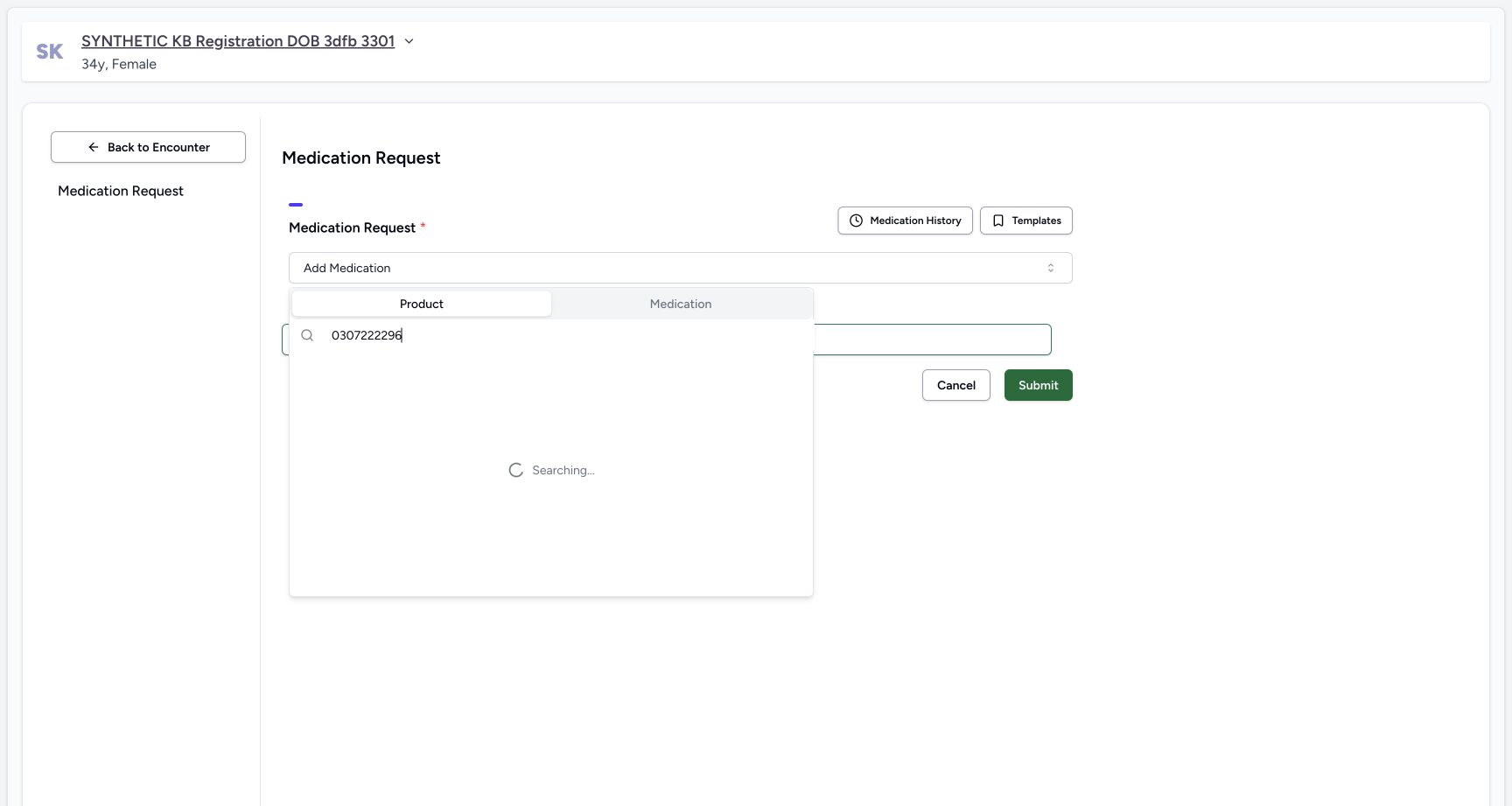
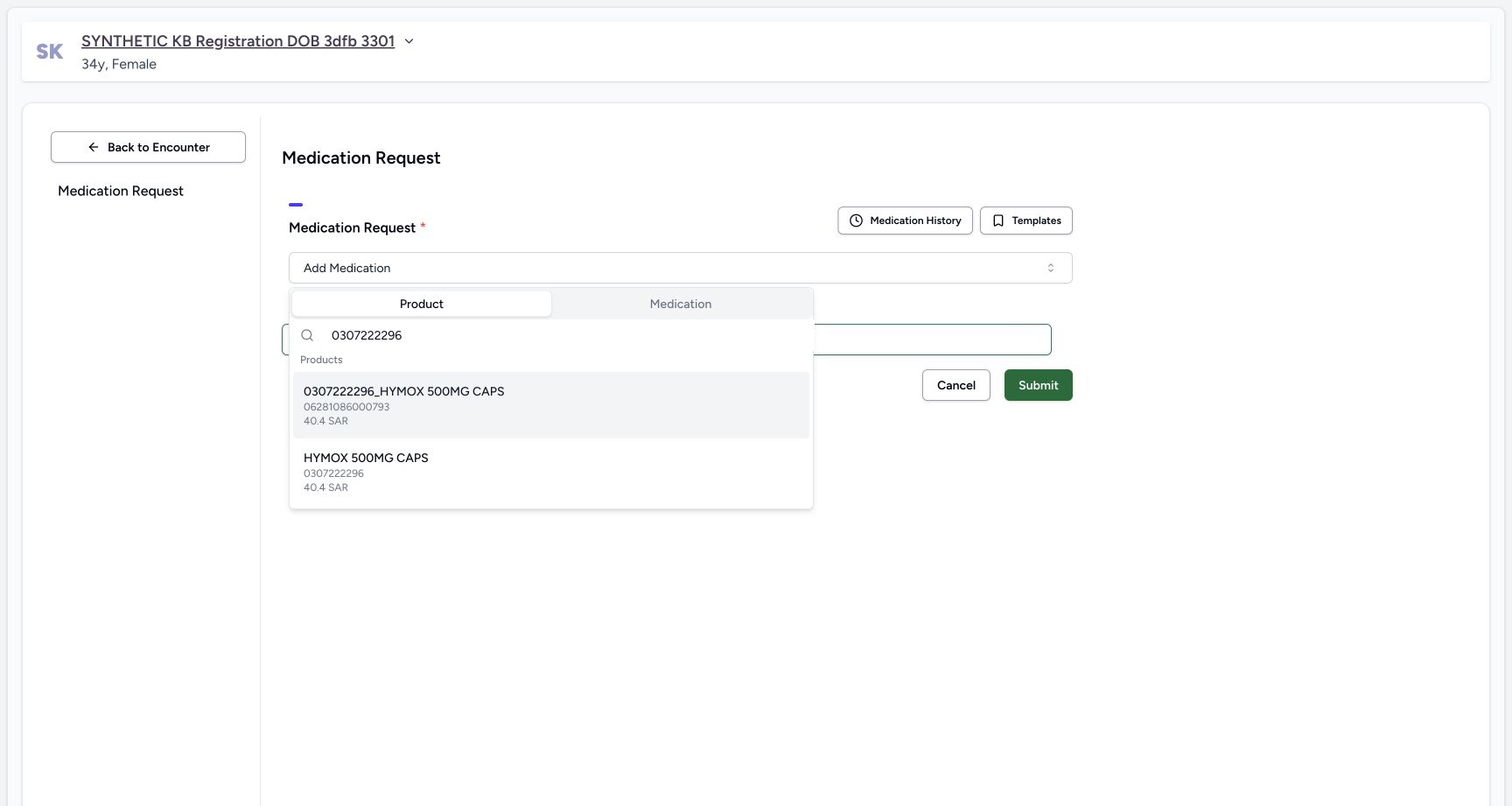
Open Add Medication and use the Product tab, distinct from Medication coding. If the empty form is shown again, reopen that selector; the reset picture does not show a Cancel action. Search 0307222296 and wait until Searching resolves. The first result has that number in its name but actual GTIN 06281086000793 below it. Choose the second HYMOX 500MG CAPS result whose actual code is 0307222296. The visible 40.4 SAR catalog display is separate from the synthetic batch prices configured earlier.
1Empty medication request form
Capture details
Genuine unchanged natural 1728×921 Doctor original from exact local committed d20e source, LOCAL_UNPUSHED. This fictional prescription prerequisite does not demonstrate a stock, dispensing, billing, payment or clinical treatment outcome.
Image SHA-256 e954458bb0739cfa42085bf551a9f456fd28de2b6fdc92f9be4a5c42cf1041e8
- Open Add Medication: The new request form starts with an empty required medicine selector.
 1
1Reset empty form before reopening selector
Capture details
Genuine unchanged natural 1728×921 Doctor original from exact local committed d20e source, LOCAL_UNPUSHED. This fictional prescription prerequisite does not demonstrate a stock, dispensing, billing, payment or clinical treatment outcome. The historical operator caption called this a Product picker; pixels show a reset empty form. No Cancel action occurred; the actual selector was reopened afterward.
Image SHA-256 f68c2e06a7e5ed654e02788d7591eaa83a5162aab9f960f916dd93a422df6a19
- Reopen the empty selector if needed: This genuine frame shows the form reset to its empty selector; it is not an open Product picker or a Cancel result.
 123
123Product search still Searching
Capture details
Genuine unchanged natural 1728×921 Doctor original from exact local committed d20e source, LOCAL_UNPUSHED. This fictional prescription prerequisite does not demonstrate a stock, dispensing, billing, payment or clinical treatment outcome. This is a loading view; the next settled matching result or detail is the outcome evidence.
Image SHA-256 d02aa85224577349223994f12f0df99cc0d975703df4c9b56aa88a80ce96614a
- Use the Product tab: Product is distinct from the Medication coding tab.
- Search registration code 0307222296: Enter the exact approved existing Product Knowledge code.
- Wait while Searching: No settled selectable result is shown until the search completes.
 1234
1234Settled registration-code and GTIN results
Capture details
Genuine unchanged natural 1728×921 Doctor original from exact local committed d20e source, LOCAL_UNPUSHED. This fictional prescription prerequisite does not demonstrate a stock, dispensing, billing, payment or clinical treatment outcome.
Image SHA-256 36beb561c1bcf260a6ec8fe280086b5fa01c879b2c1be76a8e1c95168c017ae2
- Distinguish the misleading upper name: The first result includes 0307222296 in its name but its actual code is the GTIN below it.
- Read the upper actual GTIN: The upper result code is 06281086000793, not the intended registration code.
- Choose the lower HYMOX result: Select HYMOX 500MG CAPS whose actual code below is 0307222296.
- Keep catalog price separate: The visible 40.4 SAR catalog display is not the synthetic one-SAR batch price.
 123
123Selected Product row still unsaved
Capture details
Genuine unchanged natural 1728×921 Doctor original from exact local committed d20e source, LOCAL_UNPUSHED. This fictional prescription prerequisite does not demonstrate a stock, dispensing, billing, payment or clinical treatment outcome.
Image SHA-256 a03cf39a2bbd40248d9df6478565973a97cbe3200f216462d457adfb9f85f2ed
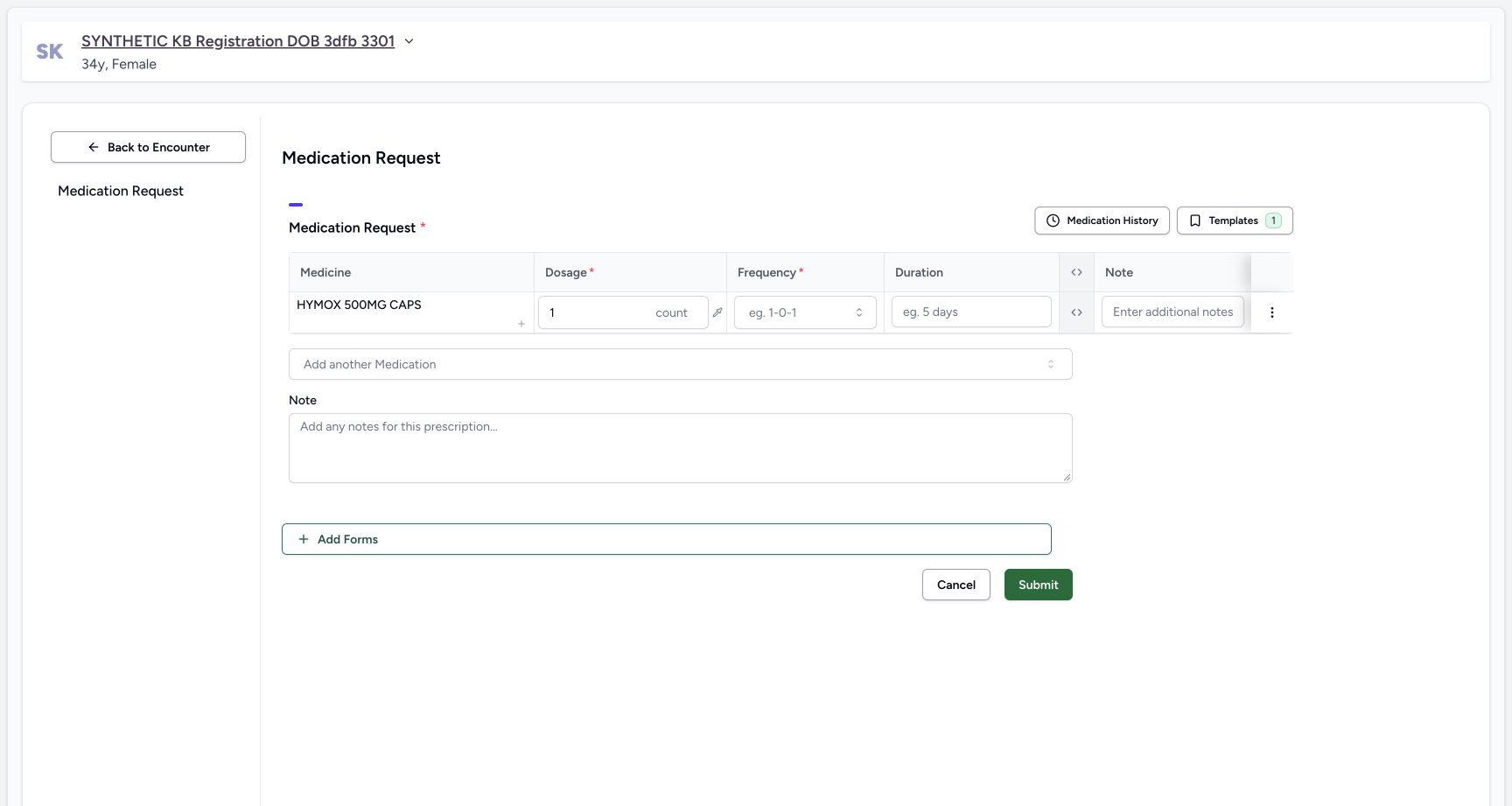
- Check the selected HYMOX Product row: This is still an unsaved single Product row.
- Keep the fictional dose one count: The form supplies the one-count dose used only for this software exercise.
- Locate the prescription-level Note: Enter the explicit software-only statement in the large prescription Note, separate from the row note.
5. Review one Product row and retain the fictional note
Verify the selected unsaved row is HYMOX 500MG CAPS and keep the illustrated dose of 1 count. Use the large prescription-level Note field, separate from the medicine row’s optional note. Retain the exact text: SYNTHETIC SOFTWARE TRAINING ONLY — fictional ten-count HYMOX product request for a two-batch partial-dispense lesson. This is not clinical advice. Do not physically dispense or administer any medicine; no actual patient treatment or money movement. Do not add another medicine or treat this example as clinical advice.
123Selected Product row still unsaved
Capture details
Genuine unchanged natural 1728×921 Doctor original from exact local committed d20e source, LOCAL_UNPUSHED. This fictional prescription prerequisite does not demonstrate a stock, dispensing, billing, payment or clinical treatment outcome.
Image SHA-256 a03cf39a2bbd40248d9df6478565973a97cbe3200f216462d457adfb9f85f2ed
- Check the selected HYMOX Product row: This is still an unsaved single Product row.
- Keep the fictional dose one count: The form supplies the one-count dose used only for this software exercise.
- Locate the prescription-level Note: Enter the explicit software-only statement in the large prescription Note, separate from the row note.
 123
123Visible filtered QD choice
Capture details
Genuine unchanged natural 1728×921 Doctor original from exact local committed d20e source, LOCAL_UNPUSHED. This fictional prescription prerequisite does not demonstrate a stock, dispensing, billing, payment or clinical treatment outcome.
Image SHA-256 f5fdba54e34a3c1026c65112e41d9cc76153bb5712947c0752fa0696a9387d8e
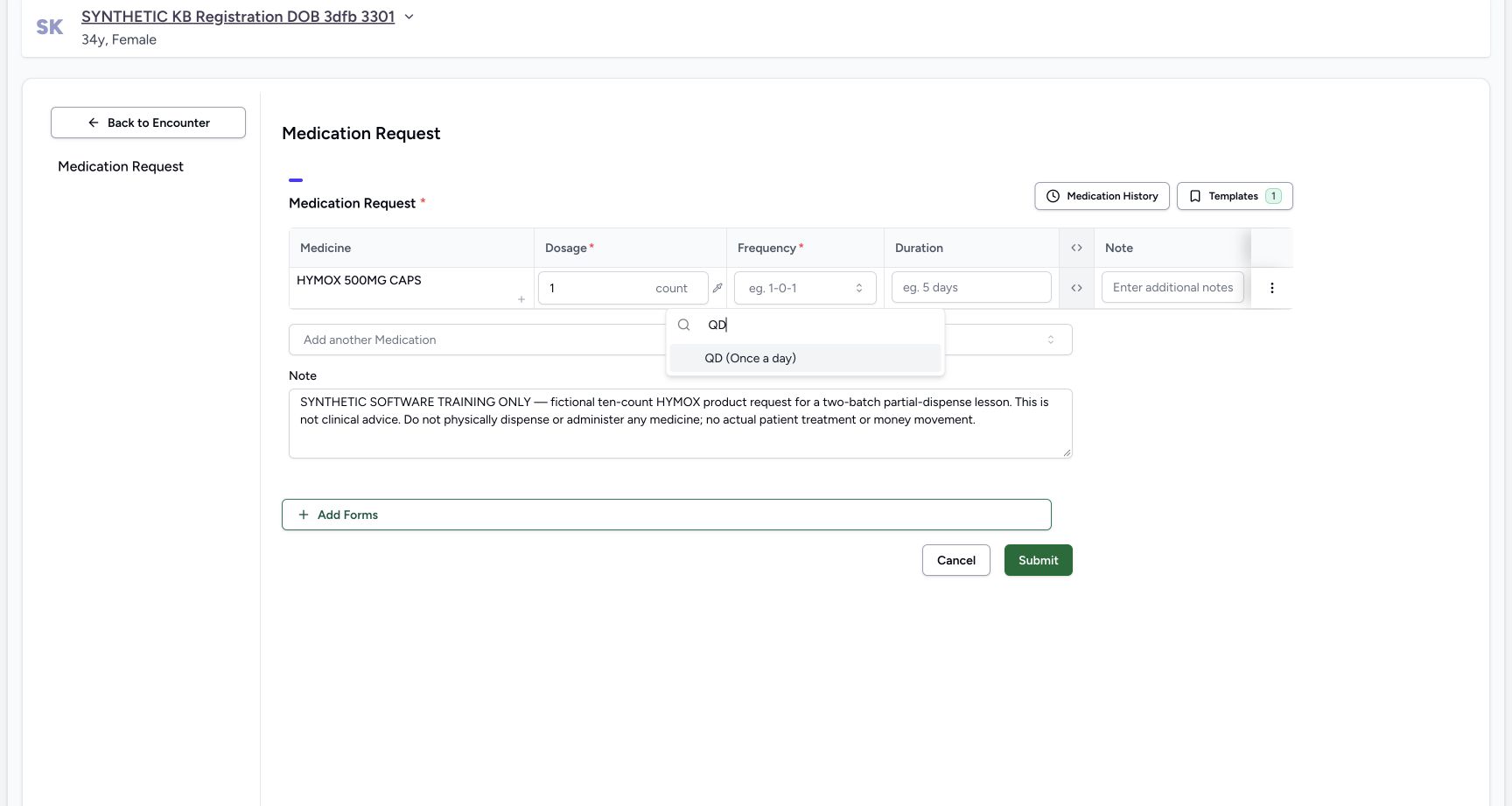
- Search QD: The frequency search is filtered to QD.
- Choose QD Once a day: The actual visible QD option is selected.
- Retain the explicit software-only note: The prescription note excludes clinical advice, physical medicine, patient treatment and money movement.
123456One fictional ten-count schedule ready
Capture details
Genuine unchanged natural 1728×921 Doctor original from exact local committed d20e source, LOCAL_UNPUSHED. This fictional prescription prerequisite does not demonstrate a stock, dispensing, billing, payment or clinical treatment outcome.
Image SHA-256 7938f8208af0f7b32176069579e2784af67c757029d75440b84cfac063918bf6
- Review the intended Product: The single row is HYMOX 500MG CAPS.
- Review one count: The dose value remains one count.
- Review QD Once a day: The selected frequency is QD.
- Review 10 days: The selected duration is ten days.
- Read the exact fictional note before saving: The prescription-level note remains explicit and unchanged.
- Submit once: Submit this one reviewed fictional request once.
6. Select the visible filtered QD option
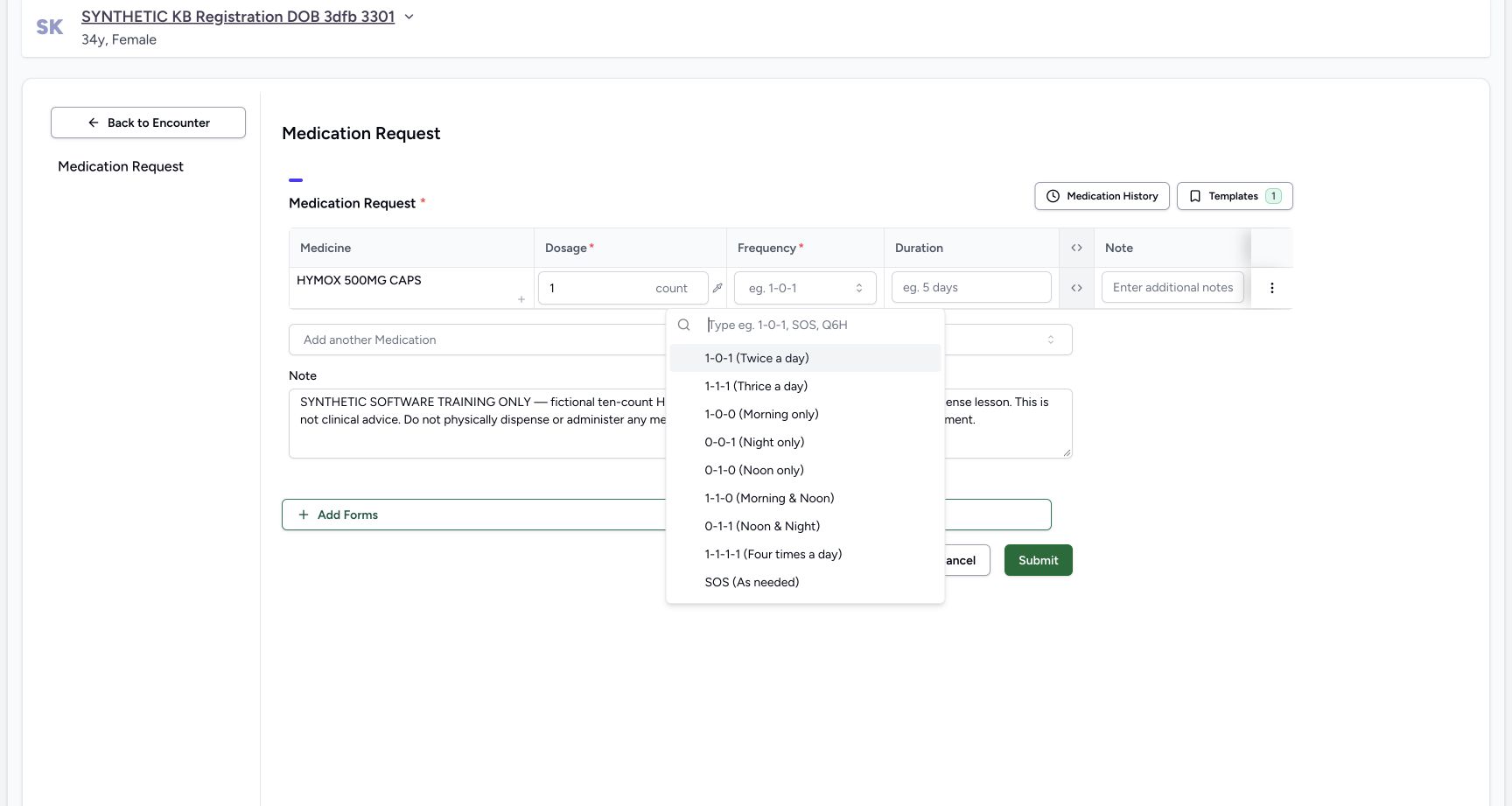
Open Frequency. The initial menu includes several options but does not picture QD in its viewport. Type QD in the menu search and choose the visible QD (Once a day) result. This selects the fictional example’s frequency without pointing to an offscreen option.
 12
12Unfiltered frequency menu
Capture details
Genuine unchanged natural 1728×921 Doctor original from exact local committed d20e source, LOCAL_UNPUSHED. This fictional prescription prerequisite does not demonstrate a stock, dispensing, billing, payment or clinical treatment outcome. QD is not pictured in this unfiltered viewport; use the actual filtered QD option in image16.
Image SHA-256 29d7f416af1eccf62666fa1454dac094499f6e10fb652564f7086285226d6db2
- Open Frequency: The unfiltered menu shows several options; the QD option is not pictured in this viewport.
- Filter the frequency choices: Search for QD rather than pointing to an offscreen option.
123Visible filtered QD choice
Capture details
Genuine unchanged natural 1728×921 Doctor original from exact local committed d20e source, LOCAL_UNPUSHED. This fictional prescription prerequisite does not demonstrate a stock, dispensing, billing, payment or clinical treatment outcome.
Image SHA-256 f5fdba54e34a3c1026c65112e41d9cc76153bb5712947c0752fa0696a9387d8e
- Search QD: The frequency search is filtered to QD.
- Choose QD Once a day: The actual visible QD option is selected.
- Retain the explicit software-only note: The prescription note excludes clinical advice, physical medicine, patient treatment and money movement.
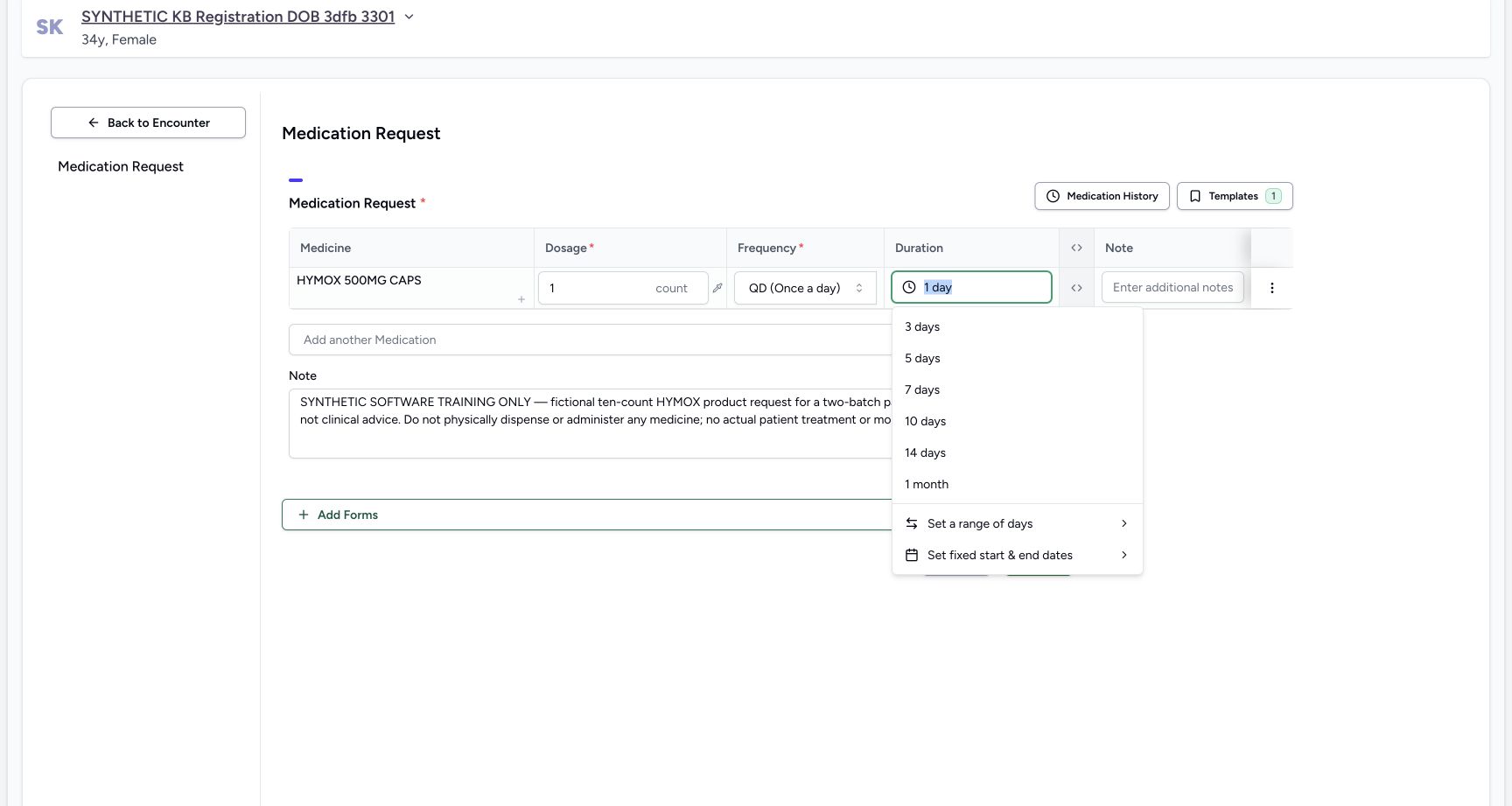 12
12Duration choices after QD
Capture details
Genuine unchanged natural 1728×921 Doctor original from exact local committed d20e source, LOCAL_UNPUSHED. This fictional prescription prerequisite does not demonstrate a stock, dispensing, billing, payment or clinical treatment outcome.
Image SHA-256 f06c5c13c8208c3c57ddac54f7e03b22583fd4806ff66c30f51f21b06384734b
- Open Duration and check its current value: The duration control currently reads one day.
- Choose 10 days: Select the visible ten-day option for this fictional schedule.
7. Set ten days and review before one Submit
Open Duration; the illustrated current default is 1 day. Choose the visible 10 days option. Review the same single HYMOX Product, 1 count, QD (Once a day), 10 days and exact fictional prescription note. Those inputs define a ten-count software example. Choose Submit once after reviewing them.
12Duration choices after QD
Capture details
Genuine unchanged natural 1728×921 Doctor original from exact local committed d20e source, LOCAL_UNPUSHED. This fictional prescription prerequisite does not demonstrate a stock, dispensing, billing, payment or clinical treatment outcome.
Image SHA-256 f06c5c13c8208c3c57ddac54f7e03b22583fd4806ff66c30f51f21b06384734b
- Open Duration and check its current value: The duration control currently reads one day.
- Choose 10 days: Select the visible ten-day option for this fictional schedule.
123456One fictional ten-count schedule ready
Capture details
Genuine unchanged natural 1728×921 Doctor original from exact local committed d20e source, LOCAL_UNPUSHED. This fictional prescription prerequisite does not demonstrate a stock, dispensing, billing, payment or clinical treatment outcome.
Image SHA-256 7938f8208af0f7b32176069579e2784af67c757029d75440b84cfac063918bf6
- Review the intended Product: The single row is HYMOX 500MG CAPS.
- Review one count: The dose value remains one count.
- Review QD Once a day: The selected frequency is QD.
- Review 10 days: The selected duration is ten days.
- Read the exact fictional note before saving: The prescription-level note remains explicit and unchanged.
- Submit once: Submit this one reviewed fictional request once.
8. Read success feedback and open the new saved card
The immediate returned encounter visibly reports Questionnaire submitted successfully. Continue through Medicines and Prescriptions. All Prescriptions shows the new October 20, 04:27 PM Doctor card above the separate earlier 03:23 PM card. Open the new 04:27 PM card. Its first detail view is still Loading; wait for the settled detail rather than submitting again.
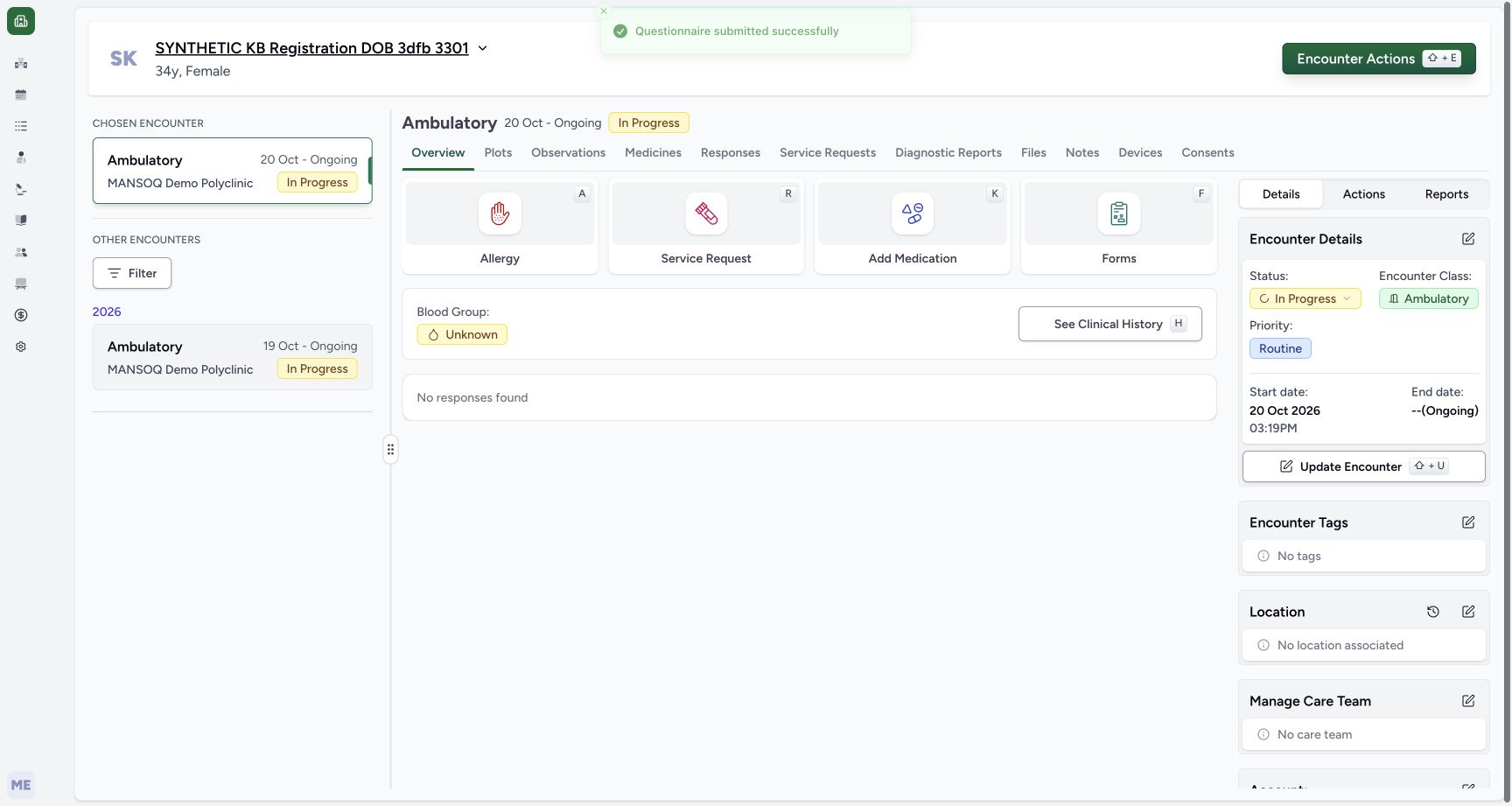 12
12Actual successful Submit feedback
Capture details
Genuine unchanged natural 1728×921 Doctor original from exact local committed d20e source, LOCAL_UNPUSHED. This fictional prescription prerequisite does not demonstrate a stock, dispensing, billing, payment or clinical treatment outcome.
Image SHA-256 c4df7f1398c190f1d5e4757bd5d775190c225d130c6b386ce8d5908dfe9a7310
- Read the actual success feedback: This frame visibly says Questionnaire submitted successfully and has returned to the encounter.
- Open Medicines: Continue to the saved prescription list instead of submitting another request.
1234Saved prescriptions list
Capture details
Genuine unchanged natural 1728×921 Doctor original from exact local committed d20e source, LOCAL_UNPUSHED. This fictional prescription prerequisite does not demonstrate a stock, dispensing, billing, payment or clinical treatment outcome.
Image SHA-256 81411c25b28ed8caafd06befa63e9f17d4fdb1b4da4f9ee2a9486be105d29377
- Use Medicines: The existing encounter Medicines view is selected.
- Use Prescriptions: Prescriptions is distinct from Medication Statements or Dispense History.
- Open the new 04:27 PM card: The new Doctor prescription is above the earlier 03:23 PM prescription.
- Recognise the new HYMOX row: All Prescriptions includes the new HYMOX request alongside the separate earlier medicine.
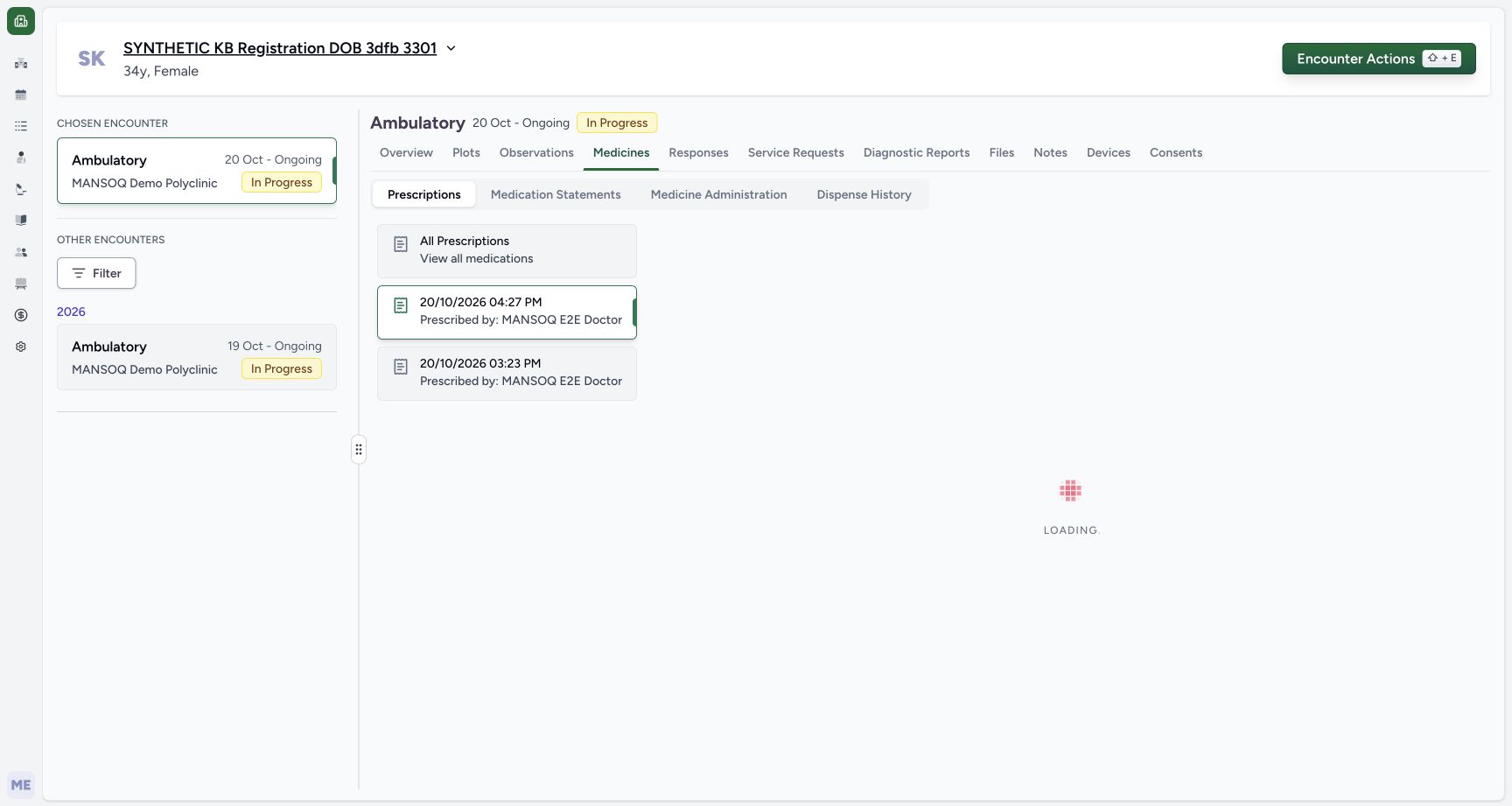 12
12New detail still Loading
Capture details
Genuine unchanged natural 1728×921 Doctor original from exact local committed d20e source, LOCAL_UNPUSHED. This fictional prescription prerequisite does not demonstrate a stock, dispensing, billing, payment or clinical treatment outcome. This is a loading view; the next settled matching result or detail is the outcome evidence.
Image SHA-256 dad44bc7b97fdc02542c2e69b50468e8ccc03050bac5232aad9b0d1235231ba3
- Keep the new prescription selected: The selected card is the October 20, 04:27 PM Doctor prescription.
- Wait for the details to settle: The detail pane still displays Loading and is not its final saved content.
123456Settled saved new prescription detail
Capture details
Genuine unchanged natural 1728×921 Doctor original from exact local committed d20e source, LOCAL_UNPUSHED. This fictional prescription prerequisite does not demonstrate a stock, dispensing, billing, payment or clinical treatment outcome. No Active badge is pictured here. Active status and the default inpatient request category are established by the frozen saved-record check; that category does not establish an admission.
Image SHA-256 daea360c6e5fed44ac5ee85a7138be5884d7336566abda41f61dc16de386ba6a
- Match the saved prescription time: The detail header is October 20, 2026 at 04:27 PM.
- Read the retained software-only note: The saved prescription detail retains the full explicit fictional note.
- Read the single HYMOX row: This card contains one HYMOX 500MG CAPS row.
- Read saved one-count dose: The saved dose is 1.00 count.
- Read saved QD frequency: The saved frequency is QD Once a day.
- Read saved ten-day duration: The saved duration is ten days; Edit and Print are separate unused actions.
9. Verify the saved note and one-row schedule
Match the 04:27 PM prescription header, the full software-only note and its one HYMOX row with 1.00 count, QD (Once a day) and 10 days. Edit, Print and Print All Prescriptions are separate actions and were not used. This Doctor detail does not display an Active badge; do not invent a visible status label.
123456Settled saved new prescription detail
Capture details
Genuine unchanged natural 1728×921 Doctor original from exact local committed d20e source, LOCAL_UNPUSHED. This fictional prescription prerequisite does not demonstrate a stock, dispensing, billing, payment or clinical treatment outcome. No Active badge is pictured here. Active status and the default inpatient request category are established by the frozen saved-record check; that category does not establish an admission.
Image SHA-256 daea360c6e5fed44ac5ee85a7138be5884d7336566abda41f61dc16de386ba6a
- Match the saved prescription time: The detail header is October 20, 2026 at 04:27 PM.
- Read the retained software-only note: The saved prescription detail retains the full explicit fictional note.
- Read the single HYMOX row: This card contains one HYMOX 500MG CAPS row.
- Read saved one-count dose: The saved dose is 1.00 count.
- Read saved QD frequency: The saved frequency is QD Once a day.
- Read saved ten-day duration: The saved duration is ten days; Edit and Print are separate unused actions.
10. Reload and reopen the same prescription
Reload normally. The interface returns its selection to All Prescriptions while the same new HYMOX and earlier Paracetamol cards remain. Reopen the existing 04:27 PM Doctor card and verify the note, single HYMOX row, one-count dose, QD and ten days again. Reopening after reload does not create a second prescription. Stop here before the separate Pharmacy partial-dispensing exercise.
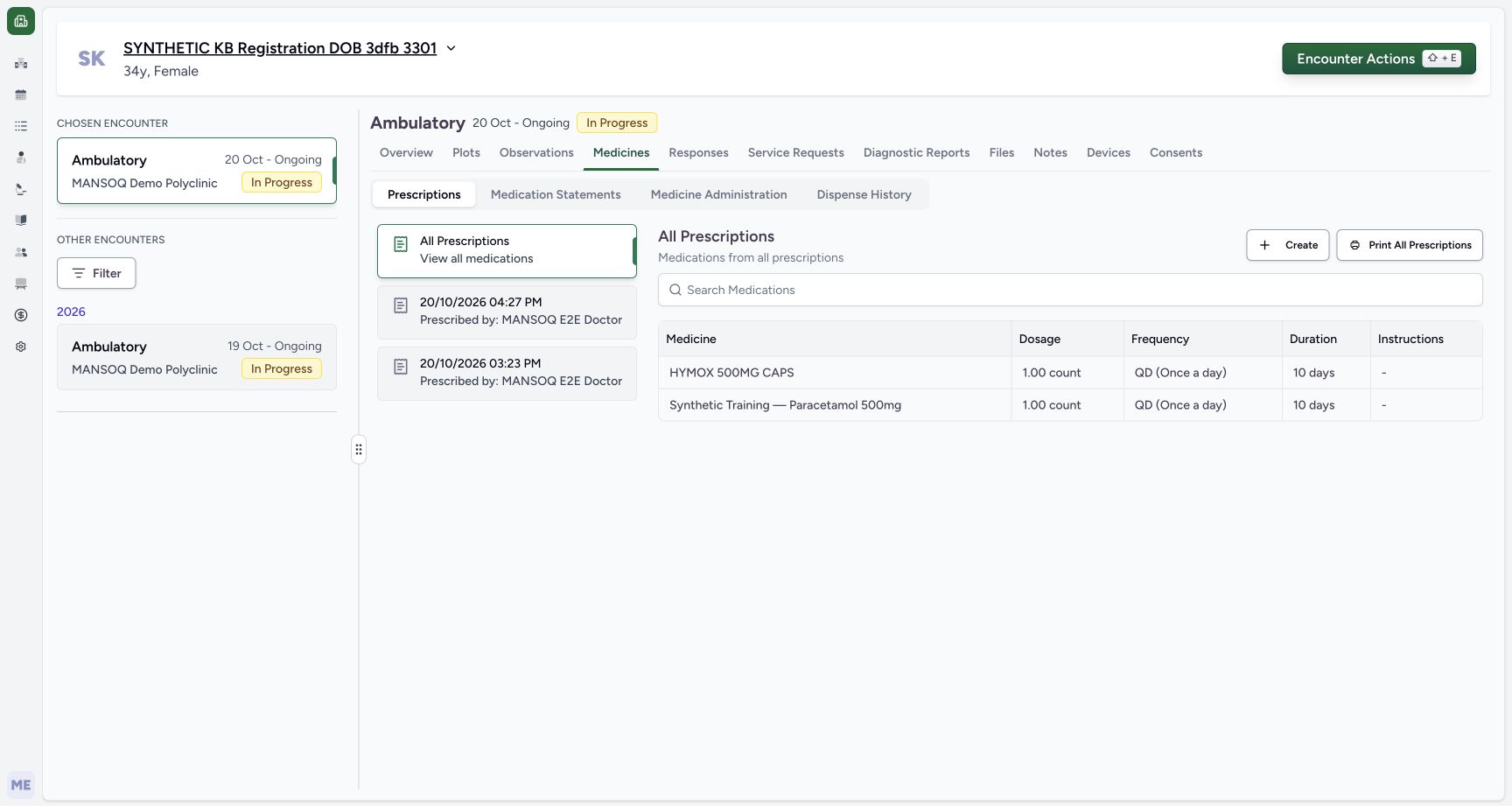 123
123All Prescriptions after reload
Capture details
Genuine unchanged natural 1728×921 Doctor original from exact local committed d20e source, LOCAL_UNPUSHED. This fictional prescription prerequisite does not demonstrate a stock, dispensing, billing, payment or clinical treatment outcome.
Image SHA-256 81411c25b28ed8caafd06befa63e9f17d4fdb1b4da4f9ee2a9486be105d29377
- Recognise the reset All Prescriptions selection: A normal reload resets the selected card to All Prescriptions without creating another record.
- Reopen the same new 04:27 PM card: Use the existing card again after reload.
- Keep the earlier prescription separate: The earlier 03:23 PM Paracetamol prescription remains a different saved record.
12345Same saved detail reopened after reload
Capture details
Genuine unchanged natural 1728×921 Doctor original from exact local committed d20e source, LOCAL_UNPUSHED. This fictional prescription prerequisite does not demonstrate a stock, dispensing, billing, payment or clinical treatment outcome. No Active badge is pictured here. Active status and the default inpatient request category are established by the frozen saved-record check; that category does not establish an admission.
Image SHA-256 daea360c6e5fed44ac5ee85a7138be5884d7336566abda41f61dc16de386ba6a
- Verify the same card after reload: The same 04:27 PM Doctor prescription is reopened.
- Verify the retained exact note: The fictional note is still present after normal reload.
- Verify one count retained: The single saved dose remains one count.
- Verify QD retained: The saved frequency remains QD.
- Verify ten days retained: The saved duration remains ten days; no second Submit was performed.
Match the code, not just the medicine name
The two search results are not interchangeable. The first includes 0307222296 in its name but has actual GTIN 06281086000793. The selected lower result has actual registration code 0307222296. This records the approved existing Product Knowledge master; it is not a clinical substitution or a Medication-tab coding demonstration.
123Product search still Searching
Capture details
Genuine unchanged natural 1728×921 Doctor original from exact local committed d20e source, LOCAL_UNPUSHED. This fictional prescription prerequisite does not demonstrate a stock, dispensing, billing, payment or clinical treatment outcome. This is a loading view; the next settled matching result or detail is the outcome evidence.
Image SHA-256 d02aa85224577349223994f12f0df99cc0d975703df4c9b56aa88a80ce96614a
- Use the Product tab: Product is distinct from the Medication coding tab.
- Search registration code 0307222296: Enter the exact approved existing Product Knowledge code.
- Wait while Searching: No settled selectable result is shown until the search completes.
1234Settled registration-code and GTIN results
Capture details
Genuine unchanged natural 1728×921 Doctor original from exact local committed d20e source, LOCAL_UNPUSHED. This fictional prescription prerequisite does not demonstrate a stock, dispensing, billing, payment or clinical treatment outcome.
Image SHA-256 36beb561c1bcf260a6ec8fe280086b5fa01c879b2c1be76a8e1c95168c017ae2
- Distinguish the misleading upper name: The first result includes 0307222296 in its name but its actual code is the GTIN below it.
- Read the upper actual GTIN: The upper result code is 06281086000793, not the intended registration code.
- Choose the lower HYMOX result: Select HYMOX 500MG CAPS whose actual code below is 0307222296.
- Keep catalog price separate: The visible 40.4 SAR catalog display is not the synthetic one-SAR batch price.
123Selected Product row still unsaved
Capture details
Genuine unchanged natural 1728×921 Doctor original from exact local committed d20e source, LOCAL_UNPUSHED. This fictional prescription prerequisite does not demonstrate a stock, dispensing, billing, payment or clinical treatment outcome.
Image SHA-256 a03cf39a2bbd40248d9df6478565973a97cbe3200f216462d457adfb9f85f2ed
- Check the selected HYMOX Product row: This is still an unsaved single Product row.
- Keep the fictional dose one count: The form supplies the one-count dose used only for this software exercise.
- Locate the prescription-level Note: Enter the explicit software-only statement in the large prescription Note, separate from the row note.
Keep prescription, category and dispensing outcomes distinct
The saved-record check confirmed one new active prescription and medicine request. The request retained the software’s inpatient category default even though its existing encounter is Ambulatory; that field does not establish an admission and is not a badge pictured on this Doctor detail. This prerequisite did not deduct either synthetic batch, bill, collect payment or complete a dispense.
12Existing encounter Add Medication
Capture details
Genuine unchanged natural 1728×921 Doctor original from exact local committed d20e source, LOCAL_UNPUSHED. This fictional prescription prerequisite does not demonstrate a stock, dispensing, billing, payment or clinical treatment outcome.
Image SHA-256 3d82da328c17da550a1b01310b5520132095cb60a12205cf9c7298920a7c1102
- Confirm the chosen existing encounter: The selected October 20 Ambulatory encounter remains In Progress.
- Choose Add Medication: Open the existing encounter medication request form.
123456One fictional ten-count schedule ready
Capture details
Genuine unchanged natural 1728×921 Doctor original from exact local committed d20e source, LOCAL_UNPUSHED. This fictional prescription prerequisite does not demonstrate a stock, dispensing, billing, payment or clinical treatment outcome.
Image SHA-256 7938f8208af0f7b32176069579e2784af67c757029d75440b84cfac063918bf6
- Review the intended Product: The single row is HYMOX 500MG CAPS.
- Review one count: The dose value remains one count.
- Review QD Once a day: The selected frequency is QD.
- Review 10 days: The selected duration is ten days.
- Read the exact fictional note before saving: The prescription-level note remains explicit and unchanged.
- Submit once: Submit this one reviewed fictional request once.
123456Settled saved new prescription detail
Capture details
Genuine unchanged natural 1728×921 Doctor original from exact local committed d20e source, LOCAL_UNPUSHED. This fictional prescription prerequisite does not demonstrate a stock, dispensing, billing, payment or clinical treatment outcome. No Active badge is pictured here. Active status and the default inpatient request category are established by the frozen saved-record check; that category does not establish an admission.
Image SHA-256 daea360c6e5fed44ac5ee85a7138be5884d7336566abda41f61dc16de386ba6a
- Match the saved prescription time: The detail header is October 20, 2026 at 04:27 PM.
- Read the retained software-only note: The saved prescription detail retains the full explicit fictional note.
- Read the single HYMOX row: This card contains one HYMOX 500MG CAPS row.
- Read saved one-count dose: The saved dose is 1.00 count.
- Read saved QD frequency: The saved frequency is QD Once a day.
- Read saved ten-day duration: The saved duration is ten days; Edit and Print are separate unused actions.
12345Same saved detail reopened after reload
Capture details
Genuine unchanged natural 1728×921 Doctor original from exact local committed d20e source, LOCAL_UNPUSHED. This fictional prescription prerequisite does not demonstrate a stock, dispensing, billing, payment or clinical treatment outcome. No Active badge is pictured here. Active status and the default inpatient request category are established by the frozen saved-record check; that category does not establish an admission.
Image SHA-256 daea360c6e5fed44ac5ee85a7138be5884d7336566abda41f61dc16de386ba6a
- Verify the same card after reload: The same 04:27 PM Doctor prescription is reopened.
- Verify the retained exact note: The fictional note is still present after normal reload.
- Verify one count retained: The single saved dose remains one count.
- Verify QD retained: The saved frequency remains QD.
- Verify ten days retained: The saved duration remains ten days; no second Submit was performed.
Troubleshooting
The selector shows Searching or the detail shows Loading
Those are pending views. Wait for the actual settled result or saved prescription detail. Do not treat the empty result area as a missing medicine, or repeat Submit to resolve a loading pane.
123Product search still Searching
Capture details
Genuine unchanged natural 1728×921 Doctor original from exact local committed d20e source, LOCAL_UNPUSHED. This fictional prescription prerequisite does not demonstrate a stock, dispensing, billing, payment or clinical treatment outcome. This is a loading view; the next settled matching result or detail is the outcome evidence.
Image SHA-256 d02aa85224577349223994f12f0df99cc0d975703df4c9b56aa88a80ce96614a
- Use the Product tab: Product is distinct from the Medication coding tab.
- Search registration code 0307222296: Enter the exact approved existing Product Knowledge code.
- Wait while Searching: No settled selectable result is shown until the search completes.
1234Settled registration-code and GTIN results
Capture details
Genuine unchanged natural 1728×921 Doctor original from exact local committed d20e source, LOCAL_UNPUSHED. This fictional prescription prerequisite does not demonstrate a stock, dispensing, billing, payment or clinical treatment outcome.
Image SHA-256 36beb561c1bcf260a6ec8fe280086b5fa01c879b2c1be76a8e1c95168c017ae2
- Distinguish the misleading upper name: The first result includes 0307222296 in its name but its actual code is the GTIN below it.
- Read the upper actual GTIN: The upper result code is 06281086000793, not the intended registration code.
- Choose the lower HYMOX result: Select HYMOX 500MG CAPS whose actual code below is 0307222296.
- Keep catalog price separate: The visible 40.4 SAR catalog display is not the synthetic one-SAR batch price.
12Actual successful Submit feedback
Capture details
Genuine unchanged natural 1728×921 Doctor original from exact local committed d20e source, LOCAL_UNPUSHED. This fictional prescription prerequisite does not demonstrate a stock, dispensing, billing, payment or clinical treatment outcome.
Image SHA-256 c4df7f1398c190f1d5e4757bd5d775190c225d130c6b386ce8d5908dfe9a7310
- Read the actual success feedback: This frame visibly says Questionnaire submitted successfully and has returned to the encounter.
- Open Medicines: Continue to the saved prescription list instead of submitting another request.
12New detail still Loading
Capture details
Genuine unchanged natural 1728×921 Doctor original from exact local committed d20e source, LOCAL_UNPUSHED. This fictional prescription prerequisite does not demonstrate a stock, dispensing, billing, payment or clinical treatment outcome. This is a loading view; the next settled matching result or detail is the outcome evidence.
Image SHA-256 dad44bc7b97fdc02542c2e69b50468e8ccc03050bac5232aad9b0d1235231ba3
- Keep the new prescription selected: The selected card is the October 20, 04:27 PM Doctor prescription.
- Wait for the details to settle: The detail pane still displays Loading and is not its final saved content.
123456Settled saved new prescription detail
Capture details
Genuine unchanged natural 1728×921 Doctor original from exact local committed d20e source, LOCAL_UNPUSHED. This fictional prescription prerequisite does not demonstrate a stock, dispensing, billing, payment or clinical treatment outcome. No Active badge is pictured here. Active status and the default inpatient request category are established by the frozen saved-record check; that category does not establish an admission.
Image SHA-256 daea360c6e5fed44ac5ee85a7138be5884d7336566abda41f61dc16de386ba6a
- Match the saved prescription time: The detail header is October 20, 2026 at 04:27 PM.
- Read the retained software-only note: The saved prescription detail retains the full explicit fictional note.
- Read the single HYMOX row: This card contains one HYMOX 500MG CAPS row.
- Read saved one-count dose: The saved dose is 1.00 count.
- Read saved QD frequency: The saved frequency is QD Once a day.
- Read saved ten-day duration: The saved duration is ten days; Edit and Print are separate unused actions.
The form is back at an empty Add Medication field
The recording includes a reset empty form before the actual Product picker was reopened. It does not show a Cancel action or a saved request. Reopen Add Medication and verify the settled Product result before continuing; use the saved prescription card to check whether a prior Submit already succeeded.
1Empty medication request form
Capture details
Genuine unchanged natural 1728×921 Doctor original from exact local committed d20e source, LOCAL_UNPUSHED. This fictional prescription prerequisite does not demonstrate a stock, dispensing, billing, payment or clinical treatment outcome.
Image SHA-256 e954458bb0739cfa42085bf551a9f456fd28de2b6fdc92f9be4a5c42cf1041e8
- Open Add Medication: The new request form starts with an empty required medicine selector.
1Reset empty form before reopening selector
Capture details
Genuine unchanged natural 1728×921 Doctor original from exact local committed d20e source, LOCAL_UNPUSHED. This fictional prescription prerequisite does not demonstrate a stock, dispensing, billing, payment or clinical treatment outcome. The historical operator caption called this a Product picker; pixels show a reset empty form. No Cancel action occurred; the actual selector was reopened afterward.
Image SHA-256 f68c2e06a7e5ed654e02788d7591eaa83a5162aab9f960f916dd93a422df6a19
- Reopen the empty selector if needed: This genuine frame shows the form reset to its empty selector; it is not an open Product picker or a Cancel result.
123Product search still Searching
Capture details
Genuine unchanged natural 1728×921 Doctor original from exact local committed d20e source, LOCAL_UNPUSHED. This fictional prescription prerequisite does not demonstrate a stock, dispensing, billing, payment or clinical treatment outcome. This is a loading view; the next settled matching result or detail is the outcome evidence.
Image SHA-256 d02aa85224577349223994f12f0df99cc0d975703df4c9b56aa88a80ce96614a
- Use the Product tab: Product is distinct from the Medication coding tab.
- Search registration code 0307222296: Enter the exact approved existing Product Knowledge code.
- Wait while Searching: No settled selectable result is shown until the search completes.
1234Settled registration-code and GTIN results
Capture details
Genuine unchanged natural 1728×921 Doctor original from exact local committed d20e source, LOCAL_UNPUSHED. This fictional prescription prerequisite does not demonstrate a stock, dispensing, billing, payment or clinical treatment outcome.
Image SHA-256 36beb561c1bcf260a6ec8fe280086b5fa01c879b2c1be76a8e1c95168c017ae2
- Distinguish the misleading upper name: The first result includes 0307222296 in its name but its actual code is the GTIN below it.
- Read the upper actual GTIN: The upper result code is 06281086000793, not the intended registration code.
- Choose the lower HYMOX result: Select HYMOX 500MG CAPS whose actual code below is 0307222296.
- Keep catalog price separate: The visible 40.4 SAR catalog display is not the synthetic one-SAR batch price.
1234Saved prescriptions list
Capture details
Genuine unchanged natural 1728×921 Doctor original from exact local committed d20e source, LOCAL_UNPUSHED. This fictional prescription prerequisite does not demonstrate a stock, dispensing, billing, payment or clinical treatment outcome.
Image SHA-256 81411c25b28ed8caafd06befa63e9f17d4fdb1b4da4f9ee2a9486be105d29377
- Use Medicines: The existing encounter Medicines view is selected.
- Use Prescriptions: Prescriptions is distinct from Medication Statements or Dispense History.
- Open the new 04:27 PM card: The new Doctor prescription is above the earlier 03:23 PM prescription.
- Recognise the new HYMOX row: All Prescriptions includes the new HYMOX request alongside the separate earlier medicine.
The new card is no longer selected after reload
Reload resets the local selection to All Prescriptions. Reopen the same 04:27 PM Doctor card and read its retained note and schedule. Keep it separate from the earlier 03:23 PM prescription; do not create a replacement just to restore the selected view.
1234Saved prescriptions list
Capture details
Genuine unchanged natural 1728×921 Doctor original from exact local committed d20e source, LOCAL_UNPUSHED. This fictional prescription prerequisite does not demonstrate a stock, dispensing, billing, payment or clinical treatment outcome.
Image SHA-256 81411c25b28ed8caafd06befa63e9f17d4fdb1b4da4f9ee2a9486be105d29377
- Use Medicines: The existing encounter Medicines view is selected.
- Use Prescriptions: Prescriptions is distinct from Medication Statements or Dispense History.
- Open the new 04:27 PM card: The new Doctor prescription is above the earlier 03:23 PM prescription.
- Recognise the new HYMOX row: All Prescriptions includes the new HYMOX request alongside the separate earlier medicine.
123456Settled saved new prescription detail
Capture details
Genuine unchanged natural 1728×921 Doctor original from exact local committed d20e source, LOCAL_UNPUSHED. This fictional prescription prerequisite does not demonstrate a stock, dispensing, billing, payment or clinical treatment outcome. No Active badge is pictured here. Active status and the default inpatient request category are established by the frozen saved-record check; that category does not establish an admission.
Image SHA-256 daea360c6e5fed44ac5ee85a7138be5884d7336566abda41f61dc16de386ba6a
- Match the saved prescription time: The detail header is October 20, 2026 at 04:27 PM.
- Read the retained software-only note: The saved prescription detail retains the full explicit fictional note.
- Read the single HYMOX row: This card contains one HYMOX 500MG CAPS row.
- Read saved one-count dose: The saved dose is 1.00 count.
- Read saved QD frequency: The saved frequency is QD Once a day.
- Read saved ten-day duration: The saved duration is ten days; Edit and Print are separate unused actions.
123All Prescriptions after reload
Capture details
Genuine unchanged natural 1728×921 Doctor original from exact local committed d20e source, LOCAL_UNPUSHED. This fictional prescription prerequisite does not demonstrate a stock, dispensing, billing, payment or clinical treatment outcome.
Image SHA-256 81411c25b28ed8caafd06befa63e9f17d4fdb1b4da4f9ee2a9486be105d29377
- Recognise the reset All Prescriptions selection: A normal reload resets the selected card to All Prescriptions without creating another record.
- Reopen the same new 04:27 PM card: Use the existing card again after reload.
- Keep the earlier prescription separate: The earlier 03:23 PM Paracetamol prescription remains a different saved record.
12345Same saved detail reopened after reload
Capture details
Genuine unchanged natural 1728×921 Doctor original from exact local committed d20e source, LOCAL_UNPUSHED. This fictional prescription prerequisite does not demonstrate a stock, dispensing, billing, payment or clinical treatment outcome. No Active badge is pictured here. Active status and the default inpatient request category are established by the frozen saved-record check; that category does not establish an admission.
Image SHA-256 daea360c6e5fed44ac5ee85a7138be5884d7336566abda41f61dc16de386ba6a
- Verify the same card after reload: The same 04:27 PM Doctor prescription is reopened.
- Verify the retained exact note: The fictional note is still present after normal reload.
- Verify one count retained: The single saved dose remains one count.
- Verify QD retained: The saved frequency remains QD.
- Verify ten days retained: The saved duration remains ten days; no second Submit was performed.
Source evidence
Every citation uses this exact committed version. The private source repository requires access.
- repositories/platform/mansoq-web/src/components/Questionnaire/QuestionTypes/MedicationRequestQuestion.tsx:612 ·
d20e68ed4a9e0b005aa54f218f84172160974b02Source file checksum
561259e73b1752c9844e31b798ad676878af5f4caf6be5fbd130cd31fcfc89cc - repositories/platform/mansoq-web/src/components/Medicine/DosageFrequencyInput.tsx:135 ·
d20e68ed4a9e0b005aa54f218f84172160974b02Source file checksum
25dd21fd48a38c46bc40f2fb8b8586e89ed72eb97451fadd29c3d54591a5e420 - repositories/platform/mansoq-web/src/components/Medicine/DurationInput.tsx:123 ·
d20e68ed4a9e0b005aa54f218f84172160974b02Source file checksum
c271b7c60fd93d91bb97ce8ab38644b1999b0a1115db3db9d5c0626557eb0c11 - repositories/platform/mansoq-web/src/components/Questionnaire/MedicationValueSetSelect.tsx:332 ·
d20e68ed4a9e0b005aa54f218f84172160974b02Source file checksum
bb8d5d5f1595778be9e9ad260296e8f43e5696fe9d19fb608e27a33a6a739610 - repositories/platform/mansoq-web/src/components/Questionnaire/QuestionnaireForm.tsx:744 ·
d20e68ed4a9e0b005aa54f218f84172160974b02Source file checksum
39b7abd29b788b0e905bbf510664b54a5234ceb83c1346e3bfa4424310f71e75 - repositories/platform/mansoq-web/src/components/Questionnaire/structured/handlers.ts:65 ·
d20e68ed4a9e0b005aa54f218f84172160974b02Source file checksum
1504758d6035ad8d5019deced4fcf9c67671ffc955846f6c9ca74f86cd795e21 - repositories/platform/mansoq-core/mansoq/emr/resources/medication/request/spec.py:282 ·
d20e68ed4a9e0b005aa54f218f84172160974b02Source file checksum
9f9e929369e186f88af131f2a1ccc3a773d9bfe9648f92a98f6a4935c09a7ade - repositories/platform/mansoq-core/mansoq/emr/api/viewsets/medication_request.py:85 ·
d20e68ed4a9e0b005aa54f218f84172160974b02Source file checksum
a3f3ae8042fb8134112c5d04fe8b060e68bce11dae682d138aafaae64119c215 - repositories/platform/mansoq-web/src/components/Medicine/PrescriptionListSelector.tsx:86 ·
d20e68ed4a9e0b005aa54f218f84172160974b02Source file checksum
d440785347dcc3045dea0d4d5c81052a9e3c7de074405fc4de87dea79cd4b083 - repositories/platform/mansoq-web/src/components/Medicine/PrescriptionView.tsx:38 ·
d20e68ed4a9e0b005aa54f218f84172160974b02Source file checksum
af1781d51d3dd511231a79e034a7f98412434dfa4603b91dce6676c4474fad96 - repositories/platform/mansoq-web/src/components/Medicine/MedicationsTable.tsx:32 ·
d20e68ed4a9e0b005aa54f218f84172160974b02Source file checksum
8bdf0ac1770dc1423e4534f9ed0f75f51bda5be717ef7bd0aa345edc79244830 - repositories/platform/mansoq-web/src/components/Patient/PatientIndex.tsx:640 ·
d20e68ed4a9e0b005aa54f218f84172160974b02Source file checksum
b7f38ea49ab4aee4872fd6f35263f9a23a609f9cb2622332ea741192fb3013de - repositories/platform/mansoq-web/src/components/Facility/EncounterCard.tsx:152 ·
d20e68ed4a9e0b005aa54f218f84172160974b02Source file checksum
5e9572f88aba61bd917500b1cd0e6fbb8f46dde4123639d935ee0d80a5c71068