 MANSOQ
 Pharmacy · VERSION d20e68ed
Receive two synthetic batches and verify their saved prices
Use one native Main Pharmacy delivery to create two fictional batches under an existing medicine master, receive A two count and B three count, complete the delivery and verify the separate saved batch prices and stock after reload.
Facility Admin
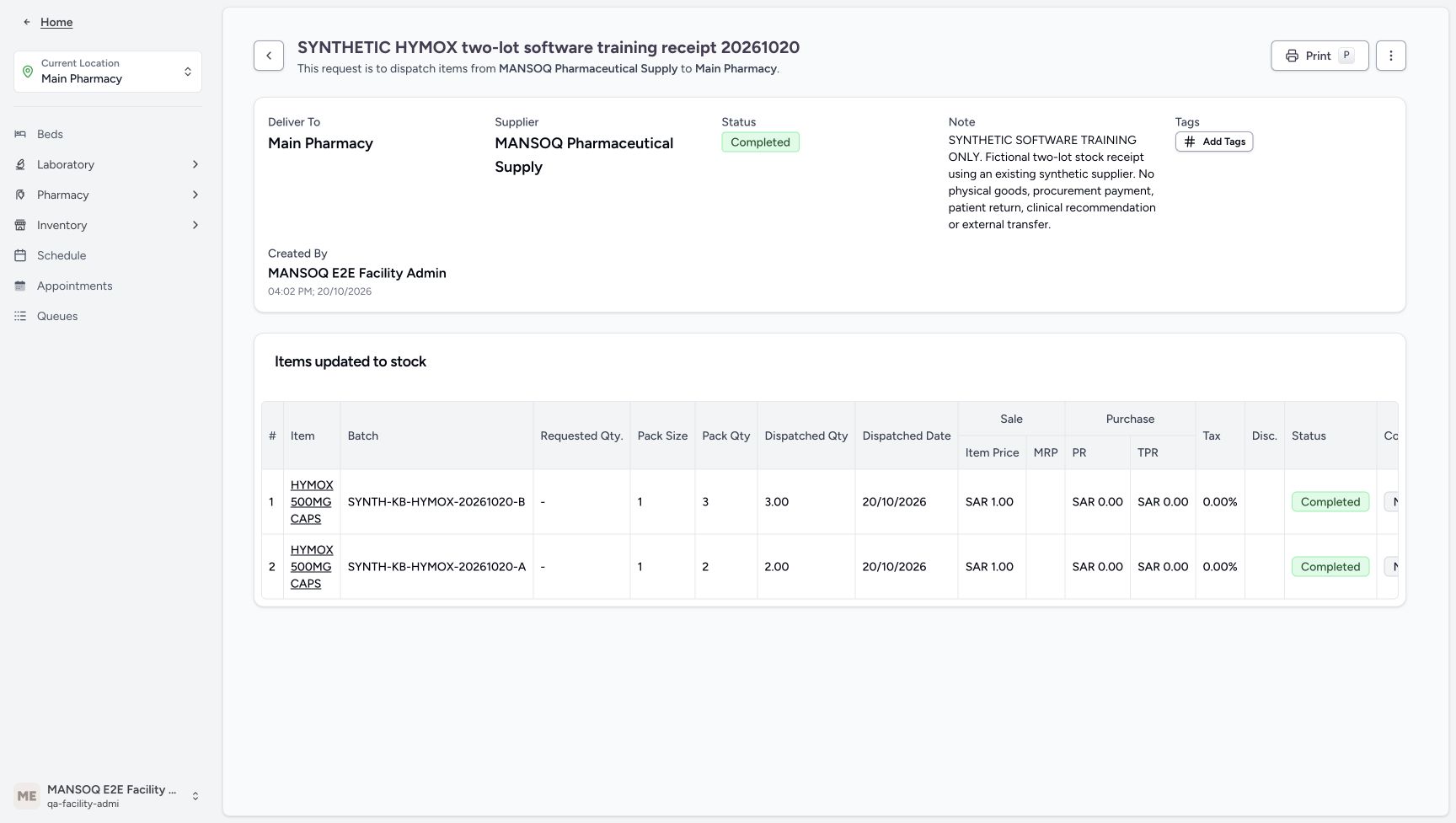 12345
12345Completed delivery after reload
Capture details
Genuine unchanged natural 1728×977 original from the exact committed local d20e build. Source publication is LOCAL_UNPUSHED. This is synthetic software stock setup; no physical goods, procurement payment, clinical recommendation, patient return or external exchange occurred.
Image SHA-256 354f86ed22fc08aae838c139efdf60624f2044d8ca7b1e9210f77cbff0cca572
- Verify Completed after reload: A normal reload retains the existing parent Completed state.
- Verify B quantity three after reload: The saved B quantity is retained.
- Verify A quantity two after reload: The saved A quantity is retained.
- Open the saved item link: The recorded item link opens All Deliveries for the existing Product Knowledge master.
- Expand the location Inventory menu: After returning to the saved Main Pharmacy delivery, expand Inventory before choosing Items.
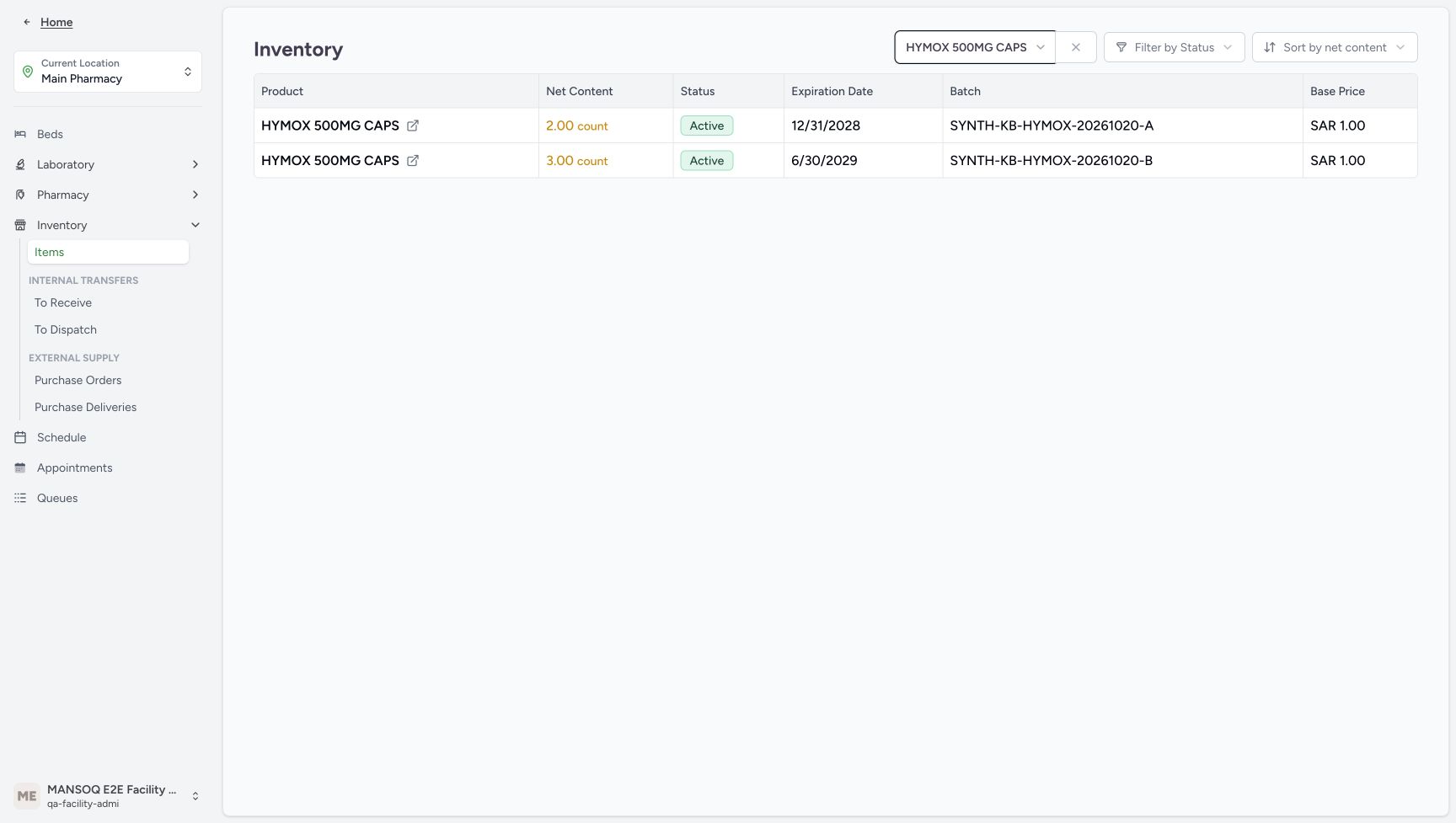 123456
Main Pharmacy A two and B three stock
Capture details
Genuine unchanged natural 1728×977 original from the exact committed local d20e build. Source publication is LOCAL_UNPUSHED. This is synthetic software stock setup; no physical goods, procurement payment, clinical recommendation, patient return or external exchange occurred.
Image SHA-256 7de5f1baf909871182bbd7e287d5041eaa6faf2a30c7b6b90e5c72677e569d79
- Verify A net content two count: Main Pharmacy stock shows A as 2.00 count.
- Verify B net content three count: Main Pharmacy stock shows B as 3.00 count.
- Match A batch: The two-count row has the exact A batch.
- Match B batch: The three-count row has the exact B batch.
- Read A base price one SAR: The A stock row displays SAR 1.00.
- Read B base price one SAR: The B stock row separately displays SAR 1.00.
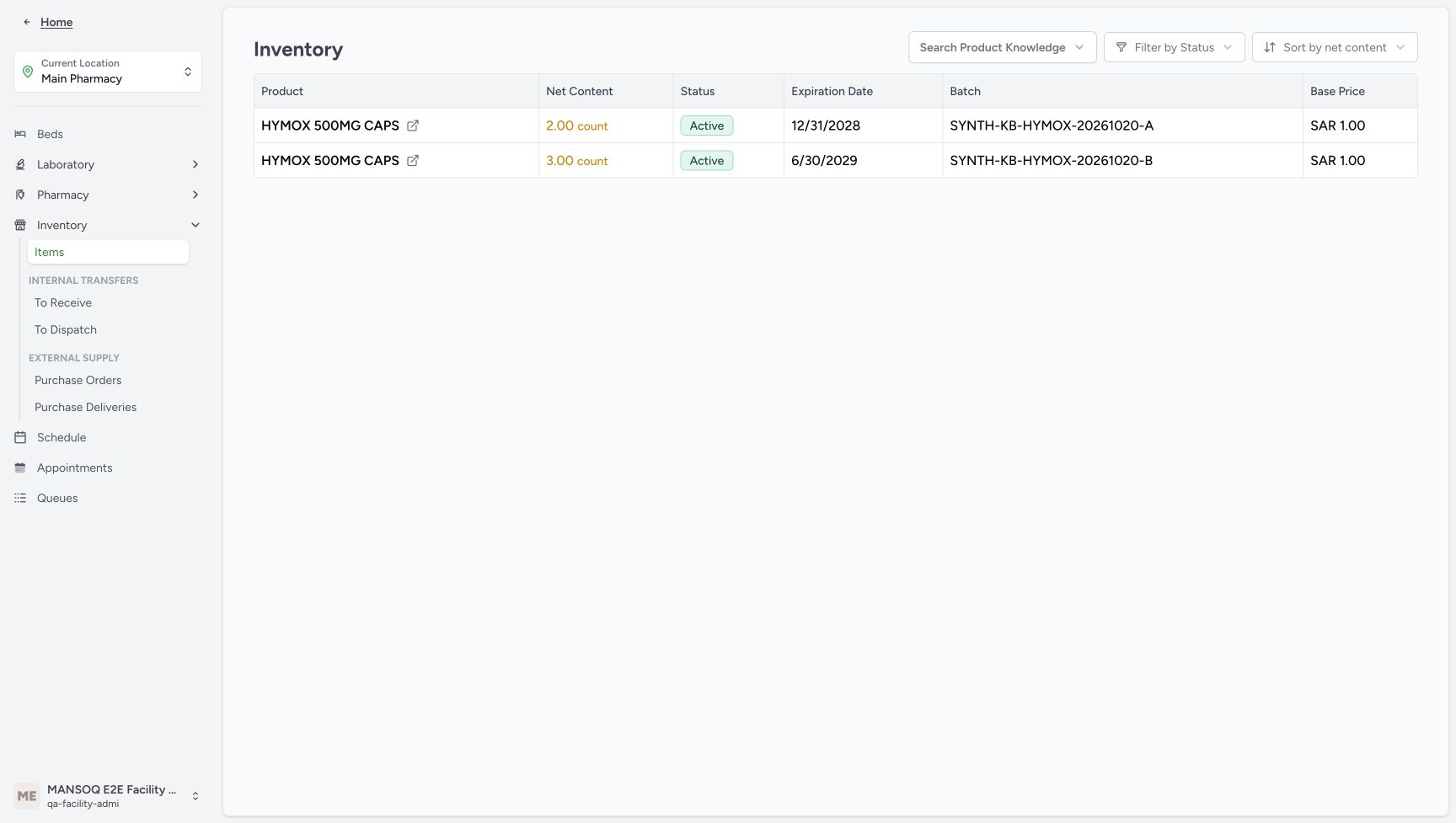 12345
12345Retained stock rows after reload
Capture details
Genuine unchanged natural 1728×977 original from the exact committed local d20e build. Source publication is LOCAL_UNPUSHED. This is synthetic software stock setup; no physical goods, procurement payment, clinical recommendation, patient return or external exchange occurred. The two saved rows remain after reload while the selector displays its placeholder; retention of the earlier selected chip is not claimed.
Image SHA-256 27aeb3a48518c7bd21b6869514f6f01bbb95fc552c1461570adf5e13d04ec05f
- Verify A retained after reload: The same A row remains at two count after normal reload.
- Verify B retained after reload: The same B row remains at three count after normal reload.
- Verify A retained expiry: The stock list retains the December 31, 2028 expiry.
- Verify B retained expiry: The stock list retains the June 30, 2029 expiry.
- Read the reloaded search control accurately: This capture shows Search Product Knowledge placeholder while the two rows remain; it does not show the earlier selected chip.
22 of 22 content blocks have reviewed image alignment.
Before you begin
- Use the authorised existing Facility Admin training account and current Main Pharmacy location. This is a setup prerequisite performed by that ordinary role; it does not grant a Pharmacist extra permissions or require borrowing another account.
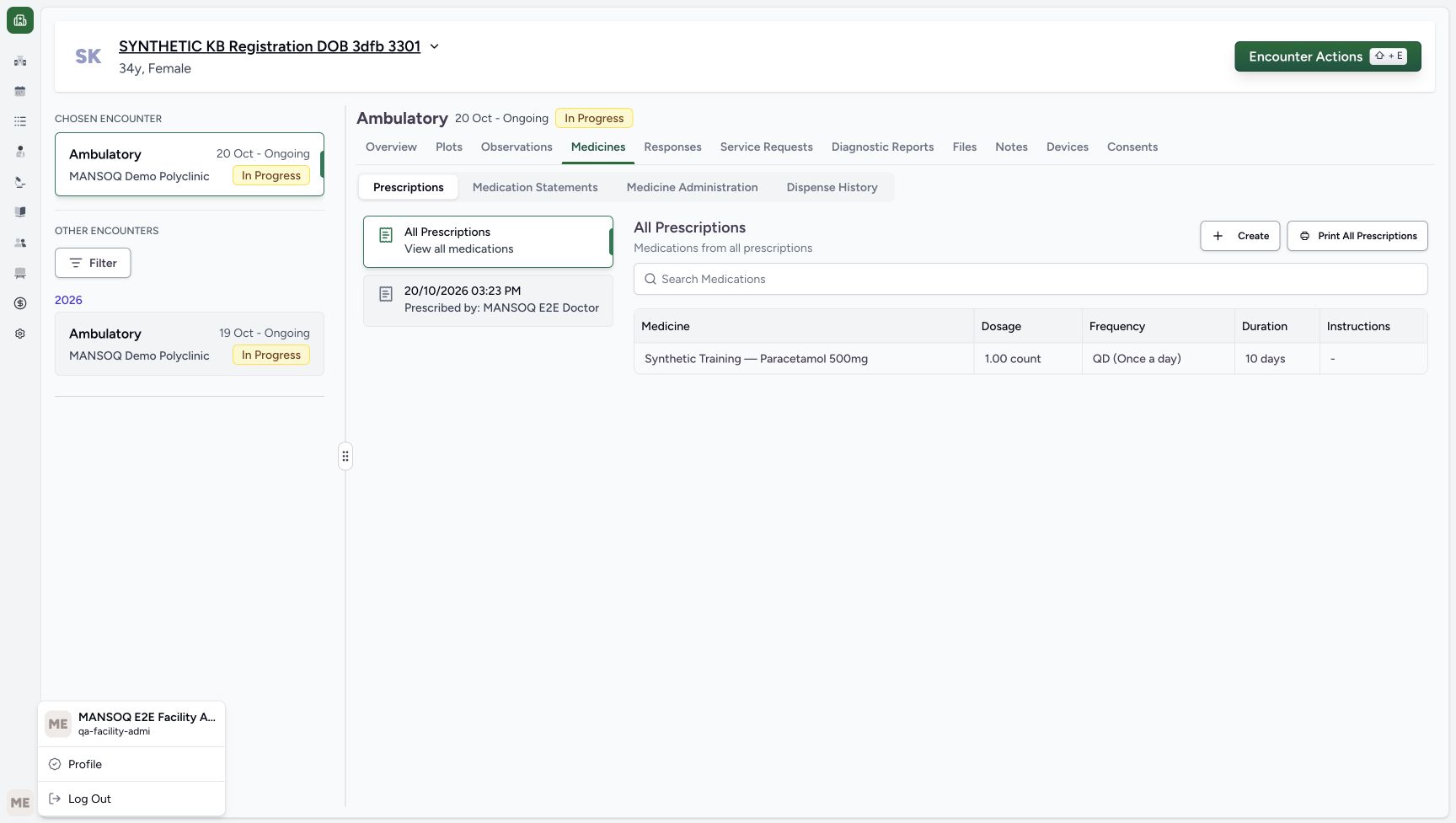 1
1Recorded release d20e68ed · 2026-10-20T12:53:34.334Z · 1728 × 977 Existing Facility Admin identity
Capture details
Genuine unchanged natural 1728×977 original from the exact committed local d20e build. Source publication is LOCAL_UNPUSHED. This is synthetic software stock setup; no physical goods, procurement payment, clinical recommendation, patient return or external exchange occurred.
Image SHA-256
941f5cf63079eb579b881e648a94544dfb588a1ffc02944a114c0794906a1310- Verify the ordinary Facility Admin: The genuine account menu shows the existing Facility Admin training identity and qa-facility-admi account.
 1234
1234Recorded release d20e68ed · 2026-10-20T13:01:52.259Z · 1728 × 977 Main Pharmacy native receipt entry
Capture details
Genuine unchanged natural 1728×977 original from the exact committed local d20e build. Source publication is LOCAL_UNPUSHED. This is synthetic software stock setup; no physical goods, procurement payment, clinical recommendation, patient return or external exchange occurred.
Image SHA-256
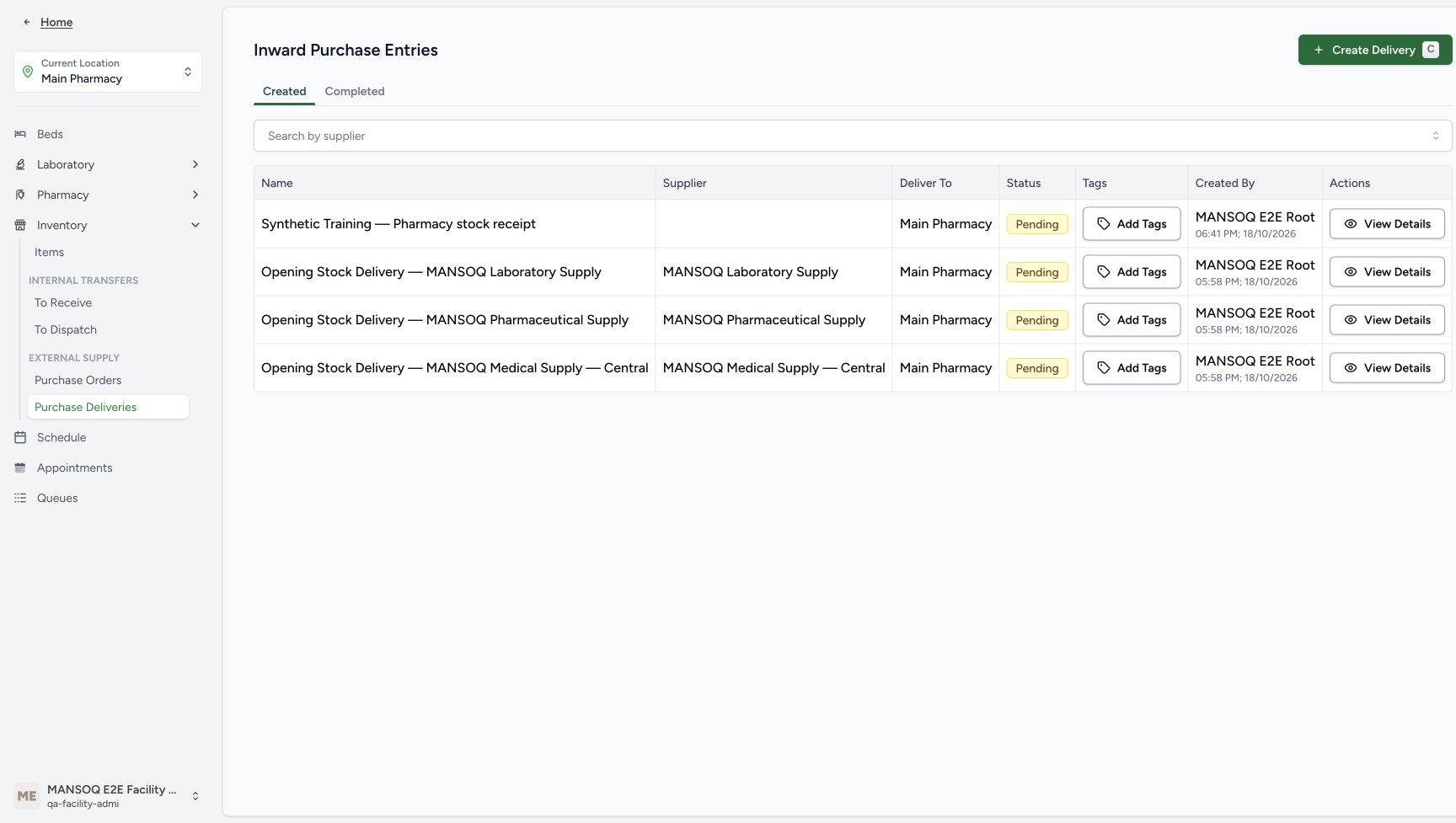
6b3df8c08f592ce53701ad06850d0006f42b46a6852fc93b69ce652076c39213- Confirm Main Pharmacy: The receipt is created for the current Main Pharmacy location.
- Open Inventory: The location menu groups its stock and delivery entries under Inventory.
- Use Purchase Deliveries: The ordinary native entry is Purchase Deliveries, displaying Inward Purchase Entries.
- Choose Create Delivery: Create one new synthetic delivery draft from this entry.
 1234
1234Recorded release d20e68ed · 2026-10-20T13:02:27.751Z · 1728 × 977 One saved empty Draft delivery
Capture details
Genuine unchanged natural 1728×977 original from the exact committed local d20e build. Source publication is LOCAL_UNPUSHED. This is synthetic software stock setup; no physical goods, procurement payment, clinical recommendation, patient return or external exchange occurred.
Image SHA-256
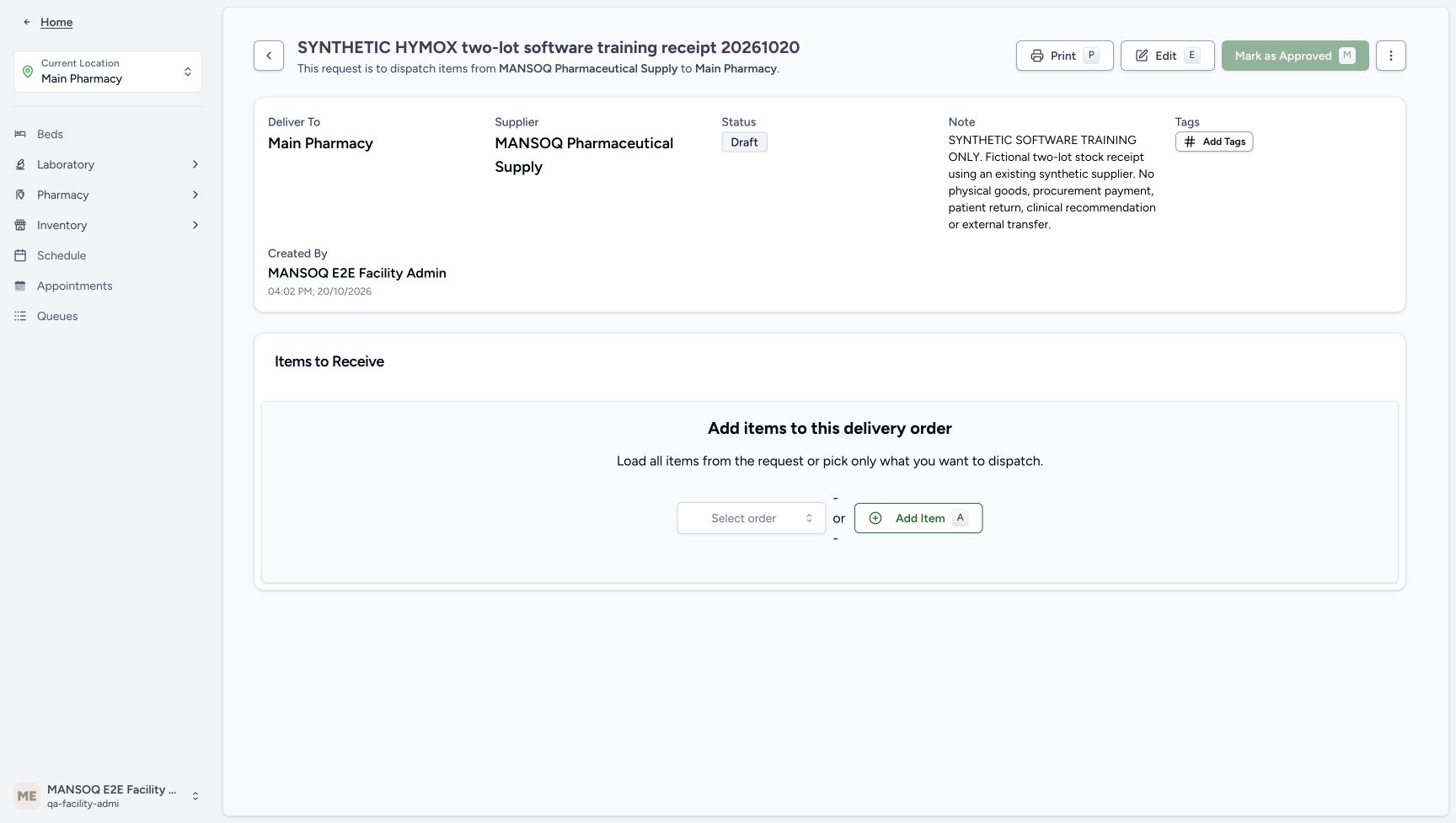
8fd9f214c5ef61b29358d7352aa6c4aff18cae0d395df67daccc702e824ab4e6- Read the saved Draft status: Creating the delivery saved an empty Draft order; it did not receive stock.
- Verify the destination: Deliver To remains Main Pharmacy.
- Verify Created By: The saved delivery identifies MANSOQ E2E Facility Admin.
- Locate Add Item: Add Item opens the native batch entry form on this existing draft.
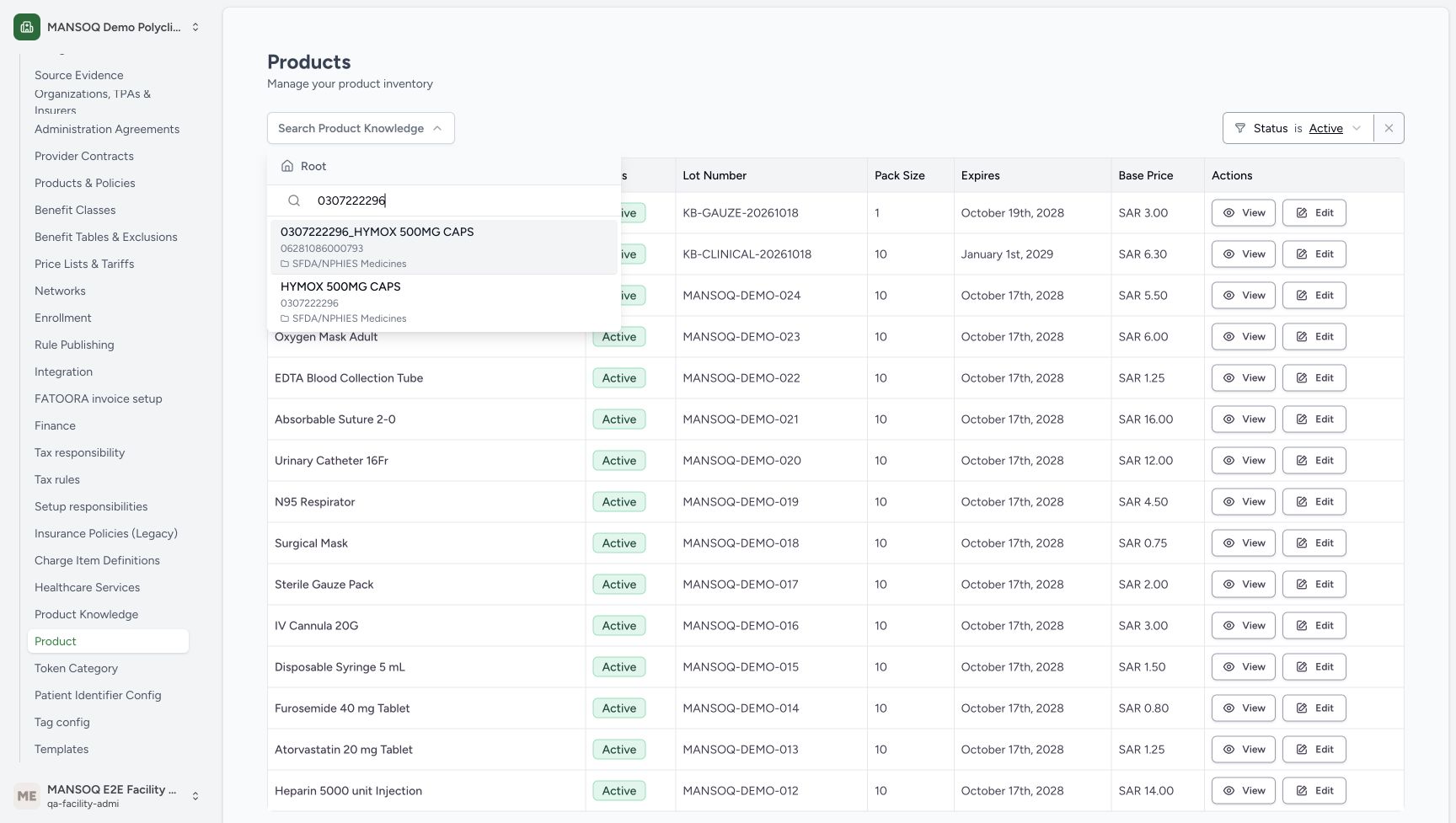
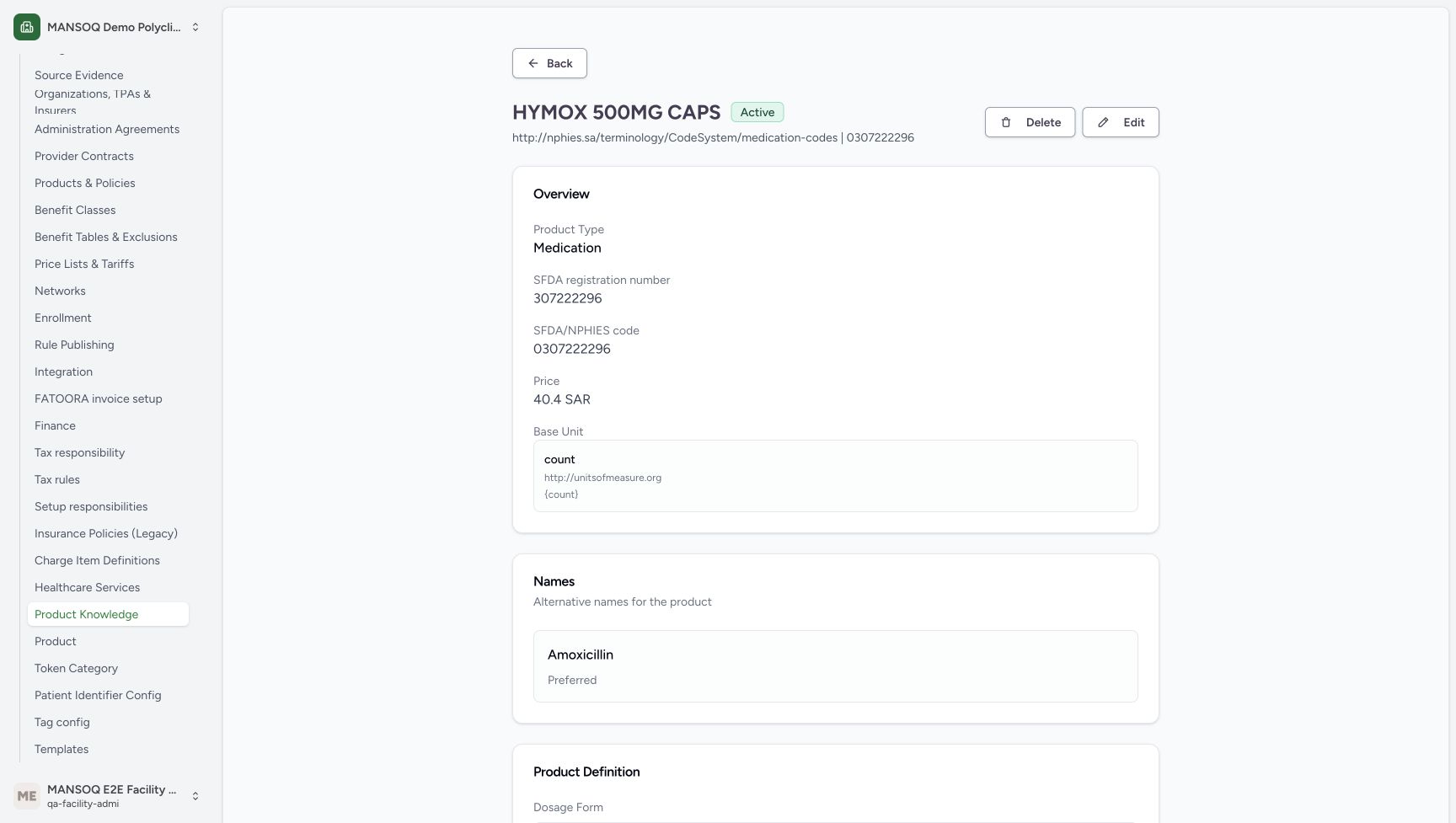
- Use the existing HYMOX 500MG CAPS Product Knowledge master with registration code 0307222296, distinct from GTIN 06281086000793. Its count base unit and displayed catalog price 40.4 SAR remain unchanged. The one-SAR prices below belong only to the new synthetic batches, with no clinical substitution or real price recommendation.
 123
123Recorded release d20e68ed · 2026-10-20T12:54:37.330Z · 1728 × 977 Distinguish registration code from GTIN
Capture details
Genuine unchanged natural 1728×977 original from the exact committed local d20e build. Source publication is LOCAL_UNPUSHED. This is synthetic software stock setup; no physical goods, procurement payment, clinical recommendation, patient return or external exchange occurred.
Image SHA-256
ce6607225c20645df507865acbf5e87f230c52b58b4d1caf0b1b15d137f813f9- Search the exact registration code: The Product Knowledge selector was searched for 0307222296.
- Distinguish the GTIN record: The upper result has GTIN 06281086000793 and is not the selected registration-code master.
- Choose the registration-code master: HYMOX 500MG CAPS with code 0307222296 is the existing master used for both synthetic lots.
 12
12Recorded release d20e68ed · 2026-10-20T12:54:53.534Z · 1728 × 977 Initial Active Product view is empty
Capture details
Genuine unchanged natural 1728×977 original from the exact committed local d20e build. Source publication is LOCAL_UNPUSHED. This is synthetic software stock setup; no physical goods, procurement payment, clinical recommendation, patient return or external exchange occurred.
Image SHA-256
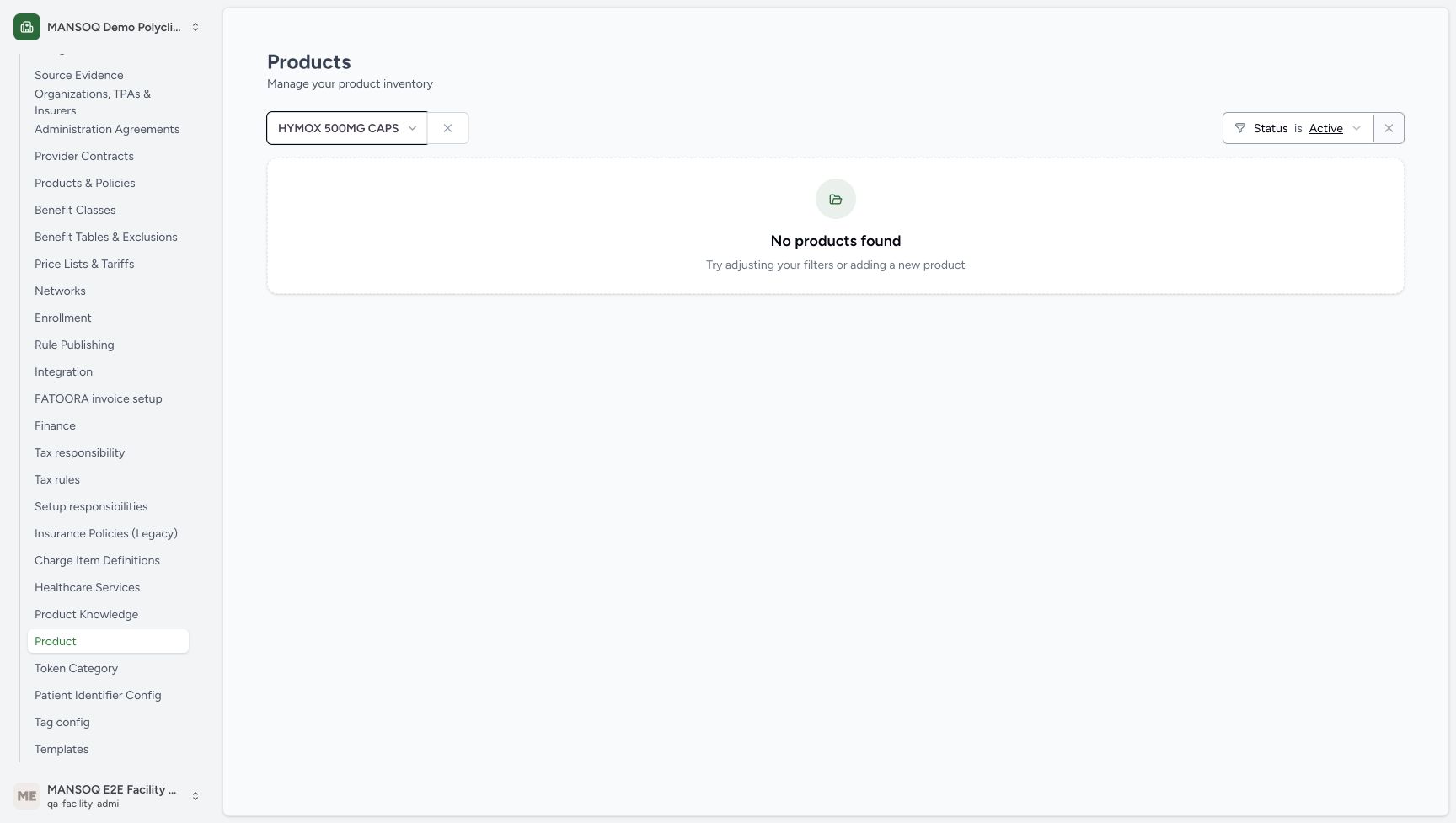
3baf2d5eb0ff37c39d3db6e50415df9a55b6a7c9ed6ae0882a1d86d82a90bd28- Check the selected master: The Product view is filtered to HYMOX 500MG CAPS.
- Read the initial empty Active list: No products found applies to this selected Active Product view before the two synthetic batches were created.
 123
123Recorded release d20e68ed · 2026-10-20T12:57:37.691Z · 1728 × 977 Existing registration master and catalog price
Capture details
Genuine unchanged natural 1728×977 original from the exact committed local d20e build. Source publication is LOCAL_UNPUSHED. This is synthetic software stock setup; no physical goods, procurement payment, clinical recommendation, patient return or external exchange occurred.
Image SHA-256
205805d4f4b6183ffe8045df9fc611c067e49634512f60fbf0fc7bf38a7bfcd1- Verify registration code 0307222296: The existing Product Knowledge record displays the intended code.
- Keep the catalog price separate: The existing master displays 40.4 SAR; the later synthetic batch prices do not edit this value.
- Read the count base unit: The existing master uses count as its base unit.
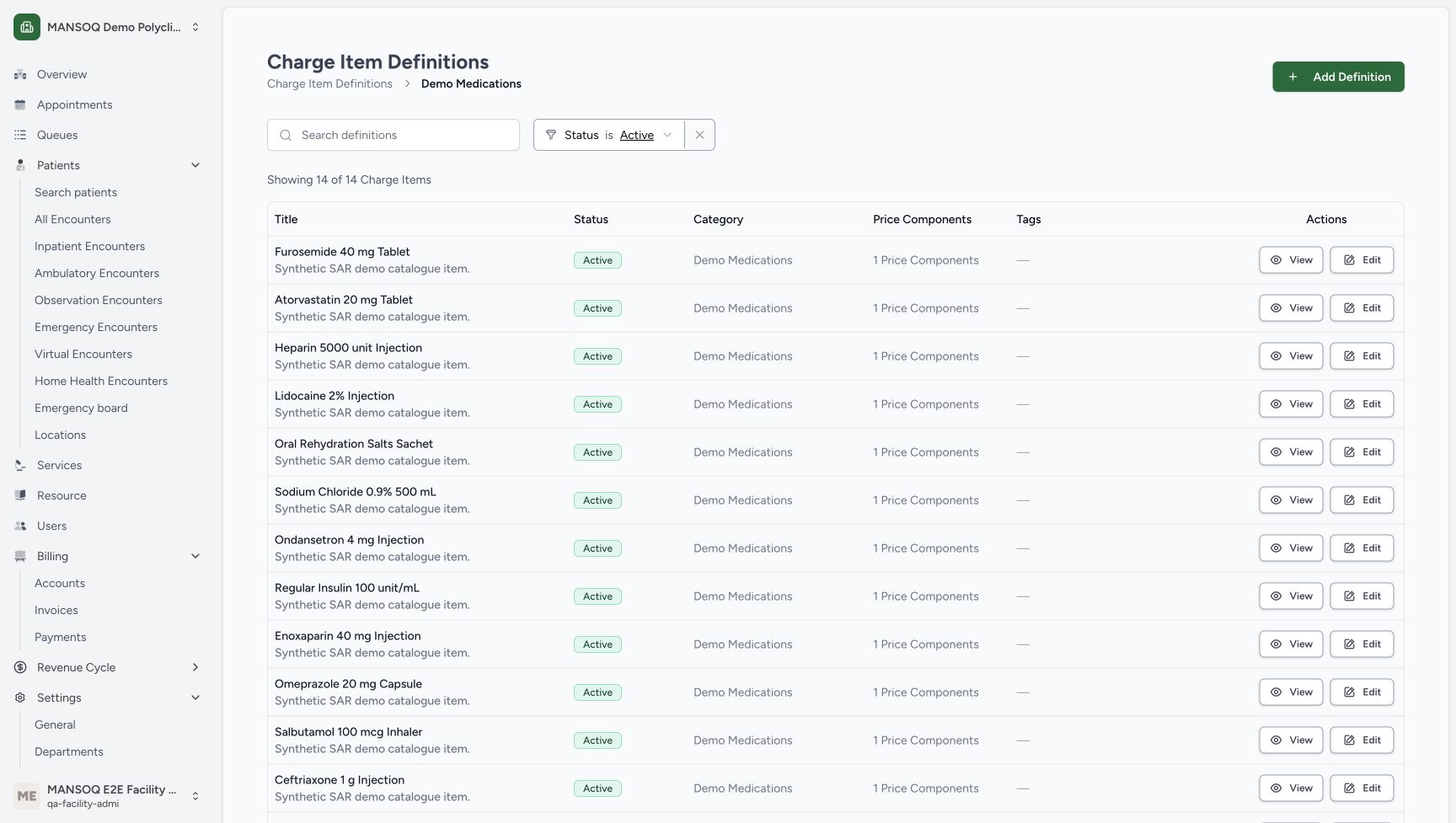
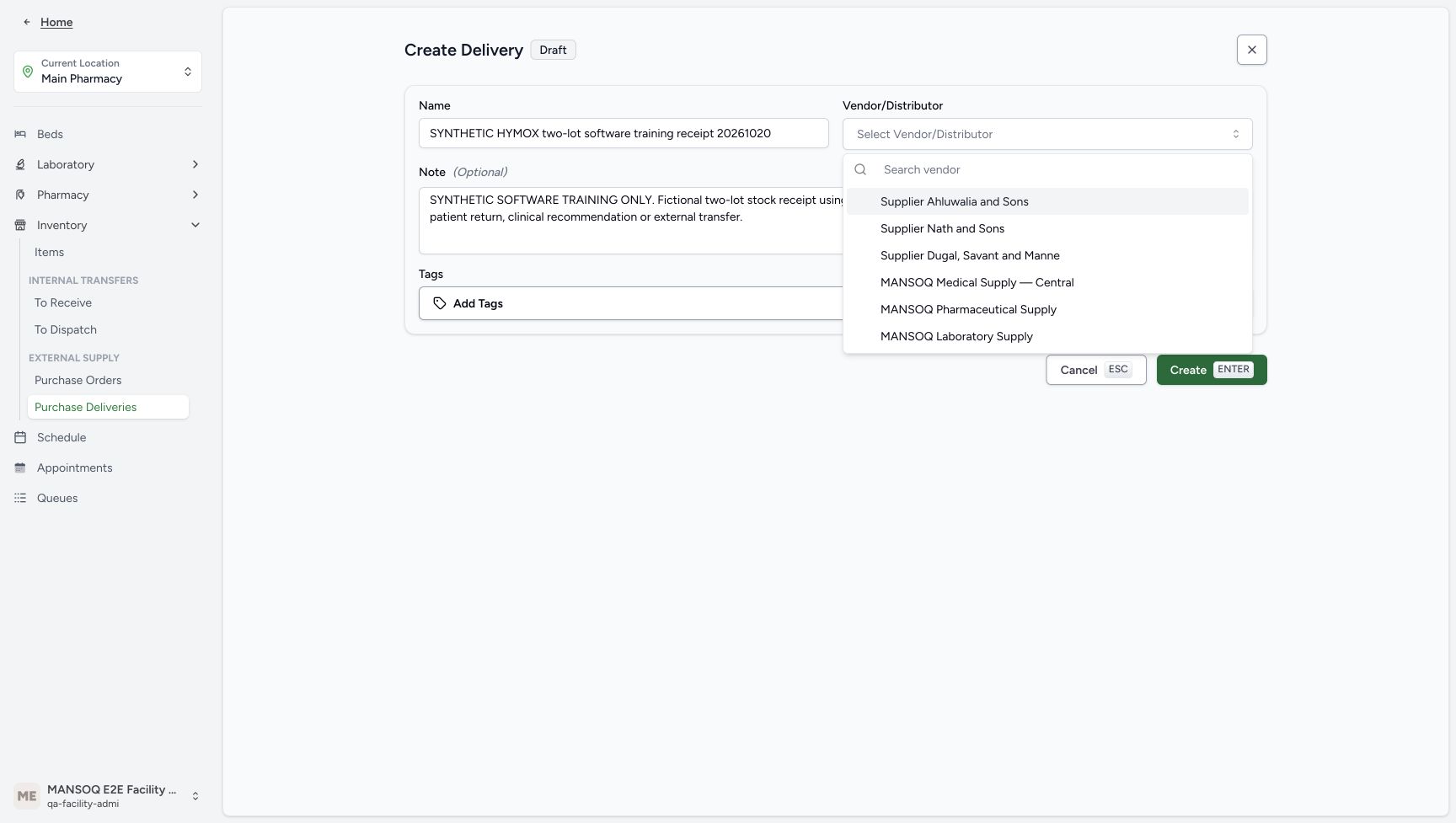
- Reuse the approved existing synthetic supplier MANSOQ Pharmaceutical Supply and existing Demo Medications category. This fictional software receipt involves no physical goods, procurement payment, patient return or external transfer. It ends before any new prescription or dispensing action.
 1
1Recorded release d20e68ed · 2026-10-20T12:59:31.118Z · 1728 × 977 Existing Demo Medications category
Capture details
Genuine unchanged natural 1728×977 original from the exact committed local d20e build. Source publication is LOCAL_UNPUSHED. This is synthetic software stock setup; no physical goods, procurement payment, clinical recommendation, patient return or external exchange occurred.
Image SHA-256
be4ed67e17c280c03e21b73cae935a249086f91ad7bd03dc8c07862f0f1d4401- Recognise the existing category: Demo Medications is the existing synthetic charge category reused by the native receipt form.
 1
1Recorded release d20e68ed · 2026-10-20T13:02:05.341Z · 1728 × 977 Select the existing synthetic supplier
Capture details
Genuine unchanged natural 1728×977 original from the exact committed local d20e build. Source publication is LOCAL_UNPUSHED. This is synthetic software stock setup; no physical goods, procurement payment, clinical recommendation, patient return or external exchange occurred.
Image SHA-256
296b7213c6f6d91143ed7c6b19b8cdac38b47de96168d71ffc143d3b049dac76- Choose the approved synthetic supplier: Select the existing MANSOQ Pharmaceutical Supply option, leaving other suppliers unchanged.
 1234
1234Recorded release d20e68ed · 2026-10-20T13:02:14.212Z · 1728 × 977 Reviewed one fictional delivery draft
Capture details
Genuine unchanged natural 1728×977 original from the exact committed local d20e build. Source publication is LOCAL_UNPUSHED. This is synthetic software stock setup; no physical goods, procurement payment, clinical recommendation, patient return or external exchange occurred.
Image SHA-256
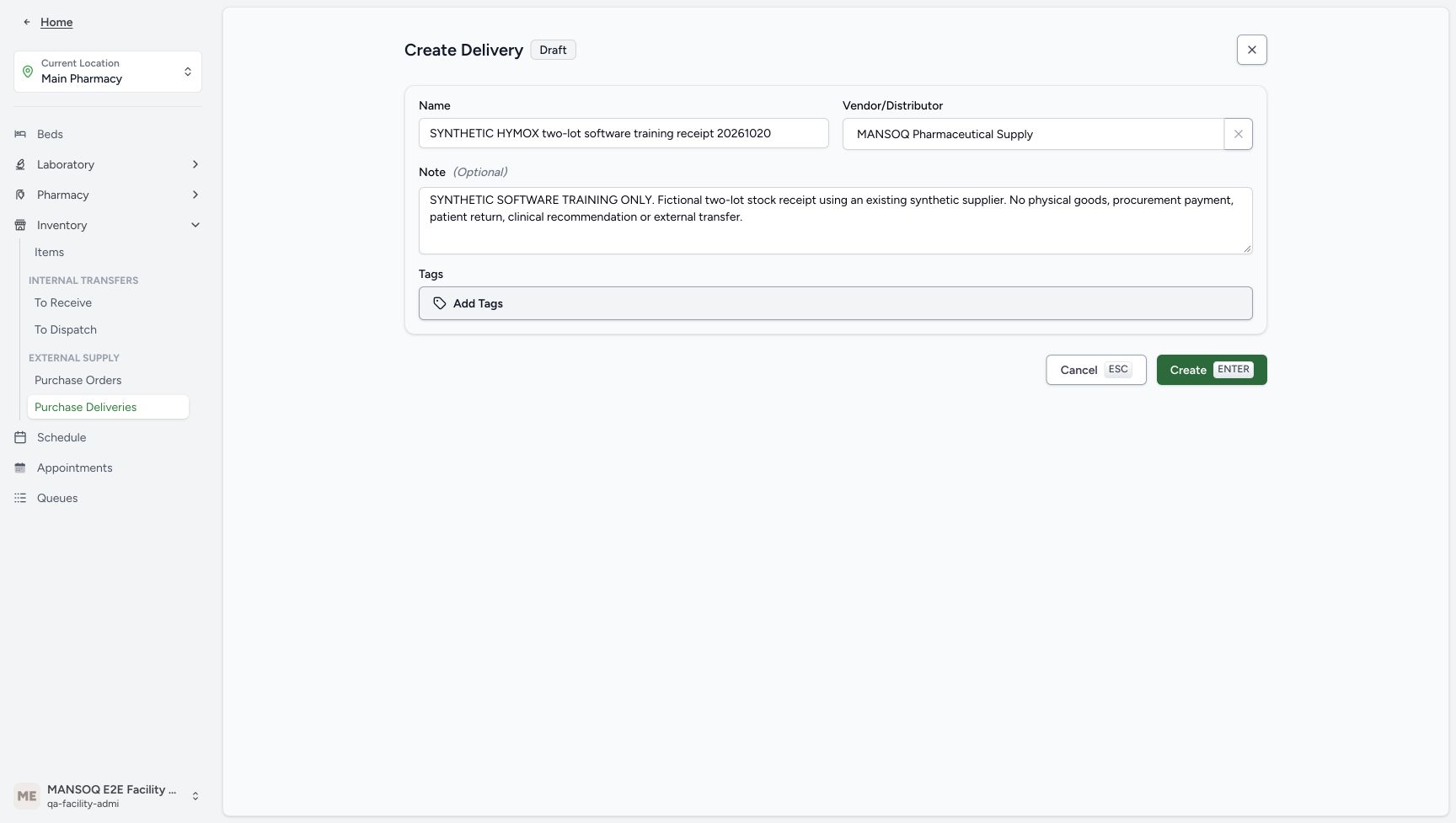
f540a8f20fa78e5969fca2efe13af7d187d7611cdc7d61524c2d50578398b43b- Verify the unique name: The draft is named SYNTHETIC HYMOX two-lot software training receipt 20261020.
- Verify the existing supplier: MANSOQ Pharmaceutical Supply is selected.
- Retain the explicit fictional note: The note excludes physical goods, procurement payment, patient return, clinical recommendation and external transfer.
- Create the draft once: The recorded workflow submitted this native Create action once.
1. Check the exact existing master before adding batches
Review the registration-code master, its count base unit and existing catalog price. In the initial Active Products view for that selected master, No products found was displayed. That is the scope of the pictured empty list, not a claim that every inventory view or medicine has no stock. Do not edit the existing Product Knowledge or category.
123Distinguish registration code from GTIN
Capture details
Genuine unchanged natural 1728×977 original from the exact committed local d20e build. Source publication is LOCAL_UNPUSHED. This is synthetic software stock setup; no physical goods, procurement payment, clinical recommendation, patient return or external exchange occurred.
Image SHA-256 ce6607225c20645df507865acbf5e87f230c52b58b4d1caf0b1b15d137f813f9
- Search the exact registration code: The Product Knowledge selector was searched for 0307222296.
- Distinguish the GTIN record: The upper result has GTIN 06281086000793 and is not the selected registration-code master.
- Choose the registration-code master: HYMOX 500MG CAPS with code 0307222296 is the existing master used for both synthetic lots.
12Initial Active Product view is empty
Capture details
Genuine unchanged natural 1728×977 original from the exact committed local d20e build. Source publication is LOCAL_UNPUSHED. This is synthetic software stock setup; no physical goods, procurement payment, clinical recommendation, patient return or external exchange occurred.
Image SHA-256 3baf2d5eb0ff37c39d3db6e50415df9a55b6a7c9ed6ae0882a1d86d82a90bd28
- Check the selected master: The Product view is filtered to HYMOX 500MG CAPS.
- Read the initial empty Active list: No products found applies to this selected Active Product view before the two synthetic batches were created.
123Existing registration master and catalog price
Capture details
Genuine unchanged natural 1728×977 original from the exact committed local d20e build. Source publication is LOCAL_UNPUSHED. This is synthetic software stock setup; no physical goods, procurement payment, clinical recommendation, patient return or external exchange occurred.
Image SHA-256 205805d4f4b6183ffe8045df9fc611c067e49634512f60fbf0fc7bf38a7bfcd1
- Verify registration code 0307222296: The existing Product Knowledge record displays the intended code.
- Keep the catalog price separate: The existing master displays 40.4 SAR; the later synthetic batch prices do not edit this value.
- Read the count base unit: The existing master uses count as its base unit.
1Existing Demo Medications category
Capture details
Genuine unchanged natural 1728×977 original from the exact committed local d20e build. Source publication is LOCAL_UNPUSHED. This is synthetic software stock setup; no physical goods, procurement payment, clinical recommendation, patient return or external exchange occurred.
Image SHA-256 be4ed67e17c280c03e21b73cae935a249086f91ad7bd03dc8c07862f0f1d4401
- Recognise the existing category: Demo Medications is the existing synthetic charge category reused by the native receipt form.
2. Start one Main Pharmacy delivery
Confirm Current Location is Main Pharmacy. Under Inventory, use Purchase Deliveries and choose Create Delivery from Inward Purchase Entries. This is the native external receipt entry; it is separate from a patient dispense or an unused-medicine return.
1234Main Pharmacy native receipt entry
Capture details
Genuine unchanged natural 1728×977 original from the exact committed local d20e build. Source publication is LOCAL_UNPUSHED. This is synthetic software stock setup; no physical goods, procurement payment, clinical recommendation, patient return or external exchange occurred.
Image SHA-256 6b3df8c08f592ce53701ad06850d0006f42b46a6852fc93b69ce652076c39213
- Confirm Main Pharmacy: The receipt is created for the current Main Pharmacy location.
- Open Inventory: The location menu groups its stock and delivery entries under Inventory.
- Use Purchase Deliveries: The ordinary native entry is Purchase Deliveries, displaying Inward Purchase Entries.
- Choose Create Delivery: Create one new synthetic delivery draft from this entry.
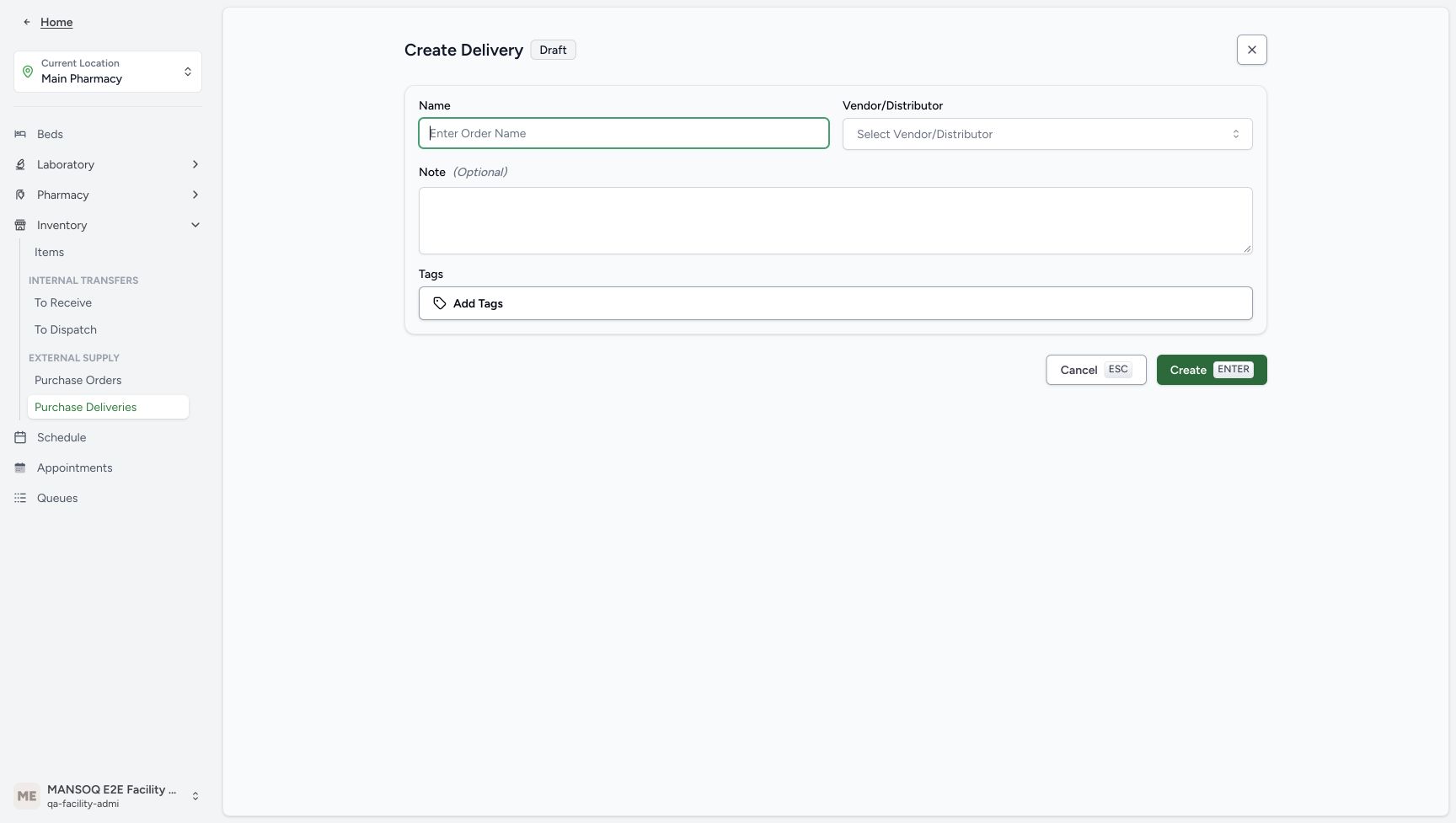 1234
1234Required native delivery form
Capture details
Genuine unchanged natural 1728×977 original from the exact committed local d20e build. Source publication is LOCAL_UNPUSHED. This is synthetic software stock setup; no physical goods, procurement payment, clinical recommendation, patient return or external exchange occurred.
Image SHA-256 23562264409cf66164c11dc4ab602677a5a61df98e9c614d60d5758c58ed1956
- Enter the unique delivery name: The normal external receipt form requires a Name.
- Open Vendor or Distributor: This ordinary form requires an existing supplier selection.
- Enter the fictional note: The optional note is used to make the software-only scope explicit.
- Locate the native Create action: Create submits the reviewed draft; it is separate from later item Save and stock receipt.
3. Create the reviewed fictional Draft once
Enter Name: SYNTHETIC HYMOX two-lot software training receipt 20261020. Open Vendor/Distributor and choose the existing MANSOQ Pharmaceutical Supply. Retain the note: SYNTHETIC SOFTWARE TRAINING ONLY. Fictional two-lot stock receipt using an existing synthetic supplier. No physical goods, procurement payment, patient return, clinical recommendation or external transfer. Choose Create once. Verify the saved empty delivery is Draft, Deliver To Main Pharmacy, with the intended supplier and Created By Facility Admin. Creating this empty Draft has not received stock.
1234Required native delivery form
Capture details
Genuine unchanged natural 1728×977 original from the exact committed local d20e build. Source publication is LOCAL_UNPUSHED. This is synthetic software stock setup; no physical goods, procurement payment, clinical recommendation, patient return or external exchange occurred.
Image SHA-256 23562264409cf66164c11dc4ab602677a5a61df98e9c614d60d5758c58ed1956
- Enter the unique delivery name: The normal external receipt form requires a Name.
- Open Vendor or Distributor: This ordinary form requires an existing supplier selection.
- Enter the fictional note: The optional note is used to make the software-only scope explicit.
- Locate the native Create action: Create submits the reviewed draft; it is separate from later item Save and stock receipt.
1Select the existing synthetic supplier
Capture details
Genuine unchanged natural 1728×977 original from the exact committed local d20e build. Source publication is LOCAL_UNPUSHED. This is synthetic software stock setup; no physical goods, procurement payment, clinical recommendation, patient return or external exchange occurred.
Image SHA-256 296b7213c6f6d91143ed7c6b19b8cdac38b47de96168d71ffc143d3b049dac76
- Choose the approved synthetic supplier: Select the existing MANSOQ Pharmaceutical Supply option, leaving other suppliers unchanged.
1234Reviewed one fictional delivery draft
Capture details
Genuine unchanged natural 1728×977 original from the exact committed local d20e build. Source publication is LOCAL_UNPUSHED. This is synthetic software stock setup; no physical goods, procurement payment, clinical recommendation, patient return or external exchange occurred.
Image SHA-256 f540a8f20fa78e5969fca2efe13af7d187d7611cdc7d61524c2d50578398b43b
- Verify the unique name: The draft is named SYNTHETIC HYMOX two-lot software training receipt 20261020.
- Verify the existing supplier: MANSOQ Pharmaceutical Supply is selected.
- Retain the explicit fictional note: The note excludes physical goods, procurement payment, patient return, clinical recommendation and external transfer.
- Create the draft once: The recorded workflow submitted this native Create action once.
1234One saved empty Draft delivery
Capture details
Genuine unchanged natural 1728×977 original from the exact committed local d20e build. Source publication is LOCAL_UNPUSHED. This is synthetic software stock setup; no physical goods, procurement payment, clinical recommendation, patient return or external exchange occurred.
Image SHA-256 8fd9f214c5ef61b29358d7352aa6c4aff18cae0d395df67daccc702e824ab4e6
- Read the saved Draft status: Creating the delivery saved an empty Draft order; it did not receive stock.
- Verify the destination: Deliver To remains Main Pharmacy.
- Verify Created By: The saved delivery identifies MANSOQ E2E Facility Admin.
- Locate Add Item: Add Item opens the native batch entry form on this existing draft.
4. Add the first Product row to the same Draft
Continue on the same saved Draft and choose Add Item. The recording resumed this existing Draft after a pause; it did not create another order. Keep item type Product. Search 0307222296 and choose the HYMOX 500MG CAPS registration-code result, below the separate GTIN result.
1234One saved empty Draft delivery
Capture details
Genuine unchanged natural 1728×977 original from the exact committed local d20e build. Source publication is LOCAL_UNPUSHED. This is synthetic software stock setup; no physical goods, procurement payment, clinical recommendation, patient return or external exchange occurred.
Image SHA-256 8fd9f214c5ef61b29358d7352aa6c4aff18cae0d395df67daccc702e824ab4e6
- Read the saved Draft status: Creating the delivery saved an empty Draft order; it did not receive stock.
- Verify the destination: Deliver To remains Main Pharmacy.
- Verify Created By: The saved delivery identifies MANSOQ E2E Facility Admin.
- Locate Add Item: Add Item opens the native batch entry form on this existing draft.
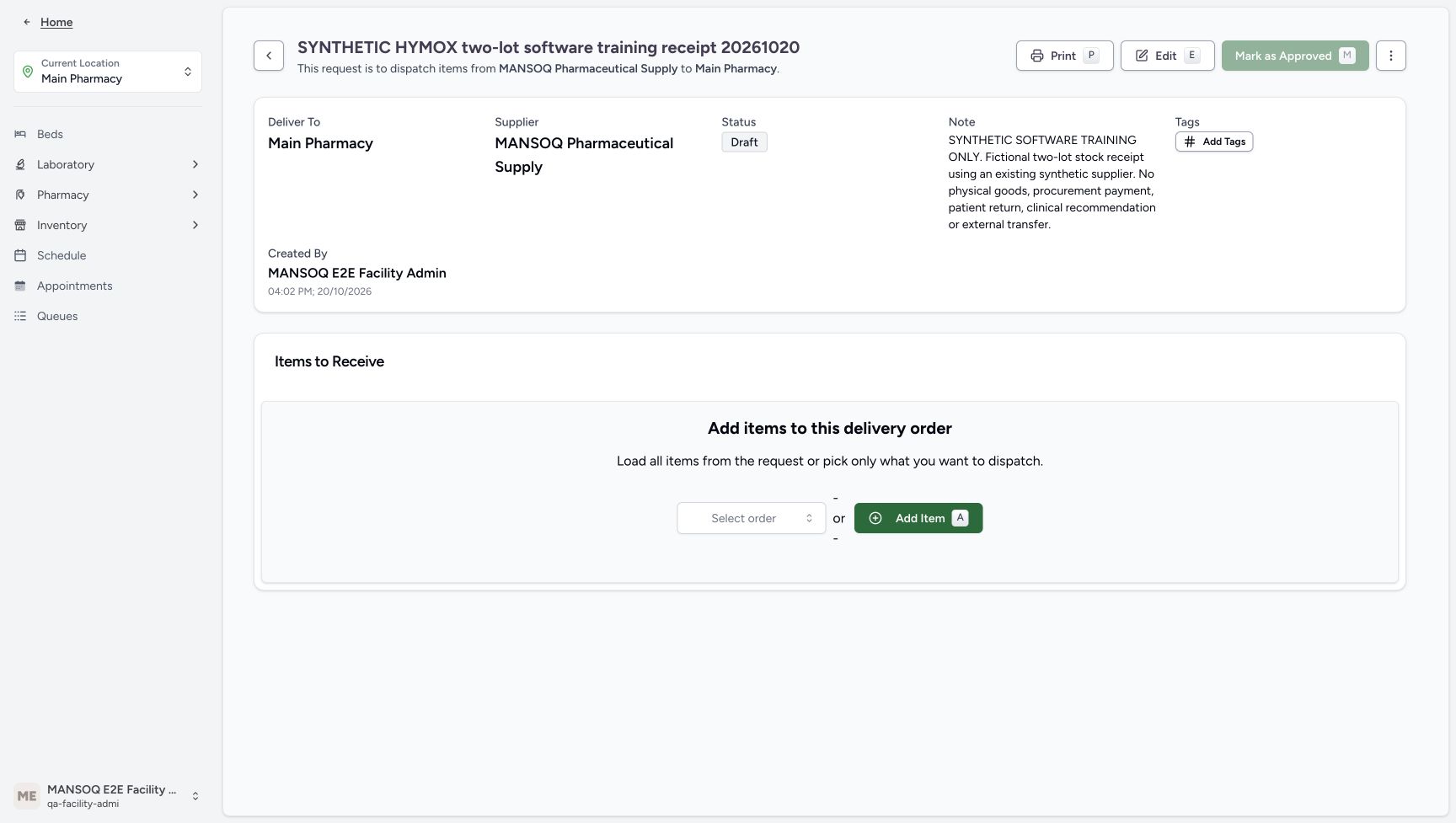 12
12Resume the same saved Draft
Capture details
Genuine unchanged natural 1728×977 original from the exact committed local d20e build. Source publication is LOCAL_UNPUSHED. This is synthetic software stock setup; no physical goods, procurement payment, clinical recommendation, patient return or external exchange occurred.
Image SHA-256 be34a726e5e1a9bf18d5fdf608fcf86c8dc0578b6ea2ec702fd5da9cbbf08821
- Reuse the same saved Draft: After the recording pause, the same existing Draft was resumed rather than created again.
- Choose Add Item: Continue by adding the two rows to this saved delivery.
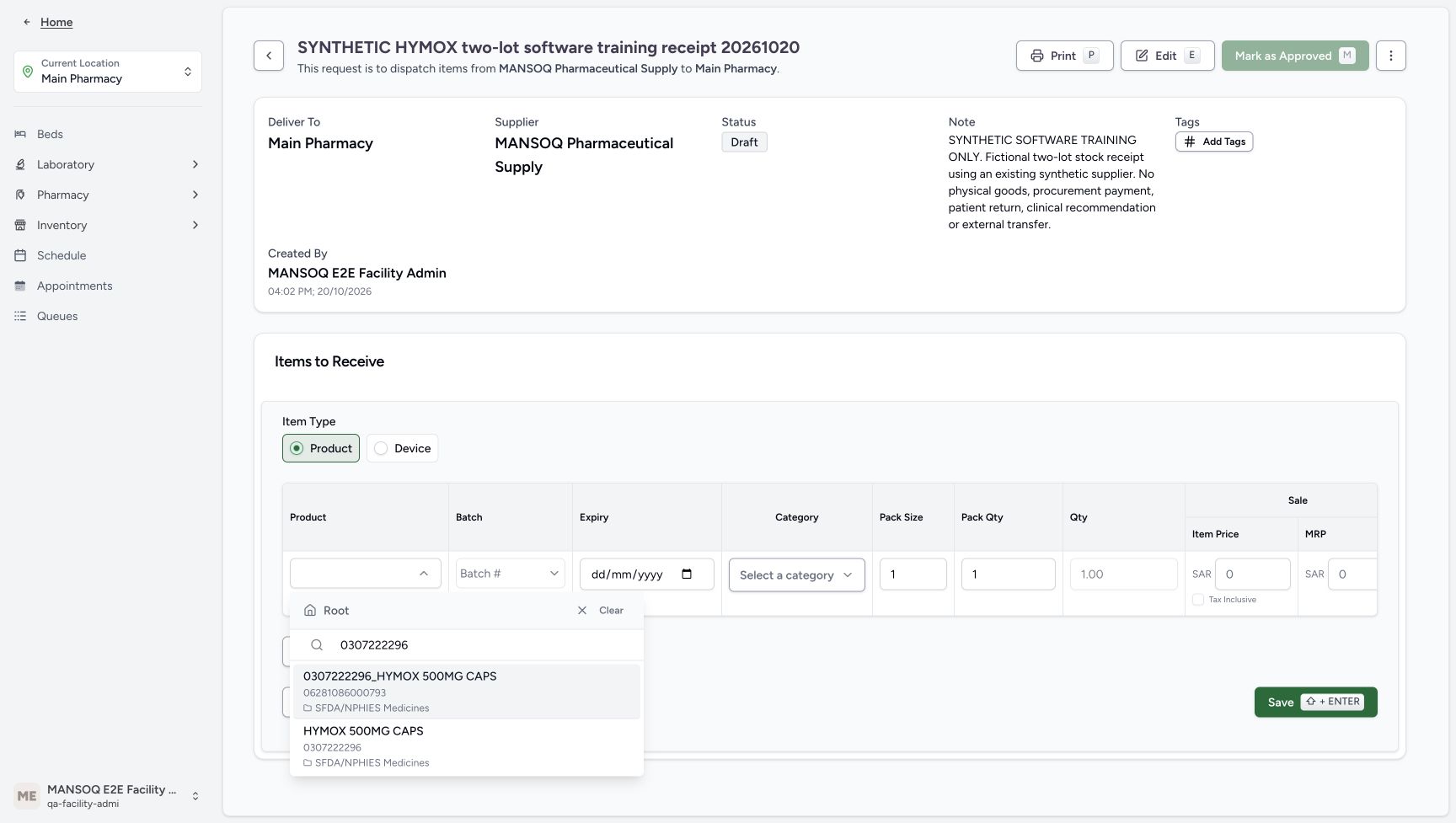 123
123Exact master in the native item picker
Capture details
Genuine unchanged natural 1728×977 original from the exact committed local d20e build. Source publication is LOCAL_UNPUSHED. This is synthetic software stock setup; no physical goods, procurement payment, clinical recommendation, patient return or external exchange occurred.
Image SHA-256 24d8abf7da5301e822922bfba4a35f5bca5e4f8f94c4d88ff46774b56afd83bd
- Keep Product selected: The intended item type is Product, not Device.
- Search the exact master: The Product selector is searched for 0307222296.
- Select the registration-code result: Choose HYMOX 500MG CAPS with code 0307222296, below the separate GTIN result.
5. Enter A as a new two-count synthetic batch
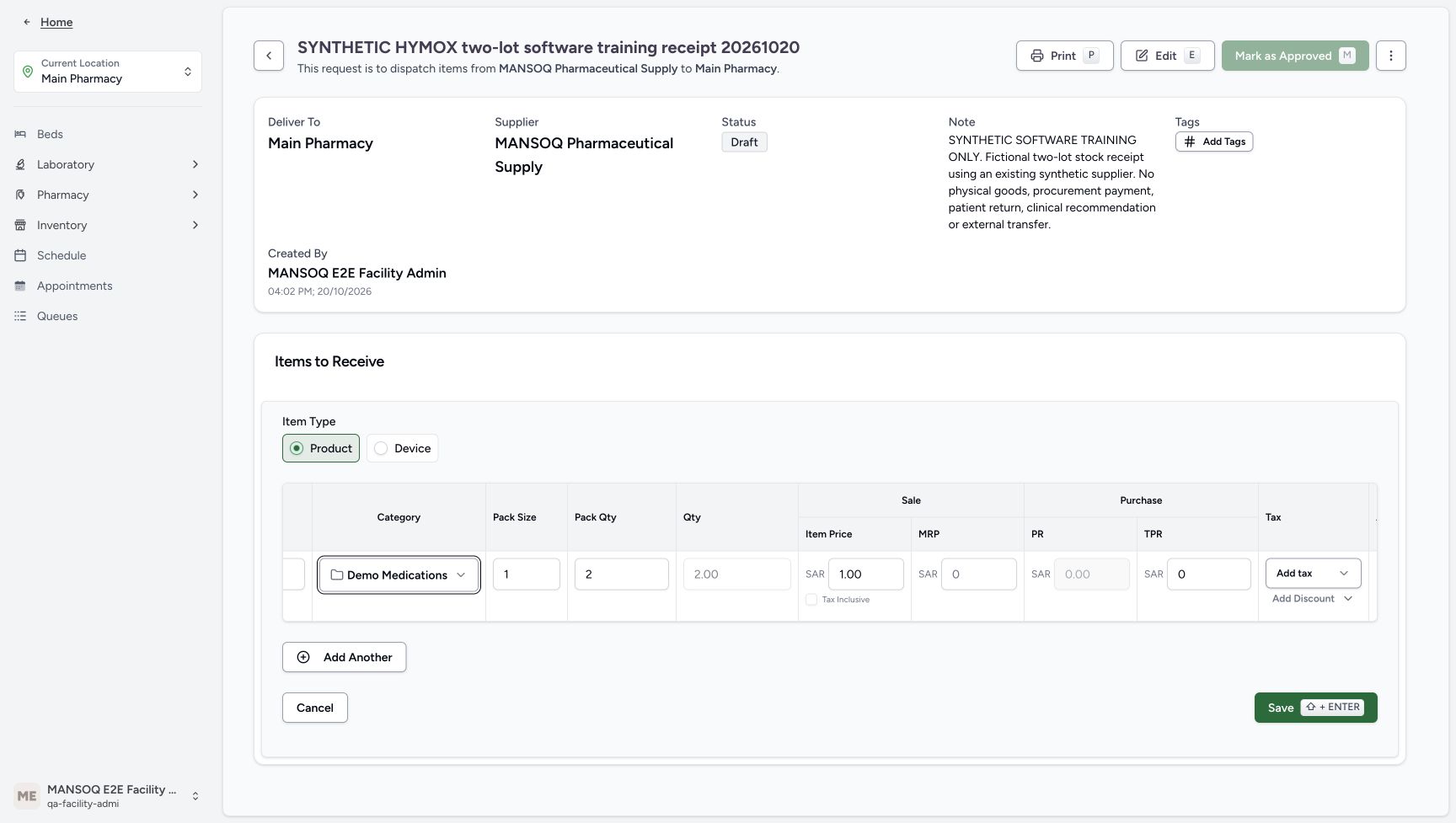
Set the new Batch to SYNTH-KB-HYMOX-20261020-A and Expiry to 31/12/2028. Choose existing Demo Medications. Keep Pack Size 1, set Pack Qty 2 and verify calculated Qty 2.00. Set Sale Item Price to SAR 1.00. The illustrated fictional row has zero total purchase value and computed zero purchase price. Leave Tax Inclusive unchecked and tax and discount choices unselected. These are training values, not a tax exemption decision. Scroll the form horizontally as needed to inspect both identity and price columns.
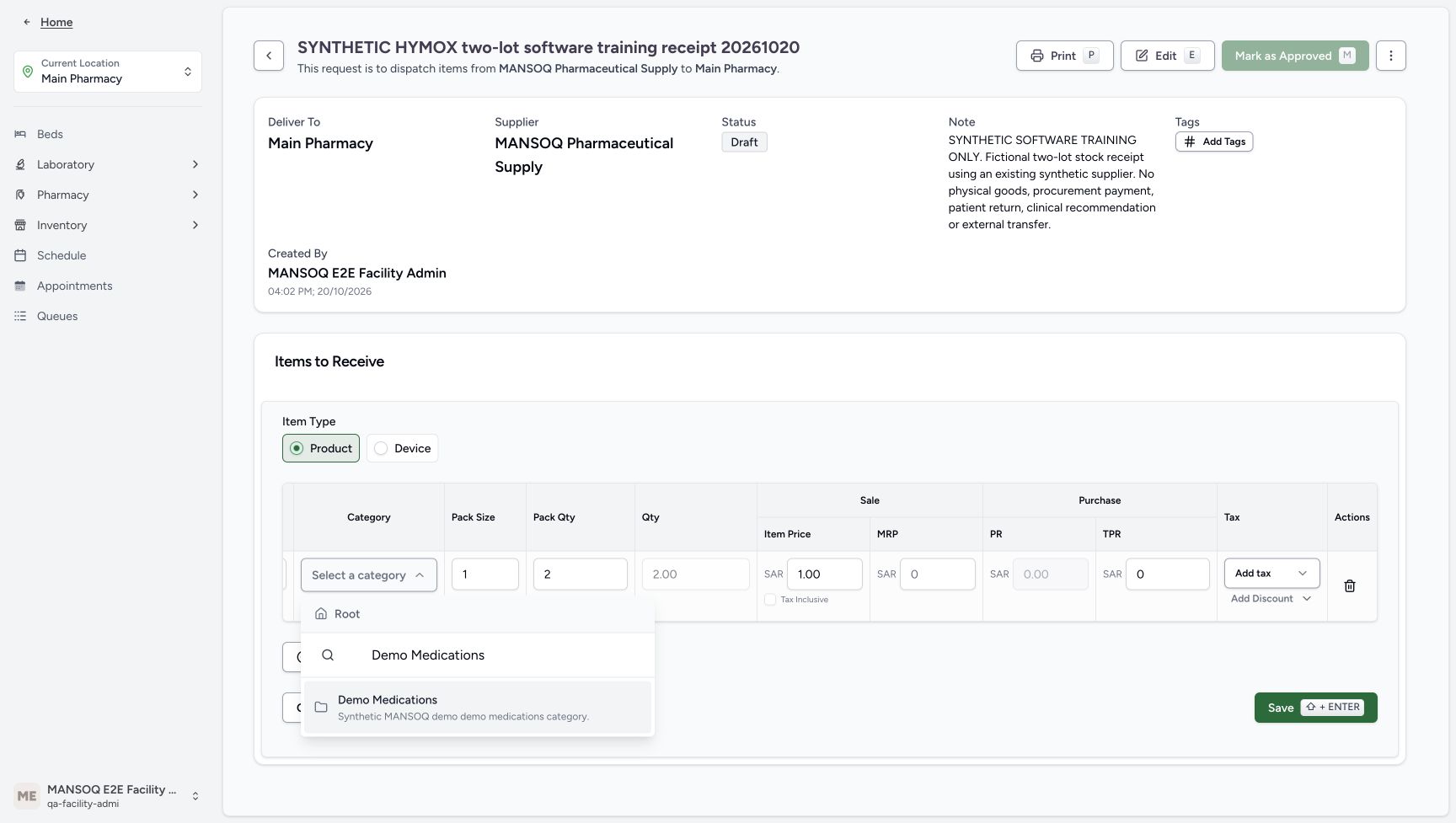 123
123A category choice
Capture details
Genuine unchanged natural 1728×977 original from the exact committed local d20e build. Source publication is LOCAL_UNPUSHED. This is synthetic software stock setup; no physical goods, procurement payment, clinical recommendation, patient return or external exchange occurred.
Image SHA-256 8828d758221834f86f0d446257f75d0175439f448399273781a59f90372410a3
- Choose existing Demo Medications: The category option is described as a synthetic MANSOQ demo medications category.
- Review A pack quantity two: With pack size one, the first row has quantity two.
- Review A sale Item Price 1.00: The synthetic lot price is entered separately from the unchanged Product Knowledge catalog price.
 12345678
A row before adding B
Capture details
Genuine unchanged natural 1728×977 original from the exact committed local d20e build. Source publication is LOCAL_UNPUSHED. This is synthetic software stock setup; no physical goods, procurement payment, clinical recommendation, patient return or external exchange occurred.
Image SHA-256 cca86e3677457ab88d8393af90de8ed27ccaa3b8164cc6fb6e8cd4ad9a7ec8e8
- Check A category: The first row uses the existing Demo Medications category.
- Keep A pack size one: One count per pack is the illustrated training value.
- Keep A pack quantity two: The first row represents two packs of size one.
- Read A calculated quantity 2.00: The form calculates two count from the pack values.
- Keep A sale Item Price 1.00: The native row will create this synthetic batch price.
- Read A total purchase value zero: The fictional training row has TPR zero and a computed zero purchase price.
- Leave tax unselected: Add tax remains unselected; this is fixture configuration, not a tax exemption decision.
- Choose Add Another: Add a second native row without saving the first row separately.
 12345678
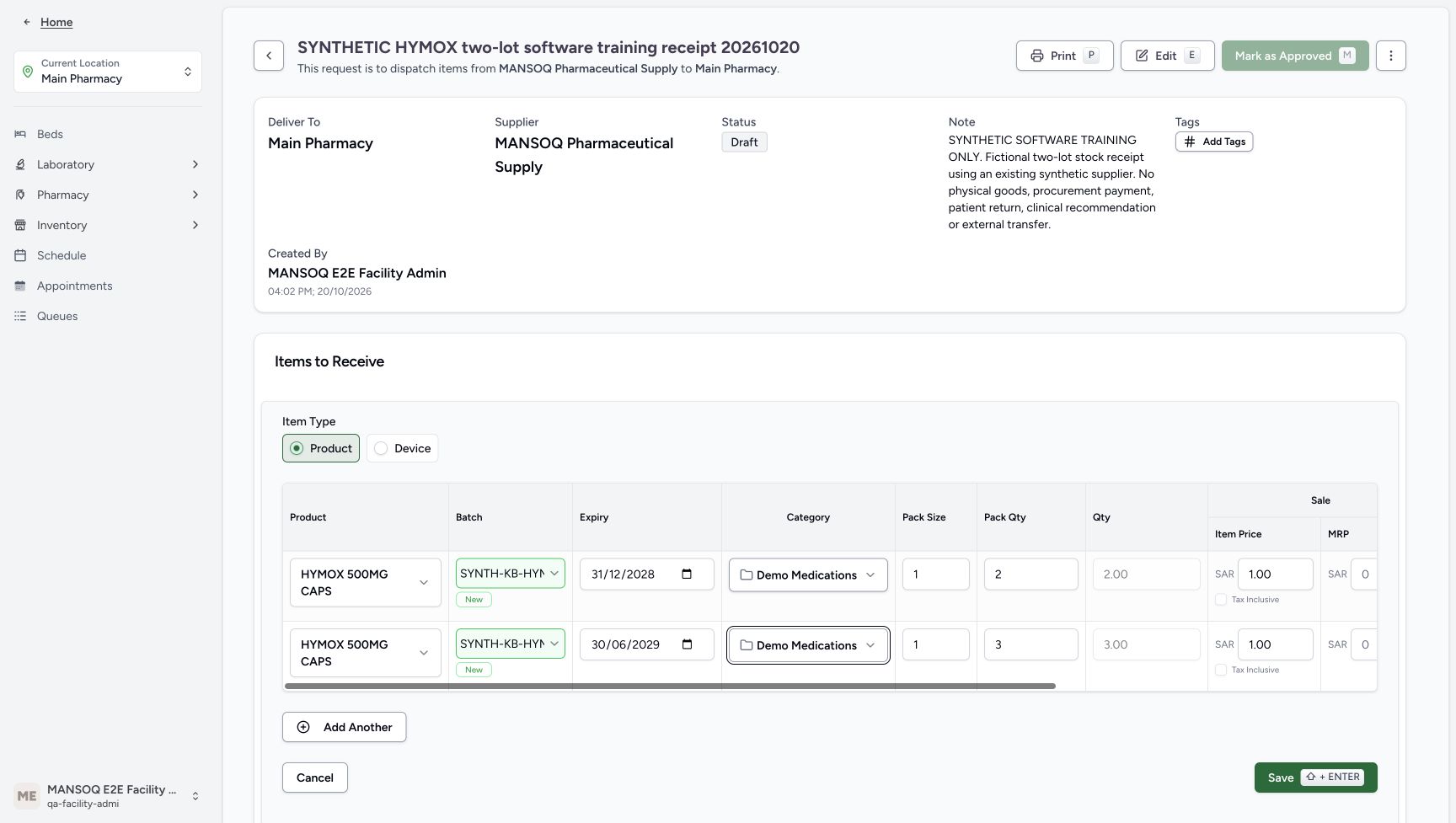
Both identities and expiries ready
Capture details
Genuine unchanged natural 1728×977 original from the exact committed local d20e build. Source publication is LOCAL_UNPUSHED. This is synthetic software stock setup; no physical goods, procurement payment, clinical recommendation, patient return or external exchange occurred.
Image SHA-256 7e6992fd3ad8e6cd863a31dff5665e6fcd74f126028ba41344e27f7716385963
- Enter the A synthetic batch: The first new batch is SYNTH-KB-HYMOX-20261020-A.
- Set A expiry 31/12/2028: The first row uses the illustrated December 31, 2028 expiry.
- Enter the B synthetic batch: The second new batch is SYNTH-KB-HYMOX-20261020-B.
- Set B expiry 30/06/2029: The second row uses the illustrated June 30, 2029 expiry.
- Check the A master: The first row is HYMOX 500MG CAPS.
- Check the B master: The second row uses the same existing master.
- Check A pack size one: The identity-side view retains pack size one.
- Check B pack quantity three: The identity-side view retains the second row quantity inputs.
6. Add B as a separate three-count row
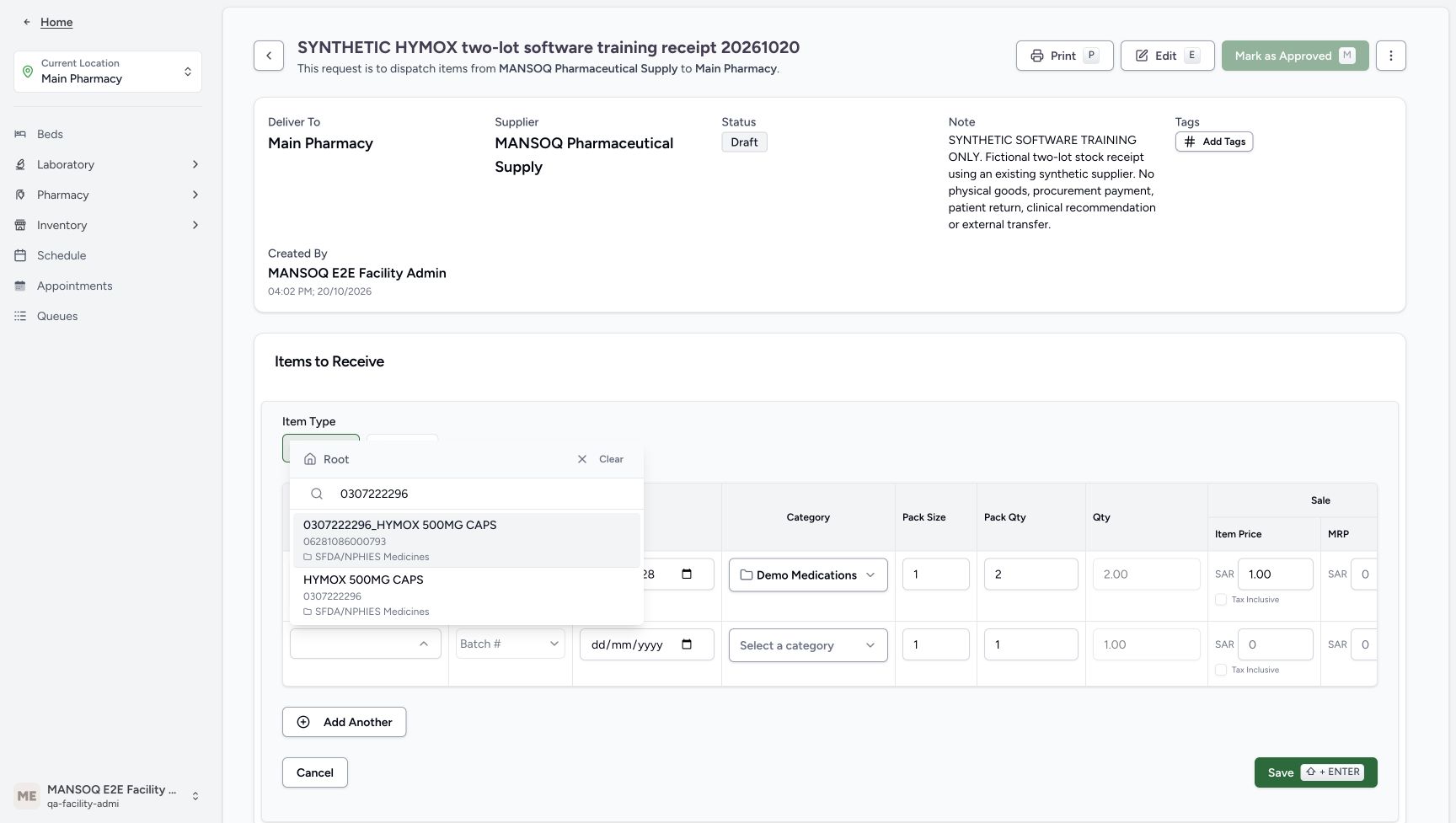
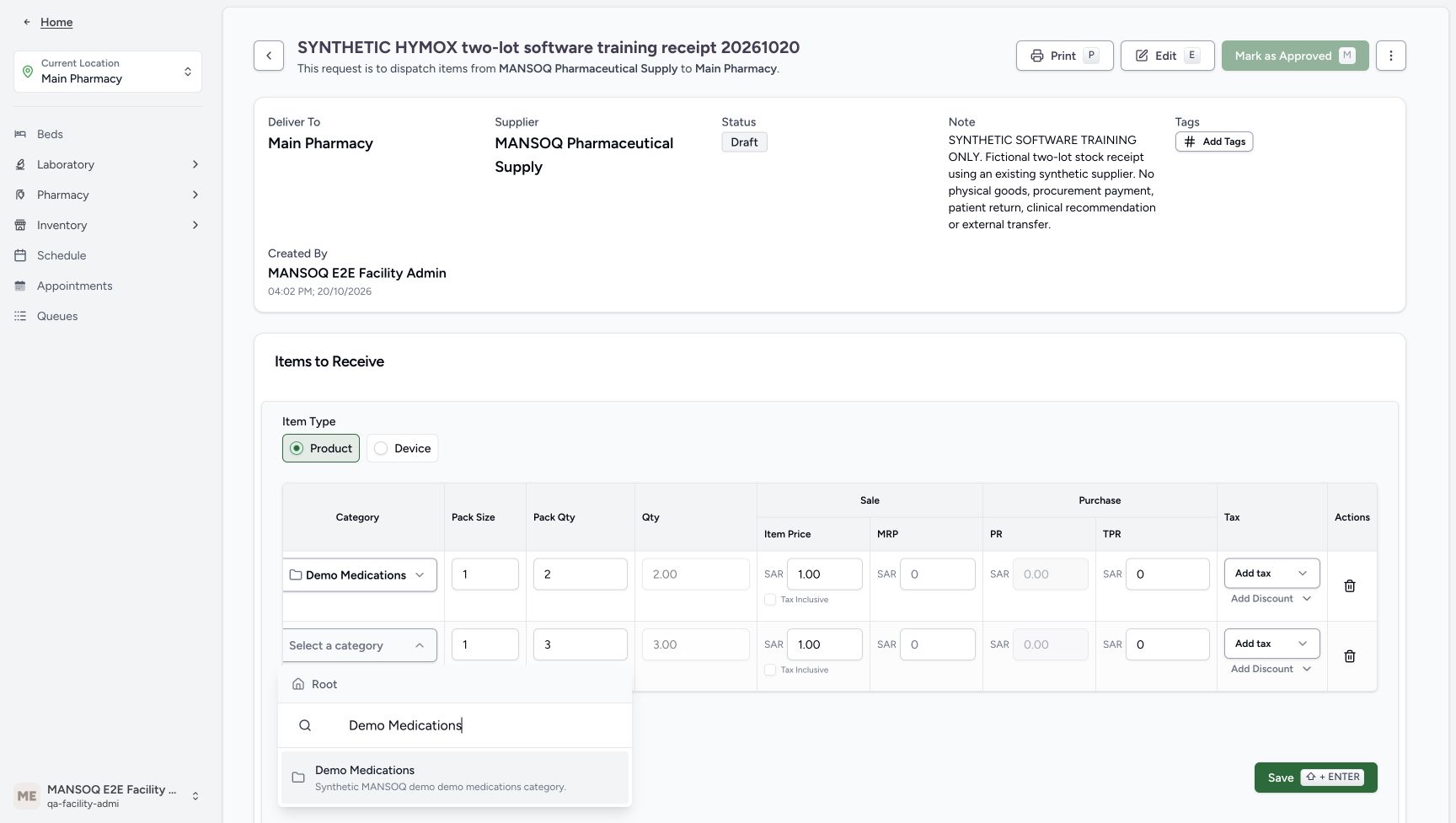
Choose Add Another. Select the same existing registration-code master for the second row. Enter SYNTH-KB-HYMOX-20261020-B and Expiry 30/06/2029. Choose existing Demo Medications, Pack Size 1, Pack Qty 3 and verify Qty 3.00. Set Sale Item Price SAR 1.00, with the same zero fictional purchase values and no selected tax or discount. B is a separate new batch; do not replace A or edit the catalog master.
12345678A row before adding B
Capture details
Genuine unchanged natural 1728×977 original from the exact committed local d20e build. Source publication is LOCAL_UNPUSHED. This is synthetic software stock setup; no physical goods, procurement payment, clinical recommendation, patient return or external exchange occurred.
Image SHA-256 cca86e3677457ab88d8393af90de8ed27ccaa3b8164cc6fb6e8cd4ad9a7ec8e8
- Check A category: The first row uses the existing Demo Medications category.
- Keep A pack size one: One count per pack is the illustrated training value.
- Keep A pack quantity two: The first row represents two packs of size one.
- Read A calculated quantity 2.00: The form calculates two count from the pack values.
- Keep A sale Item Price 1.00: The native row will create this synthetic batch price.
- Read A total purchase value zero: The fictional training row has TPR zero and a computed zero purchase price.
- Leave tax unselected: Add tax remains unselected; this is fixture configuration, not a tax exemption decision.
- Choose Add Another: Add a second native row without saving the first row separately.
 12
12B chooses the same exact master
Capture details
Genuine unchanged natural 1728×977 original from the exact committed local d20e build. Source publication is LOCAL_UNPUSHED. This is synthetic software stock setup; no physical goods, procurement payment, clinical recommendation, patient return or external exchange occurred.
Image SHA-256 fd3c629bbaa9727b672a15b1ccf9b6273a75eabc8132c280839250442253424a
- Search the same exact master: The second row again uses registration code 0307222296.
- Choose the same registration master for B: Both synthetic batches share this existing Product Knowledge master, not a shared new price definition.
 123
123B category choice
Capture details
Genuine unchanged natural 1728×977 original from the exact committed local d20e build. Source publication is LOCAL_UNPUSHED. This is synthetic software stock setup; no physical goods, procurement payment, clinical recommendation, patient return or external exchange occurred.
Image SHA-256 52e1ac3a47bdc3e5bb740fbebb7015786d205bf6a773fcfb28b8c4b394499701
- Choose Demo Medications for B: The second row reuses the same existing synthetic category.
- Review B pack quantity three: With pack size one, the second row represents three count.
- Review B sale Item Price 1.00: The B row has its own synthetic native price.
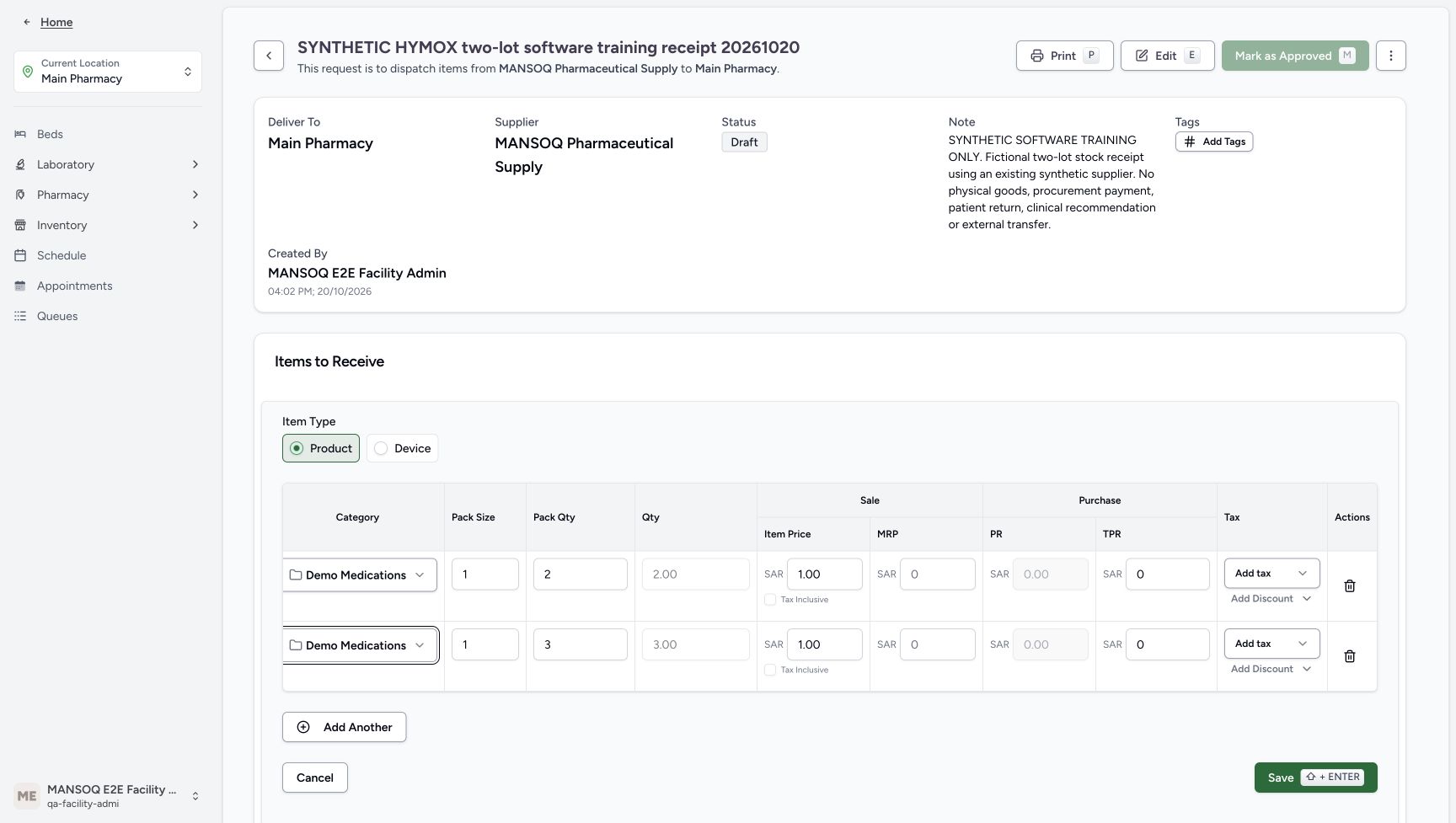 123456
Both price and quantity rows ready
Capture details
Genuine unchanged natural 1728×977 original from the exact committed local d20e build. Source publication is LOCAL_UNPUSHED. This is synthetic software stock setup; no physical goods, procurement payment, clinical recommendation, patient return or external exchange occurred.
Image SHA-256 0bfb0bb4150e5f7ecc816f376e93b5327efdd8ba5f1676e90a515cfe5478f4d3
- Review A pack size one: The first row retains pack size one.
- Review A pack quantity two: The first row calculates quantity 2.00.
- Review B pack quantity three: The second row calculates quantity 3.00.
- Review A Item Price 1.00: The first lot sale price is one SAR.
- Review B Item Price 1.00: The second lot sale price is also one SAR.
- Save both rows once: After reviewing both rows and the left-side identities, this one Save creates the two native batches and receipt rows.
12345678Both identities and expiries ready
Capture details
Genuine unchanged natural 1728×977 original from the exact committed local d20e build. Source publication is LOCAL_UNPUSHED. This is synthetic software stock setup; no physical goods, procurement payment, clinical recommendation, patient return or external exchange occurred.
Image SHA-256 7e6992fd3ad8e6cd863a31dff5665e6fcd74f126028ba41344e27f7716385963
- Enter the A synthetic batch: The first new batch is SYNTH-KB-HYMOX-20261020-A.
- Set A expiry 31/12/2028: The first row uses the illustrated December 31, 2028 expiry.
- Enter the B synthetic batch: The second new batch is SYNTH-KB-HYMOX-20261020-B.
- Set B expiry 30/06/2029: The second row uses the illustrated June 30, 2029 expiry.
- Check the A master: The first row is HYMOX 500MG CAPS.
- Check the B master: The second row uses the same existing master.
- Check A pack size one: The identity-side view retains pack size one.
- Check B pack quantity three: The identity-side view retains the second row quantity inputs.
7. Review both rows and Save once
Review A two count and B three count, both exact batch names and expiries, existing master and category, one-SAR sale prices, pack sizes and zero purchase values. Use the horizontally scrolled views to check columns that do not fit together. Choose Save once for both rows. The saved order remains Draft with two child receipt rows In Progress. This native Save creates a separate Product and charge price definition for each row; it does not reuse one shared new price definition or receive the stock yet.
123456Both price and quantity rows ready
Capture details
Genuine unchanged natural 1728×977 original from the exact committed local d20e build. Source publication is LOCAL_UNPUSHED. This is synthetic software stock setup; no physical goods, procurement payment, clinical recommendation, patient return or external exchange occurred.
Image SHA-256 0bfb0bb4150e5f7ecc816f376e93b5327efdd8ba5f1676e90a515cfe5478f4d3
- Review A pack size one: The first row retains pack size one.
- Review A pack quantity two: The first row calculates quantity 2.00.
- Review B pack quantity three: The second row calculates quantity 3.00.
- Review A Item Price 1.00: The first lot sale price is one SAR.
- Review B Item Price 1.00: The second lot sale price is also one SAR.
- Save both rows once: After reviewing both rows and the left-side identities, this one Save creates the two native batches and receipt rows.
12345678Both identities and expiries ready
Capture details
Genuine unchanged natural 1728×977 original from the exact committed local d20e build. Source publication is LOCAL_UNPUSHED. This is synthetic software stock setup; no physical goods, procurement payment, clinical recommendation, patient return or external exchange occurred.
Image SHA-256 7e6992fd3ad8e6cd863a31dff5665e6fcd74f126028ba41344e27f7716385963
- Enter the A synthetic batch: The first new batch is SYNTH-KB-HYMOX-20261020-A.
- Set A expiry 31/12/2028: The first row uses the illustrated December 31, 2028 expiry.
- Enter the B synthetic batch: The second new batch is SYNTH-KB-HYMOX-20261020-B.
- Set B expiry 30/06/2029: The second row uses the illustrated June 30, 2029 expiry.
- Check the A master: The first row is HYMOX 500MG CAPS.
- Check the B master: The second row uses the same existing master.
- Check A pack size one: The identity-side view retains pack size one.
- Check B pack quantity three: The identity-side view retains the second row quantity inputs.
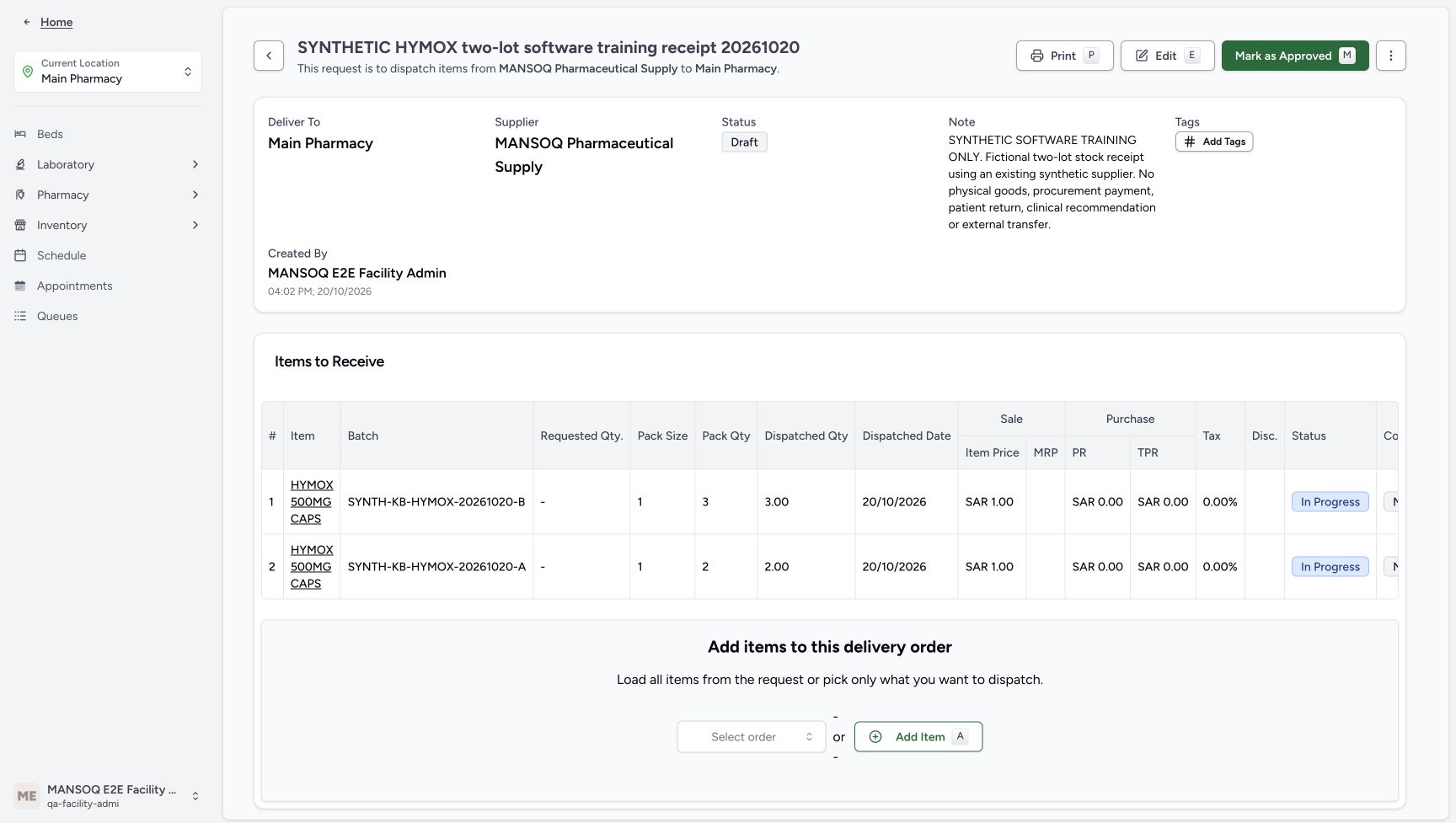 12345
12345Two saved In Progress receipts
Capture details
Genuine unchanged natural 1728×977 original from the exact committed local d20e build. Source publication is LOCAL_UNPUSHED. This is synthetic software stock setup; no physical goods, procurement payment, clinical recommendation, patient return or external exchange occurred. This image establishes the pictured settled rows and status; no pictured success-toast text is claimed.
Image SHA-256 f7c5e3639cdc87c270a207d41f8e05b35326a1d19e0852e416403569617a9c66
- Keep the parent Draft distinct: The item Save has not approved or completed the parent delivery.
- Read saved B batch and quantity: The saved B row has three count.
- Read saved A batch and quantity: The saved A row has two count.
- Read the child In Progress status: Saved receipt rows initially remain In Progress.
- Mark as Approved once: The recorded native approval is a separate action after item Save.
8. Approve the saved delivery and select both receipts
Choose Mark as Approved once. Verify the parent changes to Pending. Check that the two intended child rows are selected, B three count and A two count. Receive & Update Stock is now available. Approval and item creation are separate from receipt confirmation.
12345Two saved In Progress receipts
Capture details
Genuine unchanged natural 1728×977 original from the exact committed local d20e build. Source publication is LOCAL_UNPUSHED. This is synthetic software stock setup; no physical goods, procurement payment, clinical recommendation, patient return or external exchange occurred. This image establishes the pictured settled rows and status; no pictured success-toast text is claimed.
Image SHA-256 f7c5e3639cdc87c270a207d41f8e05b35326a1d19e0852e416403569617a9c66
- Keep the parent Draft distinct: The item Save has not approved or completed the parent delivery.
- Read saved B batch and quantity: The saved B row has three count.
- Read saved A batch and quantity: The saved A row has two count.
- Read the child In Progress status: Saved receipt rows initially remain In Progress.
- Mark as Approved once: The recorded native approval is a separate action after item Save.
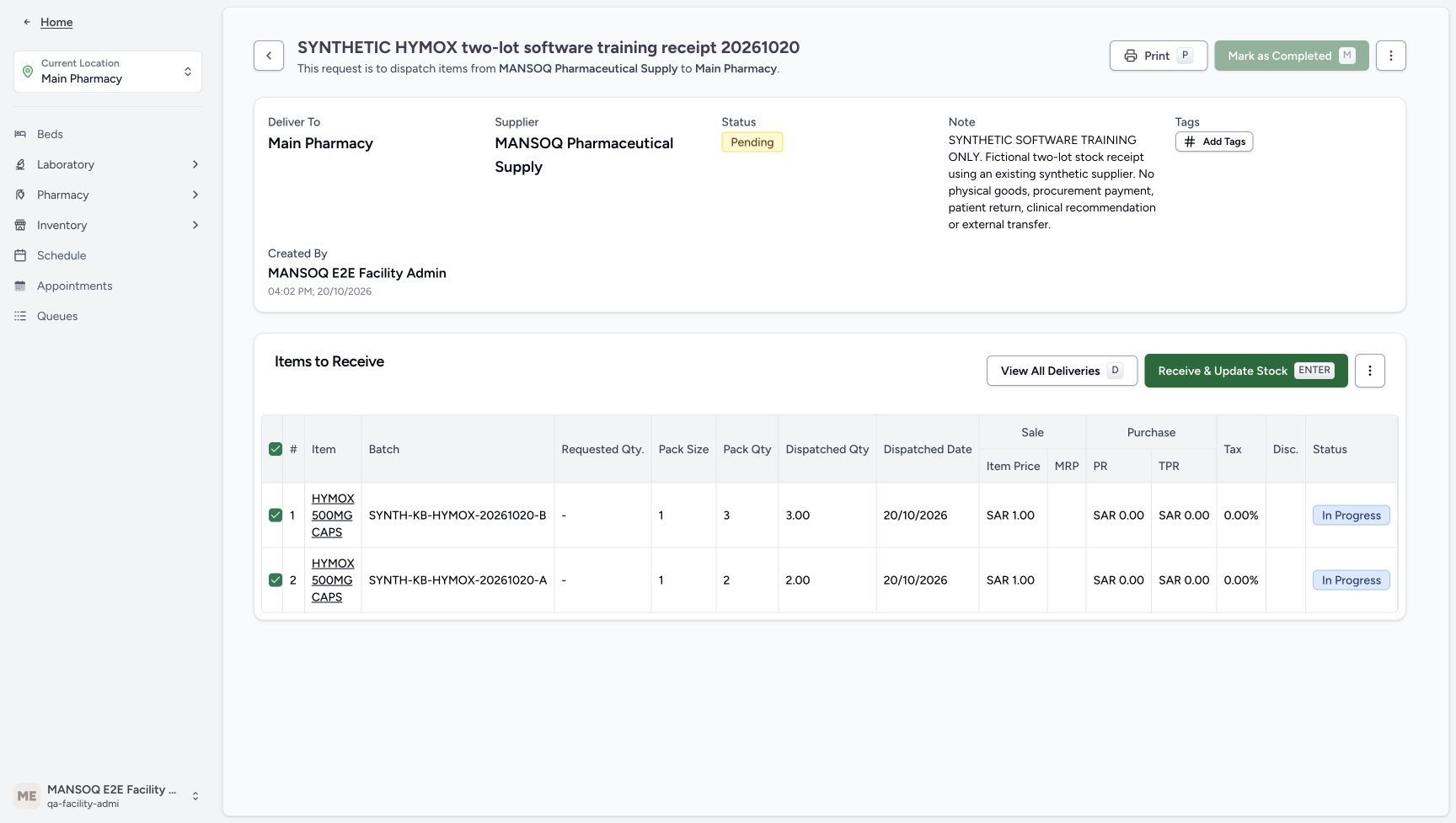 12345
12345Approved Pending delivery before receipt
Capture details
Genuine unchanged natural 1728×977 original from the exact committed local d20e build. Source publication is LOCAL_UNPUSHED. This is synthetic software stock setup; no physical goods, procurement payment, clinical recommendation, patient return or external exchange occurred.
Image SHA-256 01b5c219a69c47bf5f620caf8714e9383b88e8355403d1d414b3964858557c52
- Read parent Pending: Approval changes the delivery order to Pending.
- Verify both receipt rows selected: The header checkbox selects the two intended pending receipt rows.
- Review B three count: The selected B row is three count.
- Review A two count: The selected A row is two count.
- Open Receive and Update Stock: This opens the confirmation; opening it alone has not received the items.
9. Confirm one receipt for two Normal completed items
Choose Receive & Update Stock. The confirmation says it applies to two selected items; opening it alone is not a saved receipt. Verify Receiving Status Completed and Item Condition Normal, then choose Confirm once. Wait for the settled rows to show Completed. The parent remains Pending at this stage; receiving has updated the two stock quantities while parent completion is still separate.
12345Approved Pending delivery before receipt
Capture details
Genuine unchanged natural 1728×977 original from the exact committed local d20e build. Source publication is LOCAL_UNPUSHED. This is synthetic software stock setup; no physical goods, procurement payment, clinical recommendation, patient return or external exchange occurred.
Image SHA-256 01b5c219a69c47bf5f620caf8714e9383b88e8355403d1d414b3964858557c52
- Read parent Pending: Approval changes the delivery order to Pending.
- Verify both receipt rows selected: The header checkbox selects the two intended pending receipt rows.
- Review B three count: The selected B row is three count.
- Review A two count: The selected A row is two count.
- Open Receive and Update Stock: This opens the confirmation; opening it alone has not received the items.
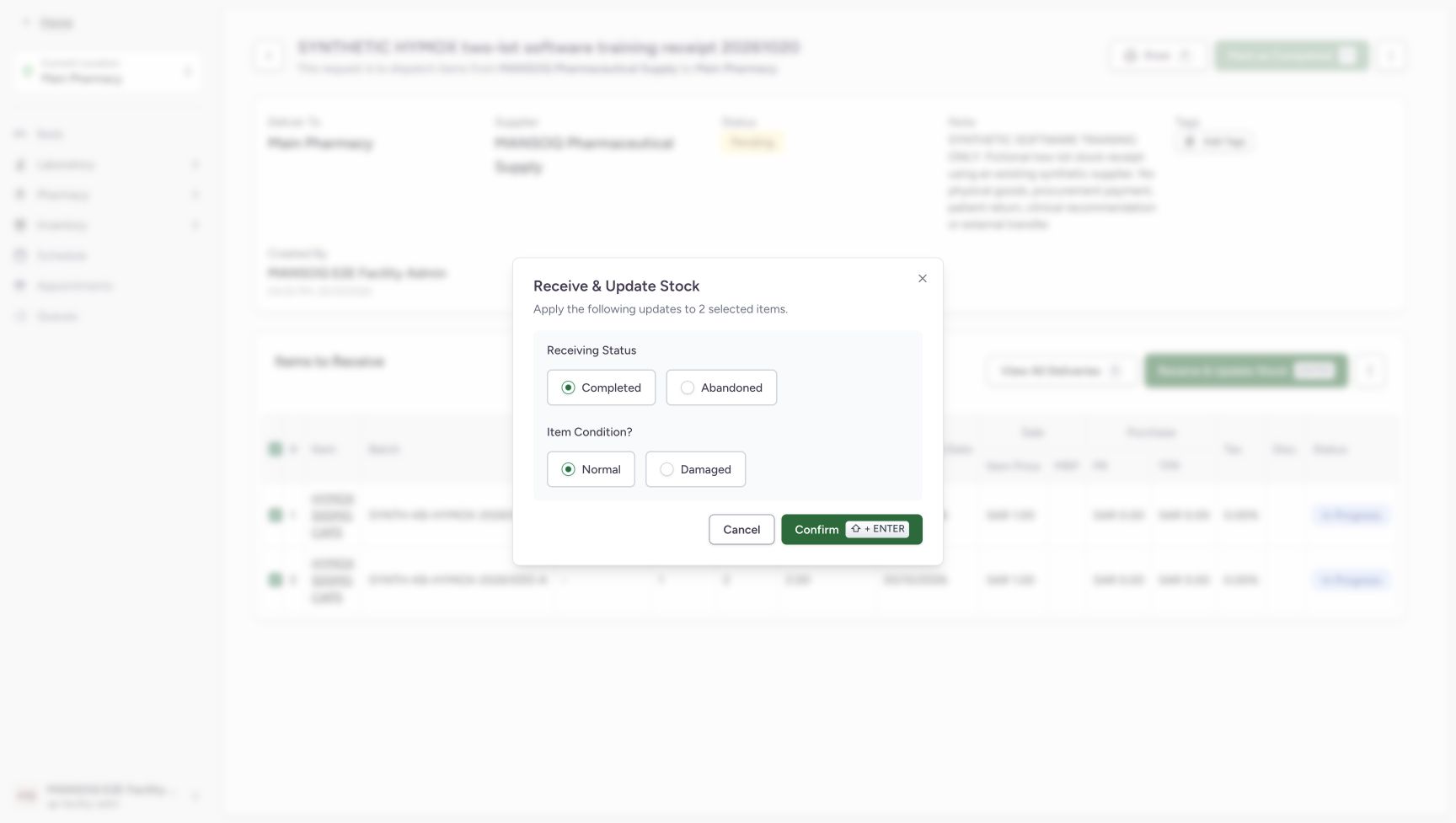 1234
1234Confirm two Normal Completed receipts
Capture details
Genuine unchanged natural 1728×977 original from the exact committed local d20e build. Source publication is LOCAL_UNPUSHED. This is synthetic software stock setup; no physical goods, procurement payment, clinical recommendation, patient return or external exchange occurred.
Image SHA-256 890a22eb93a00a09f85e3c91e8edfff821e33e4932d5974cbbfea8adc2916126
- Verify exactly two selected items: The confirmation states it applies to two selected items.
- Keep Receiving Status Completed: Completed is the recorded receipt status.
- Keep Item Condition Normal: Normal is the recorded condition; Damaged and Abandoned are separate alternatives.
- Confirm the two-row receipt once: This confirmation performs the one recorded stock receipt.
 12345
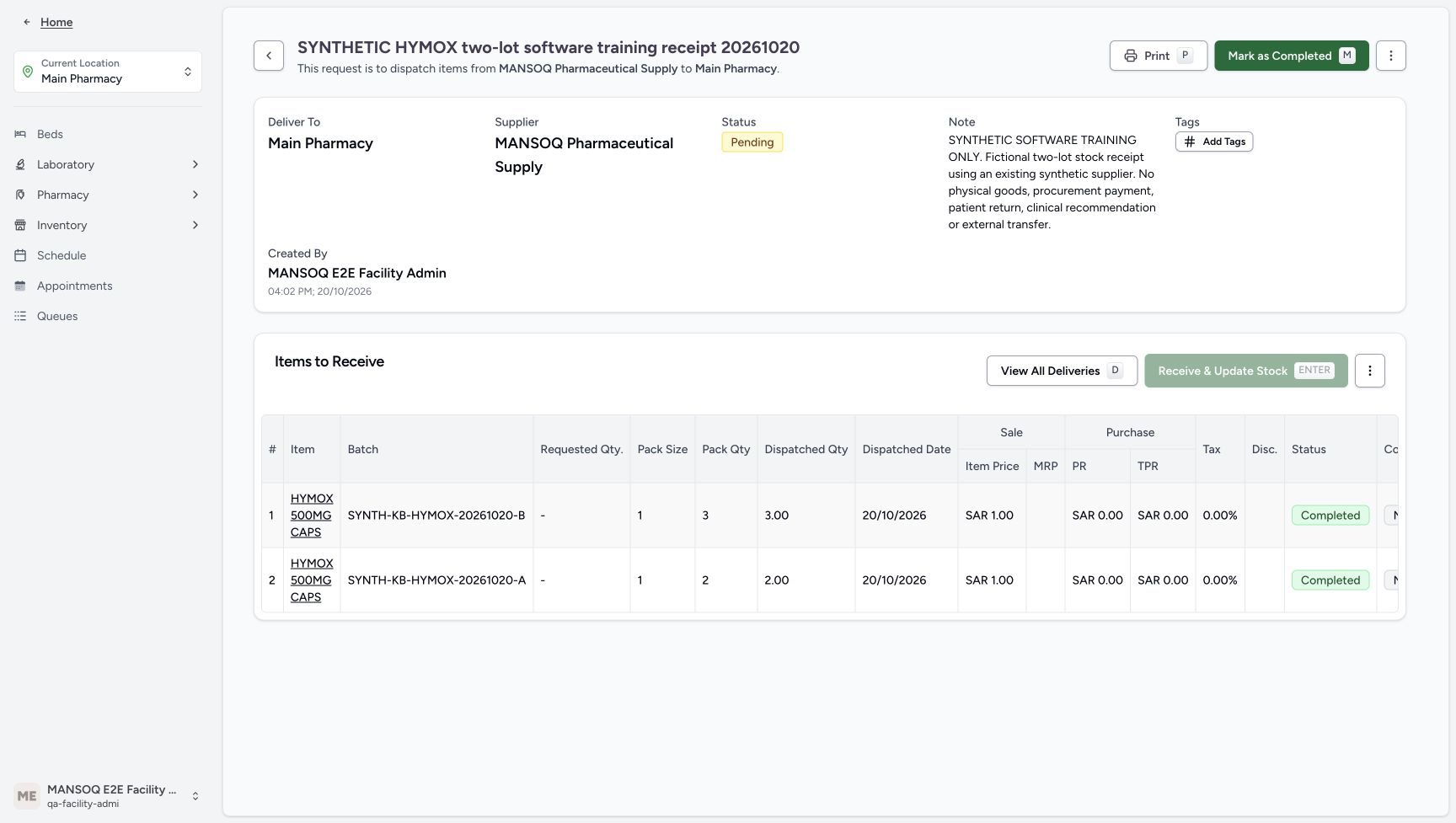
12345Completed child receipts with parent Pending
Capture details
Genuine unchanged natural 1728×977 original from the exact committed local d20e build. Source publication is LOCAL_UNPUSHED. This is synthetic software stock setup; no physical goods, procurement payment, clinical recommendation, patient return or external exchange occurred.
Image SHA-256 0c6672e68691522755a1aa9d3346b6dc11b0f5d33f1241ddc5b37314b2613b7c
- Notice parent still Pending: Receiving the child rows has not completed the delivery order.
- Read B Completed: The B receipt is now Completed.
- Read A Completed: The A receipt is now Completed.
- Notice Receive is disabled: The completed rows cannot be received again through this disabled action.
- Mark the parent as Completed once: The parent status action is now enabled and is separate from the stock receipt.
10. Complete the parent and reload the same delivery
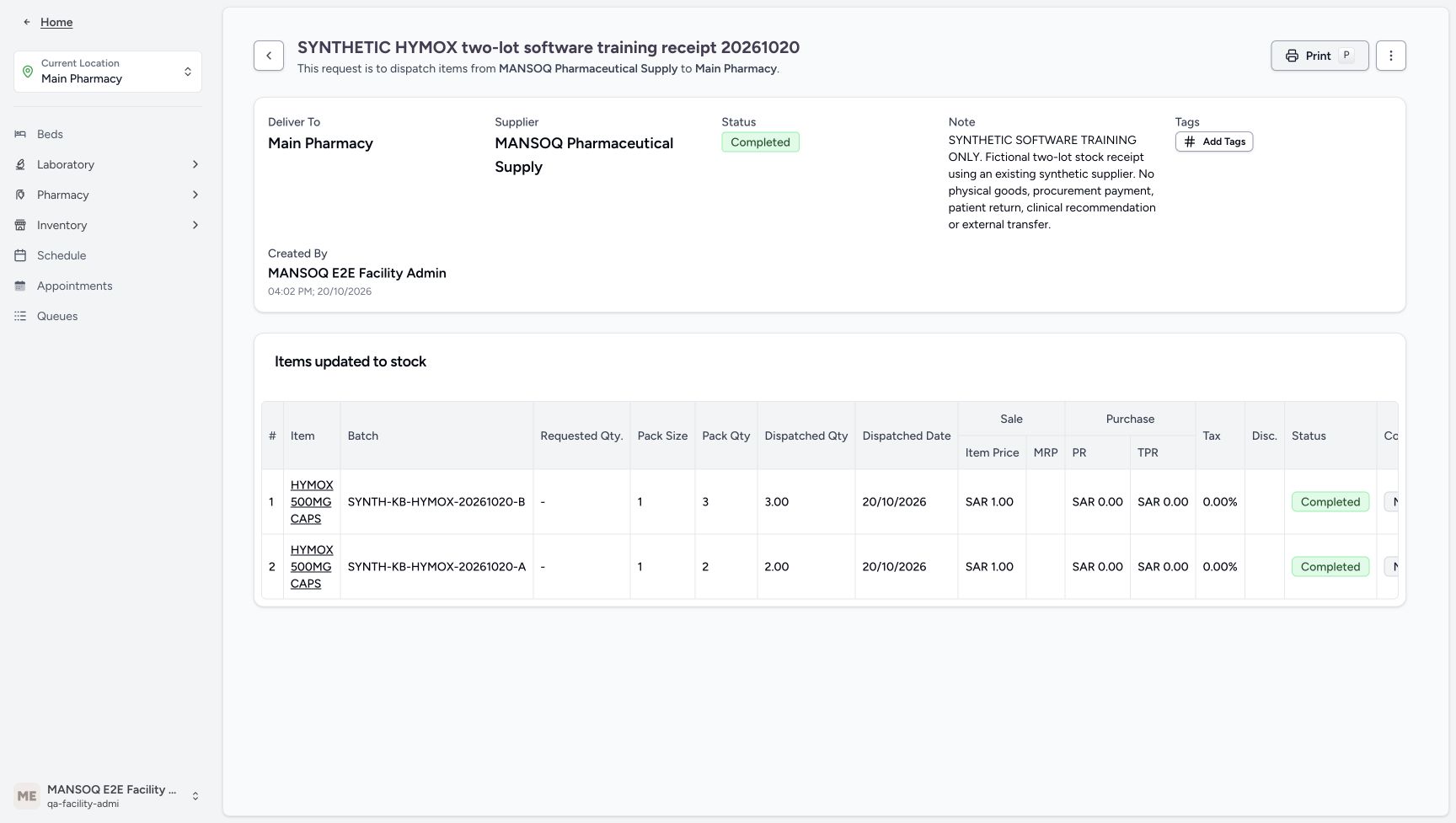
After both child receipts are Completed, choose the enabled Mark as Completed once. Verify the parent Completed status and Items updated to stock with the same two rows. Reload normally and verify Completed, B three count and A two count are retained. Completing the parent does not receive the stock again.
12345Completed child receipts with parent Pending
Capture details
Genuine unchanged natural 1728×977 original from the exact committed local d20e build. Source publication is LOCAL_UNPUSHED. This is synthetic software stock setup; no physical goods, procurement payment, clinical recommendation, patient return or external exchange occurred.
Image SHA-256 0c6672e68691522755a1aa9d3346b6dc11b0f5d33f1241ddc5b37314b2613b7c
- Notice parent still Pending: Receiving the child rows has not completed the delivery order.
- Read B Completed: The B receipt is now Completed.
- Read A Completed: The A receipt is now Completed.
- Notice Receive is disabled: The completed rows cannot be received again through this disabled action.
- Mark the parent as Completed once: The parent status action is now enabled and is separate from the stock receipt.
 1234
1234Saved parent Completed
Capture details
Genuine unchanged natural 1728×977 original from the exact committed local d20e build. Source publication is LOCAL_UNPUSHED. This is synthetic software stock setup; no physical goods, procurement payment, clinical recommendation, patient return or external exchange occurred. This image establishes the pictured settled rows and status; no pictured success-toast text is claimed.
Image SHA-256 247fc91960a2f2d5be5c62c30879a82eff147707b40a1c15aaf28ffacd0d8c63
- Read parent Completed: The saved delivery order is now Completed.
- Read Items updated to stock: The completed view groups the same received rows under this heading.
- Verify B receipt stays Completed: Completing the parent does not receive the B row a second time.
- Verify A receipt stays Completed: The A row remains the existing completed receipt.
12345Completed delivery after reload
Capture details
Genuine unchanged natural 1728×977 original from the exact committed local d20e build. Source publication is LOCAL_UNPUSHED. This is synthetic software stock setup; no physical goods, procurement payment, clinical recommendation, patient return or external exchange occurred.
Image SHA-256 354f86ed22fc08aae838c139efdf60624f2044d8ca7b1e9210f77cbff0cca572
- Verify Completed after reload: A normal reload retains the existing parent Completed state.
- Verify B quantity three after reload: The saved B quantity is retained.
- Verify A quantity two after reload: The saved A quantity is retained.
- Open the saved item link: The recorded item link opens All Deliveries for the existing Product Knowledge master.
- Expand the location Inventory menu: After returning to the saved Main Pharmacy delivery, expand Inventory before choosing Items.
11. Inspect both saved Products and their separate prices
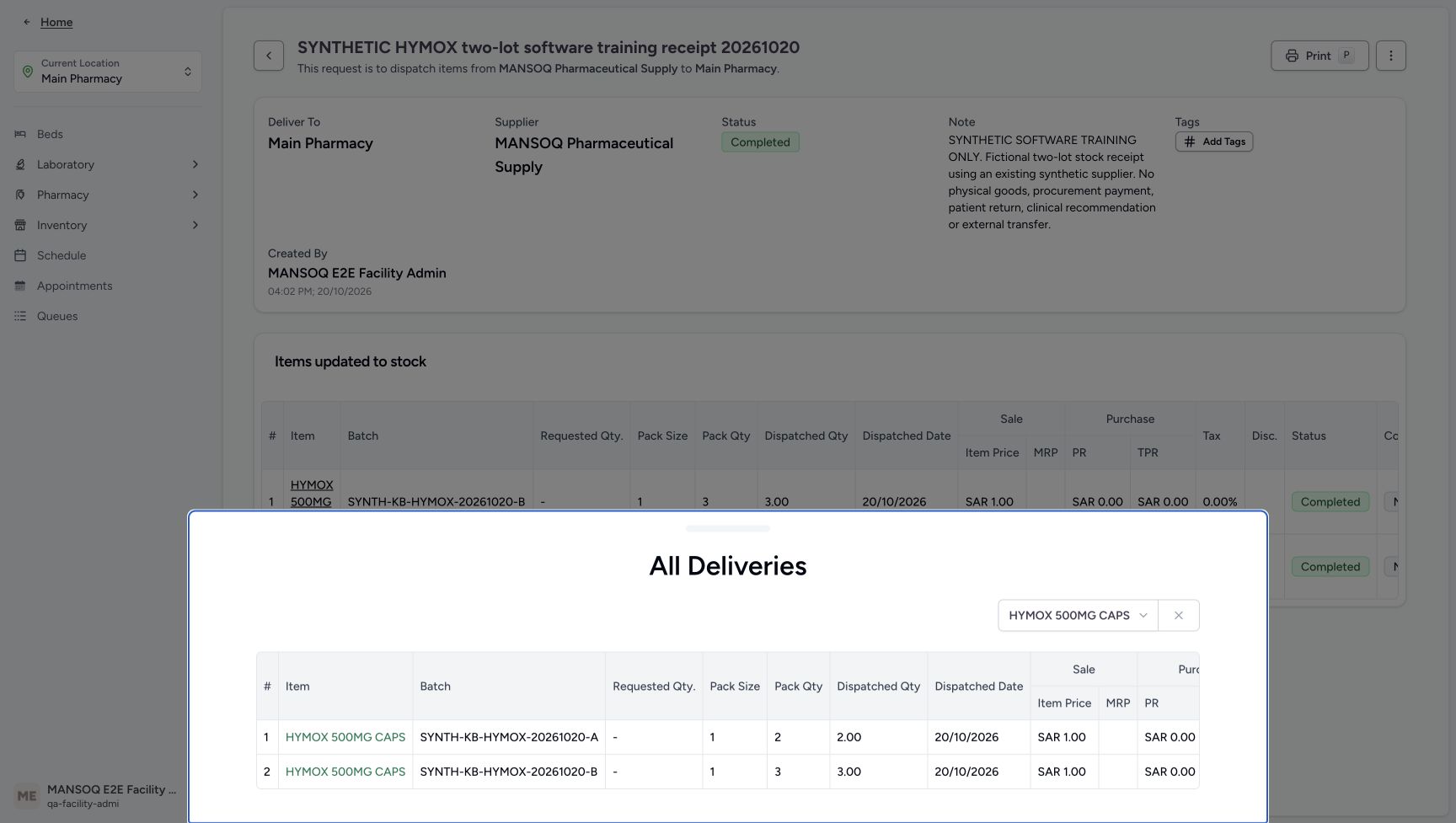
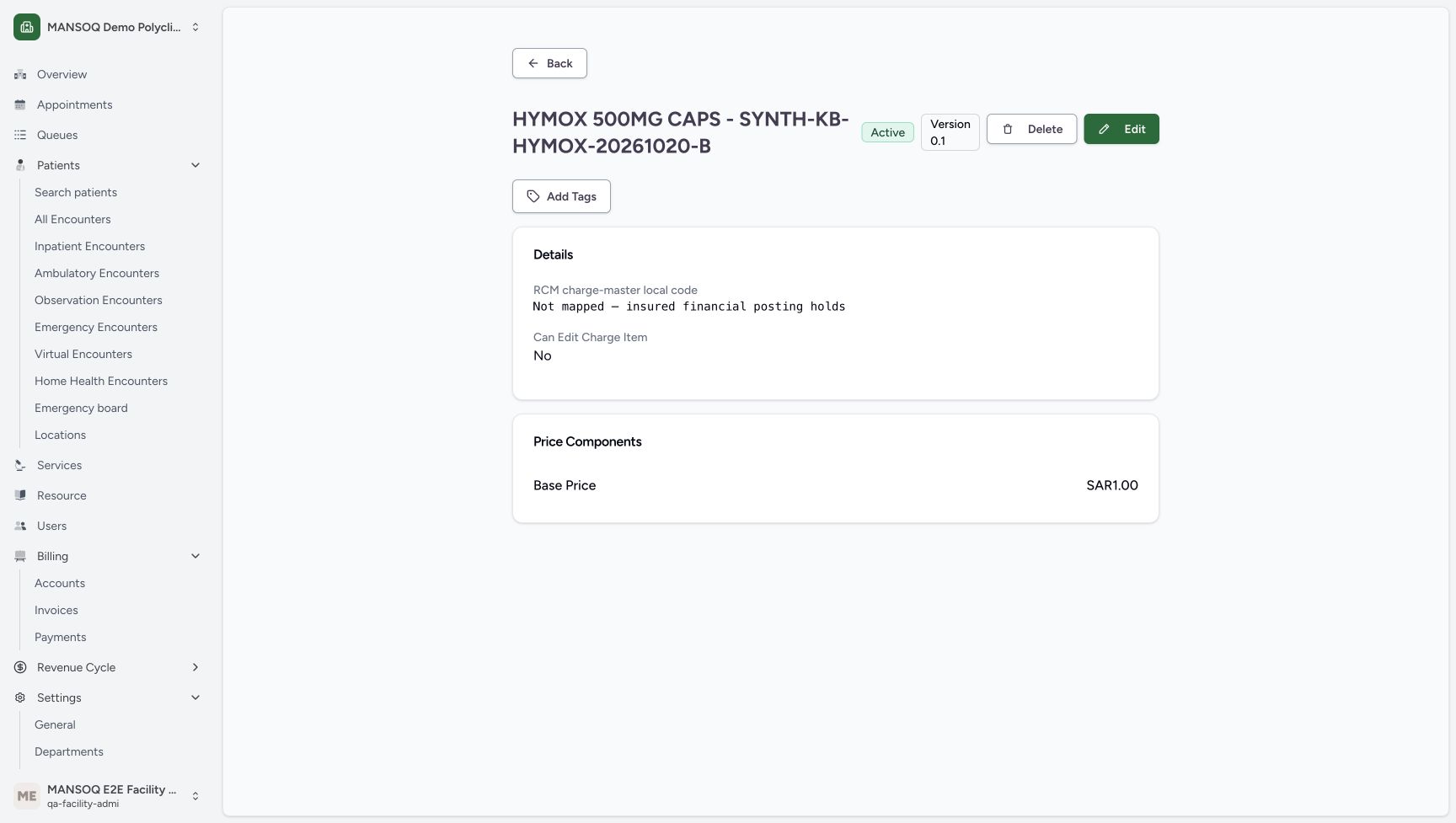
Open the saved item link to All Deliveries, then inspect each A or B Product link. Match its batch, expiry, pack size 1, purchase price SAR 0.00 and exact existing Product Knowledge master. Scroll down to Charge Item Definition and choose that lower card’s View Details, not the upper Product Knowledge card. The later companion views picture those exact saved links during a separate read-only inspection. Each definition has its own batch title and Base Price SAR 1.00. Keep the explicit Not mapped — insured financial posting holds warning visible; Can Edit Charge Item No is a displayed property. No Edit or Delete action is performed.
12345Completed delivery after reload
Capture details
Genuine unchanged natural 1728×977 original from the exact committed local d20e build. Source publication is LOCAL_UNPUSHED. This is synthetic software stock setup; no physical goods, procurement payment, clinical recommendation, patient return or external exchange occurred.
Image SHA-256 354f86ed22fc08aae838c139efdf60624f2044d8ca7b1e9210f77cbff0cca572
- Verify Completed after reload: A normal reload retains the existing parent Completed state.
- Verify B quantity three after reload: The saved B quantity is retained.
- Verify A quantity two after reload: The saved A quantity is retained.
- Open the saved item link: The recorded item link opens All Deliveries for the existing Product Knowledge master.
- Expand the location Inventory menu: After returning to the saved Main Pharmacy delivery, expand Inventory before choosing Items.
 1234
1234Read-only saved Product links
Capture details
Genuine unchanged natural 1728×977 original from the exact committed local d20e build. Source publication is LOCAL_UNPUSHED. This is synthetic software stock setup; no physical goods, procurement payment, clinical recommendation, patient return or external exchange occurred.
Image SHA-256 cef15458a0d362536849050e3500127057a2a0c81ac0de0163c0da015c95a69d
- Open saved A Product: The A row links to its own saved Product.
- Open saved B Product: The B row links to a different saved Product.
- Match the A batch: This row is SYNTH-KB-HYMOX-20261020-A, quantity two.
- Match the B batch: This row is SYNTH-KB-HYMOX-20261020-B, quantity three.
 12345
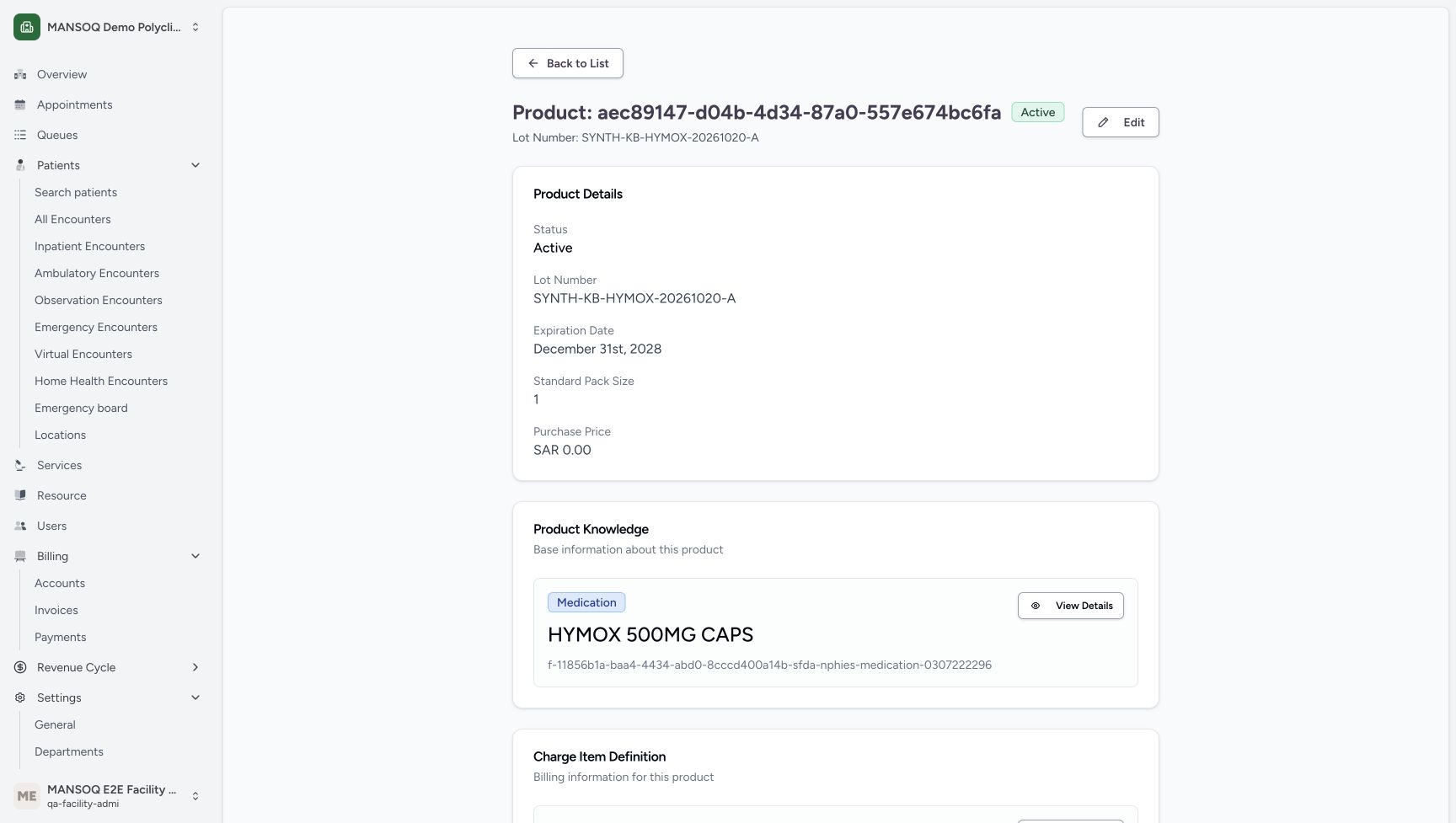
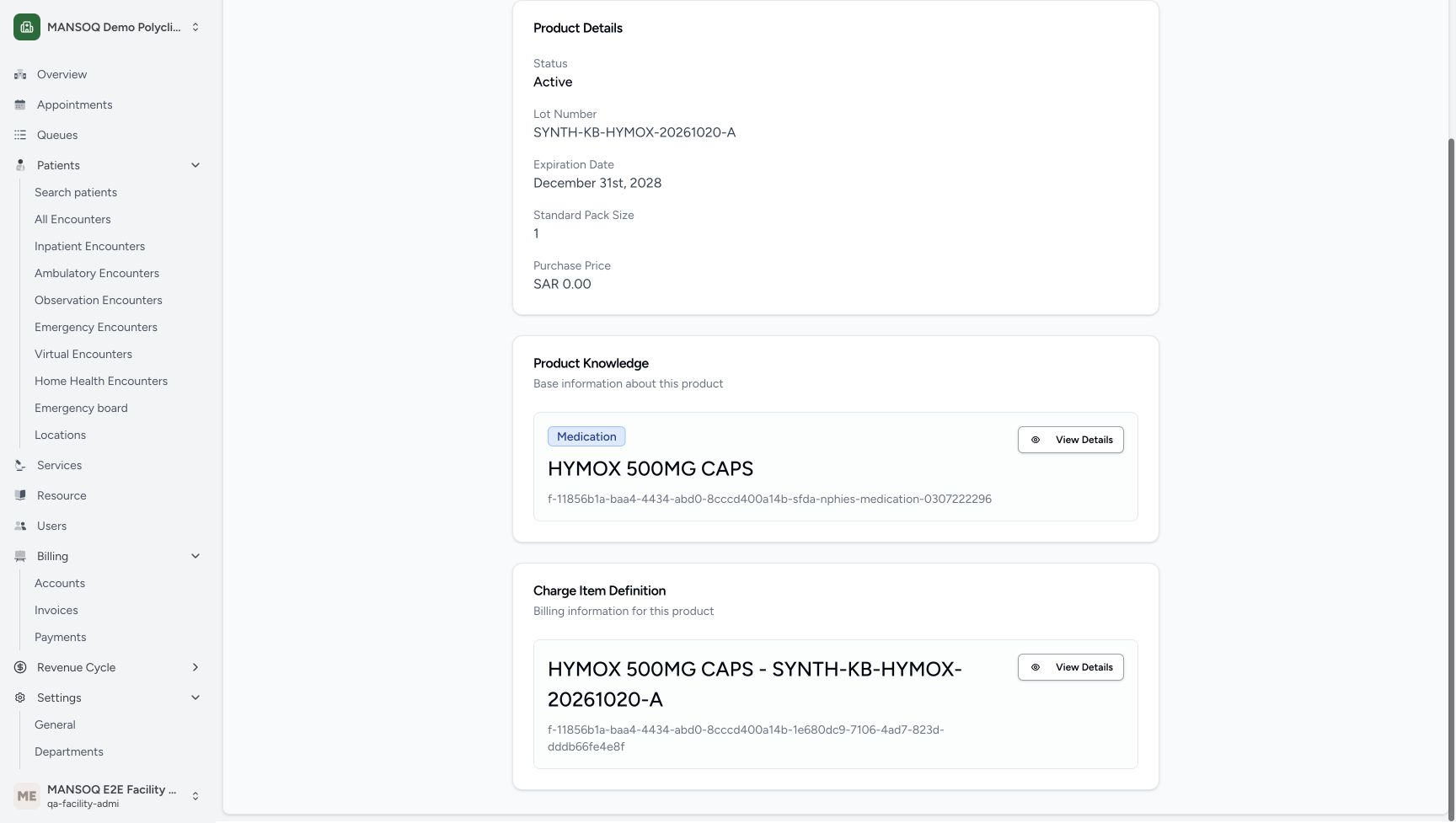
12345Saved A Product upper details
Capture details
Genuine unchanged natural 1728×977 original from the exact committed local d20e build. Source publication is LOCAL_UNPUSHED. This is synthetic software stock setup; no physical goods, procurement payment, clinical recommendation, patient return or external exchange occurred. Only the upper Product details and price-card heading are visible; the actual price-definition link is pictured in the later companion view.
Image SHA-256 e635a806c05ab04227f64c86f2e066a4c63729383850ae4c3df2a84ee5f3d90a
- Verify saved A lot number: The saved active Product retains its A batch identity.
- Verify saved A expiry: The Product shows December 31, 2028.
- Verify saved pack size one: The saved A Product retains standard pack size one.
- Verify saved purchase price zero: The Product shows SAR 0.00 purchase price.
- Match the existing registration master: The Product Knowledge slug ends in medication-0307222296.
 1234
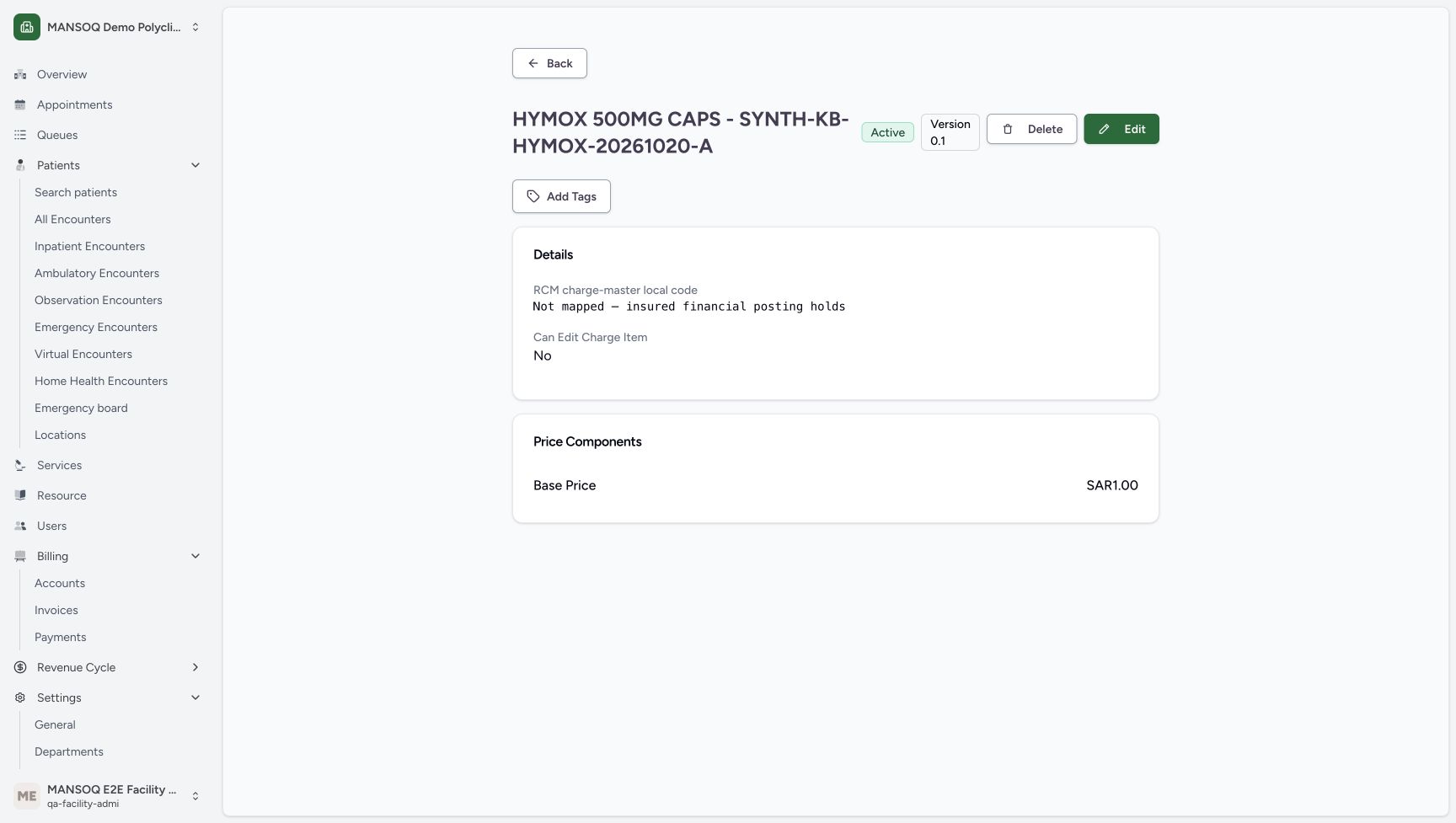
1234Later A lower Product-to-price link
Capture details
Genuine unchanged natural 1728×977 original from the exact committed local d20e build. Source publication is LOCAL_UNPUSHED. This is synthetic software stock setup; no physical goods, procurement payment, clinical recommendation, patient return or external exchange occurred. This lower-page link view was captured during a later separate read-only inspection of the same saved Product; its timestamp is retained and is not presented as an earlier create or receive action.
Image SHA-256 b5843a35dc632955970a1095212138640f9f2ecd2eb471fa29aaace70fb665b1
- Match A in the later lower-page view: This is the same saved A Product inspected during a later read-only companion capture.
- Match the exact master above the price card: The Product Knowledge slug retains code 0307222296.
- Identify A separate price definition: The Charge Item Definition title contains the A batch suffix.
- Open A charge definition View Details: Use View Details in the lower Charge Item Definition card, not the upper Product Knowledge card.
 1234
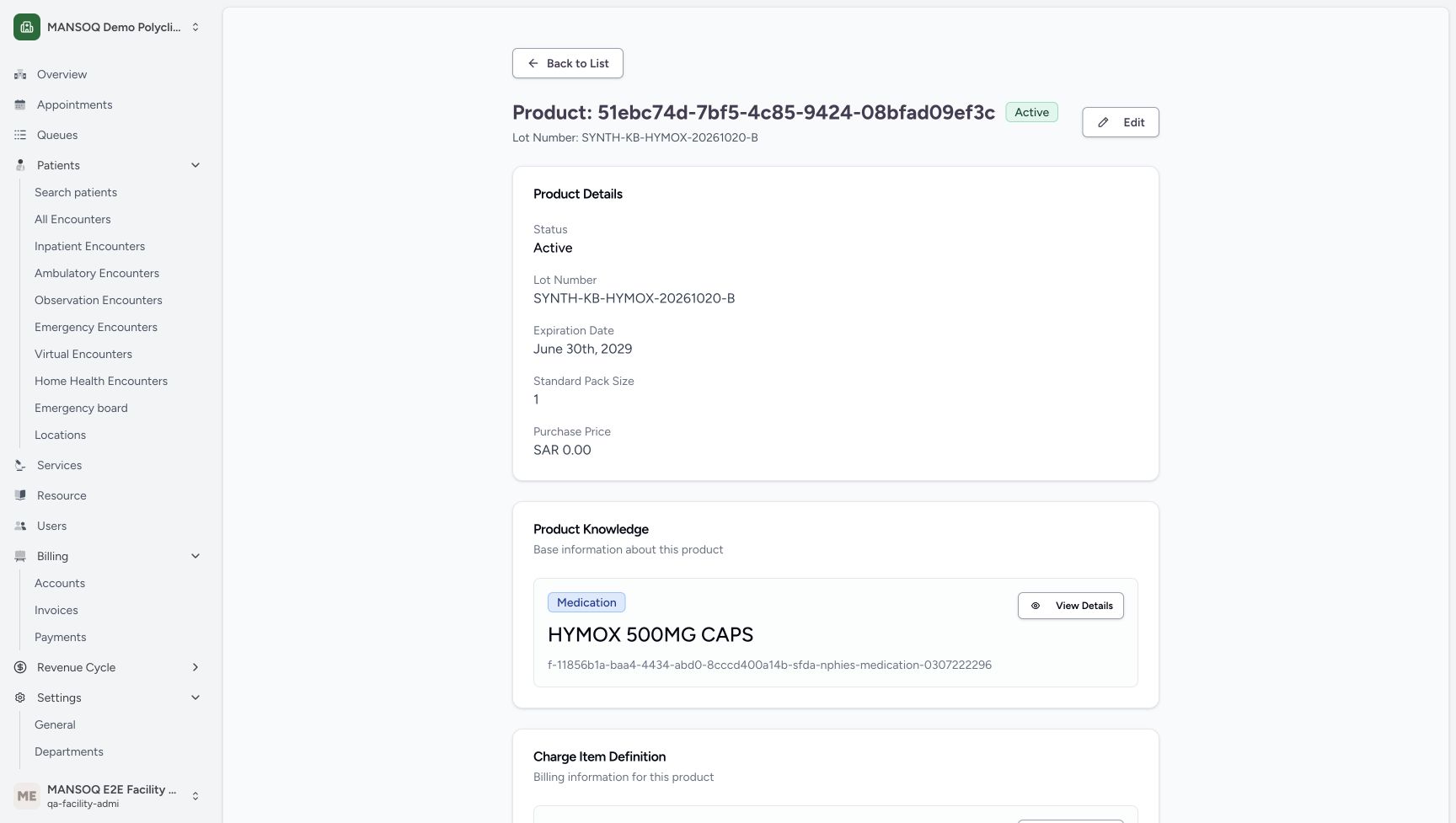
1234Saved A Base Price and insured hold
Capture details
Genuine unchanged natural 1728×977 original from the exact committed local d20e build. Source publication is LOCAL_UNPUSHED. This is synthetic software stock setup; no physical goods, procurement payment, clinical recommendation, patient return or external exchange occurred.
Image SHA-256 6afd8c5d7c59864ca9466ff4fc05c3497ec8de58a1ec4a4818e29b81a14a4c6f
- Read A Base Price SAR 1.00: The A charge definition displays one Base Price component.
- Read the insured-posting hold: Not mapped — insured financial posting holds is an explicit saved warning.
- Read Can Edit Charge Item No: This is the displayed charge definition property, not a claim that every page action is disabled.
- Locate Back from the price detail: Back returns from this read-only definition view; no Edit or Delete action is taught.
 12345
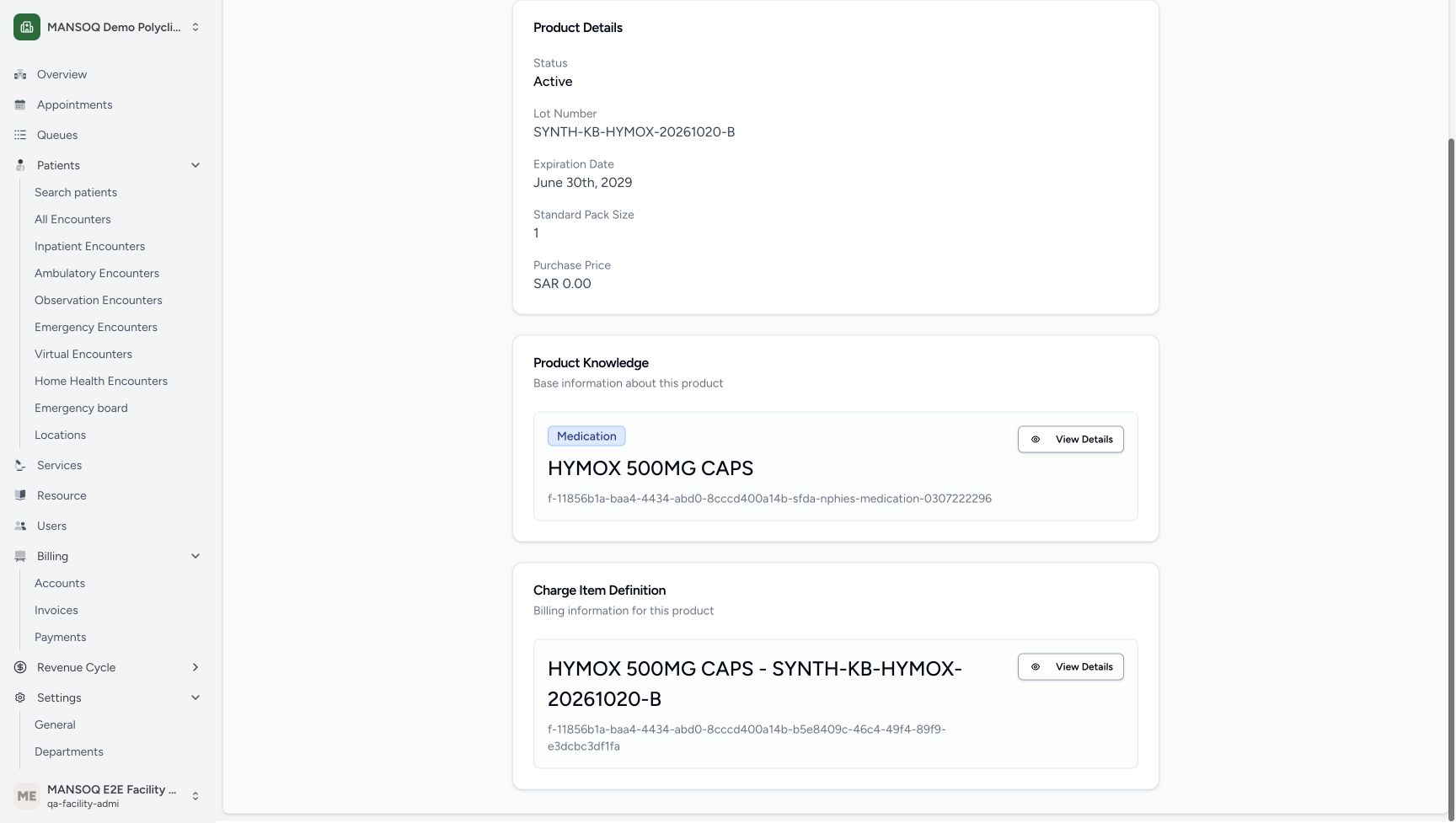
12345Saved B Product upper details
Capture details
Genuine unchanged natural 1728×977 original from the exact committed local d20e build. Source publication is LOCAL_UNPUSHED. This is synthetic software stock setup; no physical goods, procurement payment, clinical recommendation, patient return or external exchange occurred. Only the upper Product details and price-card heading are visible; the actual price-definition link is pictured in the later companion view.
Image SHA-256 b5516ad5305cbf91481146d70a213f8c19d3cf5124198ad28e27bab12c3caf19
- Verify saved B lot number: The saved active Product retains its B batch identity.
- Verify saved B expiry: The Product shows June 30, 2029.
- Verify B pack size one: The B Product retains standard pack size one.
- Verify B purchase price zero: The saved Product shows SAR 0.00 purchase price.
- Match the same registration master: The B Product links the same existing master as A.
 1234
1234Later B lower Product-to-price link
Capture details
Genuine unchanged natural 1728×977 original from the exact committed local d20e build. Source publication is LOCAL_UNPUSHED. This is synthetic software stock setup; no physical goods, procurement payment, clinical recommendation, patient return or external exchange occurred. This lower-page link view was captured during a later separate read-only inspection of the same saved Product; its timestamp is retained and is not presented as an earlier create or receive action.
Image SHA-256 5e74d39ee24f0842731dfbe505e7aeff3c5b3f22d088727d0ce4e6774a2f4160
- Match B in the later lower-page view: This genuine companion is the same saved B Product, captured later without a business save.
- Match B existing Product Knowledge master: The same registration-code master appears above the separate price card.
- Identify B separate price definition: Its Charge Item Definition title contains the B batch suffix.
- Open B charge definition View Details: This lower card has the actual B price-definition navigation link.
 1234
1234Saved B Base Price and insured hold
Capture details
Genuine unchanged natural 1728×977 original from the exact committed local d20e build. Source publication is LOCAL_UNPUSHED. This is synthetic software stock setup; no physical goods, procurement payment, clinical recommendation, patient return or external exchange occurred.
Image SHA-256 d800070a7485bf8d7f3fe2b864e0465ca1a7e82f566843cc9225debbadb4aafd
- Read B Base Price SAR 1.00: The B charge definition separately displays one Base Price component.
- Keep the unmapped warning visible: The B definition also states insured financial posting holds.
- Read B Can Edit Charge Item No: This property is visible on the saved B definition.
- Locate Back from B price detail: This recording inspects the definition without editing or deleting it.
12. Verify A two and B three in Inventory after reload
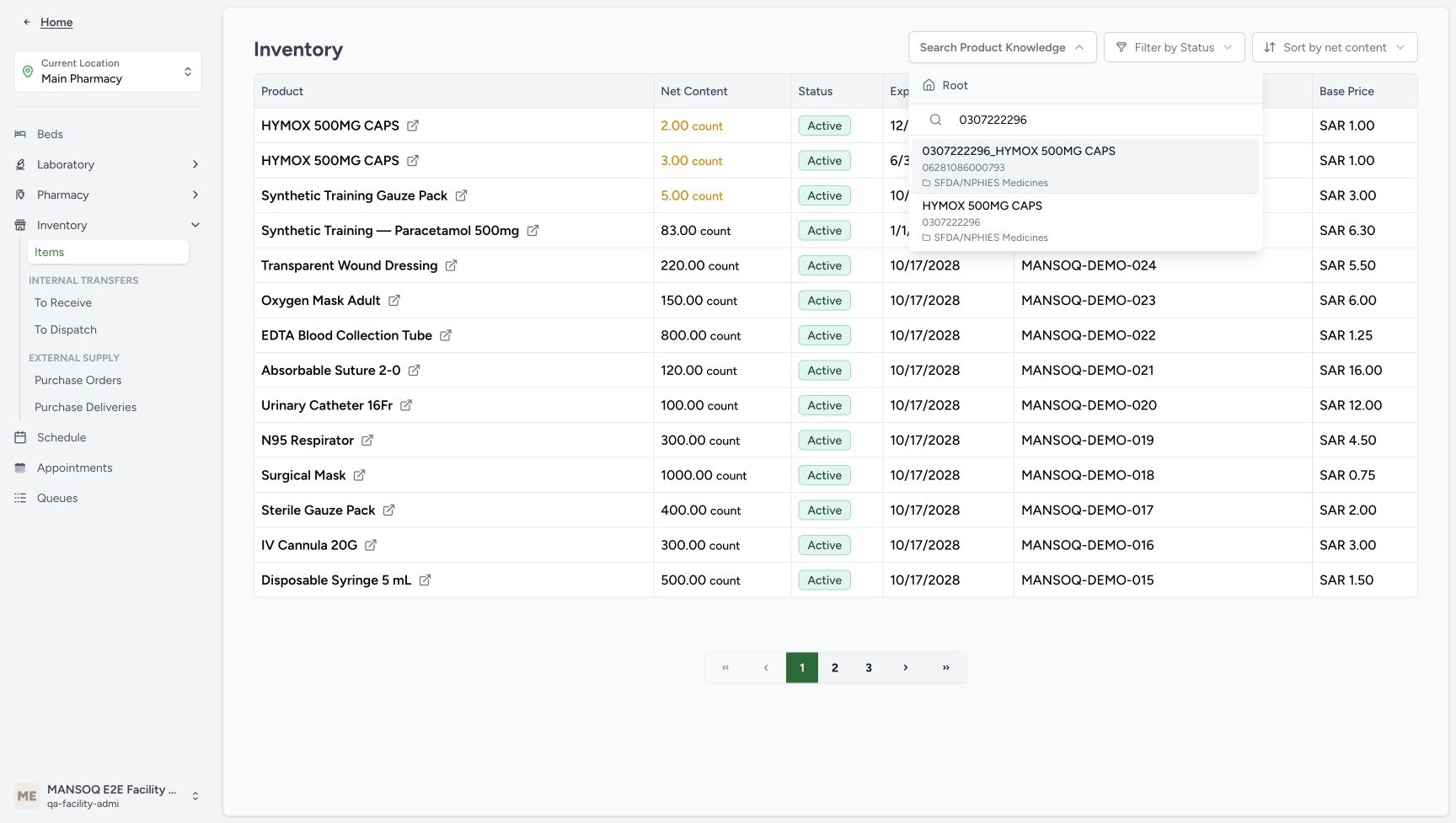
Use Back from the price detail, then normal browser Back to return to the saved Main Pharmacy delivery. Expand Inventory in its location menu and choose Items. Search Product Knowledge using 0307222296 and select the exact registration-code result. Match the Active A row at 2.00 count, expiry December 31, 2028, and B at 3.00 count, expiry June 30, 2029, each showing Base Price SAR 1.00. Reload normally and read the same two saved rows again. The reloaded capture shows the search placeholder while those rows remain; do not infer that its earlier selected chip stayed visible. Stop here before the separate prescription and partial-dispensing lesson.
 123
123Inventory registration-code search
Capture details
Genuine unchanged natural 1728×977 original from the exact committed local d20e build. Source publication is LOCAL_UNPUSHED. This is synthetic software stock setup; no physical goods, procurement payment, clinical recommendation, patient return or external exchange occurred.
Image SHA-256 4c9a5133b377eb90ddd6700283c9ff1aed962e0ddbd39f0bf4bd1206a2c69e62
- Search registration code 0307222296: Inventory can be narrowed through Product Knowledge search.
- Choose the registration-code result: Select the lower exact-registration result, not the separate GTIN result.
- Use Inventory Items: The location stock list is the Inventory Items entry.
123456Main Pharmacy A two and B three stock
Capture details
Genuine unchanged natural 1728×977 original from the exact committed local d20e build. Source publication is LOCAL_UNPUSHED. This is synthetic software stock setup; no physical goods, procurement payment, clinical recommendation, patient return or external exchange occurred.
Image SHA-256 7de5f1baf909871182bbd7e287d5041eaa6faf2a30c7b6b90e5c72677e569d79
- Verify A net content two count: Main Pharmacy stock shows A as 2.00 count.
- Verify B net content three count: Main Pharmacy stock shows B as 3.00 count.
- Match A batch: The two-count row has the exact A batch.
- Match B batch: The three-count row has the exact B batch.
- Read A base price one SAR: The A stock row displays SAR 1.00.
- Read B base price one SAR: The B stock row separately displays SAR 1.00.
12345Retained stock rows after reload
Capture details
Genuine unchanged natural 1728×977 original from the exact committed local d20e build. Source publication is LOCAL_UNPUSHED. This is synthetic software stock setup; no physical goods, procurement payment, clinical recommendation, patient return or external exchange occurred. The two saved rows remain after reload while the selector displays its placeholder; retention of the earlier selected chip is not claimed.
Image SHA-256 27aeb3a48518c7bd21b6869514f6f01bbb95fc552c1461570adf5e13d04ec05f
- Verify A retained after reload: The same A row remains at two count after normal reload.
- Verify B retained after reload: The same B row remains at three count after normal reload.
- Verify A retained expiry: The stock list retains the December 31, 2028 expiry.
- Verify B retained expiry: The stock list retains the June 30, 2029 expiry.
- Read the reloaded search control accurately: This capture shows Search Product Knowledge placeholder while the two rows remain; it does not show the earlier selected chip.
Keep master, batch, price and stock distinct
The existing Product Knowledge master identifies HYMOX and its registration code. The two new Products identify different synthetic batches and expiries. Each new Product links to its own charge price definition at one SAR. The location inventory records the received count. The existing master’s 40.4 SAR catalog display was not changed to create these training prices.
123Existing registration master and catalog price
Capture details
Genuine unchanged natural 1728×977 original from the exact committed local d20e build. Source publication is LOCAL_UNPUSHED. This is synthetic software stock setup; no physical goods, procurement payment, clinical recommendation, patient return or external exchange occurred.
Image SHA-256 205805d4f4b6183ffe8045df9fc611c067e49634512f60fbf0fc7bf38a7bfcd1
- Verify registration code 0307222296: The existing Product Knowledge record displays the intended code.
- Keep the catalog price separate: The existing master displays 40.4 SAR; the later synthetic batch prices do not edit this value.
- Read the count base unit: The existing master uses count as its base unit.
12345678Both identities and expiries ready
Capture details
Genuine unchanged natural 1728×977 original from the exact committed local d20e build. Source publication is LOCAL_UNPUSHED. This is synthetic software stock setup; no physical goods, procurement payment, clinical recommendation, patient return or external exchange occurred.
Image SHA-256 7e6992fd3ad8e6cd863a31dff5665e6fcd74f126028ba41344e27f7716385963
- Enter the A synthetic batch: The first new batch is SYNTH-KB-HYMOX-20261020-A.
- Set A expiry 31/12/2028: The first row uses the illustrated December 31, 2028 expiry.
- Enter the B synthetic batch: The second new batch is SYNTH-KB-HYMOX-20261020-B.
- Set B expiry 30/06/2029: The second row uses the illustrated June 30, 2029 expiry.
- Check the A master: The first row is HYMOX 500MG CAPS.
- Check the B master: The second row uses the same existing master.
- Check A pack size one: The identity-side view retains pack size one.
- Check B pack quantity three: The identity-side view retains the second row quantity inputs.
1234Read-only saved Product links
Capture details
Genuine unchanged natural 1728×977 original from the exact committed local d20e build. Source publication is LOCAL_UNPUSHED. This is synthetic software stock setup; no physical goods, procurement payment, clinical recommendation, patient return or external exchange occurred.
Image SHA-256 cef15458a0d362536849050e3500127057a2a0c81ac0de0163c0da015c95a69d
- Open saved A Product: The A row links to its own saved Product.
- Open saved B Product: The B row links to a different saved Product.
- Match the A batch: This row is SYNTH-KB-HYMOX-20261020-A, quantity two.
- Match the B batch: This row is SYNTH-KB-HYMOX-20261020-B, quantity three.
12345Saved A Product upper details
Capture details
Genuine unchanged natural 1728×977 original from the exact committed local d20e build. Source publication is LOCAL_UNPUSHED. This is synthetic software stock setup; no physical goods, procurement payment, clinical recommendation, patient return or external exchange occurred. Only the upper Product details and price-card heading are visible; the actual price-definition link is pictured in the later companion view.
Image SHA-256 e635a806c05ab04227f64c86f2e066a4c63729383850ae4c3df2a84ee5f3d90a
- Verify saved A lot number: The saved active Product retains its A batch identity.
- Verify saved A expiry: The Product shows December 31, 2028.
- Verify saved pack size one: The saved A Product retains standard pack size one.
- Verify saved purchase price zero: The Product shows SAR 0.00 purchase price.
- Match the existing registration master: The Product Knowledge slug ends in medication-0307222296.
1234Later A lower Product-to-price link
Capture details
Genuine unchanged natural 1728×977 original from the exact committed local d20e build. Source publication is LOCAL_UNPUSHED. This is synthetic software stock setup; no physical goods, procurement payment, clinical recommendation, patient return or external exchange occurred. This lower-page link view was captured during a later separate read-only inspection of the same saved Product; its timestamp is retained and is not presented as an earlier create or receive action.
Image SHA-256 b5843a35dc632955970a1095212138640f9f2ecd2eb471fa29aaace70fb665b1
- Match A in the later lower-page view: This is the same saved A Product inspected during a later read-only companion capture.
- Match the exact master above the price card: The Product Knowledge slug retains code 0307222296.
- Identify A separate price definition: The Charge Item Definition title contains the A batch suffix.
- Open A charge definition View Details: Use View Details in the lower Charge Item Definition card, not the upper Product Knowledge card.
1234Saved A Base Price and insured hold
Capture details
Genuine unchanged natural 1728×977 original from the exact committed local d20e build. Source publication is LOCAL_UNPUSHED. This is synthetic software stock setup; no physical goods, procurement payment, clinical recommendation, patient return or external exchange occurred.
Image SHA-256 6afd8c5d7c59864ca9466ff4fc05c3497ec8de58a1ec4a4818e29b81a14a4c6f
- Read A Base Price SAR 1.00: The A charge definition displays one Base Price component.
- Read the insured-posting hold: Not mapped — insured financial posting holds is an explicit saved warning.
- Read Can Edit Charge Item No: This is the displayed charge definition property, not a claim that every page action is disabled.
- Locate Back from the price detail: Back returns from this read-only definition view; no Edit or Delete action is taught.
12345Saved B Product upper details
Capture details
Genuine unchanged natural 1728×977 original from the exact committed local d20e build. Source publication is LOCAL_UNPUSHED. This is synthetic software stock setup; no physical goods, procurement payment, clinical recommendation, patient return or external exchange occurred. Only the upper Product details and price-card heading are visible; the actual price-definition link is pictured in the later companion view.
Image SHA-256 b5516ad5305cbf91481146d70a213f8c19d3cf5124198ad28e27bab12c3caf19
- Verify saved B lot number: The saved active Product retains its B batch identity.
- Verify saved B expiry: The Product shows June 30, 2029.
- Verify B pack size one: The B Product retains standard pack size one.
- Verify B purchase price zero: The saved Product shows SAR 0.00 purchase price.
- Match the same registration master: The B Product links the same existing master as A.
1234Later B lower Product-to-price link
Capture details
Genuine unchanged natural 1728×977 original from the exact committed local d20e build. Source publication is LOCAL_UNPUSHED. This is synthetic software stock setup; no physical goods, procurement payment, clinical recommendation, patient return or external exchange occurred. This lower-page link view was captured during a later separate read-only inspection of the same saved Product; its timestamp is retained and is not presented as an earlier create or receive action.
Image SHA-256 5e74d39ee24f0842731dfbe505e7aeff3c5b3f22d088727d0ce4e6774a2f4160
- Match B in the later lower-page view: This genuine companion is the same saved B Product, captured later without a business save.
- Match B existing Product Knowledge master: The same registration-code master appears above the separate price card.
- Identify B separate price definition: Its Charge Item Definition title contains the B batch suffix.
- Open B charge definition View Details: This lower card has the actual B price-definition navigation link.
1234Saved B Base Price and insured hold
Capture details
Genuine unchanged natural 1728×977 original from the exact committed local d20e build. Source publication is LOCAL_UNPUSHED. This is synthetic software stock setup; no physical goods, procurement payment, clinical recommendation, patient return or external exchange occurred.
Image SHA-256 d800070a7485bf8d7f3fe2b864e0465ca1a7e82f566843cc9225debbadb4aafd
- Read B Base Price SAR 1.00: The B charge definition separately displays one Base Price component.
- Keep the unmapped warning visible: The B definition also states insured financial posting holds.
- Read B Can Edit Charge Item No: This property is visible on the saved B definition.
- Locate Back from B price detail: This recording inspects the definition without editing or deleting it.
123456Main Pharmacy A two and B three stock
Capture details
Genuine unchanged natural 1728×977 original from the exact committed local d20e build. Source publication is LOCAL_UNPUSHED. This is synthetic software stock setup; no physical goods, procurement payment, clinical recommendation, patient return or external exchange occurred.
Image SHA-256 7de5f1baf909871182bbd7e287d5041eaa6faf2a30c7b6b90e5c72677e569d79
- Verify A net content two count: Main Pharmacy stock shows A as 2.00 count.
- Verify B net content three count: Main Pharmacy stock shows B as 3.00 count.
- Match A batch: The two-count row has the exact A batch.
- Match B batch: The three-count row has the exact B batch.
- Read A base price one SAR: The A stock row displays SAR 1.00.
- Read B base price one SAR: The B stock row separately displays SAR 1.00.
Distinguish Save, Receive and parent completion
Saving both item rows creates their Products, prices and In Progress receipt records. At that stage new location stock records can exist with zero net content. The one confirmed Completed/Normal receipt changes their stock to A two and B three while the parent is Pending. Mark as Completed changes the parent afterward and does not add the quantities again. The saved order and stock readbacks retain those results.
12345Two saved In Progress receipts
Capture details
Genuine unchanged natural 1728×977 original from the exact committed local d20e build. Source publication is LOCAL_UNPUSHED. This is synthetic software stock setup; no physical goods, procurement payment, clinical recommendation, patient return or external exchange occurred. This image establishes the pictured settled rows and status; no pictured success-toast text is claimed.
Image SHA-256 f7c5e3639cdc87c270a207d41f8e05b35326a1d19e0852e416403569617a9c66
- Keep the parent Draft distinct: The item Save has not approved or completed the parent delivery.
- Read saved B batch and quantity: The saved B row has three count.
- Read saved A batch and quantity: The saved A row has two count.
- Read the child In Progress status: Saved receipt rows initially remain In Progress.
- Mark as Approved once: The recorded native approval is a separate action after item Save.
12345Approved Pending delivery before receipt
Capture details
Genuine unchanged natural 1728×977 original from the exact committed local d20e build. Source publication is LOCAL_UNPUSHED. This is synthetic software stock setup; no physical goods, procurement payment, clinical recommendation, patient return or external exchange occurred.
Image SHA-256 01b5c219a69c47bf5f620caf8714e9383b88e8355403d1d414b3964858557c52
- Read parent Pending: Approval changes the delivery order to Pending.
- Verify both receipt rows selected: The header checkbox selects the two intended pending receipt rows.
- Review B three count: The selected B row is three count.
- Review A two count: The selected A row is two count.
- Open Receive and Update Stock: This opens the confirmation; opening it alone has not received the items.
1234Confirm two Normal Completed receipts
Capture details
Genuine unchanged natural 1728×977 original from the exact committed local d20e build. Source publication is LOCAL_UNPUSHED. This is synthetic software stock setup; no physical goods, procurement payment, clinical recommendation, patient return or external exchange occurred.
Image SHA-256 890a22eb93a00a09f85e3c91e8edfff821e33e4932d5974cbbfea8adc2916126
- Verify exactly two selected items: The confirmation states it applies to two selected items.
- Keep Receiving Status Completed: Completed is the recorded receipt status.
- Keep Item Condition Normal: Normal is the recorded condition; Damaged and Abandoned are separate alternatives.
- Confirm the two-row receipt once: This confirmation performs the one recorded stock receipt.
12345Completed child receipts with parent Pending
Capture details
Genuine unchanged natural 1728×977 original from the exact committed local d20e build. Source publication is LOCAL_UNPUSHED. This is synthetic software stock setup; no physical goods, procurement payment, clinical recommendation, patient return or external exchange occurred.
Image SHA-256 0c6672e68691522755a1aa9d3346b6dc11b0f5d33f1241ddc5b37314b2613b7c
- Notice parent still Pending: Receiving the child rows has not completed the delivery order.
- Read B Completed: The B receipt is now Completed.
- Read A Completed: The A receipt is now Completed.
- Notice Receive is disabled: The completed rows cannot be received again through this disabled action.
- Mark the parent as Completed once: The parent status action is now enabled and is separate from the stock receipt.
1234Saved parent Completed
Capture details
Genuine unchanged natural 1728×977 original from the exact committed local d20e build. Source publication is LOCAL_UNPUSHED. This is synthetic software stock setup; no physical goods, procurement payment, clinical recommendation, patient return or external exchange occurred. This image establishes the pictured settled rows and status; no pictured success-toast text is claimed.
Image SHA-256 247fc91960a2f2d5be5c62c30879a82eff147707b40a1c15aaf28ffacd0d8c63
- Read parent Completed: The saved delivery order is now Completed.
- Read Items updated to stock: The completed view groups the same received rows under this heading.
- Verify B receipt stays Completed: Completing the parent does not receive the B row a second time.
- Verify A receipt stays Completed: The A row remains the existing completed receipt.
12345Completed delivery after reload
Capture details
Genuine unchanged natural 1728×977 original from the exact committed local d20e build. Source publication is LOCAL_UNPUSHED. This is synthetic software stock setup; no physical goods, procurement payment, clinical recommendation, patient return or external exchange occurred.
Image SHA-256 354f86ed22fc08aae838c139efdf60624f2044d8ca7b1e9210f77cbff0cca572
- Verify Completed after reload: A normal reload retains the existing parent Completed state.
- Verify B quantity three after reload: The saved B quantity is retained.
- Verify A quantity two after reload: The saved A quantity is retained.
- Open the saved item link: The recorded item link opens All Deliveries for the existing Product Knowledge master.
- Expand the location Inventory menu: After returning to the saved Main Pharmacy delivery, expand Inventory before choosing Items.
123456Main Pharmacy A two and B three stock
Capture details
Genuine unchanged natural 1728×977 original from the exact committed local d20e build. Source publication is LOCAL_UNPUSHED. This is synthetic software stock setup; no physical goods, procurement payment, clinical recommendation, patient return or external exchange occurred.
Image SHA-256 7de5f1baf909871182bbd7e287d5041eaa6faf2a30c7b6b90e5c72677e569d79
- Verify A net content two count: Main Pharmacy stock shows A as 2.00 count.
- Verify B net content three count: Main Pharmacy stock shows B as 3.00 count.
- Match A batch: The two-count row has the exact A batch.
- Match B batch: The three-count row has the exact B batch.
- Read A base price one SAR: The A stock row displays SAR 1.00.
- Read B base price one SAR: The B stock row separately displays SAR 1.00.
12345Retained stock rows after reload
Capture details
Genuine unchanged natural 1728×977 original from the exact committed local d20e build. Source publication is LOCAL_UNPUSHED. This is synthetic software stock setup; no physical goods, procurement payment, clinical recommendation, patient return or external exchange occurred. The two saved rows remain after reload while the selector displays its placeholder; retention of the earlier selected chip is not claimed.
Image SHA-256 27aeb3a48518c7bd21b6869514f6f01bbb95fc552c1461570adf5e13d04ec05f
- Verify A retained after reload: The same A row remains at two count after normal reload.
- Verify B retained after reload: The same B row remains at three count after normal reload.
- Verify A retained expiry: The stock list retains the December 31, 2028 expiry.
- Verify B retained expiry: The stock list retains the June 30, 2029 expiry.
- Read the reloaded search control accurately: This capture shows Search Product Knowledge placeholder while the two rows remain; it does not show the earlier selected chip.
Keep the synthetic financial boundary visible
The saved price pages show one Base Price component per batch and an explicit unmapped insured-posting hold. The absence of selected tax and discount components is training fixture configuration, not a legal tax conclusion or proof of insurance readiness. This setup does not issue an invoice, collect money, process a claim, supply physical medicine or establish a clinical recommendation.
12345678A row before adding B
Capture details
Genuine unchanged natural 1728×977 original from the exact committed local d20e build. Source publication is LOCAL_UNPUSHED. This is synthetic software stock setup; no physical goods, procurement payment, clinical recommendation, patient return or external exchange occurred.
Image SHA-256 cca86e3677457ab88d8393af90de8ed27ccaa3b8164cc6fb6e8cd4ad9a7ec8e8
- Check A category: The first row uses the existing Demo Medications category.
- Keep A pack size one: One count per pack is the illustrated training value.
- Keep A pack quantity two: The first row represents two packs of size one.
- Read A calculated quantity 2.00: The form calculates two count from the pack values.
- Keep A sale Item Price 1.00: The native row will create this synthetic batch price.
- Read A total purchase value zero: The fictional training row has TPR zero and a computed zero purchase price.
- Leave tax unselected: Add tax remains unselected; this is fixture configuration, not a tax exemption decision.
- Choose Add Another: Add a second native row without saving the first row separately.
123456Both price and quantity rows ready
Capture details
Genuine unchanged natural 1728×977 original from the exact committed local d20e build. Source publication is LOCAL_UNPUSHED. This is synthetic software stock setup; no physical goods, procurement payment, clinical recommendation, patient return or external exchange occurred.
Image SHA-256 0bfb0bb4150e5f7ecc816f376e93b5327efdd8ba5f1676e90a515cfe5478f4d3
- Review A pack size one: The first row retains pack size one.
- Review A pack quantity two: The first row calculates quantity 2.00.
- Review B pack quantity three: The second row calculates quantity 3.00.
- Review A Item Price 1.00: The first lot sale price is one SAR.
- Review B Item Price 1.00: The second lot sale price is also one SAR.
- Save both rows once: After reviewing both rows and the left-side identities, this one Save creates the two native batches and receipt rows.
1234Saved A Base Price and insured hold
Capture details
Genuine unchanged natural 1728×977 original from the exact committed local d20e build. Source publication is LOCAL_UNPUSHED. This is synthetic software stock setup; no physical goods, procurement payment, clinical recommendation, patient return or external exchange occurred.
Image SHA-256 6afd8c5d7c59864ca9466ff4fc05c3497ec8de58a1ec4a4818e29b81a14a4c6f
- Read A Base Price SAR 1.00: The A charge definition displays one Base Price component.
- Read the insured-posting hold: Not mapped — insured financial posting holds is an explicit saved warning.
- Read Can Edit Charge Item No: This is the displayed charge definition property, not a claim that every page action is disabled.
- Locate Back from the price detail: Back returns from this read-only definition view; no Edit or Delete action is taught.
1234Saved B Base Price and insured hold
Capture details
Genuine unchanged natural 1728×977 original from the exact committed local d20e build. Source publication is LOCAL_UNPUSHED. This is synthetic software stock setup; no physical goods, procurement payment, clinical recommendation, patient return or external exchange occurred.
Image SHA-256 d800070a7485bf8d7f3fe2b864e0465ca1a7e82f566843cc9225debbadb4aafd
- Read B Base Price SAR 1.00: The B charge definition separately displays one Base Price component.
- Keep the unmapped warning visible: The B definition also states insured financial posting holds.
- Read B Can Edit Charge Item No: This property is visible on the saved B definition.
- Locate Back from B price detail: This recording inspects the definition without editing or deleting it.
Troubleshooting
The picker shows two HYMOX results
Match code and namespace, not the name alone. Choose registration code 0307222296. The GTIN 06281086000793 result is a separate existing Product Knowledge record. Recheck the saved Product link before any later dispensing exercise.
123Distinguish registration code from GTIN
Capture details
Genuine unchanged natural 1728×977 original from the exact committed local d20e build. Source publication is LOCAL_UNPUSHED. This is synthetic software stock setup; no physical goods, procurement payment, clinical recommendation, patient return or external exchange occurred.
Image SHA-256 ce6607225c20645df507865acbf5e87f230c52b58b4d1caf0b1b15d137f813f9
- Search the exact registration code: The Product Knowledge selector was searched for 0307222296.
- Distinguish the GTIN record: The upper result has GTIN 06281086000793 and is not the selected registration-code master.
- Choose the registration-code master: HYMOX 500MG CAPS with code 0307222296 is the existing master used for both synthetic lots.
123Exact master in the native item picker
Capture details
Genuine unchanged natural 1728×977 original from the exact committed local d20e build. Source publication is LOCAL_UNPUSHED. This is synthetic software stock setup; no physical goods, procurement payment, clinical recommendation, patient return or external exchange occurred.
Image SHA-256 24d8abf7da5301e822922bfba4a35f5bca5e4f8f94c4d88ff46774b56afd83bd
- Keep Product selected: The intended item type is Product, not Device.
- Search the exact master: The Product selector is searched for 0307222296.
- Select the registration-code result: Choose HYMOX 500MG CAPS with code 0307222296, below the separate GTIN result.
12B chooses the same exact master
Capture details
Genuine unchanged natural 1728×977 original from the exact committed local d20e build. Source publication is LOCAL_UNPUSHED. This is synthetic software stock setup; no physical goods, procurement payment, clinical recommendation, patient return or external exchange occurred.
Image SHA-256 fd3c629bbaa9727b672a15b1ccf9b6273a75eabc8132c280839250442253424a
- Search the same exact master: The second row again uses registration code 0307222296.
- Choose the same registration master for B: Both synthetic batches share this existing Product Knowledge master, not a shared new price definition.
12345Saved A Product upper details
Capture details
Genuine unchanged natural 1728×977 original from the exact committed local d20e build. Source publication is LOCAL_UNPUSHED. This is synthetic software stock setup; no physical goods, procurement payment, clinical recommendation, patient return or external exchange occurred. Only the upper Product details and price-card heading are visible; the actual price-definition link is pictured in the later companion view.
Image SHA-256 e635a806c05ab04227f64c86f2e066a4c63729383850ae4c3df2a84ee5f3d90a
- Verify saved A lot number: The saved active Product retains its A batch identity.
- Verify saved A expiry: The Product shows December 31, 2028.
- Verify saved pack size one: The saved A Product retains standard pack size one.
- Verify saved purchase price zero: The Product shows SAR 0.00 purchase price.
- Match the existing registration master: The Product Knowledge slug ends in medication-0307222296.
12345Saved B Product upper details
Capture details
Genuine unchanged natural 1728×977 original from the exact committed local d20e build. Source publication is LOCAL_UNPUSHED. This is synthetic software stock setup; no physical goods, procurement payment, clinical recommendation, patient return or external exchange occurred. Only the upper Product details and price-card heading are visible; the actual price-definition link is pictured in the later companion view.
Image SHA-256 b5516ad5305cbf91481146d70a213f8c19d3cf5124198ad28e27bab12c3caf19
- Verify saved B lot number: The saved active Product retains its B batch identity.
- Verify saved B expiry: The Product shows June 30, 2029.
- Verify B pack size one: The B Product retains standard pack size one.
- Verify B purchase price zero: The saved Product shows SAR 0.00 purchase price.
- Match the same registration master: The B Product links the same existing master as A.
Both receipts are Completed but the order is Pending
Those are different software records. Confirm the two receipt quantities and conditions, then use the enabled parent Mark as Completed action once. Do not repeat Receive & Update Stock to change the parent label.
1234Confirm two Normal Completed receipts
Capture details
Genuine unchanged natural 1728×977 original from the exact committed local d20e build. Source publication is LOCAL_UNPUSHED. This is synthetic software stock setup; no physical goods, procurement payment, clinical recommendation, patient return or external exchange occurred.
Image SHA-256 890a22eb93a00a09f85e3c91e8edfff821e33e4932d5974cbbfea8adc2916126
- Verify exactly two selected items: The confirmation states it applies to two selected items.
- Keep Receiving Status Completed: Completed is the recorded receipt status.
- Keep Item Condition Normal: Normal is the recorded condition; Damaged and Abandoned are separate alternatives.
- Confirm the two-row receipt once: This confirmation performs the one recorded stock receipt.
12345Completed child receipts with parent Pending
Capture details
Genuine unchanged natural 1728×977 original from the exact committed local d20e build. Source publication is LOCAL_UNPUSHED. This is synthetic software stock setup; no physical goods, procurement payment, clinical recommendation, patient return or external exchange occurred.
Image SHA-256 0c6672e68691522755a1aa9d3346b6dc11b0f5d33f1241ddc5b37314b2613b7c
- Notice parent still Pending: Receiving the child rows has not completed the delivery order.
- Read B Completed: The B receipt is now Completed.
- Read A Completed: The A receipt is now Completed.
- Notice Receive is disabled: The completed rows cannot be received again through this disabled action.
- Mark the parent as Completed once: The parent status action is now enabled and is separate from the stock receipt.
1234Saved parent Completed
Capture details
Genuine unchanged natural 1728×977 original from the exact committed local d20e build. Source publication is LOCAL_UNPUSHED. This is synthetic software stock setup; no physical goods, procurement payment, clinical recommendation, patient return or external exchange occurred. This image establishes the pictured settled rows and status; no pictured success-toast text is claimed.
Image SHA-256 247fc91960a2f2d5be5c62c30879a82eff147707b40a1c15aaf28ffacd0d8c63
- Read parent Completed: The saved delivery order is now Completed.
- Read Items updated to stock: The completed view groups the same received rows under this heading.
- Verify B receipt stays Completed: Completing the parent does not receive the B row a second time.
- Verify A receipt stays Completed: The A row remains the existing completed receipt.
The batch price says insured financial posting holds
The recording leaves that explicit warning unresolved. A synthetic one-SAR Base Price and a received batch do not supply an insurance mapping. Stop before any insured posting and use the responsible configured workflow; this prerequisite demonstrates only the illustrated local synthetic setup.
1234Saved A Base Price and insured hold
Capture details
Genuine unchanged natural 1728×977 original from the exact committed local d20e build. Source publication is LOCAL_UNPUSHED. This is synthetic software stock setup; no physical goods, procurement payment, clinical recommendation, patient return or external exchange occurred.
Image SHA-256 6afd8c5d7c59864ca9466ff4fc05c3497ec8de58a1ec4a4818e29b81a14a4c6f
- Read A Base Price SAR 1.00: The A charge definition displays one Base Price component.
- Read the insured-posting hold: Not mapped — insured financial posting holds is an explicit saved warning.
- Read Can Edit Charge Item No: This is the displayed charge definition property, not a claim that every page action is disabled.
- Locate Back from the price detail: Back returns from this read-only definition view; no Edit or Delete action is taught.
1234Saved B Base Price and insured hold
Capture details
Genuine unchanged natural 1728×977 original from the exact committed local d20e build. Source publication is LOCAL_UNPUSHED. This is synthetic software stock setup; no physical goods, procurement payment, clinical recommendation, patient return or external exchange occurred.
Image SHA-256 d800070a7485bf8d7f3fe2b864e0465ca1a7e82f566843cc9225debbadb4aafd
- Read B Base Price SAR 1.00: The B charge definition separately displays one Base Price component.
- Keep the unmapped warning visible: The B definition also states insured financial posting holds.
- Read B Can Edit Charge Item No: This property is visible on the saved B definition.
- Locate Back from B price detail: This recording inspects the definition without editing or deleting it.
Source evidence
Every citation uses this exact committed version. The private source repository requires access.
- repositories/platform/mansoq-web/src/pages/Facility/services/inventory/externalSupply/deliveryOrder/DeliveryOrderForm.tsx:61 ·
d20e68ed4a9e0b005aa54f218f84172160974b02Source file checksum
01fdfb912606a5231ac3461e9f320349574bc44b34f5a317475cdbf26aa9187f - repositories/platform/mansoq-web/src/pages/Facility/services/inventory/externalSupply/deliveryOrder/AddSupplyDeliveryForm.tsx:483 ·
d20e68ed4a9e0b005aa54f218f84172160974b02Source file checksum
392d5c2d3cb7a1aa91002b90a19ceaa2a4bd1d6ba89ccd1be23351fee3a30185 - repositories/platform/mansoq-web/src/pages/Facility/services/inventory/externalSupply/deliveryOrder/SmartExternalDeliveryRow.tsx:418 ·
d20e68ed4a9e0b005aa54f218f84172160974b02Source file checksum
2d129e9801f337e542b3ed7ada4db683383a30830d354005c451f3df8ee30e6f - repositories/platform/mansoq-web/src/pages/Facility/services/inventory/externalSupply/deliveryOrder/DeliveryOrderShow.tsx:472 ·
d20e68ed4a9e0b005aa54f218f84172160974b02Source file checksum
f2e95a502140751606261b88372d81a416bb59d0ea613dcdda8a4fdb7494d0f3 - repositories/platform/mansoq-web/src/pages/Facility/services/inventory/SupplyDeliveryTable.tsx:269 ·
d20e68ed4a9e0b005aa54f218f84172160974b02Source file checksum
93d710b98775916c5f0957830a822fd92b54736fd6cd1dd7aa7d94b476cc72d5 - repositories/platform/mansoq-web/src/pages/Facility/services/inventory/InventoryList.tsx:49 ·
d20e68ed4a9e0b005aa54f218f84172160974b02Source file checksum
6a78d506a34a44f2e24877ebf2a55eeee05cfde35b8cc6a474c399bf099f1806 - repositories/platform/mansoq-web/src/pages/Facility/settings/product/ProductView.tsx:230 ·
d20e68ed4a9e0b005aa54f218f84172160974b02Source file checksum
642be0b43db263b28441d2cb3800efd15ebf2fb66363444d22021a5a5feddf39 - repositories/platform/mansoq-web/src/pages/Facility/settings/chargeItemDefinitions/ChargeItemDefinitionDetail.tsx:262 ·
d20e68ed4a9e0b005aa54f218f84172160974b02Source file checksum
64606c69318be7dc54576d3ab03763ab377b0b2b46631b6fc3b4c1c475340b77 - repositories/platform/mansoq-core/mansoq/emr/resources/inventory/supply_delivery/spec.py:78 ·
d20e68ed4a9e0b005aa54f218f84172160974b02Source file checksum
53fcab738ac254b418fc8e9e373d50803217079902b8d640d820aeb12c478406 - repositories/platform/mansoq-core/mansoq/emr/resources/inventory/inventory_item/sync_inventory_item.py:48 ·
d20e68ed4a9e0b005aa54f218f84172160974b02Source file checksum
46256e24c4ef53004e128a1d73b58e994369b24bd2dbd74b717fa1c08f4b844e