 MANSOQ
 Pharmacy · VERSION d20e68ed
Hold and resume an existing dispense order
Pause one existing unpaid synthetic dispense through its confirmation, find the same order in the Pending dispense queue, resume it with Put in Preparation and verify both saved states after reload.
Pharmacist
 12345678
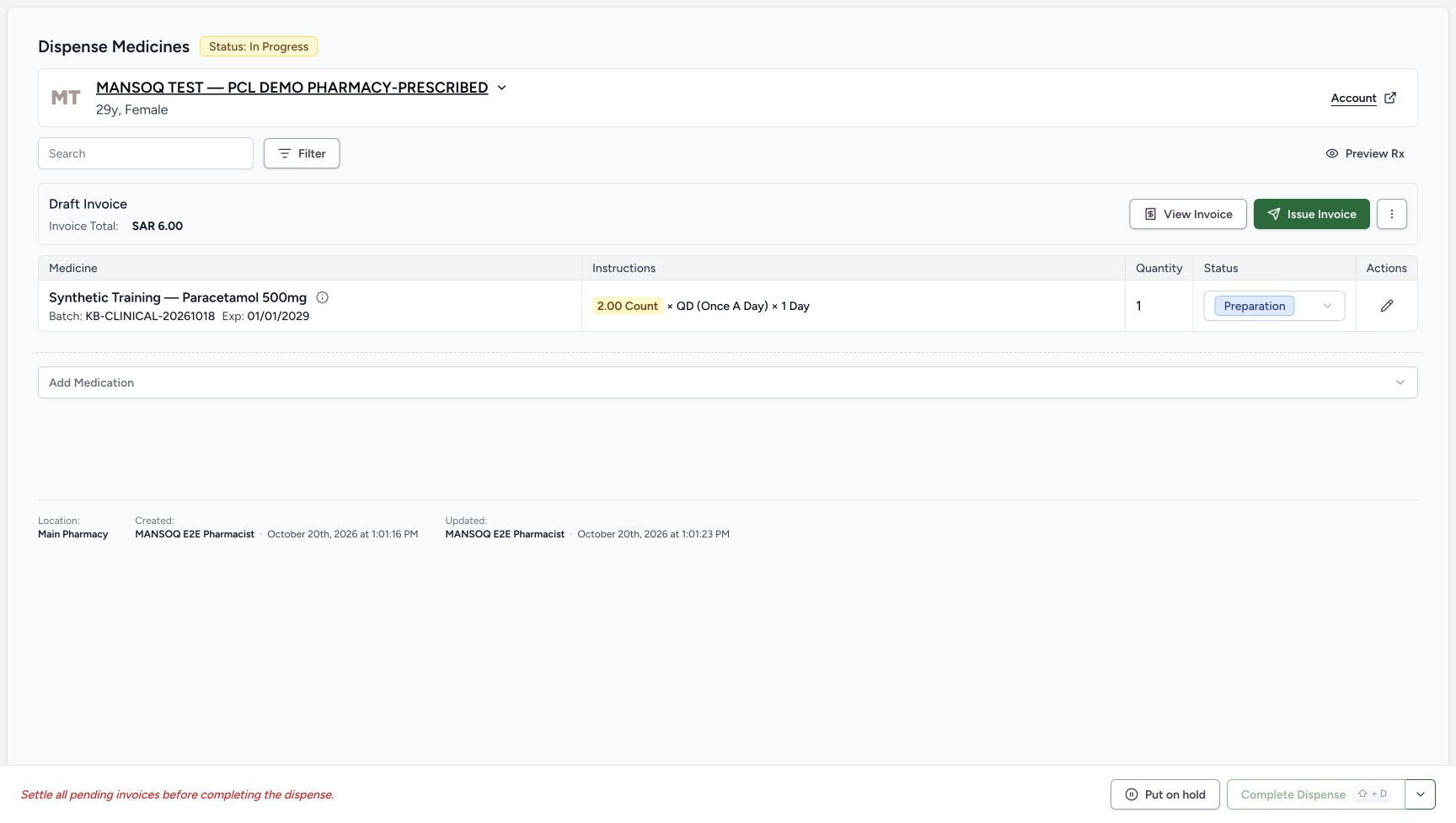
Existing unpaid order before hold
Capture details
Genuine natural native capture of the exact local d20e build; source publication is LOCAL_UNPUSHED. Original pixels are unchanged. This bounded recording covers one confirmed hold and one resume of an existing synthetic order with reloads. Completion, invoice issuance, payment and actual medicine handover are outside its demonstrated results.
Image SHA-256 e12caf721efba7021125a64a7510c32ba17e441abdb752300da370a3528ef151
- Match the existing synthetic patient: Continue the assigned Pharmacy-Prescribed patient’s existing order.
- Read the order status: The parent order starts In Progress.
- Read the existing Draft invoice: The invoice remains Draft for SAR 6.00; this lesson performs no invoice action.
- Read the prepared quantity: The existing dispense quantity is one.
- Read the medicine status: The one-count row starts Preparation.
- Distinguish prescription instructions: The instructions display 2.00 Count, QD and 1 Day; the prepared quantity column separately shows one.
- Open Put on hold: This first button opens a confirmation; it does not yet save a hold.
- Recognise disabled completion: Complete Dispense is disabled while the invoice is pending.
 12345
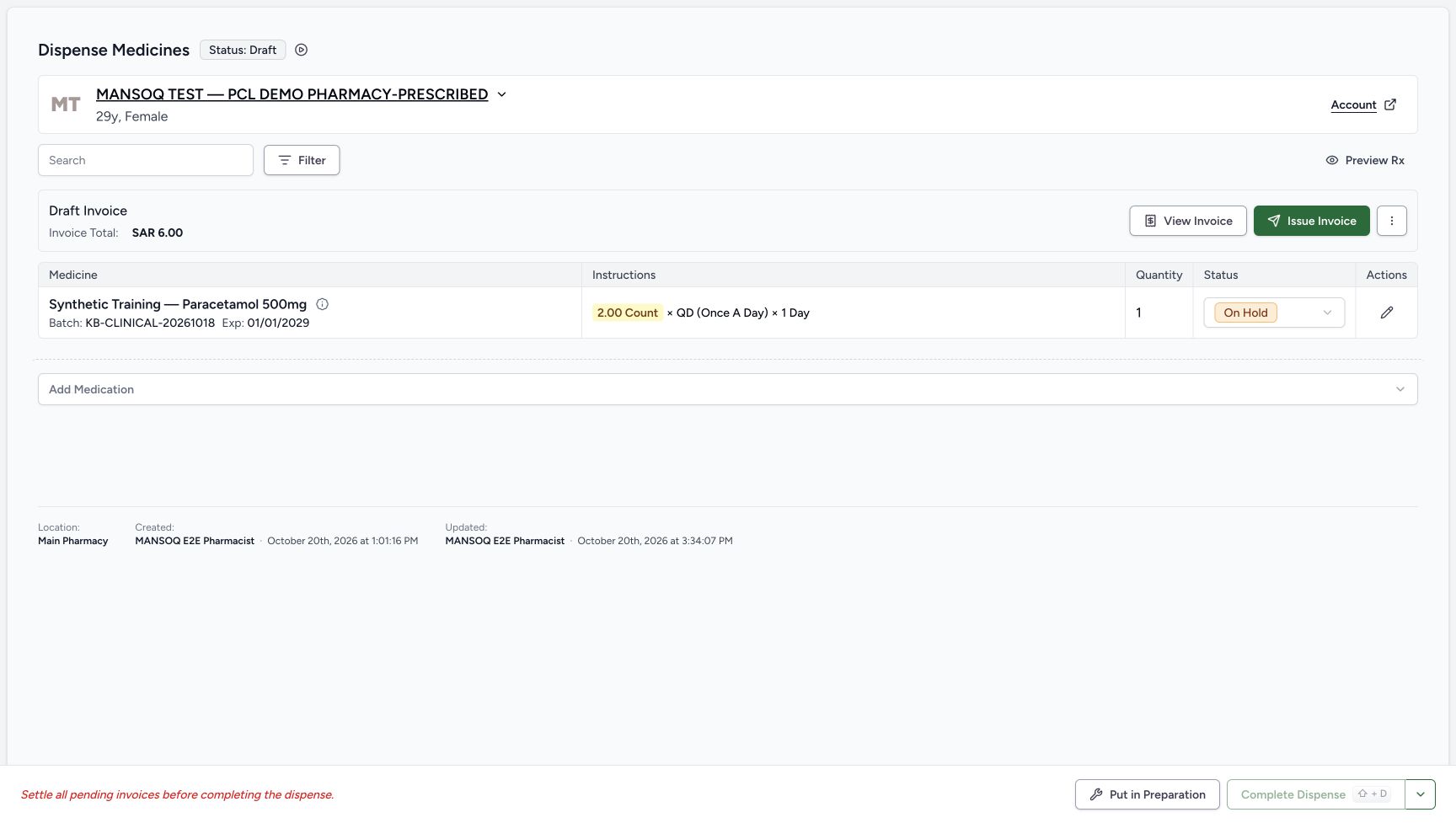
12345Held state retained after reload
Capture details
Genuine natural native capture of the exact local d20e build; source publication is LOCAL_UNPUSHED. Original pixels are unchanged. This bounded recording covers one confirmed hold and one resume of an existing synthetic order with reloads. Completion, invoice issuance, payment and actual medicine handover are outside its demonstrated results.
Image SHA-256 93e6b28f354b4ecefc4b1be30f909ebd9f6d50407e75bf39fbe4e11ca3a8a8de
- Verify Draft after reload: The parent order remains Draft after a normal browser reload.
- Verify On Hold after reload: The held medicine status persists.
- Check the unchanged Draft invoice: No invoice action was part of holding the order.
- Choose Put in Preparation once: The recorded Pharmacist resumed using this footer control.
- Keep completion separate: Complete Dispense remains disabled and is outside the tested workflow.
 12345
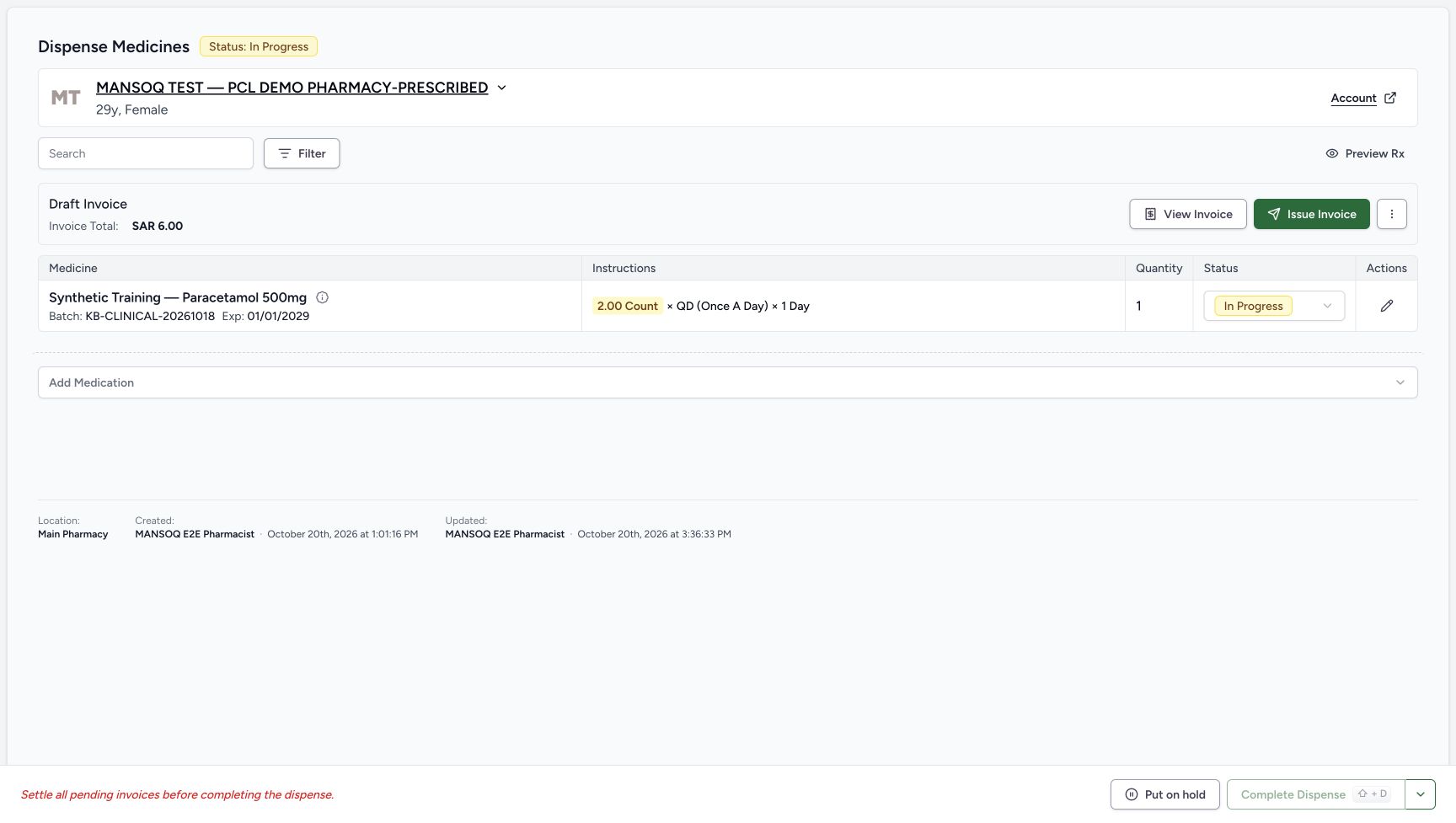
12345Resumed state retained after reload
Capture details
Genuine natural native capture of the exact local d20e build; source publication is LOCAL_UNPUSHED. Original pixels are unchanged. This bounded recording covers one confirmed hold and one resume of an existing synthetic order with reloads. Completion, invoice issuance, payment and actual medicine handover are outside its demonstrated results.
Image SHA-256 5772bd24f01ac51c6d4c4a8305804e9fafa2772a05dc4d55f2ec65e0b252598e
- Verify In Progress after reload: The parent order retains its saved resumed state.
- Verify the medicine state after reload: The same quantity-one row remains In Progress.
- Verify the retained quantity: The existing prepared quantity stays one.
- Verify the retained Draft invoice: SAR 6.00 remains Draft after reload.
- Notice the restored hold control: Put on hold is available again; no second hold was performed.
17 of 17 content blocks have reviewed image alignment.
Before you begin
- Use the authorised ordinary Pharmacist account and the existing assigned Main Pharmacy order for MANSOQ TEST — PCL DEMO PHARMACY-PRESCRIBED. Match the patient before acting. This lesson starts with that saved order already open; its earlier creation is a separate workflow.
 1
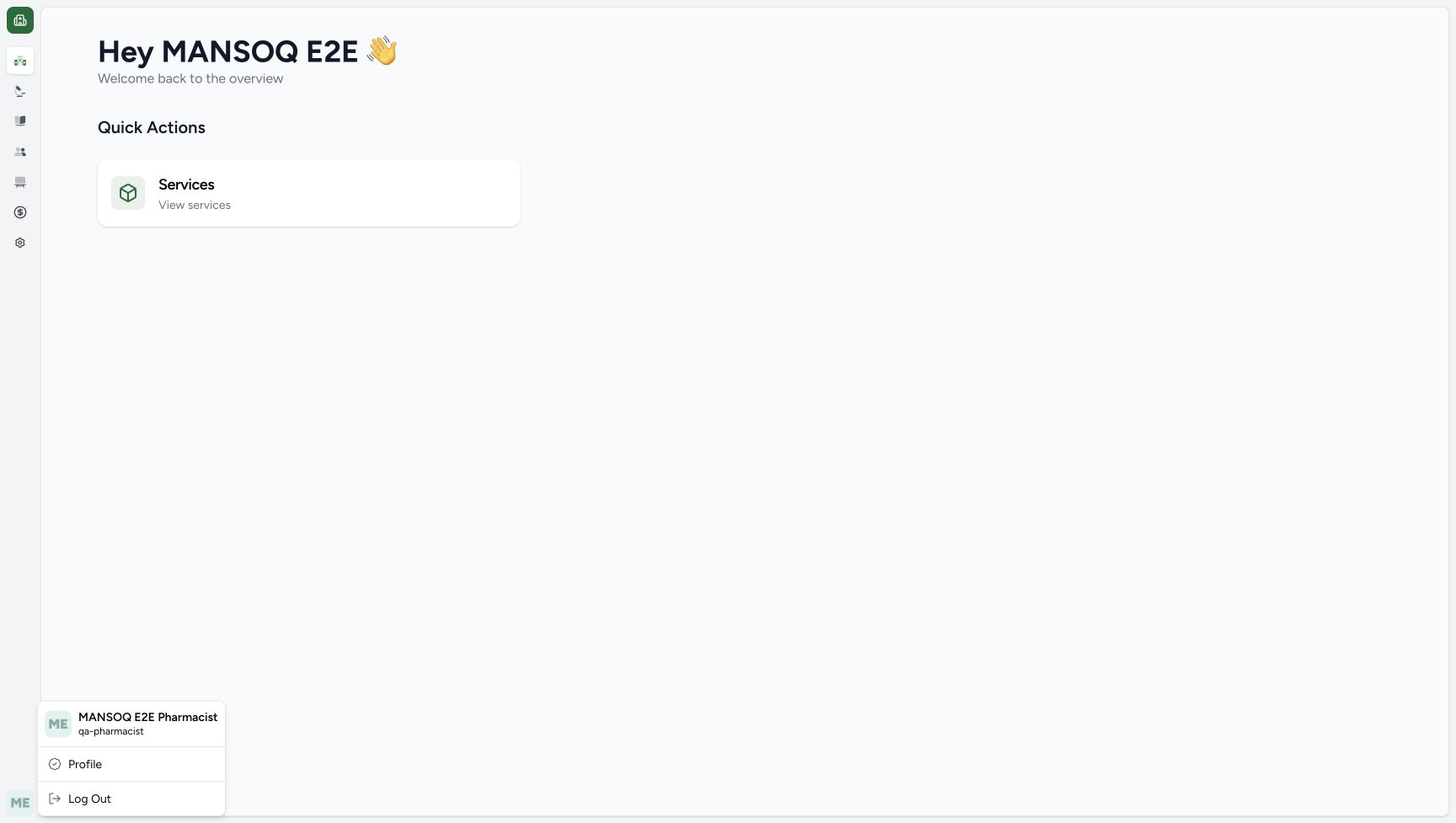
1Recorded release d20e68ed · 2026-10-20T12:33:44.207Z · 1728 × 977 Ordinary Pharmacist identity
Capture details
Genuine natural native capture of the exact local d20e build; source publication is LOCAL_UNPUSHED. Original pixels are unchanged. This bounded recording covers one confirmed hold and one resume of an existing synthetic order with reloads. Completion, invoice issuance, payment and actual medicine handover are outside its demonstrated results.
Image SHA-256
5f6856667f0483e0d31a026722c37541e2ed64c6a9b2b539350fa7eb1dd944c1- Check the ordinary Pharmacist: The account menu identifies MANSOQ E2E Pharmacist and qa-pharmacist.
12345678Recorded release d20e68ed · 2026-10-20T12:33:59.230Z · 1728 × 977 Existing unpaid order before hold
Capture details
Genuine natural native capture of the exact local d20e build; source publication is LOCAL_UNPUSHED. Original pixels are unchanged. This bounded recording covers one confirmed hold and one resume of an existing synthetic order with reloads. Completion, invoice issuance, payment and actual medicine handover are outside its demonstrated results.
Image SHA-256
e12caf721efba7021125a64a7510c32ba17e441abdb752300da370a3528ef151- Match the existing synthetic patient: Continue the assigned Pharmacy-Prescribed patient’s existing order.
- Read the order status: The parent order starts In Progress.
- Read the existing Draft invoice: The invoice remains Draft for SAR 6.00; this lesson performs no invoice action.
- Read the prepared quantity: The existing dispense quantity is one.
- Read the medicine status: The one-count row starts Preparation.
- Distinguish prescription instructions: The instructions display 2.00 Count, QD and 1 Day; the prepared quantity column separately shows one.
- Open Put on hold: This first button opens a confirmation; it does not yet save a hold.
- Recognise disabled completion: Complete Dispense is disabled while the invoice is pending.
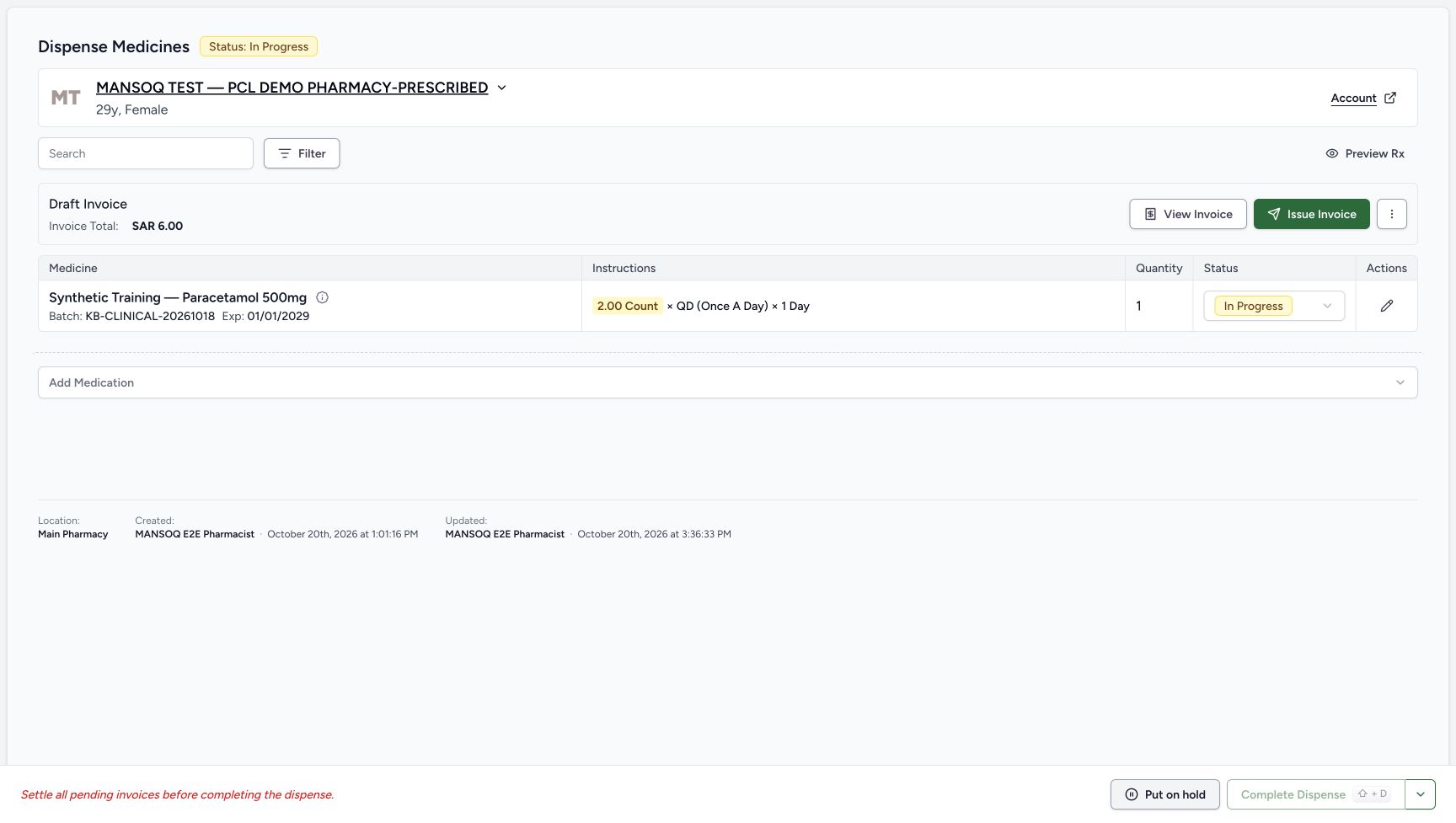
- Confirm the starting order is In Progress, its existing quantity-one Synthetic Training — Paracetamol 500mg row is Preparation and its invoice is Draft for SAR 6.00. The prescription instructions display 2.00 Count, QD and 1 Day; the prepared quantity is separately one. Leave those existing values unchanged.12345678
Recorded release d20e68ed · 2026-10-20T12:33:59.230Z · 1728 × 977 Existing unpaid order before hold
Capture details
Genuine natural native capture of the exact local d20e build; source publication is LOCAL_UNPUSHED. Original pixels are unchanged. This bounded recording covers one confirmed hold and one resume of an existing synthetic order with reloads. Completion, invoice issuance, payment and actual medicine handover are outside its demonstrated results.
Image SHA-256
e12caf721efba7021125a64a7510c32ba17e441abdb752300da370a3528ef151- Match the existing synthetic patient: Continue the assigned Pharmacy-Prescribed patient’s existing order.
- Read the order status: The parent order starts In Progress.
- Read the existing Draft invoice: The invoice remains Draft for SAR 6.00; this lesson performs no invoice action.
- Read the prepared quantity: The existing dispense quantity is one.
- Read the medicine status: The one-count row starts Preparation.
- Distinguish prescription instructions: The instructions display 2.00 Count, QD and 1 Day; the prepared quantity column separately shows one.
- Open Put on hold: This first button opens a confirmation; it does not yet save a hold.
- Recognise disabled completion: Complete Dispense is disabled while the invoice is pending.
- This is a bounded software exercise, not clinical advice or actual medicine handover. It records one confirmed hold and one resume. Complete Dispense remains disabled; no invoice issuance, new billing, payment, coverage change or completion action is demonstrated.12345678
Recorded release d20e68ed · 2026-10-20T12:33:59.230Z · 1728 × 977 Existing unpaid order before hold
Capture details
Genuine natural native capture of the exact local d20e build; source publication is LOCAL_UNPUSHED. Original pixels are unchanged. This bounded recording covers one confirmed hold and one resume of an existing synthetic order with reloads. Completion, invoice issuance, payment and actual medicine handover are outside its demonstrated results.
Image SHA-256
e12caf721efba7021125a64a7510c32ba17e441abdb752300da370a3528ef151- Match the existing synthetic patient: Continue the assigned Pharmacy-Prescribed patient’s existing order.
- Read the order status: The parent order starts In Progress.
- Read the existing Draft invoice: The invoice remains Draft for SAR 6.00; this lesson performs no invoice action.
- Read the prepared quantity: The existing dispense quantity is one.
- Read the medicine status: The one-count row starts Preparation.
- Distinguish prescription instructions: The instructions display 2.00 Count, QD and 1 Day; the prepared quantity column separately shows one.
- Open Put on hold: This first button opens a confirmation; it does not yet save a hold.
- Recognise disabled completion: Complete Dispense is disabled while the invoice is pending.
12345Recorded release d20e68ed · 2026-10-20T12:37:17.373Z · 1728 × 977 Resumed state retained after reload
Capture details
Genuine natural native capture of the exact local d20e build; source publication is LOCAL_UNPUSHED. Original pixels are unchanged. This bounded recording covers one confirmed hold and one resume of an existing synthetic order with reloads. Completion, invoice issuance, payment and actual medicine handover are outside its demonstrated results.
Image SHA-256
5772bd24f01ac51c6d4c4a8305804e9fafa2772a05dc4d55f2ec65e0b252598e- Verify In Progress after reload: The parent order retains its saved resumed state.
- Verify the medicine state after reload: The same quantity-one row remains In Progress.
- Verify the retained quantity: The existing prepared quantity stays one.
- Verify the retained Draft invoice: SAR 6.00 remains Draft after reload.
- Notice the restored hold control: Put on hold is available again; no second hold was performed.
1. Review the existing unpaid order
Check the patient banner and Main Pharmacy location. Read In Progress on the order and Preparation on the existing medicine row. Keep the quantity at one and the existing Draft Invoice at SAR 6.00. The footer states Settle all pending invoices before completing the dispense, and Complete Dispense is disabled. This exercise changes the hold state only.
1Ordinary Pharmacist identity
Capture details
Genuine natural native capture of the exact local d20e build; source publication is LOCAL_UNPUSHED. Original pixels are unchanged. This bounded recording covers one confirmed hold and one resume of an existing synthetic order with reloads. Completion, invoice issuance, payment and actual medicine handover are outside its demonstrated results.
Image SHA-256 5f6856667f0483e0d31a026722c37541e2ed64c6a9b2b539350fa7eb1dd944c1
- Check the ordinary Pharmacist: The account menu identifies MANSOQ E2E Pharmacist and qa-pharmacist.
12345678Existing unpaid order before hold
Capture details
Genuine natural native capture of the exact local d20e build; source publication is LOCAL_UNPUSHED. Original pixels are unchanged. This bounded recording covers one confirmed hold and one resume of an existing synthetic order with reloads. Completion, invoice issuance, payment and actual medicine handover are outside its demonstrated results.
Image SHA-256 e12caf721efba7021125a64a7510c32ba17e441abdb752300da370a3528ef151
- Match the existing synthetic patient: Continue the assigned Pharmacy-Prescribed patient’s existing order.
- Read the order status: The parent order starts In Progress.
- Read the existing Draft invoice: The invoice remains Draft for SAR 6.00; this lesson performs no invoice action.
- Read the prepared quantity: The existing dispense quantity is one.
- Read the medicine status: The one-count row starts Preparation.
- Distinguish prescription instructions: The instructions display 2.00 Count, QD and 1 Day; the prepared quantity column separately shows one.
- Open Put on hold: This first button opens a confirmation; it does not yet save a hold.
- Recognise disabled completion: Complete Dispense is disabled while the invoice is pending.
2. Open and read the hold confirmation
Choose the footer Put on hold. This opens Put this dispense on hold?; opening the dialog alone does not save a status change. Read the pause explanation. Stay on this page is the separate cancellation control; the recorded workflow proceeds with the dialog’s confirming Put on hold button.
12345678Existing unpaid order before hold
Capture details
Genuine natural native capture of the exact local d20e build; source publication is LOCAL_UNPUSHED. Original pixels are unchanged. This bounded recording covers one confirmed hold and one resume of an existing synthetic order with reloads. Completion, invoice issuance, payment and actual medicine handover are outside its demonstrated results.
Image SHA-256 e12caf721efba7021125a64a7510c32ba17e441abdb752300da370a3528ef151
- Match the existing synthetic patient: Continue the assigned Pharmacy-Prescribed patient’s existing order.
- Read the order status: The parent order starts In Progress.
- Read the existing Draft invoice: The invoice remains Draft for SAR 6.00; this lesson performs no invoice action.
- Read the prepared quantity: The existing dispense quantity is one.
- Read the medicine status: The one-count row starts Preparation.
- Distinguish prescription instructions: The instructions display 2.00 Count, QD and 1 Day; the prepared quantity column separately shows one.
- Open Put on hold: This first button opens a confirmation; it does not yet save a hold.
- Recognise disabled completion: Complete Dispense is disabled while the invoice is pending.
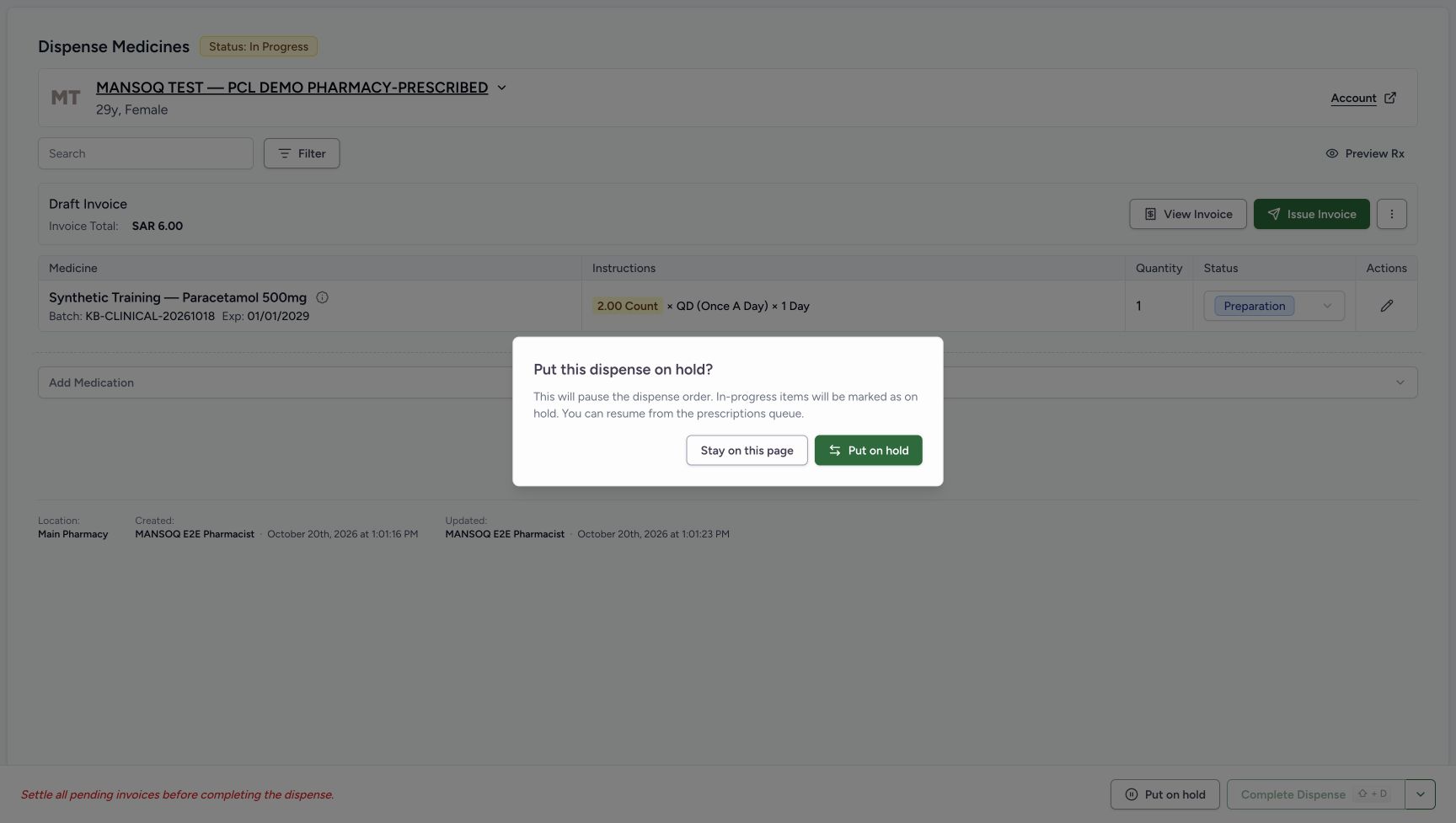 1234
1234Hold opens confirmation only
Capture details
Genuine natural native capture of the exact local d20e build; source publication is LOCAL_UNPUSHED. Original pixels are unchanged. This bounded recording covers one confirmed hold and one resume of an existing synthetic order with reloads. Completion, invoice issuance, payment and actual medicine handover are outside its demonstrated results.
Image SHA-256 a7459e82a54dabcb941bd45af90f3e3209b004848ae4fbb052c019e1095f1e3d
- Read the hold confirmation: The dialog is open; the background order has not yet been saved as held.
- Read the pause explanation: The dialog explains that the order will pause and its in-progress items will be marked on hold.
- Stay on this page: This is the separate cancellation control; it was not used in the recorded confirmation.
- Find the confirming Put on hold: This dialog button performs the hold only when selected.
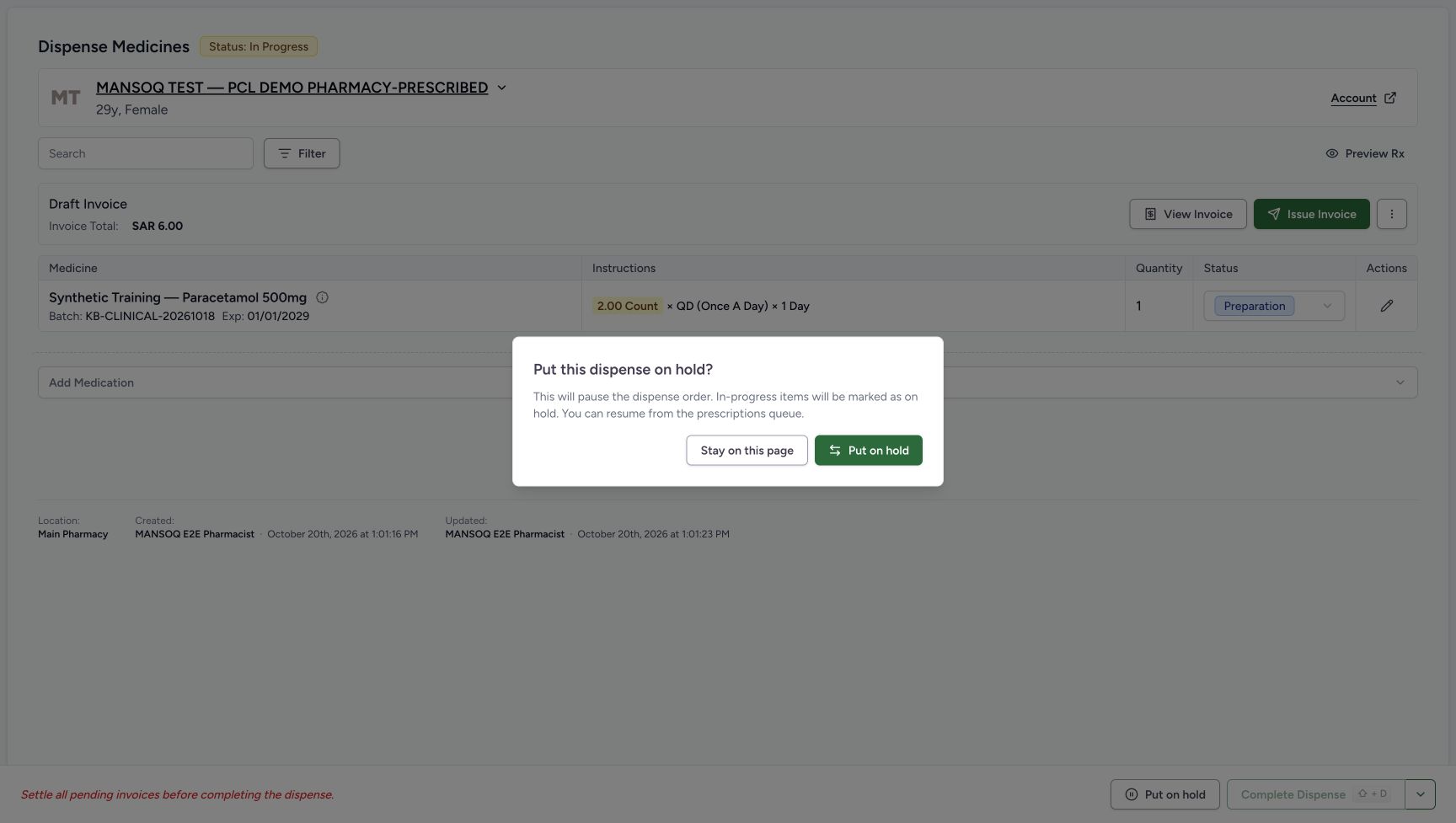 123
123Review the hold confirmation
Capture details
Genuine natural native capture of the exact local d20e build; source publication is LOCAL_UNPUSHED. Original pixels are unchanged. This bounded recording covers one confirmed hold and one resume of an existing synthetic order with reloads. Completion, invoice issuance, payment and actual medicine handover are outside its demonstrated results.
Image SHA-256 a694328d7ce2e9bc71face2c816c8136a07598d849f592fbda4307679aa022b1
- Confirm Put on hold once: The recorded Pharmacist selected this confirmation once.
- Distinguish cancellation: Stay on this page is different from confirming the hold.
- Notice the unchanged background status: Opening the dialog alone leaves the background In Progress label visible.
3. Confirm once and wait for the queue
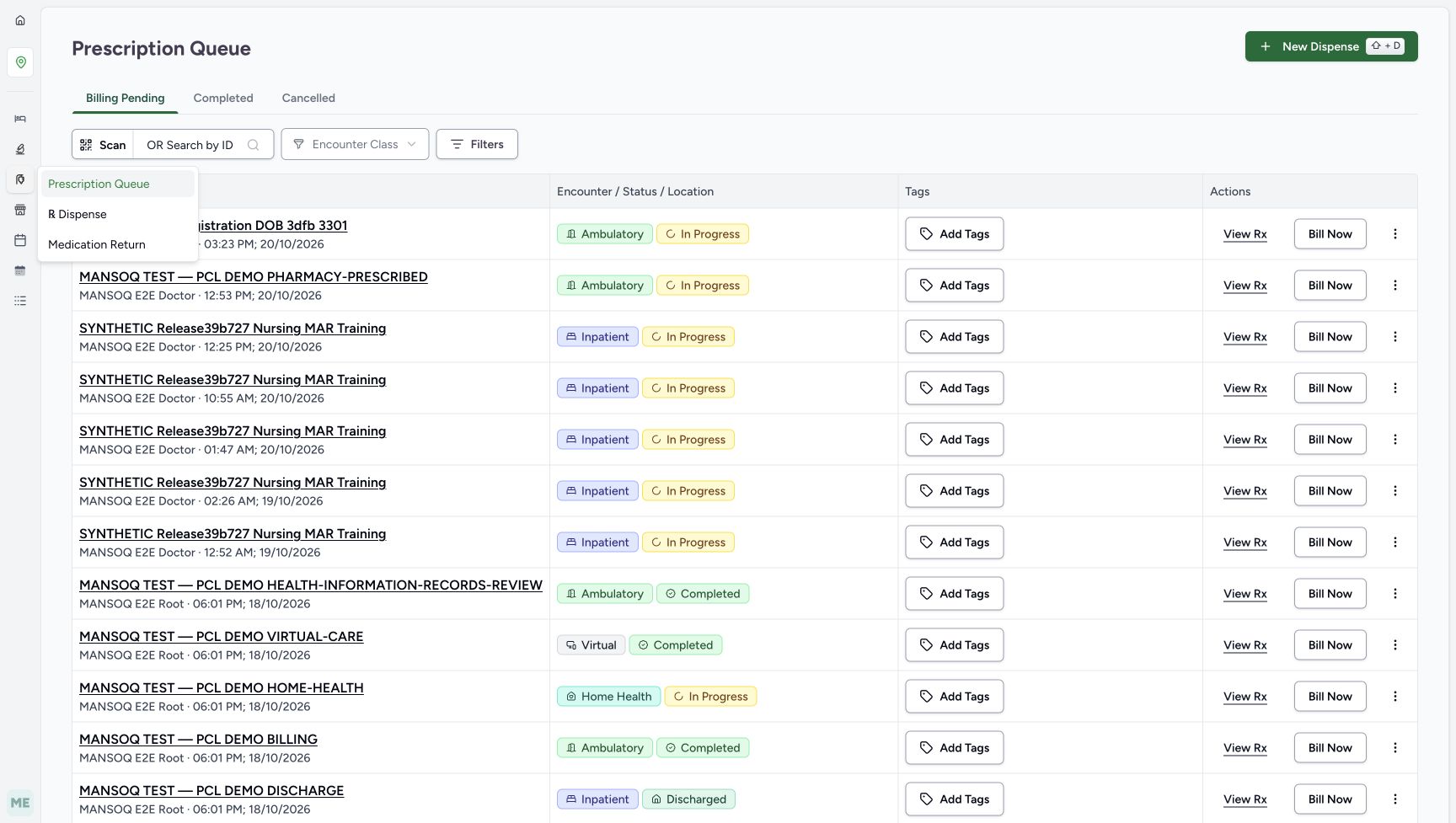
Choose Put on hold in the confirmation once. The application returns to Prescription Queue. The immediate picture contains loading placeholders; wait until the queue has settled before interpreting its rows. The existing Pharmacy-Prescribed patient’s prescription is still listed. This redirect did not create another order or perform a Bill Now action.
123Review the hold confirmation
Capture details
Genuine natural native capture of the exact local d20e build; source publication is LOCAL_UNPUSHED. Original pixels are unchanged. This bounded recording covers one confirmed hold and one resume of an existing synthetic order with reloads. Completion, invoice issuance, payment and actual medicine handover are outside its demonstrated results.
Image SHA-256 a694328d7ce2e9bc71face2c816c8136a07598d849f592fbda4307679aa022b1
- Confirm Put on hold once: The recorded Pharmacist selected this confirmation once.
- Distinguish cancellation: Stay on this page is different from confirming the hold.
- Notice the unchanged background status: Opening the dialog alone leaves the background In Progress label visible.
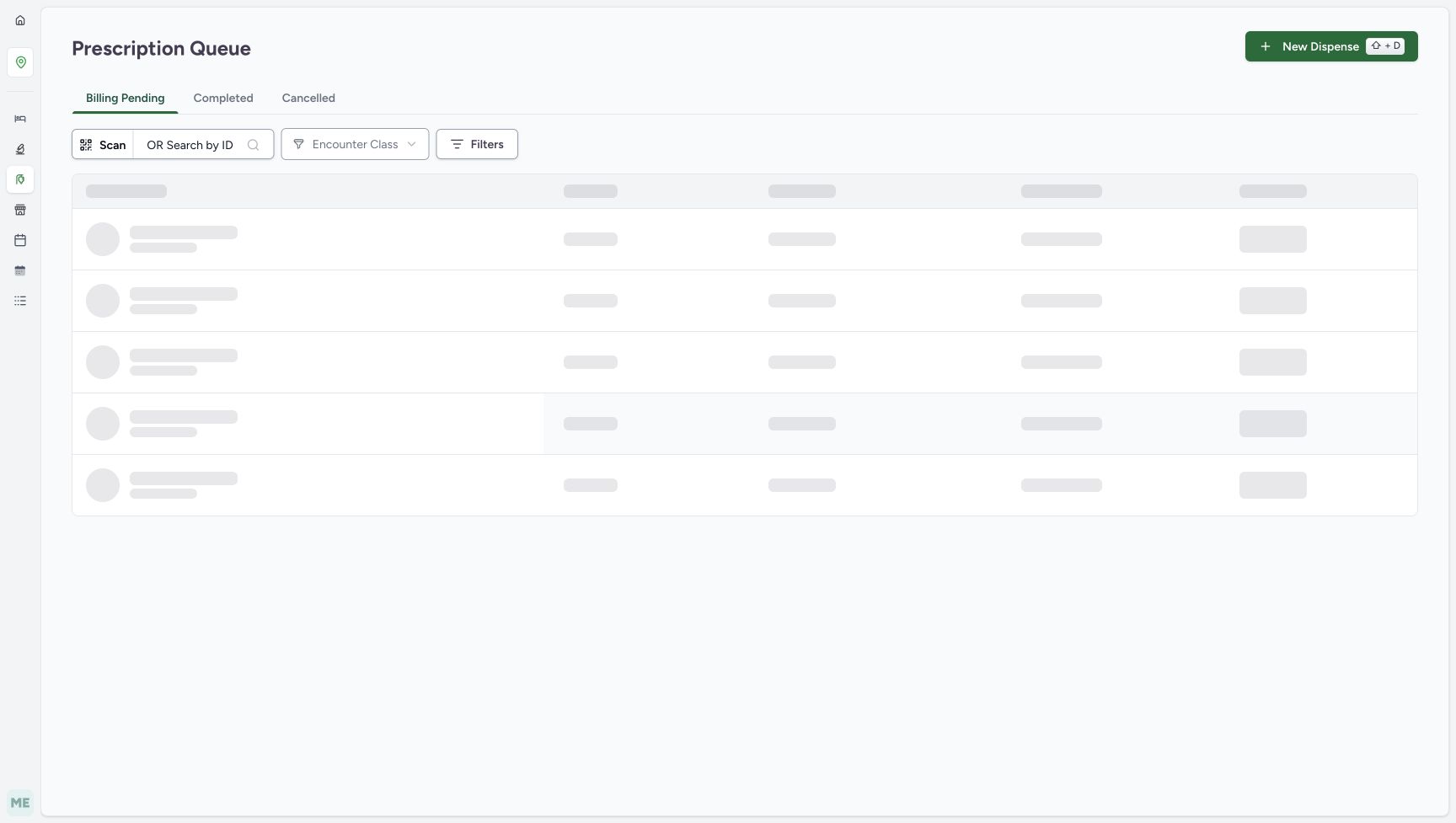 123
123Prescription Queue loading after confirmation
Capture details
Genuine natural native capture of the exact local d20e build; source publication is LOCAL_UNPUSHED. Original pixels are unchanged. This bounded recording covers one confirmed hold and one resume of an existing synthetic order with reloads. Completion, invoice issuance, payment and actual medicine handover are outside its demonstrated results.
Image SHA-256 609e8b7580c19fa4d0e93da20b1d967b11009faf0870eefe2bcdeb3f85bf6fa5
- Recognise the queue redirect: The page has navigated to Prescription Queue after confirmation.
- Wait for the table to load: The rows in this immediate capture are loading placeholders, not an empty-order result.
- Locate the Pharmacy menu: The location sidebar Pharmacy icon opens the relevant queue choices.
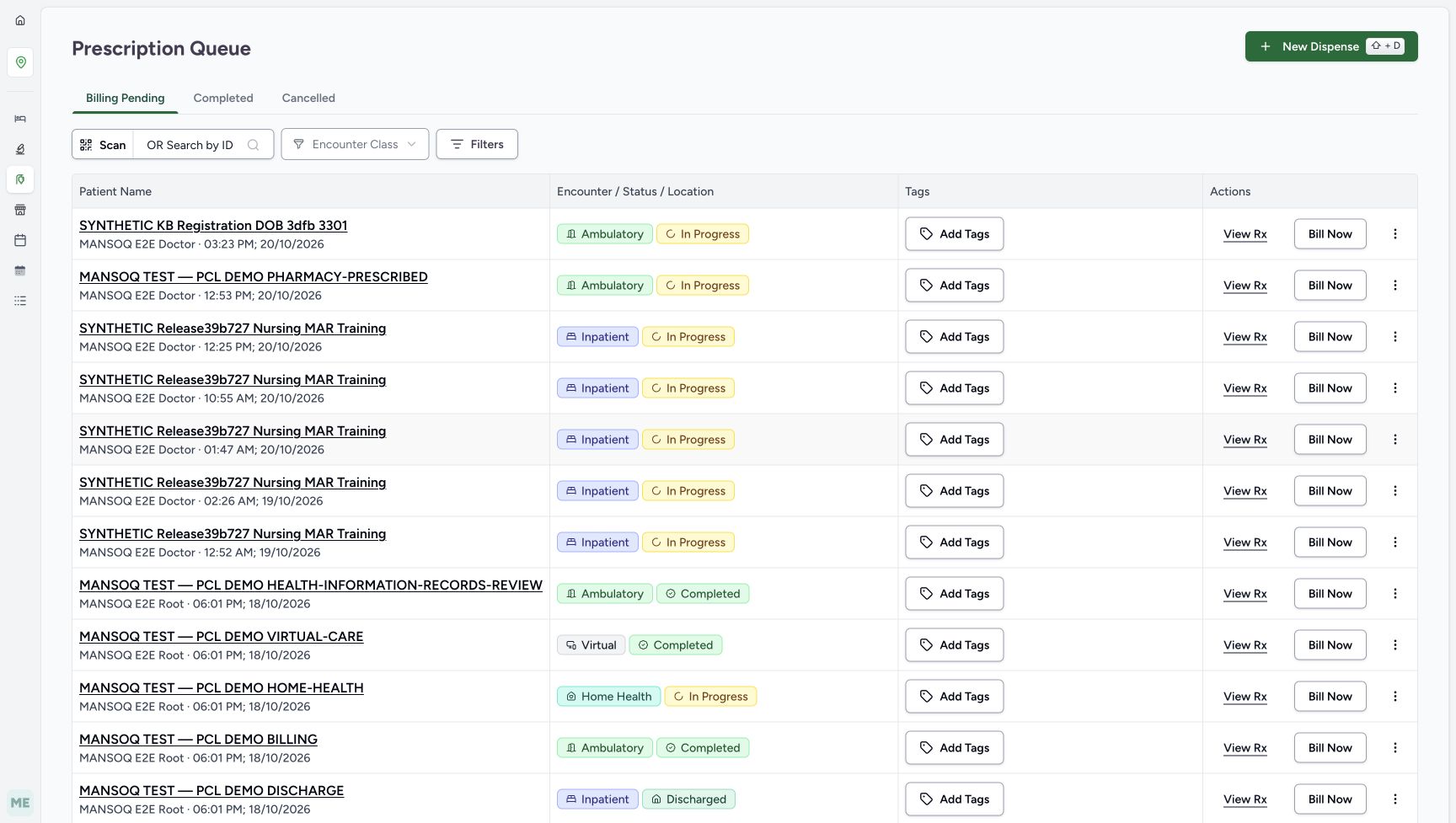 123
123Settled Prescription Queue after hold
Capture details
Genuine natural native capture of the exact local d20e build; source publication is LOCAL_UNPUSHED. Original pixels are unchanged. This bounded recording covers one confirmed hold and one resume of an existing synthetic order with reloads. Completion, invoice issuance, payment and actual medicine handover are outside its demonstrated results.
Image SHA-256 5d688c80bc27d3666d8d3576a4399fb81a719f3bb4bfd794081b109ac4d5fb60
- Identify the existing prescription row: The assigned Pharmacy-Prescribed patient’s prescription remains listed.
- Open Pharmacy in the location sidebar: Use this menu to reach the saved dispense-order queue.
- Distinguish Bill Now: Bill Now starts a billing path; it was not selected to resume this existing order.
4. Use the location Pharmacy menu to reach Dispense Orders
From Prescription Queue open the Pharmacy menu in the location sidebar, using the illustrated pharmacy icon. Choose ℞ Dispense. Prescription Queue and Dispense Orders are separate lists; use the saved order list for this recovery path rather than Bill Now or New Dispense.
123Settled Prescription Queue after hold
Capture details
Genuine natural native capture of the exact local d20e build; source publication is LOCAL_UNPUSHED. Original pixels are unchanged. This bounded recording covers one confirmed hold and one resume of an existing synthetic order with reloads. Completion, invoice issuance, payment and actual medicine handover are outside its demonstrated results.
Image SHA-256 5d688c80bc27d3666d8d3576a4399fb81a719f3bb4bfd794081b109ac4d5fb60
- Identify the existing prescription row: The assigned Pharmacy-Prescribed patient’s prescription remains listed.
- Open Pharmacy in the location sidebar: Use this menu to reach the saved dispense-order queue.
- Distinguish Bill Now: Bill Now starts a billing path; it was not selected to resume this existing order.
 123
123Location Pharmacy menu and Dispense link
Capture details
Genuine natural native capture of the exact local d20e build; source publication is LOCAL_UNPUSHED. Original pixels are unchanged. This bounded recording covers one confirmed hold and one resume of an existing synthetic order with reloads. Completion, invoice issuance, payment and actual medicine handover are outside its demonstrated results.
Image SHA-256 b90368eef261d002691e085feb5e0b8b4abacc44cddc17c6e57b56addd90cb86
- Use the open Pharmacy menu: The location sidebar menu is now open.
- Choose ℞ Dispense: This link opens Dispense Orders.
- Distinguish Prescription Queue: The current prescription list is a different queue from the saved dispense orders.
5. Reopen the existing Draft order
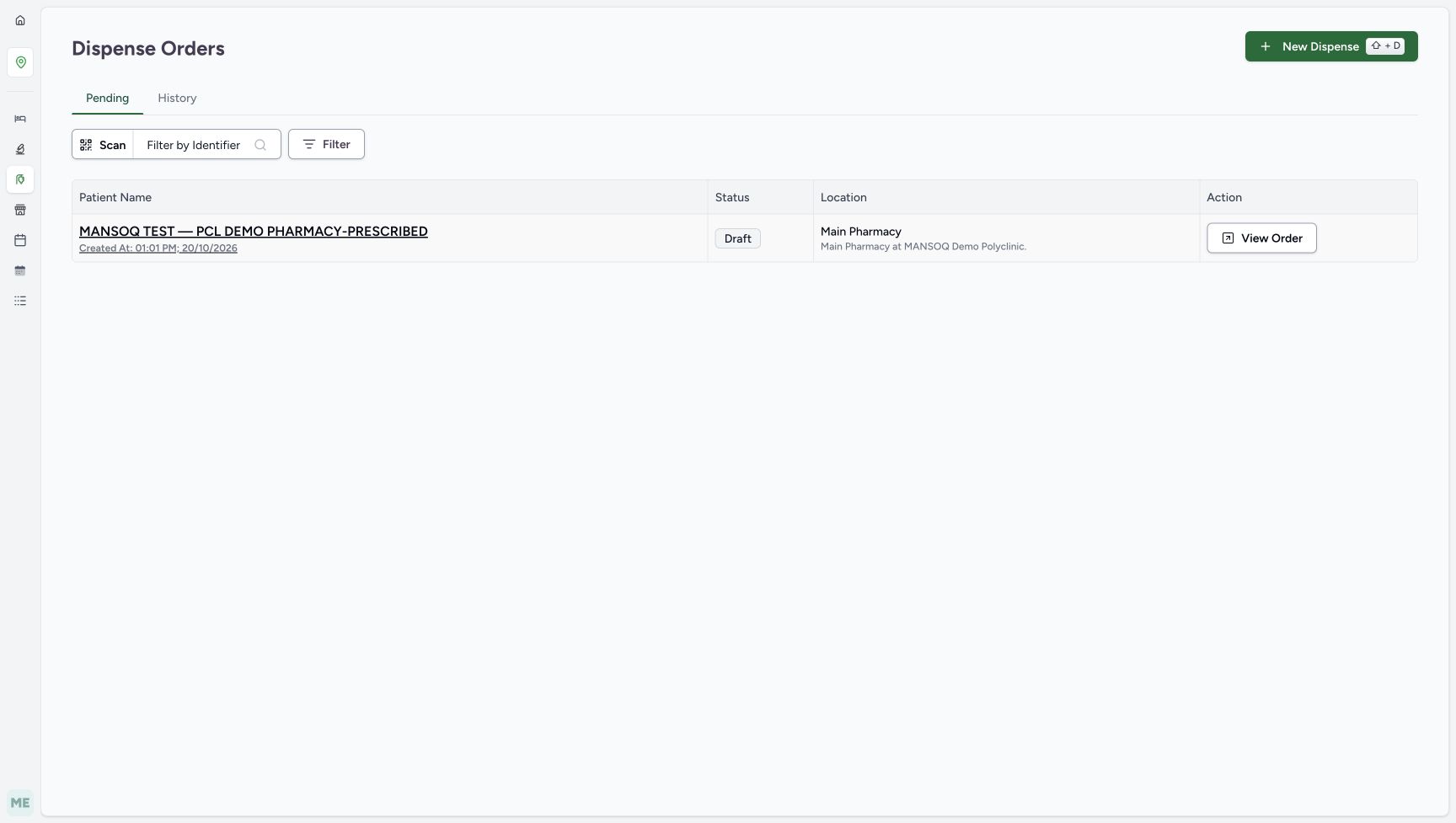
Keep Pending selected in Dispense Orders. Match the existing Pharmacy-Prescribed patient, Main Pharmacy location and creation time 01:01 PM on October 20. The row is Draft. Choose View Order. The settled view shows Draft on the order and On Hold on its existing quantity-one medicine row, with the same Draft Invoice for SAR 6.00.
 12345
12345Pending queue with the existing Draft order
Capture details
Genuine natural native capture of the exact local d20e build; source publication is LOCAL_UNPUSHED. Original pixels are unchanged. This bounded recording covers one confirmed hold and one resume of an existing synthetic order with reloads. Completion, invoice issuance, payment and actual medicine handover are outside its demonstrated results.
Image SHA-256 7cbe760cf2b89624ab7929c29978d52e98df310ec389eb78832c556d7f37c929
- Keep Pending selected: Pending includes this existing Draft order.
- Match the existing patient and creation time: The saved order belongs to the Pharmacy-Prescribed patient and was created at 01:01 PM on October 20.
- Read Draft in the order queue: This is the parent order status after the hold.
- Check Main Pharmacy: Match the saved order’s location.
- Choose View Order: Reopen this existing order rather than making another dispense.
 123456
Reopened order Draft with medicine On Hold
Capture details
Genuine natural native capture of the exact local d20e build; source publication is LOCAL_UNPUSHED. Original pixels are unchanged. This bounded recording covers one confirmed hold and one resume of an existing synthetic order with reloads. Completion, invoice issuance, payment and actual medicine handover are outside its demonstrated results.
Image SHA-256 93e6b28f354b4ecefc4b1be30f909ebd9f6d50407e75bf39fbe4e11ca3a8a8de
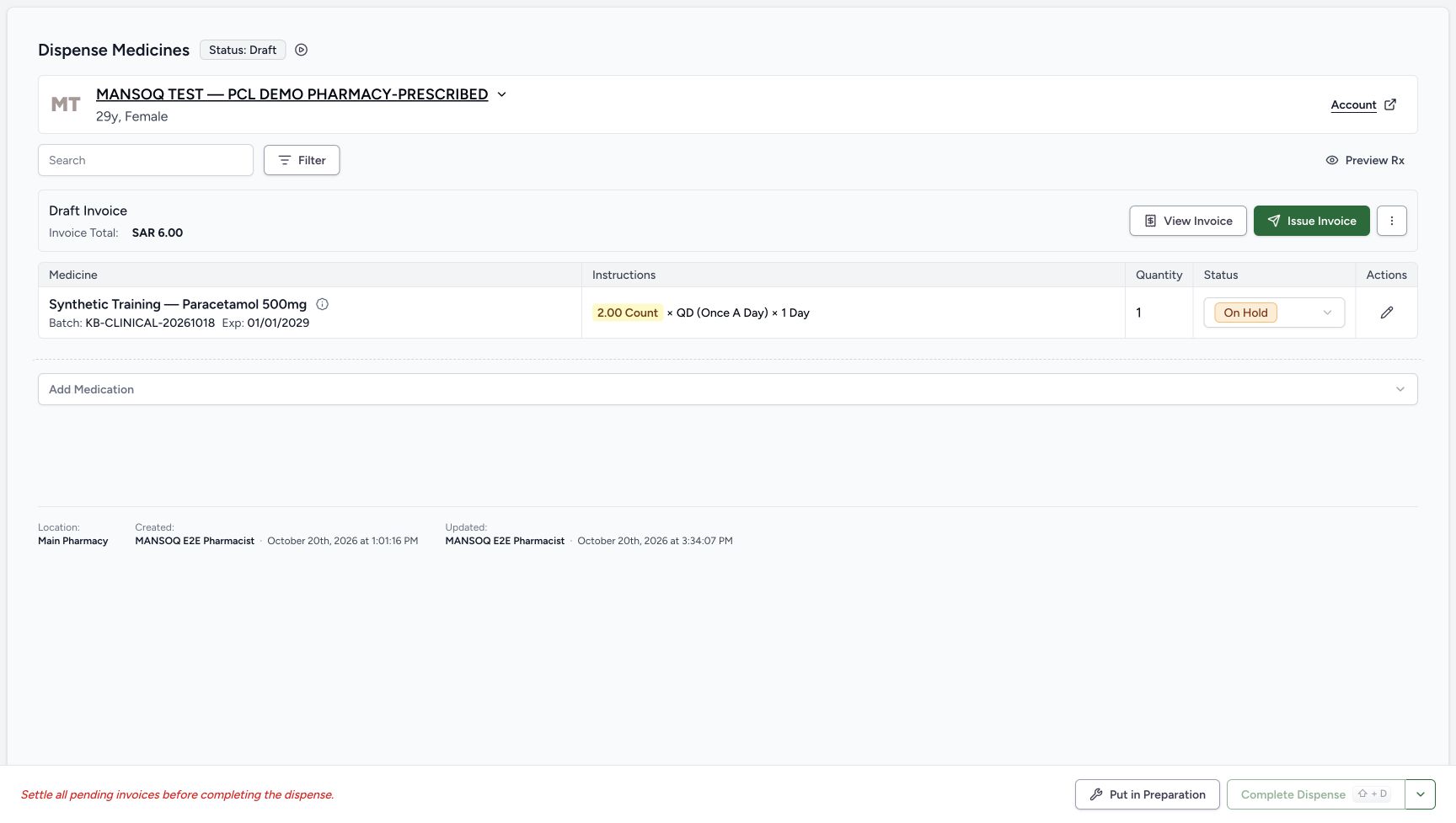
- Read the parent Draft status: The hold saved the order as Draft.
- Read the child On Hold status: The existing medicine row is On Hold.
- Verify quantity one: The held row keeps its prepared quantity.
- Verify the invoice remains Draft: The same Draft invoice still totals SAR 6.00.
- Locate Put in Preparation: The footer offers the tested resume action for the held medicine row.
- Distinguish the header action: Mark as In Progress is a separate header control; this recording used the footer instead.
6. Reload and verify the held state
Use a normal browser reload. Check that the same order remains Draft and its medicine row remains On Hold, with quantity one and the unchanged Draft Invoice for SAR 6.00. Put in Preparation is available in the footer. The small Mark as In Progress control beside the header status is a separate entry; this recording uses the footer resume control.
12345Held state retained after reload
Capture details
Genuine natural native capture of the exact local d20e build; source publication is LOCAL_UNPUSHED. Original pixels are unchanged. This bounded recording covers one confirmed hold and one resume of an existing synthetic order with reloads. Completion, invoice issuance, payment and actual medicine handover are outside its demonstrated results.
Image SHA-256 93e6b28f354b4ecefc4b1be30f909ebd9f6d50407e75bf39fbe4e11ca3a8a8de
- Verify Draft after reload: The parent order remains Draft after a normal browser reload.
- Verify On Hold after reload: The held medicine status persists.
- Check the unchanged Draft invoice: No invoice action was part of holding the order.
- Choose Put in Preparation once: The recorded Pharmacist resumed using this footer control.
- Keep completion separate: Complete Dispense remains disabled and is outside the tested workflow.
7. Resume once with Put in Preparation
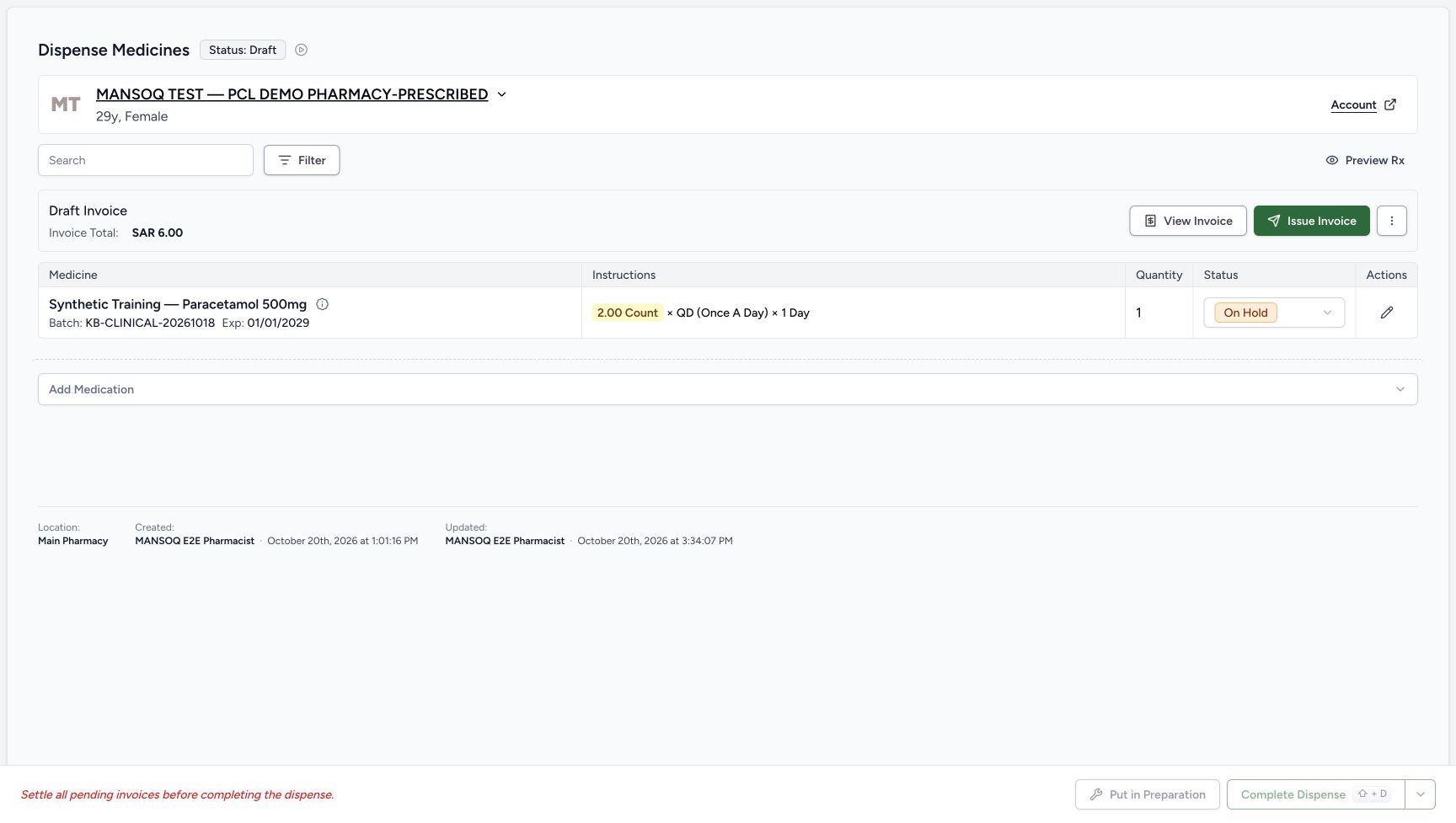
Choose the footer Put in Preparation once. The immediate view still shows Draft and On Hold while its controls are disabled during the request; wait for the settled result. The saved order and medicine row then both show In Progress. Despite the button wording, the recorded medicine status after resume is In Progress, rather than its original Preparation label. Quantity one and Draft SAR 6.00 remain.
12345Held state retained after reload
Capture details
Genuine natural native capture of the exact local d20e build; source publication is LOCAL_UNPUSHED. Original pixels are unchanged. This bounded recording covers one confirmed hold and one resume of an existing synthetic order with reloads. Completion, invoice issuance, payment and actual medicine handover are outside its demonstrated results.
Image SHA-256 93e6b28f354b4ecefc4b1be30f909ebd9f6d50407e75bf39fbe4e11ca3a8a8de
- Verify Draft after reload: The parent order remains Draft after a normal browser reload.
- Verify On Hold after reload: The held medicine status persists.
- Check the unchanged Draft invoice: No invoice action was part of holding the order.
- Choose Put in Preparation once: The recorded Pharmacist resumed using this footer control.
- Keep completion separate: Complete Dispense remains disabled and is outside the tested workflow.
 123
123Resume request still in progress
Capture details
Genuine natural native capture of the exact local d20e build; source publication is LOCAL_UNPUSHED. Original pixels are unchanged. This bounded recording covers one confirmed hold and one resume of an existing synthetic order with reloads. Completion, invoice issuance, payment and actual medicine handover are outside its demonstrated results.
Image SHA-256 453d020ca7dda65f6b4b4efa81ee205339203b797ca134ce425d3ba6d1d35faf
- Treat this as the pending view: The immediate capture still shows the old Draft label.
- Wait for the settled medicine status: On Hold is still pictured while the resume request is in progress.
- Do not repeat the pending action: Put in Preparation is temporarily disabled during the request; inspect the settled result next.
 12345
12345Saved resumed order and medicine row
Capture details
Genuine natural native capture of the exact local d20e build; source publication is LOCAL_UNPUSHED. Original pixels are unchanged. This bounded recording covers one confirmed hold and one resume of an existing synthetic order with reloads. Completion, invoice issuance, payment and actual medicine handover are outside its demonstrated results.
Image SHA-256 4576bda4325f186dd545ff86205f287c54746ca777f467f4b3c1dd825a2b8670
- Read the resumed order status: The parent order is now In Progress.
- Read the resumed medicine status: The row is In Progress, not its original Preparation status.
- Verify quantity remains one: Resuming did not create an additional medicine row.
- Verify Draft SAR 6.00 remains: The invoice status and total are unchanged.
- Recognise completion is still disabled: Resuming has not settled the pending invoice or completed the order.
8. Reload and verify the resumed order
Use a normal browser reload. Verify In Progress on both the same order and the existing quantity-one row. The invoice is still Draft for SAR 6.00, Complete Dispense remains disabled and Put on hold is available again. The recorded exercise ends here, with no second hold or completion action.
12345Resumed state retained after reload
Capture details
Genuine natural native capture of the exact local d20e build; source publication is LOCAL_UNPUSHED. Original pixels are unchanged. This bounded recording covers one confirmed hold and one resume of an existing synthetic order with reloads. Completion, invoice issuance, payment and actual medicine handover are outside its demonstrated results.
Image SHA-256 5772bd24f01ac51c6d4c4a8305804e9fafa2772a05dc4d55f2ec65e0b252598e
- Verify In Progress after reload: The parent order retains its saved resumed state.
- Verify the medicine state after reload: The same quantity-one row remains In Progress.
- Verify the retained quantity: The existing prepared quantity stays one.
- Verify the retained Draft invoice: SAR 6.00 remains Draft after reload.
- Notice the restored hold control: Put on hold is available again; no second hold was performed.
Keep the order, medicine and invoice states separate
Holding saved the parent order as Draft and the medicine row as On Hold. Resuming saved both as In Progress. The invoice stayed Draft for SAR 6.00 throughout. A resumed order does not establish that an invoice has been issued or paid, and the unchanged completion warning still applies.
12345678Existing unpaid order before hold
Capture details
Genuine natural native capture of the exact local d20e build; source publication is LOCAL_UNPUSHED. Original pixels are unchanged. This bounded recording covers one confirmed hold and one resume of an existing synthetic order with reloads. Completion, invoice issuance, payment and actual medicine handover are outside its demonstrated results.
Image SHA-256 e12caf721efba7021125a64a7510c32ba17e441abdb752300da370a3528ef151
- Match the existing synthetic patient: Continue the assigned Pharmacy-Prescribed patient’s existing order.
- Read the order status: The parent order starts In Progress.
- Read the existing Draft invoice: The invoice remains Draft for SAR 6.00; this lesson performs no invoice action.
- Read the prepared quantity: The existing dispense quantity is one.
- Read the medicine status: The one-count row starts Preparation.
- Distinguish prescription instructions: The instructions display 2.00 Count, QD and 1 Day; the prepared quantity column separately shows one.
- Open Put on hold: This first button opens a confirmation; it does not yet save a hold.
- Recognise disabled completion: Complete Dispense is disabled while the invoice is pending.
123456Reopened order Draft with medicine On Hold
Capture details
Genuine natural native capture of the exact local d20e build; source publication is LOCAL_UNPUSHED. Original pixels are unchanged. This bounded recording covers one confirmed hold and one resume of an existing synthetic order with reloads. Completion, invoice issuance, payment and actual medicine handover are outside its demonstrated results.
Image SHA-256 93e6b28f354b4ecefc4b1be30f909ebd9f6d50407e75bf39fbe4e11ca3a8a8de
- Read the parent Draft status: The hold saved the order as Draft.
- Read the child On Hold status: The existing medicine row is On Hold.
- Verify quantity one: The held row keeps its prepared quantity.
- Verify the invoice remains Draft: The same Draft invoice still totals SAR 6.00.
- Locate Put in Preparation: The footer offers the tested resume action for the held medicine row.
- Distinguish the header action: Mark as In Progress is a separate header control; this recording used the footer instead.
12345Held state retained after reload
Capture details
Genuine natural native capture of the exact local d20e build; source publication is LOCAL_UNPUSHED. Original pixels are unchanged. This bounded recording covers one confirmed hold and one resume of an existing synthetic order with reloads. Completion, invoice issuance, payment and actual medicine handover are outside its demonstrated results.
Image SHA-256 93e6b28f354b4ecefc4b1be30f909ebd9f6d50407e75bf39fbe4e11ca3a8a8de
- Verify Draft after reload: The parent order remains Draft after a normal browser reload.
- Verify On Hold after reload: The held medicine status persists.
- Check the unchanged Draft invoice: No invoice action was part of holding the order.
- Choose Put in Preparation once: The recorded Pharmacist resumed using this footer control.
- Keep completion separate: Complete Dispense remains disabled and is outside the tested workflow.
12345Saved resumed order and medicine row
Capture details
Genuine natural native capture of the exact local d20e build; source publication is LOCAL_UNPUSHED. Original pixels are unchanged. This bounded recording covers one confirmed hold and one resume of an existing synthetic order with reloads. Completion, invoice issuance, payment and actual medicine handover are outside its demonstrated results.
Image SHA-256 4576bda4325f186dd545ff86205f287c54746ca777f467f4b3c1dd825a2b8670
- Read the resumed order status: The parent order is now In Progress.
- Read the resumed medicine status: The row is In Progress, not its original Preparation status.
- Verify quantity remains one: Resuming did not create an additional medicine row.
- Verify Draft SAR 6.00 remains: The invoice status and total are unchanged.
- Recognise completion is still disabled: Resuming has not settled the pending invoice or completed the order.
12345Resumed state retained after reload
Capture details
Genuine natural native capture of the exact local d20e build; source publication is LOCAL_UNPUSHED. Original pixels are unchanged. This bounded recording covers one confirmed hold and one resume of an existing synthetic order with reloads. Completion, invoice issuance, payment and actual medicine handover are outside its demonstrated results.
Image SHA-256 5772bd24f01ac51c6d4c4a8305804e9fafa2772a05dc4d55f2ec65e0b252598e
- Verify In Progress after reload: The parent order retains its saved resumed state.
- Verify the medicine state after reload: The same quantity-one row remains In Progress.
- Verify the retained quantity: The existing prepared quantity stays one.
- Verify the retained Draft invoice: SAR 6.00 remains Draft after reload.
- Notice the restored hold control: Put on hold is available again; no second hold was performed.
Read the bounded preservation result
Checks of the saved records confirmed that the existing dispense category remained inpatient through hold, resume and both reloads. That category is not displayed by the visible status badges and does not establish an encounter admission. The existing medicine quantity remained one and the checked stock quantity remained 93; only stock recalculation timestamps advanced. No new order, medicine row, charge, invoice or payment was created in these intervals. These results qualify this recorded hold-and-resume path; a successful Complete Dispense path is not pictured or claimed.
123456Reopened order Draft with medicine On Hold
Capture details
Genuine natural native capture of the exact local d20e build; source publication is LOCAL_UNPUSHED. Original pixels are unchanged. This bounded recording covers one confirmed hold and one resume of an existing synthetic order with reloads. Completion, invoice issuance, payment and actual medicine handover are outside its demonstrated results.
Image SHA-256 93e6b28f354b4ecefc4b1be30f909ebd9f6d50407e75bf39fbe4e11ca3a8a8de
- Read the parent Draft status: The hold saved the order as Draft.
- Read the child On Hold status: The existing medicine row is On Hold.
- Verify quantity one: The held row keeps its prepared quantity.
- Verify the invoice remains Draft: The same Draft invoice still totals SAR 6.00.
- Locate Put in Preparation: The footer offers the tested resume action for the held medicine row.
- Distinguish the header action: Mark as In Progress is a separate header control; this recording used the footer instead.
12345Held state retained after reload
Capture details
Genuine natural native capture of the exact local d20e build; source publication is LOCAL_UNPUSHED. Original pixels are unchanged. This bounded recording covers one confirmed hold and one resume of an existing synthetic order with reloads. Completion, invoice issuance, payment and actual medicine handover are outside its demonstrated results.
Image SHA-256 93e6b28f354b4ecefc4b1be30f909ebd9f6d50407e75bf39fbe4e11ca3a8a8de
- Verify Draft after reload: The parent order remains Draft after a normal browser reload.
- Verify On Hold after reload: The held medicine status persists.
- Check the unchanged Draft invoice: No invoice action was part of holding the order.
- Choose Put in Preparation once: The recorded Pharmacist resumed using this footer control.
- Keep completion separate: Complete Dispense remains disabled and is outside the tested workflow.
12345Saved resumed order and medicine row
Capture details
Genuine natural native capture of the exact local d20e build; source publication is LOCAL_UNPUSHED. Original pixels are unchanged. This bounded recording covers one confirmed hold and one resume of an existing synthetic order with reloads. Completion, invoice issuance, payment and actual medicine handover are outside its demonstrated results.
Image SHA-256 4576bda4325f186dd545ff86205f287c54746ca777f467f4b3c1dd825a2b8670
- Read the resumed order status: The parent order is now In Progress.
- Read the resumed medicine status: The row is In Progress, not its original Preparation status.
- Verify quantity remains one: Resuming did not create an additional medicine row.
- Verify Draft SAR 6.00 remains: The invoice status and total are unchanged.
- Recognise completion is still disabled: Resuming has not settled the pending invoice or completed the order.
12345Resumed state retained after reload
Capture details
Genuine natural native capture of the exact local d20e build; source publication is LOCAL_UNPUSHED. Original pixels are unchanged. This bounded recording covers one confirmed hold and one resume of an existing synthetic order with reloads. Completion, invoice issuance, payment and actual medicine handover are outside its demonstrated results.
Image SHA-256 5772bd24f01ac51c6d4c4a8305804e9fafa2772a05dc4d55f2ec65e0b252598e
- Verify In Progress after reload: The parent order retains its saved resumed state.
- Verify the medicine state after reload: The same quantity-one row remains In Progress.
- Verify the retained quantity: The existing prepared quantity stays one.
- Verify the retained Draft invoice: SAR 6.00 remains Draft after reload.
- Notice the restored hold control: Put on hold is available again; no second hold was performed.
Troubleshooting
The hold dialog is open but the order still looks In Progress
That is the expected confirmation stage. Opening Put on hold has not yet saved a hold. Read the dialog and distinguish Stay on this page from its confirming Put on hold button. Check the settled saved order after the action instead of treating the background label as a saved result.
1234Hold opens confirmation only
Capture details
Genuine natural native capture of the exact local d20e build; source publication is LOCAL_UNPUSHED. Original pixels are unchanged. This bounded recording covers one confirmed hold and one resume of an existing synthetic order with reloads. Completion, invoice issuance, payment and actual medicine handover are outside its demonstrated results.
Image SHA-256 a7459e82a54dabcb941bd45af90f3e3209b004848ae4fbb052c019e1095f1e3d
- Read the hold confirmation: The dialog is open; the background order has not yet been saved as held.
- Read the pause explanation: The dialog explains that the order will pause and its in-progress items will be marked on hold.
- Stay on this page: This is the separate cancellation control; it was not used in the recorded confirmation.
- Find the confirming Put on hold: This dialog button performs the hold only when selected.
123Review the hold confirmation
Capture details
Genuine natural native capture of the exact local d20e build; source publication is LOCAL_UNPUSHED. Original pixels are unchanged. This bounded recording covers one confirmed hold and one resume of an existing synthetic order with reloads. Completion, invoice issuance, payment and actual medicine handover are outside its demonstrated results.
Image SHA-256 a694328d7ce2e9bc71face2c816c8136a07598d849f592fbda4307679aa022b1
- Confirm Put on hold once: The recorded Pharmacist selected this confirmation once.
- Distinguish cancellation: Stay on this page is different from confirming the hold.
- Notice the unchanged background status: Opening the dialog alone leaves the background In Progress label visible.
123456Reopened order Draft with medicine On Hold
Capture details
Genuine natural native capture of the exact local d20e build; source publication is LOCAL_UNPUSHED. Original pixels are unchanged. This bounded recording covers one confirmed hold and one resume of an existing synthetic order with reloads. Completion, invoice issuance, payment and actual medicine handover are outside its demonstrated results.
Image SHA-256 93e6b28f354b4ecefc4b1be30f909ebd9f6d50407e75bf39fbe4e11ca3a8a8de
- Read the parent Draft status: The hold saved the order as Draft.
- Read the child On Hold status: The existing medicine row is On Hold.
- Verify quantity one: The held row keeps its prepared quantity.
- Verify the invoice remains Draft: The same Draft invoice still totals SAR 6.00.
- Locate Put in Preparation: The footer offers the tested resume action for the held medicine row.
- Distinguish the header action: Mark as In Progress is a separate header control; this recording used the footer instead.
The redirect shows prescriptions instead of the held order
Prescription Queue is the recorded post-hold landing page. Open the location Pharmacy menu, choose ℞ Dispense, keep Pending selected and use View Order on the existing Draft row. Match the patient, location and creation time. Do not create another dispense merely to find the held order.
123Settled Prescription Queue after hold
Capture details
Genuine natural native capture of the exact local d20e build; source publication is LOCAL_UNPUSHED. Original pixels are unchanged. This bounded recording covers one confirmed hold and one resume of an existing synthetic order with reloads. Completion, invoice issuance, payment and actual medicine handover are outside its demonstrated results.
Image SHA-256 5d688c80bc27d3666d8d3576a4399fb81a719f3bb4bfd794081b109ac4d5fb60
- Identify the existing prescription row: The assigned Pharmacy-Prescribed patient’s prescription remains listed.
- Open Pharmacy in the location sidebar: Use this menu to reach the saved dispense-order queue.
- Distinguish Bill Now: Bill Now starts a billing path; it was not selected to resume this existing order.
123Location Pharmacy menu and Dispense link
Capture details
Genuine natural native capture of the exact local d20e build; source publication is LOCAL_UNPUSHED. Original pixels are unchanged. This bounded recording covers one confirmed hold and one resume of an existing synthetic order with reloads. Completion, invoice issuance, payment and actual medicine handover are outside its demonstrated results.
Image SHA-256 b90368eef261d002691e085feb5e0b8b4abacc44cddc17c6e57b56addd90cb86
- Use the open Pharmacy menu: The location sidebar menu is now open.
- Choose ℞ Dispense: This link opens Dispense Orders.
- Distinguish Prescription Queue: The current prescription list is a different queue from the saved dispense orders.
12345Pending queue with the existing Draft order
Capture details
Genuine natural native capture of the exact local d20e build; source publication is LOCAL_UNPUSHED. Original pixels are unchanged. This bounded recording covers one confirmed hold and one resume of an existing synthetic order with reloads. Completion, invoice issuance, payment and actual medicine handover are outside its demonstrated results.
Image SHA-256 7cbe760cf2b89624ab7929c29978d52e98df310ec389eb78832c556d7f37c929
- Keep Pending selected: Pending includes this existing Draft order.
- Match the existing patient and creation time: The saved order belongs to the Pharmacy-Prescribed patient and was created at 01:01 PM on October 20.
- Read Draft in the order queue: This is the parent order status after the hold.
- Check Main Pharmacy: Match the saved order’s location.
- Choose View Order: Reopen this existing order rather than making another dispense.
123456Reopened order Draft with medicine On Hold
Capture details
Genuine natural native capture of the exact local d20e build; source publication is LOCAL_UNPUSHED. Original pixels are unchanged. This bounded recording covers one confirmed hold and one resume of an existing synthetic order with reloads. Completion, invoice issuance, payment and actual medicine handover are outside its demonstrated results.
Image SHA-256 93e6b28f354b4ecefc4b1be30f909ebd9f6d50407e75bf39fbe4e11ca3a8a8de
- Read the parent Draft status: The hold saved the order as Draft.
- Read the child On Hold status: The existing medicine row is On Hold.
- Verify quantity one: The held row keeps its prepared quantity.
- Verify the invoice remains Draft: The same Draft invoice still totals SAR 6.00.
- Locate Put in Preparation: The footer offers the tested resume action for the held medicine row.
- Distinguish the header action: Mark as In Progress is a separate header control; this recording used the footer instead.
The immediate resume picture still says On Hold
The immediate picture shows the previous labels with the controls disabled while the request is pending. Do not repeat the action during that state. Inspect the settled In Progress labels, then reload and verify the same order and medicine row again. If the settled state differs, stop and ask the responsible local support team to review the saved order before retrying.
123Resume request still in progress
Capture details
Genuine natural native capture of the exact local d20e build; source publication is LOCAL_UNPUSHED. Original pixels are unchanged. This bounded recording covers one confirmed hold and one resume of an existing synthetic order with reloads. Completion, invoice issuance, payment and actual medicine handover are outside its demonstrated results.
Image SHA-256 453d020ca7dda65f6b4b4efa81ee205339203b797ca134ce425d3ba6d1d35faf
- Treat this as the pending view: The immediate capture still shows the old Draft label.
- Wait for the settled medicine status: On Hold is still pictured while the resume request is in progress.
- Do not repeat the pending action: Put in Preparation is temporarily disabled during the request; inspect the settled result next.
12345Saved resumed order and medicine row
Capture details
Genuine natural native capture of the exact local d20e build; source publication is LOCAL_UNPUSHED. Original pixels are unchanged. This bounded recording covers one confirmed hold and one resume of an existing synthetic order with reloads. Completion, invoice issuance, payment and actual medicine handover are outside its demonstrated results.
Image SHA-256 4576bda4325f186dd545ff86205f287c54746ca777f467f4b3c1dd825a2b8670
- Read the resumed order status: The parent order is now In Progress.
- Read the resumed medicine status: The row is In Progress, not its original Preparation status.
- Verify quantity remains one: Resuming did not create an additional medicine row.
- Verify Draft SAR 6.00 remains: The invoice status and total are unchanged.
- Recognise completion is still disabled: Resuming has not settled the pending invoice or completed the order.
12345Resumed state retained after reload
Capture details
Genuine natural native capture of the exact local d20e build; source publication is LOCAL_UNPUSHED. Original pixels are unchanged. This bounded recording covers one confirmed hold and one resume of an existing synthetic order with reloads. Completion, invoice issuance, payment and actual medicine handover are outside its demonstrated results.
Image SHA-256 5772bd24f01ac51c6d4c4a8305804e9fafa2772a05dc4d55f2ec65e0b252598e
- Verify In Progress after reload: The parent order retains its saved resumed state.
- Verify the medicine state after reload: The same quantity-one row remains In Progress.
- Verify the retained quantity: The existing prepared quantity stays one.
- Verify the retained Draft invoice: SAR 6.00 remains Draft after reload.
- Notice the restored hold control: Put on hold is available again; no second hold was performed.
Source evidence
Every citation uses this exact committed version. The private source repository requires access.
- repositories/platform/mansoq-web/src/pages/Facility/services/pharmacy/components/DispenseOrderViewFooter.tsx:139 ·
d20e68ed4a9e0b005aa54f218f84172160974b02Source file checksum
9ddc555df83d78afd04ed0e339630d6e67ccd52a1545d5103a835d8633d0acd6 - repositories/platform/mansoq-web/src/pages/Facility/services/pharmacy/hooks/useUpdateDispenseOrderStatus.ts:42 ·
d20e68ed4a9e0b005aa54f218f84172160974b02Source file checksum
21f899b3779d6d59f10fcfff9ccf3f9a866fac07a720faa02040a1b2988b4d7e - repositories/platform/mansoq-web/src/pages/Facility/services/pharmacy/MedicationDispenseHistory.tsx:132 ·
d20e68ed4a9e0b005aa54f218f84172160974b02Source file checksum
84c433d3613c4b3b2fdc2980d21f4fcdad7fc1bf81b8d8b2efddc6ec7e2085c6 - repositories/platform/mansoq-web/src/components/ui/sidebar/facility/location/location-nav.tsx:39 ·
d20e68ed4a9e0b005aa54f218f84172160974b02Source file checksum
6af667ed1286bb6d7b1b8c832a3baf08480366ba5ce2d7b12127db96a8328ae1 - repositories/platform/mansoq-web/src/pages/Facility/services/pharmacy/DispenseOrderView.tsx:268 ·
d20e68ed4a9e0b005aa54f218f84172160974b02Source file checksum
59bebd01a2422d3b62d5e57b0f3a9211d5eb03ddd94f81704e3dbecd47cd197d - repositories/platform/mansoq-core/mansoq/emr/resources/medication/dispense/spec.py:104 ·
d20e68ed4a9e0b005aa54f218f84172160974b02Source file checksum
e52a9ae743c750dd1a32ec8678ffc986406a42fa7d25940877af63de1a6862c7 - repositories/platform/mansoq-core/mansoq/emr/resources/base.py:95 ·
d20e68ed4a9e0b005aa54f218f84172160974b02Source file checksum
bc406c723888997dd99fc408cb3c5dec51fb0b54d10272ca31bfd8c98c893229 - repositories/platform/mansoq-core/mansoq/emr/api/viewsets/medication_dispense.py:169 ·
d20e68ed4a9e0b005aa54f218f84172160974b02Source file checksum
c1db5d5c78472ce05b7bf736c4563e0e4a29706c1f4d6b074304c112e89dd206 - repositories/platform/mansoq-core/mansoq/emr/resources/inventory/inventory_item/sync_inventory_item.py:71 ·
d20e68ed4a9e0b005aa54f218f84172160974b02Source file checksum
46256e24c4ef53004e128a1d73b58e994369b24bd2dbd74b717fa1c08f4b844e - repositories/platform/mansoq-web/src/pages/Facility/services/pharmacy/PrescriptionQueue.tsx:250 ·
d20e68ed4a9e0b005aa54f218f84172160974b02Source file checksum
20c2f3e573ae315ec5ff79b19575c1a6e3b2f7ca76b5e98bad319ef595b11d04