 MANSOQ
 Clinical care · VERSION 026fdf3e
Create and reload an Ambulatory demonstration encounter
Use the ordinary Doctor workflow to create one Ambulatory encounter for the assigned synthetic patient, review its department and actual start time, and verify the saved result after reload. The recording includes an unsaved draft that closed before the successful save.
Doctor
 12345
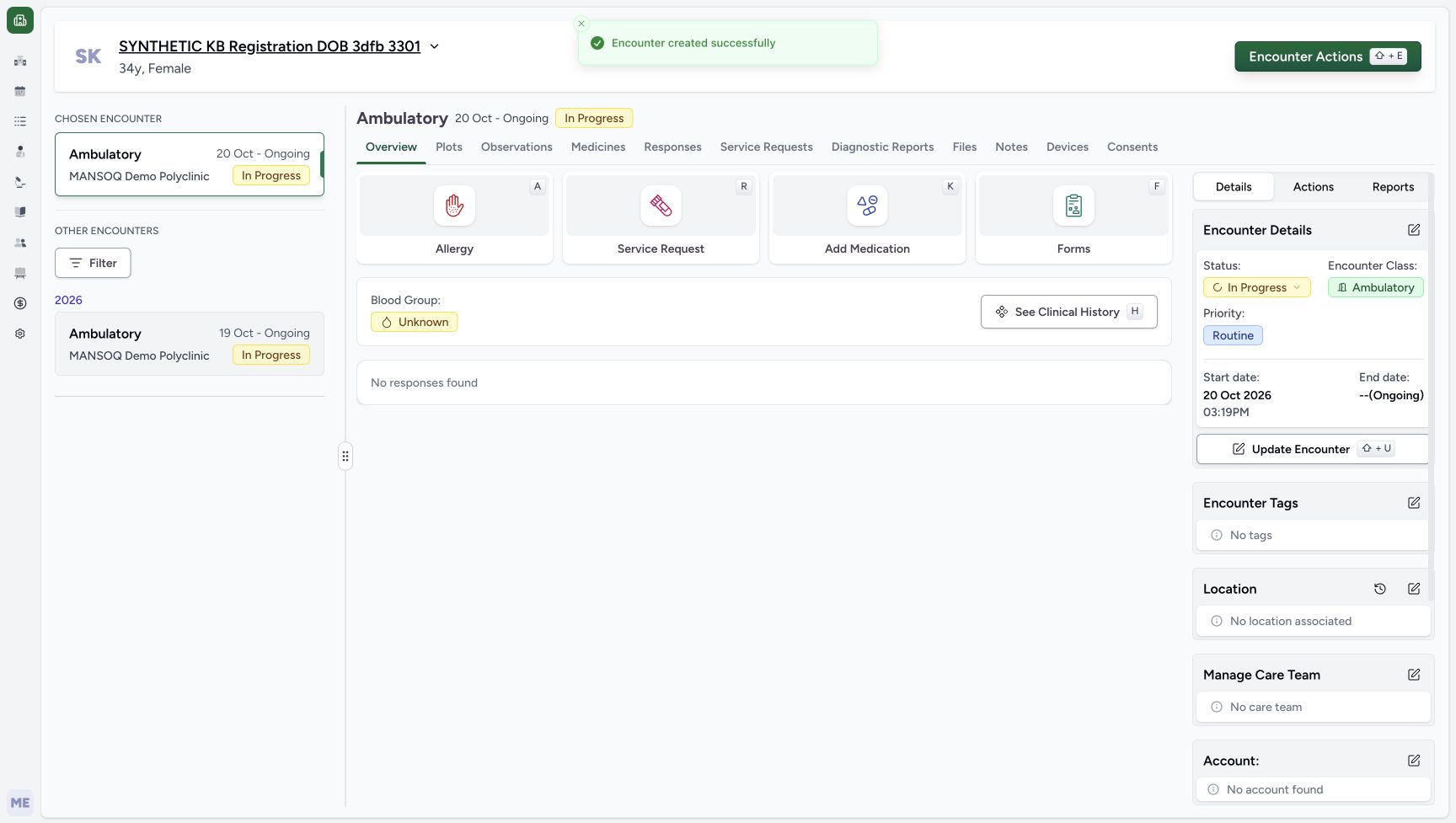
12345New encounter created successfully
Capture details
Genuine native Doctor capture on the exact committed 026f local build. Source publication is LOCAL_UNPUSHED. Original pixels are retained without cropping, resizing, editing or generated content. This bounded synthetic exercise records encounter and prescription software state; it does not establish clinical suitability, administration, dispensing, billing or full curriculum qualification.
Image SHA-256 f140298fff120e76577211b6a3667541a2dfbbb1879d3aa1aedda215cb41eeb2
- Read the encounter creation success: Encounter created successfully is visible in this original.
- Identify the new chosen encounter: The chosen Ambulatory encounter is dated October 20 and In Progress.
- Keep the earlier encounter separate: The October 19 encounter remains under Other Encounters.
- Open Add Medication: The new encounter overview provides the medication request entry.
- Check the saved start date: The details display October 20, 2026, 03:19 PM.
 123
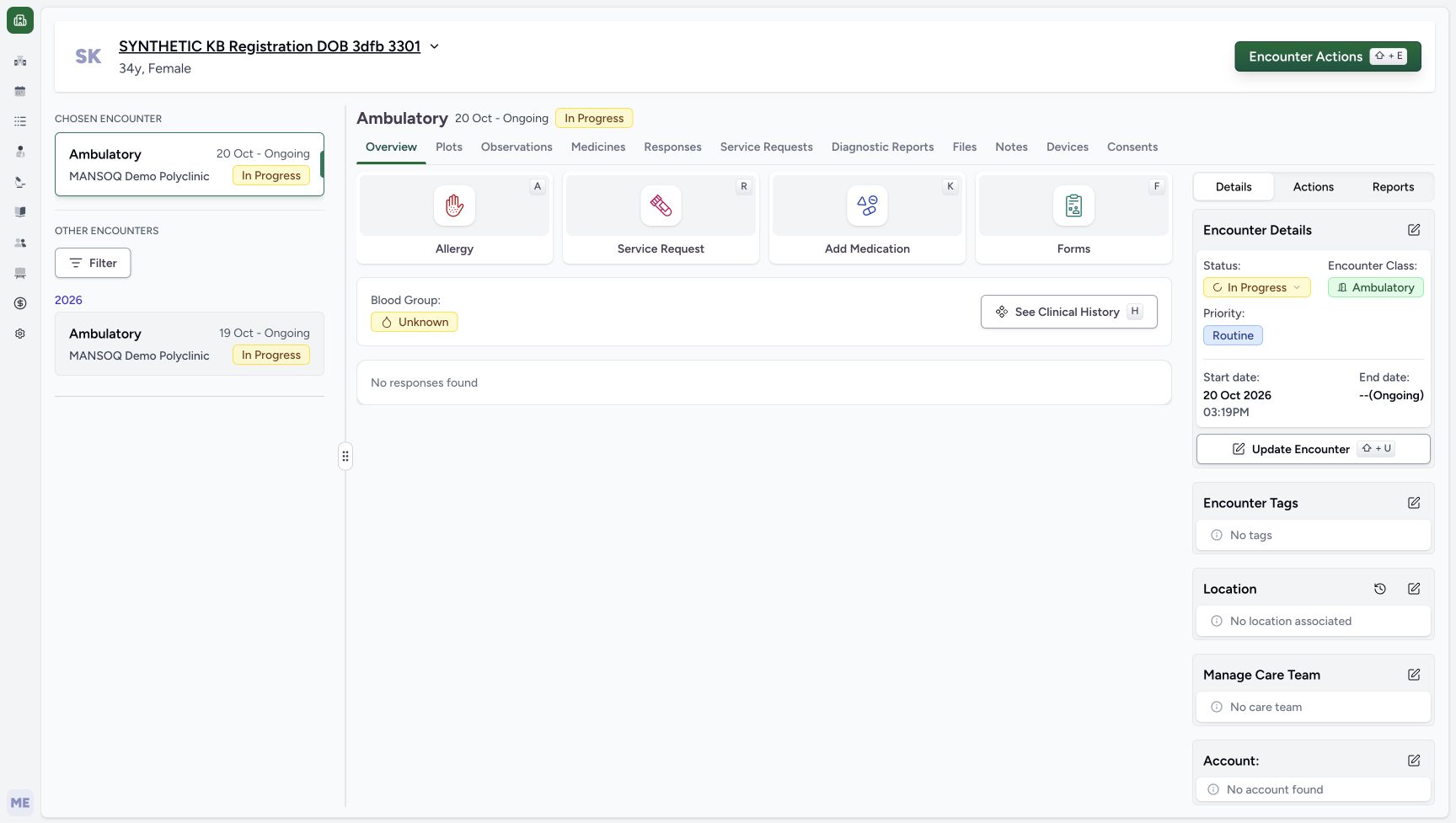
123New encounter retained after reload
Capture details
Genuine native Doctor capture on the exact committed 026f local build. Source publication is LOCAL_UNPUSHED. Original pixels are retained without cropping, resizing, editing or generated content. This bounded synthetic exercise records encounter and prescription software state; it does not establish clinical suitability, administration, dispensing, billing or full curriculum qualification.
Image SHA-256 a10a8368af44d256707b2342a4e402ee69d779344b4eb917373f139987052b23
- Check the chosen encounter after reload: A normal browser reload retains the October 20 encounter.
- Check the persisted start date: The saved start date and time remain October 20, 03:19 PM.
- Open Add Medication: Enter the medication questionnaire for the new encounter.
15 of 15 content blocks have reviewed image alignment.
Before you begin
- Use the authorised ordinary Doctor account and the assigned synthetic patient, SYNTHETIC KB Registration DOB 3dfb 3301. Confirm both identities before opening Patient Home.
 123
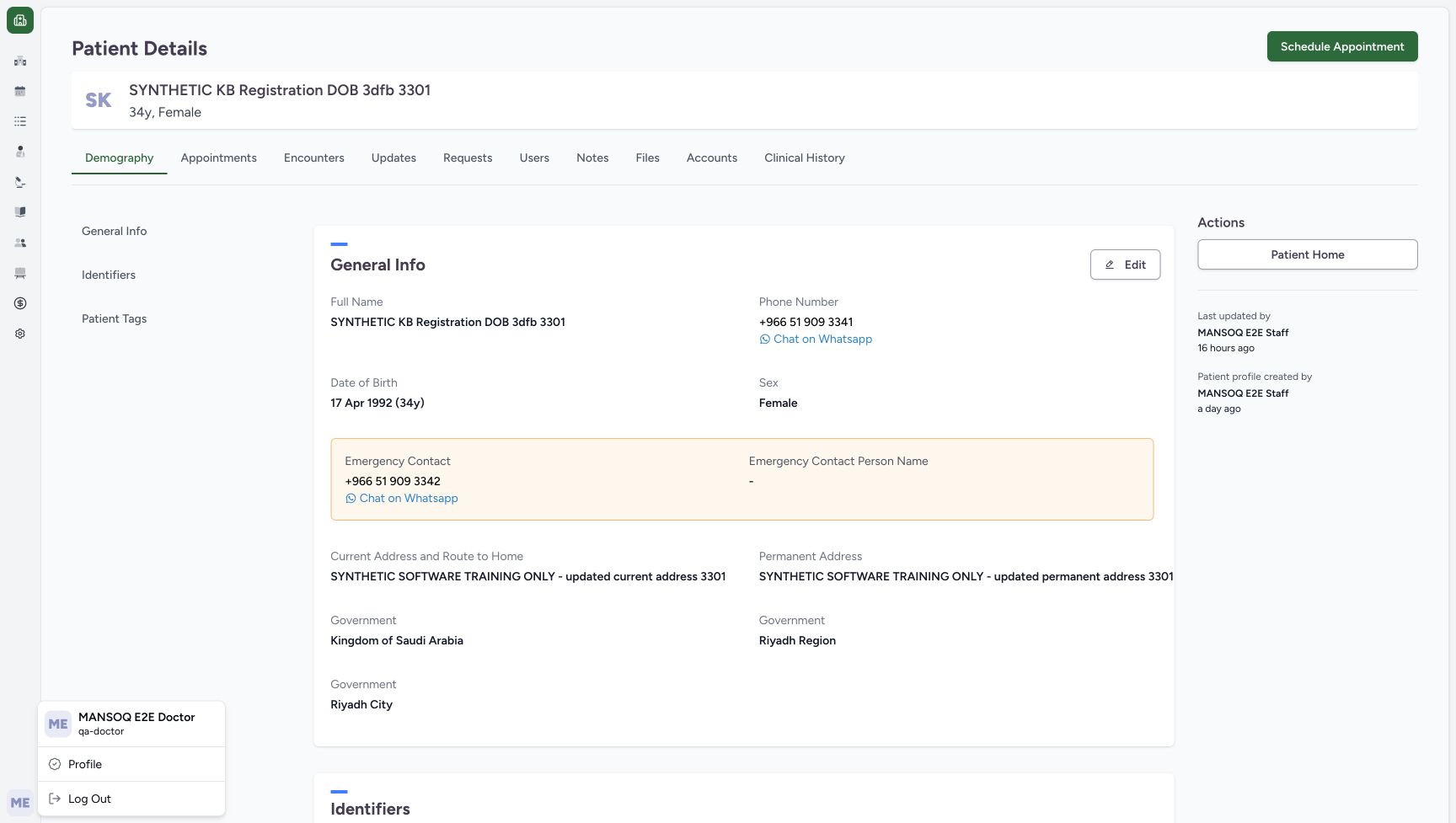
123Recorded release 026fdf3e · 2026-10-20T12:15:17.840Z · 1728 × 977 Ordinary Doctor and the assigned synthetic patient
Capture details
Genuine native Doctor capture on the exact committed 026f local build. Source publication is LOCAL_UNPUSHED. Original pixels are retained without cropping, resizing, editing or generated content. This bounded synthetic exercise records encounter and prescription software state; it does not establish clinical suitability, administration, dispensing, billing or full curriculum qualification.
Image SHA-256
ffc4abbb6e2f2f5b6b64a57e31232cb1b680c78a97d30df2bba68029d68ed881- Check the Doctor account: The open account menu identifies MANSOQ E2E Doctor and qa-doctor.
- Check the assigned synthetic patient: The patient banner identifies the existing fictional registration record.
- Open Patient Home: Use Patient Home after verifying the assigned record.
 12
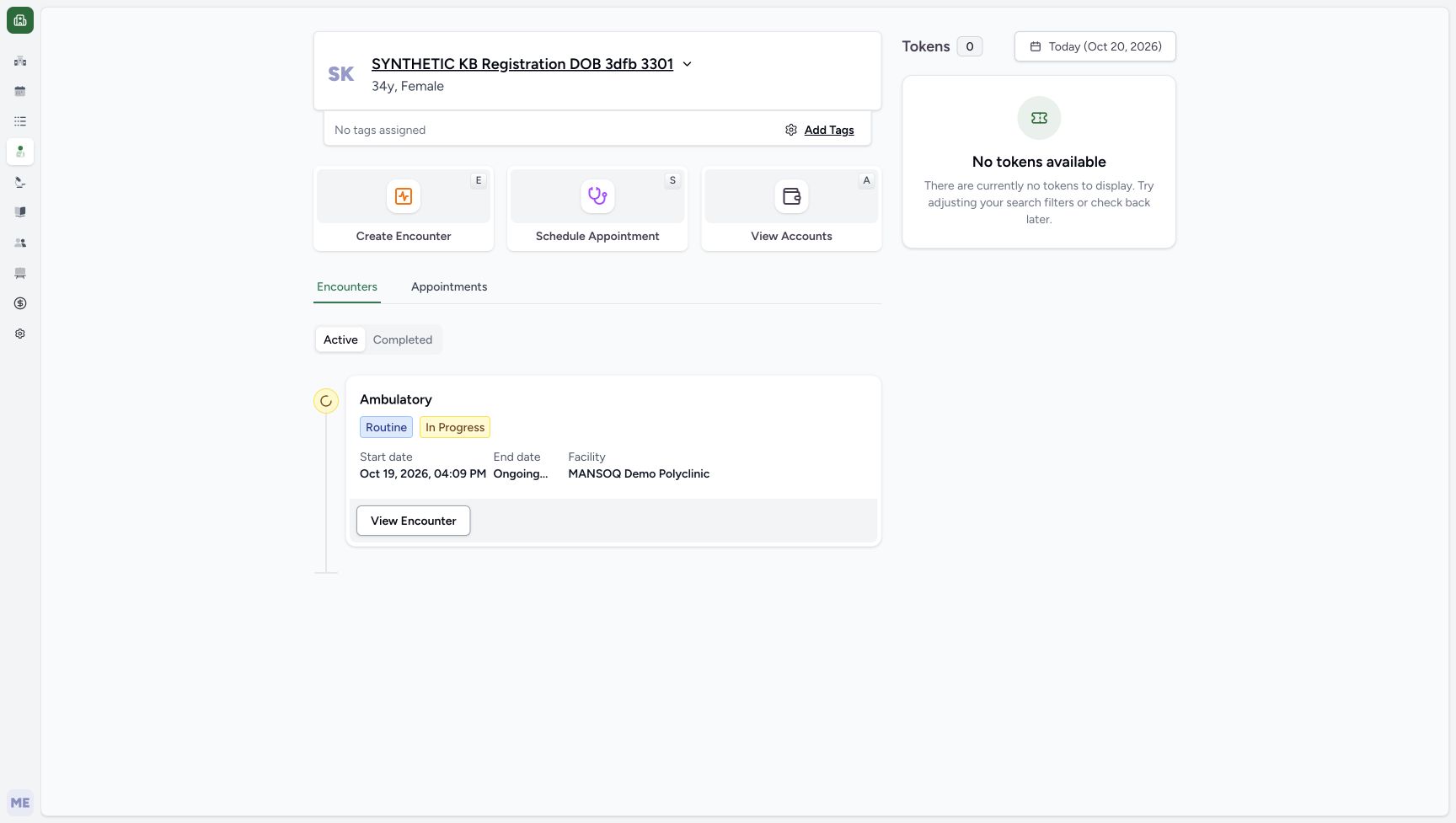
12Recorded release 026fdf3e · 2026-10-20T12:15:45.462Z · 1728 × 977 Patient Home and Create Encounter
Capture details
Genuine native Doctor capture on the exact committed 026f local build. Source publication is LOCAL_UNPUSHED. Original pixels are retained without cropping, resizing, editing or generated content. This bounded synthetic exercise records encounter and prescription software state; it does not establish clinical suitability, administration, dispensing, billing or full curriculum qualification.
Image SHA-256
f2f716bd0d358ffc9fadb9aa929d41a313b82edf0d526f23a7514903fb6e8078- Choose Create Encounter: Ordinary Doctor access exposes the encounter creation entry.
- Distinguish the existing encounter: The October 19 Ambulatory encounter is preexisting; leave it unchanged.
- The illustrated Doctor has Create Encounter available through configured access. Use your normal role permissions; if the entry is absent, stop this creation path and ask the responsible local administrator to review access.12
Recorded release 026fdf3e · 2026-10-20T12:15:45.462Z · 1728 × 977 Patient Home and Create Encounter
Capture details
Genuine native Doctor capture on the exact committed 026f local build. Source publication is LOCAL_UNPUSHED. Original pixels are retained without cropping, resizing, editing or generated content. This bounded synthetic exercise records encounter and prescription software state; it does not establish clinical suitability, administration, dispensing, billing or full curriculum qualification.
Image SHA-256
f2f716bd0d358ffc9fadb9aa929d41a313b82edf0d526f23a7514903fb6e8078- Choose Create Encounter: Ordinary Doctor access exposes the encounter creation entry.
- Distinguish the existing encounter: The October 19 Ambulatory encounter is preexisting; leave it unchanged.
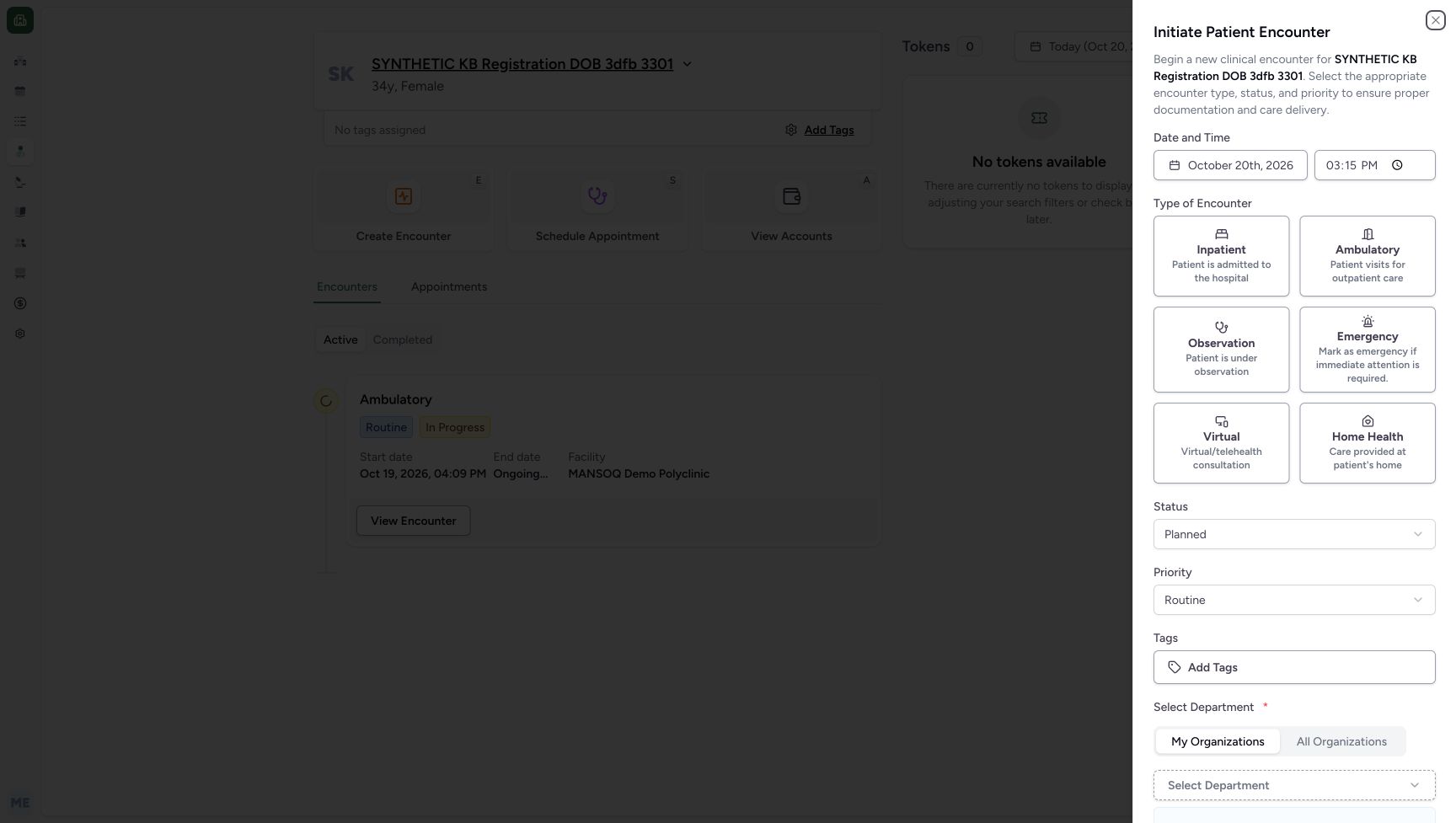 1234
1234Recorded release 026fdf3e · 2026-10-20T12:15:58.839Z · 1728 × 977 Initial encounter form
Capture details
Genuine native Doctor capture on the exact committed 026f local build. Source publication is LOCAL_UNPUSHED. Original pixels are retained without cropping, resizing, editing or generated content. This bounded synthetic exercise records encounter and prescription software state; it does not establish clinical suitability, administration, dispensing, billing or full curriculum qualification.
Image SHA-256
0164902f873b11430a2184d738d963e42454464e4024045d312a91c531fafcc4- Choose Ambulatory: This supported encounter type is for the authorized software exercise.
- Open Status: The first draft starts Planned.
- Keep Routine for this exercise: The visible priority is Routine; no clinical decision is being demonstrated.
- Review the actual date and time: The form supplies October 20, 2026, 03:15 PM in this first unsaved draft.
- This is a software demonstration. Leave the earlier October 19 Ambulatory encounter and the patient’s existing details and notes unchanged. The new encounter remains In Progress at the end of this lesson.12
Recorded release 026fdf3e · 2026-10-20T12:15:45.462Z · 1728 × 977 Patient Home and Create Encounter
Capture details
Genuine native Doctor capture on the exact committed 026f local build. Source publication is LOCAL_UNPUSHED. Original pixels are retained without cropping, resizing, editing or generated content. This bounded synthetic exercise records encounter and prescription software state; it does not establish clinical suitability, administration, dispensing, billing or full curriculum qualification.
Image SHA-256
f2f716bd0d358ffc9fadb9aa929d41a313b82edf0d526f23a7514903fb6e8078- Choose Create Encounter: Ordinary Doctor access exposes the encounter creation entry.
- Distinguish the existing encounter: The October 19 Ambulatory encounter is preexisting; leave it unchanged.
123Recorded release 026fdf3e · 2026-10-20T12:21:33.407Z · 1728 × 977 New encounter retained after reload
Capture details
Genuine native Doctor capture on the exact committed 026f local build. Source publication is LOCAL_UNPUSHED. Original pixels are retained without cropping, resizing, editing or generated content. This bounded synthetic exercise records encounter and prescription software state; it does not establish clinical suitability, administration, dispensing, billing or full curriculum qualification.
Image SHA-256
a10a8368af44d256707b2342a4e402ee69d779344b4eb917373f139987052b23- Check the chosen encounter after reload: A normal browser reload retains the October 20 encounter.
- Check the persisted start date: The saved start date and time remain October 20, 03:19 PM.
- Open Add Medication: Enter the medication questionnaire for the new encounter.
1. Check the Doctor and patient, then open Patient Home
Read the open account menu: MANSOQ E2E Doctor, qa-doctor. Match the assigned synthetic patient banner and choose Patient Home. The home view already contains an October 19 Ambulatory encounter; that is the existing record, so start from Create Encounter to make the new demonstration encounter.
123Ordinary Doctor and the assigned synthetic patient
Capture details
Genuine native Doctor capture on the exact committed 026f local build. Source publication is LOCAL_UNPUSHED. Original pixels are retained without cropping, resizing, editing or generated content. This bounded synthetic exercise records encounter and prescription software state; it does not establish clinical suitability, administration, dispensing, billing or full curriculum qualification.
Image SHA-256 ffc4abbb6e2f2f5b6b64a57e31232cb1b680c78a97d30df2bba68029d68ed881
- Check the Doctor account: The open account menu identifies MANSOQ E2E Doctor and qa-doctor.
- Check the assigned synthetic patient: The patient banner identifies the existing fictional registration record.
- Open Patient Home: Use Patient Home after verifying the assigned record.
12Patient Home and Create Encounter
Capture details
Genuine native Doctor capture on the exact committed 026f local build. Source publication is LOCAL_UNPUSHED. Original pixels are retained without cropping, resizing, editing or generated content. This bounded synthetic exercise records encounter and prescription software state; it does not establish clinical suitability, administration, dispensing, billing or full curriculum qualification.
Image SHA-256 f2f716bd0d358ffc9fadb9aa929d41a313b82edf0d526f23a7514903fb6e8078
- Choose Create Encounter: Ordinary Doctor access exposes the encounter creation entry.
- Distinguish the existing encounter: The October 19 Ambulatory encounter is preexisting; leave it unchanged.
2. Open the form and choose Ambulatory
Choose Create Encounter. Review the supplied date and time, then select Ambulatory from the supported encounter types. The first draft shown here opened at October 20, 2026, 03:15 PM with Planned status and Routine priority. The lower department chip and Create button are outside this first viewport; this image does not establish that they were empty or disabled.
12Patient Home and Create Encounter
Capture details
Genuine native Doctor capture on the exact committed 026f local build. Source publication is LOCAL_UNPUSHED. Original pixels are retained without cropping, resizing, editing or generated content. This bounded synthetic exercise records encounter and prescription software state; it does not establish clinical suitability, administration, dispensing, billing or full curriculum qualification.
Image SHA-256 f2f716bd0d358ffc9fadb9aa929d41a313b82edf0d526f23a7514903fb6e8078
- Choose Create Encounter: Ordinary Doctor access exposes the encounter creation entry.
- Distinguish the existing encounter: The October 19 Ambulatory encounter is preexisting; leave it unchanged.
1234Initial encounter form
Capture details
Genuine native Doctor capture on the exact committed 026f local build. Source publication is LOCAL_UNPUSHED. Original pixels are retained without cropping, resizing, editing or generated content. This bounded synthetic exercise records encounter and prescription software state; it does not establish clinical suitability, administration, dispensing, billing or full curriculum qualification.
Image SHA-256 0164902f873b11430a2184d738d963e42454464e4024045d312a91c531fafcc4
- Choose Ambulatory: This supported encounter type is for the authorized software exercise.
- Open Status: The first draft starts Planned.
- Keep Routine for this exercise: The visible priority is Routine; no clinical decision is being demonstrated.
- Review the actual date and time: The form supplies October 20, 2026, 03:15 PM in this first unsaved draft.
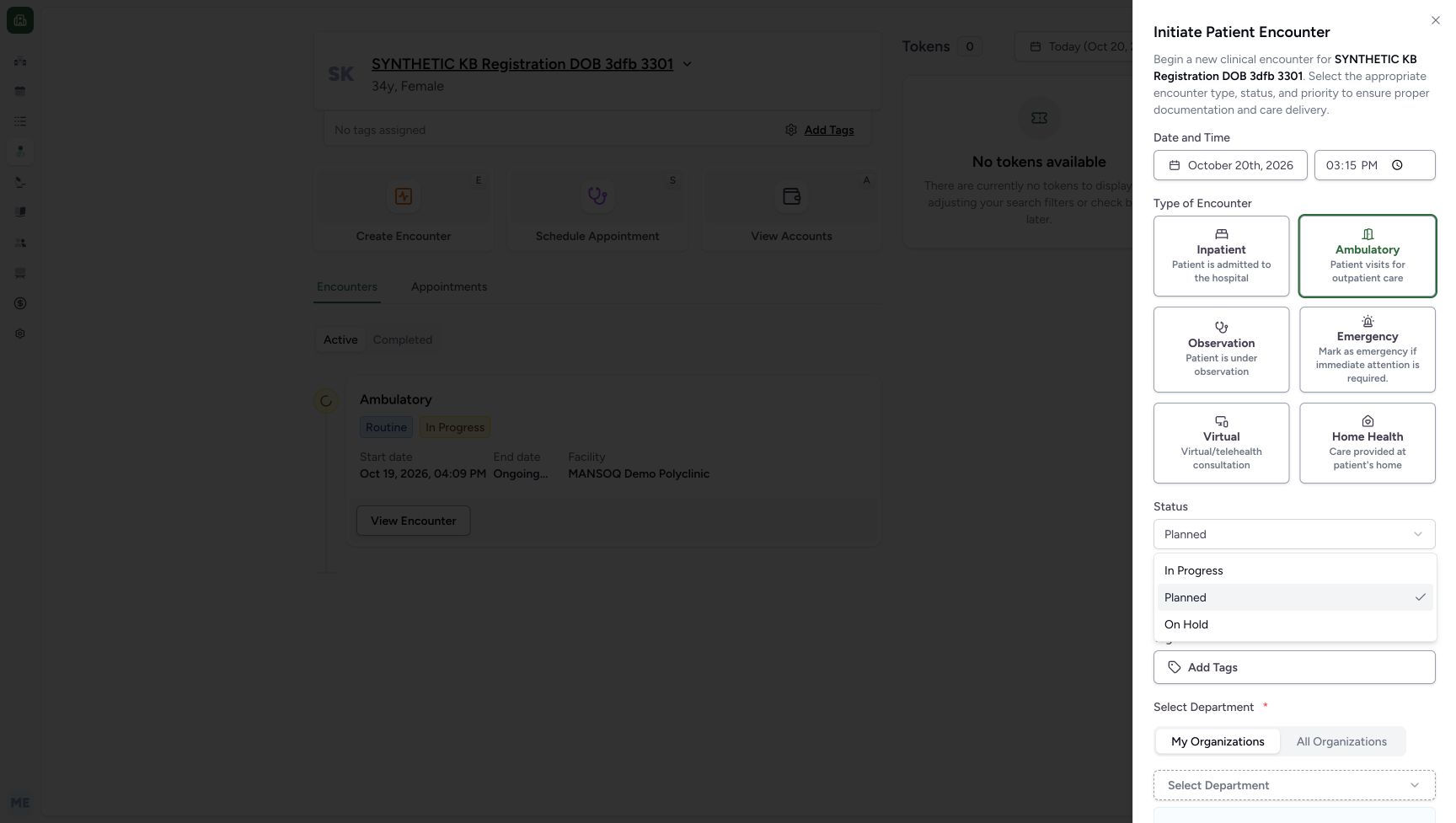 12
12Ambulatory selection and encounter status choices
Capture details
Genuine native Doctor capture on the exact committed 026f local build. Source publication is LOCAL_UNPUSHED. Original pixels are retained without cropping, resizing, editing or generated content. This bounded synthetic exercise records encounter and prescription software state; it does not establish clinical suitability, administration, dispensing, billing or full curriculum qualification.
Image SHA-256 b7364e9812b6bda7112dca9ceeae151cbd8fb0b1e0dc625e5fc332787c26d5ac
- Choose In Progress: The status menu offers In Progress, Planned, and On Hold.
- Verify Ambulatory is selected: The green border identifies Ambulatory on the first unsaved draft.
3. Set the demonstration status and review priority
Open Status and select In Progress. The menu also offers Planned and On Hold. Keep the illustrated Routine priority for this fictional exercise. Scroll within the sheet to review its lower department controls before saving.
12Ambulatory selection and encounter status choices
Capture details
Genuine native Doctor capture on the exact committed 026f local build. Source publication is LOCAL_UNPUSHED. Original pixels are retained without cropping, resizing, editing or generated content. This bounded synthetic exercise records encounter and prescription software state; it does not establish clinical suitability, administration, dispensing, billing or full curriculum qualification.
Image SHA-256 b7364e9812b6bda7112dca9ceeae151cbd8fb0b1e0dc625e5fc332787c26d5ac
- Choose In Progress: The status menu offers In Progress, Planned, and On Hold.
- Verify Ambulatory is selected: The green border identifies Ambulatory on the first unsaved draft.
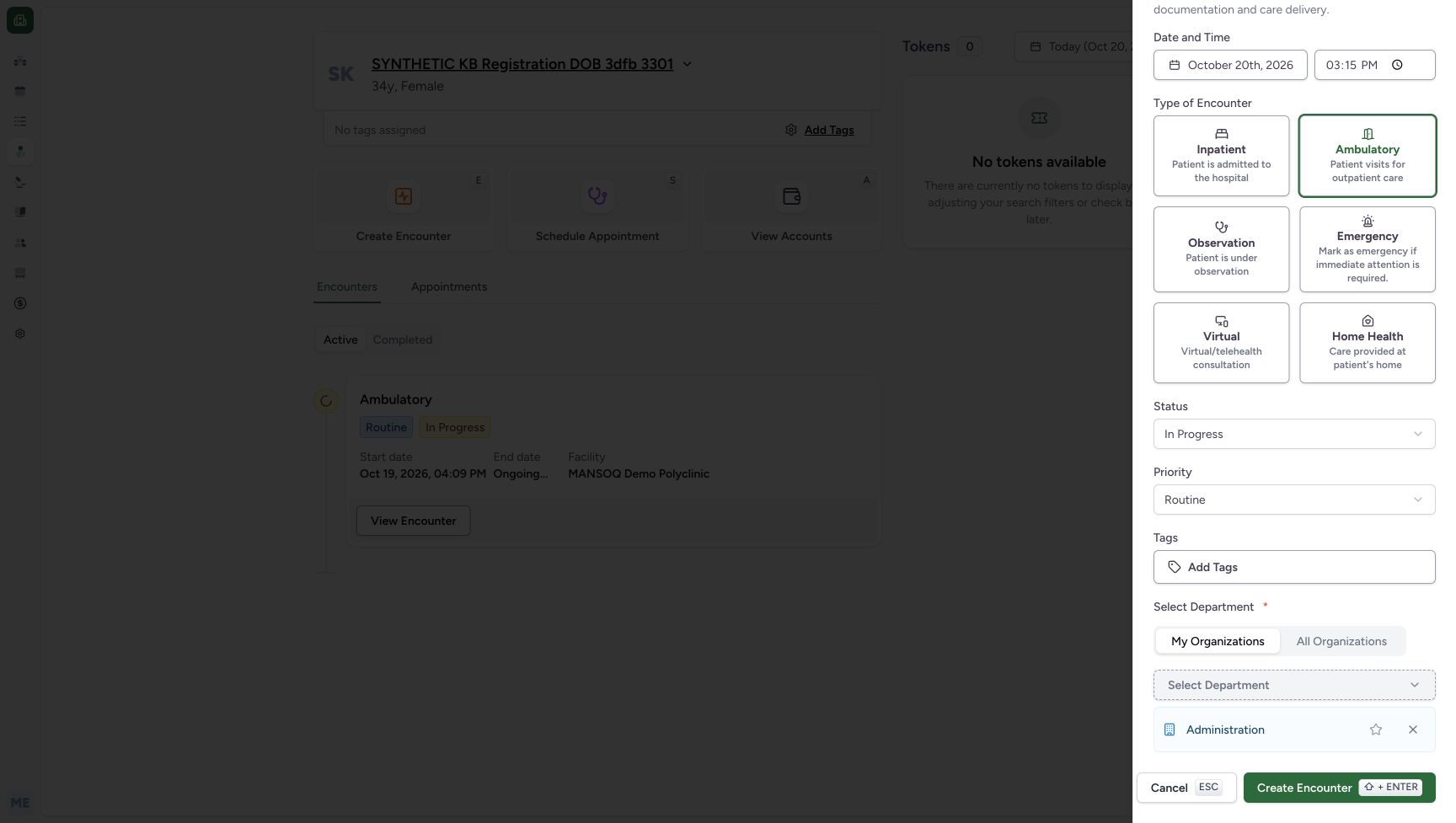 1234
1234Automatic department selection
Capture details
Genuine native Doctor capture on the exact committed 026f local build. Source publication is LOCAL_UNPUSHED. Original pixels are retained without cropping, resizing, editing or generated content. This bounded synthetic exercise records encounter and prescription software state; it does not establish clinical suitability, administration, dispensing, billing or full curriculum qualification.
Image SHA-256 7c18ba65d4a04baf38aa0027bd64ba7ff47177bf535dc8a95628830ee2aef59b
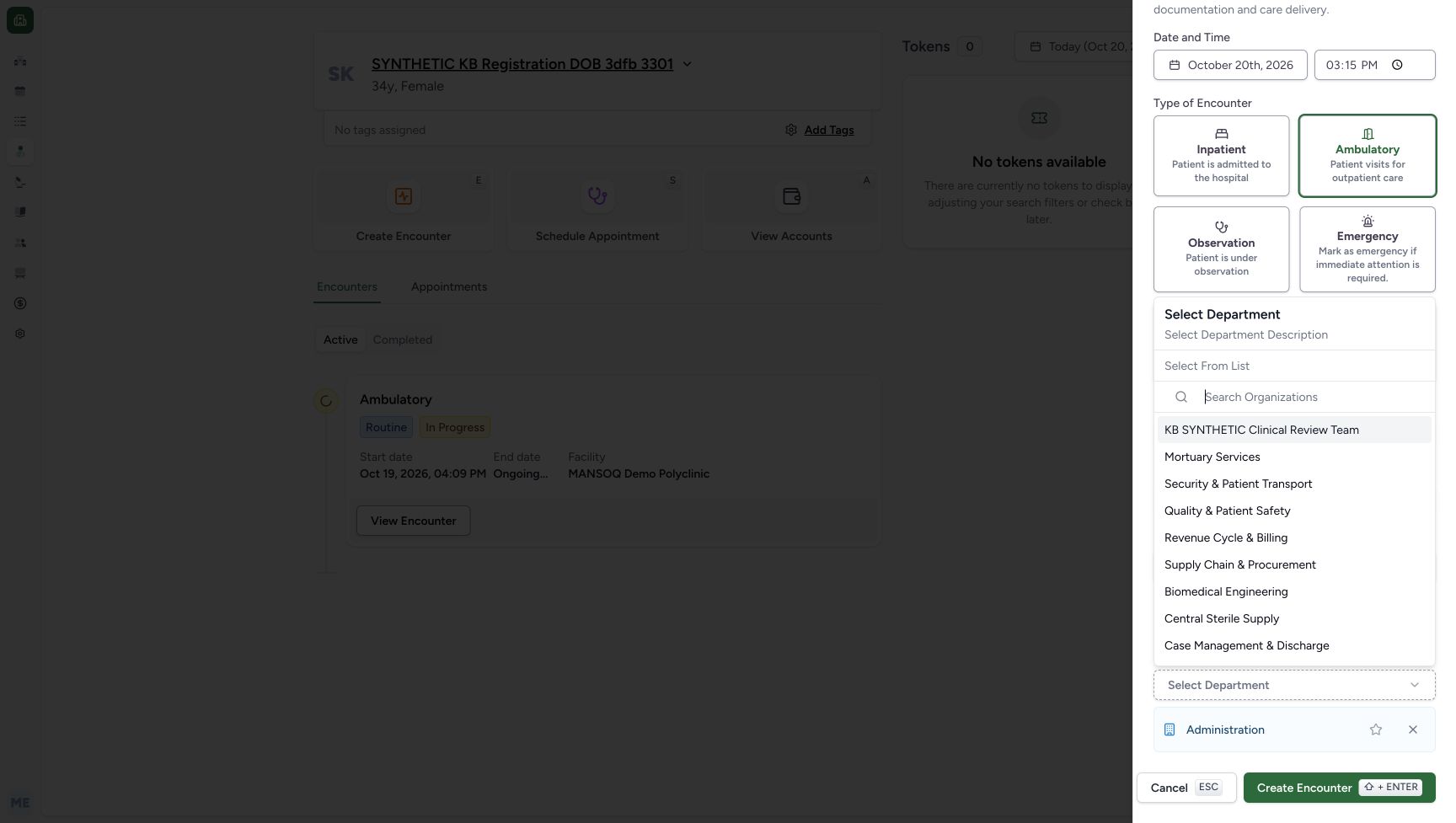
- Notice the automatic department: Administration has been auto-selected by the department control.
- Open All Organizations: Use the existing department list without changing role permissions.
- Open the department selector: The selection control sits above the department chip.
- Remove an unwanted draft department: The X removes Administration from this unsaved draft; the star is a separate preference action.
4. Review the automatically selected department
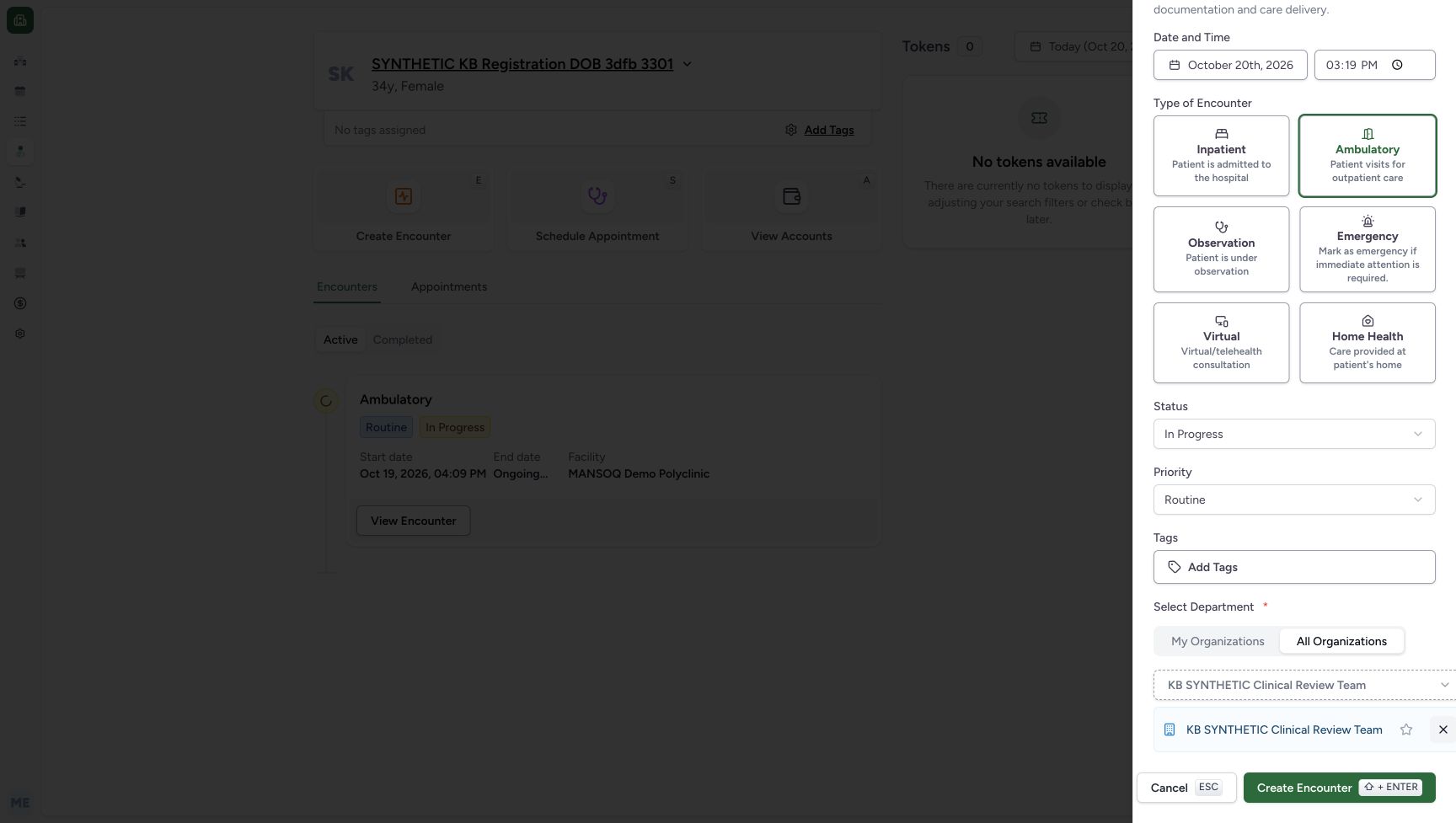
In this first draft My Organizations automatically selected Administration. Its selector offered that department alone. Switch to All Organizations, open Select Department and choose the existing KB SYNTHETIC Clinical Review Team. The recording then cancelled this unsaved draft before its department choices were saved. The later restarted draft below shows the final single-team selection. The star is a separate preference control; this exercise does not change preferences or permissions.
1234Automatic department selection
Capture details
Genuine native Doctor capture on the exact committed 026f local build. Source publication is LOCAL_UNPUSHED. Original pixels are retained without cropping, resizing, editing or generated content. This bounded synthetic exercise records encounter and prescription software state; it does not establish clinical suitability, administration, dispensing, billing or full curriculum qualification.
Image SHA-256 7c18ba65d4a04baf38aa0027bd64ba7ff47177bf535dc8a95628830ee2aef59b
- Notice the automatic department: Administration has been auto-selected by the department control.
- Open All Organizations: Use the existing department list without changing role permissions.
- Open the department selector: The selection control sits above the department chip.
- Remove an unwanted draft department: The X removes Administration from this unsaved draft; the star is a separate preference action.
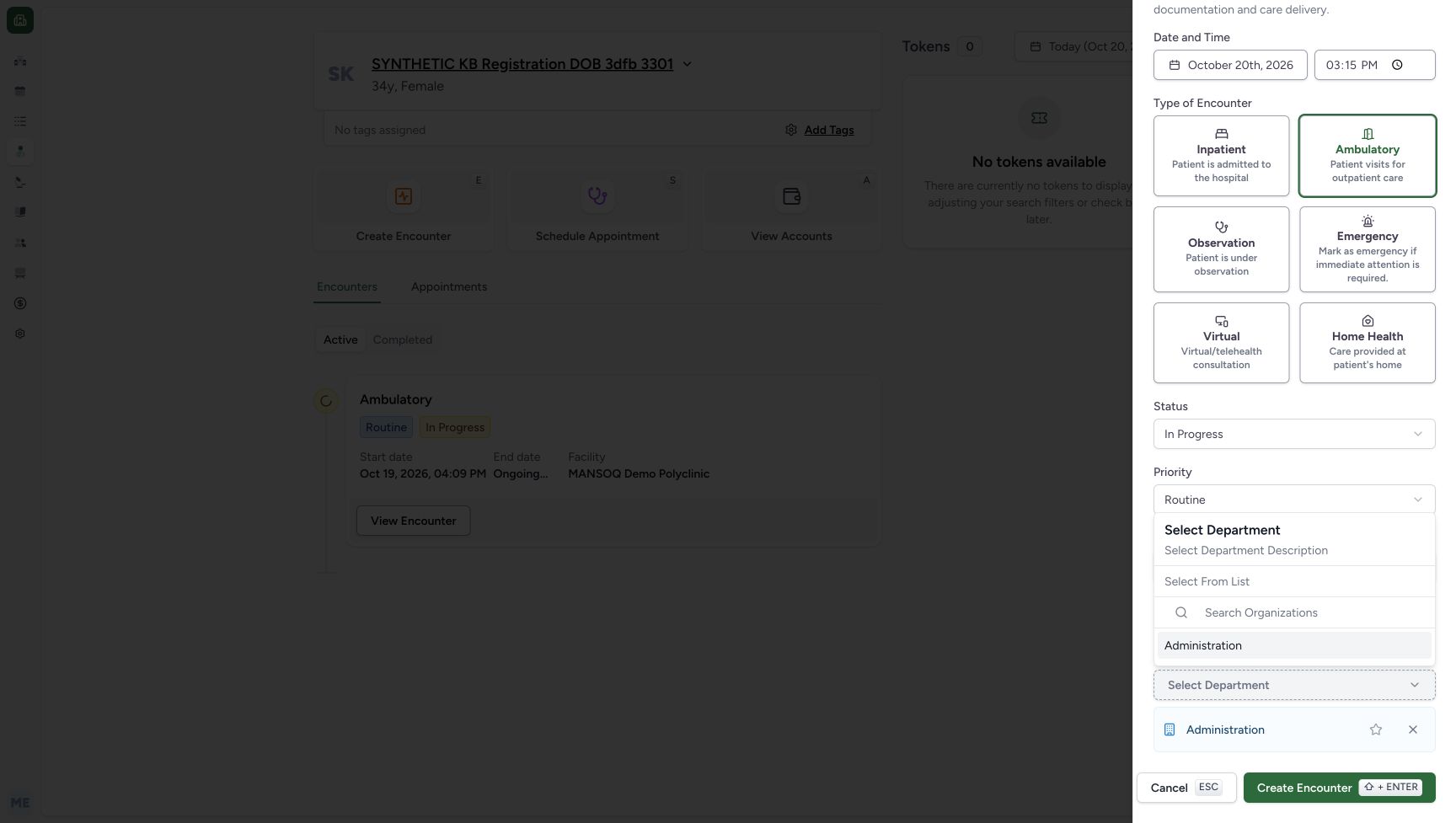 12
12My Organizations department list
Capture details
Genuine native Doctor capture on the exact committed 026f local build. Source publication is LOCAL_UNPUSHED. Original pixels are retained without cropping, resizing, editing or generated content. This bounded synthetic exercise records encounter and prescription software state; it does not establish clinical suitability, administration, dispensing, billing or full curriculum qualification.
Image SHA-256 73498768426eacfbc266d37806d70fa4fe25a58f9da0230a0a17cc23f9a6180e
- Read My Organizations: This open list offers Administration.
- Recognize Cancel and Escape: Escape can close the entire encounter sheet after the nested selector closes; no save follows cancellation.
 12
12Existing clinical team in All Organizations
Capture details
Genuine native Doctor capture on the exact committed 026f local build. Source publication is LOCAL_UNPUSHED. Original pixels are retained without cropping, resizing, editing or generated content. This bounded synthetic exercise records encounter and prescription software state; it does not establish clinical suitability, administration, dispensing, billing or full curriculum qualification.
Image SHA-256 5638ad62b6c61e7f6a3b746377cbdbf6c8c380ad4a02c8094baedfb3b78352ce
- Select the existing clinical team: KB SYNTHETIC Clinical Review Team is an existing department in All Organizations.
- Use department search when needed: The selector has a search field; this capture used the visible team row.
 123456
Reviewed restarted encounter draft
Capture details
Genuine native Doctor capture on the exact committed 026f local build. Source publication is LOCAL_UNPUSHED. Original pixels are retained without cropping, resizing, editing or generated content. This bounded synthetic exercise records encounter and prescription software state; it does not establish clinical suitability, administration, dispensing, billing or full curriculum qualification.
Image SHA-256 25a0b2eeb2051befc1ae890ba5788d66e5a3266834ba2a3644686f89563aea85
- Verify Ambulatory: The restarted draft has Ambulatory selected.
- Verify In Progress: The restarted draft uses In Progress.
- Verify Routine: Routine is retained.
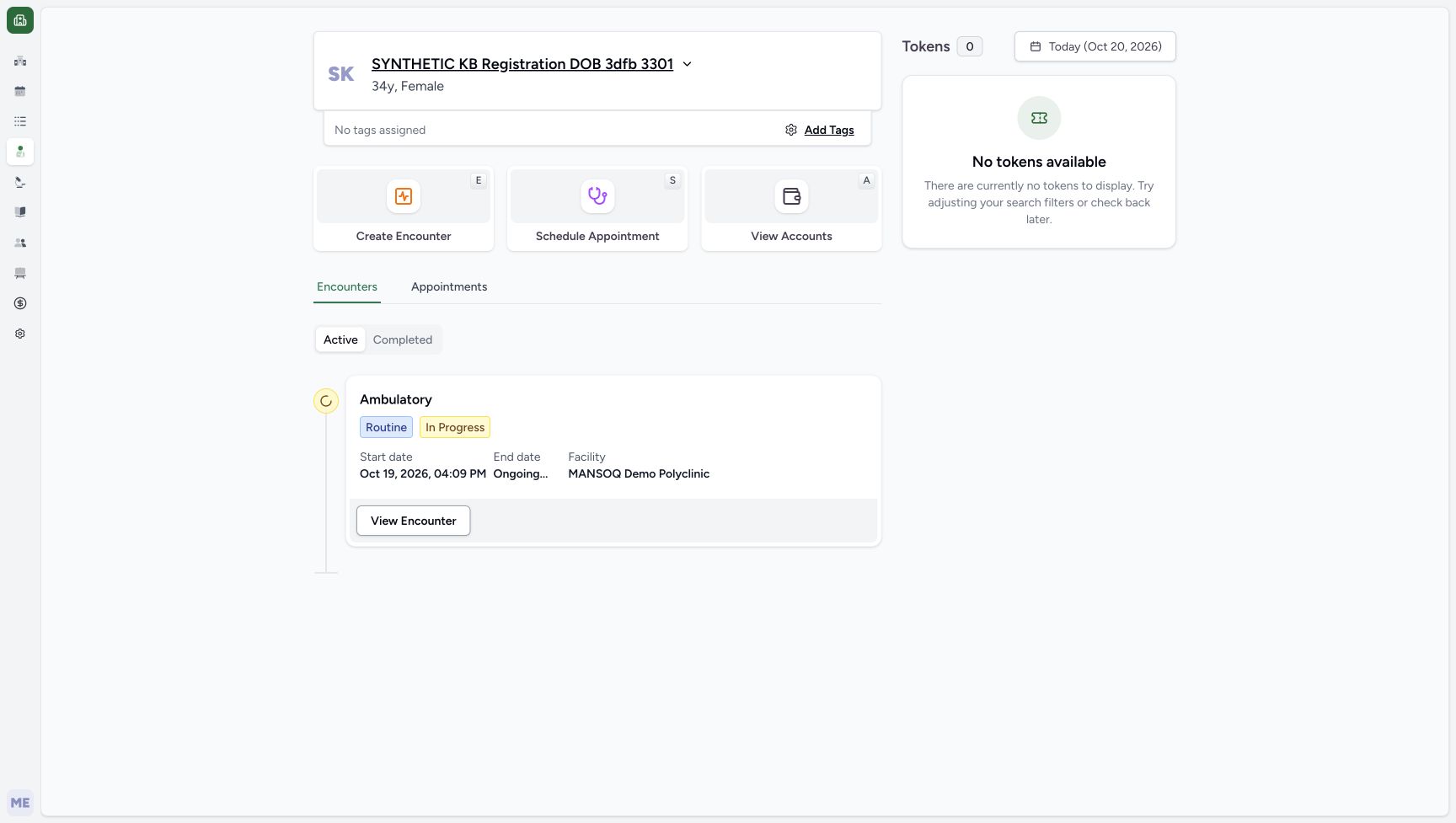
- Verify the chosen clinical department: Only KB SYNTHETIC Clinical Review Team remains selected.
- Create Encounter once: Submit the reviewed new encounter through the normal Doctor form.
- Retain the restarted draft time: This second draft supplies October 20, 03:19 PM; it differs from the cancelled draft.
5. Recognise the cancelled draft and restart carefully
After selecting the clinical team, the nested selector had closed. Escape then closed the entire unsaved encounter sheet. Patient Home still showed only the October 19 encounter. Reopen Create Encounter and repeat the reviewed Ambulatory, In Progress, Routine and clinical-team choices. In the restarted draft remove the automatically selected Administration chip using its X, then verify that only KB SYNTHETIC Clinical Review Team remains. The Administration X is pictured in the earlier department view; the restarted final selection is pictured at 03:19 PM. This is a separate draft from the earlier 03:15 PM example.
1234Automatic department selection
Capture details
Genuine native Doctor capture on the exact committed 026f local build. Source publication is LOCAL_UNPUSHED. Original pixels are retained without cropping, resizing, editing or generated content. This bounded synthetic exercise records encounter and prescription software state; it does not establish clinical suitability, administration, dispensing, billing or full curriculum qualification.
Image SHA-256 7c18ba65d4a04baf38aa0027bd64ba7ff47177bf535dc8a95628830ee2aef59b
- Notice the automatic department: Administration has been auto-selected by the department control.
- Open All Organizations: Use the existing department list without changing role permissions.
- Open the department selector: The selection control sits above the department chip.
- Remove an unwanted draft department: The X removes Administration from this unsaved draft; the star is a separate preference action.
12My Organizations department list
Capture details
Genuine native Doctor capture on the exact committed 026f local build. Source publication is LOCAL_UNPUSHED. Original pixels are retained without cropping, resizing, editing or generated content. This bounded synthetic exercise records encounter and prescription software state; it does not establish clinical suitability, administration, dispensing, billing or full curriculum qualification.
Image SHA-256 73498768426eacfbc266d37806d70fa4fe25a58f9da0230a0a17cc23f9a6180e
- Read My Organizations: This open list offers Administration.
- Recognize Cancel and Escape: Escape can close the entire encounter sheet after the nested selector closes; no save follows cancellation.
 12
12Patient Home after the unsaved draft closed
Capture details
Genuine native Doctor capture on the exact committed 026f local build. Source publication is LOCAL_UNPUSHED. Original pixels are retained without cropping, resizing, editing or generated content. This bounded synthetic exercise records encounter and prescription software state; it does not establish clinical suitability, administration, dispensing, billing or full curriculum qualification.
Image SHA-256 f2f716bd0d358ffc9fadb9aa929d41a313b82edf0d526f23a7514903fb6e8078
- Reopen after cancellation: The first unsaved draft closed; Create Encounter starts a fresh draft.
- Confirm no new encounter was saved: Only the existing October 19 encounter is visible at this checkpoint.
123456Reviewed restarted encounter draft
Capture details
Genuine native Doctor capture on the exact committed 026f local build. Source publication is LOCAL_UNPUSHED. Original pixels are retained without cropping, resizing, editing or generated content. This bounded synthetic exercise records encounter and prescription software state; it does not establish clinical suitability, administration, dispensing, billing or full curriculum qualification.
Image SHA-256 25a0b2eeb2051befc1ae890ba5788d66e5a3266834ba2a3644686f89563aea85
- Verify Ambulatory: The restarted draft has Ambulatory selected.
- Verify In Progress: The restarted draft uses In Progress.
- Verify Routine: Routine is retained.
- Verify the chosen clinical department: Only KB SYNTHETIC Clinical Review Team remains selected.
- Create Encounter once: Submit the reviewed new encounter through the normal Doctor form.
- Retain the restarted draft time: This second draft supplies October 20, 03:19 PM; it differs from the cancelled draft.
6. Review the restarted draft and create once
Check the restarted draft: October 20, 2026, 03:19 PM; Ambulatory; In Progress; Routine; and only KB SYNTHETIC Clinical Review Team selected. Choose Create Encounter once. The application opens the new encounter overview and displays Encounter created successfully. The chosen encounter is dated October 20; the older October 19 encounter remains under Other Encounters.
123456Reviewed restarted encounter draft
Capture details
Genuine native Doctor capture on the exact committed 026f local build. Source publication is LOCAL_UNPUSHED. Original pixels are retained without cropping, resizing, editing or generated content. This bounded synthetic exercise records encounter and prescription software state; it does not establish clinical suitability, administration, dispensing, billing or full curriculum qualification.
Image SHA-256 25a0b2eeb2051befc1ae890ba5788d66e5a3266834ba2a3644686f89563aea85
- Verify Ambulatory: The restarted draft has Ambulatory selected.
- Verify In Progress: The restarted draft uses In Progress.
- Verify Routine: Routine is retained.
- Verify the chosen clinical department: Only KB SYNTHETIC Clinical Review Team remains selected.
- Create Encounter once: Submit the reviewed new encounter through the normal Doctor form.
- Retain the restarted draft time: This second draft supplies October 20, 03:19 PM; it differs from the cancelled draft.
12345New encounter created successfully
Capture details
Genuine native Doctor capture on the exact committed 026f local build. Source publication is LOCAL_UNPUSHED. Original pixels are retained without cropping, resizing, editing or generated content. This bounded synthetic exercise records encounter and prescription software state; it does not establish clinical suitability, administration, dispensing, billing or full curriculum qualification.
Image SHA-256 f140298fff120e76577211b6a3667541a2dfbbb1879d3aa1aedda215cb41eeb2
- Read the encounter creation success: Encounter created successfully is visible in this original.
- Identify the new chosen encounter: The chosen Ambulatory encounter is dated October 20 and In Progress.
- Keep the earlier encounter separate: The October 19 encounter remains under Other Encounters.
- Open Add Medication: The new encounter overview provides the medication request entry.
- Check the saved start date: The details display October 20, 2026, 03:19 PM.
7. Reload and verify the saved encounter
Use a normal browser reload. Check that the October 20 Ambulatory encounter remains selected and In Progress, with the saved start time 03:19 PM and Routine priority in its details. Keep the older October 19 encounter separate. This verifies persistence of the new software encounter; it does not complete or discharge it.
123New encounter retained after reload
Capture details
Genuine native Doctor capture on the exact committed 026f local build. Source publication is LOCAL_UNPUSHED. Original pixels are retained without cropping, resizing, editing or generated content. This bounded synthetic exercise records encounter and prescription software state; it does not establish clinical suitability, administration, dispensing, billing or full curriculum qualification.
Image SHA-256 a10a8368af44d256707b2342a4e402ee69d779344b4eb917373f139987052b23
- Check the chosen encounter after reload: A normal browser reload retains the October 20 encounter.
- Check the persisted start date: The saved start date and time remain October 20, 03:19 PM.
- Open Add Medication: Enter the medication questionnaire for the new encounter.
Keep the actual draft and saved times distinct
The first unsaved draft displayed 03:15 PM. Cancelling and reopening the form supplied 03:19 PM, which became the saved encounter start. The creation audit time is later than that start time. Review the values actually supplied and saved in your authorised demonstration; do not copy an earlier screenshot time into a restarted form merely to make the pictures match.
1234Initial encounter form
Capture details
Genuine native Doctor capture on the exact committed 026f local build. Source publication is LOCAL_UNPUSHED. Original pixels are retained without cropping, resizing, editing or generated content. This bounded synthetic exercise records encounter and prescription software state; it does not establish clinical suitability, administration, dispensing, billing or full curriculum qualification.
Image SHA-256 0164902f873b11430a2184d738d963e42454464e4024045d312a91c531fafcc4
- Choose Ambulatory: This supported encounter type is for the authorized software exercise.
- Open Status: The first draft starts Planned.
- Keep Routine for this exercise: The visible priority is Routine; no clinical decision is being demonstrated.
- Review the actual date and time: The form supplies October 20, 2026, 03:15 PM in this first unsaved draft.
123456Reviewed restarted encounter draft
Capture details
Genuine native Doctor capture on the exact committed 026f local build. Source publication is LOCAL_UNPUSHED. Original pixels are retained without cropping, resizing, editing or generated content. This bounded synthetic exercise records encounter and prescription software state; it does not establish clinical suitability, administration, dispensing, billing or full curriculum qualification.
Image SHA-256 25a0b2eeb2051befc1ae890ba5788d66e5a3266834ba2a3644686f89563aea85
- Verify Ambulatory: The restarted draft has Ambulatory selected.
- Verify In Progress: The restarted draft uses In Progress.
- Verify Routine: Routine is retained.
- Verify the chosen clinical department: Only KB SYNTHETIC Clinical Review Team remains selected.
- Create Encounter once: Submit the reviewed new encounter through the normal Doctor form.
- Retain the restarted draft time: This second draft supplies October 20, 03:19 PM; it differs from the cancelled draft.
12345New encounter created successfully
Capture details
Genuine native Doctor capture on the exact committed 026f local build. Source publication is LOCAL_UNPUSHED. Original pixels are retained without cropping, resizing, editing or generated content. This bounded synthetic exercise records encounter and prescription software state; it does not establish clinical suitability, administration, dispensing, billing or full curriculum qualification.
Image SHA-256 f140298fff120e76577211b6a3667541a2dfbbb1879d3aa1aedda215cb41eeb2
- Read the encounter creation success: Encounter created successfully is visible in this original.
- Identify the new chosen encounter: The chosen Ambulatory encounter is dated October 20 and In Progress.
- Keep the earlier encounter separate: The October 19 encounter remains under Other Encounters.
- Open Add Medication: The new encounter overview provides the medication request entry.
- Check the saved start date: The details display October 20, 2026, 03:19 PM.
123New encounter retained after reload
Capture details
Genuine native Doctor capture on the exact committed 026f local build. Source publication is LOCAL_UNPUSHED. Original pixels are retained without cropping, resizing, editing or generated content. This bounded synthetic exercise records encounter and prescription software state; it does not establish clinical suitability, administration, dispensing, billing or full curriculum qualification.
Image SHA-256 a10a8368af44d256707b2342a4e402ee69d779344b4eb917373f139987052b23
- Check the chosen encounter after reload: A normal browser reload retains the October 20 encounter.
- Check the persisted start date: The saved start date and time remain October 20, 03:19 PM.
- Open Add Medication: Enter the medication questionnaire for the new encounter.
Continue from the correct encounter
The chosen October 20 encounter provides Add Medication and the Medicines tab. Creating a prescription is a separate workflow covered by the next lesson. The older encounter remains visible for reference. No patient details, existing notes, discharge, account, payment or dispense action was performed in this encounter-creation exercise.
12345New encounter created successfully
Capture details
Genuine native Doctor capture on the exact committed 026f local build. Source publication is LOCAL_UNPUSHED. Original pixels are retained without cropping, resizing, editing or generated content. This bounded synthetic exercise records encounter and prescription software state; it does not establish clinical suitability, administration, dispensing, billing or full curriculum qualification.
Image SHA-256 f140298fff120e76577211b6a3667541a2dfbbb1879d3aa1aedda215cb41eeb2
- Read the encounter creation success: Encounter created successfully is visible in this original.
- Identify the new chosen encounter: The chosen Ambulatory encounter is dated October 20 and In Progress.
- Keep the earlier encounter separate: The October 19 encounter remains under Other Encounters.
- Open Add Medication: The new encounter overview provides the medication request entry.
- Check the saved start date: The details display October 20, 2026, 03:19 PM.
123New encounter retained after reload
Capture details
Genuine native Doctor capture on the exact committed 026f local build. Source publication is LOCAL_UNPUSHED. Original pixels are retained without cropping, resizing, editing or generated content. This bounded synthetic exercise records encounter and prescription software state; it does not establish clinical suitability, administration, dispensing, billing or full curriculum qualification.
Image SHA-256 a10a8368af44d256707b2342a4e402ee69d779344b4eb917373f139987052b23
- Check the chosen encounter after reload: A normal browser reload retains the October 20 encounter.
- Check the persisted start date: The saved start date and time remain October 20, 03:19 PM.
- Open Add Medication: Enter the medication questionnaire for the new encounter.
Troubleshooting
Escape closed the whole sheet
Check Patient Home before reopening the form. In the recorded cancellation, only the old October 19 encounter remained; no Create action had been submitted. Reopen a fresh draft, review its newly supplied date and time, and verify all selections again before saving.
12My Organizations department list
Capture details
Genuine native Doctor capture on the exact committed 026f local build. Source publication is LOCAL_UNPUSHED. Original pixels are retained without cropping, resizing, editing or generated content. This bounded synthetic exercise records encounter and prescription software state; it does not establish clinical suitability, administration, dispensing, billing or full curriculum qualification.
Image SHA-256 73498768426eacfbc266d37806d70fa4fe25a58f9da0230a0a17cc23f9a6180e
- Read My Organizations: This open list offers Administration.
- Recognize Cancel and Escape: Escape can close the entire encounter sheet after the nested selector closes; no save follows cancellation.
12Patient Home after the unsaved draft closed
Capture details
Genuine native Doctor capture on the exact committed 026f local build. Source publication is LOCAL_UNPUSHED. Original pixels are retained without cropping, resizing, editing or generated content. This bounded synthetic exercise records encounter and prescription software state; it does not establish clinical suitability, administration, dispensing, billing or full curriculum qualification.
Image SHA-256 f2f716bd0d358ffc9fadb9aa929d41a313b82edf0d526f23a7514903fb6e8078
- Reopen after cancellation: The first unsaved draft closed; Create Encounter starts a fresh draft.
- Confirm no new encounter was saved: Only the existing October 19 encounter is visible at this checkpoint.
123456Reviewed restarted encounter draft
Capture details
Genuine native Doctor capture on the exact committed 026f local build. Source publication is LOCAL_UNPUSHED. Original pixels are retained without cropping, resizing, editing or generated content. This bounded synthetic exercise records encounter and prescription software state; it does not establish clinical suitability, administration, dispensing, billing or full curriculum qualification.
Image SHA-256 25a0b2eeb2051befc1ae890ba5788d66e5a3266834ba2a3644686f89563aea85
- Verify Ambulatory: The restarted draft has Ambulatory selected.
- Verify In Progress: The restarted draft uses In Progress.
- Verify Routine: Routine is retained.
- Verify the chosen clinical department: Only KB SYNTHETIC Clinical Review Team remains selected.
- Create Encounter once: Submit the reviewed new encounter through the normal Doctor form.
- Retain the restarted draft time: This second draft supplies October 20, 03:19 PM; it differs from the cancelled draft.
The automatic department is not the intended demonstration team
Read the department chip rather than assuming Select Department means nothing is selected. This recording auto-selected Administration. Use the existing All Organizations selector to choose the assigned team, remove the unwanted chip and verify the final selection before Create Encounter.
1234Automatic department selection
Capture details
Genuine native Doctor capture on the exact committed 026f local build. Source publication is LOCAL_UNPUSHED. Original pixels are retained without cropping, resizing, editing or generated content. This bounded synthetic exercise records encounter and prescription software state; it does not establish clinical suitability, administration, dispensing, billing or full curriculum qualification.
Image SHA-256 7c18ba65d4a04baf38aa0027bd64ba7ff47177bf535dc8a95628830ee2aef59b
- Notice the automatic department: Administration has been auto-selected by the department control.
- Open All Organizations: Use the existing department list without changing role permissions.
- Open the department selector: The selection control sits above the department chip.
- Remove an unwanted draft department: The X removes Administration from this unsaved draft; the star is a separate preference action.
12Existing clinical team in All Organizations
Capture details
Genuine native Doctor capture on the exact committed 026f local build. Source publication is LOCAL_UNPUSHED. Original pixels are retained without cropping, resizing, editing or generated content. This bounded synthetic exercise records encounter and prescription software state; it does not establish clinical suitability, administration, dispensing, billing or full curriculum qualification.
Image SHA-256 5638ad62b6c61e7f6a3b746377cbdbf6c8c380ad4a02c8094baedfb3b78352ce
- Select the existing clinical team: KB SYNTHETIC Clinical Review Team is an existing department in All Organizations.
- Use department search when needed: The selector has a search field; this capture used the visible team row.
123456Reviewed restarted encounter draft
Capture details
Genuine native Doctor capture on the exact committed 026f local build. Source publication is LOCAL_UNPUSHED. Original pixels are retained without cropping, resizing, editing or generated content. This bounded synthetic exercise records encounter and prescription software state; it does not establish clinical suitability, administration, dispensing, billing or full curriculum qualification.
Image SHA-256 25a0b2eeb2051befc1ae890ba5788d66e5a3266834ba2a3644686f89563aea85
- Verify Ambulatory: The restarted draft has Ambulatory selected.
- Verify In Progress: The restarted draft uses In Progress.
- Verify Routine: Routine is retained.
- Verify the chosen clinical department: Only KB SYNTHETIC Clinical Review Team remains selected.
- Create Encounter once: Submit the reviewed new encounter through the normal Doctor form.
- Retain the restarted draft time: This second draft supplies October 20, 03:19 PM; it differs from the cancelled draft.
Source evidence
Every citation uses this exact committed version. The private source repository requires access.
- repositories/platform/mansoq-web/src/components/Encounter/CreateEncounterForm.tsx:89 ·
026fdf3ef482f27cd29dd84a1efc699d1768bd07Source file checksum
849ee40ade505c03c37ead86ac160b0c611bedf5f35da2e7dec1700288d4daca - repositories/platform/mansoq-web/src/common/Permissions.tsx:336 ·
026fdf3ef482f27cd29dd84a1efc699d1768bd07Source file checksum
4b85506ece137dd8d361795440c8c69403b8805bf69aabaaa0f876017fc30e07 - repositories/platform/mansoq-web/src/pages/Patient/PatientHome.tsx:156 ·
026fdf3ef482f27cd29dd84a1efc699d1768bd07Source file checksum
c89e83e3e910337d0df6445d984f41d331f79ea5962212fff64709dec6809b7d - repositories/platform/mansoq-web/src/pages/Facility/settings/organizations/components/FacilityOrganizationSelector.tsx:247 ·
026fdf3ef482f27cd29dd84a1efc699d1768bd07Source file checksum
d8c2e8f45aa41fb084eaa52ffe031822fdb64b9d2500aa7f02f6b7cf64fef2b4 - repositories/platform/mansoq-core/mansoq/emr/resources/encounter/spec.py:72 ·
026fdf3ef482f27cd29dd84a1efc699d1768bd07Source file checksum
c500756ac656d65d419fd08381905d7201414d63cb7910205a6eb7fd52099545 - repositories/platform/mansoq-core/mansoq/emr/api/viewsets/encounter.py:172 ·
026fdf3ef482f27cd29dd84a1efc699d1768bd07Source file checksum
95deb76fba78fa3426ea5eae2fa175db4a31bd3ea8a6bc70da5f80632a05d2f8