 MANSOQ
 Clinical care · VERSION 026fdf3e
Save and reload one fictional Product prescription
From the new synthetic Ambulatory encounter, choose the illustrated inventory Product, set a one-count QD schedule for ten days, add the explicit software-training note and submit one prescription. Verify the saved Product row and note after reload.
Doctor
 1234
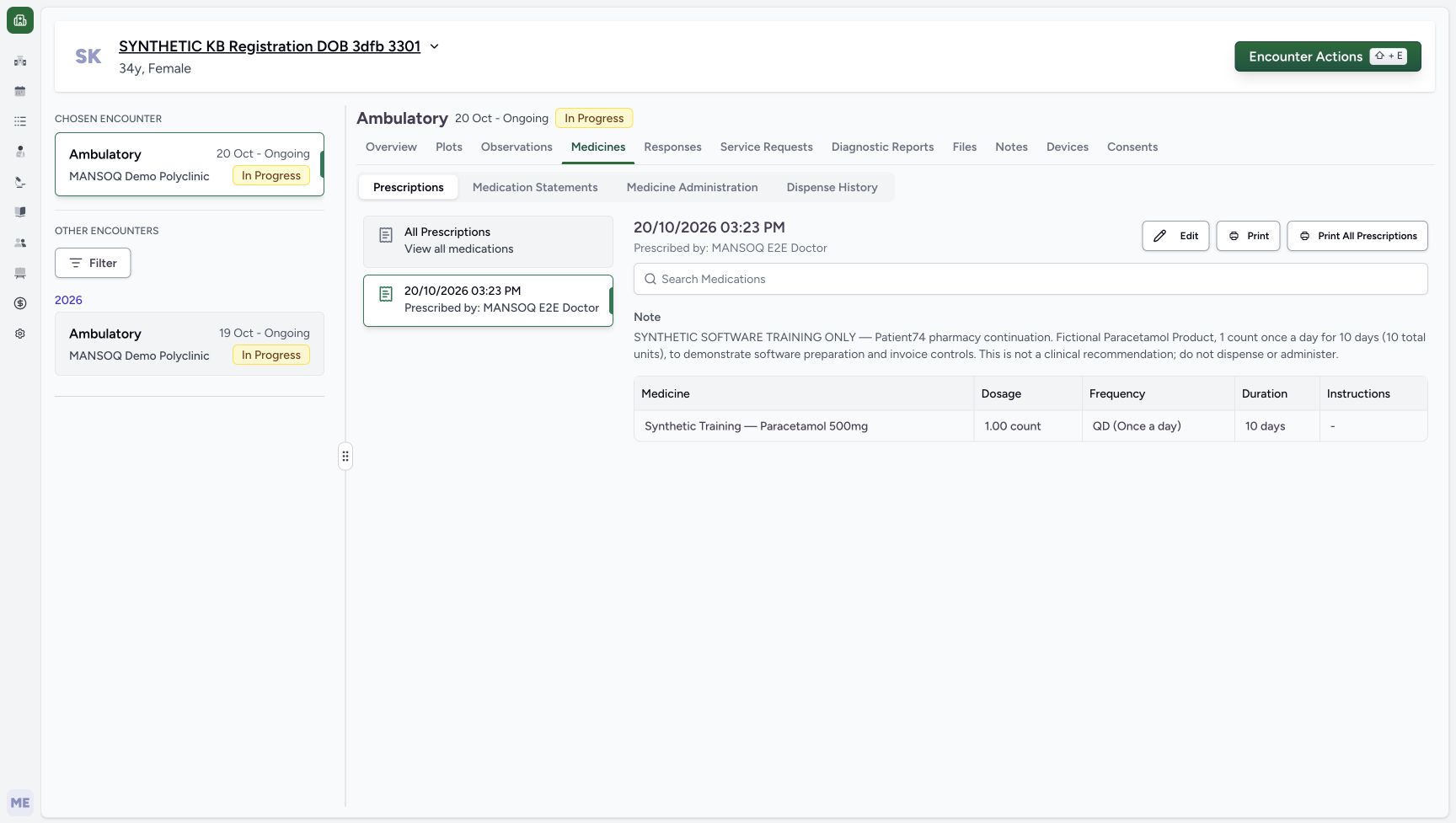
1234Selected prescription with the saved note
Capture details
Genuine native Doctor capture on the exact committed 026f local build. Source publication is LOCAL_UNPUSHED. Original pixels are retained without cropping, resizing, editing or generated content. This bounded synthetic exercise records encounter and prescription software state; it does not establish clinical suitability, administration, dispensing, billing or full curriculum qualification.
Image SHA-256 ddb800ebec25c79b867d1b78e1a72832591ba03e0c6d11d784e9118f463b5111
- Read the saved prescription note: The exact fictional software training note is visible on the selected prescription.
- Read the saved dose and timing: The single Product row remains 1.00 count, QD, 10 days.
- Distinguish Edit: Edit is a separate action; it was not used after this save.
- Distinguish Print: Print is a separate action; no print or real medication workflow occurred.
 123
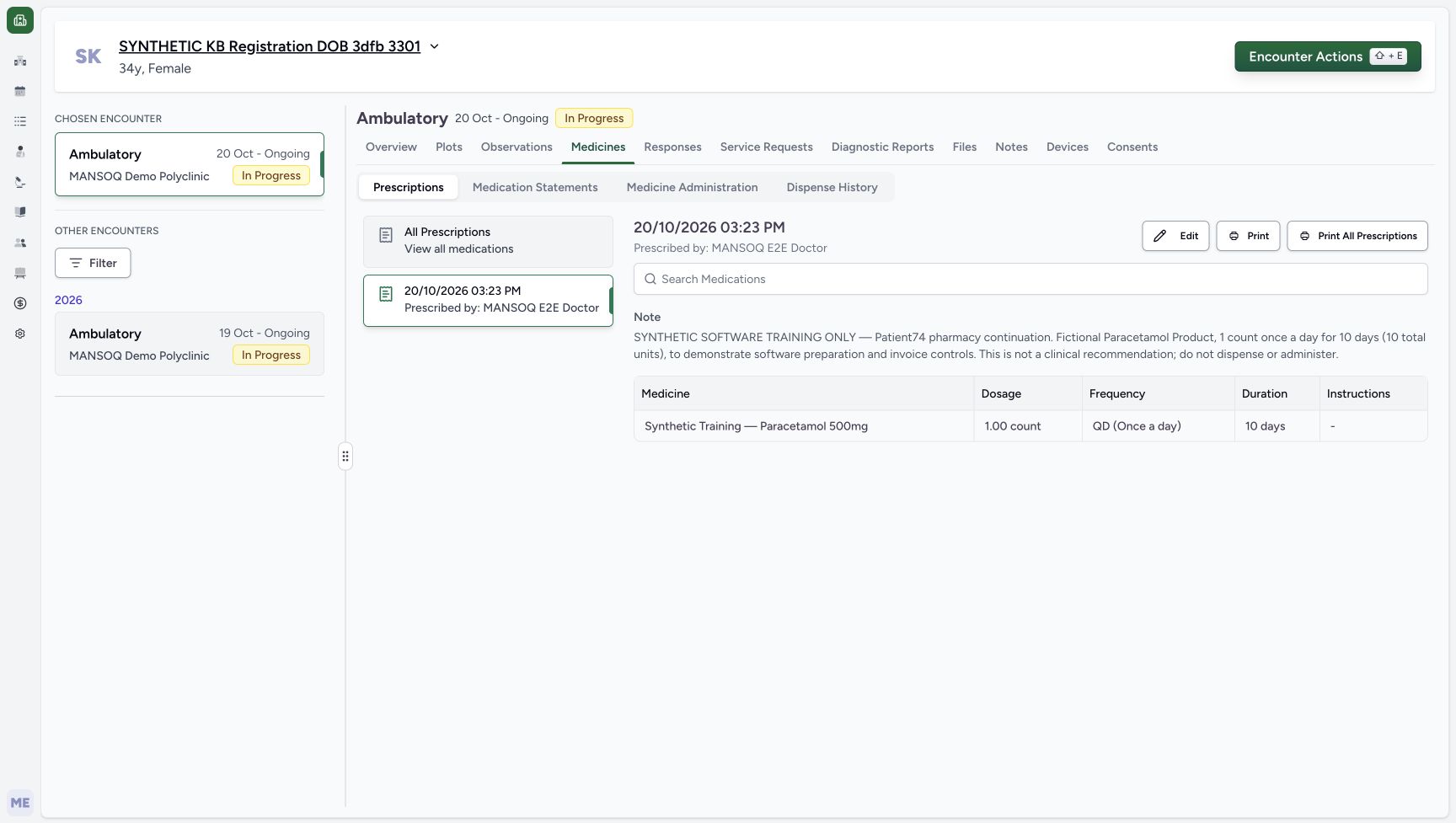
123Selected prescription and note after reload
Capture details
Genuine native Doctor capture on the exact committed 026f local build. Source publication is LOCAL_UNPUSHED. Original pixels are retained without cropping, resizing, editing or generated content. This bounded synthetic exercise records encounter and prescription software state; it does not establish clinical suitability, administration, dispensing, billing or full curriculum qualification.
Image SHA-256 ddb800ebec25c79b867d1b78e1a72832591ba03e0c6d11d784e9118f463b5111
- Verify the exact note after reload: The single prescription retains the explicit software-only and do-not-dispense wording.
- Verify the saved Product and timing: One synthetic Product remains 1.00 count, QD, 10 days.
- Keep the encounter In Progress: This Doctor task does not close the encounter or dispense medication.
17 of 17 content blocks have reviewed image alignment.
Before you begin
- Use the authorised ordinary Doctor account and the same assigned synthetic patient. Start from the new October 20 Ambulatory encounter, which remains In Progress. Do not select the older October 19 encounter.
 123
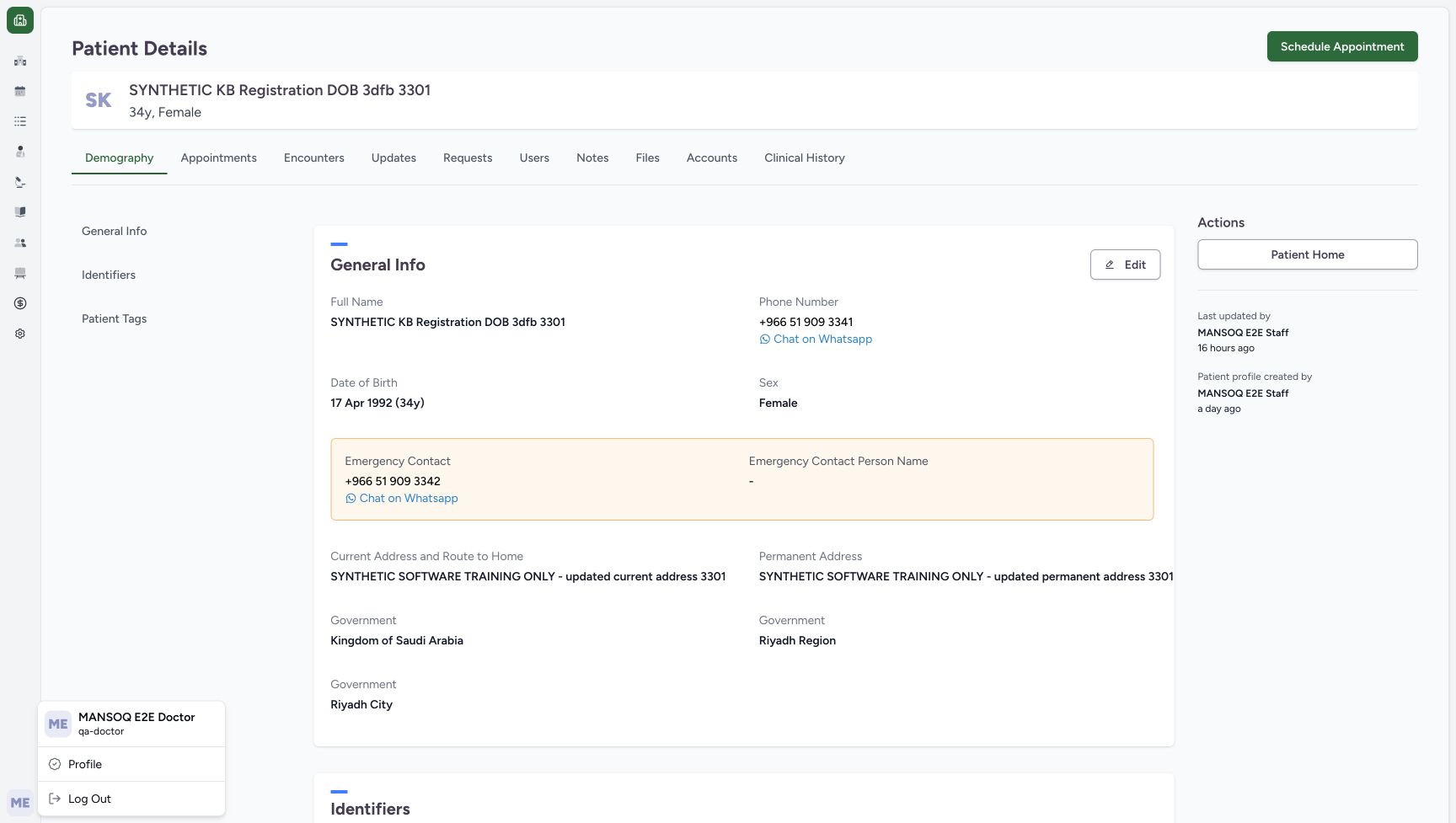
123Recorded release 026fdf3e · 2026-10-20T12:15:17.840Z · 1728 × 977 Ordinary Doctor and the assigned synthetic patient
Capture details
Genuine native Doctor capture on the exact committed 026f local build. Source publication is LOCAL_UNPUSHED. Original pixels are retained without cropping, resizing, editing or generated content. This bounded synthetic exercise records encounter and prescription software state; it does not establish clinical suitability, administration, dispensing, billing or full curriculum qualification.
Image SHA-256
ffc4abbb6e2f2f5b6b64a57e31232cb1b680c78a97d30df2bba68029d68ed881- Check the Doctor account: The open account menu identifies MANSOQ E2E Doctor and qa-doctor.
- Check the assigned synthetic patient: The patient banner identifies the existing fictional registration record.
- Open Patient Home: Use Patient Home after verifying the assigned record.
 123
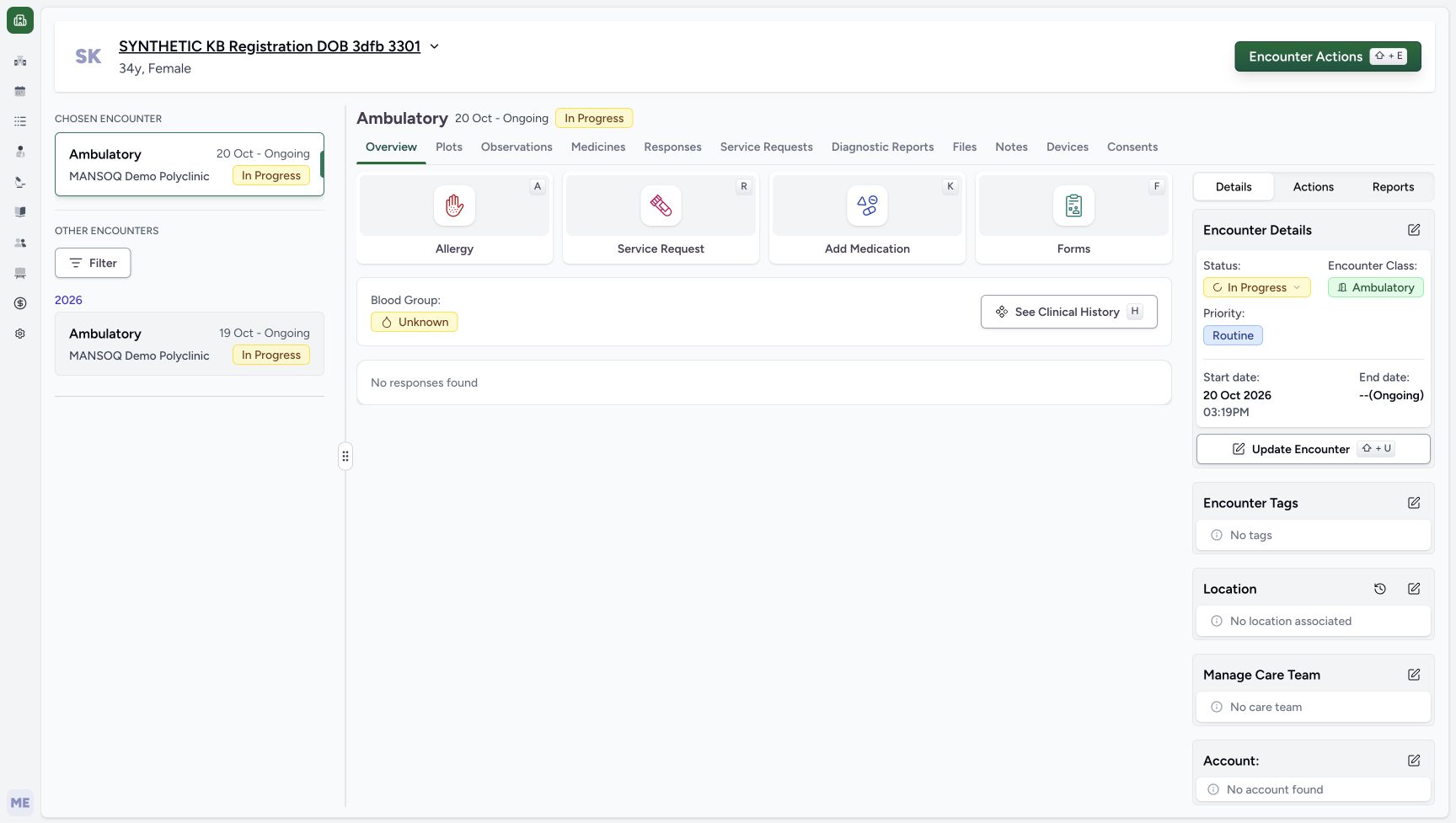
123Recorded release 026fdf3e · 2026-10-20T12:21:33.407Z · 1728 × 977 New encounter retained after reload
Capture details
Genuine native Doctor capture on the exact committed 026f local build. Source publication is LOCAL_UNPUSHED. Original pixels are retained without cropping, resizing, editing or generated content. This bounded synthetic exercise records encounter and prescription software state; it does not establish clinical suitability, administration, dispensing, billing or full curriculum qualification.
Image SHA-256
a10a8368af44d256707b2342a4e402ee69d779344b4eb917373f139987052b23- Check the chosen encounter after reload: A normal browser reload retains the October 20 encounter.
- Check the persisted start date: The saved start date and time remain October 20, 03:19 PM.
- Open Add Medication: Enter the medication questionnaire for the new encounter.
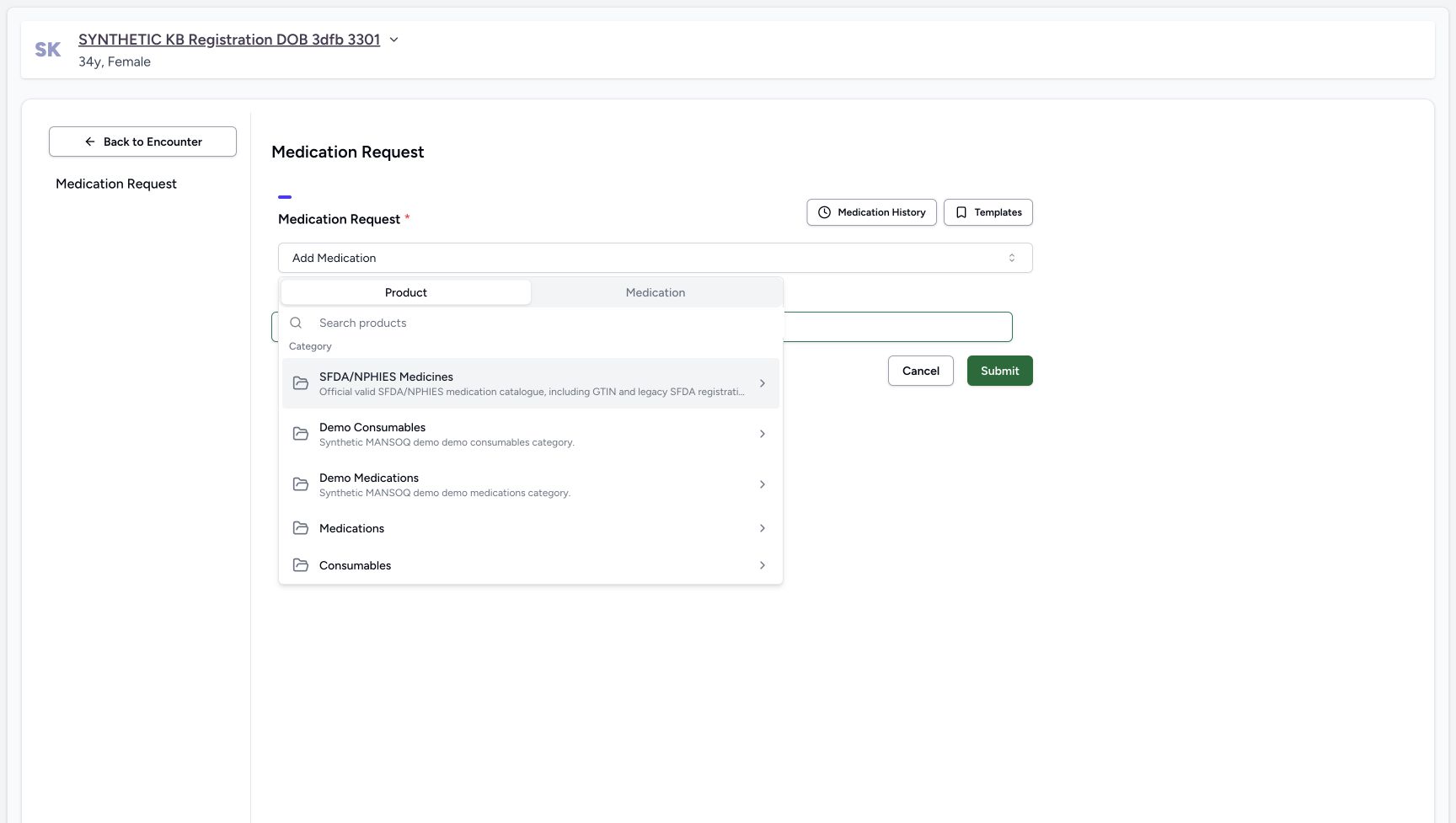
- Use the existing Synthetic Training — Paracetamol 500mg Product shown in the Product selector. Product and Medication are separate tabs; this recording selected the Product result, not a Medication-tab catalogue result or a stock batch.
 12
12Recorded release 026fdf3e · 2026-10-20T12:21:53.499Z · 1728 × 977 Product and Medication selector tabs
Capture details
Genuine native Doctor capture on the exact committed 026f local build. Source publication is LOCAL_UNPUSHED. Original pixels are retained without cropping, resizing, editing or generated content. This bounded synthetic exercise records encounter and prescription software state; it does not establish clinical suitability, administration, dispensing, billing or full curriculum qualification.
Image SHA-256
c49dc9f634672ceda1a3de1164bc77de37a62ecd57e4a22c522ef6c641489490- Keep Product selected: Product is distinct from the Medication catalogue tab.
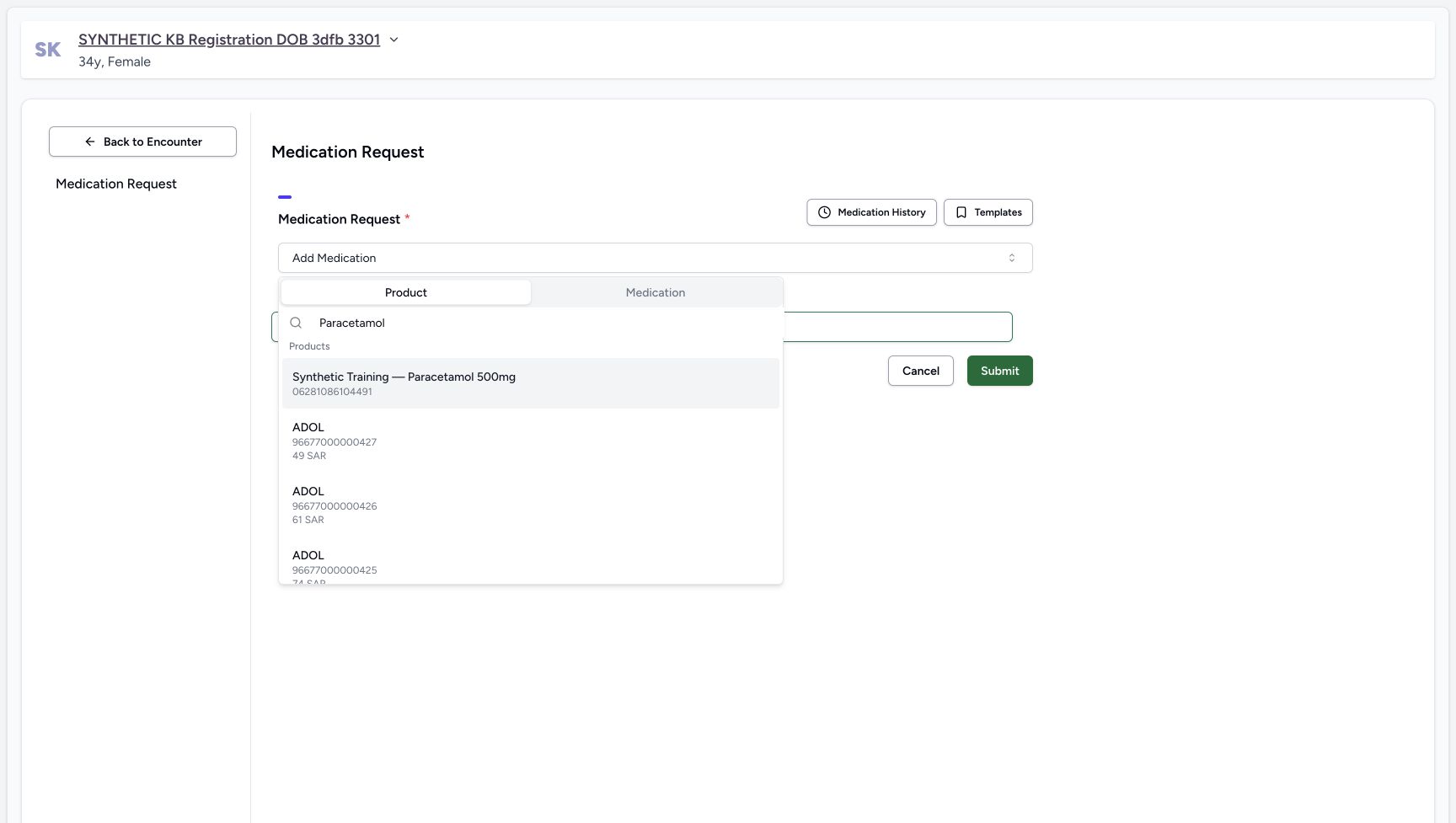
- Search products: Enter Paracetamol in the Product search field.
 12
12Recorded release 026fdf3e · 2026-10-20T12:22:07.246Z · 1728 × 977 Synthetic Product search result
Capture details
Genuine native Doctor capture on the exact committed 026f local build. Source publication is LOCAL_UNPUSHED. Original pixels are retained without cropping, resizing, editing or generated content. This bounded synthetic exercise records encounter and prescription software state; it does not establish clinical suitability, administration, dispensing, billing or full curriculum qualification.
Image SHA-256
5a81d3bdc148246140e6048a507bfc1276823b200c8a578fa355474f21b32eaf- Choose Synthetic Training — Paracetamol 500mg: Select the explicitly synthetic Product result; other catalogue results are separate products.
- Check the search text: The visible search is Paracetamol.
- Every dose, frequency, duration and note here is a fictional software example, not a clinical recommendation. Do not dispense or administer these values. Create only one new demonstration prescription and keep the explicit software-only note.
 12345
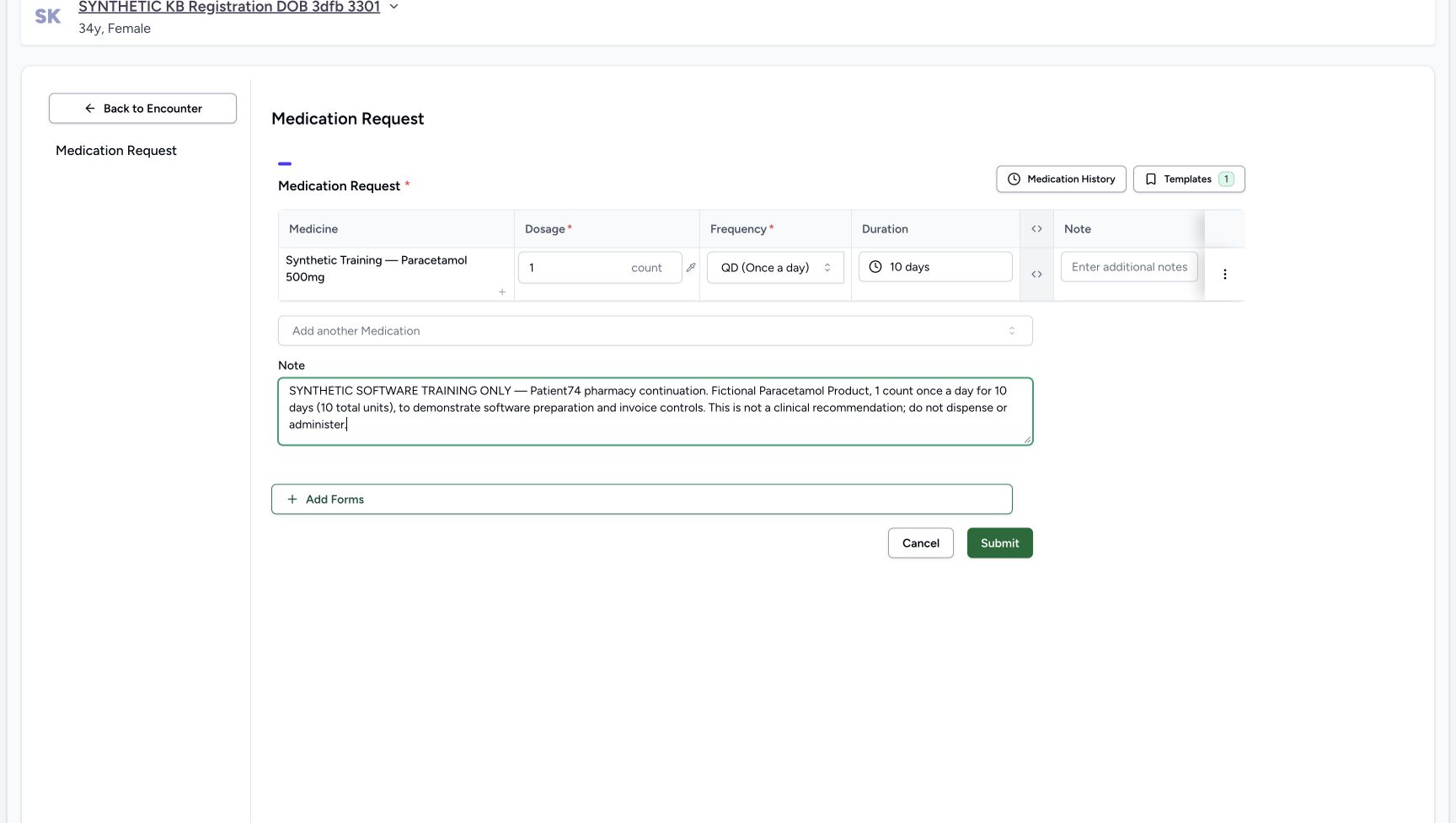
12345Recorded release 026fdf3e · 2026-10-20T12:23:03.391Z · 1728 × 977 Reviewed fictional prescription and note
Capture details
Genuine native Doctor capture on the exact committed 026f local build. Source publication is LOCAL_UNPUSHED. Original pixels are retained without cropping, resizing, editing or generated content. This bounded synthetic exercise records encounter and prescription software state; it does not establish clinical suitability, administration, dispensing, billing or full curriculum qualification.
Image SHA-256
68bdf5fa2babd6ff2bae6757a9eca264ad9ee545f4e3c4d48ea408f8fb3637cb- Check 1 count: The reviewed dosage remains exactly one count.
- Check QD: The reviewed frequency is QD (Once a day).
- Check 10 days: The ten-day preset is now applied.
- Read the software-only note: The whole-prescription note states this is fictional software training and says not to dispense or administer.
- Submit once: Submit exactly the one reviewed synthetic Product row.
123Recorded release 026fdf3e · 2026-10-20T12:23:50.494Z · 1728 × 977 Selected prescription and note after reload
Capture details
Genuine native Doctor capture on the exact committed 026f local build. Source publication is LOCAL_UNPUSHED. Original pixels are retained without cropping, resizing, editing or generated content. This bounded synthetic exercise records encounter and prescription software state; it does not establish clinical suitability, administration, dispensing, billing or full curriculum qualification.
Image SHA-256
ddb800ebec25c79b867d1b78e1a72832591ba03e0c6d11d784e9118f463b5111- Verify the exact note after reload: The single prescription retains the explicit software-only and do-not-dispense wording.
- Verify the saved Product and timing: One synthetic Product remains 1.00 count, QD, 10 days.
- Keep the encounter In Progress: This Doctor task does not close the encounter or dispense medication.
1. Open the fresh medication request
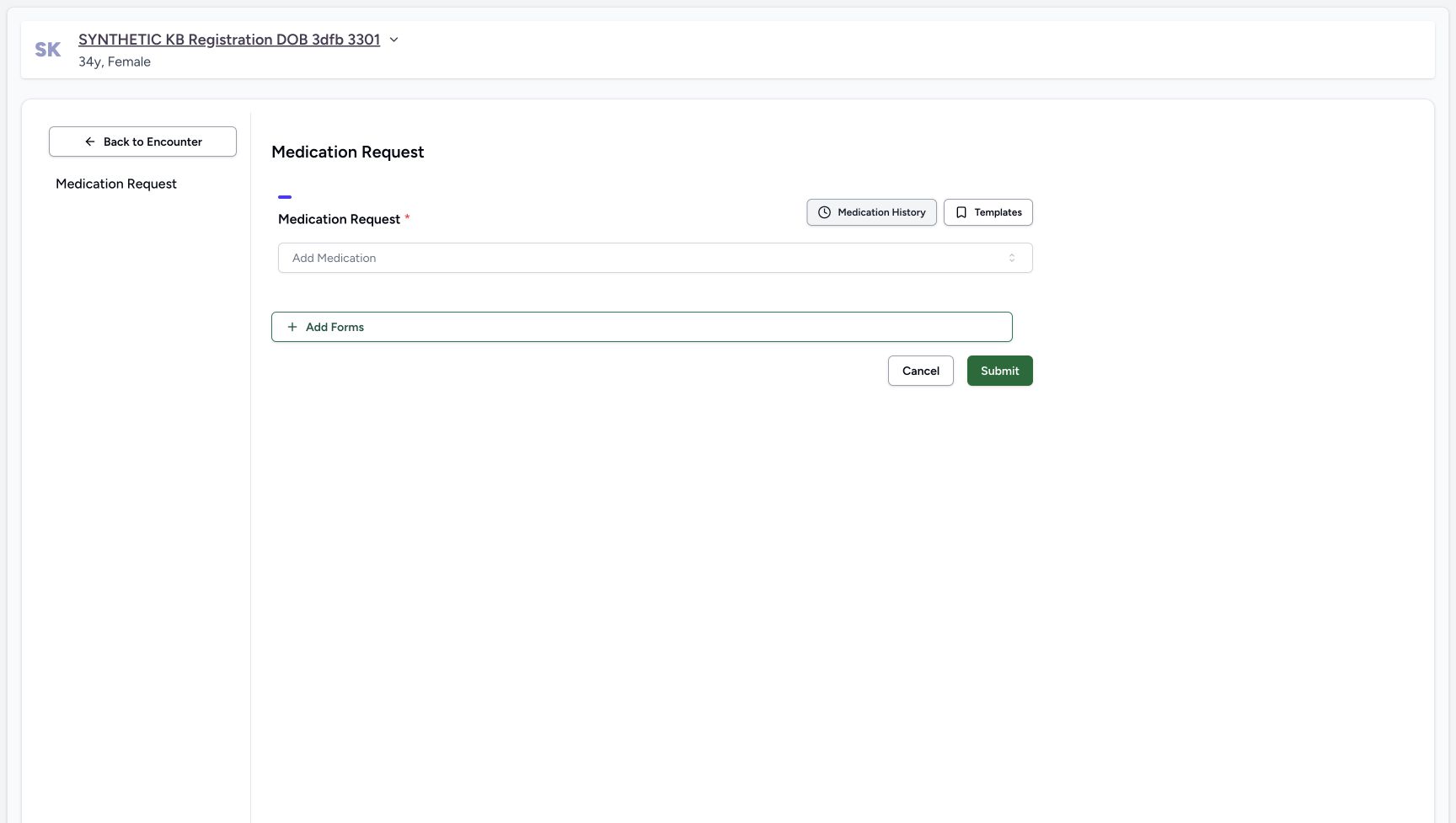
From the selected October 20 encounter overview, choose Add Medication. Check the assigned patient banner. The Medication Request questionnaire opens without medicine rows; choose Add Medication to begin the single-row example.
123New encounter retained after reload
Capture details
Genuine native Doctor capture on the exact committed 026f local build. Source publication is LOCAL_UNPUSHED. Original pixels are retained without cropping, resizing, editing or generated content. This bounded synthetic exercise records encounter and prescription software state; it does not establish clinical suitability, administration, dispensing, billing or full curriculum qualification.
Image SHA-256 a10a8368af44d256707b2342a4e402ee69d779344b4eb917373f139987052b23
- Check the chosen encounter after reload: A normal browser reload retains the October 20 encounter.
- Check the persisted start date: The saved start date and time remain October 20, 03:19 PM.
- Open Add Medication: Enter the medication questionnaire for the new encounter.
 12
12Fresh Medication Request questionnaire
Capture details
Genuine native Doctor capture on the exact committed 026f local build. Source publication is LOCAL_UNPUSHED. Original pixels are retained without cropping, resizing, editing or generated content. This bounded synthetic exercise records encounter and prescription software state; it does not establish clinical suitability, administration, dispensing, billing or full curriculum qualification.
Image SHA-256 904aa6f93f259fe86367bf52225014f2a1e0a462737f5581ea5bf82964ae9f62
- Open Add Medication: The fresh questionnaire begins without medication rows.
- Check the patient banner: Continue only on the assigned synthetic patient.
2. Choose the explicitly synthetic Product
Keep Product selected. Search for Paracetamol and choose Synthetic Training — Paracetamol 500mg, the illustrated synthetic result. Other search results are separate catalogue products. The questionnaire now contains exactly one Product row.
12Product and Medication selector tabs
Capture details
Genuine native Doctor capture on the exact committed 026f local build. Source publication is LOCAL_UNPUSHED. Original pixels are retained without cropping, resizing, editing or generated content. This bounded synthetic exercise records encounter and prescription software state; it does not establish clinical suitability, administration, dispensing, billing or full curriculum qualification.
Image SHA-256 c49dc9f634672ceda1a3de1164bc77de37a62ecd57e4a22c522ef6c641489490
- Keep Product selected: Product is distinct from the Medication catalogue tab.
- Search products: Enter Paracetamol in the Product search field.
12Synthetic Product search result
Capture details
Genuine native Doctor capture on the exact committed 026f local build. Source publication is LOCAL_UNPUSHED. Original pixels are retained without cropping, resizing, editing or generated content. This bounded synthetic exercise records encounter and prescription software state; it does not establish clinical suitability, administration, dispensing, billing or full curriculum qualification.
Image SHA-256 5a81d3bdc148246140e6048a507bfc1276823b200c8a578fa355474f21b32eaf
- Choose Synthetic Training — Paracetamol 500mg: Select the explicitly synthetic Product result; other catalogue results are separate products.
- Check the search text: The visible search is Paracetamol.
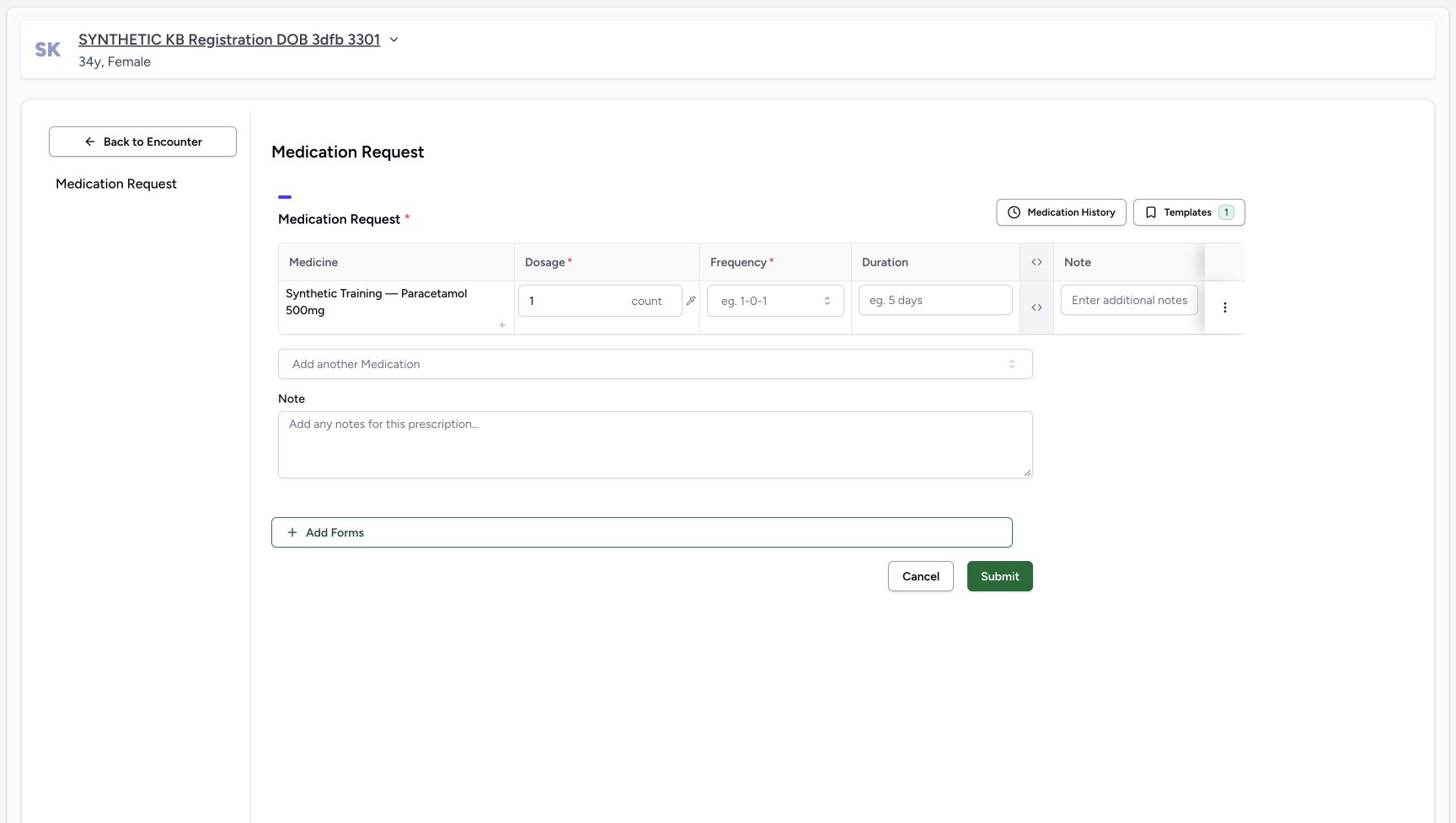 12345
12345One unsaved Product row
Capture details
Genuine native Doctor capture on the exact committed 026f local build. Source publication is LOCAL_UNPUSHED. Original pixels are retained without cropping, resizing, editing or generated content. This bounded synthetic exercise records encounter and prescription software state; it does not establish clinical suitability, administration, dispensing, billing or full curriculum qualification.
Image SHA-256 f44a2123d2dc9c04832ca782cf39b10a9d6d78cd8e58761119f8e889596f5cf9
- Verify the synthetic Product row: Exactly one Product row has been added to the unsaved questionnaire.
- Check 1 count: The default numeric dosage is 1 count.
- Open Frequency: The required frequency has not yet been selected.
- Open Duration: The duration control provides presets.
- Use the prescription Note: The lower Note is for the whole prescription; the row has a separate additional-note field.
3. Review the one-count dosage
Read the new row’s medicine name and the default 1 count dosage. Keep one count for this software example. The row has a separate additional-note field, while the lower Note belongs to the whole prescription. Do not add a second medicine row.
12345One unsaved Product row
Capture details
Genuine native Doctor capture on the exact committed 026f local build. Source publication is LOCAL_UNPUSHED. Original pixels are retained without cropping, resizing, editing or generated content. This bounded synthetic exercise records encounter and prescription software state; it does not establish clinical suitability, administration, dispensing, billing or full curriculum qualification.
Image SHA-256 f44a2123d2dc9c04832ca782cf39b10a9d6d78cd8e58761119f8e889596f5cf9
- Verify the synthetic Product row: Exactly one Product row has been added to the unsaved questionnaire.
- Check 1 count: The default numeric dosage is 1 count.
- Open Frequency: The required frequency has not yet been selected.
- Open Duration: The duration control provides presets.
- Use the prescription Note: The lower Note is for the whole prescription; the row has a separate additional-note field.
4. Filter Frequency and select QD
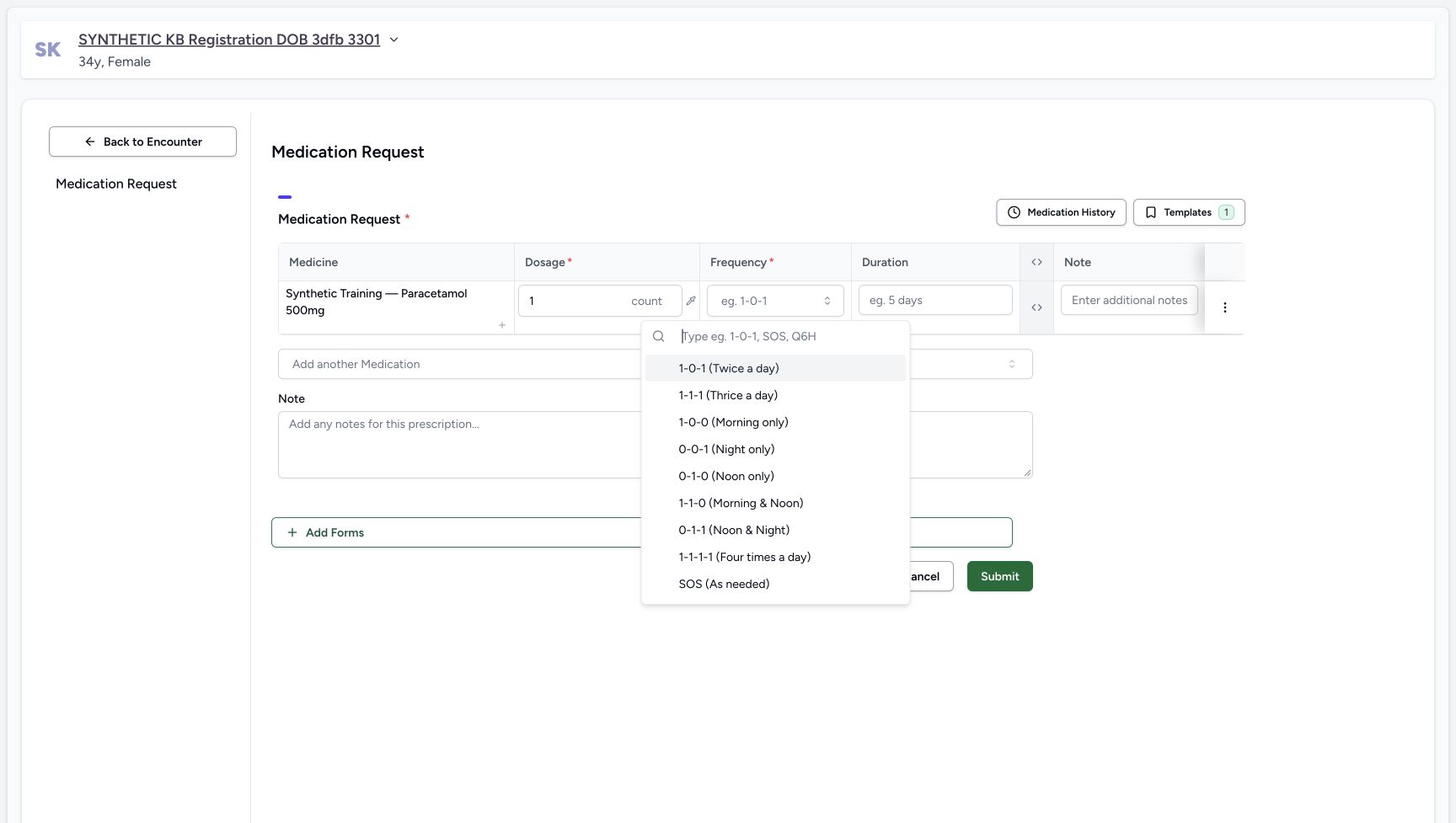
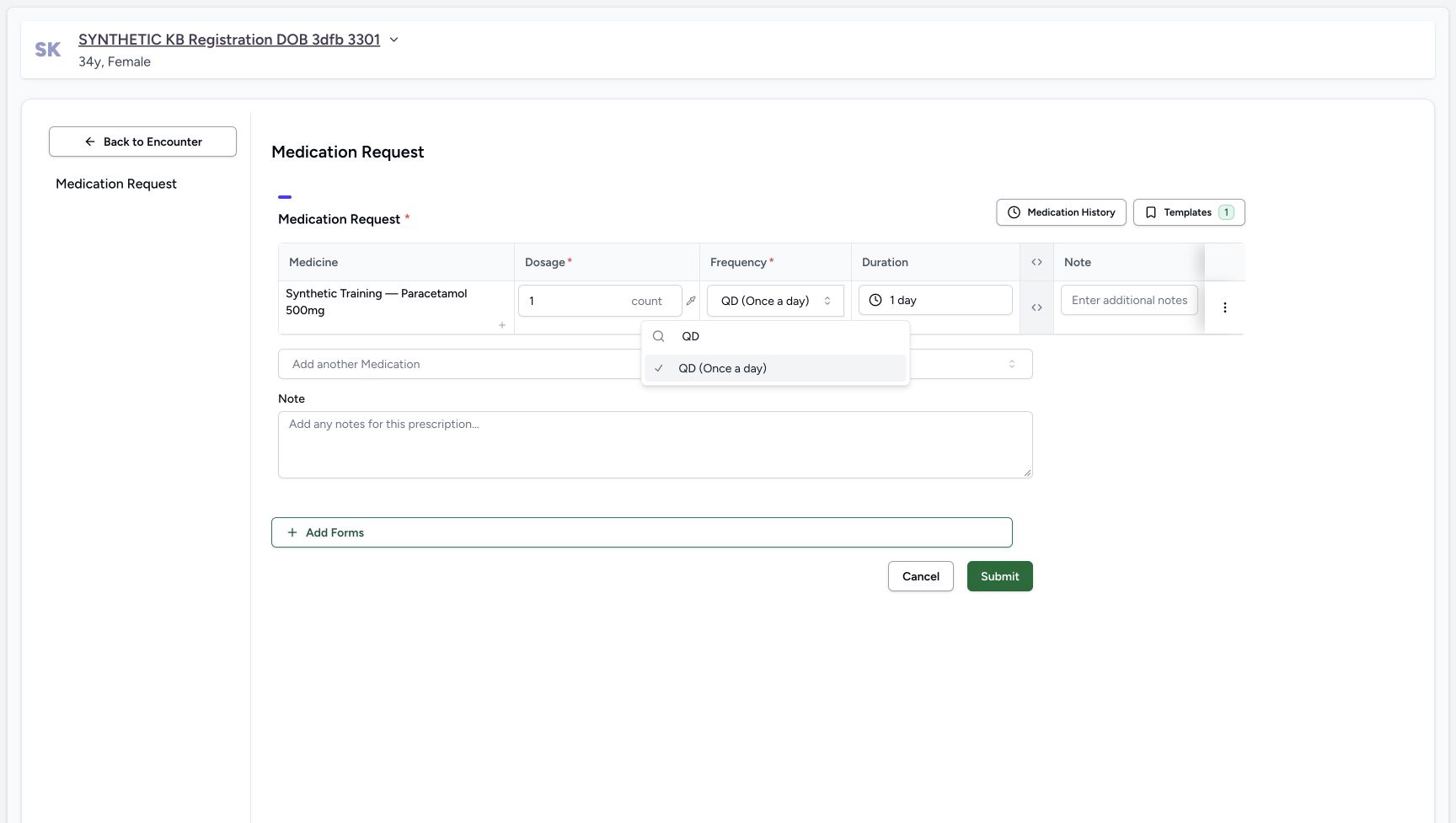
Open Frequency and type QD in its search field, then choose QD (Once a day). QD is below the pictured portion of the unfiltered menu, so use the filtered view to locate it visibly. The filtered example already has QD checked because the same value was reselected on this unsaved row. Confirm the row displays QD (Once a day).
12345One unsaved Product row
Capture details
Genuine native Doctor capture on the exact committed 026f local build. Source publication is LOCAL_UNPUSHED. Original pixels are retained without cropping, resizing, editing or generated content. This bounded synthetic exercise records encounter and prescription software state; it does not establish clinical suitability, administration, dispensing, billing or full curriculum qualification.
Image SHA-256 f44a2123d2dc9c04832ca782cf39b10a9d6d78cd8e58761119f8e889596f5cf9
- Verify the synthetic Product row: Exactly one Product row has been added to the unsaved questionnaire.
- Check 1 count: The default numeric dosage is 1 count.
- Open Frequency: The required frequency has not yet been selected.
- Open Duration: The duration control provides presets.
- Use the prescription Note: The lower Note is for the whole prescription; the row has a separate additional-note field.
 1
1Unfiltered frequency menu
Capture details
Genuine native Doctor capture on the exact committed 026f local build. Source publication is LOCAL_UNPUSHED. Original pixels are retained without cropping, resizing, editing or generated content. This bounded synthetic exercise records encounter and prescription software state; it does not establish clinical suitability, administration, dispensing, billing or full curriculum qualification.
Image SHA-256 540b0b2cb01354107af8a43fc5b288fc96c068ab61d9347a311c382c9edc2ba6
- Filter the frequency menu: Type QD in the search field to make its option visible; QD is below the captured scroll viewport in this unfiltered menu.
 123
123Visible filtered QD choice
Capture details
Genuine native Doctor capture on the exact committed 026f local build. Source publication is LOCAL_UNPUSHED. Original pixels are retained without cropping, resizing, editing or generated content. This bounded synthetic exercise records encounter and prescription software state; it does not establish clinical suitability, administration, dispensing, billing or full curriculum qualification.
Image SHA-256 54fbb9216f66c4731124457115d1b414b7745747a1442216b81459e139bc0568
- Choose QD (Once a day): The filtered menu visibly shows QD. This was a re-selection of the same unsaved value.
- Verify QD in the row: The row displays the selected once-a-day frequency.
- Open Duration next: The automatically supplied 1 day is still visible before choosing ten days.
5. Select the ten-day duration preset
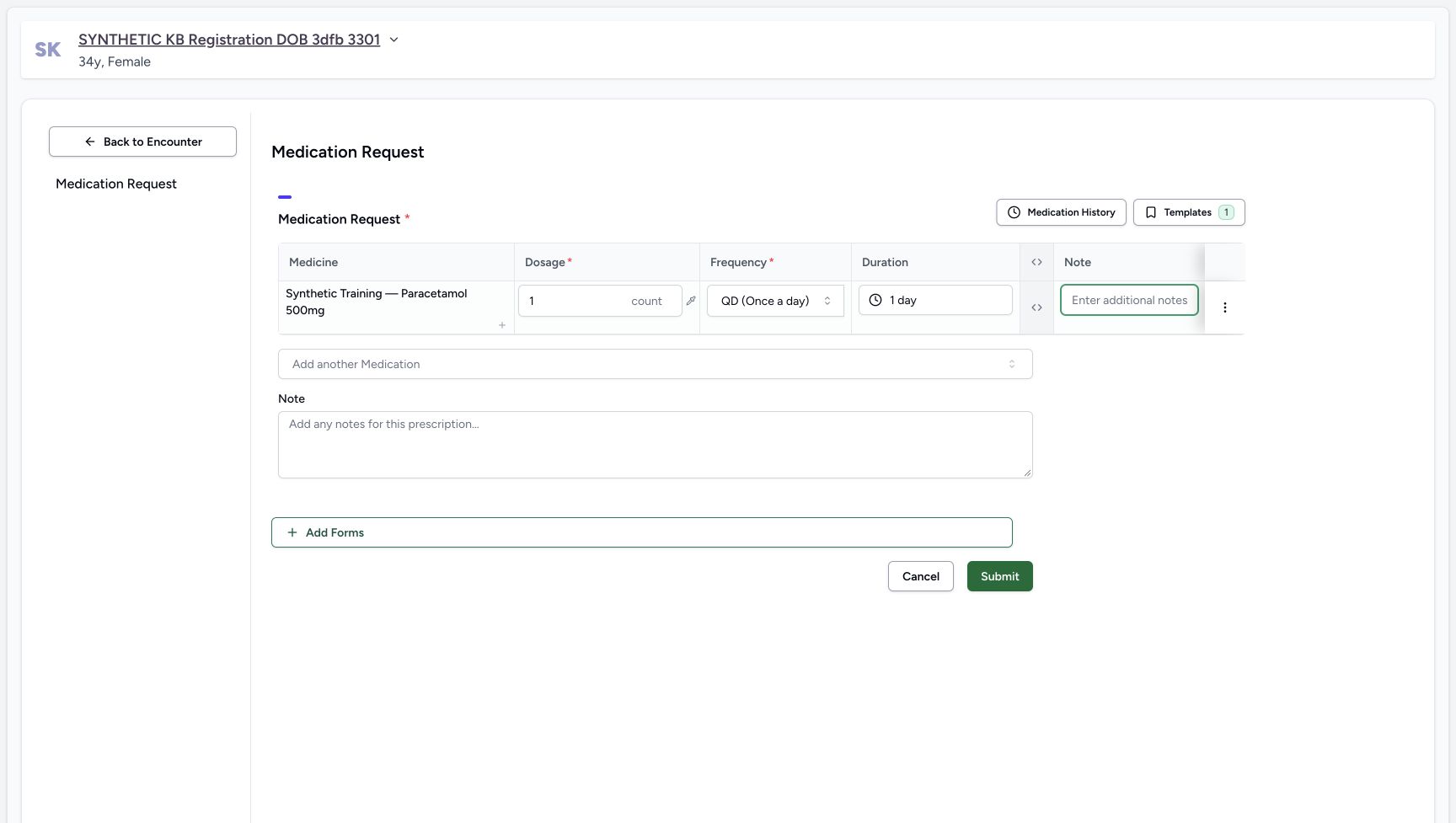
After selecting QD, the row supplied 1 day. An earlier typing and Tab attempt left that value unchanged and closed the popover. Open Duration and choose the visible 10 days preset. Verify that the field now reads 10 days; do not treat the earlier 1 day picture as a completed duration change.
123Visible filtered QD choice
Capture details
Genuine native Doctor capture on the exact committed 026f local build. Source publication is LOCAL_UNPUSHED. Original pixels are retained without cropping, resizing, editing or generated content. This bounded synthetic exercise records encounter and prescription software state; it does not establish clinical suitability, administration, dispensing, billing or full curriculum qualification.
Image SHA-256 54fbb9216f66c4731124457115d1b414b7745747a1442216b81459e139bc0568
- Choose QD (Once a day): The filtered menu visibly shows QD. This was a re-selection of the same unsaved value.
- Verify QD in the row: The row displays the selected once-a-day frequency.
- Open Duration next: The automatically supplied 1 day is still visible before choosing ten days.
 1
1Duration still one day after the earlier attempt
Capture details
Genuine native Doctor capture on the exact committed 026f local build. Source publication is LOCAL_UNPUSHED. Original pixels are retained without cropping, resizing, editing or generated content. This bounded synthetic exercise records encounter and prescription software state; it does not establish clinical suitability, administration, dispensing, billing or full curriculum qualification.
Image SHA-256 86ad92c625ff39f4bfcaf7c4013477b0453e8f519a027ecb5d3efba28b2096fe
- Notice duration is still 1 day: The earlier attempt did not change duration; the popover is closed in this original. Do not describe it as a ten-day selection.
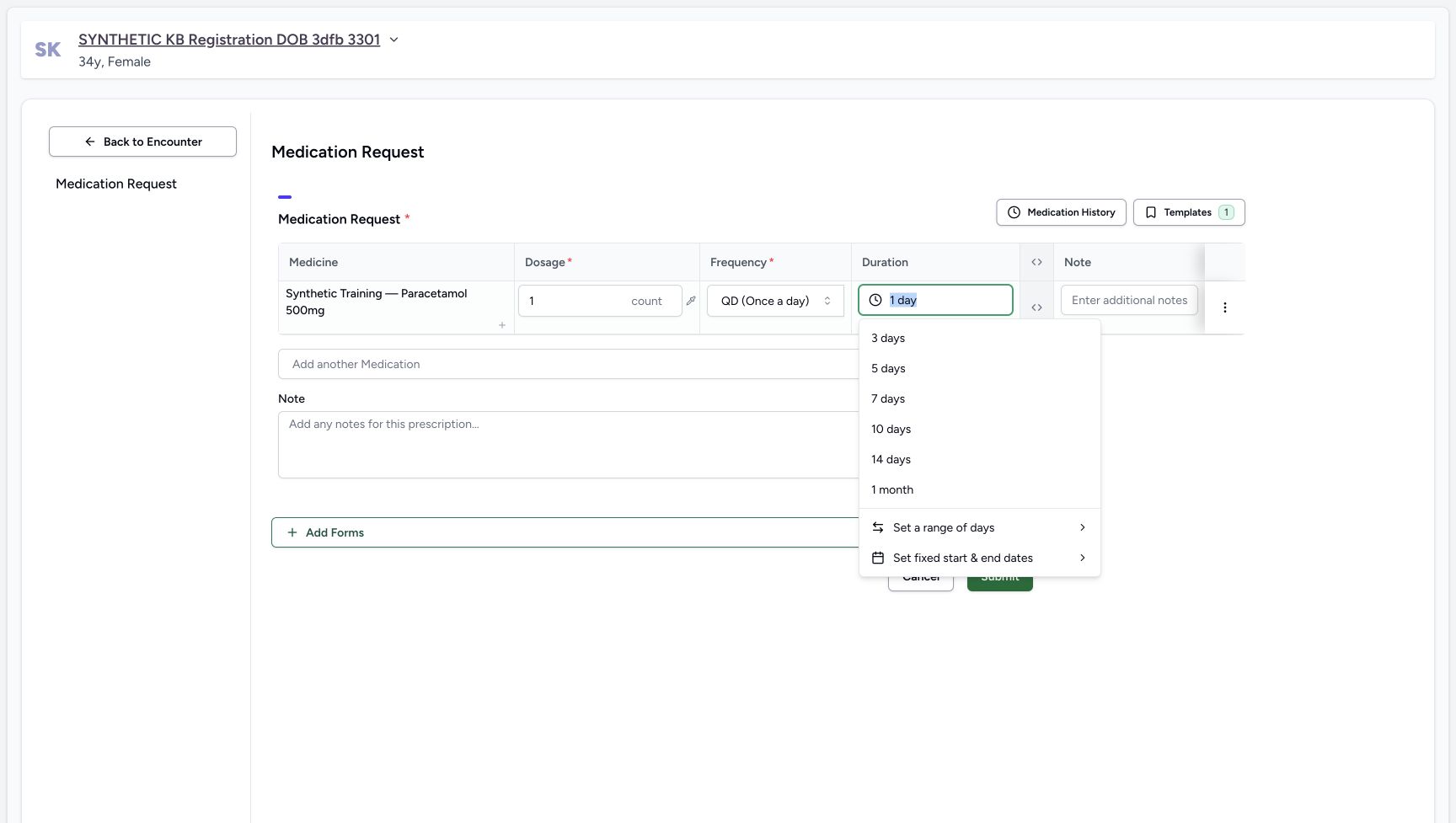 12
12Visible duration presets
Capture details
Genuine native Doctor capture on the exact committed 026f local build. Source publication is LOCAL_UNPUSHED. Original pixels are retained without cropping, resizing, editing or generated content. This bounded synthetic exercise records encounter and prescription software state; it does not establish clinical suitability, administration, dispensing, billing or full curriculum qualification.
Image SHA-256 3bc302dda1bf9074d30de05314ed26a467704ef3c356e770d3d8ceda0017ad2b
- Choose the 10 days preset: This open duration menu visibly includes 10 days.
- Distinguish the previous duration: The field remains 1 day until the preset is selected.
12345Reviewed fictional prescription and note
Capture details
Genuine native Doctor capture on the exact committed 026f local build. Source publication is LOCAL_UNPUSHED. Original pixels are retained without cropping, resizing, editing or generated content. This bounded synthetic exercise records encounter and prescription software state; it does not establish clinical suitability, administration, dispensing, billing or full curriculum qualification.
Image SHA-256 68bdf5fa2babd6ff2bae6757a9eca264ad9ee545f4e3c4d48ea408f8fb3637cb
- Check 1 count: The reviewed dosage remains exactly one count.
- Check QD: The reviewed frequency is QD (Once a day).
- Check 10 days: The ten-day preset is now applied.
- Read the software-only note: The whole-prescription note states this is fictional software training and says not to dispense or administer.
- Submit once: Submit exactly the one reviewed synthetic Product row.
6. Add and review the whole-prescription training note
Use the lower prescription Note and retain the exact wording shown: SYNTHETIC SOFTWARE TRAINING ONLY — Patient74 pharmacy continuation. Fictional Paracetamol Product, 1 count once a day for 10 days (10 total units), to demonstrate software preparation and invoice controls. This is not a clinical recommendation; do not dispense or administer. Review the single row again: Synthetic Training — Paracetamol 500mg, 1 count, QD (Once a day), 10 days.
12345Reviewed fictional prescription and note
Capture details
Genuine native Doctor capture on the exact committed 026f local build. Source publication is LOCAL_UNPUSHED. Original pixels are retained without cropping, resizing, editing or generated content. This bounded synthetic exercise records encounter and prescription software state; it does not establish clinical suitability, administration, dispensing, billing or full curriculum qualification.
Image SHA-256 68bdf5fa2babd6ff2bae6757a9eca264ad9ee545f4e3c4d48ea408f8fb3637cb
- Check 1 count: The reviewed dosage remains exactly one count.
- Check QD: The reviewed frequency is QD (Once a day).
- Check 10 days: The ten-day preset is now applied.
- Read the software-only note: The whole-prescription note states this is fictional software training and says not to dispense or administer.
- Submit once: Submit exactly the one reviewed synthetic Product row.
7. Submit once and inspect the saved row
Choose Submit once. The questionnaire returns to the encounter overview. Open Medicines and keep Prescriptions selected. All Prescriptions shows the saved synthetic Product row with 1.00 count, QD (Once a day) and 10 days, alongside the October 20, 03:23 PM prescription card attributed to MANSOQ E2E Doctor. The settled overview picture does not contain the temporary submission notice.
12345Reviewed fictional prescription and note
Capture details
Genuine native Doctor capture on the exact committed 026f local build. Source publication is LOCAL_UNPUSHED. Original pixels are retained without cropping, resizing, editing or generated content. This bounded synthetic exercise records encounter and prescription software state; it does not establish clinical suitability, administration, dispensing, billing or full curriculum qualification.
Image SHA-256 68bdf5fa2babd6ff2bae6757a9eca264ad9ee545f4e3c4d48ea408f8fb3637cb
- Check 1 count: The reviewed dosage remains exactly one count.
- Check QD: The reviewed frequency is QD (Once a day).
- Check 10 days: The ten-day preset is now applied.
- Read the software-only note: The whole-prescription note states this is fictional software training and says not to dispense or administer.
- Submit once: Submit exactly the one reviewed synthetic Product row.
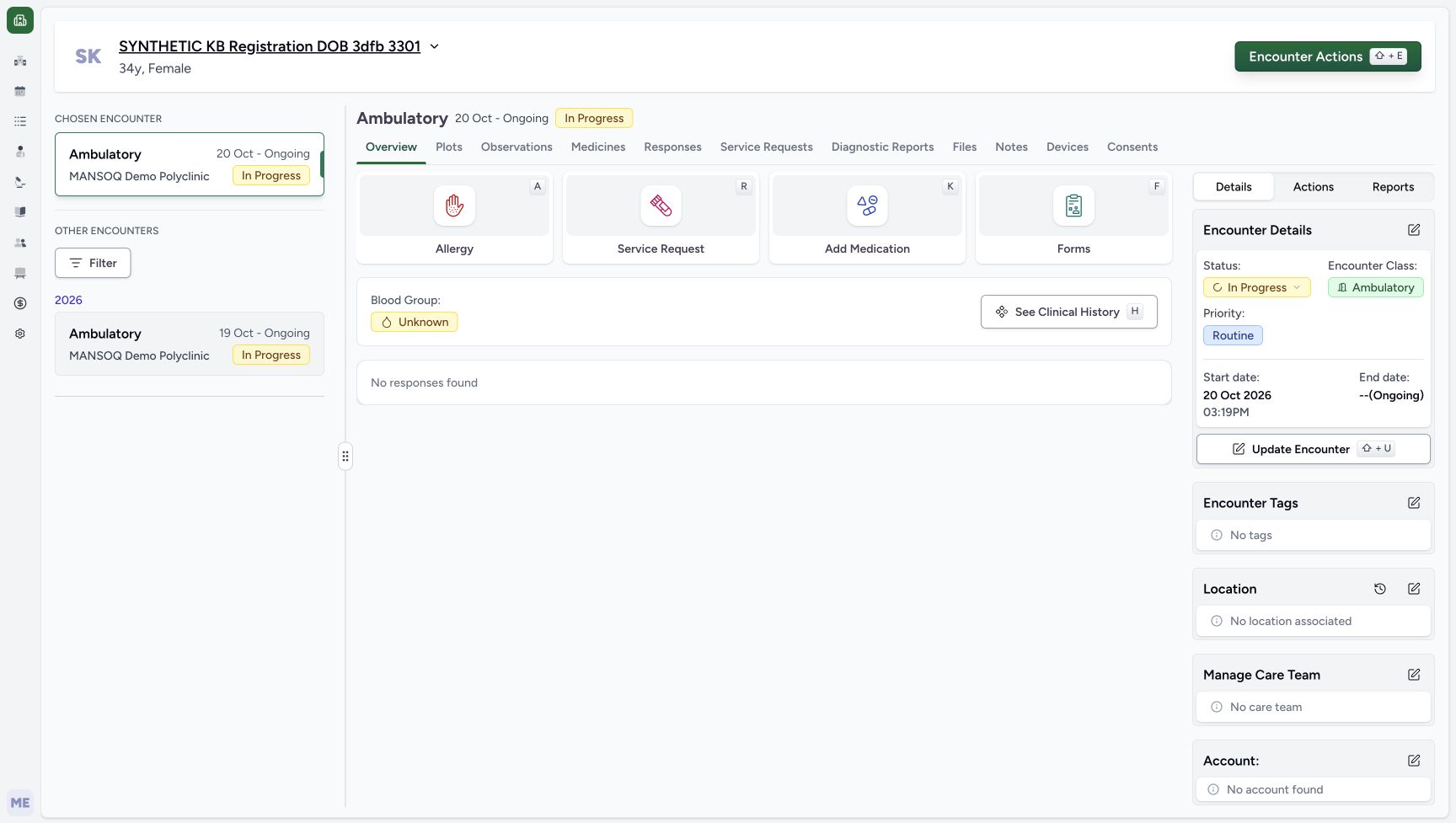 12
12Encounter overview after prescription submission
Capture details
Genuine native Doctor capture on the exact committed 026f local build. Source publication is LOCAL_UNPUSHED. Original pixels are retained without cropping, resizing, editing or generated content. This bounded synthetic exercise records encounter and prescription software state; it does not establish clinical suitability, administration, dispensing, billing or full curriculum qualification.
Image SHA-256 b540c8d41df778eda947a52602f2bcb3286d8f41d89b0a2ef86bba155ba39e01
- Open Medicines after submission: The questionnaire returned to the encounter overview. The submission toast had expired before this original; inspect the saved card next.
- Keep the new encounter selected: The encounter remains In Progress; no completion action was taken.
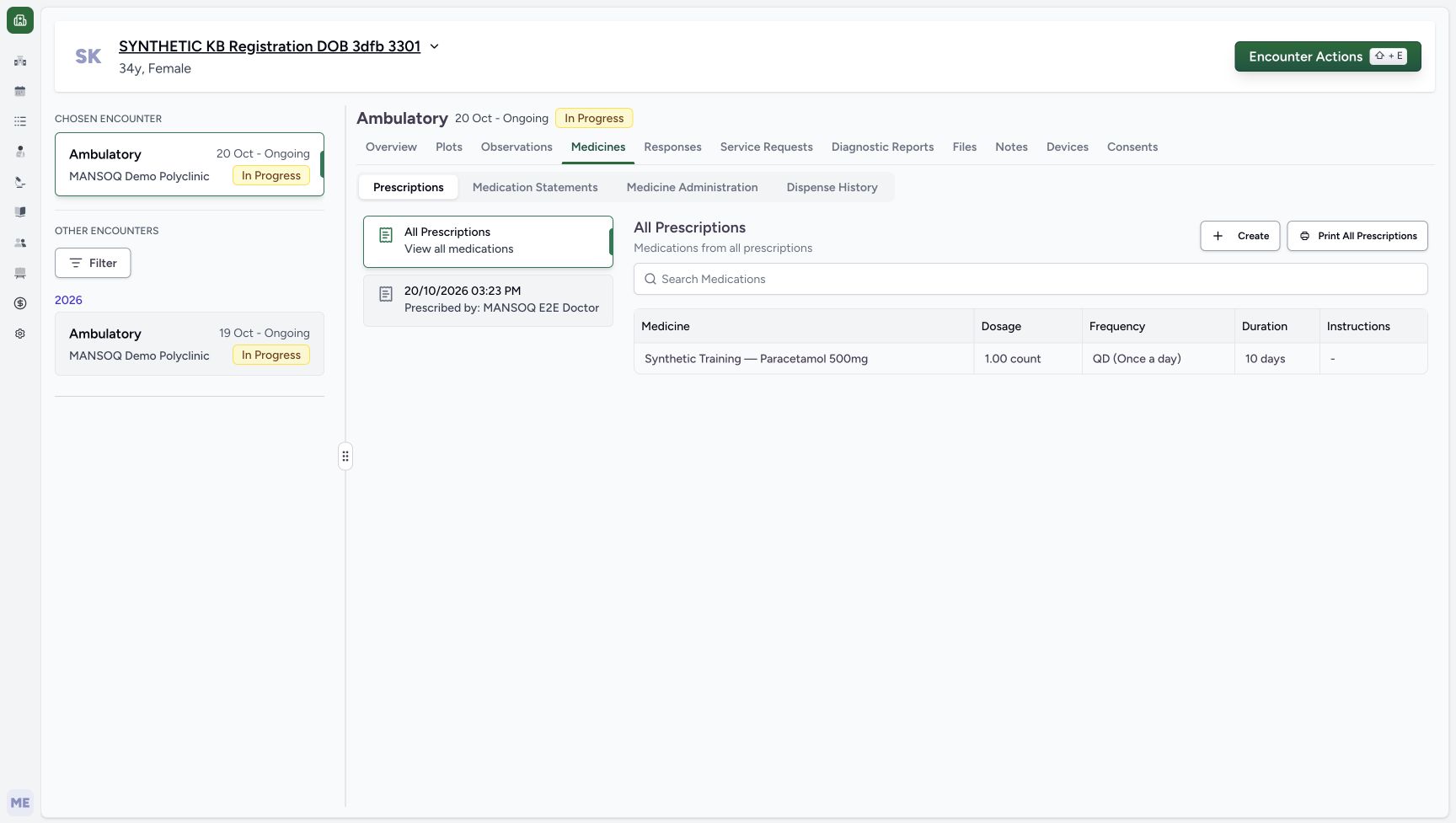 1234
1234Saved Product row under All Prescriptions
Capture details
Genuine native Doctor capture on the exact committed 026f local build. Source publication is LOCAL_UNPUSHED. Original pixels are retained without cropping, resizing, editing or generated content. This bounded synthetic exercise records encounter and prescription software state; it does not establish clinical suitability, administration, dispensing, billing or full curriculum qualification.
Image SHA-256 080dbef080f681c88d45ee9402db4dd8ce7218f492b6c5e02b7672516aadf487
- Select the dated prescription: The October 20, 03:23 PM card belongs to the new prescription.
- Read the saved Product row: The saved row is 1.00 count, QD (Once a day), 10 days.
- Distinguish Create: Create starts a separate prescription; this exercise does not create another.
- Distinguish printing: Print All Prescriptions is a separate action and was not used.
8. Select the dated prescription to read its note
Select the October 20, 03:23 PM prescription card. Read the exact software-only note and the one Product row. Edit, Print and Print All Prescriptions are separate controls; none was used after the save in this exercise.
1234Saved Product row under All Prescriptions
Capture details
Genuine native Doctor capture on the exact committed 026f local build. Source publication is LOCAL_UNPUSHED. Original pixels are retained without cropping, resizing, editing or generated content. This bounded synthetic exercise records encounter and prescription software state; it does not establish clinical suitability, administration, dispensing, billing or full curriculum qualification.
Image SHA-256 080dbef080f681c88d45ee9402db4dd8ce7218f492b6c5e02b7672516aadf487
- Select the dated prescription: The October 20, 03:23 PM card belongs to the new prescription.
- Read the saved Product row: The saved row is 1.00 count, QD (Once a day), 10 days.
- Distinguish Create: Create starts a separate prescription; this exercise does not create another.
- Distinguish printing: Print All Prescriptions is a separate action and was not used.
1234Selected prescription with the saved note
Capture details
Genuine native Doctor capture on the exact committed 026f local build. Source publication is LOCAL_UNPUSHED. Original pixels are retained without cropping, resizing, editing or generated content. This bounded synthetic exercise records encounter and prescription software state; it does not establish clinical suitability, administration, dispensing, billing or full curriculum qualification.
Image SHA-256 ddb800ebec25c79b867d1b78e1a72832591ba03e0c6d11d784e9118f463b5111
- Read the saved prescription note: The exact fictional software training note is visible on the selected prescription.
- Read the saved dose and timing: The single Product row remains 1.00 count, QD, 10 days.
- Distinguish Edit: Edit is a separate action; it was not used after this save.
- Distinguish Print: Print is a separate action; no print or real medication workflow occurred.
9. Reload and reselect the saved prescription
Use a normal browser reload. All Prescriptions retains the same single Product row and dated card. Select that card again to verify the full note and unchanged 1.00 count, QD, 10 days. The encounter remains In Progress. Do not submit another prescription merely because the list returned to All Prescriptions.
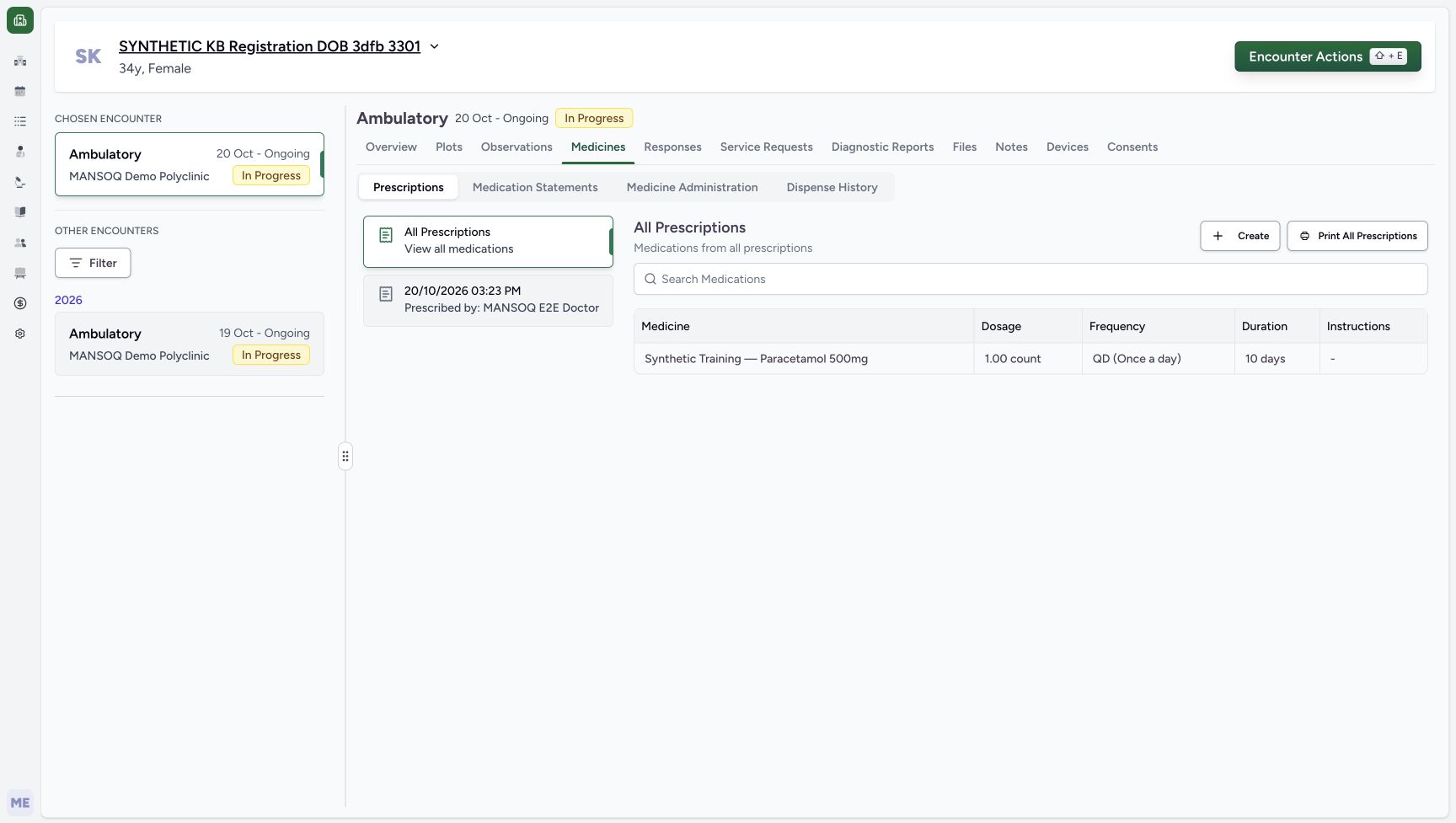 12
12Saved prescription list after reload
Capture details
Genuine native Doctor capture on the exact committed 026f local build. Source publication is LOCAL_UNPUSHED. Original pixels are retained without cropping, resizing, editing or generated content. This bounded synthetic exercise records encounter and prescription software state; it does not establish clinical suitability, administration, dispensing, billing or full curriculum qualification.
Image SHA-256 080dbef080f681c88d45ee9402db4dd8ce7218f492b6c5e02b7672516aadf487
- Check the row after reload: Normal reload preserves the one saved Product row.
- Reselect the dated prescription: Reload returns to All Prescriptions; select the dated card to read its note again.
123Selected prescription and note after reload
Capture details
Genuine native Doctor capture on the exact committed 026f local build. Source publication is LOCAL_UNPUSHED. Original pixels are retained without cropping, resizing, editing or generated content. This bounded synthetic exercise records encounter and prescription software state; it does not establish clinical suitability, administration, dispensing, billing or full curriculum qualification.
Image SHA-256 ddb800ebec25c79b867d1b78e1a72832591ba03e0c6d11d784e9118f463b5111
- Verify the exact note after reload: The single prescription retains the explicit software-only and do-not-dispense wording.
- Verify the saved Product and timing: One synthetic Product remains 1.00 count, QD, 10 days.
- Keep the encounter In Progress: This Doctor task does not close the encounter or dispense medication.
Keep Product identity and dispensing separate
This example selected an existing Product through the Product tab. The saved medicine name is Synthetic Training — Paracetamol 500mg. The separate Medication tab is a different catalogue path. Selecting a Product and saving a prescription does not select a stock batch, prepare an order, administer a dose or complete a dispense.
12Product and Medication selector tabs
Capture details
Genuine native Doctor capture on the exact committed 026f local build. Source publication is LOCAL_UNPUSHED. Original pixels are retained without cropping, resizing, editing or generated content. This bounded synthetic exercise records encounter and prescription software state; it does not establish clinical suitability, administration, dispensing, billing or full curriculum qualification.
Image SHA-256 c49dc9f634672ceda1a3de1164bc77de37a62ecd57e4a22c522ef6c641489490
- Keep Product selected: Product is distinct from the Medication catalogue tab.
- Search products: Enter Paracetamol in the Product search field.
12Synthetic Product search result
Capture details
Genuine native Doctor capture on the exact committed 026f local build. Source publication is LOCAL_UNPUSHED. Original pixels are retained without cropping, resizing, editing or generated content. This bounded synthetic exercise records encounter and prescription software state; it does not establish clinical suitability, administration, dispensing, billing or full curriculum qualification.
Image SHA-256 5a81d3bdc148246140e6048a507bfc1276823b200c8a578fa355474f21b32eaf
- Choose Synthetic Training — Paracetamol 500mg: Select the explicitly synthetic Product result; other catalogue results are separate products.
- Check the search text: The visible search is Paracetamol.
12345One unsaved Product row
Capture details
Genuine native Doctor capture on the exact committed 026f local build. Source publication is LOCAL_UNPUSHED. Original pixels are retained without cropping, resizing, editing or generated content. This bounded synthetic exercise records encounter and prescription software state; it does not establish clinical suitability, administration, dispensing, billing or full curriculum qualification.
Image SHA-256 f44a2123d2dc9c04832ca782cf39b10a9d6d78cd8e58761119f8e889596f5cf9
- Verify the synthetic Product row: Exactly one Product row has been added to the unsaved questionnaire.
- Check 1 count: The default numeric dosage is 1 count.
- Open Frequency: The required frequency has not yet been selected.
- Open Duration: The duration control provides presets.
- Use the prescription Note: The lower Note is for the whole prescription; the row has a separate additional-note field.
123Selected prescription and note after reload
Capture details
Genuine native Doctor capture on the exact committed 026f local build. Source publication is LOCAL_UNPUSHED. Original pixels are retained without cropping, resizing, editing or generated content. This bounded synthetic exercise records encounter and prescription software state; it does not establish clinical suitability, administration, dispensing, billing or full curriculum qualification.
Image SHA-256 ddb800ebec25c79b867d1b78e1a72832591ba03e0c6d11d784e9118f463b5111
- Verify the exact note after reload: The single prescription retains the explicit software-only and do-not-dispense wording.
- Verify the saved Product and timing: One synthetic Product remains 1.00 count, QD, 10 days.
- Keep the encounter In Progress: This Doctor task does not close the encounter or dispense medication.
Read the recorded dates and software quantity
The new encounter starts at October 20, 03:19 PM; the saved prescription card is dated October 20, 03:23 PM. The one-count, once-a-day, ten-day schedule represents ten counts for this fictional software exercise. These Doctor views show no invoice amount or price calculation. Any later Pharmacy preparation, invoice or payment result needs its own saved outcome and review.
123New encounter retained after reload
Capture details
Genuine native Doctor capture on the exact committed 026f local build. Source publication is LOCAL_UNPUSHED. Original pixels are retained without cropping, resizing, editing or generated content. This bounded synthetic exercise records encounter and prescription software state; it does not establish clinical suitability, administration, dispensing, billing or full curriculum qualification.
Image SHA-256 a10a8368af44d256707b2342a4e402ee69d779344b4eb917373f139987052b23
- Check the chosen encounter after reload: A normal browser reload retains the October 20 encounter.
- Check the persisted start date: The saved start date and time remain October 20, 03:19 PM.
- Open Add Medication: Enter the medication questionnaire for the new encounter.
12345Reviewed fictional prescription and note
Capture details
Genuine native Doctor capture on the exact committed 026f local build. Source publication is LOCAL_UNPUSHED. Original pixels are retained without cropping, resizing, editing or generated content. This bounded synthetic exercise records encounter and prescription software state; it does not establish clinical suitability, administration, dispensing, billing or full curriculum qualification.
Image SHA-256 68bdf5fa2babd6ff2bae6757a9eca264ad9ee545f4e3c4d48ea408f8fb3637cb
- Check 1 count: The reviewed dosage remains exactly one count.
- Check QD: The reviewed frequency is QD (Once a day).
- Check 10 days: The ten-day preset is now applied.
- Read the software-only note: The whole-prescription note states this is fictional software training and says not to dispense or administer.
- Submit once: Submit exactly the one reviewed synthetic Product row.
123Selected prescription and note after reload
Capture details
Genuine native Doctor capture on the exact committed 026f local build. Source publication is LOCAL_UNPUSHED. Original pixels are retained without cropping, resizing, editing or generated content. This bounded synthetic exercise records encounter and prescription software state; it does not establish clinical suitability, administration, dispensing, billing or full curriculum qualification.
Image SHA-256 ddb800ebec25c79b867d1b78e1a72832591ba03e0c6d11d784e9118f463b5111
- Verify the exact note after reload: The single prescription retains the explicit software-only and do-not-dispense wording.
- Verify the saved Product and timing: One synthetic Product remains 1.00 count, QD, 10 days.
- Keep the encounter In Progress: This Doctor task does not close the encounter or dispense medication.
Troubleshooting
Duration still reads 1 day
Selecting QD can supply an initial 1 day duration. Check the displayed field after every attempted edit. In this recording an earlier typing attempt did not change it. Open the duration menu, select the actual 10 days preset and verify the final value before Submit.
123Visible filtered QD choice
Capture details
Genuine native Doctor capture on the exact committed 026f local build. Source publication is LOCAL_UNPUSHED. Original pixels are retained without cropping, resizing, editing or generated content. This bounded synthetic exercise records encounter and prescription software state; it does not establish clinical suitability, administration, dispensing, billing or full curriculum qualification.
Image SHA-256 54fbb9216f66c4731124457115d1b414b7745747a1442216b81459e139bc0568
- Choose QD (Once a day): The filtered menu visibly shows QD. This was a re-selection of the same unsaved value.
- Verify QD in the row: The row displays the selected once-a-day frequency.
- Open Duration next: The automatically supplied 1 day is still visible before choosing ten days.
1Duration still one day after the earlier attempt
Capture details
Genuine native Doctor capture on the exact committed 026f local build. Source publication is LOCAL_UNPUSHED. Original pixels are retained without cropping, resizing, editing or generated content. This bounded synthetic exercise records encounter and prescription software state; it does not establish clinical suitability, administration, dispensing, billing or full curriculum qualification.
Image SHA-256 86ad92c625ff39f4bfcaf7c4013477b0453e8f519a027ecb5d3efba28b2096fe
- Notice duration is still 1 day: The earlier attempt did not change duration; the popover is closed in this original. Do not describe it as a ten-day selection.
12Visible duration presets
Capture details
Genuine native Doctor capture on the exact committed 026f local build. Source publication is LOCAL_UNPUSHED. Original pixels are retained without cropping, resizing, editing or generated content. This bounded synthetic exercise records encounter and prescription software state; it does not establish clinical suitability, administration, dispensing, billing or full curriculum qualification.
Image SHA-256 3bc302dda1bf9074d30de05314ed26a467704ef3c356e770d3d8ceda0017ad2b
- Choose the 10 days preset: This open duration menu visibly includes 10 days.
- Distinguish the previous duration: The field remains 1 day until the preset is selected.
12345Reviewed fictional prescription and note
Capture details
Genuine native Doctor capture on the exact committed 026f local build. Source publication is LOCAL_UNPUSHED. Original pixels are retained without cropping, resizing, editing or generated content. This bounded synthetic exercise records encounter and prescription software state; it does not establish clinical suitability, administration, dispensing, billing or full curriculum qualification.
Image SHA-256 68bdf5fa2babd6ff2bae6757a9eca264ad9ee545f4e3c4d48ea408f8fb3637cb
- Check 1 count: The reviewed dosage remains exactly one count.
- Check QD: The reviewed frequency is QD (Once a day).
- Check 10 days: The ten-day preset is now applied.
- Read the software-only note: The whole-prescription note states this is fictional software training and says not to dispense or administer.
- Submit once: Submit exactly the one reviewed synthetic Product row.
The submission notice has disappeared
A temporary notice can expire before you inspect the settled page. The overview capture here contains no submission notice. Open Medicines, find the existing dated prescription, read its saved row and note, then reload and verify again. Do not create a duplicate solely to reproduce a notice.
12Encounter overview after prescription submission
Capture details
Genuine native Doctor capture on the exact committed 026f local build. Source publication is LOCAL_UNPUSHED. Original pixels are retained without cropping, resizing, editing or generated content. This bounded synthetic exercise records encounter and prescription software state; it does not establish clinical suitability, administration, dispensing, billing or full curriculum qualification.
Image SHA-256 b540c8d41df778eda947a52602f2bcb3286d8f41d89b0a2ef86bba155ba39e01
- Open Medicines after submission: The questionnaire returned to the encounter overview. The submission toast had expired before this original; inspect the saved card next.
- Keep the new encounter selected: The encounter remains In Progress; no completion action was taken.
1234Saved Product row under All Prescriptions
Capture details
Genuine native Doctor capture on the exact committed 026f local build. Source publication is LOCAL_UNPUSHED. Original pixels are retained without cropping, resizing, editing or generated content. This bounded synthetic exercise records encounter and prescription software state; it does not establish clinical suitability, administration, dispensing, billing or full curriculum qualification.
Image SHA-256 080dbef080f681c88d45ee9402db4dd8ce7218f492b6c5e02b7672516aadf487
- Select the dated prescription: The October 20, 03:23 PM card belongs to the new prescription.
- Read the saved Product row: The saved row is 1.00 count, QD (Once a day), 10 days.
- Distinguish Create: Create starts a separate prescription; this exercise does not create another.
- Distinguish printing: Print All Prescriptions is a separate action and was not used.
1234Selected prescription with the saved note
Capture details
Genuine native Doctor capture on the exact committed 026f local build. Source publication is LOCAL_UNPUSHED. Original pixels are retained without cropping, resizing, editing or generated content. This bounded synthetic exercise records encounter and prescription software state; it does not establish clinical suitability, administration, dispensing, billing or full curriculum qualification.
Image SHA-256 ddb800ebec25c79b867d1b78e1a72832591ba03e0c6d11d784e9118f463b5111
- Read the saved prescription note: The exact fictional software training note is visible on the selected prescription.
- Read the saved dose and timing: The single Product row remains 1.00 count, QD, 10 days.
- Distinguish Edit: Edit is a separate action; it was not used after this save.
- Distinguish Print: Print is a separate action; no print or real medication workflow occurred.
12Saved prescription list after reload
Capture details
Genuine native Doctor capture on the exact committed 026f local build. Source publication is LOCAL_UNPUSHED. Original pixels are retained without cropping, resizing, editing or generated content. This bounded synthetic exercise records encounter and prescription software state; it does not establish clinical suitability, administration, dispensing, billing or full curriculum qualification.
Image SHA-256 080dbef080f681c88d45ee9402db4dd8ce7218f492b6c5e02b7672516aadf487
- Check the row after reload: Normal reload preserves the one saved Product row.
- Reselect the dated prescription: Reload returns to All Prescriptions; select the dated card to read its note again.
123Selected prescription and note after reload
Capture details
Genuine native Doctor capture on the exact committed 026f local build. Source publication is LOCAL_UNPUSHED. Original pixels are retained without cropping, resizing, editing or generated content. This bounded synthetic exercise records encounter and prescription software state; it does not establish clinical suitability, administration, dispensing, billing or full curriculum qualification.
Image SHA-256 ddb800ebec25c79b867d1b78e1a72832591ba03e0c6d11d784e9118f463b5111
- Verify the exact note after reload: The single prescription retains the explicit software-only and do-not-dispense wording.
- Verify the saved Product and timing: One synthetic Product remains 1.00 count, QD, 10 days.
- Keep the encounter In Progress: This Doctor task does not close the encounter or dispense medication.
Source evidence
Every citation uses this exact committed version. The private source repository requires access.
- repositories/platform/mansoq-web/src/components/Questionnaire/QuestionTypes/MedicationRequestQuestion.tsx:612 ·
026fdf3ef482f27cd29dd84a1efc699d1768bd07Source file checksum
561259e73b1752c9844e31b798ad676878af5f4caf6be5fbd130cd31fcfc89cc - repositories/platform/mansoq-web/src/components/Medicine/DosageFrequencyInput.tsx:135 ·
026fdf3ef482f27cd29dd84a1efc699d1768bd07Source file checksum
25dd21fd48a38c46bc40f2fb8b8586e89ed72eb97451fadd29c3d54591a5e420 - repositories/platform/mansoq-web/src/components/Medicine/DurationInput.tsx:123 ·
026fdf3ef482f27cd29dd84a1efc699d1768bd07Source file checksum
c271b7c60fd93d91bb97ce8ab38644b1999b0a1115db3db9d5c0626557eb0c11 - repositories/platform/mansoq-web/src/components/Questionnaire/MedicationValueSetSelect.tsx:49 ·
026fdf3ef482f27cd29dd84a1efc699d1768bd07Source file checksum
bb8d5d5f1595778be9e9ad260296e8f43e5696fe9d19fb608e27a33a6a739610 - repositories/platform/mansoq-web/src/components/Questionnaire/QuestionnaireForm.tsx:744 ·
026fdf3ef482f27cd29dd84a1efc699d1768bd07Source file checksum
39b7abd29b788b0e905bbf510664b54a5234ceb83c1346e3bfa4424310f71e75 - repositories/platform/mansoq-web/src/components/Questionnaire/structured/handlers.ts:65 ·
026fdf3ef482f27cd29dd84a1efc699d1768bd07Source file checksum
1504758d6035ad8d5019deced4fcf9c67671ffc955846f6c9ca74f86cd795e21 - repositories/platform/mansoq-core/mansoq/emr/resources/medication/request/spec.py:282 ·
026fdf3ef482f27cd29dd84a1efc699d1768bd07Source file checksum
9f9e929369e186f88af131f2a1ccc3a773d9bfe9648f92a98f6a4935c09a7ade - repositories/platform/mansoq-core/mansoq/emr/api/viewsets/medication_request.py:85 ·
026fdf3ef482f27cd29dd84a1efc699d1768bd07Source file checksum
a3f3ae8042fb8134112c5d04fe8b060e68bce11dae682d138aafaae64119c215 - repositories/platform/mansoq-web/src/components/Medicine/PrescriptionListSelector.tsx:86 ·
026fdf3ef482f27cd29dd84a1efc699d1768bd07Source file checksum
d440785347dcc3045dea0d4d5c81052a9e3c7de074405fc4de87dea79cd4b083 - repositories/platform/mansoq-web/src/components/Medicine/PrescriptionView.tsx:38 ·
026fdf3ef482f27cd29dd84a1efc699d1768bd07Source file checksum
af1781d51d3dd511231a79e034a7f98412434dfa4603b91dce6676c4474fad96 - repositories/platform/mansoq-web/src/components/Medicine/MedicationsTable.tsx:32 ·
026fdf3ef482f27cd29dd84a1efc699d1768bd07Source file checksum
8bdf0ac1770dc1423e4534f9ed0f75f51bda5be717ef7bd0aa345edc79244830